1
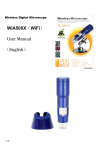
Wireless Digital Microscope
DUS.50.WF500
(WiFi)
User Manual
(English)
1 / 20
Thank you for purchasing our WF500X Wireless Digital Microscope makes up the
limitation of distance; and can be used in a range within 10 to 60 meters. It is a
perfect match with IOS mobile device ( iPad, iPhone,iPod ) and android mobile
device (android tablet PC, android mobile phone). Please read below manual to
get more detail about the microscope and follow the operation instructions.
1. Used in industrial Areas:
a.
Circuit boards, precision machinery, etc.
b.
Print inspection observations, SMT soldering inspection
c.
Check the observation and measurement of textiles
d.
IC surface and circuit components inspection observations and measurements
……
2. Used in cosmetics, skin protection:
a. Observation and measurement of skin examination
b. Check the observation and measurement of hair
c.
Check the viewing and measuring infrared therapy (customized products)
……
3. Used in biology, microbiology field:
a. Microbiological observations and measurements
b. Observation and measurement of animal biopsy
……
4. Used in Other field
a. Expansion monitor, magnifying glass, to help visually impaired people to read
b. Jewelry, diamonds, gold, jade and other valuables inspection observations and measurements, the
quality of goods and to distinguish between true and false
……
2 / 20
WF500X wireless digital microscope digital microscope to make up the distance
limit can range in space 60m in IOS system, tablet and mobile phone ( such as
IPad and IPhone , IPod ), Andriod tablet and mobile phone systems use, very
convenient. For a more detailed description of this product, please read patiently
produced product introduction, use, precautions.
a. In order to ensure the life of the product, please first use of the product is fully charged, the red
indicator light when charging, fully charged, the red indicator light goes out naturally, refer to
the charging time of 3 hours 30 minutes.
b. Please use the power adapter supplied with this product and a dedicated charging cable
charging.
c. When the Products built-in battery is running low, it will now appear like the following:
1. Green light will not blink, and it will not find the WiFi network name, such as no " CoolingTech_WiFi_
No.( For Example : CoolingTech_WiFi_8 ; CoolingTech_WiFi_168 ; CoolingTech_WiFi_9998 ; "
2. Find the WiFi network name, or connected to the network, but after connecting to the network does not
appear
image or a video, or a black screen phenomenon;
If the above is like, please immediately to the product's built-in battery is fully
charged to ensure that does not affect your normal work or study.
3 / 20
Product description catalog
Home ·······························································································1
Foreword
·························································································2-3
Directory
··························································································4
Product advantages
Product Specifications
············································································5
·········································································5-6
Product Structure Components Introduction
·············································7
IOS system products (IPhone, IPad) instructions for use
······························8-14
Android Android system products (tablet, phone) instructions for use
Safety warnings and precautions
4 / 20
············15-18
····························································19
This product and similar products in the world after comparing the
performance advantages:
a. This product does not require a USB cable to connect bulky desktop or laptop, truly portable, with
Android Android system products (tablet, phone) or IOS System Series ( IPhone, IPad,IPod ) as a display
terminal, the implant our research and development of software that can normally observe the measured
object, truly portable.
b. No need fixed WiFi wireless LAN router provides space to use, WF500X you without time and space
constraints, anytime, and truly anywhere want to see can be observed object.
c. The same small area supports multiple simultaneous users independently of each other without
disturbing each other. Supports up to 1,500 people in the same area used, independently of each;
CoolingTech Microscope Have global leader in technology.
d. Products to increase dedicated charging adapter and data cable accessories
e. If the built-in battery is no electricity, you can use the mobile power charging. CoolingTech microscope
is the world's first who use the mobile charging technology companies to supply the microscope
charging
Product Specifications:
Sensor :High-performance light-sensitive chip foreign imports
Master chip:Imports master chip DSP
Magnification : 50X ~ 500X
Photo / video:Applications built
Auxiliary light source :8 white LED lights
Static resolution: 640 * 480, according to their request to do zoom in and out processing ( 720P, 1080P
resolution can be customized OEM )
Imaging Distance: manually adjustable 0 ~ 40mm, other distances can be customized OEM
Video Resolution: 640 * 480, according to their request to do zoom in and out processing
Fixed base: special base
Optical disk: includes application software and detailed instructions
Support System: IOS-based systems and Andriod Tablet PC and mobile phone systems
Power supply: Built-in 1000mA lithium battery self-protection; Support Power adapter 5V 1A power supply;
support for mobile power supply
5 / 20
Applications :Wireless Microscope.apk ( Andriod System )
NetcamViewer ( IOS System )
Dynamic frames : QVGA 30f/s Under 600 LUX Brightness VGA 28 f/s Under 600 LUX Brightness
Illumination range: 0 ~ 30000LUX adjustable wire
Hardware Requirements: IOS system, tablet and mobile phone ( such as IPad and IPhone , IPod ),
Andriod tablet and mobile phone systems;
Cache: 512 MB
Supported languages: English, Chinese (other languages need to customize)
Color: Blue
Body size: 140mm (L) * 36.8mm (R)
Single Weight: 100g
6 / 20
Product Structure Components Introduction
Function Details:
①
5V Micro USB DC power socket, you can add mobile power supply, or the direct use of mobile phone charging
cable Charging
② switches and dimmer knob
③
lights signaled wireless transmission
④
Focus roller
⑤
magnification
⑥
special microscope optics
⑦
auxiliary light shade
⑧
Power indicator light and Lights indicate charging status
7 / 20
IOS system products ( IPhone, IPad,IPod ) Instructions for use:
1.
2.
Turn on the power switch, the light is adjusted to the brightest
LED green indicator light starts to light up after 3 to 5 seconds, LED lights begin to flash, on behalf of the
WiFi signal transmitting normal
3.
for IOS System ( iPad or iPhone,iPod ) for the column, do the following description:
1.
NetcamViewer software download
8 / 20
Note:
9 / 20
This software NetcamViewer software is free software, no deductions.
1.
In the APP store, search bar enter NetcamViewer
2.
After installation, the application surface following icon appears
3. Click NetcamViewer, some parameter settings
10 / 20
4.
11 / 20
Consistent with username password, enter " admin "
All settings are finished, click the top right button
Complete the setup
5. For WIFI signal connection, click Settings
Then select the SSID in the wireless setting is " CoolingTech_WiFi_ No.( For Example :
CoolingTech_WiFi_8 ; CoolingTech_WiFi_168 ; CoolingTech_WiFi_9998 ; "
12 / 20
6.
When the WiFi signal connections are completed, if you do not want to download the AP software
NetcamViewer, directly in Safari, IP address bar direct input 10.10.1.1:8196, you can then browse
images directly to a web page. If you need to enter a user name and password, direct input admin
, WIFI signal is connected, click the application surface
use, as shown below:
13 / 20
,You can normally
PCB board actual shooting and Measurement
14 / 20
Android system products ( Android Tablet PC, Android phones )
Instructions for use:
1.
15 / 20
Keep the CD-ROM Software Wireless Microscope.apk copy directly to the corresponding tablet
or mobile phone, and then install it, as shown:
After installation is complete,
the desktop or in the Android program directory found inside CoolingTech Microscope Icon
Before use, first open the microscope switch, the light at maximum brightness, see the WiFi status light
(green) flashes, marking signal is normal.
Then open the Android wireless settings, locate the file named "CoolingTech_WiFi_ No. (For Example:
CoolingTech_WiFi_8; CoolingTech_WiFi_168; CoolingTech_WiFi_9998;" wireless signal source,
click and Connect, as shown below:
16 / 20
Then find just installed software, and open the run
Now you can start using
17 / 20
Printed card photographed and Measurement
PCB board actual shooting and Measurement
18 / 20
Safety warnings and precautions
1.
Do not disassemble the product without permission , in order to avoid electrostatic breakdown
precision chip.
2.
Do not use alcohol and other organic solvents to clean the product.
3.
Do not touch the lens with your fingers , so as not to cause surface scratches and dirt
4. When outdoor use , avoid high temperature and high humidity environments , electronic devices
shorted. This product is not waterproof , please avoid the rain and water.
5.
The use of the product and the storage temperature and moderate range : -40 °C ~ 60 °C, relative
humidity : 45% RH ~ 85% RH
6.
If a foreign substance or water / liquid into the number inside the product , disconnect the power
immediately and sent to the maintenance center , not themselves.
7.
Equipment for reference measurement accuracy , measurement error caused by the dispute has
nothing to do with the product .
8. Wireless distance within 10 ~ 60 m
9.
The first use of this product, please full charge; When charging, the red light,When the battery
is full enough, red light will not light up, the purpose of this operation is to increase the battery
life of wireless products.
10.
For your safety, please try not to use the product while charging at the same time, try to fully charged
before use.
11. When you are outdoors trip, you can add the product to the mobile power charger
12.
Please do not thunder, rain weather outdoor use this product.
More questions about this product inquiries, please contact your local dealer or CoolingTech brand
distributors worldwide.
19 / 20
The new microscope stand with coarse and fine
focus focusing function
------ New product appeared!-----More research and development of new products
constantly, coming onto the market, so stay tuned!
20 / 20