1
PG4UW software
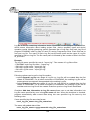
group Programming parameters
This group is available for some types of devices. It contains settings of which device parts or
areas have to be programmed.
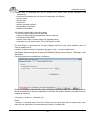
group Erase parameters
This group is available for some types of devices. It contains special settings of erase modes
of selected device.
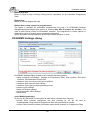
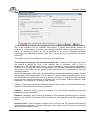
Device / Device options / Serialization
Serialization is special mode of program. When a serialization mode is activated, a specified
value is automatically inserted on predefined address into buffer before programming each
device. When more devices are programmed one by one, the serial number value is changed
for each device automatically and inserted into buffer before programming device, so each
device has unique serial number.
There are three types of serialization:
Incremental mode
From file mode
Custom generator mode
Dialog Serialization contains also settings for associated serialization position files that are
used with project files with serialization turned on. For more detailed information about using
serialization in project files, look at Serialization and projects.
Basic rules of serialization:
serialization is associated with recently selected device only. If a new device is selected,
the serialization settings will be reset (serialization will be set to disabled)
serialization settings for recent device are saved along with other settings of the device to
project file or to configuration file when application is closed
serialization engine calls request for new (next) serial number before each device
programming is started (see Note 1.)
used serial number is indicated by (*) after serial number value. Used serial number
means, the next device programming will use next serial number (see Note 1.)
Note 1.): Calling of new serial number request before programming can be suppressed in
case of previous unsuccessful device programming result by option Serial number usage if
programming action fails:
when Reuse generated serial number for next programmed device option is
selected, request for new (next) serial number is suppressed in case of unsuccessful
previous device operation result. It means, used serial number is used again, and
remains same until successful device programming is completed
when Throw away (use the serial number only once, regardless result of the
programming) is selected, request for new serial number is performed before each
device operation, regardless result of previous programming operation
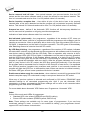
Serialization can work with control program's main buffer or extended buffers available for
some types of devices, for example Microchip PIC16Fxxx devices with Data EEPROM
Memory. The selection which buffer use by serialization routine is available in dialog
81