1
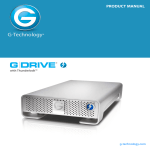
USER MANUAL
High-performance Thunderbolt™ 2 storage system with hardware RAID
g-technology.com
Table of Contents
Welcome G-RAID Studio
Table of Contents
Safety & General Use
Safety Precautions............................................................4
Backup Your Data..............................................................5
About Your G-RAID Studio
Introduction........................................................................7
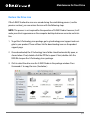
What’s in the Box ..............................................................8
The following items are included in the box:.........8
System Requirements.....................................................8
Overview of the Drive ....................................................9
Activity & Failure LEDs.................................................. 10
Daisy Chaining with Thunderbolt Technology.... 11
Using Your Drive on Mac
Easy Installation for Mac.............................................. 13
Use with Time Machine................................................ 14
Disconnect the Drive ................................................... 16
Maintenance for Your Drive
Initialize Drive for Mac ................................................ 31
Restore the Drive Icon.................................................. 34
Reformat with Partitions............................................. 36
Replace a Failed Drive Module.................................. 40
Helpful Tips...................................................................... 41
Using Your Drive on Windows
Windows Use................................................................... 43
Cross Platform Use......................................................... 44
Support & Warranty
Technical Support.......................................................... 48
Limited Warranty............................................................ 49
Copyright.......................................................................... 51
Using RAID Modes
Supported RAID Modes............................................... 18
G-Technology Assistant Utility.................................. 19
Recommended Installation........................................ 19
G-Technology Assistant Menu................................... 20
The RAID Configuration Utility.................................. 21
Configure the RAID Mode for Mac........................... 22
RAID 1 Degraded Mode and Rebuild for Mac..... 24
RAID Configuration Utility for Windows................ 26
Configure the RAID Mode for Windows................. 26
RAID 1 Rebuild for Windows...................................... 29
p.2
Safety & General Use
Safety Precautions ......................................... p.4
• Backup Your Data ........................................... p.5
•
Safety & General Use
Safety Precautions
Your G-RAID Studio’s warranty may be voided as a result of failing to respect the precautions listed
below. If you detect a problem with your drive, please contact our Technical Support department.
If the product is returned with damage caused by improper handling, the warranty will be void and
liability will rest with the user. Please read our Limited Warranty.
•S
ervicing: Your drive contains no user-serviceable parts. If it appears to be malfunctioning, have it
inspected by a qualified G-Technology Technical Support representative.
• Moisture: Place the device away from moisture or liquids. To reduce the risk of damage, do not
expose this drive to rain or moisture. Do not use it in damp or wet conditions. Never place objects
containing liquids on the drive as they may spill into its openings.
• Ventilation: Place the device in a vented area. The drive should never be placed near or over a
radiator or heat source.
•T
emperature: Do not expose this drive to temperatures outside the range of 5°C to 35°C (41°F
to 95°F). Do not expose this drive to operational humidity beyond 5 percent to 80 percent (noncondensing) or non-operating humidity beyond 10 percent to 90 percent (non-condensing).
Avoid placing your drive near a source of heat, exposing it to sunlight (even through a window), or
setting it in an environment that is too cold or humid.
•P
hysical Damage: Do not place heavy objects on the drive. Never use excessive force on your drive.
p.4
Safety & General Use
Backup Your Data
The disk drive contained in your G-RAID Studio device is a delicate electronic instrument
and is susceptible to damage from excessive physical shock. Under no circumstances will
G-Technology be held liable for the recovery or restoration of lost data. Any loss, corruption,
or destruction of data while using a G-Technology drive is the sole responsibility of the user.
Make Two Backups
To help prevent possible data loss, we highly recommend keeping TWO copies of your data
in separate storage locations. Keep one copy on your G-Technology drive. Keep a second
copy on an internal hard drive, another G-Technology drive, or a form of removable and/or
online storage media. If possible, it is advisable to keep your data in two physically disparate
locations for added safety.
p.5
About Your G-RAID Studio
Introduction ...................................................... p.7
• What’s in the Box ........................................... p.8
• System Requirements ................................... p.8
• Overview of the Drive ................................... p.9
• Activity & Failure LED ..................................p.10
• Daisy Chaining with TB Technology ........p.11
•
About Your G-RAID
Introduction
Thank you for purchasing the G-Technology G-RAID Studio, featuring 20 Gb/s Thunderbolt 2 interface technology.
Since 2011, G-RAID with Thunderbolt has been the go-to storage solution for content
creation professionals needing higher interface speeds and storage capacity. With the
introduction of G-RAID Studio, which comes in a high-quality sleek, black enclosure, content creators worldwide now have a solution where durability, style, and performance
reach new heights.
Thunderbolt 2 technology enables blazing fast, concurrent data streams, capable of data
transfer rates over 1300 MB/s! This opens up incredible time-saving and multi-stream
possibilities for content creation professionals who use bandwidth-intensive 2K and 4K
media formats.
G-RAID Studio incorporates many of the same features of the standard G-RAID with
Thunderbolt, including a thermo-regulated smart fan and soft-touch electronic power
switch. The drive supports the industry’s most demanding professional content creation
applications, including Final Cut Pro®, Adobe Premiere® and Avid™ Media Composer.
p.7
About Your G-RAID
What’s in the Box
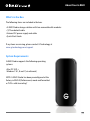
The following items are included in the box:
• G-RAID Studio storage solution with two removable disk modules
• (1) Thunderbolt cable
• External DC power supply and cable
• Quick Start Guide
If any items are missing, please contact G-Technology at
www.g-technology.com/support
System Requirements
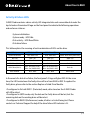
G-RAID Studio supports the following operating
systems:
• Mac OS 10.9 +
• Windows® 8.1, 8 and 7 (via reformat)
NOTE: G-RAID Studio has been preconfigured at the
factory in RAID 0 (Performance) mode and formatted
as “HFS+ with Journaling.”
p.8
About Your G-RAID
Overview of the Drive
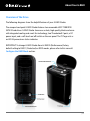
The following diagrams show the helpful features of your G-RAID Studio.
The compact and quiet G-RAID Studio features two removable HGST 7200 RPM
SATA III hard drives. G-RAID Studio showcases a sleek, high-quality, black enclosure
with integrated cooling and smart fan technology, two Thunderbolt 2 ports, a DC
power input, and a soft-touch on/off switch on the rear panel. The “G” logo acts as
an LED-lit power/error status indicator.
IMPORTANT: To change G-RAID Studio from its RAID 0 (Performance) factory
default setting to RAID 1 (Protected) or JBOD modes, please refer to this manual’s
Configure the RAID Mode section.
p.9
About Your G-RAID
Activity & Failure LEDs
G-RAID Studio contains a drive activity LED integrated into each removable disk under the
top lid and an illuminated G logo on the front panel to indicate the following operations
and enclosure statuses:
• System initialization
• System ready – HDD Idle
• Disk activity – HDD Read/Write
• Disk drive failure
This table explains the meaning of each combination of LEDs on the drive:
RAID Status
HDD1 Drive LED
HDD2 Drive LED
G-LOGO
System Initialization
Blue - Blink once
Blue - Blink once
White - blink until system ready
HDD Idle
Blue – On
Blue - On
White - On
HDD Read/Write
Blue - Blink
Blue - Blink
White - On
HDD Failure (Raid 0)
Red – On
Red – On
Red - On
HDD Failure (Raid 1)
Red – On (if HDD1 fails);
Blue – On (if HDD2 fails)
Red – On (if HDD2 fails);
Blue – On (if HDD1 fails)
Red - On
Raid 1 Rebuild
Blue – Blink
Blue – Blink
White - Blink
In the event of a disk drive failure, the front panel’s G logo will glow RED. At the same
time, the LED located near the faulty drive will turn from BLUE to RED. To replace the
faulty drive, please refer to the section Replace a Failed Drive Module.
• If configured in fail-safe RAID 1 (Protected) mode, data stored on the G-RAID Studio
will still be intact.
• If configured in JBOD mode, only the data on the faulty drive will be lost, but the
remaining data on the working drive will be intact.
• If configured in RAID 0 (Performance) mode, all data is at risk of being lost. Please
contact our Technical Support for help if the drive failure LED indicator is lit.
p.10
About Your G-RAID
Daisy Chaining with Thunderbolt Technology
As with first-generation Thunderbolt technology, Thunderbolt 2 supports daisy chaining
up to 6 compatible devices. This provides the ability to achieve bi-directional, dual-channel data transfer. First-generation Thunderbolt supported a maximum speed of 10 Gb/s
through each channel whereas Thunderbolt 2 leaps to 20 Gb/s. However, taking full advantage of Thunderbolt 2 technology requires you to connect with a computer equipped with
at least one enabled Thunderbolt 2 port.
You may attach up to six Thunderbolt devices in the chain including your G-RAID Studio.
With 20 Gb/s performance, your computer can take advantage of Thunderbolt 2’s tremendous throughput potential for your G-Technology storage solutions. The daisy chain can
also include up to two compatible displays along with up to four G-RAID Studios.
Important Note: Starting from your computer all the way downstream in your daisy chain,
if one of the devices is capable of handling only 10 Gb/s maximum allowable speed — i.e.,
if the device is first-generation Thunderbolt-enabled — then from that point on in the
chain, the maximum per-channel downstream speed will be restricted to 10 Gb/s.
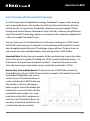
How to daisy chain multiple devices: To daisy chain your G-RAID Studio, connect the
Thunderbolt 2 port of your G-RAID Studio to the host computer’s Thunderbolt 2 port with
the included Thunderbolt cable. You can
connect up to six Thunderbolt devices in
a chain, including the G-RAID Studio, one
after another as shown in the diagram
below using the second Thunderbolt port
of each drive. Connect all drives with their
provided AC power adapters to a surge
protector or wall outlet(s) and power on
each drive. Your Thunderbolt devices are
now daisy chained and available to work
in tandem through the same host.
p.11
Using Your Drive on Mac
Easy Installation for Mac ........................... p.13
• Use with Time Machine ............................... p.14
• Disconnect the Drive .................................. p.16
•
Using Your Drive on Mac
Easy Installation for Mac
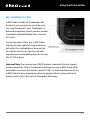
G-RAID Studio includes the Thunderbolt cable
to attach to your computer via one of the enclosure’s two Thunderbolt 2 ports. Thunderbolt 2 is
backward compatible and easily connects to older
Thunderbolt-enabled MacBook, iMac, and select
PC systems.
Connect the power cord to your G-RAID Studio
and plug the other end into a surge protector or
wall outlet. Press and hold down the power button until the unit turns on. The drive will automatically mount on the desktop if you are running
Mac OS 10.9 or above.
Important Note: If you connect your G-RAID Studio to a computer that only supports
previous-generation, 10 Gb/s Thunderbolt technology, then your G-RAID Studio will be
restricted to a maximum data transfer speed of 10 Gb/s. To understand how you can use
G-RAID Studio for daisy chaining more than one peripheral device, please refer to the
previous section Daisy Chaining with Thunderbolt Technology.
p.13
Using Your Drive on Mac
Use with Time Machine
Your G-RAID Studio can be easily used as a backup drive via Time Machine when connected to a Mac. Time Machine is an application that ships with your Mac and provides
automatic file backup. The following steps will quickly set up G-RAID Studio with Time
Machine.
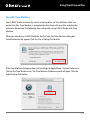
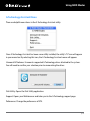
When you attach your G-RAID Studio for the first time, the Time Machine dialog box
should automatically appear. Click the Use as Backup Disk button.
If the Time Machine dialog box does not launch, go to Apple Menu > System Preferences.
Click on the Time Machine icon. The Time Machine Preference panel will open. Click the
Select Backup Disk button.
p.14
Using Your Drive on Mac
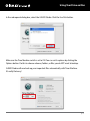
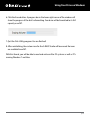
In the subsequent dialog box, select the G-RAID Studio. Click the Use Disk button.
Make sure the Time Machine switch is set to ON. You can set its options by clicking the
Options button. Do this to choose volumes, folders, or files you do NOT want to backup.
G-RAID Studio will now back up your important files automatically with Time Machine.
It’s really that easy!
p.15
Using Your Drive on Mac
Disconnect the Drive
A great feature of G-RAID Studio is the ability to connect and disconnect while your computer is running. To prevent failures and/or data loss, it is important to follow the steps
below when disconnecting or “unmounting” the drive from your computer.
1. Before powering down and disconnecting the drive, unmount the system
by simply dragging the G-RAID Studio icon to the trash located in the dock.
Keyboard shortcut: Select the drive icon and hit Command+E.
2. It is safe to remove the drive from your system when the drive icon is no
longer present on your desktop.
3. To power off G-RAID Studio, press and hold the On/Off power button until the unit
shuts down.
Helpful links
• To use G-RAID Studio on Windows, go to Windows Use.
• To use G-RAID Studio on Mac and Windows together, go to Cross Platform Use.
p.16
Using RAID Modes
Supported RAID Modes ................................... p.18
• G-Technology Assistant Utility ..................... p.19
• G-Technology Assistant Menu ...................... p.20
• G-RAID Studio Configuration Utility .......... p.21
• Configure the RAID Mode for Mac ............. p.22
• RAID 1 Degraded Mode and Rebuild Mac.. p.24
• Configure the RAID Mode for Windows ...... p.26
• RAID 1 Rebuild for Windows ..........................p.29
•
Using RAID Modes
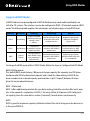
Supported RAID Modes
G-RAID Studio arrives preconfigured in RAID 0 (Performance) mode and formatted for use
with Mac OS systems. The solution can also be configured in RAID 1 (Protected) mode or JBOD
mode. The following table explains the advantages and disadvantages of each RAID level.
RAID Level
Description
Advantage
Disadvantage
Ideal For
RAID 0
Disk Striping
Highest read/write
performance. Storage
capacity is 100%
utilized.
No fault tolerance. Single
drive failure will result in
complete data loss.
Highest storage capacity
utilization and highest
performance.
RAID 1
Disk Mirroring
Complete data
protection in case of a
single drive failure.
Read/write performance is
reduced to half of RAID 0
performance.
Sensitive data which requires
constant backing up. High
performance not required.
JBOD
Disk not
RAIDed
Storage capacity is
100% utilized. Partial
data protection if a
single drive fails.
Read/write performance is
reduced to half of RAID 0
performance.
Highest storage capacity
utilization when partial data
loss is acceptable.
To change the RAID mode of the G-RAID Studio, follow the steps in Configure the RAID Mode.
RAID 0 (Performance)
This default RAID mode features 100 percent storage capacity (for example, two 4TB drives
would provide 8TB of unformatted capacity) and is ideal for video editing. In RAID 0, the
drives combine into a shared capacity pool and data is split (“striped”) between the two
drives for increased performance.
RAID 1 (Protected)
RAID 1 offers additional protection for your data, making it ideal for sensitive files, but it operates at the speed of a single drive. In RAID 1, the array will be at 50 percent of its total physical capacity since the same data is written (“mirrored”) to both drives simultaneously.
JBOD
JBOD is great for maximum capacity utilization without the risk of losing an entire data set, as
in the case of RAID 0.
p.18
Using RAID Modes
G-Technology Assistant Utility
The G-Technology Assistant (GTA) utility was created to enhance the user experience of
G-Technology storage solutions such as G-RAID Studio. The utility has two functions: 1)
to provide notifications of the G-RAID Studio status and the current drive configuration,
and 2) to quickly launch the G-RAID Studio RAID Configuration Utility.
The GTA is available for download from www.g-technology.com/support. Note that the
utility has an auto-update feature for your convenience.
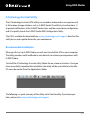
Recommended Installation
When you first set up G-RAID Studio, you will want to install the GTA on your computer.
The utility provides useful notifications and shortcuts to enhance your experience with
G-RAID Studio.
To install the G-Technology Assistant utility, follow the on-screen instructions. Once you
have successfully completed the installation, the utility will be accessible from the Mac
OS menu bar and/or from the Applications folder.
The following is a quick summary of the utility and its functionality. If you have questions, please visit www.g-technology.com/support.
p.19
Using RAID Modes
G-Technology Assistant Menu
There are helpful menu items in the G-Technology Assistant utility.
Once G-Technology Assistant has been successfully installed, the utility’s “G” icon will appear
in your menu bar. By selecting this icon, the G-Technology Assistant menu will appear.
Unmount All Volumes: Unmounts supported G-Technology drives attached to the system.
You will need to confirm your selection prior to unmounting the drives.
Disk Utility: Opens the Disk Utility application.
Support: Opens your Web browser and takes you to the G-Technology support page.
Preferences: Change the preferences of GTA.
p.20
Using RAID Modes
The RAID Configuration Utility
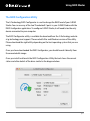
The G-Technology RAID Configurator is used to change the RAID level of your G-RAID
Studio. You can use any of the two Thunderbolt 2 ports in your G-RAID Studio with the
RAID Configurator application. To configure G-RAID Studio, it will need to be the only
device connected to your computer.
The RAID Configurator utility is available for download from the G-Technology website
at g-technology.com/support. There are both Mac and Windows version of the utility.
Please download the right utility depending on the host operating system that you are
using.
Once you have downloaded the RAID Configurator, you should launch it directly from
the mounted disk image.
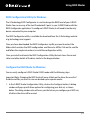
Once you install and launch the RAID Configuration Utility the tool shows the current
status and other details of the drive similar to the diagram below.
p.21
Using RAID Modes
Configure the RAID Mode for Mac
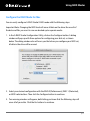
You can easily configure G-RAID Studio’s RAID mode with the following steps.
Important Note: Changing the RAID level will erase all data on the drive. Be sure all of
the data and files you want to save are backed up to separate media.
1. In the G-RAID Studio Configuration Utility, click on the Configure button. A dialog
window will pop up with three options for configuring your disk set, as shown
below. The dialog window also will warn you that when you configure your RAID set,
all data in the drive will be erased.
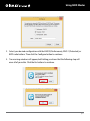
2. Select your desired configuration with the RAID 0 (Performance), RAID 1 (Protected),
or JBOD radio buttons. Then click the Configure button to continue.
3. Two warning windows will appear, both letting you know that the following step will
erase all of your data. Click the Yes buttons to continue.
p.22
Using RAID Modes
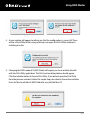
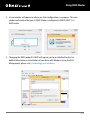
4. A new window will appear to inform you that the configuration is successful. There
will be a Disk Utility button using which you can open the Disk Utility window to
initialize your disk.
5. Changing the RAID mode of G-RAID Studio will require you to re-initialize the disk
with the Disk Utility application. The Disk Insertion dialog below should appear.
Click the Initialize button to launch Disk Utility, if you did not open the Disk Utility
from the previous window. Follow the simple steps described in the section Initialize
Drive for Mac to initialize G-RAID Studio for use with the Mac OS.
p.23
Using RAID Modes
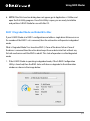
6. NOTE: If the Disk Insertion dialog does not appear, go to Application > Utilities and
open the Disk Utility program. Once Disk Utility is open, you are ready to initialize
and partition G-RAID Studio for use with Mac OS.
RAID 1 Degraded Mode and Rebuild for Mac
If your G-RAID Studio is in RAID 1 configuration and either a single drive failure occurs or
if a member of the RAID 1 set is removed, then the active drive will operate in degraded
mode.
What is Degraded Mode? In a two-drive RAID 1, if one of the drives fails or if one of
the drives is removed then the active drive keeps the user data intact but without any
fail-safe mechanism until the RAID is rebuilt. This state of operation is called degraded
mode.
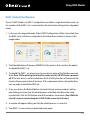
1. If the G-RAID Studio is operating in degraded mode, if the G-RAID Configuration
Utility is launched, then the RAID status will show as degraded in the information
window as shown in the image below.
p.24
Using RAID Modes
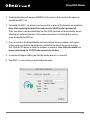
2. The Rebuild button will become ENABLED at this point so that you have the option to
rebuild the RAID 1 set.
3. To rebuild the RAID 1 set, please insert a new drive in place of the failed or removed drive.
Note: While replacing the failed drive make sure the G-RAID Studio is powered off.
If this new drive is not formatted then the Disk Utility function will automatically launch,
allowing you to format the drive. If this replacement drive is formatted then you are
ready to rebuild the RAID set.
4. Once you click on the Rebuild button two back to back warning windows will appear,
letting you know that the rebuild process will delete the data in the newly inserted
disk. Click the YES button in both the windows to continue. Note: While the rebuild is in
process please keep the G-RAID Studio connected to the host.
5. A window will appear telling you that the rebuild process is successful.
6. Your RAID 1 is now running in protected mode again.
p.25
Using RAID Modes
RAID Configuration Utility for Windows
The G-Technology RAID Configurator is used to change the RAID level of your G-RAID
Studio. You can use any of the two Thunderbolt 2 ports in your G-RAID Studio with the
RAID Configurator application. To configure G-RAID Studio, it will need to be the only
device connected to your computer.
The RAID Configurator utility is available for download from the G-Technology website
at g-technology.com/support.
Once you have downloaded the RAID Configurator .zip file you need to extract the
folder which contains the RAID configuration .exe file and a .dll file. Click on the .exe file
and follow the simple instructions to install the configuration utility.
Once you install and launch the RAID Configuration Utility the tool shows the current
status and other details of the drive similar to the diagram below.
Configure the RAID Mode for Windows
You can easily configure G-RAID Studio’s RAID mode with the following steps.
Important Note: Changing the RAID level will erase all data on the drive. Be sure all of
the data and files you want to save are backed up to separate media.
1. In the G-RAID Studio Configuration Utility, click on the Configure button. A dialog
window will pop up with three options for configuring your disk set, as shown
below. The dialog window also will warn you that when you configure your RAID set,
all data in the drive will be erased.
p.26
Using RAID Modes
2. Select your desired configuration with the RAID 0 (Performance), RAID 1 (Protected), or
JBOD radio buttons. Then click the Configure button to continue.
3. Two warning windows will appear, both letting you know that the following step will
erase all of your data. Click the Yes buttons to continue.
p.27
Using RAID Modes
4. A new window will appear to inform you that configuration is in progress. The next
window will confirm that your G-RAID Studio is configured in RAID 0, RAID 1, or
JBOD mode.
5. Changing the RAID mode of G-RAID will require you to re-initialize the disk. For
helpful information on initialization of your drive with Windows using the Disk
Management, please visit g-technology.com/windows.
p.28
Using RAID Modes
RAID 1 Rebuild for Windows
If your G-RAID Studio is in RAID 1 configuration and either a single drive failure occurs or
if a member of the RAID 1 set is removed, then the active drive will operate in degraded
mode.
1. In the case of a degraded mode, if the G-RAID Configuration Utility is launched, then
the RAID status will show as degraded in the information window as shown in the
image below.
2. The Rebuild button will become ENABLED at this point so that you have the option
to rebuild the RAID 1 set.
3. To rebuild the RAID 1 set, please insert a new drive in place of the failed or removed
drive. Note: While replacing the failed drive make sure the G-RAID Studio is powered
off. If this new drive is not formatted then the Disk Utility function will automatically
launch, allowing you to format the drive. If this replacement drive is formatted then
you are ready to rebuild the RAID set.
4. Once you click on the Rebuild button two back to back warning windows will appear, letting you know that the rebuild process will delete the data in the newly
inserted disk. Click the YES button in both the windows to continue. Note: While the
rebuild is in process please keep the G-RAID Studio connected to the host.
5. A window will appear telling you that the rebuild process is successful.
6. Your RAID 1 is now running in protected mode again.
p.29
Maintenance for Your Drive
Initialize Drive for Mac ............................... p.31
• Restore the Drive Icon ............................... p.34
• Reformat with Partitions ............................ p.36
• Replace a Failed Drive Module ................. p.40
•
Maintenance for Your Drive
Initialize Drive for Mac
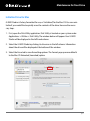
G-RAID Studio is factory-formatted for use, or “initialized,” for the Mac OS. You can reinitialize if you would like to quickly erase the contents of the drive. Here are the necessary steps.
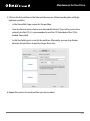
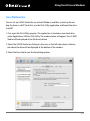
1. First, open the Disk Utility application. Disk Utility is located on your system under
Applications > Utilities > Disk Utility. The window below will appear. Your G-RAID
Studio will be displayed in the left-hand column.
2. Select the G-RAID Studio by clicking its drive icon in the left column. Information
about the drive will be displayed at the bottom of the window.
3. Select the Erase tab to view formatting options. The Format pop-up menu defaults
to the Mac OS Extended (Journaled) option.
p.31
Maintenance for Your Drive
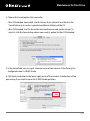
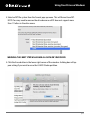
4. Choose the Format option that you prefer.
• Mac OS Extended (Journaled): Use this format if you intend to use the drive for
Time Machine or to create a separate bootable installation of the OS.
• Mac OS Extended: Use this format for best performance and media storage. To
select it, click the Format drop-down menu and its option for Mac OS Extended.
5. In the Name field, you can input a volume name of your choice. At the factory, the
configured name is G-RAID Studio
6. Click the Erase button in the lower-right corner of the window. A dialog box will appear asking if you want to erase the G-RAID Studio partition.
p.32
Maintenance for Your Drive
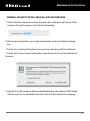
WARNING: THIS NEXT STEP WILL ERASE ALL DATA ON YOUR DRIVE.
7. Click on the Erase button to continue. A progress bar in the lower right corner of the
window will show the progress of the disk’s reformatting.
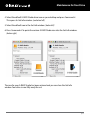
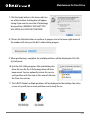
8. After the drive reinitializes, you should automatically see the Time Machine dialog
box.
• Click the Use as Backup Disk button if you want to use the drive with Time Machine.
• Click the Don’t Use or Decide Later buttons if you do not want to use Time Machine at
this point.
9. Quit the Disk Utility program. After reinitializing the drive, the icon for G-RAID Studio
will be erased. You can optionally restore this icon with the steps on the next page.
p.33
Maintenance for Your Drive
Restore the Drive Icon
If the G-RAID Studio drive icon was erased during the reinitializing process (see the
previous section), you can restore the icon with the following steps.
NOTE: This process is not required for the operation of G-RAID Studio. However, it will
make your drive’s appearance on the computer desktop look more accurate and intuitive.
1. To get the G-Technology icon package, go to g-technology.com/support and navigate to your product. There will be a link for downloading icons on the product
support page.
2. Once downloaded, the G-Technology Icons folder should automatically open, as
shown below. If not, double-click the ZIP file to open it. Next, double-click the
DMG file to open the G-Technology Icons package.
3. Click to select the drive icon for G-RAID Studio in the package window. Press
Command+C to copy the icon. (See below.)
p.34
Maintenance for Your Drive
4. Select the default G-RAID Studio drive icon on your desktop and press Command+I.
This opens its Get Info window. (see below left)
5. Select the default icon in the Get Info window. (below left)
6. Press Command+V to paste the custom G-RAID Studio icon into the Get Info window.
(below right)
The icon for your G-RAID Studio has been restored and you can close the Get Info
window. Your drive is now fully ready for use!
p.35
Maintenance for Your Drive
Reformat with Partitions
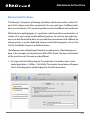
“Partitioning” is the process of dividing a hard drive into discrete sections called “volumes.” Each volume works like a separate disk. You can create up to 16 different partitions on a hard drive in OS X, and each partition can be of a different size and format.
With hard drives getting bigger, it is sometimes useful to partition your hard drive so
sections of its space can be used for different purposes. For instance, you might segment user data from backup data, set up a multi-boot environment with different operating systems, or create a dedicated capture scratch disk for programs such as Final
Cut Pro, Avid Media Composer, or Adobe Premiere.
The following steps will guide you through the simple process of partitioning your
drive. In this example, we will partition an 8TB G-RAID Studio. The steps will be identical for your drive, only the name may be different.
1. First, open the Disk Utility program. This application is located on your system
under Applications > Utilities > Disk Utility. The window shown below will appear.
Your G-Technology drive will be displayed in the left-hand column.
p.36
Maintenance for Your Drive
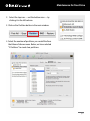
2. Select the top icon — not the bottom icon — by
clicking it in the left column.
3. Click on the Partition button in the main window.
4. Select the number of partitions you would like from
the Volume Scheme menu. Below, we have selected
“2 Partitions” to create two partitions.
p.37
Maintenance for Your Drive
5. Click on the first partition in the Volume Scheme area. A blue bounding box will highlight your partition.
•
In the Name field, type a name for the partition.
•
From the Format menu, choose your desired disk format. If you will use your drive
primarily on Mac OS, it is recommended to use Mac OS Extended or Mac OS Extended (Journaled).
•
In the Size field, type in a size for the partition. Alternately, you can drag the bar
between the partitions to quickly change their sizes.
6. Repeat this process for each partition you have created.
p.38
Maintenance for Your Drive
7. Click the Apply button in the lower-right corner of the window. A dialog box will appear
asking if you want to erase the G-Technology
drive partition. WARNING: THIS NEXT STEP
WILL ERASE ALL DATA ON YOUR DRIVE.
8. Click on the Partition button to continue. A progress bar in the lower-right corner of
the window will show you the disk’s reformatting progress.
9. When partitioning is complete, the multiple partitions will be displayed in Disk Utility’s left panel.
10. Quit the Disk Utility program. After reinitializing the
drive, the icon for the G-Technology drive will have
been erased. You can optionally restore this icon to
each partition with the steps in this manual’s Restore
the Drive Icon section.
11. The G-RAID Studio’s multiple partitions will be displayed on the desktop. Your drive
is now set up with two or more partitions and is ready for use.
p.39
Maintenance for Your Drive
Replace a Failed Drive Module
G-RAID Studio continually monitors the health of its internal disk drive configuration.
In the event of a drive failure, a visual alarm will appear. Read more in Activity and
Failure LEDs.
Follow the steps below to identify and replace a failed drive.
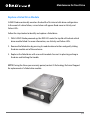
1. With G-RAID Studio powered up, the RED LED under the top lid will indicate which
drive module failed. For more information, see Activity and Failure LEDs.
2. Remove the failed drive by pressing its module release button and gently sliding
the drive module out of the enclosure.
3. Replacve the failed drive with a new disk module. Secure it in place by pushing in
the drive and latching the handle.
NOTE: During the three-year warranty period, contact G-Technology Technical Support
for replacement of a failed drive module.
p.40
Maintenance for Your Drive
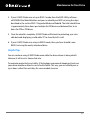
4. If your G-RAID Studio was set up in RAID 1 mode, then the RAID Utility software
will ENABLE the Rebuild button and you can rebuild your RAID set using the steps
described in the section RAID 1 Degraded Mode and Rebuild. The total rebuild time
is approximately three hours per terabyte for 6TB drives and betweed four to six
hours for 3TB or 4TB drives.
5. Once the rebuild is complete, G-RAID Studio will be back to protecting your valuable data and displaying a solid white “G” to show that all is well.
6. If your G-RAID Studio was setup in RAID 0 mode, then you have to build a new
RAID 0 set using the newly introduced drive.
Helpful Tips
You can continue using G-RAID Studio even while the drive volume is being rebuilt.
However, it will run at a slower data rate.
To maximize productivity and safety, G-Technology recommends keeping at least one
spare drive module on hand in case of a disk failure. This way, you can rebuild your array in hours rather than wait days for a new module to arrive.
p.41
Using Your Drive on Windows
Windows Use ................................................. p.43
• Cross Platform Use ...................................... p.44
•
Using Your Drive on Windows
Windows Use
G-RAID Studio is set up at the factory for use with Mac OS systems. A simple initialization
will prepare your drive for use with Windows 7, 8, and 8.1 systems.
For helpful information on configuring and using your drive with Windows, please visit
g-technology.com/windows.
p.43
Using Your Drive on Windows
Cross Platform Use
You can set up G-RAID Studio for use on both Windows and Mac systems by formatting the drive as exFAT. To do this, use the Disk Utility application and format the drive
to exFAT.
1. First, open the Disk Utility program. This application is located on your hard drive
under Applications/Utilities/Disk Utility. The window below will appear. Your G-RAID
Studio will be displayed in the left-hand column.
2. Select the G-RAID Studio by clicking its drive icon in the left-side column. Information about the drive will be displayed at the bottom of the window.
3. Select the Erase tab to view the formatting options.
p.44
Using Your Drive on Windows
4. Select exFAT file system from the Format pop-up menu. This will format to exFAT.
NOTE: You may need to rename the drive because exFAT does not support more
than 11 letters in the drive name.
WARNING: THIS NEXT STEP WILL ERASE ALL DATA ON YOUR DRIVE.
5. Click the Erase button in the lower right corner of the window. A dialog box will appear asking if you want to erase the G-RAID Studio partition.
p.45
Using Your Drive on Windows
6. Click the Erase button. A progress bar in the lower right corner of the window will
show the progress of the disk’s reformatting. Your drive will be formatted to its full
capacity as exFAT.
7. Quit the Disk Utility program. You are finished!
8. After reinitializing, the custom icon for the G-RAID Studio will be erased. No icons
are available for exFAT.
With this format, you will be able to read and write on Mac OS systems as well as PCs
running Windows 7 and later.
p.46
Support & Warranty
Technical Support ........................................ p.48
• Limited Warranty ......................................... p.49
• Copyright ........................................................ p.51
•
Support & Warranty
Technical Support
Thank you for purchasing G-RAID. If you have any comments or questions about this
manual or the product, please let us know!
G-Technology appreciates and values its customers, striving to give you the finest
service and support. If you encounter any difficulties while installing or using G-RAID,
please contact G-Technology Technical Support at g-technology.com/support
Helpful information for support
When contacting Technical Support, it’s best to be in front of your computer and have
the following information available:
• Your G-RAID serial number (on bottom of unit)
• Operating System and version
• Computer brand and model
• List of other devices attached to your computer
p.48
Support & Warranty
Limited Warranty
HGST, a Western Digital Company (“HGST”)
Including G-Technology for External Hard Disk Drives
What does this limited warranty cover?
This Limited Warranty applies to new HGST products purchased from an authorized HGST dealer
by the original purchaser for normal use and not for resale. HGST warrants that a covered product
is free from defects in materials and workmanship, with the exceptions stated below.
How long does limited warranty coverage last?
This limited warranty lasts for 1 year, 2 years, 3 years or 5 years, or a fixed period from date of
purchase, depending on when and where it was originally purchased. To determine the warranty specifically for your product, visit www.g-technology.com. A valid proof of purchase may
be required to prove eligibility. If you do not have a valid proof of purchase, the limited warranty
period will be measured from the date of sale from HGST to the authorized distributor.
What does this limited warranty not cover?
The limited warranty does not cover damage resulting from commercial use, misuse, accident,
modification or alteration to hardware or software, tampering, unsuitable physical or operating
environment beyond product specifications, improper maintenance, or failure caused by a product for which HGST is not responsible.
There is no warranty of uninterrupted or error-free operation. There is no warranty for loss of
data—you must regularly back up the data stored on your product to a separate storage product.
There is no warranty for product with removed or altered identification labels.
HGST DOES NOT PROVIDE ANY OTHER WARRANTIES OF ANY KIND, INCLUDING, BUT NOT LIMITED
TO, THE IMPLIED WARRANTIES OR CONDITIONS OF MERCHANTABILITY AND FITNESS FOR A PARTICULAR PURPOSE. SOME JURISDICTIONS DO NOT ALLOW THE LIMITATION OF IMPLIED WARRANTIES, SO THIS LIMITATION MAY NOT APPLY TO YOU. HGST is not responsible for returning to you
product which is not covered by this limited warranty.
p.49
Support & Warranty
What must you do?
If you are having trouble with a product, before seeking limited warranty service, first follow the
troubleshooting procedures that HGST or your reseller provides.
To obtain limited warranty service, you must first obtain a Return Materials Authorization (RMA) and
ship-to address by contacting G-Technology at http://www.g-technology.com/support. Please follow
the instructions found on the website. You must return the covered hard disk drive using approved
packaging to our logistics center. You must pay any associated transportation charges, duties and insurance in shipping the drive to our logistics center. You should remove all personal information from
the product prior to its return.
What will HGST do?
HGST will replace the drive with a functionally equivalent replacement product, transportation prepaid. HGST may replace your product with a product that was previously used, repaired and tested
to meet HGST specifications. You receive tile to the replaced product at delivery to carrier at HGST
shipping point. You are responsible for importation of the replaced product, if applicable. HGST will
not return the original drive to consumers; therefore, the consumer is responsible for moving data to
another media before returning. Data Recovery is not covered under this warranty and is not part of
the warranty returns process. HGST warrants that the replaced products are covered for the remainder
of the original product warranty or 90 days, whichever is greater.
How is our liability limited?
HGST AND ITS AFFILIATES, SUPPLIERS, DISTRIBUTORS, AND RESELLERS ARE NOT LIABLE FOR ANY OF
THE FOLLOWING: 1) THIRD-PARTY CLAIMS AGAINST YOU FOR DAMAGES (OTHER THAN BODILY INJURY
INCLUDING DEATH AND TANGIBLE PERSONAL PROPERTY; 2) LOSS OF, OR DAMAGE TO, YOUR DATA; OR
3) SPECIAL, INCIDENTAL, OR INDIRECT DAMAGES OR FOR ANY ECONOMIC CONSEQUENTIAL DAMAGES
(INCLUDING LOST PROFITS OR SAVINGS), EVEN IF INFORMED OF THE POSSIBILITY. SOME JURISDICTIONS DO NOT ALLOW LIMITATION OF LIABILITY, INCIDENTAL DAMAGES, OR CONSEQUENTIAL DAMAGES, SO THE ABOVE LIMITATIONS MAY NOT APPLY TO YOU.
How do local laws apply?
THIS LIMITED WARRANTY GIVES YOU SPECIFIC LEGAL RIGHTS, AND YOU MAY ALSO HAVE OTHER
RIGHTS WHICH VARY FROM JURISDICTION TO JURISDICTION.
p.50
Support & Warranty
CAPACITY DEFINITION AND DISCLAIMER
For G-Technology products 1TB or greater: “One gigabyte (GB) is equal to one billion bytes
and one terabyte (TB) equals 1,000 GB (one trillion bytes). Accessible capacity will vary from
the stated capacity due to formatting and partitioning of the hard drive, the computer’s
operating system, and other factors”
For G-Technology products less than 1TB: “One gigabyte (GB) is equal to one billion
bytes when referring to hard drive capacity. Accessible capacity will vary depending on the
operating environment and formatting.”
Copyright
One gigabyte (GB) is equal to one billion bytes when referring to hard drive capacity.
Accessible capacity will vary depending on the operating environment and formatting.
Thunderbolt and the Thunderbolt logo are trademarks of Intel Corporation in the U.S.
and/or other countries.
Design by G-Technology in California. G-RAID and G-Technology are registered trademarks
of HGST, Inc. and its affiliates in the U.S. and other countries. Apple, Mac, Thunderbolt,
MacBook Pro, Time Machine and the Mac logo are trademarks of Apple, Inc. Microsoft,
Windows, Windows Vista and Windows XP are trademarks or registered trademarks of
Microsoft Corporation in the US and/or other countries. Other trademarks are the
property of their respective owners.
©2014 G-Technology, a division of HGST, Inc. All rights reserved. R0 05/14
p.51