1
Getting started
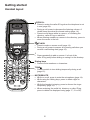
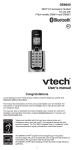
Handset layout
/VOL+
• Press to review the directory when the telephone is not in
use (page 20).
• During a call, press to increase the listening volume. A
double beep sounds at the highest setting (page 14).
• Press to scroll up while in a menu, or reviewing the
directory, caller ID log or redial list.
• When entering numbers or names in the directory, press to
move the cursor to the right.
MENU/SELECT
• Press to show the menu (page 9).
• While in a menu, press to select an item, or save an entry
or setting.
OFF/CANCEL
CANCEL
• During a call, press to hang up (page 14).
• While the handset is ringing, press to silence the ringer
temporarily (page 15).
• While the telephone is not in use, press and hold to erase
the missed call indicator (page 23).
• While in a menu, press to return to the previous menu.
• While in a menu, press and hold to return to idle mode.
• While predialing, press to delete digits (page 14).
#
• Press repeatedly to show other dialing options when
reviewing a caller ID log entry (page 24).
REDIAL/PAUSE
• Press repeatedly to review the redial list (page 17).
• While dialing or entering numbers into the directory,
press and hold to insert a dialing pause (pages 14 and 19).