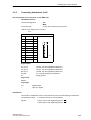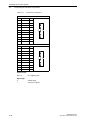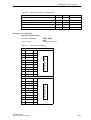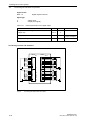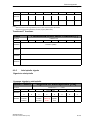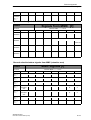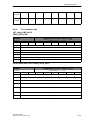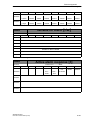
1
Start-Up 01/2002 Edition SINUMERIK 802C Numerical Control System SINUMERIK 802C 1 Installing the Control System 2 Start–Up Valid for Control SINUMERIK 802C Installing the Drives 3 Start–Up 4 Update 5 Technical Appendix 6 Manual Machine 7 Software Version 3 Index 01.2002 Edition 3ls SINUMERIK Documentation Printing history Brief details of this edition and previous editions are listed below. IThe status of each edition is shown by the code in the ”Remarks” column. Status code in the “Remarks” column: A . . . . . New documentation. B . . . . . Unrevised reprint with new Order No. C . . . . . Revised edition with new status. If actual changes have been made on the page since the last edition, this is indicated by a new edition coding in the header on the page. Edition 04.00 01.02 Order–No. 6FC5597-3AA20-0BP2 6FC5597-3AA20-0BP2 Remark A C This Manual is included on the documentation on CD–ROM (DOCONCD) Edition Order–No. Remark 11.02 6FC5298-6CA00-0AG3 C Trademarks SIMATICr, SIMATIC HMIr, SIMATIC NETr, SIROTECr, SINUMERIKr and SIMODRIVEr are registered trademarks of Siemens. Third parties using for their own purposes any other names in this document which refer to trademarks might infringe upon the rights of trademark owners. Other functions not described in this documentation might be executable in the control. This does not, however, represent an obligation to supply such functions with a new control or when servicing. This publication was produced with Interleaf V 7 The reproduction, transmission or use of this document or its contents is not permitted without express written authority. Offenders will be liable for demages. All rights, including rights created by patent grant or registration of utility model or design, are reserved. We have checked that the contents of this document correspond to the hardware and software described. Nonetheless, differences might exist and therefore we cannot guarantee that they are completely identical. The information contained in this document is, however, reviewed regularly and any necessary changes will be included in the next edition. We welcome suggestions for improvement. Subject to change without prior notice. Siemens AG 2002. All rights reserved. Bestell-Nr. 6FC5597-3AA20-0BP2 Printed in the Federal Republic of Germany Siemens–Aktiengesellschaft Safety notices This Manual contains notices intended to ensure your personal safety and to avoid material damage. The notices are highlighted by a warning triangle and, depending on the degree of hazard, represented as shown below: ! ! ! Danger indicates that loss of life, severe personal injury or substantial material damage will result if the appropriate precautions are not taken. Warning indicates that loss of life, severe personal injury or substantial material damage may result if the appropriate precautions are not taken. Caution indicates that minor personal injury or material damage may result if the appropriate precautions are not taken. Caution without a warning triangle means that a material damage can occur if the appropriate precautions are not taken. Attention means that an undesirede event or status can occur if the appropriate note is not observed. Note is used to draw your special attention to an important information on the product, the handling of the product or the corresponding part of the documentation. Qualified personnel Start–up and operation of a device may only be carried out by qualified personnel. Qualified personnel as referred to in the safety notices provided in this Manual are persons who are authorized to start up, ground and tag devices, systems and circuits according to the relevant safety standards. Usage as per intended purpose Please observe the following: ! Warning The device may only be used for the cases of application, as intended by the Catalog, and only in conjunction with third–party devices and components recommended or approved by Siemens. The proper and safe operation of the product requires transport, storage and installation according to the relevant instructions and qualified operation and maintenance at the prescribed intervals. SINUMERIK 802C 6FC5 597–3AA20–0BP2 (01.02) v Table of Contents Table of Contents 1 SINUMERIK 802C Control System . . . . . . . . . . . . . . . . . . . . . . . . . . . . . . . . . . . . . . . . . . . . . . 1-9 1.1 Components of the SINUMERIK 802C . . . . . . . . . . . . . . . . . . . . . . . . . . . . . . . . . . . . . . . . . . . 1-9 1.2 Technical data . . . . . . . . . . . . . . . . . . . . . . . . . . . . . . . . . . . . . . . . . . . . . . . . . . . . . . . . . . . . . . . . 1-12 Installing the Control System . . . . . . . . . . . . . . . . . . . . . . . . . . . . . . . . . . . . . . . . . . . . . . . . . . 2-15 2.1 Installing and removing the SINUMERIK 802C . . . . . . . . . . . . . . . . . . . . . . . . . . . . . . . . . . . . 2-15 2.2 Interfaces and cables . . . . . . . . . . . . . . . . . . . . . . . . . . . . . . . . . . . . . . . . . . . . . . . . . . . . . . . . . . 2-18 2.3 2.3.1 2.3.2 2.3.3 2.3.4 2.3.5 2.3.6 2.3.7 Connecting the individual components . . . . . . . . . . . . . . . . . . . . . . . . . . . . . . . . . . . . . . . . . . . Connecting the operator panel . . . . . . . . . . . . . . . . . . . . . . . . . . . . . . . . . . . . . . . . . . . . . . . . . . Connecting the feed drives and the spindle (X7) . . . . . . . . . . . . . . . . . . . . . . . . . . . . . . . . . . . Connecting the measuring systems (X3 ... X6) . . . . . . . . . . . . . . . . . . . . . . . . . . . . . . . . . . . . Configuration of the RS232 interface connection (X8) . . . . . . . . . . . . . . . . . . . . . . . . . . . . . . Connecting handwheels (X10) . . . . . . . . . . . . . . . . . . . . . . . . . . . . . . . . . . . . . . . . . . . . . . . . . . Connecting NCREADY (X20) . . . . . . . . . . . . . . . . . . . . . . . . . . . . . . . . . . . . . . . . . . . . . . . . . . . Connecting the digital inputs and outputs (X2003 ... X2006) . . . . . . . . . . . . . . . . . . . . . . . . . 2-21 2-21 2-23 2-26 2-27 2-29 2-30 2-31 2.4 ENC and operator panel power supply (X1) . . . . . . . . . . . . . . . . . . . . . . . . . . . . . . . . . . . . . . . 2-35 2.5 Grounding . . . . . . . . . . . . . . . . . . . . . . . . . . . . . . . . . . . . . . . . . . . . . . . . . . . . . . . . . . . . . . . . . . . 2-36 2.6 LEDs and operating elements on the ENC . . . . . . . . . . . . . . . . . . . . . . . . . . . . . . . . . . . . . . . . 2-38 3 Installing the Drives . . . . . . . . . . . . . . . . . . . . . . . . . . . . . . . . . . . . . . . . . . . . . . . . . . . . . . . . . . 3-39 4 Start-Up . . . . . . . . . . . . . . . . . . . . . . . . . . . . . . . . . . . . . . . . . . . . . . . . . . . . . . . . . . . . . . . . . . . . . . 4-41 4.1 4.1.1 4.1.2 4.1.3 4.1.4 General . . . . . . . . . . . . . . . . . . . . . . . . . . . . . . . . . . . . . . . . . . . . . . . . . . . . . . . . . . . . . . . . . . . . . . Access levels . . . . . . . . . . . . . . . . . . . . . . . . . . . . . . . . . . . . . . . . . . . . . . . . . . . . . . . . . . . . . . . . . Structure of machine data (MD) and setting data (SD) . . . . . . . . . . . . . . . . . . . . . . . . . . . . . . Handling machine data . . . . . . . . . . . . . . . . . . . . . . . . . . . . . . . . . . . . . . . . . . . . . . . . . . . . . . . . Data saving . . . . . . . . . . . . . . . . . . . . . . . . . . . . . . . . . . . . . . . . . . . . . . . . . . . . . . . . . . . . . . . . . . 4-41 4-42 4-43 4-44 4-44 4.2 4.2.1 Turning on and booting the control system . . . . . . . . . . . . . . . . . . . . . . . . . . . . . . . . . . . . . . . . Boot messages . . . . . . . . . . . . . . . . . . . . . . . . . . . . . . . . . . . . . . . . . . . . . . . . . . . . . . . . . . . . . . . 4-46 4-48 4.3 4.3.1 4.3.2 4.3.3 4.3.4 4.3.5 4.3.6 4.3.7 4.3.8 4.3.9 4.3.10 Starting up the PLC . . . . . . . . . . . . . . . . . . . . . . . . . . . . . . . . . . . . . . . . . . . . . . . . . . . . . . . . . . . Commissioning of the PLC . . . . . . . . . . . . . . . . . . . . . . . . . . . . . . . . . . . . . . . . . . . . . . . . . . . . . Start–up modes of the PLC . . . . . . . . . . . . . . . . . . . . . . . . . . . . . . . . . . . . . . . . . . . . . . . . . . . . . PLC alarms . . . . . . . . . . . . . . . . . . . . . . . . . . . . . . . . . . . . . . . . . . . . . . . . . . . . . . . . . . . . . . . . . . Machine control panel (MCP) layout . . . . . . . . . . . . . . . . . . . . . . . . . . . . . . . . . . . . . . . . . . . . . PLC programming . . . . . . . . . . . . . . . . . . . . . . . . . . . . . . . . . . . . . . . . . . . . . . . . . . . . . . . . . . . . . Instruction set . . . . . . . . . . . . . . . . . . . . . . . . . . . . . . . . . . . . . . . . . . . . . . . . . . . . . . . . . . . . . . . . Programm organization . . . . . . . . . . . . . . . . . . . . . . . . . . . . . . . . . . . . . . . . . . . . . . . . . . . . . . . . Data organization . . . . . . . . . . . . . . . . . . . . . . . . . . . . . . . . . . . . . . . . . . . . . . . . . . . . . . . . . . . . . Interface to the control system . . . . . . . . . . . . . . . . . . . . . . . . . . . . . . . . . . . . . . . . . . . . . . . . . . Testing and monitoring the user program . . . . . . . . . . . . . . . . . . . . . . . . . . . . . . . . . . . . . . . . . 4-49 4-49 4-51 4-52 4-56 4-57 4-61 4-68 4-69 4-69 4-69 4.4 PLC applications “Download/Upload/Copy/Compare” . . . . . . . . . . . . . . . . . . . . . . . . . . . . . . . 4-70 4.5 User Interface . . . . . . . . . . . . . . . . . . . . . . . . . . . . . . . . . . . . . . . . . . . . . . . . . . . . . . . . . . . . . . . . 4-72 4.6 Technology Setting . . . . . . . . . . . . . . . . . . . . . . . . . . . . . . . . . . . . . . . . . . . . . . . . . . . . . . . . . . . . 4-72 4.7 4.7.1 4.7.2 4.7.3 4.7.4 4.7.5 Commissioning . . . . . . . . . . . . . . . . . . . . . . . . . . . . . . . . . . . . . . . . . . . . . . . . . . . . . . . . . . . . . . . Entering the general machine data . . . . . . . . . . . . . . . . . . . . . . . . . . . . . . . . . . . . . . . . . . . . . . Starting up the axes . . . . . . . . . . . . . . . . . . . . . . . . . . . . . . . . . . . . . . . . . . . . . . . . . . . . . . . . . . . Starting up the spindle . . . . . . . . . . . . . . . . . . . . . . . . . . . . . . . . . . . . . . . . . . . . . . . . . . . . . . . . . Completing the Start–Up . . . . . . . . . . . . . . . . . . . . . . . . . . . . . . . . . . . . . . . . . . . . . . . . . . . . . . . Cycle start–up . . . . . . . . . . . . . . . . . . . . . . . . . . . . . . . . . . . . . . . . . . . . . . . . . . . . . . . . . . . . . . . . 4-73 4-73 4-75 4-85 4-87 4-88 4.8 Series machine start-up . . . . . . . . . . . . . . . . . . . . . . . . . . . . . . . . . . . . . . . . . . . . . . . . . . . . . . . . 4-89 2 vi SINUMERIK 802C 6FC5 597–3AA20–0BP2 (01.02) Table of Contents 5 6 7 Software Update . . . . . . . . . . . . . . . . . . . . . . . . . . . . . . . . . . . . . . . . . . . . . . . . . . . . . . . . . . . . . . 5-91 5.1 Updating the system software using a PC/PG . . . . . . . . . . . . . . . . . . . . . . . . . . . . . . . . . . . . . 5-91 5.2 Updating the system software incl. user data without using a PC/PG . . . . . . . . . . . . . . . . . . 5-92 5.3 Update errors . . . . . . . . . . . . . . . . . . . . . . . . . . . . . . . . . . . . . . . . . . . . . . . . . . . . . . . . . . . . . . . . . 5-93 Technical Appendix . . . . . . . . . . . . . . . . . . . . . . . . . . . . . . . . . . . . . . . . . . . . . . . . . . . . . . . . . . . 6-94 6.1 6.1.1 6.1.2 6.1.3 6.1.4 6.1.5 List of machine and setting data . . . . . . . . . . . . . . . . . . . . . . . . . . . . . . . . . . . . . . . . . . . . . . . . . 6-94 Display machine data . . . . . . . . . . . . . . . . . . . . . . . . . . . . . . . . . . . . . . . . . . . . . . . . . . . . . . . . . . 6-94 General machine data . . . . . . . . . . . . . . . . . . . . . . . . . . . . . . . . . . . . . . . . . . . . . . . . . . . . . . . . . 6-96 Channel-specific machine data . . . . . . . . . . . . . . . . . . . . . . . . . . . . . . . . . . . . . . . . . . . . . . . . . . 6-96 Axis-specific machine data . . . . . . . . . . . . . . . . . . . . . . . . . . . . . . . . . . . . . . . . . . . . . . . . . . . . . 6-97 Setting data . . . . . . . . . . . . . . . . . . . . . . . . . . . . . . . . . . . . . . . . . . . . . . . . . . . . . . . . . . . . . . . . . . 6-103 6.2 6.2.1 6.2.2 6.2.3 6.2.4 6.2.5 6.2.6 6.2.7 6.2.8 6.2.9 PLC user interface signals . . . . . . . . . . . . . . . . . . . . . . . . . . . . . . . . . . . . . . . . . . . . . . . . . . . . . . Address ranges . . . . . . . . . . . . . . . . . . . . . . . . . . . . . . . . . . . . . . . . . . . . . . . . . . . . . . . . . . . . . . . Retentive data area . . . . . . . . . . . . . . . . . . . . . . . . . . . . . . . . . . . . . . . . . . . . . . . . . . . . . . . . . . . NCK signals . . . . . . . . . . . . . . . . . . . . . . . . . . . . . . . . . . . . . . . . . . . . . . . . . . . . . . . . . . . . . . . . . . Channel signals . . . . . . . . . . . . . . . . . . . . . . . . . . . . . . . . . . . . . . . . . . . . . . . . . . . . . . . . . . . . . . Axis/spindle signals . . . . . . . . . . . . . . . . . . . . . . . . . . . . . . . . . . . . . . . . . . . . . . . . . . . . . . . . . . . Signals from/to MMC . . . . . . . . . . . . . . . . . . . . . . . . . . . . . . . . . . . . . . . . . . . . . . . . . . . . . . . . . . Machine control panel signals (MCP signals) . . . . . . . . . . . . . . . . . . . . . . . . . . . . . . . . . . . . . . PLC machine data . . . . . . . . . . . . . . . . . . . . . . . . . . . . . . . . . . . . . . . . . . . . . . . . . . . . . . . . . . . . User alarm . . . . . . . . . . . . . . . . . . . . . . . . . . . . . . . . . . . . . . . . . . . . . . . . . . . . . . . . . . . . . . . . . . . 6.3 Application note: unipolar spindle control . . . . . . . . . . . . . . . . . . . . . . . . . . . . . . . . . . . . . . . . . 6-123 6-105 6-105 6-106 6-107 6-108 6-113 6-116 6-118 6-119 6-120 Manual Machine . . . . . . . . . . . . . . . . . . . . . . . . . . . . . . . . . . . . . . . . . . . . . . . . . . . . . . . . . . . . . . 7-125 7.1 Hardware and software requirements for the installation . . . . . . . . . . . . . . . . . . . . . . . . . . . . 7-125 7.2 Loading the software . . . . . . . . . . . . . . . . . . . . . . . . . . . . . . . . . . . . . . . . . . . . . . . . . . . . . . . . . . 7-126 7.3 Switching the user interface . . . . . . . . . . . . . . . . . . . . . . . . . . . . . . . . . . . . . . . . . . . . . . . . . . . . 7-128 7.4 Switching the language . . . . . . . . . . . . . . . . . . . . . . . . . . . . . . . . . . . . . . . . . . . . . . . . . . . . . . . . 7-128 7.5 Additional machine data . . . . . . . . . . . . . . . . . . . . . . . . . . . . . . . . . . . . . . . . . . . . . . . . . . . . . . . . 7-129 7.6 Input limitations with regard to the user interface . . . . . . . . . . . . . . . . . . . . . . . . . . . . . . . . . . . 7-129 7.7 Operation without machine control panel (MCP) . . . . . . . . . . . . . . . . . . . . . . . . . . . . . . . . . . . 7-130 7.8 7.8.1 7.8.2 I/O assignment in the standard PLC program . . . . . . . . . . . . . . . . . . . . . . . . . . . . . . . . . . . . . . 7-130 Assignment of the digital inputs: . . . . . . . . . . . . . . . . . . . . . . . . . . . . . . . . . . . . . . . . . . . . . . . . . 7-130 Assignment of the digital outputs: . . . . . . . . . . . . . . . . . . . . . . . . . . . . . . . . . . . . . . . . . . . . . . . . 7-132 7.9 Default assignment of special data for the “Manual machine” . . . . . . . . . . . . . . . . . . . . . . . . 7-133 SINUMERIK 802C 6FC5 597–3AA20–0BP2 (01.02) vii Table of Contents notice viii SINUMERIK 802C 6FC5 597–3AA20–0BP2 (01.02) SINUMERIK 802C Control System 1.1 1 Components of the SINUMERIK 802C What is SINUMERIK? The SINUMERIK 802C is a microprocessor–controlled numerical control system for simple machine tools with stepper motor drives . Hardware components It consists of the following hardware components: S ENC: Control component for a maximum of 3 analog axes and an analog interface for a main spindle drive (ENC = Economical Numerical Control) S OP020: NC operator panel with graphics display and keyboard S MCP: machine control panel S DI/O16: 16 binary inputs/outputs each extendable to max. 64 by using 4 modules SINUMERIK 802C 6FC5 597–3AA20–0BP2 (01.02) 1-9 SINUMERIK 802C Control System 1.1 Components of the SINUMERIK 802C OP020 MCP INC JOG AUTO SBL REF MDA M N G X E 7 F O 4 S Q 1 M H > < Y Z 8 9 5 6 L A 3 = A U BV F 2 0 $ T K _ P Pg +Z Pg % INS ENCODER1 ENCODER2 X3 X4 ERR POK DIAG -Z -X R CW % +X VM D + X10 MPG X2003 D15 8 9 10 11 12 13 14 15 M DC24V X1 ENC RS232ENCODER3 SPINDLE AXIS OPI X2 X5 X6 X7 X8 DI X20 X2004 OUT L+ 0 1 2 3 4 5 6 7 M L+ 8 9 10 11 12 13 14 15 M 0 1 2 3 4 5 6 7 M S3 PE M L+ M X2005 IN S2 X2006 DI/O External analog drive Fig. 1-1 SINUMERIK 802C hardware components (example configuration) Software components The SINUMERIK 802C comprises the following software components, which can be ordered: S System software on the permanent flash memory of the ENC – Boot software, loads the remaining system software from the permanent memory into the user memory (DRAM) and starts the system. – MMC software (Man Machine Communication), implements all operating functions – NCK software (NC Kernel) implements all NC functions. This software controls an NC channel with a maximum of 3 movement axes and a spindle. – PLC software (Programmable Logic Control), executes the integrated PLC user program cyclically. – Integrated PLC user program intended to adjust the SINUMERIK 802C to the machine functions (see also Description of Functions “Integrated User Program for SINUMERIK 802C”). 1-10 SINUMERIK 802C 6FC5 597–3AA20–0BP2 (01.02) SINUMERIK 802C Control System 1.1 S Components of the SINUMERIK 802C Toolbox – WinPCIN transfer program for a PC/PG (programming device) to transfer user data and programs – Text manager – Cycle kit for loading into the control system using WinPCIN – User program library – Technological machine data files – Programming tool S Update diskettes – Update program with operator prompting system – 802C system software, packed, for loading and programming the SINUMERIK 802C via an update program. User data User data are: S Machine data S Setting data S Tool data S R parameters S Zero offsets S Compensation data S Part programs S Standard cycles Data saving Modified user data are saved for at least 50 h after power off or power failure. After then, they might get lost. ! Warning To avoid data loss, the operator must carry out data saving (see Section 4.1.4). SINUMERIK 802C 6FC5 597–3AA20–0BP2 (01.02) 1-11 SINUMERIK 802C Control System 1.2 1.2 Technical data Technical data Connected load Table 1-1 Connected load Min. Parameter Supply voltage Typ. 20.4 Ripple Max. Unit 28.8 V 3.6 Vss Current consumption from 24 V 1 A Power dissipation of ENC 15 W Power dissipation of OP020 7 W Power dissipation of MCP - Power dissipation of DI/O16 7 Start–up current * W 2.6 Basic configuration of ENC, OP020, MCP and DI/O16, all outputs open, current consumption for any * ** A further DI/O16 connected will increase by 0.05 A each. ** at nominal load Weight Table 1-2 Weight Weight [g] Component ENC component 900 g DI/O16 component 350 g OP020 component 1,800 g MCP component 1,200 g Dimensions Table 1-3 Component dimensions Component 1-12 Dimensions HxWxD [mm] ENC component 125 x 200 x 118 DI/O component 125 x 80 x 118 OP020 component 300 x 250 x 50 MCP component 300 x 170 x 50 SINUMERIK 802C 6FC5 597–3AA20–0BP2 (01.02) SINUMERIK 802C Control System 1.2 Technical data Environmental operating conditions Table 1-4 Environmental operating conditions Parameter Temperature range 0...55 °C Permissible relative humidity 5...95 % without condensation Air pressure 700...1,060 hPa The operating conditions comply with IEC 1131-2. Installation in a housing (e.g. cubicle) is absolutely necessary for operation. Transport and storage conditions Table 1-5 Transport and storage conditions Parameter Temperature range Transport: -40...70 °C Storage: –20 ... 55 °C Permissible relative air humidity 5...95 % without condensation Air pressure 700...1,060 hPa Transport height -1,000...3,000 m Free fall in transport package v 1,200 mm Protective quality and degree of protection Class of protection I to IEC 536. No PE terminal required. Foreign matter and water protection to IEC 529. S for ENC and DI/O16: IP 20 S for OP020 and MCP: IP 54 front IP 00 rear SINUMERIK 802C 6FC5 597–3AA20–0BP2 (01.02) 1-13 SINUMERIK 802C Control System 1.2 1-14 Technical data SINUMERIK 802C 6FC5 597–3AA20–0BP2 (01.02) Installing the Control System 2.1 ! 2 Installing and removing the SINUMERIK 802C Warning Before performing any installation work, always first make sure that the system is disconnected from the mains! The modules contain electrostatically sensitive devices. It must be ensured that persons without ESD protection never touch printed circuit boards or components when handling operator and machine control panels. Approach Prior to installation, the machine control panel can be provided with a spindle override switch and an emergency stop button. If these are not required, the openings must be covered with the supplied self–adhesive covers. 1. Mount the spindle override switch. 2. Install the operator panel and the machine control panel. 3. Connect the panel using ribbon cable. 4. Install the DIN rail. 5. Connect the ENC and DI/O components. Note If you want to connect several DI/O16 components, it may be necessary to remove the right– hand connector from the housing. 6. Slide the components onto the DIN rail, tilt it down and screw it tight. Removing the control system The control components are removed as described above in the reverse order. SINUMERIK 802C 6FC5 597–3AA20–0BP2 (01.02) 2-15 Installing the Control System 2.1 ! 2-16 Installing and removing the SINUMERIK 802C Warning Before removing the control components, always first make sure that the system is disconnected from the mains! SINUMERIK 802C 6FC5 597–3AA20–0BP2 (01.02) Installing the Control System 2.1 Installing and removing the SINUMERIK 802C Mounting dimensions The dimensions shown below are important for installing the control components: 170 142 8 250 142 300 Ñ Ñ Ñ Ñ Ñ Ñ A F 8 234 154 SubD 45 8 80 Mounting Holes 4,8 40 ENCODER1 X3 ENCODER2 X4 X10 MPG X2003 120 X2005 OUT IN ERR L+ 0 1 0 POK 1 2 DIAG 2 3 3 4 4 5 6 5 6 7 57,2 7 M M L+ 8 8 9 9 10 DC24V X1 20 10 11 11 12 13 L+ M L+ M 12 13 14 14 15 M RS232 X2 ENCODER3 X5 200 SPINDLE X6 AXIS X7 OPI X8 DI X20 X2004 125 32,5 482 15 M X2006 80 15 40 Fig. 2-1 Mounting dimensions for SINUMERIK 802C SINUMERIK 802C 6FC5 597–3AA20–0BP2 (01.02) 2-17 Installing the Control System 2.2 2.2 Interfaces and cables Interfaces and cables Position of the interfaces and front panel elements ECU DI/O16 ENCODER1 ENCODER2 X3 X4 X10 MPG X2003 ERR POK DIAG OUT L+ 0 1 2 3 4 5 6 7 M L+ 8 9 10 11 12 13 14 15 M 0 1 2 3 4 5 6 7 M S2 S3 D15 8 9 10 11 12 13 14 15 M DC24V X1 PE M L+ M Fig. 2-2 X2005 IN RS232 ENCODER3 X2 X5 SPINDLE X6 AXIS X7 OPI X8 DI X20 X2004 X2006 User interfaces MCP OP020 Rear Rear CFL X1202 X1201 X1001 X1002 X1009 Fig. 2-3 2-18 LCD- signal connector Rear of machine control panel and operator panel SINUMERIK 802C 6FC5 597–3AA20–0BP2 (01.02) Installing the Control System 2.2 Interfaces and cables Interfaces ENC S X1 power supply terminals (DC24V) 4–pin screw–type terminal block for connecting the 24 V load power supply S X2 RS232 interface (V24) 9–pin sub–D plug connector S X3 to X5 measuring system interfaces (ENCODER) three 15–pin sub–D plug connectors for connecting incremental position encoders (RS422) S X6 spindle interface (SPINDLE) 9–pin sub–D socket for connecting a spindle drive with analog interface S X7 drive interface (AXIS) 50–pin sub–D socket connector for connecting the power sections for a maximum of four analog drives including spindle S X8 operator terminal interface (OPI) 25–pin D–Sub female connector for connecting the operator terminal S X10 handwheel interface (MPG) 10–pin front connector for connecting the handwheels S X20 digital inputs (DI) 10–pin front connector for connecting the NC READY relay DI/O S X2003 and X2004 10–pin front connector for connecting digital inputs S X2005 and X2006 10–pin front connector for connecting digital outputs LEDs 3 LEDs for fault and status displays Operating elements Start–up switch S SINUMERIK 802C 6FC5 597–3AA20–0BP2 (01.02) 2-19 Installing the Control System 2.2 Interfaces and cables Connecting cables The components are wired up as shown in the Connection Diagram 2-4. For the cables required, please refer to the diagram below. L+ M X1 DC24V Wire (1.0...2.5) ECU flat or round cable 1) X1201 1) X1202 X1001 X1002 AXIS X1009 X8 X2 OPI X7 RS232 Machine Control Panel RS232 Op. Panel ANALOG DRIVE ANALOG MOTOR X10 DI DI/O16 IN 0..7 IN 8..15 Hand Wheels NC READY X2003 X2004 MPG X20 ENCODER SPINDLE MOTOR ENCODER X3–X5 SPINDLE ENCODER X6 SPINDLE DRIVE Sensor IN M Wire (0.14...1.5) 1...16 X2005 X2006 L+ OUT0..7 OUT8..15 OUT Wire (0.14...1.5) M Actor 1...16 M P24 M P24 Power Supply Fig. 2-4 SINUMERIK 802C connection diagram 1) Ribbon cable (included in scope of supply) 2-20 SINUMERIK 802C 6FC5 597–3AA20–0BP2 (01.02) Installing the Control System 2.3 2.3 Connecting the individual components Connecting the individual components Connecting the components Note Use only shielded cable and make sure that the shield is connected to the metal or metal plated connector casing on the control side. For the purpose of isolating the analog setpoint signal from low–frequency interference, we recommend not to ground the shield on the drive side. The preassembled cable offered as accessories provides optimum protection against interference. General procedure: Proceed as follows to connect the individual components: 1. Connect the cables to the components as shown in Fig. 2-4. 2. Fix the sub–D connector in place using the knurled screws. 2.3.1 Connecting the operator panel Connector pin assignment on the ENC side Operator panel interface Connector designation: Connector type: SINUMERIK 802C 6FC5 597–3AA20–0BP2 (01.02) X8 OP020 25–pin sub–D plug connector 2-21 Installing the Control System 2.3 Connecting the individual components Table 2-1 Pin assignment of connector X8 X8 Pin Signal Type Pin 1 Signal Type 14 P24_OP VO 2 M_OP VO 15 OPD0_N O 3 OPD0 O 16 OPD1_N O 4 OPD1 O 17 OPD2_N O 5 OPD2 O 18 OPD3_N O 6 OPD3 O 19 OPCP1_N O 7 OPCP1 O 20 OPCP2_N O 8 OPCP2 O 21 OPS_N O 9 OPS O 22 ENRXD_N I 10 ENRXD I 23 ENTXD_N O 11 ENTXD O 24 ENRTS_N O 12 ENRTS O 25 P24_OP VO 13 M_OP VO 25 13 14 1 Connector pin assignment on the OP side Operator panel interface Connector designation: X1009 OP020 25–pin sub–D plug connector Connector type: Table 2-2 Pin assignment of connector X1009 X1009 Pin Signal Type Pin 1 Signal Type 14 P24_OP VI 2 M_OP VI 15 OPD0_N I 3 OPD0 I 16 OPD1_N I 4 OPD1 I 17 OPD2_N I 5 OPD2 I 18 OPD3_N I 6 OPD3 I 19 OPCP1_N I 7 OPCP1 I 20 OPCP2_N I 8 OPCP2 I 21 OPS_N I 9 OPS I 22 OPTXD_N O 10 OPTXD O 23 OPRXD_N I 11 OPRXD I 24 OPCTS_N I 12 OPCTS I 25 P24_OP VI 13 M_OP VI 14 2-22 13 25 1 SINUMERIK 802C 6FC5 597–3AA20–0BP2 (01.02) Installing the Control System 2.3 Connecting the individual components Signal names OPD[0...3] OPCP1 OPS OPCP2 OPRXD OPTXD OPCTS ENRXD ENTXD ENRTS P24_OP M_OP LCD Data 0...3 LCD Latch LCD Frame LCD Clock OP Receive Data OP Transmit Data OP Clear to Send ECU Receive Data ECU Transmit Data ECU Request to Send DC24V Ground Signal level RS422 / LVDS Signal type VO VI O I 2.3.2 Voltage output Voltage input Output Input Connecting the feed drives and the spindle (X7) Connector pin assignment on the ENC side Feed drive interface Connector designation: Connector type: Table 2-3 X7 AXIS 1-4 50–pin sub–D plug connector Pin assignment of connector X7 X7 Pin 1 2 3 4 5 6 7 8 9 10 SINUMERIK 802C 6FC5 597–3AA20–0BP2 (01.02) Signal SW1 BS2 SW3 BS4 Type VO VO VO VO Pin 18 19 20 21 22 23 24 25 26 27 Signal Type Pin 34 35 36 37 38 Signal BS1 SW2 BS3 SW4 Type VO VO VO VO 39 40 41 42 43 2-23 Installing the Control System 2.3 Connecting the individual components 11 12 13 14 15 16 17 RF1.1 RF2.1 RF3.1 RF4.1 K K K K 28 29 30 31 32 33 44 45 46 47 48 49 50 RF1.2 RF2.2 RF3.2 RF4.2 K K K K Signal names SWn BSn RFn.1, RFn.2 Setpoint Reference potential for setpoint Servo enable contact Signal level RS422 Signal type O Signal output Axis assignment 1 2 3 4 2-24 X axis Y axis Z axis Spindle SINUMERIK 802C 6FC5 597–3AA20–0BP2 (01.02) Installing the Control System 2.3 Table 2-4 Cable assignment (for type 6FX2 002–3AD01) Cable NC Side PIN 34 18 1 50 33 Connecting the individual components 17 Drive Side Core Color Signal Name 1st axis PIN 14 black 1.9 47 brown 1.65 34 red 1.4 1 orange 1.56 15 yellow 48 green 2.65 2 blue 2.14 35 purple 2.56 16 gray 49 pink 3.65 36 white/black 3.14 3 white/brown 3.56 17 white/red 50 white/orange 4.65 4 white/yellow 4.14 37 white/green 4.56 2nd axis 2.9 3rd axis 3.9 Spindle 4.9 Drives with analog interface Signals One voltage and one enable signal each is output. S SWn (SETPOINT) Analog voltage signal in the range "10 V to output a speed setpoint S Sn (REFERENCE SIGNAL) Reference potential (analog ground) for the setpoint signal, internally connected to logic ground. S RFn (SERVO ENABLE) Relay contact pair controlling the enable of the power section, e.g. of a SIMODRIVE drive unit controlled via a PLC program. Signal parameters The setpoint is output as an analog differential signal. Table 2-5 Electrical parameters of the signal outputs for step–switching drives Parameter Min Max Unit Voltage range -10.5 10.5 V Output current -3 3 mA SINUMERIK 802C 6FC5 597–3AA20–0BP2 (01.02) 2-25 Installing the Control System 2.3 Connecting the individual components Relay contact Table 2-6 Electrical parameters of the relay contacts RFn.1 and RFn.2 Parameter Max. Unit Switching voltage 50 V Switching current 1 A Switching power 30 VA Cable length: max. 35 m 2.3.3 Connecting the measuring systems (X3 ... X6) Pin assignment of the connector on the ENC side Measuring system interface (incremental encoder) Connector designation: X3 ... X6 ENCODER 15–pin sub–D plug connector Connector type: Table 2-7 Pin assignment of the female connector X3 ... X6 X3 ... X6 Pin Signal Type Pin Signal Type 1 9 M VO 2 10 N I 3 11 N_N I VO 12 B_N I VO 13 B I 4 P5_MS 5 6 P5_MS VO 14 A_N I 7 M VO 15 A I 8 15 9 1 8 Signal names A, A_N B, B_N N, N_N P5_MS M Track A (true and negated) Track B (true and negated) Zero mark (true and negated) +5.2 V supply Supply ground Signal level RS422 Signal type VO I 2-26 Voltage output (supply) 5V input (5V signal) SINUMERIK 802C 6FC5 597–3AA20–0BP2 (01.02) Installing the Control System 2.3 Connecting the individual components Connectable encoder types Incremental 5 V encoders can be connected directly. Characteristics The encoders must meet the following requirements: Transmission method: Differential transmission with 5 V square–wave signalsOutput signals: Track A as true and negated signal (Ua1, Ua1) Track B as true and negated signal (Ua2, Ua2) Zero signal N as true and negated signal (Ua0, Ua0) Max. output frequency: 1.5 MHz Phase offset between tracks A and B: 90° "30° Current consumption: max. 300 mA Cable lengths The maximum cable length depends on the specifications of the encoder power supply and on the transmission frequency. To provide fault–free operation, make sure that the following values are not exceeded when using preassembled interconnecting cables from SIEMENS: Table 2-8 Maximum cable lengths depending on the encoder power supply Supply Voltage Tolerance Current Consumption 5 V DC 4.75 V...5.25 V < 300 mA 25 m 5 V DC 4.75 V...5.25 V < 220 mA 35 m Table 2-9 Maximum cable lengths depending on the transmission frequency Frequency Encoder Type incremental 2.3.4 Max. Cable Length Max. Cable Length 1 MHz 10 m 500 kHz 35 m Configuration of the RS232 interface connection (X8) Pin assignment of the connector on the ENC side RS232 interface Connector designation: Connector type: SINUMERIK 802C 6FC5 597–3AA20–0BP2 (01.02) X2 RS232 9–pin sub–D plug connector 2-27 Installing the Control System 2.3 Connecting the individual components Table 2-10 Pin assignment of connector X2 X8 Pin Name Type Pin 1 Name Type 6 DSR I 2 RxD I 7 RTS O 6 3 TxD O 8 CTS I 9 4 DTR O 9 5 M VO Signal description: RxD TxD RTS CTS DTR DSR M 1 5 Receive data Send data Request to send Send enable Standby output Standby input Ground Signal level RS232 (+ 12 V) Signal type I O VO Input Output Voltage output Cable for WinPCIN Table 2-11 Cable for WinPCIN: Pin assignment of the Sub–D connector 9–Pin Name 25–Pin 1 Shield 1 2 RxD 2 3 TxD 3 4 DTR 6 5 M 7 6 DSR 20 7 RTS 5 8 CTS 4 9 2-28 SINUMERIK 802C 6FC5 597–3AA20–0BP2 (01.02) Installing the Control System 2.3 2.3.5 Connecting the individual components Connecting handwheels (X10) Pin assignment of the connector on the ENC side Handwheel interface Connector designation: X10 MPG 10–pin mini-Combicon plug connector Connector type: Table 2-12 Pin assignment of connector X10 X10 Pin Name Type 1 A1 I 2 A1_N I 3 B1 I 4 B1_N I 5 P5_MS VO 6 M5_MS VO 7 A2 I 8 A2_N I 9 B2 I 10 B2_N I 1 10 Signal names A1, A1_N B1, B1_N A2, A2_N B2, B2_N P5_MS M Track A, true and negated (handwheel 1) Track B, true and negated (handwheel 1) Track A, true and negated (handwheel 2) Track B, true and negated (handwheel 2) 5.2 V supply voltage for handwheels Supply ground Signal level RS422 Signal type VO I Voltage output Input (5 V signal) Handwheels Two electronic handwheels can be connected which must meet the following requirements: Transmission method: 5 V square–wave (TTL level or RS422) Signals: Track A as true and negated signal (Ua1, Ua1) Track B as true and negated signal (Ua2, Ua2) SINUMERIK 802C 6FC5 597–3AA20–0BP2 (01.02) 2-29 Installing the Control System 2.3 2.3.6 Connecting the individual components Max. output frequency: 500 kHz Phase offset between tracks A and B: 90° "30° Supply: 5 V, max. 250 mA Connecting NCREADY (X20) Pin assignment of the connector on the ENC side BERO input interface Connector designation: X20 DI 10–pin plug connector Connector type: Table 2-13Pin assignment of connector X20 X20 Pin Name Type 11 NCRDY_1 K 12 NCRDY_2 K 13 reserved DI 14 reserved DI 15 reserved DI 16 reserved DI 17 reserved DI 18 reserved DI 19 reserved VI 20 reserved VI 11 20 Signal names NCRDY_1...2 NC Ready (NCREADY contacts 1...2) Signal type K Switching contact NC-READY output Readiness in the form of a relay contact (NO); must be integrated into the EMERGENCY STOP circuit. 2-30 SINUMERIK 802C 6FC5 597–3AA20–0BP2 (01.02) Installing the Control System 2.3 Table 2-14 Connecting the individual components Electrical parameters of the NCREADY relay contact Max. Unit DC switching voltage 50 V Switching current 1 A Switching power 30 VA Parameter L+ EMERGENCY STOP X20.11 NCREADY X20.12 Machine control voltage Fig. 2-5 The NCREADY contact will switch off the control voltage in case of danger. 2.3.7 Connecting the digital inputs and outputs (X2003 ... X2006) Connector pin assignment Interface for the digital inputs Connector designation: Connector type: SINUMERIK 802C 6FC5 597–3AA20–0BP2 (01.02) X2003, X2004 IN 10–pin plug connector 2-31 Installing the Control System 2.3 Connecting the individual components Table 2-15 Connector pin assignment X2003 Pin Name Type 2 DI0 I 3 DI1 I 4 DI2 I 5 DI3 I 6 DI4 I 7 DI5 I 8 DI6 I 9 DI7 I 10 M24 V 1 X2004 Pin Name Type 2 DI8 I 3 DI9 I 4 DI10 I 5 DI11 I 6 DI12 I 7 DI13 I 8 DI14 I 9 DI15 I 10 M24 V 1 Signal names DI0...15 24 V digital inputs Signal type V I 2-32 Voltage input Input (24 V signal) SINUMERIK 802C 6FC5 597–3AA20–0BP2 (01.02) Installing the Control System 2.3 Table 2-16 Connecting the individual components Electrical parameters of the digital inputs Value Unit “1” signal, voltage range 15...30 V “1” signal, current consumption 2...15 mA “0” signal, voltage range -3...5 V Signal delay 0 ³ 1 0.5...3 ms Signal delay 1 ³ 0 0.5...3 ms Parameter Note or input open Connector pin assignment Interface for digital outputs Connector designation: Connector type: Table 2-17 X2005, X2006 OUT 10–pin plug connector Connector pin assignment X2005 Pin Name Type 1 1P24 V 2 DO0 O 3 DO1 O 4 DO2 O 5 DO3 O 6 DO4 O 7 DO5 O 8 DO6 O 9 DO7 O 10 1M24 V X2006 Pin Name Type 1 2P24 V 2 DO8 O 3 DO9 O 4 DO10 O 5 DO11 O 6 DO12 O 7 DO13 O 8 DO14 O 9 DO15 O 10 2M24 V SINUMERIK 802C 6FC5 597–3AA20–0BP2 (01.02) 2-33 Installing the Control System 2.3 Connecting the individual components Signal names DO0...15 Digital outputs 24V/0.5A Signal type V O Voltage input Output (24 V signal) Table 2-18 Electrical parameters of the digital outputs Parameter “1” signal, nominal voltage Voltage drop “1” signal, output current “0” signal, leakage current Value Unit 24 V max. 3 V 0.5 A max. 2 mA Note Simultaneity factor 0.5 per 16 outputs Connecting sensors and actuators X2003 X2005 IN 0 1 2 3 4 5 6 7 M 8 9 10 11 12 13 14 15 M X2004 Fig. 2-6 2-34 OUT L+ 0 1 2 3 4 5 6 7 M L+ 8 9 10 11 12 13 14 15 M X2006 Connecting the digital inputs and outputs SINUMERIK 802C 6FC5 597–3AA20–0BP2 (01.02) Installing the Control System 2.4 2.4 ENC and operator panel power supply (X1) ENC and operator panel power supply (X1) Screw–type terminal block The 24 V DC load power supply unit required for supplying ENC and operator terminal is connected to screw–type terminal block X1. Characteristics of the load power supply The 24 V DC voltage must be generated as a functional extra–low voltage with safe electrical isolation (to IEC 204-1, Section 6.4, PELV). Table 2-19 Electrical parameters of the load power supply Min. Max. Units 20.4 28.8 V Ripple 3.6 Vss Non–periodic overvoltage 35 V Rated current consumption 1 A 2.6 A Parameter Voltage range mean value Starting current Conditions 500 ms cont. 50 s recovery Pin connector assignment on the ENC side Table 2-20 Pin connector assignment of screw–type terminal block X1 Terminal 1 PE PE 2 M Ground 3 L+ DC 24 V 4 M Ground The contacts 2/4 are connected internally in the device. Operator panel The operator panel does not possess a separate power supply connection. It is powered from the ENC via the signal cables. SINUMERIK 802C 6FC5 597–3AA20–0BP2 (01.02) 2-35 Installing the Control System 2.5 2.5 Grounding Grounding Ground connections The following ground connections must be implemented: S Busbar for ENC, DI/O S OP020 operator panel S Machine control panel (MCP) The ground connections for the MCP/OP020 must take into account installation in the machine or a panel. In the case of cubicle installation, the grounding points must be connected to the grounding bar (see Fig. 2-7). OP020 MCP CFL Installation in a cubicle or machine LCD signalconnector Shielded signal cable ENC ENCODER1 X3 DI/O16 ENCODER2 X4 X10 MPG X2003 X2005 OUT IN ERR L+ 0 1 0 POK 1 2 DIAG 2 3 3 4 5 4 5 6 6 7 7 M M L+ 8 8 9 9 10 DC24V X1 10 11 11 12 13 L+ M L+ M 12 13 14 14 15 M RS232 X2 ENCODER3 X5 SPINDLE X6 AXIS X7 OPI X8 DI X20 X2004 15 M X2006 to chassis Grounding bar Fig. 2-7 2-36 Grounding diagram for MCP/OP020 installation in a cubicle or machine SINUMERIK 802C 6FC5 597–3AA20–0BP2 (01.02) Installing the Control System 2.5 Grounding Panel installation requires that the ground connections on the MCP and OP020 are connected together and to the panel frame. The panel frame is grounded centrally (see Fig. 2-8 ). OP020 Installation in a separate unit CFL MCP LCD signalconnector Shielded signal cable ECU ENCODER1 X3 DI/O16 ENCODER2 X4 X10 MPG X2003 X2005 OUT IN ERR L+ 0 1 0 POK 1 2 DIAG 2 3 3 4 5 4 5 6 6 7 7 M M L+ 8 8 9 9 10 DC24V X1 10 11 11 12 13 L+ M L+ M 12 13 14 14 15 M RS232 X2 ENCODER3 X5 SPINDLE X6 AXIS X7 OPI X8 DI X20 X2004 15 M X2006 to chassis Grounding bar Fig. 2-8 Grounding diagram for MCP/OP020 installation in a panel SINUMERIK 802C 6FC5 597–3AA20–0BP2 (01.02) 2-37 Installing the Control System 2.6 LEDs and operating elements on the ENC 2.6 LEDs and operating elements on the ENC Error and status LEDs There are three LEDs on the front panel of the ENC. ENC DI/O16 ENCODER1 ENCODER2 X3 X4 X10 MPG X2003 POK DIAG S3 D15 8 9 10 11 12 13 14 15 M DC24V X1 PE M L+ M RS232 ENCODER3 X2 X5 SPINDLE X6 AXIS X7 OPI X8 DI X20 X2004 OUT L+ 0 1 2 3 4 5 6 7 M L+ 8 9 10 11 12 13 14 15 M 0 1 2 3 4 5 6 7 M S2 Fig. 2-9 X2005 IN ERR X2006 User interfaces ERR (red) Group error This LED indicates an error condition of the ENC. POK (green) Power OK The power supply is ready. DIAG (yellow) Diagnostics This LED indicates various diagnosis states. Under normal operating conditions, this LED flashes 1:1. Start–up switch (S3) This rotary switch is intended to assist start–up. Position 0: Positions 1-4: Normal operation Start–up cf. also Section 4.2, Table 4-2 2-38 SINUMERIK 802C 6FC5 597–3AA20–0BP2 (01.02) Installing the Drives 3 Lesehinweis Manufacturer documentation of the drives SINUMERIK 802C 6FC5 597–3AA20–0BP2 (01.02) 3-39 Installing the Drives 3-40 SINUMERIK 802C 6FC5 597–3AA20–0BP2 (01.02) 4 Start-Up 4.1 General Start-up requirements S The following is required: – User’s Guide: “Operation and Programming, SINUMERIK 802C” – PC/PG (programming device) only for data saving and series start-up – Toolbox on CD. The CD is either supplied with the control system or can be ordered separately. Contents: see also p. 1–11 S The mechanical and electrical installation of the equipment must be completed. Note Installation notes are to be found in Chapter LEERER MERKER. S The control system with its components has powered up without errors. Start-up sequence The SINUMERIK 802C can be strated up as follows: 1. Check whether the ENC has powered up. 2. PLC start–up 3. Technology setting 4. Set general machine data. 5. Set axis/machine-specific machine data. – Match encoder with spindle – Match setpoint with spindle 6. Dry run for axes and spindle(s) 7. Drive optimization 8. Complete start–up, data saving SINUMERIK 802C 6FC5 597–3AA20–0BP2 (01.02) 4-41 Start-Up 4.1 4.1.1 General Access levels Protection levels The SINUMERIK 802C provides a protection level concept for enabling data areas. The protection levels range from 0 to 7 whereby 0 is the highest and 7 the lowest level. The control system comes with default passwords for protection levels 2 and 3. If necessary these passwords can be changed by the appropriate authorized person. Table 4-1 Protection level concept Protection Level Disabled via Data Area 0 Siemens, reserved 1 Siemens, reserved 2 Password: EVENING (default) Machine manufacturer 3 Password: CUSTOMER (default) Authorized operator, setter 4 No password or user IS from PLC NCK Authorized operator, setter 5 User IS from PLC NCK 6 User IS from PLC NCK 7 User IS from PLC NCK Protection levels 2 ... 3 The protection levels 2 and 3 require a password. The passwords can be changed after activation. For example, if the passwords are no longer known, the control system must be reinitialized (booting in Start-Up Switch position 1). This will reset all passwords to the default settings for this software version. If the password is deleted, protection level 4 is applicable. The password remains set until it is reset using the Delete password softkey; POWER ON will not reset the password. Protection levels 4 ... 7 Protection level 4 is automatically set when no password is entered. If required, the protection levels 4 ... 7 can be set from the user program via the user interface. See Section 6.1.1 “Display Machine Data”. Note How to set the access levels is described in the User’s Guide “Operation and Programming”. 4-42 SINUMERIK 802C 6FC5 597–3AA20–0BP2 (01.02) Start-Up 4.1 4.1.2 General Structure of machine data (MD) and setting data (SD) Number and name Machine data (MD) and setting data (SD) are differed either by numbers or names. Both the number and the name are displayed on the screen. Parameters: S Activation S Protection level S Unit S Standard value S Range of values Activation The activation levels are listed according to their priority. Any data changes come into effect after: S POWER ON (po) switching on/off the SINUMERIK 802S S NEW_CONF (cf) – Activate MD softkey on the operator panel – RESET key on machine control panel (MCP) – Modifications at the block limits are possible while the program is running. S RESET (re) RESET key on the machine control panel (MCP) or M2/m30 at the end of the program S IMMEDIATELY (im) after entering a value Protection level To display machine data, protection level 4 (or higher) must be activated. Start-up or machine data input generally requires protection level 2 or higher (password ”EVENING”). Unit Depending on the MD SCALING_SYSTEM_IS_METRIC, the physical units of the MD are set as follows: MD10240 = 1 MD10240 = 0 mm in mm/min in/min m/s2 in/s2 m/s3 in/s3 mm/rev in/rev If no physical units are applicable to the MD, the field contains a ”-”. SINUMERIK 802C 6FC5 597–3AA20–0BP2 (01.02) 4-43 Start-Up 4.1 General Note The default setting of the machine data is MD10240 SCALING_SYSTEM IS METRIC = 1 (metric). With the INCH scaling system MD10240=0, MD203=4 (display unit after the decimal). Default data This is the default value for the machine or setting data. Range of values (minimum and maximum values) ... specifies the input limits. If no range of values is specified, then the input limits are defined by the data type, and the field is marked with ”∗∗∗”. 4.1.3 Handling machine data Handling methods S Display S Input via keys and V24 interface S Making backup copies and reading in/reading out data via the V24 interface These back–up copies contain – machine data – line check sums and – machine data numbers. Aborting when loading MD If incorrect machine data files are read into the control system, an alarm is output. At the end of reading, an alarm with the number of errors is displayed. 4.1.4 Data saving Saving data internally The data in the memory backed up for a limited period can be saved internally in the permanent memory of the control system. An internal data backup should be carried out if the control system has been switched off for more than 50 hours (at least 10 min/day with controller ON). It is recommended to carry out internal data saving whenever important data changes have been made. 4-44 SINUMERIK 802C 6FC5 597–3AA20–0BP2 (01.02) Start-Up 4.1 General Note During the internal data backup, a memory copy of the memory backed up for a limited time is made and stored in the permanent memory. Selective data backup (e.g. only the machine data and not the part programs) is not possible. Saving data internally: Use the ETC key to extend the menu in the Diagnosis/Start-up menu and press the Save data softkey. Loading data from an internal data backup: Boot the control system using the start-up switch, position 3 If the data in the backed-up memory area are lost, on POWER ON the data saved in the permanent memory area are automatically reloaded into the memory. Note The note ”4062 Data backup copy has been loaded“ appears. Saving data externally In addition to the internal data backup, the user data of the control system can and must also be saved internally. External data saving requires a PC/PG (programming device) with V24 interface and the WinPCIN tool (included in the tool box). External data saving should be performed whenever substantial changes in the data have been made, as well as always at the end of start-up. External data backup variants: 1. The data record is read out completely, creating the series start–up file. This is intended for series start–up or to restore the control system status after replacing hardware components or after data loss. 2. Files are read in or read out by areas. The following user data can be selected as individual files: Data – Machine data – Setting data – Tool data – R parameters – Zero offset – Compensation data (LEC) Part programs Standard cycles SINUMERIK 802C 6FC5 597–3AA20–0BP2 (01.02) 4-45 Start-Up 4.2 Turning on and booting the control system Saving data externally: Use the Services/Data outp. menu to transfer the following user data as individual files to an external PC via the V24 interface. Loading data from an external data backup into the control system: Press the Start data inp. softkey in the Services menu. 4.2 Turning on and booting the control system Approach S Inspect the system visually for: – proper mechanical installation with tight electrical connections – supply voltages – connections for shielding and grounding. S Turn on the control system. Note Providing memory and start-up switch S1 are set correctly (see Fig.2-9), the control system boots. Start-up switch S1 (hardware) The ENC is provided with a start-up switch to assist start-up of the control system. This switch can be actuated using a screw driver. Table 4-2 Start-up switch settings Meaning Position 0 Normal power–up 1 Power–up with default machine data (user data determined by the software version) 2 System software update 3 Power–up with saved data 4 PLC stop 5 Reserve 6 Assigned 7 Assigned The switch position comes into effect with next power–up and is displayed on the screen when the control system powers up. 4-46 SINUMERIK 802C 6FC5 597–3AA20–0BP2 (01.02) Start-Up 4.2 Turning on and booting the control system Start-up switch(software) In addition to the hardware start-up switch, the following functions can also be carried out in the Diagnosis/Start-up/Start-up switch menu: S Normal power–up S Power–up with default machine data S Power–up with saved data (Start-up switch position 0) (Start-up switch position 1) (Start-up switch position 3) These power–up functions have a higher priority than the hardware start–up switch. Booting the control system When the control system is turned on for the first time, an initial state of the control system is established automatically. All memory areas are initialized and are loaded with previously stored default data. The PLC area of retentive bit memories is explicitly erased. The control system changes to the JOG/Ref.point approach mode and the yellow LED DIAG flashes (see Fig. 2-9). This initial state is the precondition for error-free start-up of the control system. When the control system is already turned on, start-up is also possible in the Diagnosis menu (see User Manual). Normal booting (Start–up switch position 0) Result User data exist, no boot error Control system changes to JOG/Ref.point approach mode, yellow LED DIAG (see Fig. 4-1) flashes. Data in user memory faulty Backed-up user data are loaded from the permanent memory into the user memory (as in start-up switch position 3). If no valid user data are in the permanent memory, the default data are loaded (as in start-up switch position 1). Any deviations from normal booting are displayed on the screen. Booting with default machine data(Start-up switch position 1) Result The user memory area not loaded with default data is erased, and the default machine data are loaded from the permanent memory into the user memory. Booting with saved data (Start-up switch position 3) Result The user data backed-up on the permanent memory are loaded into the user memory. Contrast control See User’s Guide “Operation and Programming” SINUMERIK 802C 6FC5 597–3AA20–0BP2 (01.02) 4-47 Start-Up 4.2 Turning on and booting the control system 4.2.1 Boot messages Displays on the screen When the control system is booting, test patterns or boot information are displayed on the screen as progress displays. After the control system has booted without errors, it changes to the JOG/Ref.point approach mode, and the yellow DIAG LED (see Fig. 4-1) flashes. Boot errors Boot errors are displayed either on the screen or via the LED (see Fig. 4-1 in the following). The ERR flashes, and the DIAG LED does not flash. ERR POK DIAG Fig. 4-1 LED Table 4-3 Boot errors Error Message Remedial Action ERROR EXCEPTION 1. Check the connections of the plugged or connected modules (PLC D/IO modules). ERROR DRAM 2. Switch off the control system and back on again (POWER ON). ERROR BOOT 4. Replace the hardware components. 3. Carry out a software update. 5. Inform the hotline if necessary. ERROR NO BOOT2 ERROR NO SYSTEM ERROR LOAD NC NO SYSTEM-LOADER ERROR LOAD NC CHECKSUM-ERROR ERROR LOAD NC DECOMPRESS-ERROR ERROR LOAD NC INTERNAL-ERROR 1 4-48 SINUMERIK 802C 6FC5 597–3AA20–0BP2 (01.02) Start-Up 4.3 4.3 Starting up the PLC Starting up the PLC General The PLC is a store–programmable logic controller for simple machines. It has no hardware of its own and is used as a software PLC in the SINUMERIK 802C control system. The task of the PLC is to control machine–related functional sequences. The PLC executes the user program cyclically. A PLC cycle is always executed in the same sequence of order. S Update process image (inputs, outputs, user interface, timers) S Process communication requests (Operator Panel, PLC 802 Programming Tool) S Execute user program S Evaluate alarms S Output process image (outputs, user interface) The PLC executes the user program cyclically, starting from the first up to the final operation. Access from user program is only carried out via the process image and not directly to the hardware inputs or outputs. The hardware inputs and outputs are updated by the PLC at the beginning and at the end of program execution. The signals are thus stable over a PLC cycle. The user program can be created by means of the PLC 802 Programming Tool using the programming language S7–200 in conjunction with ladder diagrams (LAD). A ladder diagram is a graphical programming language to represent electrical circuit diagrams. This Documentation describes the program structure and the instruction set of the PLC in detail. 4.3.1 Commissioning of the PLC The SINUMERIK 802C comes to the user with a simulation program included. The SAMPLE user program is stored in the permanent memory. This sample program and the documentation are included in the SINUMERIK 802SC Toolbox component “PLC802SC Library”. The simulation program is intended for the first function test of the control system after assembling the control. Internal simulation program The simulation program is integral part of the 802C system software. The simulation program allows operation of the control system without digital input and output modules. The user program processes all firmly defined keys and the default setting of the axis keyboard (default). Axes and spindle are switched to simulation mode. No real axis movement is carried out. The Axis/Spindle Disable user signal is set for each axis. For this reason, the movements of the axes and of the spindle are simulated virtually. The user can use this program to test the interrelation of the components Operator Panel / Machine Control Panel / ENC. SINUMERIK 802C 6FC5 597–3AA20–0BP2 (01.02) 4-49 Start-Up 4.3 Starting up the PLC Approach S Set MD20700 to zero. S Use the Diagnosis/StartUp switch/PLC softkey to select Simulation. You can check the current setting via Diagnosis/Service display/Version/PLC application. S Select the desired key and check your setting by pressing the key. Supported keys S Mode selection S Axis keys S NC keys Note S The Increment key is only active in the JOG mode. The toggle function can be used to set increments in the range between 1 and 1,000. Check the response by pressing the axis direction keys. S Reference Point is not supported. Standard user program The control system comes with the SAMPLE user program for simple turning machines, which is stored in the permanent memory. 4-50 SINUMERIK 802C 6FC5 597–3AA20–0BP2 (01.02) Start-Up 4.3 4.3.2 Starting up the PLC Start–up modes of the PLC The PLC can activate its start–up modes from two places. Table 4-4 Start–up modes Start–Up Switch Operator Panel Start Up Menu PLC Program Selection Program Status Retentive Data (Backed– Up) MD for the PLC in the User Interface NCK start–up * Normal power–up Normal power–up User program Run Unchanged Accept active PLC MD Power–up with default values User program Run Deleted Standard PLC MD Power–up with saved data User program Run Saved data Saved PLC MD Unchanged Stop Unchanged Accept active PLC MD Restart User program Run Unchanged Accept active PLC MD Restart User program Stop Unchanged Accept active PLC MD Restart with simulation Simulation program Run Unchanged Accept active PLC MD Overall reset User program Run Deleted Accept active PLC MD Overall reset and debug mode User program Stop Deleted Accept active PLC MD Position 0 Power–up with default values Position 1 Power–up with saved data Position 3 PLC Stop after POWER ON Position 4 PLC start up ** and debug mode * Diagnosis/Start up / Start up switch / NCK softkey ** Diagnosis/Start up / Start up switch / PLC softkey The start–up switch PLC Stop can be activated either during operation or power–up. The debug mode (see “Operation and Programming”, Chapter 7) causes the PLC to remain in PLC Stop after the control system has powered up. All power–up modes that have been set either via softkeys or via hardware start–up switches will only come into effect after the next power–up of the control system. The hardware start–up switch “PLC STOP” (position 4) is active immediately. The priority of the power–up modes activated via the softkeys on the operator panel is higher than that of the hardware start–up switches. SINUMERIK 802C 6FC5 597–3AA20–0BP2 (01.02) 4-51 Start-Up 4.3 Starting up the PLC Example: S Hardware start–up switch position 3 S Restart from operator panel => Restart is active from next power–up of the control system The Run mode activates the cyclic mode. In the Stop mode, the following actions are initiated: S All hardware outputs are disabled. S The NC Ready relay is inactive. S No cyclic operation (active user program is not executed) S Process image is no longer updated (”frozen”) S Emergency Stop active The user can also use the PLC 802 Programming Tool to start the Stop or Run modes. A corrected or new project can only be loaded into the control system in the Stop mode. The user program comes only into effect with next power–up or when the Run mode is active. 4.3.3 PLC alarms The control system displays a maximum of 8 PLC alarms (system alarms or user alarms). The PLC manages the alarm information per PLC cycle. It stores or deletes the alarms in the alarm list according to their occurrence. The first alarm in the list is generally the alarm last occurred. If more than 8 alarms occur, the first seven alarms occured are displayed, and the last one with the highest cancel priority is displayed. Alarm response and cancel criterion Furthermore, the PLC manages the alarm responses. The alarm responses are always active, irrespective of the number of active alarms. Depending on the type of the alarm response, the PLC triggers an appropriate response. Each alarm requires a cancel criterion to be defined. The PLC uses the SELF– CLEARING criterion as default criterion. Cancel criteria are: S POWERONCLEAR: The alarm is canceled by switching off/switching on the control system. S CANCELCLEAR: The alarm is canceled by pressing the Cancel key or the Reset key (analogously to NCK alarms). S SELF–CLEARING: The alarm is cleared because the cause resulting in the alarm has been eliminated or does not exist any longer. Desired alarm responses are defined for each alarm in the PLC. By default, the PLC uses the SHOWALARM response (bit0 – bit5 = 0). 4-52 SINUMERIK 802C 6FC5 597–3AA20–0BP2 (01.02) Start-Up 4.3 Starting up the PLC Possible alarm responses are: S PLC Stop : The user program is no longer executed, the NC Ready relay drops out, and the hardware outputs are disabled ( OUTDS ). S EMERGENCY STOP: The PLC provides the EMERGENCY STOP signal to the NCK in the user interface after the user program has been executed. S Feed disable: The PLC provides the Feed Disable signal to the NCK in the user interface after the user program has been executed. S Read–in disable: The NCK provides the Read–in Disable signal to the NCK in the user interface after the user program has been executed. S NC Start inhibited: The PLC provides the NC Start Inhibited signal to the NCK after the user program has been executed. S SHOWALARM : This alarm has no alarm response (bit0 – bit5 =0). Priority of cancel conditions The cancel conditions have the following priority: S POWER ON CLEAR – system alarms (highest priority) S CANCEL CLEAR – system alarms S SELF–CLEARING – system alarms S POWER–ON CLEAR – user alarms S CANCEL CLEAR – user alarms S SELF–CLEARING – user alarm (lowest priority) System alarms see Diagnostics Guide User alarms The user interface “1600xxxx” provides the user with two sub–ranges for setting a user alarm. S Sub–range 0: 4 x 8 bits to set user alarms (0 –> 1 edge) Byte 0 : Bit0 => 1st user alarm ‘’ 700000 ‘’ Byte 3 : Bit7 => 32nd user alarm ‘’ 700031 ’’ S Sub–range 1: User alarm variables The respective bit (sub–range 0) with a 0/1 edge change will activate a new user alarm. Sub–range 1 is intended for additional user information. Sub–range 2 can be used to analyze the active alarm responses. Sub–range 1 can only be read or written as a double word. Sub–range 2 can only be read. You can delete self–clearing alarms by resetting the respective bit in the variable range ‘’1600xxxx’’ in sub–range 0 (1 –> 0 edge). The remaining user alarms are cleared by the PLC after detecting the respective cancel condition. If the alarm is still present, the alarm occurs again. SINUMERIK 802C 6FC5 597–3AA20–0BP2 (01.02) 4-53 Start-Up 4.3 Starting up the PLC User alarm activation User interface Int. inter– face Alarm handler Feed disable active Feed disable in the NCK is active for all axes as long as the PLC user alarm is active. User program Example: Feed disable=0 User alarm with feed disable Alarm handler Module: Analyze user alarm PLC cycle Fig. 4-2 User alarm with Feed Disable alarm response Configuring user alarms Each alarm is assigned a configuration byte. The user alarms can be configured by the user in machine data 14516_MN_USER_DATA_PLC_ALARM. Default setting MD 14516: 0 => SHOW ALARM/SELF–CLEARING user alarm Configuration byte structure: S Bit0 – bit5 : Alarm responses S Bit6 – bit7 : Cancel criterion Alarm responses: Bit0 = 1: Bit1 = 1: Bit2 = 1: Bit3 = 1: Bit4 = 1: Bit5 = Bit0 – bit 5 = 0: Showalarm (default) NC Start inhibited Read–in disable Feed disable for all axes EMERGENCY STOP PLC Stop Reserved Cancel criteria: Bit6 + bit7 = 0: SELF–CLEARING alarm (default) Bit6 = 1 : CANCELCLEAR alarm Bit7 = 1 : POWERONCLEAR alarm 4-54 SINUMERIK 802C 6FC5 597–3AA20–0BP2 (01.02) Start-Up 4.3 Starting up the PLC Alarm texts The user has two possibilities to define his own alarms. S using the Edit PLC txt softkey (cf. “Operation, Programming”, Chapter 7) S using the Toolbox 802SC Text Manager The procedure is described in the Toolbox readme file. Alarm texts are structured as follows: Alarm number Flag 1 Flag2 Text Note The text must be put in inverted commas (‘’ ‘’)! Adhere to the given text structure. Table 4-5 Example Flag 1 Alarm Number 700000 0 Flag 2 0 Text “User alarm 1” 700000 0 0 ‘’’’ // 1st user alarm, text is assigned by the user 700001 0 0 ‘’’’ // 2nd user alarm, text is assigned by the user 700002 0 0 ‘’’’ // 3rd user alarm, text is assigned by the user 700003 0 0 ‘’’’ // 4th user alarm, text is assigned by the user 700004 0 0 ‘’’’ // 5th user alarm, text is assigned by the user 700005 0 0 ‘’’’ // 6th user alarm, text is assigned by the user ... If no user alarm text is assigned by the user, the operator panel will display only the alarm number. The % character in the alarm text is the code for the additional variable. The variable type is the representation type of the variable. 700031 0 0 ‘’ ’’ // 32nd user alarm, the text is assigned by the user Number The alarm text must be here. Comment line (does not appear in the dialog window of the Operator Panel) SINUMERIK 802C 6FC5 597–3AA20–0BP2 (01.02) 4-55 Start-Up 4.3 Starting up the PLC The following variable types are possible: S %D ... Integer decimal number S % I ... Integer decimal number S %U ... Unsigned decimal number S %O ... Integer octal number S %X ... Integer hexadecimal number S %B ... Binary representation of 32–bit value S % F... 4 byte floating point number User alarm text examples S 700000 ‘’ ‘’ // Only user alarm number S 700001 ‘’ Hardware limit switch X + axis S 700002 ‘’ %D ‘’ // Only variable as an integer decimal number S 700003 ‘’ Alarm number with fixed alarm text and variable %X ‘’ S 700004 ‘’ %U Alarm number with variable and fixed alarm text ‘’ S 700005 ‘’Rotation monitoring of axis active : %U’’ Operator panel display : 700005 Rotation monitoring of axis active : 1 or 4.3.4 700005 Rotation monitoring of axis active : 3 Machine control panel (MCP) layout The machine control panel in the standard version has been configured for simple turning machines (2 axes and one spindle). The user can use the keys 1 – 6 and the associated LEDs (the same applies to keys 1 ... 6) for his own purposes. The keys 16–24 should be used as axis keys (see sample program SAMPLE). The programmer can assign the axis keys depending on his particular machine type. 4-56 SINUMERIK 802C 6FC5 597–3AA20–0BP2 (01.02) Start-Up 4.3 Layout when delivered (from product release 2) Key number for configurable key assignment % Included separately: Available as accessories: Fig. 4-3 Starting up the PLC #1 #2 #3 #4 #5 #6 #7 #8 #9 #10 #11 #12 #13 #14 #15 #16 #17 #18 #19 #20 #21 #22 #23 #24 #25 #26 #27 % % #1 ... 27 –> keys 1 ... 27 (see user interface) Spindle override switch and Emergency Stop button Layout of the machine control panel +Y –Y horizonal turning machine Fig. 4-4 4.3.5 vertical milling machine Examples for the assignment of the axis keyboard PLC programming The PLC user program is created using the PLC 802 Programming Tool. The Documentation “S7–200 Automation System, System Manual“ describes how this tool is operated for S7–200. The PLC 802 Programming Tool is to be understood as a subset of this Documentation. SINUMERIK 802C 6FC5 597–3AA20–0BP2 (01.02) 4-57 Start-Up 4.3 Starting up the PLC Compared with the S7–200 MicroWin basic system, please note the following: S The PLC 802 Programming Tool is delievered in the English language version. S The user program can only be programmed using ladder diagram. S Only a subset of the S7–200 programming language is supported. S The compilation of the user program is carried out either offline on a programming device (PG)PC or semi–automatically when downloading into the control system. S The project can be loaded into the control system (download). S It is also possible to load the project from the control system (upload). S Direct data addressing is not possible; therefore, no programming errors will rsult during the operation. S The data/process information must be managed by the user in accordance with the particular type. Example: Information 1 Information 2 T value Override DWord memory size Byte memory size User data Byte 0 Byte 4 DWord Byte (Information 1) (Information 2) (32–bit) (8–bit) The user is not allowed to access both of these data at the same time; otherwise, the relevant data access rules must be observed. S Furthermore, the data direction in the memory model (alignment) and the data type must be observed for all data. Example: Flag bit Flag byte Flag word Flag double–word Table 4-6 MB0.1,MB3.5 MB0,MB1,MB2 MW0,MW2,MW4 MW3, MW5 ... are not permissible MD0,MD4,MD8 MD1,MD2,MD3, MD5 ... are not permissible PLC data types permitted in the control system Size Data Type Address Alignment Range for Logic Operations Range for Arithmetical Operations BOOL 1 bit 1 0, 1 – BYTE 1 byte 1 00 ... FF 0 ... +255 WORD 2 bytes 2 0000 ... FFFF –32 768 ... + 32 767 DWORD (Double Word) 4 bytes 4 0000 0000 ... FFFF FFFF –2 147 483 648 ... +2 147 483 647 REAL 4 bytes 4 – $10–37... $1038 PLC project In any case, the PLC 802 Programming tool manages one project (logic operations, symbols and comments). The download function is intended to store all important information of a project in a control system. 4-58 SINUMERIK 802C 6FC5 597–3AA20–0BP2 (01.02) Start-Up 4.3 Starting up the PLC The control system is able store max. 4,000 instructions and 1,000 symbols. The required PLC memory is influenced by the following components: S Number of instructions S Number and length of the symbol names S Number and length of the comments S7–200 ladder diagram A ladder diagram is a graphical programming language similar to electric circuit diagrams. When creating a program using the ladder diagram form, then you will work with graphical components to create the networks of your logics. To create your program, you can use the following elements: S Contacts constitute a switch through which the current can flow. Current, however, will only flow through a normally open contact if the contact is closed (logical value 1). Current will flow through a normally closed contact or a negated contact (NOT) if the contact is open (logical value 0). S Coils constitute a relay or an output which is updated by the signal flow. S Boxes constitute a function (e.g. a timer, counter or arithmetic operation) which is carried out at the moment when the signal flow reaches the box. A network consists of the elements mentioned above, forming a closed circuit. The current flows from the left conductor bar (in the ladder diagram symbolized by a vertical line at the left window) through the closed contacts, enabling coils or boxes. Overview of commands Table 4-7 Operand identifers Description Operand ID Range V Data V0.0 to V79999999.7 (see Table 4–8) T Timers T0 to T15 C Counters C0 to C31 I Map of digital inputs I0.0 to I7.7 Q Map of digital outputs Q0.0 to Q7.7 M Flags M0.0 to M127.7 SM Special flags SM0.0 to SM 0.6 (see Table 4–10) AC ACCU AC0 ... AC3 Table 4-8 Type Code (DB No.) Generating the addresses for the V range (see user interface) Range No. (Channel/ Axis No.) Subrange Offset Addressing 00 00 0 000 symbolic (00–79) (00–99) (0–9) (000–999) (8–digit) SINUMERIK 802C 6FC5 597–3AA20–0BP2 (01.02) 4-59 Start-Up 4.3 Starting up the PLC Table 4-9 S802C ranges of operands Accessed by: Memory Type SINUMERIK 802SC Bit (Byte.bit) V 14000000.0–79999999.7 I 0.0 – 7.7 Q 0.0 – 7.7 M 0.0 – 127.7 SM 0.0 – 0.6 T 0 – 15 C 0 – 31 L 0.0 – 59.7 VB 14000000–79999999 IB 0–7 QB 0–7 MB 0 – 127 SMB 0 LB 0 – 59 AC 0–3 VW 14000000–79999998 IW 0–6 QW 0–6 MW 0 – 126 T 0 – 15 C 0 – 31 LW 0 – 58 AC 0–3 VD 14000000–79999994 ID 0–4 QD 0–4 MD 0 – 124 LD 0 – 56 AC 0–3 Byte Word Double Word Table 4-10 Special Flag SM Bit Definition Description SM Bits 4-60 SM 0.0 Flags with defined ONE signal SM 0.1 Initial position: first PLC cycle ‘1’, following cycles ‘0’ SM 0.2 Buffered data lost – applicable only to the first PLC cycle (‘0’ data o.k., ‘1’ – data lost) SINUMERIK 802C 6FC5 597–3AA20–0BP2 (01.02) Start-Up 4.3 Table 4-10 , FortsetzungSpecial Flag SM Bit Definition SM Bits 4.3.6 Starting up the PLC Description SM 0.3 POWER ON: first PLC cycle ‘1’, following cycles ‘0’ SM 0.4 60 s cycle (alternating ‘0’ for 30 s, then ‘1’ for 30 s) SM 0.5 1 s cycle (alternating ‘0’ for 0.5 s, then ‘1’ for 0.5 s) SM 0.6 PLC cycle (alternating, one “0” cycle, then one “1” cycle) Instruction set A detailed description of the instructions is to be found in the help system of the PLC 802 Programming Tool (Help > Contents and Index, “SIMATIC LAD Instructions”) and in the Documentation “S7–200 Automation System, CPU22x System Manual. SINUMERIK 802C 6FC5 597–3AA20–0BP2 (01.02) 4-61 Start-Up 4.3 Starting up the PLC Table 4-11 Instruction set BASIC BOOLEAN INSTRUCTIONS Instruction Load normal open And n=1 close Or n=0 open Load Not normal close And Not n=0 close Or Not n=1 open Output prior 0, n=0 Ladder Symbol Valid Operands n: V, I, Q, M, SM, T, C, L n: V, I, Q, M, SM, T, C, L n n: V, I, Q, M,T, C, L Bit S_Bit: V, I, Q, M, T, C, L S n =1 n n prior 1, n=1 Set (1 Bit) prior 0, not set Reset (1 Bit) prior 0, no reset prior 1 or ½ Bit prior 1 or ½ S_Bit: V, I, Q, M, T, C, L n=1 R OTHER BOOLEAN INSTRUCTIONS Instruction Edge Up prior ½ close (1 PLC cycle) Edge Down prior ¿ close (1 PLC cycle) Logical Not Ladder Symbol Valid Operands P N prior 0, later 1 prior 1, later 0 No operation NOT n NOP n = 0 ... 255 BYTE COMPARES (Unsigned) Instruction Ladder Symbol Valid Operands Load Byte = a = b close a a: And Byte = a b open ==B b VB, IB, QB, MB, SMB, AC, Constant, LB b: VB, IB, QB, MB, SMB, AC, Constant, LB Or Byte = Load Byte . a ≥ b close And Byte . a t b open Or Byte . a > =B b Load Byte 3 a ≤ b close a And Byte 3 a u b open < =B Or Byte 3 4-62 b SINUMERIK 802C 6FC5 597–3AA20–0BP2 (01.02) Start-Up 4.3 Starting up the PLC WORD COMPARES (Signed) Instruction Ladder Symbol Load Word = a = b close a And Word = a b open ==I b Or Word = Load Word . a ≥ b close And Word . a t b open Or Word . a: VW, T, C, IW, QW, MW, AC, Constant, LW b: VW, T, C, IW, QW, MW, AC, Constant, LW a > =I b Load Word 3 a ≤ b close a And Word 3 a u b open < =I b Or Word 3 Valid Operands DOUBLE WORD COMPARES (Signed) Instruction Ladder Symbol Valid Operands Load DWord = a = b close a a: VD, ID, QD, MD, AC, Constant, LD And DWord = a b open ==D b: VD, ID, QD, MD, AC, Constant, LD b Or DWord = Load DWord . a ≥ b close And DWord . a t b open Or DWord . a > =D b Load DWord 3 a ≤ b close a And DWord 3 a u b open < =D b Or DWord 3 REAL WORD COMPARES (Signed) Instruction Load RWord = a = b close And RWord = a b open Ladder Symbol a = =R Valid Operands a: VD, ID, QD, MD, AC, Constant, LD b: VD, ID, QD, MD, AC, Constant, LD b Or RWord = Load RWord . a ≥ b close And RWord . a t b open a > =R b Or RWord . Load RWord 3 a ≤ b close And RWord 3 a u b open Or RWord 3 SINUMERIK 802C 6FC5 597–3AA20–0BP2 (01.02) a < =R b 4-63 Start-Up 4.3 Starting up the PLC TIMER Instruction Timer Retentive On Delay Ladder Symbol EN=1, Start EN=0, Stop If TValue ≥ PT, Tbit=1 Txxx Valid Operands Enable: (IN) S0 Txxx: T0 – T15 Preset: (PT) VW, T, C, IW, QW, MW, AC, Constant 100 ms T0 – T15 Enable: (IN) S0 Txxx: T0 – T15 Preset: (PT) VW, T, C, IW, QW, MW, AC, Constant TONR IN PT Timer On Delay EN=1, Start EN=0, Stop If TValue ≥ PT, Tbit=1 Txxx TON IN PT Timer Of Delay If TValue < PT, Tbit=1 Txxx 100 ms T0 – T15 Enable: (IN) S0 Txxx: T0 – T15 Preset: (PT) VW, T, C, IW, QW, MW, AC, Constant 100 ms T0 – T15 TOF IN PT COUNTER Instruction Count Up Ladder Symbol CU ½, Value+1 Cxxx R=1, Reset If CValue ≥ PV, Cbit=1 Count Up/Down CU CTU Cnt Up: (CU) S1 Reset: (R) S0 R Cxxx: PV Preset: (PV) VW, T, C, IW, QW, MW, AC, Constant, LW CU ½, Value+1 CD ½, Value–1 Cxxx R=1, Reset If CValue ≥ PV, Cbit=1 Valid Operands CU CTUD C0 – 31 Cnt Up: (CU) S2 Cnt Dn: (CD) S1 Reset: (R) S0 CD R Cxxx: PV C0 – 31 Preset: (PV) VW, T, C, IW, QW, MW, AC,Constant, LW Count Down If CValue = 0, Cbit=1 Cxxx CD LD PV CTD Cnt Down: (CD) S2 Reset: (R) S0 Cxxx: C0 – 31 Preset: (PV) VW, T, C, IW, QW, MW, AC, Constant, LW 4-64 SINUMERIK 802C 6FC5 597–3AA20–0BP2 (01.02) Start-Up 4.3 Starting up the PLC MATH OPERATIONS Instruction Ladder Symbol Word Add If EN = 1, Word Subtract b=a+b EN b=b–a IN1 ADD_I IN2 DWord Add If EN = 1, DWord Subtract b=a+b EN b=b–a IN1 Multiply If EN = 1, b=axb In: VW, T, C, IW, QW, MW, AC, Constant, LW OUT Out: VW, T, C, IW, QW, MW, AC, LW ENO Enable: EN In: VD, ID, QD, MD, AC, Constant, LD Out: VD, ID, QD, MD, AC, LD OUT MUL EN Enable: EN ENO SUB_DI IN2 Valid Operands Enable: EN ENO In: VW, T, C, IW, QW, MW, AC, Constant, LW OUT Out: VD, ID, QD, MD, AC, LD IN1 IN2 Divide Enable: EN If EN = 1, b=b÷a DIV Out: 16 bit remainder EN Out+2: 16 bit quotient IN2 IN1 Add If EN = 1, Subtract b=a+b EN b=b–a IN1 Real Numbers Multiply If EN = 1, Divide b=axb EN Real Numbers b=b÷a IN1 SINUMERIK 802C 6FC5 597–3AA20–0BP2 (01.02) ENO Out: VD, ID, QD, MD, LD Enable: EN In: VD, ID, QD, MD, AC, Constant, LD Out: VD, ID, QD, MD, AC, LD OUT MUL_R IN2 VW, T, C, IW, QW, MW, AC, Constant, LW OUT ADD_R IN2 In: ENO ENO Enable: EN In: VD, ID, QD, MD, AC, Constant, LD Out: VD, ID, QD, MD, AC, LD OUT 4-65 Start-Up 4.3 Starting up the PLC INCREMENT, DECREMENT Instruction Increment If EN = 1, Decrement a=a+1 Byte a=a–1 Increment If EN = 1, Decrement a=a+1 Word a=a–1 Ladder Symbol Enable: EN INC_B EN ENO IN OUT If EN = 1, Decrement. a=a+1 a=a–1 In: VB, IB, QB, MB, AC, Constant LB Out: VB, IB, QB, MB, AC, LB Enable: EN INC_W EN ENO IN OUT a = /a Increment Valid Operands In: VW, T, C, IW, QW, MW, AC, Constant, LW Out: VW, T, C, IW, QW, MW, AC, LW Enable: EN INC_DW EN ENO IN OUT In: VD, ID, QD, MD, AC, Constant, LD Out: VD, ID, QD, MD, AC, LD LOGIC OPERATIONS Instruction Ladder Symbol Byte AND If EN = 1, Byte OR b = a AND b EN b = a OR b IN1 Byte XOR b = a XOR b WAND_B IN2 Word AND If EN = 1, Word OR b = a AND b EN b = a OR b IN1 Word XOR b = a XOR b ENO Enable: EN In: VB, IB, QB, MB, AC, Constant, LB Out: VB, IB, QB, MB, AC, LB OUT WAND_W IN2 Valid Operands Enable: EN ENO In: VW, T, C, IW, QW, MW, AC, Constant, LW OUT Out: VW, T, C, IW, QW, MW, AC, LW DWord AND If EN = 1, WXOR_DW Enable: EN DWord OR b = a AND b EN In: VD, ID, QD, MD, AC, Constant, LD b = a OR b IN1 Out: VD, ID, QD, MD, AC, LD DWord XOR b = a XOR b Invert Byte If EN = 1, a = /a Invert Word If EN = 1, a = /a EN ENO IN OUT INV_W Enable: EN In: VB, IB, QB, MB, AC, Constant, LB Out: VB, IB, QB, MB, AC, LB Enable: EN EN ENO In: VW, T, C, IW, QW, MW, AC, Constant, LW IN OUT Out: VW, T, C, IW, QW, MW, AC, LW INV_DW EN IN 4-66 OUT INV_B If EN = 1, a = /a Invert DWord IN2 ENO ENO Enable: EN In: VD, ID, QD, MD, AC, Constant, LD Out: VD, ID, QD, MD, AC, LD OUT SINUMERIK 802C 6FC5 597–3AA20–0BP2 (01.02) Start-Up 4.3 Starting up the PLC SHIFT AND ROTATE OPERATIONS Instruction Ladder Symbol Shift Right If EN = 1, Shift Left a = a SR c bits EN a = a SL c bits IN SHL_B ENO OUT N Shift Right If EN = 1, Shift Left a = a SR c bits EN a = a SL c bits IN SHL_W ENO OUT N DWord Shift R If EN = 1, DWord Shift L a = a SR c bits EN a = a SL c bits IN SHL_DW ENO OUT N Valid Operands Enable: EN In: VB, IB, QB, MB, AC, Constant, LB Out: VB, IB, QB, MB, AC Count: VB, IB, QB, MB, AC, Constant, LB Enable: EN In: VW, T, C, IW, QW, MW, AC, Constant, LW Out: VW, T, C, IW, QW, MW, AC, LW Count: VB, IB, QB, MB,AC, Constant, LB Enable: EN In: VD, ID, QD, MD, AC, Constant, LD Out: VD, ID, QD, MD, AC, LD Count: VB, IB, QB, MB, AC, Constant, LB CONVERSION OPERATIONS Instruction Convert Double Word Integer to a Real Convert a Real to a Double Word Integer Ladder Symbol If EN = 1, convert the double word integer i to a real number o. EN If EN = 1, convert the real number i to a double word integer o. EN DI_REAL IN ENO OUT TRUNC IN ENO OUT Valid Operands Enable: EN In: VD, ID, QD, MD, AC, Constant, LD Out: VD, ID, QD, MD, AC, LD Enable: EN In: VD, ID, QD, MD, AC, Constant, LD Out: VD, ID, QD, MD, AC, LD PROGRAM CONTROL FUNCTIONS Instruction Jump to Label Label If EN = 1, go to label n. Label marker for the jump. Conditional Return If EN = 1, exit the from Subroutine subroutine. Conditional End If EN = 1, END terminates the main scan. SINUMERIK 802C 6FC5 597–3AA20–0BP2 (01.02) Ladder Symbol n JMP n Valid Operands Enable: EN Label: WORD: 0–127 Label: WORD: 0–127 LBL Enable: EN RET Enable: EN END 4-67 Start-Up 4.3 Starting up the PLC PROGRAM CONTROL FUNCTIONS Instruction Ladder Symbol If EN ½, go to subroutine n. Subroutine Valid Operands Label: n Constant : 0–63 SBR EN x1 x3 x2 (x... optional paramete MOVE, FILL AND FIND OPERATIONS Instruction Move Byte Ladder Symbol If EN = 1, copy i to o. MOV_B EN If EN = 1, copy i to o. Move DWord If EN = 1, copy i to o. MOV_W If EN = 1, copy i to o. If EN = 1, exchange MSB and LSB of w. VB, IB, QB, MB, AC, Constant, LB Out: VB, IB, QB, MB, AC, LB Enable: EN ENO In: VW, T, C, IW, QW, MW, AC, Constant, LW IN OUT Out: VW, T, C, IW, QW, MW, AC, LW MOV_DW EN ENO Enable: EN In: VD, ID, QD, MD, AC, Constant, LD Out: VD, ID, QD, MD, AC, LD OUT MOV_R EN ENO Enable: EN In: VD, ID, QD, MD, AC, Constant, LD Out: VD, ID, QD, MD, AC, LD OUT IN Swap Bytes In: EN IN Move Real Enable: EN OUT IN Move Word ENO Valid Operands SWAP EN ENO Enable: EN In: VW, IW, QW, MW, T, C, AC, LW IN 4.3.7 Programm organization Each programmer should divide the user program into several closed program sections (subroutines). The S7–200 programming language allows the user to create structured user programs. There are two program types – main programs and subroutines. Eight program levels are possible. A PLC cycle can be a multiple of the control–internal interpolation cycle (IPO cycle). The machine manufacturer must set the PLC cycle according to his/her own requirements (see machine data “PLC_IPO_TIME_RATIO”). The ratio IPO/ PLC of 1:1 is the fastest possible cyclic processing. 4-68 SINUMERIK 802C 6FC5 597–3AA20–0BP2 (01.02) Start-Up 4.3 Starting up the PLC Example: The programmer programs a sequence control in the main program using his own defined cycle counter. The sequence control defines all cyclic signals in the subroutine (UP0); UP1/UP2 is called every two cycles, and UP 3 controls all signals in steps of three cycles. 4.3.8 Data organization The data can be divided into three areas: S non–retentive data S retentive data S machine data for the PLC (All these machine data are active after POWER ON.) Most data, such as process map, timers and counters, are non–retentive data and deleted with each power–up. The user has a certain area available for the retentive data (data range 14000000 –140000xx ). All data that are wished to remain their validity even after POWER ON can be stored in this area. The user can use the PLC MD (see user interface) to load his program with default data or to parameterize various program sections. 4.3.9 Interface to the control system This interface can be selected on the operator panel using the softkeys Diagnosis \ Start–up \ STEP7 connect. The V24 interface remains active even after restart or normal power–up. The connection (STEP7 connect active) to the control system can be checked in the PLC 802 Programming Tool menu “PLC/Information”. If the interface is active, e.g. the active PLC mode (Run/Stop) is displayed in this window. 4.3.10 Testing and monitoring the user program The user program can be analyzed or checked for errors using the following methods: S PLC Status menu (PCU) S Status list menu (PCU) S PLC 802 Programming Tool (see Help menu > Contents and Index, “Debugging” or documentation “S7–200 Automation System”, Section “Testing and Monitoring Your Program”) SINUMERIK 802C 6FC5 597–3AA20–0BP2 (01.02) 4-69 Start-Up 4.4 4.4 PLC applications “Download/Upload/Copy/Compare” PLC applications “Download/Upload/Copy/Compare” The user can save or copy PLC applications in the control system or overwrite them by another PLC project. This is possible using the S Programming Tool 802 S WinPCIN (binary file) PT PLC 802 Download/ Upload/ Compare 802D PLC project PLC user texts Permanent memory PLC machine data Toolbox PLC application WINPCIN Fig. 4-5 4-70 Series start–up PLC applications in the control system SINUMERIK 802C 6FC5 597–3AA20–0BP2 (01.02) Start-Up 4.4 PLC applications “Download/Upload/Copy/Compare” Download This function is used to write the transferred data to the permanent memory (load memory) of the control system. S Download the PLC project using the PLC 802 Programming Tool (Step 7 connect on) S Series start–up using the WinPCIN tool (PLC MD, PLC project and user alarm texts) Data In The loaded PLC user program is transferred from the permanent memory to the user memory when the control is booted next time; it will be active from this moment. Upload The PLC applications can be saved using the PLC 802 Programming Tool or the tool PCIN. S Upload PLC project using the PLC 802 Programming Tool (Step 7 connect on) Read out the project from the control system to reconstruct the current project in the PLC 802 Programming Tool. S Series start–up “Start–up Data” using the tool PCIN (PLC MD, PLC Project and user alarm texts) Data Out S Read out PLC applications using the Tool PCIN (PLC Project information and user alarm texts) Data Out Compare The project in the PLC 802 Programming Tool is compared with the project contained in the permanent memory (load memory) of the CNC. Versions display Calling via the softkey Diagnosis / Service Display / Version S Project The transmitted project including user program, which is active in the PLC after the control system has powered up. The programmer can use the first comment line in the program title of the PLC 802 Programming Tool for his own additional information in the version display (see “View Properties“). SINUMERIK 802C 6FC5 597–3AA20–0BP2 (01.02) 4-71 Start-Up 4.5 User Interface 4.5 User Interface This interface includes all signals between NCK/PLC and HMI/PLC. In addition, the PLC decodes the auxiliary function commands for straightforward further processing in the user program. 4.6 Technology Setting Overview The SINUMERIK 802C is supplied with the default machine data as a control system for turning machines (2 axes, 1 spindle). If you wish to set another technology (e.g. milling), the relevant machine data file must be loaded from the tool box into the control system. The file with the technology machine data must be loaded after the control system has booted successfully, but prior to commissioning. Sequence of operations To change the technology setting, proceed as follows: S Make a V24 link between PG/PC and the control system. S Turn on the control system and wait until it has booted without errors. S Press the Start data inp. softkey in the Services menu (use the V24 default interface settings). S Select the technology machine data file techmill.ini (included in the toolbox) required for milling and transfer it to the PG/PC using WinPCIN. S After the file has been transferred correctly, carry out POWER ON. S The SINUMERIK 802S is now preset to the desired technology. Example: techmill. ini Default: 3 axes (X, Y and Z), 1 spindle, no transversal axis, G17 etc. If you wish to reconfigure a SINUMERIK 802S control system to turning, carry out POWER ON with the default machine data (start–up switch position 1). Note All memory areas are initialized or loaded with stored default values (machine data). The basic configuration of the SINUMERIK 802C must be carried out during the commissioning prior to the general configuration (MD input). This need not to be done when series start–up is carried out. The configured machine data are contained in the series start–up file. 4-72 SINUMERIK 802C 6FC5 597–3AA20–0BP2 (01.02) Start-Up 4.7 4.7 Commissioning Commissioning Initializing the control system 4.7.1 S Turn on the control system. S The SINUMERIK 802C will load the standard machine data automatically. Entering the general machine data Overview To make your work easier, the most important machine data of the individual subranges are listed. If more detailed information is required, the user is referred to the relevant chapters/ sections of this manual. The machine data and interface signals are described in detail in the descriptions of functions to which reference is made in the relevant lists. Note The general machine data are selected such (default values) that only a few machine data parameters have to be modified. Entering the machine data (MD) Before the machine data can be entered, the password for protection level 2 or 3 must be entered. The following machine data ranges must be selected and modified (if necessary) using the appropriate softkeys: S General machine data S Axis machine data S Other machine data S Display machine data SINUMERIK 802C 6FC5 597–3AA20–0BP2 (01.02) 4-73 Start-Up 4.7 Commissioning Once entered, these data are immediately written to the data memory. The machine data are activated depending on the Activation setting of the appropriate machine data, Section 4.1.2. Note Since these data are only stored in the memory backed up for a limited period of time, a data backup is necessary (see Section 4.1.4). Machine data The following machine data list contains all general and other machine data and setting data, which can be changed if necessary. Number Default Value Description 10074 Division ratio of the PLC task factor for main run 2 11100 Number of auxiliary function groups 1 11200 Standard machine data loaded on next Power On OH 11210 MD backup of changed MD only 0FH 11310 Threshold for direction change of handwheel 2 11320 Handwheel pulses per detent position (handwheel number): 0...1 1 20210 Maximum angle for compensation blocks with TRC 100 20700 NC-Start disable without reference point 1 21000 Circle end point monitoring constant 0.01 22000 Auxiliary function group (aux. fct. no. in channel): 0...49 1 22010 Auxiliary function type (aux. fct. no. in channel): 0...49 “” 22030 Auxiliary function value (aux. fct. no. in channel): 0...49 0 22550 New tool compensation for M function 0 Setting data Number 4-74 Explanation DefaultValue 41110 Jog feedrate 0 41200 Spindle speed 0 42000 Start angle 0 42100 Dry run feedrate 5000 SINUMERIK 802C 6FC5 597–3AA20–0BP2 (01.02) Start-Up 4.7 4.7.2 Commissioning Starting up the axes Overview The SINUMERIK 802C has up to three stepper motor feedrate axes (X, Y and Z). The stepper motor drive signals are output at connector X7 for the: S X axis at pins 1–3 (PULS1, DIR1 and EN1) S Y axis at pins 4–6 (PULS2, DIR2 and EN2) and for the S Z axis at pins 7–9 (PULS3, DIR3 and EN3). Simulation/stepper motor drive Setpoint output and pulse feedback can be switched between simulation and drive operation using the axis MD 30130_CRTLOUT_TYPE and 30240_ENC_TYPE. Table 4-12 Simulation Normal Operation 30130 Value = 0 To test the axis, the actual value is fed back internally as an actual value. No setpoint output at connector X7. Value = 2 The setpoint signals for stepper motor operation are output at connector X7. Real axis traversal is possible using a stepper motor. 30240 Value = 0 Value = 3 Internal pulse feedback from setpoint output to actual value input “ON” MD Machine data for axes and spindle Number Explanation Default Value 30130 Output type of setpoint (setpoint branch): 0 30200 Number of encoders 1 Type of actual value acquisition (actual position value) (encoder no.) 30240 0: Simulation 0 2: Square-wave generator, standard encoder (pulse multiplication) 30350 Output of axis signals with simulation axes 0 31020 Encoder markings per revolution (encoder no.) 2048 31030 Pitch of leadscrew 10 31040 Encoder mounted directly to the machine (encoder no:) 0 31050 Denominator load gearbox (control parameter no.): 0...5 1 SINUMERIK 802C 6FC5 597–3AA20–0BP2 (01.02) 4-75 Start-Up 4.7 Commissioning Number Default Value 31060 Numerator load gearbox (control parameter set no.): 0...5 1 31070 Denominator resolver gearbox (encoder no.) 1 31080 Numerator resolver gearbox (encoder no.) 1 32100 Traversing direction (not control direction) 1 32110 Sign actual value (control direction) (encoder no.) 1 32200 Servo gain factor (control parameter set no.): 0...5 1 32250 Rated output voltage 80 32260 Rated motor speed (setpoint branch): 0 3000 32700 Interpolatory compensation (encoder no.): 0,1 0 Traversing distance for lubrication from PLC 100 000 000 35010 Gear change possible. Spindle has several gear steps 0 35040 Own spindle reset 0 35100 Maximum spindle speed 10000 35110 Maximum speed for gear change (gear stage no.): 0..5 500,... 35120 Minimum speed for gear change (gear stage no.): 0..5 50,... 35130 Maximum speed of gear stage (gear stage no.): 0...5 500,... 35140 Minimum speed of gearsetp (gear stage no.): 0...5 5,... 35150 Spindle speed tolerance 0.1 35160 Spindle speed limitation from PLC 1000 35220 Speed for reduced acceleration 1.0 35230 Reduced acceleration 0.0 35300 Position control switch-on speed 500 35350 Direction of rotation when positioning 3 35400 Reciprocation speed 500 35410 Acceleration during reciprocating 16 35430 Starting direction during reciprocation 0 35440 Reciprocation time for M3 direction 1 35450 Reciprocation time for M4 direction 0,5 35510 Feedrate enable for spindle stopped 0 36000 (only SPOS) Exact positioning coarse 36010 (only SPOS) Exact positioning fine 36020 (only SPOS) Delay exact positioning fine 33050 4-76 Explanation 0.04 0.01 1 SINUMERIK 802C 6FC5 597–3AA20–0BP2 (01.02) Start-Up 4.7 Number Commissioning Default Value Explanation 36030 (only SPOS) Zero-speed tolerance 36040 (only SPOS) Delay zero-speed monitoring 36050 (only SPOS) Clamping tolerance 36060 (only SPOS) Maximum velocity/speed ”axis/spindle stopped” 0.2 0.4 0.5 5 (axis); 0.0138 (spindle) Threshold value for velocity monitoring (control parameter set no.): 0...5 36200 11500 (axis); 31,94 (spindle) 36300 Encoder limit frequency 300000 36302 Encoder limit frequency at which encoder is switched on again. (Hystere99.9 sis) Zero mark monitoring (encoder no.): 0,1 0: 36310 Zero mark monitoring off, encoder HW monitoring on 0 1-99, >100: Number of recognized zero mark errors during monitoring 100: Zero mark monitoring off, encoder HW monitoring off 36400 Contour Tol 1 36610 Duration of the deceleration ramp for error states 0.05 36620 Cutout delay servo enable 0.1 36700 Automatic drift compensation 0 36710 Drift limit value for automatic drift compensation 1 36720 Drift basic value 0 Matching encoder to axis/spindle Machine data for encoder adjustment Number Description Spindle 31040 Encoder mounted directly to the machine (encoder no.) 0 1 31020 Encoder markings per revolution (encoder no.) Incr. /rev. Incr. /rev. 31080 Numerator resolver gearbox (encoder no.) Motor revs Load rev. 31070 Denominator resolver gearbox (encoder no.) Enc. revs Enc. revs 31060 Numerator load gearbox (control parameter set no.): 0...5 Motor revs Motor revs 31050 Denominator load gearbox (control parameter no.): 0...5 Load revs Load revs SINUMERIK 802C 6FC5 597–3AA20–0BP2 (01.02) 4-77 Start-Up 4.7 Commissioning Example 1 for encoder matching: Axis with rotary encoder (500 pulses) mounted directly on the motor. The internal multiplication factor is 4. The internal computational resolution amounts to 1,000 increments per degree. 360 degrees Internal resolution = MD 310 20 @ 4 @ MD31080 M D 3 1 0 7 0 @ 1 0 0 0 360 @ 1 @ 1000 = 5 1 0 8 0 0 @ 4 @ 1 One encoder increment corresponds to 180 internal increments. One encoder increment corresponds to 0.18 degrees (minimum positioning step). Internal resolution = Example 2 for encoder matching: Spindle with rotary encoder on motor (2,048 pulses), internal multiplication = 4, 2 speed stages exist: Gear stage 1: Motor/spindle = 2.5/1 Gear stage 2: Motor/spindle = 1/1 4-78 SINUMERIK 802C 6FC5 597–3AA20–0BP2 (01.02) Start-Up 4.7 Commissioning Gear stage 1 Internal = resolution 360 degrees Internal = resolution @ MD31080 MD 310 20 @ 4 360 degrees @ M D 3 1 0 7 0 @ 1 4@ 1 2,04 8 pulses @ 1 MD31050 @ 1 , 0 0 0 i n c r/ d e g M D 3 1 0 6 0 @ 1,0 00 pulse s/ de g 1 = 4 3 . 9 4 5 One encoder increment corresponds to 43.945 internal increments. One encoder increment corresponds to 0.043945 degrees (minimum positioning step). Machine data default settings for analog motor axes The machine data list below contains the default machine data with their recommended settings with the analog motor axes connected. After they have been set, the axis are ready to be traversed, as far as the machine data are concerned, and only fine settings have to be done. Number 30130 30240 Description Output type of setpoint (setpoint branch): 0 Type of actual value acquisition (actual position value) (encoder no.) Default Value Setting or Remark 0 1 0 2 0: Simulation 2: Encoder external 31020 Encoder markings per revolution (encoder no.) 2048 Steps per encoder revolution 31030 Pitch of leadscrew 10 Leadscrew pitch 31050 Denominator load gearbox (control parameter no.): 0...5 1 Load gear transmission ratios SINUMERIK 802C 6FC5 597–3AA20–0BP2 (01.02) 4-79 Start-Up 4.7 Commissioning Number Description Default Value Setting or Remark 31060 Nominator load gearbox (control parameter no.) 0...5 1 Load gear transmission ratios (MD31080:MD31050) 31070 Denominator resolver gearbox (control parameter no.): 0...5 1 Load gear transmission ratios 31080 Nominator resolver gearbox (control parameter no.): 0...5 1 Load gear transmission ratios (MD31080:MD31050) 10000 30,000 (max. axis velocity) 32000 Maximum axis velocity 32100 Traversing direction (not control direction) 0 Reversal of direction of movement 32110 Sign actual value (control direction) (encoder no.) 0 Measuring system reversal 32200 Servo gain factor (control parameter set no.): 0...5 1,0 1.0 (position controller gain) 80% The speed defined in MD32260 is reached at the setpoint of 8 V Rated output voltage 32250 32260 Rated motor speed (setpoint branch): 0 3000 Motor speed 34070 Reference point positioning velocity 300 Positioning velocity when referencing 1 Zero pulse 11500 Threshold monitoring for velocity monitoring in the axis 31,94 Threshold value for speed monitoring in the spindle 34200 36200 Type of position measuring system 1: Zero pulse (on encoder track) Threshold value for velocity monitoring (control parameter set no.): 0...5 To solve monitoring problems, the following machine data must be set. Number Description Default Value 36000 Exact positioning coarse 0.04 Exact stop coarse 36010 Exact positioning fine 0.01 Exact stop fine 36020 Delay exact positioning fine 1.0 Positioning dealy time Maximum velocity/speed ”axis/spindle stopped” 5.0 Threshold velocity for “Axis at standstill” 0.013889 Threshold velocity for “Spindle at standstill” 36060 4-80 Setting or Remark SINUMERIK 802C 6FC5 597–3AA20–0BP2 (01.02) Start-Up 4.7 Commissioning Parameterization example Encoder: 2500 [10,000 pulses per motor revolution] Load gear: 1:1 Leadscrew pitch: 10 mm Motor speed: 1,200 rpm MD 30130 =1 MD 30240 =2 MD 31020 =2500 MD 32250 =80% MD 32260 =1,200 rpm MD 32000 =12,000 mm/min The hardware of the drive must be set such that it will reach exactly 1,200 rpm at 8 V. Servo gain The servo gain default setting is Kv=1 (corresponds to 1mm following error at a velocity of 1m/ min). The servo gain can or has to be adapted according to the particular mechanical conditions. Too high gain will result in vibrations, too low gain in a too high following error. It is imerative that the drive observes the set speed characteristic (MD32250, MD32260). In addition, the continuous characteristic of the speed when passing zero is also imperative. Service display of the axis behavior Servo Trace To provide axis service, the Servo Trace function is integrated in the Diagnosis menu, which can be used for graphical representation of the axis setpoint speed. The Trace function is selected in the Diagnosis/Service display/Servo Trace operating area (cf. User Manual “Operation..”). Dynamic adaptation for thread G331/G332 Function The dynamic response of spindle and involved axis for the function G331/G332– thread interpolation – can be adapted to the “slower” control loop. Usually, this concerns the Z axis, which is adapted to the more inert response of the spindle. If an exact adjustment is carried out, it is possible to sacrifice of a compensating chuck for tapping. At least, higher spindle speeds/smaller compensation paths can be achieved. SINUMERIK 802C 6FC5 597–3AA20–0BP2 (01.02) 4-81 Start-Up 4.7 Commissioning Activation The values for the adaptation are entered in MD 32910 DYN_MATCH_TIME [n], usually for the axis. The adaptation is only possible if MD 32900 DYN_MATCH_ENABLE =1 has bee set for the axis/spindle. With active function G331/G332, parameter block n (0...5) of the axis of MD 32910 becomes automatically active, which acts corresponding to the gear stage for the spindle. The gear stage is dependent on the spindle speed with M40 or is directly set by M41...M45 (see also Section 4.5.3 Start–up of the spindle). Number Explanation Default Value 32900 Dynamic response adaptation 0 32910 Time constant of dynamic adaption (control parameter set no): 0...5 0.0 Determination of value The dynamic value of the spindle is stored for each individual stage in MD 32200 POSCTRL_GAIN[n] as closed–loop gain. An adaptation of the axis to these values must be made in MD 32910 DYN_MATCH_TIME [n] in accordance with the following instruction: 1 1 MD 32910 DYN_MATCH_TIME [n] = –––––––– – ––– Kv[n]spindle Kv[n]axis The entry to be made in MD 32910 requires the time unit s. The values of MD 32200 POSCTRL_GAIN[n] for spindle and axis must be converted accordingly: 1000 Kv[n]spindle = POSCTRL_GAIN[n]spindle –––––– 60 1000 Kv[n]axis = POSCTRL_GAIN[n]axis –––––– 60 When using further gear stages with G331/G332, the adaptation must also be carried out in these parameter blocks. 4-82 SINUMERIK 802C 6FC5 597–3AA20–0BP2 (01.02) Start-Up 4.7 Commissioning Example for adaptation of the dynamic response of the Z axis/spindle: 1st gear stage –> parameter block[1], for spindle–Kv, MD 32200 POSCTRL_GAIN[1] = 0.5 is entered, for axis Z–Kv, MD 32200 POSCTRL_GAIN[1] = 2.5 is entered., The searched entry for the Z axis in 1 MD 32910 DYN_MATCH_TIME [1] = –––––––– Kv[1]spindle 1 = ( –––– – 0.5 – –––– 1 –––– Kv[1]z 1 ) 2.5 60 * ––––– 1000 MD 32910 DYN_MATCH_TIME [1] = 0.0960 s If necessary, for fine adaptation, in practice a more exact value must be determined. When traversing axis (e.g. Z axis) and spindle, the exact value for POSCTRL_GAIN is displayed on the service display. MD 32900 DYN_MATCH_ENABLE must be set to = 1. Example: service display for Z axis with POSCTRL_GAIN : 2.437 in 1,000/min Exact calculation: 1 1 60 MD 32910 DYN_MATCH_TIME [1] = ( –––– – 0.5 * ––––– = 0.0954 s 2.437 1000 ––––––– ) In practice, this value can be optimized. To this aim, the thread is first tested with compensating chuck and the calculated values. Then the values should be modified sensitively such that the difference path in the compensating chuck approximates to zero. Now, the POSCTRL_GAIN values displayed on the service display for axis and spindle should be identical. Note If MD 32900 DYN_MATCH_ENABLE has been set to “1” for the drilling axis, it should also be set to “1” for all interpolating axes. This increases the traversing accuracy along the contour. However, the entries for these axes in MD 32910 DYN_MATCH_TIME [n] must be left at the value “0”. Backlash compensation Overview The falsification of axis travel due to mechanical backlash can be compensated (cf. Technical Manual “Description of Functions“). Funktion The axis–specific actual value is corrected by the backlash compensation value (MD32450 BACKLASH) with each change of the traversing direction. SINUMERIK 802C 6FC5 597–3AA20–0BP2 (01.02) 4-83 Start-Up 4.7 Commissioning Activation The backlash compensation is active in all operating modes only after referencing. Leadscrew error compensation (LEC) Overview The compensation values are determined by means of the measured error curve and entered in the control system using special system variables during start-up. The compensation tables (cf. Technical Manual “Description of Functions“) must be created in the form of NC programs. Function The leadscrew error compensation (LEC) changes the axis-specific actual position by the associated compensation value. If the compensation values are too high, an alarm message can be output (e.g. contour monitoring, speed setpoint limitation). Activation The LEC is only activated in all operating modes if the following requirements are met: S ! 4-84 The number of compensation intermediate points must be defined. They are only active after Power ON (MD: MM_ENC_MAX_POINTS). Caution Changing the MD: MM_CEC_MAX_POINTS[t] or MM_ENC_COMP_MAX_POINTS automatically reorganizes the NC user memory when the control system is booting. All user data stored in the user memory (e.g. drive and MMC machine data, tool offsets, part programs, compensation tables etc.) are deleted. S Enter the compensation value for the intermediate point N in the compensation value table (ENC_COMP_[0,N,Axi]). S Select the distance between the individual intermediate points (ENC_COMP_STEP [0,Axi]). S Select the start position (ENC_COMP_MIN [0,Axi]). S Define the end position (ENC_COMP_MAX [0,Axi]). S In the NC, set MD: ENC_COMP_ENABLE(0)=0. This is the only way to load the compensation table. S The compensation values for the machine axes are entered into the NC memory by means of a part program (see also example in the Manual “Description of Functions“) SINUMERIK 802C 6FC5 597–3AA20–0BP2 (01.02) Start-Up 4.7 S Commissioning Approach the reference points in the axes. Then start the NC program with the leadscrew error compensation table. The reference points must then be approached once more to set the LEC active. The LEC function is activated by setting the MD: ENC_COMP_ENABLE(0)=1 for each machine axis. – Another possibility to create the LEC compensation table is by reading out the LEC file from the NC via the V24 interface. MD: MM_ENC_MAX_POINTS must be set depending on the number of axes to be compensated. Select Service using the softkey, put the cursor to Data, and press the Show softkey. Then select “Leadscrew Error” using the cursor and press the Data Out softkey. Enter compensation values, intermediate point distance, start and end position in the received file _N_COMPLETE_EEC by means of the editor (e.g. in the PCIN/OUT program). Then re–read the edited file into the control system. Approach the reference point in the axes and set MD: ENC_COMP_ENABLE(0)=1. The LEC is thus activated. 4.7.3 Starting up the spindle Overview With the SINUMERIK 802C, the spindle is a subfunction of the entire axis functionality. The machine data of the spindle are therefore to be found under the axis machine data (from MD35000). For this reason, data have to be entered for the spindle, too; these data are described for axis start-up. Note With SINUMERIK 802C, the 4th machine axis (SP) is fixed for the spindle. The spindle settings for the 4th machine axis are contained in the default machine data. The spindle setpoint (+10 V analog voltage signal) is output to X7. The spindle measuring system must be connected to X6. Spindle modes The following modes are possible for the spindle: S Control mode (M3, M4, M5) S Oscillating mode (to assist gearbox change) S Positioning mode (SPOS) MD for spindle see MD for axis and spindle SINUMERIK 802C 6FC5 597–3AA20–0BP2 (01.02) 4-85 Start-Up 4.7 Commissioning SD for spindle Number Default Value Description 43210 Progr. spindle speed limitation G25 0 43220 Progr. spindle speed limitation G26 1000 43230 Spindle speed limitation with G96 100 Spindle MD parameterization Spindle machine data are entered depending on the gear stages. Each gear stage is assigned a parameter record. The set of parameters corresponding to the current gear stage is selected. 1st gear stage set of parameters [1] Example: Note The field containing the parameter “0” is not used for the spindle machine data.. Machine data for setpoint and actual values Setpoints: MD 30130 CTRLOUT_TYPE [AX4] = 1 Actual values: MD 30200 NUM_ENCS[AX4] = 0 ;Spindle without encoder MD 30200 NUM_ENCS[AX4] = 1 ;Spindle with encoder MD 30240 ENC_TYPE[AX4] = 2 Interface signals of the spindle Interface signals “Speed change” 39032000 Bit 3 “Actual gear stage” 38032000 bits 0 to 2 “No speed monitoring on gear change” 38032000 bit 6 “Speed is changed” 38032000 Bit 3 “Set gear stage” 39032000 bits 0 to 2 “Positioning mode” 39032002 bit 5 “Oscillating through PLC”38032002 bit 4 “Oscillating mode” 39032002 bit 6 “Control mode” 39032002 bit 7 4-86 SINUMERIK 802C 6FC5 597–3AA20–0BP2 (01.02) Start-Up 4.7 Commissioning Interface signals “Traversing minus” 39030004 bit 6 “Traversing plus” 39030004 bit 7 Reciprocation mode for gear change The reciprocation mode of the spindle is intended to facilitate the gear change. For reciprocation mode, the following axis MD and interface signals are relevant: Number Description Machine data 35400 Reciprocation speed 35410 Acceleration when reciprocating 35430 Start direction in reciprocation 35440 Reciprocation time for M3 direction 35450 Reciprocation time for M4 direction Interface signals “Change gear” 39032000 bit 3 “Reciprocation speed” 38032002 bit 5 “Reciprocating by PLC” 38032002 bit 4 “Set direction of rotation CCW” 38032002 bit 7 4.7.4 Completing the Start–Up After start–up of the control system by the machine manufacturer, the following should be observed prior to delivery to the final customer: 1. Change the default password for access level 2 from ”EVENING” to your own password. If the machine manufacturer uses the password ”EVENING” for access level 2 during the start–up work, the password must be changed. – Press the softkey Change passw. – Enter the new password and press OK to confirm. – Note the password in the Manufacturer Documentation. SINUMERIK 802C 6FC5 597–3AA20–0BP2 (01.02) 4-87 Start-Up 4.7 Commissioning 2. Reset the access level. To save the data which have been set during the start–up, an internal data saving is required. To this aim, set access level 7 (final customer); otherwise, access level 2 will also be saved. – Press the softkey Delete passw. – The access level will be reset. 3. Carry out internal data saving. – Press the softkey Save data. 4.7.5 Cycle start–up Sequence of operations When loading cycles into the control system, adhere to the following sequence of operations: 1. Save tool offset data and zero offsets either on the FLASH or on the PG (programming device). These data can be selected in the Services menu by pressing the Data outp./data...softkey. 2. Load all files of the selected technology path from the toolbox diskette into the control system via the V24 interface. 3. Carry out POWER ON. 4. Reload the recovered data. 4-88 SINUMERIK 802C 6FC5 597–3AA20–0BP2 (01.02) Start-Up 4.7 4.8 Commissioning Series machine start-up Functionality The objective of series machine start-up is: S after commissioning, in order to bring another control system connected to the same machine type with minimum effort to the condition as after commissioning; or S under service conditions (after replacing hardware components), to bring a new control system to the initial state with minimum effort. Precondition To carry out commissioning, a PC/PG provided with a V24 interface for data transfer from/to the control system is necessary. In the PC/PG, the PCIN tool must be used. Sequence of operations 1. Create the series machine start-up file (transfer from the control system to the PC/PG).: – Make a V24 cable connection between the PC/PG (COM port) and the SINUMERIK 802S (X8). – Make the following settings in the WinPCIN tool: – Binary format Receive data Select the path where you want to save your data – Save The PC/PG will set itself to “Receive” and will wait for data from the control system. – Enter the password for protection level 2 in the control system. – Call the Services/RS232 setting menu. – Select the Start-up data line from the Services menu and press Start data outp. to output the series machine start-up file. 2. Reading in the series machine start-up file into the SINUMERIK 802S: – Enter the V24 interface settings as described under 1). – Press the Data In Start button in the Service menu. The control system is thus ready to receive data. – Use the PCIN tool in the PC/PG to select the series start-up file from the DATA_OUT menu and start data transfer. – The control system is brought to “RESET with rebooting” three times during and at the end of data transfer. On completion of error-free data transfer, the control system is completely configured and ready to operate. SINUMERIK 802C 6FC5 597–3AA20–0BP2 (01.02) 4-89 Start-Up 4.7 Commissioning Series machine start-up file The series machine start-up file contains: 4-90 S machine data S R parameters S display and alarm text files S display machine data S PLC user program S main programs S subroutines S cycles SINUMERIK 802C 6FC5 597–3AA20–0BP2 (01.02) Software Update 5.1 5 Updating the system software using a PC/PG General The following reasons may require a system software update: S You wish to install new system software (new software version). S After hardware replacement, if software versions other than the supplied are to be loaded. Note In addition to the update procedure description below, the update diskette also contains a description of the update procedure in the readme.txt file. Preconditions To change the system software of the SINUMERIK 802S, you will need the following: S Update software (2 diskettes) S A PG/PC with V24 interface (COM1 or COM2) and an appropriate cable. Update procedure As far as not yet done, carry out external data saving before you update your updating system software (see Section 4.1.4 “Data Saving”). 1. Turn the hardware start–up switch to position “2” (software update on permanent memory). 2. Start the update file on your PC/PG by calling UPD_802.BAT on your diskette. The installation is menu–assisted. 3. After the software has been prepared in the PC/PG completely, the message “Transfer the selected ...” appears on the display. 4. Power On ---> control system changes to the update condition. Various patterns appear on the screen. 5. After the patterns on the display of the SINUMERIK 802S have disappeared, start the transfer on the PC/PG. SINUMERIK 802C 6FC5 597–3AA20–0BP2 (01.02) 5-91 Software Update 5.2 Updating the system software incl. user data without using a PC/PG The progress and the end of the update (and errors if any) are displayed on the PG/PC. 6. At the end of the update --> switch off the control system. 7. Turn the start–up switch to position “1” ---> switch on the control system 8. Booting with default values 9. Prior to next POWER ON ---> start–up switch to 0 position. Note Reload the externally saved user standard data via V24. 5.2 Updating the system software incl. user data without using a PC/PG General It is possible to transfer the entire contents of the memory of the control system including user data from one control system directly to another control system. This can be necessary after updating the system software of a CNC and subsequent reloading the recovered user data (series start–up file) into this control system in order to bring further control systems to the same condition. This reduces the time needed for the transfer. Precondition Cable connection from master control system (source control) to slave control (control system to be updated) via V24 interface. Update sequence 1. Turn the hardware start–up switch of both control systems to position “2” (software update on permament memory). 2. Carry out POWER ON for slave control system –––> control system changes to the update condition. Various patterns appera on the screen. 3. After the patterns on the screen have disappeared, switch on the master control system on the slave control. 3 data blocks are transferred. 5-92 SINUMERIK 802C 6FC5 597–3AA20–0BP2 (01.02) Software Update 5.3 5.3 Update errors Update errors Table 5-1 Update errors Explanation Error Text ERROR UPDATE Error when updating the system software via V24 S Data already in receive buffer (send from PC side started too early) S Error when erasing the FLASH memory S Error when writing to the FLASH memory S Inconsistent data (incomplete or faulty) SINUMERIK 802S UPDATE NO DATA Remedial Action S Repeat update S Check link between control system and PC/PG S Check diskette Update without programming the code FLASH completed (no data received, transfer not started) SINUMERIK 802C 6FC5 597–3AA20–0BP2 (01.02) 5-93 6 Technical Appendix 6.1 List of machine and setting data Data type BOOLEAN BYTE DOUBLE Machine data bit (1 or 0) Integer values (from -128 to 127) Real and integer values (from " 4.19 10-307 to " 1.67 10308) DWORD Integer values (from -2.147 109 to 2.147 109 ) STRING Character string (max. 16 characters) consisting of upper-case letters with digits and underscore UNSIGNED WORD Integer values (from 0 to 65536) SIGNED WORD Integer values (from -32768 to 32767) UNSIGNED DWORD Integer values (from 0 to 4294967300) SIGNED DWORD Integer values (from -2147483650 to 2147483649) WORD Hex values (from 0000 to FFFF) DWORD Hex values (from 00000000 to FFFFFFFF) FLOAT DWORDReal values (from "8.43 10-37 to "3.37 1038) 6.1.1 Display machine data Number MD Name Representation Name, Miscellaneous Unit Standard value 202 Foreground language 0 1 203 206 2/3 2 Byte Power On Byte 2/3 5 Immediately 2/3 $MM_DISPLAY_RESOLUTION Display resolution 3 0 $MM_USER_CLASS_WRITE_TOA_GEO User class Write tool geometry 0 3 0 7 Byte $MM_USER_CLASS_WRITE_TOA_WEAR Decimal User class Write tool wear data 0 3 6-94 User Class w/r Data type Power On 1 Decimal 207 Maximum value $MM_FIRST_LANGUAGE Decimal Decimal 0 Activated Minimum value 0 Immediately 7 2/3 Byte SINUMERIK 802C 6FC5 597–3AA20–0BP2 (01.02) Technical Appendix 6.1 208 Decimal 0 210 $MM_USER_CLASS_WRITE_ZOA User class Write settable zero offset 3 0 User class Write setting data 0 3 0 7 User class Write R parameters 0 3 0 User class Set V24 0 3 Immediately 3 7 7 User class access PLC project 3 0 Immediately 7 Option data to enable system–specific functions 0 0 282 PPI address of the PLC 2 PPI address of the NCK 3 2/2 Byte 0 POWER ON BYTE 3/3 126 0 POWER ON BYTE 3/3 126 POWER ON 3/3 $MM_V24_PPI_ADDR_MMC PPI address of the HMI 4 0 126 BYTE $MM_V24_PPI_MODEM_ACTIVE Decimal Modem active 0 0 Immediately 0 1 3/3 BYTE $MM_V24_PPI_MODEM_BAUD Decimal Modem baud rate 0 7 285 POWER ON 15 $MM_V24_PPI_ADDR_NCK 0 284 0 $MM_V24_PPI_ADDR_PLC Decimal 283 2/3 Byte $MM_NCK_SYSTEM_FUNC_MASK Decimal 281 2/3 Byte $MM_USER_CLASS_PLC_ACCESS 0 Decimal 0 2/3 Byte Immediately 0 Decimal 280 2/3 Byte $MM_USER_CLASS_DIR_ACCESS User class access directory Decimal 0 2/3 Immediately 0 278 Immediately Byte 7 0 Decimal 277 2/3 $MM_USER_CLASS_SET_V24 Decimal 219 Immediately Byte $MM_USER_CLASS_WRITE_RPA Decimal 217 7 $MM_USER_CLASS_WRITE_SEA Decimal 216 List of machine and setting data Immediately 5 9 3/3 BYTE $MM_V24_PPI_MODEM_PARITY Decimal Modem parity 0 0 SINUMERIK 802C 6FC5 597–3AA20–0BP2 (01.02) Immediately 0 2 3/3 BYTE 6-95 Technical Appendix 6.1 6.1.2 Number List of machine and setting data General machine data MD Name Unit Name, Miscellaneous HW / function Standard value 10074 - Minimum value Activated Maximum value 1 50 2 10240 *** *** Basic system metric 11100 1 1 11210 0x0F - 14510 2 – 0.0 plus 0 User data (Float) 0 ... 7 - 0.0 2/7 DWORD 2/7 BYTE 2/7 DOUBLE 2/7 POWER ON 0 - 0 0xFF ... ... 0 0xFF BYTE 2/7 Activated Maximum value D type User class POWER ON POWER ON USER_DATA_PLC_ALARM [n] User data (Hex) Alarm bit 0 ... 31 - 0 POWER ON Channel-specific machine data MD Name Unit Name, Miscellaneous HW / function Standard value 6-96 DOUBLE USER_DATA_FLOAT [n] - Number 2/7 POWER ON - User data (Hex) 0 ... 31 - 6.1.3 BYTE USER_DATA_INT [n] USER_DATA_HEX [n] 14516 2/7 POWER ON Handwheel pulses per detent position (handwheel number): 0...1 1., 1. - 14512 - BYTE HANDWH_IMP_PER_LATCH User data (INT) 0 ... 31 - 14514 2/7 HANDWH_REVERSE kB _always kB BYTE RESTART – Threshold for direction change handwheel 11320 2/7 POWER ON - Saving only of modified MD (value=0: complete= no difference) _always _always BYTE POWER ON 50 UPLOAD_MD_CHANGE_ONLY 0x0F 11310 1 Standard machine data loaded on next Power On – - 2/7 INIT_MD _always HEX BOOLEAN POWER ON Number of auxiliary functions distr. amongst aux. fct. groups 11200 2/7 AUXFU_MAXNUM_GROUP_ASSIGN _always HEX DWORD POWER ON SCALING_SYSTEM_IS_METRIC _always - User class PLC_IPO_TIME_RATIO PLC task factor for main run - D type Minimum value SINUMERIK 802C 6FC5 597–3AA20–0BP2 (01.02) Technical Appendix 6.1 20210 CUTCOM_CORNER_LIMIT Degrees _always Maximum angle for compensation blocks with TRC 100 0.0 20700 REFP_NC_START_LOCK - NC-Start disable without reference point _always 1 21000 CIRCLE_ERROR_CONST mm Circle end point monitoring constant _always 0.01 2/7 BOOLEAN 2/7 DOUBLE 2/7 BYTE 2/7 STRING 2/7 DWORD 2/7 BYTE 2/7 1 BYTE 2/7 Minimum value Activated Maximum value D type User class 0 2 BYTE 2/7 BYTE 2/7 BYTE 2/7 BOOLEAN 2/7 DOUBLE 2/7 RESET 1 0.0 plus POWER ON AUXFU_ASSIGN_GROUP Auxiliary function group (aux. fct. no. in channel): 0...49 1 22010 AUXFU_ASSIGN_TYPE - Auxiliary function type (aux. fct. no. in channel): 0...49 _always ,, - 22030 AUXFU_ASSIGN_VALUE - Auxiliary function value (aux. fct. no. in channel): 0...49 _always 0 22550 TOOL_CHANGE_MODE - New tool compensation for M function _always 27800 - 0 Number 0 1 POWER ON CTRLOUT_TYPE Output type of setpoint (setpoint branch): 0 0 POWER ON NUM_ENCS Anzahl der Geber (1 oder kein Geber für die Spindel) 1 0 30240 ENC_TYPE - _always Type of actual value acquisition (actual position value) (encoder no.) 0: Simulation 2: Square-wave generator, standard encoder (pulse multiplication) 3: Encoder for stepper motor 0, 0 0 30350 SIMU_AX_VDI_OUTPUT - Output of axis signals with simulation axes _always NEW CONF MD Name - 30200 POWER ON - Axis-specific machine data 30130 - POWER ON - TECHNOLOGY_MODE Unit Name, Miscellaneous HW / function Standard value _always POWER ON 15 - Technology in the channel (value=0: milling, value=1: turning) 1 0 6.1.4 150. 0 - 1 POWER ON DOUBLE 22000 _always List of machine and setting data 0 FIX_POINT_POS mm, degrees _always Fixed-value positions of axis with G75 (position no.) SINUMERIK 802C 6FC5 597–3AA20–0BP2 (01.02) POWER ON 4 POWER ON *** 30600 0.0 RESTART 1 - *** POWER ON - 6-97 Technical Appendix 6.1 List of machine and setting data 31000 ENC_IS_LINEAR _always Direct measuring system (linear scale) (encoder no.) 0 *** 31010 ENC_GRID_POINT_DIST mm Division period for linear scales (encoder no.) _always 0.01 0.0 31020 ENC_RESOL - Encoder markings per revolution (encoder no.) _always 2048 31030 LEADSCREW_PITCH mm Pitch of leadscrew _always 10.0 *** DRIVE_AX_RATIO_DENOM - Denominator load gearbox (control parameter no.): 0...5 1 31060 DRIVE_AX_RATIO_NUMERA - Numerator load gearbox (control parameter set no.): 0...5 1, 1, 1, 1, 1, 1 1 31070 DRIVE_ENC_RATIO_DENOM _always Denominator resolver gearbox (encoder no.) 1 1 31080 DRIVE_ENC_RATIO_NUMERA _always Numerator resolver gearbox (encoder no.) 1 1 31090 JOG_INCR_WEIGHT mm, degrees Evaluation of an increment with INC/handwheel 32000 MAX_AX_VELO mm/min, rev/min _always Maximum axis velocity 32010 JOG_VELO_RAPID mm/min, rev/min _always Rapid treverse in jog mode 32020 JOG_VELO mm/min, rev/min _always Jog axis velocity 32070 CORR_VELO % Axis velocity for handwheel override, ext. ZO, cont. dressing, distance control _always 10000. 10000. 2000. 50 32100 AX_MOTION_DIR - Traversing direction (not control direction) _always 6-98 1 DWORD 2/7 DOUBLE 2/7 BOOLEAN 2/7 DWORD 2/7 2147000000 DWORD 2/7 POWER ON 2147000000 DWORD 2/7 POWER ON 2147000000 DWORD 2/7 DOUBLE 2/7 DOUBLE 2/7 DOUBLE 2/7 DWORD 2/7 DWORD 2/7 POWER ON POWER ON 31050 _always 2/7 plus Encoder mounted directly to the machine (encoder no:) 1, 1, 1, 1, 1, 1 DOUBLE POWER ON plus 0.0 ENC_IS_DIRECT _always 2/7 plus - 0 BOOLEAN 0.0 31040 _always POWER ON *** POWER ON *** POWER ON 2147000000 POWER ON RESET NEW CONF 0.0 plus RESET 0.0 plus RESET 0.0 plus RESET 0.0 plus -1 1 POWER ON SINUMERIK 802C 6FC5 597–3AA20–0BP2 (01.02) Technical Appendix 6.1 32110 ENC_FEEDBACK_POL _always Sign actual value (control direction) (encoder no.) 1 -1 32200 POSCTRL_GAIN 1000/min Servo gain factor (control parameter set no.): 0...5 _always (2,5; 2,5; 2,5; 1), ... 32250 RATED_OUTVAL % Ratedoutput voltage (setprint brauch):0 _always 80 32260 RATED_VELO rev/min Rated motor speed (setpoint branch): 0 _always 3000 0.0 10 0.0 plus 32450 BACKLASH mm _always Backlash 32700 ENC_COMP_ENABLE - Interpolatory compensation (encoder no.): 0,1 0 0 *** * * *** 0 1 DOUBLE 2/7 DOUBLE 2/7 BOOLEAN 2/7 BYTE 2/7 DOUBLE 2/7 DOUBLE 2/7 DOUBLE 2/7 BOOLEAN 2/7 BOOLEAN 2/7 DOUBLE 2/7 DOUBLE 2/7 DYN_MATCH_TIME Time constant of dynamic adaption (control parameter set no): 0...5 0.0 AC_FILTER_TIME Smoothing factor time constant for adaptive control 0.0 0.0 33050 LUBRICATION_DIST mm, deg. Traversing distance for lubrication from PLC 100000000 NEW_CONF plus POWER ON plus NEW CONF 0.0 plus *** *** 34010 REFP_CAM_DIR_IS_MINUS _always Approach reference point in minus direction 0 *** *** 34020 REFP_VELO_SEARCH_CAM mm/min, rev/min _always Reference point approach velocity 34030 REFP_MAX_CAM_DIST mm, deg. Maximum distance to reference cam 34000 REFP_CAM_IS_ACTIVE - Axis with reference point cam _always 2/7 NEW_CONF s _always DOUBLE POWER ON *** 32920 _always 2/7 DYN_MATCH_ENABLE 0 _always DOUBLE NEW CONF 0.000 0 32910 2/7 NEW CONF Dynamic response adaptation - DOUBLE NEW CONF Axis acceleration 32900 2/7 NEW CONF MAX_AX_ACCEL - DWORD NEW CONF plus mm/s^2, rev/s^2 _always _always POWER ON 1 0.0 32300 1 List of machine and setting data 1 5000.0 10000.0 SINUMERIK 802C 6FC5 597–3AA20–0BP2 (01.02) RESET RESET RESET 0.0 plus 0.0 plus RESET 6-99 Technical Appendix 6.1 List of machine and setting data 34040 REFP_VELO_SEARCH_MARKER mm/min, rev/min _always Creep speed (encoder no.) 34050 REFP_SEARCH_MARKER_REVERSE - Direction reversal to reference cams (encoder no.) _always 300.0 0 RESET 0.0 *** 34060 REFP_MAX_MARKER_DIST mm, deg. _always Maximum distance to reference mark. Max. distance to 2 reference marks for distance-coded measuring systems. 20.0 0.0 34070 REFP_VELO_POS mm/min, rev/min _always Reference point positioning velocity 34080 REFP_MOVE_DIST mm, deg. Reference point distance/target point for distance-coded system _always 1000.0 -2.0 0.0 - REFP_MOVE_DIST_CORR mm, deg. Reference point offset/absolute offset distance-coded 0.0 plus - plus 0.0 REFP_SET_POS mm, deg. _always Reference point value/irrelevant for distance-coded system: 0 ... 3 0., 0., 0., 0. - 34110 REFP_CYCLE_NR - _always Sequence of axes in channel-specific referencing -1: No obligatory reference point for NC Start 0: No channel-specific reference-point approach 1-15: Sequence in channel-specific reference point approach 1 -1 34200 ENC_REFP_MODE - _always Type of position measuring system 0: No ref. point appr.; if an absolute encoder exists: REFP_SET_POS accepted 1: Zero pulse (on encoder track) 1 0 6 35010 GEAR_STEP_CHANGE_ENABLE - Gear change possible. Spindle has several gear steps SPIND_ACTIVE_AFTER_RESET - Own spindle reset _always 0 35100 SPIND_VELO_LIMIT rev/min Maximum spindle speed 31 DOUBLE 2/7 DOUBLE 2/7 DOUBLE 2/7 DOUBLE 2/7 DWORD 2/7 BYTE 2/7 BOOLEAN 2/7 BOOLEAN 2/7 DOUBLE 2/7 DOUBLE 2/7 POWER ON POWER ON *** *** 0.0 plus POWER ON POWER ON 35110 GEAR_STEP_MAX_VELO rev/min Maximum speed for gear change (gear stage no.): 0..5 6-100 2/7 RESET *** 10000 500, 500, 1000, 2000, 4000, 8000 DOUBLE RESET - *** _always _always 2/7 RESET plus 34100 35040 DOUBLE POWER ON - Electr. cam offset of incremental measuring systems with equidistant zero marks 0 2/7 RESET - REFP_CAM_SHIFT _always BOOLEAN RESET mm, deg. 0.0 2/7 RESET *** 34092 _always DOUBLE RESET 34090 _always plus 0.0 NEW CONF plus SINUMERIK 802C 6FC5 597–3AA20–0BP2 (01.02) Technical Appendix 6.1 35120 GEAR_STEP_MIN_VELO rev/min _always Minimum speed for gear change (gear stage no.): 0..5 50, 50, 400, 800, 1500, 3000 0.0 35130 GEAR_STEP_MAX_VELO_LIMIT rev/min Maximum speed of gear stage (gear stage no.): 0...5 _always 500, 500, 1000, 2000, 4000, 8000 0.0 35140 GEAR_STEP_MIN_VELO_LIMIT rev/min Minimum speed of gearsetp (gear stage no.): 0...5 _always 5, 5,10, 20, 40, 80 35150 SPIND_DES_VELO_TOL Factor Spindle speed tolerance _always 0.1 35160 SPIND_EXTERN_VELO_LIMIT rev/min Spindle speed limitation from PLC _always 1000 0.0 plus 2 GEAR_STEP_POSCTRL_ACCEL Acceleration in position control mode (gear stage no.): 1...5 ACCEL_REDUCTION_SPEED_POINT Speed for reduced acceleration 1.0 35230 ACCEL_REDUCTION_FACTOR Factor _always Reduced acceleration 0.0 35240 ACCEL_TYPE_DRIVE - Type of acceleration 0 35300 SPIND_POSCTRL_VELO rev/min Position control switch-on speed _always 500 35350 SPIND_POSITIONING_DIR - Direction of rotation when positioning _always 3 DOUBLE 2/7 DOUBLE 2/7 DOUBLE 2/7 DOUBLE 2/7 DOUBLE 2/7 DOUBLE 2/7 BOOLEAN 2/7 DOUBLE 2/7 BYTE 2/7 DOUBLE 2/7 DOUBLE 2/7 BYTE 2/7 NEW CONF 2 *** 0.0 1.0 0.0 0.95 0 1 0.0 plus 3 4 RESET RESET RESET NEW CONF RESET SPIND_OSCILL_DES_VELO Reciprocation speed 500 0.0 plus 35410 rev/s^2 _always SPIND_OSCILL_ACCEL Acceleration during reciprocating 16 2 *** 35430 – SPIND_OSCILL_START_DIR Starting direction during reciprocation 0–2: As last direction of rotation (zero–speed M3) 3: M3 direction 4: M4 direction 0 0 SINUMERIK 802C 6FC5 597–3AA20–0BP2 (01.02) 2/7 NEW CONF *** 35400 rev/min _always _always DOUBLE NEW CONF rev/s^2 Factor _always 2/7 RESET 35210 35220 DOUBLE NEW CONF 1.0 Acceleration in speed control mode [gear stage no.]: 0...5 30, 30, 25, 20, 15, 10 2/7 NEW CONF 0.0 GEAR_STEP_SPEEDCTRL_ACCEL _always DOUBLE plus plus rev/s^2 30, 30, 25, 20, 15, 10 NEW CONF plus 0.0 35200 _always List of machine and setting data NEW CONF NEW CONF RESET 4 6-101 Technical Appendix 6.1 List of machine and setting data 35440 s _always SPIND_OSCILL_TIME_CW Reciprocation time for M3 direction 1.0 0.0 plus 35450 s _always SPIND_OSCILL_TIME_CCW Reciprocation time for M4 direction 0.5 0.0 plus 35510 SPIND_STOPPED_AT_IPO_START - Feedrate enable for spindle stopped *** *** 0.0 plus 0.0 plus 0.0 plus 0.0 plus 0.0 plus 0.0 plus _always 0 36000 STOP_LIMIT_COARSE mm, deg. Exact positioning coarse _always 0.04 36010 STOP_LIMIT_FINE mm, deg. Exact positioning fine _always 0.01 36020 POSITIONING_TIME s Delay exact positioning fine _always 1.0 36030 STANDSTILL_POS_TOL mm, deg. Zero-speed tolerance _always 0.2 NEW CONF CLAMP_POS_TOL Clamping tolerance 0.5 36060 STANDSTILL_VELO_TOL mm/min, rev/min _always Maximum velocity/speed ”axis/spindle stopped” 36100 POS_LIMIT_MINUS mm, deg. 1st software limit switch minus 1st software limit switch plus _always 100000000 36120 POS_LIMIT_MINUS2 mm, deg. 2nd software limit switch minus _always -100000000 36130 POS_LIMIT_PLUS2 mm, deg. 2nd software limit switch plus _always 100000000 36200 AX_VELO_LIMIT mm/min, rev/min _always Threshold value for velocity monitoring (control parameter set no.): 0...5 11500., 11500., 11500., 11500., ... 6-102 DOUBLE 2/7 DOUBLE 2/7 DOUBLE 2/7 DOUBLE 2/7 DOUBLE 2/7 DOUBLE 2/7 DOUBLE 2/7 DOUBLE 2/7 DOUBLE 2/7 DOUBLE 2/7 DOUBLE 2/7 DOUBLE 2/7 NEW CONF mm, deg. _always POS_LIMIT_PLUS 2/7 NEW CONF 36050 mm, deg. BOOLEAN NEW CONF Delay zero-speed monitoring 0.4 36110 2/7 NEW CONF STANDSTILL_DELAY_TIME -100000000 DOUBLE RESET s _always _always 2/7 NEW CONF 36040 5 (0.014) DOUBLE NEW CONF NEW CONF NEW CONF 0.0 plus - - - - - - - - RESET RESET RESET RESET NEW CONF 0.0 plus SINUMERIK 802C 6FC5 597–3AA20–0BP2 (01.02) Technical Appendix 6.1 36300 ENC_FREQ_LIMIT Hz _always Encoder limit frequency 300000 36302 ENC_FREQ_LIMIT_LOW % Encoder limit frequency at which encoder is switched on again. (Hysteresis) _always 99.9 POWER ON 0 0 36310 ENC_ZERO_MONITORING - _always Zero mark monitoring (encoder no.): 0,1 0: Zero mark monitoring off, encoder HW monitoring on 1-99, >100: Number of recognized zero mark errors during monitoring 100: Zero mark monitoring off, encoder HW monitoring off 0, 0 0.0 36400 CONTOU_TOL mm, deg. Contour monitoring tolerance band _always 1.0 AX_EMERGENCY_STOP_TIME s _always Duration of the deceleration ramp for error states 0.05 0.0 36620 SERVO_DISABLE_DELAY_TIME s Cutout delay servo enable Automatic drift compensation _always 0 *** *** DRIFT_VALUE Drift basic value _always 0.0 MM_ENC_COMP_MAX_POINTS - Number of intermediate points for interpolatory compensation (SRAM) 6.1.5 Number Unit DOUBLE 2/7 DOUBLE 2/7 BOOLEAN 2/7 DOUBLE 2/7 DOUBLE 2/7 DWORD 2/7 D type User class DOUBLE 4/4 DOUBLE 4/4 POWER ON 0 5000 Minimum value Maximum value 0.0 plus 0.0 plus MD Name Name, Miscellaneous Standard value 41110 JOG_SET_VELO mm/min Axis speed for JOG 0.0 41200 JOG_SPIND_SET_VELO rev/min Speed for spindle JOG mode _always 2/7 Setting data HW / function _always DOUBLE NEW CONF 38000 0, 0 2/2 NEW CONF plus 0.0 _always DOUBLE NEW CONF Drift limit value for automatic drift compensation % 2/7 NEW CONF plus DRIFT_LIMIT 36720 DWORD NEW CONF plus 0.0 % 1.000 2/7 NEW CONF 36710 _always plus plus 36610 DRIFT_ENABLE DOUBLE NEW CONF 0.0 Portion of distance for backlash working 0,1 - 2/7 NEW CONF mm, deg _always 36700 DOUBLE NEW CONF 100 *** ENC_CHANGE_TOL 0.1 plus *** 36500 _always List of machine and setting data 0.0 SINUMERIK 802C 6FC5 597–3AA20–0BP2 (01.02) Activated Immediately Immediately 6-103 Technical Appendix 6.1 List of machine and setting data 43210 SPIND_MIN_VELO_G25 rev/min _always Progr. spindle speed limitation G25 0.0 43220 SPIND_MAX_VELO_G26 rev/min Progr. spindle speed limitation G26 _always 1000 43230 SPIND_MAX_VELO_LIMS rev/min Spindle speed limitation with G96 _always 100 52011 STOP_CUTCOM_STORE Immediately 0.0 plus 0.0 plus 0.0 plus 1 6-104 4/4 DOUBLE 4/4 DOUBLE 4/4 BOOLEAN 4/4 Immediately Immediately Alarm response for TRC and feedforward stop - DOUBLE 0 Immediately 1 SINUMERIK 802C 6FC5 597–3AA20–0BP2 (01.02) Technical Appendix 6.2 PLC user interface signals Technical Appendix 6.2 PLC user interface signals The following tables of the user interface signals between PLC and NC (and vice versa) are handled by the integrated fixed user program. These signals can be displayed using PLC Status in the Diagnosis/Start–Up/PLC Status menu. 6.2.1 Address ranges Operand Identifier Description Range V Data V0.0 to V79999999.7 (see below) T Timers T0 to T15 C Counters C0 to C31 I Image of digital inputs I0.0 to I7.7 Q Image of digital outputs Q0.0 to Q7.7 M Flags M0.0 to M127.7 SM Special flags SM0.0 to SM 0.6 (see below) AC ACCU AC0 ... AC3 Generating the V address range Type Identifier (DB No.) 10 Range No. (Channel / Axis No.) 00 Subrange Offset Addressing 0 000 (10-79) (00-99) (0-9) (000-999) symbolic (8-digit) Definition of special flag bits (SM) (read–only) SM Bits SM 0.0 SM 0.1 SM 0.2 SM 0.3 SM 0.4 SM 0.5 SM 0.6 Description Flags with a defined ONE signal Initial position: first PLC cycle ‘1’, following cycles ‘0’ Buffered data lost - only valid in the first PLC cycle (‘0’ - data o.k., ‘1’ - data lost) Power On: first PLC cycle ‘1’, following cycles ‘0’ 60 s clock (alternating ‘0’ for 30 s, then ‘1’ for 30 s) 1 s clock (alternating ‘0’ for 0.5 s, then ‘1’ for 0,5 s) PLC cycle clock (alternating one cycle ‘0’, then one cycle ‘1’) SINUMERIK 802C 6FC5 597–3AA20–0BP2 (01.02) 6-105 Technical Appendix 6.2 PLC user interface signals Note All empty user interface fields in the following tables are Reserved for SIEMENS and may neither be written, nor evaluated by the user! All fields with a “0” contain the value “logic =”. Variable access rights [r] [r/w] 6.2.2 is used to mark a read–only range is used to mark a read/write range Retentive data area 1400 Retentive Data [r/w] Data block Byte Bit 7 Bit 6 Bit 5 Interface NCK –––––> PLC Bit 4 Bit 3 Bit 2 User Data Bit 1 Bit 0 14000000 User Data 14000001 User Data 14000002 ... ... ... User Data 14000062 User Data 14000063 6-106 SINUMERIK 802C 6FC5 597–3AA20–0BP2 (01.02) Technical Appendix 6.2 6.2.3 NCK signals 2600 General signals to NCK [r/w] Data block Byte PLC user interface signals Bit 7 Bit 6 Bit 5 Protection level Interface PLC –––––> NCK Bit 4 Bit 3 Bit 2 26000000 4 5 6 26000001 7 Bit 1 Acknowl. EMERGENCY STOP EMERGENCY STOP Request distances to go by the axes Request actual distances to go by the axes Bit 0 26000002 26000003 2700 General signals from NCK [r] Data block Byte Bit 7 Bit 6 27000000 Bit 5 Interface NCK –––––> PLC Bit 4 Bit 3 Bit 2 Bit 1 EMERGENCY STOP active Bit 0 27000001 27000002 27000003 Drive ready Ambient temperature alarm SINUMERIK 802C 6FC5 597–3AA20–0BP2 (01.02) NCK alarm present 6-107 Technical Appendix 6.2 PLC user interface signals 3000 Mode signals to NCK [r/w] Data block Byte 30000000 Bit 7 Bit 6 Bit 5 Reset Bit 4 Mode Change lock Interface PLC –––––> NCK Bit 3 Bit 2 JOG Bit 1 Mode Bit 0 MDA AUTOM. Machine function 30000001 REF TEACH IN 30000002 30000003 3100 Mode signals from NCK [r] Data block Byte Bit 7 Bit 6 Bit 5 Bit 4 Interface NCK –––––> PLC Bit 3 Bit 2 Bit 1 Active mode Bit 0 31000000 READY JOG MDA Active machine function AUTOM. 31000001 REF 6.2.4 TEACH IN Channel signals Control signals to NC channel 3200 Signals to NCK channel [r/w] Data block Byte Bit 7 32000000 32000001 32000002 Activate Program Test Bit 6 Activate dry run feed Bit 5 Activate M01 Bit 4 Activate Single Block4) Interface PLC –––––> NCK Bit 3 Bit 2 Bit 1 Bit 0 Activate Referencing Activate Skip Block 32000003 6-108 SINUMERIK 802C 6FC5 597–3AA20–0BP2 (01.02) Technical Appendix 6.2 PLC user interface signals Feed override 2) 32000004 H G F H Feed 1) override enabled G Rapid traverse override enabled F E D Rapid traverse override 3) C B A C Delete distance to go B Read–in disabled A Feed lock NC start NC start inhibited 32000005 32000006 E Program level abortion NC stop axes plus spindle 32000007 Notes: 1)+ Feed override enabled 2)+ Feed override 3)+ Rapid traverse override 4)+ Single Block D NC stop NC stop to block limit Even if the feed override is not enabled (=100%), the 0% position is active. 31 positions (Gray code) with 31 MD for % weighting 31 positions (Gray code) with 31 MD for % weighting Use the softkey to select Single Block Type Preselection (SBL1/SBL2) see ”User Manual” Control signals to axes in the WCS 3200 Signals to NCK Channel [r/w] Data block Byte Bit 7 Bit 6 32001000 Traversing keys + – Bit 5 Rapid traverse override 32001001 continuous Interface PLC –––––> NCK Bit 4 Bit 3 Bit 2 Bit 1 Bit 0 Axis 1 in WCS Traversing Feed Activate handwheel key lock stop 2 1 Axis 1 in WCS Machine function 1000 INC 100 INC 10 INC 1 INC 32001002 32001003 32001004 Traversing keys + – 32001005 continuous Rapid traverse override Axis 2 in WCS Traversing Feed key lock Stop Axis 2 in WCS Machine function 1000 INC Activate handwheel 100 INC 2 1 10 INC 1 INC 32001006 32001007 SINUMERIK 802C 6FC5 597–3AA20–0BP2 (01.02) 6-109 Technical Appendix 6.2 PLC user interface signals 32001008 Traversing keys + – Rapid traverse override 32001009 continuous Axis 3 in WCS Traversing Feed key lock stop Axis 3 in WCS Machine function 1000 INC Activate handwheel 100 INC 2 1 10 INC 1 INC 32001010 32001011 Status signals from NC channel 3300 Signals from NCK channel [r] Data block Bit 7 Bit 6 33000000 33000001 Bit 5 Interface NCK –––––> PLC Bit 4 Bit 3 Bit 2 Bit 1 Bit 0 M0 / M1 active Program test M2 / M30 Block search active active active Revolutional feed active Referencing active 33000002 Channel state interrupted 33000003 Reset 33000004 NCK alarm with stop of machining present Program state interrupted active NCK alarm channel– specific present aborted stopped All axes All axes stopped referenced waiting running 33000005 33000006 33000007 6-110 SINUMERIK 802C 6FC5 597–3AA20–0BP2 (01.02) Technical Appendix 6.2 PLC user interface signals Status signals: Axes in WCS 3300 Signals from NCK channel [r] Data block Byte 33001000 Bit 7 Bit 6 Bit 5 Interface NCK –––––> PLC Bit 4 Bit 3 Bit 2 Axis 1 in WCS Traversing command plus minus Bit 1 Bit 0 Handwheel active 2 1 Axis 1 in WCS 33001001 continuous 1000 INC Machine function 100 INC 10 INC 1 INC 33001002 33001003 Axis 2 in WCS 33001004 Traversing command plus minus 33001005 continuous Handwheel active 2 1 Axis 2 in WCS Active machine function 1000 INC 100 INC 10 INC 1 INC 33001006 33001007 Axis 3 in WCS 33001008 Traversing command plus minus 33001009 continuous Handwheel active 2 1 Axis 3 in WCS Active machine function 1000 INC 100 INC 10 INC 1 INC 33001010 33001011 SINUMERIK 802C 6FC5 597–3AA20–0BP2 (01.02) 6-111 Technical Appendix 6.2 PLC user interface signals Transfer of auxiliary functions from the NC channel 2500 Auxiliary functions from NCK channel [r] Data block Byte Bit 7 Bit 6 Bit 5 Bit 4 Interface PLC Bit 3 Bit 2 Bit 1 25000000 25000001 Bit 0 Modify decoded M functions 0–99 Modify T funct. 1 25000002 25000003 Decoded M signals (M0 – M99) 2500 M functions from NCK channel [r] Data block Byte Bit 7 Bit 6 Bit 5 M7 M6 M5 M15 M14 M13 M23 M22 M21 Interface NCK Bit 4 Bit 3 Dynamic M functions Bit 2 Bit 1 Bit 0 M4 M3 Dynamic M functions M2 M1 M0 M12 M11 Dynamic M functions M10 M9 M8 M18 M17 M16 M98 M97 M96 25001000 25001001 25001002 M20 M19 ... ... ... Dynamic M functions 25001012 M99 25001013 6-112 SINUMERIK 802C 6FC5 597–3AA20–0BP2 (01.02) Technical Appendix 6.2 PLC user interface signals 25001014 25001015 Notes: + Static M functions must be generated by the PLC user from the dynamic M functions. + Dynamic M functions are decoded by the basic program (M00 to M99). Transferred T functions 2500 T functions from NCK channel [r] Data block Byte Bit 7 Bit 6 Bit 5 25002000 Bit 4 Interface PLC Bit 3 Bit 2 Bit 1 Bit 0 T function 1 (DINT) 25002004 25002008 25002012 6.2.5 Axis/spindle signals Signals to axis/spindle Common signals to axis/spindle Signals to axis/spindle [r/w] 3800...3803 Data block Byte Interface PLC –––––> NCK Bit 4 Bit 3 Bit 2 Feed override Bit 7 Bit 6 Bit 5 H G F E Position encoder 1 Follow–up mode Bit 1 Bit 0 B A 380x0000 380x0001 Override enabled SINUMERIK 802C 6FC5 597–3AA20–0BP2 (01.02) D Axes/ spindle lock C 6-113 Technical Appendix 6.2 PLC user interface signals Clamping process running 380x0002 Delete distance to go/ spindle reset Servo enable Speed/ spindle speed 380x0003 limitation Traversing keys 380x0004 plus 380x0005 Rapid traverse override minus Traversing key lock Feed stop Spindle stop Machine function 1000 INC continuous Activate handwheel 100 INC 2 1 10 INC 1 INC 380x0006 380x0007 Signals to axis 3800...3802 Signals to axis [r/w] Data block Byte 380x1000 Bit 7 Delay Ref.–point approach Bit 6 Bit 5 Bit 4 (axis) Interface PLC –––––> NCK Bit 3 Bit 2 Bit 1 Bit 0 2nd software limit Hardware limit switch switch plus minus plus minus 380x1001 (axis) 380x1002 (axis) 380x1003 (axis) Signals to spindle 3803 Signals to spindle [r/w] Data block Byte Bit 7 Bit 6 Bit 5 Bit 4 Interface PLC –––––> NCK Bit 3 Bit 2 Gear is 38032000 (spindle) Bit 1 Bit 0 Actual gear stage changed C B A Spindle feed 6-114 SINUMERIK 802C 6FC5 597–3AA20–0BP2 (01.02) Technical Appendix 6.2 38032001 (spindle) Invert M3/M4 Set direction of rotation 38032002 (spindle) CCW CW PLC user interface signals override valid Reciprocating speed Reciprocating by PLC Spindle override 38032003 (spindle) H G F E D C B A General signals from axis/spindle 3900...3903 Signals from axis/spindle [r] Data block Byte 390x0000 Bit 7 Bit 6 Position reached with exact pos. fine Bit 5 with exact pos., coarse Speed 390x0001 Current controller active controller active Position controller active Interface NCK –––––> PLC Bit 4 Bit 3 Bit 2 ReferEncoder enced/ limit fresynchroquency nized 1 exceeded 1 Axis/spindle Follow–up active Bit 1 Bit 0 Spindle/ no axis stopped (n < nmin) 390x0002 390x0003 Motion command Handwheel active 390x0004 plus 390x0005 minus Active machine function 1000 INC continuous 100 INC 2 1 10 INC 1 INC 390x0006 390x0007 Signals from axis 3900...3903 Signals from axis [r] Data block Byte 390x1000 Bit 7 Bit 6 Bit 5 Bit 4 Interface NCK –––––> PLC Bit 3 Bit 2 Bit 1 Bit 0 (axis) SINUMERIK 802C 6FC5 597–3AA20–0BP2 (01.02) 6-115 Technical Appendix 6.2 PLC user interface signals 390x1001 (axis) 390x1002 Lubrication pulse (axis) 390x1003 (axis) Signals from spindle 3903 Signals from spindle [r] Data block Byte Bit 7 Bit 6 Bit 5 Bit 4 39032000 (spindle) 39032001 (spindle) 39032002 (spindle) Actual diSpindle rection of rotation within set CW range Active spindle mode Control ReciproPositioncating ing mode mode Interface NCK –––––> PLC Bit 3 Bit 2 Bit 1 Bit 0 Set gear stage Change gear C B A Set Set Speed speed increased speed limited limit exceeded Tapping without compensating mode chuck 39032003 (spindle) 6.2.6 Signals from/to MMC Program control signals from MMC (retentive area) (see also signals to channel V32000000) 1700 MMC signals [r] Data block DBB Bit 7 17000000 (MMC –––> PLC) 17000001 (MMC ––> PLC) 17000002 6-116 Program test selected Bit 6 Dry run feed selected Bit 5 Bit 4 Interface MMC –––––> PLC Bit 3 Bit 2 Bit 1 Bit 0 M01 selected Feed override for rapid traverse selected Select Skip SINUMERIK 802C 6FC5 597–3AA20–0BP2 (01.02) Technical Appendix 6.2 PLC user interface signals (MMC ––> PLC) Block 17000003 (MMC –––> PLC) Dynamic mode signals from MMC 1800 Signals from MMC Data block Byte Bit 7 Bit 6 Bit 5 Bit 4 Interface MMC –––––> PLC Bit 3 Bit 2 [r] Bit 1 Bit 0 18000000 Machine function 18000001 TEACH IN 18000002 18000003 General selection/status signals from MMC (retentive area) 1900 MMC Signals [r] Data block Byte 19001000 Bit 7 Bit 6 Bit 5 Interface MMC –––––> PLC Bit 4 Bit 3 Bit 2 Bit 1 Bit 0 (MMC –––> PLC) 19001001 (MMC –––> PLC) 19001002 (MMC –––> PLC) 19001003 (MMC –––> PLC) Machine axis 19001004 (MMC –––> PLC) Machine axis Axis number for handwheel 1 B A Axis number for handwheel 2 B A 19001005 (MMC –––> PLC) 19001006 (MMC –––> PLC) SINUMERIK 802C 6FC5 597–3AA20–0BP2 (01.02) 6-117 Technical Appendix 6.2 PLC user interface signals Control signals to operator panel (retentive range) 1900 Signals to operator panel Data block Byte 19005000 Bit 7 Bit 6 Bit 5 Interface PLC –––––> MMC Bit 4 Bit 3 Bit 2 OP key lock [r/w] Bit 1 Bit 0 19005001 19005002 19005003 6.2.7 Machine control panel signals (MCP signals) Status signals from MCP 1000 Byte Signals from MCP Interface MCP –––––>PLC Bit 3 Bit 2 #4 #3 free free 10000000 Bit 7 #8 JOG Bit 6 #7 INC Bit 5 #6 free Bit 4 #5 free 10000001 #16 Axis key #15 Spindle start #14 Spindle stop #13 Spindle start + #12 MDA 10000002 #24 Axis key #23 Axis key #22 Axis key #21 Axis key 10000003 ”0” ”0” ”0” 10000004 ”0” ”0” 10000005 ”0” ”0” [r] Bit 1 #2 free Bit 0 #1 free #11 SBL #10 AUTO #9 REF #20 Axis key #19 Axis key #18 Axis key #17 Axis key ”0” ”0” #27 NC START #26 NC STOP #25 NC RESET ”0” E D Feed override C B A ”0” E D Spindle override C B A Control signals to MCP 1100 Byte 6-118 Signals to MCP Bit 7 Bit 6 Bit 5 [r/w] Interface PLC –––––> MCP Bit 4 Bit 3 Bit 2 Bit 1 Bit 0 SINUMERIK 802C 6FC5 597–3AA20–0BP2 (01.02) Technical Appendix 6.2 L6 L5 L4 PLC user interface signals L3 L2 L1 11000000 11000001 6.2.8 PLC machine data INT values (MD 14510 USER_DATA_INT) 4500 Signals from NCK [r] Data block Interface NCK –––––> PLC Byte 45000000 Int value (WORD/ 2 bytes) 45000002 Int value (WORD/ 2 bytes) 45000004 Int value (WORD/ 2 bytes) 45000006 Int value (WORD/ 2 bytes) 45000060 Int value (WORD/ 2 bytes) 45000062 Int value (WORD/ 2 bytes) HEX values (MD 14512 USER_DATA_HEX) 4500 Data block Signals from NCK [r] Interface NCK –––––> PLC Byte 45001000 Hex value (BYTE) 45001001 Hex value (BYTE) 45001002 Hex value (BYTE) 45001003 Hex value (BYTE) 45001030 Hex value (BYTE) 45001031 Hex value (BYTE) SINUMERIK 802C 6FC5 597–3AA20–0BP2 (01.02) 6-119 Technical Appendix 6.2 PLC user interface signals FLOAT values (MD 14514 USER_DATA_FLOAT) 4500 Signals from NCK [r] Data block Interface NCK –––––> PLC Byte 45002000 Float value (REAL/ 4 bytes) 45002004 Float value (REAL/ 4 bytes) 45002008 Float value (REAL/ 4 bytes) 45002012 Float value (REAL/ 4 bytes) 45002016 Float value (REAL/ 4 bytes) 45002020 Float value (REAL/ 4 bytes) 45002024 Float value (REAL/ 4 bytes) 45002028 Float value (REAL/ 4 bytes) HEX–BYTE values (MD 14516 USER_DATA__PLC_ALARM) 4500 Signals from NCK [r] Data block Interface NCK –––––> PLC Byte 45003000 Alarm reaction / clear criterion of alarm 700000 45003001 Alarm reaction / clear criterion of alarm 700001 45003002 Alarm reaction / clear criterion of alarm 700002 45003031 Alarm reaction / clear criterion of alarm 700031 6.2.9 User alarm Alarm activation 1600 Data block Byte Bit 7 Bit 6 Bit 5 700007 700006 700005 Alarm activation [r/w] Interface PLC –––––> MMC Bit 4 Bit 3 Bit 2 Activation of alarm no. Bit 1 Bit 0 700001 700000 16000000 700004 700003 Activation of alarm no. 700002 16000001 6-120 SINUMERIK 802C 6FC5 597–3AA20–0BP2 (01.02) Technical Appendix 6.2 PLC user interface signals 700015 700014 700013 700012 700011 Activation of alarm no. 700010 700009 700008 700023 700022 700021 700020 700019 Activation of alarm no. 700018 700017 700016 700031 700030 700029 700026 700025 700024 16000002 16000003 700028 700027 Variable for alarm 1600 Variable for alarm Data block [r/w] Interface PLC –––––> MMC Byte 16001000 Variable for alarm 700000 16001004 Variable for alarm 700001 16001008 Variable for alarm 700002 ... 16001116 Variable for alarm 700029 16001120 Variable for alarm 700030 16001124 Variable for alarm 700031 Active alarm response 1600 Active alarm response Data block Byte Bit 7 16002000 Bit 6 Bit 5 Interface PLC –––––> MMC Bit 4 Bit 3 Bit 2 Feed lock PLC– NOT– of all axes STOP AUS [r] Bit 1 Read–in disable Bit 0 NC start inhibited 16002001 16002002 16002003 SINUMERIK 802C 6FC5 597–3AA20–0BP2 (01.02) 6-121 Technical Appendix 6.2 PLC user interface signals Axis actual value and distances to go 5700 ... 5704 Signals from axis/spindle Data block Byte Bit 7 Interface PLC –––––> MMC Bit 6 Bit 5 Bit 4 Bit 3 570x0000 Axis actual value (REAL) 570x0004 Axis distance to go (REAL) 6-122 [r] Bit 2 Bit 1 Bit 0 SINUMERIK 802C 6FC5 597–3AA20–0BP2 (01.02) Technical Appendix 6.3 Application note: unipolar spindle control Technical Appendix 6.3 Application note: unipolar spindle control General With SINUMERIK 802C, the spindle speed setpoint is generally output in the range from –10V through +10V (S... M3 or M4). A setpoint output with positive polarity only (0V through +10V) and an additional direction signal, as it is required for unipolar frequency converters, can be realized via appropriate programming in the NC part program and in the PLC user program (additionally, two M commands for switching the direction signal and M3 for starting rotation). A direction reversal may only be carried out with setpoint zero (spindle at standstill). It should be taken into account that the setpoint output is provied by the NC, but switching of the direction signal is provided by the PLC. In other words: It must be ensured by the user program that the new direction signal is only provided if the spindle has stopped. A new rotation start may only be provided after the direction signal has been output by the PLC. Position–controlled spindle mode (SPOS= , G331,G332, LCYC84) is not possible with unipolar spindle control. NC programming N10 M5 N20 G4 F15 N30 M23 N40 S200 M3 N100 M5 ;Spindle stop ;Dwelling if necessary, spindle must have stopped safely what can also be provided by the PLC user program ;M23 will be the new direction signal ;New spindle speed and start of rotation ;Spindle stop PLC programming according to the particular conditions and requirements, taking into account what was mentioned below; M23 and M24, for example, are the M commands for the direction signals and must be evaluated accordingly by the user program; then, the direction signal must be set. SINUMERIK 802C 6FC5 597–3AA20–0BP2 (01.02) 6-123 Technical Appendix 6.3 Application note: unipolar spindle control This sheet has been left empty for your notes. 6-124 SINUMERIK 802C 6FC5 597–3AA20–0BP2 (01.02) Manual Machine 7 This description should be understood as an addition to the “Start–up Guide for the Sinumerik 802S”. Therefore, only the special features of the Sinumerik 802S with regard to the “Manual machine” user interface will be described here. 7.1 Hardware and software requirements for the installation Hardware: Notice To ensure that the software is installed successfully when installing the software both for the first time and whenever installing new software in the future if the “Manufacturer protection level” is not enabled in the control system, the 802C standard operator panel (OP 020) is required, in addition to the machine control panel (because of the keys for entering the password). The following components are required to install the Sinumerik 802S/C MM software: S PG, PC or laptop with CD–ROM drive and serial interface (V24) S V24 data cable S OP 020 operator panel (standard operator panel); not always required with subsequent installations (provided that the “Manufacturer protection level” is still enabled in the control) S Jumper on connector X1002, pin 24 ––> pin 5 if no machine control panel (MCP) is connected. Software: The following requirements must be fulfilled, and the following components must be provided: S PG, PC or laptop with operative WinPCIN program (if not yet installed, install it from the Toolbox) S CD ROM with up–to–date toolbox for Sinumerik 802S/C MM S At least software version 03.01.06–802S/C or higher must be installed on the Sinumerik 802S/C (otherwise, the operating system must be updated). SINUMERIK 802C 6FC5 597–3AA20–0BP2 (01.02) 7-125 Manual Machine 7.2 7.2 Loading the software Loading the software Preparatory work: S If an operator panel other than the standard operator panel (OP 020) is installed on the machine and an initial or subsequent installation is carried out with which not the “Manufacturer protection level” is set in the control system, then the currently installed operator panel must be replaced by the standard operator panel (OP 020). S If no machine control panel (MCP) is connected to the installed operator panel, then connect a jumper (pin 24 ––> pin 5) to the connector X1002 of the operator panel; otherwise, the control system will not power up. S Use an appropriate cable to connect PG, PC or laptop on which an operative WinPCIN program is installed to the V24 interface of the Sinumerik (connector X2). Supplementary installation conditions: If a language other than the first language is installed, switch to the second language English to install the “Manual machine”. Installing the software: To ensure successful installation, it is imperative to observe the sequence described below: 7-126 S Start the WinPCIn software on your PG, PC or laptop. S Use an appropriate interface cable to connect the X2 interface of the Sinumerik (V24 interface) to COM 1 on the PG, PC or laptop. S Turn on the control system. S Use the S Press the “Diagnosis” function key. S Press the “Start–up” function key. S Use the S Press the “Set passw.” function key. S Type “EVENING” and press the “OK” function key. Make sure that the message “Access level: Manufacturer“ is displayed; otherwise, repeat the password input. S Select the S Press the “Services” function key. S Press the “Settings” fucntion key. S Press the “V24 binary” function key. Accept the settings displayed in the WinPCIN software (V24_ini) (19200 Bd, 1 stop bit, no parity, 8 data bits, Handshake RTS/CTS). S Press the “OK” function key to accept the Sinumerik settings. S Use the WinPCIN software to start the transfer of the file “manmach.arc” from the Toolbox CD ROM (in some cases, first the file has to be copied to the hard disk, as not every WinPCIN version can access a CD ROM drive). key to switch to the “Data” area. key to extend the menu range. key to switch back to the “Data” area. SINUMERIK 802C 6FC5 597–3AA20–0BP2 (01.02) Manual Machine 7.2 Loading the software S Press the “Input start” function key to start the data transfer on the control system. S A box with the following question will appear on the control system: “Read in start–up data?”. If you wish to start this process, press the “OK” function key to confirm. S If the data transfer has been started successfully, the message “V24 input running” is displayed. The data transfer will take approx. 15 minutes; during this time, it is imperative to prevent a power failure or an interruption of the data transfer. If sometimes the message “No text management available!” is displayed, this is normal and can therefore be ignored. Note Under no circumstances may a power failure or an interruption of the data transfer occur while the data transfer is running! Otherwise, a new power–up of the control system can be suppressed due to an uncontrolled interruption of the data saving (in the flash memory). In this case, it is not possible to try to transfer the data once more; the operating system must be re–installed. S After the transfer has been completed, press the “Error log” function key to check whether the “OK” message has been set for all data. S Carry out Power ON. The user interface for the manual machine is installed. The installation of the “Manual Machine” user interface is now completed. Now, however, the relevant default data are not yet set for machine data, tool data, MGUDs,..., and for the PLC program. These data / default data must be loaded into the control system by transferring an appropriately adapted “initial.ini”. To this end, either use the “initial.ini” adapted by the machine manufacturer or load (when starting the project) the default machine data record included in the file “manmach.cnf” on the supplied CD ROM. How to load the file “manmach.cnf” (default data record) is explained in the following: S After the control system has powered up, press the word screenform. S Enter the password “1111” and press the S Press the interface. key to call the interactive pass- key to confirm. once more and use the “OK” function key to switch to the standard user The further sequence corresponds to that as described for the installation of the user interface for the “Manual Machine” (see above). The individual difference is that the file “MM_2.ser” must be transferred from the Toolbox. During the transfer, the control system reboots sometimes. The whole process takes approx. 5 minutes (depending on the amount of data). At the completion of this process, the relevant machine data and – in some cases – also the standard PLC program must be adapted accordingly, depending on the hardware confirguration. SINUMERIK 802C 6FC5 597–3AA20–0BP2 (01.02) 7-127 Manual Machine 7.3 Switching the user interface Two PLC projects are contained in the Toolbox: 7.3 S ManMach_MCP.ptp: designed for use on the standard machine control panel S ManMach_3DIO.ptp: designed as described in Section 7.8 (with I/O modules) Switching the user interface From “Manual Machine” to Siemens standard: To switch to the Siemens standard user interface, proceed as follows (always start from the 2nd extension of the basic menu): S Press the S Enter the password “1111” and press the S Press the key once more and then press the “OK” function key to switch to the standard user interface. key to call the password input screenform. key to confirm. From Siemens standard to “Manual Machine”: To switch back to the “Manual Machine” screenform, proceed as follows: 7.4 S Press the key to switch to the main selection screenform. S Press the to extend the function key bar. S Press the “Man. Mach” function key to switch to the “manual Machine” screenform area. Switching the language In the “Manual Machine” operating area: How to switch the language in the “Manual Machine” operating area is described in detail in the “Operator’s Guide Sinumerik 802S/C, Manal Machine” in the Chapter “Service Functions“. 7-128 SINUMERIK 802C 6FC5 597–3AA20–0BP2 (01.02) Manual Machine 7.5 Additional machine data In the Siemens standard user interface: 7.5 S Press the S Press the “Diagnosis” function key. S Press the S Press the “Language changeover” function key to switch to the alternative language. key to call the main selection screenform. key to extend the function key bar. Additional machine data Limitations: MD 14514 [0] $MN_USER_DATA_FLOAT [0] Max. input value for “Cut meters” Lubrication: MD 14510 [1] $MN_USER_DATA_INT [1] Lubrication time (x 100ms) MD 14510 [2] $MN_USER_DATA_INT [2] Lubrication pause (x 100ms) Spindle shutdown in “Chuck key position”: MD 14510 [0] $MN_USER_DATA_INT [0] Time monitoring Spindle positioning (x 100ms) MD 14514 [1] $MN_USER_DATA_FLOAT [1] Starting speed Spindle positioning MD 14514 [2] $MN_USER_DATA_FLOAT [2] Tolerance window Spindle positioning MD 35160 [4] $MA_SPIND_EXTERN_VELO_LIMIT [2] Spindle speed limitation from PLC Spindle positioning 7.6 Input limitations with regard to the user interface Spindle: Feedrate: SINUMERIK 802C 6FC5 597–3AA20–0BP2 (01.02) 0 < speed < MD 35100 [4] $MA_SPIND_VELO_LIMIT [4] 0 < cut meters < MD 14514 [0] $MN_USER_DATA_FLOAT [4] 0 < Time feedrate < MD 32020 [1] $MA_JOG_VELO [1] 0 < Revolutional feedrate < MD 32050 [1] $MA_JOG_REV_VELO [1] 7-129 Manual Machine 7.7 7.7 Operation without machine control panel (MCP) Operation without machine control panel (MCP) If you wish to run the control system without machine control panel (MCP), then connect a jumper between pin 24 and pin 5 to connector X1002 on the installed operator panel; otherwise, the cotnrol system will not power up. 7.8 I/O assignment in the standard PLC program The standard PLC program supplied with the Toolbox is designed for subsequent I/O assignments where currently only modules of the DI/O16 type can be used. 7.8.1 Assignment of the digital inputs: 1st module: I 0.0 * Reference switch X axis X2003 Pin 2 DI 0 I 0.1 * Reference switch Z axis X2003 Pin 3 DI 1 I 0.2 Limit position X axis X2003 Pin 4 DI 2 I 0.3 Limit position Z axis (tailstock collision switch) X2003 Pin 5 DI 3 X2003 Pin 6 DI 4 I 0.4 I 0.5 Chuck guard closed X2003 Pin 7 DI 5 I 0.6 Lubrication filling level X2003 Pin 8 DI 6 I 0.7 Lubrication pressure X2003 Pin 9 DI 7 X2004 Pin 2 DI 8 I 1.0 I 1.1 Protective door closed X2004 Pin 3 DI 9 I 1.2 Drive ready X2004 Pin 4 DI 10 I 1.3 * I2t monitoring of drive tripped X2004 Pin 5 DI 11 I 1.4 X2004 Pin 6 DI 12 I 1.5 X2004 Pin 7 DI 13 X2004 Pin 8 DI 14 X2004 Pin 9 DI 15 I 1.6 I 1.7 7-130 Spindle jogging key SINUMERIK 802C 6FC5 597–3AA20–0BP2 (01.02) Manual Machine 7.8 I/O assignment in the standard PLC program 2nd module: I 2.0 Retract axis (bypass limit switch) X2003 Pin 2 DI 0 I 2.1 * Q21 230V power supply missing X2003 Pin 3 DI 1 I 2.2 X2003 Pin 4 DI 2 I 2.3 * Q4 Motor circuit–breaker coolant pump tripped X2003 Pin 5 DI 3 I 2.4 * Q2 Motor circuit–breaker spindle external ventilation tripped X2003 Pin 6 DI 4 I 2.5 Coolant pump is ON X2003 Pin 7 DI 5 I 2.6 Single block active X2003 Pin 8 DI 6 I 2.7 * EMERGENCY STOP X2003 Pin 9 DI 7 I 3.0 X2004 Pin 2 DI 8 I 3.1 X2004 Pin 3 DI 9 I 3.2 X2004 Pin 4 DI 10 I 3.3 X2004 Pin 5 DI 11 I 3.4 Spindle CCW rotation X2004 Pin 6 DI 12 I 3.5 Spindle CW rotation X2004 Pin 7 DI 13 I 3.6 Handwheel evaluation bit 1 X2004 Pin 8 DI 14 I 3.7 Handwheel evaluation bit 2 X2004 Pin 9 DI 15 3rd module: I 4.0 Spindel override bit 1 X2003 Pin 2 DI 0 I 4.1 Spindel override bit 2 X2003 Pin 3 DI 1 I 4.2 Spindel override bit 3 X2003 Pin 4 DI 2 I 4.3 Spindel override bit 4 X2003 Pin 5 DI 3 I 4.4 Feed override bit 1 X2003 Pin 6 DI 4 I 4.5 Feed override bit 2 X2003 Pin 7 DI 5 I 4.6 Feed override bit 3 X2003 Pin 8 DI 6 I 4.7 Feed override bit 4 X2003 Pin 9 DI 7 I 5.0 Star handle axis direction X+ X2004 Pin 2 DI 8 I 5.1 Star handle axis direction X– X2004 Pin 3 DI 9 I 5.2 Star handle axis direction Z+ X2004 Pin 4 DI 10 I 5.3 Star handle axis direction Z– X2004 Pin 5 DI 11 I 5.4 Rapid traverse override axes X2004 Pin 6 DI 12 I 5.5 Star handle 0 position X2004 Pin 7 DI 13 I 5.6 Cycle start key X2004 Pin 8 DI 14 I 5.7 * Cycle stop key X2004 Pin 9 DI 15 All inputs marked with a * possess an inverted logics, i.e. their meanings refer to the signal status “LOW”, and with all of the remaining inputs to the signal status “HIGH”. SINUMERIK 802C 6FC5 597–3AA20–0BP2 (01.02) 7-131 Manual Machine 7.8 7.8.2 I/O assignment in the standard PLC program Assignment of the digital outputs: 1st module: O 0.0 X2005 Pin 2 DO 0 O 0.1 Pulse enable drive I/RF module X2005 Pin 3 DO 1 O 0.2 Pulse enable drive X2005 Pin 4 DO 2 O 0.3 Coolant pump ON X2005 Pin 5 DO 3 O 0.4 Secondary power ON X2005 Pin 6 DO 4 O 0.5 Fault general X2005 Pin 7 DO 5 O 0.6 Fault lubrication X2005 Pin 8 DO 6 X2005 Pin 9 DO 7 X2006 Pin 2 DO 8 O 1.1 X2006 Pin 3 DO 9 O 1.2 X2006 Pin 4 DO 10 X2006 Pin 5 DO 11 O 1.4 X2006 Pin 6 DO 12 O 1.5 X2006 Pin 7 DO 13 O 1.6 X2006 Pin 8 DO 14 O 1.7 X2006 Pin 9 DO 15 X2005 Pin 2 DO 0 X2005 Pin 3 DO 1 O 0.7 O 1.0 O 1.3 Ready Lubrication axes 2nd module: O 2.0 Spindle contactor (control) O 2.1 O 2.2 X2005 Pin 4 DO 2 O 2.3 X2005 Pin 5 DO 3 O 2.4 X2005 Pin 6 DO 4 O 2.5 X2005 Pin 7 DO 5 O 2.6 X2005 Pin 8 DO 6 O 2.7 X2005 Pin 9 DO 7 O 3.0 X2006 Pin 2 DO 8 O 3.1 X2006 Pin 3 DO 9 O 3.2 X2006 Pin 4 DO 10 O 3.3 X2006 Pin 5 DO 11 O 3.4 X2006 Pin 6 DO 12 O 3.5 X2006 Pin 7 DO 13 O 3.6 X2006 Pin 8 DO 14 O 3.7 X2006 Pin 9 DO 15 7-132 Bypass axis limit switch SINUMERIK 802C 6FC5 597–3AA20–0BP2 (01.02) Manual Machine 7.9 Default assignment of special data for the “Manual machine” 3rd module: O 4.0 X2005 Pin 2 DO 0 X2005 Pin 3 DO 1 O 4.2 X2005 Pin 4 DO 2 O 4.3 X2005 Pin 5 DO 3 O 4.4 X2005 Pin 6 DO 4 O 4.5 X2005 Pin 7 DO 5 O 4.6 X2005 Pin 8 DO 6 O 4.7 X2005 Pin 9 DO 7 O 5.0 X2006 Pin 2 DO 8 O 5.1 X2006 Pin 3 DO 9 O 5.2 X2006 Pin 4 DO 10 O 5.3 X2006 Pin 5 DO 11 O 5.4 X2006 Pin 6 DO 12 O 5.5 X2006 Pin 7 DO 13 O 5.6 X2006 Pin 8 DO 14 O 5.7 X2006 Pin 9 DO 15 O 4.1 7.9 PLC cycle time Default assignment of special data for the “Manual machine” Machine data: MD 12010 $MN_OVR_FACTOR_AX_SPEED[1] 0.1 MD 12010 $MN_OVR_FACTOR_AX_SPEED[2] 0.2 MD 12010 $MN_OVR_FACTOR_AX_SPEED[3] 0.3 MD 12010 $MN_OVR_FACTOR_AX_SPEED[4] 0.4 MD 12010 $MN_OVR_FACTOR_AX_SPEED[5] 0.5 MD 12010 $MN_OVR_FACTOR_AX_SPEED[6] 0.6 MD 12010 $MN_OVR_FACTOR_AX_SPEED[7] 0.7 MD 12010 $MN_OVR_FACTOR_AX_SPEED[8] 0.8 MD 12010 $MN_OVR_FACTOR_AX_SPEED[9] 0.9 MD 12010 $MN_OVR_FACTOR_AX_SPEED[10] 0.95 MD 12010 $MN_OVR_FACTOR_AX_SPEED[11] 1 MD 12010 $MN_OVR_FACTOR_AX_SPEED[12] 1.05 MD 12010 $MN_OVR_FACTOR_AX_SPEED[13] 1.1 MD 12010 $MN_OVR_FACTOR_AX_SPEED[14] 1.2 MD 12010 $MN_OVR_FACTOR_AX_SPEED[15] 1.2 MD 12010 $MN_OVR_FACTOR_AX_SPEED[16] 1.2 MD 12010 $MN_OVR_FACTOR_AX_SPEED[17] 1.2 MD 12010 $MN_OVR_FACTOR_AX_SPEED[18] 1.2 SINUMERIK 802C 6FC5 597–3AA20–0BP2 (01.02) 7-133 Manual Machine 7.9 Default assignment of special data for the “Manual machine” MD 12010 $MN_OVR_FACTOR_AX_SPEED[19] 1.2 MD 12010 $MN_OVR_FACTOR_AX_SPEED[20] 1.2 MD 12010 $MN_OVR_FACTOR_AX_SPEED[21] 1.2 MD 12030 $MN_OVR_FACTOR_FEEDRATE[1] 0.1 MD 12030 $MN_OVR_FACTOR_FEEDRATE[2] 0.2 MD 12030 $MN_OVR_FACTOR_FEEDRATE[3] 0.3 MD 12030 $MN_OVR_FACTOR_FEEDRATE[4] 0.4 MD 12030 $MN_OVR_FACTOR_FEEDRATE[5] 0.5 MD 12030 $MN_OVR_FACTOR_FEEDRATE[6] 0.6 MD 12030 $MN_OVR_FACTOR_FEEDRATE[7] 0.7 MD 12030 $MN_OVR_FACTOR_FEEDRATE[8] 0.8 MD 12030 $MN_OVR_FACTOR_FEEDRATE[9] 0.9 MD 12030 $MN_OVR_FACTOR_FEEDRATE[10] 0.95 MD 12030 $MN_OVR_FACTOR_FEEDRATE[11] 1 MD 12030 $MN_OVR_FACTOR_FEEDRATE[12] 1.05 MD 12030 $MN_OVR_FACTOR_FEEDRATE[13] 1.1 MD 12030 $MN_OVR_FACTOR_FEEDRATE[14] 1.2 MD 12030 $MN_OVR_FACTOR_FEEDRATE[15] 1.2 MD 12030 $MN_OVR_FACTOR_FEEDRATE[16] 1.2 MD 12030 $MN_OVR_FACTOR_FEEDRATE[17] 1.2 MD 12030 $MN_OVR_FACTOR_FEEDRATE[18] 1.2 MD 12030 $MN_OVR_FACTOR_FEEDRATE[19] 1.2 MD 12030 $MN_OVR_FACTOR_FEEDRATE[20] 1.2 MD 12030 $MN_OVR_FACTOR_FEEDRATE[21] 1.2 MD 12050 $MN_OVR_FACTOR_RAPID_TRA[1] 0.1 MD 12050 $MN_OVR_FACTOR_RAPID_TRA[2] 0.2 MD 12050 $MN_OVR_FACTOR_RAPID_TRA[3] 0.3 MD 12050 $MN_OVR_FACTOR_RAPID_TRA[4] 0.4 MD 12050 $MN_OVR_FACTOR_RAPID_TRA[5] 0.5 MD 12050 $MN_OVR_FACTOR_RAPID_TRA[6] 0.6 MD 12050 $MN_OVR_FACTOR_RAPID_TRA[7] 0.7 MD 12050 $MN_OVR_FACTOR_RAPID_TRA[8] 0.8 MD 12050 $MN_OVR_FACTOR_RAPID_TRA[9] 0.9 MD 12050 $MN_OVR_FACTOR_RAPID_TRA[10] 0.95 MD 12050 $MN_OVR_FACTOR_RAPID_TRA[11] 1 MD 12050 $MN_OVR_FACTOR_RAPID_TRA[12] 1 MD 12050 $MN_OVR_FACTOR_RAPID_TRA[13] 1 MD 12050 $MN_OVR_FACTOR_RAPID_TRA[14] 1 MD 12050 $MN_OVR_FACTOR_RAPID_TRA[15] 1 MD 12050 $MN_OVR_FACTOR_RAPID_TRA[16] 1 MD 12050 $MN_OVR_FACTOR_RAPID_TRA[17] 1 MD 12202 $MN_PERMANENT_FEED[0] 350 MD 12202 $MN_PERMANENT_FEED[1] 1000 7-134 SINUMERIK 802C 6FC5 597–3AA20–0BP2 (01.02) Manual Machine 7.9 Default assignment of special data for the “Manual machine” MD 12202 $MN_PERMANENT_FEED[2] 2000 MD 12202 $MN_PERMANENT_FEED[3] 3500 MD 14510 $MN_USER_DATA_INT[0] 300 MD 14510 $MN_USER_DATA_INT[1] 20 MD 14510 $MN_USER_DATA_INT[2] 600 MD 14514 $MN_USER_DATA_FLOAT[0] 1000 MD 14514 $MN_USER_DATA_FLOAT[1] 22 MD 14514 $MN_USER_DATA_FLOAT[2] 15 MD 18118 $MN_MM_NUM_GUD_MODULES 2 MD 18120 $MN_MM_NUM_GUD_NAMES_NCK 14 MD 18150 $MN_MM_GUD_VALUES_MEM 30 MD 20150 $MC_GCODE_RESET_VALUES[7] 2 MD 20150 $MC_GCODE_RESET_VALUES[14] 2 MD 20150 $MC_GCODE_RESET_VALUES[27] 1 MD 31090 $MA_JOG_INCR_WEIGHT[AX1] 0.0005 MD 32084 $MA_HANDWH_STOP_COND[AX1] H2ff MD 32084 $MA_HANDWH_STOP_COND[AX3] H2ff MD 35040 $MA_SPIND_ACTIVE_AFTER_RESET[AX4] 1 MD 35160 $MA_SPIND_EXTERN_VELO_LIMIT[AX4] 18 Setting data: MD 41110 $SN_JOG_SET_VELO 500 MD 41120 $SN_JOG_REV_SET_VELO 0.2 MD 41130 $SN_JOG_ROT_AX_SET_VELO 100 MD 41200 $SN_JOG_SPIND_SET_VELO 100 MD 42100 $SC_DRY_RUN_FEED 10 MD 42440 $SC_FRAME_OFFSET_INCR_PROG 0 MD 42442 $SC_TOOL_OFFSET_INCR_PROG 0 MD 43300 $SA_ASSIGN_FEED_PER_REV_SOURCE[AX4] 0 R parameters: R[4] 1 SINUMERIK 802C 6FC5 597–3AA20–0BP2 (01.02) 7-135 Manual Machine 7.9 7-136 Default assignment of special data for the “Manual machine” SINUMERIK 802C 6FC5 597–3AA20–0BP2 (01.02) Index Index A Interfaces and cables, 2-18 Access levels, 4-42 L B Boot messages, 4-48 C Configuration of the RS232 interface connection (X8), 2-27 Connecting handwheels (X10), 2-29 Connecting NCREADY (X20), 2-30 Connecting the digital inputs and outputs (X2003 ... X2006), 2-31 Connecting the Feed Drives (X2), 2-23 Connecting the individual components, 2-21 Connecting the Operator Panel, 2-21 Connecting the spindle drive (X3), 2-26 Connection diagram, 2-20 LEDs and operating elements on the ENC unit, 2-38 M Machine and Setting Data, Unit, 4-43 Manual machine, 7-125 Default assignment, 7-133 I/O assignment, 7-130 Installation, 7-125 Machine data, 7-129 Switching the language, 7-128 Switching the user interface, 7-128 P Protection levels, 4-42 E ENC and operator panel power supply (X1), 2-35 Encoder matching to spindles, 4-77 S Spindel data, Spindle modes, 4-85 G U Grounding, 2-36 Grounding diagram, 2-36 Updating the System Software, 5-91 I Installing and Dismantling the SINUMERIK 802C, 2-15 SINUMERIK 802C 6FC5 597–3AA20–0BP2 (01.02) Index-137 Index notice Index-138 SINUMERIK 802C 6FC5 597–3AA20–0BP2 (01.02) Suggestions SIEMENS AG A&D MC BMS Postfach 3180 Corrections for Publication/Manual: SINUMERIK 802C D–91050 Erlangen (Tel. +49 180 / 5050 – 222 [Hotline] Fax +49 9131 / 98 – 2176 [Documentation] Mailto: [email protected]) Start-Up From Order No.: 6FC5597-3AA20-0BP2 Edition: 01.02 Name Company/dept. Street Zip code: Manufacturer Documentation City: Telephone: / Telefax: / Suggestions and/or corrections Should you come across any printing errors when reading this publication, please notify us on this sheet. Suggestions for improvement are also welcome. SINUMERIK 802S and 802C Document Structure General Documentation: Catalog SINUMERIK 802S SINUMERIK 802C Turning, Milling User Manual: Operation and Programming SINUMERIK 802S SINUMERIK 802C SINUMERIK 802S SINUMERIK 802C Turning Milling User Manual: Diagnostics Guide SINUMERIK 802S SINUMERIK 802C Turning, Milling Technical Manual: Start–Up SINUMERIK 802S Truning, Milling SINUMERIK 802C Technical Appendix Turning, Milling Turning Technical Manual: Description of Functions SINUMERIK 802S SINUMERIK 802C Turning, Milling Technical Appendix Turning Siemens AG Automatisierungs- und Antriebstechnik Motion Control Systems Postfach 3180, D – 91050 Erlangen Bundesrepublik Deutschland www.ad.siemens.de © Siemens AG 2002 Subject to change without prior notice Order No.: 6FC5597-3AA20-0BP2 Printed in the Federal Republic of Germany