1
;;
;
Using the REMOTE 2 terminal
Using the serial terminals
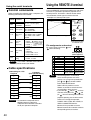
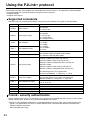
Control commands
When controlling the projector from a computer, the
following commands are available:
Command
POF
Power query
QPW
IIS
Switch input
modes
Query for
active
lamp mode
QSL
Active lamp
mode
LPM
Lamp power
setting
OLP
Note
Example of a control panel layout
Function of
command
Power “ON”
Power
“STANDBY”
PON
Remarks
To confirm that the power is
ON, use a “Power query”
command.
Parameter
000 = STANDBY
001 = Power “ON”
Parameter
VID = VIDEO SVD = S-VIDEO
RG1 = RGB1 RG2 = RGB2
DVI=DVI
Parameter
0 = DUAL
“SINGLE” will use
1 = SINGLE the lamp (LAMP 1
or LAMP 2) with
2 = LAMP 1
shorter operating
hours.
3 = LAMP 2
Parameter
0 = DUAL
1 = SINGLE
2 = Only LAMP 1 is on
3 = Only LAMP 2 is on
Parameter
0 = HIGH, 1= LOW
• If you need a detailed command list,
please contact your dealer.
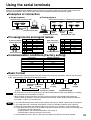
Cable specifications
<Connecting to a PC>
Projector
1
NC
NC
1
2
3
3
NC
NC
5
6
4
5
NC
NC
6
7
7
8
8
9
NC
NC
9
Attention • To connect the computer to the
SERIAL terminal, prepare an
adequate communication cable that
fits to your personal computer.
40
External
control
Remote
terminal
Remote terminal
/External control
ON
STANDBY
LAMP
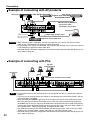
Projector set up in a meeting room
RGB1
VIDEO
RGB2
S-VIDEO
DVI
Control panel located
in a different room
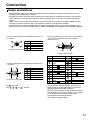
Pin assignments and control
Be sure to short-circuit Pins
when controlling.
and
D-Sub 9-pin (female)
external appearance
Names of terminals
GND
POWER
RGB1
RGB2
VIDEO
S-VIDEO
DVI
SHUTTER
RST / SET
Computer
(DTE specifications)
2
4
Using the REMOTE 2 terminal provided on the side of the
main unit, it is possible to operate the projector from a
control panel etc. furnished in a distant location where
infrared remote control signal cannot be received.
Note
Short (L)
GND
ON
OFF
RGB1
Other
RGB2
Other
VIDEO
Other
S-VIDEO
Other
DVI
Other
ON
OFF
Controlled by
Controlled by
remote control external contact
Open (H)
• The following buttons on the remote
control and the operation area of the
projector can no longer be operated when
pins
and
are shorted: POWER
button and SHUTTER button.
Neither will it be possible to use the
RS232C commands or network functions
corresponding to these functions.
• If you short pin
and pin
, and also
short one of the pins from
to
and
pin
, then the following buttons on the
projector operating area and the remote
control can no longer be operated:
POWER, RGB1, RGB2, DVI, VIDEO, SVIDEO and SHUTTER buttons.
Neither will it be possible to use the
RS232C commands or network functions
corresponding to these functions.