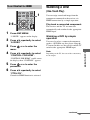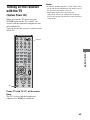
1
3-283-377-11(1)
DVD Home Theatre
System
Operating Instructions
HT-7200DH
©2008 Sony Corporation
Owner’s Record
The model and serial numbers are located on the rear
of the unit. Record the serial number in the space
provided below. Refer to them whenever you call
upon your Sony dealer regarding this product.
This symbol is intended to alert the
user to the presence of important
operating and maintenance
(servicing) instructions in the
literature accompanying the
appliance.
Model No. ______________________________________________________
Serial No. ______________________________________________________
WARNING
To reduce the risk of fire or electric
shock, do not expose this apparatus to
rain or moisture.
To prevent fire, do not cover the ventilation of the
apparatus with newspapers, table-cloths, curtains,
etc. And don’t place lighted candles on the
apparatus.
To prevent fire or shock hazard, do not place objects
filled with liquids, such as vases, on the apparatus.
Do not install the appliance in a confined space, such
as a bookcase or built-in cabinet.
Install this system so that the power cord can be
unplugged from the wall socket immediately in the
event of trouble.
Batteries or batteries installed apparatus shall not be
exposed to excessive heat such as sunshine, fire or
the like.
For customers in the United
States
WARNING
This equipment has been tested and found to comply
with the limits for a Class B digital device, pursuant
to Part 15 of the FCC Rules. These limits are
designed to provide reasonable protection against
harmful interference in a residential installation.
This equipment generates, uses, and can radiate
radio frequency energy and, if not installed and used
in accordance with the instructions, may cause
harmful interference to radio communications.
However, there is no guarantee that interference will
not occur in a particular installation. If this
equipment does cause harmful interference to radio
or television reception, which can be determined by
turning the equipment off and on, the user is
encouraged to try to correct the interference by one
or more of the following measures:
– Reorient or relocate the receiving antenna.
– Increase the separation between the equipment
and receiver.
– Connect the equipment into an outlet on a circuit
different from that to which the receiver is
connected.
– Consult the dealer or an experienced radio/TV
technician for help.
CAUTION
You are cautioned that any changes or modification
not expressly approved in this manual could void
your authority to operate this equipment.
Note to CATV system installer:
This symbol is intended to alert the
user to the presence of uninsulated
“dangerous voltage” within the
product’s enclosure that may be of
sufficient magnitude to constitute a
risk of electric shock to persons.
2US
This reminder is provided to call CATV system
installer’s attention to Article 820-40 of the NEC
that provides guidelines for proper grounding and, in
particular, specifies that the cable ground shall be
connected to the grounding system of the building,
as close to the point of cable entry as practical.
About This Manual
• The instructions in this manual are for model
HT-7200DH.
The HT-7200DH consists of:
• Receiver
• DVD player
• Speaker system
– Front speakers
– Center speaker
– Surround speakers
– Sub woofer
STR-K7200
DVP-NS700H
SS-MSP890
SS-CNP890
SS-SRP890
SA-WP890
• The instructions in this manual describe the
controls on the supplied remote. You can also use
the controls on the receiver if they have the same
or similar names as those on the remote.
This receiver incorporates Dolby* Digital and Pro
Logic Surround and the DTS** Digital Surround
System.
* Manufactured under license from Dolby
Laboratories. Dolby, Pro Logic, and the doubleD symbol are trademarks of Dolby Laboratories.
** Manufactured under license under U.S. Patent
#’s: 5,451,942; 5,956,674; 5,974,380;
5,978,762; 6,487,535 & other U.S. and
worldwide patents issued & pending. DTS and
DTS Digital Surround are registered trademarks
and the DTS logos and Symbol are trademarks of
DTS, Inc. © 1996-2007 DTS, Inc. All Rights
Reserved.
This receiver incorporates High-Definition
Multimedia Interface (HDMITM) technology.
HDMI, the HDMI logo and High-Definition
Multimedia Interface are trademarks or registered
trademarks of HDMI Licensing LLC.
The XM name and related logo are registered
trademarks of XM Satellite Radio Inc. All rights
reserved.
“x.v.Color” and “x.v.Color” logo are trademarks of
Sony Corporation.
“BRAVIA” and
Sony Corporation.
are trademarks of
3US
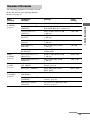
Table of Contents
Getting Started
Tuner Operations
Description and location of parts...................5
1: Installing the speakers .............................14
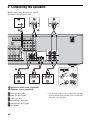
2: Connecting the speakers ..........................16
3: Connecting the TV ..................................18
4a: Connecting the audio components ........19
4b: Connecting the video components ........20
5: Connecting the antennas..........................27
6: Preparing the receiver and the remote .....28
7: Calibrating the appropriate settings
automatically
(AUTO CALIBRATION) .......................29
8: Adjusting the speaker levels and
balance (TEST TONE) ...........................33
Listening to FM/AM radio.......................... 52
Presetting radio stations .............................. 53
Listening to the XM Radio ......................... 56
Presetting XM Radio channels ................... 61
Control for HDMI
Playback
Using the Control for HDMI function
for “BRAVIA” Sync .............................. 64
Preparing Control for HDMI function ........ 66
Watching a DVD (One-Touch Play) ........... 67
Enjoying the TV sound from the speakers
connected to the receiver
(System Audio Control)......................... 68
Turning off the receiver with the TV
(System Power Off) ............................... 69
Selecting a component.................................34
Listening/Watching a component ................36
Other Operations
Amplifier Operations
Navigating through menus...........................38
Adjusting the level (LEVEL menu).............41
Adjusting the tone (TONE menu) ...............42
Settings for the surround sound
(SUR menu)............................................42
Settings for the tuner (TUNER menu).........43
Settings for the audio (AUDIO menu).........43
Settings for the video (VIDEO menu).........44
Settings for the system (SYSTEM menu) ...45
Calibrating the appropriate settings
automatically (A. CAL menu)................47
Switching between digital and analog
audio (INPUT MODE) .......................... 70
Listening to digital sound from other
inputs (DIGITAL ASSIGN)................... 70
Enjoying the DIGITAL MEDIA PORT
(DMPORT) ............................................ 71
Naming inputs............................................. 73
Changing the display .................................. 74
Using the Sleep Timer ................................ 74
Recording using the receiver....................... 75
Using the Remote
Changing button assignments ..................... 76
Enjoying Surround Sound
Additional Information
Enjoying Dolby Digital and DTS Surround
sound (AUTO FORMAT DIRECT) .......48
Selecting a pre-programmed sound field.....49
Using only the front speakers and sub
woofer (2CH STEREO) .........................51
Resetting sound fields to the initial
settings....................................................51
Glossary ...................................................... 77
Precautions.................................................. 78
Troubleshooting .......................................... 80
Specifications.............................................. 84
Index ........................................................... 87
4US
Getting Started
Getting Started
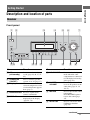
Description and location of parts
Receiver
Front panel
1
2
3
4
5
?/1
6
7
MASTER VOLUME
DISPLAY
INPUT MODE
INPUT SELECTOR
SPEAKERS
(ON/OFF)
AUTO CAL MIC
MEMORY/
ENTER
TUNING
MODE
TUNING
2CH
A.F.D.
MOVIE
MUSIC
AUTO CAL
MUTING
9
8
VIDEO 2 IN/PORTABLE AV IN
PHONES
VIDEO
qj qh
L AUDIO R
qg
qf qd
qs
qa
q;
Name
Function
Name
Function
A ?/1
(on/standby)
Press to turn the receiver on
or off (page 28, 36, 37, 51,
85).
F INPUT MODE
B SPEAKERS
(ON/OFF)
Press to turn the speaker
system on or off (page 17).
Press to select the input
mode when the same
components are connected
to both digital and analog
jacks (page 70).
C Display
The current status of the
selected component or a list
of selectable items appears
here (page 7).
G MASTER
VOLUME
Turn to adjust the volume
level of all speakers at the
same time (page 33, 34,
36, 37).
H MUTING
Press to turn off the sound
temporarily.
Press MUTING again to
restore the sound (page
35).
I AUTO CAL
Press to activate the Auto
Calibration function
(page 29).
D Remote sensor Receives signals from
remote commander.
E DISPLAY
Press to select information
displayed on the display
(page 61, 74).
continued
5US
Name
Function
J INPUT
SELECTOR
Turn to select the input
source to play back (page
34, 36, 37, 52, 58, 70, 73,
75).
K 2CH
Press to select a sound
field (page 48).
A.F.D.
MOVIE
MUSIC
L TUNING +/–
Press to scan a station
(page 52, 58).
M TUNING MODE
Press to select the tuning
mode (page 52, 58).
N MEMORY/
ENTER
Press to store a station or
enter the selection when
selecting the settings
(page 28).
O VIDEO 2 IN/
Connect to a portable
PORTABLE AV IN audio/video component
jacks
such as a camcorder or
video game (page 25, 34).
P AUTO CAL MIC
jack
Connects to the supplied
optimizer microphone for
the Auto Calibration
function (page 30).
Q PHONES jack
Connects to headphones
(page 80).
6US
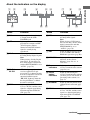
About the indicators on the display
2
3
SW
LFE
;D
L
C
4
; PLII
5
6
7
8
; PL OPT
DTS
CAT
MEMORY
D.RANGE
HDMI COAX
R
9
ST
MONO
SL S SR
qf
qd
qs
qa
q;
Name
Function
Name
Function
A SW
Lights up when the audio signal
is output from the SUB
WOOFER jack.
F DTS
B LFE
Lights up when the disc being
played back contains an LFE
(Low Frequency Effect)
channel and the LFE channel
signal is actually being
reproduced.
Lights up when the receiver is
decoding DTS signals.
Note
When playing a DTS format
disc, be sure that you have made
digital connections and that
INPUT MODE is set to
“AUTO” (page 70).
G CAT
Lights up when category mode
is set to “ONE CAT” during
XM Radio operation (page 60).
H MEMORY
Lights up when a memory
function, such as Preset
Memory (page 54), etc., is
activated.
I Tuner
indicators
Lights up when using the
receiver to tune in radio stations
(page 52), etc.
J Preset
station
indicators
Lights up when using the
receiver to tune in radio stations
you have preset. For details on
presetting radio stations, see
page 53.
K D.RANGE
Lights up when dynamic range
compression is activated (page
41).
L COAX
Lights up when INPUT MODE
is set to “AUTO” and the source
signal is a digital signal being
input through the COAXIAL
jack (page 70).
C; D
Lights up when the receiver is
decoding Dolby Digital signals.
Note
When playing a Dolby Digital
format disc, be sure that you
have made digital connections
and that INPUT MODE is set to
“AUTO” (page 70).
D ; PL/
; PLII
“; PL” lights up when the
receiver applies Pro Logic
processing to 2 channel signals
in order to output the center and
surround channel signals.
“; PLII” lights up when the
Pro Logic II Movie or Music
decoder is activated.
E OPT
Lights up when INPUT MODE
is set to “AUTO” and the source
signal is a digital signal being
input through the OPTICAL
jack (page 70).
continued
7US
Getting Started
1
Name
Function
M HDMI
Lights up when the receiver
recognizes a component
connected via an HDMI IN jack
(page 21).
N Playback
channel
indicators
The letters (L, C, R, etc.)
indicate the channels being
played back. The boxes around
the letters vary to show how the
receiver downmixes the source
sound.
Front Left
Front Right
Center (monaural)
Surround Left
Surround Right
Surround (monaural or the
surround components obtained
by Pro Logic processing)
Example:
Recording format (Front/
Surround): 3/2.1
Sound Field: A.F.D. AUTO
L
R
C
SL
SR
S
SW
L
SL
8US
C
R
SR
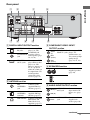
Rear panel
2
TV
1
SAT IN
ANTENNA
DVD IN
3
BD IN
Getting Started
1
OUT
OPTICAL
HDMI
IN
AM
SAT IN
DVD IN
VIDEO 1 IN MONITOR OUT
XM
Y
SAT
IN
OPTICAL
VIDEO
IN
VIDEO
IN
VIDEO
OUT
VIDEO
IN
PB/
CB
VIDEO
OUT
DVD
IN
PR/
CR
COAXIAL
MONITOR
DIGITAL (ASSIGNABLE)
SURROUND
OUT
DC5V
0.7A MAX
IN
IN
AUDIO
IN
AUDIO
IN
AUDIO
OUT
AUDIO
IN
FRONT
COMPONENT VIDEO
AUDIO
OUT
R
L
CENTER
L
L
R
DMPORT
R
SA-CD/CD/CD-R
7
5
TV
SAT
DVD
6
VIDEO 1
SUB WOOFER
5
A DIGITAL INPUT/OUTPUT section
OPTICAL
IN jacks
Connects to a DVD
player, etc. The
COAXIAL jack
COAXIAL IN provides a better
sound quality (page
jack
18, 23, 24).
HDMI IN/
OUT* jacks
Connects to a DVD
player, Blu-ray disc
player, etc. The
image is output to a
TV or a projector
while the sound can
be output from a TV
or/and speakers
connected to this
receiver (page 21).
SPEAKERS
4
C COMPONENT VIDEO INPUT/
OUTPUT section
Y, PB/CB, PR/CR Connects to a DVD
IN/OUT* jacks player, TV,
satellite tuner, etc.
Blue
You can enjoy high
(PB/CB)
quality image
Red
(page 18, 23, 24).
Green
(Y)
(PR/CR)
D SPEAKERS section
Connects to the
supplied speakers
(page 16).
B ANTENNA section
FM
ANTENNA
jack
Connects to the
supplied FM wire
antenna (page 27).
AM
ANTENNA
terminals
Connects to the
supplied AM loop
antenna (page 27).
XM terminal
Connects to the XM
Mini-Tuner and
Home Dock (not
supplied) (page 57).
E AUDIO INPUT/OUTPUT section
AUDIO IN/
Connects to a
Super Audio CD
player, etc. (page
19).
AUDIO OUT
jack
Connects to the
supplied sub
woofer (page 16).
White (L) OUT jack
Red (R)
Black
continued
9US
F VIDEO/AUDIO INPUT/OUTPUT
section
AUDIO IN/
White (L) OUT jacks
Red (R)
Yellow
Connects to a
VCR, DVD player,
etc. (page 18, 23,
24, 25).
VIDEO IN/
OUT* jacks
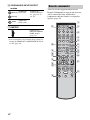
Remote commander
You can use the supplied RM-AAU021
Remote Commander to operate the receiver
and to control the Sony audio/video
components that the remote is assigned to
operate (page 76).
1
TV ?/1
TV INPUT
SLEEP DMPORT AV ?/1
?/1
2
wa
G DMPORT
SYSTEM STANDBY
VIDEO 1 VIDEO 2
Connects to a
DIGITAL MEDIA
PORT adapter
(page 72).
* You can watch the selected input image when you
connect the HDMI OUT or MONITOR OUT jack
to a TV (page 18).
SAT
TV
2CH
A.F.D.
BD
DVD
SA-CD/CD TUNER
MOVIE
MUSIC
THEATER
1
w;
3
DVD/BD
MENU
4
7
ql
qk
qj
2
6
5
9
8
>10
0/10
AUTO CAL
D.TUNING
D.SKIP
MEMORY AMP MENU
ENTER
CLEAR
DISPLAY
TOOLS/
OPTIONS MUTING
3
4
5
6
7
8
9
q;
TV VOL
MASTER VOL
qh
qa
qg
qf
O
RETURN/EXIT
MENU/HOME
– CATEGORY +
TV CH –
TV CH +
PRESET – REPLAY ADVANCE PRESET +
<
<
.
>
TUNING –
m
CATEGORY MODE TUNING +
H
FM MODE
TV
qd
10US
M
X
x
qs
Function
Name
Function
Press TV ?/1 and TV (M) at
the same time to turn the TV
on or off.
D 2CH
Press to select a sound field.
AV ?/1
(on/standby)
Press to turn on or off the
Sony audio/video components
that the remote is assigned to
operate (page 76).
If you press ?/1 (B) at the
same time, it will turn off the
receiver and other Sony
components (SYSTEM
STANDBY).
Note
The function of the AV ?/1
switch changes automatically
each time you press the input
buttons (C).
B ?/1
(on/standby)
Press to turn the receiver on or
off.
To turn off all Sony
components, press ?/1 and
AV ?/1 (A) at the same time
(SYSTEM STANDBY).
C Input buttons Press one of the buttons to
select the component you
want to use. When you press
any of the input buttons, the
receiver turns on. The buttons
are factory assigned to control
Sony components as follows.
You can change the button
assignments following the
steps in “Changing button
assignments” on page 76.
Button
Assigned Sony
component
DMPORT
DIGITAL MEDIA
PORT adapter
VIDEO 1
VCR (VTR mode 3)
VIDEO 2
VCR (VTR mode 2)
BD
Blu-ray disc player
DVD
DVD player
SAT
Digital Satellite
Receiver
TV
TV
A.F.D.
MOVIE
MUSIC
E THEATER
Press to enjoy optimal image
suited for movies and to
output the sound from the
speakers connected to this
receiver automatically.
Note
This button will only function
if your TV is compatible with
Theater Mode.
Refer to the operating
instructions supplied with the
TV for details.
F DVD/BD
MENU
Press to display the menu of
the DVD or Blu-ray disc on
the TV screen. Then, use V, v,
B, b and
(P) to perform
menu operations.
AUTO CAL
Press to activate the Auto
Calibration function.
G D.TUNING
Press to enter direct tuning
mode.
D.SKIP
Press to skip a disc when
using a multi-disc changer.
H AMP MENU
Press to display the menu of
the receiver. Then, use V, v,
B, b and
(P) to perform
menu operations.
I ENTER
Press to enter the value after
selecting a channel, disc or
track using the numeric
buttons of the TV, VCR or
satellite tuner.
MEMORY
J MUTING
Press to store a station.
Press to turn off the sound
temporarily.
Press MUTING again to
restore the sound.
Press MUTING and TV (M)
at the same time to activate
the TV’s muting function.
SA-CD/CD Super Audio CD/
CD player
TUNER
Built-in tuner
continued
11US
Getting Started
Name
A TV ?/1
(on/standby)
Name
Function
Name
Function
K TV VOL
+a)/–
Press TV VOL +/– and TV
(M) at the same time to adjust
the volume level of the TV.
M TV
Press TV and the button with
orange printing at the same
time to enable TV operation.
Press to adjust the volume
level of all speakers at the
same time.
N MENU/HOME Press to display the menu of
the VCR, DVD player,
satellite tuner or Blu-ray disc
player on the TV screen.
Press MENU/HOME and TV
(M) at the same time to
display the TV’s menu.
Then, use V, v, B, b and
(P) to perform menu
operations.
MASTER
VOL +a)/–
L ./>b)
Press to skip a track of the CD
player, DVD player or Blu-ray
disc player.
REPLAY < / Press to replay the previous
ADVANCE < scene or fast forward the
current scene of the VCR,
DVD player or Blu-ray disc
player.
m/Mb)
Press to
– search tracks in the forward/
reverse direction of the DVD
player.
– start fast forward/rewind of
the VCR, CD player or Bluray disc player.
Ha)b)
Press to start playback of the
VCR, CD player, DVD player,
or Blu-ray disc player.
Xb)
Press to pause playback or
recording of the VCR, CD
player, DVD player or Blu-ray
disc player. (Also starts
recording with components in
recording standby.)
xb)
Press to stop playback of the
VCR, CD player, DVD player
or Blu-ray disc player.
TV CH +/–
Press TV CH +/– and TV (M)
at the same time to select
preset TV channels.
CATEGORY
+/–
Press to select a category for
XM Radio (page 60).
PRESET +/–
Press to select
– preset stations.
– preset channels of the VCR
or satellite tuner.
TUNING +/–
Press to scan a station.
CATEGORY
MODE
Press to select the category
mode for XM Radio (page 60).
FM MODE
Press to select the FM
monaural or stereo reception.
12US
O RETURN/
EXIT O
Press to
– return to the previous menu.
– exit the menu while the
menu or on-screen guide of
the VCR, DVD player,
satellite tuner or Blu-ray
disc player is displayed on
the TV screen.
Press RETURN/EXIT and TV
(M) at the same time to return
to the previous menu or exit
the TV’s menu while the
menu is displayed on the TV
screen.
P
After pressing DVD/BD
MENU (F), AMP MENU
(H), or MENU/HOME (N),
press V, v, B or b to select the
settings. Then, press
to
enter the selection if you have
pressed DVD/BD MENU or
MENU/HOME previously.
Press
also to enter the
selection of the receiver,
VCR, satellite tuner, CD
player, DVD player or Bluray disc player.
V/v/B/b
Q DISPLAY
Press to select information
displayed on the TV screen of
the VCR, satellite tuner, CD
player, DVD player or Bluray disc player.
Press DISPLAY and TV (M)
at the same time to display
TV’s information on the TV
screen.
Function
R TOOLS/
OPTIONS
Press to display and select the
options of the DVD player or
Blu-ray disc player.
Press TOOLS/OPTIONS and
TV (M) at the same time to
display the options applicable
to the Sony TV.
S
z
Press to input the decimal
point for channel numbers of
the Digital CATV terminal.
Press z and TV (M) at the
same time to input the decimal
point for the channel numbers
of the TV.
>10
Press to select track numbers
over 10 of the CD player.
CLEAR
Press to clear a mistake when
you press the incorrect
numeric button.
T Numeric
buttons
(number 5a))
Press to
– preset/tune to preset
stations.
– select track numbers of the
CD player, DVD player or
Blu-ray disc player. Press
0/10 to select track number
10.
– select channel numbers of
the VCR or satellite tuner.
Press the numeric buttons and
TV (M) at the same time to
select the TV channels.
U TV INPUT
Press TV INPUT and TV (M)
at the same time to select the
input signal (TV input or
video input).
SLEEP
Notes
• Some functions explained in this section may not
work depending on the model.
• The above explanation is intended to serve as an
example only. Therefore, depending on the
component, the above operation may not be
possible or may operate differently than described.
Press to activate the Sleep
Timer function and the
duration which the receiver
turns off automatically.
a) The number 5, MASTER VOL +, TV VOL +, and
H buttons have tactile dots. Use the tactile dots
as references when operating the receiver.
b) This button is also available for DIGITAL MEDIA
PORT adapter operation. For details on the
function of the button, refer to the operating
instructions supplied with the DIGITAL MEDIA
PORT adapter.
13US
Getting Started
Name
1: Installing the speakers
This receiver allows you to use a 5.1 channel
system (5 speakers and one sub woofer).
To fully enjoy theater-like multi channel
surround sound requires five speakers (two
front speakers, a center speaker, and two
surround speakers) and a sub woofer (5.1
channel).
Installing the speakers on a flat
surface
Before you install the speakers and sub
woofer, be sure to attach the supplied foot pads
to prevent vibration or movement as shown in
the illustration below.
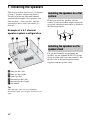
Example of a 5.1 channel
speaker system configuration
Installing the speakers on the
speaker stand
For greater flexibility in positioning the
speakers, use the optional WS-FV11 speaker
stand (available only in certain countries). For
details, refer to the operating instructions
supplied with the speaker stand.
AFront speaker (left)
BFront speaker (right)
CCenter speaker
DSurround speaker (left)
ESurround speaker (right)
FSub woofer
Tip
Since the sub woofer does not emit highly
directional signals, you can place it wherever you
want.
14US
3
Hang the speakers on the
screws.
Getting Started
Installing the speakers on the
wall
Hook on the back of the speaker
You can install your surround speakers on the
wall.
1
3/16 inch
(4.6 mm)
Prepare screws (not supplied)
that are suitable for the hook on
the back of each speaker as
shown in the illustrations
below.
13/32 inch
(10 mm)
3/16 inch (4 mm)
more than 1 inch (25 mm)
3/16 inch
(4.6 mm)
13/32 inch
(10 mm)
Hook on the back of the speaker
2
Fasten the screws to the wall.
The screws should protrude
7/32 to 9/32 inch (5 to 7 mm).
Notes
• Use screws that are suitable for the wall material
and strength. As a plaster board wall is especially
fragile, attach the screws securely to a beam and
fasten them to the wall. Install the speakers on a
vertical and flat wall where reinforcement is
applied.
• Contact a screw shop or installer regarding the wall
material or screws to be used.
• Sony is not responsible for accident or damage
caused by improper installation, insufficient wall
strength or improper screw installation, natural
calamity, etc.
7/32 to 9/32 inch
(5 to 7 mm)
15US
2: Connecting the speakers
Before connecting the cords, be sure to
disconnect the AC power cord.
F
D
A
SAT IN
A
B
DVD IN
BD IN
OUT
HDMI
SAT IN
DVD IN
VIDEO 1 IN MONITOR OUT
XM
VIDEO
IN
VIDEO
IN
Y
VIDEO
OUT
VIDEO
IN
PB/
CB
VIDEO
OUT
PR/
CR
MONITOR
SURROUND
AUDIO
IN
AUDIO
IN
AUDIO
OUT
AUDIO
IN
FRONT
COMPONENT VIDEO
AUDIO
OUT
R
L
CENTER
L
R
SAT
DVD
VIDEO 1
SPEAKERS
SUB WOOFER
B
13/32”
(10 mm)
E
C
B
A Monaural audio cord (supplied)
B Speaker cords (supplied)*
AFront speaker (left)
BFront speaker (right)
CCenter speaker
DSurround speaker (left)
ESurround speaker (right)
FSub woofer
16US
* Use the long speaker cords to connect the surround
speakers and the short speaker cords to connect the
front and center speakers.
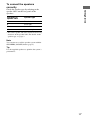
To connect the speakers
correctly
Character on
speaker label
Speaker type
L
Front left
R
Front right
SL
Surround left
SR
Surround right
Getting Started
Check the speaker type by referring to the
speaker label* on the rear panel of the
speakers.
* The center speaker and sub woofer do not have any
character on the speaker label. For details on the
speaker type, see page 3.
Note
You can turn on or off the speaker system with the
SPEAKERS (ON/OFF) button (page 5).
Tip
Use the supplied speakers to optimize the system’s
performance.
17US
3: Connecting the TV
You can watch the selected input image when
you connect the HDMI OUT or MONITOR
OUT jack to a TV.
It is not necessary to connect all the cords.
Connect audio and video cords according to
the jacks of your components. Before
connecting the cords, be sure to disconnect the
AC power cord.
TV
Audio signals
Audio/video
signals
A
Video signals
B
TV
C
SAT IN
ANTENNA
DVD IN
D
BD IN
E
OUT
OPTICAL
HDMI
IN
AM
SAT IN
DVD IN
VIDEO 1 IN MONITOR OUT
XM
Y
SAT
IN
OPTICAL
VIDEO
IN
VIDEO
IN
VIDEO
OUT
VIDEO
IN
PB/
CB
VIDEO
OUT
DVD
IN
PR/
CR
COAXIAL
MONITOR
DIGITAL (ASSIGNABLE)
SURROUND
OUT
DC5V
0.7A MAX
IN
IN
AUDIO
IN
AUDIO
IN
AUDIO
OUT
AUDIO
IN
FRONT
COMPONENT VIDEO
AUDIO
OUT
R
L
CENTER
L
L
R
DMPORT
R
SA-CD/CD/CD-R
TV
SAT
DVD
VIDEO 1
SUB WOOFER
A Optical digital cord (not supplied)
B Audio cord (not supplied)
C HDMI cable (not supplied)
We recommend that you use a Sony HDMI cable.
D Component video cord (not supplied)
E Video cord (not supplied)
18US
SPEAKERS
Notes
4a: Connecting the audio
components
Tips
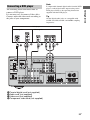
The following illustration shows how to
connect a Super Audio CD player, CD player
or CD recorder. Before connecting the cords,
be sure to disconnect the AC power cord.
After connecting your audio component,
proceed to “4b: Connecting the video
components” (page 20).
• To output the sound of the TV from the speakers
connected to the receiver, be sure to
– connect the audio output jacks of the TV to the
TV IN jacks of the receiver.
– turn off the TV’s volume or activate the TV’s
muting function.
• All the digital audio jacks are compatible with
32 kHz, 44.1 kHz, 48 kHz, and 96 kHz sampling
frequencies.
Connecting a Super Audio CD/CD
player/CD recorder
Super Audio
CD player/
CD player/
CD recorder
A
TV
SAT IN
ANTENNA
DVD IN
OPTICAL
HD
IN
AM
XM
SAT
IN
OPTICAL
VIDEO
IN
VIDEO
IN
VIDEO
OUT
VIDEO
IN
VIDEO
OUT
DVD
IN
COAXIAL
MONITOR
DIGITAL (ASSIGNABLE)
OUT
DC5V
0.7A MAX
IN
IN
AUDIO
IN
AUDIO
IN
TV
SAT
DVD
AUDIO
OUT
AUDIO
IN
AUDIO
OUT
L
DMPORT
R
SA-CD/CD/CD-R
VIDEO 1
SUB WOOF
A Audio cord (not supplied)
19US
Getting Started
• Be sure to turn on the receiver when the video and
audio signals of a playback component are being
output to a TV via the receiver. Unless the power is
turned on, neither video nor audio signals will be
transmitted.
• When connecting optical digital cords, insert the
plugs straight in until they click into place.
• Do not bend or tie optical digital cords.
4b: Connecting the video components
How to hook up your
components
Video input/output jack to be
connected
This section describes how to hook up your
components to this receiver. Before you begin,
refer to “Component to be connected” below
for the pages which describe how to connect
each component.
Before connecting the cords, be sure to
disconnect the AC power cord.
After hooking up all your components,
proceed to “5: Connecting the antennas” (page
27).
The image quality depends on the connecting
jack. Refer to the illustration that follows.
Select the connection according to the jacks on
your components.
Y
PB/
CB
PR/
CR
HDMI
VIDEO
COMPONENT VIDEO
Digital
Analog
Component to be connected
High quality image
Component
Page
TV
18
With HDMI jack
21
Note
DVD player
23
Satellite tuner/Set-top box
24
DVD recorder, VCR
25
Camcorder, video game, etc.
25
Be sure to turn on the receiver when the video and
audio signals of a playback component are being
output to a TV via the receiver. Unless the power is
turned on, neither video nor audio signals will be
transmitted.
If you want to connect several
digital components, but cannot
find an unused input
See “Listening to digital sound from other
inputs (DIGITAL ASSIGN)” (page 70).
20US
HDMI features
• A digital audio signal transmitted by HDMI
can be output from the speakers connected to
this receiver. This signal supports Dolby
Digital, DTS, and Linear PCM.
• This receiver supports xvYCC transmission.
• This receiver supports the Control for HDMI
function. For details, see “Control for
HDMI” (page 64).
HDMI is the abbreviated name for HighDefinition Multimedia Interface. It is an
interface which transmits video and audio
signals in digital format.
DVD player
Satellite tuner
Audio/video
signals
Audio/video
signals
A
TV
Blu-ray disc player
Audio/video
signals
A
SAT IN
ANTENNA
TV, projector, etc.
DVD IN
Audio/video
signals
A
BD IN
A
OUT
OPTICAL
HDMI
IN
AM
SAT IN
DVD IN
VIDEO 1 IN MONITOR OUT
XM
Y
SAT
IN
OPTICAL
VIDEO
IN
VIDEO
IN
VIDEO
OUT
VIDEO
IN
PB/
CB
VIDEO
OUT
DVD
IN
PR/
CR
COAXIAL
MONITOR
DIGITAL (ASSIGNABLE)
SURROUND
OUT
DC5V
0.7A MAX
IN
IN
AUDIO
IN
AUDIO
IN
AUDIO
OUT
AUDIO
IN
AUDIO
OUT
FRONT
COMPONENT VIDEO
R
L
CENTER
L
L
R
DMPORT
R
SA-CD/CD/CD-R
TV
SAT
DVD
VIDEO 1
SUB WOOFER
SPEAKERS
A HDMI cable (not supplied)
continued
21US
Getting Started
Connecting components with
HDMI jacks
Notes on connecting cables
• We recommend that you use a Sony HDMI
cable.
• We do not recommend using an HDMI-DVI
conversion cable. When you connect an
HDMI-DVI conversion cable to a DVI-D
component, the sound and/or the image may
not be output.
Notes on HDMI connections
• Audio signals input to the HDMI IN jack can
only be output from the SPEAKERS jacks
and HDMI OUT jack. The audio input
signals cannot be output from any other
audio jacks.
• Video signals input to the HDMI IN jack can
only be output from the HDMI OUT jack.
The video input signals cannot be output
from the VIDEO OUT jacks or MONITOR
OUT jacks.
• When you want to listen to the sound from
the TV speaker, set “AUDIO FOR HDMI”
to “TV+AMP” in the VIDEO menu (page
44). If you cannot play back multi channel
software, set to “AMP”. However, the sound
will not output from the TV speaker.
• The multi/stereo area audio signals of a
Super Audio CD are not output.
• Audio signals (sampling frequency, bit
length, etc.) transmitted from an HDMI jack
may be suppressed by the connected
component. Check the setup of the
connected component if the image is poor or
the sound does not come out of a component
connected via the HDMI cable.
• Sound may be interrupted when the
sampling frequency, the number of channels
or the audio format of the audio output
signals from the playback component is
switched.
• When the connected component is not
compatible with copyright protection
technology (HDCP), the image and/or the
sound from the HDMI OUT jack may be
distorted or may not be output.
In this case, check the specification of the
connected component.
22US
• You can enjoy multi channel Linear PCM
only with an HDMI connection.
• Set the resolution of the image of the
playback component to 720p, 1080i or
1080p when you output 96 kHz multi
channel sound over an HDMI connection.
• You may need to make certain settings on
the image resolution of the player before you
can enjoy multi channel Linear PCM. Refer
to the operation instructions of the player.
• Refer to the operating instructions of each
connected component for details.
Note
Connecting a DVD player
The following illustration shows how to
connect a DVD player.
It is not necessary to connect all the cables.
Connect audio and video cords according to
the jacks of your components.
Tip
All the digital audio jacks are compatible with
32 kHz, 44.1 kHz, 48 kHz, and 96 kHz sampling
frequencies.
DVD player
Audio signals
Video signals
B
A
TV
SAT IN
ANTENNA
D
C
DVD IN
BD IN
OUT
OPTICAL
HDMI
IN
AM
SAT IN
DVD IN
VIDEO 1 IN MONITOR OUT
XM
Y
SAT
IN
OPTICAL
VIDEO
IN
VIDEO
IN
VIDEO
OUT
VIDEO
IN
PB/
CB
VIDEO
OUT
DVD
IN
PR/
CR
COAXIAL
MONITOR
DIGITAL (ASSIGNABLE)
SURROUND
OUT
DC5V
0.7A MAX
IN
IN
AUDIO
IN
AUDIO
IN
AUDIO
OUT
AUDIO
IN
AUDIO
OUT
FRONT
COMPONENT VIDEO
R
L
CENTER
L
L
R
DMPORT
R
SA-CD/CD/CD-R
TV
SAT
DVD
VIDEO 1
SUB WOOFER
SPEAKERS
A Coaxial digital cord (not supplied)
B Audio cord (not supplied)
C Video cord (not supplied)
D Component video cord (not supplied)
23US
Getting Started
To input multi channel digital audio from the DVD
player, set the digital audio output setting on the
DVD player. Refer to the operating instructions
supplied with the DVD player.
Notes
Connecting a satellite tuner/
Set-top box
• When connecting optical digital cords, insert the
plugs straight in until they click into place.
• Do not bend or tie optical digital cords.
The following illustration shows how to
connect a satellite tuner or set-top box.
It is not necessary to connect all the cables.
Connect audio and video cords according to
the jacks of your components.
Tip
All the digital audio jacks are compatible with
32 kHz, 44.1 kHz, 48 kHz, and 96 kHz sampling
frequencies.
Satellite tuner/Set-top box
Audio signals
Video signals
A
B
TV
C
D
SAT IN
ANTENNA
DVD IN
BD IN
OUT
OPTICAL
HDMI
IN
AM
SAT IN
DVD IN
VIDEO 1 IN MONITOR OUT
XM
Y
SAT
IN
OPTICAL
VIDEO
IN
VIDEO
IN
VIDEO
OUT
VIDEO
IN
PB/
CB
VIDEO
OUT
DVD
IN
PR/
CR
COAXIAL
MONITOR
DIGITAL (ASSIGNABLE)
SURROUND
OUT
DC5V
0.7A MAX
IN
IN
AUDIO
IN
AUDIO
IN
AUDIO
OUT
AUDIO
IN
AUDIO
OUT
FRONT
COMPONENT VIDEO
R
L
CENTER
L
L
R
DMPORT
R
SA-CD/CD/CD-R
TV
SAT
DVD
VIDEO 1
SUB WOOFER
A Audio cord (not supplied)
B Optical digital cord (not supplied)
C Video cord (not supplied)
D Component video cord (not supplied)
24US
SPEAKERS
The following illustration shows how to
connect a component which has analog jacks
such as a DVD recorder, VCR, etc.
DVD recorder, VCR
Audio signals
Video signals
A
A
TV
B
B
SAT IN
ANTENNA
DVD IN
C
BD IN
OUT
OPTICAL
HDMI
IN
AM
SAT IN
DVD IN
VIDEO 1 IN MONITOR OUT
XM
Y
SAT
IN
OPTICAL
VIDEO
IN
VIDEO
IN
VIDEO
OUT
VIDEO
IN
PB/
CB
VIDEO
OUT
DVD
IN
PR/
CR
COAXIAL
MONITOR
DIGITAL (ASSIGNABLE)
SURROUND
OUT
DC5V
0.7A MAX
IN
IN
AUDIO
IN
AUDIO
IN
AUDIO
OUT
AUDIO
IN
AUDIO
OUT
FRONT
COMPONENT VIDEO
R
L
CENTER
L
L
R
DMPORT
R
SA-CD/CD/CD-R
TV
SAT
DVD
VIDEO 1
SUB WOOFER
SPEAKERS
(On the front panel)
VIDEO 2 IN/PORTABLE AV IN
VIDEO
L AUDIO R
D
Camcorder/
video game
A Audio cord (not supplied)
B Video cord (not supplied)
C Component video cord (not supplied)
D Audio/video cord (not supplied)
continued
25US
Getting Started
It is not necessary to connect all the cables.
Connect audio and video cords according to
the jacks of your components.
Connecting components with
analog video and audio jack
Notes
• Be sure to change the factory setting of the VIDEO
1 input button on the remote so that you can use the
button to control your DVD recorder. For details,
see “Changing button assignments” (page 76).
• You can also rename the VIDEO 1 input so that it
can be displayed on the receiver’s display. For
details, see “Naming inputs” (page 73).
26US
5: Connecting the antennas
Getting Started
Connect the supplied AM loop antenna and
FM wire antenna.
Before connecting the antennas, be sure to
disconnect the AC power cord.
FM wire antenna (supplied)
AM loop antenna (supplied)
TV
SAT IN
ANTENNA
DVD IN
BD IN
OUT
OPTICAL
HDMI
IN
AM
SAT IN
DVD IN
VIDEO 1 IN MONITOR OUT
XM
Y
SAT
IN
OPTICAL
VIDEO
IN
VIDEO
IN
VIDEO
OUT
VIDEO
IN
PB/
CB
VIDEO
OUT
DVD
IN
PR/
CR
COAXIAL
MONITOR
DIGITAL (ASSIGNABLE)
SURROUND
OUT
DC5V
0.7A MAX
IN
IN
AUDIO
IN
AUDIO
IN
AUDIO
OUT
AUDIO
IN
AUDIO
OUT
FRONT
COMPONENT VIDEO
R
L
CENTER
L
L
R
DMPORT
R
SA-CD/CD/CD-R
TV
SAT
DVD
VIDEO 1
SUB WOOFER
SPEAKERS
Notes
• To prevent noise pickup, keep the AM loop
antenna away from the receiver and other
components.
• Be sure to fully extend the FM wire antenna.
• After connecting the FM wire antenna, keep it as
horizontal as possible.
27US
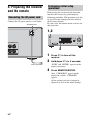
6: Preparing the receiver
and the remote
Connecting the AC power cord
Connect the AC power cord to a wall outlet.
AC power cord
Performing initial setup
operations
Before using the receiver for the first time,
initialize the receiver by performing the
following procedure. This procedure can also
be used to return settings you have made to
their factory defaults.
Be sure to use the buttons on the receiver for
this operation.
1,2
?/1
MASTER VOLUME
DISPLAY
INPUT MODE
INPUT SELECTOR
SPEAKERS
(ON/OFF)
AUTO CAL MIC
MEMORY/
ENTER
FRONT
TUNING
MODE
TUNING
2CH
A.F.D.
MOVIE
MUSIC
AUTO CAL
MUTING
VIDEO 2 IN/PORTABLE AV IN
PHONES
L
VIDEO
L AUDIO R
3
R
1
Press ?/1 to turn off the
receiver.
2
Hold down ?/1 for 5 seconds.
“PUSH” and “ENTER” appears on the
display alternately.
To the wall outlet
3
Press MEMORY/ENTER.
After “CLEARING” appears on the
display for a while, “CLEARED”
appears.
All the settings you have changed or
adjusted are reset to the initial settings.
28US
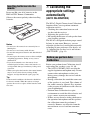
Insert two R6 (size-AA) batteries in the
RM-AAU021 Remote Commander.
Observe the correct polarity when installing
batteries.
Notes
• Do not leave the remote in an extremely hot or
humid place.
• Do not use a new battery with old ones.
• Do not mix manganese batteries and other kinds of
batteries.
• Do not expose the remote sensor to direct sunlight
or lighting apparatuses. Doing so may cause a
malfunction.
• If you do not intend to use the remote for an
extended period of time, remove the batteries to
avoid possible damage from battery leakage and
corrosion.
• When you replace the batteries, the remote buttons
may be reset to their factory settings. If this
happens, reassign the buttons again (page 76).
Tip
Under normal conditions, the batteries should last
for about 3 months. When the remote no longer
operates the receiver, replace all the batteries with
new ones.
7: Calibrating the
appropriate settings
automatically
(AUTO CALIBRATION)
The DCAC (Digital Cinema Auto Calibration)
function allows you to perform automatic
calibration such as:
• Checking the connection between each
speaker and the receiver.
• Adjusting the speaker level.
• Measuring the distance of each speaker from
your listening position.
The DCAC is designed to obtain proper sound
balance in your room. However, you can
adjust the speaker levels and balance manually
according to your preference. For details, see
“8: Adjusting the speaker levels and balance
(TEST TONE)” (page 33).
Before you perform Auto
Calibration
Before you perform Auto Calibration, install
and connect the speakers (page 14, 16).
• The AUTO CAL MIC jack is used for the
supplied optimizer microphone only. Do not
connect other microphones to this jack.
Doing so may damage the receiver and the
microphone.
• During calibration, the sound that comes out
of the speakers is very loud. The volume of
the sound cannot be adjusted. Pay attention
to the presence of children or to the effect on
your neighborhood.
• Perform Auto Calibration in a quiet
environment to avoid the effect of noise and
to get a more accurate measurement.
• If there are any obstacles in the path between
the optimizer microphone and the speakers,
the calibration cannot be performed
correctly. Remove any obstacles from the
measurement area to avoid measurement
error.
continued
29US
Getting Started
Inserting batteries into the
remote
Notes
• The Auto Calibration function does not work when
headphones are connected.
• If the muting function has been activated before
you perform Auto Calibration, the muting function
will be set to off automatically.
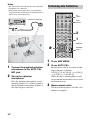
Performing Auto Calibration
TV ?/1
TV INPUT
SLEEP DMPORT AV ?/1
?/1
?/1
switch
SYSTEM STANDBY
?/1
MASTER VOLUME
DISPLAY
Optimizer microphone
VIDEO 1 VIDEO 2
BD
DVD
INPUT MODE
INPUT SELECTOR
SPEAKERS
(ON/OFF)
AUTO CAL MIC
MEMORY/
ENTER
TUNING
MODE
TUNING
2CH
A.F.D.
MOVIE
MUSIC
AUTO CAL
MUTING
VIDEO 2 IN/PORTABLE AV IN
SAT
TV
SA-CD/CD TUNER
2CH
A.F.D.
MOVIE
1
2
3
4
5
6
7
8
9
PHONES
VIDEO
Input
buttons
L AUDIO R
MUSIC
THEATER
DVD/BD
MENU
>10
0/10
AUTO CAL
D.TUNING
D.SKIP
MEMORY AMP MENU
ENTER
CLEAR
DISPLAY
2
1
TOOLS/
OPTIONS MUTING
MUTING
TV VOL
MASTER VOL
MASTER
VOL +/–
O
RETURN/EXIT
MENU/HOME
– CATEGORY +
TV CH –
TV CH +
PRESET – REPLAY ADVANCE PRESET +
<
<
.
>
1
Connect the supplied optimizer
microphone to the AUTO CAL
MIC jack.
2
Set up the optimizer
microphone.
Place the optimizer microphone at your
listening position. Use a stool or tripod so
that the optimizer microphone remains at
the same height as your ears.
30US
1
2
Press AMP MENU.
Press AUTO CAL.
Measurement starts in 5 seconds and the
display changes as follows:
A.CAL [5] t A.CAL [4] t A.CAL [3]
t A.CAL [2] t A.CAL [1]
While the time is counting down, stand
away from the measurement area to avoid
measurement error.
3
Measurement starts.
The measurement process will take a few
minutes to complete.
The table below shows the display when
measurement starts.
Environment noise
level
NOISE.CHK
Speaker connection
MEASURE and SP
DET. appears
alternately*
Speaker level
MEASURE and GAIN
appears alternately*
Speaker distance
MEASURE and
DISTANCE appears
alternately*
* The corresponding speaker indicator lights
up in the display during measurement.
4
Measurement ends.
“COMPLETE” appears on the display
and the settings are registered.
When you have finished
Disconnect the optimizer microphone from the
AUTO CAL MIC jack.
Notes
• Auto Calibration cannot detect the sub woofer.
Therefore, all sub woofer settings will be
maintained.
• If you have repositioned your speakers, we
recommend that you perform Auto Calibration
again to enjoy the surround sound.
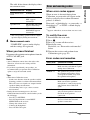
When error codes appear
When an error is detected during Auto
Calibration, an error code will appear on the
display cyclically after each measurement
process as follows:
Error code t blank display t (error code t
blank display)a) t PUSH t blank display
t ENTER
a)
Appears when there are more than one error code.
To rectify the error
1 Record down the error code.
2 Press .
3 Press ?/1 to turn off the receiver.
4 Rectify the error.
For details, see “Error codes and remedies”
below.
5 Turn on the receiver and perform Auto
Calibration again (page 30).
Error codes and remedies
Error code
Cause and remedy
ERROR 10
The environment is too noisy.
Make sure the environment is quiet
during Auto Calibration.
ERROR 11
The speakers are placed too near
the optimizer microphone. Place
your speakers further away from
the optimizer microphone.
ERROR 12
None of the speakers are detected.
Make sure that the optimizer
microphone is connected properly
and perform Auto Calibration
again.
ERROR 20
Front speakers are not detected or
only one front speaker is detected.
Check the front speakers
connection.
ERROR 21
Only one surround speaker is
detected. Check the surround
speakers connection.
Tips
• When Auto Calibration starts:
– Stand some distance from the speakers and the
listening position to avoid measurement failure.
This is because test signals are output from the
speakers during measurement.
– Avoid making noise to get a more accurate
measurement.
• During the measurement process, the Auto
Calibration function will be canceled when you do
the following:
– Press ?/1 or MUTING.
– Press the input buttons or turn INPUT
SELECTOR on the receiver.
– Change the volume level.
– Connect the headphones.
– Press AUTO CAL again.
continued
31US
Getting Started
Measurement for Display
Error and warning codes
When warning codes appear
During Auto Calibration, the warning code
provides information on the measurement
result. The warning code will appear on the
display cyclically as follows:
Warning code t blank display t (warning
code t blank display)b) t PUSH t blank
display t ENTER
b) Appears
when there are more than one warning
Warning
code
Explanation and solution
WARN. 64
The surround right speaker level is
out of range. Reposition your
surround right speaker.d)
WARN. 70
The front speaker distance is out of
range. Reposition your front
speakers.c)
WARN. 72
The center speaker distance is out of
range. Reposition your center
speaker.d)
WARN. 73
The surround left speaker distance is
out of range. Reposition your
surround left speaker.d)
WARN. 74
The surround right speaker distance
is out of range. Reposition your
surround right speaker.d)
code.
You can choose to ignore the warning code as
the Auto Calibration function will
automatically adjust the settings. You can also
change the settings manually.
To change the settings
manually
1 Record down the warning code.
2 Press .
3 Press ?/1 to turn off the receiver.
4 Follow the solution provided in the
“Warning codes and solutions” below.
5 Turn on the receiver and perform Auto
Calibration again (page 30).
Warning codes and solutions
Warning
code
Explanation and solution
WARN. 40
The environment is noisy. Make sure
the environment is quiet during Auto
Calibration.
WARN. 50
The center speaker is not connected.
Be sure to connect the center speaker.
WARN. 51
The surround speakers are not
connected. Be sure to connect the
surround speakers.
WARN. 60
The front speaker balance is out of
range. Reposition your front
speakers.c)
WARN. 62
The center speaker level is out of
range. Reposition your center
speaker.d)
WARN. 63
The surround left speaker level is out
of range. Reposition your surround
left speaker.d)
32US
c) For
details, refer “Front speaker distance”
(page 45).
d)
For details, refer “Tip” on page 46.
5
The test tone is output from each speaker
in sequence as follows:
Front left t Center t Front right t
Surround right t Surround left t
Sub woofer
(TEST TONE)
You can adjust the speaker levels and balance
while listening to the test tone from your
listening position.
6
Tip
The receiver employs a test tone with a frequency
centered at 800 Hz.
TV ?/1
TV INPUT
SLEEP DMPORT AV ?/1
For details, see “Adjusting the level
(LEVEL menu)” (page 41).
?/1
Tips
SYSTEM STANDBY
VIDEO 1 VIDEO 2
BD
SAT
TV
2CH
A.F.D.
MOVIE
1
2
3
4
5
6
DVD
SA-CD/CD TUNER
• To adjust the level of all speakers at the same
time, press MASTER VOL +/–. You can also
use MASTER VOLUME on the receiver.
• The adjusted value are shown on the display
during adjustment.
Input
buttons
MUSIC
THEATER
7
DVD/BD
MENU
7
8
>10
0/10
9
AUTO CAL
D.TUNING
D.SKIP
MEMORY AMP MENU
ENTER
CLEAR
DISPLAY
1
MASTER
VOL +/–
O
RETURN/EXIT
MENU/HOME
– CATEGORY +
TV CH –
TV CH +
PRESET – REPLAY ADVANCE PRESET +
<
<
.
>
1
Repeat steps 1 to 5 to select
“T. TONE N”.
You can also press any input buttons.
The test tone turns off.
TOOLS/
OPTIONS MUTING
TV VOL
MASTER VOL
2-5
Adjust the speaker levels and
balance using the LEVEL menu
so that the level of the test tone
sounds the same from each
speaker.
When a test tone is not output
from the speakers
• The speaker cords may not be connected
securely.
• The speaker cords may have the short-circuit
problem.
Press AMP MENU.
“1-LEVEL” appears on the display.
2
Press
menu.
3
Press V/v repeatedly to select
“T. TONE”.
4
Press
or b to enter the
parameter.
or b to enter the
33US
Getting Started
8: Adjusting the speaker
levels and balance
Press V/v repeatedly to select
“T. TONE Y”.
Selected input Components that can
[Display]
be played back
Playback
DMPORT
[DMPORT]
DIGITAL MEDIA PORT
adapter connected to the
DMPORT jack
VIDEO 1
[VIDEO 1]
DVD recorder, VCR, etc.,
connected to the VIDEO 1
jack
VIDEO 2
[VIDEO 2/
PORTABLE
AV]*
Camcorder, video game,
etc., connected to the
VIDEO 2 IN/PORTABLE
AV IN jack
BD
[BD]
Blu-ray disc player, etc.,
connected to the BD jack
DVD
[DVD]
DVD player, etc.,
connected to the DVD jack
SAT
[SAT]
Satellite tuner, set-top box,
etc., connected to the SAT
jack
MUTING
TV
[TV]
TV, etc., connected to the
TV jack
3
SA-CD/CD
[SA-CD/CD/
CD-R]*
Super Audio CD player,
CD player, etc., connected
to the SA-CD/CD/CD-R
jack
Selecting a component
TV ?/1
TV INPUT
SLEEP DMPORT AV ?/1
?/1
SYSTEM STANDBY
VIDEO 1 VIDEO 2
BD
SAT
TV
2CH
A.F.D.
MOVIE
1
2
3
4
5
6
7
8
9
DVD
SA-CD/CD TUNER
1
MUSIC
THEATER
DVD/BD
MENU
>10
0/10
AUTO CAL
D.TUNING
D.SKIP
MEMORY AMP MENU
ENTER
CLEAR
DISPLAY
TOOLS/
OPTIONS MUTING
TV VOL
MASTER VOL
O
RETURN/EXIT
MENU/HOME
– CATEGORY +
TV CH –
TV CH +
PRESET – REPLAY ADVANCE PRESET +
<
<
.
>
1
TUNER
Built-in radio tuner
[FM or AM band]
TUNER
[XM RADIO]
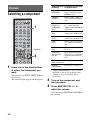
Press one of the input buttons
to select the component you
want.
You can also use INPUT SELECTOR on
the receiver.
The selected input appears on the display.
For details, see page 56.
* VIDEO 2/PORTABLE AV” and “SA-CD/
CD/CD-R” scroll across the display, then
“VIDEO 2” and “SA-CD/CD” appear
respectively.
2
Turn on the component and
start playback.
3
Press MASTER VOL +/– to
adjust the volume.
You can also use MASTER VOLUME on
the receiver.
34US
To activate the muting function
Playback
Press MUTING.
The muting function will be canceled when
you do the following.
• Press MUTING again.
• Increase the volume.
• Turn off the receiver.
To avoid damaging your
speakers
Before you turn off the receiver, be sure to turn
down the volume level.
To listen to the sub woofer
Be sure to use the controls on the rear panel of
the sub woofer for this operation.
1 Press POWER.
The POWER indicator on the front panel of
the sub woofer lights up.
2 Turn LEVEL to adjust the volume.
Set the volume level to suit your preference
according to the selected input as slight
adjustments may enhance the sound.
Note
Do not set the volume of the sub woofer to
maximum as extraneous noise may be heard.
35US
Listening/Watching a component
Listening to a Super Audio CD/CD
TV ?/1
TV INPUT
SLEEP DMPORT AV ?/1
?/1
SYSTEM STANDBY
VIDEO 1 VIDEO 2
BD
SAT
TV
2CH
A.F.D.
MOVIE
1
2
3
DVD
SA-CD/CD TUNER
MUSIC
THEATER
2
3
?/1
MASTER VOLUME
DVD/BD
MENU
4
5
6
7
8
9
>10
0/10
AUTO CAL
D.TUNING
DISPLAY
D.SKIP
MEMORY AMP MENU
ENTER
TOOLS/
OPTIONS MUTING
TV VOL
MASTER VOL
O
RETURN/EXIT
MENU/HOME
– CATEGORY +
TV CH –
TV CH +
PRESET – REPLAY ADVANCE PRESET +
<
<
.
>
TUNING –
AUTO CAL MIC
5
MEMORY/
ENTER
TUNING
MODE
TUNING
2CH
A.F.D.
MOVIE
MUSIC
AUTO CAL
MUTING
VIDEO 2 IN/PORTABLE AV IN
3
PHONES
VIDEO
L AUDIO R
CATEGORY MODE TUNING +
m
H
M
FM MODE
TV
X
x
Notes
• The operation is described for a
Sony Super Audio CD player.
• Refer to the operating
instructions supplied with the
Super Audio CD player or CD
player.
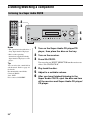
1
Turn on the Super Audio CD player/CD
player, then place the disc on the tray.
2
3
Turn on the receiver.
You can select the sound field to
suit the music. Refer to page 49
for details.
Recommended sound fields:
Classical: HALL
Jazz: JAZZ
Live concert: CONCERT
Press SA-CD/CD.
You can also use INPUT SELECTOR on the receiver to
select “SA-CD/CD/CD-R”.
Tip
36US
5
INPUT SELECTOR
SPEAKERS
(ON/OFF)
CLEAR
DISPLAY
INPUT MODE
4
5
6
Play back the disc.
Adjust to a suitable volume.
After you have finished listening to the
Super Audio CD/CD, eject the disc and turn
off the receiver and Super Audio CD player/
CD player.
Watching a DVD/Blu-ray disc
TV ?/1
TV INPUT
SLEEP DMPORT AV ?/1
?/1
SYSTEM STANDBY
VIDEO 1 VIDEO 2
BD
TV
SA-CD/CD TUNER
2CH
A.F.D.
MOVIE
1
2
3
4
5
6
7
8
9
MUSIC
THEATER
2
3
?/1
MASTER VOLUME
DVD/BD
MENU
>10
0/10
AUTO CAL
D.TUNING
DISPLAY
D.SKIP
MEMORY AMP MENU
ENTER
TOOLS/
OPTIONS MUTING
TV VOL
MASTER VOL
O
RETURN/EXIT
MENU/HOME
– CATEGORY +
TV CH –
TV CH +
PRESET – REPLAY ADVANCE PRESET +
<
<
.
>
TUNING –
6
INPUT SELECTOR
SPEAKERS
(ON/OFF)
CLEAR
DISPLAY
INPUT MODE
6
AUTO CAL MIC
MEMORY/
ENTER
TUNING
MODE
TUNING
2CH
A.F.D.
MOVIE
MUSIC
VIDEO 2 IN/PORTABLE AV IN
VIDEO
AUTO CAL
MUTING
3
PHONES
L AUDIO R
CATEGORY MODE TUNING +
m
H
M
FM MODE
TV
X
x
Notes
• Refer to the operating
instructions supplied with the
TV and DVD player/Blu-ray
disc player.
• Check the following if you
cannot listen to multi channel
sound.
– Be sure this receiver is
connected to the DVD player/
Blu-ray disc player via a
digital connection.
– Be sure the digital audio
output of the DVD player/
Blu-ray disc player is set up
properly.
Tips
• Select the sound format of the
disc to be played, if necessary.
• You can select the sound field to
suit the movie/music. Refer to
page 49 for details.
Recommended sound fields:
Movie: C.ST.EX
Music: CONCERT
1
Turn on the TV and DVD player/Blu-ray disc
player.
2
3
Turn on the receiver.
Press DVD to watch a DVD or press BD to
watch a Blu-ray disc.
You can also use INPUT SELECTOR on the receiver to
select “DVD” or “BD”.
4
Switch the input of the TV so that an image
of the DVD/Blu-ray disc is displayed.
5
6
7
Play back the disc.
Adjust to a suitable volume.
After you have finished watching the DVD/
Blu-ray disc, eject the disc and turn off the
receiver, TV and DVD player/Blu-ray disc
player.
37US
Playback
SAT
DVD
To return to the previous
display
Amplifier Operations
Press B.
Navigating through
menus
To exit the menu
Press AMP MENU.
By using the amplifier menus, you can make
various adjustments to customize the receiver.
THEATER
1
2
3
4
5
6
7
8
9
DVD/BD
MENU
>10
0/10
AUTO CAL
D.TUNING
D.SKIP
MEMORY AMP MENU
ENTER
CLEAR
DISPLAY
1
TOOLS/
OPTIONS MUTING
TV VOL
MASTER VOL
2-6
O
RETURN/EXIT
MENU/HOME
– CATEGORY +
TV CH –
TV CH +
PRESET – REPLAY ADVANCE PRESET +
<
<
.
>
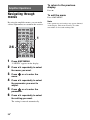
1
Press AMP MENU.
“1-LEVEL” appears on the display.
2
Press V/v repeatedly to select
the menu you want.
3
Press
menu.
4
Press V/v repeatedly to select
the parameter you want to
adjust.
5
Press
or b to enter the
parameter.
6
Press V/v repeatedly to select
the setting you want.
or b to enter the
The setting is entered automatically.
38US
Note
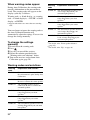
Some parameters and settings may appear dimmed
on the display. This means that they are either
unavailable or fixed and unchangeable.
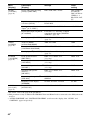
Overview of the menus
The following options are available in each
menu. For details on navigating through
menus, see page 38.
Parameters
[Display]
LEVEL
[1-LEVEL]
(page 41)
Test tonea) [T. TONE]
a)
Settings
Initial
setting
T. TONE N, T. TONE Y
T. TONE N
Front speaker balance
[FRT BAL]
BAL. L +1 to BAL. L +8,
BALANCE
BALANCE, BAL. R +1 to BAL. R +8
Center speaker level
[CNT LVL]
CNT –10 dB to CNT +10 dB
(1 dB step)
CNT 0 dB
Surround left speaker level
[SL LVL]
SUR L –10 dB to SUR L +10 dB
(1 dB step)
SUR L 0 dB
Surround right speaker level
[SR LVL]
SUR R –10 dB to SUR R +10 dB
(1 dB step)
SUR R 0 dB
Sub woofer level
[SW LVL]
SW –10 dB to SW +10 dB
(1 dB step)
SW 0 dB
Dynamic range compressora)
[D. RANGE]
COMP. OFF, COMP. STD,
COMP. MAX
COMP. OFF
TONE
[2-TONE]
(page 42)
Front speaker bass level
[BASS LVL]
BASS –6 dB to BASS +6 dB
(1 dB step)
BASS 0 dB
Front speaker treble level
[TRE LVL]
TRE –6 dB to TRE +6 dB
(1 dB step)
TRE –4 dB
SUR
[3-SUR]
(page 42)
Sound field selectiona)
[S.F. SELCT]
For details, see “Enjoying Surround
Sound” (page 48).
A.F.D. AUTO
Effect levela) [EFFECT]
EFCT. MIN, EFCT. STD,
EFCT. MAX
EFCT. STD
TUNER
[4-TUNER]
(page 43)
FM station receiving modea)
[FM MODE]
FM AUTO, FM MONO
FM AUTO
Naming preset stationsa)
[NAME IN]
For details, see “Naming preset
stations” (page 55).
XM Antenna Aimingb)
[XM ANT]
For details, see “Aiming the XM
Antenna” (page 57).
continued
39US
Amplifier Operations
Menu
[Display]
Menu
[Display]
Parameters
[Display]
Settings
Initial
setting
AUDIO
[5-AUDIO]
(page 43)
Digital audio input decoding
prioritya) [DEC. PRI.]
DEC. PCM, DEC. AUTO
DEC. PCM for
SA-CD/CD;
DEC. AUTO for
VIDEO 1, 2,
BD, DVD, SAT,
TV
Digital broadcast language
selectiona) [DUAL]
DUAL M/S, DUAL M, DUAL S,
DUAL M+S
DUAL M
Synchronizes audio with video
outputa) [A.V. SYNC.]
A.V.SYNC. N, A.V.SYNC. Y
A.V.SYNC. N
Digital audio input assignmenta) For details, see “Listening to digital
[D. ASSIGN]
sound from other inputs (DIGITAL
ASSIGN)” (page 70).
VIDEO
[6-VIDEO]
(page 44)
SYSTEM
[7-SYSTEM]
(page 45)
A. CAL
[8-A. CAL]
(page 47)
a) For
Naming inputsa) [NAME IN]
For details, see “Naming inputs”
(page 73).
Audio for HDMIa)c)
[AUDIO FOR HDMI]
AMP, TV+AMP
AMP
Control for HDMIa)c)
[CONTROL FOR HDMI]
CTRL OFF, CTRL ON
CTRL OFF
Naming inputsa) [NAME IN]
For details, see “Naming inputs”
(page 73).
Front speaker distancea)
[FRT DIST.]
DIST. 3 ft. to DIST. 23 ft.
(1 ft. step)
DIST. 10 ft.
Center speaker distancea)
[CNT DIST.]
DIST. 3 ft. to DIST. 23 ft.
(1 ft. step)
DIST. 10 ft.
Surround left speaker distancea) DIST. 3 ft. to DIST. 23 ft.
[SL DIST.]
(1 ft. step)
DIST. 10 ft.
Surround right speaker
distancea)
[SR DIST.]
DIST. 3 ft. to DIST. 23 ft.
(1 ft. step)
DIST. 10 ft.
Surround speaker positiona)
[SUR POS.]
BEHD/HI, BEHD/LO, SIDE/HI,
SIDE/LO
SIDE/LO
Brightness of the displaya)
[DIMMER]
0% dim, 40% dim, 70% dim
0% dim
Auto Calibrationa)
[AUTO CAL]
A.CAL NO, A.CAL YES
A.CAL NO
details, refer to the page in the parentheses.
This parameter is only available if the XM Mini-Tuner and Home Dock is connected to the XM jack on the
receiver.
c) “AUDIO FOR HDMI” and “CONTROL FOR HDMI” scroll across the display, then “AUDIO” and
“CONTROL” appear respectively.
b)
40US
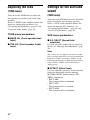
Adjusting the level
(LEVEL menu)
LEVEL menu parameters
Lets you compress the dynamic range of the
sound track. This may be useful when you
want to watch movies at low volumes late at
night. Dynamic range compression is possible
with Dolby Digital sources only.
• COMP. OFF
The dynamic range is not compressed.
• COMP. STD
The dynamic range is compressed as
intended by the recording engineer.
• COMP. MAX
The dynamic range is compressed
dramatically.
x T. TONE (Test tone)
Tip
Lets you adjust the speaker levels and balance
while listening to the test tone from your
listening position. For details, see
“8: Adjusting the speaker levels and balance
(TEST TONE)” (page 33).
Dynamic range compressor lets you compress the
dynamic range of the soundtrack based on the
dynamic range information included in the Dolby
Digital signal.
“COMP. STD” is the standard setting, but it only
enacts light compression. Therefore, we recommend
using the “COMP. MAX” setting. This greatly
compresses the dynamic range and lets you view
movies late at night at low volumes. Unlike analog
limiters, the levels are predetermined and provide a
very natural compression.
x FRT BAL (Front speaker
balance)
Lets you adjust the balance between front left
and right speakers.
x CNT LVL (Center speaker level)
x SL LVL (Surround left speaker
level)
x SR LVL (Surround right speaker
level)
x SW LVL (Sub woofer level)
41US
Amplifier Operations
You can use the LEVEL menu to adjust the
balance and level of each speaker. These
settings are applied to all sound fields.
Select “1-LEVEL” in the amplifier menus. For
details on adjusting the parameters, see
“Navigating through menus” (page 38) and
“Overview of the menus” (page 39).
x D. RANGE (Dynamic range
compressor)
Adjusting the tone
(TONE menu)
You can use the TONE menu to adjust the
tonal quality (bass/treble level) of the front
speakers.
Select “2-TONE” in the amplifier menus. For
details on adjusting the parameters, see
“Navigating through menus” (page 38) and
“Overview of the menus” (page 39).
TONE menu parameters
x BASS LVL (Front speaker bass
level)
x TRE LVL (Front speaker treble
level)
Settings for the surround
sound
(SUR menu)
You can use the SUR menu to select the sound
field you want for your listening pleasure.
Select “3-SUR” in the amplifier menus. For
details on adjusting the parameters, see
“Navigating through menus” (page 38) and
“Overview of the menus” (page 39).
SUR menu parameters
x S.F. SELCT (Sound field
selection)
Lets you select the sound field you want. For
details, see “Enjoying Surround Sound” (page
48).
Note
The receiver lets you apply the last selected sound
field to an input whenever it is selected (Sound Field
Link). For example, if you select “HALL” for the
DVD input, then change to a different input and then
return to DVD, “HALL” will automatically be
applied again.
x EFFECT (Effect level)
Lets you adjust the “presence” of the surround
effect for sound fields selected with the
MOVIE or MUSIC buttons and for “HP
THEA” sound field.
• EFCT. MIN
The surround effect is minimum.
• EFCT. STD
The surround effect is standard.
• EFCT. MAX
The surround effect is maximum.
42US
Settings for the audio
(TUNER menu)
(AUDIO menu)
You can use the TUNER menu to set the FM
station receiving mode and to name preset
stations.
Select “4-TUNER” in the amplifier menus.
For details on adjusting the parameters, see
“Navigating through menus” (page 38) and
“Overview of the menus” (page 39).
You can use the AUDIO menu to make
settings for the audio to suit your preference.
Select “5-AUDIO” in the amplifier menus. For
details on adjusting the parameters, see
“Navigating through menus” (page 38) and
“Overview of the menus” (page 39).
AUDIO menu parameters
TUNER menu parameters
x FM MODE (FM station receiving
mode)
• FM AUTO
This receiver will decode the signal as stereo
signal when the radio station is broadcast in
stereo.
• FM MONO
This receiver will decode the signal as mono
signal regardless of the broadcast signal.
x NAME IN (Naming preset
stations)
Lets you set the name of preset stations. For
details, see “Naming preset stations” (page
55).
x XM ANT (XM Antenna Aiming)
This parameter helps you to aim the XM
antenna for optimal signal reception. For
details, see “Aiming the XM Antenna”
(page 57).
x DEC. PRI. (Digital audio input
decoding priority)
Lets you specify the input mode for the digital
signal input to the DIGITAL IN and HDMI IN
jacks.
• DEC. PCM
When signals from the DIGITAL IN jack are
selected, PCM signals are given priority (to
prevent interruption when playback starts).
However, when other signals are input, there
may be no sound, depending on the format.
In this case, set this item to “DEC. AUTO”.
When signals from the HDMI IN jack are
selected, only PCM signals are output from
the connected player. When signals in any
other format are received, set this item to
“DEC. AUTO”.
• DEC. AUTO
Automatically switches the input mode
between DTS, Dolby Digital, or PCM.
Note
When set to “DEC. AUTO” and the sound from the
digital audio jacks (for a CD, etc.) is interrupted
when playback starts, set to “DEC. PCM”.
continued
43US
Amplifier Operations
Settings for the tuner
x DUAL (Digital broadcast
language selection)
Lets you select the language you want to listen
to during digital broadcast. This feature only
functions for Dolby Digital sources.
• DUAL M/S (Main/Sub)
Sound of the main language will be output
through the front left speaker and sound of
the sub language will be output through the
front right speaker simultaneously.
• DUAL M (Main)
Sound of the main language will be output.
• DUAL S (Sub)
Sound of the sub language will be output.
• DUAL M+S (Main + Sub)
Mixed sound of both the main and sub
languages will be output.
x A.V. SYNC. (Synchronizes audio
with video output)
• A.V.SYNC. N (No) (Delay time: 0 ms)
The audio output is not delayed.
• A.V.SYNC. Y (Yes) (Delay time: 60 ms)
The audio output is delayed so that the time
gap between the audio output and visual
display is minimized.
Notes
• This parameter is useful when you use a large LCD
or plasma monitor or a projector.
• This parameter is valid only when you use a sound
field selected with the 2CH or A.F.D. buttons.
• This parameter is not valid when
– signals with a sampling frequency of more than
48 kHz are input.
– multi channel Linear PCM signals are received
via an HDMI jack.
x D. ASSIGN (Digital audio input
assignment)
Lets you assign the digital audio input to other
input source. For details, see “Listening to
digital sound from other inputs (DIGITAL
ASSIGN)” (page 70).
x NAME IN (Naming inputs)
Lets you set the name of inputs. For details,
see “Naming inputs” (page 73).
44US
Settings for the video
(VIDEO menu)
You can use the VIDEO menu to make various
adjustments for HDMI and to name inputs.
Select “6-VIDEO” in the amplifier menus. For
details on adjusting the parameters, see
“Navigating through menus” (page 38) and
“Overview of the menus” (page 39).
VIDEO menu parameters
x AUDIO FOR HDMI (Audio for
HDMI)
Lets you set the audio output for HDMI from
the playback component connected to the
receiver via an HDMI connection.
• AMP
The HDMI audio signals from the playback
component is only output to speakers
connected to the receiver. Multi-channel
sound can be played back as it is.
Note
Audio signals are not output from the TV’s
speakers when “AUDIO FOR HDMI” is set to
“AMP”.
• TV+AMP
The sound is output from TV’s speaker and
the speakers connected to the receiver.
Notes
• The sound quality of the playback component
depends on the TV’s sound quality, such as the
number of channels, and the sampling
frequency, etc. When the TV has stereo
speakers, the sound output from the receiver is
also stereo as that of the TV, even if you play
back multi-channel source.
• When you connect the receiver to a video
component (projector, etc.), sound may not be
output from the receiver. In this case, select
“AMP”.
x CONTROL FOR HDMI (Control
for HDMI)
Lets you turn the Control for HDMI function
on or off. For details, see “Control for HDMI”
(page 64).
x NAME IN (Naming inputs)
Lets you set the name of inputs. For details,
see “Naming inputs” (page 73).
Settings for the system
(SYSTEM menu)
SYSTEM menu parameters
x FRT DIST. (Front speaker
distance)
Lets you set the distance from your listening
position to the front speaker (A). If both front
speakers are not placed an equal distance from
your listening position, set the distance to the
closest speaker.
A
30˚
100˚-120˚
30˚
A
100˚-120˚
x CNT DIST. (Center speaker
distance)
Lets you set the distance from your listening
position to the center speaker.
x SL DIST. (Surround left speaker
distance)
x SR DIST. (Surround right
speaker distance)
Lets you set the distance from your listening
position to the surround speakers.
continued
45US
Amplifier Operations
You can use the SYSTEM menu to set the
distance of the speakers connected to this
system.
Select “7-SYSTEM” in the amplifier menus.
For details on adjusting the parameters, see
“Navigating through menus” (page 38) and
“Overview of the menus” (page 39).
Tip
The distance between the center speaker and the
listening position B cannot be more than 5 feet
closer than the one between the listening position
and the front speaker A. Place the speakers so that
the difference in the length of B in the following
diagram is no more than 5 feet closer than the length
of A.
Example: Adjust the distance B to 15 feet or more
when the distance A is 20 feet.
Also, the distance between the surround speakers
and the listening position C cannot be more than
15 feet closer than the distance between the listening
position and the front speakers A. Place the
speakers so that the difference in the length of C in
the following diagram is no more than 15 feet closer
than the length of A.
Example: Adjust the distance C to 5 feet or more
when the distance A is 20 feet.
This is important because incorrect speaker
placement is not conductive to the enjoyment of
surround sound. Please note that placing the
speakers closer than the required will cause a delay
in the output of the sound from that speaker. In other
words, the speaker will sound like it is farther away.
Adjusting these parameter while listening to the
sound often results in much better surround sound.
Give it try!
x SUR POS.
(Surround speaker position)
Lets you specify the location of your surround
speakers for proper implementation of the
surround effects in the Cinema Studio EX
modes (page 50).
• BEHD/HI
Select if the location of your surround
speakers corresponds to sections B and D.
• BEHD/LO
Select if the location of your surround
speakers corresponds to sections B and C.
• SIDE/HI
Select if the location of your surround
speakers corresponds to sections A and D.
• SIDE/LO
Select if the location of your surround
speakers corresponds to sections A and C.
46US
Tip
Calibrating the
appropriate settings
automatically
(A. CAL menu)
For details on Auto Calibration, see “7:
Calibrating the appropriate settings
automatically (AUTO CALIBRATION)”
(page 29).
Amplifier Operations
Surround speaker position is designed specifically
for implementation of the Cinema Studio EX modes.
For other sound fields, speaker position is not so
critical.
Those sound fields were designed under the premise
that the surround speakers would be located behind
the listening position, but presentation remains
fairly consistent even with the surround speakers
positioned at a rather wide angle. However, if the
speakers are pointing toward the listener from the
immediate left and right of the listening position, the
surround effects become unclear unless set to
“SIDE/LO” or “SIDE/HI”.
Nevertheless, each listening environment has many
variables, such as wall reflections, and you may
obtain better results using “BEHD/HI” if your
speakers are located high above the listening
position, even if they are located to the immediate
left and right.
Therefore, although it may result in a setting
contrary to the above explanation, we recommend
that you playback multi channel surround encoded
software and select the setting that provides a good
sense of spaciousness and that best succeeds in
forming a cohesive space between the surround
sound from the surround speakers and the sound of
the front speakers. If you are not sure which sounds
best, select “BEHD/LO” or “BEHD/HI” and then
use the speaker distance parameter and speaker level
adjustments to obtain proper balance.
x DIMMER (Brightness of the
display)
Lets you adjust the brightness in 3 steps.
47US
Enjoying Surround Sound
Enjoying Dolby Digital
and DTS Surround sound
(AUTO FORMAT DIRECT)
The Auto Format Direct (A.F.D.) mode allows
you to listen to higher fidelity sound and select
the decoding mode for listening to a 2 channel
stereo sound as multi channel sound.
SAT
TV
SA-CD/CD TUNER
2CH
A.F.D.
MOVIE
1
2
3
A.F.D.
MUSIC
THEATER
Press A.F.D. repeatedly to select
the sound field you want.
For details, see “Types of A.F.D. mode”
below.
Types of A.F.D. mode
A.F.D. mode
[Display]
Multi channel
audio after
decoding
Effect
A.F.D. AUTO
[A.F.D. AUTO]
(Detecting
automatically)
Presents the sound as it was recorded/encoded without
adding any surround effects. However, this receiver will
generate a low frequency signal for output to the sub woofer
when there is no LFE signals.
PRO LOGIC
[DOLBY PL]
4 channel
Performs Dolby Pro Logic decoding. The source recorded
in 2 channel format is decoded into 4.1 channels.
PRO LOGIC II MOVIE
[PLII MV]
5 channel
Performs Dolby Pro Logic II Movie mode decoding. This
setting is ideal for movies encoded in Dolby Surround. In
addition, this mode can reproduce sound in 5.1 channel for
watching videos of overdubbed or old movies.
PRO LOGIC II MUSIC
[PLII MS]
5 channel
Performs Dolby Pro Logic II Music mode decoding. This
setting is ideal for normal stereo sources such as CDs.
MULTI STEREO
[MULTI ST.]
(Multi Stereo)
Outputs 2 channel left/right signals from all speakers.
48US
Selecting a preprogrammed sound field
You can take advantage of surround sound
simply by selecting one of the receiver’s preprogrammed sound fields. They bring the
exciting and powerful sound of movie theaters
and concert halls into your home.
2CH
SAT
TV
2CH
A.F.D.
SA-CD/CD TUNER
MOVIE
MUSIC
MUSIC
A.F.D.
1
2
3
4
5
6
DVD/BD
MENU
Enjoying Surround Sound
THEATER
MOVIE
AUTO CAL
Press MOVIE repeatedly to select a
sound field for movies or press
MUSIC repeatedly to select a sound
field for music.
For details, see “Types of sound field
available” (page 50).
continued
49US
Types of sound field available
Sound field
for
Sound field
[Display]
Effect
Movie
CINEMA STUDIO EX A
DCS [C.ST.EX A]
Reproduces the sound characteristics of the Sony Pictures
Entertainment “Cary Grant Theater” cinema production
studio. This is a standard mode, great for watching almost any
type of movie.
CINEMA STUDIO EX B
DCS [C.ST.EX B]
Reproduces the sound characteristics of the Sony Pictures
Entertainment “Kim Novak Theater” cinema production
studio. This mode is ideal for watching science-fiction or
action movies with lots of sound effects.
CINEMA STUDIO EX C
DCS [C.ST.EX C]
Reproduces the sound characteristics of the Sony Pictures
Entertainment scoring stage. This mode is ideal for watching
musicals or films where orchestra music is featured in the
soundtrack.
HALL [HALL]
Reproduces the acoustics of a classical concert hall.
JAZZ CLUB [JAZZ]
Reproduces the acoustics of a jazz club.
LIVE CONCERT
[CONCERT]
Reproduces the acoustics of a 300-seat live house.
Music
STADIUM [STADIUM]
Reproduces the feeling of a large open-air stadium.
SPORTS [SPORTS]
Reproduces the feeling of sports broadcasting.
PORTABLE AUDIO
Reproduces a clear enhanced sound image from your portable
ENHANCER [PORTABLE] audio device. This mode is ideal for MP3 and other
compressed music.
Headphone*
HEADPHONE 2CH
[HP 2CH]
This mode is selected automatically if you use headphones
when 2 channel mode (page 51)/A.F.D. mode (page 48) is
selected. Standard 2 channel stereo sources completely bypass
the sound field processing and multi channel surround formats
are downmixed to 2 channels.
HEADPHONE THEATER
DCS [HP THEA]
This mode is selected automatically if you use headphones
when a sound field for movie/music is selected. It allows you
to experience a theater-like environment while listening
through a pair of headphones.
* You can only select this sound field if the headphones are connected to the receiver.
Notes
Tips
• The effects provided by the virtual speakers may
cause increased noise in the playback signal.
• When listening with sound fields that employ the
virtual speakers, you will not be able to hear any
sound coming directly from the surround speakers.
• This function does not work when
– signals with a sampling frequency of more than
48 kHz are input.
– multi channel Linear PCM signals are received
via an HDMI jack.
• You can identify the encoding format of DVD
software, etc., by looking at the logo on the
package.
• Sound fields with DCS mark use DCS
technology. See “Glossary” (page 77).
50US
To turn off the surround effect
for movie/music
Press 2CH to select “2CH ST.” or press A.F.D.
repeatedly to select “A.F.D. AUTO”.
Using only the front
speakers and sub woofer
(2CH STEREO)
2CH
SAT
TV
2CH
A.F.D.
SA-CD/CD TUNER
MOVIE
2
3
DVD/BD
MENU
4
5
6
AUTO CAL
Press 2CH.
1,2
?/1
MASTER VOLUME
DISPLAY
INPUT MODE
INPUT SELECTOR
SPEAKERS
(ON/OFF)
AUTO CAL MIC
MEMORY/
ENTER
TUNING
MODE
TUNING
2CH
A.F.D.
MOVIE
MUSIC
AUTO CAL
MUTING
VIDEO 2 IN/PORTABLE AV IN
PHONES
VIDEO
L AUDIO R
2
1
Press ?/1 to turn off the
receiver.
2
While holding down 2CH, press
?/1.
MUSIC
THEATER
1
Be sure to use the buttons on the receiver for
this operation.
“S.F. CLR.” appears on the display and
all sound fields are reset to their initial
setting.
51US
Enjoying Surround Sound
In this mode, the receiver outputs the sound
from the front left/right speakers and the sub
woofer.
When multi channel surround formats are
input, the signals are downmixed to 2 channel
with bass frequencies being output from the
sub woofer.
When standard 2 channel stereo sources are
input, the receiver’s bass redirection circuitry
will be activated. The front channel bass
frequencies will be output from the sub
woofer.
Resetting sound fields to
the initial settings
2
Tuner Operations
Listening to FM/AM radio
Press TUNING + or TUNING –.
Press TUNING + to scan from low to
high; press TUNING – to scan from high
to low.
The receiver stops scanning whenever a
station is received.
You can listen to FM and AM broadcasts
through the built-in tuner. Before operation,
make sure you have connected the FM and
AM antennas to the receiver (page 27).
Using the controls on the
receiver
Tip
1 Turn INPUT SELECTOR to select the FM
The tuning scale is:
FM : 100 kHz
AM : 10 kHz*
2 Press TUNING MODE repeatedly to select
or AM band.
“AUTO T.”.
* The AM tuning scale can be changed (page 85).
In case of poor FM stereo
reception
Automatic tuning
VIDEO 1 VIDEO 2
BD
SAT
TV
2CH
A.F.D.
MOVIE
1
2
3
4
5
6
DVD
SA-CD/CD TUNER
1
MUSIC
THEATER
DVD/BD
MENU
7
8
>10
0/10
9
AUTO CAL
D.TUNING
D.SKIP
MEMORY AMP MENU
ENTER
CLEAR
DISPLAY
TOOLS/
OPTIONS MUTING
TV VOL
MASTER VOL
O
RETURN/EXIT
MENU/HOME
TV CH –
TV CH +
– CATEGORY +
PRESET – REPLAY ADVANCE PRESET +
<
<
.
>
2
TUNING –
m
CATEGORY MODE TUNING +
H
X
1
52US
M
FM MODE
TV
3 Press TUNING + or TUNING –.
x
FM
MODE
Press TUNER repeatedly to
select the FM or AM band.
If the FM stereo reception is poor and “ST”
flashes on the display, select monaural audio
so that the sound will be less distorted.
Press FM MODE repeatedly until the
“MONO” indicator lights up on the display.
To return to stereo mode, press FM MODE
repeatedly until the “MONO” indicator on the
display lights off.
Direct tuning
Presetting radio stations
Enter the frequency of a station directly by
using the numeric buttons.
VIDEO 1 VIDEO 2
BD
SAT
TV
2CH
A.F.D.
MOVIE
1
2
3
4
5
6
7
8
9
DVD
SA-CD/CD TUNER
1
MUSIC
You can preset up to 30 FM stations and 30
AM stations. Then you can easily tune in the
stations you often listen to.
Presetting radio stations
THEATER
3
>10
0/10
AUTO CAL
D.TUNING
D.SKIP
MEMORY AMP MENU
ENTER
CLEAR
SAT
TV
2
2CH
A.F.D.
MOVIE
4
1
2
3
4
5
6
7
8
9
4
Press TUNER repeatedly to
select the FM or AM band.
0/10
D.SKIP
MEMORY AMP MENU
ENTER
TOOLS/
OPTIONS MUTING
If you cannot tune in a station
Make sure you have entered the right
frequency. If not, repeat steps 2 to 4. If you
still cannot tune in a station, the frequency is
not used in your area.
3,5
TV VOL
MASTER VOL
O
RETURN/EXIT
MENU/HOME
TV CH –
TV CH +
– CATEGORY +
PRESET – REPLAY ADVANCE PRESET +
<
<
.
>
TUNING –
m
1
If you have tuned in an AM station, adjust the
direction of the AM loop antenna for optimum
reception.
You can also use MEMORY/ENTER on
the receiver.
AUTO CAL
D.TUNING
CLEAR
DISPLAY
Press the numeric buttons to
enter the frequency.
Press ENTER.
1
MUSIC
DVD/BD
MENU
>10
Example 1: FM 102.50 MHz
Select 1 b 0 b 2 b 5 b 0
Example 2: AM 1,350 kHz
Select 1 b 3 b 5 b 0
4
SA-CD/CD TUNER
Press D.TUNING.
Tip
DVD
THEATER
You can also use INPUT SELECTOR on
the receiver.
2
3
BD
PRESET
+/–
CATEGORY MODE TUNING +
H
M
Press TUNER repeatedly to
select the FM or AM band.
You can also use INPUT SELECTOR on
the receiver.
2
Tune in the station that you
want to preset using Automatic
Tuning (page 52) or Direct
Tuning (page 53).
In case of poor FM stereo reception,
switch the FM reception mode (page 52).
continued
53US
Tuner Operations
1
VIDEO 1 VIDEO 2
DVD/BD
MENU
3
Press MEMORY.
You can also use MEMORY/ENTER on
the receiver.
“MEMORY” lights up for a few seconds.
Perform steps 4 and 5 before
“MEMORY” goes out.
4
Press the numeric buttons to
select a preset number.
You can also press PRESET + or
PRESET – to select a preset number.
If “MEMORY” goes out before you
select the preset number, start again from
step 3.
5
Tuning to preset stations
VIDEO 1 VIDEO 2
TV
2CH
A.F.D.
MOVIE
1
2
3
4
5
6
1
MUSIC
DVD/BD
MENU
Numeric
buttons
7
8
>10
0/10
9
AUTO CAL
D.TUNING
D.SKIP
MEMORY AMP MENU
ENTER
CLEAR
DISPLAY
TOOLS/
OPTIONS MUTING
ENTER
TV VOL
MASTER VOL
Press ENTER.
Repeat steps 1 to 5 to preset
another station.
DVD
SA-CD/CD TUNER
THEATER
You can also use MEMORY/ENTER on
the receiver.
The station is stored as the selected preset
number.
If “MEMORY” goes out before you press
ENTER, start again from step 3.
6
BD
SAT
O
RETURN/EXIT
MENU/HOME
TV CH –
TV CH +
– CATEGORY +
PRESET – REPLAY ADVANCE PRESET +
<
<
.
>
TUNING –
m
2
CATEGORY MODE TUNING +
H
M
1
Press TUNER repeatedly to
select the FM or AM band.
2
Press PRESET + or PRESET –
repeatedly to select the preset
station you want.
Each time you press the button, you can
select a preset station as follows:
01 y 02 y ... y 30 y 01 y ...
You can also press the numeric buttons to
select the preset station you want. Then,
press ENTER to enter the selection.
Using the controls on the
receiver
1 Turn INPUT SELECTOR to select the FM
or AM band.
2 Press TUNING MODE repeatedly to select
“PRESET T.”.
3 Press TUNING + or TUNING – repeatedly
to select the preset station you want.
54US
To create an index name
Naming preset stations
VIDEO 1 VIDEO 2
SAT
TV
2CH
A.F.D.
BD
Press V/v to select a character, then press
B/b to move the cursor to the next position.
DVD
SA-CD/CD TUNER
MOVIE
1 Use V/v/B/b to create an index name.
1
MUSIC
Press B/b until the character you want to
change flashes, then press V/v to select the
correct character.
THEATER
1
2
3
4
5
6
7
8
9
DVD/BD
MENU
>10
0/10
Tips
AUTO CAL
D.TUNING
D.SKIP
MEMORY AMP MENU
ENTER
CLEAR
3
TOOLS/
OPTIONS MUTING
DISPLAY
TV VOL
MASTER VOL
4-7
• You can select the character type as follows by
pressing V/v.
Alphabet (upper case) t Numbers t
Symbols
• To enter a blank space, press b without
selecting a character.
2 Press
MENU/HOME
.
The entered name is registered.
Tuner Operations
O
RETURN/EXIT
1
If you made a mistake
Press TUNER repeatedly to
select the FM or AM band.
You can also use INPUT SELECTOR on
the receiver.
2
Tune in the preset station you
want to create an index name
for (page 54).
3
Press AMP MENU.
“1-LEVEL” appears on the display.
4
Press V/v repeatedly to select
“4-TUNER”.
5
Press
menu.
6
Press V/v repeatedly to select
“NAME IN”.
7
Press
or b to enter the
parameter.
or b to enter the
The cursor flashes and you can select a
character. Follow the procedure given in
“To create an index name” below.
55US
Listening to the XM Radio
About XM Radio for U.S. Products
XM is America’s number one satellite radio
company. Broadcasting live daily from studios
in Washington, DC, New York City, Chicago,
the Country Music Hall of Fame in Nashville,
Toronto and Montreal, XM’s 2007 lineup
includes more than 170 digital channels of
choice from coast to coast: commercial-free
music, premier sports, news, talk radio,
comedy, children’s and entertainment
programming; and the most advanced traffic
and weather information. For more
information or to subscribe in the U.S., visit
xmradio.com or call Listener Care at 1-800XMRADIO (1-800-967-2346).
XM Ready® Legal for U.S. Products
XM monthly service subscription sold
separately. XM Mini-Tuner and Home Dock
required (each sold separately) to receive XM
service. It is prohibited to copy, decompile,
disassemble, reverse engineer, hack,
manipulate or otherwise make available any
technology or software incorporated in
receivers compatible with the XM Satellite
Radio System. Installation costs and other fees
and taxes, including a one-time activation fee
may apply. All fees and programming subject
to change. Channels with frequent explicit
language are indicated with an XL.
Channel blocking is available for XM radio
receivers by calling 1-800-XMRADIO
(1-800-967-2346). Subscriptions subject to
Customer Agreement available at
xmradio.com. XM service only available in
the 48 continuous United States. ©2007 XM
Satellite Radio Inc. All rights reserved.
56US
XM Ready® Subscriptions for U.S.
Products
Once you have installed the XM Mini-Tuner
Dock, inserted the XM Mini-Tuner, connected
the XM Dock to your XM Ready® home audio
system, and installed the antenna, you are
ready to subscribe and begin receiving XM
programming. There are three places to find
your eight character XM Radio ID: On the XM
Mini-Tuner, on the XM Mini-Tuner package,
and on XM Channel 0. Record the Radio ID in
the following eight squares for reference.
ssssssss
Note
The XM Radio ID does not use the letters “I”, “O”,
“S” or “F”. Activate your XM Radio service in the
U.S. online at http://activate.xmradio.com or call
1-800-XMRADIO (1-800-967-2346). You will
need a major credit card. XM will send a signal from
the satellites to activate the full channel lineup.
Activation normally takes 10 to 15 minutes, but
during peak busy periods you may need to keep your
XM Ready home audio system on for up to an hour.
When you can access the full lineup on your XM
Ready home audio system you are done.
Connecting the XM Radio
Aiming the XM Antenna
Before operating the system, connect the XM
Mini-Tuner and Home Dock to the XM jack.
You can use “XM ANT” in the TUNER menu
to help you aim the antenna for optimal signal
reception.
XM jack
VIDEO 1 VIDEO 2
TV
SAT IN
ANTENNA
DVD IN
BD
SAT
TV
2CH
A.F.D.
MOVIE
1
2
3
4
5
6
7
8
9
DVD
SA-CD/CD TUNER
BD IN
OPTICAL
1
MUSIC
HDMI
IN
AM
SA
THEATER
XM
DVD/BD
MENU
SAT
IN
OPTICAL
VIDEO
IN
VIDEO
IN
VIDEO
OUT
VIDEO
IN
VIDEO
OUT
DVD
IN
COAXIAL
MONITOR
DIGITAL (ASSIGNABLE)
>10
0/10
OUT
DC5V
0.7A MAX
IN
IN
AUDIO
IN
AUDIO
IN
AUDIO
OUT
AUDIO
IN
AUTO CAL
D.TUNING
D.SKIP
MEMORY AMP MENU
ENTER
CLEAR
AUDIO
OUT
DISPLAY
L
2
TOOLS/
OPTIONS MUTING
DMPORT
SA-CD/CD/CD-R
TV
SAT
DVD
VIDEO 1
SUB WOOFER
TV VOL
MASTER VOL
3-6
Tuner Operations
R
O
RETURN/EXIT
MENU/HOME
– CATEGORY +
TV CH –
TV CH +
PRESET – REPLAY ADVANCE PRESET +
<
<
.
>
Note
To ensure optimal reception of XM’s satellite signal,
move your antenna to various window locations
around your home to see where the best reception
will be received. Most XM customers place the
antenna in a south-facing window with a clear view
to the sky.
1
Press TUNER repeatedly to
select “XM RADIO”.
You can also use INPUT SELECTOR on
the receiver.
2
Press AMP MENU.
“1-LEVEL” appears on the display.
3
Press V/v repeatedly to select
“4-TUNER”.
4
Press
menu.
5
Press V/v repeatedly to select
“XM ANT”.
6
Press
or b to enter the
parameter.
or b to enter the
continued
57US
7
While checking the parameter,
aim your antenna to where the
best reception will be received.
Checking the XM Radio ID
VIDEO 1 VIDEO 2
For details on the parameter, see “Signal
strength” below.
BD
SAT
TV
2CH
A.F.D.
MOVIE
1
2
3
SA-CD/CD TUNER
4
5
6
7
8
9
Signal strength
Signal
strength
DVD
1
MUSIC
THEATER
Signal type
Satellite
DVD/BD
MENU
Terrestrial
Good
S–3
T–3
Marginal
S–2
T–2
Weak
S–1
T–1
None
S–0
T–0
>10
0/10
AUTO CAL
D.TUNING
D.SKIP
MEMORY AMP MENU
ENTER
CLEAR
DISPLAY
TOOLS/
OPTIONS MUTING
TV VOL
MASTER VOL
When you have finished
O
Press AMP MENU.
RETURN/EXIT
MENU/HOME
TV CH –
TV CH +
– CATEGORY +
PRESET – REPLAY ADVANCE PRESET +
<
<
.
>
TUNING –
m
CATEGORY MODE TUNING +
H
X
1
M
2
FM MODE
TV
x
Press TUNER repeatedly to
select “XM RADIO”.
You can also use INPUT SELECTOR on
the receiver.
2
Press TUNING + or TUNING – to
select channel 0.
You can also press TUNING MODE on
the receiver to select “AUTO T.”, and
then press TUNING + or TUNING – to
select channel 0.
58US
3
Check the XM Radio ID on the
display and write it in the space
provided here.
Receiving XM Radio broadcasts
VIDEO 1 VIDEO 2
ID:_____________________________
If you cannot read the characters or
numbers on the display, refer to the
following table.
BD
SAT
TV
2CH
A.F.D.
MOVIE
1
2
3
4
5
6
7
8
9
DVD
SA-CD/CD TUNER
1
MUSIC
THEATER
Display
Description
DVD/BD
MENU
2 (two)
5 (five)
>10
0/10
6 (six)
AUTO CAL
D.TUNING
D.SKIP
MEMORY AMP MENU
ENTER
CLEAR
DISPLAY
8 (eight)
TOOLS/
OPTIONS MUTING
TV VOL
MASTER VOL
0 (zero)
A
O
Tuner Operations
B
RETURN/EXIT
MENU/HOME
TV CH –
TV CH +
– CATEGORY +
PRESET – REPLAY ADVANCE PRESET +
<
<
.
>
D
G
TUNING –
m
H
CATEGORY MODE TUNING +
H
M
2
FM MODE
TV
X
x
K
M
Q
1
Z
Press TUNER repeatedly to
select “XM RADIO”.
You can also use INPUT SELECTOR on
the receiver.
2
Press TUNING + or TUNING – to
select a channel.
You can also press TUNING MODE on
the receiver to select “AUTO T.”, and
then press TUNING + or TUNING – to
select a channel.
59US
Selecting channels from a
category (CATEGORY TUNING)
3
The category is selected and the channel
with the lowest number in the specified
category is selected.
You can select a channel from one category or
all the categories by changing the category
mode.
VIDEO 1 VIDEO 2
BD
SAT
TV
2CH
A.F.D.
MOVIE
1
2
3
4
5
6
7
8
9
4
DVD
SA-CD/CD TUNER
1
THEATER
DVD/BD
MENU
>10
0/10
Notes
• When you select a channel in the “ONE CAT”
mode, the channel you selected may not be the one
in the category you want. This is because one
channel may belong to more than one category.
• If you press CATEGORY + or CATEGORY – in
the “ALL CAT” mode, the first channel of the next
or previous category is selected (CATEGORY
SKIP).
D.SKIP
MEMORY AMP MENU
ENTER
CLEAR
DISPLAY
TOOLS/
OPTIONS MUTING
TV VOL
MASTER VOL
3
O
RETURN/EXIT
MENU/HOME
TV CH –
TV CH +
– CATEGORY +
PRESET – REPLAY ADVANCE PRESET +
<
<
.
>
TUNING –
m
2
1
CATEGORY MODE TUNING +
H
M
4
FM MODE
TV
X
Press TUNING + or TUNING – to
select the channel.
You can also press TUNING MODE on
the receiver to select “AUTO T.”, and
then press TUNING + or TUNING – to
select a channel.
MUSIC
AUTO CAL
D.TUNING
Press CATEGORY + or
CATEGORY – to select the
category you want.
x
Selecting channels by inputting
the channel number directly
(DIRECT TUNING)
VIDEO 1 VIDEO 2
Press TUNER repeatedly to
select “XM RADIO”.
You can also use INPUT SELECTOR on
the receiver.
2
BD
SAT
TV
2CH
A.F.D.
MOVIE
1
2
3
4
5
6
7
8
9
DVD
SA-CD/CD TUNER
1
MUSIC
THEATER
Press CATEGORY MODE
repeatedly to select “ONE
CAT”.
• ALL CAT: You can select a channel from all
the categories. The initial setting is “ALL
CAT”.
• ONE CAT: You can select a channel from one
category. “CAT” lights up on the display
when “ONE CAT” is selected.
3
DVD/BD
MENU
>10
0/10
AUTO CAL
D.TUNING
D.SKIP
MEMORY AMP MENU
ENTER
CLEAR
1
2
4
Press TUNER repeatedly to
select “XM RADIO”.
You can also use INPUT SELECTOR on
the receiver.
2
60US
Press D.TUNING.
3
Press the numeric buttons to
enter the channel number.
4
Press ENTER.
You can also use MEMORY/ENTER on
the receiver.
The selected channel is tune in.
Displaying the XM Radio
information on the front panel
display
Presetting XM Radio
channels
You can select the channels you want directly
by presetting them using the preset numbers.
You can preset up to 30 XM Radio channels.
Presetting channels using the
preset numbers
VIDEO 1 VIDEO 2
DISPLAY
?/1
BD
SAT
TV
2CH
A.F.D.
MOVIE
1
2
3
4
5
6
DVD
SA-CD/CD TUNER
MASTER VOLUME
DISPLAY
INPUT MODE
1
MUSIC
INPUT SELECTOR
SPEAKERS
(ON/OFF)
MEMORY/
ENTER
TUNING
MODE
TUNING
2CH
A.F.D.
MOVIE
MUSIC
AUTO CAL
MUTING
DVD/BD
MENU
VIDEO 2 IN/PORTABLE AV IN
PHONES
VIDEO
4
L AUDIO R
7
Press DISPLAY on the receiver
repeatedly.
0/10
9
D.SKIP
MEMORY AMP MENU
ENTER
CLEAR
DISPLAY
Each time you press DISPLAY while tuning in
the channel, the display changes cyclically as
follows:
Channel name t Channel number t
Category name t Artist name/Feature t
Song/Program title t Signal strength t
Sound field type
TOOLS/
OPTIONS MUTING
3,5
TV VOL
MASTER VOL
O
RETURN/EXIT
MENU/HOME
TV CH –
TV CH +
– CATEGORY +
PRESET – REPLAY ADVANCE PRESET +
<
<
.
>
TUNING –
m
Tip
The preset number is always displayed at the right
end of the display.
8
>10
AUTO CAL
D.TUNING
1
PRESET
+/–
CATEGORY MODE TUNING +
H
M
Press TUNER repeatedly to
select “XM RADIO”.
You can also use INPUT SELECTOR on
the receiver.
2
Tune in the channel you want to
preset.
For details on selecting channels, see
“Listening to the XM Radio” (page 56).
3
Press MEMORY.
You can also use MEMORY/ENTER on
the receiver.
continued
61US
Tuner Operations
THEATER
AUTO CAL MIC
4
Press the numeric buttons to
select a preset number.
You can also press PRESET + or
PRESET – to select a preset number.
Selecting the channel by using
the preset numbers
VIDEO 1 VIDEO 2
Preset number is available from 1 to 30,
and channel 1 is preset for all the preset
numbers when you purchase the receiver.
5
6
SAT
TV
2CH
A.F.D.
MOVIE
1
2
3
4
5
6
7
8
9
DVD
SA-CD/CD TUNER
1
MUSIC
THEATER
Press ENTER.
You can also use MEMORY/ENTER on
the receiver.
BD
Numeric
buttons
DVD/BD
MENU
>10
Repeat steps 2 to 5 to preset
another channel.
0/10
AUTO CAL
D.TUNING
D.SKIP
MEMORY AMP MENU
ENTER
CLEAR
DISPLAY
TOOLS/
OPTIONS MUTING
ENTER
TV VOL
MASTER VOL
O
RETURN/EXIT
MENU/HOME
TV CH –
TV CH +
– CATEGORY +
PRESET – REPLAY ADVANCE PRESET +
<
<
.
>
TUNING –
m
1
2
CATEGORY MODE TUNING +
H
M
Press TUNER repeatedly to
select “XM RADIO”.
You can also use INPUT SELECTOR on
the receiver.
2
Press PRESET + or PRESET –
repeatedly to select the preset
channel you want.
You can also press the numeric buttons to
select the preset channel you want. Then
press ENTER to enter the selection.
You can also press TUNING MODE on
the receiver to select “PRESET T.”, and
then press TUNING + or TUNING –.
You can select preset channels from 1 to
30.
Note
The preset channel information will be updated
depending on the service provided by the XM
Satellite Radio Inc. that you have subscribed to.
62US
XM Radio messages list
Explanation
Remedies
ANTENNA
The XM antenna is not
connected to the XM MiniTuner Dock or the XM
antenna cable is damaged.
Check that the XM antenna is connected to the XM MiniTuner Dock securely and check the antenna cable for
damage. Replace the XM antenna if the cable is damaged.
UNAUTH
You selected an XM channel
that is blocked or cannot be
received with your XM
subscription package.
Consult the latest channel guide at www.xmradio.com for the
current list of channels.
For information on receiving this channel, visit
www.xmradio.com or contact XM Satellite Radio at
1-800-967-2346.
NO SIGNL
The XM Mini-Tuner is not
receiving the XM satellite
signal. The XM antenna’s
view of the satellites may be
blocked or the antenna is not
properly aimed.
Check the antenna for obstructions and reposition the XM
antenna to get a better signal reception.
To optimize the antenna position, see “Aiming the XM
Antenna” (page 57).
Refer to the instructions supplied with the XM Mini-Tuner
and Home Dock for antenna installation information.
LOADING
The XM Mini-Tuner is
acquiring audio or program
information from the XM
satellite signal. This message
can also appear if the signal is
too weak.
This message should disappear when the signal is strong. If
you often see this message, reposition the XM antenna for
better signal reception.
To optimize the antenna position, see “Aiming the XM
Antenna” (page 57).
OFF AIR
You selected an XM channel Check this XM channel later. In the meantime, select another
that is not currently
channel.
broadcasting.
––––
No artist name or song title is —
available for this selection.
CH UNAVL
The selected channel is not
available. The channel may
have been reassigned to a
different channel number. This
message may occur initially
with a new radio or a radio that
has not received XM’s signal
for an extended period.
XM TUNER
The XM Mini-Tuner is not
Confirm the XM Mini-Tuner is fully seated in the dock and
installed or not fully seated in check the XM Mini-Tuner dock cable is connected to the
the XM Mini-Tuner Dock or receiver.
the XM Mini-Tuner dock is
not connected to the receiver.
––
The preset number entered is Enter a number from 1 to 30.
an invalid number.
SIG-GOOD
The signal strength is good.
SIG-MARG
The signal strength is
marginal.
SIG-WEAK
The signal strength is weak.
SIG-NONE
There is no signal.
Consult the latest channel guide at www.xmradio.com for the
current list of channels. For a new radio or a radio that has not
received XM’s signal for an extended period, allow the radio
to receive the XM satellite signal for at least 5 minutes and
then select the channel again.
Adjust the antenna so that the signal is as strong as possible.
For details, see “Aiming the XM Antenna” (page 57).
63US
Tuner Operations
Message
appears
Note
Control for HDMI
Using the Control for
HDMI function for
“BRAVIA” Sync
To use “BRAVIA” Sync, set the Control for
HDMI function as explained below.
By connecting Sony components that are
compatible with the Control for HDMI
function with an HDMI cable (not supplied),
operation is simplified as follows:
• One-Touch Play: When you play back a
component such as a DVD/Blu-ray disc
player, the receiver and the TV are turned on
automatically and switched to the
appropriate HDMI input.
• System Audio Control: While watching TV,
you can select to output the sound from the
TV speaker or the speakers connected to the
receiver.
• System Power Off: When you turn off the
TV, the receiver and connected components
are also turned off simultaneously.
Control for HDMI is a mutual control function
standard used by HDMI CEC (Consumer
Electronics Control) for HDMI (HighDefinition Multimedia Interface).
The Control for HDMI function
does not work in the following
cases:
• When you connect the receiver to a
component which does not correspond with
Sony Control for HDMI function.
• When you connect the receiver and
components using other than HDMI
connection.
We recommend that you connect the receiver
to products featuring “BRAVIA” Sync.
64US
Depending on the connected component, the
Control for HDMI function may not work. Refer to
the operating instructions of the component.
To enjoy TV multi channel
surround sound broadcasting
Connecting a TV and other
components
You can listen to TV multi channel surround
sound broadcasting from the speakers
connected to the receiver.
Connect the OPTICAL output jack of the TV
to the OPTICAL IN jack of the receiver.
Before connecting the cords, be sure to
disconnect the AC power cord.
Satellite tuner/Set-top box
DVD player
Audio/video
signals
Blu-ray disc player
Audio/video
signals
Audio/video
signals
A
TV
A
SAT IN
ANTENNA
DVD IN
A
BD IN
OUT
OPTICAL
HDMI
IN
AM
SAT IN
DVD IN
VIDEO 1 IN MONITOR OUT
XM
Y
SAT
IN
VIDEO
IN
VIDEO
IN
VIDEO
OUT
VIDEO
IN
VIDEO
OUT
DVD
IN
Control for HDMI
OPTICAL
PB/
CB
PR/
CR
COAXIAL
MONITOR
DIGITAL (ASSIGNABLE)
SURROUND
OUT
DC5V
0.7A MAX
IN
IN
AUDIO
IN
AUDIO
IN
AUDIO
OUT
AUDIO
IN
AUDIO
OUT
FRONT
COMPONENT VIDEO
R
L
CENTER
L
L
R
DMPORT
R
SA-CD/CD/CD-R
B
TV
SAT
DVD
VIDEO 1
SPEAKERS
SUB WOOFER
C
A
Audio signals
Audio/video
signals
TV, etc.
A HDMI cable (not supplied)
We recommend that you use a Sony HDMI cable.
B Optical digital cord (not supplied)a)
C Audio cord (not supplied)a)
a) Connect
at least one of the audio cords (B or C).
65US
6 Repeat steps 4 and 5 for other components
Preparing Control for
HDMI function
This receiver supports the Control for HDMIEasy Setting function.
This function is only available for certain
types of TV. When you perform the Control
for HDMI-Easy Setting on the TV, the Control
for HDMI setting on this receiver will
automatically change accordingly.
During the Control for HDMI-Easy Setting
operation, “CONTROL”, “SCAN FOR” and
“HDMI” appear sequentially in the display.
This receiver will automatically change the
input to HDMI input. When the setting is
completed, “COMPLETE” appears on the
display.
For details, refer to the operating instructions
of the TV.
If your TV does not support the Control for
HDMI-Easy Setting function, do the following
procedures. For details on setting the TV and
the connected components, refer to the
operating instructions of the respective
components.
1 Make sure that the receiver is connected to
the TV and components (compatible with
Control for HDMI function) via HDMI
connection.
2 Turn on the receiver, TV and connected
components.
3 Set the respective Control for HDMI
function for the receiver and TV to on.
See “To set Control for HDMI” (page 67).
For details on setting the TV, refer to the
operating instructions of the TV.
4 Select the HDMI input of the receiver and
TV to match the HDMI input of the
connected component, so that the image
from the connected component is displayed.
5 Set the Control for HDMI function for the
connected component to on.
If the Control for HDMI function for the
connected component is already set to on,
you do not need to change the setting.
66US
that you want to use the Control for HDMI
function.
Notes
• If you unplug and reconnect the HDMI cable, be
sure to repeat steps 1 to 6 above.
• You cannot perform One-Touch Play and System
Audio Control during the Control for HDMI-Easy
Setting operation.
• Before you do the Control for HDMI-Easy Setting
from the TV, be sure to turn on the TV, connected
components and receiver.
• If the playback components cannot function after
you have made the settings for Control for HDMIEasy Setting, check the Control for HDMI setting
on your TV.
• If the connected components do not support the
Control for HDMI-Easy Setting, you need to set
the Control for HDMI function for the connected
components to on before you perform the Control
for HDMI-Easy Setting from the TV.
To set Control for HDMI
7
8
>10
0/10
(One-Touch Play)
D.TUNING
9
D.SKIP
MEMORY AMP MENU
ENTER
CLEAR
DISPLAY
Watching a DVD
1
TOOLS/
OPTIONS MUTING
TV VOL
MASTER VOL
2-6
Play back a connected component.
O
RETURN/EXIT
1
You can enjoy sound and image from the
components connected to the receiver via
HDMI connections by a simple operation.
MENU/HOME
The receiver and the TV are turned on
automatically and switched to the appropriate
HDMI input.
Press AMP MENU.
“1-LEVEL” appears on the display.
Press V/v repeatedly to select
“6-VIDEO”.
3
Press
menu.
4
Press V/v repeatedly to select
“CONTROL FOR HDMI”.
or b to enter the
You can also select a connected component,
such as a DVD/Blu-ray disc player using the
TV menu. In this case, the receiver and the TV
switch to the appropriate HDMI input.
Note
Depending on the TV, the start of the content may
not be output.
“CONTROL FOR HDMI” scrolls across
the display, then “CONTROL” appears.
5
Press
or b to enter the
parameter.
6
Press V/v repeatedly to select
“CTRL ON”.
Control for HDMI function is activated.
continued
67US
Control for HDMI
2
Watching a DVD by simple
operation
Notes
Enjoying the TV sound
from the speakers
connected to the receiver
(System Audio Control)
You can enjoy the TV sound from the speakers
connected to the receiver by a simple
operation.
You can operate System Audio Control
function using the TV menu. For details, refer
to the operating instructions of the TV.
When System Audio Control function is
turned on, the receiver will turns on and
switches to the appropriate input
automatically.
TV sound is output from the speakers
connected to the receiver, and the volume of
the TV is minimized simultaneously.
You can also use the System Audio Control
function as follows.
• If you turn on the receiver while the TV is
turned on, the System Audio Control
function will automatically be set to on and
the TV sound will output from the speakers
connected to the receiver. However, if you
turn off the receiver, the sound will output
from the TV speakers.
• You can adjust the receiver’s volume when
you adjust the TV volume.
68US
• If System Audio Control does not function
according to your TV setting, refer to the operating
instructions of the TV.
• When “CONTROL FOR HDMI” is set to “CTRL
ON”, the “AUDIO FOR HDMI” settings in the
VIDEO menu will be set automatically depending
on the System Audio Control settings.
• When you connect a TV that does not have System
Audio Control function, the System Audio Control
function does not work.
• If the TV is turned on before turning on the
receiver, the TV sound will not be output for a
moment.
• When you switch to an input other than HDMI or
TV, the System Audio Control function will
automatically be set to off.
• If you switch from other input to HDMI or TV
input, the System Audio Control function will
automatically be set to on.
Notes
Turning off the receiver
with the TV
(System Power Off)
When you turn the TV off by using the
POWER button on the TV’s remote, the
receiver and the connected components turn
off automatically.
You can also use the receiver’s remote to turn
off the TV.
TV ?/1
TV INPUT
SLEEP DMPORT AV ?/1
?/1
SYSTEM STANDBY
VIDEO 1 VIDEO 2
BD
SAT
TV
2CH
A.F.D.
MOVIE
1
2
3
4
5
6
7
8
9
• Set the TV Standby Synchro to “ON” before using
the System Power Off function. For details, refer to
the operating instructions of the TV.
• Depending on the status, the connected
components may not be turned off. For details,
refer to the operating instructions of the connected
components.
TV ?/1
DVD
SA-CD/CD TUNER
MUSIC
THEATER
Control for HDMI
DVD/BD
MENU
>10
0/10
AUTO CAL
D.TUNING
D.SKIP
MEMORY AMP MENU
ENTER
CLEAR
DISPLAY
TOOLS/
OPTIONS MUTING
TV VOL
MASTER VOL
O
RETURN/EXIT
MENU/HOME
– CATEGORY +
TV CH –
TV CH +
PRESET – REPLAY ADVANCE PRESET +
<
<
.
>
TUNING –
m
CATEGORY MODE TUNING +
H
TV
M
FM MODE
TV
X
x
Press TV and TV ?/1 at the same
time.
The TV, receiver and the components
connected via HDMI are turned off.
69US
Other Operations
Switching between
digital and analog audio
Turn INPUT SELECTOR on the
receiver to select the input.
You can also use the input buttons on the
remote.
1
When you connect components to both digital
and analog audio input jacks on the receiver,
you can fix the audio input mode to either of
them, or switch from one to the other,
depending on the type of material you intend
to watch.
2
(DIGITAL ASSIGN)
You can reassign digital audio input that has
OPTICAL or COAXIAL (SAT IN, DVD IN)
signals to another input when they are not
currently being used.
For example, to output the sound source for
the DVD player using the OPTICAL IN jack
on the receiver:
• Connect the optical output jack of the DVD
player to the OPTICAL SAT IN jack of the
receiver.
• Assign “SAT OPT” to “DVD” in the
“D. ASSIGN” setting.
(INPUT MODE)
1
Listening to digital sound
from other inputs
“1-LEVEL” appears on the display.
Press INPUT MODE repeatedly
on the receiver to select the
audio input mode.
2
Press V/v repeatedly to select
“5-AUDIO”.
The selected audio input mode appears on
the display.
3
Press
menu.
4
Press V/v repeatedly to select
“D. ASSIGN”.
5
Press
or b to enter the
parameter.
6
Press V/v repeatedly to select a
vacant digital audio input
(“SAT OPT” in the example).
7
Press
or b to enter your
selection.
Audio input modes
x AUTO
Gives priority to digital audio signals when
there are both digital and analog
connections. If there are no digital audio
signals, analog audio signals are selected.
x ANALOG
Specifies the analog audio signals input to
the AUDIO IN (L/R) jacks.
Note
Some audio input modes may not be set up
depending on the input.
70US
Press AMP MENU.
or b to enter the
8
Press V/v repeatedly to select
the input (“SAT- DVD” in the
example) you want to assign to
the digital audio input jack
selected in step 6.
When “DVD” input is selected, the sound
of the DVD player will become a digital
sound through the OPTICAL SAT IN
jack.
The input you can assign varies for each
audio input. For details, see the following
“Assignable inputs for digital audio
input”.
Assignable inputs for digital
audio input
The initial setting is marked with an
underscore.
Digital
audio
input
[Display]
Assignable
inputs
OPTICAL
SAT IN
[SAT OPT]
DVD– VD1
DVD– VD2
DVD– BD
DVD
DVD– DVD
SAT
DVD– SAT
SA-CD/CD
DVD– CD
VIDEO 1
SAT– VD1
VIDEO 2
SAT– VD2
BD
SAT– BD
DVD
SAT– DVD
SAT
SAT– SAT
SA-CD/CD
SAT– CD
(DMPORT)
The DIGITAL MEDIA PORT (DMPORT)
allows you to enjoy sound and image from a
network system such as a portable audio/video
source or computer.
By connecting a DIGITAL MEDIA PORT
adapter (not supplied), you can enjoy sound
and image from the connected component on
the receiver.
For details, refer to the operating instructions
supplied with the DIGITAL MEDIA PORT
adapter.
Notes
• Do not connect an adapter other than the DIGITAL
MEDIA PORT adapter.
• Do not connect or disconnect the DIGITAL
MEDIA PORT adapter while the receiver is turned
on.
• Depending on the DIGITAL MEDIA PORT
adapter, video output may not be possible.
• The DIGITAL MEDIA PORT adapters are
available for purchase depending on the area.
Notes
• You cannot reassign more than one digital audio
inputs to the same input.
• You cannot use the digital audio input as the
original input when it has been reassigned to
another input.
• When you assign the digital audio input, the
INPUT MODE setting may change automatically
(page 70).
71US
Other Operations
COAXIAL
VIDEO 1
DVD IN
VIDEO 2
[DVD COAX]
BD
Display
Enjoying the DIGITAL
MEDIA PORT
Before connecting the cords, be sure to
disconnect the AC power cord.
Connecting the DIGITAL MEDIA
PORT adapter
You can listen to the sound and view the
images from the component connected
through the DIGITAL MEDIA PORT adapter
to the DMPORT jack on the receiver.
TV
TV
SAT IN
ANTENNA
DVD IN
B
OPTICAL
HD
IN
AM
XM
A
SAT
IN
OPTICAL
VIDEO
IN
VIDEO
IN
VIDEO
OUT
VIDEO
IN
IN
AUDIO
IN
AUDIO
IN
AUDIO
OUT
AUDIO
IN
TV
SAT
DVD
VIDEO
OUT
DVD
IN
COAXIAL
MONITOR
DIGITAL (ASSIGNABLE)
DIGITAL MEDIA
PORT adapter
OUT
DC5V
0.7A MAX
IN
AUDIO
OUT
L
DMPORT
R
SA-CD/CD/CD-R
VIDEO 1
SUB WOOF
A Video cord (not supplied)
To detach the DIGITAL MEDIA
PORT adapter from the
DMPORT jack
DC5V
0.7A MAX
DMPORT
2
1
Press and hold both sides of the connector and
then pull out the connector.
72US
Notes
• When connecting the DIGITAL MEDIA PORT
adapter, be sure the connector is inserted with the
arrow mark facing towards the arrow mark on the
DMPORT jack.
• Be sure to make DMPORT connections firmly,
insert the connector straight in.
• As the connector of the DIGITAL MEDIA PORT
adapter is fragile, be sure to handle with care when
placing or moving the receiver.
Listening/watching a connected
component through DMPORT
connection
1
Press DMPORT.
You can also use the INPUT SELECTOR
on the receiver to select “DMPORT”.
2
Naming inputs
You can enter a name of up to 8 characters for
inputs and display it on the receiver’s display.
This is convenient for labeling the jacks with
the names of the connected components.
1
Start playback of the connected
component.
The sound is played back on the receiver
and the image appears on the TV.
For details, refer to the operating
instructions supplied with the DIGITAL
MEDIA PORT adapter.
Notes
• Depending on the type of DIGITAL MEDIA
PORT adapter, you can operate the connected
component by using the remote. For details on the
remote button operation, see page 10.
• Be sure you have connected the MONITOR
VIDEO OUT of the receiver to the TV (page 72).
Tip
You can also use INPUT SELECTOR on
the receiver.
2
Press AMP MENU.
“1-LEVEL” appears on the display.
3
Press V/v repeatedly to select
“5-AUDIO” or “6-VIDEO”.
4
Press
menu.
5
6
Press V/v to select “NAME IN”.
or b to enter the
Press
or b to enter the
parameter.
The cursor flashes and you can select a
character. Follow the procedure given in
“To create an index name” (page 55).
73US
Other Operations
When listening to MP3 or other compressed music
using a portable audio source, you can enhance the
sound. Press MUSIC repeatedly to select
“PORTABLE” (page 49).
Press one of the input buttons
to select the input you want to
create an index name for.
Changing the display
Using the Sleep Timer
You can check the sound field, etc., by
changing the information on the display.
Be sure to use the buttons on the receiver for
this operation.
You can set the receiver to turn off
automatically at a specified time.
Press DISPLAY repeatedly.
Each time you press the button, the display
changes cyclically as follows:
2-00-00 t 1-30-00 t 1-00-00 t 0-30-00
t OFF
When Sleep Timer is activated, the display
dims.
Each time you press the button, the display
changes cyclically as follows.
All inputs except the FM and AM
band and XM Radio
Index name of the inputa) t Selected input
t Sound field currently applied
FM and AM band
Preset station namea) t Frequency t Sound
field currently applied
XM Radio
Channel name t Channel number t
Category name t Artist name/Feature t
Song/program title t Signal strength t
Sound field currently applied
a) Index name appears only when
you have assigned
one to the input or preset station (page 55, 73).
Index name does not appear when only blank
spaces have been entered, or it is the same as the
input name.
Note
Character or marks may not be displayed for some
languages.
74US
Press SLEEP repeatedly while the
power is on.
Note
If you press any buttons on the remote or receiver
after the display dims, the display brightens up.
After a while, the display dims again if no button is
pressed.
Tip
To check the remaining time before the receiver
turns off, press SLEEP. The remaining time appears
on the display. If you press SLEEP again, the sleep
timer will be canceled.
Recording using the
receiver
Recording onto a recording
media
1
You can record from an audio/video
component using the receiver. Refer to the
operating instructions supplied with your
recording component.
Recording onto a CD-R
You can record onto a CD-R using the
receiver. Refer to the operating instructions
supplied with your CD recorder.
1
2
Prepare the playback
component for playing.
2
Prepare the recording
component.
Prepare the playback
component for playing.
For example, insert the video tape you
want to copy into the VCR.
3
Prepare the recording
component.
Insert a blank video tape, etc. into the
recording component (VIDEO 1) for
recording.
4
Start recording on the
recording component, then
start playback on the playback
component.
Note
Some sources contain copy guards to prevent
recording. In this case, you may not be able to record
from the source.
Insert a CD-R into the CD recorder and
adjust the recording level.
4
Start recording on the
recording component, then
start playback on the playback
component.
Note
Sound adjustments do not affect the signal output
from the SA-CD/CD/CD-R OUT jacks.
75US
Other Operations
For example, tune in the radio station you
want to record.
3
You can also use INPUT SELECTOR on
the receiver.
Press one of the input buttons
to select the playback
component.
You can also use INPUT SELECTOR on
the receiver.
Press one of the input buttons
to select the playback
component.
Using the Remote
Categories and the
corresponding buttons
Categories
Changing button
assignments
You can change the factory settings of the
input buttons to suit the components in your
system. For example, if you connect a DVD
recorder to the VIDEO 1 jacks on the receiver,
you can set the VIDEO 1 button on this remote
to control the DVD recorder.
1
Hold down the input button of
which you want to change the
assignment.
VCR (command mode VTR 3)
1
VCR (command mode VTR 2)a) 2
DVD player/DVD recorder
(command mode DVD1)b)
3
DVD recorder
(command mode DVD3)b)
4
CD player
5
Euro Digital Satellite Receiver
6
DVR (Digital CATV terminal)
7
DSS (Digital Satellite Receiver) 8
Blu-ray disc player
(command mode BD1)c)
9
Referring to the table below,
press the corresponding
button for the category you
want.
Blu-ray disc recorder
(command mode BD3)c)
0/10
Example: Press 4.
Now you can use the VIDEO 1 button to
control the DVD recorder.
Not assigned
Example: Hold down VIDEO 1.
2
Press
a)
TV
/>10/
CLEAR
z
ENTER/
MEMORY
a) Sony
VCRs are operated with a VTR 2 or VTR 3
setting which corresponds to 8 mm and VHS
respectively.
b) Sony DVD recorders are operated with a DVD1 or
DVD3 setting. For details, refer to the operating
instructions supplied with the DVD recorders.
c) For details on the BD1 or BD3 setting, refer to the
operating instructions supplied with the Blu-ray
disc player or Blu-ray disc recorder.
To clear all remote button
assignments
Press ?/1, DMPORT and MASTER VOL – at
the same time.
The remote is reset to its factory settings.
76US
Digital Cinema Sound (DCS)
Additional Information
Glossary
x Cinema Studio EX
x Component video
A format for transmitting video signal
information consisting of three separate
signals: luminance Y, chrominance Pb, and
chrominance Pr. High quality pictures, such as
DVD video or HDTV pictures, are transmitted
more faithfully. The three jacks are color
coded green, blue and red.
x Composite video
A standard format for transmitting video
signal information. The luminance signal Y
and chrominance signal C are combined and
transmitted together.
x Dolby Digital
Digital audio encoding/decoding technology
developed by Dolby Laboratories, Inc. It
consists of front (left/right), center, surround
(left/right) and sub woofer channels. It is a
designated audio standard for DVD-video and
also known as 5.1 channel surround. Since
surround information is recorded and
reproduced in stereo, more realistic sound with
fuller presence is delivered than with Dolby
surround.
x Dolby Pro Logic II
This technology converts 2 channel stereo
recorded audio into 5.1 channel for playback.
There is a MOVIE mode for movies and
MUSIC mode for stereo sources such as
music. Old movies encoded in the traditional
stereo format can be enhanced with 5.1
channel surround sound.
x Dolby Surround (Dolby Pro
Logic)
Audio processing technology developed by
Dolby Laboratories, Inc. Center and mono
surround information is matrixed into two
stereo channels. When reproduced, audio is
decoded and output in 4 channel surround
sound. This is the most common audio
processing method for DVD-video.
x DTS Digital Surround
Digital audio encoding/decoding technology
for theaters developed by DTS, Inc. It
compresses audio less than Dolby Digital,
delivering a higher quality sound
reproduction.
continued
77US
Using the Remote/Additional Information
A surround sound mode that can be regarded
as the compilation of Digital Cinema Sound
technology, delivers the sound of a dubbing
theater using three technologies: “Virtual
Multi Dimensions”, “Screen Depth
Matching”, and “Cinema Studio
Reverberation”.
“Virtual Multi Dimensions”, the virtual
speaker technology, creates a virtual multisurround environment with actual speakers up
to 7.1 channels, and brings the surround sound
experience of a theater with the latest facilities
into your home.
“Screen Depth Matching” reproduces treble
attenuation, fullness, and depth of sound
usually created in a theater using sound
emission from behind the screen. This is then
added to the front and center channels.
“Cinema Studio Reverberation” reproduces
the sound characteristics of state-of-the-art
dubbing theaters and recording studios,
including Sony Pictures Entertainment’s
dubbing studios. There are three modes, A/B/
C, available according to the studio type.
A unique sound reproduction technology for
home theater developed by Sony, in
cooperation with Sony Pictures Entertainment,
for enjoying the exciting and powerful sound
of movie theaters at home. With this “Digital
Cinema Sound” developed by integrating a
DSP (Digital Signal Processor) and measured
data, the ideal sound field intended by
filmmakers can be experienced at home.
x HDMI (High-Definition
Multimedia Interface)
HDMI (High-Definition Multimedia
Interface) is an interface that supports both
video and audio on a single digital connection,
allowing you to enjoy high quality digital
picture and sound. The HDMI specification
supports HDCP (High-bandwidth Digital
Contents Protection), a copy protection
technology that incorporates coding
technology for digital video signals.
x Sampling frequency
To convert analog audio to digital, analog data
should be quantified. This process is called
sampling, and the number of times per second
the analog data is quantified is called the
sampling frequency. A standard music CD
stores data quantified at 44,100 times per
second, which is expressed as a sampling
frequency of 44.1 kHz. Generally speaking, a
higher sampling frequency means better sound
quality.
x x.v.Color
x.v.Color is a more familiar term for the
xvYCC standard proposed by Sony, and is a
trademark of Sony. xvYCC is an international
standard for color space in video.
This standard can express a wider color range
than the currently used broadcast standard.
Precautions
On safety
Should any solid object or liquid fall into the
cabinet, unplug the receiver and have it
checked by qualified personnel before
operating it any further.
On power sources
• Before operating the receiver, check that the
operating voltage is identical with your local
power supply.
The operating voltage is indicated on the
nameplate on the back of the receiver.
• The unit is not disconnected from the AC
power source (mains) as long as it is
connected to the wall outlet, even if the unit
itself has been turned off.
• If you are not going to use the receiver for a
long time, be sure to disconnect the receiver
from the wall outlet. To disconnect the AC
power cord, grasp the plug itself; never pull
the cord.
• One blade of the plug is wider than the other
for the purpose of safety and will fit into the
wall outlet only one way. If you are unable
to insert the plug fully into the outlet, contact
your dealer.
• The AC power cord must be changed only at
a qualified service shop.
On heat buildup
Although the receiver heats up during
operation, this is not a malfunction. If you
continuously use this receiver at a large
volume, the cabinet temperature of the top,
side and bottom rises considerably. To avoid
burning yourself, do not touch the cabinet.
78US
On placement
• Place the receiver in a location with
adequate ventilation to prevent heat buildup
and prolong the life of the receiver.
• Do not place the receiver near heat sources,
or in a place subject to direct sunlight,
excessive dust, or mechanical shock.
• Do not place anything on top of the cabinet
that might block the ventilation holes and
cause malfunctions.
• Do not place the receiver near equipment
such as a television, VCR, or tape deck. (If
the receiver is being used in combination
with a television, VCR, or tape deck, and is
placed too close to that equipment, noise
may result, and picture quality may suffer.
This is especially likely when using an
indoor antenna. Therefore, we recommend
using an outdoor antenna.)
• Use caution when placing the receiver or
speakers on surfaces that have been
specially treated (with wax, oil, polish, etc.)
as staining or discoloration of the surface
may result.
If color irregularity is observed
again...
Place the speaker further away from the TV
set.
If howling occurs
Reposition the speakers or turn down the
volume on the receiver.
On cleaning
Clean the cabinet, panel, and controls with a
soft cloth slightly moistened with a mild
detergent solution. Do not use any type of
abrasive pad, scouring powder, or solvent,
such as alcohol or benzine.
If you have any questions or problems
concerning your receiver, please consult your
nearest Sony dealer.
On operation
Before connecting other components, be sure
to turn off and unplug the receiver.
If you encounter color
irregularity on a nearby TV
screen
Additional Information
The front and center speakers and the sub
woofer are magnetically shielded to allow it to
be installed near a TV set. However, color
irregularities may still be observed on certain
types of TV sets.
As the surround speakers are not magnetically
shielded, we recommend that you place the
surround speakers slightly further away from
the TV set (page 14).
If color irregularity is
observed...
Turn off the TV set, then turn it on again after
15 to 30 minutes.
79US
Troubleshooting
If you experience any of the following
difficulties while using the receiver, use this
troubleshooting guide to help you remedy the
problem.
Audio
There is no sound, no matter which
component is selected, or only a very
low-level sound is heard.
• Check that the speakers and components
are connected correctly and securely.
• Check that both the receiver and all
components are turned on.
• Check that MASTER VOLUME is not set
to “VOL MIN”.
• Check that SPEAKERS (ON/OFF) is not
set to “SPK OFF”.
• Check that headphones are not connected.
• Press MUTING to cancel the muting
function.
• Check that you have selected the correct
component with the input buttons.
• The protective device on the receiver has
been activated. Turn off the receiver,
eliminate the short-circuit problem, and
turn on the power again.
There is no sound from a specific
component.
• Check that the component is connected
correctly to the audio input jacks for that
component.
• Check that the cord(s) used for the
connection is (are) fully inserted into the
jacks on both the receiver and the
component.
80US
There is no sound from one of the front
speakers.
• Connect a pair of headphones to the
PHONES jack to verify that sound is
output from the headphones. If only one
channel is output from the headphones, the
component may not be connected to the
receiver correctly. Check that all the cords
are fully inserted into the jacks on both the
receiver and the component. If both
channels are output from the headphones,
the front speaker may not be connected to
the receiver correctly. Check the
connection of the front speaker which is
not outputting any sound.
• Make sure you have connected to both the
L and R jacks of an analog component, and
not only to either the L or R jack. Use an
audio cord (not supplied).
There is no sound from digital sources
(from COAXIAL or OPTICAL input
jack).
• Check that the INPUT MODE is set to
“AUTO” (page 70).
The left and right sounds are
unbalanced or reversed.
• Check that the speakers and components
are connected correctly and securely.
• Adjust the balance parameters using the
LEVEL menu.
There is severe hum or noise.
• Check that the speakers and components
are connected securely.
• Check that the connecting cords are away
from a transformer or motor, and at least
10 feet (3 meters) away from a TV set or
fluorescent light.
• Move your audio components away from
the TV.
• The plugs and jacks are dirty. Wipe them
with a cloth slightly moistened with
alcohol.
There is no sound, or only a very lowlevel sound is heard from the center/
surround speakers.
• Select a CINEMA STUDIO EX mode
(page 50).
• Adjust the speaker level (page 33).
There is no sound from the sub woofer.
• Check that the sub woofer is connected
correctly and securely.
• Make sure you have turned on your sub
woofer.
The surround effect cannot be
obtained.
• Make sure the sound field function is on
(press MOVIE or MUSIC).
• Sound fields do not function for signals
with a sampling frequency of more than
48 kHz.
Dolby Digital or DTS multi channel
sound is not reproduced.
• Check that the DVD, etc. you are playing
is recorded in Dolby Digital or DTS
format.
• When connecting the DVD player, etc., to
the digital input jacks of this receiver,
check the audio setting (the settings for the
audio output) of the connected component.
Video
There is no picture or an unclear
picture appears on the TV screen or
monitor.
• Select the appropriate input using the input
buttons.
• Set your TV to the appropriate input mode.
• Move your audio components away from
the TV.
• Depending on the DIGITAL MEDIA
PORT adapter, video output may not be
possible.
Recording cannot be carried out.
• Check that the components are connected
correctly.
• Select the source component using the
input buttons.
continued
81US
Additional Information
Recording cannot be carried out.
• Check that the components are connected
correctly.
• Select the source component using the
input buttons.
There is no sound from the component
connected to the DIGITAL MEDIA
PORT adapter.
• Adjust the volume of this receiver.
• The DIGITAL MEDIA PORT adapter
and/or component is not connected
correctly. Turn off the receiver, then
reconnect the DIGITAL MEDIA PORT
adapter and/or component.
• Check the DIGITAL MEDIA PORT
adapter and/or component device to make
sure it supports this receiver.
HDMI
The source sound input to the HDMI
jack on the receiver is not output from
the receiver or the TV speaker.
• Check the HDMI connection.
• You cannot listen to the Super Audio CD
by connecting HDMI.
• Depending on the playback component,
you may need to set up the component.
Refer to the operating instructions
supplied with each component.
The source image input to the HDMI
jack on the receiver is not output from
the TV.
• Check the HDMI connection.
• Depending on the playback component,
you may need to set up the component.
Refer to the operating instructions
supplied with each component.
The Control for HDMI function does not
work.
• Check the HDMI connection (page 65).
• Make sure “CONTROL FOR HDMI” is
set to “CTRL ON” in the VIDEO menu.
• Make sure the connected component is
compatible with the Control for HDMI
function.
• Check the Control for HDMI settings on
the connected component. Refer to the
operating instructions of the connected
component.
• Repeat the procedures of “Preparing
Control for HDMI function” if you change
the HDMI connection, connect/disconnect
the AC power cord, or when there is a
power failure (page 66).
82US
No sound is output from the receiver
and TV speaker while using the System
Audio Control function.
• Make sure the TV is compatible with the
System Audio Control function.
• If the TV does not have System Audio
Control function, set the “AUDIO FOR
HDMI” settings in VIDEO menu to
– “TV+AMP” if you want to listen to the
sound from the TV speaker and
receiver.
– “AMP” if you want to listen to the
sound from the receiver.
• If you cannot listen to the sound of a
component connected to the receiver
– Select the appropriate input when you
want to watch a program on a
component connected via HDMI
connection to the receiver.
– Change the TV channel when you want
to watch a TV broadcast.
– Select the component or input you want
to watch when you watch a program on
the component connected to the TV.
Refer to the operating instructions of the
TV on this operation.
The TV’s remote cannot be used to
control the connected component
when using the Control for HDMI
function.
• Change the input of the receiver to the
HDMI input connected to the component.
Tuner
Remote commander
The FM reception is poor.
• Use a 75-ohm coaxial cable (not supplied)
to connect the receiver to an outdoor FM
antenna as shown below. If you connect
the receiver to an outdoor antenna, ground
it against lightning. To prevent a gas
explosion, do not connect the ground wire
to a gas pipe.
The remote does not function.
• Point the remote at the remote sensor on
the receiver.
• Remove any obstacles in the path between
the remote and the receiver.
• Replace all the batteries in the remote with
new ones, if they are weak.
• Make sure you select the correct input on
the remote.
Outdoor FM antenna
Receiver
Receiver
ANTENNA
Error messages
AM
Ground wire
(not supplied)
To ground
PROTECT
Irregular current is output to the speakers.
The receiver will automatically turn off after
a few seconds. Check the speaker
connection and turn on the power again.
Additional Information
Radio stations cannot be tuned in.
• Check that the antennas are connected
securely. Adjust the antennas and connect
an external antenna, if necessary.
• The signal strength of the stations is too
weak (when tuning in with automatic
tuning). Use direct tuning.
• Make sure you set the tuning interval
correctly (when tuning in AM stations
with direct tuning).
• No stations have been preset or the preset
stations have been cleared (when tuning
by scanning preset stations). Preset the
stations (page 53).
• Press DISPLAY repeatedly on the
receiver so that the frequency appears on
the display.
If there is a malfunction, the display shows a
message. You can check the condition of the
system by the message. Refer to the following
table to solve the problem. If any problem
persists, consult your nearest Sony dealer.
If an error message appears while you perform
Auto Calibration, see “Error and warning
codes” (page 31) to solve the problem.
continued
83US
If you are unable to remedy the
problem using the
troubleshooting guide
Clearing the receiver’s memory may remedy
the problem (page 28). However, note that all
memorized settings will be reset to their
factory settings and you will have to readjust
all settings on the receiver.
If the problem persist
Consult your nearest Sony dealer. Note that if
service personnel changes some parts during
repair, these parts may be retained.
Reference sections for clearing
the receiver’s memory
To clear
See
All memorized settings
page 28
Customized sound fields
page 51
Specifications
AUDIO POWER
SPECIFICATIONS
POWER OUTPUT AND TOTAL
HARMONIC DISTORTION:
With 6 ohm loads, both channels driven, from
120 – 20,000 Hz; rated 90 watts per channel
minimum RMS power, with no more than 1%
total harmonic distortion from 250 milliwatts
to rated output.
Amplifier section
Power Output1)
Stereo mode (rated)
(6 ohms 1 kHz, THD 1%)
90 W + 90 W
Surround mode (reference)
(6 ohms 1 kHz, THD 10%)
RMS Output2)
FRONT: 140 W
per channel
CENTER: 140 W
SURROUND: 140 W
per channel
1) Measured
2)
under 120 V AC, 60 Hz
Reference power output for front, center and
surround speakers. Depending on the sound field
settings and the source, there may be no sound
output.
Inputs
Analog
Sensitivity: 800 mV/
50 kohms
Digital (Coaxial) Impedance: 75 ohms
Outputs (Analog)
AUDIO OUT
Voltage: 800 mV/
10 kohms
SUB WOOFER Voltage: 2 V/1 kohm
Tone
Gain levels
±6 dB, 1 dB step
Reproduction frequency range
28 – 20,000 Hz
84US
FM tuner section
General
Tuning range
87.5 – 108.0 MHz
Antenna
FM wire antenna
Antenna terminals 75 ohms, unbalanced
Intermediate frequency
10.7 MHz
Power requirements 120 V AC, 60 Hz
Power output (DIGITAL MEDIA PORT)
DC OUT
5 V, 0.7A MAX
Power consumption 170 W
Power consumption (during standby mode)
0.3 W (when “CONTROL
FOR HDMI” in VIDEO
menu is set to “CTRL
OFF”)
Dimensions (w/h/d) (Approx.)
17 × 6 1/4 × 12 5/8 inches
(430 × 157.5 × 318 mm)
including projecting parts
and controls
Mass (Approx.)
17 lb 4 oz (7.8 kg)
AM tuner section
Tuning range
With 10-kHz tuning scale:
530 – 1,710 kHz3)
With 9-kHz tuning scale:
531 – 1,710 kHz3)
Antenna
Loop antenna
Intermediate frequency
450 kHz
3) You
can change the AM tuning scale to 9 kHz or
10 kHz. After tuning in any AM station, turn off
the receiver. While holding down TUNING
MODE, press ?/1. All preset stations will be
erased when you change the tuning scale. To reset
the scale to 10 kHz (or 9 kHz), repeat the
procedure.
Video section
Inputs/Outputs
Video:
1 Vp-p, 75 ohms
COMPONENT VIDEO:
Y: 1 Vp-p, 75 ohms
PB/CB: 0.7 Vp-p, 75 ohms
PR/CR: 0.7 Vp-p, 75 ohms
80 MHz HD Pass Through
Speaker section
• Front speakers (SS-MSP890)
• Center speaker (SS-CNP890)
• Surround speakers (SS-SRP890)
continued
85US
Additional Information
Front/center speaker Full range, Bass reflex,
Magnetically shielded
Surround speakers Full range
Speaker unit
3 1/4 inches (80 mm),
cone type
Rated Impedance
6 ohms
Dimension (w/h/d) (Approx.)
Front speakers
5 1/8 × 8 1/2 × 5 3/8 inches
(130 × 215 × 136 mm) with
foot
Center speaker
9 3/4 × 4 3/8 × 5 3/8 inches
(245 × 110 × 136 mm) with
foot
Surround speakers 4 5/8 × 6 3/4 × 5 5/8 inches
(115 × 170 × 141 mm) with
foot
Mass (Approx.)
Front speakers
3 lb 2 oz (1.4 kg)
Center speaker
2 lb 14 oz (1.3 kg)
Surround speakers 2 lb 4 oz (1.0 kg)
• Sub woofer (SA-WP890)
AUDIO POWER
SPECIFICATIONS
POWER OUTPUT AND TOTAL
HARMONIC DISTORTION:
With 6 ohm loads, from 28 – 200 Hz; rated 120
watts, minimum RMS power, with no more
than 1% total harmonic distortion from 250
milliwatts to rated output.
Speaker system
Speaker unit
Active subwoofer, Bass
reflex, Magnetically
shielded
8 inches (200 mm),
cone type
200 W
LINE IN (input pin jacks)
RMS output
Input
Power requirements 120 V AC, 60 Hz
Power consumption 80 W
Dimensions (w/h/d) (Approx.)
10 3/4 × 13 1/4 × 15 inches
(270 × 335 × 380 mm) with
foot
Mass (Approx.)
18 lb 5 oz (8.3 kg)
86US
Supplied speakers
• Front speakers (2)
• Center speaker (1)
• Surround speakers (2)
• Sub woofer (1)
Supplied accessories
Operating instructions (this manual)
Quick Setup Guide (1)
FM wire antenna (1)
AM loop antenna (1)
Monaural audio cord (1)
Speaker cords
• Long (2)
• Short (3)
Footpads
• Speakers (20)
• Sub woofer (4)
Remote commander (RM-AAU021) (1)
R6 (size-AA) batteries (2)
Optimizer microphone (ECM-AC2 or
ECM-AC2a) (1)
Design and specifications are subject to
change without notice.
Index
Numerics
H
S
2CH STEREO 51
5.1 channel 14
HDMI
Audio for HDMI 44
connecting 21
Control for HDMI 45
Satellite tuner
connecting 24
Selecting
component 34
sound field 49
Set-top box
connecting 24
Sleep Timer 74
Sound fields
resetting 51
selecting 49
Speakers
connecting 16
installing 14
Super Audio CD player
connecting 19
playback 36
A
AUTO CALIBRATION 29
AUTO FORMAT DIRECT
(A.F.D.) 48
B
Blu-ray disc player
connecting 21
playback 37
C
Camcorder
connecting 25
CD player
connecting 19
playback 36
CD recorder
connecting 19
D
E
Initial setup 28
INPUT MODE 70
M
Menu
A. CAL 47
AUDIO 43
LEVEL 41
SUR 42
SYSTEM 45
TONE 42
TUNER 43
VIDEO 44
Muting 35
N
Naming 55, 73
P
Portable audio
connecting 25
sound field 50
R
Recording
onto a CD-R 75
onto a recording media
75
Remote commander 10
T
TEST TONE 33
Tuner
connecting 27
Tuning
automatically 52
directly 53
to preset stations 54
TV
connecting 18
Additional Information
DIGITAL ASSIGN 70
Digital Cinema Sound
(DCS) 77
DIGITAL MEDIA PORT
connecting 72
Dolby Digital 77
DTS 77
DVD player
connecting 23
playback 37
DVD recorder
connecting 25
I
V
VCR
connecting 25
Video game
connecting 25
X
XM Radio 56
Error messages 83
87US
(1)
Sony Corporation Printed in Malaysia