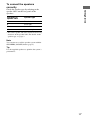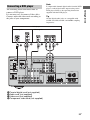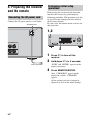
1
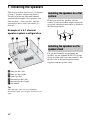
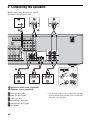
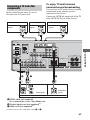
2: Connecting the speakers
Before connecting the cords, be sure to
disconnect the AC power cord.
F
D
A
SAT IN
A
B
DVD IN
BD IN
OUT
HDMI
SAT IN
DVD IN
VIDEO 1 IN MONITOR OUT
XM
VIDEO
IN
VIDEO
IN
Y
VIDEO
OUT
VIDEO
IN
PB/
CB
VIDEO
OUT
PR/
CR
MONITOR
SURROUND
AUDIO
IN
AUDIO
IN
AUDIO
OUT
AUDIO
IN
FRONT
COMPONENT VIDEO
AUDIO
OUT
R
L
CENTER
L
R
SAT
DVD
VIDEO 1
SPEAKERS
SUB WOOFER
B
13/32”
(10 mm)
E
C
B
A Monaural audio cord (supplied)
B Speaker cords (supplied)*
AFront speaker (left)
BFront speaker (right)
CCenter speaker
DSurround speaker (left)
ESurround speaker (right)
FSub woofer
16US
* Use the long speaker cords to connect the surround
speakers and the short speaker cords to connect the
front and center speakers.