1
USER GUIDE
u-line.com
SAFETY • INSTALLATION & INTEGRATION • OPERATING INSTRUCTIONS • MAINTENANCE • SERVICE
SERVICE MENU
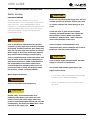
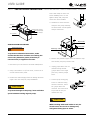
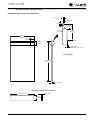
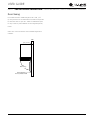
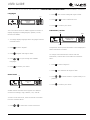
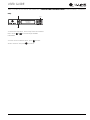
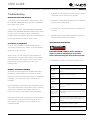
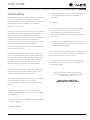
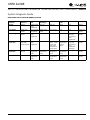
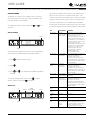
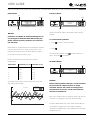
The All Errors option keeps record of any system errors.
In addition to a feature rich customer menu, the 3000
When an error occurs it is recorded to all errors. The
series also offers a service menu with the ability to fine
number next to the error indicates the number of recorded
tune and monitor unit operation.
instances. Errors in the log may not be currently active.
The error log memory is non volatile and is persistent
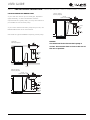
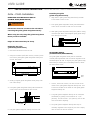
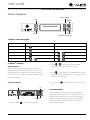
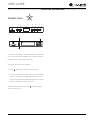
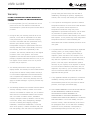
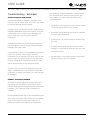
To initiate the Service menu, hold both
and
for 5
seconds.
Actual Temps
should power be lost and restored to the unit. See below
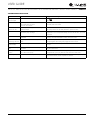
for a list of logged errors and their respective descriptions.
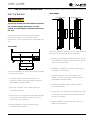
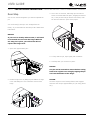
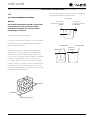
ID
Description
No Comm
Unit lost
Unplug the communication
communication cable from the user interface.
to the display. Check the black to red
conductors looking for 5 VDC. If
voltage is present replace the
user interface. If no voltage is
present check for 5 VDC at the
main board where the
communication cable plugs onto
the pins for the red and black
conductors. If 5 VDC is not
present replace the main
control board. If 5 VDC is
present replace the
communication cable.
Bin T Open
Bin thermistor
circuit open.
Up
Select
RETURN TO MENU
ACTUAL TEMPS
ZONE = 37°
EVAP = 52°
Can be displayed in Celsius
Down
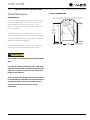
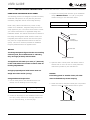
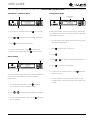
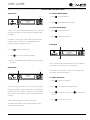
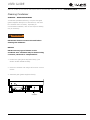
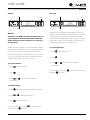
The Actual Temp option in the service menu will display
raw thermistor readings without calculating offsets.
1. Press
2. Press
to select “Actual Temps”.
Condenser T Condenser
Open
thermistor
circuit open.
.
3. Press
and
to scroll through available thermistor
readings.
Bin T Short
To exit the Actual Temps menu, press
“Return to Menu” and press
to confirm.
Error ID
Number
Of Occurrences
RETURN TO MENU
ALL ERRORS
NO COMM 0
ZONE T OPEN 0
Down
Check thermistor connection to
harness for moisture or
corrosion. Also check
connection where thermistor
harness attaches to main board.
If connections are valid replace
the thermistor.
Check thermistor connection to
harness for moisture or
corrosion. Also check
connection where thermistor
harness attaches to main board.
If connections are valid replace
the thermistor.
Bin thermistor Check connection. Replace if
circuit shorted. necessary.
Condenser T Condenser
Check thermistor connection to
Short
thermistor
harness for moisture or
circuit shorted. corrosion. Also check
connection where thermistor
harness attaches to main board.
If connections are valid replace
the thermistor.
to select
All Errors
Up
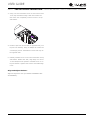
Solution
Select
Temp Hi
6H+
Not used.
Not used.
Temp Hi
12H+
Not used.
Not used.
Temp Lo
6H+
Not used.
Not used.
Temp Lo
12H+
Not used.
Not used.
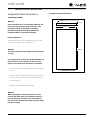
Door Open
5M
Door switch
open for more
then 5
minutes.
Check door switch magnet reed
switch alignment when door is
in closed position. Check reed
switch connection at the
harness and the main board.
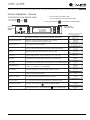
Control Operation - Service 2