1
 Table of Contents
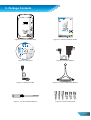
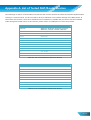
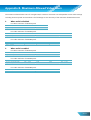
Table of Contents .............................................................................................................................................................. 1 1. Introduction .................................................................................................................................................................. 1 1.1. The Differences ................................................................................................................................................. 1 2. Installation & Setup....................................................................................................................................................... 2 2.1. Hardware Overview .......................................................................................................................................... 2 2.2. Quick Installation and Usage............................................................................................................................. 3 2.2.1. First, Connect the IP CAM to the home/office network ........................................................................... 3 2.2.2. Second, Install the LiveView Software on the notebook/PC .................................................................... 3 2.2.3. Third, Use LiveView program to see the video ......................................................................................... 4 2.2.4. Seeing the video in a remote location ...................................................................................................... 4 2.3. Wireless Connection ......................................................................................................................................... 5 2.3.1. First, set the WiFi security settings on the web configuration page. ....................................................... 5 2.3.2. Second, test if the WiFi settings are correct ............................................................................................. 5 2.3.3. Third, unplug the Ethernet cable .............................................................................................................. 6 3. Web Configurations ...................................................................................................................................................... 7 3.1. Information ....................................................................................................................................................... 8 3.2. Video Display..................................................................................................................................................... 9 3.3. Network........................................................................................................................................................... 10 3.4. WiFi Security.................................................................................................................................................... 12 3.5. Advanced Network .......................................................................................................................................... 15 3.6. Video Settings.................................................................................................................................................. 16 3.7. Mobile Video Settings ..................................................................................................................................... 18 3.8. Night Mode Control......................................................................................................................................... 19 3.9. Email/Ftp Alarm .............................................................................................................................................. 20 3.10. Speaker Alarm Settings ............................................................................................................................... 22 3.11. NAS Settings ................................................................................................................................................ 22 3.12. SD‐Card Settings.......................................................................................................................................... 24 3.13. Scheduling ................................................................................................................................................... 26 3.14. LED Control.................................................................................................................................................. 27 3.15. Date/Time ................................................................................................................................................... 27 3.16. Admin .......................................................................................................................................................... 27 3.17. Upgrade....................................................................................................................................................... 29 3.18. Reboot ......................................................................................................................................................... 30 3.19. Safe Mode ................................................................................................................................................... 31 3.20. Set To Factory Default................................................................................................................................. 32 4. Features & Specifications............................................................................................................................................ 33 4.1. Features .......................................................................................................................................................... 33 4.2. Specifications .................................................................................................................................................. 33 5. Package Contents........................................................................................................................................................ 35 Appendix A. List of Tested NAT/Router Devices ............................................................................................................. 36 Appendix B. Maximum Allowed Video Users.................................................................................................................. 37 Appendix C. Performance Information ........................................................................................................................... 38 Appendix D. Troubleshooting ......................................................................................................................................... 39 Worldwide Customer Care Centers ................................................................................................................................ 46