1
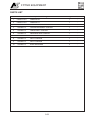
CONTENTS
Section
Introduction / Warranty / Body Construction............................. 1
Motorhome Code ..................................................................... 2
Preparing for the Road ............................................................. 3
On the Road ............................................................................. 4
Arrival on Site ........................................................................... 5
Safety & Security ...................................................................... 6
Connection of Services ............................................................ 7
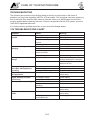
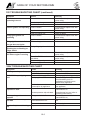
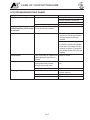
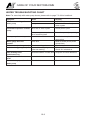
Technical Specification ............................................................. 8
Fitted Equipment ...................................................................... 9
Care of your Motorhome ........................................................ 10
Useful Information ................................................................... 11
Service Section ...................................................................... 12
Index ...................................................................................... 13
Copyright © 2011 Auto-Sleepers Ltd. All rights reserved.
No part of this document may be reproduced or transmitted in any form or by any means, electronic
or mechanical, for any purpose, without the express written permission of Auto-Sleepers Ltd.
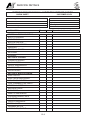
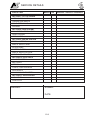
DATA RECORD
INTRODUCTION
Welcome.
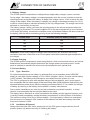
Model
Congratulations on your purchase of an AutoSleeper motorhome. We are confident it will
give you many years of pleasure.
This Handbook covers the Peugeot
Windrush, based on Peugeot Boxer 335 L3
H2 long wheelbase high roof window van.
This handbook has been compiled to enable
you to obtain the maximum pleasure from
your vehicle. It contains the appliance
instructions along with advice on safety
matters.
Gas System
The gas system is designed to operate on
LPG stored in a re-fillable tank fitted under
the vehicle. The regulator has a working
pressure of 30 mbar.
Please read this Handbook thoroughly so that
you are conversant with all the motorhome
systems, operating instructions and
precautions.
Conversion Type
Panel van conversion, with four seats
designated for use whilst the vehicle is in
motion. Vehicle has a large transverse
double bed and two permanent bunk beds
across the rear of the vehicle.
Failure to observe these recommendations or
precautions may result in incorrect operation
of equipment and subsequent risk to
occupants.
Climatic Conditions
Information leaflets and literature on safe
operation of appliances and equipment fitted
to your motorhome are included in the AutoSleeper Customer Pack. Please read these
carefully prior to use.
The motorhome is designed for use in
temperate climates, and is certified Grade 1
in accordance with EN 1646-1: 2004.,
indicating an effective heating system is fitted
but has not been tested for thermal
performance.
Should you experience any difficulties contact
your dealer who will be pleased to offer
advise.
Handbook
Any queries should be addressed to your
Auto-Sleeper dealer.
It is the policy of Peugeot and Auto-Sleeper to
continually improve their vehicles, so whilst
the details contained in this Handbook are
correct at the time of going to press, they
reserve the right to alter the specifications at
any time without notice.
Appliance Instructions
The appliance instructions included have
been extracted from those supplied from the
appliance manufacturers.
Auto-Sleeper motorhomes offer a variety of
customer uses and whilst each vehicle
features the optimum storage, fluid, seating
and sleeping capabilities, it is the customer’s
responsibility to select the proper
combinations of loads without exceeding
weight capacities.
Automotive - Peugeot
For all automotive matters you should refer to
the Peugeot vehicle instructions manual. This
includes tyre pressures, referring to the type
of tyres fitted.
The Auto-Sleeper conversion does not affect
the tyre pressures in any way as it is built
within the design envelope of the base
vehicle.
Your Auto-Sleeper motorhome conforms to
the European standard of EN 1646.
1-1
INTRODUCTION
Air Suspension
Your vehicle has been fitted with a
supplementary air suspension system on the
rear axle. This is called Air Top, is
manufactured by AL-KO, and uses additional
air springs to improve the quality of the
vehicle ride. The operating pressure may be
adjusted by the vehicle user to suit their
requirements. The system does not increase
the carrying capacity of the rear axle, or the
vehicle as a whole.
See Section 9 for further details.
IMPORTANT:
In the interests of safety, replacements parts
for appliances must conform to the
manufacturer’s specification and should be
fitted by them or an authorised agent.
Your Auto-Sleeper conforms to the CEN
Standard EN1646-1/2004 for habitation
requirements relating to Health and Safety.
To deal with your queries efficiently, always
quote your vehicle’s production number
which can be found in the glove
compartment.
Please read and complete the warranty
registration card supplied with your vehicle;
and return to the address below, without
delay.
Auto-Sleepers Limited,
Orchard Works,
Willersey,
Nr Broadway,
Worcestershire
WR12 7QF
Tele: 01386 853338
Fax: 01386 858343
E-mail: [email protected]
1-2
WARRANTY
AUTO-SLEEPERS WARRANTY
Warranty Registration
The supplying dealer’s representative and
the purchaser must sign the declaration in
the Warranty/Service book to verify that the
dealer has explained the warranty terms and
conditions and that the purchaser
understands them.
The dealer must then register the sale on the
Auto-Sleepers warranty system to activate
the cover.
Warranty Terms and Conditions
For full details of the warranty terms and
conditions, please refer to the Warranty/
Service handbook supplied with your AutoSleeper.
1-3
BODY CONSTRUCTION
BODY CONSTRUCTION:
Peugeot Boxer L3 H2 window van.
Body paint colours:
• Golden White
• Azzura Blue
• White
• Metallic Silver
• Volcano Red
• Clipper Blue
• Horizon Yellow
• Silverstone Green
Floor Vinyl: Dark Wood Block.
Furniture: Amati.
Furniture fittings: Chrome.
Work Surfaces and Table finish: Minstrel.
Carpet: Mocha.
Curtains, Cushions/Upholstery: Crystal,
various colours.
Exterior Graphics: BS1820.
1-4
MOTORHOME CODE
THE COUNTRY & COASTAL
CODES
Upon arrival at your destination you should
be aware of the Country Code relating to
motorhome owners. This is entitled the Motor
Caravanners’ Code.
Code of Conduct - Camp Sites
•
Children should be restrained from
making excessive noise.
•
Flying kites and model aircraft and the
use of items like catapults or air-guns as
well as ball games should not be
permitted among, or close to,
motorhomes.
•
Musical instruments, record players,
radios and televisions should not be used
to the inconvenience of other people on
site.
•
Open and close doors quietly.
•
Power generators must be adequately
silenced and used with consideration.
Arrivals
•
Report to reception immediately on
arrival.
Vehicle Movement
•
Keep to roadways unless otherwise
directed.
•
Adhere to speed limits. Note that these
are generally 10 mph. (Remember that
the stopping distance on grass is
considerably greater than on tarmac).
•
Only a person in possession of a current
driving licence may drive on the site.
•
Park correctly as advised on your pitch.
Where possible leave 20ft of free space
around your vehicle.
Dogs and Pets
Use the electrical mains hook-up in the
correct manner and with caution.
•
Ensure that all fresh water taps/
connections are turned off after use.
•
Have care and consideration when using
all facilities (toilets and showers etc.) and
leave them clean and tidy. Young children
should be escorted.
•
Unless permission has been granted, no
animal should be allowed loose on the
site and leads must not exceed 10ft.
•
No animal should be allowed in the
shower/toilet blocks.
•
Do not let dogs foul the site.
Adhere to and make note of all fire
precautions concerning the whereabouts of
the fire points.
Although not compulsory, it is recommended
that a 1 kg (2lb) dry powder fire extinguisher
is carried. It should comply with BS 5423 and
be marked BSI or FOC approved. It is
important to check at regular intervals that
the extinguisher is working as is required by
types meeting BS 5423.
To avoid possible damage to sewage
purification works, only approved chemical
fluids must be used. Under no circumstances
may coal tar, phenol or caustic-based fluids
be used. Disposable napkins and similar
bulky items must not be put into chemical
closet emptying points but should be
wrapped in a polythene bag and placed in the
container provided. (Put all litter in containers
marked for the purpose).
Careful thought is necessary for the
positioning of the extinguisher, which should
be near the door but not too close to the
cooking equipment where sudden flames
could make it unreachable. In the kitchen
area, a fire blanket is a worthwhile
precaution.
Unless permission has been granted,
barbecues should not be used. When
permission has been given, consideration
should be given to the annoyance that can be
caused to other users of the site. Open fires
are not allowed.
Noise
•
All dogs and other pets should be kept
under control.
Fire Precautions
Use of Site
•
•
Do not make excessive noise.
2-1
MOTORHOME CODE
Awnings and Tents
that all passengers are seated and seat
restraint straps worn.
Awnings and tents should only be used when
permission has been obtained.
When on grass and staying for more than a
few days, the ground sheet and/or side flaps
of awnings should be periodically raised in
order to avoid damage to the ground.
Before moving off, elevating roofs MUST be
lowered and correctly secured, and top
hinged windows closed. Likewise all doors
and access lockers for gas containers and
chemical toilets must be properly closed.
Departure
Exterior steps should be properly retracted
and secured.
•
Leave the pitch clean and tidy.
•
On leaving, check out with the reception
paying the required dues.
When the vehicle is being refuelled, or on a
ferry, all gas systems must be turned off.
Gas appliances should only be used when
the vehicle is in motion when the
manufacturer of the appliance permits such
use.
Wild camping
Camping away from licensed sites, without
the permission of the landowner or his agent,
is not allowed in the United Kingdom. When
permission has been granted, all aspects of
this Code should be adhered to.
Handbook
Before using a motorhome all aspects of the
handbooks produced by the chassis
manufacturer and the converter must be read
and adhered to.
On no accounts should:
•
Litter be disposed of other than in
receptacles provided.
•
Water be allowed to escape from the
vehicle.
Care and consideration should be taken to
protect the environment.
•
Chemical toilets be emptied except into
the disposal places agreed with the
landowner.
Observe the Country and Coastal Codes
shown below:
•
Washing or similar be hung outside the
vehicle.
Environment
The Country Code
Enjoy the countryside but respect its life and
work.
Parking
More people than ever before are exploring
the countryside, interested in farming, plant
life, bird watching or just observing the
general wildlife. Whatever your interest, there
is a lot to learn, but please observe the
following code.
Motorhomes should only be parked in
approved places.
When using the facilities of a motorhome at
such times, care and consideration should be
given to those around them.
Guard against all risk of fires. Hay and heath
land catch alight easily and once ablaze are
very hard to put out. Remember: Fire
Spreads Quickly.
Driving
When using a motorhome on either the public
highway or private road, the Highway Code
should be complied with and full
consideration given to other road users.
In the event of a motorhome travelling slowly
and there being a queue of traffic behind, the
driver of the motorhome should, where
possible, pull over in order to let the other
traffic pass.
When the vehicle is in motion it is compulsory
2-2
•
Keep to public paths across farmland.
•
Use gates and stiles to cross fences,
hedges and walls.
•
Leave livestock, crops and machinery
alone. View from a distance.
•
Take your litter home - it is unsightly and
harmful to wildlife.
MOTORHOME CODE
•
Help to keep all water clean.
•
Take special care of country roads.
•
Make no unnecessary noise. Most
animals are very timid, noises can disturb
them unnecessarily. If you want to get the
best out of the country, go quietly.
The Coastal Code
As our coastlines are increasingly used for
recreation and education, the following
suggestions are made to enable us to enjoy
our inheritance and preserve it for posterity.
•
Do not trample about, or move rocks
unnecessarily.
•
Do not frighten seals or seabirds.
•
Do not spear fish.
•
Do not spill detergents, solvents or fuel
from boats as these can kill marine life.
•
When sailing, moderate your speed - the
wash from a fast boat can destroy banks
and nests.
•
Live mollusks and crustaceans need not
be collected as souvenirs - dead shells
can usually be found.
•
Shellfish can take years to grow and
fines can be imposed for not observing
national regulations.
•
Do not pull up seaweed unnecessarily.
•
Make your visit instructive - not
destructive.
•
Look at material, don’t remove it. Take
notes and photographs, not specimens.
•
Observe bye-laws and be considerate to
others.
•
National Trust property or Country Parks
have regulations to protect the wildlife.
Follow these.
Fire Precautions
You should also make yourself aware of the
local fire regulations.
2-3
MOTORHOME CODE
2-4
PREPARING FOR THE ROAD
YOUR MOTORHOME (Weights
explained)
LOADING AND DISTRIBUTION OF
WEIGHT IN THE MOTORHOME
Mass in Running Order (MRO)
SENSIBLE LOADING
The weight of your motorhome as it leaves
the factory, as new with standard fixtures and
fittings, plus an allowance for driver and 90%
fuel.
HOW TO APPORTION WEIGHT
Maximum Technically Permissible Laden
Mass (MTPLM)
The maximum weight of the vehicle when
fully laden for use on the road. See
specification section for actual figure.
User Payload
The load margin (payload), this represents
the difference between the Mass in Running
Order (MRO) and the Maximum Technically
Permissible Laden Mass (MTPLM). It shows
the maximum weight which can be loaded
into your motorhome, covering items such as
food, crockery, cutlery, clothing, bedding, gas
cylinders, etc. See Technical Specification for
actual figure.
Loading
Correct weight distribution is a major factor in
making your motorhome a balanced and
pleasant vehicle to drive without
compromising road-holding. Care should
therefore be taken to ensure that heavy items
are well spaced and are in as low a position
as possible, for example, low cupboards and
bed boxes.
Please take care to ensure that you have
allowed for the masses of all items you intend
to carry in the motorhome, e.g.. passengers,
optional equipment, essential habitation
equipment and personal effects such as
clothing, food, pets, bicycles etc.
DO NOT EXCEED THE STATED MAXIMUM
LOAD. ITEMS FITTED OTHER THAN
STANDARD EQUIPMENT WILL DEPLETE
THE PAYLOAD STATED IN THIS
HANDBOOK.
Although there are additional seat belts within
the motorhome, please refer to the stated
number of passengers that are allowed due
to the MRO and MTPLM.
WARNING: Under no circumstances
should the maximum permissible laden
mass of the motorhome be exceeded.
Roof Loading
DO NOT ALLOW CHILDREN TO CLIMB
ONTO THE ROOF.
Roof Rack Bars and Ladder (optional)
When using the optional roof rack, care
should be taken to see that all the items are
securely anchored. Apart from general
cleaning and polishing, the roof rack and
ladder require no special maintenance.
WARNING: Take special care when on the
roof in wet or frosty weather conditions,
which cause it to be particularly slippery.
Maximum load within the area encompassed
3-1
PREPARING FOR THE ROAD
14. Lock the motorhome exterior door
(remember to take out your keys).
by the roof rack should not exceed 75 kgs
(165 lbs) with a maximum loading of 8 kg (17
lbs) per square foot.
15. Check your external rear view mirrors
and adjust if necessary.
Before Moving Off
16. Check that all corner steadies are wound
up and that, if a step is used, it is put
away before moving off.
Whenever making a journey with your
motorhome, either setting off on holiday or
returning home, it is good practice to run
through this simple checklist.
17. Check wheel nuts are secure and tyre
pressures are correct.
1. Close and secure all cupboards and
drawers and check any loose articles. Do
not store tins, bottles, etc. in overhead
lockers.
18. Ensure, if required, that your fresh water
tank is full and your waste tank is empty.
19. Referring to your base vehicle manual,
check all fluid levels including automotive
fuel and tyre pressures. Remember to
check that your spare tyre is of the
recommended pressure.
2. Close and secure all windows and roof
lights.
3. Leave all curtains and blinds open to aid
visibility.
20. Ensure that, on models fitted with an
elevating roof, the roof is securely locked
down with the exterior catches applied.
4. Check that gas cylinders are securely
fastened and turn off all gas appliances,
except those heating appliances
designed to function while the vehicle is
in motion. Also, ensure that the gas
locker door is securely fastened.
5. Ensure that there is sufficient gas to meet
your needs.
21. The fridge vent covers should be fitted
when the vehicle is to be driven in order
to comply with European Type Approval
regulations for vehicle external
projections.
6. Switch off 230 volt supply at source,
disconnect mains cable from site supply
before disconnecting from vehicle. Beware
of potential electric shock from wet cable.
Coil cable and store in a safe place.
22. Ensure that the toilet flush tank only
contains a small amount of water (1-2
litres) in order to minimise the risk of
leaks or spillage whilst the vehicle is in
motion.
7. Check your RCD’s/MCB’s for operation.
23. Check underneath the vehicle for stray
items.
8. Check and if necessary, charge the
conversion battery.
24. Safely store levelling blocks away in an
appropate place.
9. Check battery selection switch is in the
OFF position.
10. Check that the battery is secure and that
the battery box lid is fastened.
11. Ensure the fridge is on 12V operation
and door lock is set. (Note: the electrical
relays will allow the fridge to be run on
the vehicle battery when the engine is
running.)
12. Remove any external fresh water
connections etc.
13. Make sure any heavy articles are stored
in accordance with the loading
procedure. Tables should also be made
secure.
3-2
ON THE ROAD
Pulling Off
Removing the Spare Wheel
Engage the clutch smoothly.
CAUTION: Exercise care when lowering
the wheel frame due to its weight.
Avoid wear and tear on clutch and
transmission by taking extra care.
Removal
Change gears smoothly.
a. The spare is located in front of the rear
step.
Try not to jerk the clutch.
MOTORWAY DRIVING
b. Tools - The jack, handle and wheel brace
are stored under the nearside rear seat.
Speed Limits (UK)
c. Follow the procedure for changing a
wheel as described and illustrated in the
base vehicle handbook.
If a speed limit is not in force, your
motorhome can be driven up to 70mph on
motorways and dual carriageways.
Replacement of Spare Wheel
1. Reduce Speed:
i)
Follow the procedure as described in the
base vehicle handbook.
In high or cross winds.
ii) Downhill.
Caravan Door Step
iii) In poor visibility.
Motorway Handling
Your vehicle is fitted with an electrically
operated side step. In the event of the step
being left extended a buzzer, positioned
under the dashboard, will sound (when the
ignition is switched on) and the step will selfretract.
Do not bump the kerb with the wheels.
Cycle Rack
When passing other vehicles allow more than
the normal clearance.
In the event of a cycle rack being fitted, the
cycle rack when folded will increase the
vehicle length by 400mm. Your Auto-Sleeper
dealer will give further advice or assistance if
required.
2. High sided vehicles cause air buffeting,
so extra care must be taken when
passing or being passed. As much space
as possible should be given.
Allow longer to get up speed to pass.
Do not swing out suddenly.
Carry out all manoeuvres as smoothly as
possible.
Whilst Driving
Whilst the vehicle is being driven ensure that:
Use nearside wing mirror to check
motorhome has cleared when overtaking.
•
Both the passenger and driver wear seat
belts - this is a legal requirement.
•
Heavy loads are not stored in top
cupboards or in areas from which they
may become detached. Please ensure
that heavy items are stored low down and
take care not to overload individual
wheels, the axles or the MTPLM.
•
Table(s) are stowed in the correct
position and table legs secured in their
retaining clips.
•
Furniture lids are lowered; cupboards
and flaps are closed and secured.
•
The refrigerator door is closed and
secured by its travelling catch.
Changing a Wheel
Refer to the vehicle handbook
WARNING: Ensure the wheel is of the
same construction and size as the one
that has been removed.
Jacking
Front and Rear - use the standard jacking
points as per the base vehicle handbook.
4-1
ON THE ROAD
•
The retractable rear step if fitted, is
folded away or, if a separate step is
supplied, it is safely stowed in the
vehicle.
•
Roof ventilators are closed and locked in
the down position.
•
The bathroom is not used whilst the
vehicle is in motion. (Note: Refers only to
models fitted with shower or toilet
compartment).
•
Top hinged windows are closed, and
securely fastened.
•
Children do not roam around the vehicle;
they may fall and injure themselves.
Front Seat Swivel (where fitted)
Your vehicle may be fitted with a swivel base
to either or both of the front seats, so that
they may be turned to face the rear of the
vehicle.
The release lever, coloured red, is located at
the front of the seat and is pushed
downwards to unlock the swivel mechanism.
Note: It may be necessary to lower the
handbrake in order to swivel the driver’s seat.
In this case, ensure that first gear (or PARK
on automatic) is engaged and the road
wheels are chocked first.
WARNING: It is important that while the
vehicle is in motion, any seat swivels are
locked in the forward facing position.
Map Storage
In the rear of each cab seat there is a map
pocket for storage of maps, periodicals and
light items.
4-2
ARRIVAL AT SITE
CHECK SITE REGULATIONS
Siting your Motorhome
When siting your motorhome, keep to the
roadways unless otherwise directed. Obey
the speed limit which, in general, is 10 mph.
Only a person in possession of a current
driving licence is permitted to drive on the
site. Stopping distances on grass are
considerably greater than on tarmac.
Selecting a Pitch
Carefully select where you wish to park your
motorhome. The site should be as level as
possible, well drained and away from boggy
areas and, preferably, not under or near
trees. Consider also, how you will move your
motorhome when leaving the site. For
example, on sloping ground in wet
conditions, pitch facing downhill.
Levelling
It is important to site your motorhome level to
ensure correct operation of the refrigeration,
cooker, etc by using purpose made ramps
and NOT bricks or such items.
Awning Light
The exterior awning light is controlled by a
switch located on the side of the nearside
rear seat, accessed when the side door is
opened.
5-1
ARRIVAL AT SITE
5-2
SAFETY & SECURITY
SAFETY
make any additional openings in the floor.
Important: Your attention is drawn to the
notice affixed in the motorhome advising on
fire prevention, ventilation and what to do in
case of fire.
Under no circumstances must these vents
be blocked or obstructed.
Additional night time ventilation is obtained
by releasing the window catches and placing
them in the second groove on the frame
catch.
Children
Do not leave children alone in the motorhome
in any event, keep potentially dangerous
items out of reach as at home. e.g. matches,
drugs, etc.
Awnings
There is no danger of pollution of an
enclosed awning space by the LPG exhaust
from the refrigerator venting into it.
WARNING: When upper bunks are used
by children especially under six years of
age care shall be taken against the risk of
them falling out.
WARNING: Space heaters may produce
sufficient exhaust gases to pollute the
awning space if it is totally enclosed (from
a general comfort, smell, and hygiene
point of view). In the extreme case, there
could be a build up of carbon dioxide to a
dangerous level.
Fire Extinguishers
It is recommended that a 1 kg (2lb) minimum
capacity dry powder fire extinguisher be
located by the main exit door at all times.
Note: Motorhome owners are advised to
allow some fresh air circulation into the
awning space when such appliances are in
use.
A pan fire should not have an extinguisher
aimed at it but be smothered with a fire
blanket (which should be stored by the
cooker).
In case of fire
1. Get everyone out of the motorhome as
quickly as possible using whichever exit
is the quickest including windows. Do not
stop to collect any personal items.
2. Raise the alarm — Call the fire brigade.
3. Turn off gas container valve if safe to do
so.
Ventilation and Condensation
The ventilation points on your motorhome are
fixed points of ventilation which are stated by
the European Standards. Under no
circumstances must these vents be blocked
or obstructed. It is advised that fixed
ventilation points and any protective screens
are checked and cleaned (if necessary) on a
regular basis.
Fresh air circulation should be allowed below
the motorhome when appliances are in use
and when flues terminate below the floor to
allow free evacuation of the products of
combustion. At least three sides of the
underfloor space should always be kept open
and unobstructed especially by snow. Do not
6-1
SAFETY & SECURITY
ELECTRICAL SYSTEMS
for appliances should conform to the
appliance manufacturer’s specification and
should be fitted by them or their authorised
agent.
Batteries
Battery terminals and connectors should be
firmly attached. Battery surfaces should be
free of moisture and dirt.
WARNINGS:
Where removable cell taps are fitted these
must be screwed firmly home.
When removing a battery always remove the
negative cable first. On re-connection the
negative cable should be connected last.
Switch off all lamps and appliances before
disconnecting the battery. Do not smoke
while working on or near to the battery.
1
Never use portable cooking or heating
equipment, other than electric heaters
that are not of the direct radiant type,
as it is a fire and asphyxiation hazard.
2
Do not use cookers as heaters or dry
clothes etc on the cooker or space
heater.
3
Make sure that combustible materials
can not come into contact with hot
surfaces or burners.
4
Surfaces of appliances may become
hot in use and the guard provided
does not give full protection to the
young and elderly.
5
Do not use additional independent gas
appliances inside the vehicle.
6
Never allow modifications of electrical
or LPG systems or appliances except
by qualified technicians.
Fuses
Always replace blown fuses with one of a
correct rating.
Overload
Never overload any electrical circuit,
especially the 12-volt socket outlet. The
rating of appliances should be checked
before connection.
Shower Compartment Light
Ensure that water does not ingress into the
light unit.
The water heater fitted to this vehicle is of the
“room sealed” type, any replacement should
be the same, i.e. “room sealed”.
Charger Unit
Turn off all gas equipment and cylinders/
tanks and any other heating appliances
before travelling.
Keep the charger unit well ventilated and
never allow material or bags to be in contact
with the unit casing which gets hot when the
unit is operating.
Before connecting to the supply, ensure that
the contacts in both the plug and the socket
are clean and dry and that the hook-up plug
is firmly located and locked into the socket.
The RCD must be easily accessible at all
times.
Ventilation openings are located below all the
gas appliances, and in the base of the gas
locker. In winter conditions make sure the
vents are clear of snow and mud. These
openings should be regularly checked and
any mesh covering them cleaned with a stiff
brush to prevent any risk of them becoming
blocked. The openings are provided for your
safety - please do not obstruct them.
GENERAL
Air Bags
Before using your Auto-Sleeper, you should
be fully conversant with the following safety
precautions; if you are in any doubt as to the
meaning of any of them you should contact
your supplying Auto-Sleeper dealer. Please
read the following carefully.
Do not fit rear-facing children’s seats to front
facing seat protected by air bags. It is
recommended that small children do not sit in
the front passenger seat whilst the vehicle is
in motion. Follow the advice given in your
base vehicle instruction book.
230 Volt Mains Operation
In the interests of safety, replacement parts
6-2
SAFETY & SECURITY
Smoke Alarm
Carbon Monoxide Alarm
Features
A Fire Angel CO-808 battery operated alarm
is fitted near the ceiling on the wardrobe side
panel.
•
Battery operated.
•
Operating light (LED) flashes
approximately every 45 seconds
confirming unit is powered.
Features
•
An advanced electrochemical sensor
designed to accurately measure low
levels of carbon monixide (CO) providing
an early warning of toxic CO levels in
your motorhome.
•
Detects carbon monoxide continuously.
•
Resistant to false alarms caused by
normal household contaminants.
•
WARNING: Test smoke alarm operation
after vehicle has been in storage, before
each trip and at least once per week
during use.
Sounds a loud 85dB alarm (at 3 metres/
10 feet) to alert you in case of an
emergency.
•
Test/Reset button.
•
Your alarm requires one 9 volt battery. Under
normal use, the battery should last
approximately one year.
Simple to mount, portable, ideal for
travelling.
•
Conforms to the British Standards
Institute (CSI) Carbon Monoxide
Standard BS7860 : 1996.
Vacuum every six months to help keep the
unit working efficiently. Open cover and
gently vacuum interior of detector. Keep
vacuum nozzle from touching the unit.
•
Five year limited warranty (batteries
excluded).
Problems are indicated by two events:
Your FireAngel detector offers many features
which set it apart from other CO detectors on
the market today.
•
Low battery warning. Unit “beeps”
approximately every 45 seconds for up to
30 days when the battery needs
replacing.
•
Sensitivity test button. Tests sensitivity,
circuitry, battery, horn (and emergency
light, model 350 only).
•
Loud 85 decibel Piezo electric alarm.
Automatically resets when hazardous
condition has passed.
Simple maintenance
Operating Features
1. The alarm does not sound upon pressing
the test button.
2. The operating light remains steadily on or
off (i.e. does not flash approximately
once every 45 seconds, when the unit it
not in alarm).
Test/Reset Button Feature
This button will:
•
Test your horn, battery and circuitry.
1. Inspect for obvious damage.
•
2. Visually check that unit contains
recommended battery type.
Silence the loud 85dB (at 3 metres/10ft)
horn during an alarm.
•
Allow you to test the sensor by blowing
smoke into the detector vents.
Try the following:
3. Check that battery is properly connected.
4. Gently vacuum as recommended above.
Testing the Horn, Battery and Circuitry
5. Replace battery.
Test the horn, battery and circuitry by
pressing the Test/Reset button to confirm that
the detector is operating properly. The horn
If these procedures do not correct the
problem, do NOT attempt repairs. Contact
the manufacturer.
6-3
SAFETY & SECURITY
should sound as soon as the button is
pressed, and both the red LEDs will flash
indicating that the horn is working and the
battery is providing power to the unit. This
test for the horn, battery and circuitry should
be performed on a weekly basis.
should happen after around 5 seconds).
Upon releasing the Test/Reset button the
High Level LED will begin to flash twice in
quick succession every 5 seconds. This
indicates that the detector is now monitoring
continously for CO and may be tested using
a known source of CO.
Step 3: Light a cigarette or an incense stick
using a match or lighter. Extinguish the
lighter, or put out the match and place it into
a dish of water.
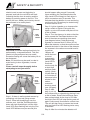
vents
vents
test/
reset
button
Step 4: Turn the alarm on its side so that the
vents nearest the Test/Reset button on the
side of the alarm are pointing down ward
(see diagram below). Hold the burning
cigarette or incense stick 15-20cm (6-8 in)
below the detector, so that the smoke moves
towards the holes in the sides of the detector.
An increase in the carbon monoxide level to
more than
100ppm will
cause the horn
to sound
momentarily
and the High
Level LED to
illuminate
continuously for
a short time
and then flash
rapiidly. (Note it make take up
to 2 minutes of
exposure to the
smoke for the
carbon
monoxide
levels to reach
over 100 ppm).
Testing the Sensor
CAUTION: All sensor testing should only be
performed by a responsible adult. This test
should only be performed once a month.
Excessive testing will cause the battery life to
be shortened.
Note: CO test kits may be used in order to
avoid having to burn cigarettes, incense
sticks etc.
Please read all steps throughly before
attempting to test your alarm.
vents
vents
test/
reset
button
Step 5: After
step 4, put out
the incense stick or cigarette by placing it into
a dish of water. Ensure that all flames have
been extinguished. As the level of CO falls
the High Level LED will stop flashing and will
again continuously illuminate for a short time.
The unit will then return to sensor test mode
with the High LEvel LED flashing twice every
5 seconds.
Step 1: If alarm is wall mounted remove by
unhooking unit from wall fixing screws.
Step 2: Place left thumb/finger over the
sounder vent. Hold the Test/Reset button
down with right thumbfinger until the High
Level LED stops flashing and only the Low
Level LED flashes once per second (this
Step 6: After four minutes the detector will
6-4
SAFETY & SECURITY
minute for up to 30 days. Replace the battery
immediately! When there is no battery in
place, the red ‘missing battery’ indicator will
appear at the top of the unit to remind you to
replace the battery. If the unit continues to
chirp, even with a fresh battery, then your
detector is indicating that a fault has
developed.
return to normal monitoring mode and the
High Level LED will flash once per minute.
Note: The reason we recommend using
cigarettes or incense sticks to test your
alarm’s sensor is that carbon monoxide is
contained within the smoke given off by them
as they burn inefficiently. Candles/matches
etc will not provide a source of CO as they do
not burn inefficiently. Your CO detector
cannot detect smoke.
On discovering a fault please contact the
FireAngel Technical Support Line between
10am-4pm, Monday to Friday.
Tel: 024 7623 6663 (1-800 523171 in Eire).
E-mail: [email protected]
Understanding different alarms
High Level Alarm
If a high level of CO (above 70ppm) has
been detected for a specified period of time,
a loud continuous 85dB (at 3 metres) alarm
will sound and the High Level LED will flash
once very 5 seconds. Press the Test/Reset
button to silence the alarm for 6 minutes. If
the CO level remains above 70ppm during
this 6 minutes, the alarm will again sound.
Quick Reference Label
Low Level Alarm
WARNING: A loud alarm is a warning that
high and potentially lethal levels of
carbon monoxide are present. Never
ignire this alarm, further exposure can be
fatal. Immediately check residents for
symptoms of carbon monoxide poisoning,
and contact the proper authorities to
resolve all CO problems.
A Quick Reference Label is located on the
back of your detector and provides you with
general instructions on the actions to take
when your alarm sounds. For full details,
read this owner’s manual carefully.
What to do in the event of an alarm
The detector will sound a loud continuous
85dB (at 3 metres) alarm and the Low Level
LED will flash once every 5 seconds when a
low level of CO (35ppm-70ppm) has been
continuously detected for 4 hours. To silence
the alarm, press the Test/Reset button. If the
CO level remains above 35ppm for the next 4
hours, the alarm will again sound.
NEVER IGNORE A LOW-LEVEL OR HIGHLEVEL ALARM
Continued low level alarms are an indication
that the potential of a high level alarm exists.
You should treat this alarm very seriously.
Prolonged low levels of CO are believed to
cause brain damage and heart disease,
particularly in children and pregnant women.
Call a qualified service engineer and have the
problem investigated and rectified
immediately. In the case of gas appliances
this must be a GAS SAFE registered installer.
Please carefully review these instructions to
ensure that you know what actions to take in
the event of both high and low-level alarms.
What to do during a high-level alarm
WARNING: If both the High Level LED and
the Low Level LED are flashing, the unit
has detected both High and Low levels of
carbon monoxide. You should treat this as
a High Level Alarm, and act accordingly.
•
Open the doors and windows to ventilate.
•
Turn off the appliance where possible
and stop using the appliance.
•
Silence the alarm by pressing the Test/
Reset button.
•
Evacuate the property leaving the doors
and windows open.
•
Ring your gas or other fuel supplier on
their emergency number, keep the
number in a prominent place.
•
Do not re-enter the property until the
alarm has stopped.
•
Get medical help immediately for anyone
Low Battery/Error Warning
When your battery needs replacing, the High
LEvel LED will continue to flash once per
minute and the detector will chirp once per
6-5
SAFETY & SECURITY
suffering the effects of carbon monoxide
poisoning (headache, nausea), and
advise that carbon monoxide poisoning is
suspected.
•
detector terminals and push the battery
into place. Use of a battery other than the
battery recommended by FireAngel Ltd
can have a detrimental effect on the
detector operation. Replace the battery
cover and return the detector to the
origiinal position.
Do not use the appliance again until it
has been checked by an expert. In the
case of gas appliances this must be a
GAS SAFE registered installer.
d. When the battery is first inserted the
detector will shortly emit a single beep
and the LEDs will flash to indicate that
the battery is properly connected.
What to do during a low-level warning
•
Open all doors and windows to ventilate.
•
Turn off all appliances that are potential
sources of CO when possible, and stop
using the appliance. These may include
gas and wood-burning fireplaces, all gas
appliances, and barbecues.
•
Silence the alarm by pressing the Test/
Reset button.
•
Do not use the appliance again until it
has been checked by a qualified service
engineer. In the case of gas appliances
this must be a GAS SAFE registered
installer.
•
e. Your advanced FireAngel detector does
not require a proplonged ‘power-up’
period. If you have followed all of the
above steps correctly, your unit will begin
monitoring for CO in 20 minutes. After the
20 minute warm-up period, the HighLevel LED will flash once per minute to
indicate that the detector is powered up
and is monitoring for CO.
f.
Get medical help immediately for anyone
suffering the effects of carbon monoxide
poisoning (headache, nausea), and
advise that carbon monoxide poisoning is
suspected.
Battery installation/replacement
Test the horn, battery and circuitry by
pressing the Test/reset button to confirm
that the detector is operating properly.
The horn should sound as soon as the
button is pressed, and the LEDs will flash
indicating that the horn is working and
the battery is providing power to the unit.
This test for the horn, battery and
circuitry should be performed on a
weekly basis.
WARNING: Prolonged exposure to the
horn in close proximmity will damage
your hearing.
When there is no battery in place, a red
missing battery indicator will remind you to
replace the battery. Under normal operating
conditions, the battery should last one year.
The battery life in full alarm is 7 days. The
detector will not protect against the risk of CO
poisoning when the battery has drained.
Caution: Constant exposure to extreme high
or low temperatures amy reduce battery life.
a. If the detector is wall mounted then
unhook it from the mounting screws.
Maintaining/Testing your detector
b. Remove the battery cover located on the
back of the detector.
Maintenance
c. Replace the battery with an approved 9
volt alkaline battery, making sure the
battery terminals align properly with the
Your detector will alert you to potentially
hazardous CO concentrations in your home
when maintained properly. To maintain your
Fireangel detector in proper working order,
6-6
SAFETY & SECURITY
and to ensure that your sensor will maintain
its 5 year life, it is recommended that you:
•
Test horn, battery and circuitry at least
once per week.
•
Test sensor once per month.
•
Keep the detector free of dust by gently
vacuuming the case with a soft brush
attachment once per month.
•
Never use cleaning solutions on your
detector. Simply wipe with a slightly
damp cloth.
•
Do not paint the detector.
•
Do not spray aerosols on or near the
detector.
•
Move the detector to a safe location and
store in a plastic bag before painting, wall
papering, using or performing any other
activities that use materials that emit
strong fumes. WARNING: Your alarm will
not detect CO when it is stored in this
way). Remember to remove it from the
bag and replace the detector when these
activities are finished.
SECURITY
Chassis number
Record the chassis number and the factory
job number of your motorhome, and keep
them in a safe place at home.
The chassis number is a 17 digit number,
beginning with the letters VF3, and is found
stamped on a plate visible through a window
in the bottom left hand corner of the
windscreen, and also on a plate under the
bonnet attached to the bonnet closing
crossmember.
The factory job number is an alphanumeric
code consisting of a letter followed by four
numbers, and is found on a label inside the
glove box.
Motorhome Theft
The theft of a motorhome can occur in the
most unlikely circumstances; from a
motorway service area, even from an
owner’s driveway.
Technical information
Secure all windows and doors when your
motorhome is unoccupied even if only for a
short length of time.
Detector specifications: Model CO-808.
Vehicle location device
Sensor Type: Electrochemical.
Your vehicle has been fitted with a HAL 1000
satellite location device, which has been
installed in a concealed location. This will
automatically send a message to your mobile
phone if the vehicle is moved and, if it is
being moved without your authority then it
can be tracked wherever it may be taken.
Sensor Life: 5 years.
Sensor range: 10ppm-999ppm.
Alarm Sound Level: 85dB (at 3 metres/10ft).
Recommended Batteries: Duracell 9V Ultra,
Duracell MN1604, Energizer 522, Energizer
9V Ultra+, Gold Peak 1604A.
If you discover, or are informed by the
Control Centre, that your vehicle has been
stolen you need to contact the police and
obtain a crime reference number. Then
supply this number to the Control Centre
(detailed are on the HAL-Locate registration
card provided) who will liaise directly with the
police to locate and recover your vehicle.
Battery Life: Exceeds 1 year, replaceable.
Please read carefully the HAL 1000 user
instructions supplied with your vehicle
particularly with regard to the registration of
your mobile phone(s), and understanding the
various messages.
Note: For effective operation of the system
the leisure battery must be maintained in a
6-7
SAFETY & SECURITY
good state of charge at all times.
Please be aware that maintenance of the
HAL-Locate service is via an annual
subscription payable after the first 2 years
ownership from new.
If you sell your vehicle or change your
contact details (including mobile phone),
please contact the HAL-Locate support team
on 0844 3576269 with the details.
Additional security
Consider fitting any device which might deter
or prevent intrusion by thieves. A wheel lock
prevents removal of the wheel.
Window etching of the chassis number is a
cost effective deterrent.
Free crime prevention
Advice about securing your motorhome,
protecting your valuables, property marking,
either at home or whilst on site, can be
obtained from the Crime Prevention Officer
through your local Police Station.
6-8
CONNECTION OF SERVICES
filling the fresh water tank, water may escape
through these breathers; this should give no
cause for concern.
Please read and become familiar with
operating instructions for equipment fitted in
your motorhome.
Connection of services are dealt with under
separate headings, Water, Electricity and
Gas.
Frost Precaution
If the vehicle is not being used during
freezing conditions the water must be
drained. Whilst the vehicle is being used in
such conditions, and the water heater is at
risk of freezing, it should be drained by
opening the drain valve.
WATER SYSTEMS
Fresh/Waste Tanks
The fresh and waste water tanks are located
under the floor near the middle of the vehicle.
The drain taps for both tanks are clipped to
the underside of the vehicle on the offside,
with the waste drain being nearer to the rear
of the vehicle.
For capacities of both see the Technical
Specification Section.
The fresh water tank is filled through the
Whale socket on the side of the vehicle using
the special hose supplied. See next page for
further details of the Watermaster System,
but note that the socket lid must be used to
lock the plug securely into the socket.
All pipe work is manufactured to food grade
material specification.
FRESH WATER PUMP
A Whale submersible water pump is fitted in
the freshwater tank of your vehicle. This is a
compact, self venting, high flow pump which
is quiet in operation and has a maximum flow
rate of 15.8 litres per minute.
Maintenance
The pump is a sealed unit so no maintenance
is required other than a check as part of the
annual habitation service.
Ensuring the water supply is free of debris
when filling the tank will reduce the likelihood
of pump clog.
Winterising
To protect against damage as a result of
freezing, drain the entire water system.
Breathers
Both tanks are fitted with breathers, which
allow air displacement when filling. When
7-1
CONNECTION OF SERVICES
The submersible pump can be run for quite
long periods when in water, but it is
recommended that running periods should be
restricted to a maximum of 15 minutes. Do
not run the pump without water. Do not use
the pump in water temperatures above 40ºC
(100ºF). It is best to stand the pump
vertically.
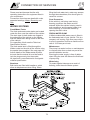
FRESHWATER FILLER
The Whale Watermaster system is used on
your vehicle to make easier the connection of
an outside water supply to the water system.
Operation
Priming:
1.
2.
3.
4.
Open one cold tap (e.g. kitchen sink).
Place pump into water container.
Insert plug into wall socket.
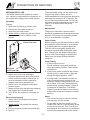
Whale socket: Locate plug tab into lid slot
and close lid to lock in position in the
socket.
Maintenance
The pump is fitted with a strainer which
should be inspected and cleaned at frequent
intervals. The pump is a completely sealed
unit, no maintenance is required.
Helpful Hints:
Close lid to lock
Before switching on, place the pump in water
and shake for a few seconds in a horizontal
or inverted position to release trapped air.
This will ensure successful priming and
should be repeated after refilling the water
tank. The plug for the Whale socket has a
groove under the handgrip for clipping the
water hose into when refilling the water
container.
Fault Finding
1. If the pump will not run:
Check contacts in plug and socket are
clean and making contact. Check wiring
connections.
2. If the pump cycles on/off with tap closed:
Check for air or water leaks in taps and
piping. Re-adjust pressure switch.
3. If pump motor runs steadily and will not
stop: Check that there is water in the
container. Battery voltage may be too low
(at or below 10.5 volts). Adjust pressure
switch and/or recharge battery. Check all
connections in pipe-work. The Whale
Tiptoe Pump can be fitted in-line with the
submersible pump and used as a manual
back-up.
Plug tab
locks into slot
5. Adjust dust cover over opening in
container (please note dust cover should
not be secured to water container as air
must be allowed to enter container to
replace water being pumped out).
6. Switch on 12 volt supply at main panel
isolator switch.
7. Water will flow from the open tap expelling
any trapped air in a few seconds.
8. Turn off tap, the system is now ready for
use.
Notes
When removing plug
*
1. Switch off 12 volt supply at main panel
isolator switch.
2. Whale socket: Lift socket lid to release
plug.
3. Pull out plug from socket using hand grip.
4. Shut lid.
•
7-2
The socket lid must be used to lock the
plug securely into the socket.
On the back of the filler socket, on the
inside of the vehicle, is an adjusting screw
for the pump solenoid. This is set by the
manufacturer and under no circumstances
should it be tampered with by the owner.
CONNECTION OF SERVICES
WATER PRESSURE SWITCH
If setting of pressure switch is still not correct
you may experience:
Adjustment
Pump running continuously, even with tap
closed. If undiscovered, could result in pump
failure and flat battery. Most likely causes are
that present voltage is significantly lower
when last adjusted, or water container is
empty.
Your pressure switch is factory set and
should not normally require adjustment. In
the event that your pump doesn’t switch off
when you close the taps , or it pulses on and
off when the taps are fully open, follow these
guidelines to readjust the setting.
CURE: Re- adjust switch or refill container
Pressure switch adjustment may be required
usually because the power supply voltage
has varied from the previous setting. Possible
causes are: a. Battery drainage through
normal use b. Higher voltage supply when
battery charger operating
Pump does not run at all. If not due to blown
fuse or faulty connections, then most likely
cause is excessive continuous running (see
‘a’ above)
CURE: Replace pump and readjust switch
Pump runs intermittently ON, OFF, ON, OFF
etc. Seen as pulsing flow from tap, or as
inability to set constant water temperature,
water goes hot, cold, hot, cold instead of
constant warm. Most likely cause is that
present voltage is significantly higher than
when last adjusted.
Pressure Switch Setting
1. Ensure the system, including the heater
is full of water and all taps are closed.
Refer to your user manual. Be sure to set
the switch at low battery condition.
2. If present, remove the pressure switch
locknut in an anti- clockwise direction,
then tighten the adjusting screw
clockwise until the pump comes on.
3. Open any tap until you have a smooth
flow of water, then close the tap. You
should hear the pump running and the
pump running light if fitted will be on.
4. Return to the pressure switch and turn
the screw slowly anti-clockwise until the
pump has stopped. Turn the screw a
further half turn (180 degrees)
anti-clockwise.
5. Check for correct operation by opening
and closing all taps individually. The
pump should turn on when the cold tap is
opened and switch off immediately when
the cold tap is closed. NB At low flows
there may be some pulsation.
6. The hot side may take about 10 seconds
to react (both on and off) due to
cushioning from the water heater.
7. Carefully replace the lockout until it is
tight keeping the adjustment screw in
position.
CURE: Readjust pressure switch, if problem
persists add a Whale Surge Damper.
Pump runs very noisily but does not pump
water. Likely to occur after water container
has been refilled. Pump is air- locked and is
fighting to get air out and water in.
CURE: Unplug from the socket, allowing
pump to flood, and reconnect by plugging in
again. The correct sequence when refilling
the container is to unplug, put pump into
container, then reconnect.
Pump continues to run for up to 30 seconds
after tap is turned off. This is not a problem.
This is a characteristic of pressure switch
systems caused by the dampening effect of
the hot water heater or surge damper on the
cold side.
THREE GOLDEN RULES:
1. NEVER allow the pump to run dry.
2. NEVER allow the pump to run
continuously for more than 15 minutes.
3. The pump assembly MUST be
unplugged BEFORE putting the pump
back into the refilled water container.
Remember: You may also have to adjust the
pressure switch to cope with changes in
voltage from either battery or mains. Do so
using the above instructions.
7-3
CONNECTION OF SERVICES
instance. Look for signs advertising
‘Autogas’.
If you have internet access, search for ‘LPG
filling stations’ and there are many sites
where input of your postcode will locate the
nearest filling station to your location.
There are many companies producing LPG
but all brands are suitable for use in your
vehicle.
GAS
GENERAL INFORMATION
The gas appliances in this vehicle are
powered by Liquified Petroleum Gas (LPG)
which is stored, under pressure, in a tank
located under the floor in the centre of the
vehicle. This tank is refilled, when required,
at a re-fuelling station using a nozzle and
hose in a similar way to refilling the engine
fuel tank. Make sure that heating and cooking
appliances are switched off before you move
the motorhome.
LPG Re-fuelling
LPG re-fuelling is simple and efficient, carried
out in much the same way as petrol and
diesel with a hose and nozzle designed to
lock onto the filling connector on the vehicle.
The refulling point is located behind a black
plastic cover on the nearside of the vehicle
behind the side door.
Once the connection is made, the customer
simply presses and holds down a button on
the dispenser until they have put the required
amount of fuel into the vehicle or until the
tank is full.
LPG tanks are fitted with a valve that stops
the flow once the tank has reached its
maximum safe filling level. Once the meter
stops the customer simply disconnects the
nozzle and returns it to the dispenser.
The regulator
Your motorhome is fitted with a regulator as
standard equipment. The gas regulator has a
working pressure of 30mbar and is suitable
for use with all commercially available brands
of LPG. It is fitted adjacent to the tank
installation under the vehicle and requires no
attention from the owner whilst using the
vehicle.
Availability
LPG is becoming more widely available as
more vehicle engines are converted to run on
it. Many garages now have an LPG pump
and other outlets are available in more rural
areas, often near farming communities for
7-4
CONNECTION OF SERVICES
Safety Note
Filling Nozzles
•
When pulling up to the Autogas
dispenser ensure the vehicle is parked
with the filling connector located nearest
to the dispensing pump.
•
Apply the handbrake and switch off the
engine.
•
No smoking, naked flames or mobile
phones are allowed on the Service
Station forecourt.
•
The use of an adaptor is not
recommended.
•
Refilling of portable LPG cylinders is not
allowed.
•
All dispensing nozzles should be fitted
with a nozzle shield. Please report to
staff if missing.
When connecting the nozzle to the filler valve
on your vehicle always check that the locking
pins are aligned.
There are two main types of filling nozzles
used in the UK - ‘Gas Guard’ and ‘De Visser’.
Gas Guard uses a rotating barrel to lock on
to the filler valve wherease De Visser uses a
lever.
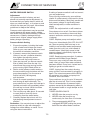
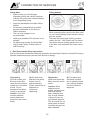
1 - Gas Guard nozzle filling instructions
Ensure Gas Guard nozzles are fitted with protective nozzle shields. Report to site staff if missing.
(Nozzle shields have been removed from picture for clarity).
1
Connecting
(1) Push nozzle over
the lugs on the filler
valve and turn barrel a
quarter turn clockwise
to lock. Do not
squeeze lever before
nozzle is connected.
Caution: From this
moment onwards
ensure hands are
away from the nozzle
barrel.
2
(2) Pull back lever
and latch into place.
Ensure lever is
latched securely.
Follow instructions on
dispenser to
commence
dispensing.
3
Disconnect
(3) Ensure hands are
away from the nozzle
barrel.
Caution: When
dispensing has
ended, squeeze back
lever and release
latch. Release lever
fully. A small release
of gas will occur as
you release the lever.
This is normal! Do not
place hands on barrel
until after the gas has
been released.
7-5
4
(4) Turn barrel anti
clockwise a quarter
turn to release nozzle
from vehicle. Replace
nozzle in holder on
dispenser.
CONNECTION OF SERVICES
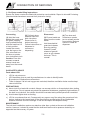
1 - De Visser nozzle filling instructions
Ensure De Visser nozzles are fitted with protective nozzle shields. Report to site staff if missing.
(Nozzle shields have been removed from picture for clarity).
1
Connecting
(1) Hold the hose
behind the nozzle and
the guard, keeping
lever pushed forward
with the handle at 12
o’clock position.
Locate the nozzle
over the lugs on the
filler valve and turn
the lever a quarter
turn clockwise to lock.
2
(2) Pull back lever
towards hose and
latch into place.
Ensure lever is
latched securely.
Follow instructions on
dispenser to
commence
dispensing.
3
Disconnect
(3) Ensure hands are
away from the nozzle
barrel.
Hold hose behind
guard and release
lever by pushing
forward. A small
release of gas will
occur as you release
the lever. This is
normal!
4
(4) Turn lever anti
clockwise a quarter
turn to release nozzle
from vehicle. Replace
nozzle in holder on
dispenser.
Caution: From this
moment onwards
ensure hands are
away from the nozzle
barrel.
GAS SAFETY ADVICE
Facts about LPG
•
•
•
•
LPG is not poisonous.
LPG has been given a smell by manufacturers in order to identify leaks.
Bi-products of combustion are harmless.
There is danger if all air and oxygen are excluded, therefore ventilation holes must be kept
clear at all times.
PRECAUTIONS
a) Never look for a leak with a match. Always use a soap solution or its equivalent when testing
connections. Do not operate any electrical apparatus whatsoever, especially light switches. If
the leak is not obvious, the vehicle should be evacuated and qualified personnel consulted.
b) Avoid naked lights when re-fuelling.
c) LPG is more dense than air. Consequently any vapour may flow along the ground and into
drains, sinking to the lowest level of the surroundings and be ignited at a considerable
distance from the source of leakage. In still air the vapour will disperse slowly.
MAINTENANCE
The bulk tank installation requires no attention other than a check at the annual habitation
service, however, it should be noted that the bulk tank itself must be pressure tested by an
approved test house every 10 years.
7-6
CONNECTION OF SERVICES
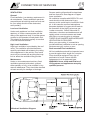
VENTILATION
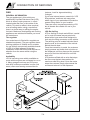
Screens and/or grilles should be kept clean
and free from dust. See diagram of upper/
lower ventilation.
General
Fixed ventilation is a statutory requirement in
all motorhomes. These ventilation apertures
are positioned at both high and low level and
for your safety should not be obstructed,
even partially.
All ventilation complies with BS EN 721 and
vents should not be obstructed in any
manner as this could lead to insufficient fresh
air. In this case the confined atmosphere
becomes depleted of oxygen which leads to
the formation of the highly poisonous gas
‘carbon monoxide’. Carbon Monoxide is
odourless, colourless and tasteless and will
rapidly cause unconsciousness and death
with little or no warning prior to collapse.
THERE IS NO DANGER WHEN ADEQUATE
VENTILATION IS PROVIDED.
Low Level Ventilation
Under each appliance is a fixed ventilation
aperture, of a size commensurate with the
rating of the appliance itself. It is either gauze
covered or incorporates a fixed plastic vent.
This should be checked regularly to see that
it has not become blocked.
When you are cooking, it is essential to
provide additional ventilation such as opening
windows near grill, cooker or oven.
High Level Ventilation
High level ventilation is provided by the roof
vents. The ventilation provided has been
carefully calculated and relates to the rating
of the appliances in the vehicle. Roof vents
must not be covered with anything that may
limit or affect the ventilation they provide.
Roof-mounted Flue installations
All flue installations should be inspected once
a year throughout their length for corrosion.
Flues should be replaced if any sign of
perforation is found. Ensure that the
replacement is of an approved type.
Maintenance
WARNING: Never allow modification of
LPG systems and appliances except by
qualified persons.
Under no circumstances should any fixed
ventilation aperture be blocked, covered,
either partially or fully, or be modified in any
manner whatsoever. They should be checked
at least annually for damage or blockage.
Windrush Ventilation Diagram
7-7
CONNECTION OF SERVICES
Connection
Safe Usage
Before turning on the gas supply, ensure that
all gas operated equipment in the motorhome
is turned off.
To avoid accidents, the following fundamental
advice should be carefully read before using
gas appliances.
• Always read and follow the use and
maintenance instructions provided by the
manufacturers of gas equipment. Should
any soot accumulate on pans, fire
radiants, etc., or any smell be produced,
consult a competent installer on the
correct maintenance and adjustment of
burners.
• Never check for gas leaks with a naked
flame.
• Never use gas appliances without
adequate ventilation. All gas appliances
require a plentiful supply of fresh air for
correct operation. Fixed ventilators or air
inlets should not be stopped up. Where
practicable, turn off all appliances before
retiring to bed, preferably at the cylinder
or inlet to the motorhome or other
dwelling.
• Unless the appliance incorporates
automatic ignition, when lighting an
appliance always make sure you apply a
lighted match or taper to the burner
before turning on the gas.
• If any appliance is disconnected for
repair, maintenance, etc., ensure that the
gas line is capped off.
• If taps are stiff to operate or appear to be
a source of leakage, call in a competent
installer to rectify. LPG taps require a
special grease.
• Always seek advice when in doubt.
All gas equipment is supplied through a
central Gas Manifold System which has
individual isolation taps for each appliance
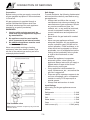
denoted by a symbol (see below).
WARNINGS:
1
Interior outlet sockets must only be
used with original appliances supplied
by manufacturer.
2
No appliance must be used outside
when connected to an internal socket.
3
No additional appliance must be used
inside the motorhome.
Never use portable cooking or heating
equipment other than electric heaters, that
are not of the radiant type as they are a fire
and asphyxiation hazard.
Input Ratings
Input rating for the gas appliances are as
follows:
Refrigerator ......................................... 0.1kW
Heater ................................................. 2.4kW
Grill ...................................................... 1.5kW
Water heater ....................................... 1.5kW
Oven ................................................... 1.5kW
Gas isolation valve
Hob burners (x3) ...................... 1.5kW (each)
Note: Amount and order of taps may vary from that
which is shown.
7-8
CONNECTION OF SERVICES
IT IS IMPORTANT THAT THE MAIN
SWITCH AT THE SITE SUPPLY POINT
SHOULD BE SWITCHED OFF, THE
SUPPLY FLEXIBLE CABLE
DISCONNECTED, AND ANY COVER
REPLACED ON THE SOCKET OUTLET AT
THE SITE SUPPLY POINT BEFORE
DISCONNECTING THE FLEXIBLE CABLE
FROM THE MOTORHOME. IT IS
DANGEROUS TO LEAVE THE SUPPLY
SOCKET OR SUPPLY FLEXIBLE CABLE
LIVE.
ELECTRICITY
As with electricity in the home, care must be
exercised when handling mains electricity.
Your attention is drawn to the following notice
as laid down by the Institute of Electrical
Engineers.
INSTRUCTIONS FOR ELECTRICITY
SUPPLY
On arrival at caravan site
The motorhome mains inlet flexible supply
cable and its limits are shown on page 7-12.
Note: Please check appliance manufacturers
handbook to see if suitable for use with
generator or charger.
1. Before connecting the motorhome
installation to the mains supply, check
that:
A generator may only be connected via the
mains socket. If using a generator you also
need to comply with the requirements/
instructions supplied with the generator.
(a) the mains supply is suitable for your
installation and appliances, i.e. whether it
is a.c. or d.c. and whether it is at the
correct voltage and frequency,
Because motorhomes are sometimes left
unused for long periods in the open, it is
strongly advised that the mains installation is
inspected periodically to ensure that it is safe
to use. The IEE Wiring Regulations
recommend that mains installations in
motorhomes are re-inspected every 3 years
by a qualified person (see list) who should
sign and issue a periodic inspection report.
(The manufacturer recommends annual
inspections).
(b) your installation will be properly earthed.
Never accept a supply from a socket
outlet or plug having only two pins, or
from a lighting outlet, and
(c) any residual current device (earth
leakage circuit breaker) in the mains
supply to the motorhome has been tested
within the last month.
In case of doubt, consult the site owner or his
agent.
2. MAKE SURE THAT THE SWITCH AT
THE SITE SUPPLY POINT IS OFF.
3. Lift the cover of the electricity inlet
provided on the motorhome, and insert
the connector of the supply flexible cable.
4. Remove any cover from the socket outlet
provided at the site supply point, and
connect the plug at the other end of the
supply flexible cable to this. Switch on the
main switch at the site supply point.
Suitably qualified persons acceptable to the
NCC to sign and issue inspection and
completion certificates are:
• an approved contractor of the National
Inspection Council for Electrical Installation Contracting* or
• a member of the Electrical Contractors’
Association
• a member of the Electrical Contractors’
Association of Scotland
• a qualified person acting on behalf of the
above (in which event it should be stated
for whom he is acting).
Note: Use mains cable fully uncoiled and
protect from traffic.
Caution: Be aware that the 12V appliances,
except the refrigerator, will not operate whilst
the ignition is switched on and the vehicle
engine running. The master switch on the
electrical control panel controls the 12 volt
supply.
7-9
CONNECTION OF SERVICES
*The names and addresses of Approved
Contractors in any locality (there are over
10,500 in the UK) can be obtained from:
OVERSEAS CONNECTION
NICEIC
Warwick House
Houghton Hall Park
Houghton Regis
Dunstable LU5 5ZX
Telephone: 0870 013 0382
Email: [email protected]
Care must be taken when connecting
supplies abroad since the supplies can be of
REVERSE POLARITY.
The names and addresses of members of
the Electrical Contractors’ Associations can
be obtained direct from:
The only certain way of making equipment
safe is to unplug it.
Note: Connection to a mains voltage supply
OVERSEAS requires particular attention.
The significance of REVERSE POLARITY is
that when equipment is switched off it may
not be electrically isolated.
If electrical polarity indication is not included
in your motorhome electrical equipment, it is
useful to have a means of checking polarity
of the mains supply, especially when touring
overseas. There are available several
proprietary makes of equipment for testing
polarity.
ECA
Esca House
Palace Court
London W2 4HY
Telephone: 020 7313 4800
If it can be achieved, it is preferable to
connect live to live, and neutral to neutral to
maintain full electrical protection.
WARNING: Current consumption in the
motorhome must not exceed 16 amps or
the pitch permitted maximum if this is
less than 16 amps.
It is dangerous to attempt modifications
and additions yourself. Never allow
modification of electrical systems and
appliances except by qualified persons.
Lampholder–plugs (bayonet-cap
adaptors) should not in any
circumstances be used.
CAUTION: Electrical heaters have the
potential to draw 8 amps at 2kW. It is,
therefore, advisable to check the supply
rating before switching on two loads (items)
greater than the supply as this may cause an
overload and the circuit breaker to trip.
7-10
The legal length of the
mains inlet cable is 25
± 2 metres. When in
use it must be fully
uncoiled and
protected from traffic.
WARNING: It is
essential that
connections are made
exactly as shown. If
terminal markings are
not in accordance
with the diagram they
must be ignored. If in
doubt consult a
qualified electrician.
7-11
WIRING OF CONNECTING CABLE AND MOTORHOME MAINS INLET
MOTORHOME MAINS INLET
CONNECTION OF SERVICES
CONNECTION OF SERVICES
EC500 POWER CONTROL SYSTEM
1
INTRODUCTION
This section of the handbook will guide you through the operation of the electrical system.
Further technical details are contained in sections 3 to 6 or in the supporting technical manual
available from www.sargentltd.co.uk
For the safe operation of all electrical equipment within your Leisure Vehicle it is important that
you read and fully understand these instructions. If you are unsure of any point please contact
your dealer / distributor for advice before use.
The system has a number of key components that you will need to be familiar with before
attempting to use the system, these are:
•
The EC500 series Power Supply Unit (PSU) -a combined mains consumer unit and 12V
controller.
•
The EC480 series Control Panel (CP) -a remotely located user control panel used to turn
circuits on and off and to display battery and water tank information.
•
The PX-300 Battery Charger / Power Supply – A separate, air cooled 300 Watt multi-stage
power converter unit that charges the batteries and provides 12V DC power.
•
The EM40 Interface Unit - This small unit is located at floor level behind the drivers’ seat.
The unit houses fuses for the fridge, vehicle battery, radio and other systems. It also
provides connections for the optional tow bar harness.
2
USING THE SYSTEM
2.1 EC500 Power Supply Unit - Component Layout
7-12
CONNECTION OF SERVICES
button and confirm that the RCD turns off
(lever in down position). Switch the RCD
back to the on position (lever in up
position). If the test button failed to
operate the RCD see section 3.14.
2.2 Activating the System
The EC500 system has a shutdown feature
that should be used when the vehicle is in
storage or is not being used for long periods
of time. This allows the leisure electronics to
be turned off when not required to save
battery power. When in the off state the alarm
and tracking system supplies are still active,
most other supplies are turned off.
E) Check Miniature Circuit Breakers. Locate
the MCB’s within the PSU (adjacent to
the RCD) and ensure they are all in the
on (up) position. If any MCB’s fail to
‘latch’ in the on position see section 3.14.
Before using the system please ensure the
system shutdown switch is in the on position
(button in).
F) Turn the PSU ON. Locate the black
‘Shutdown’ button and ensure it is in the
on position (press button to change,
button in = on, button out = off). Locate
the green ‘Charger’ switch on the PSU
and turn to the on position (press button
to change, button in = on, button out =
off). The charger switch will illuminate
when turned on.
2.3 Connecting to the Mains 230V supply
and Safety checks
For your safety it is IMPORTANT that you
follow these connections instructions each
time your Leisure Vehicle is connected to a
mains supply. This section assumes that the
system is complete and that a Leisure battery
has been installed (see 3.5).
G) Check correct Polarity. Locate the
‘Reverse polarity’ indicator on the PSU
and ensure that the indicator is NOT
illuminated. If the indicator is illuminated
see section 3.10.
A) Ensure suitability of the Mains Supply.
Your Leisure Vehicle should only be
connected to an approved supply that
meets the requirements of BS7671 or
relevant harmonised standards. In most
cases the site warden will hold
information regarding suitability of supply.
If using a generator you also need to
comply with the requirements /
instructions supplied with the generator.
Please note that some electronic
generators may not be compatible with
your leisure system. Further generator
operational information is contained
elsewhere in this manual.
H) Check operation of equipment. It is now
safe to operate the 12v and 230v
equipment.
B) Switch the PSU internal Power Converter
OFF. Locate the green ‘Charger’ power
switch on the PSU and ensure the switch
is in the off position (button out) before
connection to the mains supply.
C) Connect the Hook-up Lead. Firstly
connect the supplied hook-up lead
(orange cable with blue connectors) to
the Leisure Vehicle and then connect to
the mains supply.
D) Check Residual Current Device
operation. Locate the RCD within the
PSU and ensure the RCD is switched on
(lever in up position). Press the ‘Test’
7-13
CONNECTION OF SERVICES
2.4 EC480 Digital Control Panel (Colour graphic display)
2.5 Control Panel Operation
EC480
Button Description
Power Button. Press the power button to turn the leisure power on. Press the
button again to turn the power off. The adjacent LED will illuminate when the
power is on, and also the voltage of the selected battery will be displayed on
the screen. This button is also present on the PSU unit, so this feature can
also be operated from the PSU.
Pump Button. With the power on, press the pump button to turn the water
pump on. Press the button again to turn the pump off. The adjacent LED will
illuminate when the pump is on, and also the level of the water tank will be
displayed on the screen. This button is also present on the PSU unit, so this
feature can also be operated from the PSU.
Light Button. With the power on, press the light button to turn the main
internal lighting on. Press the button again to turn the lights off. The adjacent
LED will illuminate when the lights are on. The lights will be turned on and off
automatically each time the power button is operated. This button is also
present on the PSU unit, so this feature can also be operated from the PSU.
Battery Select. By default, the leisure battery is selected as the power source
if no mains supply is present, or as the battery to be charged when the mains
supply is available. To change the selected battery, press the vehicle battery
select button. The selected or ‘Active’ battery is shown on the screen, and on
EC300 panels is also indicated by the adjacent LED (LED off = Leisure
battery, LED on = vehicle battery).
Awning Light Button. With the power on, press the awning light button to
turn the awning light on or off. The adjacent LED will illuminate when the light
is on.
Frost Protect Button. When the frost protection option has been installed,
with the power on, press the frost protect button to turn on the water tank
heating system. The adjacent LED will illuminate to show that the tank heating
system is on. Note: This feature is NOT enabled at the time of manufacture.
7-14
CONNECTION OF SERVICES
EC480
Button Description
Ceiling Light Button. This switch turns the ceiling lights on and off.
Scroll Up. Use this button to scroll through the various menu / screen items or
to make setting adjustments
Select. Use this button to select options/items or to cancel alarms/warnings.
Note: The screen illumination/backlight will turn off after a period of time.
Press the select button to reactive the illumination.
Scroll Down. Use this button to scroll through the various manu/screen items
or to make setting adjustments.
2.6 Remote Control
Systems fitted with the EC480 Control Panel also have an
infrared remote control. This control can be used to control
some of the control panel functions, as follows;
The power button works in the same manner as
the control panel power button. Point the remote
towards the control panel and press the button to
turn the power on or off.
The ‘B’ button works the same as the control panel
lights button. . Press the button to turn the lights on
or off.
The ‘A’ button is used to turn on or off the dimmer
circuit lights. Press the button to turn the lights on
or off.
The left hand side up and down buttons are used
to control the dimmer circuit lights. With the lights
turned on, press the up button to increase the
brightness, and press the down button to decrease
the brightness.
Please note the right hand side up / down buttons
and the ‘C’ button are for future use and have no
function.
7-15
CONNECTION OF SERVICES
2.7 Operation while driving
The EC500 system is designed to shutdown parts of the system whilst the engine is running.
This is to meet Electro Magnetic Compatibility (EMC) regulations and to ensure the safe
operation of your motorhome.
Please ensure the system shutdown switch on the PSU is in the “on” (button in) position before
driving (see 2.2). This will ensure the electronic system is active and will therefore be able to
control the charging process, supply the refrigerator and monitor other system circuits.
When fitted, designated 12v sockets, en-route reading lights and en-route heating will remain
operational while the engine is running.
If you hear a warning buzzer when the engine is started, please see the control panel display for
details and also refer to section 3.11.
3
System Technical Information
The following section provides further technical information relating to the electrical system.
3.1 System Configuration
There are a number of dealer configurable features within the system. Your dealer will discuss
these options with you and make the necessary adjustments as required. Should you wish to
review the possible options / settings, further information can be sourced from
www.sargentltd.co.uk
3.2 Residual Current Device & Miniature Circuit Breakers
The Residual Current Device (RCD) is
basically provided to protect the user from
lethal electric shock. The RCD will turn off
(trip) if the current flowing in the live conductor
does not fully return down the neutral
conductor, i.e. some current is passing through
a person down to earth or through a faulty
appliance.
To ensure the RCD is working correctly, the
test button should be operated each time the
vehicle is connected to the mains supply (see
section 2.3)
The Miniature Circuit Breakers (MCB’s)
operate in a similar way to traditional fuses and
are provided to protect the wiring installation
from overload or short circuit. If an overload occurs the MCB will switch off the supply. If this
occurs you should investigate the cause of the fault before switching the MCB back on.
The following table shows the rating and circuit allocation for the three MCB’s
MCB
Rating
Output Wire Colour
Description
1
10 Amps
White
2
10 Amps
White (Yellow for heater)
Extra 230v Sockets / Space Heater
3
10 Amps
Black (Blue for water heater)
Fridge / Water Heater /
12v Charger (internally connected)
230v Sockets
7-16
CONNECTION OF SERVICES
3.3 Battery Charger
The EC500 system incorporates an intelligent three-stage battery charger / power converter.
During stage 1 the battery voltage is increased gradually while the current is limited to start the
charging process and protect the battery. At stage 2 the voltage rises to 14.4V to deliver the bulk
charge to the battery. When the battery is charged, the voltage is decreased at stage 3 to 13.6V
to deliver a float charge to maintain the battery in the fully charged state. The charger can be left
switched on continuously as required.
The battery charger / power converter also provides power to the leisure equipment when the
mains supply is connected. This module supplies DC to the leisure equipment up to a maximum
of 25 Amps (300 Watts), therefore the available power is distributed between the leisure load and
the battery, with the leisure load taking priority as per the following example:
Leisure load
Available power for battery charging
5A
20A
10A
15A
15A
10A
20A
5A
WARNING: Under heavy loads the charger case may become hot. ALWAYS ensure any
ventilation slots have a clear flow of air. Do not place combustible materials against/adjacent to
the charger.
3.4 Smart Charging
The EC500 system incorporates a smart charge feature, which monitors both leisure and vehicle
batteries and automatically adjusts and directs the charger power (and solar power if a solar
panel is installed) to maintain the leisure and vehicle batteries at an optimal level.
3.5 Leisure Battery
3.5.1
Type / Selection
For optimum performance and safety it is essential that only a proprietary brand LEISURE
battery is used with a typical capacity of 75 to 120 Ah (Ampere / hours). A normal vehicle battery
is NOT suitable. This battery should always be connected when the system is in use.
The PSU is configured to work with standard lead acid leisure batteries, and in most cases is
also compatible with the latest range of Absorbed Glass Matt (AGM) batteries. Before fitting nonstandard batteries please check that the charging profile described in 3.3 is suitable for the type
of battery by referring to the battery documentation or battery manufacturer.
Some vehicle installations can cater for two leisure batteries connected in parallel. In these
cases it is recommended that two identical batteries are used.
The battery feed is fitted with an inline fuse between the battery and the electrical harness, and
is usually located immediately outside the battery compartment or within 500mm of the battery.
The maximum rating of this fuse is 20A per battery. If a single battery is fitted to a motorhome,
this fuse may be increased to 30A, however if two batteries are fitted each battery should be
fused at a maximum of 20A.
3.5.2
Installation & Removal
Always disconnect the 230v mains supply and turn the PSU green charger switch to the off
position (button out) before removing or installing the battery.
7-17
CONNECTION OF SERVICES
When connecting the battery, ensure that the correct polarity is observed (black is negative [-]
and red is positive [+]) and that the terminals are securely fastened. Crocodile clips must not be
used.
WARNING: Explosive gases may be present at the battery. Take care to prevent flames and
sparks in the vicinity of the battery and do not smoke.
3.5.3
Operation / Servicing
Under normal circumstances it should not be necessary to remove the battery other than for
routine inspection of the terminals and “topping up” of the battery fluid where applicable. Please
see instructions supplied with the battery.
Note: Do not over discharge the battery. One of the most common causes of battery failure is
when the battery is discharged below the recommended level of approximately 10v. Discharging
a battery below this figure can cause permanent damage to one or more of the cells within the
battery.
To prevent over discharge, the EC500 system incorporates a battery protect circuit that warns
the users and then disconnects the batteries when they fall below set values.
If the power is turned on and the leisure battery level falls below 9V a warning beep will be heard
and information will be shown on the screen. To cancel the warning, press the select button.
If the power is turned on and the vehicle battery level falls below 10.9V a warning beep will be
heard and information will be shown on the screen. If no action is taken the system will switch
over from the vehicle battery to the leisure battery. To cancel the warning, press the select
button.
These warnings will not be repeated unless the power switch is turned off and on again. This is
to ensure the warning does not become a nuisance.
Battery
Vehicle
Cut off
Action after cut off
10.9V
Battery selection is
changed from
Vehicle battery to
Leisure battery. If
the leisure battery is
below 9V then a
further warning will
occur (see below).
Notes
This cut off level is designed to protect the
vehicle battery from over discharge. The
10.9V level ensures there is sufficient power
in the battery to run the vehicle electronics
and start the vehicle. This cut off only applies
to power drawn from the battery by the leisure
equipment; it will not protect the battery if you
leave vehicle circuits switched on, such as
the road lights.
This is an emergency cut off level to protect
the battery from severe damage. You should
not rely on this cut off level during normal
operation, but manage your power
consumption to a discharge level of 10V.
Leisure
9V
Power is turned off
This cut off only applies to power drawn from
the battery by the leisure equipment that is
controlled by the control panel power switch;
it will not protect the battery from discharge
by permanently connected equipment.
7-18
CONNECTION OF SERVICES
3.6 Solar Charge Management
The EC500 PSU incorporates a built-in solar charge management feature, which will control the
input from a solar panel (when fitted, maximum rating 120W). Depending on the charge state of
the batteries, the solar power will be directed to the required battery, and continuously monitored
to ensure optimum operation. For this system to operate intelligently, the shutdown button should
be left switched on. If the shutdown button is turned off then the solar panel will charge the
leisure battery only.
3.7 Water System Operation
The control panel pump button operates the internal (onboard) water pump. This pump will draw
water from the internal (onboard) water tank.
The water tanks (fresh & waste) incorporate a level warning feature to warn the user when the
fresh water level drops below 25% or when the waste water level reaches 100%.
If the water pump power is turned on and the fresh water level drops to below 25% a warning
beep will be heard information will be shown on the screen. To cancel the warning, press the
select button.
If the water pump power is turned on and the waste water level rises to full (100%) a warning
beep will be heard and information will be shown on the screen. To cancel the warning, press the
select button.
These warnings will not be repeated unless the water pump power switch is turned off and on
again. This is to ensure the warning does not become a nuisance.
3.8 Frost Protection
On vehicles fitted with water tank frost protection, the EC480 control panel frost protect switch
can be used to turn the feature on or off.
Note: This feature is NOT enabled at the time of manufacture.
3.9 Awning Light Operation
The awning light is control by the control panel awning / aux button. The awning light is also
linked to the remote door locking. If the doors are locked or unlocked the light will illuminate for a
short period of time. This is a dealer configurable item.
3.10 Electric Step Operation
On vehicles fitted with an electric step, this is operated by a button near the entry door. Press
and release the button to move the step in or out. One press of the button will move the step out,
a further press will move the step in again.
If the engine is started the step will move in automatically, after a short warning buzzer. If this
operation fails due to an obstacle or mechanical failure a buzzer will sound continuously to warn
that the step is still in the out position, and therefore requires your attention.
The electric step is also linked to the remote door locking. If the doors are unlocked the step will
move out, if the doors are locked the step will move in. This is a dealer configurable item, and
can be turned off if not required.
7-19
CONNECTION OF SERVICES
3.11 System Warnings
The system incorporates a number of warnings that are active at specific times. These are
summarised below, and also covered by relevant sections of this manual.
Warning
When
Type
Fresh water level low
With pump turned on and fresh water
level low (less than 25% full)
Message on screen and 1 minute
audible beep
Waste water level full
With pump turned on and waste water
level full (tank level 100%)
Message on screen and 1 minute
audible beep
Vehicle battery voltage
low
With control panel power on and vehicle
battery selected (as active battery) and
voltage level below 10.9V
Message on screen and 1 minute
audible beep. If no action taken after
1 minute then the system will switch to
the leisure battery
Leisure battery voltage
low
With control panel power on and leisure
battery selected (as active battery) and
voltage level below 9V
Message on screen and 1 minute
audible beep. If no action taken after
1 minute then the system will switch
the power of to prevent over discharge
of the battery
Alarm clock active
When alarm has been turned on and
alarm time has been reached
Message on screen and 1 minute
audible beep
Engine running
When the engine is started the system
power will be turned off
Message on screen, on EC480 this
will remain visible for 1 minute
Step still out
When the engine is started and the step
has failed to retract automatically
Message on screen and rapid beeps
from the control panel. The beeping
will not stop until the fault is cleared.
Mains lead (hook-up
cable) still connected /
plugged in
When the engine is started and the
mains cable is still plugged in and
switched on
Message on screen and repeated
beeps from the control panel. The
beeping will not stop until the fault is
cleared.
3.12 Event Timer Operation
The event timer is designed to allow the motorhome user to turn the 12v power on or off (in the
same way as using the control panel power button) without being in the vehicle. This allows
lights or other equipment to be turned on or off at a predetermined time.
Example - to turn on one interior light at 11.00pm for 1 hour
Ensure the clock is set to the correct time
EC480
Scroll to the System Time Setting screen
Follow the instructions in section 4 to set the ON time to 23:00 and the OFF time to 24:00
Set the Timer to ON
A stopwatch symbol will appear in the header area to indicate the timer is set
Turn all lights and 12v equipment off in the vehicle except the light that you want the event
timer to automatically switch on
Exit the vehicle At 11:00pm (23:00) the control panel will switch the 12v power on and
therefore any equipment that was left switched on will be turned on. The 12v power will be
switched off at Midnight (24:00).
7-20
CONNECTION OF SERVICES
3.13
12 Volt DC Fuses
WARNING: When replacing fuses always replace a fuse with the correct value. NEVER replace
with a higher value/rating as this could damage the wiring harness. If a replacement fuse ‘blows’
do not keep replacing the fuse as you could damage the wiring harness. Please investigate the
fault and contact your dealer.
The following table shows the fuse allocation for the 15 fuses fitted to the PSU. Please note that
fuses are dependant on PSU versions, so not all fuses may be present.
Fuse
1
Rating
Fuse Colour
10 Amps
Red
Description
Toilet
2
5 Amps
Tan
Ignitions
3
10 Amps
Red
Electric Step
4
10 Amps
Red
Water Pumps
5
10 Amps
Red
Permanent Supplies
6
20 Amps
Yellow
Leisure Battery
7
20 Amps
Yellow
Vehicle Battery
8
10 Amps
Red
Fans
9
10 Amps
Red
Power Circuits
10
10 Amps
Red
Lighting Circuit 1
11
10 Amps
Red
Lighting Circuit 2
12
10 Amps
Red
En-route Circuits
13
10 Amps
Red
Tank Heaters
Future Supply
14
10 Amps
Red
15
25 Amps
White
Charger (fitted internally to PSU)
The following table shows details of the fuse(s) located at the Leisure battery.
Fuse
Rating
Fuse Colour
Battery 1
20 Amps
Yellow
Fuse remotely located near battery
Description
Battery 2
20 Amps
Yellow
Fuse remotely located near battery 2
(where fitted)
The following table shows details of the fuse(s) located at the EM40 Interface Unit
Fuse
Rating
Fuse Colour
Description
2
5 Amps
Tan
Marker Lights
3
20 Amps
Yellow
Tow Bar +
4
20 Amps
Yellow
Vehicle Battery
6
20 Amps
Yellow
Fridge +
7
20 Amps
Yellow
Tow Bar D+
8
20 Amps
Yellow
Fridge D+
1
Spare location
5
Spare location
7-21
CONNECTION OF SERVICES
3.14
Common Fault Table
Fault
Possible Cause
Proposed Fix
No 230 volt
output from PSU
Connecting lead between
the site and Leisure
Vehicle not connected
Check and connect lead as per 2.3C
Reverse Polarity
light is
illuminated
Control Panel
problems
RCD switched off
Reset RCD as per 2.3D
RCD not operating
Check supply polarity; if the RCD continues to fail contact your Dealer
as there is probably an equipment or wiring fault
MCB switched off
Reset MCB by switching OFF (down position) then back ON (up
position), if the MCB continues to fail contact your Dealer as there is
propably an equipment or wiring fault
No or deficient supply
from site
Contact site Warden for assistance
Mains Supply reversed?
The reverse polarity light is designed to illuminate when the Live and
Neutral supply has been reversed/crossed over. If the light
illuminates there is a problem with the site supply or the cable
connecting the supply to your vehicle. The light is designed to work
on UK electrical supplies (where the neutral conductor is connected
to earth at the sub station). If you are using your vehicle outside the
UK this light may illuminate when no fault exists. In these cases
consult the site warden for advice.
Generator being used
‘The Reverse Polarity warning light is on when using my Generator’.
This is a normal side effect when using some types of generator.
Instead of connecting the neutral conductor to earth, some generators
centre tap the earth connection making both neutral and live
conductors 110V above earth. This 110V difference causes the neon
polarity indicator to illuminate. In most cases it is still safe to use the
generator, but please consult the generator handbook for further
information.
Control Panel has no
display
Backlight/illumination may have switched off. Press the select
button to reactivate the backlight.
Check batteries and fuses, turn PSU shutdown switch and charger
switch on and ensure mains supply is connected.
Check control panel connecting lead at PSU and behind Control
Panel
Contact your Dealer
12V power turns off
Battery protect feature has operated to protect the Vehicle battery
and or the Leisure battery. See 3.5.3.
Engine has been started, all equipment has been disconnected to
meet EMC requirements. See 2.7.
Control Panel locked/
erratic function
Observe control panel handling instructions.
Control panel software may have crashed. Reboot control panel by
turning off the PSU isolate switch. Wait 30 seconds then turn the
switch back on.
No 12 volt output
No 230V supply
Check all above
from PSU
Charger not switched on
Turn charger switch on, switch will illuminate
Battery not connected
and/or charged
Install charged battery as per 3.5
Continued next page
7-22
CONNECTION OF SERVICES
3.14
Common Fault Table (continued)
Fault
Possible Cause
Proposed Fix
No 12 volt output
from PSU
Power button on control
panel not switched to on
Turn power on at control panel
(continued)
Battery flat / Battery fuse
Recharge battery, check fuses, check charging voltage is present at
battery
Fuse blown
Check all fuses are intact and the correct value fuse is installed as
per fuse table
Equipment switched off /
unplugged
Check equipment is switched on and connected to the 12V supply
PSU overheated / auto
shutdown operated
Reduce load on system. Allow PSU to cool down. PSU will
automatically restart when cool
Pump not
working
3.15
Other fault
Contact your Dealer
Fuse blown
Replace fuse with correct value as per fuse table
Pump turned off
Turn pump on by pressing the pump button at the control panel
Setting incorrect
Both the internal and external pump feeds are controlledd from the
control panel. To alter the setting of the pump switch see your dealer.
Ensure the setting matches your desired requirement.
Contact details
Sargent Electrical Services Limited, provide a technical help line during office hours. Please
contact 01482 678981 if you require technical help. For out of hour support please refer to the
tech support section of the Sargent web site www.sargentltd.co.uk
4 EC480 Control Panel
In addition to the information contained in section 2.5 (Control Panel Operation), the following
section provides further detail information.
4.1 Backlight Operation
The screen backlight (illumination) is turned on and off automatically. When operating on battery
power only the backlight time is 30 seconds. When operating on mains power the backlight time
is increased to 2 minutes. Pressing the select button will reactivate the backlight.
If the large clock screen is selected (see 4.4.4 below) and the mains supply is on then the
backlight will remain on continuously.
4.2 Header Area
The header area of the screen shows the following information;
At the left, the external temperature in centigrade
At the right, the internal temperature in centigrade
In the centre, the current time (24 hour clock)
In addition to the above, the following symbols (when shown) indicate;
Mains supply connected and charger switched on
Alarm clock set
Event timer set
7-23
CONNECTION OF SERVICES
4.3 Footer Area
The footer area of the screen shows details of the current information screen, and may also
show additional information during specific operations.
4.4 Information Area
The main information area can display a variety of system information screens. These have been
designed to present the information in a clear and concise form, while retaining technical detail
for the more advanced users.
The selected screen can be changed by using the down or up buttons, and work on a continuous
loop basis. The selected screen may be changed automatically by the system depending on the
action being performed.
4.4.1
Splash Screen
This screen shows the header and footer detail, along with the Auto-Sleepers logo.
4.4.2
System Levels Screen
This screen shows, from left to right;
•
[V] Vehicle battery voltage gauge. This gauge shows the voltage of the Vehicle battery in bar
format, with the precise reading shown at the top of the bar. The actual bar changes colour
according to the battery voltage. Less than 10.9V = red (Poor), 10.9V to 11.8V = yellow
(Fair), 11.9V to 14.4V = green (Good).
•
[L] Leisure battery voltage gauge. This gauge shows the voltage of the Leisure battery in bar
7-24
CONNECTION OF SERVICES
format, with the precise reading shown at the top of the bar. The actual bar changes colour
according to the battery voltage. Less than 10.9V = red (Poor), 10.9V to 11.8V = yellow
(Fair), 11.9V to 14.4V = green (Good).
•
[F] Fresh water level gauge. This gauge shows the level of water in the Fresh water tank,
with the reading also shown at the top of the bar. The actual bar changes colour according to
the water level. 25% = red, 50% = yellow, 75% and above = green.
•
[W] Waste water level gauge. This gauge shows the level of water in the Waste water tank,
with the reading also shown at the top of the bar. The actual bar changes colour according to
the water level. 25% = green, 50% = yellow, 75% and above = red.
4.4.3
Active Battery Screen
This screen is automatically selected when the battery select button is operated. The battery
symbol bottom left will contain a ‘L’ if the leisure battery is selected and a ‘V’ if the vehicle battery
is selected. From left to right;
•
[L or V] Active battery voltage gauge. This gauge shows the voltage of the Active battery (the
currently selected battery) in bar format, with the precise reading shown at the top of the bar.
The actual bar changes colour according to the battery voltage. Less than 10.9V = red
(Poor), 10.9V to 11.8V = yellow (Fair), 11.9V to 14.4V = green (Good).
•
[AH] Leisure battery calculated capacity (percentage of Amp Hours). When the leisure
battery is active (selected), this gauge will be shown. The gauge shows the predicted charge
capacity of the battery. As the battery is charged this gauge will increase, as the battery is
discharged (used) this gauge will reduce. This can provide a useful indication of usable
battery power.
•
[SUN] Solar panel ammeter. This gauge shows the current in Amps that is being provided by
the solar panel (when fitted). The system will decide which battery to direct the solar power
to. This is based on system logic (see section 3.6) and is indicated by a ‘L’ or ‘V’ in the centre
of the sun logo.
•
[A] Battery ammeter. This gauge shows the current in Amps going into or out of the Active
(selected) battery. Positive current (+) indicates charging of the battery, and is indicated by a
green bar. Negative current (-) indicated discharging of the battery, and is indicated by a
yellow bar (low discharge) or red bar (high discharge).
7-25
CONNECTION OF SERVICES
4.4.4
Large Clock Screen
This screen shows a large display clock in 24 hour format.
4.4.5
Time and Timer Event Settings Screen
This screen is used to adjust any of the system times and to set the alarm clock or event timer.
Press the select button to move through each setting. Press the up / down buttons to adjust the
setting.
•
Set Clock Time. First adjust the hour using the up / down buttons, then press select again to
move to minutes and adjust with the up / down buttons.
•
Set Alarm Time. Press the select button to move to alarm hour setting. Press the up / down
buttons to adjust the setting, then press select again to move to minutes and adjust with the
up / down buttons. Press select again to move to alarm on / off. Press the up / down buttons
to adjust the setting. If the alarm is turned on, a bell symbol will be shown in the header area.
•
Set Timer event on Time. Press the select button to move to timer hour setting. Press the up
/ down buttons to adjust the setting, then press select again to move to minutes and adjust
with the up / down buttons.
•
Set Timer event off Time. Press the select button to move to timer hour setting. Press the up
/ down buttons to adjust the setting, then press select again to move to minutes and adjust
with the up / down buttons. Press select again to move to timer on / off. Press the up / down
buttons to adjust the setting. If the timer is turned on, a stopwatch symbol will be shown in
the header area.
•
Press select again to exit the settings
7-26
CONNECTION OF SERVICES
4.4.6
System Warnings Screens
The system can display a number of warnings. The control panel will beep and display the
appropriate message. Press the select button to cancel the warning.
See sections 3.4B and 3.8 for an explanation of typical system warnings.
7-27
CONNECTION OF SERVICES
5
EC300 Control Panel
Display
Description
Options / Notes
EC300 v2.20
12:00 23.90ºC
Main Control Panel display showing
model number (EC300), software version
number, current time (12:00) and Internal
temperature (23.9ºC) in centrigrade
The addition of a asterisk (*) in the
top left of the display indicates that
the alarm is set.
The addition of a hash (#) in the top
right of the display indicates that the
event timer is set.
The addition of the letters ‘AC’ in
the centre of the display indicates
that the AC Mains supply is
switched on.
Leisure Battery
12.5v (Good)
Voltage reading and battery condition
description for the on-board leisure
battery
See also 3.5.3
Less than 10.9 = (Poor)
10.9 to 11.8 = (Fair)
11.9 to 14.4 = (Good)
Vehicle Battery
13.3v (Good)
Voltage reading and battery condition
description for the vehicle battery
See also 3.5.3
Less than 10.9 = (Poor)
10.9 = 11.8 = (Fair)
11.9 to 14.4 = (Good)
Indication of the 230V mains supply
ON = mains supply on
OFF = mains supply off
Water level in the fresh water tank
(5 measurement levels)
If the water pump power switch is turned
ON and the water level drops below 25%
a warning beep will be heard and the LCD
display will flash. To cancel the warning,
press the select ( ) button. The warning
will not be repeated unless the water
pump power switch is turned off and on
again. This is to ensure the warning does
not become a nuisance.
0% < = 1/4 Full (Nearly empty)
25% > = 1/4 Full
50% > = 1/2 Full
75% > = 3/4 Full
100% = Full
Water level in the waste water tank
(5 measurement levels)
If the water pump power switch is turned
ON and the waste water level rises to
100% a warning beep will be heard and
the LCD display will flash. To cancel the
warning, press the select ( ) button.
The warning will not be repeated unless
the water pump power switch is turned off
and on again. This is to ensure the
warning does not become a nuisance.
0% < = 1/4 Full (Nearly empty)
25% > = 1/4 Full
50% > = 1/2 Full
75% > = 3/4 Full
100% = Full
Mains Supply
ON
Fresh Water
25% Full
Waste Water
0% Full
External Temp
20.5ºC
External temperature (in degrees
centigrade) as measured by the external
temperature probe
7-28
CONNECTION OF SERVICES
5
EC300 Control Panel (continued)
Display
Tank Heaters
ON
Battery Current
5.4 Amps
Description
Options / Notes
Shows the status of the Tank Heaters (on
/ off) (when fitted).
Press the select button ( ) to switch
between OFF and ON
The addition of a tank symbol ( ) in
the top centre of the main EC325
display indicates that the tank
heater are on
Current (in Amps) being drawn from or
charged into the selected battery.
If a solar panel is fitted this display will
include the current being provided by the
solar panel
Negative figure (-) = current being
drawn from the selected battery
Positive figure = current being used
to charge the selected battery
Allows operation of the External pump for
Will have no effect if the External
pump is already switched on (see
above)
Will not operate if the Internal
(Fresh) water tank is showing 100%
Full
Water Tank Fill? a period of one minute
(for filling the internal tank from the
(Start 1 Min)
external tank)
Use the select button (
STOP)
Clock Set?
12:00
) to START (or
Access to set the internal clock
Press the select button ( ) to select
HOUR
) buttons to
Use the up/down (
Please note the clock uses a 24
hour cycle
change
Press the select button ( ) to select
MINUTE
Use the up/down (
) buttons to
change
Press the select button (
Alarm Set?
12:00
) to exit
Access to set the alarm clock
Press the select button ( ) to select
hour
Use the up/down (
) buttons to
Please note the alarm uses a 24
hour cycle
change
Press the select button ( ) to select
MINUTE
Use the up/down (
) buttons to
Alarm = OFF
change
Press the select button ( ) to exit
Shows the alarm clock status (on/off)
Press the select button( ) to switch
between OFF or ON
7-29
The addition of a asterisk (*0 in the
top left of the main EC325 display
indicates that the alarm is set
CONNECTION OF SERVICES
5
EC300 Control Panel (continued)
Display
Set Event Timer?
Description
Options / Notes
Access to set the event timer
Press the select button ( ) to select
HOUR ON
Use the up/down (
) buttons to
Please note the event timer uses a
24 hour cycle
The event timer is used to switch
the control panel power on and off
change
Press the select button ( ) to select
MINUTE ON
Use the up/down (
) buttons to
in the absence of the user/
occupier.
See section 3.12 for further details
change
Press the select button ( ) to select
HOUR OFF
Use the up/down (
) buttons to
change
Press the select button ( ) to select
MINUTE OFF
Use the up/down (
) buttons to
change
Press the select button (
Event Timer = Off
12:00 till 12:00
) to exit
Shows the event timer status (OFF/ON)
and the current On and Off times
Press the select button ( ) to switch
Vehicle Battery This WARNING display indicates that the
Vehicle battery voltage is low (10.9 volts or
Dangerously Low less). The panel will beep for one minute and
then switch over to the Leisure Battery to
prevent draining the Vehicle battery.
Leisure Battery This WARNING display indicates that the
Leisure battery voltage is low (6 volts or less).
Dangerously Low
The addition of a hash (#) in the top
right of the main EC300 display
indicates that the event timer is set
You can switch over to the
Leisure battery immediately
(and cancel the beep) by using
the battery selector switch
See section 3.11 for further
details
The panel will beep for one minute and then
switch the power off to prevent damage to the
leisure battery.
System disabled
Engine started
This WARNING display indicates that the
system has been disabled because the vehicle
engine is running
7-30
EMC (Electro Magnetic Compatability)
directive 89/336/EEC requires that
electrical accessories within the
vehicle are disconnected while
the vehicle is in motion
CONNECTION OF SERVICES
6 TECHNICAL DATA & APPROVALS
6.1 Outline specification -EC500PSU & EC300, EC480 Control Panel
INPUT 230V
230 Volts / 0 to 16 Amps
+ / - 10%
OUTPUT 230V
RCD protected, 3 x MCB outputs fo 10A
Separate switched channels for water heater, space
heater and charger
INPUT 12V
2 x 20A battery inputs via 2 x 4 way connectors
SOLAR INPUT
1 x Dedicated solar panel input (20 to 100W panel) via a 4
way connector
OUTPUT 12V
25A total output via multiple switched channels protected
by 14 fused outputs
CHARGER
Input 220-240 Volts AC +/- 10%, Frequency 50 Hz +/- 6%,
Current 3A max.
DC Output 13.6 to 14.4 Volts nominal, Current 25 Amps
max (300 Watts)
Overall size (HxWxD) 50 x 250 x 135mm
Fixing centres 128*128mm
1.2kg
Signal INPUT
4 x Fresh water level, 4 x Waste water level, 1 x Engine
running, plus multiple vehicle connections
Fresh water negative sensed
Waste water negative sensed
Data IN / OUT
CANBUS Data communication and power to Control
Panel via 6 way connector
IP rating
IP31
Operating
temperature
Ambient 0 to 35º Centigrade
PSU case temperature with full load 65ºC Max
Automatic shutdown and restart
if overheated/overloaded
EC500PSU
Overall size (HxWxD) 315 x 195 x 150mm
Clearances 75mm above, 50mm left and right
Weight 2.9kg
EC300, EC480
Control Panel
Overall size (HxWxD) 80 x 194 x 25mm
Cut-out size (HxW) 60 x 165mm
Fixing centres 178mm
Weight 140g
7-31
CONNECTION OF SERVICES
12V/230V WIRING DIAGRAM
7-32
TECHNICAL SPECIFICATION
Mass in Running Order (MRO)
TECHNICAL DATA
The Mass in Running Order is defined as the
mass of the standard converted vehicle with
bodywork including the following:
Base Vehicle Data
For all matters relating to the base vehicle,
and particularly tyre pressures, refer to the
base vehicle instruction book or if in doubt
consult your local base vehicle commercial
dealer.
•
Coolants (oil and water)
•
90% of automotive fuel
•
Spare wheel
Weights, Dimensions and Capacities
•
Crockery
Before using your Auto-Sleeper you should
be fully conversant with all matters relating to
weights. The following definitions should be
fully understood and then related to the
tabulated base vehicle weight data.
•
Washer fluid
•
Tools
•
Driver (at 75 kg, 11st 12lb)
•
Fire extinguisher
All other optional equipment whether on the
base vehicle or part of the conversion is
excluded from the mass in running order.
Weights
Details of vehicle weights are found below,
and are presented in the manner prescribed
in the European Standard EN1646-2 for
Payloads. All weights are in kilograms (kg).
Mass of the User Payload
The Mass of the User Payload is the
difference between the MPTLM and the
MRO. It is the motor caravans carrying
capacity for everything placed in or on the
vehicle, including the passengers. Please
note that a driver (at 75kg, 11st 12lb) is
included in the MRO. Everything listed in
italics below must be subtracted from the
payload.
Take care to ensure that heavy loads are
stored low down in bed boxes and low
cupboards, and distribute weight evenly side
to side as far as possible.
Note 1: Please take care to ensure that you
have allowed for the masses of all items you
intend to carry in the motor caravan, e.g.
passengers, optional equipment, essential
habitation equipment and personal effects
such as clothing, food, pets, bicycles,
sailboards, sports equipment, etc.
Mass of the Conventional Load
The Conventional Load is the mass of the
passengers carried and must be subtracted
from the payload. The “EC standard person”
weighs 75kg (11st 12lb). The user should
adjust the figure according to the mass and
number of passengers carried. Motorhome
Manufacturers designate passenger seats as
being suitable for travelling, and provide seat
belts accordingly. Multiplying the weight of
the passengers by the number of passengers
gives the Conventional Load. Please note
that a driver (at 75kg, 11st 12lb) is included in
the MRO.
Note 2: Warning - Under no circumstances
should the maximum technically permissible
laden mass of this motor caravan, or its
individual axles, be exceeded.
DEFINITIONS
Maximum Technically Permissible Laden
Mass (MTPLM)
The Maximum Technically Permissible Laden
Mass is a figure given by the manufacturer of
the base vehicle. It is the combined
maximum permitted weight of the vehicle and
all of its contents, both inside and out. The
MTPLM is unaffected by the Auto-Sleeper
conversion.
8-1
TECHNICAL SPECIFICATION
Essential Habitation Equipment
Gross Train Mass (GTM)
For the purpose of EN1646-2, the mass of
the Essential Habitation Equipment includes
the mass of the following:
If you are towing a trailer with your AutoSleeper, the Gross Train Weight is the
maximum allowable weight of the towing
vehicle, the trailer and the mass of every item
carried. The GTM is given by the base
vehicle manufacturer and is unaffected by the
Auto-Sleeper conversion. Please check your
driving licence to ensure you are allowed to
drive a vehicle combination at this weight.
•
the LPG cylinders, 90% full.
•
the freshwater tank, 90% full.
•
the water heater system, full.
•
the waste water tank, empty.
•
the toilet system flushing tank, full.
•
the toilet system holding tank, empty.
Maximum Braked Trailer Mass (MBTM)
This is the maximum allowable weight of the
trailer together with its load, provided the
trailer has a braking system, which complies
with the local Construction and Use
Regulations. The MBTM is given by the base
vehicle manufacturer and is unaffected by the
Auto-Sleeper conversion.
All of these must be subtracted from the user
payload.
Auto-Sleepers include the low voltage (230V)
connection cable and the second battery in
the mass in running order.
Options, Personal Effects and
Accessories
MTPLM of the Axles
When options, personal effects and
accessories are fitted or carried the mass
must be subtracted from the user payload. All
optional equipment whether on the base
vehicle or part of the conversion is excluded
from the mass in running order. Personal
effects are any items of any description
carried by the vehicle.
The individual axles also have MTPLM’s. The
sum of the two axle MTPLM’s usually
exceeds the overall vehicle MTPLM, but this
does not mean you can load each axle to its
maximum, because doing so would exceed
the overall MTPLM of the whole vehicle.
To determine accurately if a vehicle is
exceeding one of its maximum technically
permissible laden masses, the vehicle with all
of its load (that is passengers, contents,
luggage and external load) should be
weighed on a weighbridge.
You may wish to allocate the user payload to
suit your own use. For example, to increase
the available payload, the water system may
be emptied. If the vehicle is not being used
for camping the gas bottles can be left at
home to increase the mass available for
other items.
8-2
TECHNICAL SPECIFICATION
WEIGHT AND DIMENSION DATA
WEIGHT DATA TABLE
All weights in kg
WINDRUSH
2.2 HDi
Vehicle Designation
335 L2 H2
MTPLM
3500
Mass in Running Order
2998
Mass of the User Payload
502
Designated Passenger Seats (excluding driver)
3
Conventional Load @ 75kg per person)
225
Essential Habitation Equipment
103
Personal Effects (standard minimum figure)
100
Remainder for Personal Effects / Options /
Accessories
74
Optional air conditioning, roof mounted
42
Gross Train Mass
6000
MBTM
2500
Axle Weights
Front, in Running Order
1599
Rear, in Running Order
1399
MTPLM Front
1850
MTPLM Rear
2000
8-3
TECHNICAL SPECIFICATION
WEIGHT AND DIMENSION DATA (continued)
DIMENSIONAL DATA
All dimensions in mm
MODEL
WINDRUSH
Base Vehicle Manufacturer
Peugeot
Base Vehicle Model
335 L2 H2
Wheelbase
4035
METRIC DIMENSIONS
Overall Length
5998
Overall Width (mirrors extended)
2508
Overall Width (mirrors folded)
2260
Overall Height
2700
Internal Height (maximum)
1890
Internal Height (minimum)
1860
Double Bed (transverse)
1800 x 1470
Single Bed (nearside)
n/a
Single Bed (offside)
n/a
Bunk Beds
1800 x 600
Fresh Water Tank Capacity (litres)
69
Waste Water Tank Capacity (litres)
40
Gas, Refillable Tank, LPG
20 Litres
8-4
FITTED EQUIPMENT
IMPORTANT
SPINFLO TRIPLEX
COMBINATION OVEN
To maximise the usage of fitted equipment in
your motorhome it is essential that any
accompanying manufacturers’ literature is
read fully. All recommended maintenance
and preparation procedures should be
followed. The information provided in this
manual is only intended as a guide. If in any
doubt consult your manufacturer appointed
dealer, particularly before attempting to install
extra equipment.
BURNER OPERATION
The burners on this appliance have fixed
aeration and no adjustment is required. The
burners should flame as follows:
Propane - The flames should burn quietly
with a blue/green colour with no sign of
yellow tips.
Butane - Normally on initial lighting, a small
amount of yellow tipping will occur and then
slightly increases as the burner heats up.
In the interests of safety, replacement parts
for an appliance shall conform to the
appliance manufacturer’s specifications and
should be fitted by him or his authorised
agent.
IMPORTANT - The right hand control knob
operates both the Grill and Oven burners.
To ensure safe operation it is not possible to
operate both burners at the same time.
MICROWAVE
Model: Daewoo KOR6L1B
Cautions:
•
The two in line hob burners will support
pans from 10 to 20cm. The single hob
burner will support pans from 10 to
22cm. Care should be taken not to
overload the appliance as reduced
performance may result.
•
When using small pans the flames
should not spread beyond the base of
the pan as this will reduce the efficiency
of the burner. In the event of the burner
flame being accidentally extinguished,
turn off the burner control and do not
attempt to re-ignite the burner for at
least one minute.
•
Avoid old or mis-shapen pans as these
may cause instability.
•
The lid must be opened fully prior to
using the hotplate burners.
Microwave oven
Features:
•
Oven volume in Litres: 20.
•
Ten power steps.
•
Maximum Wattage: 700.
•
Turntable.
•
Electronic time control.
•
Touch control.
Separate operating instructions are supplied
with this equipment.
Using the hotplate gas burners
BARBECUE GAS POINT
1. Ensure gas cylinder/supply is connected
and turned on. In the event of a gas
smell turn off at gas cylinder/mains and
contact supplier.
An external gas point is located on the
nearside of the van behind a lift up flap. The
connector has a tap to enable the gas supply
to be cut off prior to connection or
disconnection of an external gas appliance.
2. Flame supervision: Each burner is
controlled individually and is monitored
by a thermocouple probe.
9-1
FITTED EQUIPMENT
3. To light: Push in the control knob and turn
anti-clockwise until the large flame
symbol is in the vertical position, adjacent
to the circle mark. Hold a lit match or
taper to the burner and push the control
knob in and hold. It is necessary to hold
the knob depressedafter the burner has
ignited for approximately 10-15 seconds,
to allow the thermocouple probe to reach
temperature, before releasing the knob.
Should the flame go out when the knob is
released, the procedure should be
repeated holding the knob depressed for
slightly longer.
WARNINGS
4. For models fitted with spark ignition the
procedure is similar except that the
burner can be ignited by depressing the
ignition button, which is located on the
fascia. If the burner has not lit within 15
seconds the control knob should be
released and the burner left for at least
one minute before a further attempt to
ignite the burner is made.
5. For simmering, turn the knob further anticlockwise so that the small flame symbol
is adjacent to the mark.
6. To turn off: Turn the control knob
clockwise as far as possible. Always
make sure the control knob is in the off
position when you have finished using
the hotplate burners.
9-2
•
Glass lids may shatter when heated.
Turn off all burners before shutting the
lid.
•
Spillage on the surface of the lid
should be removed before opening
the lid.
FITTED EQUIPMENT
USING THE GRILL
mechanical ventilators to help remove
the smoke.
WARNINGS
•
The grill MUST only be used with the
door open.
•
The heat deflector below the facia
should be pulled out prior to lighting
the grill. Never adjust the heat
deflector position without using hand
protection - i.e. oven gloves.
5. Although the grill does heat up quickly, it
is recommended that a few minutes
preheat be allowed.
6. Flame Failure Device (FFD): the grill
burner is fitted with a flame sensing
probe, which will automatically cut off the
gas supply in the event of the flame
going out. In the event of the burner
flames being accidentally extinguished,
turn off the burner control and do not
attempt to re-ignite the burner for at least
one minute.
Important
•
The grill pan supplied is multi functional,
for use in grill or oven.
•
The handle design allows removal or
insertion whilst the pan is in use.
•
Always remove the handle when the pan
is in use.
•
The grill MUST only be used with the
door open.
7. It is normal for the flames on this burner
to develop yellow tips as it heats up,
particularly on butane.
8. A reversible grill pan trivet enables the
correct grilling height to be achieved.
Grilling should be carried out on the
middle shelf position.
1. Ensure gas cylinder/supply is connected
and turned on. In the event of a gas smell
turn off at gas cylinder/mains and contact
supplier.
Fast Toasting ................... trivet in high position
Grilling Sausages ............. trivet in high position
Grilling Steak/Bacon ........ trivet in high position
2. To light: Open door, push in the control
knob and turn clockwise as far as
possible. Hold a lighted match or taper to
the burner and push the control knob in
and hold. The burner should ignite and
the control knob should be held in for 1015 seconds before release. If the burner
goes out, repeat procedure, holding
control knob for slightly longer.
Grilling Chops, etc ............. trivet in low position
Slow Grilling ............................... trivet removed
9. To turn off: Turn the control knob anticlockwise to the vertical position. Always
make sure the control knob is in the off
position when you have finished grilling.
Caution: The grill must only be used with the
door open.
3. For models fitted with spark ignition the
procedure is similar except that the
burner can be ignited by depressing the
ignition button, which is located on the
fascia. Ignition must be carried out with
the door open, and if the burner has not
lit within 15 seconds the control knob
should be released and the grill left for at
least 1 minute before a further attempt to
ignite the burner.
4. On first use of the grill, it should be
heated for about 20 minutes to eliminate
any residual factory lubricants that might
impart unpleasant smells to the food
being cooked. A non-toxic smoke may
occur when using for the first time so
open any windows and turn on
9-3
FITTED EQUIPMENT
USING THE OVEN
Oven temperature control
1. Ensure gas cylinder/supply is connected
and turned on. In the event of a gas smell
turn off at gas cylinder/mains and contact
supplier.
2. To light: Open door, push in the control
knob and turn anti-clockwise to full rate
(gas mark 9). Hold a lighted match or
taper to the burner and push the control
knob in and hold. The burner should
ignite and the control knob should be
held in for 10-15 seconds before release.
If the burner goes out, repeat procedure
holding control knob for slightly longer.
3. For models fitted with spark ignition the
procedure is similar except that the
burner can be ignited by depressing the
ignition button, which is located on the
fascia. Ignition must be carried out with
the door open, and if the burner has not
lit within 15 seconds the control knob
should be released and the oven left for
at least 1 minute before a further attempt
to ignite the burner.
4. Place the oven shelf in the required
position and close the door. Set control
knob to approximately gas mark 5 and
heat the oven door for about 30 minutes
to eliminate any residual factory
lubricants that might impart unpleasant
smells to the meals being cooked. A nontoxic smoke may occur when using for
the first time so open any windows and
turn on mechanical ventilators to help
remove the smoke.
5. Although the oven does heat up quickly,
it is recommended that a 10 minute
preheat be allowed. The oven should be
up to full temperature in about 15-20
minutes.
6. To turn off: Turn the control knob
clockwise until the line on the control
knob is aligned with the dot on the control
panel.
7. Shelf: The shelf has been designed to
allow a good circulation at the rear of the
oven and is fitted with a raised bar to
prevent trays or dishes making contact
with the back of the oven. To remove a
shelf, pull forward until it stops, raise at
front and remove.
The temperature in the oven is controlled by
a thermostatic gas tap and is variable over
the range 130ºC to 240ºC. Approximate
temperatures for the settings on the control
knob are shown in the following table. The
temperatures indicated refer to the centre of
the oven and at any particular setting the
oven will be hotter at the top and cooler
towards the base. The variation between top
and centre, and centre to bottom is
approximately equivalent to one gas mark.
Good use can be made of the temperature
variation in several dishes requiring different
temperatures may be cooked at the same
time. In this way maximum benefit can be
obtained from the gas used to heat the oven.
Care should be taken not to overload the
oven, adequate spacing being used to allow
free circulation for heat.
Cooking guidelines
Best results will be obtained by the shelf
positions in this guide - please see chart on
next page. It is not necessary to preheat the
oven but advisable for a range of dishes. The
oven is capable of full temperature in 15-20
minutes.
Most cookery books give details of the shelf
positions and gas mark settings for each
recipe. If in doubt about a recipe you intend
to use, study the recipe carefully then find a
similar dish in our guide and use our shelf
position and gas mark setting
recommendation. Shelf positions are from the
top down. When roasting with aluminium foil
care must be taken that the foil does not
impair circulation or block the oven flue
outlet.
Important: Always ensure food is properly
cooked prior to serving.
Do’s and Don’ts
Do
read the user instructions carefully
before using the appliance for the
first time.
Do
allow the oven to heat before using
for the first time, in order to expel any
smells before the introduction of
food.
Do
clean the appliance regularly.
9-4
FITTED EQUIPMENT
Do
Do
Do
Do
Do not
Do not
Do not
Do not
Do not
remove spills as soon as they occur.
turn handles away from the front of
the cooker so that they cannot be
caught accidentally.
always use oven gloves when
removing food shelves and trays
from the oven.
check that controls are in the off
position when finished.
allow children near the cooker when
in use. All outer surfaces will get hot
when in use.
allow fats or oils to build up in the
oven trays or base.
use abrasive cleaners or powders
that will scratch the surfaces of the
appliance.
under any circumstances use the
oven as a space heater.
put heavy objects onto open grill and
oven doors.
Leaks
If a smell of gas becomes apparent, the
supply should be turned off at the cylinder
IMMEDIATELY. Extinguish naked lights
including cigarettes and pipes. Do not
operate electrical switches. Open all doors
and windows to disperse any gas escape.
Butane/Propane gas is heavier than air, any
escaping gas will therefore collect at low
level. The strong unpleasant smell of gas will
enable the general area of the leak to be
detected. Check that the gas is not escaping
from an unlit appliance. Never check for
leaks with a naked flame, leak investigation
should be carried out using a leak detector
spray.
9-5
FITTED EQUIPMENT
Gas Mark
Temperature
1/4 - 1/2
265-275ºF
130-135ºC
Very cool
Meringues
1
285
140
Cool
Stewed fruit
2
300
150
Cool
Rich fruit cake
3
330
165
Warm
Baked custard
4
355
180
Moderate
Victoria sandwich
5
385
195
Fairly hot
Whisked sponges
6
410
210
Hot
Shortcrust pastry
7
430
220
Hot
Bread, scones
8
445
230
Very hot
Puff pastry
9
465
240
Very hot
Quick browning
Dish
Gas Mark
Shelf Position
Cooking Time
Scones
7
2
8-15 mins
Small cakes
5
2
15-25 mins
Victoria sandwich
4
2
20-30 mins
Very rich fruit cake
2
2
Approx. 60 mins per 500g
Puff pastry
8
2
15-30 mins
Flaky pastry
7
2
15-30 mins
Shortcrust pastry
6
2
15-55 mins
Shortbread fingers
3
2
25-30 mins
Ginger nuts
5
2
12-16 mins
Rice pudding
2
3
100-120 mins
Baked custard
3
3
50-60 mins
Fruit crumble
5
3
30-40 mins
Beef
3
3
25 mins per 500g plus 25 mins
7
3
15 mins per 500g plus 20 mins
3
3
30 mins per 500g plus 35 mins
7
3
25 mins per 500g plus 25 mins
Pork
9-6
FITTED EQUIPMENT
DOMETIC CK2000 AIR
CIRCULATING COOKER HOOD
SEITZ CONCERTINA BLINDS
The windows of the habitation area are fitted
with concertina blinds and flyscreens.
With 50 m3/h capacity ‘Circulair’ performs
more efficiently than conventional cooker
hoods - while offering a low DC-consumption
of only 5 watts.
The flyscreens pull down from the top, the
concertina blinds up from the base and a
combination of both may be achieved by
clipping both units together in the centre to
adopt the required position. It should be
remembered that both the flyscreens and
concertina blinds are relatively delicate and
those in the living area should be treated with
care. They should be kept in a dry and dustfree state, it is advised that the mechanisms
are only lightly lubricated when they become
a little stiff and inoperative - otherwise no
maintenance is needed.
A roof mounted ventilator is no longer
necessary as the cleaned air is returned
downwards while the suction is concentrated
along the edges. This creates an air-dome
which stops fumes escaping.
Features:
•
Lateral air suction ensures efficient
performance with 50 m3/h.
•
Easy installation as no roof-mounted
ventilator is necessary.
•
With 2 fan-speed regulation and
integrated halogen lights.
•
Washable grease filter and exchangeable
carbon filter.
•
The concertina blinds are manufactured from
a paper type material and thus cleaning
solvents and aerosols should be kept well
clear from them.
Unlike Seitz roller blinds, they will not need to
be re-tensioned - any problems that should
arise should be addressed to your AutoSleeper dealer or the Motorhome Service
Centre at Willersey.
Snap-on releases for easy access to
filters and lamps.
Technical data:
Weight ................................................ 2.2 kg
Height ................................................ 55 mm
Width ............................................... 400 mm
Depth .............................................. 280 mm
Halogen lamps ................................ 2 x 10W
Lamps (V) ................................................ 12
9-7
FITTED EQUIPMENT
operation should be selected so that enough
heating power is always available.
WARM AIR & HOT WATER
HEATING
A Truma liquid gas Combi 4E warm-air
heater, with integrated hot water boiler, is
fitted under the lower bunk on the offside of
the vehicle. It operates on LPG and/or 230V
electricity depending on the chosen mode of
operation.
With mixed operation, 230V electrical
operation is preferred if the power
requirement is low (e.g. for maintaining the
room temperature). The gas burner is not
enabled until the power requirement is
higher, and is the first to switch off during
heat-up operations.
Warning: This heater is intended for
stationary use only, and must not be in
operation whilst the vehicle is in motion.
Summer operation (boiler operation only)
Gas operation or 230V electrical operation is
used for hot water preparation. The water
temperature can be set to 40 degºC or 60ºC.
In winter operation the heater can be used to
heat the room and simultaneously warm
water. If only warm water is required, select
summer operation.
With gas operation the water is heated at the
lowest burner setting. Once the water
temperature is reached, the burner switches
off.
At a temperature of approximately 3 deg C
the automatic frost control safety/drain valve
will open and drain the boiler.
Depending on the fuse protection at the
camping site, power of 900W (3.9A) or
1800w (7.8A) can be manually selected for
electrical operation.
Three different options are available for
operating the unit.
Gas operation only: Propane/butane for
autonomous use.
Note: Mixed operation is not possible. With
this setting the unit automatically selects
electrical operation. The gas burner is not
enabled.
Electrical operation only: 230V for stationary
use on camp sites.
Mixed operation: Gas and electrical operation
- only possible in winter mode.
Winter operation
In winter operation, the unit automatically
selects the required power setting according
to the temperature difference between the
temperature set on the control panel and the
current room temperature. When the boiler is
filled, the water is automatically heated as
well. The water temperature depends on the
selected operation mode and the heater
output.
All three energy selection options can be
used for winter deployment.
With gas operation the unit automatically
selects the output level that is required.
Depending on the fuse protection at the
camping site, power of 900W (3.9A) or
1800W (7.8A) can be manually selected for
electrical operation.
``
If more output is required (e.g. heating up or
low outside temperatures) gas or mixed
9-8
FITTED EQUIPMENT
OPERATING INSTRUCTIONS
Control panel
Caution: Always observe the operating
instructions and “Important operating notes”
prior to starting. The vehicle owner is
responsible for the correct operation of the
appliance.
Note: Before using for the first time, it is
essential to flush the entire water supply
through with clean warm water. If the heater
is not being used, always drain the water
contents if there is a risk of frost. There can
be no claims under guarantee for damage
caused by frost!
h = Rotary switch for room temperature (1-5)
k = green LED lit “Operation”
green LED blinking
“after-running” is active in order to reduce the unit’s
temperature
l = Summer operation (water temperature 40ºC or 60ºC)
m = Winter operation (heating without water temperature
monitoring or with drained water system)
n = Winter operation (heating with water temperature
monitoring)
o = Rotary “Off” switch
p = Yellow LED lit “Boiler heat-up phase”
r = Red LED lit, red LED blinking “Failure”
Power selector switch
Note: The LEDs are visible only when the
unit is switched on.
Room thermostat
a = Power selection rotary switch
b = Electric operation 230V, 1800W.
c = Electric operation 230V, 900W.
d = Gas operation.
e= Mixed operation* (gas and electricity, 900W).
f = Mixed operation* (gas and electricity, 1800W).
g = Yellow LED on = Electrical operation
s = Room temperature sensor
The thermostat setting on the control panel (1-5) must
be determined individually depending on the heating
requirement and the type of vehicle. For an average
room temperature of about 23ºC, we recommend a
thermostat setting of about 4.
* Winter mode only. In summer mode the unit
automatically selects electric operation at the preselected electrical power of 900W or 1800W.
Note: Switching on the electric heating
elements as well does not increase the
maximum heating power.
To measure the room temperature, an
external room temperature sensor is located
in the vehicle. The location of the sensor is
determined individually by the vehicle
manufactuer, depending on the vehicle type;
consult the operation instructions for your
vehicle for further details.
9-9
FITTED EQUIPMENT
FrostControl (safety/drain valve)
Manual opening of the drain valve
Turn the rotary switch by 180º until it
engages, whereby the push button moves
out (position w). The water in the boiler
drains out through the drainage muff (x).
The FrostControl drainage muff (x) must be
free of contamination (slush, ice, leaves, etc.)
at all times so the water can drain out easily.
No warranty given for frost damage.
Taking into operation
Note: Heating is possible without restrictions
with gas, electrical and mixed operation, with
or without water.
t = Rotary switch position “Operation”
u = Push button position “Closed”
w = Push button position “Drain”
x = Drainage muff (led outside through floor of vehicle)
Check to make sure the cowl is unobstructed.
Be sure to remove any covers that may be
present.
FrostControl is a currentless safety/drain
valve. When there is a danger of frost, it
automatically drains the contents of the boiler
through a drainage muff. If excessive
pressure is present in the system, pressure
will be automatically intermittently equalised
through the pressure relief valve.
Turn on the gas cylinder and open quickacting valve in the gas supply line.
Check whether the power supply fuse
protection on the camp site is adequate for
the 900W (3.9A) or 1800W (7.8A) that have
been selected using the power selector
switch.
Closing the drain valve
Check if the rotary switch is set to
“Operation” (position t), meaning that it is
parallel to the water connection and
engaged.
The cable drum must be fully unwound in
order to prevent the power cable from
overheating.
Summer operation (boiler operation only)
Close the drain valve by activating the push
button. The push button must engage in
position (u) “closed”.
Select gas or electrical operation using the
power selector switch. Illumination of the
yellow LED (g) on the power selector switch
indicates that the unit is operating with 230V.
It can be manually closed with the push
button (position u) and then the boiler filled
only when the temperature at the drain valve
is above approximately 7ºC.
Note: Mixed operation (gas and electrical) is
not possible in summer mode. With this
setting the unit automatically selects
electrical operation with a pre-selected power
setting of 900W or 1800W.
Truma can provide a heating element (part
no. 70070-01) as an accessory; it is inserted
into FrostControl and warms it up to about
10ºC when Combi is switched on. This
means that the boiler can be filled after a
shorter time, irrespective of the temperature
in the installation compartment.
Move the rotary switch on the control panel to
position (l - summer operation) 40ºC or 60ºC.
The green (k) and yellow (p) LEDs light up.
When the selected water temperature is
reached (40ºC or 60ºC) the heater shuts off
and the yellow LEd (p) goes off.
Automatic opening of the drain valve
When the temperature is below
approximately 3ºC at the drain valve, the
drain valve will open automatically, the push
button moves out (position w) and the water
in the boiler drains out through the drainage
muff (x).
9-10
FITTED EQUIPMENT
temperature selected on the control panel
and the current room temperature. Once
the room temperature selected on the
control panel has been reached, the heater
switches off. The warm air fan continues to
run at slow speed until the out-going air
temperature (on the unit) has fallen to
40ºC or less.
Winter operation
Heating with water temperature monitoring:
Select gas, electrical or mixed operation
using the power switch. Illumination of the
yellow LED (g) on the power selector
switch indicates that the unit is operating
with 230V.
Move rotary switch on control panel to
operating position (n).
If the boiler is filled, the water will
automatically be heated at the same time.
The water temperature is then dependent
on the heating output being given off, and
the duration of heating required to reach
the desired room temperature.
Set the rotary switch (h) to the desired
thermostat setting (1-5). the green LED (k)
for operation is lit and simultaneously
indicates the position of the selected room
temperature. The yellow LED (p) indicates
the water’s heat-up phase.
Heating with drained water system:
Select gas or electrical operation using the
power selector switch. Illumination of the
yellow LED (g) on the power selector
switch indicates that the unit is operating
with 230V.
The device automatically selects the
required power setting in accordance with
the temperature difference between the
temperature selected on the control panel
and the current room temperature. When
the room temperature selected on the
control panel is reached, the heater
switches back to the smallest setting and
heats the water to 60ºC. Once the water
temperature is reached, the heater
switches off and the yellow LED (p) goes
out.
Move rotary switch on control panel to
operating position (m).
Turn the rotary switch (h) to the desired
thermostat setting (1-5). The green LEd (k)
for operation is lit and simultaneously
indicates the position of the selected room
temperature. the yellow LED (p) will be lit
only when the temperature of the unit is
below 5ºC!
The warm air fan can continue to run in
order to cool the unit (after-run).
Depending on the operating mode, the unit
will automatically select the required power
level according to the temperature
difference between the setting on the
control panel and the current room
temperature. Once the room temperature
selected on the control panel has been
reached, the heater switches off. The
warm air fan continues to run at slow
speed until the outgoing air temperature
(on the unit) has fallen to 40ºC or less.
Heating without water temperature
monitoring:
Select gas, electrical or mixed operation
using the power switch. Illumination of the
yellow LED (g) on the power selector
switch indicates that the unit is operating
with 230V.
Move rotary switch on control panel to
operating position (m).
Turn the rotary switch (h) to the desired
thermostat setting (1-5). The green LED (k)
for operation is lit and simultaneously
indicates the position of the selected room
temperature. The yellow LED (p - water’s
heat-up phase) will be lit only when the
water temperature is below 5ºC!
The device automatically selects the
requires power setting in accordance with
the temperature difference between the
9-11
FITTED EQUIPMENT
Switching off
Note: When the temperature at FrostControl
is below about 7ºC, first switch on the heater
to warm the installation compartment and
FrostControl. After several minutes, when the
temperature at FrostControl is above 7ºC,
the drain valve can be closed.
Switch off heater at control panel using rotary
switch (position o). The green LED (k) goes
off.
Note: If the green LED (k) blinks after
switching off, then the unit’s after-running is
active in order to reduce the unit’s
temperature. This will end after a few minutes
and the green LED (k) will go off.
Switch on power for water pump (main or
pump switch).
Open hot water taps in kitchen and bathroom
(set pre-selecting mixing taps or single-lever
fittings to “hot”). Leave the fittings open for as
long as it takes for the boiler to displace the
air and fill up, and the water to flow without
interruption.
CAUTION: Always drain water contents if
there is risk of frost!
If the appliance is not to be used for a
prolonged period, close the quick-acting
valve in the gas supply line and turn off the
gas cylinder.
Note: If just the cold water system is being
operated, without using the water heater, the
heater tank also fills up with water. To avoid
frost damage, the boiler must be drained
through the drain valve, even if it was not
operated.
Gas operation fault
If a fault occurs during gas operation the red
LED (r) on the control panel illuminates.
Please consult the troubleshooting list for
possible causes.
WARNING: When connecting to a central
water supply (rural or city mains), a
pressure reduction valve must always be
installed to prevent pressures above 2.8
bar from developing in the water heater.
A reset (fault reset) is carried out by
switching off, waiting until all LED’s on the
control panel have stopped flashing, and
then switching the heater on again.
Note: If a window to which a window switch
has been fitted is opened, the heater stops
operating and the red LED (r) flashes. The
heater continues operating when the window
is closed.
Draining the water heater
Electrical operation fault
In order to check the water that is flowing out,
place an appropriate container (capacity 10
litres) beneath the drain valve (FrostControl)
drainage muff (x).
Switch off power to water pump (main or
pump switch).
Open hot water taps in kitchen and
bathroom.
If a fault occurs during electrical operation
the yellow indicator lamp (g) on the power
selector switch goes off.
Turn the rotary switch on the drain valve by
180º until it engages, whereby the push
button moves out and the drain valve opens.
Possible causes can be found in the
troubleshooting list.
Note: If the 230V power supply is interrupted
for just a brief period of approximately one
second during operation, the heater will
subsequently resume as normal.
Check whether all of the water in the boiler
(10 litres) has been drained into the container
via the drain valve.
There shall be no claims under guarantee for
damage caused by frost!
Filling the water heater
Check if the rotary switch for the drain valve
(FrostControl) is set to “Operation”, meaning
that it is parallel to the water connection and
engaged.
Maintenance
Only original Truma parts may be used for
maintenance and repair work!
Close the drain valve by pushing the push
button until it engages.
The materials in the device that come into
9-12
FITTED EQUIPMENT
contact with water are drinking water safe.
Fuses 12V
Bio-film, deposits and limescale must be
removed using chemicals to protect the unit
from infestation by micro-organisms. Only
Chloride-free products must be used in order
to prevent damage to the unit.
The effectiveness of the use of chemicals to
combat micro-organisms in the unit can be
increased by heating the water in the boiler to
70ºC at regular intervals.
Move power selector switch to gas operation
(d) to do this.
Move the rotary switch on the control panel to
position (l - summer operation) 60ºC. the
green (k) and yellow (p) LEDs light up.
The fuse is in the electronics beneath the
connection cover. Replace the unit’s fuse
only with an identical fuse.
Note: Once the water in the boiler has
reached a temperature of 60ºC, the burner
will switch off and the yellow LEd (p) will go
out. The unit must stay switched on for at
least 30 minutes and no warm water may be
removed. The residual heat in the heat
exchanger will heat the water up to 70ºC.
Device fuse: 10A - slow - (T 10A).
Fuses 230V
CAUTION: The fuse and the power supply
lines must only be replaced by an expert!
WARNING: The unit must be disconnected
from the mains (all poles) before opening
the electronic housing lid.
The fuse in the power electronics (16)
beneath the electronic housing lid.
This fine fuse must always be replaced with a
fuse of the same type: 10A, slow, interrupting
capacity “H”.
9-13
FITTED EQUIPMENT
Overheating protection 230V
The 230V heating facility has a mechanical
overheating switch. If the 12V power supply
is interrupted during operation or during the
after-run period, for example, the
temperatures within the unit could activate
the overheating protection.
To reset the overheating protection, allow
heater to cool, remove connection cover and
press red reset button.
9-14
FITTED EQUIPMENT
TROUBLESHOOTING LIST
Fault
Cause
Rectification
After switching on (winter and
summer operation) none of the
LEDs are lit.
- No operating voltage.
- Check battery voltage (12V).
- Check all electrical plug connections.
- Check the unit or vehicle fuse and replace if necessary
(see fuses).
- Device fuse or vehicle fuse
defective.
The green LED comes on when - The temperature setting on
the unit is switched on (by
the control panel is lower than
means of the ZUCB time switch), the room temperature.
but the heater does not operate.
- Select higher room temperature at the control panel.
The green LED comes on when - Open window above cowl.
the unit is switched on (by
(window switch).
means of the ZUCB time switch),
but the heater does not operate. - Battery voltage is too low
< 10.5V.
- Close window.
- Charge battery.
After the heater is switched on,
the green LED is lit and the red
LED blinks.
- Electronics are defective.
- Please contact the Truma Service Centre.
Approximately 30 seconds after
the heater is switched on, the
red LED is lit.
- Gas cylinder or quick-closure
valve in the gas line is closed.
- Check gas supply and open valves.
- Combustion air infeed or
exhaust outlet is sealed.
- Inspect openings for contamination (slush, ice, leaves, etc.) and
remove contamination if necessary.
- Hot-air outlets blocked.
- Check individual outlet apertures.
- Recirculated air intake
- Remove blockage from recirculated air intake.
After operating for a longer
period of time, the heater
switches to failure.
- Gas pressure regulator iced up. - Use regulator heating (EisEx).
- Butane content in the gas
cylinder too high.
- Use propane (at temperatures below 10ºC in particular, butane is
unsuitable for heating purposes).
Green and red LEDs blink
after heater is switched off.
- Unit was switched off during
failure. After-running is active
in order to reduce the unit’s
temperature.
- After-running will switch off after a few minutes. Only at that time
will a failure reset be possible (switch off and then back on).
Green LED blinks after heater is
switched off.
- After-running is active in
order to reduce the unit’s
temperature.
- No failure. After-running will switch off after approximately 5 minutes. The heater can be switched back on at any time during the
after-running phase in winter operation (in summer operation only
after two minutes).
When the device is switched on
in electrical operation the red
LED on the control panel flashes,
the yellow LED on the power selector switch does not illuminate
and the heater does not heat up.
- No 230 V operating voltage.
- Check 230 V operating voltage.
- 230 V fuse defective.
- Check 230 V fuse and replace if necessary.
- Overheating protection has
activated.
- Reset overheating protection. Allow heater to cool, remove
connection cover and press reset button.
9-15
FITTED EQUIPMENT
WATER SUPPLY
Fault
Cause
Rectification
After the heater is switched
off, the drain valve opens
(FrostControl).
- Temperature at drain valve
less than approx. 3ºC.
- Switch the heater on. If the temperature is below approximately
3ºC, the drain valve will open automatically! If the heater is not in
operation, the drain valve can be reclosed only when the temperature is approximately 7ºC or higher!
The drain valve (FrostControl)
can no longer be closed.
- Temperature at drain valve is
below approximately 7ºC.
- Switch the heater on. If the heater is not in operation, the drain
valve can be reclosed only when the temperature is approximately
7ºC or higher!
- Rotary switch is not at
“Operation”.
- Turn the drain valve’s rotary switch to “Operation”, then press the
push button until it engages.
- Water pressure too high.
- Check pump pressure (max. 2.8 bar). If connected to a central
water supply (rural or urban connection), a pressure reducer must
be used, which will prevent pressures higher than 2.8 bar entering
the boiler.
- Use heating element for FrostControl.
Water flows intermittently from
the FrostControl drain muff.
If these measures do not remove the failure, please contact the Truma Service Centre.
9-16
FITTED EQUIPMENT
REFRIGERATOR
A = Energy source selector switch
B = Thermostat
C = Flame meter
Introduction
Door locking mechanism
Your vehicle is fitted with a Thetford DeLuxe
absorption type refrigerator. The control
panel allows you to select your preferred
energy source and cooling level.
The refrigerator door has an automatic
locking mechanism. The door locks
automatically when you press it firmly shut.
The mechanism keeps the door shut while
driving.
Cold space
OPERATION
Cooling fins are located on the inside of the
refrigerator and the absorption system uses
these to withdraw heat from the refrigerator.
Therefore, never cover these fins with plastic
or paper. Air must be able to circulate freely
through the refrigerator so that the heat can
be extracted.
Before first use it is recommended that the
inside of the refrigerator is cleaned, and that
it is allowed to operate for at least eight hours
before putting any food into it.
Switching on
Refer to page 9-16 for illustration of the
control panel.
To limit frosting on the cooling fins:
•
Always cover liquid foods before placing
them in the refrigerator
•
Always let hot food cool before placing it
in the refrigerator
•
Do not keep refrigerator door open longer
than necessary
The refrigerator can be powered by the
mains (230V), direct current (12V) or liquid
gas. Select the energy source that you want
by means of the energy source selector
switch (A). The switch has four settings:
•
mains supply (230V)
Freezer compartment
•
direct current (DC) (12V)
The freezer compartment is not suitable for
freezing foods although it will maintain the
temperature of already frozen food.
•
gas
•
switched off
Ice cubes are best made at night when the
refrigerator has less work to do and has more
reserves.
B = The thermostat controls the refrigerator
temperature when the refrigerator is
powered from the mains (230V) or gas.
The refrigeration level is indicated by the
dots (the bigger the dot, the colder the
setting).
Automatic defrosting cycle
All LCD refrigerators have an automatic
defrosting cycle which is activated at the end
of each 49 hours of operation. The system
switches itself off and on again when
defrosted, and resets the internal timer.
C = The flame meter shows whether the
frame is alight. The flame is alight when
the red needle of the meter moves into
the green area.
There is normally no need to manually
defrost the refrigerator.
9-17
FITTED EQUIPMENT
Electrical operation
3
Set the energy source selector switch (A)
to
4
Ignite the gas flame.
The refrigerator can be powered by electricity
in two ways:
•
DC (12V): Set the energy source selector
the refrigerator will now
switch (A) to
Electrical ignition
•
Press the thermostat (B) and keep it
depressed.
Important: Always use the gas connection or
mains voltage to start up the refrigerator for
the first time and to cool it. Powering from the
battery of your vehicle is suitable only for
maintaining the temperature of the
refrigerator and its contents once it has been
refrigerated.
•
Ignition takes place automatically. You
will hear a ticking noise. If ignition was
successful, the noise will stop and the
flame meter will turn green. Release the
thermostat.
•
If the flame goes out, ignition will be
repeated automatically.
•
When powered by a vehicle battery (12V)
the refrigerator works without
temperature control (i.e. constant
operation).
•
Set the desired refrigeration level by
means of the thermostat (B). (The bigger
the dot the colder the setting).
•
Mains voltage (230V): set the power
selector switch (A) to
•
Set the temperature by means of the
thermostat, rotary switch (B). (The bigger
the dot, the colder the setting).
be powered by the battery of your car or
camper.
Important Note:
• It is prohibited to use gas to power the
refrigerator while you are driving. If a
road accident results in a fire, there is
danger of an explosion.
• It is prohibited to use gas to power the
refrigerator in the vicinity of petrol
stations. If it will take longer than 15
minutes to refuel your vehicle you should
switch the refrigerator off using the main
switch (A).
Powering with gas
WARNING: Flammable material must be
kept away from the refrigerator.
•
For selection of gas type, see the
information plate inside your refrigerator.
•
For the pressure regulator model, see the
information plate inside your refrigerator.
•
The type of gas container and its located
must be in compliance with the most
recent regulators. Ensure that the unit is
installed in a location with good
ventilation and make sure that the
ventilation openings in the gas container
storage location remain open.
Switching off the refrigerator
•
Set the energy source selector switch (A)
to
•
The refrigerator is now completely
switched off.
•
Use the special storage latch on the door
locking mechanism to stop the door from
closing. This prevents unpleasant odours
and mould in the refrigerator.
•
The changing of the gas container must
be done outside in the open air and out of
reach of any possible sources of ignition.
Important: If you are not going to use the
refrigerator for a prolonged period, close the
valve of the gas bottle and the gas taps.
1
Open the valve of the gas bottle and the
gas taps.
Maintenance
2
Set the thermostat (B) to the highest level
(the biggest dot).
Regular maintenance is necessary to ensure
the correct functioning of your refrigerator.
Cleaning
•
9-18
Clean the refrigerator with a soft cloth
and mild detergent
FITTED EQUIPMENT
•
•
•
Winter operation
Dust the refrigerator with a soft
moistened cloth
Do not use soap or aggressive
detergents that are abrasive or sodabased.
Note the removable interior components
of the refrigerator are not dishwasher
proof.
Defrosting
•
•
•
•
•
•
•
•
Fig A
The refrigerator should defrost itself
automatically. However, should it be
necessary to manually defrost the
refrigerator observe the following:
Act once the frost layer reaches about
3mm thick.
Remove contents of refrigerator and
switch off.
Leave the door open.
Place dry towels inside to absorb the
water.
Place trays of hot water in the freezer
compartment.
After defrosting use a cloth to dry the
inside
Switch on again
If you use the refrigerator when the outdoor
temperature is below 8oC, install the Thetford
vent winter/storage cover (see fig A) on the
ventilation grills. The cover, which is available
from your dealer, protects your refrigerator
from excessively cold air. It is also advisable
to fit the cover if you are not going to use the
vehicle for a long period.
Maintenance of gas equipment
Important: Do not use force or sharp objects
to remove frost. Do not try to accelerate
defrosting by using (for example) a hairdryer.
Door locking mechanism
Frost will form in the refrigerator if the door is
not closed properly. To check this, close the
door with a piece of paper between the door
and the refrigerator. Pull at the piece of
paper. If you feel resistance, the door closes
properly. If you feel no resistance, the door
does not close properly. Perform this test
regularly on all sides of the door. If you find
that the door does not close properly, check
whether the door locking mechanism keeps
the door properly shut.
•
A qualified engineer must inspect and
maintain gas and electrical equipment.
•
Important: Laws covering gas appliances
make it the user’s responsibility to
observe the following rules:
•
Appliances that run on LPG must be
inspected every year.
•
The gas burner must be cleaned at least
once a year.
•
Gas hoses must be checked annually
and replaced regularly as required.
•
These items will be checked as part of
your motorhome annual habitation check.
Refer to section 12 of the handbook.
Maintenance checklist
9-19
•
Your refrigerator will give years of
trouble-free use if you run through this
check list regularly:
•
Keep the refrigerator clean
•
Check that the refrigerator is defrosting
itself regularly
•
Check the door closing mechanism
regularly, as previously described.
•
Make sure that the ventilation grills are
not blocked.
•
Regularly clean the ventilation grills.
FITTED EQUIPMENT
Vent screen
Storage
The vent has a screen to prevent bugs from
entering the combustion area of the
refrigerator. These vents need to be cleaned
regularly to ensure a good airflow. When the
refrigerator performs poorly due to high
external temperatures the vents can be
removed to improve the airflow and hence
cooling performance.
If you do not expect to use your refrigerator
for a lengthy period, carry out the following
actions:
•
Remove all food
•
Switch off the refrigerator
•
Clean the refrigerator as described
earlier
•
Shut off the gas tap to the refrigerator
•
Leave the door ajar using the special
closure hook (storage position)
•
Place the winter cover on the ventilation
grill
Troubleshooting
If your refrigerator does not refrigerate properly or will not start, run through the following
checklist:
•
Check that you have followed the instructions in ‘Switching on’ section.
•
Check that the refrigerator is on a level surface.
•
Check that there is an available energy source.
Problem
Refrigerator will not work on gas
Refrigerator will not work on
12V DC
Refrigerator will not refrigerate
sufficiently
Possible cause
Gas bottle is empty
Valve of the gas bottle or one of
the isolation valves is closed
12V fuse is defective
Habitation battery is flat
Insufficient ventilation
Thermostat set too low
Too much ice on the condenser
Too much food stored
simultaneously
Gas burner is dirty
Door does not close properly
Action you can take
Replace the gas bottle
Open the valves
Fit new fuse number 3
Test the battery and charge it
Check whether the ventilation
grills are covered
Increase the setting of the
thermostat
Check that the door shuts
properly and defrost the fridge
Let the food cool off first
Have the gas burner cleaned
Check the door closing mechanism
Technical data
Model. ........................................................................ ………………………………………..... N80
Gross volume, incl freezer… ........................................................................................... 81 litres
Freezer compartment capacity…… .................................................................. ………... 10 litres
Electricity consumption / 24 hr……… ......................... …….... 2.5kW (average at 25oC ambient)
Gas consumption / 24 hr……………… ....................... ………0.30 kg (average at 25oC ambient)
9-20
FITTED EQUIPMENT
towards you. Your toilet is now ready to
use.
THETFORD CASSETTE C200CS
TOILET
10. After use, open the valve blade (if it is
still closed) and flush the toilet by
pressing the flush button. Close the toilet
valve after flushing.
Introduction
The toilet is made up of two parts: a
permanently fixed toilet and a waste tank that
is accessible from the outside. The
removable waste tank is located under the
toilet and can be removed via an access door
on the outside of the motorhome.
Note: Do not leave water in the bowl if the
toilet is not being used. This does not help to
reduce unpleasant smells and only leads to
flooding.
WARNING: Do not travel with water in the
flush tank of your toilet. Failure to adhere to
this notice may result in water damage to
your motorhome.
Preparing for use
Open the access door on the outside of your
motorhome.
1. Remove the waste tank by pulling the
safety catch upwards.
Emptying
The waste tank has a capacity of 17 litres
and must be emptied, at the latest, when the
warning lamp is lit. It is advisable to empty
the waste tank earlier. The warning lamp
illuminates when the waste tank contains in
excess of 15 litres. This indicates that a
capacity of 2 litres is left, which will allow
approximately five uses.
2. Pull the waste tank outward to the stop.
Tip it slightly and take the tank fully out.
3. Place the tank upright and turn the
emptying spout upwards.
4. Remove the cap, with the measuring cup
inside, from the emptying spout and pour
the stated quantity of toilet fluid into the
waste tank. This avoids unpleasant
smells in the waste tank and keeps the
inside of the waste tank clean. Next add
approximately 2 litres of water - enough
to ensure that the bottom of the waste
tank is covered. Screw the cap back onto
the emptying spout. Turn the emptying
spout back to its original position.
Note: Do not allow the waste tank to become
too full.
11. Make sure that the valve blade is closed.
Open the access door located outside the
vehicle. Pull the safety catch upwards
and remove the waste tank.
12. Carry the tank by the handles to a normal
toilet or to a legal waste disposal site.
Place the waste tank upright on the
ground and turn the emptying spout
upwards.
WARNING: Never add toilet fluid via the
valve blade or via the toilet bowl.
5. Slide the waste tank back into its original
position via the access door.
13. Remove the emptying spout cap. Hold
the waste tank by the upper handle
nearest to the emptying spout. Hold the
rear handle with your other hand so that
you can operate the vent plunger with
your thumb. Keep the vent plunger
pressed in to ensure the tank is emptied
without splashing.
Note: Never use force if you cannot get the
tank back into place easily. This may cause
serious damage.
6. Make sure that the waste tank is secured
with the safety catch. Shut the access
door and lock it.
7. Turn the toilet bowl to the desired
position.
Note: The vent plunger should only be
pressed once the emptying spout is pointing
downwards!
8. Run some water into the bowl by
pressing the flush button once.
9. The toilet may be used with the blade
open or closed. To open the valve, pull
the valve handle under the toilet bowl
9-21
FITTED EQUIPMENT
1
4
2
5
3
6
9-22
FITTED EQUIPMENT
7
10
8
11
9
12
9-23
FITTED EQUIPMENT
Note: Never use Vaseline or any vegetable
oil. These may cause leakage.
13
If the toilet will not be used for a long period,
it is advisable to clean the seals and coat
them lightly with Thetford Seal Lubricant. This
will ensure that they remains in good
condition (supple).
N.B. The valve blade seal is a part of the
toilet that is subject to wear. Depending on
the extent and manner of serivcing, after a
certain period the seal will lose quality and
must be replaced.
Winter use
You can continue to use your Thetford
cassette toilet in cold weather as long as the
toilet is situated in a heated location. If not,
there is a risk of freezing. In this case we
advice that the toilet is drained.
Storage
First empty the central water system. Press
the flush button until the remaining water has
been pumped away. Empty the waste tank.
To allow the tank to dry, do not place the cap
back on the emptying spout of the waste
tank.
Cleaning and maintenance
The waste tank seal, the automatic pressure
release vent seal and the cap seal must be
cleaned regularly. When the toilet is being
used frequently, monthly cleaning is generally
sufficient.
We advise cleaning the seals and valve
blade with Thetford Plastic Cleaner.
Note: Never use household cleaners (bleach,
solvents or other powerful cleaning agents).
These may cause permanent damage to the
seals and other toilet components.
Toilet:
•
Squirt Thetford Plastic Cleaner in the
toilet.
•
Flush the bowl with water and wipe down
the rest of the toilet with a damp cloth.
•
Thoroughly clean the seals and valve
blade, using Thetford Seal Lubricant and
wipe them over with a cloth or a piece of
toilet paper. Repeat the above operation
if the seal and blade are dirty or if
opening and closing the blade is getting
more difficult.
9-24
FITTED EQUIPMENT
bracket is unscrewed from the back of
the TV, ensure that when it is re-fitted
that only the original screws (or ones of
the same length) are used. If longer
screws are used they may damage the
internal components of the equipment.
TELEVISION & AERIAL
You vehicle is fitted with an Avtex TV as
standard. This is connected to a Teleco aerial
via a signal booster located in an overhead
locker, and a TV connection point located
adjacent to the TV.
In addition, the vehicle is pre-wired to enable
a satellite receiver to be fitted at a later date.
To facilitate this there is a DVD AV socket
adjacent to the TV point connected to a
similar one in the overhead locker above the
cooker, ready for a de-coder to be connected.
There is also an external cable input socket,
on the offside of the vehicle, with two input
sockets. One is for connection of a satellite
dish and is wired to the de-coder connection
point in the overhead locker.
The other is for connection of a digital TV
external aerial and is wired directly to the TV
point.
Note that the ‘SAT’ connection on the TV
points must be used to connect the TV when
this input is used.
ELECTRIC STEP
Your vehicle is fitted with an electrically
operated side step. In the event of the step
being left extended a buzzer, positioned
under the dashboard, will sound (when the
ignition is switched on) and the step will selfretract.
Maintenance
Dirt and frost can prevent the step from
operating properly. In this case the moving
parts should be cleaned or defrosted. All
points of movement are layered in
maintenance-free bearings.
Consult manufacturers literature for further
maintenance details.
Notes
REVERSING CAMERA
If your vehicle is fitted with an Avtex TV/DVD
then please note the following points:
• For detailed operating instructions and
specification please refer to the literature
supplied with the vehicle.
• Avtex operate a helpline for users
experiencing problems with any of their
products. Whether it is difficulty with
tuning, setting up the equipment or a
physical malfunction then contact their
Service Department on 02920 020279
(normal business hours).
They will be able to talk to you through
many issues, but if there is still a problem
they will arrange for a courier to collect
your set from any UK postcode (including
campsites) for return to their factory
overnight. The repaired equipment will
normally be despatched the following day
for return to the customer.
This service is free during the warranty
period. After the warranty has expired the
service is still available but there will be a
charge.
• Warning: If for any reason the support
A wide angle, colour reversing camera is
fitted to your vehicle, adjacent to the high
mounted rear stop lamp.
The monitor is clipped over the original
interior mirror and is automatically activated
when reverse gear is selected.
Take care to avoid hard objects from
scratching the LCD surface of the screen.
9-25
FITTED EQUIPMENT
combination oven, grill and hob with three
gas burners. Adjacent to this is a stainless
steel sink with cutlery rack and drainer,
concealed by a Chincjilla glass lid which may
also be used as a chopping board. The sink
is fed by a chrome mixer tap mounted to the
left of the sink. Below the sink is a drawer,
containing a cutlery tray, and a large storage
cupboard. An adjacent cupboard, below the
oven, houses the Sargent main electrical
control box.
Below the work surface is an additional slide
out worktop, and a Thetford absorption
refrigerator with selectable gas or electric
energy source and automatic ignition.
INTERNAL LAYOUT
General
The Windrush is designed as a four berth
model, with a front lounge and twin bunks
across the back of the vehicle.
Cab Seats
Both the reclining cab seats have full forward
and rearward movement by releasing the
catch on the front of the seat and sliding it to
the required position.
Accommodation Seating
The Windrush features two forward facing
rear seats, with seat belts, that easily convert
into longitudinal seats when required. Each
seat has access to an underseat storage
area.
Above the cooker is an overhead storage
locker with a cooker hood mounted
underneath. An adjacent overhead unit
houses the microwave oven, with its isolation
switch mounted on the panel above. Another
overhead locker, in the lounge area, houses
the storage racks for the crockery, which is
supplied separately in its own storage bag.
Please note that Auto Sleepers advise
against the retrofitting of additional seat belts.
Security
Passengers are reminded that it is a legal
requirement to wear the seat belts provided
whilst the vehicle is in motion.
Bathroom
The bathroom is located on the offside of the
vehicle, behind a sliding door, and consists of
an electric flush toilet with a swivel bowl, a
sliding wash basin and a shower area.
A chrome mixer tap, shower head and hose,
located in the front corner, may be used to fill
the basin or as a shower when clipped to the
shower post. The sliding basin may be
moved from one end of the bathroom to the
other in order to maximise the available
space.
A mirror is fitted to the front wall and there is
a high level storage rack for washbags,
bottles etc. There is a motorised extractor fan
in the ceiling adjacent to an LED light, a
blown warm air duct fitted near the floor, and
a plastic mat prevents damage to the shower
tray when not in use.
The toilet is fed through its own integral water
supply and is serviced via a door on the
offside of the vehicle.
Table
Three tables are supplied with the Windrush.
A large table with folding legs can be
positioned along the vehicle to form a large
dinette, with the rear seats lowered to the
bed position to provide seating. When not
required this table should be securely stowed
in the front overcab shelf area.
Two smaller pedestal tables may be used
instead, by positioning the table legs in the
holes provided in the floor at the front of the
vehicle. When not in use the bungs should
be fitted to the hole in the floor, and the table
tops stored behind the offside side panel,
with the legs stored in the clips in the
overcab shelf area.
Caution: Ensure that the folding legs are
locked in place before using the table. The
table must be stored when the vehicle is in
motion.
Wardrobe
Kitchen Area
The wardrobe is located on the offside of the
vehicle, rear of the bathroom, and comprises
an upper and lower area, each with its own
The kitchen area is located towards the rear
of the vehicle and features a Spinflo Triplex
9-26
FITTED EQUIPMENT
ARRANGEMENT OF EQUIPMENT
9-27
FITTED EQUIPMENT
hanging rail. If required the floor of the upper
wardrobe may be removed to make a taller
hanging area for long clothes.
all cupboards are securely fastened before
moving off (i.e. that the push buttons are in
the ‘locked’ position).
Rear Bunk Beds
Ensure any articles stowed below the cab
seats will not come loose when the vehicle is
being driven.
Twin bunks are arranged across the full width
of the rear of the vehicle. The lower bunk has
a lift up base to give access to the heater,
battery and a large storage area. On the
nearside wall are mounted the red isolation
taps for the gas appliances. For explanation
of the symbols on each tap, please refer to
page 7-7.
The upper bunk, accessible via a detachable
ladder, has a lift up centre section to facilitate
access to the storage area under the lower
bunk.
Each bunk has its own storage locker, LED
reading light and power sockets.
Lounge Area
The lounge area is at the front of the vehicle
and consists of the two travelling seats which
can be extended forward to form inward
facing bench seats. At the front of the
nearside seat is a dropdown door which
reveals a bottle storage area with four bottle
clips. On the outside of this seat, and
accessible when the side door is open, is the
switch for the retractable step, the exterior
awning light and the interior step lights.
On a panel above the side door is located the
electrical control panel with scrolling menu
display and programmable control of all the
vehicle’s electrical services. It incorporates a
fresh water level indicator and master
switches for the water pump and 12 volt
circuits. Adjacent to this are the controls for
the water and space heaters.
Storage
Storage is provided by the cupboards,
lockers and within the seat bases. Additional
storage is available in the overcab shelving
area and various small pockets around the
vehicle.
Heavy items must not be stored in any
overhead locker, nor in any storage area
from which they could come free and cause
injury to the occupants of the vehicle. Ensure
9-28
FITTED EQUIPMENT
LOCATION OF KEY FACILITIES
Awning light switch
Outer side panel of nearside seat
Controls for space heater
On panel above side door
Controls for water heater
On panel above side door
Electric step switch
Outer side panel of nearside seat
Electrical isolation switch for water heater
On electrical control unit front panel
Electrical isolation switch for space heater
On electrical control unit front panel
Fuses, 12V DC
On electrical control unit front panel
Gas isolation taps
Under lower bunk on the nearside
Main 12V control panel
On panel above side door
Main 12V switch for lighting
On control panel
Miniature circuit breakers (MCBs)
On electrical control unit front panel
Microwave oven isolation switch
On panel above microwave oven
Radio rear speakers
Inner side panels of rear seats
Reading lights
Various, all individually switched
Residual current device (RCD)
On electrical control unit front panel
TV aerial socket
One on panel above side door
One in rear overhead locker
Water heater safety / drain valve
Under lower bunk on the offside
Water pump / Filter
In freshwater tank
Water pressure adjustment valve
Under lower bunk on the offside
12V DC sockets
One on panel above side door
One on nearside front bulkhead
One on offside front bulkhead
One in rear overhead locker
One above each bunk
230V AC sockets
One on outer side panel of nearside seat
One on inner side panel of offside seat
Two on panel above worktop
One above each bunk
9-29
FITTED EQUIPMENT
SLEEPING ARRANGEMENTS
Transverse double bed
On the nearside, remove the small infill
cushion from behind the seat. Release the
catch on the inside near the front of the seat
and pull the seat forward to its full extent
allowing the cushions to fall into place.
On the offside, undo the studs holding the
large infill cushion in place. Release the
catch on the inside near the front of the seat
and pull the seat forward to its full extent.
Insert the smaller infill cushion to fill the gap
adjacent to the bathroom.
Locate the cross slides in the offside seat
frame and pull them towards the nearside
seat. Adjust the leg feet if necessary. Place
the large infill cushion across these supports
ensuring that the join in the cushion is
nearest to the front of the vehicle.
9-30
FITTED EQUIPMENT
NORMAL SEATING ASSEMBLY
9-31
FITTED EQUIPMENT
DOUBLE BED ASSEMBLY
9-32
FITTED EQUIPMENT
PARTS LIST
Item
Part No
1
CS0161/2 C??
2
CS0161/2 C??
3
CS0359 C??
4
CS0359 C??
5
Description/Cushion type
Qty
Notes
CABSEAT RH
1
-
CABSEAT LH
1
-
OFFSIDE BENCH CUSHION
1
-
OFFSIDE BACKREST CUSHION
1
-
CS0359 C??
LARGE INFILL CUSHION
1
-
6
CS0359 C??
NEARSIDE SEAT CUSHION
1
-
7
CS0359 C??
NEARSIDE BACKREST CUSHION
1
-
8
CS0359 C??
INFILL CUSHION
1
-
9
CS0359 C??
INFILL CUSHION
1
-
10
CS0359 C??
BUNK MATTRESS
2
-
9-33
FITTED EQUIPMENT
Stainless Steel Sink and Drainer
EQUIPMENT ARRANGEMENT
The stainless steel sink and drainer should
only be cleaned with light detergent. Under
no circumstances should bleach be used
since this will react adversely with the
stainless steel and may cause small holes in
the metal. Immediately beneath the sink is a
slide-out cutlery drawer. The chrome mixer
tap has a small rubber end cap to eliminate
water droplets marking the work surface
whilst in transit.
Ventilation
Your vehicle is fitted with Remis roof lights in
the lounge and kitchen areas and a smaller
MPK in the rear above the top bunk.
When the vehicle is being driven the roof
ventilators should be fully closed. Wind noise
may be reduced by closing the night blind.
WARNING: The roof ventilators are
designed to flow a certain amount of air
even when fully closed. Do not obstruct
them - your safety depends on them.
Habitation Battery
This is located beneath the lower bunk on the
offside of the vehicle. The battery is a 110AH
12V, low maintenance, leisure battery which
should only require attention at the annual
habitation service.
Remis Roof Light
The Remis roof light incorporates a separate
sliding flyscreen and night blind which can
operate even if the ventilator iis open. To
open the ventilator, release the catch and
push upwards until one of the holding
positions is reached
If a replacement habitation battery should be
required then it is important that the
replacement be of the same type and
specification as that originally fitted.
When closing, ensure that the release catch
clicks into place against the handle.
WARNING: Switch off all appliances and
lamps before connecting or disconnecting
the habitation battery.
MPK Roof Light
The MPK roof light is fitted with a hinged
cover which incorporates a roller blind and a
fixed flyscreen. Opening the hinged cover
gives access to the adjustment handles for
the five way opening facility. Grasp the
handles and push upwards to fully open or tilt
in the required direction.
Air Conditioning
If specified, your vehicle will be fitted with a
Dometic FreshLight air conditioning unit in the
roof of the habitation area. This will supply
fresh and dehumidified air in summer and
warm air in winter. The temperature is set by
the user, and the system may be operated by
a remote control. For full operating details
please read carefully the instructions supplied
with the vehicle.
Insulation
All body panels, except the front doors and
engine bulkhead, are insulated using
fibreglass insulation material, giving
protection against extremities of hot and cold,
and, at the same time, minimising
condensation.
9-34
FITTED EQUIPMENT
Electronic Control System/Battery
Charger
A Sargent EC500 Power Control System is
fitted to your vehicle. It features a built-in
battery charger, a digital control panel to
provide intelligent control of the vehicle
systems, and incorporates a smart charge
feature. This monitors both leisure and
vehicle batteries and automatically adjusts
and directs the charger power (and solar
power if a solar panel is installed) to maintain
the leisure and vehicle batteries at an optimal
level. For a full description of this unit
including operating instructions and fault
finding, refer to the Connection of Services
section.
Electrical - General
The 230V AC sockets fitted to your vehicle
are suitable only for medium demand items
such as televisions and hairdryers. Safety/
overload protection is provided by the MCBs
located under the cover on the front of the
electrical control box.
An EM40 electrical interface adaptor box is
located behind the driver’s seat. This
contains fuses and relays for systems
connected directly to the base vehicle
electrical system and these are unlikely to
require attention from the owner.
At least one 12 volt socket is provided in your
vehicle. For its position, please refer to the
Location of Key Facilities chart.
The mains hookup cable, provided as
standard with the vehicle, is stored under one
of the seats.
Retrofit Options
Please consult either your local Auto-Sleeper
dealer or the Motorhome Service Centre,
Willersey for a comprehensive list of suitable
options available for fitment to your vehicle.
9-35
FITTED EQUIPMENT
AIR SUSPENSION
Your vehicle has been fitted with a
supplementary air suspension system on the
rear axle. This is called Air Top, is
manufactured by AL-KO, and uses additional
air springs to improve the quality of the
vehicle ride.
The operating pressure may be adjusted by
the vehicle user to suit their requirements.
The system does not increase the carrying
capacity of the rear axle, or the vehicle as a
whole.
Use
The pressure is adjusted by attaching a
garage airline or footpump to the car tyre
type valves located in the passenger door
stepwell. Adjust the pressure on the gauge to
any value in the range stated for the optimum
working pressure, in order to obtain the ride
characteristics you require.
If you choose to have different pressures side
to side, ensure that the difference between
them is not greater than 0.7 bar (10 psi).
Do not inflate to more than the maximum
pressure.
Maintenance
No maintenance is required, although the
system will be checked at the annual
habitation service.
Washing with water is permitted to remove
any salt which may collect during road use.
If there are any problems with the system
contact your dealer, or an AL-KO approved
service centre.
Specification
Optimum working pressure: 1.8 bar (26 psi)
to 2.5 bar (36 psi).
Minimum working pressure: 1.5 bar (22 psi).
Maximum working pressure: 3.0 bar (44 psi).
9-36
CARE OF YOUR MOTORHOME
remove the flatting marks created by the
abrasive paper. For deep gouge type
scratches, where the paint or gel may have
been penetrated, you should first seek the
advice of your supplying Auto-Sleeper dealer.
GENERAL
In order to keep your Auto-Sleeper in first
class condition, periodic maintenance will be
required to both the bodywork, windows,
upholstery and other parts of the conversion.
This maintenance should be carried out as
follows:
Removing Scratches from Acrylic
Windows
All windows, except the chassis cab and
Luton, are manufactured in acrylic. Over time
these become scratched and their clarity
impaired. An Acrylic Window Polish removes
unwanted scratches and blemishes leaving a
clear, haze free finish. Minor scratches can
be polished out directly.
Servicing
Servicing of the conversion is the
responsibility of your local franchised AutoSleeper dealer to whom all queries should be
referred. Your local base vehicle commercial
dealer should carry out servicing of the base
vehicle.
Cleaning Interior Plastics
GLASSFIBRE BODYWORK AND
ACRYLIC WINDOWS
Interior plastic parts, such as the shower and
wash basin, should only be cleaned with
warm soapy water, or non-abrasive cleaners
specified as being suitable for use on plastic
items.
General Cleaning
At regular intervals, you should wash the
fibreglass bodywork with a recognised
cleaner for use on fibreglass gel coats.
Should marks remain, use a cleaner with
chemical and abrasion agents formulated for
use on gel coats.
Recommended Materials
G3 Paste Compound: This is a cutting
compound and polish, recommended for use
on painted surfaces and GRP. It is ideal for
removing the traffic film that builds up on
glassfibre coachwork and not only restores it
to its former glory, but adds a high level of
polish as well.
Discolouration
Fading or discolouration of the gel coat is a
natural ageing process caused by ultraviolet
light. To overcome this, use a mild abrasive,
which removes a thin layer of the discoloured
surface. This will restore the bodywork to its
original colour and surface lustre. Since
discolouration develops gradually, it should
not be necessary to carry out this procedure
more than every three years. Frequent use of
abrasive materials can reduce the thickness
of the gel coat, to a potentially harmful extent.
G10 Extra Fine Grade Liquid: This is again
ideal for polishing surfaces and removes swirl
marks and very fine scratches. It is less
abrasive than G3 yet has the same polish
properties and cleans and restores
discoloured surfaces. It is ideal for use on
dark colours.
Black Top Hand Glaze: This is ideal for use
on stains, vinyls, body mouldings and
provides a long lasting high gloss finish. It is
resistant to car wash and abrasive solvents
and is easy to apply. Economical in use, only
a small amount is needed to give a very fine
finish.
Removing Scratches from Bodywork
Scratches can be removed from both gel and
painted surfaces. The method depends upon
the depth of the scratch, as care has to be
taken to avoid penetrating the paint or gel
coat. Very fine, hairline scratches can be
removed by rubbing across the line of the
scratch with rubbing compound. Slightly
deeper scratches should be lightly wet
sanded first using very fine (1200 grit or finer)
abrasive paper. Rubbing compound will then
Finishing Cloths: These are very fine grade
cloths, woven and thus easily washable that
are recommended by Farecia for use with
their materials.
The above can be purchased from our
Service Centre, Willerly (01386) 853511.
10-1
CARE OF YOUR MOTORHOME
UPHOLSTERY MAINTENANCE
STAINLESS STEEL
COMPONENTS
Cleaning
External
Upholstery should be brushed or vacuumed
regularly. Fabrics should be wiped every six
to eight weeks with a lint free cloth and fabric
cleaning fluid. Velour materials may be drycleaned.
In the event of discolouration of the stainless
steel ladder, this should be removed with TCut or any other mild abrasive and the
surface protected with WD40 or a similar
product.
Fabric Care
Internal
Fabric snags caused by sharp objects such
as toys, nails, etc., should be trimmed off
immediately. Never attempt to pull them off
since this could cause the snag to run.
Do not clean stainless steel fittings, i.e.
splash plate and sinks with bleach since this
reacts with the stainless steel and may lead
to corrosion.
Whenever possible, avoid exposing the
upholstery to direct sunlight which might
eventually cause the colour to fade.
Furniture
Furniture should be cleaned with a
proprietary furniture polish periodically. Any
watermarks that may occur on the hardwood
edging of the furniture units should be
removed by use of fine grade wire wool and
furniture wax.
Fabrics with a velour type pile finish will
develop crush marks in use - this is
unavoidable and does not affect the quality of
the product in any way.
Stain Removal
Heavy stains may need to be sanded out and
the edging re-polished with a proprietary
varnish (Ronseal etc.). The high gloss finish
is achieved by using wire wool and wax.
A proprietary dry cleaning fluid will remove
most household stains. However, stubborn
stains, such as coffee, wine or ice-cream
may need pre-treatment with a mild soap and
distilled water.
GAS INSTALLATION
Small marks in velour type fabrics can
usually be removed by stroking along the pile
using a small brush and warm water.
All gas vents and flue pipes should be
periodically checked for damage and should
be kept free from dirt.
We strongly recommend that before
commencing any treatment an inconspicuous
piece of material is tested for colourfastness
and shinkage. If in doubt, please contact a
professional dry cleaning company. Do not
apply cleaning solvents to velour piping,
otherwise the flock will be removed.
Blocking of vents or flues is extremely
hazardous and should be avoided at all
times.
Gas Appliance Igniters
It is advisable, periodically, to check visually
the igniters on hobs, grills and ovens are
sparking correctly.
Work Surfaces
Laminated work surfaces are fitted to the
tops of all furniture units. Whilst these are
hard wearing, hot pans should not be placed
directly on these surfaces, since damage
may result.
Annual Inspection
The gas installations should be inspected
annually by qualified personnel. If in doubt
contact your supplying Auto-Sleeper dealer.
Modifications to the gas systems should not
take place unless carried out by qualified
technicians.
10-2
CARE OF YOUR MOTORHOME
SEAT RESTRAINTS
WINTERISATION
WARNING: In the event of any impact of
25 mph or over in which seat belts have
been worn, they must be replaced before
the vehicle is used again.
General
WATER SYSTEM
This section contains information on the
winterisation of your Auto-Sleeper,
particularly when you may wish to lay up your
vehicle for the winter months.
Fresh Water Tank
Water System
At regular intervals, and at least every three
months, the fresh water system should be
flushed through with fresh water. Furthermore
it is advisable that prior to using your AutoSleeper, the fresh water system is thoroughly
flushed with fresh water.
The water system should be fully emptied, by
opening the drain valve located adjacent to
the water heater (see heater section for more
details), and the drain taps on both the fresh
water tank and waste water tank left in the
open position. Likewise, all internal taps
should be left open and the water pump run
until the last traces of water have come out of
the taps. Purely as a precaution, against very
severe freezing conditions, the water filter
that is attached to the water pump on the
outlet side should be removed and cleared of
all water. In doing so it will give you the
opportunity of cleaning it, if necessary, ready
for the coming season. Remove all sink plugs
to allow the water system to breathe.
Waste Water Tank
Since the waste water tank can hold foreign
matter, it should be regularly flushed with
fresh water. To prevent odours working back
through the shower and sink outlets, flush the
waste tank through with a small amount of
mild disinfectant.
Depending on the use of the waste tank, it is
possible that this will collect solid waste
matter, which in some instances may build up
and block the waste tank outlet tap. In this
case it will be necessary to drop the tank for
cleaning. Access is through a large diameter
fitting in the tank top. Once removed this will
allow the tank to be flushed out in an inverted
position and all solids removed.
Flush fully the waste water tank to remove
any excess debris and waste material. Flush
through again with disinfectant as part of the
final drain. Leave drain tap open.
Upholstery
We advise that any detachable upholstery is
removed and taken indoors during prolonged
winter storage, particularly detachable upper
bed mattresses and scatter cushions.
Curtains/Blinds
To prevent uneven bleaching, and possible
excess sunlight onto the furniture and fabrics,
we recommend that either the curtains or
blinds are left drawn.
Refrigerator
Leave the refrigerator door open, on its
intermediate lock position; this will allow the
refrigerator to breathe and prevent any
unpleasant odours in the storage department.
Ventilation
There is fixed upper and lower ventilation in
your Auto-Sleeper which is built-in in the
interests of safety. There is therefore no need
10-3
CARE OF YOUR MOTORHOME
to leave any windows or roof ventilators ajar indeed the roof ventilators have sufficient
fixed ventilation to allow the interior of the
vehicle to breathe satisfactorily.
Automotive
Follow the advice laid down by the base
vehicle manufacturer. In particular,
•
Secure the vehicle using chocks.
Release the handbrake to prevent the
brake linings from seizing on.
•
Increase the tyre pressure (by
approximately 2 bar above the
standard pressure) to prevent the
tyres from becoming flat.
Exterior
Fit, where appropriate, the Electrolux winter
covers to the fridge ventilators. Give your
Auto-Sleeper a good wash and polish before
laying up, and apply a small film of protective
oil to the stainless steel roof rack, ladder and
any other external polished metal
components.
Electrical
WARNING: Do not exceed the
maximum pressure noted on the
sidewall of the tyre.
Turn the electrical system off at the control
panel.
Alternatively, jack up the vehicle to
relieve the load on the tyres.
Peugeot recommend that if the vehicle is to
be parked up for a period of more than one
month then it is advisable to disconnect the
main vehicle battery. For full instructions on
the correct procedure refer to the Peugeot
handbook supplied with the vehicle and look
for the section covering the battery. If this
advice is followed, bear in mind that the
remote central locking will not function,
although it will still be possible to unlock and
lock the doors manually using the key.
To maintain the vehicle battery in good
condition it is recommended that it is fully
charged prior to storage and then recharged
every 3 months.
Windows
Open all windows fully. Check all window
seals are intact and shut firmly. Ensure locks
and over centre catches are applied as
appropriate.
10-4
•
Cover the tyres to protect from sunlight,
as they will deteriorate rapidly in ultraviolet light. A light proof cover will help to
prevent cracking of sidewalls and
premature ageing.
•
Check coolant for antifreeze protection,
correct as required.
•
Check windscreen and headlamp
cleaning systems for antifreeze
protection, correct as required.
CARE OF YOUR MOTORHOME
TROUBLESHOOTING
The following are a series of fault finding charts to which you should refer in the event of
problems you may have regarding 230/12V, LPG and water. This should be used as a guide only,
and in the case of an electrical fault, where a fuse has blown or an MCB tripped out, the fault
must be located before replacing the fuse. If a fault is suspected with the LPG system, consult a
GAS SAFE registered technician.
If in doubt consult a qualified technician or your local Auto-Sleeper dealer.
12V TROUBLESHOOTING CHART
Symptom
Habitation 12V does not
operate
Habitation battery not
charging
Battery does not hold its
charge
Cause
Main 20A fuse blown
Battery Discharged
Switch on control panel in off
position
Vehicle ignition ‘on’
Main 20A fuse blown
Relay fault
Contacts dirty/loose on
battery terminals
Poor earthing
Failed battery
Current being drawn
Battery discharges over a
short time with appliances
operating
No power to one or more
12V appliances
Lights dull/only one tube
illuminating
Water pump not operating
No power on 12V socket
outlet
Poor battery cell condition
Failed battery
Battery not fully charged
Circuit fuse blown
Low battery charge
Faulty light unit/tube
Switch on panel ‘off’
Pressure switch on pump not
operating
Fuse 4 blown
Fuse 9 blown
12V plug incorrectly
connected/wired
10-5
Remedy
Check/Replace
Recharge
Switch to on
Switch ‘off’ ignition
Check/Replace
Refer to dealer
Clean and check for tightness
Check earthing to chassis point
Check cells with hydrometer
change electrolyte if necessary
Check all appliances are off
when not in use
Check cells with hydrometer
Change battery
Fully recharge battery
Find fault and replace fuse with
same rating
Check battery
Replace/Check
Switch it ‘on’
Refer to dealer
Find fault and replace fuse with
same rating
Find fault and replace fuse with
same rating
Check plug
CARE OF YOUR MOTORHOME
12V TROUBLESHOOTING CHART (continued)
Symptom
Water Heater not
operating/cuts out
Cooker ignition not operating
Fridge gas ignition not
operating
Fridge ignition switch flashes
but gas does not ignite
Ignition can be heard to be
sparking but no flashing on
fridge switch
Fridge does not operate on
12V when engine is running
Cause
Fuse 11 blown
Ignition control switch fault
Fault on fridge unit
Remedy
Find fault and replace fuse with
same rating
Recharge battery
Refer to dealer
Find fault and replace fuse with
same rating
Refer to dealer
Refer to dealer
Find fault and replace fuse with
same rating
Refer to dealer
Refer to dealer
Faulty fridge ignition switch
Refer to dealer
Fuse 3 blown
Find fault and replace fuse with
same rating
Find fault and replace fuse with
same rating
Refer to dealer
Refer to dealer
Low battery charge
Unit fault
Fuse 11 blown
Spark unit fault
Fault on cooker unit
Fuse 11 blown
Fuse 7 in EM50 interface
box blown
Fault on fridge relay
Fault on fridge unit
230V TROUBLESHOOTING CHART
Symptom
230V system inoperative
RCD/MCB keeps tripping
out
Water heater does not
operate on 230V
Cause
No site power
RCD/MCB switches tripped out
Fault on 230V supply
Faulty appliance
Overload on current
consumption by appliance
No power
Overtemperature trip activated
Battery charger does not
operate
Refrigerator does not operate
on 230V
Cooker Hotplate not heating
up
Charger switched off
Switch on refrigerator
thermostat dial not ‘on’
Element fault
No power
10-6
Remedy
Check site supply
Reset circuit breakers
Check supply including polarity
Turn off all appliances, reset
circuit breakers, turn on
appliances until fault occurs.
Isolate faulty appliance
10A maximum available do not
use appliance
Switch on isolator switch/
check MCB is on
Reset thermal cut-out (refer to
operating instructions)
Switch on at control box/
check MCB is on
Check position of thermostat
dial
Refer to dealer
Check MCB is on
CARE OF YOUR MOTORHOME
LPG TROUBLESHOOTING CHART
Symptom
Appliance will not light
Cause
No gas
Appliance lights but goes out
immediately the FSD override
is released
Odour
Gas leak
Yellow flame
Orange flame
Floating flame
Remedy
Change the cylinder
Check cylinder is turned on
Check isolation valve is open
Low battery (auto ignition)
Charge battery
Flame supervision device (FSD) Refer to dealer
is not functioning correctly
Lack of primary air. please note
yellow tipping to the flame is
normal
Particles of dust or dirt in the
mixing tube being carried
through the burner ports
Burner ports partically blocked
Lack of secondary air
Blocked retention ports
If in an oven
10-7
Turn off the gas at the cylinder
and do not use the gas system
until the problem has been
rectified
In the event of a leaking cylinder,
if possible, position the cylinder
in an open area away from any
sources of ignition. Contact the
site warden and/or the local gas
supplier
Refer to dealer
Reduce the amount of dust in
air
Refer to dealer
Check all vents are clear (air
inlet to vehicle)
Check retention ports are clear
Check the flue way is clear
CARE OF YOUR MOTORHOME
WATER TROUBLESHOOTING CHART
Note: For more help with water pump issues, please refer to page 7-3 of this handbook.
Symptom
Continuous running of
water pump
Cause
1. No water
2. Major leak
Intermittent operation of water Minor leak in water system
pump
Water pump pressure release
valve reasserting itself
Water pump does not operate Fuse 4 blown
Water gauge does not
operate
No hot water (mains system)
No hot water (gas system)
Slow drainage from
sink/shower tray
Tip-up handbasin slow to
drain
Unsatisfactory operation of
water pump
Remedy
1. Fill tank
2. Switch off immediately and
check system
Check push fit joints
No action - part of pump design
Find fault and replace fuse with
same rating
Probe fault
Refer to dealer (check probe
connections)
Water heater tripped
Check and press re-set button
Gas module not lighting
Refer to dealer
Igniter not working
Check 12V switched on
Blocked breathers in waste tank Drop tank and clear breathers
Blocked drain hole
Remove basin and clear
Filter blocked
Clean filter
10-8
USEFUL INFORMATION
DATA RECORD
We suggest that you record key details in the spaces below should you
accidentally mislay your keys or other vital documentation.
Vehicle Type ....................................................................................................................................
Vehicle Model ..................................................................................................................................
Auto-Sleepers Production Number .................................................................................................
Keys ................................................................................................................................................
Ignition Key .....................................................................................................................................
Door Key (if applicable) ...................................................................................................................
Fuel Filler (if applicable) ..................................................................................................................
Water Filler ......................................................................................................................................
Gas Compartment Key ...................................................................................................................
Toilet Compartment Key ..................................................................................................................
Alarm Code (if fitted) .......................................................................................................................
AA/RAC/etc. Membership Number .................................................................................................
Radio Security Code .......................................................................................................................
Supplying Dealer Contact Number .................................................................................................
11-1
USEFUL INFORMATION
AUTO-SLEEPER DEALERS
To find your nearest Auto-Sleepers dealer
please go to www.auto-sleepers.co.uk and
click on ‘Find a Dealer’.
11-2
SERVICE DETAILS
RECOMMENDED ANNUAL
SERVICE CHECK FOR MOTOR
CARAVAN BODIES AND
CONVERSIONS
SECTION 1 - BODY MOUNTING
Body to Chassis
Examine all fixings retaining the body to the
chassis - this may be direct or through a subframe. Where practical, all fittings should be
checked to ensure they are all present and
correctly secured.
It is recommended that the annual service is
carried out by an approved motorhome
service centre.
Body to Cab
Introduction
Examine joint between body and cab for
signs of movement and soundness of sealing
media.
This entire section offers guidelines for the
checking of a motorhome’s habitation area
and to ensure continual compliance with
EN1646-1.
Body Retention (dismountables)
Check serviceability and tightness of body
retaining gear.
It does not cover any part of the base vehicle,
although there may be minor overlapping
(such as tyre pressures, cab seats, internal
lights, battery and windows) in a van
conversion. The base vehicle must be
serviced in accordance with the chassis
manufacturer’s instructions.
Check serviceability of body support struts
and mountings. (Note: whether it will be
necessary to demount the body to check the
body supports must be agreed between
dealer and customer).
SECTION 2 - WINDOWS
Reference should also be made to:
•
Windows
Any owner’s manual or equivalent
supplied with the vehicle by the
motorhome converter.
•
Appliance manufacturer’s instructions.
•
Driver’s handbook or equivalent supplied
by the chassis manufacturer.
•
A vehicle is accepted for service at the
dealer’s discretion.
•
Any defects, repairs, adjustments,
cleaning or lubrication required will be
noted on the checklist. The customer’s
approval will be obtained before any work
is done.
Check window glazing rubber or sealing for
cracks and general condition. Check for
satisfactory operation and closing.
Check fixing of top hinge rail on top hung
windows.
Check for good weather seal when window is
closed and latched.
Check catches and stays for satisfactory
operation.
SECTION 3 - DOORS
EXTERNAL DOORS
Not including base vehicle doors.
Not all of the equipment mentioned in this
manual is fitted as standard to every
motorhome.
Security:
This guide is published as an aide de
memoire for dealers. Any work carried out
following the check, and the sufficiency of the
work in the check itself, is subject to the
contract between the customer and the
dealer.
12-1
•
Check that hinges and catches are
satisfactory and that, when latched,
doors are held securely shut.
•
Check that the keys or internal latches
lock the doors correctly.
•
Check that any device fitted to hold a
door in the open position is satisfactory.
SERVICE DETAILS
Sealing:
Spare Wheel
•
Check all door seals for cracking and
general condition.
Remove spare wheel. Check for damage.
Check typre pressure.
•
Check correct closing to give a weathertight seal.
Check mounting frame for security to body
and for secure retention of spare wheel.
Childproof Lock:
Wheel Boxes
•
Check for damage, corrosion, water
seepage, signs of tyre scrubbing.
Where a door is fitted with a childproof
lock check that an appropriate warning
notice is fixed adjacent to the door.
Appropriate warning notices are available
from motorhome manufacturers.
SECTION 5 - ATTACHMENTS TO
BODY EXTERIOR
INTERNAL DOORS
Roof Lights
Security:
Check security, general condition, and that
sealing has not deteriorated.
•
Check that hinges and catches are
satisfactory and that, when latched, the
door is held securely shut.
Roof Racks and Ladders
Check security to body and general
condition.
Safety:
•
Check roof for damage adjacent to rack.
Check that any device fitted to hold a
door in the closed position can be
operated from both sides to open the
door in an emergency.
Mouldings, Trims
Check security. Check sealing has not
deteriorated.
SECTION 4 - ATTACHMENTS TO
CHASSIS OR UNDERBODY
Flue Terminals, Air Vents
Check security. Check sealing has not
deteriorated.
Corner Steadies
Check that these are not blocked.
Check that attachments to chassis are
secure.
SECTION 6 - INTERNAL
Ensure steadies work freely and
satisfactorily.
Body Seepage Check
Examine for moisture/water staining of areas
under windows, at side of roof and at
corners, which could indicate water seepage
problems. A moisture meter should be used
where appropriate.
Lubricate screw to ensure correct operation.
Folding/Retractable Steps
Check that step pivots are satisfactory and
not worn. Check that, when closed, the
retaining mechanism holds the step securely.
If fitted, check device is working.
Furniture
Check furniture is securely fixed.
Underfloor Water Tank Mountings
Check door hinges, catches and stays for
satisfactory operation.
Check mounting frames are secure to body.
Any fastenings that require releasing to
remove the tank should be free of rust and
operate freely. (Removal, flushing, cleaning
and replacing of tanks will be carried out at
the prior request of the customer or will be
done subsequently with other work).
Dinette Seats/Beds
Check seat bases for security of fixings and
for damage.
Make up beds according to manufacturer’s
instructions and check for rigidity and safety.
12-2
SERVICE DETAILS
Upper Bunks
ADVICE TO USERS
Check there is a secure means of access to
upper bunks and that, where applicable,
protection against falling out and entrapment
is provided.
VENTILATION
Do not obstruct the ventilators which are
fitted; your safety depends on them.
Curtains/Blinds/Nets
IN CASE OF FIRE
Check track is secure and curtains draw
freely without snagging.
1. Get everyone out.
2. Turn off outside gas valve and/or oil
valve (if fitted).
Check blinds and/or nets for correct
operation.
3. Disconnect the mains electricity
supply.
Check flyscreens in roof lights and air vents.
Cab Seats
4. Raise the alarm and call the fire
brigade.
Where cab seats form part of the living area
and/or bed layout they should be checked for
security of attachment, smooth and easy
operation of seat slides, swivels and seat
back operation.
5. Tackle fire if safe to do so.
FIRE PRECAUTIONS
Children: Do not leave them alone.
Means of Escape: Make sure you know
the location and operation of the
emergency exits, keep all escape routes
clear.
Fire Extinguisher
Check condition and expiry date. If an
extinguisher is not fitted, inform the customer
of the advisability of such equipment
Combustible Materials: Keep them
clear of all heating and cooking
appliances.
Fire Blanket
Check position (should be near cooker).
Fire Fighting: Provide, at least, a 1kg
power fire extinguisher, that complies
with BS5423 by the main exit door, and
a fire blanket next to the cooker. Make
yourself familiar with the instructions on
your fire extinguisher and the fire
precaution arrangements on the caravan
park.
If one is not present, inform the customer of
the advisability of such equipment.
Advice to Occupiers/Warning Notice
Check presence and condition and advise
customers accordingly.
The wording and layout of the notice should
be set out as follows:
Portable or Open Flame Heating
Equipment
Check for its presence. The customer must
be advised against its use.
12-3
SERVICE DETAILS
SECTION 7 - ELEVATING ROOFS
SECTION 8 - GAS SYSTEMS
Lifting Mechanism
Cylinders, Regulators and Feed Hoses
Gas struts or spring struts should be checked
for corrosion (particularly on the piston rods
of gas struts), smooth operation when
operating roof up and down and to ensure
that they support the roof when fully up.
Establish that the cylinder and feed hose is
compatible.
Since the introduction of BS EN1949 the gas
pressures for Butane (blue) cylinders and
propane (red) cylinders have been
harmonised across Europe. The gas system
pressure is now 30mbar for both gases.
Check attachment points of struts to body
and roof.
Check for satisfactory attachment to body
and roof.
The gas regulator is now fitted as standard
equipment by Auto-Sleepers. Your supplying
dealer will need to supply you with the correct
hose compatible with the cylinder to be fitted.
Check for splits or holes, particularly at fold
lines.
Check cylinder compartment vents and gas
drop hole in floor are free from obstruction.
Check that the canvas stows satisfactorily
when roof is lowered. (A waterproofing check
will be done at the request of the customer).
Check seals on internal doors.
Solid Side Wall
Check any flexible hose is of an approved
type. Check its condition and any evidence of
cracking.
Canvas side walls
Hose and Piping
Check sides and end panels fold up and
down correctly, that they seal against each
other where appropriate and that retaining
mechanisms are satisfactory.
Check all hinges for security and freedom
from strain.
The maximum permissible hose length is
400mm, longer hoses should not be used.
The hose length is the length of the flexible
portion of the hose assembly. Do not use
external cylinders and or extension hoses.
Locking of Roof
Check piping for condition, damage and
correct support.
It is important to ensure that, when the roof is
in the travelling position, it is safely and
positively locked down. Any locking retaining
mechanism should be carefully examined.
Carry out an overall leak test.
Appliances
In general, the checking of gas appliances
can be divided into the following:
1. Cleaning.
2. Operation of controls.
3. Correct flame structure.
4. Flues.
5. Flame failure device.
6. Security.
Cleaning
•
12-4
Where apprpriate, remove cover(s) to
gain access to heat exchanger. Clean
away any fluff or foreign matter.
Reassemble and test. Clean flame
viewing window.
SERVICE DETAILS
Controls
•
appliance has been successfully
checked, allow time for the thermocouple
to cool. Attempt to relight the appliance
by turning it on wihtout pushing in the gas
control knob. (Do not override the FFD).
If appliance does not light, FFD is
satisfactory.
Check that all knobs etc. work smoothly
and are secure on their spindles. If gas
taps require greasing to ease stiffness,
use only approved LPG grease. Check
that appliances can be brought into
service using the normal controls.
Correct Flame Structure
Security:
•
•
Check that all pilot flames burn quietly
and clearly.
Refrigerator: With the refrigerator gas control
turned to maximum, the colour of the flame
should be predominantly blue.
Check appliance is securely fixed to the
vehicle/furniture and will be free from
rattles. Where applicable, check that
water pipes are satisfactorily attached
with no sign of leakage.
Instantaneous Water Heating: The main
burner flame should be of even height and
blue in colour. A flame burning yellow will
allow sooting to occur.
Protection of adjacent surfaces:
Ovens: The oven flame should burn quietly
and be of even height, mainly blue/green in
colour. If the gas is propane, the flame will
normally develop yellow tips as the burner
heats up. If the gas is butane, a small amount
of yellow tipping will be seen immediately
after lighting, increasing as the burner heats
up.
Inspections:
•
•
Before operating the water system, a visual
check of the following items may show up an
obvious leak source...
Fresh Water Tank
Check condition, fill tank and check for leaks.
General: A flame lifting away from the
burners is an indication of too high a
pressure, although it may happen with grill
burners whilst the frets are heating up. A
yellow flame will cause sooting and is an
indication of too low a pressure. Providing
the regulator and piping have been checked
and found satisfactory, the above faults
should not appear.
Check the external filler and filler pipe to tank.
Check for satisfactory venting.
Check condition and presence of filler cap.
Waste Water Tank
Check drain tap is clear and working.
Check condition and presence of drain hose.
(The water tank will be drained, flushed,
cleaned and charged with a measure of toilet
fluid/disinfectant at the prior request of the
customer).
Flues:
Flues should be examined for security of
fixing and for correct attachment to
appliances and flue terminals. They
should be free from damage and
corrosion. Check for leakage of flue
gases into the vehicle.
Pump Filter
When applicable, remove filter and replace.
Check the in-line pump for security and
condition. Remove the submersible pump
from tank, check condition.
Flame Failure Device (FFD):
•
It is recommended that inspections are
carried out by a qualified trained fitter
trained to GAS SAFE standards.
SECTION 9 - WATER SYSTEM
Grill Burners: It is normal for the flames on
this type of burner to develop yellow tips as it
heats up, particularly on butane.
•
Check that surfaces adjacent to open
flame cooking appliance have adequate
protection.
Where fitted, FFD should be checked to
ensure satisfactory operation. After the
Check pump inlet and outlet are clear and not
12-5
SERVICE DETAILS
being protected.
obstructed.
Appliances:
Check delivery hose and electric cable are
secure and satisfactory.
•
System Check
Operate pump. Check all piping for leaks.
Inspect all appliances for damage, signs
of overheating and secure fixing.
Function test all appliances.
Mains 230 Volt System
Operate taps and shower. If a hot water
system is fitted, it can be checked for leaks
etc., using cold water. (Note: Aerated water
from tap could be due to a leak on the
suction side of the pump).
It is recommended that the inspection and
certification of the 230 volt system be carried
out by a qualified electrician who is an
approved contractor of the NICEIC (National
Inspection Council for Electrical Installation
Contracting) or a member of the Electrical
Contractors Assocation.
Waste Water System
With water running through the drain pipes,
check for leaks and satisfactory draining of
water from sinks etc.
SECTION 11- VENTILATION
Couplings and Fluids
High Level
Check that the appropriate markings are
used - blue for fresh water, grey for waste
water. Ensure a sealing off cover is supplied
for each coupling.
Check all high level ventilators, including roof
lights, are free from obstruction and allow a
free flow of air.
Check that filler positions are designated
“petrol”, “diesel” or “water” as appropriate.
Check all low level ventilators are free from
obstructions and allow a free flow of air. If the
ventilator is manually adjustable then ensure
the mechanism is free and operating
correctly.
Low Level
Toilet Waste Tank
Check that any fixed tank intended to receive
discharge from a toilet is fitted with either a
level or full indicator.
SECTION 10 - ELECTRICAL
SYSTEMS
Extra Low Voltage 12 Volts (excluding
vehicle)
Battery/ies:
•
Check battery/ies for condition.
•
Check connections, wires, fuses and
relays appertaining to the habitation
electrics.
Wiring:
•
Examine all visible wiring.
•
Check all connections and joints are
sound and satisfactory.
Fuses/Fuse Holders:
•
Ensure that fuses and fuse holders used
to protect the habitation electrics are
satisfactory and that fuse ratings are
compatible with the circuit appliances
12-6
SERVICE DETAILS
You will see also that we check that key
components are serviceable (fire
extinguishers etc) and furthermore that
where appropriate, items are lubricated and
checked for serviceability.
AUTO-SLEEPERS SERVICE
CENTRE ANNUAL HABITATION
CHECK
Introduction
It is recommended that every 12 months the
habitation side of your motorhome is
inspected by qualified technicians. Attached
to this brief, is a list of all the points that are
checked.
A few customers are of the belief that this
check includes rectification of faults. It is
stressed that this is not the case, the annual
service is a check only of the habitation
aspect of the motorhome.
If faults are found, the technician will advise
you, the customer, of the fault and the
recommended course of action to resolve
this.
Servicing is not included in this check.
All facilities are run and tested through their
operational envelope. For example, the flame
propagation on the refrigerator and other
main gas appliances (where visible) is
checked. If the flame is burning a wrong
colour or burning too far from the jet, we
again advise you, the customer, as to how
this should be rectified.
We also recommend and are only too happy
to arrange for the refrigerator of your AutoSleeper to be checked here at the Service
Centre by a qualified Dometic engineer. In
this instance we call upon Leisure Appliances
and Repairs of Hereford who come, by
appointment, to carry out the necessary
work.
The only component that is changed during
the course of the annual check is the flexible
gas hose, the hose that leads from the
bulkhead fitting in the gas compartment to
the gas regulator.
A further aspect of the test is a gas pressure
test.
12-7
SERVICE DETAILS
MOTOR CARAVAN ANNUAL HABITATION SERVICE CHECK
CHECK SHEET
CUSTOMER COPY
A Class
Coachbuilt
High top conversion
Elevating Roof
Dismountable
Vehicle Reg. Mark
Make & Model
Year of Manufacture
Recorded Mileage
CHECK ITEM
Manual
SECTION 1: BODY MOUNTING
BODY TO CHASSIS
BODY TO CAB
BODY RETENTION
SECTION 2: WINDOWS
WINDOWS
SECTION 3: DOORS
EXTERNAL
INTERNAL
SECTION 4: CHASSIS
CORNER STEADIES
FOLDING STEP
WATER TANK MOUNTS
SPARE WHEEL
WHEEL BOXES
SECTION 5: BODY EXTERIOR
ROOF LIGHTS
ROOF RACK AND LADDER
MOULDINGS AND TRIM
FLUE TERMINALS, AIR VENTS
SECTION 6: INTERNAL
SEEPAGE CHECK
FURNITURE
DINETTE SEATS/BEDS
CURTAINS, BLINDS, NETS
CAB SEATS
FIRE EXTINGUISHER
FIRE BLANKET
WARNING NOTICE
HEATING EQUIPMENT
12-8
OK
Remarks - Advice to Customers
SERVICE DETAILS
CHECK ITEM
Manual
OK
SECTION 7: LIFT UP ROOFS
LIFTING MECHANISM
CANVAS SIDE WALLS
SOLID SIDE WALLS
LOCKING
SECTION 8: GAS SYSTEM
CYLINDERS & REGULATOR
HOSE & PIPING
APPLIANCES
SECTION 9: WATER SYSTEM
FRESH WATER TANK
WASTE WATER TANK
FILTER PUMP
SYSTEM CHECK
WASTE WATER SYSTEM
COUPLINGS & FLUIDS
SECTION 10: ELECTRICS
12 VOLT SYSTEM
BATTERIES
WIRING
FUSES, FUSE HOLDERS
APPLIANCES
MAINS 230 VOLT SYSTEM
SECTION 11: VENTILATION
HIGH LEVEL
LOW LEVEL
DEALER:
SIGNED:
DATE:
12-9
Remarks - Advice to Customers
SERVICE DETAILS
12-10
INDEX
A
R
Air Suspension ......................................... 1-2, 9-36
Annual Service Checks .................................... 12-1
Awning ............................................................. 9-25
Awnings ............................................................. 6-1
Refrigerator ...................................................... 9-17
Reversing Camera ........................................... 9-25
Roof Rack Bars & Ladder .................................. 3-1
S
B
Cleaning
General ....................................................... 10-1
Stainless Steel ............................................ 10-2
Upholstery ................................................... 10-2
Codes of Conduct .............................................. 2-1
Cooker Hood ...................................................... 9-7
Cycle Rack ......................................................... 4-1
Safety ................................................................. 6-1
Air Bags ........................................................ 6-1
Awnings ........................................................ 6-1
Children ........................................................ 6-1
Fire Extinguishers ......................................... 6-1
In case of fire ................................................ 6-1
Ventilation ..................................................... 6-1
Seat Swivel ........................................................ 4-2
Seating Arrangement ....................................... 9-31
Site Regulations ................................................. 5-1
Siting your Motorhome ....................................... 5-1
Smoke Alarm ...................................................... 6-3
Step, Electric .................................................... 9-25
D
T
Data Record ..................................................... 11-1
Dealer Addresses ............................................. 11-2
Technical Data ................................................... 8-1
Television & Aerial ............................................ 9-25
Toilet
Thetford C200 CS ....................................... 9-21
Troubleshooting Chart ...................................... 10-5
Barbecue point ................................................... 9-1
Bed Assembly .................................................. 9-32
C
E
Electricity ............................................................ 7-9
Instructions for Electricity Supply .................. 7-9
Overseas Connection ................................. 7-10
Electronic Control System ................................ 9-35
Equipment Arrangement ........................ 9-27, 9-34
V
Ventilation .................................................. 6-1, 7-7
W
G
Gas ....................................................................
Connection ....................................................
Gas Safety Advice ........................................
Gas System .......................................................
Warranty ............................................................. 1-3
Water System ..................................................... 7-1
Weight & Dimension Data .................................. 8-3
Weights .............................................................. 8-1
Wheel Changing ................................................ 4-1
Wheel, spare ...................................................... 4-1
Winterisation .................................................... 10-3
Wiring Diagram
12V/230V .................................................... 7-32
7-4
7-8
7-8
7-4
I
Internal Layout ................................................. 9-26
L
Levelling ............................................................. 5-1
Loading of Weight .............................................. 3-1
Location of Facilities ........................................ 9-29
M
Marker Lights ..................................................... 4-1
Microwave .......................................................... 9-1
P
Power Control System ..................................... 7-12
13-1
NOTES
© Designed and Printed by Preset Graphics. Tel: 01332 549278 (HB1097MY 2011. Ref: 21229)
13-2