1
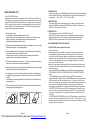
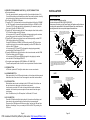
MAINTENANCE OF REMOTE CONTROL
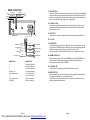
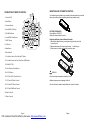
OPERATION OF REMOTE CONTROL
12
4
An insulation tag was installed in your remote by the manufacturer to prevent the
battery from draining. Removing the tag from the remote before using.
1. Power On/Off
2. Mute Button
1
3. Loudness Button
2
5
MUTE
8
4. Level/MENU UP Button
9
5. SEL/MENU Button
14
10
6. Level/MENU Down Button
CLOCK
MODE
11
SELECT
6
-
ST
BAND
LOC
LOUD
INT
RPT
2
3
5
6
A.P.
15
17
16
7. MO/ST Button
19
8. A.P Button
TOP/
1
RDM
4
7
SCN
3
13
18
21
20
9. Band Button
BATTERY INFORMATION:
Lithium Battery: CR2025 3V
Battery Life: Approximately 6 months.
Replacing the Battery from the Remote Controller:
1) Remove the battery holder by pressing the locking tab with your thumb
and pulling it out.
2) Replace the battery with the same type and the “+” side facing up.
3) Gently push in the holder until securely locked into place.
10. Mode Button
11. Tune/Seek Up And Track Skip Up/FF Button
12. Tune/Seek Down And Track Skip Down/REW Button
13. SCAN BUTTON
14. Clock Display /Setting Button
WARNING:
15. LOC/DX Button
16. CD Track TOP/>||/Radio Preset 1
Do not recharge, disassemble or dispose of in fire.
17. CD Track INT/Radio Preset 2
Battery leakage may cause damage to the unit.
18. CD Track RPT/Radio Preset 3
To avoid the risk of accident, keep batteries out of reach of children.
19. CD Track RDM/Radio Preset 4
20. Radio Preset 5
21. Radio Preset 6
Page 7
PDF created with FinePrint pdfFactory trial version http://www.pdffactory.com
Page 8