1
Power on/Power off
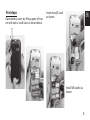
Press and hold „finish/power” button for 3
seconds to power on the device. Repeat this
action to power off the device.
Flashlight function
When phone is in standby mode press and
hold „OK” button for 3 seconds, flashlight LED
will be on. To switch off press and hold again
“OK” button for 3 seconds.
Using the phone
■Dialing
Use numeric buttons to enter phone number
or select contact from phonebook, press “call”
button to dial number. If you have installed
two SIM cards a question will pop-up, then
use „up/down” buttons to select SIM card you
want to use for dialing.
Note! During call „up/down” buttons will adjust
volume. If you want to enter „+” when entering
phone number (for i.e.+48 XXX XXX XXX) press
twice „*” button.
■Incoming calls
Press „call” button to receive incoming call.
■Reject/finish call.
To finish call or reject incoming call press „finish” button.
Lock/Unlock keyboard
Press „menu” button and then „#” button to
lock keyboard. Repeat this action to unlock
keyboard.
Mute function
Press and hold „*” to disable all sounds, repeat
this action to enable sounds.
Using menu
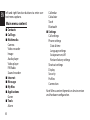
Press „menu” button in standby mode to enter menu icons. Use navigation buttons and
OK button to enter options. You can also use
5
EN