1
INTRODUCTION
Thank you for choosing the CIM K 500 Optima Plastic Card Printer.
CIM’s P series card printers offer a low cost, high quality solution to those requiring
computer-controlled printing and encoding of credit card style plastic cards, Card
applications include personalized identification, access control, visitor, membership,
badges and tags.
This manual guides you to efficient start up and operation of your new Card Printer.
K 500 Optima PRINTER MODELS
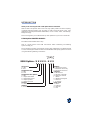
The CIM Product Number tells a story:
Here is a quick review of the CIM Card Printer Series numbering and lettering
system to help you.
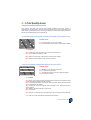
The K 500 Optima Plastic Card Printer employs Dye Sublimation and Resin Thermal
Transfer technologies. Model numbers include identifiers that specify options are shown
using the following lettering conventions:
}
Ship-away kit
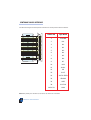
K500 Optima - X X X X X - X X X
Smart Card:
O = No
E = Yes
Magnetic Encoder:
O = No
M = Yes
Magnetic Encoder Options:
O = No
1 = Stripe down HICO
2 = Stripe Down LOCO
3 = Stripe Up HICO
4 = Stripe Up LOCO
Memory:
O = Standard
Interface:
P = Parallel (Centronics 36 pins)
Software:
O = WindCard Cd only
F = Windows driver only
B = WindCard & drivers
Language:
O = No manual
A = English & Spanish
B = French & German
I = Italian
P = Brazilian Portugese
C = Chinese
J = Japanese
Power Cord:
O = None
A = 120 VAC
E = 220 VAC
U = UK
v