1
Wireless transmission for elevator
The default value of digital code pairing is done before delivery.
If the transmission isn’t available, please accord below steps to
re-pairing again
Pairing process
Press the pair keys of transmitter and receiver. Both of them will search
each other to finish setting with encryption. when the “Link” light is on, that
means successful.
Note:
1. The pairing is successful after delivery.
2. After successful pairing process, while the Link light is off, it shows that
there is no connection between the transmitter and the receiver.
It means the transmission rage is a little too far to connect between
the transmitter and the receiver. The reception between the transmitter &
the receiver is not stable. Please reduce the distance between the
transmitter and the receiver until it works.
Notes :
a. Please connect antenna to Transmitter / Receiver firstly then power on.
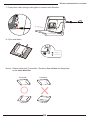
b. Panel antenna is directional. Please keep both Panel antennas
face - to - face
c. Elevator moves fast for passengers.
Before installation, please make sure the elevator operation is under
controlled by elevator manager.
d. Please confirm the power supply voltage from elevator system is available
for our wireless devices.
1