1
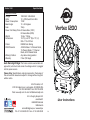
Vortex 1200
Universal DMX Control
Universal DMX Control: This function allows you to use a univer-
sal DMX-512 controller to create unique programs tailored to your
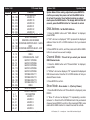
individual needs. The Vortex 1200 has 4 DMX modes; 14 DMX channels, 15 DMX channels, 17 DMX channels, and 29 DMX channels.
1. This function will allow you to control each individual fixture’s
traits with a standard DMX 512 controller. See pages 18-30 for the DMX traits.
2. To control your fixture in DMX mode, follow the set-up procedures
on pages 7-8 as well as the set-up specifications that are included with your DMX controller.
3. Use the controller’s faders to control the various DMX fixture traits.
This will allow you to create your own programs.
4. Follow the instructions on page 10 to select your DMX channel mode and to set the DMX address.
5. For longer cable runs (more than a 100 feet) use a terminator on the last fixture.
6. For help operating in DMX mode consult the manual included with your DMX controller.
Vortex 1200
Vortex 1200
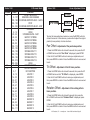
Channel
1
2
3
4
5
6
7
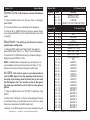
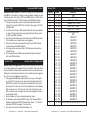
Master-Slave Configuration
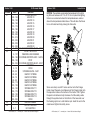
Master-Slave Configuration: This function will allow you to link up
to 16 units together and operate without a controller. The units will be
sound activated. In Master-Slave operation one unit will act as the controlling unit and the others will react to the controlling units programs.
Any unit can act as a Master or as a Slave.
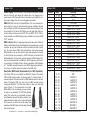
1. Using approved DMX data cables, daisy chain your units togeth- er via the XLR connector on the rear of the units. Remember the Male XLR connector is the input and the Female XLR connector
is the output. The first unit in the chain (master) will use the female XLR connector only - The last unit in the chain will use the male XLR connector only. For longer cable runs we suggest a termina-
tor at the last fixture.
2. Set the Master unit to your desired operating mode.
3. On the slave units press the MENU button until “Slave Mode” is displayed, and Press ENTER. Choose either “Slave 1” or “Slave 2” and press ENTER. See page 11 for more info.
4. The slave units will now follow the Master unit.
ADJ Products, LLC - www.adj.com - Vortex 1200 User Manual Page 17
8
Value
0 - 255
0 - 255
0 - 255
0 - 255
0 - 255
0 - 255
0 - 19
20 - 29
30 - 39
40 - 49
50 - 59
60 - 69
70 - 79
80 - 89
90 - 99
100 - 109
110 - 119
120 - 129
130 - 139
140 - 149
150 - 159
160 - 169
170 - 179
180 - 189
190 - 199
200 - 209
210 - 219
220 - 229
230 - 239
240 - 255
0 - 255
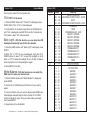
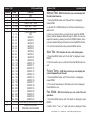
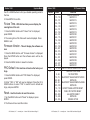
14 Channel Mode
Function
PAN
TILT
RED 0% - 100%
GREEN 0% - 100%
BLUE 0% - 100%
WHITE 0% - 100%
COLOR MACROS
OFF
MACRO 1
MACRO 2
MACRO 3
MACRO 4
MACRO 5
MACRO 6
MACRO 7
MACRO 8
MACRO 9
MACRO 10
MACRO 11
MACRO 12
MACRO 13
MACRO 14
MACRO 15
MACRO 16
MACRO 17
MACRO 18
MACRO 19
MACRO 20
MACRO 21
MACRO 22
MACRO 23
COLOR MACRO SPEED SLOW - FAST
ADJ Products, LLC - www.adj.com - Vortex 1200 User Manual Page 18