1
TABLE OF CONTENTS
SAFETY INFORMATION...................................................................................................... 1
REGULATORY INFORMATION............................................................................................ 4
POLISH CENTER FOR TESTING AND CERTIFICATION NOTICE....................................5
CHAPTER 1: UNPACKING AND INSTALLATION.............................................................11
1.1.Unpacking........................................................................................................................ 11
1.2. Package Contents........................................................................................................... 11
1.3. Installation Notes............................................................................................................. 11
1.4. Mounting on a Wall.......................................................................................................... 12
1.4.1. VESA Grid............................................................................................................ 12
1.5. Using of remote sensor and power status indicator......................................................... 13
CHAPTER 2: PARTS AND FUNCTIONS........................................................................... 14
2.1. Control Panel................................................................................................................... 14
2.2. Input/Output Terminals..................................................................................................... 15
2.3. Remote Control................................................................................................................ 16
2.3.1 General functions................................................................................................. 16
2.3.2 Inserting the batteries in the remote control......................................................... 16
2.3.3 Handling the remote control................................................................................. 16
2.3.4 Operating range of the remote control.................................................................. 16
CHAPTER 3: CONNECTING EXTERNAL EQUIPMENT................................................... 18
3.1 Connecting External Equipment (DVD/VCR/VCD).......................................................... 18
3.1.1 Using COMPONENT video input.......................................................................... 18
3.1.2 Using Video Source input..................................................................................... 18
3.1.3. Using HDMI video input........................................................................................ 19
3.2 Connecting a PC.............................................................................................................. 19
3.2.1. Using VGA input................................................................................................... 19
3.2.2. Using DVI input..................................................................................................... 20
3.2.3. Using HDMI input................................................................................................. 20
3.3. Connecting Audio Equipment.......................................................................................... 21
3.3.1. Connecting an external audio device................................................................... 21
3.4. Connecting Multiple Displays in a Daisy-chain Configuration.......................................... 21
3.4.1. Display control connection.................................................................................... 21
3.5. IR Pass-through Connection............................................................................................ 22
3.6. Wire-connecting to Network............................................................................................. 22
CHAPTER 4: OPERATION................................................................................................. 23
4.1. Change Picture Format.................................................................................................... 23
4.2. Play Multimedia Files....................................................................................................... 23
4.2.1. Play files from computer....................................................................................... 23
4.2.2. Play multimedia files from USB device................................................................. 24
4.3. Play options..................................................................................................................... 25
4.3.1. Playing music files................................................................................................ 25
TABLE OF CONTENTS
4.3.2. Playing movie files................................................................................................ 26
4.3.3. Playing photo files................................................................................................ 27
CHAPTER 5: CHANGE YOUR SETTINGS........................................................................ 28
5.1.Settings............................................................................................................................ 29
5.1.1. Picture menu........................................................................................................ 29
5.1.2. Sound menu......................................................................................................... 30
5.1.3. General settings menu......................................................................................... 31
5.2. Network Settings.............................................................................................................. 32
CHAPTER 6: USB DEVICE COMPATIBILITY.................................................................... 33
CHAPTER 7: INPUT MODE............................................................................................... 36
CHAPTER 8: PIXEL DEFECT POLOCY............................................................................ 38
8.1. Pixels and Sub-Pixels...................................................................................................... 38
8.2. Types of Pixel Defects + Dot Definition........................................................................... 38
8.3. Bright Dot Defects............................................................................................................ 38
8.4. Dark Dot Defects............................................................................................................. 39
8.5. Proximity of Pixel Defects................................................................................................ 39
8.6. Pixel Defect Tolerances................................................................................................... 39
8.7.MURA.............................................................................................................................. 40
CHAPTER 9: CLEANING AND TROUBLESHOOTING..................................................... 41
9.1.Cleaning........................................................................................................................... 41
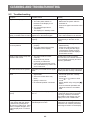
9.2.Troubleshooting............................................................................................................... 42
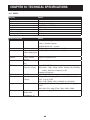
CHAPTER 10: TECHNICAL SPECIFICATIONS................................................................ 43
10.1.PM-32.............................................................................................................................. 43
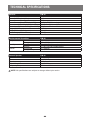
10.1.PM-43.............................................................................................................................. 46
10.1.PM-55.............................................................................................................................. 47
SAFETY INSTRUCTIONS
Warnings and Precautions
KNOW THESE SAFETY SYMBOLS
CAUTION:TO REDUCE THE RISK OF ELECTRIC SHOCK, DO NOT REMOVE COVER
(OR BACK). NO USER SERVICEABLE PARTS INSIDE. REFER SERVICING TO
QUALIFIED SERVICE PERSONNEL.
This symbol indicates high voltage is present inside. It is dangerous to make any kind
of contact with any inside part of this product.
This symbol alerts you that important literature concerning operation and maintenance
has been included with this product.
CAUTION: FCC/CSA regulations state that any unauthorized changes or modifications to this
equipment may void the user’s authority to operate it.
CAUTION: To prevent electric shock, match the wide blade of plug to the wide slot, and fully insert
the plug.
TO PREVENT DAMAGE WHICH MAY RESULT IN FIRE OR ELECTRIC SHOCK HAZARD, DO
NOT EXPOSE THIS APPLIANCE TO RAIN OR MOISTURE.
The Socket-outlet should be installed near the apparatus and be easily accessible.
Read and follow these instructions when connecting and using your Public
Information Display:
•
Unplug the display if you are not going to use it for an extensive period of time.
•
Unplug the display if you need to clean it with a slightly damp cloth. The screen
many be wiped with a dry cloth when the power is off. However, never use
alcohol, solvents or ammonia-based liquids.
•
Consult a service technician if the display does not operate normally when you
have followed the instructions in this manual.
•
The casing cover should be opened only by qualified service personnel.
•
Keep the display out of direct sunlight and away from stoves or any other heat
sources.
•
Remove any object that could fall into the vents or prevent proper cooling of the
display’s electronics.
1
SAFETY INSTRUCTIONS
•
Do not block the ventilation holes on the cabinet.
•
Keep the display dry. To avoid electric shock, do not expose it to rain or excessive
moisture.
•
If turning off the display by detaching the power cable, wait for 6 seconds before
re-attaching the power cable for normal operation.
•
To avoid the risk of shock or permanent damage to the set do not expose the
display to rain or excessive moisture.
•
When positioning the display, make sure the power plug and outlet are easily
accessible.
•
IMPORTANT: Always activate a screen saver program during your application. If a
still image in high contrast remains on the screen for an extended period of time,
it may leave an ‘after-image’ or ‘ghost image’ on the front of the screen. This is
a well-known phenomenon that is caused by the shortcomings inherent in LCD
technology. In most cases the afterimage will disappear gradually over a period
of time after the power has been switched off. Be aware that the after-image
symptom cannot be repaired and is not covered under warranty.
Important Safety Instructions
1. Read these instructions.
2. Keep these instructions.
3. Heed all warnings.
4. Follow all instructions.
5. Do not use this apparatus near water.
6. Clean only with dry cloth.
7. Do not block any ventilation openings. Install in accordance with the manufacturer’s instructions.
8. Do not install near any heat sources such as radiators, heat registers, stoves, or other apparatus
(including amplifiers) that produce heat.
9. Do not defeat the safety purpose of the polarized or grounding-type plug. A polarized plug has
two blades with one wider than the other. A grounding type plug has two blades and a third
grounding prong. The wide blade or the third prong are provided for your safety. If the provided
plug does not fit into your outlet, consult an electrician for replacement of the obsolete outlet.
10. Protect the power cord from being walked on or pinched particularly at plugs, convenience
receptacles, and the point where they exit from the apparatus.
11. Only use attachments/accessories specified by the manufacturer.
12. Use only with the cart, stand, tripod, bracket, or table specified by the
manufacturer, or sold with the apparatus. When a cart is used, use caution
when moving the cart/apparatus combination to avoid injury from tip-over.
13. Unplug this apparatus during lightning storms or when unused for long periods of time.
14. Refer all servicing to qualified service personnel. Servicing is required when the apparatus
has been damaged in any way, such as power-supply cord or plug is damaged, liquid has been
spilled or objects have fallen into the apparatus, the apparatus has been exposed to rain or
moisture, does not operate normally, or has been dropped.
2
SAFETY INSTRUCTIONS
WARNING:TO REDUCE THE RISK OF FIRE OR ELECTRIC SHOCK, DO NOT EXPOSE THIS
APPARATUS TO RAIN OR MOISTURE.
WARNING:
pparatus shall not be exposed to dripping or splashing and no objects filled with
A
liquids, such as vases, shall be placed on the apparatus.
WARNING:
The batteries (batteries installed) shall not be exposed to excessive heat such as
sunshine, fire or the like.
WARNING:
he mains plug or appliance coupler is used as the disconnect device,the
T
disconnect device shall remain readily operable.
WARNING:
o prevent the spread of fire, keep candles or other open flames away from this
T
product at all times.
WARNING:
o prevent injury, this apparatus must be securely attached to the floor/wall in
T
accordance with the installation instructions.
CAUTION:
hese servicing instructions are for use by qualified service personnel only. To
T
reduce the risk of electric shock,do not perform any servicing other than that
contained in the operating instructions unless you are qualitified to do so.
CAUTION:
xcessive sound pressure from earphones and headphones can cause hearing
E
loss. Adjustment of the equalizer to maximum increases the earphone and
headphone output voltage and the sound pressure level. Therefore, to protect your
hearing, adjust the equalizer to an appropriate level.
For UL/CUL application: For use only with UL Listed Wall Mount Bracket with minimum weight/
load: W Kg
Model Name
W (kg)
PM-32
5.2
PM-43
8.7
PM-55
16.0
For CB application: Unit without base weight: W Kg. The equipment and its associated mounting
means still remain secure during the test.(Used wall mounting kit as following table shown).
Model Name
Wall Mount Grid
Screw
PM-32
100x100, 200x200
M4x(10+X), X=thickness of wall mount plate
PM-43
400x400, 200x200
M6x(10+X), X=thickness of wall mount plate
PM-55
400x400, 400x200
M6x(10+X), X=thickness of wall mount plate
3
REGULATORY INFORMATION
CE Declaration of Conformity
We declare under our responsibility that the product is in conformity with the following standards:
• EN60950-1:2006+A11:2009+A1:2010+A12:2011+A2:2013 (Safety requirement of Information
Technology Equipment).
• EN55022:2010 (Radio Disturbance requirement of Information Technology Equipment).
• EN55024:2010 (Immunity requirement of Information Technology Equipment).
• EN61000-3-2:2006 +A1:2009+A2:2009 (Limits for Harmonic Current Emission).
• EN61000-3-3:2013 (Limitation of Voltage Fluctuation and Flicker)
• EN 50581:2012 (Technical documentation for the assessment of electrical and electronic
products with respect to the restriction of hazardous substances)
• EN 50564:2011 (Electrical and electronic household and office equipment — Measurement of
low power consumption)
following provisions of directives applicable.
• 2006/95/EC (Low Voltage Directive).
• 2004/108/EC (EMC Directive).
• 2009/125/EC (ErP, Energy-related Product Directive, EC No. 1275/2008 and 642/2009
Implementing)
• 2011/65/EU (RoHS Directive) and is produced by a manufacturing organization on ISO9000
level.
Federal Communications Commission (FCC) Notice (U.S. Only)
NOTES: This equipment has been tested and found to comply with the limits
for a Class A digital device, pursuant to part 15 of the FCC Rules. These limits are
designed to provide reasonable protection against harmful interference when the
equipment is operated in a commercial environment. This equipment generates, uses,
and can radiate radio frequency energy and, if not installed and used in accordance
with the instruction manual, may cause harmful interference to radio communications.
Operation of this equipment in a residential area is likely to cause harmful interference
in which case the user will be required to correct the interference at his own expense.
Changes or modifications not expressly approved by the party responsible for
compliance could void the user’s authority to operate the equipment.
Use only an RF shielded cable that was supplied with the display when connecting this display to a
computer device.
To prevent damage which may result in fire or shock hazard, do not expose this appliance to rain
or excessive moisture.
This device complies with Part 15 of the FCC Rules. Operation is subject to the
following two conditions: (1) this device may not cause harmful interference, and (2)
this device must accept any interference received, including interference that may
cause undesired operation.
4
REGULATORY INFORMATION
Polish Center for Testing and Certification Notice
The equipment should draw power from a socket with an attached protection circuit (a three-prong
socket). All equipment that works together (computer, display, printer, and so on) should have the
same power supply source.
The phasing conductor of the room’s electrical installation should have a reserve short-circuit
protection device in the form of a fuse with a nominal value no larger than 16 amperes (A).
To completely switch off the equipment, the power supply cable must be removed from the power
supply socket, which should be located near the equipment and easily accessible.
A protection mark “B” confirms that the equipment is in compliance with the protection usage
requirements of standards PN-93/T-42107 and PN-89/E-06251.
5
REGULATORY INFORMATION
Electric, Magnetic and Electromagnetic Fields (“EMF”)
1. We manufacture and sell many products targeted at consumers, which, like any electronic
apparatus, in general have the ability to emit and receive electromagnetic signals.
2. One of our leading Business Principles is to take all necessary health and safety measures for
our products, to comply with all applicable legal requirements and to stay well within the EMF
standards applicable at the time of producing the products.
3. We are committed to develop, produce and market products that cause no adverse health
effects.
4. We confirm that if its products are handled properly for their intended use, they are safe to use
according to scientific evidence available today.
5. We play an active role in the development of international EMF and safety standards, enabling
us to anticipate further developments in standardization for early integration in its products.
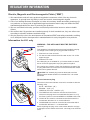
Information for U.K. only
WARNING - THIS APPLIANCE MUST BE EARTHED.
Important:
This apparatus is supplied with an approved moulded 13A plug.
To change a fuse in this type of plug proceed as follows:
(B)
(A)
1. Remove fuse cover and fuse.
2. Fit new fuse which should be a BS 1362 5A,A.S.T.A. or BSI
approved type.
3. Refit the fuse cover.
If the fitted plug is not suitable for your socket outlets, it should
be cut off and an appropriate 3-pin plug fitted in its place.
If the mains plug contains a fuse, this should have a value of 5A.
If a plug without a fuse is used, the fuse at the distribution board
should not be greater than 5A.
NOTES: The severed plug must be destroyed to avoid a
possible shock hazard should it be inserted into a 13A socket
elsewhere.
How to connect a plug
The wires in the mains lead are coloured in accordance with the
following code:
BLUE - “NEUTRAL” (“N”)
BROWN - “LIVE” (“L”)
GREEN & YELLOW - “EARTH” (“E”)
1. The GREEN & YELLOW wire must be connected to the
terminal in the plug which is marked with the letter “E” or by
the Earth symbol or coloured GREEN or GREEN & YELLOW.
2. The BLUE wire must be connected to the terminal which is
marked with the letter “N” or coloured BLACK.
3. The BROWN wire must be connected to the terminal which
marked with the letter “L” or coloured RED.
Before replacing the plug cover, make certain that the cord grip
is clamped over the sheath of the lead - not simply over the three
wires.
6
REGULATORY INFORMATION
China RoHS
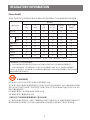
中国电子信息产品污染控制标识要求 (中国RoHS法规标示要求) 产品中有害物质的名称及含量。
有害物质
零部件名称
铅
(Pb)
汞
(Hg)
镉
(Cd)
六价铬
(Cr (VI))
多溴联苯
(PBB)
多溴二苯醚
(PBDE)
塑料外框
O
O
O
O
O
O
后壳
O
O
O
O
O
O
CCFL
X
X
O
O
O
O
LED
X
O
O
O
O
O
电路板组件*
X
O
O
O
O
O
底座
O
O
O
O
O
O
电源线
X
O
O
O
O
O
其他线材
X
O
O
O
O
O
遥控器
X
O
O
O
O
O
LCD
panel
*:电路板组件包括印刷电路板及其构成的零部件,如电阻、电容、集成电路、连接器等。
本表格依据SJ/T 11364的规定编制。
O:表示该有害物质在该部件所有均质材料中的含量均在 GB/T 26572 标准规定的限量要求以下.
X:表示该有害物质至少在该部件的某一均质材料中的含量超出 GB/T 26572 标准规定的限量要求.
上表中打“X”的部件中,应功能需要,部分有害物质含量超出GB/T 26572规定的限量要求,但是符合欧盟
RoHS法规要求(属于豁免部分)。
10
环保使用期限
在产品本体上标示的该标志表示环境保护使用期限为10年。
电子信息产品的环境保护使用期限是指电子信息产品中所含的有害物质不会向外部泄漏或出现突然
变异,并且电子信息产品的用户在使用该电子信息产品时也不会对环境造成严重污染或对人体、财产
带来严重损害的期限。
在环境保护期限中,请按照使用说明书使用本产品。
本环境保护使用不覆盖易损件:电池。
《废弃电子产品回收处理管理条例》提示性说明
为了更好地关爱及保护地球,当用户不再需要此产品或产品寿命终止时,请遵守国家废弃电器电子产
品回收处理相关法律规定,将其交给当地具有国家认可的回收处理资质的厂商进行回收处理。
7
REGULATORY INFORMATION
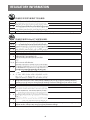
仅适用于非热带气候条件下安全使用:
汉
文 仅适用于非热带气候条件下安全使用。
蒙古文
藏
文
维
文
壮
文 Dan hab yungh youq gij dienheiq diuzgen mbouj dwg diegndat haenx ancienz sawjyungh.
≤2000m
汉
仅适用于海拔2000m以下地区安全使用:
文 仅适用于海拔2000m以下地区安全使用。
蒙古文
藏
文
维
文
壮
文 Hai dou gaxgonq, wngdang sien duenh denvasen bae.
汉
“注意
文 如果电池更换不当会有爆炸危险
只能用同样类型或等效类型的电池来更换”
蒙古文
藏
文
维
文
壮
“Louzsim
文 Danghnaeuz denyouz vuenh ndaej mbouj habdangq aiq miz gij yungyiemj fatseng bauqcaq
Cijndaej yungh gij denyouz doengzyiengh loihhingz roxnaeuz daengjyauq loihl haenx vuenh”
汉
文 “接入本设备的有线网络天线必须与保护接地隔离,不然可能会引起着火等危险!”
蒙古文
藏
文
维
文
壮
文
“Gij mizsienq vangjloz denhsen ciephaeuj bonj sezbi daeuj haenx itdingh aeu caeuq gij ciepdieg
baujhoh doxliz, mboujne aiq miz gij yungyiemj dawzfeiz daengj!”
8
REGULATORY INFORMATION
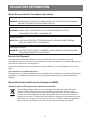
North Europe (Nordic Countries) Information
Placering/Ventilation
VARNING: FÖRSÄKRA DIG OM ATT HUVUDBRYTARE OCH UTTAG ÄR LÄTÅTKOMLIGA,
NÄR DU STÄLLER DIN UTRUSTNING PÅPLATS.
Placering/Ventilation
ADVARSEL: SØRG VED PLACERINGEN FOR, AT NETLEDNINGENS STIK OG
STIKKONTAKT ER NEMT TILGÆNGELIGE.
Paikka/Ilmankierto
VAROITUS: SIJOITA LAITE SITEN, ETTÄ VERKKOJOHTO VOIDAAN TARVITTAESSA
HELPOSTI IRROTTAA PISTORASIASTA.
Plassering/Ventilasjon
ADVARSEL: NÅR DETTE UTSTYRET PLASSERES, MÅ DU PASSE PÅ AT KONTAKTENE
FOR STØMTILFØRSEL ER LETTE Å NÅ.
End-of-Life Disposal
Your new Public Information Display contains materials that can be recycled and reused.
Specialized companies can recycle your product to increase the amount of reusable materials and
to minimize the amount to be disposed of.
Please find out about the local regulations on how to dispose of your old display from your local
dealer.
(For customers in Canada and U.S.A.)
This product may contain lead and/or mercury. Dispose of in accordance to local-state and federal
regulations. For additional information on recycling contact www.eia.org (Consumer Education
Initiative)
Waste Electrical and Electronie Equipment-WEEE
Attention users in European Union private households
This marking on the product or on its packaging illustrates that, under European
Directive 2002/96/EG governing used electrical and electronic appliances, this
product may not be disposed of with normal household waste. You are responsible
for disposal of this equipment through a designated waste electrical and electronic
equipment collection. To determine the locations for dropping off such waste electrical
and electronic, contact your local government office, the waste disposal organization
that serves your household or the store at which you purchased the product.
9
REGULATORY INFORMATION
Attention users in United States:
Please dispose of according to all Local, State and Federal Laws. For the disposal or recycling
information, contact: www.mygreenelectronics.com or www.eiae.org.
End of Life Directives-Recycling
Your new Public Information Display contains several materials that can be recycled
for new users.
Please dispose of according to all Local, State, and Federal laws.
As an ENERGY STAR Partner, we have determined that this product meets the
ENERGY STAR guidelines for energy efficiency.
Restriction on Hazardous Substances statement (India)
This product complies with the “India E-waste Rule 2011” and prohibits use of lead, mercury,
hexavalent chromium, polybrominated biphenyls or polybrominated diphenyl ethers in
concentrations exceeding 0.1 weight % and 0.01 weight % for cadmium, except for the exemptions
set in Schedule 2 of the Rule.
E-Waste Declaration for India
This symbol on the product or on its packaging indicates that this product must not
be disposed of with your other household waste. Instead it is your responsibility to
dispose of your waste equipment by handing it over to a designated collection point
for the recycling of waste electrical and electronic equipment . The separate collection
and recycling of your waste equipment at the time of disposal will help to conserve
natural resources and ensure that it is recycled in a manner that protects human health
and the environ-ment. For more information about where you can drop off your waste
equipment for recycling in India
10
CHAPTER 1: UNPACKING AND INSTALLATION
1.1. Unpacking
•
•
•
•
This product is packed in a carton, together with the standard accessories.
Any other optional accessories will be packed separately.
Due to the size and weight of this display it is recommended for two people to move it.
After opening the carton, ensure that the contents are complete and in good condition.
1.2. Package Contents
Please verify that you received the following items with your package content:
• LCD display
• Remote control with AAA
batteries
• Power cord (1.8 m)
• VGA cable (1.8 m)
• RS232 cable (1.8 m)
• User Manual
Remote Control
and AAA Batteries
* The supplied power cord varies depending on destination.
Power Cord
Video Signal Cable
(D-SUB to D-SUB Cable)
User Manual
RS232 Cable
NOTES:
• For all other regions, apply a power cord that conforms to the AC voltage of the power socket
and has been approved by and complies with the safety regulations of the particular country.
• You might like to save the package box and packing material for shipping the display.
1.3. Installation Notes
• Due to the high power consumption, always use the plug exclusively designed for this product. If
an extended line is required, please consult your service agent.
• The product should be installed on a flat surface to avoid tipping. The distance between the
back of the product and the wall should be maintained for proper ventilation. Avoid installing the
product in the kitchen, bathroom or any other places with high humidity so as not to shorten the
service life of the electronic components.
• The product can normally operate only under 3000m in altitude. In installations at altitudes
above 3000m, some abnormalities may be experienced.
11
UNPACKING AND INSTALLATION
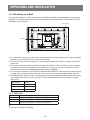
1.4. Mounting on a Wall
To mount this display to a wall, you will have to obtain a standard wall-mounting kit (commercially
available). We recommend using a mounting interface that complies with TUV-GS and/or UL1678
standard in North America.
Protective Sheet
VESA Grid
Table
1. Lay a protective sheet on a table, which was wrapped around the display when it was packaged,
beneath the screen surface so it will not be scratched.
2. Ensure you have all the accessories for mounting this display (wall mount, ceiling mount, table
stand, etc).
3. Follow the instructions that come with the base mounting kit. Failure to follow correct mounting
procedures could result in damage to the equipment or injury to the user or installer. Product
warranty does not cover damage caused by improper installation.
4. For the wall-mounting kit, use PM-32 for M4 and PM-43/PM-55 for M6 mounting screws (having
a length 10 mm longer than the thickness of the mounting bracket) and tighten them securely.
5. Unit without base weight= W Kg. The equipment and its associated mounting means still remain
secure during the test. For use only with UL Listed Wall Mount Bracket with minimum weight/
load: W Kg.
Model Name
W (kg)
PM-32
5.2
PM-43
8.7
PM-55
16.0
1.4.1.VESA Grid
Model Name
PM-32
PM-43
PM-55
Vesa Grid
100(H) x 100(V)mm / 200(H) x 200(V)mm
200(H) x 200(V)mm / 400(H) x 400(V)mm
400(H) x 200(V)mm / 400(H) x 400(V)mm
Caution:
To prevent the display from falling:
12
UNPACKING AND INSTALLATION
• For wall or ceiling installation, we recommend installing the display with metal brackets which
are commercially available. For detailed installation instructions, refer to the guide received with
the respective bracket.
• To lessen the probability of injury and damage resulting from fall of the display in case of
earthquake or other natural disaster, be sure to consult the bracket manufacturer for installation
location.
•
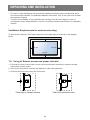
Ventilation Requirements for enclosure locating
To allow heat to disperse, leave space between surrounding objects as shown in the diagram
below.
100 mm
100 mm
100 mm
100 mm
1.5. Using of Remote sensor and power indicator
1. Pull down the lens to have better remote control performance and easy to observe the light
information of power status
2. Push up the lens before mounting the display for video wall application
3. Pull/Push the lens until hearing the click sound
Push right to collapse the lens
Push left to extend the lens
13
CHAPTER 2: PARTS AND FUNCTIONS
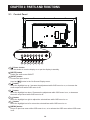
2.1. Control Panel
MUTE INPUT
1
2
3
MENU
4
5
6
7
8
1
[ ] Power button
Use this button to turn the display on or put the display to standby.
2
[MUTE] button
Switch the audio mute ON/OFF.
3
[INPUT] button
Choose the input source.
Used as [
] button in the On-Screen-Display menu.
4
[ ] button
Move the highlight bar up / Increase the adjustment while OSD menu is on, or increase the
audio output level while OSD menu is off.
5
[ ] button
Move the highlight bar down / Decrease the adjustment while OSD menu is on, or decrease
the audio output level while OSD menu is off.
6
[ ] button
Move the highlight bar right to adjust the selected item while OSD menu is on.
7
[ ] button
Move the highlight bar left or return the selected item while OSD menu is on.
8
[MENU] button
Return to previous menu while OSD menu is on, or to activate the OSD menu when OSD menu
is off.
14
PARTS AND FUNCTIONS
USB
IN
14
OUT
13
RJ45
12
IN
2
15
11
OUT
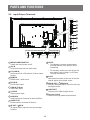
2.2. Input/Output Terminals
10
16
R
1
R
L
9
L
8
Y
3
4
1
MAIN POWER SWITCH
Switch the main power on/off.
2
AC IN
AC power input from the wall outlet.
3
PC LINE IN
Audio input from VGA source (3.5mm stereo
phone).
4
HDMI IN
HDMI video / audio input.
5
DVI-D IN
DVI-D video input.
6
VGA IN (D-Sub)
VGA video input.
7
8
9
Pr
7
6
5
Pb
NOTE: • This display’s remote control sensor
will stop working if the jack [IR IN] is
connected.
• To remotely control your A/V device via
this display, refer to page for IR Pass
Through connection.
12 RJ-45
LAN control function for the use of remote
control signal from control center.
13
RS232 OUT / 14 RS232 IN
RS232C network output / input for the loopthrough function.
15 USB
PORT
Connect your USB storage device.
Y/CVBS
Video source input.
16 Security
LOCK
Used for security and theft prevention.
AUDIO IN
Audio input from external AV device (RCA).
AUDIO OUT
Audio output to external AV device.
10 IR
OUT / 11 IR IN
IR signal output /input for the loop-through
function.
15
PARTS AND FUNCTIONS
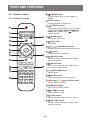
2.3. Remote Control
1
[ ] POWER button
Turn the display on or put the display to
standby.
2
[PLAY] buttons
Control playback of media files.
3
[ ] SOURCE button
Choose input source. Press [ ] or [ ] button
to choose from USB, Network, HDMI, DVI,
YPbPr, AV, or VGA. Press [
] button to
confirm and exit.
4
[ ] HOME button
Access the OSD menu.
5
6
[ ] [ ] [ ] [ ] NAVIGATION buttons
Navigate through menus and choose items.
7
[
] button
Confirm an entry or selection.
8
[ ] ADJUST button
Access currently available options, picture
and sound menus.
9
2.3.1 General functions
1
2
3
14
4
5
15
6
7
8
16
9
10
11
12
10
] LIST button
No function.
] BACK button
Return to the previous menu page or exit
from the previous function.
10 [
] [ ] VOLUME button
Adjust volume.
11 [
] MUTE button
Press to turn the mute function on/off.
13
12 [
][
][
][
] COLOR buttons
Choose tasks or options.
13 [NUMERIC]
buttons
Enter text for network setting.
14 [
] FORMAT button
Change picture format.
15 [
] INFO button
Display information about current activity.
16 [
] OPTIONS button
Access currently available options, picture
and sound menus.
16
PARTS AND FUNCTIONS
2.3.2 Inserting the batteries in the remote control
The remote control is powered by two 1.5V AAA batteries.
To install or replace batteries:
1. Press and then slide the cover to open
it.
2. Align the batteries according to the (+)
and (–) indications inside the battery
compartment.
3. Replace the cover.
Caution:
The incorrect use of batteries can result in leaks or bursting. Be sure to follow these instructions:
• Place “AAA” batteries matching the (+) and (–) signs on each battery to the (+) and (–) signs of
the battery compartment.
• Do not mix battery types.
• Do not combine new batteries with used ones. It causes shorter life or leakage of batteries.
• Remove the dead batteries immediately to prevent them from liquid leaking in the battery
compartment. Don’t touch exposed battery acid, as it can damage your skin.
NOTE: If you do not intend to use the remote control for a long period, remove the batteries.
2.3.3 Handling the remote control
• Do not subject to strong shock.
• Do not allow water or other liquid to splash the remote control. If the remote control gets wet,
wipe it dry immediately.
• Avoid exposure to heat and steam.
• Other than to install the batteries, do not open the remote control.
2.3.4 Operating range of the remote control
Point the front of the remote control toward this
display’s remote control sensor when pressing a
button.
Use the remote control within a distance of less than
5m/16ft from this display’s sensor, and a horizontal
and vertical angle of less than 30 degrees.
NOTE: The remote control may not function
properly when the remote control sensor on
this display is under direct sunlight or strong
illumination, or when there is an obstacle in
the path of signal transmission.
17
30
30
CHAPTER 3: CONNECTING EXTERNAL EQUIPMENT
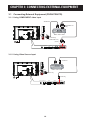
3.1 Connecting External Equipment (DVD/VCR/VCD)
3.1.1 Using COMPONENT video input
Audio Out
OUT
IN
RJ45
OUT
IN
USB
COMPONENT Out
(YPbPr)
DVD / VCR / VCD
R
L
R
[R]
L
[L]
[AUDIO IN]
[COMPONENT IN]
(YPbPr)
AC IN
PC Line IN HDMI IN
DVI IN
VGA IN
COMPONENT IN
3.1.2 Using Video Source input
DVD / VCR / VCD
[R]
L
R
L
R
OUT
IN
RJ45
OUT
IN
USB
Y/CVBS Out
[L]
[AUDIO IN]
[Y/CVBS IN]
AC IN
PC Line IN HDMI IN
18
DVI IN
VGA IN
COMPONENT IN
CONNECTING EXTERNAL EQUIPMENT
RJ45
OUT
IN
USB
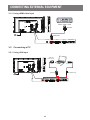
3.1.3 Using HDMI video input
R
OUT
IN
DVD / VCR / VCD
L
R
L
HDMI Out
[HDMI IN]
AC IN
PC Line IN HDMI IN
DVI IN
VGA IN
COMPONENT IN
3.2 Connecting a PC
3.2.1 Using VGA input
RJ45
OUT
IN
USB
VGA Out
D-Sub 15 pin
IN
Audio Out
L
R
L
R
OUT
PC
[VGA IN]
[VGA AUDIO IN]
AC IN
PC Line IN HDMI IN
19
DVI IN
VGA IN
COMPONENT IN
CONNECTING EXTERNAL EQUIPMENT
USB
3.2.2 Using DVI input
IN
RJ45
OUT
IN
DVI Out
R
L
R
OUT
PC
L
Audio Out
[DVI IN]
AC IN
PC Line IN HDMI IN
[VGA AUDIO IN]
DVI IN
VGA IN
COMPONENT IN
OUT
IN
USB
3.2.3 Using HDMI input
L
R
OUT
IN
RJ45
HDMI Out
L
R
PC
AC IN
[HDMI IN]
PC Line IN HDMI IN
20
DVI IN
VGA IN
COMPONENT IN
CONNECTING EXTERNAL EQUIPMENT
3.3 Connecting Audio Equipment
3.3.1 Connecting an external audio device
AUDIO OUT
STEREO AMPLIFIER
AUDIO IN
RJ45
OUT
IN
USB
COMPONENT OUT (YPbPr)
L
R
L
R
OUT
IN
DVD / VCR / VCD
AC IN
PC Line IN HDMI IN
DVI IN
VGA IN
COMPONENT IN
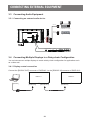
3.4 Connecting Multiple Displays in a Daisy-chain Configuration
You can interconnect multiple displays to create a daisy-chain configuration for applications such
as a video wall.
3.4.1 Display control connection
Connect the [RS232C OUT] connector of DISPLAY 1 to the [RS232C IN] connector of DISPLAY 2.
DISPLAY 1
DISPLAY 2
PC
[RS-232C]
[RS-232C IN]
[RS-232C OUT]
21
[RS-232C IN]
CONNECTING EXTERNAL EQUIPMENT
3.5 IR Pass-through Connection
[IR OUT]
DVD / VCR / VCD
[IR IN]
(DVD / VCR / VCD)
Remote Control
3.6 Wire-connecting to Network
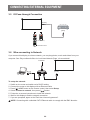
If you connect this display to a home network, you can play photos, music and videos from your
computer. See Play multimedia files via Local Area Network (Page ) for more detail.
INTERNET
[RJ-45]
ROUTER
[RJ-45]
PC
To setup the network:
1. Switch on the router and switch on its DHCP setting.
2. Connect the router to this display with an Ethernet cable.
3. Press [ ] HOME button on the remote control, then select Setup.
] button.
4. Select Connect to network, then press [
5. Follow the on-screen instructions to install the network.
6. Wait for this display to find the network connection.
7. If you are prompted, agree to the “End User Licence Agreement”.
NOTE: Connecting with a shielded CAT-5 Ethernet cable to comply with the EMC directive.
22
CHAPTER 4: OSD MENU
NOTE: The control button described in this section is mainly on the remote control unless
specified otherwise.
4.1 Change Picture Format
You can change the picture format to suit the video source. Each video source has its available
picture formats.
The available picture formats depend on the video source:
1. Press
button.
button.
2. Press or button to select a picture format, then press
• {Auto zoom}: Enlarge the picture to fill the screen. Recommended for minimal screen
distortion but not for HD or PC.
• {Movie expand 16:9}: Scale 4:3 format to 16:9. Not recommended for HD or PC.
• {Wide screen}: Shows widescreen format content unstretched. Not recommended for HD or
PC.
• {Unscaled}: Provide maximum detail for PC. Only available when PC mode is selected in the
{Picture} menu.
• {4:3}: Display the classic 4:3 format.
•
• {Music}: Ideal settings for listening to music.
• {Game}: Ideal settings for games.
• {News}: Ideal settings for spoken audio, such as the news.
4.2 Play Multimedia Files
You can play videos, photos, and music on your display from:
• Your computer connected through your network.
• A USB device connected to this display.
4.2.1 Play files from computer
To play files from computer, you will need:
• A wired network, connected with a Universal Plug and Play (uPnP) router.
• Optional: A LAN cable that connects your display to your network.
• A media server running on your computer.
• Appropriate settings on your computer firewall to allow you to run the media server.
Set up the network
1. Connect your display and the computer to the same network. .
2. Switch on your computer and the router.
NOTE: If the apparatus does not return to DLNA mode due to external electrical disturbances
(e.g. electrostatic discharge), user intervention is required.
Set up media sharing
1. Install a media server on your computer to share media files. These are some media servers:
• For PC: Windows Media Player 11 (or higher) or TVersity
• For Mac: Twonky
23
OPERATION
2. Switch on media sharing on your computer using the media server. For more information on
how to set up the media server, refer to the website of the media server.
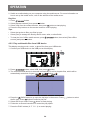
Play files
1. Press
button.
button.
2. Select [Browse network], then press
button to start playing.
3. Select a file from the content browser, then press
4. Press the Play buttons on the remote control to control playing.
Tips:
• Select the top bar to filter your files by type.
• Select [Sort] to arrange the files by album name, artist, or other fields.
button, then select [Clear offline
• To clear the list of offline media servers, press
button.
servers] and press
4.2.2 Play multimedia files from USB device
This display can play music, movie, or photo files from your USB device.
1. Connect your USB device to the USB port on this display.
L
R
L
R
OUT
IN
RJ45
OUT
IN
USB
USB
2. Press
button, select USB, then press
button.
3. The connected USB device is detected automatically for all its playable files, which will be
,
, and
.
automatically sorted into 3 types:
4. Press the
BACK button to go up to the top layer in the screen. Press
the file type. Press
button to enter its play list.
button to start playing.
5. Select the file you want. Press
6. Follow the on-screen instruction to control the play option.
7. Press the PLAY buttons (H F G I J) to control playing.
24
button to select
OPERATION
Supported file system:
• FAT32
Supported file format:
• Music: MP3, WMA, M4A, AAC, AC3
• Movie: AVI, MP4, MOV, MPG/MPEG
• Photo: JPEG, BMP, GIF
Caution:
• The manufacturer is not responsible if the USB device is not supported, nor is it responsible for
damage to or loss of data in the device.
• Do not overload the USB port. If you connect a USB storage device that consumes more than
500mA power, make sure that it is connected to its own external power supply.
NOTE: When you are playing multimedia files from USB device and turn the display off. It will
set input source to the last real input source, such as CVBS, YPbPr, VGA, HDMI and
DVI-D when you turn the display on next time.
4.3 Play options
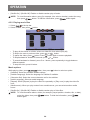
4.3.1 Playing music files
1. Select
in the top bar.
2. Select one music track, then press
button.
Album
1. Music
Info
Play All
05:05
Sort
USB device
Options
•
•
•
•
•
To play all the tracks in a folder, select one music file, then select {Play All}.
or
button.
To skip to the next or previous track, press
button. Press
button again to resume playback.
To pause the track, press
To skip backward or forward 10 seconds, press or button.
To search backward or forward, press G or J button, press repeatedly to toggle between
different speeds.
• To stop the music, press H button.
Music options
While you play music, press
button, then press
button to select an option:
• {Repeat}: Select {Repeat} to play a track or an album repeatedly, or select {Play once} to play a
track once.
• {Media Server}: When you play content from a media server, you can select another media
server.
25
OPERATION
• {Shuffle On} / {Shuffle Off}: Enable or disable random play of tracks.
NOTE: To view information about a song (for example, title, artist or duration), select the song,
button. To hide the information, press
button again.
then press
4.3.2 Playing movie files
1. Select
in the top bar.
button.
2. Select a video, then press
Track
Info
Play All
USB device
Options
•
•
•
•
•
To play all the videos in a folder, select one video file, then select {Play All}.
or
button.
To skip to the next or previous video, press
button. Press
button again to resume playback.
To pause the video, press
To skip backward or forward 10 seconds, press or button.
To search backward or forward, press G or J button, press repeatedly to toggle between
different speeds.
• To stop the video, press H button.
Movie options
While playing video, press
button, then press
button to select an option:
• {Subtitles}: Select the available subtitle settings.
• {Subtitle Language}: Select the language for subtitles if available.
• {Character Set}: Select the correct character set for the subtitles.
• {Audio Language}: Select an audio language.
• {Repeat}: Select {Repeat} to play the video file repeatedly or {Play once} to play the video file
once.
• {Media server}: When you play content from a media server, you can select another media
server.
• {Shuffle On} / {Shuffle Off}: Enable or disable random play of video files.
NOTE: To view information about a video (for example, played position, duration, title, or date),
button. To hide the information, press
select the video, then press
button again.
26
OPERATION
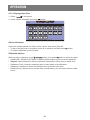
4.3.3 Playing photo files
1. Select
in the top bar.
2. Select a photo thumbnail, then press
button.
Date
Info
Play All
Sort
USB device
Options
Start a slideshow
If there are multiple photos in a folder, select a photo, then select {Play All}.
• To skip to the previous or next photo, press or button, and then press
• To stop the slideshow, press H button.
button.
Slideshow options
While you play a slideshow, press
button, then press
button to select an option:
• {Shuffle Off} / {Shuffle On}: Enable or disable random display of pictures in the slideshow.
• {Repeat}: Select {Repeat} to watch a slideshow repeatedly or {Play once} to watch once.
• {Slideshow Time}: Select the displaying time for each photo in the slideshow.
• {Slideshow Transitions}: Select the transition from one photo to the next.
• {Media Server}: When you play content from a media server, you can select another media
server.
27
CHAPTER 5: CHANGE YOUR SETTINGS
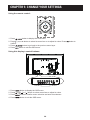
Using the remote control:
1. Press
2. Press , ,
confirm.
3. Press
button to display the OSD menu.
, or button to select its menu item or to adjust its value. Press
4. Press
button to exit the OSD menu.
button to go back to the previous menu layer.
Using this display’s control buttons:
1. Press
button to display the OSD menu.
2. Press[ ] [ ] [ ] or [ ] button to select menu item or adjust its value.
button to confirm menu selection and enter its submenu.
3. Press
button to exit the OSD menu.
4. Press
28
button to
CHANGE YOUR SETTINGS
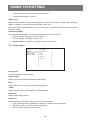
5.1 Settings
5.1.1 Picture menu
Picture
Picture style
Sound
Restore style
General settings
Backlight
Network settings
Contrast
Brightness
Hue
Colour
Sharpness
Advanced
Video or PC
Foramat and edges
Picture style
Select a predefined picture setting.
Restore style
Restore the last-selected predefined picture setting.
Backlight
Adjust the brightness of this display’s backlight.
Contrast
Adjust video contrast.
Brightness
Adjust screen brightness.
Hue
{Hue}: Adjust screen hue.
Colour
Adjust the colour saturation of the picture.
Sharpness
Adjust the sharpness of the picture.
Advanced
Access advanced settings such as gamma, tint settings and video contrast settings.
• {Noise reduction}: Select the amount of noise reduction for the picture.
• {Gamma}: Adjust the non-linear setting for picture luminance and contrast.
• {Color temp.}: Change the colour balance.
• {Custom color temp.}: Customise colour balance setting.
• {Advanced sharpness}: Enable superior sharpness, especially on lines and contours in the
picture.
• {Dynamic contrast}: Dynamically enhance the details in the dark, medium and light areas of
the picture.
• {Dynamic backlight}: Select a backlight level to optimise dynamic power consumption and
picture contrast.
29
CHANGE YOUR SETTINGS
• {Colour enhancement}: Dynamically enhance the
• vividness and details of colours.
Video or PC
When viewing content from a connected video console, select {Video} to apply video settings.
When a computer is connected through HDMI, select {PC}.
Make sure that {Format and edges} {Picture format} {Unscaled} is selected so as to view
maximum detail.
Format and edges
Access advanced settings to control the displaying format of the picture.
• {Picture format}: Change the picture format.
• {Screen edges}: Change the picture size.
• {Picture shift}: If available, move the position of the picture.
5.1.2 Sound menu
Picture
Sound style
Sound
Restore style
General settings
Bass
Network settings
Treble
Audio out
Advanced
Sound style
Access predefined sound settings.
Restore style
Restore the last-selected predefined sound setting.
Bass
Adjust the bass level of the speaker and headphones.
Treble
Adjust the treble level of the speaker and headphones.
Audio out
Adjust audio output volume.
Advanced
Access advanced settings to enhance your audio experience.
• {Auto volume leveling}: Enable the reduction of sudden volume changes.
• {Speaker}: Turn on or off the internal speakers.
• {Clear sound}: Enhance sound quality.
30
CHANGE YOUR SETTINGS
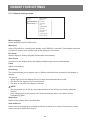
5.1.3 General settings menu
Picture
Menu language
Sound
Monitor id
General settings
Eco mode
Network settings
Auto search
Clock
USB scheduling
Sleep timer
Auto switch off
Pixel shift
Control settings
Factory settings
Menu language
Select language used for OSD menus.
Monitor id
Set the ID number for controlling this display via the RS232C connection. Each display must have
a unique ID number when multiple sets of this display are connected.
Eco mode
Set this display to reduce the power consumption automatically.
Auto search
Choose to let this display detect and display available signal sources automatically.
Clock
Adjust clock settings.
Scheduling
This function allows you to program up to 3 different scheduled time intervals for this display to
activate.
You can set:
• Which input source the display will use for each scheduled activation period.
• The time for the display to turn on and turn off.
• The days in a week for the display to activate.
NOTE: • We recommend you to set up current date and time in the {Clock} menu before using this
function.
• After changing the {Clock} option in the {General settings} menu, you need to set this
{Scheduling} again.
Sleep timer
Switch off this display after a specified time.
Auto switch off
Set the time for this display to be switched off after a period of no activity. Press any key on the
remote control to disable this function.
31
CHANGE YOUR SETTINGS
Pixel shift
For video input sources, you may choose {On} to move the screen image automatically to protect
the display from “burn-in” or “after-image” symptoms 30 seconds after not operating the display.
Control settings
• {Local KB lock}: Choose to enable or disable the keyboard (control buttons) function of this
display.
• {Unlock}: Enable the keyboard function.
• {Lock all}: Lock all keyboard function.
and
button.
• {Lock but volume}: Disable all the keyboard function except the
button.
• {Lock but power}: Disable all the keyboard function except the
• {RC lock}: Choose to enable or disable the button function of the remote control.
• {Unlock}: Enable the button function.
• {Lock all}: Lock all button function.
button.
• {Lock but volume}: Disable all the button function except the
button.
• {Lock but power}: Disable all the button function except the
NOTE: To disable the lock function from [Local KB lock] or [RC lock] item, press buttons
1 9 9 8 on the remote control.
Factory settings
Reset all your customized settings to the factory defaults.
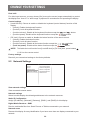
5.2 Network Settings
Picture
View network settings
Sound
Network configuration
General settings
Static IP configuration
Network settings
Digital Media Render...
Network name
View network settings
View connected network status.
Network settings
Select how this display should assign addresses to the network resources.
Static IP Configuration
Assign {IP address}, {Netmask}, {Gateway}, {DNS1}, and {DNS2} for this display.
Digital Media Renderer - DMR
Receive multimedia files from Smart Phones or Tablets connected to your network.
Network name
Rename this display for easy identification if you have more than one display connected to your
network.
32
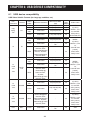
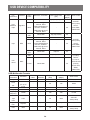
CHAPTER 6: USB DEVICE COMPATIBILITY
6.1 USB device compatibility
USB Video Subtitle Formats (for language subtitles, etc.)
File
Extensions
.mpg
mpeg
.vob
.ts
.ts
.m2ts
.mts
.mt2
.ts
.m2ts
.mts
Container
PS
TS
Maximum resolution
Max.Frame Rate
(fps)
MPEG-1
MPEG-2
MPEG-4
ASP
1920x1080
1920x1080
25p,30p,50i,60i
25p,30p,50i,60i
Max.Bit
Rate
(Mbps)
30
30
1920x1080
25p,30p,50i,60i
30
H.264
1920x1080
p,30p,50p,60p,60i
30
MPEG-2
MPEG-4
ASP
1920x1080
25p,30p,50i,60i
30
1920x1080
25p,30p,50i,60i
30
H.264
1920x1080
25p,30p,50p,60p,
60i
30
-
30
25p,30p,50i,60i
30
25p,30p,50i,60i
30
25p,30p,50p,60p,
60i
30
-
30
25p,30p,50i,60i
30
25p,30p,50i,60i
30
Video
codec
1920x1080i@field
rate=50, 60Hz
1920x1080p@frame
MVC
rate=24, 25,30Hz
1280x720p@frame
rate=50, 60Hz
MPEG-2
1920x1080
MPEG-4
1920x1080
ASP
H.264
MaTS
TTS
1920x1080
1920x1080i @ field
rate=50, 60Hz
1920x1080p @
MVC
frame rate=24,
25,30Hz
1280x720p @ frame
rate=50, 60Hz
MPEG-2
1920x1080
MPEG-4
1920x1080
ASP
AVCHD
H.264
1920x1080
25p,30p,50p,60p,
60i
30
-
30
25p,30p,50p,60p,
60i
30
.ts
.m2ts
.mts
AVCHD
MVC
1920x1080i@field
rate=50, 60Hz
1920x1080p@frame
rate=24, 25,30Hz
1280x720p @ frame
rate=50, 60Hz
.m4v
M4V
H.264
1920x1080
33
Audio codec
MPEG1(L1&L2),
MPEG-1,2,2.5
L3, AAC/HEAAC(v1&v2),
DVD-PCM,AC3
MPEG1(L1&L2),
MPEG-1,2,2.5
L3,
AAC/HE-AAC
(v1&v2),
AC3,E-AC3,
Dolby Pulse
MPEG1(L1&L2),
MPEG-1,2,2.5
L3,
AAC/HE-AAC
(v1&v2),
AC3,E-AC3,
Dolby Pulse
MPEG1(L1&L2),
MPEG-1,2,2.5
L3, AAC/HEAAC (v1&v2),
AC3,E-AC3,
Dolby Pulse
MPEG1(L1&L2),
MPEG-1,2,2.5
L3, AAC/HEAAC (v1&v2),
AC3,E-AC3,
Dolby Pulse
AAC
USB DEVICE COMPATIBILITY
File
Extensions
.ism/
Manifest
.mpd
Container
frag MP4
Video
codec
Maximum resolution
Max.Frame Rate
(fps)
Max.
Bit Rate
(Mbps)
H.264
1920x1080
25p,30p,50p,60p,60i
30
MVC
1920x1080i@field
rate=50, 60Hz
1920x1080p@frame
rate=24, 25,30Hz
1280x720p @ frame
rate=50, 60Hz
-
30
1920x1080
25p,30p,50i,60i
30
MPEG-4
ASP
H.264
.mp4
MP4
1920x1080
1920x1080i@field
rate=50, 60Hz
1920x1080p@frame
rate=24, 25,30Hz
1280x720p @ frame
rate=50, 60Hz
MVC
WMV9/
VC1
MPEG-4
ASP
.mkv
.mk3d
MKV
H.264
30
-
30
1920x1080
30p,60i
30
1920x1080
25p,30p,50i,60i
30
1920x1080
30
Audio codec
AAC/HEAAC(v1&v2),
AC3,EAC3,WMA,
WMA-PRO
AAC/HEAAC(v1&v2),
AC3,EAC3,WMA,
WMA-PRO
MPEG1(L1&L2),
MPEG1,2,2.5 L3,
AAC/HE-AAC
(v1&v2),
AC3,E-AC3,
WMA,
WMA-PRO
USB Multimedia Formats
File
Extensions
.mp3
.wma
.asf
.wma
.wav(PC)
.aif(mac)
.aiff(mac)
.aac
.mp4
.m4a
.pls
.m3u
.m4a
Container
MP3
WMA
Video
codec
-
Maximum
resolution
-
Frequency
Max.Bit Rate
(kHz)
48
(Mbps)
384
MPEG-1,2,2.5 L3
Audio codec
(V2 up to
V9.2)
WMA Pro
LPCM
-
-
48
192
WMA
-
-
96
192
768
768
WMA,WMA Pro
LPCM
LPCM
-
-
192
768
LPCM
AAC
-
-
48
1024
AAC,HEAAC(v1&v2)
Playlists
-
-
-
-
-
M4A
-
-
48
1024
AAC,HEAAC(v1&v2)
34
USB DEVICE COMPATIBILITY
USB Photo Formats
File
Extensions
Container Video
codec
Maximum Resolution
Frequency
Max.Bit
Rate
Audio
codec
jpg/jpeg
JPEG
baseline:
color mode = 444,
size <=32768x16128
color mode = 422v,
size <= 16384x16128
color mode = other, not support
-
-
-
bmp
BMP
4096x3072_4bit,
2730x2500_8bit,
2048x1536_16bit,
1500x1200_32bit
-
-
-
png
PNG
4096x3072_4bit,
2730x2500_8bit,
2048x1536_16bit,
1500x1200_32bit
-
-
-
gif
GIF
4096x3072_4bit,
2730x2500_8bit,
2048x1536_16bit,
1500x1200_32bit
-
-
-
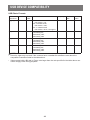
NOTE: • Sound or video may not work if the contents have a standard bit rate/frame rate above the
compatible Frame/sec listed in the table above.
• Video content with a Bit rate or Frame rate larger than the rate specified in the table above can
cause choppy video during playback.
35
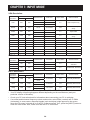
CHAPTER 7: INPUT MODE
VGA Resolution:
Standard
Resolution
VGA
Active Resolution
H Pixels
640
V Lines
480
WVGA
720
400
SVGA
800
600
XGA
1024
768
WXGA
1280
WXGA
SXGA
Refresh Rate
Pixel Rate
60 Hz
25.175 MHz
72 Hz
31.5 MHz
75 Hz
31.5 MHz
70 Hz
33.75 MHz
60 Hz
40 MHz
75 Hz
49.5 MHz
Aspect Ratio
Stand for Mode
4:3
Video Graphic Array
16:9
Wide Video Graphic
Array
4:3
Super VGA
4:3
Extended Graphic
Array
Wide XGA
60 Hz
65 MHz
75 Hz
78.75 MHz
768
60 Hz
79.5 MHz
5:3
1280
800
60 Hz
79.5 MHz
16:10
Wide XGA
1280
960
60 Hz
108 MHz
4:3
Super XGA
SXGA
1280
1024
60 Hz
108 MHz
5:4
Super XGA
WXGA
1360
768
60 Hz
85.5 MHz
16:9
Wide XGA
WXGA
1366
768
60 Hz
85.5 MHz
16:9
Wide XGA
UXGA
1600
1200
60 Hz
162 MHz
4:3
Ultra XGA
HD1080
1920
1080
60 Hz
148.5 MHz
16:9
HD1080
Refresh Rate
Pixel Rate
Aspect Ratio
Stand for Mode
29.97 Hz
13.5 MHz
59.94 Hz
27 MHz
4:3
Modified NTSC
Standard
25 Hz
13.5 MHz
50 Hz
27 MHz
4:3
Modified PAL Standard
Refresh Rate
Pixel Rate
Aspect Ratio
Stand for Mode
74.25 MHz
16:9
Normally DVB Mode
74.25 MHz
16:9
Normally ATSC Mode
148.5 MHz
16:9
Normally ATSC Mode
SDTV Resolution:
Standard
Resolution
480i
480p
576i
576p
Active Resolution
H Pixels
V Lines
720
480
720
576
HDTV Resolution:
Active Resolution
Standard
Resolution
H Pixels
V Lines
720p
1280
720
1080i
1920
1080
1080p
1920
1080
50 Hz
60 Hz
25 Hz
30 Hz
50 Hz
60 Hz
• The PC text quality is optimum in HD 1080 mode (1920 x 1080, 60Hz).
• Your PC display screen might appear different depending on the manufacturer (and your
particular version of Windows).
• Check your PC instruction book for information about connecting your PC to a display.
• If a vertical and horizontal frequency-select mode exists, select 60Hz (vertical) and 31.5KHz
(horizontal). In some cases, abnormal signals (such as stripes) might appear on the screen
when the PC power is turned off (or if the PC is disconnected). If so, press the [INPUT] button to
enter the video mode. Also, make sure that the PC is connected.
36
INPUT MODE
• When horizontal synchronous signals seem irregular in RGB mode, check PC power saving
mode or cable connections.
• The display settings table complies to the IBM/VESA standards, and based on the analog input.
• The DVI support mode is regarded as same to the PC support mode.
• The best timing for the vertical frequency to each mode is 60Hz.
37
CHAPTER 8: PIXEL DEFECT POLOCY
We strive to deliver the highest quality products and use some of the industry’s most advanced
manufacturing processes whilst practicing stringent quality control. However, pixel or sub-pixel
defects on the PDP / TFT panels used in Plasma- & LCD- displays are sometimes unavoidable.
No manufacturer can guarantee that all panels will be free from pixel defects, but we guarantee
that any Plasma- & LCD- displays with an unacceptable number of defects will be repaired during
the warranty period in line with your local guarantee conditions.
This notice explains the different types of pixel defects and defines the acceptable defect level
for the LCD screen. In order to qualify for repair under warranty, the number of pixel defects must
exceed a certain level as shown in the reference table. If the LCD screen is within specification a
warranty exchange / claim back will be refused. Additionally, because some types or combinations
of pixel defects are more noticeable than others, We set even higher quality standards for those.
8.1 Pixels and Sub-Pixels
subpixel
pixel
A pixel, or picture element, is composed of three sub-pixels
in the primary colors of red, green and blue. Many pixels
together form an image. When all sub-pixels of a pixel
are lit, the three colored sub-pixels together appear as a
single white pixel. When all are dark, the three colored
sub-pixels together appear as a single black pixel. Other
combinations of lit and dark sub-pixels appear as single
pixels of other colors.
8.2 Types of Pixel Defects + Dot Definition
Pixel and sub-pixel defects appear on the screen in different ways. There are three categories of
pixel defects and several types of sub-pixel defects within each category.
Dot definition = What is a defective “Dot”? :
One or more defective, adjacent sub-pixel are defined as one “dot”. The no. of defective sub-pixels
are not relevant to define a defective dot. This means that a defective dot can consist of one, two
or three defective sub-pixels which can be dark or lit.
R G B
One dot = One Pixel; consists of three sub-pixels of Red, Green, and Blue.
8.3 Bright Dot Defects
Bright dot defects appear as pixels or sub-pixels that are always lit or “on”. These are the examples
of bright dot defects:
38
PIXEL DEFECT POLOCY
One lit red, green or blue sub
pixel
Two adjacent lit sub pixels:
Red + Blue = Purple
Three adjacent lit sub pixels
(one white pixel)
Red + Green = Yellow
Green + Blue = Cyan (Light
Blue)
8.4 Dark Dot Defects
Black dot defects appear as pixels or sub-pixels that are always dark or “off”. These are the
examples of black dot defects:
One dark dot
Two adjacent dark dots = 1
pair of dark dots
Two dark dots, specifications
defines the minimum distance
between dark dots
8.5 Proximity of Pixel Defects
Because pixel and sub-pixels defects of the same type that are nearby one another may be more
noticeable, We also specifie tolerances for the proximity of pixel defects. In the table below you can
find specifications about:
• Allowed amount of adjacent dark dots = (adjacent dark dots =1 pair of dark dots)
• Minimum distance between dark dots
• Total no. of all defective dots
8.6 Pixel Defect Tolerances
In order to qualify for repair due to pixel defects during the warranty period, a PDP / TFT panel in a
Plasma / LCD- display must have pixel or sub-pixel defects exceeding the tolerances listed in the
following table.
39
PIXEL DEFECT POLOCY
BRIGHT DOT EFFECT
1 lit sub pixel
BLACK DOT EFFECT
1 dark sub pixel
TOTAL DOT DEFECTS OF ALL TYPES
ACCEPTABLE LEVEL
2
ACCEPTABLE LEVEL
10
12
NOTE: * 1 or 2 adjacent sub pixel defects = 1 dot defect
8.7MURA
Dark spots or patches may occasionally appear on some liquid crystal display (LCD) panels. This
is known within the industry as Mura, which is a Japanese term for “unevenness.” It is used to
describe an irregular pattern or area in which uneven screen uniformity appears under certain
conditions. Mura is a result of the deterioration of the liquid crystal alignment layer and is most
commonly caused by long-term operation under high ambient temperatures. It is an industry- wide
phenomenon and Mura is not repairable. It is also not covered by our warranty terms.
Mura has been around since the introduction of LCD technology and with screens getting bigger
and in operation 24/7, many displays are running in low light conditions. This all adds to the
possibility of Mura affecting displays.
HOW TO SPOT MURA
There are many symptoms of Mura and also multiple causes. Several of these are listed below:
• Impurities or foreign particles in the crystal matrix
• Uneven distribution of LCD matrix during manufacturing
• Non-uniform luminance distribution of the backlight
• Panel assembly induced stress
• Flaws within the LCD cells
• Thermal induced stress - high temperature operation over long periods of time
HOW TO AVOID MURA
Although we can not guarantee the complete eradication of Mura every time, in general the
appearance of Mura can be minimized by these methods:
• Lower the backlight brightness
• Use a screen saver
• Reduce the ambient temperature around the unit
40
CHAPTER 9: CLEANING AND TROUBLESHOOTING
9.1Cleaning
Caution When Using the Display
• Do not bring your hands, face or objects close to the ventilation holes of the display. The top
of the display is usually very hot due to the high temperature of exhaust air being released
through the ventilation holes. Burns or personal injuries may occur if any body parts are
brought too close. Placing any object near the top of the display could also result in heat
related damage to the object as well as the display itself.
• Be sure to disconnect all cables before moving the display. Moving the display with its cables
attached may damage the cables and thus cause fire or electric shock.
• Disconnect the power plug from the wall outlet as a safety precaution before carrying out any
type of cleaning or maintenance procedure.
Front Panel Cleaning Instructions
• The front of the display has been specially treated. Wipe the surface gently using only a
cleaning cloth or a soft, lint-free cloth.
• If the surface becomes dirty, soak a soft, lint-free cloth in a mild detergent solution. Wring the
cloth to remove excess liquid. Wipe the surface of the display to remove dirt. Then use a dry
cloth of the same type to dry.
• Do not scratch or hit the surface of the panel with fingers or hard objects of any kind.
• Do not use volatile substances such as insert sprays, solvents and thinners.
Cabinet Cleaning Instructions
• If the cabinet becomes dirty, wipe the cabinet with a soft, dry cloth.
• If the cabinet is extremely dirty, soak a lint-free cloth in a mild detergent solution. Wring the
cloth to remove as much moisture as possible. Wipe the cabinet. Use another dry cloth to
wipe over until the surface is dry.
• Do not allow any water or detergent to come into contact with the surface of the display. If
water or moisture gets inside the unit, operating problems, electrical and shock hazards may
result.
• Do not scratch or hit the cabinet with fingers or hard objects of any kind.
• Do not use volatile substances such as insert sprays, solvents and thinners on the cabinet.
• Do not place anything made from rubber or PVC near the cabinet for any extended periods of
time.
41
CLEANING AND TROUBLESHOOTING
9.2Troubleshooting
Symptom
Possible Cause
Remedy
No picture is displayed
1. The power cord is disconnected. 1. Plug in the power cord.
2. Make sure the power switch is
2. The main power switch on
switched on.
the back of the display is not
switched on.
3. Connect a signal connection to the
display.
3. The selected input has no
connection.
4. The display is in standby mode.
Interference displayed on the
Caused by surrounding electrical
display or audible noise is heard appliances or fluorescent lights.
Move the display to another location
to see is the interference is reduced.
Color is abnormal
The signal cable is not connected
properly.
Make sure that the signal cable is
attached firmly to the back of the
display.
Picture is distorted with
abnormal patterns
1. The signal cable is not connected 1. Make sure that the signal cable is
properly.
attached firmly.
2. The input signal is beyond the
2. Check the video signal source
capabilities of the display.
to see if it is beyond the range
of the display. Please verify its
specifications with this display’s
specification section.
Display image doesn’t fill up the 1. The zoom mode is not set
full size of the screen
correctly.
2. Scan Mode may be set
incorrectly to underscan.
3. If the image exceeds the screen
size, Scan Mode may need to be
set to Underscan.
Use the Zoom mode or Custom
zoom function in the Screen menu to
fine tune display geometry and time
frequency parameter.
Can hear sound, but no picture
Improperly connected source signal
cable.
Make sure that both video inputs and
sound inputs are correctly connected.
Can see picture but no sound is 1. Improperly connected source
heard
signal cable.
2. Volume is turned all the way
down.
3. {Mute} is turned on.
4. No external speaker connected.
1. Make sure that both video inputs
and sound inputs are correctly
connected.
2. Press [ ] or [ ] button to hear
sound.
3. Switch MUTE off by using the [ ]
button.
4. Connect external speakers and
adjust the volume to a suitable
level.
Some picture elements do not
light up
This display is manufactured using
an extremely high level of precision
technology: however, sometimes
some pixels of the display may not
display. This is not a malfunction.
Some pixels of the display may not
turn on.
After-Images can still be seen
A still picture is displayed for an over
on the display after the display extended period of time
is powered off. (Examples of
still pictures include logos, video
games, computer images, and
images displayed in 4:3 normal
mode)
42
Do not allow a still image to be
displayed for an extended period of
time as this can cause a permanent
after-image to remain on the display.
CHAPTER 10: TECHNICAL SPECIFICATIONS
10.1 PM-32
Display
Screen Size (Active Area)
Aspect Ratio
Number of pixels
Pixel pitch
Displayable colors
Brightness (typical)
Contrast ratio (typical)
Viewing angle
PM-32
698.4(H) x 392.85(V)
16:9
1920 (H) x 1080 (V)
0.36375(H) x 0.36375(V)
16.7M
350 cd/m2
1400:1
178 degrees
In/Out Terminals
PM-32
Speaker Output
Internal Speakers 10W (L) + 10W (R) [RMS]/16Ω
1 Way 1 Speaker System
Audio Output
Audio Input
RS232C
RJ-45
HDMI Input
RCA Jack x 2
RCA Jack x 2
3.5mm phone jack
x1
2.5mm Phone
jack x 2
RJ-45 Jack x 1 (8
pin)
HDMI Jack x 1
(Type A) (19 pin)
DVI-D Input
VGA Input
DVI-D jack
D-Sub Jack x 1
(15 pin)
Component Input
RCA Jack x 3
Video Input
RCA x 1
(Share with
Component_Y)
82 dB/W/M/160 Hz ~ 13 KHz
0.5V [rms] (Normal) / 2 Channel (L+R)
0.5V [rms] (Normal) / 2 Channel (L+R)
RS232C in/RS232C out
10/100 LAN Port
Digital RGB: TMDS (Video + Audio)
MAX:Video - 720p, 1080p, 1920 x 1080/60 Hz (WUXGA)
Audio - 48 KHz/ 2 Channel (L+R)
Supports LPCM only
Digital RGB: TMDS (Video)
Analog RGB: 0.7V [p-p] (75Ω), H/CS/V: TTL (2.2kΩ),
SOG: 1V [p-p] (75Ω)
MAX: 720p, 1080p, 1920 x 1080/60 Hz (WUXGA)
Y: 1V [p-p] (75Ω), Pb: 0.7V [p-p] (75Ω), Pr: 0.7V [p-p]
(75Ω)
MAX: 480i, 576i, 480p, 576p, 720p, 1080i, 1080p
Composite 1V [p-p] (75Ω)
43
43
TECHNICAL SPECIFICATIONS
General
Power Supply
Power Consumption (Max)
Power Consumption (typ.)
Power Consumption (Standby & Off)
Dimensions (With Stand) [W x H x D]
Dimensions (Without Stand) [W x H x D]
Weight (With Stand)
Weight (Without Stand)
Gross Weight (Without Stand)
PM-32
AC 100 - 240V, 50 - 60Hz
81W
57W
<0.5 W (RS232 in active)
726.5mmx462.9mmx239.8mm
726.5mmx425.4mmx63.6mm
6.67 Kg
5.2 Kg
7.8 Kg
Environmental Condition
Temperature
Operational
Storage
Humidity
Operational
Storage
Altitude
Operational
Storage / Shipment
PM-32
0 ~ 40°C
-20 ~ 60°C
20 ~ 80% RH (No condensation)
5 ~ 95% RH (No condensation)
0 ~ 3,000 m
0 ~ 9,000 m
Internal Speaker
Type
Input
Impedance
Output Sound Pressure
Frequency Response
PM-32
1 Way 1 Speaker
10 W (RMS)
16Ω
82 dB/W/M
160 Hz ~ 13 KHz
NOTE: All specifications are subject to change without prior notice.
44
44
TECHNICAL SPECIFICATIONS
10.2 PM-43
Display
Screen Size (Active Area)
Aspect Ratio
Number of pixels
Pixel pitch
Displayable colors
Brightness (typical)
Contrast ratio (typical)
Viewing angle
PM-43
940.9(H) x 529.25(V)
16:9
1920 (H) x 1080 (V)
0.49(H) x 0.49(V)
16.7M
350 cd/m2
3000:1
178 degrees
In/Out Terminals
PM-43
Speaker Output
Internal Speakers 10W (L) + 10W (R) [RMS]/16Ω
1 Way 1 Speaker System
Audio Output
Audio Input
RS232C
RJ-45
HDMI Input
DVI-D Input
VGA Input
Component Input
Video Input
RCA Jack x 2
RCA Jack x 2
3.5mm phone jack
x1
2.5mm Phone
jack x 2
RJ-45 Jack x 1 (8
pin)
HDMI Jack x 1
(Type A) (19 pin)
DVI-D jack
D-Sub Jack x 1
(15 pin)
RCA Jack x 3
RCA x 1
(Share with
Component_Y)
82 dB/W/M/160 Hz ~ 13 KHz
0.5V [rms] (Normal) / 2 Channel (L+R)
0.5V [rms] (Normal) / 2 Channel (L+R)
RS232C in/RS232C out
10/100 LAN Port
Digital RGB: TMDS (Video + Audio)
MAX:Video - 720p, 1080p, 1920 x 1080/60 Hz (WUXGA)
Audio - 48 KHz/ 2 Channel (L+R)
Supports LPCM only
Digital RGB: TMDS (Video)
Analog RGB: 0.7V [p-p] (75Ω), H/CS/V: TTL (2.2kΩ),
SOG: 1V [p-p] (75Ω)
MAX: 720p, 1080p, 1920 x 1080/60 Hz (WUXGA)
Y: 1V [p-p] (75Ω), Pb: 0.7V [p-p] (75Ω), Pr: 0.7V [p-p]
(75Ω)
MAX: 480i, 576i, 480p, 576p, 720p, 1080i, 1080p
Composite 1V [p-p] (75Ω)
45
TECHNICAL SPECIFICATIONS
General
Power Supply
Power Consumption (Max)
Power Consumption (typ.)
Power Consumption (Standby & Off)
Dimensions (With Stand) [W x H x D]
Dimensions (Without Stand) [W x H x D]
Weight (With Stand)
Weight (Without Stand)
Gross Weight (Without Stand)
PM-43
AC 100 - 240V, 50 - 60Hz
132 W
99 W
<0.5 W (RS232 in active)
968.2(W)x599.1(H)x329.6(D)
968.2(W)x559.4(H)x59.9(D@Rear Cover)/60.9(D@
Wall Mount)
10.57 Kg
8.7 Kg
12.2 Kg
Environmental Condition
Temperature
Operational
Storage
Humidity
Operational
Storage
Altitude
Operational
Storage / Shipment
PM-43
0 ~ 40°C
-20 ~ 60°C
20 ~ 80% RH (No condensation)
5 ~ 95% RH (No condensation)
0 ~ 3,000 m
0 ~ 9,000 m
Internal Speaker
Type
Input
Impedance
Output Sound Pressure
Frequency Response
PM-43
1 Way 1 Speaker
10 W (RMS)
16Ω
82 dB/W/M
160 Hz ~ 13 KHz
NOTE: All specifications are subject to change without prior notice.
46
TECHNICAL SPECIFICATIONS
10.3 PM-55
Display
Screen Size (Active Area)
Aspect Ratio
Number of pixels
Pixel pitch
Displayable colors
Brightness (typical)
Contrast ratio (typical)
Viewing angle
PM-55
1209.6(H) x 680.4(V)
16:9
1920 (H) x 1080 (V)
0.63(H) x 0.63(V)
16.7M
350 cd/m2
1200:1
178 degrees
In/Out Terminals
PM-55
Speaker Output
Internal Speakers 10W (L) + 10W (R) [RMS]/16Ω
1 Way 1 Speaker System
Audio Output
Audio Input
RS232C
RJ-45
HDMI Input
DVI-D Input
VGA Input
Component Input
Video Input
RCA Jack x 2
RCA Jack x 2
3.5mm phone jack
x1
2.5mm Phone
jack x 2
RJ-45 Jack x 1 (8
pin)
HDMI Jack x 1
(Type A) (19 pin)
DVI-D jack
D-Sub Jack x 1
(15 pin)
RCA Jack x 3
RCA x 1
(Share with
Component_Y)
82 dB/W/M/160 Hz ~ 13 KHz
0.5V [rms] (Normal) / 2 Channel (L+R)
0.5V [rms] (Normal) / 2 Channel (L+R)
RS232C in/RS232C out
10/100 LAN Port
Digital RGB: TMDS (Video + Audio)
MAX:Video - 720p, 1080p, 1920 x 1080/60 Hz (WUXGA)
Audio - 48 KHz/ 2 Channel (L+R)
Supports LPCM only
Digital RGB: TMDS (Video)
Analog RGB: 0.7V [p-p] (75Ω), H/CS/V: TTL (2.2kΩ),
SOG: 1V [p-p] (75Ω)
MAX: 720p, 1080p, 1920 x 1080/60 Hz (WUXGA)
Y: 1V [p-p] (75Ω), Pb: 0.7V [p-p] (75Ω), Pr: 0.7V [p-p]
(75Ω)
MAX: 480i, 576i, 480p, 576p, 720p, 1080i, 1080p
Composite 1V [p-p] (75Ω)
47
TECHNICAL SPECIFICATIONS
General
Power Supply
Power Consumption (Max)
Power Consumption (typ.)
Power Consumption (Standby & Off)
Dimensions (With Stand) [W x H x D]
Dimensions (Without Stand) [W x H x D]
Weight (With Stand)
Weight (Without Stand)
Gross Weight (Without Stand)
PM-55
AC 100 - 240V, 50 - 60Hz
179 W
141 W
<0.5 W (RS232 in active)
1238.6(W)x751.7(H)x329.6(D)
1238.6(W)x711.1(H)x59.9(Rear Cover)/61.7(Wall
Mount)
17.87 Kg
16.0 Kg
23.0 Kg
Environmental Condition
Temperature
Operational
Storage
Humidity
Operational
Storage
Altitude
Operational
Storage / Shipment
PM-55
0 ~ 40°C
-20 ~ 60°C
20 ~ 80% RH (No condensation)
5 ~ 95% RH (No condensation)
0 ~ 3,000 m
0 ~ 9,000 m
Internal Speaker
Type
Input
Impedance
Output Sound Pressure
Frequency Response
PM-55
1 Way 1 Speaker
10 W (RMS)
16Ω
82 dB/W/M
160 Hz ~ 13 KHz
NOTE: All specifications are subject to change without prior notice.
Company Address: 5F-1, No. 3-1, Park Street, Nangang District, Taipei, 11503, Taiwan.
48