1
ELECTRIC BICYCLE METER KT—LCD1 Product User Manual
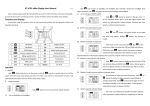
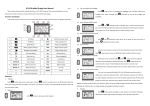
Setting interface of maximum trip speed
Under the setting maximum riding speed interface, if there’s no button operation
on the meter for more than 1 minute, and then the meter will automatically return to
display interface, and the original set values will be saved.
After finishing the maximum riding speed setting, hold
button (SW) shortly to
enter into the next setting.
○ Wheel Diameter
After finishing the maximum riding speed setting, enter the wheel diameter setting
interface, and then the wheel diameter display column flashes. Hold
button (UP) or
button (DOWN) to choose the corresponding wheel diameter specification to a
selected vehicle. The selection range of wheel diameter specifications are 12 species such
as 8,10,12,14,16,18,20,22,24,26,700c and 28 inches.
Setting Interface of Wheel Diameter
Under the wheel diameter setting interface, if there’s no button operation on the
meter for more than 1 minute, and then the meter will automatically return to display
interface, and the original set values will be saved.
After finishing the wheel diameter setting, hold
into the next setting.
- 11 -
button (SW) shortly to enter