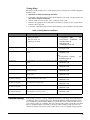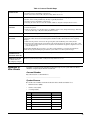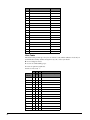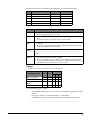
1
) 466-1667 Rev F May 2003 *(,QWHUORJL[ ZZZ*(,QWHUORJL[FRP Part No: 60-806 60-806-95R T e s t S y s te m W e e k ly O ff S ta y A w a y 1 2 3 N o D e la y S ile n t A p re s s b o th 4 5 6 F e a tu re s S y s te m M e n u B p re s s b o th 7 8 9 S ta tu s L ig h ts B y p a s s 0 # C Q u ic k E x it D p re s s b o th * S y s te m is O K A rm e d R e a d y Q u ic k G u id e D is a r m S y s te m / C a n c e l A la r m B y p a ss S e n so rs P ress 1 + C O D E . 2 A rm T u rn C H IM E O n / O ff 1 2 3 A rm 1 2 3 to S T A Y C lo se a ll p r o te c te d d o o rs a n d w in d o w s. P ress 2 + C O D E . P re ss 4 to a rm d e la y d o o r s in sta n tly , if d e sire d . to A W A Y 1 A rm sy ste m to d e sir e d le v e l. P ress B Y P A S S + C O D E + S en so r N o . 1 P ro g ra m 1 2 C lo se a ll p r o te c te d d o o rs a n d w in d o w s. P ress 3 + C O D E . E x it p re m ise s th ro u g h d e la y d o o r . Z o n e /S e n so r N u m b e r 0 1 0 2 0 3 0 4 0 5 0 6 0 7 T e s t S y s te m W e e k ly M a P re P re P re P re p re k e ss ss ss ss ss p re s s b o th U s e r S e ttin g s su r e sy ste m is d isa rm e d . A o r B to sc ro ll th r o u g h m e n u s. # to se le c t o p tio n o r a c c e p t e n try . to d e se le c t o p tio n o r c a n c e l e n try . 1 fo r O F F ; p re ss 2 fo r O N ; 0 - 9 fo r o th e r e n trie s. S ta y A w a y 1 2 3 N o D e la y S ile n t 4 5 6 F e a tu re s S y s te m M e n u B p re s s b o th 7 8 9 S ta tu s L ig h ts B y p a s s 0 # C 0 8 0 9 1 0 1 1 1 2 1 3 1 4 O ff A M a k e su r e sy ste m is d isa rm e d . P re ss 7 + 1 to tu rn C H IM E o n o r o ff. 2 p re s s b o th Q u ic k E x it D * Concord Express User Instructions FCC Notices FCC Part 15 Information to the User Changes or modifications not expressly approved by GE Interlogix can void the user’s authority to operate the equipment. FCC Part 15 Class B This equipment has been tested and found to comply with the limits for a Class B digital device, pursuant to part 15 of the FCC Rules. These limits are designed to provide reasonable protection against interference in a residential installation. This equipment generates, uses, and can radiate radio frequency energy and, if not installed and used in accordance with the instructions, may cause harmful interference to radio communications. However, there is no guarantee that interference will not occur in a particular installation. If this equipment does cause harmful interference to radio or television reception, which can be determined by turning the equipment off and on, the user is encouraged to try to correct the interference by one or more of the following measures: • Reorient or relocate the receiving antenna. • Increase the separation between the equipment and receiver. • Connect the affected equipment and the panel receiver to separate outlets, on different branch circuits. • Consult the dealer or an experienced radio/TV technician for help. ACTA Part 68 This equipment complies with Part 68 of the FCC Rules. Located on this equipment is a label that contains, among other information, the FCC registration number and the ringer equivalence number (REN) for this equipment. If requested, this information must be provided to the telephone company. FCC Part 68 Registration No. B4ZUSA-27621-AL-E REN: 0.2B The REN is used to determine the maximum number of devices that may be connected to your telephone line. Excessive RENs on a telephone line may result in devices not ringing in response to an incoming call. In most areas, the sum of all device RENs should not exceed five (5.0). To be certain of the number of devices that may be connected to a line, as determined by the total RENs, contact the local telephone company. For products approved after July 23, 2001, the REN for this product is part of the product identifier that has the format US:AAAEQ##TXXXX. The digits represented by ## are the REN without a decimal point (e.g., 03 is a REN of 0.3). For earlier products, the REN is separately shown on the label. A plug and jack used to connect this equipment to the premises wiring and telephone network must comply with the applicable FCC Part 68 rules and requirements as adopted by ACTA. A compliant telephone cord and modular plug is provided with this product. It is designed to be connected to a compliant modular jack that is also compliant. See the Installation Instructions for details. Alarm dialing equipment must be able to seize the telephone line and place a call in an emergency situation. It must be able to do this even if other equipment (telephone, answering system, computer modem, etc.) already has the telephone line in use. To do so, alarm dialing equipment must be connected to a properly installed RJ31X jack that is electrically in series and ahead of all other equipment attached to the same telephone line. Proper installation is depicted in the following diagram. If you have any questions concerning these instructions, consult your local telephone company or a qualified installer about installing an RJ31X jack and alarm dialing equipment for you. C u s to m e r P r e m is e s E q u ip m e n t a n d W ir in g N e tw o rk S e r v ic e P r o v id e r 's F a c ilitie s A la r m D ia lin g E q u ip m e n t R J 3 1 X J a c k C o m p u te r U n u s e d R J -1 1 J a c k T e le p h o n e L in e N e tw o rk D e m a r c a tio n P o in t A n s w e r in g S y s te m T e le p h o n e T e le p h o n e F a x M a c h in e U n u s e d R J -1 1 J a c k T e le p h o n e If this equipment causes harm to the telephone network, the telephone company may temporarily disconnect your service. If possible, you will be notified in advance. When advance notice is not practical, you will be notified as soon as possible. You will also be advised of your right to file a complaint with the FCC. The telephone company may make changes in its facilities, equipment, operations, or procedures that could affect the operation of the equipment. You will be given advance notice in order to maintain uninterrupted service. If you experience trouble with this equipment, please contact the company that installed the equipment for service and/or repair information. The telephone company may ask you to disconnect this equipment from the network until the problem has been corrected or you are sure that the equipment is not malfunctioning. This equipment may not be used on coin service provided by the telephone company. Connection to party lines is subject to state tariffs. Canada Notice The Canadian Department of Communications label identifies certified equipment. This certification means that the equipment meets certain telecommunications network protective, operational, and safety requirements. The department does not guarantee the equipment will operate to the user’s satisfaction. Before installing this equipment, users should ensure that it is permissible to be connected to the facilities of the local telecommunications company. The equipment must also be installed using an acceptable method of connection. In some cases, the company’s inside wiring associated with a single-line individual service may be extended by means of a certified connector assembly (telephone extension cord). The customer should be aware that compliance with the above conditions may not prevent degradation of service in some situations. Repairs to certified equipment should be made by an authorized Canadian maintenance facility designated by the supplier. Any repairs or alterations made by the user to this equipment, or equipment malfunctions, may give the telecommunications company cause to request the user to disconnect the equipment. For your protection, make sure that the electrical ground connections of the power utility, telephone lines, and internal metallic water pipe system, if present, are connected together ! Do not attempt to make connections yourself. Contact the appropriate electrician or electric inspections authority. Caution The Load Number (LN) assigned to each terminal device denotes the percentage of the total load to be connected to a telephone loop which is used by the device, to prevent overloading. The termination on a loop may consist of any combination of devices subject only to the requirement that the total of the LNs of all the devices does not exceed 100. Load Number: .1 The term “IC:” before the certification/registration number only signifies that the Industry Canada technical specifications were met. IC: 867A 787SIMON “AVIS: - L ´étiquette du ministère des Communications du Canada identifie le matériel homologué. Cette étiquette certifie que le matériel est conforme a certaines normes de protection, d ´ exploitation et de sécurité des réseaux de télécommunications. Le ministère n ´ assure toutefois pas que le matériel fonctionnera a la satisfaction de l ´ utilisateur. Avant d ´ installer ce matériel, l ´ utilisateur doit s ´ assurer qu´ il est permis de le raccorder aux installations de l ´ enterprise locale de télécommunication. Le matériel doit également etre installé en suivant une méthod acceptée de raccordement. Dans certains cas, les fils intérieurs de l´ enterprise utilisés pour un service individuel a ligne unique peuvent etre prolongés au moyen d´ un dispositif homologué de raccordement (cordon prolongateur téléphonique interne). L ´ abonné ne doit pas oublier qu ´ il est possible que la conformité aux conditions énoncées ci-dessus n ´ empechent pas le dégradation du service dans certaines situations. Actuellement, les enterprises de télécommunication ne permettent pas que l ´ on raccorde leur matériel a des jacks d ´ abonné, sauf dans les cas précis prévus pas les tarrifs particuliers de ces enterprises. Les réparations de matériel homologué doivent etre effectuées pas un centre d ´ entretien canadien autorisé désigné par le fournisseur. La compagne de télécommunications peut demander a l ´ utilisateur de débrancher un appareil a la suite de réparations ou de modifications effectuées par l ´ utilisateur ou a cause de mauvais fonctionnement. Pour sa propre protection, l ´ utilisateur doit s ´ assurer que tous les fils de mise a la terre de la source d ´ énergie électrique, des lignes téléphoniques et des canalisations d ´´ eau métalliques, s ´ il y en a, sont raccordés ensemble. Cette précaution est particulièrement importante dans les régions rurales. Avertissment. - L ´ utilisateur ne doit pas tenter de faire ces raccordements lui-meme; il doit avoir recours a un service d ´ inspection des installations électriques, ou a electricien, selon le cas”. Une note explicative sur les indices de charge (voir 1.6) et leur emploi, a l ´ intention des utilisateurs du matériel terminal, doit etre incluse dans l ´ information qui accompagne le materiel homologué. La note pourrait etre rédigée selon le modèle suivant: “L ´ indice de charge (IC) assigné a chaque dispositif terminal indique, pour éviter toute surcharge, le pourcentage de la charge totale qui peut etre raccordée a un circuit téléphonique bouclé utilisé par ce dispositif. La terminaison du circuit bouclé peut etre constituée de n ´ import somme des indices de charge de l ´ ensemble des dispositifs ne dépasse pas 100.” L ´ Indice de charge de cet produit est ____________. ) *(,QWHUORJL[&RQFRUGLVDWUDGHPDUNRI*(,QWHUORJL[$OORWKHUWUDGHPDUNV DUHSURSHUWLHVRIWKHLURZQHUV $OOULJKWVUHVHUYHG *(,QWHUORJL[ 6HFRQG6WUHHW1RUWK 1RUWK6DLQW3DXO01 Commands at a Glance To do this: Press: Disarm the system. 1 + Code Disarm the system during Entry Delay Time. Code (or 1 + Code) Cancel an accidental alarm. Code (or 1 + Code) Arm to Level 2—STAY. 2 + Code Arm to Level 3—AWAY. 3 + Code Send a police alarm. Press and hold both POLICE buttons for 2 seconds. Send an auxiliary alarm. Press and hold both AUXILIARY buttons for 2 seconds. Send a fire alarm. Press and hold both FIRE buttons for 2 seconds. Arm system with No Delay. 2 + Code + 4 or 3 + Code + 4 Arm system to send a Latchkey page. 2 + Code + 6 or 3 + Code + 6 Bypass a sensor. Indirectly: Directly: 2 + Code + ƒ or 3 + Code + ƒ ƒ + Code + Sensor Number Arm system silently. 5 + 2 + Code 5 + 3 + Code Check the system status. ‚ Turn Chime on/off. 7+1 Check alarm memory. 7+6 Initiate a phone test. 8 + Code + 2 Initiate a sensor test. 8 + Code + 3 or Contents Getting to Know Your Security System 1 Overview .....................................................................................................................................................1 Control Panel ..........................................................................................................................................1 Touchpads ...............................................................................................................................................1 Wireless Panic Button .............................................................................................................................1 Door/Window Sensors ............................................................................................................................ 1 Motion Sensors .......................................................................................................................................2 Environmental Sensors ...........................................................................................................................2 Communicating with the Panel 2 Instructing the Panel ...................................................................................................................................2 How Your System Communicates with You ..............................................................................................2 Key Beeps ...............................................................................................................................................2 Status Beeps ............................................................................................................................................2 Pager Notification ...................................................................................................................................3 Indicator Lights .......................................................................................................................................3 Fire and Smoke Alarms 3 Clearing Smoke Sensors .............................................................................................................................3 What Happens When There is an Alarm ....................................................................................................3 Arming Your System 4 Level 1—OFF .............................................................................................................................................4 Arming Level 2—STAY .............................................................................................................................4 Arming Level 3—AWAY ............................................................................................................................4 Keychain Touchpad Arming 5 Quick Arm 5 Quick Exit 5 Using the Chime Feature 5 Preventing Accidental Alarms 5 Aborting Accidental Alarms .......................................................................................................................6 Guidelines for Preventing Accidental Alarms ............................................................................................6 Exit and Entry Delay Times 6 Exit Delay Example ................................................................................................................................6 Entry Delay Example ..............................................................................................................................7 Extended Delay ...........................................................................................................................................7 Exit Extension .............................................................................................................................................7 i No Delay—For Instant Alarm ....................................................................................................................7 Auto STAY Arming Feature .......................................................................................................................8 Arming While a Door or Window is Open 8 Bypassing a Sensor Directly .......................................................................................................................8 Bypassing a Sensor Indirectly .....................................................................................................................9 Was the Bypass Successful? .......................................................................................................................9 Checking the Status of Your System 9 Short System Status ....................................................................................................................................9 Full System Status ....................................................................................................................................10 System Alarm Sounds ...............................................................................................................................10 Panic Alarms 10 Fire Panic ..................................................................................................................................................10 Police Panic Alarm ...................................................................................................................................10 Auxiliary Panic Alarm .............................................................................................................................. 11 Siren Time-out .......................................................................................................................................... 11 Access Codes 11 System Master Code ................................................................................................................................. 11 Regular User Codes .................................................................................................................................. 11 Using the Programming Menus ................................................................................................................ 11 Programming Access Codes ..................................................................................................................... 11 Changing a User Code .......................................................................................................................... 11 Erasing a User Code .............................................................................................................................12 Assigning the Direct Bypassing Attribute ............................................................................................12 The Touchpad Tamper Feature .............................................................................................................12 Setting the Time and Date 12 Adjusting System Sounds and Touchpad Brightness 13 Arming Your System Silently ...................................................................................................................13 Silent Arming on Demand ....................................................................................................................13 Arming Always Silent ..........................................................................................................................13 Adjusting the Touchpad Beeps .................................................................................................................13 Adjusting the Touchpad Display Brightness ............................................................................................14 Notification by Pager 14 Pager Messages .........................................................................................................................................15 Event Code in Page ...............................................................................................................................15 Sensor Number or User Number in Page ..............................................................................................15 Account Number in Page ......................................................................................................................16 Streamlining the Page ...............................................................................................................................16 Opening and Closing Reports ii 16 Latchkey Paging 16 No Activity Feature 17 Using the Panel Download Feature 17 System Information 17 Testing the System 17 Automatic Test Features ...........................................................................................................................17 Manual Tests .............................................................................................................................................18 Sensor Test ............................................................................................................................................18 Phone Communication Test ..................................................................................................................18 Testing Sirens ........................................................................................................................................19 Troubleshooting 19 Trouble Beeps and Trouble Messages ......................................................................................................20 Silencing Trouble Beeps .......................................................................................................................20 Appendix A: User Sheets 21 Account Number .......................................................................................................................................21 System Sensors .........................................................................................................................................21 User Codes ................................................................................................................................................22 Touchpad Information ...............................................................................................................................23 Accidental Smoke and Fire Alarms ..........................................................................................................24 Dialer Abort ..............................................................................................................................................24 Arming Information ..................................................................................................................................24 Paging .......................................................................................................................................................25 If the Power Goes Out ..............................................................................................................................26 No Activity Time ......................................................................................................................................26 System Information ...................................................................................................................................26 Appendix B: Planning for Emergencies 26 Floor Plan Example ..................................................................................................................................26 Your Floor Plan .........................................................................................................................................27 Alarm System Limitations ....................................................................................................................28 If Your System Needs Service ..............................................................................................................29 Appendix C: Programming Your System 29 Two Methods to Program Your System ....................................................................................................29 Using Programming Menus ..................................................................................................................29 Examples of Programming Using Menus .............................................................................................30 Using Programming Shortcuts ..............................................................................................................32 Notes 33 iii Getting to Know Your Security System This manual describes how to operate your system. It describes basic arming and disarming commands as well as how to program system features. The dealer or installer may have already discussed the details of your system with you. Record your system details in the User Sheets located in Appendix A. Overview Your security system is made up of different parts. Each plays a special role in the system’s operation: T e s t S y s te m O ff W e e k ly A p re s s b o th p re s s b o th is O K D A w a y 3 2 N o D e la y S ile n t P a g e r 4 5 6 F e a tu re s S y s te m M e n u 7 8 9 S ta tu s L ig h ts B y p a s s * 0 # C S y s t e m S ta y 1 p re s s b o th B A rm e d R e a d y Q u ic k G u id e D isa r m S y s te m / C a n c e l A la rm B y p a ss S e n s o rs P ress 1 + C O D E . 2 A rm T u r n C H IM E O n / O ff 1 2 3 A rm 1 2 3 to S T A Y C lo s e a ll p r o te c te d d o o r s a n d w in d o w s . P ress 2 + C O D E . P r e s s 4 to a r m d e la y d o o r s in s ta n tly , if d e s ir e d . to A W A Y 1 T e s t S y s te m W e e k ly A r m s y s te m to d e s ire d le v e l. P ress B Y P A S S + C O D E + S e n so r N o . 1 1 S ta y 1 p re s s b o th U se r S e ttin g s p re s s b o th D A w a y 3 S ile n t P a g e r 4 5 F e a tu re s S y s te m 7 8 9 S ta tu s L ig h t s B y p a ss * 0 # C p re s s b o th 2 N o D e la y B M a k e s u r e s y s te m is d is a r m e d . P r e s s A o r B to s c r o ll th r o u g h m e n u s . P r e s s # t o s e le c t o p tio n o r a c c e p t e n t r y . P ress to d e s e le c t o p tio n o r c a n c e l e n t r y . P ress 1 fo r O F F ; p ress 2 fo r O N ; p r e s s 0 - 9 f o r o th e r e n tr ie s . 2 0 8 0 9 1 0 1 1 1 2 1 3 1 4 O ff A M a k e s u r e s y s te m is d is a r m e d . P re s s 7 + 1 to tu rn C H I M E o n o r o ff. 2 P ro g r a m C lo s e a ll p r o te c te d d o o r s a n d w in d o w s . P ress 3 + C O D E . E x it p r e m is e s th r o u g h d e la y d o o r . Z o n e /S e n s o r N u m b e r 0 1 0 2 0 3 0 4 0 5 0 6 0 7 6 M e n u Touchpads Wireless Panic Button Door/Window Sensors Environmental Sensors Panel Motion Sensors Control Panel The panel is at the heart of your system. It stores the intelligence to monitor all the sensors and devices in the system. The panel is the piece of equipment that activates sirens and initiates a call to the central station in an alarm situation. Touchpads Touchpads are used to arm, disarm, and program your system. The first touchpad is called a fixed display touchpad. It communicates by using indicator lights, lighted text, and an 11-character display. The second touchpad is called an alphanumeric touchpad and communicates by displaying text on a two-line display. Your system may also use wireless, handheld touchpads that can be carried from room to room. Keychain touchpads are also wireless and are handy for simple arming and disarming functions. Keychain touchpads can be carried off-site. The installer can program the keychain touchpad to send a Police or Auxiliary panic alarm. Wireless Panic Button Wireless panic button touchpads are dedicated to sending one signal only—usually a Police or Auxiliary panic alarm. Panic button touchpads are usually kept near the user. Door/Window Sensors Door and window sensors protect the perimeter of your home by alerting the panel when a door or window is opened. 1 Motion Sensors Motion Sensors in hallways or rooms detect a person moving across the field of detection. Environmental Sensors Environmental sensors such as gas, smoke, and heat detectors remain alert for the presence of fire or carbon monoxide 24 hours a day. Communicating with the Panel Your system can be set up to communicate with you through: • Status beeps • Alarm sirens • Touchpad text • Pager information A s e n s o r is a c tiv a te d . T h e s e n s o r a le r t s t h e p a n e l im m e d ia t e ly . T h e p a n e l a c tiv a te s s ir e n s . If t h e s y s te m is m o n ito r e d , th e p a n e l c a lls t h e c e n t r a l m o n it o r in g s t a t io n . T h is d e c is io n is b a s e d o n s y s t e m p r o g r a m m in g a n d th e c u r r e n t a r m in g le v e l. T h e c e n tr a l m o n ito r in g s ta t io n o p e r a t o r r e p o r t s t h e a la r m t o t h e p o lic e o r fir e d e p a r t m e n t . Instructing the Panel Not just anyone can walk up to a touchpad and operate your security system. Before the system will process most commands, users are required to enter a pre-programmed 4-digit access code. See “Access Codes” for detailed information. Keychain touchpads that are enrolled as part of the system do not require an access code, but are usually kept in an individual’s pocket or purse. If you would rather use an actual key to arm and disarm the system, your security dealer can install a special key and keyswitch in your home. How Your System Communicates with You Touchpads and interior sirens produce a variety of operating beeps to inform you of different system states and operations. The fixed display touchpad also uses indicator lights. Key Beeps A Key beep is the tone you hear when you press a button on a touchpad. The sound confirms that the button was pressed adequately. Key beeps can be turned on or off by the installer. Status Beeps Status beeps from touchpads or sirens sound when there is a change in the current status of the system. Status beeps are not alarms, but they do warrant your attention. There is more than one type of Status beep: 2 • Exit Delay beeps indicate that an arming command has been entered and the countdown to arming has begun. • Entry Delay beeps indicate that you’ve entered the building and the countdown to an alarm has begun. (So disarm the system as soon as you get in!) • Trouble beeps tell you that there is a problem with the system or one of its components. • Chime feature beeps tell you that a door was opened. • Protest beeps inform you that you’re trying to arm the system while there is an open door or window. • Sensor test beeps are the sound the system makes during a sensor test to indicate that a sensor was tested properly. Status beeps are described in more detail throughout the manual. Pager Notification Your system can dial the phone numbers of three different pagers to notify users of events they may want to be aware of. Some of the events include: • when the system is disarmed, • when the system is armed, • trouble conditions in the system, and • alarm conditions. For more information, see “Notification by Pager.” Indicator Lights The fixed display touchpad used with Concord™ Express Systems includes ARMED and READY indicator LEDs (light emitting diodes) that provide instant feedback. ARMED The red LED is the ARMED indicator. It will flash during the exit delay when you are arming the system to level 2 (STAY) or level 3 (AWAY). It will also flash during the entry delay, before you disarm your system. The arming indicator will stop flashing—but will remain on—when the exit delay expires and the system is armed. The arming indicator will be off when the system is disarmed. READY Note Any time you notice that the ready light is not on, you should press the STATUS button to find out what the trouble condition is. Fire and Smoke Alarms The green LED is the READY indicator. It will be on whenever the system is functioning normally. The ready indicator shuts off if the system detects a trouble condition. If your system contains smoke and fire sensors, it monitors the premises for smoke and fire alarms 24 hours a day and in all arming levels. These alarms cannot be cancelled or aborted and are always reported to the central station. Since many communities charge for dispatching the fire department in error, your dealer may give you specific instructions to follow in the event of an accidental smoke or fire alarm. Record these instructions in the Appendix A User Sheets under “Accidental Smoke and Fire Alarms.” Clearing Smoke Sensors Once a smoke sensor has been in alarm, it is considered “Open” or in “Trouble” until it is reset: • Press 1 + Code once to silence the alarm, then press sensor. 1 + Code again to reset the smoke What Happens When There is an Alarm Note Your system may or may not be monitored. If it is not monitored, no call will be made. In the event of an alarm, several things happen at once: • Sirens and hardwired touchpads emit emergency tones • Panel notifies the central station for help.* • Message appears on fixed display or alphanumeric touchpads. 3 Arming Your System Since your security needs may vary throughout the day, the system was designed with three arming levels. By arming your system to a particular level, only those sensors programmed to detect in that arming level will report alarms. Level 1—OFF Use Level 1 when intrusion detection is not necessary. For example, on an active Saturday morning—kids playing inside and out; someone working in the garage; various house projects going on. Even though Level 1 disarms the system, your system continues to monitor for fire, smoke, carbon monoxide, and/or panic alarms if your system has these devices installed. Here are some other situations in which you’d set the system to Level 1—OFF: • Upon entering your armed home or business. When entering the armed premises through a designated delay door, the entry delay time begins. Entry Delay beeps remind you to disarm the system. • Before opening a door or window while inside or outside the armed home or business. When you wake up in the morning and want to get your newspaper, you must disarm the system before opening the door to prevent an accidental alarm. (See the section on “Preventing Accidental Alarms” if you would like to be able to leave quickly when the system is armed.) • To stop sirens and cancel an alarm. When an alarm condition occurs, disarming the system turns off any sirens. ¾ To disarm to Level 1—OFF using a touchpad: 1. Press 1. Touchpads display “Enter Code.” 2. Enter your access code. Touchpads display date and time or programmed text. 3. The system sounds one long beep. Arming Level 2—STAY There are times when you want intrusion protection, but still want the freedom to move around within your house without setting off an alarm. For example, in the evening when your family is inside for the night. In this and similar situations, arm your system to 2—STAY. ¾ To arm to Level 2—STAY using a touchpad: 1. Close all protected perimeter doors and windows. 2. Press 2 at any touchpad. Touchpads display, “Enter Code.” 3. Enter your access code. Touchpads display, “Armed to STAY.” 4. The system sounds two short beeps. ARMED indicators on fixed display touchpads will light (indicator will flash during the exit delay). The exit beeps begin. 5. If leaving the premises, exit through a designated delay door immediately. Arming Level 3—AWAY At other times, you want every sensor to be alert: When the family is away from home, or, in a business, after closing time. In this and similar situations, set your system to 3—AWAY for maximum protection. All sensors are active—perimeter door and window sensors, and interior motion detectors. ¾ To arm to Level 3—AWAY using a touchpad: 1. Close all perimeter doors and windows. 2. Press 3 at any touchpad. Touchpads display, “Enter Code.” 3. Enter your access code. Touchpads display, “Armed to AWAY.” 4. The system sounds three short beeps. ARMED indicators on fixed display touchpads will light (indicator will flash during the exit delay). The exit beeps begin. 5. Exit through a designated delay door immediately. 4 Keychain Touchpad Arming To disarm your system with a keychain touchpad, press the Unlock button. Your installer can set up your keychain touchpad to arm the system in one of two ways: • Press the Lock button to arm the system directly to Level 3 with no Exit delay. Using this method, you would not be able to arm to Level 2. • Press the Lock button to increase the arming level each time it is pressed (Level 1 to Level 2, or Level 2 to Level 3). The Exit delay time would be applied. Note Your system may be configured to sound short beeps on exterior sirens when arming or disarming the system using a keychain or wireless touchpad. This gives confirmation that an arming change was successful even when outside. Ask your installer about this feature. Quick Arm Your system may be set up so that you’re able to arm the system without using an access code. ¾ To use Quick Arm: • Increase the arming level by simply pressing 2 or 3 at any touchpad. • Decreasing the arming level requires that the user enter a code. Quick Exit Note In UL Listed systems, this feature is disabled. Important ! If you step outside and are planning to come back in, do not close the door behind you! Note Opening the door without pressing D will cause the entry delay to begin. Using the Chime Feature Your system may be set up so that when your system is armed to Level 2—STAY, you’re able to press D on any touchpad and simply walk out of the door without having to disarm and rearm the system. This is useful when your system is armed and you want to quickly pop outside to pick up the newspaper without disarming your system. ¾ To use Quick Exit: 1. When the system is armed to 2—STAY, press D at any touchpad. You will begin to hear one beep every five seconds. These beeps will continue throughout the 2 minute Quick Exit interval. 2. Open the door and go outside. Leave the door open if you are planning to come back in! 3. Come back in within two minutes and close the door. The system will rearm to 2—STAY. Turning on the Chime feature is like having bells on every protected door and window. When this feature is on, sirens and speakers sound 2 beeps whenever anyone opens a protected door or window. The Chime feature works only in Level 1—OFF. ¾ To turn Chime on/off: • While in Level 1—OFF, from any touchpad, press 7 + 1. While the Chime feature is on, touchpads display, “CHIME IS ON” or “Chime.” When the system is armed again, Chime becomes deactivated. Chime-On-Close The Chime-On-Close feature works like the regular Chime feature, but in addition to the double beeps heard upon opening a protected door or window, the system sounds one long beep when the door or window is closed again. You can turn the Chime-On-Close feature on or off from the programming menu. Refer to Appendix C, “Programming Menus” for information on programming your system. Preventing Accidental Alarms Your security system is engineered with advanced technology that reduces the chance of an accidental alarm caused by a technical problem. In wireless systems, this technology prevents other devices, such as garage door openers, ham radios, television remote controls, and cellular phones, from interfering with your security system. Most accidental alarms occur when leaving the house after arming the system, or upon returning, before disarming the system. 5 If, for example, you arm the system, then run upstairs for something you forgot, the Exit Delay time may expire. Once the Exit Delay expires, opening an armed door or moving in front of a motion detector will cause an alarm. Aborting Accidental Alarms Your system can be set up with the opportunity to abort an accidental intrusion, Police or Auxiliary alarm. If the Dialer Abort feature is turned on, disarming the system within a specified time period will silence the siren and prevent the alarm from being reported to the central monitoring station (thus aborting the alarm). Your system will display “report aborted” for a few seconds, if you disarm before the alarm is reported. If you don’t disarm in time to abort the central station report, the system will automatically send an “alarm cancelled” report to the central station when the system is disarmed. Follow the procedures of your central station to prevent a false dispatch. See “Alarm Information” in Appendix A to determine if this feature is enabled for your system. Fire alarms caused by smoke sensors, fire panic alarms, and heat sensors cannot be aborted. Disarming a fire alarm will silence the siren, but fire alarms are always reported. If an accidental fire alarm has sounded, follow the procedures of your central monitoring station to prevent a false dispatch. Note There is a communicator delay (Dialer Abort Delay) of 30 seconds programmed into this panel. The panel will delay 30 seconds before dialing the central monitoring station or a numeric pager to send reports. You can have your installer program this delay time between 15 - 45 seconds. ¾ To cancel an alarm: • Press Code (or 1 + Code.) Guidelines for Preventing Accidental Alarms Following these guidelines will go a long way toward preventing accidental alarms. • Close doors and windows before you leave your house. • When getting ready to leave the house, gather the things you want to take with you so you can exit immediately after arming the system. • Always enter and exit within the programmed delay times. • Make sure you leave through a door that has a delay time set for it. If you arm your system, then leave through a door without a delay time, an alarm will immediately sound. • When you return, immediately disarm your system. • Be aware of the devices in your security system and learn how each one operates. • Listen to system beeps. Take note of any touchpad messages or lights that indicate the current system status. • If you have pets, ask your installer if you need pet lenses in your motion detectors. Pets climb higher than you may guess, causing alarms when you are away. • Check the location of your smoke detectors. Smoke detectors near bathrooms can be tripped by steam from a shower. Smoke detectors near the kitchen can be tripped by cooking smoke. Refer to the User Sheet in Appendix A to determine what the specific settings are for your system. Exit and Entry Delay Times After arming your system, you need time to exit the building so you won’t set off an alarm. Likewise, upon returning to your home or business, you’ll need enough time to open the door and get to a touchpad to disarm the system. • The Exit Delay is a period of time long enough to let you leave through a designated delay door after arming the system. • The Entry Delay is a period of time long enough to let you unlock a designated delay door and get to a touchpad to disarm the system. Exit Delay Example You’re about to go on an errand. You are inside your house and have just armed the system to Level 3—AWAY. 6 The interior sirens and touchpads sound three quick status beeps, telling you that the system accepted the command and has started the Exit Delay time. During the Exit Delay time, the system sounds one short beep every 4 seconds. The red ARMED indicator light on fixed display touchpads will flash. During the last seconds of the delay time, the beeps will accelerate to one per second. Exit the premises immediately. At the end of the Exit Delay, you’ll hear three more quick status beeps. These beeps indicate that the Exit Delay has ended. The ARMED indicator light on fixed display touchpads will stop flashing and remain on. Opening an armed door or window after the Exit Delay has expired will cause an alarm. B A fte r a r m in g , y o u 'l l h e a r 3 q u ic k s ta tu s b e e p s . D u r in y o u 'l l fo u r s L e a v e g th h e a e c o th e E E P S e E x it D e la y , r o n e b e e p e v e ry n d s. p r e m is e s n o w . 3 q u ic k s ta tu s b e e p s so u n d b e fo re th e s y s te m is a r m e d . Entry Delay Example You are returning to your house that is armed to Level 3—AWAY. When you unlock and enter the designated delay door, the interior sirens and touchpads sound two short beeps every two seconds. The red ARMED indicator light on fixed display touchpads will flash. This tells you that the Entry Delay time has begun and reminds you to disarm the system to avoid setting off an alarm. During the last 10 seconds of Entry Delay, you’ll hear two short beeps every second. B E E U p o n e n t e r in g , d u r in g th e E n t r y D e l a y , y o u 'l l h e a r 2 b e e p s e v e ry 2 se c o n d s. P S D is a r m th e s y s te m b e fo r e t h e la s t o f 1 0 q u ic k s t a t u s b e e p s t o a v o id a n a c c id e n t a l a la r m . Your installer will work with you to decide which door(s) should be delay door(s), and determine the delay times that will work best for you and your family. Then, the installer will program the Exit and Entry Delay times into your system. Extended Delay In some situations, additional time is needed to arm or disarm the system from, for example, a protected outside gate or door. In these instances, the installer can program an extended delay, giving as much as 16 minutes to exit or disarm the system before setting off an alarm. Refer to the Appendix A User Sheets, “Delay Doors and Delay Time Settings,” for a list of actual exit delay times. Exit Extension Note In UL Listed systems, this feature is disabled. Note The Exit Extension will work on the first re-entry only. Your system may be set up so that the exit delay time is restarted if you reopen the delay door during the initial exit delay time. This is useful if, after arming the system, you walk out the door, then remember something you forgot inside. You can reenter and exit through the delay door without disarming and rearming the system. If your system is not using this feature, you must disarm the system when you reenter the armed premises to avoid setting off an alarm. No Delay—For Instant Alarm You can choose to turn off the Entry and Exit Delays, causing the delay doors to arm immediately. Anyone entering the house through the delay door when the system is set to No Delay would immediately cause an alarm. No Delay is normally used: • When you’re staying at home, after you’ve armed the system. • When you’re arming and disarming your house from the outside. (You must have a wireless touchpad in order to do this.) 7 ¾ Arming to Level 2 or 3 with No Delay: 1. Close all perimeter doors and windows. 2. Exit the premises if arming to Level 3—AWAY. 3. Enter: 2 + Code or 3 + Code. The system sounds two or three short beeps. 4. Immediately after hearing the beeps, press 4 for No Delay. Touchpads display an arming message, such as “Armed to STAY No Delay” or “ARMED TO AWAY NO DELAY,” for example. The ARMED indicator light on fixed display touchpads will light. Changing the arming level will restore delay doors to their normal Exit and Entry Delay times. Auto STAY Arming Feature The Auto STAY Arming feature helps cut down on false alarms in the event that you arm the system to 3—AWAY, but fail to leave during the exit delay time. Here’s how it works: If you arm the system to Level 3—AWAY, and do not leave the premises within the exit delay time— If feature turned on The system can tell that no one opened and closed a delay door within the delay time. It assumes that someone is still inside and the panel will arm to 2—STAY to avoid a false alarm. If feature turned off The system arms to Level 3—AWAY regardless of whether or not a delay door has been opened and closed. Your movement inside the premises could activate a motion detector, causing an alarm. Your dealer can turn this feature on or off for you. See the “Arming Information” section of Appendix A to find out if this feature is currently enabled in your system. Arming While a Door or Window is Open It is possible to arm your system while leaving a door or window open. This is useful if, for example, you like to sleep at night with the window open. If the door or window has a sensor installed on it, the system must be told to ignore, or bypass, that sensor when it’s open. All other sensors will remain active. There are two methods for bypassing a sensor: Note When a sensor is bypassed, you are allowing that door or window to be unprotected. • Directly — After arming the system, bypass door/window sensors before you open them. You must know the sensor number of the door or window you wish to bypass. To bypass directly, the user code must have been given the Direct Bypassing attribute. See “Assigning the Direct Bypassing Attribute” for more information. • Indirectly — As you are arming, bypass sensors on already-open doors and window. This method should not be used in UL-listed installations. Bypassing a Sensor Directly Use this method if the system is armed and you would like to open a window without disarming. Refer to the Appendix A User Sheets to determine what the sensor number is for the sensor you wish to bypass. ¾ To bypass sensors directly: 1. Close all doors and windows. 2. Arm your system to the desired level. 3. At any touchpad, press ƒ (labeled Bypass) + Code + sensor number. 4. Touchpads display, “Bypassed Zones 01,” or “SENSOR 01 BYPASSED,” for example. If the touchpad displays “INVALID,” or if the touchpad sounds one long beep, make sure that you entered a valid access code and a valid sensor number. Gas, heat, and smoke sensors cannot be bypassed. 5. Bypass other sensors, if necessary, by repeating Step 3. 8 6. The bypassed door or window can now be opened. ¾ To arm bypassed sensors: • Arm the system again. OR Note At any touchpad, press ƒ (labeled Bypass) + Code + sensor number. Touchpads display, “Zones 01 OK,” or “SENSOR 01 UNBYPASSED,” for example. You cannot bypass sensors directly using a keychain touchpad. If the touchpad displays “INVALID,” or if the touchpad sounds one long beep, make sure that you entered a valid access code and a valid sensor number. • Bypassing a Sensor Indirectly Use this method if you are arming the system and would like to bypass doors and windows already open. ¾ To bypass sensors indirectly: 1. Leave open only those doors and windows that are to remain open. Close all others. 2. Arm your system to the desired level. The touchpad emits protest beeps and displays “PROTEST,” because of the open sensor(s). 3. At any touchpad. press BYPASS. Touchpads with displays show, “Bypassed Zones 01,” or “SENSOR 01 BYPASSED,” for example. 4. The system sounds arming level beeps to indicate that the system is armed and open sensors have been successfully bypassed. ¾ To arm bypassed sensors: • Arm the system again. OR • At any touchpad, press ƒ (labeled Bypass) + Code + sensor number. Touchpads display, “Zones 01 OK,” or “SENSOR 01 UNBYPASSED,” for example. If the touchpad displays “INVALID,” or if the touchpad sounds one long beep, make sure that you entered a valid sensor number. ¾ To bypass sensors indirectly using a keychain touchpad: • Press the Lock button once to arm the system and again to bypass open sensors: + Was the Bypass Successful? ¾ To confirm whether or not a sensor was bypassed: • Press the ‚ button (labeled Status) on the touchpad. Touchpads with displays list bypassed sensors or zones. Checking the Status of Your System Checking the system status means finding out about the current condition of your system. This includes finding out if any sensors are open or currently bypassed, whether or not the AC power and backup battery are okay, the nature of the most recent alarm, and more, depending on the features in use and the equipment in your system. Check the system status if: • Your system sounds trouble beeps (five short beeps every minute). • Your touchpads display, “Zones,” “POLICE,” “AUXILIARY,” or “FIRE.” • Your touchpads display, “Press Status” or a blinking . • The green READY light on fixed display touchpads is off. Short System Status A Short Status indicates the current arming level, sensor status (whether open or bypassed), low battery, supervisory, AC power or backup battery failures. 9 ¾ To get a Short System Status: ¾ Press ‚. The system sounds beeps according to the current arming level. (One for Level 1, two for Level 2, three for Level 3.) Touchpads display the status information, for example: “System is OK,” or “SENSOR 02 OPEN.” If an alarm or system trouble condition has occurred, it is displayed on a touchpad the first time you perform a Short or Full Status check. Performing a system status check a second time displays the system status including any trouble conditions. If any alarm or system trouble is active, it continues to show up in every status check until the system is disarmed. Full System Status Note A Full System Status is not available from the fixed display touchpad. A Full Status combines the Short Status information with added details about specific system features. ¾ To get a Full System Status: • Press ‚ + ‚. Interior sirens sound beeps according to the current arming level. Touchpads display the status information, for example, “SENSOR 03 BYPASSED,” “SYSTEM BATTERY IS OK,” or “AC POWER IS OK.” System Alarm Sounds The sirens and touchpads in your system emit alarm sounds whenever an alarm occurs, either by a sensor or panic button activation. Each type of alarm sounds and reacts differently when activated, as described in the following table. Type of Alarm Alarm Sound Repeating series of three beeps Fire Continuous Tone Police Rapid Beeps Auxiliary . Panic Alarms Panic alarms are easily activated from any touchpad to quickly alert the central monitoring station to a Fire, Police, or Auxiliary emergency. A panic alarm can be activated at any time, regardless of the current arming level: 1—OFF, 2—STAY, or 3—AWAY. This system is designed to inform a central monitoring station of the nature of the emergency so the correct personnel can be dispatched immediately. Fire Panic The Fire panic alarm sounds from all interior and exterior sirens. On monitored systems, the central monitoring station responds by calling the fire department. ¾ To activate a Fire panic alarm from a touchpad: • Press and hold both Fire buttons for 2 seconds. Police Panic Alarm The Police panic alarm sounds from all interior and exterior sirens, scaring off any intruder and alerting neighbors to the trouble. On monitored systems, the central monitoring station responds by calling the police. 10 ¾ To activate a Police panic alarm using a touchpad: • Press and hold the Police button(s) for 2 seconds. ¾ To activate a Police panic alarm from a keychain touchpad*: • Press and hold the Lock and Unlock buttons at the same time for 2 seconds. * The installer must configure the Police panic alarm to work this way. Auxiliary Panic Alarm The Auxiliary panic alarm sounds from interior sirens only. It is typically set up by your security dealer, based on your specific needs. On monitored systems, the central station responds by calling the service or agency you specified through your dealer. ¾ To activate an Auxiliary panic alarm from a touchpad: • Press and hold the Auxiliary button(s) for 2 seconds. Siren Time-out If the system is not disarmed after an alarm, the sirens will continue to sound until the time-out period is reached. The time-out period can be programmed only by your installer or dealer. Even though reaching the end of the time-out period stops the sirens, if your system is monitored, the central station will consider the alarm in progress until the system is manually disarmed. Access Codes The system requires a valid access code before it will process most commands. The Appendix A User Sheets provide a location for you to record the System Master and User codes. System Master Code There is one System Master code. The System Master code is used to enter the programming menus for your system. The default System Master code is 1234. It is important that you change the default code and record the new code in the Appendix A User Sheets. ¾ To change the System Master Code: 1. Enter the programming menus by pressing 9 + the current System Master Code. 2. Press 110. 3. Enter the desired 4-digit System Master Code, then press ƒ. 4. Press ‚ + 4 + ƒ to exit the programming menus. Regular User Codes There are 16 Regular User codes which act like keys to arm and disarm the system. If necessary, they can be assigned to neighbors, baby-sitters, or repair persons for temporary use. Regular user codes can be changed in the programming menus and are easily deleted from the system when no longer necessary. Good User Code Hygiene To preserve the integrity of your system, keep user codes confidential and delete extra codes as soon as they are no longer needed. We recommend that you avoid using obvious code patterns such as 1234 or 1111, 2222, etc. Using the Programming Menus Some system settings can be changed by you, the user, while other settings must be changed by the installer. To change system settings, you’ll use the System Master code to enter a series of programming menus. Appendix C gives a detailed explanation of how to use the menus or, if desired, how to use programming shortcuts. 11 Programming Access Codes User codes can be given certain attributes which determine whether the user can bypass a sensor or perform system tests. Changing a User Code Note The system will not accept the same code for two different users. ¾ To change or assign a user access code: 1. Enter the programming menus by pressing 9 + System Master Code. 2. Press 10 nn 0 where nn is user 00 through 15. 3. Enter the desired 4-digit code, then ƒ. 4. Press ‚ + 4 + ƒ to exit the programming menus. Erasing a User Code When a code is deleted from the system, that code no longer acts as a key for operating the system in any manner. ¾ To erase a user code: 1. Enter the programming menus by pressing 9 + System Master Code. 2. Press 10 n n 0 where nn is user 00 through 15. 3. Enter the System Master code, then ƒ. 4. Press ‚ + 4 + ƒ to exit the programming menus. Assigning the Direct Bypassing Attribute Direct Bypassing is a user code attribute that allows the user to bypass open sensors. If the user code does not have this attribute turned on, the user will not be able to bypass sensors directly. ¾ To assign Direct Bypassing to a user: 1. 2. 3. Enter the programming menus by pressing 9 + System Master Code. Press 10 n n 1 where nn is user 00 through 15. To turn Direct Bypassing on, press 2 + ƒ. off, press 1 + ƒ. 4. Press ‚ + 4 + ƒ to exit the programming menus. Assigning the System Test Attribute System Tests is a user code attribute that allows the user to perform system tests. If the user code does not have this attribute turned on, the user will not be able to perform phone or sensor tests. ¾ To assign the System Testing to a user: 1. Enter the programming menus by pressing 9 + System Master Code. 2. Press 10 n n 2 where nn is user 00 through 15. 3. To turn System Testing: on, press 2 + ƒ. off, press 1 + ƒ. 4. Press ‚ + 4 + ƒ to exit the programming menus. The Touchpad Tamper Feature The installer can program your system to send a Police alarm in the case of possible touchpad tampering. If more than 40 keys are pressed when the system asks for a code, and those keystrokes are not part of a valid access code, a siren will sound. See “Touchpad Information” in Appendix A to determine if this feature is enabled for your system. 12 Setting the Time and Date Although the installer usually sets the time and date at the time of installation, the user can change it when necessary. See Appendix C, “Programming Your System” for more detailed information on setting this feature. ¾ To set the system time: 1. Enter the programming menus by pressing 9 + System Master Code. 2. Press 00. 3. Enter the correct time in 24-hour format (4 digits), then press ƒ. For example, if the current time is 7:23 a.m., press 0723 + ƒ. 4. Press ‚ + 4 + ƒ to exit the programming menus. 2 4 -H o u r F o rm a t 00 01 02 03 04 05 :0 :0 :0 :0 :0 :0 0 = 0 = 0 = 0 = 0 = 0 = M id n 1 :0 0 2 :0 0 3 :0 0 4 :0 0 5 :0 0 ig h t 0 6 am 07 am 08 am 09 am 10 am 11 :0 :0 :0 :0 :0 :0 0 = 6 0 = 7 0 = 8 0 = 9 0 = 10 0 = 11 :0 :0 :0 :0 :0 :0 0 a 0 a 0 a 0 a 0 a 0 a m m m m m m 12 13 14 15 16 17 :0 :0 :0 :0 :0 :0 0 = 0 = 0 = 0 = 0 = 0 = 1 :0 2 :0 3 :0 4 :0 5 :0 N oon 0 pm 0 pm 0 pm 0 pm 0 pm 18 19 20 21 22 23 :0 :0 :0 :0 :0 :5 0 = 0 = 0 = 0 = 0 = 1 9 = 1 6 :0 7 :0 8 :0 9 :0 0 :0 1 :5 0 p 0 p 0 p 0 p 0 p 9 p m m m m m m ¾ To set the system date: 1. Enter the programming menus by pressing 9 + System Master Code. 2. Press 01. 3. Enter the current date as 6 digits (mm/dd/yy) then press ƒ. 4. Press ‚ + 4 + ƒ to exit the programming menus. Adjusting System Sounds and Touchpad Brightness Arming Your System Silently Use the Silent Arming feature to arm your system without disturbing people throughout the house with arming status beeps. There are two methods for implementing Silent Arming: • Silent on Demand (User presses 5 before arming.) • Arming Always Silent (Silent Arming feature on). Regardless of the method employed, when Silent Arming is in effect, no Exit beeps sound. Note Silent Arming on Demand Protest beeps will always sound when bypassing a sensor. Pressing 5 before arming silences arming status beeps from touchpads and interior sirens. ¾ To use Silent Arming on demand: 1. From any touchpad, press 5. 2. Within 4 seconds enter: 2 + Code or 3 + Code. Arming Always Silent Note Arming Always Silent may have been disabled by your installer. Turning this feature on in the programming menu means that the status beeps that come from touchpads and interior speakers while arming will always be silent. You will not have to enter 5 before arming, as with Silent Arming on Demand. See Appendix C, “Programming Your System” for more detailed information on setting this feature. Note Exit Delay is doubled when you enable Silent Arming. ¾ To enable Arming Always Silent: 1. Enter the programming menus by pressing 9 + System Master Code. 2. Press 2 + 1. 3. To turn Silent Arming: on, press 2 + ƒ. No system status beeps will sound while arming. off, press 1 + ƒ. System status beeps will sound from touchpad while arming. 13 4. Press ‚ + 4 + ƒ to exit the programming menus. Adjusting the Touchpad Beeps The frequency or pitch of chime and trouble beeps from each fixed display touchpad can be adjusted individually to a more desirable or distinct tone. Chime and trouble beep tones sound using the default frequency during, or within 15 seconds of, any button activity at that specific touchpad. ¾ To change status tone pitch: 1. Press and hold the ‚ and 0 until you hear a steady tone, then release the buttons. 2. Press and hold 1 to lower the pitch or press and hold 2 to raise the pitch. 3. Release the button when the desired pitch is heard. After about 10 seconds of no touchpad activity, the steady tone stops sounding. Adjusting the Touchpad Display Brightness You may want to change the brightness of a touchpad display based on its location in a building or room. For example, dim the touchpad display in a bedroom or enhance a display near a window. Changing the touchpad display affects only the touchpad currently being used. ¾ To change touchpad display brightness: 1. Enter the programming menus by pressing 9 + System Master Code. 2. Press 2 + 2. 3. Select a brightness level: 0 + ƒ Off 1 + ƒ Low 2 + ƒ Medium 3 + ƒ High 4. Press ‚ + 4 + ƒ to exit the programming menus. After dimming the display, pressing any button momentarily returns the display to full brightness. After 15 seconds without touchpad activity, the display returns to the set dimmed level. If an alarm occurs while the display is dimmed, it automatically returns to the full brightness level and stays that way until you disarm your system. Notification by Pager Your system can notify up to three different pager phone numbers to report system events. The installer can program any pager to receive pages for one or more of the following groups: • High Level Reports, which includes the following reports: – Sensor alarms – Sensor Tamper – Sensor Restores – Phone test – Receiver failure – Receiver jam – Touchpad tamper • – Bus failures – No activity alarm – Fire panic – Police panic – Auxiliary panic – Duress alarm Low Level Reports, which includes the following reports: – Bypass sensors – AC power fail – Sensor Low battery – CPU low battery – Sensor Supervisory – Auto phone test – Sensor Trouble – CPU back in service – Phone test – Phone Failure – Touchpad supervisory – Event buffer full – Touchpad low battery – Force armed(reports when a user bypasses sensors while arming system) 14 • Opening and Closing reports • Latchkey Paging Pager Messages When an event is reported on a numeric pager, the following information is included: E v e n t c o d e L a s t fo u r d ig its o f c e n tr a l s ta tio n a c c o u n t n u m b e r S e n so r n u m b e r o r u se r n u m b e r Although all three types of information can be reported on your pager, your pager service determines how the information will actually appear. Event Code in Page This part of the page let’s you know what has happened. Code 009 Indicates A sensor has been restored to its non-alarm state 111 System has been disarmed 118 System trouble has been fixed 119 System alarm condition has been cancelled 222 System armed to Level 2 333 System armed to Level 3a 555 System phone test 888 System has a trouble condition 999 System is in alarm condition a. If the user arms the system to level 3 (AWAY) the pager will report that the system was armed to level 3 (333). However, if the Auto Stay Arming feature is enabled and the user does not exit the premises, the arming level will revert to level 2 (STAY) without notifying the pager. Sensor Number or User Number in Page This part of the page let’s you know who or what is causing the event. Code 000 Indicates System event not caused by a sensor or user 001 — 024 Sensor numbers 1 through 24 600 — 615 User codes 00 through 15 used 678 System Master code used 679 Installer code used 680 Dealer code used 697 Quick Arm used 698 Keyswitch sensor used 699 System armed itself because it is being serviced or powered-up 15 Account Number in Page This part of the page let’s you know where the event is occurring. Code XXXX Indicates 4-digits of account number Some pager providers transmit only numbers and not alpha-characters. If your account number contains alpha-characters, check with your provider to see exactly how your account number will appear on your pager. Streamlining the Page If you feel that it is not necessary to see your account number with each page from your system, you may elect to have the Streamlining feature turned on. Your page will contain only an event code (Table 1) and a sensor or user number (Table 2). Ask your dealer or installer if you would like the Streamline feature turned on. E v e n t c o d e S e n so r n u m b e r o r u se r n u m b e r Figure 1. Sample Pager Message with Streamline Feature Turned On Opening and Closing Reports The Opening and Closing Reports feature allows up to three users (with pagers) and the central station to be notified whenever the system is armed or disarmed. Refer to the Appendix A User Sheets to see which pagers have been set up to receive a page for this feature. The Opening and Closing Reports feature can be enabled only by the installer. If the feature is on, users with pagers will receive: • an Opening Report page every time the system is disarmed: 111 for Level 1—OFF, and the user code entered. • a Closing Report page every time a user arms the system: 222 for Level 2 or 333 for Level 3, and the user code entered. See “Notification by Pager” for more information on paging reports. Latchkey Paging The Latchkey paging feature allows up to three users (with pagers) to be notified when the system is disarmed. Latchkey pages do not report to the central station. This feature is useful when you’re at work and would like to be notified when your daughter or son arrives home and disarms the system. The Latchkey paging feature can be enabled only by the installer. Refer to the Appendix A User Sheets to see which pagers have been set up to receive a Latchkey page. Only Latchkey-designated user codes can cause a Latchkey page to be sent. By default, this includes the first 5 Regular User codes. If you’d like more user codes to be included, contact your installer. ¾ Preparing the system to send a Latchkey page: • Arm the system, then press 6. Touchpads display briefly: “Pager on,” or “LATCHKEY PAGER ON.” ¾ To send a Latchkey page: • Latchkey-designated user disarms the system. Users with pagers will receive a message containing 111 and the user code entered to disarm the system. 16 Note If you have the Opening and Closing Reports feature turned on, you’ll receive a page every time someone disarms the feature, not just Latchkey-designated user codes. No Activity Feature The system can monitor the activity in your home and automatically call for help if normal activities are not detected within a defined period of time. Note For example, if someone falls and can’t move, the system will detect that normal activities, such as opening doors and windows, have not occurred for a predetermined. No Activity time. This feature is not active in Level 3—AWAY. The system sounds an auxiliary alarm to let you know there may be a problem. If all is well, you can stop the siren by disarming your system. If no one disarms the system for 5 minutes, your system calls the central monitoring station. The central monitoring station will send emergency personnel to the premises to check out the situation. Refer to the Appendix A User Sheets to see if the No Activity feature is currently available to you and the duration of the No Activity setting. If the feature is not currently available to you, contact your installer. Using the Panel Download Feature To download to the panel is to replace the old information in it with new information. Downloading is performed only by your dealer using ITI software specifically designed for this panel. Turning the Download feature on allows the dealer remote access to your panel in order to: • Update your account. • Back up data from your panel. • Allow your dealer to quickly implement requested programming changes. ¾ To enable/disable the Panel Download setting: 1. Enter the programming menus by pressing 9 + System Master Code. 2. Press 2 + 0. 3. To turn Downloading: on, press 2 + ƒ. The dealer will be able to access your system remotely if necessary. off, press 1 + ƒ. The dealer will not be able to access your system remotely. 4. Press ‚ + 4 + ƒ to exit the programming menus. System Information There is information about your system that is useful to know. This includes the factory code, the system number, and the system level. After identifying the information for your system, make a note of it in the Appendix A User Sheets. ¾ To identify system information: 1. Enter the programming menus by pressing 9 + System Master Code. 2. Press B until the touchpad displays “System ID,” or SYSTEM VERSION,” then press ƒ. The first information displayed is the factory code. For example, “FACTORY CODE nnn * nnnn,” or “F nnn – nnnn.” Press B to display the system number. For example, “N – nnnnnnn,” or “SYSTEM NUMBER * nnnnnnn.” Press B to display the system level. For example, “L nnnn,” or SYSTEM LEVEL nnnn.” 3. Press ‚ + 4 + ƒ to exit the programming menus. Testing the System The system contains a test mode that allows you to test sensors and panic signals without creating false alarms. Test your system weekly, by following the instructions in this section carefully. Automatic Test Features Your security system conducts routine tests, checking for problems like power failures, low batteries, sensors that aren’t working, and communication trouble with the central monitoring station. 17 When your system detects a problem, trouble beeps sound to alert you. See “Troubleshooting” for an explanation of the causes of trouble beeps and what you can do to fix the problem. Manual Tests The automatic tests your system performs provide continuing reassurance that it is working properly. There are also weekly system tests you can do yourself as an added safeguard. Taking time to do these tests will familiarize you with your system and alert you to anything unusual, such as cut phone lines or sensors that have been tampered with. The ability to conduct sensor and phone tests is a code attribute given per User code. Check the Appendix A User Sheets to see which access codes have the ability to conduct these tests. Sensor Test Note This test verifies that the sensors in your system are operating correctly. Make sure system is disarmed when performing sensor tests. Sensor test reports are sent to the central station at the beginning and end of system tests. ¾ To initiate a sensor test 1. Press 8 + Code + 3. Touchpads display, “Press Status. System Armed to Sensor Test,” or “*SENSOR TEST nn MINUTES LEFT.” When less than 5 minutes remain to the Test Mode time, the system sounds a short beep every 60 seconds. 2. Use the procedures listed in Table 1 to test the individual sensors. 3. If you need more time to complete testing, restart the timer by pressing 8 + Code + 3. 4. Check to see that all sensors have been tested by pressing ‚. Touchpads display a list of untested sensors. 5. You will know that you have finished testing when touchpads display, “SENSOR TEST OK” or “ZONES ALL TESTED.” 6. Disarm to Level 1 to exit Test Mode. Phone Communication Test The purpose of this weekly test is to verify that the connection between the central monitoring station and your system is working properly. Most phone tests take only a few minutes, however, your system will try for up to 15 minutes to establish a connection. After the test has started, the arming level can be changed to Level 2—Stay or Level 3—AWAY. ¾ To perform a phone communication test: 1. Contact the central monitoring station to inform them that you want to test the phone communication of your system. 2. Disarm the system. 3. Press 8 + System Master Code + 2. The touchpad displays, “System Armed to PHONE TEST,” or “PHONE TEST.” On fixed display touchpads: After the phone test is complete, the touchpad displays “PHONE TEST OK.” Press ‚. • • If the phone test is successful, the touchpad displays “System Phone Test Alarm Memory” or “Phone Test Memory” briefly, then returns to a normal text display. Press ‚ a second time and the touchpad displays “System is OK.” If the phone test is unsuccessful, the touchpad displays “Memory Test Phone” briefly, then “Alarm Memory Phone Failure.” On alphanumeric touchpads: • If the phone test is successful, the touchpad display returns to a normal text display. • If the phone test is unsuccessful, the touchpad displays “SYSTEM PHONE TEST ALARM,” then, “MEMORY,” and finally, “PHONE FAILURE ALARM MEMORY.” If a phone test is unsuccessful, check to see if you hear a dial tone from phones in the house. Call your dealer if you hear a dial tone, but your phone test is unsuccessful. 18 Testing Sirens The purpose of this weekly test is to verify that the panel is activating sirens with the appropriate warning sounds. ¾ To perform an alarm siren warning sound test: 1. Contact the central monitoring station to inform them that you will be activating alarms and they should not dispatch authorities. 2. Activate alarms of each type (fire, police, auxiliary), one at a time. 3. Listen for the appropriate siren sound when each alarm is activated (see the “System Alarm Sounds” table on page 10). 4. Contact the central monitoring station to inform them that you are finished activating alarms. Table 1: Testing Sensors and Zones Device Test Procedure Touchpad Result Touchpads Send a: • Police panic alarm, • Fire panic alarm, and • Auxiliary panic alarm. • • • • • • Touchpad Panic POLICE Touchpad Panic FIRE Touchpad Panic AUXILIARY POLICE PANIC OK FIRE PANIC OK AUXILIARY PANIC OK Wireless Touchpads Press the Bypass key. • • Zones nn OK Touchpad nn OK Keychain Touchpads Press and hold Lock and Unlock simultaneously for 3 seconds. • • Zones nn OK SENSOR nn OK OR • Touchpad Panic POLICE • POLICE PANIC OK Panic buttons Press and hold the appropriate panic button(s) for 3 full • seconds. • Zones nn OK SENSOR nn OK Door/window sensor Open the secured door or window. • • Zones nn OK SENSOR nn OK Smoke detector Press and hold the test button until the system sounds transmission beeps. • • Zones nn OK SENSOR nn OK Motion detector Avoid the motion detector’s view for 5 minutes, then enter its view. • • Zones nn OK SENSOR nn OK Rate-of-Rise Heat Detector (Not UL investigated) Rub your hands together until warm, then place one hand on the detector for 30 seconds. • • Zones nn OK SENSOR nn OK Shock sensor (Not UL investigated) Tap the glass twice, away from the sensor. Wait at least • 30 seconds before testing again. • Zones nn OK SENSOR nn OK Glass guard sensor (Not UL investigated) Tap the glass 3 or 4 inches from the sensor. • • Zones nn OK SENSOR nn OK Freeze sensor (Not UL investigated) Apply an ice cube wrapped in plastic to the sensor. • • Zones nn OK SENSOR nn OK Troubleshooting Do not allow the sensor to get wet. OK OK OK OK Your security system uses a variety of different alarm sirens, status beeps, and trouble beeps to communicate with you. The next few pages describe the different sounds and what they mean. Try to familiarize yourself with the differences. You will hear some sounds each time you tell your security system to do something, like arm or disarm. Some sounds you will hear only when there is a problem with the system, like a low battery. Other sounds you will only hear in an emergency. Getting to know your system sounds allows you to react quickly and appropriately. 19 Trouble Beeps and Trouble Messages Trouble beeps are a series of five short beeps, once a minute. When your system detects a problem, it lets you know by sounding trouble beeps from touchpads and sirens, and by trouble messages on touchpad displays. Table 2 lists the causes of trouble beeps, the visual display you can expect to see, and possible solutions for the trouble condition. Silencing Trouble Beeps If possible, correct the situation which is causing the trouble beeps. If this is not possible, call for service. If the problem is not corrected, trouble beeps and messages start again 4 to 10 hours later. ¾ To stop trouble beeps: 1. Perform a system status check by pressing ‚ on a touchpad, 2. Change the arming level. Table 2 describes the conditions under which trouble beeps occur and when they begin. (These sounds are heard from interior sirens and touchpads if available.) Frequently Asked Questions Q> I can’t arm my system. A> Try the following: • • • If arming to Level 2—STAY or Level 3—AWAY, make sure all monitored perimeter doors and windows are closed. Press ‚ for a system status and for clues to the problem. Call your security dealer. Q> I cannot bypass a sensor: my alphanumeric touchpad displays “INVALID” and my fixed display touchpad sounds a single, long beep. A> Possible explanations include: • • • The sensor you’re trying to bypass may not be active in the current arming level. For example, an interior motion detector will not be active in Level 2—STAY. Some sensors can be bypassed only in certain levels. For example, motion sensors in Level 3—AWAY. You may be trying to bypass a 24-hour sensor than cannot be bypassed, such as a smoke detector. Q> I can’t arm my system to Level 3—AWAY. A> If a delay door is opened while you’re trying to arm the system to Level 3, the system will arm to Level 2 instead. Close the delay door, arm the system to Level 3, then exit through a delay door. Table 2: Causes of Trouble Beeps Touchpad Feedback After Pressing ‚ Trouble Condition AC POWER FAILURE The panel power transformer may be unplugged or there may be an AC power outage. If the transformer is plugged in, check the circuit breaker or fuse that controls that outlet. The backup battery will take over, but if AC power is not restored within 15 minutes, the system will alert you and the central monitoring station (if your system is monitored). It reports again when power is restored. LOW BATT 20 The power in the emergency backup battery is low and must be recharged or replaced. If AC power is out, the security system may shut down once the battery is below the operating level. When AC power is restored, the panel will recharge the battery. If the trouble condition exists more than 24 hours after AC power is restored, call your security dealer for service. Table 2: Causes of Trouble Beeps SENSOR SUPERVISORY There is a problem with how the sensor is communicating with the panel. 1. Test the sensor as described in “Sensor Test.” 2. If the sensor does not test OK, call your security dealer for service. SENSOR TROUBLE A sensor may have an internal problem or a fire/smoke sensor may not have properly reset after activation, or the sensing chamber may be dirty or partially obstructed. 1. Test the sensor as described in “Sensor Test.” 2. If testing the sensor does not clear the trouble condition, call your security dealer for service. SENSOR XX LOW BATTERY A sensor has a low battery. 1. Disarm the system. 2. Remove the sensor cover. If the battery is an Alkaline AAA or AA, change the battery(s). If the battery is any other type, call your security dealer for service. SENSOR XX TAMPER A sensor cover is off or open. Secure the cover and trip the sensor to clear the tamper condition. PHONE FAILURE TROUBLE The system can’t communicate with the central monitoring station. The system tries to report to the central station three times before indicating Phone Failure Trouble, then makes five more reporting attempts. 1. Make sure the panel is connected to the special phone jack installed by your security dealer. 2. Disconnect the panel from the special phone jack and check phones for dial tone. If you hear a dial tone, call your security dealer for service. If you don’t hear dial from any phones, telephone service in your area may be out. Phone Failure Trouble takes precedence over other system problems, so you must clear the Phone Failure message (by disarming the panel) before you’re able to see other system messages. RECEIVER INTERFERENCE or RECEIVER FAILURE There is a receiver failure or receiver interference problem. Call your security dealer for service. MEMORY FAILURE or all text is lit on a fixed display touchpad There is a system memory failure. Call your security dealer for service. Appendix A: User Sheets Appendix A contains specific information about the setup of your system. The User Sheets should be completed by the installer and the user. Account Number My central station account number is: ______________________________________________ System Sensors Record the sensor number and name in the table below. Indicate whether it is a: • hardwired sensor (HW), • wireless sensor (WL), • or touchpad (TP). No. Sensor Name HW / WL / TP 01 02 03 04 05 06 21 No. Sensor Name HW / WL / TP 07 08 09 10 11 12 13 14 15 16 17 18 19 20 21 22 23 24 User Codes The tables below provide space for you to record user codes and the attributes of each. If you would like the Latchkey attribute changed for any code, contact your dealer. B = User can bypass sensors. L = Users can send Latchkey pages. S = User can perform system tests. Defaults are indicated by B System Master ¸ N/A 00 9 01 9 02 9 03 9 04 9 05 06 07 08 09 10 11 12 13 22 L 9 S Code ¸ (Default: 1234) B L S Code 14 15 Touchpad Information Status beeps and Key beeps are programmable by the installer. The Silent Arming feature is user–programmable. Protest beeps upon bypassing will always sound. Location of TP Status Beeps Key Beeps On/Off On/Off On/Off On/Off On/Off On/Off On/Off On/Off On/Off On/Off On/Off On/Off On/Off On/Off On/Off On/Off On/Off On/Off On/Off On/Off Is Touchpad Tamper feature on? • Yes. If, when the system asks for a code, more than 40 touchpad keys are pressed in rapid succession and those keystrokes are not part of a valid access code, a siren will sound. • No. Multiple keystrokes that are not part of a valid access code will not send an alarm. There are _____keychain touchpads in use in the system. Keychain Touchpad 1 P re s s th e L o c k k e y to : ¨ In c re a s e th e a r m in g le v e l. ¨ A rm th e s y s te m to L e v e l 3 w ith n o E x it o r E n t r y d e la y . P re ss b o ¨ C re ¨ C re O th ¨ _ _ _ _ _ _ _ _ _ _ _ _ th a te a te e r: _ _ _ _ _ _ _ _ _ _ _ _ a t o n e tim e to : a P o lic e p a n ic a la r m . a n A u x ilia r y p a n ic a la r m . P re ss b o ¨ C re ¨ C re O th ¨ _ _ _ _ _ _ _ _ _ _ _ _ th a te a te e r: _ _ _ _ _ _ _ _ _ _ _ _ a t o n e tim e to : a P o lic e p a n ic a la r m . a n A u x ilia r y p a n ic a la r m . _ _ _ _ _ _ _ _ _ _ _ _ _ _ _ _ _ _ _ _ _ _ _ _ _ _ _ _ _ _ _ _ _ _ _ _ _ _ _ _ _ _ _ _ _ _ _ _ _ _ _ _ _ _ _ _ _ _ _ _ _ _ _ _ _ _ _ _ _ _ _ _ _ _ _ _ _ _ _ _ _ _ _ _ _ _ _ _ Keychain Touchpad 2 P re s s th e L o c k k e y to : ¨ In c re a s e th e a r m in g le v e l. ¨ A rm th e s y s te m to L e v e l 3 w ith n o E x it o r E n t r y d e la y . _ _ _ _ _ _ _ _ _ _ _ _ _ _ _ _ _ _ _ _ _ _ _ _ _ _ _ _ _ _ _ _ _ _ _ _ _ _ _ _ _ _ _ _ _ _ _ _ _ _ _ _ _ _ _ _ _ _ _ _ _ _ _ _ _ _ _ _ _ _ _ _ _ _ _ _ _ _ _ _ _ _ _ _ _ _ _ _ 23 Keychain Touchpad 3 P re s s th e L o c k k e y to : ¨ In c re a s e th e a r m in g le v e l. ¨ A rm th e s y s te m to L e v e l 3 w ith n o E x it o r E n t r y d e la y . P re ss b o ¨ C re ¨ C re O th ¨ _ _ _ _ _ _ _ _ _ _ _ _ th a te a te e r: _ _ _ _ _ _ _ _ _ _ _ _ a t o n e tim e to : a P o lic e p a n ic a la r m . a n A u x ilia r y p a n ic a la r m . P re ss b o ¨ C re ¨ C re O th ¨ _ _ _ _ _ _ _ _ _ _ _ _ th a te a te e r: _ _ _ _ _ _ _ _ _ _ _ _ a t o n e tim e to : a P o lic e p a n ic a la r m . a n A u x ilia r y p a n ic a la r m . _ _ _ _ _ _ _ _ _ _ _ _ _ _ _ _ _ _ _ _ _ _ _ _ _ _ _ _ _ _ _ _ _ _ _ _ _ _ _ _ _ _ _ _ _ _ _ _ _ _ _ _ _ _ _ _ _ _ _ _ _ _ _ _ _ _ _ _ _ _ _ _ _ _ _ _ _ _ _ _ _ _ _ _ _ _ _ _ Keychain Touchpad 4 P re s s th e L o c k k e y to : ¨ In c re a s e th e a r m in g le v e l. ¨ A rm th e s y s te m to L e v e l 3 w ith n o E x it o r E n t r y d e la y . _ _ _ _ _ _ _ _ _ _ _ _ _ _ _ _ _ _ _ _ _ _ _ _ _ _ _ _ _ _ _ _ _ _ _ _ _ _ _ _ _ _ _ _ _ _ _ _ _ _ _ _ _ _ _ _ _ _ _ _ _ _ _ _ _ _ _ _ _ _ _ _ _ _ _ _ _ _ _ _ _ _ _ _ _ _ _ _ Accidental Smoke and Fire Alarms To silence the alarms and reset the sensor: • • Press Press 1 + Code once to silence the alarm. 1 + Code again to reset the sensor. Smoke and fire alarms cannot be cancelled and are always reported to the central station. If, after disarming the system once, the system still thinks the smoke sensor is open, disarm the system again. In the event of an accidental smoke or fire alarm, follow these dealer instructions: _______________________________________________________________________ _______________________________________________________________________ _______________________________________________________________________ _______________________________________________________________________ _______________________________________________________________________ _______________________________________________________________________ _______________________________________________________________________ Dialer Abort Is the Dialer Abort feature enabled? • • Yes. I have ____ seconds to cancel an accidental intrusion or auxiliary alarm before it is reported to the central station. No. All alarms are reported to the central station immediately. Arming Information Delay Doors and Delay Time Settings When the system is armed, enter and exit the premises only through designated delay doors. The time allowed to enter the premises and disarm the system is the Entry Delay time. 24 The time allowed to leave the premises after arming the system is the Exit Delay time. Door Door Location Entry Delay Exit Delay 1 : : 2 : : 3 : : 4 : : 5 : : Feature My system features include: Quick Arm • • Yes. Press the arming level desired. No. Enter arming level, then access code. Quick Exit • Yes. Press D and exit your armed premises through a delay door within 2 minutes. No. I need to disarm my system in order to exit the premises. • Exit Extension • • Keyswitch Arming Auto STAY Arming • Yes. If I reenter the armed premises during the Exit Delay time, the Exit Extension will begin. No. If I reenter the armed premises during the Exit Delay time, it will continue to count down and I must disarm the system. Yes. I can use a key to arm the system. The switch is located: _____________________________________________________________ _____________________________________________________________ • No. • Yes. If, after arming to Level 3—AWAY, I don’t exit through a designated delay door, the system will arm to Level 2—STAY. No. If, after arming to Level 3—AWAY, I don’t exit through a designated delay door, the system will continue to arm to Level 3—AWAY. And, if my system contains motion detectors, movement may cause an alarm. • Paging For what events will the central station or pagers be notified? Pagers Reporting Features CS 1 CS 2 1 2 3 High Level Reports Low Level Reports Opening/Closing Reports Latchkey Reports N/A N/A Is the Streamlining feature enabled? • • • Yes. When the system pages me, the message will not include the central station account number. No. All pages from my system will include the account number. According to my pager provider, the central station account number will appear as: ___________________________________________________________________ 25 If the Power Goes Out Your system has a backup battery that keeps your system operational during a power failure. An optional feature allows your system to alert the central monitoring station if the power is off for more than 15 minutes. It reports again when power has been restored. No Activity Time My system uses the No Activity feature. • • Yes. If there is no activity in my system for ____ hours (1-42, default 24), the system will send a No Activity report to the Central Station. No. My system setup does not include this feature. System Information System Information Code Factory code System number System level Appendix B: Planning for Emergencies Develop plans for a variety of emergency situations. Periodically discuss and rehearse emergency plans that include the following: • Understand how to use your security system. • Know the normal state of doors and windows; open, closed, or locked. • Use a different escape route if closed doors feel hot to the touch. • Emphasize that everyone should escape as quickly as possible. Do not stop to gather any belongings. • Crawl and hold your breath as much as possible to help reduce smoke inhalation during your escape. • Meet at a designated outdoor location. • Emphasize that no one should return to the premises if there is a fire. • Notify fire department from a neighbor’s phone. ! Warning If you arrive at the premises and hear sirens, do not attempt to enter the building. Call for emergency assistance from a neighbor’s phone. ! High sensitivity should only be used in extremely quiet environments wher Floor Plan Example Figure 2 shows an example of a multilevel floor plan. Use it as a guide and draw your floor plan. 26 H a ll A s m o k e d e t e c t o r s h o u ld b e lo c a t e d o n e a c h le v e l. B e d ro o m L iv in g R o o m D in in g R o o m H X B a s e m e n t D in in g R o o m B e d ro o m K itc h e n d s m o k te c to r s s m o k l if d o o n t a n d e d e te c to r e d e t e c t o r is r is n o t p r o v id e d b e t w e e n r e c r e a tio n r o o m s . S m s h tw a r th B e d ro o m H H a ll L iv in g R o o m B e d ro o m B e d ro o m L iv in g R o o m x B a s e m e n t D in in g R o o m T V R e q u ir e H e a t d e In d ic a te o p tio n a b a s e m e K itc h e n H a ll B e d ro o m k e ld n a n a m d e b e th e d t ily te c to rs lo c a t e d s le e p in h e re s t liv in g u g b e - o f n it . B e d ro o m R e c r e a tio n R o o m In fa m m o re lo c a t e a t e a c B e d ro o m H R o o m L iv in g R o o m o o u e e e a e f ily liv th a n a s m h a re in g u n its w ith o n e s le e p in g a r e a , o k e d e te c to r a . B e d ro o m B e d ro o m N O T E : C e ilin g -m o u n t e d s m o k e d e t e c t o r s s h o u ld r o o m o r h a ll, o r n o t le s s t h a n 4 in c h e s fr o m o u n t e d o n t h e w a ll, t h e t o p o f t h e d e t e fr o m t h e c e ilin g . N O T E : D o n o t in s t a ll s m o k e d e t e c t o r s w h e r e n o a b o v e 1 0 0 ° F o r b e lo w 4 0 ° F . A ls o , d o n o A C / H e a t r e g is t e r s o r o t h e r lo c a t io n s w h k e e p s m o k e fr o m e n te r in g th e d e te c to r . N O T E : A d d it io n a l in fo r m a t io n o n h o u s e h o ld fir e c o s t fr o m : T h e N a tio n a l F ir e P r o t e c tio n Q u in c y , M A 0 2 2 6 9 . R e q u e s t S t a n d a r d N b e lo c a t e d in t h e c e n t e r o f t h e t h e w a ll. W h e n t h e d e t e c t o r is c t o r s h o u ld b e 4 t o 1 2 in c h e s m r m a l a m b ie n t te m p e r a tu r e s a r e t lo c a t e d e t e c t o r s in fr o n t o f e r e n o r m a l a ir c ir c u la t io n w ill w a r n in g is a v a ila b le a t n o m in a l A s s o c ia tio n , B a t te r y m a r c h P a r k , o . N F P A 7 4 . Figure 2. Floor Plan Example Your Floor Plan Use the space provided on the next page and the follow these guidelines when drawing your floor plan: • Show all building levels. • Show exits from each room (two exits per room are recommended). • Show the location of all security system components. • Show the locations of any fire extinguishers. 27 Floor Plan of Your Home or Business Alarm System Limitations Not even the most advanced alarm system can guarantee protection against burglary, fire, or environmental emergencies. All alarm systems are subject to possible compromise or failure-towarn, for a variety of reasons including: 28 • If sirens are not placed within range of persons sleeping, in remote areas of the premises, or if they are placed behind doors or other obstacles. • If intruders gain access through unprotected entry points or areas where sensors are bypassed. • If intruders have the technical means of bypassing, jamming, or disconnecting any or all parts of the system. • If power to sensors is disconnected or inadequate. • If freeze, flood, or any environmental sensors are not located in areas where the specific condition can be detected. • If smoke does not reach a smoke sensor. For example, smoke sensors cannot detect smoke in chimneys, walls, roofs, or smoke blocked by a closed door. Sensors may not detect smoke on building levels different from their installed location. Sensors may not warn in time when fires are caused by smoking in bed, explosions, improper storage of flammables, overloaded electrical circuits, or other hazardous conditions. • If telephone lines are out of service. Telephone lines are also vulnerable to compromise by any of several means. Inadequate maintenance is the most common cause of alarm failure. Therefore, test your system once each week to verify sensors, sirens, and phone communications are all working correctly. Note Although having an alarm system can make you eligible for reduced insurance premiums, the system is no substitute for insurance. ! Security systems and devices cannot compensate you for life or property losses Warning ! High sensitivity should only be used in extremely quiet environments where If Your System Needs Service If you have any questions about your security system or if it ever needs servicing, please contact your security dealer. Company Name _______________________________________________ Address _____________________________________________________ City _______________ State _____ Zip ___________ Phone Number (_____) ________________________ Contact Name _______________________________________________ Appendix C: Programming Your System You can program the following items on your system: • System time and date • User codes • Downloading feature • Silent Arming feature • Brightness of touchpads • Chime feature Two Methods to Program Your System There are 2 methods for programming your system: • Programming menus, which offer visual text cues from your touchpad. • Programming shortcuts, which allow you to type in a sequence of numbers for a specific programming task. Either method requires a valid System Master code. You cannot program the system using a regular user code. Using Programming Menus The programming menus are arranged much like a computer software program: menus containing multiple options. 29 P re ss P re ss P re s s Ato m o v e b a c k w a rd th ro u g h th e m e n u 1 to tu rn a fe a tu re o ff Test System Weekly Off Stay A 1 2 3 No Delay Silent Pager 4 5 6 Features System Menu B press both 7 8 9 Status Lights Bypass * 0 # C press both D u m b e re d e y s w h e n s o r c o d e o ic e s a r e re q u e s te d Away press both P re s s Bto m o v e fo rw a rd th ro u g h th e m e n u P re ss n k v a lu e c h 2 to tu rn a fe a tu re o n P re ss ‚ t o d e s e le c t a n o p tio n o r to c a n c e l a n e n try P r e s s ƒ t o s e le c t a n o p tio n o r to a c c e p t a n e n try Figure 3. Navigating Through Menus Examples of Programming Using Menus Here are two examples of programming using system menus. The examples describe each step involved in programming a user code and in erasing a user code from a fixed display touchpad. Note The system will not accept the same code for two different users. ¾ To change or assign a user access code: 1. Enter the programming menus by pressing 9 + System Master Code. 2. Press B until the touchpad displays “USER CODES,” then press ƒ. 3. Press B until the touchpad displays the type of code you wish to change (Regular User codes or System Master code), then press ƒ. 4. For example, if you want to change a Regular User code, press ƒ when the touchpad displays “REG CODES.” 5. Press B until the touchpad displays the user code you wish to change, then press ƒ. For example, if you want to change Regular User code 2, press ƒ when the touchpad displays “REG CODE 02.” 6. Enter the new code and press ƒ. 7. Press B. “BYPASS on/off” appears: • Press 1 + ƒ to turn the option off for this user code. • Press 2 + ƒ to turn the option on for this user code. 8. Press B. “TESTS on/off” appears: • Press 1 + ƒ to turn the option off for this user code. • Press 2 + ƒ to turn the option on for this user code. 9. Press ‚ + B to move to the next user code, or ‚ + 4 + ƒ to exit programming menus. ¾ To erase a user code: 1. Enter the programming menus by pressing 9 + System Master Code. Note You cannot delete the System Master Code. 2. Press B until the touchpad displays “USER CODES,” then press ƒ. 3. The touchpad displays “REG CODES.” Press ƒ. 4. Press B until the touchpad displays the user code you wish to erase, then press ƒ. For example, if you want to change User code 4, press ƒ when the touchpad displays “REG CODE 04,” or “USER 04.” 5. Enter the System Master code you used in Step 1 and press ƒ. The deleted code appears as “REG 04 ----”. 6. Press ‚ + B to move to the next user code, or ‚ +4 + ƒ to exit the programming menus. 30 E n t e r c o d e 9 B 8642G71B.DSF ƒ ‚ B Then, system displays: ‚ B ‚ ƒ Press B to return to Reg Code 00. ƒ B ƒ ‚ B B 1 + ƒ for Off 2 + ƒ for On 1 + ƒ for Off 2 + ƒ for On 1 + ƒ for Off 2 + ƒ for On (Direct Bypassing) B B B B 1 + ƒ for Off 2 + ƒ for On 1 + ƒ for Off 2 + ƒ for On 1 + ƒ for Off 2 + ƒ for On (System Tests) 1 + ƒ for Off 2 + ƒ for On (Downloading) ‚ ƒ to enter the menu. ƒ Press ƒ ‚ to back out of the menu. B (Chime On Close) C h im e Press ‚ + B for next User Code. Press ‚ + B for next User Code. is O K Allows dealer to make changes to the system from off-site. When feature is on: 2 beeps sound when a protected When feature is on and Chime is turned on ( 7 + 1 ): Chime On Close S y s t e m ƒ Downloading door or window is opened. Note: Silent Arming 1 beep sounds when the door may be disabled or window is closed again. by your installer Status beeps while arming will be silent. When feature is on: Silent Arming A user attribute that, when on, allows the user to enter test mode by pressing: 8 + code + 2 (Phone Test) 8 + code + 3 (Sensor Test) A user attribute that, when on, allows the user to bypass sensors directly by pressing: ƒ + code + sensor number B B ‚ System Tests ƒ B Press B to return to the start of the Programming Menu. Direct Bypassing 1 + ƒ for Off 0 + ƒ for Off 1 + ƒ for Low 2 + ƒ for On 2 + ƒ for Medium 3 + ƒ for High B 2 to turn a feature on. 1 to turn a feature off. (Touchpad Brightness) B Press Press Press ‚ + B for next User Code. 1 + ƒ for Off 2 + ƒ for On (Silent Arming) ‚ A to move backward in the menu. A B to move forward in the menu. B Press Press Press B (System Master Code) ƒ B Continue to press B for User Codes. ƒ (Regular User Codes) ƒ Enter the System Master code. System displays briefly: At a touchpad, press System displays: Programming Menus 31 Using Programming Shortcuts A programming shortcut is a number that gets you to a particular spot in the programming menus. A series of shortcut numbers takes you directly to the feature or code you want to change. The table below lists: 1. 2. 3. 4. 5. 6. 1. Enter programming menus: How to enter the programming menus. User programming tasks. The sequence of keystrokes to take you to the task. Specific information to enter for the task. How to accept an entry. How to exit the programming menus. 2.Choose programming task. 00 Time in 24-hour format (Enter 4 digits) Set system date 01 Enter 6-digit date in mm/dd/yy format Change User code 00 10000 Direct Bypassing for User 00 10001 System Tests for User 00 10002 Change User code 01 10010 Direct Bypassing for User 01 10011 System Tests for User 01 10012 Change User code 02 10020 Direct Bypassing for User 02 10021 System Tests for User 02 10022 10030 Direct Bypassing for User 03 10031 System Tests for User 03 10032 Change User code 04 10040 Direct Bypassing for User 04 10041 System Tests for User 04 10042 Change User code 05 10050 Direct Bypassing for User 05 10051 System Tests for User 05 10052 Change User code 06 10060 Direct Bypassing for User 06 10061 System Tests for User 06 10062 Change User code 07 32 4.Enter value or choice. Set system time Change User code 03 9 + Master Code 3. Enter ‚+‚, then key sequence. 10070 Direct Bypassing for User 07 10071 System Tests for User 07 10072 5. Secure choice. 6. Exit programming menus. ƒ ‚+4+ƒ 4-digit code 1 (Off) or 2 (On) 4-digit code 1 (Off) or 2 (On) 4-digit code 1 (Off) or 2 (On) 4-digit code 1 (Off) or 2 (On) 4-digit code 1 (Off) or 2 (On) 4-digit code 1 (Off) or 2 (On) 4-digit code 1 (Off) or 2 (On) 4-digit code 1 (Off) or 2 (On) 1. Enter programming menus: 2.Choose programming task. Change User code 08 10080 Direct Bypassing for User 08 10081 System Tests for User 08 10082 Change User code 09 10090 Direct Bypassing for User 09 10091 System Tests for User 09 10092 Change User code 10 10100 Direct Bypassing for User 10 10101 System Tests for User 10 10102 Change User code 11 10110 Direct Bypassing for User 11 10111 System Tests for User 11 10112 Change User code 12 10120 Direct Bypassing for User 12 10121 System Tests for User 12 10122 Change User code 13 9 + Master Code 3. Enter ‚+‚, then key sequence. 10130 Direct Bypassing for User 13 10131 System Tests for User 13 10132 Change User code 14 10140 Direct Bypassing for User 14 10141 System Tests for User 14 10142 Change User code 15 10150 Direct Bypassing for User 15 10151 System Tests for User 15 10152 Change System Master Code 110 Downloading 20 Silent Arming 21 Touchpad Brightness 22 Chime on Close 25 Factory Code 30 System Number 31 System Level 32 4.Enter value or choice. 5. Secure choice. 6. Exit programming menus. 4-digit code 1 (Off) or 2 (On) 4-digit code 1 (Off) or 2 (On) 4-digit code 1 (Off) or 2 (On) 4-digit code 1 (Off) or 2 (On) 4-digit code 1 (Off) or 2 (On) 4-digit code 1 (Off) or 2 (On) ƒ ‚+4+ƒ 4-digit code 1 (Off) or 2 (On) 4-digit code 1 (Off) or 2 (On) 4-digit code 1 (Off) or 2 (On) 1 (Off) or 2 (On) 0 for Off 1 for Low 2 for Medium 3 for High 1 (Off) or 2 (On) Notes 33