1
Troubleshooting
In DVB-T mode
Some Problems will only occur when viewing DVB channels.
Due to the different techniques involved in digital reception, DVB signal quality can be poor even if you
appear to have a strong signal when viewing analogue porgrammes.
The DVB system requires a good quality signal to provide the best picture. When viewing analogue pictures,
interference such as reflection from nearby buildings or mountains causes 'ghosting' but still provides a
viewable picture. For the DVB system, interference such as this can disrupt the flow of data causing the picture
to be made up of large blocks, or to freeze intermittently. If the picture disappears completely, this could mean
that signal quality is very poor. If this happens often, you may need to improve your aerial system to provide a
better signal. This TV contains a complex microprocessor which enables you to view enhanced digital services.
Occasionally this device may need to be reset. This can be done by pressing the stand-by button on your
remote control or the power switch on the front panel.
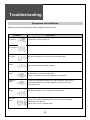
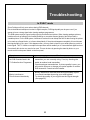
Symptom
No DVB Channels listed in the
TV Guide after Auto Programme
Blocky interference.
Picture freezes intermittently
Check
Check that DVB transmissions are available from the
transmitter you are currently using. If not, try directing the
aerial at another local transmitter.
Check analogue transmissions. If picture quality is poor, you
will need to improve or change your aerial system to receive
DVB channels. Consult a local installer.
Blocky interference indicates that the signal quality is poor.
You should consider improving your aerial system.
To check the quality of your signal use the Signal strength
(See page 32).
53