1
Functional Description
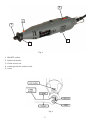
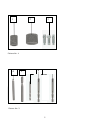
(Fig.1)
WARNING: Disconnect the plug from the power source before making any assembly,
adjustments or changing accessories. Such preventive safety measures reduce the risk
of starting the tool accidentally.
Application
This rotary tool can be used for drilling, grinding, sanding and polishing, as well as engraving,
cutting and removing rust in tight spaces or inaccessible places. The tool can be used on most
metals, glass, wood and ceramics. For best performance and results keep the speed as even as
possible without exercising too much pressure. As a guideline, use the tool at low speed for all
large accessories, such as polishing for example, and at high speed for smaller accessories such
as those used for engraving. For grinding and engraving, hold the tool as if it were a pen.
Operation
CAUTION! Always be sure that the tool is switched off before assembly or adjustments
Installing and Removing Accessories
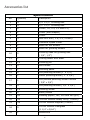
(Fig.2)
Always switch the tool off first and unplug. Hold the locking button at the front of the tool down
and undo the collet chuck (anti-clockwise). Insert the collet that matches the shaft size of the
accessory to be used. Place the collet nut over the collet and then insert the accessory shaft
into the collet chuck ensuring maximum shaft contact then tighten up the collet nut. (DO NOT
USE PLIERS).
Switching On/Off
The tool is switched "ON" by the slide switch located on the motor housing.(Fig.1-1)
TO TURN THE TOOL "ON" slide the switch button forward.
TO TURN THE TOOL "OFF" slide the switch button backward.
Warning! Hold the tool with both hands while starting the tool, since torque from the motor
can cause the tool to twist.
Variable speed control dial
This tool is equipped with a variable speed control dial, adjustment from 10000 to 32000 rpm.
(Fig.1-2).
20