1
3. A tour of τ-ARGUS
This section will give the reader an introduction through all phases of the use of τ-ARGUS. Some
Windows experience is assumed. In section 4 a more systematic description of the different parts of
τ-ARGUS will be given.
3.1 Preparation
To start the disclosure control with τ-ARGUS you need to have a microdata file and the metadata
describing this microdata file. The microdata file must be a fixed format ASCII file. If you click
(File|Open Microdata) you can specify the name of the microdata file and the name of the file
containing the metadata.
The program assumes the extension .ASC for the datafile and .RDA for the metadata, but you can use
your own extensions. The metadata is stored in a separate file. If the name of the metadata file is the
same as the datafile, except for the extension, τ-ARGUS will fill in this file automatically. If no
metadata file is specified, the program has the facility to let the user specify the metadata interactively
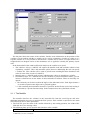
via the menu option (Specify|Metafile). This is also the place to make changes to the metadata. In
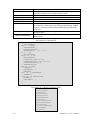
subsection 3.1.1 we will give a description of the metadata file for τ-ARGUS.
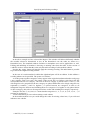
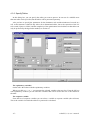
When you enter or change the metadata interactively using τ-ARGUS the option
(Specify|Metafile) will bring you to this screen:
-15-
τ-ARGUS (2.1) user’s manual