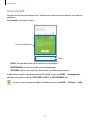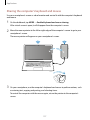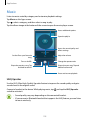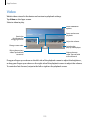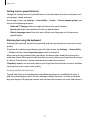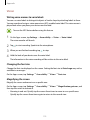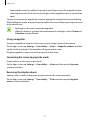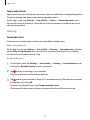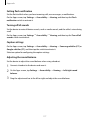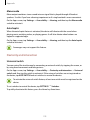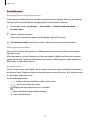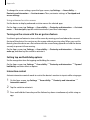
1
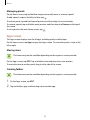
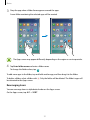
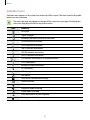
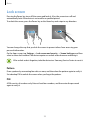
SM-N920W8
User Manual
English. 08/2015. Rev.1.0
www.samsung.com
Table of Contents
Basics
73Messages
76Internet
77Email
78Camera
101Gallery
103 Smart Manager
105 S Note
112 S Planner
114 S Health
117 S Voice
119SideSync
128Music
129Video
130Scrapbook
131 Voice Recorder
133 My Files
133 Samsung Gear
134Clock
136Calculator
136 Google apps
4 Read me first
5 Package contents
6 Device layout
12Battery
18 SIM or USIM card
22 Turning the device on and off
23Touchscreen
26 Home screen
33 Lock screen
34 Notification panel
39 Entering text
42 Screen capture
42 Opening apps
43 S Pen features
52 Multi window
57 Transferring data from your previous
device
59 Device and data management
61 Connecting to a TV
63 Sharing files with contacts
64 Emergency mode
Settings
138Introduction
138Wi-Fi
140Bluetooth
142 Flight mode
142 Mobile hotspot and tethering
143 Data usage
Applications
65 Installing or uninstalling apps
66Phone
71Contacts
2
Table of Contents
144 Mobile networks
145 NFC and payment
148 More connection settings
150 Sounds and notifications
151Display
152 S Pen
153 Motions and gestures
153Applications
154Wallpaper
154Themes
154 Lock screen and security
159 Privacy and safety
162 Easy mode
162Accessibility
163Accounts
164 Backup and reset
164 Language and input
165Battery
165Storage
166Accessories
166 Date and time
167 User manual
167 About device
Appendix
168Accessibility
183Troubleshooting
Health and Safety
3
Basics
Read me first
Please read this manual before using the device to ensure safe and proper use.
• Descriptions are based on the device’s default settings.
• Some content may differ from your device depending on the region, service provider,
model specifications, or device’s software.
• Content (high quality content) that requires high CPU and RAM usage will affect the
overall performance of the device. Apps related to the content may not work properly
depending on the device’s specifications and the environment that it is used in.
• Samsung is not liable for performance issues caused by apps supplied by providers other
than Samsung.
• Samsung is not liable for performance issues or incompatibilities caused by edited
registry settings or modified operating system software. Attempting to customize the
operating system may cause the device or apps to work improperly.
• Software, sound sources, wallpapers, images, and other media provided with this device
are licensed for limited use. Extracting and using these materials for commercial or other
purposes is an infringement of copyright laws. Users are entirely responsible for illegal
use of media.
• You may incur additional charges for data services, such as messaging, uploading and
downloading, auto-syncing, or using location services depending on your data plan. For
large data transfers, it is recommended to use the Wi-Fi feature.
• Default apps that come with the device are subject to updates and may no longer be
supported without prior notice. If you have questions about an app provided with
the device, contact a Samsung Service Centre. For user-installed apps, contact service
providers.
• Modifying the device’s operating system or installing softwares from unofficial sources
may result in device malfunctions and data corruption or loss. These actions are violations
of your Samsung licence agreement and will void your warranty.
4
Basics
Instructional icons
Warning: situations that could cause injury to yourself or others
Caution: situations that could cause damage to your device or other equipment
Notice: notes, usage tips, or additional information
Package contents
Check the product box for the following items:
• Device
• Quick start guide
• The items supplied with the device and any available accessories may vary
depending on the region or service provider.
• The supplied items are designed only for this device and may not be compatible
with other devices.
• Appearances and specifications are subject to change without prior notice.
• You can purchase additional accessories from your local Samsung retailer. Make
sure they are compatible with the device before purchase.
• Use only Samsung-approved accessories. Using unapproved accessories may cause
the performance problems and malfunctions that are not covered by the warranty.
• Availability of all accessories is subject to change depending entirely on
manufacturing companies. For more information about available accessories, refer
to the Samsung website.
5
Basics
Device layout
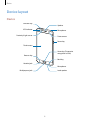
Device
SIM card tray
Speaker
LED indicator
Microphone
Proximity/Light sensor
Front camera
Power key
Touchscreen
Home key (Fingerprint
recognition sensor)
Recents key
Back key
Headset jack
Microphone
Multipurpose jack
Loud speaker
6
Basics
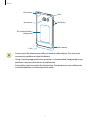
GPS antenna
Flash
Rear camera
Volume key
NFC antenna/Wireless
charging coil
Main antenna
S Pen
• Do not cover the antenna area with your hands or other objects. This may cause
connectivity problems or drain the battery.
• Using a Samsung-approved screen protector is recommended. Unapproved screen
protectors may cause the sensors to malfunction.
• Do not allow water to contact the touchscreen. The touchscreen may malfunction
in humid conditions or when exposed to water.
7
Basics
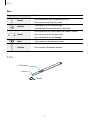
Keys
Key
Power
Recents
Home
Function
• Press and hold to turn the device on or off.
• Press to turn on or lock the screen.
• Tap to open the list of recent apps.
• Tap and hold to launch the split screen view.
• Press to turn on the screen while the screen is locked.
• Press to return to the Home screen.
• Press and hold to launch Google.
Back
• Tap to return to the previous screen.
Volume
• Press to adjust the device volume.
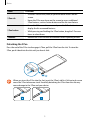
S Pen
S Pen button
S Pen nib
Tweezers
8
Basics
Name
S Pen nib
S Pen button
Tweezers
Functions
• Use the S Pen to write, draw, or perform touch actions on the
screen.
• Hover the S Pen over items on the screen to access additional
S Pen features, such as Action button and the Air view feature.
• Hover the S Pen over the screen and press the S Pen button to
display the Air command features.
• While pressing and holding the S Pen button, drag the S Pen over
items to select them.
• Remove the S Pen nib with the tweezers when replacing the nib.
Detaching the S Pen
Press the end of the S Pen to disengage it. Then, pull the S Pen from the slot. To store the
S Pen, push it back into the slot until you hear it click.
1
2
When you insert the S Pen into the slot, insert the S Pen’s nib first. Failure to do so can
cause the S Pen to become stuck. Forcefully detaching the S Pen from the slot may
cause damage to the S Pen and your device.
9
Basics
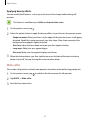
Replacing the S Pen nib
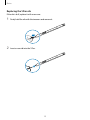
If the nib is dull, replace it with a new one.
1 Firmly hold the nib with the tweezers and remove it.
2 Insert a new nib into the S Pen.
10
Basics
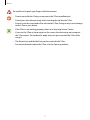
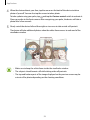
Be careful not to pinch your fingers with the tweezers.
• Do not reuse old nibs. Doing so may cause the S Pen to malfunction.
• Do not press the nib excessively when inserting the nib into the S Pen.
• Do not insert the round end of the nib into the S Pen. Doing so may cause damage
to the S Pen or your device.
• If the S Pen is not working properly, take it to a Samsung Service Centre.
• If you use the S Pen at sharp angles on the screen, the device may not recognise
the S Pen actions. Do not bend or apply excessive pressure with the S Pen while
using it.
• The Recents key and the Back key can be used with the S Pen.
• For more information about the S Pen, visit the Samsung website.
11
Basics
Battery
Charging the battery
Charge the battery before using it for the first time or when it has been unused for extended
periods.
Use only Samsung-approved chargers, batteries, and cables. Unapproved chargers or
cables can cause the battery to explode or damage the device.
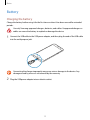
1 Connect the USB cable to the USB power adapter, and then plug the end of the USB cable
into the multipurpose jack.
Connecting the charger improperly may cause serious damage to the device. Any
damage caused by misuse is not covered by the warranty.
2 Plug the USB power adapter into an electric socket.
12
Basics
3 After fully charging, disconnect the device from the charger. First unplug the charger
from the device, and then unplug it from the electric socket.
To save energy, unplug the charger when not in use. The charger does not have a
power switch, so you must unplug the charger from the electric socket when not in
use to avoid wasting power. The charger should remain close to the electric socket
and easily accessible while charging.
Viewing the remaining charging time
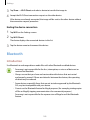
While charging, open the Home screen and tap Apps → Settings → Battery.
The actual charging time may vary depending on the status of your device and the
charging conditions. The remaining charging time may not be displayed when you
charge the device in very cold or very hot conditions.
Reducing the battery consumption
Your device provides various options that help you conserve battery power.
• Optimize the device using the Smart manager.
• When you are not using the device, switch to sleep mode by pressing the Power key.
• Activate power saving mode.
• Close unnecessary apps.
• Deactivate the Bluetooth feature when not in use.
• Deactivate the Wi-Fi feature when not in use.
• Deactivate auto-syncing of apps.
• Decrease the backlight time.
• Decrease the screen brightness.
13
Basics
Battery charging tips and precautions
• When the battery power is low, the battery icon appears empty.
• If the battery is completely discharged, the device cannot be turned on immediately
when the charger is connected. Allow a depleted battery to charge for a few minutes
before turning on the device.
• If you use multiple apps at once, network apps, or apps that need a connection to
another device, the battery will drain quickly. To avoid losing power during a data
transfer, always use these apps after fully charging the battery.
• Using a power source other than the USB power adapter, such as a computer, may result
in a slower charging speed due to a lower electric current.
• The device can be used while it is charging, but it may take longer to fully charge the
battery.
• If the device receives an unstable power supply while charging, the touchscreen may not
function. If this happens, unplug the charger from the device.
• While charging, the device and the charger may heat up. This is normal and should not
affect the device’s lifespan or performance. If the battery gets hotter than usual, the
charger may stop charging.
• If the device is not charging properly, take the device and the charger to a Samsung
Service Centre.
14
Basics
Fast charging
The device has a built-in fast charging feature. You can use this feature to charge the battery
more quickly while the device or its screen is turned off.
About Fast charging
• Fast charging uses battery charging technology that charges the battery faster by
increasing the charging power. The device supports Samsung’s Adaptive fast charging
feature and Qualcomm Quick Charge 2.0.
• To use Fast charging on your device, connect it to a battery charger that supports
Adaptive fast charging or Quick Charge 2.0.
Increasing the charging speed
To increase the charging speed, turn the device or its screen off when you charge the battery.
• While charging the battery when the device is turned off, the
screen.
icon appears on the
• You cannot use the fast charging feature when the screen is turned on. Turn off the
screen to increase the charging speed.
• You cannot use the built-in fast charging feature when you charge the battery
using a standard battery charger.
• If the device heats up or the ambient air temperature rises, the charging speed may
decrease automatically. This is a normal operating condition to prevent damage to
the device.
15
Basics
Wireless charging
The device has a built-in wireless charging coil. You can charge the battery using a wireless
charger (sold separately).
Fast wireless charging
You can charge your device faster using the fast wireless charging feature. To use this feature,
you must use a charger and components that support the fast wireless charging feature.
A fan inside the charger may produce noise during fast wireless charging. To reduce
the fan noise, you must deactivate the Fast wireless charging feature. The on/off
option will be added in your device’s settings menu when you first place it on the
charger. On the Home screen, tap Apps → Settings → Accessories, and then tap the
Fast wireless charging switch to deactivate it. Deactivating this feature will reduce
noise, but may result in slower charging times.
Charging the battery
1 Place the centre of the device’s back on the centre of the wireless charger.
You can check the remaining charging time on the screen. The actual remaining time
may vary depending on the charging conditions.
16
Basics
2 After fully charging, disconnect the device from the wireless charger.
• When there are foreign materials between the device and the wireless charger, the
device may not charge properly.
• If you use the wireless charger in areas with weak network signals, you may lose
network reception.
• Use Samsung-approved wireless chargers. If you use other wireless chargers, the
battery may not charge properly.
Power saving mode
Save the battery power by limiting the device’s functions.
On the Home screen, tap Apps → Settings → Battery → Power saving mode, and then tap
the switch to activate it.
To automatically activate power saving mode when the remaining battery power reaches the
preset level, tap Start power saving and select an option.
Ultra power saving mode
Use this mode to extend the device’s battery power. In ultra power saving mode, the device
performs the following:
• Displays colours on the screen as grey tones.
• Restricts the available apps to essential and selected apps only.
• Deactivates the mobile data connection when the screen turns off.
• Deactivates the Wi-Fi and Bluetooth features.
On the Home screen, tap Apps → Settings → Battery → Ultra power saving mode, and
then tap the switch to activate it.
To deactivate ultra power saving mode, tap MORE → Disable Ultra power saving mode.
The usage time left shows the time remaining before the battery power runs
out. Usage time left may vary depending on your device settings and operating
conditions.
17
Basics
SIM or USIM card
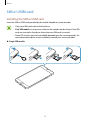
Installing the SIM or USIM card
Insert the SIM or USIM card provided by the mobile telephone service provider.
• Only nano-SIM cards work with the device.
• Dual SIM models: In some areas, data transfer speeds may be slower if two SIM
cards are inserted in the device than when one SIM card is inserted.
• Some LTE services may not be available depending on the service provider. For
more information about service availability, contact your service provider.
► Single SIM models:
1
3
2
18
4
Basics
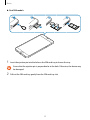
► Dual SIM models:
1
1
3
2
4
1 Insert the ejection pin into the hole on the SIM card tray to loosen the tray.
Ensure that the ejection pin is perpendicular to the hole. Otherwise, the device may
be damaged.
2 Pull out the SIM card tray gently from the SIM card tray slot.
19
Basics
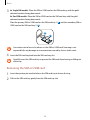
3 ► Single SIM models: Place the SIM or USIM card on the SIM card tray with the goldcoloured contacts facing downwards.
► Dual SIM models: Place the SIM or USIM card on the SIM card tray with the goldcoloured contacts facing downwards.
Place the primary SIM or USIM card on the SIM card tray 1 ( 1 ) and the secondary SIM or
USIM card on the SIM card tray 2 ( 2 ).
2
1
Use caution not to lose or let others use the SIM or USIM card. Samsung is not
responsible for any damages or inconveniences caused by lost or stolen cards.
4 Insert the SIM card tray back into the SIM card tray slot.
Carefully insert the SIM card tray to prevent the SIM cards from leaving or falling out
of the tray.
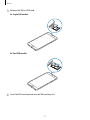
Removing the SIM or USIM card
1 Insert the ejection pin into the hole on the SIM card tray to loosen the tray.
2 Pull out the SIM card tray gently from the SIM card tray slot.
20
Basics
3 Remove the SIM or USIM card.
► Single SIM models:
► Dual SIM models:
4 Insert the SIM card tray back into the SIM card tray slot.
21
Basics
Using dual SIM or USIM cards (dual SIM models)
If you insert two SIM or USIM cards, you can have two phone numbers or service providers for
a single device.
Activating SIM or USIM cards
On the Home screen, tap Apps → Settings → SIM card manager. Select a SIM or USIM card
and tap the switch to activate it.
Changing the display name and icon of SIM or USIM cards
On the Home screen, tap Apps → Settings → SIM card manager. Select a SIM or USIM card,
tap Name or Icon. Set a display name and icon for each card.
Switching between cards
When two SIM or USIM cards are activated, card selection icons appear on the dashboard of
the notification panel. Open the notification panel and then select a card.
Turning the device on and off
Press and hold the Power key for a few seconds to turn on the device.
When you turn on your device for the first time or after performing a data reset, follow the onscreen instructions to set up your device.
To turn off the device, press and hold the Power key, and then tap Power off.
• If your device is frozen and unresponsive, press and hold the Power key and the
Volume key down simultaneously for more than 7 seconds to restart it.
• Follow all posted warnings and directions from authorised personnel in areas
where the use of wireless devices is restricted, such as aeroplanes and hospitals.
22
Basics
Touchscreen
• Do not allow the touchscreen to come into contact with other electrical devices.
Electrostatic discharges can cause the touchscreen to malfunction.
• To avoid damaging the touchscreen, do not tap it with anything sharp or apply
excessive pressure to it with your fingertips.
• The device may not recognize touch inputs close to the edges of the screen, which
are outside of the touch input area.
• Leaving the touchscreen idle for extended periods may result in afterimages
(screen burn-in) or ghosting. Turn off the touchscreen when you do not use the
device.
• It is recommended to use fingers when you use the touchscreen.
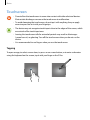
Tapping
To open an app, to select a menu item, to press an on-screen button, or to enter a character
using the keyboard on the screen, tap it with your finger or the S Pen.
23
Basics
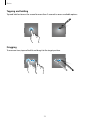
Tapping and holding
Tap and hold an item or the screen for more than 2 seconds to access available options.
Dragging
To move an item, tap and hold it and drag it to the target position.
24
Basics
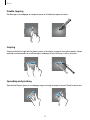
Double-tapping
Double-tap on a webpage or image to zoom in. Double-tap again to return.
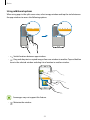
Swiping
Swipe to the left or right on the Home screen or the Apps screen to view other panels. Swipe
upwards or downwards to scroll through a webpage or a list of items, such as contacts.
Spreading and pinching
Spread two fingers apart on a webpage, map, or image to zoom in a part. Pinch to zoom out.
25
Basics
Home screen
Home screen
The Home screen is the starting point for accessing all of the device’s features. It displays
widgets, shortcuts to apps, and more.
To view other panels, swipe to the left or right.
The Home screen may appear differently depending on the region or service
provider.
A widget
An app
A folder
Screen indicators
Favourite apps
Apps screen icon
26
Basics
Home screen options
On the Home screen, tap and hold an empty area, or pinch your fingers together to access
the available options. Customize the Home screen by adding, deleting, or rearranging Home
screen panels. You can also set the Home screen wallpaper, add widgets to the Home screen,
and more.
• Wallpapers: Change the wallpaper settings for the Home screen and the locked screen.
• Widgets: Add widgets to the Home screen. Widgets are small apps that launch specific
app functions to provide information and convenient access on your Home screen.
• Themes: Change the device’s theme. Visual elements of interface, such as colours, icons,
and wallpapers, will change depending on the selected theme.
• Screen grid: Change the size of the grid to display more or less items on the Home
screen.
27
Basics
Flipboard Briefing
View the latest articles in various categories. You can get up to date on news that interests
you using this feature.
On the Home screen, swipe to the right to open Flipboard Briefing. Swipe upwards or
downwards to browse articles in each news category.
If this feature is not activated, tap and hold an empty area on the Home screen. Then, swipe
to the right and tick the tick box at the top of the Flipboard Briefing panel.
Adding items
Tap and hold an app or a folder from the Apps screen, and then drag it to the Home screen.
To add widgets, tap and hold an empty area on the Home screen, tap Widgets, tap and hold a
widget, and then drag it to the Home screen.
Moving and removing an item
Tap and hold an item on the Home screen, and then drag it to a new location.
To move the item to another panel, drag it to the side of the screen.
You can also move frequently used apps to the shortcuts area at the bottom of the Home
screen.
To remove an item, tap and hold the item. Then, drag it to Remove at the top of the screen.
28
Basics
Creating folders
1 On the Home screen, tap and hold an app, and then drag it over another app.
2 Drop the app when a folder frame appears around the apps.
A new folder containing the selected apps will be created.
3 Tap Enter folder name and enter a folder name.
To change the folder colour, tap
.
To add more apps to the folder, tap and hold another app, and then drag it to the folder.
To move apps from a folder to the Home screen, tap the folder, and then drag an app to the
Home screen.
To delete apps in a folder, tap the folder, and then drag the app you want to delete to
Remove at the top of the screen.
29
Basics
Managing panels
On the Home screen, tap and hold an empty area to add, move, or remove a panel.
To add a panel, swipe to the left, and then tap
.
To move a panel, tap and hold a panel preview, and then drag it to a new location.
To remove a panel, tap and hold a panel preview, and then drag it to Remove at the top of
the screen.
To set a panel as the main Home screen, tap
.
Apps screen
The Apps screen displays icons for all apps, including newly installed apps.
On the Home screen, tap Apps to open the Apps screen. To view other panels, swipe to the
left or right.
Moving items
This feature may not be available depending on the region or service provider.
On the Apps screen, tap EDIT. Tap and hold an item and drag it to a new location.
To move the item to another panel, drag it to the side of the screen.
Creating folders
This feature may not be available depending on the region or service provider.
1 On the Apps screen, tap EDIT.
2 Tap and hold an app, and then drag it over another app.
30
Basics
3 Drop the app when a folder frame appears around the apps.
A new folder containing the selected apps will be created.
The Apps screen may appear differently depending on the region or service provider.
4 Tap Enter folder name and enter a folder name.
To change the folder colour, tap
.
To add more apps to the folder, tap and hold another app, and then drag it to the folder.
To delete a folder, select a folder with
be relocated to the Apps screen.
. Only the folder will be deleted. The folder’s apps will
Rearranging items
You can rearrange items in alphabetical order on the Apps screen.
On the Apps screen, tap A-Z → SORT.
31
Basics
Indicator icons
Indicator icons appear on the status bar at the top of the screen. The icons listed in the table
below are most common.
The status bar may not appear at the top of the screen in some apps. To display the
status bar, drag down from the top of the screen.
Icon
Meaning
No signal
Signal strength
Roaming (outside of normal service area)
GPRS network connected
EDGE network connected
UMTS network connected
HSDPA network connected
HSPA+ network connected
/
LTE network connected (LTE-enabled models)
Wi-Fi connected
Bluetooth feature activated
GPS activated
Call in progress
Missed call
New text or multimedia message
Alarm activated
Mute mode activated
Vibration mode activated
Flight mode activated
Error occurred or caution required
Battery power level
32
Basics
Lock screen
Pressing the Power key turns off the screen and locks it. Also, the screen turns off and
automatically locks if the device is not used for a specified period.
To unlock the screen, press the Power key or the Home key and swipe in any direction.
You can change the way that you lock the screen to prevent others from accessing your
personal information.
On the Apps screen, tap Settings → Lock screen and security → Screen lock type, and then
select a screen lock method. The device requires an unlock code whenever unlocking it.
If the unlock code is forgotten, take the device to a Samsung Service Centre to reset it.
Pattern
Draw a pattern by connecting four dots or more, and then draw the pattern again to verify it.
Set a backup PIN to unlock the screen when you forget the pattern.
PIN
A PIN consists of numbers only. Enter at least four numbers, and then enter the password
again to verify it.
33
Basics
Password
A password consists of characters and numbers. Enter at least four characters including
numbers and symbols, and then enter the password again to verify it.
Fingerprints
Register your fingerprints to unlock the screen. Refer to Fingerprint recognition for more
information.
Notification panel
Using the notification panel
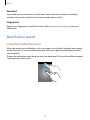
When you receive new notifications, such as messages or missed calls, indicator icons appear
on the status bar. To see more information about the icons, open the notification panel and
view the details.
To open the notification panel, drag the status bar downwards. To close the notification panel,
swipe upwards on the screen.
34
Basics
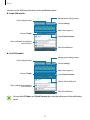
You can use the following functions on the notification panel.
► Single SIM models:
Manage quick setting buttons.
Quick setting buttons
Launch Settings.
Adjust the brightness.
Launch S Finder.
Launch Quick Connect.
Tap a notification and perform
various actions.
Clear all notifications.
► Dual SIM models:
Manage quick setting buttons.
Quick setting buttons
Launch Settings.
Adjust the brightness.
Launch S Finder.
Launch Quick Connect.
Select a SIM or USIM card.
Tap a notification and perform
various actions.
Clear all notifications.
You can hide S Finder and Quick Connect by using the edit menu in the notification
panel.
35
Basics
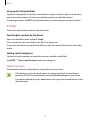
Using quick setting buttons
Tap quick setting buttons to activate some features. Swipe to the left or right on the buttons
area to view more buttons. To view more detailed settings, tap and hold a button.
To rearrange buttons, tap EDIT, tap and hold a button, and then drag it to another location.
S Finder
Search for a wide variety of content with a keyword.
Searching for content on the device
Open the notification panel and tap S Finder.
Enter a keyword in the search field or tap
and say a keyword.
To get more refined results, tap the filter buttons under the search field, and then select filter
details.
Setting search categories
You can set search categories to search for content in specific search fields.
Tap MORE → Select search locations and select categories.
Quick Connect
Automatically search for nearby devices and quickly connect to them.
• If the device you want to connect does not support the Quick connect feature,
activate its Wi-Fi Direct feature before launching Quick Connect on your device.
• Connection methods may vary depending on the type of connected devices or the
shared content.
36
Basics
Connecting to other devices
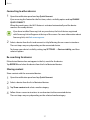
1 Open the notification panel and tap Quick Connect.
If you are using this feature for the first time, select a visibility option and tap ENABLE
QUICK CONNECT.
When the panel opens, the Wi-Fi feature is activated automatically and the device
searches for nearby devices.
If you have installed Samsung Link on your device, the list of devices registered
with Samsung Link will appear at the top of the screen. For more information about
Samsung Link, visit link.samsung.com.
2 Select a device from the list and connect to it by following the on-screen instructions.
The next steps may vary depending on the connected device.
To change your device’s visibility setting, tap SETTINGS → Device visibility, and then
select an option.
Re-searching for devices
If the desired device does not appear in the list, search for the device.
Tap REFRESH and select the device from the list of detected devices.
Sharing content
Share content with the connected devices.
1 Open the notification panel and tap Quick Connect.
2 Select a device from the list of detected devices.
3 Tap Share content and select a media category.
4 Follow the on-screen instructions to send content to the connected device.
The next steps may vary depending on the selected media category.
37
Basics
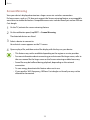
Screen Mirroring
View your device’s displayed content on a larger screen via a wireless connection.
If a large screen, such as a TV, does not support the Screen mirroring feature, use compatible
accessories to enable the feature. Compatible accessories include HomeSync and an AllShare
Cast dongle.
1 On the TV, activate the screen mirroring feature.
2 On the notification panel, tap EDIT → Screen Mirroring.
The detected devices are listed.
3 Select a device to connect to.
Your device’s screen appears on the TV screen.
4 Open or play a file, and then control the display with the keys on your device.
• This feature may not be available depending on the region or service provider.
• For more information about connecting your device and the large screen, refer to
the user manual for the large screen or the Screen mirroring-enabled accessory.
• Some files may be buffered during playback, depending on the network
connection.
• To save energy, deactivate this feature when not in use.
• If you specify a Wi-Fi frequency, AllShare Cast dongles or HomeSync may not be
detected or connected.
38
Basics
Entering text
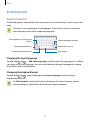
Keyboard layout
A keyboard appears automatically when you enter text to send messages, create memos, and
more.
Text entry is not supported in some languages. To enter text, you must change the
input language to one of the supported languages.
Enter uppercase. For all caps, tap
it twice.
Delete a preceding character.
Enter punctuation marks.
Break to the next line.
Switch to handwriting mode.
Enter a space.
Changing the input language
Tap and hold , tap → Add input languages, and then select the languages to use. When
you select two or more languages, you can switch between the input languages by swiping
to the left or right on the space key.
Changing the keyboard layout
Tap and hold , tap , select a language under Input languages, and then select a
keyboard layout to use.
On 3x4 keyboard, a key has three or four characters. To enter a character, tap the
corresponding key repeatedly until the desired character appears.
39
Basics
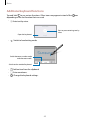
Additional keyboard functions
Tap and hold to use various functions. Other icons may appear instead of the
depending on the last function that was used.
icon
• : Enter text by voice.
Start or pause entering text by
voice.
Open the keyboard.
•
: Switch to handwriting mode.
Switch between number mode
and character mode.
Switch to the standard keyboard.
•
: Add an item from the clipboard.
•
: Enter emoticons.
•
: Change the keyboard settings.
40
Basics
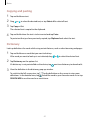
Copying and pasting
1 Tap and hold over text.
2 Drag or to select the desired text, or tap Select all to select all text.
3 Tap Copy or Cut.
The selected text is copied to the clipboard.
4 Tap and hold where the text is to be inserted and tap Paste.
To paste text that you have previously copied, tap Clipboard and select the text.
Dictionary
Look up definitions for words while using certain features, such as when browsing webpages.
1 Tap and hold over a word that you want to look up.
If the word you want to look up is not selected, drag
2 Tap Dictionary on the options list.
If a dictionary is not preinstalled on the device, tap
3 View the definition in the dictionary pop-up window.
or
to select the desired text.
next to a dictionary to download it.
To switch to the full screen view, tap . Tap the definition on the screen to view more
definitions. In the detailed view, tap to add the word to your favourite words list or tap
SEARCH WEB to use the word as a search term.
41
Basics
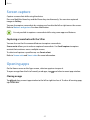
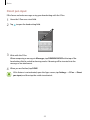
Screen capture
Capture a screenshot while using the device.
Press and hold the Home key and the Power key simultaneously. You can view captured
images in Gallery.
You can also capture screenshots by swiping your hand to the left or right across the screen.
Refer to Motions and gestures for more information.
It is not possible to capture a screenshot while using some apps and features.
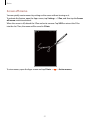
Capturing screenshots with the S Pen
You can also use the Air command features to capture screenshots.
Screen write allows you to write on captured screenshots. Use Scroll capture to capture
content that continues across multiple screens.
To select and capture a specific area, use Smart select.
Refer to Screen write and Smart select for more information.
Opening apps
On the Home screen or the Apps screen, select an app icon to open it.
To open an app from the list of recently used apps, tap
and select a recent app window.
Closing an app
Tap
and drag a recent app window to the left or right to close it. To close all running apps,
tap CLOSE ALL.
42
Basics
S Pen features
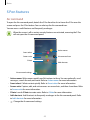
Air command
To open the Air command panel, detach the S Pen from the slot or hover the S Pen over the
screen and press the S Pen button. You can also tap the Air command icon.
You can access useful features and frequently used apps.
When the screen is off or certain security features are activated, removing the S Pen
will not open the Air command panel.
Action memo
Smart select
Screen write
Air command icon
S Note
Add shortcuts
Air command settings
• Action memo: Write memos quickly and link actions to them. You can make calls, send
messages, search the web, and more. Refer to Action memo for more information.
• Smart select: Collect content quickly. Refer to Smart select for more information.
• Screen write: Capture, edit, and write memos on screenshots, and then share them. Refer
to Screen write for more information.
• S Note: Launch S Note to create notes. Refer to S Note for more information.
• Add shortcuts: Add shortcuts to frequently used apps to the Air command panel. Refer
to Add shortcuts for more information.
•
: Change the Air command settings.
43
Basics
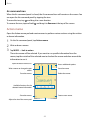
Air command icon
When the Air command panel is closed, the Air command icon will remain on the screen. You
can open the Air command panel by tapping the icon.
To move the icon, tap
and drag it to a new location.
To remove the icon, tap and hold
and drag it to Remove at the top of the screen.
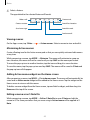
Action memo
Open the Action memo pad and create memos to perform various actions using the written
or drawn information.
1 On the Air command panel, tap Action memo.
2 Write or draw a memo.
3 Tap MORE → Link to action.
The entire memo will be selected. If you want to use specific information from the
memo, tap the outside of the selected area to deselect the memo and draw around the
information to use it.
Open the action memos list.
Access additional options.
Save the memo.
Write a memo or change the pen
colour.
Delete the memo.
Erase the memo.
Available functions for the
selected memo information
Create a new memo.
Share the memo.
Adjust the size of the memo pad.
44
Basics
4 Select a feature.
The app related to the selected feature will launch.
Make a call.
Create a task.
Create a contact.
Search for a location.
Send a message.
Search the web.
Send an email.
Viewing memos
On the Apps screen, tap S Note →
→ Action memos. Select a memo to view and edit it.
Minimizing Action memos
Create a floating icon for the Action memo pad so that you can quickly write and edit memos
at any time.
While composing a memo, tap MORE → Minimize. The memo will minimize to a pop-up
icon. However, the memo will not be saved until you tap SAVE on the memo pad screen.
To move the pop-up icon to another location, tap the icon and drag it to a new location.
To save the memo, tap the pop-up icon and tap SAVE. The memo will be saved in S Note and
the pop-up icon will disappear.
Adding Action memo widgets on the Home screen
After composing a memo, tap MORE → Pin to home screen. The memo will automatically be
saved and an Action memo widget will be added to the Home screen. Tap the widget on the
Home screen to view or edit the memo.
To delete a memo widget from the Home screen, tap and hold a widget, and then drag it to
Remove at the top of the screen.
Editing a memo as an S Note file
While composing a memo, tap MORE → Edit as S Note file to open S Note and edit the
memo in it. The same pen colour that you were using in Action memo will be applied in S
Note.
45
Basics
Deleting memos
On the Apps screen, tap S Note →
→ Action memos. Select a memo and tap DELETE.
To delete multiple memos, open the memos list. Tap and hold a memo. Then, tick the memos
you want to delete and tap DELETE.
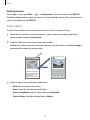
Smart select
Use the S Pen to select an area and perform actions, such as sharing or saving.
1 When there is content you want to capture, such as a part of an image, open the Air
command panel and tap Smart select.
2 Drag the S Pen across the content you want to select.
Reshape the selected area by selecting a shape icon on the toolbar, or tap Auto shape to
automatically reshape the selected area.
3 Select an option to use with the selected area.
• Write: Write or draw on the screen.
• Share: Share the selected area with others.
• Save in Scrapbook: Save the selected area in Scrapbook.
• Save in Gallery: Save the selected area in Gallery.
46
Basics
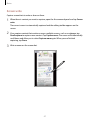
Screen write
Capture screenshots to write or draw on them.
1 When there is content you want to capture, open the Air command panel and tap Screen
write.
The current screen is automatically captured and the editing toolbar appears on the
screen.
2 If you capture content that continues across multiple screens, such as a webpage, tap
Scroll capture to capture more content. Tap Capture more. The screen will automatically
scroll down and allow you to select Capture more again. When you are finished
capturing, tap Done.
3 Write a memo on the screenshot.
47
Basics
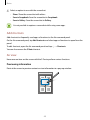
4 Select an option to use with the screenshot.
• Share: Share the screenshot with others.
• Save in Scrapbook: Save the screenshot in Scrapbook.
• Save in Gallery: Save the screenshot in Gallery.
It is not possible to capture a screenshot while using some apps.
Add shortcuts
Add shortcuts to frequently used apps or functions to the Air command panel.
On the Air command panel, tap Add shortcuts and select apps or functions to open from the
panel.
To edit shortcuts, open the Air command panel and tap
→ Shortcuts.
You can also remove the S Note shortcut.
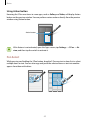
Air view
Hover over an item on the screen with the S Pen to perform various functions.
Previewing information
Point at the screen to preview content or view information in a pop-up window.
48
Basics
Using Action button
Hovering the S Pen over items in some apps, such as Gallery and Video, will display Action
button on the preview window. You can perform various actions directly from the preview
window using Action button.
Action button
If this feature is not activated, open the Apps screen, tap Settings → S Pen → Air
view, and then tap the switch to activate it.
Pen Select
While pressing and holding the S Pen button, drag the S Pen over text or item lists to select
multiple items or text. You can also copy and paste the selected items or text into another
app or share them with others.
49
Basics
Direct pen input
Fill in forms and write messages using your handwriting with the S Pen.
1 Hover the S Pen over a text field.
2 Tap to open the handwriting field.
3 Write with the S Pen.
When composing a message in Messages, tap DRAWING MODE at the top of the
handwriting field to switch to drawing mode. A drawing will be inserted into the
message as an attachment.
4 When you are finished, tap DONE.
If this feature is not activated, open the Apps screen, tap Settings → S Pen → Direct
pen input, and then tap the switch to activate it.
50
Basics
Screen off memo
You can quickly create memos by writing on the screen without turning on it.
To activate this feature, open the Apps screen, tap Settings → S Pen, and then tap the Screen
off memo switch to activate it.
When the screen is off, detach the S Pen and write a memo. Tap SAVE or reinsert the S Pen
into the slot. Then, the memo will be saved in S Note.
To view memos, open the Apps screen and tap S Note →
51
→ Action memos.
Basics
Multi window
Introduction
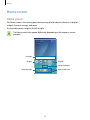
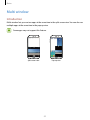
Multi window lets you run two apps at the same time in the split screen view. You can also run
multiple apps at the same time in the pop-up view.
Some apps may not support this feature.
Split screen view
Pop-up view
52
Basics
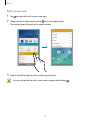
Split screen view
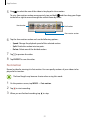
1 Tap to open the list of recently used apps.
2 Swipe upwards or downwards and tap on a recent app window.
The selected app will launch in the upper window.
3 Swipe to the left or right to select another app to launch.
You can also launch the split screen view by tapping and holding
53
.
Basics
Using additional options
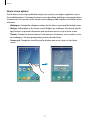
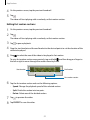
When using apps in the split screen view, select an app window and tap the circle between
the app windows to access the following options:
•
•
: Switch locations between app windows.
: Drag and drop text or copied images from one window to another. Tap and hold an
item in the selected window and drag it to a location in another window.
Some apps may not support this feature.
•
: Minimize the window.
54
Basics
•
: Maximize the window.
•
: Close the app.
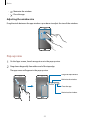
Adjusting the window size
Drag the circle between the app windows up or down to adjust the size of the windows.
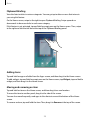
Pop-up view
1 On the Apps screen, launch an app to use in the pop-up view.
2 Drag down diagonally from either end of the top edge.
The app screen will appear in the pop-up view.
Drag and drop content.
Minimise the window.
Close the app.
Maximise the window.
55
Basics
Moving pop-up windows
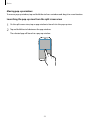
To move a pop-up window, tap and hold the circle on a window and drag it to a new location.
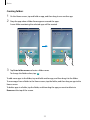
Launching the pop-up view from the split screen view
1 On the split screen view, tap an app window to launch it in the pop-up view.
2 Tap and hold the circle between the app windows.
The selected app will launch in a pop-up window.
56
Basics
Transferring data from your previous device
You can transfer data from a previous device to your new device via Samsung Smart Switch.
The following versions of Samsung Smart Switch are available.
• Mobile version: Transfer data between mobile devices. You can download the app from
Galaxy Apps or Play Store.
• Computer version: Transfer data between your device and a computer. You can download
the app from www.samsung.com/smartswitch.
• Samsung Smart Switch is not supported on some devices or computers.
• Limitations apply. Visit www.samsung.com/smartswitch for details. Samsung
takes copyright seriously. Only transfer content that you own or have the right to
transfer.
Transferring data from a mobile device
Transfer data from your previous device to your new device.
1 On both devices, download and install Smart Switch from Galaxy Apps or Play Store.
2 Place the devices near each other.
3 Launch Smart Switch on both devices.
4 On your new device, select the previous device type from the list and tap START.
5 Follow the on-screen instructions to transfer data from your previous device.
57
Basics
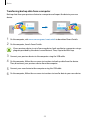
Transferring backup data from a computer
Back up data from your previous device to a computer and import the data to your new
device.
1 On the computer, visit www.samsung.com/smartswitch to download Smart Switch.
2 On the computer, launch Smart Switch.
If your previous device is not a Samsung device, back up data to a computer using a
program provided by the device’s manufacturer. Then, skip to the fifth step.
3 Connect your previous device to the computer using the USB cable.
4 On the computer, follow the on-screen instructions to back up data from the device.
Then, disconnect your previous device from the computer.
5 Connect your new device to the computer using the USB cable.
6 On the computer, follow the on-screen instructions to transfer data to your new device.
58
Basics
Device and data management
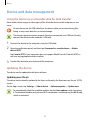
Using the device as a removable disk for data transfer
Move audio, video, image, or other types of files from the device to the computer, or vice
versa.
Do not disconnect the USB cable from the device when you are transferring files.
Doing so may cause data loss or device damage.
The devices may not connect properly if they are connected via a USB hub. Directly
connect the device to the computer’s USB port.
1 Connect the device to the computer using the USB cable.
2 Open the notification panel, and then tap Connected as a media device → Media
device (MTP).
Tap Camera (PTP) if your computer does not support Media Transfer Protocol (MTP) or
not have any appropriate driver installed.
3 Transfer files between your device and the computer.
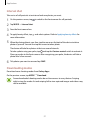
Updating the device
The device can be updated to the latest software.
Updating over the air
The device can be directly updated to the latest software by the firmware over-the-air (FOTA)
service.
On the Apps screen, tap Settings → About device → Software update → Update now.
To automatically check for available updates, tap the Auto update switch to activate
it. To download updates only when a Wi-Fi connection is activated, tap the Wi-Fi only
switch to activate it.
59
Basics
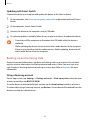
Updating with Smart Switch
Connect the device to a computer and update the device to the latest software.
1 On the computer, visit www.samsung.com/smartswitch to download and install Smart
Switch.
2 On the computer, launch Smart Switch.
3 Connect the device to the computer using a USB cable.
4 If a software update is available, follow the on-screen instructions to update the device.
• Do not turn off the computer or disconnect the USB cable while the device is
updating.
• While updating the device, do not connect other media devices to the computer.
Doing so may interfere with the update process. Before updating, disconnect all
other media devices from the computer.
Backing up and restoring data
Keep your personal information, app data, and settings safe on your device. You can back
up your sensitive information to a backup account and access it later. You must sign in to
your Google or Samsung account to back up or restore data. Refer to Accounts for more
information.
Using a Samsung account
On the Apps screen, tap Settings → Backup and reset → Back up my data, select the items
to back up, and then tap BACK UP NOW.
To set the device to automatically back up data, tap the Auto back up switch to activate it.
To restore data using a Samsung account, tap Restore. Current data will be deleted from the
device to restore the selected items.
60
Basics
Using a Google account
On the Apps screen, tap Settings → Backup and reset, and then tap the Back up my data
switch to activate it. Tap Backup account and select an account as the backup account.
To restore data using a Google account, tap the Automatic restore switch to activate it. When
you reinstall apps, backed up settings and data will be restored.
Performing a data reset
Delete all settings and data on the device. Before performing a factory data reset, ensure you
back up all important data stored on the device. Refer to Backing up and restoring data for
more information.
On the Apps screen, tap Settings → Backup and reset → Factory data reset → RESET
DEVICE → ERASE EVERYTHING. The device automatically restarts.
Connecting to a TV
Introduction
Register a TV to your device to easily share content between them.
• This feature is compatible with Samsung Smart TVs released in 2015 or later that
support the Bluetooth Low Energy (BLE) feature. If your TV does not support the
BLE feature, you can connect your device to the TV via the Screen mirroring feature.
Refer to Screen Mirroring for more information.
• Some files may be buffered during playback, depending on the network
connection.
Registering a TV
Register a TV to your device. Once you register a TV, you can easily share the screen between
your device and TV and use the Briefing on TV feature.
1 Turn on the TV and place your device close to the TV.
61
Basics
2 Open the notification panel and tap Quick Connect.
3 Select the TV and tap Register TV.
Sharing screen
You can mirror your device’s screen on a TV or vice versa.
Mirroring your device’s screen to a TV
When your device recognizes the registered TV while you are watching a video, the icon
will appear on the device. Tap the icon to stream the video from your device to your TV.
If the TV is turned off and registered with Quick Connect, it will automatically turn on and
your device’s screen will appear on the TV screen.
This feature is supported only by the device’s default gallery, music, and video player
apps.
Mirroring a TV screen to your device
1 Open the notification panel and tap Quick Connect.
The registered TV will appear on the list.
2 Select the registered TV.
3 Tap TV to mobile device.
The TV screen will appear on your device.
Using the Briefing on TV feature
Your registered TV turns on automatically according to the preset time set on your device and
displays the time, weather, and your schedule information on the screen. To use this feature,
your device and the TV must be connected to the same access point.
1 Open the notification panel and tap Quick Connect.
The registered TV will appear on the list.
62
Basics
2 Select the registered TV.
3 Tap Briefing on TV and set a time and day to use the Briefing on TV feature.
Time, weather, and schedule information will be displayed on the right side of the TV
screen at the preset time.
Sharing files with contacts
Share files with your contacts using the simple sharing feature. The following actions are an
example of sharing images.
This feature may not be available depending on the region or service provider.
1 Tap Gallery on the Apps screen.
2 Select an image.
3 Tap Share → Simple sharing.
If you are using this feature for the first time, read and agree to the terms and conditions.
Your phone number will be verified and then the simple sharing feature will be activated.
4 Select recipients and tap DONE.
When the image is sent to the recipients’ device, a notification will appear on their devices.
Tap the notification to view or download the image.
• If the recipients have not verified their phone numbers, or if their devices do not
support the simple sharing feature, a link to the files will be sent to them via text
message. The link will expire after a certain period.
• You may incur additional charges when sharing files via the mobile network.
63
Basics
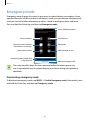
Emergency mode
Emergency mode changes the screen to grey tones to reduce battery consumption. Some
apps and functions will be restricted. In emergency mode, you can make an emergency call,
send your current location information to others, sound an emergency alarm, and more.
Press and hold the Power key, and then tap Emergency mode.
Access additional options.
Turn on the flash.
Sound alarms.
Send your current location
information in a message.
Make a call.
Browse the Internet.
Add more apps to use.
Remaining battery power and
usage time left
Make an emergency call.
The usage time left shows the time remaining before the battery power runs
out. Usage time left may vary depending on your device settings and operating
conditions.
Deactivating emergency mode
To deactivate emergency mode, tap MORE → Disable Emergency mode. Alternatively, press
and hold the Power key, and then tap Emergency mode.
64
Applications
Installing or uninstalling apps
Galaxy Apps
Purchase and download apps. You can download apps that are specialised for Samsung
Galaxy devices.
Tap Galaxy Apps on the Apps screen.
This app may not be available depending on the region or service provider.
Installing apps
Browse apps by category or tap SEARCH to search for a keyword.
Select an app to view information about it. To download free apps, tap INSTALL. To purchase
and download apps where charges apply, tap the price and follow the on-screen instructions.
To change the auto update settings, tap
then select an option.
→ Settings → Auto update apps, and
Play Store
Purchase and download apps.
Tap Play Store on the Apps screen.
Installing apps
Browse apps by category or search for apps by keyword.
Select an app to view information about it. To download free apps, tap INSTALL. To purchase
and download apps where charges apply, tap the price and follow the on-screen instructions.
To change the auto update settings, tap
then select an option.
65
→ Settings → Auto-update apps, and
Applications
Managing apps
Uninstalling or disabling apps
On the Apps screen, tap EDIT. The icon appears on the apps that you can disable or
uninstall. Select an app and tap DISABLE or UNINSTALL. Alternatively, on the Apps screen,
tap Settings → Applications → Application manager, select an app, and then tap DISABLE
or UNINSTALL.
• DISABLE: Disable selected default apps that cannot be uninstalled from the device.
• UNINSTALL: Uninstall downloaded apps.
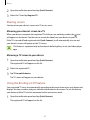
Enabling apps
On the Apps screen, tap Settings → Applications → Application manager, scroll to
DISABLED, select an app, and then tap ENABLE.
Phone
Introduction
Make or answer voice and video calls.
Making calls
1 Tap Phone on the Apps screen.
2 Enter a phone number.
If the keypad does not appear on the screen, tap
66
to open the keypad.
Applications
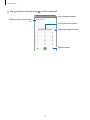
3 Tap
to make a voice call, or tap
to make a video call.
Access additional options.
Add the number to the contacts
list.
Preview the phone number.
Delete a preceding character.
Hide the keypad.
67
Applications
Using speed dial
Set speed dial numbers to quickly make calls.
To set a number to speed dial, tap MORE → Speed dial, select a speed dial number, and then
select a contact.
To make a call, tap and hold a speed dial number on the keypad. For speed dial numbers 10
and up, tap the first digit(s) of the number, and then tap and hold the last digit.
For example, if you set the number 123 as a speed dial number, tap 1, tap 2, and then tap and
hold 3.
Making calls from the locked screen
On the locked screen, drag
outside the large circle.
Making calls from call logs or contacts list
Tap LOG or CONTACTS, and then swipe to the right on a contact or a phone number to make
a call.
Making an international call
1 Tap to open the keypad if the keypad does not appear on the screen.
2 Tap and hold 0 until the + sign appears.
3 Enter the country code, area code, and phone number, and then tap .
68
Applications
Receiving calls
Answering a call
When a call comes in, drag
outside the large circle.
Rejecting a call
When a call comes in, drag
outside the large circle.
To send a message when rejecting an incoming call, drag the reject message bar upwards.
To create various rejection messages, open the Apps screen, tap Phone → MORE → Settings
→ Call blocking → Call-reject messages, enter a message, and then tap .
Blocking phone numbers
Reject calls from specific numbers added to your block list.
1 On the Apps screen, tap Phone → MORE → Settings → Call blocking → Block list.
2 Tap LOG or CONTACTS to select contacts and tap .
To manually enter a number, tap Enter phone number, and then enter a phone number.
When blocked numbers try to contact you, you will not receive notifications. The calls will be
logged in the call log.
You can also reject any phone number that is not saved as a contact. Tap the Block
anonymous calls switch to activate the feature.
Missed calls
If a call is missed, the
icon appears on the status bar. Open the notification panel to view
the list of missed calls. Alternatively, on the Apps screen, tap Phone → LOG to view missed
calls.
69
Applications
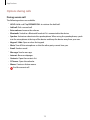
Options during calls
During a voice call
The following actions are available:
• HOLD: Hold a call. Tap RESUME CALL to retrieve the held call.
• Add call: Dial a second call.
• Extra volume: Increase the volume.
• Bluetooth: Switch to a Bluetooth headset if it is connected to the device.
• Speaker: Activate or deactivate the speakerphone. When using the speakerphone, speak
into the microphone at the top of the device and keep the device away from your ears.
• Keypad / Hide: Open or close the keypad.
• Mute: Turn off the microphone so that the other party cannot hear you.
• Email: Send an email.
• Message: Send a message.
• Internet: Browse webpages.
• Contacts: Open the contacts list.
• S Planner: Open the calendar.
• Memo: Create an Action memo.
•
: End the current call.
70
Applications
Contacts
Introduction
Create new contacts or manage contacts on the device.
Adding contacts
Creating contacts manually
1 Tap Contacts on the Apps screen.
2 Tap and select a storage location.
3 Enter contact information.
•
: Add an image.
•
/
: Add or delete a contact field.
4 Tap SAVE.
To add a phone number to the contacts list from the keypad, open the Apps screen and tap
Phone. If the keypad does not appear on the screen, tap to open the keypad. Enter the
number and tap Add to Contacts.
To add a phone number to the contacts list from received calls or messages, open the Apps
screen and tap Phone → LOG → a contact.
Importing contacts
Import contacts from storage services to your device.
On the Apps screen, tap Contacts → MORE → Settings → Import/Export contacts →
IMPORT and select an import option.
71
Applications
Searching for contacts
On the Apps screen, tap Contacts.
Use one of the following search methods:
• Scroll up or down the contacts list.
• Drag a finger along the index at the right side of the contacts list to scroll through it
quickly.
• Tap the search field at the top of the contacts list and enter search criteria.
Once a contact is selected, take one of the following actions:
•
: Add to favourite contacts.
•
: Make a voice call.
•
: Compose a message.
•
: Compose an email.
Sharing profile
Share your profile information, such as your photo and status message, with others using the
profile sharing feature.
• This feature may not be available depending on the region or service provider.
• This feature is only available for contacts who have activated the profile sharing
feature on their device.
On the Apps screen, tap Contacts → your profile → Profile sharing, and then tap the switch
to activate it. If you are using this feature for the first time, read and agree to the terms and
conditions. Your phone number will be verified and then the profile sharing feature will be
activated. You can view your contacts’ updated profile information in Contacts.
To set additional items to share, tap Shared profile info and select items.
To set a contact group to share your profile with, select a contact group under Share with.
72
Applications
Sharing contacts
You can share contacts with others by using various sharing options.
1 Tap Contacts on the Apps screen.
2 Tap MORE → Share.
3 Tick contacts and tap SHARE.
4 Select a sharing method.
Messages
Introduction
Send and view messages by conversation.
Sending messages
You may incur additional charges for sending messages when you are roaming.
1 Tap Messages on the Apps screen.
2 Tap .
73
Applications
3 Add recipients and enter a message.
Access additional options.
Enter recipients.
Select contacts from the
contacts list.
Attach files.
Send the message.
Enter a message.
Enter emoticons.
4 Tap SEND to send the message.
74
Applications
Viewing messages
Messages are grouped into message threads by contact.
You may incur additional charges for receiving messages when you are roaming.
1 Tap Messages on the Apps screen.
2 On the messages list, select a contact.
3 View your conversation.
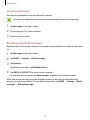
Blocking unwanted messages
Block messages from specific numbers or messages that contain phrases added to your block
list.
1 Tap Messages on the Apps screen.
2 Tap MORE → Settings → Block messages.
3 Tap Block list.
To add phrases to block, tap Blocked phrases.
4 Tap INBOX or CONTACTS to select contacts and tap
.
To manually enter a number, tap Enter number, and then enter a phone number.
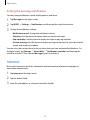
When you receive messages from the blocked numbers or messages including blocked
phrases, you will not be notified. To view blocked messages, tap MORE → Settings → Block
messages → Blocked messages.
75
Applications
Setting the message notification
You can change notification sound, display options, and more.
1 Tap Messages on the Apps screen.
2 Tap MORE → Settings → Notifications, and then tap the switch to activate it.
3 Change the notification settings.
• Notification sound: Change the notification sound.
• Vibrations: Set the device to vibrate when you receive messages.
• Pop-up display: Set the device to display messages in pop-up windows.
• Preview message: Set the device to display message content on the status bar, locked
screen, and in pop-up windows.
You can set an alert at an interval to let you know that you have unchecked notifications. On
the Apps screen, tap Settings → Accessibility → Notification reminder, and then tap the
switch to activate it. Then, tap the Messages switch to activate it.
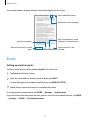
Internet
Browse the Internet to search for information and bookmark your favourite webpages to
access them conveniently.
1 Tap Internet on the Apps screen.
2 Tap the address field.
3 Enter the web address or a keyword, and then tap Go.
76
Applications
To view the toolbars, drag your finger downwards slightly on the screen.
Access additional options.
Refresh the current webpage.
View your bookmarks, saved
webpages, and recent history.
Open the homepage.
Open the browser's tab
manager.
Move to the previously visited
page.
Email
Setting up email accounts
Set up an email account when opening Email for the first time.
1 Tap Email on the Apps screen.
2 Enter the email address and password, and then tap NEXT.
To manually register a company email account, tap MANUAL SETUP.
3 Follow the on-screen instructions to complete the setup.
To set up another email account, tap MORE → Settings → Add account.
If you have more than one email account, you can set one as the default account. Tap MORE
→ Settings → MORE → Set default account.
77
Applications
Sending emails
1 Tap to compose an email.
2 Add recipients and enter an email text.
3 Tap SEND to send the mail.
Reading emails
When Email is open, the device will automatically retrieve new emails. To manually retrieve
emails, swipe downwards on the screen.
Tap an email on the screen to read it.
If email syncing is disabled, new emails cannot be retrieved. To enable email syncing,
tap MORE → Settings → your account name, and then tap the Sync account switch
to activate it.
Camera
Introduction
Take photos and record videos using various modes and settings.
Basic shooting
You can take photos or record videos. View your photos and videos in Gallery.
Tap Camera on the Apps screen.
Camera etiquette
• Do not take photos or record videos of other people without their permission.
• Do not take photos or record videos where legally prohibited.
• Do not take photos or record videos in places where you may violate other people’s
privacy.
78
Applications
Taking photos or recording videos
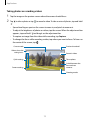
1 Tap the image on the preview screen where the camera should focus.
2 Tap to take a photo or tap to record a video. To take a series of photos, tap and hold
.
• Spread two fingers apart on the screen to zoom in, and pinch to zoom out.
• To adjust the brightness of photos or videos, tap the screen. When the adjustment bar
appears, tap and hold and drag it on the adjustment bar.
• To capture an image from the video while recording, tap Capture.
• To change the focus while recording a video, tap where you want to focus. To focus on
the centre of the screen, tap .
Current mode
Preview thumbnail
Hide or show the
setting icons.
Record a video.
Quick settings
Take a photo.
Switch between the
front and rear
cameras.
Camera settings
Shooting modes
79
Applications
On the preview screen, swipe to the right to access the list of shooting modes. Or, swipe to
the left to view photos and videos you have captured.
• The preview screen may vary depending on the shooting mode and which camera
is being used.
• The camera automatically shuts off when unused.
• Make sure that the lens is clean. Otherwise, the device may not work properly in
some modes that require high resolutions.
• The front camera features a wide-angle lens. Minor distortion may occur in wideangle photos and does not indicate device performance problems.
• The maximum recording time may reduce when you record video at high
resolution.
Launching Camera on the locked screen
To quickly take photos, launch Camera on the locked screen.
On the locked screen, drag
outside the large circle.
• This feature may not be available depending on the region or service provider.
• Some camera features are not available when you launch Camera from the locked
screen while the security features are activated.
Launching Camera quickly
Press the Home key twice quickly to launch Camera. Camera always launches in auto mode.
Some camera features are not available when you launch Camera from the locked
screen or when the screen is turned off while the security features are activated.
80
Applications
HDR (High Dynamic Range)
Take photos with rich colours and reproduce details even in bright and dark areas.
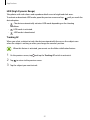
To activate or deactivate HDR mode, open the preview screen and tap
desired option.
•
until you reach the
: The device automatically activates HDR mode depending on the shooting
conditions.
•
: HDR mode is activated.
•
: HDR mode is deactivated.
Tracking AF
When you select a subject to track, the device automatically focuses on the subject even
when the subject is moving or when you change the camera’s position.
When this feature is activated, you cannot use the Video stabilisation feature.
1 On the preview screen, tap and tap the Tracking AF switch to activate it.
2 Tap to return to the preview screen.
3 Tap the subject you want to track.
81
Applications
4 Tap
to take a photo or tap
to record a video.
Tracking a subject may fail in the following conditions:
• The subject is too big or too small.
• The subject moves excessively.
• The subject is backlit or you are shooting in a dark place.
• Colours or patterns on the subject and the background are the same.
• The subject includes horizontal patterns, such as blinds.
• The camera shakes excessively.
• The video resolution is high.
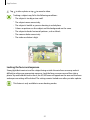
Locking the focus and exposure
Strong light/dark contrast and the subject being outside the auto focus area may make it
difficult to achieve an appropriate exposure. Lock the focus or exposure and then take a
photo. Tap and hold the area to focus, the AF/AE frame will appear on the area and the focus
and exposure setting will be locked. The setting remains locked even after you take a photo.
This feature is only available in some shooting modes.
82
Applications
Auto mode
Auto mode allows the camera to evaluate the surroundings and determine the ideal mode
for the photo.
On the preview screen, tap MODE → Auto.
Pro mode
Take photos while manually adjusting various shooting options, such as exposure value and
ISO value.
On the preview screen, tap MODE → Pro. Select options and customise the settings, and
then tap to take a photo.
•
: Select a colour tone. To create your own colour tone, tap Tone 1 or Tone 2.
•
: Change the focus mode. Drag the adjustment bar towards or
to manually
adjust the focus. To switch to auto focus mode, drag the adjustment bar towards AUTO.
•
: Select an appropriate white balance, so images have a true-to-life colour range. You
and drag your finger on the colour temperature
can set the colour temperature. Tap
bar.
•
: Select an ISO value. This controls camera light sensitivity. Low values are for
stationary or brightly lit objects. Higher values are for fast-moving or poorly lit objects.
However, higher ISO settings can result in noise in photos.
If the shutter speed is set manually, you cannot set the ISO setting to AUTO.
•
: Adjust the shutter speed. A slow shutter speed allows more light in, so the photo
becomes brighter. This is ideal for photos of scenery or pictures taken at night. A fast
shutter speed allows less light in. This is ideal for taking photos of fast-moving subjects.
•
: Change the exposure value. This determines how much light the camera’s sensor
receives. For low-light situations, use a higher exposure.
If the shutter speed is set manually, you cannot change the exposure value. The
exposure value will change and be displayed based on the shutter speed setting.
83
Applications
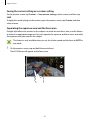
Saving the current setting as a custom setting
On the preview screen, tap Custom → Save current settings, select a name, and then tap
SAVE.
To apply the saved settings to the camera, open the preview screen, tap Custom, and then
select a name.
Separating the exposure area and the focus area
If bright light affects the contrast or the subject is outside the auto focus area, use this feature
to achieve an appropriate exposure. You can separate the exposure and focus areas and select
the exposure level you want for the subject.
This feature is only available when you set the shutter speed and the focus to AUTO in
pro mode.
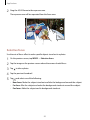
1 On the preview screen, tap and hold the area to focus.
The AF/AE frame will appear on the focus area.
84
Applications
2 Drag the AF/AE frame to the exposure area.
The exposure area will be separated from the focus area.
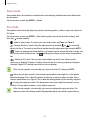
Selective focus
Use the out-of-focus effect to make specific objects stand out in a photo.
1 On the preview screen, tap MODE → Selective focus.
2 Tap the image on the preview screen where the camera should focus.
3 Tap to take a photo.
4 Tap the preview thumbnail.
5 Tap and select one of the following:
• Near focus: Make the subject stand out and blur the background around the subject.
• Far focus: Blur the subject and make the background stand out around the subject.
• Pan focus: Make the subject and its background stand out.
85
Applications
6 Tap SAVE.
• It is recommended that you position subjects within 50 cm of the device. Position
the subject that you want to focus on close to the device.
• When taking photos, ensure there is sufficient distance between the subject
and the background. The distance should be more than three times the distance
between the device and the subject.
• The quality of photos taken by the device can be affected in the following
conditions:
– – The device or the subject is moving.
– – There is strong background light, low levels of light, or you are taking photos
indoors.
– – The subject or background has no pattern, or consists of a plain colour.
Panorama
Take a series of photos horizontally or vertically and then stitch them together to create a
wide scene.
On the preview screen, tap MODE → Panorama.
To get the best shots using panorama mode, follow these tips:
• Move the camera slowly in one direction.
• Keep the image within the frame on the camera’s viewfinder.
• Avoid taking photos of indistinct backgrounds, such as an empty sky or a plain
wall.
86
Applications
Video collage
Record videos to create a unique video collage. You can edit the videos and share them with
others.
1 On the preview screen, tap MODE → Video collage.
2 Tap to select one of the following:
• Collage: Record several videos and combine them to play as a video collage. You can
select a collage type and change the screen ratio.
• Series: Select the screen ratio and record a series of videos containing various scenes.
While recording, pause recording and then resume recording to capture multiple
scenes.
• Slow motion: Record a video to view it in a slow motion video collage.
You can also select a recording time for videos. Tap
3 Tap
to start recording.
After you record a video, an editing screen appears.
87
and select an option.
Applications
4 Edit the video using the available options.
• Audio: Adjust the recorded sound or insert background music.
• Slow parts: Select sections of the video in each frame to be played in slow motion.
This option appears when you select the Slow motion video option.
• End tags: Display the recording date and time on the video.
5 When you are finished editing, tap SAVE to save the video.
To share the video with friends, tap SHARE.
Live Broadcast
Record and share live videos of your special moments. Invite your family and friends to watch
your live broadcast. For more information about the YouTube broadcast feature, refer to
YouTube’s help menu.
You may incur additional charges for broadcasting via the mobile network.
Before you start
• You must sign into your Google account to use this feature.
• Only people saved in Contacts can be invited. Save people as your contacts in advance.
• To automatically save your broadcast on your device when it ends, open the preview
screen, tap Settings, and then tap the Auto save switch to activate it. You can view your
videos in Gallery.
Starting your broadcast
1 On the preview screen, tap MODE → Live Broadcast.
2 Read the terms and conditions, and then tap AGREE.
3 To change your channel’s name, tap the default name under Live Broadcast and enter a
new name.
88
Applications
4 To set your broadcast as public or private, tap Settings → Privacy.
5 Tap Invite and select contacts.
When the broadcast starts, the video link will be sent to the selected contacts via
message. The invited contacts can watch the broadcast by tapping the link.
6 Tap
to start broadcasting.
7 Tap
to end your broadcast.
To invite more people during your broadcast, tap Share and select a sharing method.
While inviting people, your broadcast will be paused. To start recording again, tap
RESUME.
The broadcast will be automatically uploaded to YouTube. To share the link with others,
tap SHARE.
Watching a live broadcast
Invited contacts can watch the broadcast by tapping the video link they received. For public
broadcasts, viewers can search for your channel name on YouTube.
During your broadcast, viewers can like or dislike it.
89
Applications
Slow motion
Record a video for viewing it in slow motion. You can specify sections of your videos to be
played in slow motion.
The focal length may become shorter when using this mode.
1 On the preview screen, tap MODE → Slow motion.
2 Tap to start recording.
3 When you are finished recording, tap to stop.
4 On the preview screen, tap the preview thumbnail.
5 Tap .
The video will start playing with a randomly set slow motion section.
Editing slow motion sections
1 On the preview screen, tap the preview thumbnail.
2 Tap .
The video will start playing with a randomly set slow motion section.
3 Tap to pause playback.
4 Drag the start bracket and the end bracket to the desired points to set the duration of the
video to be played.
90
Applications
5 Drag
to select the area of the video to be played in slow motion.
To set a slow motion section more precisely, tap and hold , and then drag your finger
to the left or right to move through the section frame by frame.
Start bracket
End bracket
Slow motion section
6 Tap the slow motion section and use the following options:
• Speed: Change the playback speed of the selected section.
• Split: Divide the section into two parts.
• Delete: Delete one of the divided section.
7 Tap to preview the video.
8 Tap EXPORT to save the video.
Fast motion
Record a video for viewing it in fast motion. You can specify sections of your videos to be
played in fast motion.
The focal length may become shorter when using this mode.
1 On the preview screen, tap MODE → Fast motion.
2 Tap to start recording.
3 When you are finished recording, tap to stop.
91
Applications
4 On the preview screen, tap the preview thumbnail.
5 Tap .
The video will start playing with a randomly set fast motion section.
Editing fast motion sections
1 On the preview screen, tap the preview thumbnail.
2 Tap .
The video will start playing with a randomly set fast motion section.
3 Tap to pause playback.
4 Drag the start bracket and the end bracket to the desired points to set the duration of the
video to be played.
5 Drag
to select the area of the video to be played in fast motion.
To set a fast motion section more precisely, tap and hold , and then drag your finger to
the left or right to move through the section frame by frame.
Start bracket
End bracket
Fast motion section
6 Tap the fast motion section and use the following options:
• Speed: Change the playback speed of the selected section.
• Split: Divide the section into two parts.
• Delete: Delete one of the divided section.
7 Tap to preview the video.
8 Tap EXPORT to save the video.
92
Applications
Virtual shot
Take a series of photos while circling a subject to create a view of the subject from multi
angles. You can view the subject from different angles by dragging your finger left or right on
the photo.
1 On the preview screen, tap MODE → Virtual shot.
2 Place a subject in the centre of the preview screen and tap .
3 Move the device around the subject slowly in one direction to take more photos.
When the arrow becomes completely yellow or when you stop circling the subject, the
device will automatically stop taking photos.
Viewing virtual shot photos
1 On the preview screen, tap the preview thumbnail.
2 Tap .
3 Drag your finger left or right on the screen, or slowly swivel the device left or right to view
the subject from different angles.
93
Applications
Selfie
Take self-portraits with the front camera. You can preview various beauty effects on the
screen.
1 On the preview screen, tap to switch to the front camera for self-portraits.
2 Tap MODE → Selfie.
3 Face the front camera lens.
4 When the device detects your face, tap the sensor on the back of the device to take a
photo of yourself. You can also tap the screen to take a photo.
To take a photo using your palm, tap and tap the Gesture control switch to activate it.
Show your palm to the front camera. After recognising your palm, the device will take a
photo after a few seconds.
94
Applications
Applying beauty effects
You can modify facial features, such as your skin tone or face shape, before taking selfportraits.
This feature is available only in Selfie and Interval shot modes.
1 On the preview screen, tap .
2 Select the options below to apply the beauty effects to your face on the preview screen:
• Shape correction: When your face is at the edges of the preview screen, it will appear
distorted. Enable this option to correct your face shape. After shape correction, the
background may appear slightly distorted.
• Slim Face: Adjust the face shape and make your face appear slimmer.
• Large eyes: Make your eyes appear bigger.
• Skin tone: Make your skin appear brighter and clearer.
3 When the device detects your face, tap the sensor on the back of the device to take a
photo of yourself. You can also tap the screen to take a photo.
Wide selfie
Take a wide self-portrait to include more people in the photo and avoid leaving people out.
1 On the preview screen, tap
2 Tap MODE → Wide selfie.
3 Face the front camera lens.
to switch to the front camera for self-portraits.
95
Applications
4 When the device detects your face, tap the sensor on the back of the device to take a
photo of yourself. You can also tap the screen to take a photo.
To take a photo using your palm, tap and tap the Gesture control switch to activate it.
Show your palm to the front camera. After recognising your palm, the device will take a
photo after a few seconds.
5 Slowly swivel the device left and then right or vice versa to take a wide self-portrait.
The device will take additional photos when the white frame moves to each end of the
viewfinder window.
• Make sure to keep the white frame inside the viewfinder window.
• The subjects should remain still while taking wide self-portraits.
• The top and bottom parts of the image displayed on the preview screen may be
cut out of the photo depending on the shooting conditions.
96
Applications
Interval shot
Take series of self-portraits at an interval and save photos you want.
1 On the preview screen, tap
2 Tap MODE → Interval shot.
3 Face the front camera lens.
4 To apply beauty effect, tap
to switch to the front camera for self-portraits.
and select options. Refer to Applying beauty effects for
more information.
5 When the device detects your face, tap the sensor on the back of the device to take a
photo of yourself. You can also tap the screen to take a photo.
The device will take four photos at the two-second intervals.
To take a photo using your palm, tap and tap the Gesture control switch to activate it.
Show your palm to the front camera. After recognising your palm, the device will take a
photo after a few seconds.
6 Tick photos you want to save and tap SAVE.
Downloading modes
Download more shooting modes from Galaxy Apps.
On the preview screen, tap MODE → Download.
Some downloaded shooting modes do not have access to every feature. Swiping
right to view the modes list and swiping left to view captured images and videos may
not be available.
97
Applications
Camera settings
Quick settings
On the preview screen, use the following quick settings.
The available options may vary depending on the shooting mode and which camera
is being used.
•
: Select a filter effect to use when taking photos or recording videos. To set whether
to display certain effects on the list or rearrange the order of effects, tap . To download
more effects, tap .
•
: Use this to take photos with rich colours and reproduce details even in bright and
dark areas.
•
: Select a metering method. This determines how light values are calculated. Centreweighted uses the light in the centre portion of the shot to calculate the exposure of
the shot. Spot uses the light in a concentrated centre area of the shot to calculate the
exposure of the shot. Matrix averages the entire scene.
•
: Select a video recording time.
• : Change the video collage type or screen ratio. You can also record video collages
featuring the slow motion effect.
• : Select the length of the delay before the camera automatically takes a photo.
•
: Apply beauty effects to the preview screen of self-portraits. You can adjust the skin
tone, correct the face shape, and more.
• : Activate or deactivate the flash.
•
/ : Select a resolution for photos. Using a higher resolution will result in higher
quality photos, but they will take up more memory.
The resolution of a photo may be affected by lighting conditions when taking photos
with the front camera.
98
Applications
Camera settings
On the preview screen, tap
.
The available options may vary depending on the shooting mode and which camera
is being used.
• Video size (rear) / Video size (front): Select a resolution for videos. Using a higher
resolution will result in higher quality videos, but they will take up more memory.
• Gesture control: Set the device to detect your palm, so you can use it to take selfportraits.
• Save pictures as previewed: Invert the image to create a mirror-image of the original
scene, when taking photos with the front camera.
• Tracking AF: Set the device to track and automatically focus on a selected subject, even
when the subject or camera moves.
• Video stabilisation: Activate anti-shake to reduce or eliminate blurry image resulting
from camera shake while recording a video.
• Grid lines: Display viewfinder guides to help composition when selecting subjects.
• Location tags: Attach a GPS location tag to the photo.
• GPS signal strength may decrease in locations where the signal is obstructed, such
as between buildings or in low-lying areas, or in poor weather conditions.
• Your location may appear on your photos when you upload them to the Internet.
To avoid this, deactivate the location tag setting.
• Review pictures: Set the device to show photos after capturing them.
• Quick launch: Set the device to launch the camera by pressing the Home key twice
quickly.
99
Applications
• Save as RAW file: Set the device to save photos as uncompressed RAW files (DNG file
format) in pro mode. RAW files retain all of a photo’s data for the best image quality, but
they will take up more memory. To view RAW files, an image viewer app is required.
• When using this feature, each photo is saved in two formats, DNG and JPG. Burst
shot photos are only saved as JPG files.
• You can view JPG files in Gallery. DNG files can be viewed or deleted in the DCIM
→ Camera folder.
• Voice control: Set the device to take photos or record videos with voice commands.
You can say “Smile”, “Cheese”, “Capture”, or “Shoot” to take a photo. To record a video, say
“Record video.”
• Volume keys function: Set the device to use the Volume key to control the shutter or
zoom function.
• Reset settings: Reset the camera settings.
100
Applications
Gallery
Introduction
View and manage photos and videos stored in the device.
Viewing images or videos
1 Tap Gallery on the Apps screen.
2 Select an image or a video.
Video files show the
icon on the preview thumbnail. To play a video, tap
.
Move to the previous screen.
Access additional options.
Share the image with others.
Modify the image.
Add the image to favourites.
Delete the image.
To hide or show the menus, tap the screen.
101
Applications
Deleting images or videos
Deleting an image or a video
Select an image or a video and tap Delete at the bottom of the screen.
Deleting multiple images and videos
1 On the Gallery main screen, tap and hold an image or a video to delete.
2 Tick the images or videos to delete.
3 Tap DELETE.
Sharing images or videos
Select an image or a video, tap Share at the bottom of the screen, and then select a sharing
method.
102
Applications
Smart Manager
Introduction
The Smart manager provides an overview of the status of your device’s battery, storage, RAM,
and system security. You can also automatically optimise the device with one tap of your
finger.
Using the quick optimization feature
On the Apps screen, tap Smart Manager → CLEAN ALL.
The quick optimization feature improves device performance through the following actions.
• Identifying apps that use excessive battery power and clearing some memory.
• Deleting unnecessary files and closing apps running in the background.
• Scanning for malware.
103
Applications
Using the Smart manager
On the Apps screen, tap Smart Manager and select a feature.
Battery
Check the remaining battery power and time to use the device. For devices with low battery
levels, conserve battery power by activating power saving features and closing apps that are
consuming an excessive amount of battery power.
The usage time left shows the time remaining before the battery power runs
out. Usage time left may vary depending on your device settings and operating
conditions.
Storage
Check the status of used and available memory capacity. You can delete unused and residual
files or uninstall apps that you do not use any more.
RAM
Check the amount of available RAM. You can close background apps and reduce the amount
of RAM you are using to speed up your device.
Device security
Check the device’s security status. This feature scans your device for malware.
104
Applications
S Note
Introduction
Create custom notes by recording your thoughts and ideas. You can insert multimedia files
and create Photo notes.
This app may appear in the Tools folder depending on the region or service provider.
Using the S Note widget
You can launch some S Note features directly from the S Note widget.
On the Home screen, tap an icon in the S Note widget.
The S Note widget may not be displayed on the Home screen by default depending
on the region or service provider. If the S Note widget is not displayed, you can add it
to the Home screen to use it.
Launch S Note.
Open the Action memo
pad and create a memo.
Create a note in
handwriting mode.
Take a photo and open it
with S Note.
Create a note in text
mode.
Creating notes
1 On the Apps screen, tap S Note →
Alternatively, on the Home screen, tap
→ Notes.
in the S Note widget.
You can also launch S Note with the S Pen. Open the Air command panel and tap the S
Note shortcut.
2 Tap
.
105
Applications
3 Compose a note.
Tap Pen to write or draw on the screen, or tap Text to enter text using the keyboard.
Handwriting mode
More options
Eraser mode
Save
Text mode
Undo/Redo
Load saved pen profiles.
Add page
106
Applications
Changing the pen settings
When writing or drawing on the screen, tap Pen once more to change the pen type, line
thickness, or pen colour.
Change the pen type.
Change the line thickness.
Change the pen colour.
Select a new colour using the
colour picker.
Fountain pen
Calligraphy pen
Using the line eraser
1 Tap Eraser.
2 Tap an area to erase.
The whole line on the area will be erased. The line eraser can erase your S Note line by
line.
• To only erase the area you touch with the S Pen, tap Eraser once more and tap Erase
touched area. You can adjust the size of the eraser by dragging the size adjustment
bar.
• To clear the note, tap ERASE ALL.
Even with a smaller eraser, you may still not be able to precisely erase the intended
part.
107
Applications
Editing handwritten notes
Edit handwritten notes using various editing options, such as cutting, moving, resizing, or
transforming.
1 When there is handwriting or a drawing on the note, tap MORE → Selection mode.
2 Tap or draw a line around the input to select.
To move the input to another location, select the input, and then drag it to a new
location.
To change the size of the selection, tap the input and drag a corner of the frame that
appears.
3 Edit the input using the available options.
• Layout: Arrange the layers.
• Cut: Cut out the input. To paste it to another location, tap and hold the location, and
then tap Paste.
• Copy: Copy the input. To paste it to another location, tap and hold the location, and
then tap Paste.
• Delete: Delete the input.
108
Applications
Creating Photo notes
Create notes by taking photos of content from various sources, such as handwritten text or
drawings.
1 On the Apps screen, tap S Note →
Alternatively, on the Home screen, tap
→ Notes.
on the S Note widget.
You can also launch S Note with the S Pen. Open the Air command panel and tap the S
Note shortcut.
2 Tap → MORE → Insert → Photo note.
3 Fit the edges of a subject inside the preview screen.
Hide or show the option icons.
Turn the flash on or off.
Show or hide viewfinder guides.
Detected subject
Take a photo.
109
Applications
4 When a blue border appears around the subject, tap
5 Edit the photo.
Crop the image.
to take a photo.
Edit sections to insert into the
note.
Rotate the image.
Enhance the visibility of text in
the image.
6 Tap DONE.
The photo will be inserted into S Note.
110
Applications
Editing sections
You can select and crop sections of a photo to insert into a note. After taking a photo, tap
Sections and select the sections you want to include.
Delete the section.
Drag the frame around
the section to adjust
the size.
Manually add a section
to be recognised.
Deleting notes
1 On the Apps screen, tap S Note →
Alternatively, on the Home screen, tap
→ Notes.
on the S Note widget.
You can also launch S Note with the S Pen. Open the Air command panel and tap the S
Note shortcut.
2 On the notes list, tap and hold a note to delete.
To delete multiple notes, tick more memos to delete.
3 Tap DELETE.
111
Applications
Downloading additional S Note features
Download additional features from Galaxy Apps.
On the Apps screen, tap S Note →
→ Notes → MORE → More features.
• Extension pack: Add advanced note features to your S Note, such as sketch recording,
formula recognition, and shape recognition.
• Easy chart: Create and manage charts and tables.
• Idea Sketch: Create idea sketches.
• S Note widget: Add the S Note widget to the Home screen and create a note. You can
view or edit the note by tapping the widget.
S Planner
Introduction
Manage your schedule by entering upcoming events or tasks in your planner.
Creating events
1 Tap S Planner on the Apps screen.
2 Tap or double-tap a date.
If the date already has saved events or tasks in it, tap the date and tap
112
.
Applications
3 Enter event details.
Enter a title.
Set a start and end date for the
event.
Select a calendar to use or sync
with.
Set an alarm.
Enter the location of the event.
Attach a map showing the
location of the event.
Add more details.
4 Tap SAVE to save the event.
Creating tasks
1 Tap S Planner on the Apps screen.
2 Tap → Tasks.
3 Enter task details and tap TODAY or TOMORROW to set a due date.
To add more details, tap
.
4 Tap SAVE to save the task.
113
Applications
Syncing events and tasks with your accounts
On the Apps screen, tap Settings → Accounts, select an account service, and then tap the
Sync Calendar switch to sync events and tasks with the account.
To add accounts to sync with, open the Apps screen and tap S Planner → MORE → Manage
calendars → Add account. Then, select an account to sync with and sign in. When an
account is added, a green circle is displayed next to the account name.
S Health
Introduction
S Health helps you manage your wellness and fitness. Set fitness goals, check your progress,
and keep track of your overall wellness and fitness.
Starting S Health
When running this app for the first time or restart it after performing a data reset, follow the
on-screen instructions to complete the setup.
1 Tap S Health on the Apps screen.
2 Follow the on-screen instructions to complete the setup.
114
Applications
Using S Health
You can view the key information from S Health menus and trackers to monitor your wellness
and fitness.
Tap S Health on the Apps screen.
Goals and programmes
Trackers
• GOALS: Set your daily fitness goals and view your progress.
• PROGRAMMES: Use customisable exercise programmes.
• TRACKERS: Monitor your activities, food intake, and body measurements.
To add trackers, goals, or programmes to the S Health screen, tap MORE → Manage items,
and then select items under the TRACKERS, GOALS, or PROGRAMMES tab.
To access more information about S Health functions, tap MORE → Settings → Help.
115
Applications
Additional information
• S Health is intended for fitness and wellness purposes only and is not intended for use
in the diagnosis of disease or other conditions, or in the cure, mitigation, treatment, or
prevention of disease.
• The available functions, features and addable applications for S Health may vary from
country to country due to different local laws and regulations. You should check the
features and applications available in your specific region before use.
• S Health applications and its service can be changed or discontinued without prior
notice.
• The purpose for data collection is limited to providing the service that you have
requested, including providing additional information to enhance your wellness, sync
data, data analysis and statistics or to develop and provide better services. (But if you
sign in to your Samsung account from S Health, your data may be saved on the server
for data backup purposes.) Personal information may be stored until the completion of
such purposes. You can delete personal data stored by S Health by using the Reset data
option in the Settings menu. To delete any data you have shared with social networks or
transferred to storage devices, you must delete them separately.
• You may share and/or sync your data with additional Samsung services or compatible
third party services that you select, as well as with any of your other connected devices.
Access to S Health information by such additional services or third party devices will only
be permitted with your express approval.
• You assume full responsibility for the inappropriate use of data shared on social networks
or transmitted to others. Use caution when sharing your personal data with others.
• If the device is connected to measuring devices, verify the communication protocol to
confirm proper operation. If you use a wireless connection, such as Bluetooth, the device
may be affected by electronic interference from other devices. Avoid using the device
near other devices that transmit radio waves.
• Please read Terms and Conditions and Privacy Policy of S Health carefully before using it.
116
Applications
S Voice
Introduction
Perform various tasks simply by speaking.
Setting a wake-up command
You can launch S Voice using your own wake-up command.
When launching S Voice for the first time, tap START and set your own wake-up command.
To change the wake-up command, open the Apps screen and tap S Voice. Then, tap →
Voice wake-up → Change wake-up command → START, and then follow the on-screen
instructions.
To set the device to launch S Voice using the wake-up command while the device is locked,
tap and tap the Wake up in secured lock switch to activate it.
Using S Voice
1 Say the preset wake-up command.
Alternatively, on the Apps screen, tap S Voice.
When S Voice is launched, the device begins voice recognition.
This app may not be available depending on the region or service provider.
S Voice settings
View examples of voice
commands.
117
Applications
2 Say a voice command.
If the device recognises the command, the device will perform the corresponding action.
To repeat a voice command or say a different command, tap .
This app will close automatically if the device is not used for a specified period.
Tips for better voice recognition
• Speak clearly.
• Speak in quiet places.
• Do not use offensive or slang words.
• Avoid speaking in dialectal accents.
The device may not recognise your commands or may perform unwanted commands
depending on your surroundings or how you speak.
Setting the language
On the Apps screen, tap S Voice →
→ Language, and then select a language.
The selected language is applied to S Voice only, not to the language displayed on
the device.
118
Applications
SideSync
Introduction
SideSync allows you to easily share your screen and data between Samsung Android
smartphones, tablets, and any computers. After you connect your devices, a virtual screen will
appear on the connected tablet or computer. You can check notifications, such as messages,
from the dashboard or in pop-up windows.
Before you start
• The SideSync app must be installed on both devices that you want to connect. If
SideSync is not installed, use one of the following methods to download and install it:
– – To download and install SideSync on your Samsung Android tablet or smartphone,
search for SideSync in Galaxy Apps or Play Store. If your device does not support
SideSync, you may not be able to find the app.
– – To download and install SideSync on your computer, visit
www.samsung.com/sidesync. On the webpage, you can also find the information
about SideSync system requirements.
• To wirelessly connect devices, they must support Wi-Fi Direct and be connected to the
same access point.
119
Applications
Connecting to computers or tablets
Connecting to a computer
1 Connect your smartphone to your computer using a USB cable.
Alternatively, connect both devices to the same access point.
2 Launch SideSync on both devices.
3 Tap START on both devices.
Both devices will scan each other and connect. Then, the dashboard will appear on your
computer.
Connecting to a tablet via Wi-Fi Direct
1 Launch SideSync on both your tablet and smartphone.
2 Tap START on both devices.
Both devices will scan each other and connect.
3 On your smartphone, select your tablet from the detected devices list.
120
Applications
4 On the tablet, accept the connection request.
The dashboard will appear on your tablet.
Connecting devices automatically
When two devices have been previously connected, you can set them to reconnect
automatically. Connecting the devices via USB or Wi-Fi Direct automatically launches
SideSync. If the devices are connected to the same access point, place them near each other
to connect them.
To stop using the auto connection feature, open the smartphone, tap SideSync → MORE →
Settings, and then tap the Auto connect devices switch to deactivate it. Alternatively, on
the dashboard, tap MORE → Settings → Connections and deactivate the auto connection
feature.
121
Applications
Using the dashboard
Launch frequently used apps or view notifications from your smartphone.
When you tap a notification, the related app or program will launch. The following is an image
of the smartphone’s dashboard on the computer.
Minimise the dashboard.
Access additional options.
Close the dashboard.
Turn on the virtual smartphone
screen.
Add more apps.
Tap a notification and perform
various actions.
You can rearrange or delete apps when you right-click on an app icon.
Continuing media playback
You can pause music or videos on your smartphone and continue playback on another
device.
On the dashboard, select the play button on the music controller or a video notification.
Playback will pause on your smartphone and start playing on your other device.
The connected device’s music controller and a video notification will appear only
when you play media files via the default music or video app.
Sharing a webpage
You can open a webpage on your smartphone and display it in the web browser of the
connected device.
While browsing webpages on your smartphone, a web access notification will appear on the
dashboard. On the dashboard, select the notification. Then, the same webpage will appear on
your connected device.
122
Applications
Sharing your smartphone’s hotspot
You can share your smartphone’s mobile data connection with computers or tablets if an
Internet connection is not available.
You may incur additional charges when using this feature.
On the dashboard, tap MORE → Enable Mobile hotspot. The smartphone’s mobile hotspot
will be activated.
Using calling and messaging features in pop-up windows
When you receive a call or message on your smartphone, a pop-up window will appear on
the connected device.
If you receive a call, you can answer or reject the call in the pop-up window. The connected
device’s microphone and speaker will be used during the call.
If you receive a message, you can directly reply to the message.
Using the virtual screen
SideSync mirrors a device’s screen on another device. You can use a device’s functions via the
virtual screen. The following is an image of the virtual smartphone screen on the computer.
On the dashboard, tap Phone screen.
• Some functions may not work through the virtual screen.
• The appearance and functions of the virtual screen may vary depending on the
connected device.
123
Applications
Close the virtual screen.
Minimize the virtual screen.
Tap
Maximize the virtual screen.
to use the following options:
• Always on top: Set the virtual screen to always stay on top.
• Rotate: Rotate the screen.
• Capture: Capture a screenshot.
• Enable Presentation mode: Turn on the smartphone’s screen to control it from both
your computer and smartphone. This feature may not be available depending on the
connected device.
To move the virtual screen, click and drag the top of the virtual screen to a new location.
To adjust the size of the virtual screen, place the mouse pointer over the edge of the virtual
screen, then click and drag it.
124
Applications
Switching between screens
To use your smartphone’s actual screen, press the Power key or the Home key on your
smartphone. The virtual screen turns off and the smartphone’s screen turns on.
To return to the virtual screen, click the virtual smartphone screen on the computer or tap
SWITCH TO TABLET on the tablet. The actual screen turns off and the virtual screen turns on.
You can view and control the virtual screen and the connected device’s screen
→ Enable Presentation mode to turn
simultaneously. On the virtual screen, tap
on the connected device’s screen. This feature may not be available depending on the
connected device.
Sharing files and clipboard
Copying files to the computer
1 Tap and hold a file to enter edit mode on the virtual smartphone screen.
2 Tick more files to copy.
3 Tap and hold the selected files, and then drag and drop them outside of the virtual
screen.
The files will be copied to the intended location.
For example, when you move an image from your smartphone to an open Word document
on your computer, the image will be inserted into the Word document.
125
Applications
Copying files to your smartphone
Select files on the computer and drag them to the dashboard or the virtual smartphone
screen. The files will be saved in the Tools → My Files → Device storage → SideSync folder.
While composing a message or an email on the virtual screen, the copied files will be
attached to the message or email being composed.
When the smartphone’s virtual screen and actual screen are turned on, you cannot
share files.
Sharing clipboard
You can conveniently copy and paste text between the connected devices via the clipboard
sharing feature. Copy or cut text from the virtual screen and paste it into a text field outside of
the virtual screen, or vice versa.
126
Applications
Sharing the computer’s keyboard and mouse
Use your smartphone’s screen as a dual monitor and control it with the computer’s keyboard
and mouse.
1 On the dashboard, tap MORE → Enable Keyboard and mouse sharing.
If the virtual screen is open, it will disappear from the computer’s screen.
2 Move the mouse pointer to the left or right edge of the computer’s screen to go to your
smartphone’s screen.
The mouse pointer will appear on your smartphone’s screen.
3 On your smartphone, use the computer’s keyboard and mouse to perform actions, such
as entering text, copying and pasting, and selecting items.
To control the computer with the mouse again, return the pointer to the computer’s
screen.
127
Applications
Music
Listen to music sorted by category and customise playback settings.
Tap Music on the Apps screen.
Tap
, select a category, and then select a song to play.
Tap the album image at the bottom of the screen to open the music player screen.
Access additional options.
Open the playlist.
Access the sound quality and
effects settings.
Set the file as your favourite
song.
Adjust the volume.
Turn on shuffle.
Change the repeat mode.
Skip to the previous song. Tap
and hold to rewind.
Skip to the next song. Tap and
hold to fast-forward.
Pause and resume playback.
UHQ Upscaler
Use the UHQ (Ultra High Quality) Upscaler feature to improve the sound quality and get a
sound closer to the original sound.
Connect a headset to the device. While playing music, tap
switch to activate it.
and tap the UHQ Upscaler
• Sound quality may vary depending on the connected headset.
• If you connect a Bluetooth headset that supports the UHQ feature, you can listen
to music wirelessly.
128
Applications
Video
Watch videos stored in the device and customise playback settings.
Tap Video on the Apps screen.
Select a video to play.
Access additional
options.
Pause and resume
playback.
Rewind or
fast-forward by
dragging the bar.
Adjust the volume.
Change screen ratio.
Switch to the
pop-up video player.
Skip to the previous
video. Tap and hold
to rewind.
Skip to the next
video. Tap and hold
to fast-forward.
Drag your finger up or down on the left side of the playback screen to adjust the brightness,
or drag your finger up or down on the right side of the playback screen to adjust the volume.
To rewind or fast-forward, swipe to the left or right on the playback screen.
129
Applications
Scrapbook
Collect content from various sources to create your own digital scrapbook.
This app may not be available depending on the region or service provider.
Adding content to Scrapbook
While viewing content, such as webpages or videos, tap MORE → Share → Scrapbook. The
selected content will be added to Scrapbook.
You can also collect content you want using Screen write and Smart select. Refer to Screen
write and Smart select for more information.
Viewing content
1 Tap Tools → Scrapbook on the Apps screen.
2 Tap to select a category and select a scrapbook.
If there is a link in the scrapbook content, tap the content to go to the source.
To edit the scrapbook, tap EDIT. You can edit a title, a tag, and other options to the
scrapbook.
130
Applications
Voice Recorder
Introduction
Use different recording modes for various situations, such as in an interview. The device can
convert your voice to text and distinguish between sound sources.
Recording voice memos
1 On the Apps screen, tap Tools → Voice Recorder.
2 Tap to start recording. Speak into the microphone.
Tap Pause to pause recording.
While recording a voice memo, tap Bookmark to insert a bookmark.
Change the recording mode.
Start recording.
3 Tap
to finish recording.
131
Applications
Changing the recording mode
Tap
to select a mode from the list.
• Standard: This is the normal recording mode. Voice memos recorded in this mode appear
with the icon next to them.
• Interview: The microphone is sensitive to sounds from two directions. In this mode, both
the top and the bottom of the device pick up equal amounts of sound. Voice memos
recorded in this mode appear with the icon next to them.
• Voice memo: The device records your voice and simultaneously converts it to on-screen
text. For best results, keep the device near your mouth and speak loudly and clearly in a
quiet place. Voice memos recorded in this mode appear with the icon next to them.
If the voice memo system language does not match the language you are speaking,
the device will not recognise your voice. Before using this feature, tap the current
language to set the voice memo system language.
Playing selected voice memos
When you review interview recordings, you can mute or unmute certain sound sources in the
recording.
1 On the Apps screen, tap Tools → Voice Recorder.
2 Tap Recordings and select a voice memo recorded in interview mode.
132
Applications
3 To mute certain sound sources, tap
for the corresponding direction that sound is to be
muted.
The icon will change to
and the sound will be muted.
Muted sound source
Unmuted sound source
My Files
Access and manage various files stored in the device or in other locations, such as cloud
storage services.
On the Apps screen, tap Tools → My Files.
• Category: View files by category.
• Local storage: View files stored in the device.
• Cloud storage: View files stored in the cloud storage service.
• STORAGE USAGE: View your device’s memory information.
To search for files or folders, tap SEARCH.
Samsung Gear
Samsung Gear is an app that allows you to manage your Gear wearable device. When you
connect your device to the Gear, you can customise the Gear’s settings and apps.
On the Apps screen, tap Tools → Samsung Gear.
Tap CONNECT TO GEAR to connect your device to the Gear. Follow the on-screen instructions
to finish the setup.
133
Applications
Clock
Introduction
Set alarms, check the current time in many cities around the world, time an event, or set a
specific duration.
Alarm
On the Apps screen, tap Clock → Alarm.
Setting alarms
Set an alarm time and tap SAVE.
To open the keypad to enter an alarm time, tap KEYPAD.
To set an alarm with various alarm options, tap OPTIONS, set alarm options, and then tap
SAVE.
To activate or deactivate alarms, tap the clock icon next to the alarm in the alarms list.
Stopping alarms
Tap DISMISS to stop an alarm. If you have previously enabled the snooze option, tap
SNOOZE to repeat the alarm after a specified length of time.
Deleting alarms
Tap
on an alarm in the list of alarms.
134
Applications
World clock
On the Apps screen, tap Clock → World clock.
Creating clocks
Enter a city name or select a city from the globe, and then tap
Deleting clocks
Tap
on a clock.
Stopwatch
1 On the Apps screen, tap Clock → Stopwatch.
2 Tap START to time an event.
To record lap times while timing an event, tap LAP.
3 Tap STOP to stop timing.
To restart the timing, tap RESUME.
To clear lap times, tap RESET.
Timer
1 On the Apps screen, tap Clock → Timer.
2 Set the duration, and then tap START.
To open the keypad to enter the duration, tap KEYPAD.
3 Tap DISMISS when the timer goes off.
135
.
Applications
Calculator
Perform simple or complex calculations.
Tap Calculator on the Apps screen.
Rotate the device to landscape orientation to display the scientific calculator. If Auto rotate is
disabled, tap to display the scientific calculator.
To see the calculation history, tap HISTORY. To close the calculation history panel, tap
KEYPAD.
To clear the history, tap HISTORY → CLEAR HISTORY.
Google apps
Google provides entertainment, social network, and business apps. You may require a Google
account to access some apps. Refer to Accounts for more information.
To view more app information, access each app’s help menu.
Some apps may not be available or may be labelled differently depending on the
region or service provider.
Chrome
Search for information and browse webpages.
Gmail
Send or receive emails via the Google Mail service.
Maps
Find your location on the map, search for locations, and view location information for various
places.
136
Applications
Play Music
Discover, listen to, and share music on your device.
Play Movies
Watch videos stored on your device and download various content to watch from Play Store.
Drive
Store your content on the cloud, access it from anywhere, and share it with others.
YouTube
Watch or create videos and share them with others.
Photos
Search for, manage, and edit all your photos and videos from various sources in one place.
Hangouts
Chat with your friends individually or in groups and use images, emoticons, and video calls
while you are chatting.
Google
Search quickly for items on the Internet or your device.
Voice Search
Search quickly for items by saying a keyword or phrase.
Google Settings
Configure settings for some features provided by Google.
137
Settings
Introduction
Customise settings for functions and apps. You can make your device more personalised by
configuring various setting options.
On the Apps screen, tap Settings.
To search for settings by entering keywords, tap SEARCH.
To edit the list of frequently used settings, tap EDIT. Then, tick items to add or deselect items
to remove.
Wi-Fi
Connecting to a Wi-Fi network
Activate the Wi-Fi feature to connect to a Wi-Fi network and access the Internet or other
network devices.
• Turn off Wi-Fi to save the battery when not in use.
1 On the Settings screen, tap Wi-Fi, and then tap the switch to activate it.
2 Select a network from the Wi-Fi networks list.
Networks that require a password appear with a lock icon.
138
Settings
3 Tap CONNECT.
• Once the device connects to a Wi-Fi network, the device will reconnect to that
network each time it is available without requiring a password. To prevent the
device connecting to the network automatically, select it from the list of networks
and tap FORGET.
• If you cannot connect to a Wi-Fi network properly, restart your device’s Wi-Fi feature
or the wireless router.
Wi-Fi Direct
Wi-Fi Direct connects devices directly via a Wi-Fi network without requiring an access point.
1 On the Settings screen, tap Wi-Fi, and then tap the switch to activate it.
2 Tap Wi-Fi Direct.
The detected devices are listed.
If the device you want to connect to is not in the list, request that the device turns on its
Wi-Fi Direct feature.
3 Select a device to connect to.
The devices will be connected when the other device accepts the Wi-Fi Direct
connections request.
Sending and receiving data
You can share data, such as contacts or media files, with other devices. The following actions
are an example of sending an image to another device.
1 Tap Gallery on the Apps screen.
2 Select an image.
139
Settings
3 Tap Share → Wi-Fi Direct and select a device to transfer the image to.
4 Accept the Wi-Fi Direct connection request on the other device.
If the devices are already connected, the image will be sent to the other device without
the connection request procedure.
Ending the device connection
1 Tap Wi-Fi on the Settings screen.
2 Tap Wi-Fi Direct.
The device displays the connected devices in the list.
3 Tap the device name to disconnect the devices.
Bluetooth
Introduction
Use Bluetooth to exchange data or media files with other Bluetooth-enabled devices.
• Samsung is not responsible for the loss, interception, or misuse of data sent or
received via Bluetooth.
• Always ensure that you share and receive data with devices that are trusted
and properly secured. If there are obstacles between the devices, the operating
distance may be reduced.
• Some devices, especially those that are not tested or approved by the Bluetooth
SIG, may be incompatible with your device.
• Do not use the Bluetooth feature for illegal purposes (for example, pirating copies
of files or illegally tapping communications for commercial purposes).
Samsung is not responsible for the repercussion of illegal use of the Bluetooth
feature.
140
Settings
Pairing with other Bluetooth devices
1 On the Settings screen, tap Bluetooth, and then tap the switch to activate it.
The detected devices are listed.
2 Select a device to pair with.
If the device you want to pair with is not in the list, request that the device turns on its
visibility option. Refer to the other device’s user manuals.
Your device is visible to other devices while the Bluetooth settings screen is open.
3 Accept the Bluetooth connection request on your device to confirm.
The devices will be connected when the other device accepts the Bluetooth connection
request.
Sending and receiving data
Many apps support data transfer via Bluetooth. You can share data, such as contacts or media
files, with other Bluetooth devices. The following actions are an example of sending an image
to another device.
1 Tap Gallery on the Apps screen.
2 Select an image.
3 Tap Share → Bluetooth, and then select a device to transfer the image to.
If your device has paired with the device before, tap the device name without confirming
the auto-generated passkey.
If the device you want to pair with is not in the list, request that the device turns on its
visibility option.
4 Accept the Bluetooth connection request on the other device.
141
Settings
Unpairing Bluetooth devices
1 Tap Bluetooth on the Settings screen.
The device displays the paired devices in the list.
2 Tap next to the device name to unpair.
3 Tap Unpair.
Flight mode
This disables all wireless functions on your device. You can use only non-network services.
On the Settings screen, tap Flight mode.
Mobile hotspot and tethering
Use the device as a mobile hotspot to share the device’s mobile data connection with other
devices when the network connection is not available. Connections can be made via Wi-Fi,
USB, or Bluetooth.
On the Settings screen, tap Mobile hotspot and tethering.
You may incur additional charges when using this feature.
• Mobile hotspot: Use the mobile hotspot to share the device’s mobile data connection
with computers or other devices.
• Bluetooth tethering: Use Bluetooth tethering to share the device’s mobile data
connection with computers or other devices via Bluetooth.
• USB tethering: Use USB tethering to share the device’s mobile data connection with
a computer via USB. When connected to a computer, the device is used as a wireless
modem for the computer.
142
Settings
Using the mobile hotspot
Use your device as a mobile hotspot to share your device’s mobile data connection with other
devices.
1 On the Settings screen, tap Mobile hotspot and tethering → Mobile hotspot.
2 Tap the switch to activate it.
The icon appears on the status bar. Other devices can find your device in the Wi-Fi
networks list.
To set a password for the mobile hotspot, tap MORE → Configure Mobile hotspot and
select the level of security. Then, enter a password and tap SAVE.
3 On the other device’s screen, search for and select your device from the Wi-Fi networks
list.
4 On the connected device, use the device’s mobile data connection to access the Internet.
Data usage
Keep track of your data usage amount and customise the settings for the limitation.
On the Settings screen, tap Data usage.
• Mobile data: Set the device to use data connections on any mobile network.
• Set mobile data limit: Set a limit for mobile data usage.
• Background data: Prevent apps that are running in the background from using a mobile
data connection.
→ Change cycle.
To change the monthly reset date for the monitoring period, tap
143
Settings
Limiting data usage
1 On the Settings screen, tap Data usage and tap the Set mobile data limit switch to
activate it.
2 Drag the limit adjustment bar upwards or downwards to set the limit.
3 Drag the warning adjustment bar upwards or downwards to set a data usage alert level.
The device will alert you when the warning level is reached.
Mobile networks
Configure your mobile network settings.
On the Settings screen, tap Mobile networks.
• Data roaming: Set the device to use data connections when you are roaming.
• Access Point Names: Set up access point names (APNs).
• Network mode (single SIM models): Select a network type.
Network mode SIM 1 / Network mode SIM 2 (dual SIM models): Select a network type.
• Network operators: Search for available networks and manually register a network.
144
Settings
NFC and payment
Introduction
Your device allows you to read near field communication (NFC) tags that contain information
about products. You can also use this feature to make payments and buy tickets for
transportation or events after downloading the required apps.
The device contains a built-in NFC antenna. Handle the device carefully to avoid
damaging the NFC antenna.
Using the NFC feature
Use the NFC feature to send images or contacts to other devices, and read product
information from NFC tags. If you insert a SIM or USIM card that has a payment feature, you
can use the device to make payments conveniently.
1 On the Settings screen, tap NFC and payment, and then tap the switch to activate it.
2 Place the NFC antenna area on the back of your device near an NFC tag.
The information from the tag appears.
Ensure that the device’s screen is unlocked. Otherwise, the device will not read NFC
tags or receive data.
145
Settings
Making payments with the NFC feature
Before you can use the NFC feature to make payments, you must register for the mobile
payment service. To register or get more information about the service, contact your service
provider.
1 On the Settings screen, tap NFC and payment, and then tap the switch to activate it.
2 Touch the NFC antenna area on the back of your device to the NFC card reader.
To set the default payment app, open the Settings screen and tap NFC and payment → Tap
& Pay, and then select an app.
The payment services list may not include all available payment apps.
146
Settings
Sending data
Allow data exchange when your device’s NFC antenna touches the other device’s NFC
antenna.
1 On the Settings screen, tap NFC and payment, and then tap the switch to activate it.
2 Tap Android Beam and tap the switch to activate it.
3 Select an item and touch the other device’s NFC antenna to your device’s NFC antenna.
4 When Touch to beam. appears on the screen, tap your device’s screen to send the item.
If both devices try to send data simultaneously, the file transfer may fail.
147
Settings
More connection settings
Options
Customise settings to control other features.
On the Settings screen, tap More connection settings.
• Printing: Configure settings for printer plug-ins installed on the device. You can search
for available printers or add one manually to print files. Refer to Printing for more
information.
• MirrorLink: Use the MirrorLink feature to control your device’s MirrorLink apps on the
vehicle’s head unit monitor. Refer to MirrorLink for more information.
• Download booster: Set the device to download files larger than 30 MB, faster via Wi-Fi
and mobile networks simultaneously. Refer to Download booster for more information.
• VPN: Set up and connect to virtual private networks (VPNs).
• Default messaging app: Select the default app to use for messaging.
Printing
Configure settings for printer plug-ins installed on the device. You can connect the device to a
printer via Wi-Fi or Wi-Fi Direct, and print images or documents.
Some printers may not be compatible with the device.
Adding printer plug-ins
Add printer plug-ins for printers you want to connect the device to.
1 On the Settings screen, tap More connection settings → Printing → Download plug-in.
2 Search for a printer plug-in in Play Store.
3 Select a printer plug-in and install it.
148
Settings
4 Select the printer plug-in and tap the switch to activate it.
The device searches for printers that are connected to the same Wi-Fi network as your
device.
To add printers manually, tap MORE → Add printer → ADD PRINTER.
To change print settings, tap MORE → Printing settings.
Printing content
While viewing content, such as images or documents, tap Share → Print →
printers, and then select a printer.
→ All
MirrorLink
Connect your device to a vehicle to control your device’s MirrorLink apps on the vehicle’s
head unit monitor.
On the Settings screen, tap More connection settings → MirrorLink.
Your device is compatible with vehicles that support MirrorLink version 1.1 or higher.
Connecting your device to a vehicle via MirrorLink
When using this feature for the first time, connect the device to a Wi-Fi or mobile network.
1 Pair your device with a vehicle via Bluetooth.
Refer to Pairing with other Bluetooth devices for more information.
2 Connect your device to the vehicle using a USB cable.
When they are connected, access your device’s MirrorLink apps on the head unit monitor.
Ending the MirrorLink connection
Unplug the USB cable from your device and the vehicle.
149
Settings
Download booster
Set the device to download files larger than 30 MB, faster via Wi-Fi and mobile networks
simultaneously. A stronger Wi-Fi signal will provide a faster download speed.
On the Settings screen, tap More connection settings → Download booster.
• This feature may not be supported by some devices.
• You may incur additional charges when downloading files via the mobile network.
• When you download large files, the device may heat up. If the device exceeds a set
temperature, the feature will turn off.
• If network signals are unstable, the speed and performance of this feature may be
affected.
• If the Wi-Fi and mobile network connections have significantly different data
transfer speeds, the device may use only the fastest connection.
• This feature supports Hypertext Transmission Protocol (HTTP) 1.1 and Hypertext
Transmission Protocol Secure (HTTPS). The feature cannot be used with other
protocols, such as FTP.
Sounds and notifications
Change settings for various sounds on the device.
On the Settings screen, tap Sounds and notifications.
• Sound mode: Set the device to use sound mode or silent mode.
• Volume: Adjust the volume level for call ringtones, music and videos, system sounds, and
notifications.
• Ringtones and sounds: Change the ringtone and system sound settings.
150
Settings
• Vibrations: Change the vibration settings.
• Sound quality and effects: Configure additional sound settings.
• Do not disturb: Set the device to mute incoming call and notification sounds, except for
allowed exceptions.
• App notifications: Change the notification settings for each app.
• LED indicator: Set the device to turn on the LED indicator while the battery is charging,
when you have notifications, or when you record voice memos.
Display
Change the display settings.
On the Settings screen, tap Display.
• Brightness: Adjust the brightness of the display.
• Font: Change the font size and type.
• One-handed operation: Activate one-handed operation mode for your convenience
when using the device with one hand.
• Screen timeout: Set the length of time the device waits before turning off the display’s
backlight.
• Smart stay: Set the device to prevent the display backlight from turning off while you are
looking at the display.
• Screen mode: Change the screen mode to adjust the display’s colour and contrast.
• Daydream: Set the device to launch a screensaver when the device is charging or
connected to a dock.
151
Settings
S Pen
Change the settings for using the S Pen.
On the Settings screen, tap S Pen.
• Air command: Customise Air command settings and select apps or functions to open
from the Air command panel.
• Air view: Activate the Air view feature to perform various actions with the S Pen.
• Direct pen input: Set the device to display the handwriting field icon when hovering the
S Pen over a text input field.
• Pointer: Set the device to display the S Pen pointer when hovering the S Pen over the
screen.
• Screen off memo: Set the device to open the Action memo pad when you detach the
S Pen while the screen is off.
• S Pen alerts: Set the device to display a pop-up alert and emit a sound if you walk when
the touch screen is off and S Pen is detached from the device.
• S Pen power saver: To reduce battery consumption, set the touchscreen to disable S Pen
detection while the S Pen is inserted.
• S Pen sound: Set the device to make writing sounds when you write or draw on the
screen with the S Pen. The device also emits a sound when the S Pen is inserted or
detached from the slot.
• S Pen vibration: Set the device to vibrate when the S Pen is inserted or detached from
the slot.
152
Settings
Motions and gestures
Activate the motion recognition feature and change the settings that control motion
recognition on your device.
On the Settings screen, tap Motions and gestures.
Excessive shaking or impact on the device may result in unintended inputs. Control
motions properly.
• Direct call: Set the device to make a voice call by picking up and holding the device near
your ear while viewing call, message, or contact details.
• Smart alert: Set the device to alert you if you have missed calls or new messages when
you pick up the device.
This feature may not work if the screen is turned on or the device is not on a flat
surface.
• Mute: Set the device to mute incoming calls or alarms by using palm motions or facing
the device’s screen downwards.
• Palm swipe to capture: Set the device to capture a screenshot when you swipe your
hand to the left or right across the screen. You can view the captured images in Gallery.
It is not possible to capture a screenshot while using some apps and features.
Applications
Manage the device’s apps and change their settings.
On the Settings screen, tap Applications.
• Application manager: View and manage the apps on your device.
• Default applications: Select a default setting for using apps.
• Application settings: Customise the settings for each app.
153
Settings
Wallpaper
Change the wallpaper settings for the Home screen and the locked screen.
On the Settings screen, tap Wallpaper.
Themes
Apply various themes to the device to change the visual elements of the Home screen, locked
screen, and icons.
On the Settings screen, tap Themes.
To download more themes, tap THEME STORE.
Lock screen and security
Options
Change the settings for securing the device and the SIM or USIM card.
On the Settings screen, tap Lock screen and security.
The available options may vary depending on the screen lock method selected.
• Screen lock type: Change the screen lock method.
• Show information: Change settings for the items displayed on the locked screen.
• Notifications: Set whether or not to show notification content on the locked screen and
select which notifications to display.
• Secure lock settings: Change screen lock settings for the selected lock method.
• Unlock effect: Select an effect that you see when you unlock the screen.
154
Settings
• Fingerprints: Register your fingerprint to the device to secure the device or sign in to
your Samsung account. Refer to Fingerprint recognition for more information.
• Device security: Check the device’s security status and scan the device for malware.
• Find My Mobile: Activate or deactivate the Find My Mobile feature. This feature can
help you locate your device if it is lost or stolen. You can also access the Find my mobile
website (findmymobile.samsung.com) to track and control your lost or stolen device.
• Unknown sources: Set the device to allow the installation of apps from unknown
sources.
• Other security settings: Configure additional security settings.
Fingerprint recognition
In order for fingerprint recognition to function, your fingerprint information needs to be
registered and stored in your device. After registering, you can set the device to use your
fingerprint for the features below:
• Screen lock
• Web sign-in
• Verify Samsung account
• This feature may not be available depending on the region or service provider.
• Fingerprint recognition uses the unique characteristics of each fingerprint to
enhance the security of your device. The likelihood of the fingerprint sensor
confusing two different fingerprints is very low. However, in rare cases where
separate fingerprints are very similar the sensor may recognise them as identical.
• If your fingerprint is not recognised and you have forgotten your backup password,
you must take the device to a Samsung Service Centre to have it reset. Then, you
must re-register your fingerprints and create a new backup password.
155
Settings
For better fingerprint recognition
When you scan your fingerprints on the device, be aware of the following conditions that
may affect the feature’s performance:
• The Home key contains a fingerprint recognition sensor. Ensure that the Home key is not
scratched or damaged by metal objects, such as coins, keys, and necklaces.
• The screen protector supplied with the device may cause the fingerprint recognition
sensor to malfunction. Remove the screen protector to improve fingerprint sensitivity.
• Ensure that the fingerprint recognition area and your fingers are clean and dry.
• The device may not recognise fingerprints that are affected by wrinkles or scars.
• The device may not recognise fingerprints from small or thin fingers.
• If you bend your finger or use a fingertip, the device may not recognise your fingerprints.
Make sure to cover the entire Home key with your finger.
• To improve recognition performance, register fingerprints of the hand used most often to
perform tasks on the device.
• In dry environments, static electricity can build up in the device. Avoid using this feature
in dry environments or before using the feature, discharge static electricity by touching a
metal object.
Registering fingerprints
1 On the Settings screen, tap Lock screen and security → Fingerprints → Add
fingerprint.
2 Place your finger on the Home key.
3 After the device detects your finger, lift it up and place it on the Home key again.
Repeat this action by moving your finger upwards or downwards until the fingerprint is
registered.
4 When a screen appears requesting to register a backup password, enter the backup
password, and then tap CONTINUE.
156
Settings
5 Enter the backup password again to verify it, and then tap OK.
You can use the backup password instead of scanning your fingerprints.
6 When a fingerprint lock pop-up window appears, tap SET. You can use your fingerprints
to unlock the screen.
Deleting fingerprints
You can delete registered fingerprints.
1 On the Settings screen, tap Lock screen and security → Fingerprints.
2 Scan a registered fingerprint, or tap Backup password and enter the backup password.
3 Tap EDIT.
4 Tick fingerprints to delete and tap REMOVE.
Changing the backup password
You can change the password that you use as a backup to scanning your fingerprints.
1 On the Settings screen, tap Lock screen and security → Fingerprints.
2 Scan a registered fingerprint, or tap Backup password and enter the backup password.
3 Tap Change backup password.
4 Enter a new password and tap CONTINUE.
5 Enter the password again and tap OK.
157
Settings
Verifying the Samsung account password
Use fingerprints to verify your Samsung account password. You can use a fingerprint instead
of entering your password, for example, when you purchase content from Galaxy Apps.
1 On the Settings screen, tap Lock screen and security → Fingerprints.
2 Scan a registered fingerprint, or tap Backup password and enter the backup password.
3 Tap the Verify Samsung account switch to activate it.
4 Sign in to your Samsung account.
Using fingerprints to sign in to accounts
You can use your fingerprints to sign in to webpages that support password saving.
This feature is only available for webpages that you access via the Internet app.
1 On the Settings screen, tap Lock screen and security → Fingerprints.
2 Scan a registered fingerprint, or tap Backup password and enter the backup password.
3 Tap the Web sign-in switch to activate it.
4 Open a webpage that you want to sign in to with a fingerprint.
5 Enter your user name and password, and then tap the webpage’s sign in button.
6 Tick Sign in using your fingerprints and tap REMEMBER.
You can use your fingerprint to verify your account and password to sign in to the
webpage.
158
Settings
Privacy and safety
Options
Change the settings for maintaining your privacy and safety.
On the Settings screen, tap Privacy and safety.
• Location: Change settings for location information permissions.
• Private mode: Activate private mode to prevent others from accessing your personal
content. Refer to Private mode for more information.
• Report diagnostic info: Set the device to automatically send the device’s diagnostic and
usage information to Samsung.
• Send SOS messages: Set the device to send help messages by pressing the Power
key three times. You can also send sound recordings along with the message to the
recipients. Refer to Send SOS messages for more information.
Private mode
Hide personal content in your device to prevent others from accessing it.
Activating private mode
1 On the Settings screen, tap Privacy and safety → Private mode, and then tap the switch
to activate it.
If you are activating private mode for the first time, follow the on-screen instructions to
set up a private mode access code.
2 Follow the on-screen instructions to enter the preset private mode access code.
Private mode is activated and the
icon appears on the status bar.
You can view and access the hidden items only when private mode is activated. To
hide items stored in the private folder, deactivate private mode.
159
Settings
Hiding content
1 On the Apps screen, launch an app to hide items.
2 Select an item and tap MORE → Move to Private.
If private mode is not activated, follow the on-screen instructions to enter the preset
private mode access code.
The selected items will be moved to the private folder.
Viewing hidden content
You can view hidden items only when private mode is activated.
1 On the Settings screen, tap Privacy and safety → Private mode, and then tap the switch
to activate it.
2 Follow the on-screen instructions to enter the preset private mode access code.
3 On the Apps screen, tap Tools → My Files → Private.
Items moved to the private folder will appear on the screen. For bookmarks, you can view
them with the Internet app.
Unhiding content
1 In the private folder, tap and hold an item, and then tick items to unhide.
2 Tap MORE → Remove from Private.
3 Select a folder to move the items to, and then tap MOVE HERE.
The items will be moved to the selected folder.
160
Settings
Automatically deactivating private mode
You can set the device to automatically deactivate private mode each time the screen turns
off.
1 On the Settings screen, tap Privacy and safety → Private mode, and then tap the switch
to activate it.
2 Follow the on-screen instructions to enter the preset private mode access code.
3 Tap the Auto disable switch to activate it.
When the Auto disable option is enabled, the device will fail to transfer files to the
private folder if the screen turns off during transfer.
Send SOS messages
In an emergency situation, quickly press the Power key three times. The device sends
messages to your primary contacts. The messages include your location information.
1 On the Settings screen, tap Privacy and safety → Send SOS messages, and then tap the
switch to activate it.
2 Follow the on-screen instructions to add primary contacts if you have not already done
so.
To send help messages with audio recordings or photos, tap the Attach audio recording or
Attach pictures switch to activate it.
The Attach pictures option may not be available depending on the region or service
provider.
Adding primary contacts
On the Settings screen, tap Privacy and safety → Send SOS messages → Send messages
to → ADD. Tap Create contact and enter contact information or tap Select from contacts to
add an existing contact as a primary contact.
161
Settings
Easy mode
Easy mode provides an easier user experience by using a simpler layout and bigger icons on
the Home screen.
Some app features may not be available in easy mode.
Switching to easy mode
1 On the Settings screen, tap Easy mode → Easy mode.
2 Select apps under Easy applications to apply a simpler layout.
3 Tap DONE.
Returning to standard mode
Swipe to the left on the Home screen and tap Settings → Easy mode → Standard mode →
DONE.
Managing shortcuts
To add a shortcut to an app to the Home screen, swipe to the left, tap
app.
, and then select an
To add a shortcut to a contact on the Home screen, swipe to the right and tap
.
To delete a shortcut from the Home screen, tap EDIT and select an app or contact with
Accessibility
Configure various settings to improve accessibility to the device. Refer to Accessibility for
more information.
On the Settings screen, tap Accessibility.
162
.
Settings
Accounts
Add your Samsung and Google accounts, or other accounts, to sync with.
Adding accounts
Some apps used on your device require a registered account. Create accounts to have the
best experience with your device.
1 On the Settings screen, tap Accounts → Add account.
2 Select an account service.
3 Follow the on-screen instructions to complete the account setup.
To sync content with your accounts, select an account and select items to sync.
Registering Samsung accounts
You need a Samsung account when using some Samsung apps. You can back up or restore
data saved in the device to your Samsung account. Register your Samsung account to the
device to conveniently use Samsung services.
1 On the Settings screen, tap Accounts → Add account.
2 Tap Samsung account.
3 Follow the on-screen instructions to complete the account setup.
Once your Samsung account has been registered, you can use apps requiring your Samsung
account without the sign in procedure.
Removing accounts
On the Settings screen, tap Accounts, select an account name, select the account to remove,
and then tap MORE → Remove account.
163
Settings
Backup and reset
Change the settings for managing settings and data.
On the Settings screen, tap Backup and reset.
• Back up my data: Back up your personal information and app data to the Samsung
server. You can also set the device to automatically back up data.
• Restore: Restore previously backed up personal information and app data from your
Samsung account.
• Auto restart: Set the device to automatically optimise and restart itself at preset times for
optimal performance.
• Backup account: Set up or edit your Google backup account.
• Back up my data: Set the device to back up settings and app data to the Google server.
• Automatic restore: Set the device to automatically restore settings and app data from
the Google server when apps are reinstalled.
• Factory data reset: Return the device to the factory default settings and delete all data.
• Reset settings: Return the device’s settings to the factory default settings without
deleting data.
Language and input
Select device languages and change settings, such as keyboards and voice input types. Some
options may not be available depending on the selected language.
On the Settings screen, tap Language and input.
• Language: Select a display language for all menus and apps.
• Default keyboard: Select a default keyboard type for text input.
• Samsung keyboard: Change the Samsung keyboard settings.
• Google voice typing: Change the voice input settings.
• Language: Select a language for handwriting recognition. You can search for files
containing handwriting in the selected language.
164
Settings
• Voice input: Select a default voice input service. You can also change settings for each
service.
• Text-to-speech options: Change the text-to-speech settings.
• Pointer speed: Adjust the pointer speed for the mouse or trackpad connected to your
device.
Battery
View battery power information and change power saving options.
On the Settings screen, tap Battery.
The usage time left shows the time remaining before the battery power runs
out. Usage time left may vary depending on your device settings and operating
conditions.
• BATTERY USAGE: View the amount of battery power consumed by your device.
• Power saving mode: Activate power-saving mode and change the settings for powersaving mode. Refer to Power saving mode for more information.
• Ultra power saving mode: Extend standby time and reduce battery consumption by
displaying a simpler layout and allowing limited access to an app. Refer to Ultra power
saving mode for more information.
• Abnormal battery usage: View a list of apps that are consuming an excessive amount of
battery power.
• Show power on status bar: Set the device to display the remaining battery life.
Storage
View memory information for your device.
On the Settings screen, tap Storage.
The actual available capacity of the internal memory is less than the specified
capacity because the operating system and default apps occupy part of the memory.
The available capacity may change when you update the device.
165
Settings
Accessories
Change the accessory settings.
On the Settings screen, tap Accessories.
This option will appear when you place your device on a wireless charger that
supports the fast wireless charging feature.
• Fast wireless charging: Set whether to use the fast wireless charging feature. When this
feature is activated, noise may occur from the wireless charger. Deactivating this feature
will reduce noise, but may result in slower charging times.
Date and time
Access and alter the following settings to control how the device displays the time and date.
On the Settings screen, tap Date and time.
If the battery remains fully discharged or removed from the device, the time and date
is reset.
• Automatic date and time: Automatically update the time and date when moving across
time zones.
• Automatic time zone: Set the device to receive time zone information from the network
when you move across time zones.
• Set date: Set the current date manually.
• Set time: Set the current time manually.
• Select time zone: Set the home time zone.
• Use 24-hour format: Display time in 24-hour format.
166
Settings
User manual
View help information to learn how to use the device and apps or configure important
settings.
On the Settings screen, tap User manual.
About device
Access device information, edit the device name, or update device software.
On the Settings screen, tap About device.
167
Appendix
Accessibility
About Accessibility
Improve accessibility with features that make the device easier to use for users who have
impaired vision, hearing, and reduced dexterity.
On the Apps screen, tap Settings → Accessibility.
Using the Home key to open accessibility menus
On the Apps screen, tap Settings → Accessibility → Direct access, and then tap the switch
to activate it. Then, select an accessibility menu to open when you press the Home key three
times quickly.
You can access the following accessibility menus.
• Accessibility
• Voice Assistant
• Universal switch
• Magnifier window
• Negative colours
• Greyscale
• Colour adjustment
• Interaction control
168
Appendix
Voice Assistant (Voice feedback)
Activating or deactivating Voice Assistant
When you activate Voice Assistant, the device reads aloud the text on the screen or selected
features when you tap it once.
On the Apps screen, tap Settings → Accessibility → Vision → Voice Assistant, and then tap
the switch to activate it. The device will start voice feedback.
To deactivate Voice Assistant, tap the switch and tap anywhere on the screen twice quickly.
When you activate Voice Assistant for the first time, the tutorial will start after activation. You
can replay it by tapping Voice Assistant help.
Some features are not available while you are using Voice Assistant.
Controlling the screen with finger gestures
You can use various finger gestures to control the screen while you are using Voice Assistant.
One finger gestures
• Tapping: Read aloud the item under your finger. To explore the screen, place a finger on
the screen and move it on the screen.
• Tapping twice: Open the selected item. While selected items are read aloud, when you
hear the item you want, release your finger from the item. Then, tap anywhere on the
screen twice quickly.
• Double-tapping and holding the screen: Move an item or access an available option.
• Swiping to the left: Move to the previous item.
• Swiping to the right: Move to the next item.
• Swiping upwards or downwards: Use the most recent contextual menu option or change
its settings. In text selection mode, move the cursor backwards or forwards to select text.
169
Appendix
• Swiping to the left then right in one motion: Scroll up the screen.
• Swiping to the right then left in one motion: Scroll down the screen.
• Swiping upwards then downwards in one motion: Move to the first item on the screen. In
text selection mode, move the cursor to the beginning of the text.
• Swiping downwards then upwards in one motion: Move to the last item on the screen. In
text selection mode, move the cursor to the end of the text.
Two finger gestures
• Tapping: Pause or resume voice feedback.
• Tapping twice: Start, pause, or resume playback.
• Tapping three times: Check the current time, remaining battery power, and mode.
To change items that are read aloud, open the Apps screen and tap Settings →
Accessibility → Vision → Voice Assistant → SETTINGS → Status bar information.
• Double-tapping and holding the screen: Enable or disable text selection mode.
• Swiping to the left: Move to the next page. In text selection mode, cut the selected text.
• Swiping to the right: Return to the previous page. In text selection mode, paste the
copied text.
• Swiping upwards: Scroll down the list. In text selection mode, copy the selected text.
• Swiping downwards: Scroll up the list. In text selection mode, select all text.
• Swiping in any direction on the locked screen: Unlock the screen.
• Swiping downwards from the top of the screen: Open the notification panel.
Three finger gestures
• Tapping: Start reading items aloud from the top.
• Tapping twice: Start reading from the next item.
• Tapping three times: Read the last selected text and copy it to the clipboard.
• Swiping to the left or right: Open the contextual menu and scroll through the options.
• Swiping upwards or downwards: Change the text reading and selecting granularity.
170
Appendix
Using the contextual menu
While you are using Voice Assistant, swipe to the left or right with three fingers. The
contextual menu will appear and the device will read the options aloud. Swipe to the left or
right with three fingers to scroll through the options. When you hear the option you want,
swipe upwards or downwards to use the option or adjust the settings for the option. For
example, when you hear Device volume, you can adjust the volume by swiping upwards or
downwards.
Adding and managing image labels
You can assign labels to images on the screen. The device reads aloud the labels when the
images are selected. Add labels to unlabelled images by tapping the screen twice with three
fingers and holding.
To manage the labels, open the Apps screen and tap Settings → Accessibility → Vision →
Voice Assistant → SETTINGS → Manage customised labels.
Configuring settings for Voice Assistant
Configure settings for Voice Assistant for your convenience.
On the Apps screen, tap Settings → Accessibility → Vision → Voice Assistant → SETTINGS.
• Speech volume: Select the volume level for voice feedback.
• Speech rate: Select a speed for voice feedback.
• Change pitch of keyboard feedback: Set the device to read aloud text with an altered
pitch while using a keyboard.
• Keyboard feedback: Set the device to read aloud the item under your finger while using
a keyboard.
• Speak while screen off: Set the device to read aloud notifications when the screen is
turned off.
• Use proximity sensor: Set the device to pause voice feedback when you place your hand
over the sensor at the top of the device.
• Shake to continue reading: Set the device to read aloud the text displayed on the screen
when you shake the device. You can select from various shaking speeds.
171
Appendix
• Vibration feedback: Set the device to vibrate when you explore the screen.
• Sound feedback: Set the device to emit a sound when you control the screen, such as
scrolling the screen, and more.
• Focus on speech audio: Set the device to turn the media volume down when the device
reads an item aloud.
• Sound feedback volume: Adjust the volume that sound is played when you touch the
screen to control it. This feature is available when Sound feedback is activated.
• Back and Recents key feedback: Set the device to provide voice feedback when you tap
or
once. Double-tap
or
to use the keys.
• Manage customised labels: Manage the labels you added.
• Status bar information: Select items to read aloud when you tap the screen three times
with two fingers.
• Developer options: Set options for app development.
Using the device with the screen turned off
Set the device to turn the screen off at all times to keep the content on your screen private.
The screen does not turn on when you press the Home key or tap the screen. Currently
activated features do not turn off when the screen is off.
On the Apps screen, tap Settings → Accessibility → Vision, and then tap the Dark screen
switch to activate it. You can activate or deactivate this feature by pressing the Power key
twice.
Reading passwords aloud
Set the device to read the password aloud when you enter the password while Voice Assistant
is activated.
On the Apps screen, tap Settings → Accessibility → Vision, and then tap the Speak
passwords switch to activate it.
172
Appendix
Setting text-to-speech features
Change the settings for text-to-speech features used when Voice Assistant is activated, such
as languages, speed, and more.
On the Apps screen, tap Settings → Accessibility → Vision → Text-to-speech options, and
then use the following functions:
• Preferred TTS engine: Select an engine for the text-to-speech feature.
• Speech rate: Adjust the speed for the text-to-speech feature.
• Default language status: View the status of the current language set for the text-to
speech feature.
Entering text using the keyboard
To display the keyboard, tap the text input field, and then tap anywhere on the screen twice
quickly.
To activate the rapid key input feature, open the Apps screen, tap Settings → Accessibility
→ Vision, and then tap the Rapid key input switch to activate it.
When you touch the keyboard with your finger, the device reads aloud the character keys
under your finger. When you hear the character you want, release your finger from the screen
to select it. The character is entered and the device reads the text aloud.
If Rapid key input is not activated, release your finger from the character you want, and then
tap anywhere on the screen twice quickly.
Entering additional characters
Tap and hold a key on the keyboard to enter additional characters available for the key. A
pop-up window appears above the key showing available characters. To select a character,
drag your finger on the pop-up window until you hear the character you want, and release it.
173
Appendix
Vision
Writing voice memos to voice labels
You can use voice labels to distinguish objects of similar shape by attaching labels to them.
You can record and assign a voice memo to an NFC-enabled voice label. The voice memo is
played back when you place your device near the label.
Turn on the NFC feature before using this feature.
1 On the Apps screen, tap Settings → Accessibility → Vision → Voice Label.
The voice recorder will launch.
2 Tap to start recording. Speak into the microphone.
3 When you are finished recording, tap to stop.
4 Hold the back of your device over the voice label.
The information in the voice recording will be written to the voice label.
Changing the font size
Change the font size displayed on the screen. Setting the font size to Extra huge may not be
available in some apps.
On the Apps screen, tap Settings → Accessibility → Vision → Font size.
Magnifying the screen
Magnify the screen and zoom in on a specific area.
On the Apps screen, tap Settings → Accessibility → Vision → Magnification gestures, and
then tap the switch to activate it.
• Zooming in and out: Quickly tap the screen three times to zoom in on a specific area.
Quickly tap the screen three times again to return to the normal view.
174
Appendix
• Exploring the screen by scrolling: Drag two or more fingers across the magnified screen.
• Adjusting zoom ratio: Pinch two or more fingers on the magnified screen or spread them
apart.
You can also temporarily magnify the screen by tapping the screen three times and holding.
While holding the screen, drag your finger to explore the screen. Release your finger to return
to the normal view.
• Keyboards on the screen cannot be magnified.
• When this feature is activated, the performance of some apps, such as Phone and
Calculator, may be affected.
Using a magnifier
Activate a magnifier to zoom in on the screen to view a larger version of the content.
On the Apps screen, tap Settings → Accessibility → Vision → Magnifier window, and then
tap the switch to activate it. The magnifier will appear on the screen.
Drag the magnifier to where you want to zoom in on the screen.
Converting the screen to greyscale mode
Display colours on the screen as grey tones.
On the Apps screen, tap Settings → Accessibility → Vision, and then tap the Greyscale
switch to activate it.
Reversing the display colours
Improve screen visibility to help users recognise text on the screen more easily.
On the Apps screen, tap Settings → Accessibility → Vision, and then tap the Negative
colours switch to activate it.
175
Appendix
Colour adjustment
Adjust how colours are displayed on the screen if you have difficulty in distinguishing colours.
The device changes the colours into more recognisable colours.
On the Apps screen, tap Settings → Accessibility → Vision → Colour adjustment, and
then tap the switch to activate it. Follow the on-screen instructions to complete the colour
adjustment procedure.
Hearing
Sound detectors
Set the device to vibrate when it detects your doorbell or a baby crying.
Baby crying detector
On the Apps screen, tap Settings → Accessibility → Hearing → Sound detectors, and then
tap the Baby crying detector switch to activate it. The device will vibrate when it detects
sound and the alert will be saved as a log.
Doorbell detector
1 On the Apps screen, tap Settings → Accessibility → Hearing → Sound detectors, and
then tap the Doorbell detector switch to activate it.
2 Tap
to make a recording of your doorbell.
The device will detect and record the doorbell.
3 Tap
and ring your doorbell to check if it is recorded correctly. When the device detects
the doorbell sound, tap OK.
To change the doorbell sound, tap Change doorbell sound.
The device will vibrate when it detects sound and the alert will be saved as a log.
176
Appendix
Setting flash notification
Set the flash to blink when you have incoming calls, new messages, or notifications.
On the Apps screen, tap Settings → Accessibility → Hearing, and then tap the Flash
notification switch to activate it.
Turning off all sounds
Set the device to mute all device sounds, such as media sounds, and the caller’s voice during
a call.
On the Apps screen, tap Settings → Accessibility → Hearing, and then tap the Turn off all
sounds switch to activate it.
Caption settings
On the Apps screen, tap Settings → Accessibility → Hearing → Samsung subtitles (CC) or
Google subtitles (CC), and then tap the switch to activate it.
Select an option for configuring the caption settings.
Adjusting the sound balance
Set the device to adjust the sound balance when using a headset.
1 Connect a headset to the device and wear it.
2 On the Apps screen, tap Settings → Accessibility → Hearing → Left/right sound
balance.
3 Drag the adjustment bar to the left or right and adjust the sound balance.
177
Appendix
Mono audio
Mono output combines stereo sound into one signal that is played through all headset
speakers. Use this if you have a hearing impairment or if a single earbud is more convenient.
On the Apps screen, tap Settings → Accessibility → Hearing, and then tap the Mono audio
switch to activate it.
Auto haptic
When the auto haptic feature is activated, the device will vibrate with the sound when
playing music, watching videos, or playing games. It will also vibrate when buttons are
tapped in supported apps.
On the Apps screen, tap Settings → Accessibility → Hearing, and then tap the Auto haptic
switch to activate it.
Some apps may not support this feature.
Dexterity and interaction
Universal switch
You can control the touchscreen by connecting an external switch, by tapping the screen, or
by using head movements and face gestures.
On the Apps screen, tap Settings → Accessibility → Dexterity and interaction → Universal
switch, and then tap the switch to activate it. If the universal switches are not registered on
the device, tap ADD SWITCH and set switches to control the device.
To activate the universal switch feature, at least one switch must be registered on the
device.
To set switches to control the device, tap SETTINGS → Switches.
To quickly deactivate this feature, press the Home key three times.
178
Appendix
Assistant menu
Displaying the assistive shortcut icon
Set the device to display the assistive shortcut icon for accessing apps, features, and settings.
You can easily control the device by tapping the assistive menus in the icon.
1 On the Apps screen, tap Settings → Accessibility → Dexterity and interaction →
Assistant menu.
2 Tap the switch to activate it.
The assistive shortcut icon appears at the bottom right of the screen.
3 Tap Dominant hand to move the assistive shortcut icon to a convenient location.
Accessing assistive menus
The assistive shortcut icon appears as a floating icon for easy access to the assistive menus
from any screen.
When you tap the assistive shortcut icon, the icon expands slightly and the assistive menus
appear on the icon. Tap the up or down arrow to move to other panels or swipe upwards or
downwards to select other menus.
Using the cursor
On the assistive menu, tap Cursor. You can control the screen using small finger movements
on the touch area. Drag your finger on the touch area to move the cursor. Also, tap the screen
to select items under the cursor.
Use the following options:
• /
: Select an item or scroll left or right on the screen.
•
/
: Scroll up or down the screen.
•
: Magnify the area where the cursor is located.
•
: Move the touch area to another location.
•
: Close the touch area.
179
Appendix
To change the cursor settings, open the Apps screen, tap Settings → Accessibility →
Dexterity and interaction → Assistant menu. Then, customise settings in Touchpad and
cursor settings.
Using enhanced assistive menus
Set the device to display enhanced assistive menus for selected apps.
On the Apps screen, tap Settings → Accessibility → Dexterity and interaction → Assistant
menu → Assistant plus, tap the switch to activate it, and then select apps.
Turning on the screen with the air gesture feature
Use the air gesture feature to turn on the screen by moving your hand above the sensor at
the top of the device. You can turn on the screen without pressing a key. When you use this
feature, place the device on a flat surface with the screen facing upwards or hold the device
securely to prevent it from moving.
On the Apps screen, tap Settings → Accessibility → Dexterity and interaction → Gesture
wake up, and then tap the switch to activate it.
Setting tap and hold delay options
Set the recognition time for tapping and holding the screen.
On the Apps screen, tap Settings → Accessibility → Dexterity and interaction → Tap and
hold delay, and then select an option.
Interaction control
Activate interaction control mode to restrict the device’s reaction to inputs while using apps.
1 On the Apps screen, tap Settings → Accessibility → Dexterity and interaction →
Interaction control.
2 Tap the switch to activate it.
3 Press and hold the Home key and the Volume key down simultaneously while using an
app.
180
Appendix
4 Adjust the size of the frame or draw a line around an area that you want to restrict.
5 Tap DONE.
The device displays the restricted area. The restricted area will not react when you touch
it and the device’s hard keys will be disabled.
To deactivate interaction control mode, press and hold the Home key and the Volume key
down simultaneously.
Direction lock
Create a directional combination to unlock the screen.
1 On the Apps screen, tap Settings → Accessibility → Direction lock and tap the switch
to activate it.
2 Drag your finger up, down, left, or right more than four times, and then tap CONTINUE.
3 Draw the direction combination again to verify it and tap CONFIRM.
4 Set a backup PIN to unlock the screen when you forget the combination.
Notification reminder
Set the device to alert you to notifications that you have not checked at the interval.
On the Apps screen, tap Settings → Accessibility → Notification reminder, and then tap
the switch to activate it.
To set the device to vibrate when you have unchecked notifications, tap the Vibrate switch to
activate it.
To set the device to turn on the LED indicator when you have unchecked notifications while
the screen is turned off, tap the LED indicator switch to activate it.
To set an interval between alerts, tap Reminder interval.
To set apps to alert you to notifications, select apps under Select applications.
181
Appendix
Answering or ending calls
Change the method of answering or ending calls.
On the Apps screen, tap Settings → Accessibility → Answering and ending calls.
Select the desired method.
Using single tap mode
When an alarm sounds or a call comes in, tap the button to stop the alarm or answer the call
instead of dragging the button.
On the Apps screen, tap Settings → Accessibility, and then tap the Single tap mode switch
to activate it.
Managing accessibility settings
Saving accessibility settings in a file
Export the current accessibility settings in a file.
On the Apps screen, tap Settings → Accessibility → Manage accessibility → Import/
Export → Export to My Files.
Importing an accessibility settings file
Import an accessibility settings file and update the current settings.
On the Apps screen, tap Settings → Accessibility → Manage accessibility → Import/
Export → Import from My Files. Select a file to import and tap DONE. The accessibility
settings will be updated according to the imported file.
Sharing accessibility settings files
Share accessibility settings files with others via email, Wi-Fi Direct, Bluetooth, and more.
On the Apps screen, tap Settings → Accessibility → Manage accessibility → Share via.
Then, select the accessibility files and tap DONE. Select a sharing method and follow the onscreen instructions to share the files.
182
Appendix
Troubleshooting
Before contacting a Samsung Service Centre, please attempt the following solutions. Some
situations may not apply to your device.
When you turn on your device or while you are using the device, it
prompts you to enter one of the following codes:
• Password: When the device lock feature is enabled, you must enter the password you set
for the device.
• PIN: When using the device for the first time or when the PIN requirement is enabled, you
must enter the PIN supplied with the SIM or USIM card. You can disable this feature by
using the Lock SIM card menu.
• PUK: Your SIM or USIM card is blocked, usually as a result of entering your PIN incorrectly
several times. You must enter the PUK supplied by your service provider.
• PIN2: When you access a menu requiring the PIN2, you must enter the PIN2 supplied with
the SIM or USIM card. For more information, contact your service provider.
Your device displays network or service error messages
• When you are in areas with weak signals or poor reception, you may lose reception. Move
to another area and try again. While moving, error messages may appear repeatedly.
• You cannot access some options without a subscription. For more information, contact
your service provider.
Your device does not turn on
When the battery is completely discharged, your device will not turn on. Fully charge the
battery before turning on the device.
183
Appendix
The touchscreen responds slowly or improperly
• If you attach a protective cover or optional accessories to the touchscreen, the
touchscreen may not function properly.
• If you are wearing gloves, if your hands are not clean while touching the touchscreen,
or if you tap the screen with sharp objects or your fingertips, the touchscreen may
malfunction.
• The touchscreen may malfunction in humid conditions or when exposed to water.
• Restart your device to clear any temporary software bugs.
• Ensure that your device software is updated to the latest version.
• If the touchscreen is scratched or damaged, visit a Samsung Service Centre.
Your device freezes or has fatal errors
If your device freezes or hangs, you may need to close apps or turn off the device and turn
it on again. If your device is frozen and unresponsive, press and hold the Power key and the
Volume key down simultaneously for more than 7 seconds to restart it.
If this does not solve the problem, perform a factory data reset. On the Apps screen,
tap Settings → Backup and reset → Factory data reset → RESET DEVICE → ERASE
EVERYTHING. Before performing the factory data reset, remember to make backup copies of
all important data stored in the device.
If the problem is still not resolved, contact a Samsung Service Centre.
Calls are not connected
• Ensure that you have accessed the right cellular network.
• Ensure that you have not set call barring for the phone number you are dialling.
• Ensure that you have not set call barring for the incoming phone number.
Others cannot hear you speaking on a call
• Ensure that you are not covering the built-in microphone.
• Ensure that the microphone is close to your mouth.
• If using a headset, ensure that it is properly connected.
184
Appendix
Sound echoes during a call
Adjust the volume by pressing the Volume key or move to another area.
A cellular network or the Internet is often disconnected or audio
quality is poor
• Ensure that you are not blocking the device’s internal antenna.
• When you are in areas with weak signals or poor reception, you may lose reception. You
may have connectivity problems due to issues with the service provider’s base station.
Move to another area and try again.
• When using the device while moving, wireless network services may be disabled due to
issues with the service provider’s network.
The battery icon is empty
Your battery is low. Charge the battery.
The battery does not charge properly (For Samsung-approved
chargers)
• Ensure that the charger is connected properly.
• Visit a Samsung Service Centre and have the battery replaced.
The battery depletes faster than when first purchased
• When you expose the device or the battery to very cold or very hot temperatures, the
useful charge may be reduced.
• Battery consumption increases when you use messaging features or some apps, such as
games or the Internet.
• The battery is consumable and the useful charge will get shorter over time.
Your device is hot to the touch
When you use apps that require more power or use apps on your device for an extended
period of time, your device may feel hot to the touch. This is normal and should not affect
your device’s lifespan or performance.
185
Appendix
Error messages appear when launching the camera
Your device must have sufficient available memory and battery power to operate the camera
app. If you receive error messages when launching the camera, try the following:
• Charge the battery.
• Free some memory by transferring files to a computer or deleting files from your device.
• Restart the device. If you are still having trouble with the camera app after trying these
tips, contact a Samsung Service Centre.
Photo quality is poorer than the preview
• The quality of your photos may vary, depending on the surroundings and the
photography techniques you use.
• If you take photos in dark areas, at night, or indoors, image noise may occur or images
may be out of focus.
Error messages appear when opening multimedia files
If you receive error messages or multimedia files do not play when you open them on your
device, try the following:
• Free some memory by transferring files to a computer or deleting files from your device.
• Ensure that the music file is not Digital Rights Management (DRM)-protected. If the file is
DRM-protected, ensure that you have the appropriate licence or key to play the file.
• Ensure that the file formats are supported by the device. If a file format is not supported,
such as DivX or AC3, install an app that supports it. To confirm the file formats that your
device supports, visit www.samsung.com.
• Your device supports photos and videos captured with the device. Photos and videos
captured by other devices may not work properly.
• Your device supports multimedia files that are authorised by your network service
provider or providers of additional services. Some content circulated on the Internet,
such as ringtones, videos, or wallpapers, may not work properly.
186
Appendix
Another Bluetooth device is not located
• Ensure that the Bluetooth wireless feature is activated on your device.
• Ensure that the Bluetooth wireless feature is activated on the device you wish to connect
to.
• Ensure that your device and the other Bluetooth device are within the maximum
Bluetooth range (10 m).
If the tips above do not solve the problem, contact a Samsung Service Centre.
A connection is not established when you connect the device to a
computer
• Ensure that the USB cable you are using is compatible with your device.
• Ensure that you have the proper driver installed and updated on your computer.
• If you are a Windows XP user, ensure that you have Windows XP Service Pack 3 or higher
installed on your computer.
Your device cannot find your current location
GPS signals may be obstructed in some locations, such as indoors. Set the device to use Wi-Fi
or a mobile network to find your current location in these situations.
Data stored in the device has been lost
Always make backup copies of all important data stored in the device. Otherwise, you cannot
restore data if it is corrupted or lost. Samsung is not responsible for the loss of data stored in
the device.
A small gap appears around the outside of the device case
• This gap is a necessary manufacturing feature and some minor rocking or vibration of
parts may occur.
• Over time, friction between parts may cause this gap to expand slightly.
187
Health and Safety
This safety information contains content for mobile devices. Some content may be not
applicable to your device. To prevent injury to yourself and others or damage to your device,
read the safety information about your device before using the device.
Warning: Failure to comply with safety warnings and
regulations can cause serious injury or death.
Do not use damaged power cords or plugs, or loose electrical sockets
• Unsecured connections can cause electric shock or fire.
Do not touch the power cord with wet hands or disconnect the charger by pulling the
cord
• Doing so may result in electrocution.
Do not bend or damage the power cord
• Doing so may cause electric shock or fire.
Do not use your device while it is charging or touch your device with wet hands
• Doing so may cause electric shock.
Do not short-circuit the charger or the device
• Doing so may cause electric shock or fire, or the battery may malfunction or explode.
Do not use your device outdoor during a thunderstorm
• Doing so may result in electric shock or device malfunction.
Use manufacturer-approved chargers, accessories, and supplies
• Using generic chargers may shorten the life of your device or cause the device to
malfunction. They may also cause a fire or cause the battery to explode.
• Use only Samsung-approved charger specifically designed for your device. Incompatible
battery and charger can cause serious injuries or damage to your device.
• Samsung cannot be responsible for the user’s safety when using accessories or supplies
that are not approved by Samsung.
• Do not drop or cause an impact to the charger or the device
Handle and dispose of the device and charger with care
• Never dispose of the device in a fire. Never place the device on or in heating devices,
such as microwave ovens, stoves, or radiators. The device may explode when overheated.
Follow all local regulations when disposing of used battery or device.
• Never crush or puncture the device.
188
Health and Safety
• Avoid exposing the device to high external pressure, which can lead to an internal short
circuit and overheating.
Protect the device and charger from damage
• Avoid exposing your device to very cold or very hot temperatures.
• Extreme temperatures can damage the device and reduce the charging capacity and life
of your device and battery.
• Never use a damaged charger.
Do not store your device near or in heaters, microwaves, hot cooking equipment, or
high pressure containers
• The battery may leak.
• Your device may overheat and cause a fire.
Do not use or store your device in areas with high concentrations of dust or airborne
materials
• Dust or foreign materials can cause your device to malfunction and may result in fire or
electric shock.
Do not bite or suck the device
• Doing so may damage the device or result in an explosion or fire.
• Children or animals can choke on small parts.
• If children use the device, make sure that they use the device properly.
Do not insert the device or supplied accessories into the eyes, ears, or mouth
• Doing so may cause suffocation or serious injuries.
Do not handle the device if the Lithium Ion (Li-Ion) battery is damaged or leaking
• For safe disposal of your Li-Ion battery, contact your nearest authorized service centre.
189
Health and Safety
Caution: Failure to comply with safety cautions and regulations
can cause injury or property damage
Do not use your device near other electronic devices
• Most electronic devices use radio frequency signals. Your device may interfere with other
electronic devices.
• Using an LTE data connection may cause interference with other devices, such as audio
equipment and telephones.
Do not use your device in a hospital, on an aircraft, or in an automotive equipment that
can be interfered with by radio frequency
• Avoid using your device within a 15 cm range of a pacemaker, if possible, as your device
can interfere with the pacemaker.
• To minimize possible interference with a pacemaker, use your device only on the side of
your body that is opposite the pacemaker.
• If you use medical equipment, contact the equipment manufacturer before using your
device to determine whether or not the equipment will be affected by radio frequencies
emitted by the device.
• On an aircraft, using electronic devices can interfere with the aircraft’s electronic
navigational instruments. Make sure the device is turned off during takeoff and landing.
After takeoff, you can use the device in flight mode if allowed by aircraft personnel.
• Electronic devices in your car may malfunction, due to radio interference from your
device. Contact the manufacturer for more information.
Do not expose the device to heavy smoke or fumes
• Doing so may damage the outside of the device or cause it to malfunction.
If you use a hearing aid, contact the manufacturer for information about radio
interference
• The radio frequency emitted by your device may interfere with some hearing aids. Before
using your device, contact the manufacturer to determine whether or not your hearing
aid will be affected by radio frequencies emitted by the device.
Do not use your device near devices or apparatuses that emit radio frequencies, such as
sound systems or radio towers
• Radio frequencies may cause your device to malfunction.
Turn off the device in potentially explosive environments
• Turn off your device in potentially explosive environments instead of removing the
battery.
190
Health and Safety
• Always comply with regulations, instructions and signs in potentially explosive environments.
• Do not use your device at refueling points (petrol stations), near fuels or chemicals, or in
blasting areas.
• Do not store or carry flammable liquids, gases, or explosive materials in the same
compartment as the device, its parts, or accessories.
If you notice strange smells or sounds coming from your device, or if you see smoke
or liquids leaking from the device, stop using the device immediately and take it to a
Samsung Service Centre
• Failure to do so may result in fire or explosion.
Comply with all safety warnings and regulations regarding mobile device usage while
operating a vehicle
• While driving, safely operating the vehicle is your first responsibility. Never use your
mobile device while driving, if it is prohibited by law. For your safety and the safety of
others, use your common sense and remember the following tips:
• Get to know your device and its convenience features, such as speed dial and redial.
These features help you reduce the time needed to place or receive calls on your mobile
device.
• Position your device within easy reach. Make sure you can access your wireless device
without taking your eyes off the road.
• Suspend calls in heavy traffic or hazardous weather conditions. Rain, sleet, snow, ice, and
heavy traffic can be hazardous.
• Do not take notes or look up phone numbers. Jotting down a “to do” list or flipping
through your address book takes attention away from your primary responsibility of
driving safely.
• Dial sensibly and assess the traffic. Place calls when you are not moving or before pulling
into traffic. Try to plan calls when your car will be stationary.
• Do not engage in stressful or emotional conversations that may be distracting. Make
the person you are talking to aware that you are driving and suspend conversations that
could potentially divert your attention from the road.
191
Health and Safety
Care for and use your mobile device properly
Keep your device dry
• Humidity and liquids may damage the parts or electronic circuits in your device.
• Do not turn on your device if it is wet. If your device is already on, turn it off immediately
(if the device will not turn off or you cannot remove the battery, leave it as-is). Then, dry
the device with a towel and take it to a service centre.
• Liquids will change the colour of the label that indicates water damage inside the device.
Water damage to your device can void your manufacturer’s warranty.
Store your device only on flat surfaces
• If your device falls, it may be damaged.
Do not store your device in very hot or very cold areas. It is recommended to use your
device at temperatures from 5 °C to 35 °C
• Do not store your device in very hot areas such as inside a car in the summertime. Doing
so may cause the screen to malfunction, result in damage to the device, or cause the
battery to explode.
• Do not expose your device to direct sunlight for extended periods of time (on the
dashboard of a car, for example).
Do not store your device with metal objects, such as coins, keys, and necklaces
• Your device may be scratched or may malfunction.
Do not store your device near magnetic fields
• Your device may malfunction or the battery may discharge from exposure to magnetic
fields.
• Magnetic stripe cards, including credit cards, phone cards, passbooks, and boarding
passes, may be damaged by magnetic fields.
Do not use your device or applications for a while if the device is overheated
• Prolonged exposure of your skin to an overheated device may cause low temperature
burn symptoms, such as red spots and pigmentation.
Use caution when exposed to flashing lights
• While using your device, leave some lights on in the room and do not hold the screen too
close to your eyes.
• Seizures or blackouts can occur when you are exposed to flashing lights while watching
videos or playing Flash-based games for extended periods. If you feel any discomfort,
stop using the device immediately.
• If anyone related to you has experienced seizures or blackouts while using a similar
192
Health and Safety
device, consult a physician before using the device.
• If you feel discomfort, such as a muscle spasm, or disoriented, stop using the device
immediately and consult a physician.
• To prevent eye strain, take frequent breaks while using the device.
Reduce the risk of repetitive motion injuries
When you repetitively perform actions, such as pressing keys, drawing characters on a touch
screen with your fingers, or playing games, you may experience occasional discomfort in your
hands, neck, shoulders, or other parts of your body. When using your device for extended
periods, hold the device with a relaxed grip, press the keys lightly, and take frequent breaks. If
you continue to have discomfort during or after such use, stop using the device and consult a
physician.
Protect your hearing and ears when using a headset
• Excessive exposure to loud sounds can cause hearing damage.
• Exposure to loud sounds while walking may distract your attention and cause an
accident.
• Always turn the volume down before plugging the earphones into an audio source and
use only the minimum volume setting necessary to hear your conversation or music.
• In dry environments, static electricity can build up in the headset. Avoid using headsets
in dry environments or touch a metal object to discharge static electricity before
connecting a headset to the device.
• Do not use a headset while driving or riding. Doing so may distract your attention and
cause an accident, or may be illegal depending on your region.
Use caution when using the device while walking or moving
• Always be aware of your surroundings to avoid injury to yourself or others.
• Make sure the headset cable does not become entangled in your arms or on nearby
objects.
Do not carry your device in your back pockets or around your waist
• You could be injured or damage the device if you fall.
193
Health and Safety
Do not paint or put stickers on your device
• Paint and stickers can clog moving parts and prevent proper operation.
• If you are allergic to paint or metal parts of the device, you may experience itching,
eczema, or swelling of the skin. When this happens, stop using the device and consult
your physician.
Do not use the device if the screen is cracked or broken
• Broken glass or acrylic could cause injury to your hands and face. Take the device to a
Samsung Service Centre to have it repaired.
Install mobile devices and equipment with caution
• Ensure that any mobile devices or related equipment installed in your vehicle are securely
mounted.
• Avoid placing your device and accessories near or in an airbag deployment area.
Improperly installed wireless equipment can cause serious injury when airbags inflate
rapidly.
Do not drop your device or cause impacts to your device
• Your device may be damaged or may malfunction.
• If bent or deformed, your device may be damaged or parts may malfunction.
Ensure maximum battery and charger life
• Avoid charging your device for more than a week, as overcharging may shorten battery
life.
• Over time, unused device will discharge and must be recharged before use.
• Disconnect the charger from power sources when not in use.
• Leaving batteries unused over time may reduce their lifespan and performance. It may
also cause the batteries to malfunction or explode, or cause a fire.
• Follow all instructions in this manual to ensure the longest lifespan of your device
and battery. Damages or poor performance caused by failure to follow warnings and
instructions can void your manufacturer’s warranty.
• Your device may wear out over time. Some parts and repairs are covered by the warranty
within the validity period, but damages or deterioration caused by using unapproved
accessories are not.
194
Health and Safety
When using the device, mind the following
• Hold the device upright, as you would with a traditional phone.
• Speak directly into the microphone.
• Do not cover the antenna area with your hands or other objects. This may cause
connectivity problems or drain the battery.
Do not disassemble, modify, or repair your device
• Any changes or modifications to your device can void your manufacturer’s warranty. If
your device needs servicing, take your device to a Samsung Service Centre.
When cleaning your device, mind the following
• Wipe your device or charger with a towel or an eraser.
• Do not use chemicals or detergents. Doing so may discolour or corrode the outside the
device or may result in electric shock or fire.
Do not use the device for anything other than its intended use
• Your device may malfunction.
Avoid disturbing others when using the device in public
Allow only qualified personnel to service your device
• Allowing unqualified personnel to service your device may result in damage to your
device and will void your manufacturer’s warranty.
Handle SIM cards and cables with care
• When inserting a card or connecting a cable to your device, make sure that the card is
inserted or the cable is connected to the proper side.
• Do not remove a card while the device is transferring or accessing information, as this
could result in loss of data and/or damage to the card or device.
• Protect cards from strong shocks, static electricity, and electrical noise from other devices.
• Do not touch gold-coloured contacts or terminals with your fingers or metal objects. If
dirty, wipe the card with a soft cloth.
• Inserting a card or connecting a cable by force or improperly may result in damage to the
multipurpose jack or other parts of the device.
195
Health and Safety
Ensure access to emergency services
• Emergency calls from your device may not be possible in some areas or circumstances.
Before traveling in remote or undeveloped areas, plan an alternative method of
contacting emergency services personnel.
Protect your personal data and prevent leakage or misuse of sensitive information
• While using your device, be sure to back up important data. Samsung is not responsible
for the loss of any data.
• When disposing of your device, back up all data and then reset your device to prevent
misuse of your personal information.
• Carefully read the permissions screen when downloading applications. Be particularly
cautious with applications that have access to many functions or to a significant amount
of your personal information.
• Check your accounts regularly for unapproved or suspicious use. If you find any sign of
misuse of your personal information, contact your service provider to delete or change
your account information.
• In the event your device is lost or stolen, change the passwords on your accounts to
protect your personal information.
• Avoid using applications from unknown sources and lock your device with a pattern,
password, or PIN.
Do not distribute copyright-protected material
• Do not distribute copyright-protected material without the permission of the content
owners. Doing this may violate copyright laws. The manufacturer is not liable for any legal
issues caused by the user’s illegal use of copyrighted material.
196
Health and Safety
Malware and viruses
To protect your device from malware and viruses, follow these usage tips. Failure to do so may
result in damages or loss of data that may not be covered by the warranty service
• Do not download unknown applications.
• Do not visit untrusted websites.
• Delete suspicious messages or email from unknown senders.
• Set a password and change it regularly.
• Deactivate wireless features, such as Bluetooth, when not in use.
• If the device behaves abnormally, run an antivirus program to check for infection.
• Run an antivirus program on your device before you launch newly-downloaded
applications and files.
• Install antivirus programs on your computer and run them regularly to check for
infection.
• Do not edit registry settings or modify the device’s operating system.
Correct disposal of this product
This product and its electronic accessories (e.g., charger, headset, USB cable) should not be
disposed of with other household waste.
To prevent possible harm to the environment or human health from uncontrolled waste
disposal, please separate these items from other types of waste and recycle them responsibly
to promote the sustainable reuse of material resources. If you intend to discard the product,
the waste collection site will take the appropriate measures for the recycling and treatment of
the product, including the battery.
This device is compliant with RoHS.
Correct disposal of batteries in this product
This device contains a LiIon battery. For safe disposal options, contact your nearest service
centre. For information on battery replacement, please contact your service provider. Do not
disassemble, crush, or puncture the device. Do not dispose of it in a fire.
• Be sure to dispose of your device properly. In some areas, the disposal of batteries
in household or business trash may be prohibited.
• For safety, do not handle the device if the LiIon battery is damaged or leaking.
197
Health and Safety
Disclaimer
Some content and services accessible through this device belong to third parties and are
protected by copyright, patent, trademark and/or other intellectual property laws. Such
content and services are provided solely for your personal non-commercial use. You may
not use any content or services in a manner that has not been authorized by the content
owner or service provider. Without limiting the foregoing, unless expressly authorized by the
applicable content owner or service provider, you may not modify, copy, republish, upload,
post, transmit, translate, sell, create derivative works, exploit, or distribute in any manner or
medium any content or services displayed through this device.
“THIRD PARTY CONTENT AND SERVICES ARE PROVIDED “AS IS.” SAMSUNG DOES NOT
WARRANT CONTENT OR SERVICES SO PROVIDED, EITHER EXPRESSLY OR IMPLIED, FOR ANY
PURPOSE. SAMSUNG EXPRESSLY DISCLAIMS ANY IMPLIED WARRANTIES, INCLUDING BUT NOT
LIMITED TO, WARRANTIES OF MERCHANTABILITY OR FITNESS FOR A PARTICULAR PURPOSE.
SAMSUNG DOES NOT GUARANTEE THE ACCURACY, VALIDITY, TIMELINESS, LEGALITY, OR
COMPLETENESS OF ANY CONTENT OR SERVICE MADE AVAILABLE THROUGH THIS DEVICE
AND UNDER NO CIRCUMSTANCES, INCLUDING NEGLIGENCE, SHALL SAMSUNG BE LIABLE,
WHETHER IN CONTRACT OR TORT, FOR ANY DIRECT, INDIRECT, INCIDENTAL, SPECIAL OR
CONSEQUENTIAL DAMAGES, ATTORNEY FEES, EXPENSES, OR ANY OTHER DAMAGES ARISING
OUT OF, OR IN CONNECTION WITH, ANY INFORMATION CONTAINED IN, OR AS A RESULT OF
THE USE OF ANY CONTENT OR SERVICE BY YOU OR ANY THIRD PARTY, EVEN IF ADVISED OF
THE POSSIBILITY OF SUCH DAMAGES.”
Third party services may be terminated or interrupted at any time, and Samsung makes no
representation or warranty that any content or service will remain available for any period
of time. Content and services are transmitted by third parties by means of networks and
transmission facilities over which Samsung has no control. Without limiting the generality of
this disclaimer, Samsung expressly disclaims any responsibility or liability for any interruption
or suspension of any content or service made available through this device.
Samsung is neither responsible nor liable for customer service related to the content and
services. Any question or request for service relating to the content or services should be
made directly to the respective content and service providers.
198
Health and Safety
Acknowledging Special Precautions and Industry Canada Notice
Cautions
Any changes or modifications to your device not expressly approved in this document could
void your warranty for this equipment, and void your authority to operate this equipment.
Only use approved batteries, antennas, and chargers. The use of any unauthorized accessories
may be dangerous and void the phone warranty if they cause damage or a defect to the
device.
Although your device is quite sturdy, it is a complex piece of equipment and can be broken.
Avoid dropping, hitting, bending, or sitting on it.
Information to User
This equipment has been tested and found to comply with the limits of a Class B digital
device. These limits are designed to provide reasonable protection against harmful
interference in a residential installation. This equipment generates, uses, and can radiate
radio frequency energy and, if not installed and used in accordance with the instructions,
may cause harmful interference to radio communications. However, there is no guarantee
that interference will not occur in a particular installation; if this equipment does cause
harmful interference to radio or television reception, which can be determined by turning
the equipment off and on, the user is encouraged to try to correct the interference by one or
more of the following measures:
• Reorient/relocate the receiving antenna.
• Increase the separation between the equipment and receiver.
• Connect the equipment into an outlet on a circuit different from that to which the
receiver is connected.
Consult the dealer or an experienced radio/TV technician for help.
Warning: At very high volumes, prolonged listening to a headset can damage your
hearing.
Specific Absorption Rates (SAR) for Wireless Devices
The SAR is a value that corresponds to the relative amount of RF energy absorbed by the user
of a wireless device.
The SAR value of a device is the result of an extensive testing, measuring and calculation
process. It does not represent how much RF the device emits. All devices are tested at their
highest value in strict laboratory settings. But when in operation, the SAR of a device can be
substantially less than the level reported to Industry Canada. This is because of a variety of
factors including its proximity to a base station antenna, design and other factors. What is
important to remember is that each device meets strict federal guidelines. Variations in SARs
do not represent a variation in safety.
199
Health and Safety
All devices must meet the federal standard, which incorporates a substantial margin of safety.
As stated above, variations in SAR values between different model devices do not mean
variations in safety. SAR values at or below the federal standard of 1.6 W/kg are considered
safe for use by the public.
This device has been tested and meets RF exposure guidelines when used with an accessory
that contains no metal and that positions the mobile device 0mm from the body.
Owner’s Record
The model number, regulatory number, and serial number are located on a nameplate inside
the battery compartment. Record the serial number in the space provided below. This will be
helpful if you need to contact us about your phone in the future.
Model: SM-N920W8
Serial No.:
200
Copyright
Copyright © 2015 Samsung Electronics
This manual is protected under international copyright laws.
No part of this manual may be reproduced, distributed, translated, or transmitted in any form
or by any means, electronic or mechanical, including photocopying, recording, or storing
in any information storage and retrieval system, without the prior written permission of
Samsung Electronics.
Trademarks
• SAMSUNG and the SAMSUNG logo are registered trademarks of Samsung Electronics.
• Bluetooth® is a registered trademark of Bluetooth SIG, Inc. worldwide.
• Wi-Fi®, Wi-Fi Protected Setup™, Wi-Fi Direct™, Wi-Fi CERTIFIED™, and the Wi-Fi logo are
registered trademarks of the Wi-Fi Alliance.
• All other trademarks and copyrights are the property of their respective owners.
IC Notice
This Class B digital apparatus complies with Canadian ICES-003.
This device complies with Industry Canada licence-exempt RSS standard(s). Operation is
subject to the following two conditions:
(1) this device may not cause interference, and
(2) this device must accept any interference, including interference that may cause undesired
operation of the device.
Operation in the band 5150-5250 MHz is only for indoor use to reduce the potential for
harmful interference to co-channel mobile satellite systems.