1
3.1 Overview of Hardware Installation & Upgrading
The Vehicle Mounted Computer consists of a PC-based computer that is housed in a
ruggedized aluminum enclosure. Any maintenance or hardware upgrades can be
completed after removing both cover panels.
Warning!
Warning! Do not remove the ruggedized aluminum covers until verifying that no
power is flowing within the computer. Power must be switched off and
the power cord must be unplugged. Take care in order to avoid injury or
damage to the equipment.
3.2 Installing the Storage Device and Memory
The Vehicle Mounted Computer can only use a CompactFlash Card (CFC) as a storage device. Put the CFC into the CF slot and insert the RAM into the 200-pin
SODIMM socket on the main board.
3.3 Installing Optional Accessories
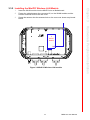
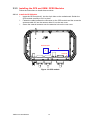
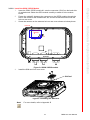
Optional accessories, like mounting kits or other functional modules are available for
purchase to complement TREK-743. The following are instructions for accessory
installation.
3.3.1 Installing Ram-mount Kits
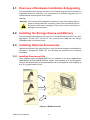
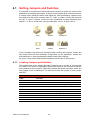
Three different types of RAM-MOUNT kits are available to fit various applications;
RAM-MOUNT-01 and RAM-MOUNT-02 support units weighing up to 4.5 kg (approximate 10 lbs); RAM-MOUNT-03 and RAM-MOUNT-05E mount supports units weighing up
to 6.75 kg (approximate 15 lbs).
Figure 3.1 RAM mount kits
TREK-743 User Manual
12