1
www.elationlighting.com
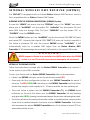
EDIT PROGRAM – Record Controller – Working With Built In Programs
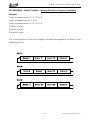
A Master unit can send up to 3 different data groups to the Slave units, i.e. a Master
unit can start 3 different Slave units, which run 3 different programs. The Master unit
sends the 3 program parts in a continuous loop.
The Slave unit receives data from the Master unit according to the group which the
Slave unit was assigned to. If e.g. a Slave unit is set to “Slave 1” in the menu
“SetSlave”, the Master unit sends “Prog 1” to the Slave unit.
If set to “Slave 2”, the Slave unit receives “Prog 2”.
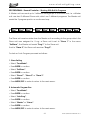
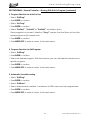
To start an Auto Program proceed as follows:
1. Slave Setting
• Select “FuncMode”.
• Press ENTER to confirm.
• Select “SetSlave”.
• Press ENTER to confirm.
• Select “Slave 1”, “Slave 2” or “Slave 3”.
• Press ENTER to confirm.
• Press MODE/ESC in order to return to the main menu.
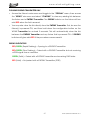
2. Automatic Program Run
• Select “FuncMode”.
• Press ENTER to confirm.
• Select “AutoProg”.
• Press ENTER to confirm.
• Select “Master” or “Alone”.
• Press ENTER to confirm.
• Press MODE/ESC in order to return to the main menu.
23
VOLT Q3™ User Manual ver 1