1
Stellar Wipe
Version 2.0
User Guide
Overview
Stellar Wipe is a comprehensive solution to maintain your computer privacy by wiping worthless yet sensitive
information from your computer, beyond recovery.
Operating systems store record of all activities such as browsing Internet, opening documents constantly. In
addition, deleted or formatted data also has traces on hard disk, data recovery software use these traces to
recover data, making the hard disk inefficient. When you delete data from hard disk the data content is not
deleted entirely, instead the space occupied by previous data is marked as free space and the new data is
written on that free space.
Stellar Wipe erases selected data completely from hard disk. Once data is wiped by using Stellar Wipe you will
not be able to recover that data. Stellar Wipe also erases all system traces. In addition, it can erase free space
completely such that all traces of previously stored data will be completely removed.
Stellar Wipe can use any of the 11 algorithms for wiping process. Extremely secure algorithms which confirm to
the US Government DoD standards are used to ensure permanent data deletion. The software is menu driven,
simple to use with an intuitive interface, and requires no prior technical skill.
Key Features
• Wipes Internet browsing data stored by Web browsers, such as:
o Temporary internet files: deletes content of internet pages visited by you
o Cookies: deletes cookies left by internet sites
o Page History: cleans the history that stores list of visited web sites
o Form Values: information saved and used by web browsers to automatically complete web forms
• Wipe file and folder
You can erase files and folders completely from hard disk. You can select an individual file or an entire
folder.
• Wipe system traces:
Logs such as cups access logs, install logs, console logs
• Wipe unused space:
You can completely erase all traces of previously stored on the unused space of hard disk. This makes a
cleaner, safer and more efficient hard disk.
• Wipe Recent File Histories
Some applications show a list of files recently opened in them for quick access. In spite of helping user this
list also act as a proof of our activity in the application. Wipe recent files history of the application helps in
maintaining full privacy by deleting this list.
• Wipe Instant Messaging
Chat messenger help in communicating through internet by sending and receiving short text messages.
Some messengers keep history of the conversation. This saved conversation should be wiped to delete any
proof of the conversation. Wipe Instant messages option of the application deletes all the saved
conversation in the messengers efficiently.
• Schedule the wipe task
You can schedule task such that wiping process defined for system traces, internet activity and volume of
hard disk should start automatically at the configured option.
• Wiping algorithm
You can set the wiping algorithm for files and folders. You can choose any algorithm from 11 algorithms,
such as Zeroes, Pseudo Random, DoD 5220.22-M, DoD 5200.28-STD, Russian standard, German
Standard.
Installation Procedure
Before installing the software, ensure that your computer meets the minimum system requirements.
Minimum System Requirements
• Processor: Intel G4 or later
• RAM: 256 MB recommended
• Hard Disk: 25 MB of free space
• Operating System: Mac OS X 10.4 or later
To install the software:
1. Unpack SWP.dmg.zip file.
2. After decompressing it, double click .dmg file. This will mount a virtual volume - SWP.
3. Double-click SWP volume to open SWP window. Copy Stellar Wipe to location where you want to install
Stellar Wipe.
4. The Stellar Wipe icon appears on the installed location.
Order and Register
You can purchase the software online. For price details and to place the order, click here.
On confirmation of order, a pre-paid serial number is sent to you through e-mail, which would be required to
register the software.
Register Stellar Wipe:
After receiving the Registration Key, the software can be registered.
To register the software:
1. Click Tools and select Register.
2. Type key number, received through e-mail, in the key text box. Click OK.
If typed key is correct, registration will be successful. Otherwise, you will get a message to check the registration
key.
User Interface
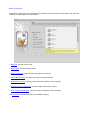
Stellar Wipe software has a rich Graphical User Interface (GUI) with easy to use features. The main user
interface of Stellar Wipe is as shown below:
• Wipe File: use this to wipe a file
• Wipe Folder: use this to wipe a folder
• Wipe Free Space: use this to wipe free space from volumes
• Wipe Internet Activity: use this to wipe internet related activities
• Wipe System Traces: use this to wipe information related to your computer.
• Wipe Recent File Histories: use this to wipe recent history of files.
• Wipe Instant Messaging: use this to wipe to wipe saved chat messages
The menu bar of Stellar Wipe also provide different options.
Menubar
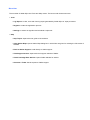
The menubar of Stellar Wipe has Tools and Help menus. The items under these menus are:
• Tools
o Log Report: to view, save and clear log report generated by Stellar Wipe of wipe processes.
o Register: to start the registration process
o Settings: to select an algorithm and schedule a wipe task
• Help
o Help Topics: Opens the user guide of the software
o Order Stellar Wipe: Opens Stellar Wipe dialog box in which links are given for ordering the full version of
software
o Email to Stellar Support: email directly to Stellar support
o View Support Section: Opens technical support website of Stellar
o View Knowledge Base Articles: Opens Stellar website for articles
o Generate a Ticket: Sends request to Stellar support
Wipe File
Stellar Wipe can wipe any file from hard disk. The wiped file cannot be recovered once the wiping process is
finished. You can select a single file at a time to wipe. You can also select the algorithm to be used for wiping
the selected file.
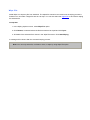
To wipe file:
1. In the Wiping Options screen, select Wipe File option.
2. Click Browse, locate and select the file that needs to be wiped and click Open.
3. All details of the selected file is shown in the Wipe File screen. Click Start Wiping.
A message will be shown after the successful wiping process.
Note: You can only select file, not folder or drive, to wipe by using Wipe File option.
Wipe Folder
Stellar Wipe can wipe any folder from hard disk. All files that are stored in the selected folder will also be wiped.
The wiped folder cannot be recovered once the wiping process is finished. You can select a single folder at a
time to wipe. You can also select the algorithm to be used for wiping the selected folder.
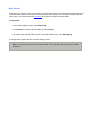
To wipe folder:
1. In the Wiping Options screen, select Wipe Folder.
2. Click Browse, locate and select the folder and click Choose.
3. All details of the selected folder is shown in the Wipe Folder screen. Click Start Wiping.
A message will be shown after the successful wiping process.
Note: You cannot select files from the selected folder. The entire folder will be wiped not individual
files from it.
Wipe Free Space
Stellar Wipe can wipe the unused or free space completely from hard disk. When you delete data from hard disk,
the space where data was stored is marked as free space. The original data remains there and the new data
may overwrite the previously stored data.
The previously stored data is retrievable. If you have stored sensitive information on your computer and later
deletes it then still the deleted data can be retrieved. Therefore you should wipe the free space to make your
computer clean and safe. Once free space is wiped then previously stored data cannot be retrieved.
To wipe free space:
1. In the Wiping Options screen, select Wipe Free Space.
2. Select a volume from which free space needs to be wiped. Click Start Wiping.
A message will be shown after the successful completion of wiping process.
Wipe Internet Activity
Web browsers store browsing information consistently on hard disk. Information such as temporary internet files,
cookies, user session are saved in different files.
These files use space on hard disk and also contain sensitive data. If user has access to your computer then the
user can view these files and obtain information related to Web browsing activities. You should wipe these files
to clean and protect your computer from unauthorized users.
Stellar Wipe can completely wipe Web browsing related information saved by these Web browsers:
• Camino
• Firefox
• Internet Explorer
• OmniWeb
• Opera
• Safari
• Adobe Flash Player
• Flock
• Google Chrome
• iCab
• Navigator
In addition, you can select all or specific files to be wiped that are saved by these browsers.
To wipe Internet activity:
1. In the Wiping Options screen, select Wipe Internet Activity.
2. In the Wipe Web Browsers and Internet Activity screen, under List of Web Browsers, Web browsers that
are installed on your computer are visible, others are greyed. Select the Web browser of which data
needs to be wipe.
3. Check the check boxes of items that should be wiped. Click Start Wiping.
All the selected items will be completely erased.
Wipe System Traces
Operating Systems (OSs) consistently stores all user activity on hard disk. OS creates several log files
corresponding to different activities. For example, OS stores all information related to newly installed software in
Install log files.
These log files consumes space and also their size keeps increasing as activities performed. An unauthorized
user can view these files if the user has access to your computer and can use the information specific to you.
You should remove these log files to clean and protect your computer from unauthorized users.
To wipe system traces:
1. In the Wiping Options screen, select Wipe System Traces.
2. In the System related logs screen, all log files that are created and saved by OS is shown. Check the check
boxes of log names that should be wiped. Click Start Wiping.
A message will be shown after the successful completion of wiping process.
Wipe Recent File Histories
Many applications store information about the files opened in them. A fixed number of the files that were recently
opened in the application is shown as a list in the 'File' menu. These file links actually speed up the file opening
process but also act as a proof of the file access activity, creating a breach to privacy.
Stellar Wipe can completely wipes recent file history and any other related information saved by applications in
these supported application categories :
• All Applications
• Disk Utility
• Finder
• iPhoto
• iTunes
• Quick Time
• VLC
• MPlayer
• Preview
In addition, you can select all or specific applications from the list.
To wipe Recent File Histories:
• In the Wiping Options screen, select Wipe Recent File Histories.
• In the Wipe Recent File Histories screen, under list of application, select the applications whose recent
file list needs to be wiped. Click Start Wiping.
All the recent file history of selected items will be completely erased.
Wipe Instant Messaging
Most of the chat messengers store chat information consistently on hard disk. Information such as login time,
logout time, messages sent and received are saved in the chat history. These saved messages are a threat to
users privacy.
Stellar Phoenix Wipe can completely wipe instant messages related information saved by these chat
messengers:
• Adium
• AIM
• aMSN
• Fire
• iChat
• ICQ
• Microsoft Messenger
• Proteus
• Skype
• Yahoo Messenger
In addition, you can select all or specific applications whose messages are to be wiped.
To wipe Instant Messages:
• In the Wiping Options screen, select Wipe Instant Messaging.
• In the Wipe Instant Messaging screen, under List of messengers that are installed on your computer
are visible, others are greyed. Select the messengers whose messages needs to be wipe. Click Start
Wiping.
All the selected items will be completely erased.
Wipe Settings
You change the algorithm that should be used in wiping process. In addition, you can schedule a wiping task
such that wiping process should automatically start at specified time.
• Select Algorithm
• Schedule and configure a wipe task
Selecting Algorithm
An algorithm refers to the method that software uses to wipe data from the hard disk. Different algorithms
overwrite data in different ways - algorithms overwrite clusters of the hard disk with either zero's, or pseudo
random numbers, or both zero's and pseudo random numbers.
Stellar Wipe includes 11 different algorithms that can be used with wiping process. All are listed in ascending
order of efficiency and descending order of speed. The Zeros algorithm is the quickest but least efficient, while
the DoD and B.Schneier's algorithms are slower but much more efficient.
To select an algorithm:
1. On the Tools menu and select Settings.
2. Click Select Algorithm tab.
3. Select an algorithm from the list of algorithm and click OK.
Scheduling Tasks
You can configure and schedule a wiping task such that the configured task starts automatically at the specified
time. You can configure and schedule a wiping task for system traces, Web browsers information and free
space from volume.
To configure and schedule a wiping task:
a) Configure the time schedule
b) Select wiping options
a) Configure the time schedule
Stellar Wipe provides you two options for setting time for a wiping task.
• Every
Select Every option if you want to schedule the task on every reboot or any day of week. Select Every
option, click Every combo box and then select a day from the list.
• On
Select On if you want to schedule the task to start automatically on specified date and time.
1. Click On option and then click drop-down combo box to view calendar.
2. Click back or forward arrows to select past or coming months. Select a month and then click a date.
This will be the date, month and year on which task will automatically starts.
3. Click At combo box to set the time. Place the cursor on hour, minute or AM\PM column to adjust time.
Use up and down arrows to set time or manually enter the time.
b) Select wiping options
Select wiping options that should be performed on specified time. You can configure the task to wipe system
traces, internet activity and free space. All can be selected simultaneously or only one can be selected.
• Select volume
Click on a volume name of which free space should be wiped. Click OK, after configuring the time schedule
and selecting the wiping options.
• Select system traces:
In the Select task from list box, double-click System log to view log files type that can be wiped. Check the
check boxes of log file names that need to be wiped.
• Select Web browser files
In the Select task from list box, double-click Web Browsers(s) to view the list of Web browsers. Double-click
a Web browser name to view files that can be wiped. Check the check boxes of file names.
• Select Recent File Histories
In the Select task from list box, double-click on application history whose files should be wiped. Click OK,
after configuring the time schedule and selecting the wiping options.
• Select Instant Messaging
In the Select task from list box, double-click on a chat messengers whose messages should be wiped. Click
OK, after configuring the time schedule and selecting the wiping options.
You can also remove a configure task.
To remove a scheduled task:
• Select Cancel Previous Scheduling option and then click OK.
Log Report
You can view, clear and save log report of processes that are processed by Stellar Wipe.
• To view log report
On the Tools menu, select Log Report.
• To save log report
1. On the Tools menu, select Log Report.
2. Click Save Log.
3. In the Log Report to File dialog box, specify the destination to save log file. Click Save.
• To clear log report
1. On the Tools menu, select Log Report.
2. Click Clear Log.
Copyright
Stellar Wipe software, accompanied user manual and documentation are copyright of Stellar Information
Systems Ltd., with all rights reserved. Under the copyright laws, this user manual cannot be reproduced in any
form without the prior written permission of Stellar Information Systems Ltd. No Patent Liability is assumed,
however, with respect to the use of the information contained herein.
Copyright ©1995-2010 by Stellar Information Systems Ltd. All rights reserved.
Disclaimer
The Information contained in this manual, including but not limited to any product specifications, is subject to
change without notice.
STELLAR INFORMATION SYSTEMS LTD PROVIDES NO WARRANTY WITH REGARD TO THIS MANUAL
OR ANY OTHER INFORMATION CONTAINED HEREIN AND HEREBY EXPRESSLY DISCLAIMS ANY
IMPLIED WARRANTIES OF MERCHANTABILITY OR FITNESS FOR ANY PARTICULAR PURPOSE WITH
REGARD TO ANY OF THE FOREGOING STELLAR INFORMATION SYSTEMS LTD ASSUMES NO
LIABILITY FOR ANY DAMAGES INCURRED DIRECTLY OR INDIRECTLY FROM ANY TECHNICAL OR
TYPOGRAPHICAL ERRORS OR OMISSIONS CONTAINED HEREIN OR FOR DISCREPANCIES BETWEEN
THE PRODUCT AND THE MANUAL. IN NO EVENT SHALL STELLAR INFORMATION SYSTEMS LTD, BE
LIABLE FOR ANY INCIDENTAL, CONSEQUENTIAL SPECIAL, OR EXEMPLARY DAMAGES, WHETHER
BASED ON TORT, CONTRACT OR OTHERWISE, ARISING OUT OF OR IN CONNECTION WITH THIS
MANUAL OR ANY OTHER INFORMATION CONTAINED HEREIN OR THE USE THEREOF.
Trademarks
Stellar Wipe® is a registered trademark of Stellar Information Systems Ltd.
Mac OS X® is a registered trademark of Apple Computers.
All Trademarks Acknowledged.
All other brands and product names are trademarks or registered trademarks of their respective companies.
License Agreement
Stellar Wipe
Copyright © 1995-2010 by Stellar Information Systems Ltd. INDIA
www.stellarinfo.com
All rights reserved.
All product names mentioned herein are the trademarks of their respective owners.
This license applies to the standard-licensed version of Stellar Wipe.
Your Agreement to this License
You should carefully read the following terms and conditions before using, installing or distributing this software,
unless you have a different license agreement signed by Stellar Information Systems Ltd.
If you do not agree to all of the terms and conditions of this License then do not copy, install, distribute or use
any copy of Stellar Wipe with which this License is included, you may return the complete package unused
without requesting an activation key within 30 days after purchase for a full refund of your payment.
The terms and conditions of this License describe the permitted use and users of each Licensed Copy of Stellar
Wipe. For purposes of this License, if you have a valid single-user license, you have the right to use a single
Licensed Copy of Stellar Wipe. If you or your organization has a valid multi-user license, then you or your
organization has the right to use up to a number of Licensed Copies of Stellar Wipe equal to the number of
copies indicated in the documents issued by Stellar when granting the license.
Scope of License
Each Licensed Copy of Stellar Wipe may either be used by a single person or used non-simultaneously by
multiple people who use the software personally installed on a single workstation. This is not a concurrent use
license.
All rights of any kind in Stellar Wipe, which are not expressly granted in this license, are entirely and exclusively
reserved to and by Stellar Information Systems Ltd. You may not rent, lease, modify, translate, reverse
engineer, decompile, disassemble or create derivative works based on Stellar Wipe nor permit anyone else to
do so. You may not make access to Stellar Wipe available to others in connection with a service bureau,
application service provider or similar business nor permit anyone else to do so.
Warranty Disclaimers and Liability Limitations.
Stellar Wipe and all accompanying software, files, data and materials are distributed and provided AS IS and
with no warranties of any kind, whether expressed or implied. In particular, there is no warranty for the quality of
data recovered. You acknowledge that good data processing procedure dictates that any program including
Stellar Wipe must be thoroughly tested with non-critical data before there is any reliance on it and you hereby
assume the entire risk of all use of the copies of Stellar Wipe covered by this License. This disclaimer of
warranty constitutes an essential part of this License.
In addition, in no event does Stellar authorize you or anyone else to use Stellar Wipe in applications or systems
where its failure to perform can reasonably be expected to result in a significant physical injury or in loss of life.
Any such use is entirely at your own risk and you agree to hold Stellar harmless from any and all claims or
losses relating to such unauthorized use.
General
This License is the complete statement of the agreement between the parties on the subject matter and merges
and supersedes all other or prior understandings, purchase orders, agreements and arrangements. This License
shall be governed by the laws of the State of Delhi, India. Exclusive jurisdiction and venue for all matters relating
to this License shall be in courts and for a located in the State of Delhi, India and you consent to such
jurisdiction and venue. There are no third party beneficiaries of any promises, obligations or representations
made by Stellar herein. Any waiver by Stellar of any violation of this License by you shall not constitute nor
contribute to a waiver by Stellar of any other or future violation of the same provision or any other provision of
this License.
Copyright ©1995-2010 by Stellar Information Systems Ltd. All rights reserved.
Technical Support
Our Technical Support professionals will give solutions for all your queries related to Stellar Products.
You can either Call Us or Go Online to our support section http://stellarinfo.com/support/
Support Helpline
Monday – Friday [ 24 Hrs. a day ]
USA (Tollfree- Pre Sales Queries)
+1-877-778-6087
USA (Post Sales Queries)
+1-732-584-2700
UK (Europe)
+44-203-026-5337
Australia & Asia Pacific
+61-280149899
Netherlands Pre & Post Sales Support
+31-208-111-188
Worldwide
+91-921-395-5509
Skype Id
stellarsupport
Email Orders
[email protected]
Online Help
• Chat Live with an Online technician
• Search in our extensive Knowledge Base
• Submit Enquiry (If our Knowledge Base does not answer your question)
About Stellar
Stellar Information Systems Ltd. is a trusted name in the field of Data Recovery and Data Protection Software
for more than a decade.
We provide the widest range of Data Recovery Products. Our range includes Data Recovery Software for almost
all Operating Systems and File Systems.
Product line:
Data Recovery
A widest range of data recovery software that helps you recover your valued data lost after accidental format,
virus problems, software malfunction, file/directory deletion, or even sabotage!. More Info >>
File Recovery
The most comprehensive range of file undelete and unerase software for Windows and MS office repair tools.
More Info >>
Email Recovery
A wide range of mail recovery, mail repair and mail conversion applications for MS Outlook, MS Outlook
Express and MS Exchange useful in instances of data loss due to damages and corruption of Email. More Info
>>
Data Protection
A wide range of Prevent Data Loss, Data backup and Hard Drive Monitoring Applications to ensure complete
data protection against hard drive crash. More Info >>
Data Sanitization
Data cleanup and file eraser utility can delete selected folders, groups of files, entire logical drives, System
Traces & Internet traces. Once the data have been removed using Stellar Wipe - Data File eraser utility, it is
beyond recovery limits of any Data Recovery Software or utility. More Info >>
For more information about us, please visit www.stellarinfo.com
FAQs
1. What is Stellar Wipe?
Stellar Wipe is a comprehensive solution to maintain your computer privacy by wiping worthless yet sensitive
information from your computer, beyond recovery.
Stellar Wipe erases selected data completely from hard disk. Once data is wiped by using Stellar Wipe you will
not be able to recover that data. Stellar Wipe also erases all system traces. In addition, it can erase free space
completely such that all traces of previously stored data will be completely removed
Stellar Wipe can use any of the 11 algorithms for wiping process. The software is menu driven, simple to use
with an intuitive interface, and requires no prior technical skill. These situations include :
• When you resell your computer
• When you donate your computer
• You are recycling or disposing the hard drives or any other electronic storage media
• You are merging, reconstructing or want to stop business
If any of these situations occurs, Stellar Wipe is the ideal solution to completely wipe the data from your
computer hard drive.
2. What are the key features of the application?
The key features of Stellar Wipe are:
• Wipes Internet browsing data stored by Web browsers, such as:
• Wipe file and folder
• Wipe system traces
• Wipe unused space
• Wipe Recent File Histories
• Wipe Instant Messaging
• Schedule the wipe task
• Wiping algorithm
3. How do I wipe my files?
Stellar Wipe can wipe any file from hard disk. The wiped file cannot be recovered once the wiping process is
finished. You can select a single file at a time to wipe. You can also select the algorithm to be used for wiping
the selected file.
To wipe file:
1. In the Wiping Options screen, select Wipe File option.
2. Click Browse, locate and select the file that needs to be wiped and click Open.
3. All details of the selected file is shown in the Wipe File screen. Click Start Wiping.
A message will be shown after the successful wiping process.