1
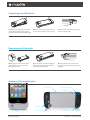
Connecting your iPod touch
➊ Slide the iPod in to the pulse case bottom
➋ Press the top of the iPod touch down in to
➌ Flip the switch to the gaming position and
end first; making sure the touch is securely
connected to the pass-through headphone jack.
the pulse case until the top snaps in to place.
launch your favorite game.
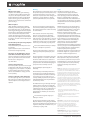
➊ Disengage the latch on the back of the
➋ Rock the iPod touch forward slightly and
➌ Recharge the pulse case and store it in a
device until the top of your iPod touch is
released from its catch.
slide it up to disconnect the touch from the
pass-through headphone jack.
safe place until your ready for your next round
of gaming.
Removing your iPod touch
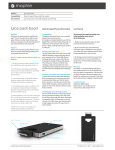
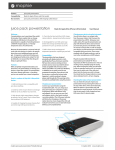
Anatomy of the mophie pulse
Volume buttons
Dual-injected game grip
3-way standby switch
Release latch
Stereo speakers
mophie pulse Manual
Sleep/wake button
LED Status Indicator
© mophie 2012 www.mophie.com