1
Thank you very much for your purchase of our LCD TV products. To enjoy your set to the full from the very beginning,
read this manual carefully and keep it handy for future reference.
Contents
Safety Instructions.........................................................3
How to use “SET UP” ·······························11
To place .............................................................. 3
TIMER................................................................ 13
Power cord protection .......................................... 3
How to enter “TIMER” ............................... 13
How to use
! Precaution...................................................... 3
“TIMER” ............................... 13
Maintenance.................................................................. 4
FUNCTION ........................................................ 14
Maintenance......................................................... 4
How to enter “FUNCTION”.......................... 14
Other items........................................................... 4
How to use “FUNCTION” ......................... 14
Installation .....................................................................5
How to use “Position” in YPbPr mode................ 15
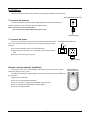
To connect the antenna........................................ 5
How to use “Position” in VGA mode .................. 15
To connect the power ........................................ .5
How to use “HDMI Position” in HDMI mode....... 15
Remote control's batteries installation.................. 5
Teletext Operation ...................................................... 16
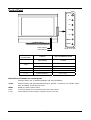
Control Panel ................................................................ 6
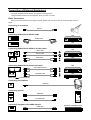
Connection of External Equipment.............................. 17
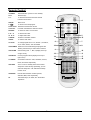
Remote Control ............................................................. 7
Socket Location ................................................. 17
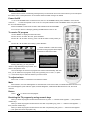
Basic Operation............................................................. 8
To Connect Speaker .......................................... 17
Power On/Off ....................................................... 8
Basic Connection ............................................... 18
To receive TV program......................................... 8
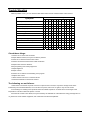
Trouble Shooting ........................................................ 19
To adjust volume .................................................. 8
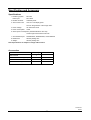
Specification and Accessory ....................................... 20
Mute ..................................................................... 8
Return .................................................................. 8
Receiving the TV program by using numeric keys8
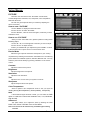
Using Menus ................................................................. 9
PICTURE ............................................................. 9
How to enter “PICTURE”............................. 9
How to use “PICTURE” ............................... 9
SOUND .............................................................. 10
How to enter “SOUND”.............................. 10
How to use “SOUND” ................................ 10
SET UP .............................................................. 11
How to enter “SET UP”.............................. 11
-2-