1
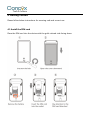
then Power LED will flash first, During signal searching process, GSM and GPS LED will
flash. Once GPS LED keeps solid light, it means the device has been located and it starts
to work.
Power off: Just turn off the power switch.
The device will begin to upload positioning data to server once inserting a valid SIM
card and power on. During the working time, it can upload data to server every 10
seconds.
6.2 Check location
1. Via SMS
1.1 SMS “WHERE#”, to the SIM number of device. The device will send a location
message automatically. You can get the coordinates. If the device does not search any
information of location, it will send “No data” to the cell phone.
Example:
Lat:N22.571285,Lon:E113.877115,Course:42.20,Speed:0.0740,DateTime:10-11-23
22:28:51
1.2 SMS “URL#”, to the SIM number of device. The device will send a location Google
Map link. If the device does not search any information of location, it will send “No
data” to the cell phone.
Example:
<Date Time:10-11-23 23:42:51> http://maps.google.com/maps?q=N22.5714