1
2. Before Using
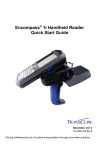
2.2 Button Layout and Physical Features
……………………………………………………………….
Part Description and Function
10
4
2
16
5
9
9
13
6
11
1
14
12
7
3
15
Name
1
2
3
4
5
6
7
9
8
10
11
12
13
14
15
16
Description
LCD
Touch screen on which information is displayed
Speaker
Part used as receiver where sound is output during telephone conversation
Buttons
Buttons used to enter phone numbers, or start or terminate the call
Bar Code Reader
Part where laser is output for bar code scanning
Camera and Flash
Camera and flash used to take pictures
Battery Switch
Switch used to mount or remove the battery
Battery
Standard or large capacity battery
Bar Code Scanner Button
Button used for bar code recognition
Earphone Jack
Hole into which the earphone is inserted
Snap-on Fixing Hole
Hole in which the snap-on for charging and synchronization is fixed
Volume Increase Button
Button used to increase the volume of telephone conversation
Volume Decrease Button
Button used to decrease the volume of telephone conversation
Sleep Button
Button used to turn on and off the LCD with the power on
Camera (Function) Button
Button used to start camera function or to be separately defined
snap-on Insertion Hole
Place to insert the snap-on for charging and synchronization
Stylus pen holder
Stylus pen holder
8