1
SETTINGS
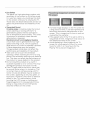
SE]-rINGS => PICTURE _ Picture Mode
Picture Option
SETTINGS => AUDIO _ Sound Out
TV Speaker
Adjusts detailed setting for images.
• Noise Reduction Eliminates noise in the
picture.
• MPEG Noise Reduction Eliminates noise
generated while creating digital picture
signals.
• Black Level Adjusts the brightness and
contrast of the screen to suit the black level.
• Real Cinema Optimizes the screen for movie
viewing.
• Motion Eye Care Saves power consumption
by adjusting the brightness corresponding to
the movement of the image on the screen.
• TruMotion [Depending upon model]
Corrects images to display smoother motion
sequences.
• Depending upon input signal or other picture
settings, the range of detailed items for
adjustment may differ.
Sound is output through the TV speaker.
SETTINGS => AUDIO _ Sound Out
External Speaker (Optical)
[Only available for models with an optical port]
Sound is output through the speaker connected
to the optical port,
• StMPLtNK is supported.
SETTINGS => AUDIO _ Sound Out
External Speaker (Optical) _ Digital Sound Out
[Depending
upon modet]
Sets up Digital Sound Out.
iO outpuq____ /
SETTINGS _ PICTURE -_ Energy Saving
J
Saves electric power by adjusting screen
brightness.
• OffTurns off the Energy Saving.
• Minimum / Medium / Maximum Applies the
pre-set Energy Saving.
• Screen Off Screen is turned off and only
sound is played. Press any button on the
remote control to turn the screen back on.
19
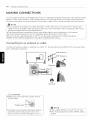
SETTINGS => AUDIO _ Sound Out
LG Sound Sync (Optical)
[Only available for models with an optical port]
Sound
,
Connect LG audio device with the sy_@logo to
the optical digital audio output port. LG audio
device allows you to enjoy rich powerful sound
easily.