1
2
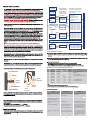
Turn off the ESC
Turn on the transmitter
Hold the SET key
Switch on the ESC
Release
Green LED flashes
Press
Enter the 1st item
SET key
SET key
"Running Mode"
1 time
Hold SET key for 3 seconds
Release
Green LED flashes
SET key
2 time
Press
Enter the 2nd item SET key
"Drag Brake Force"
Hold SET key for 3 seconds
Release
Green LED flashes
SET key
3 time
Press
Enter the 3rd item SET key
"Low Voltage Cut-Off"
Hold SET key for 3 seconds
Press the SET key to choose the programmable
value, the Red LED ? ashes for several times,
the times pressents the serial number of the
value you are choosing
Red LED
"Forward
Red LED
"Forward
Red LED
"Forward
flashes 1 time to choose
with brake"
flashes 2 times to choose
/ Reverse with brake"
flashes 3 times to choose
/ Reverse"
Red
Red
Red
Red
Red
Red
Red
Red
LED
LED
LED
LED
LED
LED
LED
LED
flashes
flashes
flashes
flashes
flashes
flashes
flashes
flashes
1
2
3
4
5
6
7
8
time, choose "0%"
times, choose "5%"
times, choose "10%"
times, choose "20%"
times, choose "40%"
times, choose "60%"
times, choose "80%"
times, choose "100%"
Red
Red
Red
Red
Red
Red
LED
LED
LED
LED
LED
LED
flashes
flashes
flashes
flashes
flashes
flashes
1
2
3
4
5
6
time, choose "None"
times, choose "2.6V"
times, choose "2.8V"
times, choose "3.0V"
times, choose "3.2V"
times, choose "3.4V"
……The following steps are just like the above steps……
Hold SET key for 3 seconds
Press
Green LED flashes
N time
Release
SET key
Enter the Nth item
SET key
Press SET key to choose the value, the
flash times of Red LED means the serial
number of the value (1 time means the 1st
value, 2 times means the 2nd value, etc.)
Finish programming, switch off the ESC, and then switch it on
Red LED flashes
Enter the corresponding
programmable item, the
Red LED flashes for
several times, the times
presents the current
value of this item
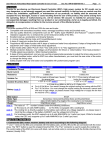
ALERT TONES AND LED STATUS
1
2
3
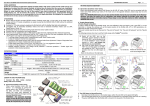
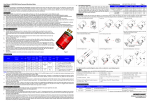
BRUSHLESS SYSTEM CONFIGURATION SUGGESTION
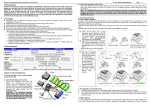
Top point of maximum throttle
Forward zone
Brake and
backward
zone
Neutral zone
Neutral point
Brake and backward zone
Top point of maximum brake
Forward
zone
Top point of
maximum brake
Gear Rate
Gear Rate
1/10 On Road
1/10 Off Road
Suitable
ESC
Motor
KV/ Power
3.5T
9100KV/600W
9.6-11.0
4.5T
7300KV/500W
8.4-10.0
5.5T
6000KV/400W
8.0-9.4
10.0-12.0
120A
6.5T
5200KV/350W
7.4-8.4
9.0-11.0
120A
120A
120A
8.5T
4000KV/300W
6.0-7.0
8.0-9.6
120A/60A
10.5T
3300KV/250W
5.0-6.0
7.5-8.5
120A/60A
13.5T
2700KV/200W
4.5-5.5
7.0-8.0
120A/60A
17.5T
1900KV/150W
4.5-5.5
6.0-8.0
120A/60A
Application
1/10, 1/12 On-road competitive racing
(Modified group)
1/10 On-Road sportful racing
1/10 Off-road competitive racing (Modified group)
1/10, 1/12 On-Road sportful racing
1/10, 1/12 Off-Road sportful racing
Neutral point
Neutral zone
Top point of
maximum throttle
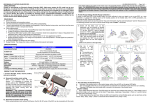
Trouble
Possible Reason
Solution
are not
Check the power connections, replace the
connectors or switch
After power on, motor doesn’t work, no sound
is emitted
The connections of battery pack
correct
The switch is damaged
After power on, motor can’t work, emits “beepbeep-, beep-beep-” alert tone. (Every group
“beep-beep-” has time interval of 1 sec )
Input voltage is abnormal, too high or too low.
Check the voltage of the battery pack
After power on, the red LED lights, but motor
cannot run
Throttle signal is abnormal
Check the transmitter and the receiver, and
check the signal wire connection of your ESC
The motor runs in the opposite direction
1) The wire connections between the ESC
and the motor need to be changed
1) Swap any two wire connections between
the ESC and the motor. (Note: This method is
ONLY available for SENSORLESS motor )
2) Please don't use the ESC for this special
chassis.
2) The chassis is not suitable for this ESC
3
4
The motor stops running while in working
state
The ESC has entered the “Low voltage
protection mode” or the “Over-heat protection
mode”
3
4
The red LED flashes means Low voltage
protection, please replace the battery pack
The green LED flashes means Over-heat
protection, please wait for some minutes to
cool the ESC