1
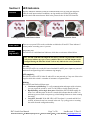
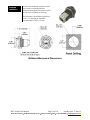
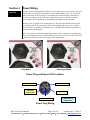
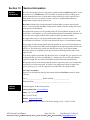
Section 3 Switch Installation Installation The IP67 Industrial Ethernet Switch can be fastened to any flat surface by using the supplied mounting ears or by mounting the box directly. Refer to the mechanical drawings below. Make sure to allow enough room to route your Ethernet and power cables. Note: The switch is typically shipped with the mounting ears unattached. To attach these ears or to mount the box directly you must remove the four cover screws and remove the cover. Then use the supplied screws to attach the mounting ears, or mount the box base directly to any flat surface. When replacing the cover make sure to tighten the cover screws evenly and firmly to ensure a water-tight seal. Use these holes to mount the box directly (without ears). You must remove the cover to access these holes. Switch Mechanical Dimensions IP67 Switch User Manual Page 9 of 30 Last Revised: 17-Dec-13 Red Lion Controls 20 Willow Springs Circle York, PA 17406 USA +1-877-432-9908 [email protected]