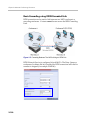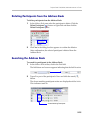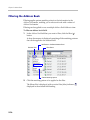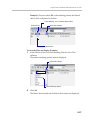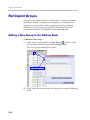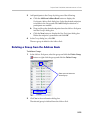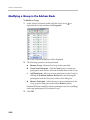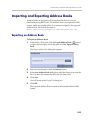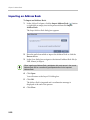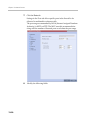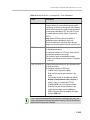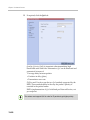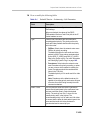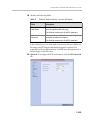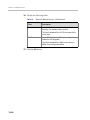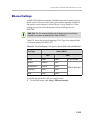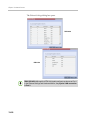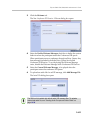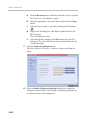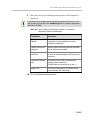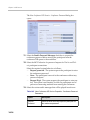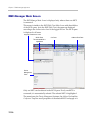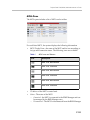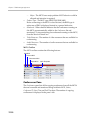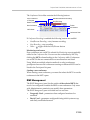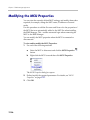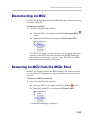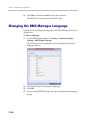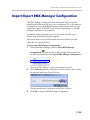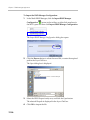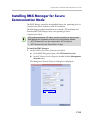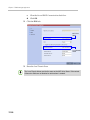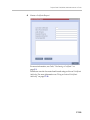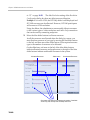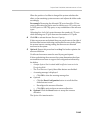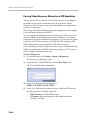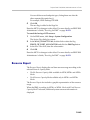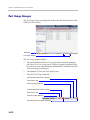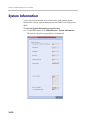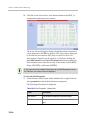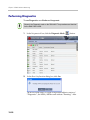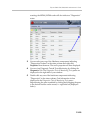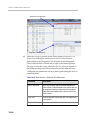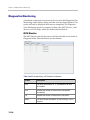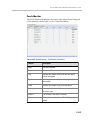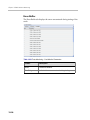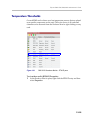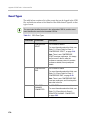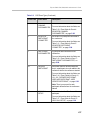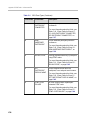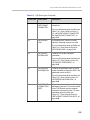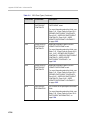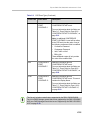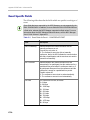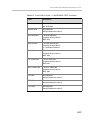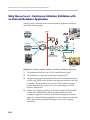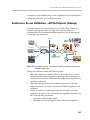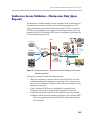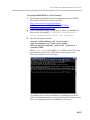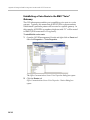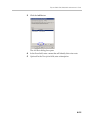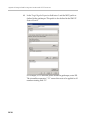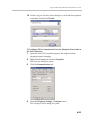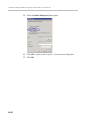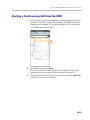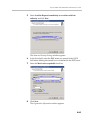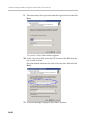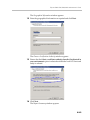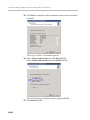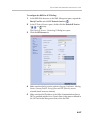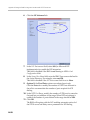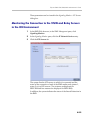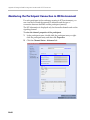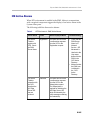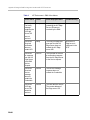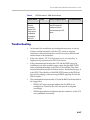
1
Polycom® RMX® 1500/2000/4000 Administrator’s Guide Version 7.0.2 | December 2010 | DOC2561C Trademark Information Polycom®, the Polycom “Triangles” logo, and the names and marks associated with Polycom’s products are trademarks and/or service marks of Polycom, Inc., and are registered and/or common-law marks in the United States and various other countries. All other trademarks are the property of their respective owners. Patent Information The accompanying product is protected by one or more U.S. and foreign patents and/or pending patent applications held by Polycom, Inc. © 2010 Polycom, Inc. All rights reserved. Polycom, Inc. 4750 Willow Road Pleasanton, CA 94588-2708 USA No part of this document may be reproduced or transmitted in any form or by any means, electronic or mechanical, for any purpose, without the express written permission of Polycom, Inc. Under the law, reproducing includes translating into another language or format. As between the parties, Polycom, Inc., retains title to and ownership of all proprietary rights with respect to the software contained within its products. The software is protected by United States copyright laws and international treaty provision. Therefore, you must treat the software like any other copyrighted material (e.g., a book or sound recording). Every effort has been made to ensure that the information in this manual is accurate. Polycom, Inc., is not responsible for printing or clerical errors. Information in this document is subject to change without notice. Regulatory Notices United States Federal Communication Commission (FCC) Part 15: Class A Statement. This equipment has been tested and found to comply with the limits for a Class A digital device, pursuant to Part 15 of the FCC Rules. Test limits are designed to provide reasonable protection against harmful interference when the equipment is operated in a commercial environment. This equipment generates, uses and can radiate radio-frequency energy and, if not installed and used in accordance with the instruction manuals, may cause harmful interference to radio communications. Operation of this equipment in a residential area is likely to cause harmful interference, in which case the user will be required to correct the interference at his or her own expense. Part 68: Network Registration Number. This equipment is registered with the FCC in accordance with Part 68 of the FCC Rules. This equipment is identified by the FCC registration number. If requested, the FCC registration Number and REN must be provided to the telephone company. Any repairs to this equipment must be carried out by Polycom Inc. or our designated agent. This stipulation is required by the FCC and applies during and after the warranty period. • • United States Safety Construction Details: All connections are indoor only. Unit is intended for RESTRICTED ACCESS LOCATION. • Unit is to be installed in accordance with the National Electrical Code. • The branch circuit overcurrent protection shall be rated 20 A for the AC system. • This equipment has a maximum operating ambient of 40°C, the ambient temperature in the rack shall not exceed this temperature. To eliminate the risk of battery explosion, the battery should not be replaced by an incorrect type. Dispose of used batteries according to their instructions. CE Mark R&TTE Directive Polycom Inc., declares that the Polycom RMX™ 2000 is in conformity with the following relevant harmonized standards: EN 60950-1:2001 EN 55022: 1998+A1:2000+A2:2003 class A EN 300 386 V1.3.3: 2005 Following the provisions of the Council Directive 1999/CE on radio and telecommunication terminal equipment and the recognition of its conformity. Canadian Department of Communications This Class [A] digital apparatus complies with Canadian ICES-003. Notice: The Industry Canada label identifies certified equipment. This certification means that the equipment meets telecommunication network protective, operational and safety requirements as prescribed in the appropriate Terminal Equipment Technical Requirements document(s). The Department does not guarantee the equipment will operate to the user's satisfaction. Before installing this equipment, users should ensure that it is permissible to be connected to the facilities of the local telecommunications company. The equipment must also be installed using an acceptable method of connection. The customer should be aware that compliance with the above conditions may not prevent degradation of service in some situations. Repairs to certified equipment malfunctions, may give the telecommunications company causes to request the user to disconnect the equipment. Users should ensure for their own protection that the electrical ground connections of the power utility, telephone lines and internal metallic water pipe system, if present, are connected together. This precaution may be particularly important in rural areas. Caution: Users should not attempt to make such connections themselves, but should contact the appropriate electric inspection authority, or electrician, as appropriate. Regulatory Notices RMX 2000: Chinese Communication Certificate Singapore Certificate RMX 2000 complies with IDA standards G0916-07 Polycom RMX 1500/2000/4000 Administrator’s Guide Table of Contents Conference Profiles . . . . . . . . . . . . . . . . . . . . . . . . . . . . 1-1 Conferencing Modes .............................................................................. 1-3 Standard Conferencing .................................................................. 1-3 Supplemental Conferencing Features ......................................... 1-5 Viewing Profiles ..................................................................................... 1-7 Profile Toolbar ................................................................................ 1-8 Defining Profiles ..................................................................................... 1-9 Modifying an Existing Profile ..................................................... 1-34 Deleting a Conference Profile ..................................................... 1-34 Additional Conferencing Information . . . . . . . . . . . . . . 2-1 Video Session Modes ............................................................................. 2-1 Line Rates for CP and VSW .......................................................... 2-2 Dynamic Continuous Presence (CP) Mode ................................ 2-3 Continuous Presence (CP) Conferencing ............................................ 2-4 Video Resolutions in CP ................................................................ 2-4 Video Resource Usage ........................................................... 2-5 Default Minimum Threshold Line Rates ............................ 2-5 Additional Video Resolutions in MPM+/MPMx Card Configuration Mode ....................................................................... 2-6 Additional Intermediate Video Resolutions ............................... 2-6 Video Display with CIF, SD and HD Video Connections ....... 2-7 Setting the Maximum CP Resolution for Conferencing ... 2-7 CP Conferencing with H.263 4CIF ............................................... 2-8 H.263 4CIF Guidelines ........................................................... 2-9 H.264 High Profile .......................................................................... 2-9 Guidelines ................................................................................ 2-9 H.264 High Profile System Flags ........................................ 2-10 Resolution Configuration ............................................................ 2-13 Guidelines .............................................................................. 2-13 Accessing the Resolution Configuration dialog box ....... 2-13 Modifying the Resolution Configuration in MPM or MPM+ Card Configuration Mode ........................................................... 2-14 i Table of Contents Max Resolution Pane ........................................................... 2-15 Limiting Maximum Resolution .......................................... 2-15 Resolution Configuration Pane .......................................... 2-15 Sharpness / Motion Resolution Slider Panes ................... 2-17 Modifying the Resolution Configuration in MPMx Card Configuration Mode ..................................................................... 2-18 Sharpness and Motion ......................................................... 2-19 Resolution Configuration - Basic ....................................... 2-19 Resolution Configuration - Detailed .................................. 2-20 Video Switching .................................................................................... 2-22 Guidelines ...................................................................................... 2-23 Enabling Video Switching ........................................................... 2-23 Modifying the Video Switching Threshold Bit Rate ....... 2-24 Creating a Video Switching Profile .................................... 2-24 Monitoring Video Switching Conferences ................................ 2-26 H.239 / People+Content ..................................................................... 2-27 H.239 ............................................................................................... 2-27 People+Content ............................................................................ 2-27 Guidelines .............................................................................. 2-27 Content Transmission Modes ..................................................... 2-28 Content Protocol ........................................................................... 2-29 Defining Content Sharing Parameters for a Conference ........ 2-30 Sending Content to Legacy Endpoints ...................................... 2-32 Guidelines for Sending Content to Legacy Endpoints .... 2-32 Interoperability with Polycom CMA and DMA .............. 2-33 Content Display on Legacy Endpoints .............................. 2-34 Enabling the Send Content to Legacy Endpoints Option ....... 2-35 Changing the Default Layout for Displaying Content on Legacy Endpoints ................................................................. 2-36 Stopping a Content Session ........................................................ 2-38 Video Preview ....................................................................................... 2-39 Video Preview Guidelines .......................................................... 2-39 Workstation Requirements ......................................................... 2-40 Testing your Workstation ................................................... 2-40 Previewing the Participant Video .............................................. 2-42 Gathering Phase .................................................................................... 2-44 Gathering Phase Guidelines ....................................................... 2-45 ii Polycom RMX 1500/2000/4000 Administrator’s Guide Gathering Phase Duration ................................................... 2-46 Enabling the Gathering Phase Display .............................. 2-47 Closed Captions .................................................................................... 2-48 Enabling Closed Captions ........................................................... 2-49 Message Overlay .................................................................................. 2-50 Guidelines ...................................................................................... 2-50 Enabling Message Overlay .......................................................... 2-51 Audio Algorithm Support ................................................................... 2-54 Guidelines ...................................................................................... 2-54 Mono ....................................................................................... 2-54 Stereo ...................................................................................... 2-55 Audio algorithms supported for ISDN ..................................... 2-56 Monitoring Participant Audio Properties ................................. 2-58 Media Encryption ................................................................................. 2-59 Media Encryption Guidelines ..................................................... 2-59 Conference Access ................................................................ 2-60 Entry Queue Access ............................................................. 2-62 Move Guidelines ................................................................... 2-64 Encryption Flag Settings .............................................................. 2-64 Enabling Encryption in the Profile ............................................. 2-65 Enabling Encryption at the Participant Level .......................... 2-65 Monitoring the Encryption Status .............................................. 2-66 LPR – Lost Packet Recovery ................................................................ 2-68 Packet Loss .................................................................................... 2-68 Causes of Packet Loss .......................................................... 2-68 Effects of Packet Loss on Conferences ............................... 2-68 Lost Packet Recovery ................................................................... 2-68 Lost Packet Recovery Guidelines ....................................... 2-69 Enabling Lost Packet Recovery .......................................... 2-69 Monitoring Lost Packet Recovery .............................................. 2-70 Telepresence Mode ............................................................................... 2-72 RMX Telepresence Mode Guidelines ........................................ 2-72 System Level .......................................................................... 2-72 Conference Level .................................................................. 2-73 Room (Participant/Endpoint) Level .................................. 2-73 Automatic detection of Immersive Telepresence (ITP) Sites ......................................................................................... 2-74 iii Table of Contents Striping Options ........................................................................... 2-75 Horizontal Striping .............................................................. 2-75 Asymmetric Letter box Cropping ...................................... 2-75 Gathering Phase with ITP Room Systems ........................ 2-75 Aspect ratio for standard endpoints .................................. 2-75 Video Fade is enabled for all Telepresence conferences . 2-75 RPX and TPX Video Layouts ...................................................... 2-76 Enabling Telepresence Mode ...................................................... 2-79 Conference Level .................................................................. 2-79 Room (Participant/Endpoint) Level .................................. 2-80 Saving an Ongoing Conference as a Template ................ 2-82 Starting an Ongoing Conference From a Template ......... 2-82 Monitoring Telepresence Mode ................................................. 2-84 Monitoring Ongoing Conferences ..................................... 2-84 Monitoring Participant Properties ..................................... 2-85 Lecture Mode ........................................................................................ 2-86 Enabling Lecture Mode ............................................................... 2-86 Enabling the Automatic Switching .................................... 2-86 Selecting the Conference Lecturer ..................................... 2-87 Restricting Content Broadcast to Lecturer ........................ 2-87 Content Broadcast Control .................................................. 2-88 Giving and Cancelling Token Ownership ........................ 2-89 Lecture Mode Monitoring ........................................................... 2-90 Permanent Conference ........................................................................ 2-93 Guidelines ...................................................................................... 2-93 Enabling a Permanent Conference ............................................. 2-94 Cascading Conferences ........................................................................ 2-95 General Guidelines ....................................................................... 2-95 Video Layout in Cascading conferences ........................... 2-96 DTMF Forwarding ............................................................... 2-97 Basic Cascading ............................................................................ 2-97 Basic Cascading using IP Cascaded Link .......................... 2-98 Basic Cascading using ISDN Cascaded Link ................. 2-100 Star Cascading Topology .......................................................... 2-102 Master-Slave Cascading .................................................... 2-103 Cascading via Entry Queue .............................................. 2-110 Monitoring Cascaded Conferences .................................. 2-116 iv Polycom RMX 1500/2000/4000 Administrator’s Guide Creating the Dial-out Link from a Conference Running on the MGC to the Conference Running on the RMX .. 2-117 Cascading Conferences - H.239-enabled MIH Topology ..... 2-118 MIH Cascading Levels ....................................................... 2-119 MIH Cascading Guidelines ............................................... 2-120 H.239 Content Sharing ....................................................... 2-122 Setting up MIH Cascading Conferences ......................... 2-123 MGC to RMX Cascading ................................................... 2-131 Starting and Monitoring MIH Cascading Conferences ........ 2-141 Monitoring Participants in an MIH Cascaded Conference ........................................................................... 2-141 Viewing Participant Properties ........................................ 2-143 Meeting Rooms . . . . . . . . . . . . . . . . . . . . . . . . . . . . . . . 3-1 Meeting Rooms List ............................................................................... 3-3 Meeting Room Toolbar & Right-click Menu .............................. 3-5 Creating a New Meeting Room ............................................................ 3-6 Entry Queues, Ad Hoc Conferences and SIP Factories . 4-1 Entry Queues ........................................................................................... 4-1 Defining a New Entry Queue ....................................................... 4-4 Listing Entry Queues ..................................................................... 4-8 Modifying the EQ Properties ........................................................ 4-9 Transit Entry Queue ....................................................................... 4-9 Setting a Transit Entry Queue .............................................. 4-9 IVR Provider Entry Queue (Shared Number Dialing) ............ 4-10 Call Flow ................................................................................ 4-10 Guidelines .............................................................................. 4-11 RMX Configuration .............................................................. 4-11 Ad Hoc Conferencing .......................................................................... 4-13 Gateway to Polycom® Distributed Media Application™ (DMA™) 7000 ....................................................................................... 4-14 SIP Factories .......................................................................................... 4-15 Creating SIP Factories .................................................................. 4-15 Address Book . . . . . . . . . . . . . . . . . . . . . . . . . . . . . . . . 5-1 Viewing the Address Book ................................................................... 5-2 Displaying and Hiding the Address Book .......................... 5-2 Adding a Participant to the Address Book ......................................... 5-4 Adding a new participant to the Address Book Directly ......... 5-4 v Table of Contents Adding a Participant from an Ongoing Conference to the Address Book ................................................................................ 5-13 Modifying Participants in the Address Book ........................... 5-14 Deleting Participants from the Address Book .......................... 5-15 Searching the Address Book ....................................................... 5-15 Filtering the Address Book ......................................................... 5-16 Participant Groups ............................................................................... 5-18 Adding a New Group to the Address Book ............................. 5-18 Deleting a Group from the Address Book ................................ 5-19 Modifying a Group in the Address Book ................................. 5-20 Importing and Exporting Address Books ......................................... 5-21 Exporting an Address Book ........................................................ 5-21 Importing an Address Book ........................................................ 5-22 Integrating the Polycom CMA™ Address Book with the RMX .... 5-23 Reservations . . . . . . . . . . . . . . . . . . . . . . . . . . . . . . . . . 6-1 Guidelines ................................................................................................ 6-1 System ...................................................................................... 6-1 Resources ................................................................................. 6-2 Reservations ............................................................................ 6-3 Using the Reservation Calendar .......................................................... 6-4 Toolbar Buttons ....................................................................... 6-4 Reservations Views ........................................................................ 6-5 Week View ............................................................................... 6-6 Day View ................................................................................. 6-6 Today View ............................................................................. 6-6 List View .................................................................................. 6-7 Changing the Calendar View ....................................................... 6-8 Scheduling Conferences Using the Reservation Calendar ............. 6-10 Creating a New Reservation ....................................................... 6-10 Managing Reservations ....................................................................... 6-18 Guidelines ...................................................................................... 6-18 Viewing and Modifying Reservations ....................................... 6-18 Using the Week and Day views of the Reservations Calendar ................................................................................. 6-18 Deleting Reservations .................................................................. 6-20 Searching for Reservations using Quick Search ...................... 6-21 vi Polycom RMX 1500/2000/4000 Administrator’s Guide Operator Assistance & Participant Move . . . . . . . . . . . 7-1 Operator Conferences ............................................................ 7-1 Defining the Components Enabling Operator Assistance ....... 7-3 Defining a Conference IVR Service with Operator Assistance Options ................................................................. 7-4 Defining an Entry Queue IVR Service with Operator Assistance Options ................................................................. 7-7 Defining a Conference Profile for an Operator Conference ............................................................................... 7-9 Defining an Ongoing Operator Conference ..................... 7-16 Saving an Operator Conference to a Template ................ 7-20 Starting an Operator Conference from a Template ......... 7-22 Monitoring Operator Conferences and Participants Requiring Assistance .................................................................... 7-23 Requesting Help ................................................................... 7-23 Participant Alerts List .......................................................... 7-25 Audible Alarms ............................................................................ 7-25 Using Audible Alarms ......................................................... 7-25 Moving Participants Between Conferences .............................. 7-26 Moving Participants ............................................................. 7-27 Conference Templates . . . . . . . . . . . . . . . . . . . . . . . . . . 8-1 Guidelines ................................................................................ 8-1 Using Conference Templates ................................................................ 8-3 Toolbar Buttons ....................................................................... 8-4 Creating a New Conference Template ................................................ 8-5 Creating a new Conference Template from Scratch .................. 8-5 Saving an Ongoing Conference as a Template ........................ 8-12 Saving an Operator Conference to a Template ................ 8-12 Starting an Ongoing Conference From a Template ......................... 8-14 Starting an Operator Conference from a Template ......... 8-15 Scheduling a Reservation From a Conference Template ................ 8-16 Deleting a Conference Template ........................................................ 8-18 Polycom Conferencing for Microsoft Outlook® . . . . . . . 9-1 Setting up the Calendaring Solution ................................................... 9-3 Calendaring Guidelines ............................................................... 9-10 Creating and Connecting to a Conference ........................................ 9-12 Creating a Conference ................................................................. 9-12 vii Table of Contents Connecting to a Conference ........................................................ 9-14 RMX Standalone Deployment ............................................ 9-15 RMX and Polycom DMA System Deployment ................ 9-15 Polycom Solution Support .......................................................... 9-16 Conference and Participant Monitoring . . . . . . . . . . . 10-1 General Monitoring .............................................................................. 10-2 Conference Level Monitoring ............................................................. 10-3 Monitoring Operator Conferences and Participants Requiring Assistance .................................................................. 10-12 Requesting Help ................................................................. 10-12 Participant Alerts List ........................................................ 10-14 Participant Level Monitoring ........................................................... 10-15 IP Participant Properties ................................................... 10-16 Monitoring ISDN/PSTN Participants ............................. 10-26 Monitoring Telepresence Participant Properties ........... 10-34 Recording Conferences . . . . . . . . . . . . . . . . . . . . . . . . 11-1 Multiple Recording Links ........................................................... 11-1 Creating Multiple virtual Recording Rooms on the RSS ................ 11-2 Configuring the RMX to Enable Recording ...................................... 11-2 Defining the Recording Link ...................................................... 11-3 Enabling the Recording Features in a Conference IVR Service ............................................................................................ 11-5 Enabling the Recording in the Conference Profile .................. 11-6 Recording Link Encryption ......................................................... 11-8 Managing the Recording Process ..................................................... 11-11 Recording Link Layout .............................................................. 11-11 Using the RMX Web Client to Manage the Recording Process .......................................................................................... 11-13 Using DTMF Codes to Manage the Recording Process ........ 11-15 Conference Recording with Codian IP VCR .................................. 11-16 Users, Connections and Notes . . . . . . . . . . . . . . . . . . 12-1 Listing Users .................................................................................. 12-2 Adding a New User ..................................................................... 12-3 Deleting a User ............................................................................. 12-4 Changing a User’s Password ...................................................... 12-5 Disabling a User ............................................................................ 12-6 Enabling a User ............................................................................. 12-7 viii Polycom RMX 1500/2000/4000 Administrator’s Guide Renaming a User .......................................................................... 12-7 Connections ........................................................................................... 12-9 Viewing the Connections List ..................................................... 12-9 User and Connection Management in Enhanced Security Mode 12-10 Managing the RMX Users ......................................................... 12-11 User Types ........................................................................... 12-11 Disabling/Enabling Users ................................................. 12-11 Renaming Users .................................................................. 12-11 Disabling Inactive Users .................................................... 12-11 Managing the User Login Process ........................................... 12-12 Implementing Strong Passwords ..................................... 12-12 Implementing Password Re-Use / History Rules ......... 12-13 Defining Password Aging ................................................. 12-14 Defining Password Change Frequency ........................... 12-14 Forcing Password Change ................................................. 12-15 Temporary User Lockout .................................................. 12-15 User Lockout ....................................................................... 12-15 User Login Record .............................................................. 12-16 Controlling RMX User Sessions ............................................... 12-17 Management Sessions per System ................................... 12-17 Sessions per User ................................................................ 12-17 Connection Timeout ........................................................... 12-17 Session Timeout .................................................................. 12-18 Erase Session History After Logout ................................. 12-18 Notes .................................................................................................... 12-19 Using Notes ................................................................................. 12-19 Network Services . . . . . . . . . . . . . . . . . . . . . . . . . . . . . 13-1 IP Network Services ............................................................................. 13-2 Management Network (Primary) ............................................... 13-2 Default IP Service (Conferencing Service) ................................ 13-3 Modifying the Management Network ...................................... 13-3 Modifying the Default IP Network Service ............................ 13-13 Ethernet Settings ......................................................................... 13-31 IP Network Monitoring ............................................................. 13-34 Using IPv6 Networking Addresses for RMX Internal and External Entities .......................................................................... 13-39 RMX Internal Addresses ................................................... 13-39 ix Table of Contents External Entities .................................................................. 13-39 IPv6 Guidelines ........................................................................... 13-39 Network Security ............................................................................... 13-41 Network Separation ................................................................... 13-41 RMX 1500/4000 .................................................................. 13-41 RMX 2000 ............................................................................. 13-42 Enabling Network Separation .......................................... 13-42 RMX Network Port Usage ................................................................ 13-46 ISDN/PSTN Network Services ........................................................ 13-50 Adding/Modifying ISDN/PSTN Network Services ............ 13-51 Obtaining ISDN/PSTN required information ............... 13-51 Modifying an ISDN/PSTN Network Service ......................... 13-60 IVR Services . . . . . . . . . . . . . . . . . . . . . . . . . . . . . . . . . 14-1 IVR Services List ................................................................................... 14-2 IVR Services Toolbar .................................................................... 14-3 Adding Languages ............................................................................... 14-4 Defining a New Conference IVR Service .......................................... 14-9 Defining a New Conference IVR Service .................................. 14-9 Entry Queues IVR Service ................................................................. 14-27 Defining a New Entry Queue IVR Service ............................. 14-27 Setting a Conference IVR Service or Entry Queue IVR Service as the Default Service ................................................... 14-34 Modifying the Conference or Entry Queue IVR Service Properties ..................................................................................... 14-35 Replacing the Music File ................................................................... 14-36 Adding a Music File ........................................................... 14-36 Creating Audio Prompts and Video Slides .................................... 14-38 Recording an Audio Message ................................................... 14-38 Creating a Welcome Video Slide .............................................. 14-42 Default IVR Prompts and Messages ................................................ 14-43 Volume Control of IVR Messages, Music and Roll Call ............... 14-47 The Call Detail Record (CDR) Utility . . . . . . . . . . . . . . 15-1 The CDR File ......................................................................................... 15-2 CDR File Formats ......................................................................... 15-2 CDR File Contents ........................................................................ 15-3 Viewing, Retrieving and Archiving Conference Information ....... 15-5 Viewing the Conference Records ............................................... 15-5 x Polycom RMX 1500/2000/4000 Administrator’s Guide Refreshing the CDR List .............................................................. 15-6 Retrieving and Archiving Conference CDR Records .............. 15-7 Gateway Calls . . . . . . . . . . . . . . . . . . . . . . . . . . . . . . . 16-1 Call Flows ...................................................................................... 16-1 Direct Dialing ........................................................................ 16-1 Gateway IVR ......................................................................... 16-5 PSTN Dial-in Using GK Prefix ............................................ 16-7 Interoperability with CMA ................................................. 16-9 Connection Indications .............................................................. 16-10 Gateway Functionality ............................................................... 16-11 Configuring the Gateway Components on the RMX ............ 16-12 Defining the IVR Service for Gateway Calls ................... 16-12 Defining the Conference Profile for Gateway Calls ...... 16-16 Defining the Gateway Profile ........................................... 16-17 Displaying the Connection Information - System Configuration ...................................................................... 16-21 Monitoring Ongoing Gateway Sessions ................................. 16-22 Gateway Session Parameters ............................................ 16-22 Connected Participant Parameters ................................... 16-23 Dialing to Polycom® DMA™ 7000 .................................................. 16-24 Direct Dialing from ISDN/PSTN Endpoint to IP Endpoint via a Meeting Room ..................................................................................... 16-25 RMX Manager Application . . . . . . . . . . . . . . . . . . . . . 17-1 Installing the RMX Manager ............................................................... 17-1 Starting the RMX Manager Application ........................................... 17-6 Connecting to the MCU ............................................................... 17-7 RMX Manager Main Screen ...................................................... 17-10 MCUs Pane .......................................................................... 17-11 Conferences Pane ................................................................ 17-12 RMX Management .............................................................. 17-13 List Pane ............................................................................... 17-14 Status Bar ............................................................................. 17-14 Address Book ...................................................................... 17-15 Conference Templates ........................................................ 17-16 Adding MCUs to the MCUs List ...................................................... 17-16 Starting a Conference ......................................................................... 17-19 Starting a Conference from the Conferences Pane ................ 17-19 xi Table of Contents Starting a Reservation ................................................................ 17-21 Starting an Ongoing Conference or Reservation From a Template ...................................................................................... 17-22 Monitoring Conferences .................................................................... 17-23 Grouping the Participants by MCU ......................................... 17-24 Start Monitoring/Stop Monitoring .......................................... 17-25 Modifying the MCU Properties ........................................................ 17-26 Disconnecting an MCU ..................................................................... 17-27 Removing an MCU from the MCUs Pane ...................................... 17-27 Changing the RMX Manager Language ......................................... 17-28 Import/Export RMX Manager Configuration ............................... 17-29 Installing RMX Manager for Secure Communication Mode ....... 17-31 Using an Internal Certificate Authority .................................. 17-36 RMX Administration and Utilities . . . . . . . . . . . . . . . . 18-1 System and Participant Alerts ............................................................ 18-1 System Alerts ................................................................................ 18-2 Participant Alerts .......................................................................... 18-4 System Configuration .......................................................................... 18-5 Modifying System Flags .............................................................. 18-5 Manually Adding and Deleting System Flags ....................... 18-18 JITC_MODE System Flag .......................................................... 18-33 Auto Layout Configuration ...................................................... 18-36 Customizing the Default Auto Layout ............................ 18-36 LEGACY_EP_CONTENT_DEFAULT_LAYOUT Flag Values ........................................................................................... 18-40 CS_ENABLE_EPC Flag ............................................................. 18-41 Automatic Password Generation Flags ................................... 18-42 Guidelines ............................................................................ 18-42 Enabling the Automatic Generation of Passwords ....... 18-43 RMX Time ............................................................................................ 18-47 Guidelines ............................................................................ 18-47 Altering the clock ....................................................................... 18-47 Resource Management ...................................................................... 18-49 Resource Capacity ...................................................................... 18-49 Resource Capacity Modes ................................................. 18-50 Resource Usage ................................................................... 18-51 Video/Voice Port Configuration ............................................. 18-54 xii Polycom RMX 1500/2000/4000 Administrator’s Guide Flexible Resource Capacity Mode .................................... 18-54 Fixed Resource Capacity ................................................... 18-54 Configuring the Video/Voice Resources in MPM Mode ..................................................................................... 18-55 Configuring the Video/Voice Resources in MPM+ and MPMx Mode ........................................................................ 18-56 Flexible Resource Capacity ............................................... 18-56 Forcing Video Resource Allocation to CIF Resolution . 18-61 Resource Report .......................................................................... 18-62 Displaying the Resource Report ....................................... 18-63 Resource Report Display in Flexible Resource Capacity Mode™ ................................................................................. 18-64 Resource Report in Fixed Resource Capacity Mode™ . 18-65 ISDN/PSTN ........................................................................ 18-66 RMX Resource Management by CMA and DMA ................. 18-67 Guidelines ............................................................................ 18-67 Port Usage Threshold ................................................................ 18-69 Setting the Port Usage Threshold ..................................... 18-69 SIP Dial-in Busy Notification ............................................ 18-70 Port Usage Gauges ..................................................................... 18-71 Port Gauges in Flexible/Fixed Capacity Modes ............ 18-72 System Information ............................................................................ 18-73 SNMP (Simple Network Management Protocol) .......................... 18-77 Detailed Description .................................................................. 18-77 MIB (Management Information Base) Files ............................ 18-77 Private MIBS ........................................................................ 18-77 Support for MIB-II Sections .............................................. 18-78 The Alarm-MIB ................................................................... 18-78 H.341-MIB (H.341 – H.323) ............................................... 18-78 Standard MIBs ..................................................................... 18-78 Traps ............................................................................................. 18-80 Status Trap Content ............................................................ 18-81 Defining the SNMP Parameters in the RMX .......................... 18-82 Audible Alarms .................................................................................. 18-88 Using Audible Alarms ............................................................... 18-88 Audible Alarm Permissions .............................................. 18-88 Stop Repeating Message .................................................... 18-89 xiii Table of Contents Configuring the Audible Alarms ............................................. 18-89 User Customization ............................................................ 18-89 Replacing the Audible Alarm File ................................... 18-90 Multilingual Setting ........................................................................... 18-93 Customizing the Multilingual Setting ..................................... 18-93 Banner Display and Customization ................................................. 18-94 Customizing Banners ................................................................. 18-94 Banner Display ............................................................................ 18-95 Login Screen Banner .......................................................... 18-95 Main Screen Banner ........................................................... 18-97 Software Management ....................................................................... 18-98 Backup and Restore Guidelines ............................................... 18-98 Using Software Management ........................................... 18-99 Ping RMX ........................................................................................... 18-101 Guidelines .................................................................................. 18-101 Using Ping ................................................................................. 18-101 Notification Settings ......................................................................... 18-103 Logger Diagnostic Files ................................................................... 18-105 Auditor ............................................................................................... 18-108 Auditor Files .............................................................................. 18-108 Auditor Event History File Storage ............................... 18-108 Retrieving Auditor Files .................................................. 18-109 Auditor File Viewer ................................................................. 18-111 Audit Events .............................................................................. 18-114 Alerts and Faults ............................................................... 18-114 Transactions ...................................................................... 18-116 ActiveX Bypass ................................................................................. 18-118 Installing ActiveX ..................................................................... 18-118 Resetting the RMX ............................................................................ 18-120 RMX Hardware Monitoring . . . . . . . . . . . . . . . . . . . . . 19-1 Viewing the Status of the Hardware Components ......................... 19-1 HW Monitor Pane Tool bar ................................................. 19-3 Viewing Hardware RMX 1500 Component’s Properties ................ 19-4 Viewing Hardware RMX 2000 Component’s Properties .............. 19-13 Viewing Hardware RMX 4000 Component’s Properties .............. 19-22 Diagnostic Mode (RMX 1500/2000/4000) ...................................... 19-31 Performing Diagnostics ............................................................. 19-32 xiv Polycom RMX 1500/2000/4000 Administrator’s Guide Diagnostics Monitoring ............................................................. 19-36 MCU Monitor ...................................................................... 19-36 Cards Monitor ..................................................................... 19-37 Error Buffer .......................................................................... 19-38 Temperature Thresholds ........................................................... 19-39 Appendix A - Disconnection Causes . . . . . . . . . . . . . . . A-1 IP Disconnection Causes. ..................................................................... A-1 ISDN Disconnection Causes .............................................................. A-10 Appendix B - Alarms and Faults . . . . . . . . . . . . . . . . . . B-1 Alarms ..............................................................................................B-1 Appendix C - CDR Fields - Unformatted File . . . . . . . . . C-1 The Conference Summary Record ...................................................... C-3 Event Records ........................................................................................ C-5 Standard Event Record Fields ..................................................... C-5 Event Types .................................................................................... C-6 Event Specific Fields ................................................................... C-16 Disconnection Cause Values .............................................................. C-55 MGC Manager Events that are not Supported by the RMX 1500/2000/ 4000 ........................................................................................................ C-59 Appendix D - Ad Hoc Conferencing and External Database Authentication . . . . . . . . . . . . . . . . . . . . . . . D-1 Ad Hoc Conferencing without Authentication ................................ D-2 Ad Hoc Conferencing with Authentication ...................................... D-3 Entry Queue Level - Conference Initiation Validation with an External Database Application .................................................... D-4 Conference Access with External Database Authentication ........... D-6 Conference Access Validation - All Participants (Always) ..... D-7 Conference Access Validation - Chairperson Only (Upon Request) .......................................................................................... D-9 System Settings for Ad Hoc Conferencing and External Database Authentication ..................................................................................... D-11 Ad Hoc Settings ........................................................................... D-11 Authentication Settings .............................................................. D-11 MCU Configuration to Communicate with an External Database Application .......................................................... D-13 Enabling External Database Validation for Starting New Ongoing Conferences .......................................................... D-15 xv Table of Contents Enabling External Database Validation for Conferences Access .................................................................................... D-16 Appendix E - Participant Properties Advanced Channel Information . . . . . . . . . . . . . . . . . . . . . . . . . . . . . . . . . . E-1 Appendix F - Secure Communication Mode . . . . . . . . . .F-1 Switching to Secure Mode ............................................................. F-1 Purchasing a Certificate ......................................................... F-1 Installing the Certificate ........................................................ F-3 Creating/Modifying System Flags ...................................... F-5 Enabling Secure Communication Mode ..................................... F-5 Alternate Management Network ......................................... F-6 Securing an External Database ..................................................... F-7 Appendix G - Configuring Direct Connections to RMX . G-1 Management Network (Primary) ....................................................... G-1 Alternate Management Network ........................................................ G-1 Configuring the Workstation ....................................................... G-2 Connecting to the Management Network ................................. G-7 Connecting to the Alternate Management Network ................ G-9 Connecting to the RMX via Modem ......................................... G-10 Procedure 1: Install the RMX Manager ............................ G-10 Procedure 2: Configure the Modem ................................. G-10 Procedure 3: Create a Dial-up Connection ...................... G-11 Procedure 4: Connect to the RMX ..................................... G-16 Appendix H - Setting the RMX for Integration Into Microsoft OCS Environment . . . . . . . . . . . . . . . . . . . . . . H-1 Setting the Matched URI Dialing Method ......................................... H-2 Configuring the OCS for RMX Systems ..................................... H-3 Setting the Trusted Host for RMX in the OCS .................. H-3 Setting the Static Route for RMX in the OCS ..................... H-6 Optional. Setting the Static Route & Trusted Host for RMX in the Load Balancer Server ....................................... H-7 Dialing to an Entry Queue, Meeting Room or Conference Using the Matched URI Method ................................................. H-9 Setting the Numerical Dialing Method ............................................ H-10 Setting the Numerical Dialing into RMX Meeting Rooms .... H-10 Configuring the RMX as a Routable Gateway ................ H-12 xvi Polycom RMX 1500/2000/4000 Administrator’s Guide Establishing a Voice Route to the RMX “Voice” Gateway ................................................................................ H-14 Configuring Office Communicator Users for Enterprise Voice ...................................................................................... H-18 Starting a Conferencing Call from the MOC ........................... H-23 Setting Simultaneous Numerical Dialing and Matched URI Routing .................................................................................................. H-24 Configuring the RMX 1500/2000/4000 for Microsoft OCS 2007 Integration ............................................................................................ H-25 Modify the RMX Management Network Service to Include the DNS Server ............................................................................. H-25 Defining a SIP Network Service in the RMX and Creating/ Installing the Security Certificate .............................................. H-27 The Security certificate ........................................................ H-27 Configuring the RMX IP Network Service ...................... H-28 Polycom RMX System Flag Configuration .............................. H-36 PFX Method - Creating the Security (TLS) Certificate in the OCS and Exporting the Certificate to the RMX Workstation .................................................................................. H-39 Retrieving the Certificate from the OCS to the RMX Workstation .......................................................................... H-45 Optional. Creating the Certificate Password File (certPassword.txt) ................................................................ H-48 Interactive Connectivity Establishment (ICE) ................................. H-49 ICE Guidelines ............................................................................. H-49 Connecting to the RMX in ICE Environment .......................... H-49 Dialing Methods .................................................................. H-50 Deployment Process for the RMX Systems ............................. H-51 Creating an Active Directory Account for the RMX ...... H-52 Enabling the RMX User Account for Office Communication Server ....................................................... H-55 Configuring the RMX for ICE Dialing .............................. H-56 Monitoring the Connection to the STUN and Relay Servers in the ICE Environment .............................................................. H-59 Monitoring the Participant Connection in ICE Environment ................................................................................. H-60 Active Alarms and Troubleshooting ................................................ H-63 Active Alarms .............................................................................. H-63 xvii Table of Contents ICE Active Alarms ....................................................................... H-65 Troubleshooting ........................................................................... H-67 Known Issues ............................................................................... H-68 Polycom Solution Support ......................................................... H-68 xviii 1 Conference Profiles Profiles stored on the MCU enable you to define all types of conferences. Profiles include conference parameters such as Bit Rate, Video Layout, Encryption, etc. The maximum of Conference Profiles can that be defined is: • RMX 1500 - 40 • RMX 2000 - 40 • RMX 4000 - 80 Conference Profiles are saved to Conference Templates along with all participant parameters, including their Personal Layout and Video Forcing settings, enabling administrators and operators to create, save, schedule and activate identical conferences. For more information see Chapter 8, “Conference Templates” . The RMX is shipped with a default Conference Profile which allows users to immediately start standard ongoing conferences. Its settings are as follows: Table 1-1 Default Conference Profile Settings Setting Value Profile Name Factory Video Profile Bit Rate 384Kbps H.239 Settings Graphics High Definition Video Switching Disabled Operator Conference Disabled Encryption Disabled LPR Enabled for CP Conferences 1-1 Chapter 1-Conference Profiles Table 1-1 Default Conference Profile Settings (Continued) Setting Value Auto Terminate • • After last participant quits - Enabled When last participant remains - Disabled Echo Suppression Enabled Keyboard Noise Suppression Disabled Video Quality Sharpness Video Clarity™ Enabled Content Video Definition • • Content Settings: Graphics Content Protocol: Up to H.264 Send Content to Legacy Endpoints Enabled Layout Auto Layout - Enabled Same Layout - Disabled Skin Polycom IVR Name Conference IVR Service This Profile is automatically assigned to the following conferencing entities: Name ID Meeting Rooms Maple_Room 1001 Oak_Room 1002 Juniper_Room 1003 Fig_Room 1004 Entry Queue Default EQ 1-2 1000 Polycom RMX 1500/2000/4000 Administrator’s Guide Conferencing Modes Standard Conferencing When defining a new video Profile, you select the parameters that determine the video display on the participant’s endpoint and the quality of the video. When defining a new conference Profile, the system uses default values for standard conferencing. Standard conferencing enable several participants to be viewed simultaneously and each connected endpoint uses its highest video, audio and data capabilities up to the maximum bit rate set for the conference. The main parameters that define the quality of a video conference are: • Bit Rate - The transfer rate of video and audio streams. The higher the bit rate, the better the video quality. • Audio Algorithm - The audio compression algorithm determines the quality of the conference audio. • Video protocol, video format, frame rate, annexes, and interlaced video mode - These parameters define the quality of the video images. The RMX will send video at the best possible resolution supported by endpoints regardless of the resolution received from the endpoints. — When Sharpness is selected as the Video Quality setting in the conference Profile, the RMX will send 4CIF (H.263) at 15fps instead of CIF (H.264) at 30fps. — H.264 protocol provides better compression of video images in bit rates lower than 384 Kbps and it will be automatically selected for the endpoint if it supports H.264. — When working with RMXs at low bit rates (128, 256, or 384Kbps), HDX endpoints will transmit SD15 resolution instead of 2CIF resolution. When using 1x1 conference layout, the RMX transmits the same resolution it receives from the endpoint. • Lost Packet Recovery (LPR) - LPR creates additional packets that contain recovery information used to reconstruct packets that are lost during transmission. 1-3 Chapter 1-Conference Profiles • Video Clarity - Video Clarity feature applies video enhancing algorithms to incoming video streams of resolutions up to and including SD. • Operator Conferences - Offers additional conference management capabilities to the RMX users, enabling them to attend to participants with special requirements and acquire participant details for billing and statistics. This service is designed usually for large conferences that require the personal touch. Operator assistance is available in both MPM, MPM+ and MPMx Card Configuration Modes. For more information, see Chapter 7, “Operator Assistance & Participant Move” on page 7-1. • Supported resolutions: — H.261 CIF/QCIF – Is supported in Continuous Presence (CP) conferences at resolutions of 288 x 352 pixels (CIF) and 144 x 176 pixels (QCIF). Both resolutions are supported at frame rates of up to 30 frames per second. — H.263 4CIF - A high video resolution available to H.263 endpoints that are not H.264 enabled. It is only supported for conferences in which the video quality is set to sharpness and for lines rates of 384kbps to 1920kbps. — Standard Definition (SD) - A high quality video protocol which uses the H.264 video algorithm. It enables HD compliant endpoints to connect to Continuous Presence conferences at resolutions of 720X576 pixels for PAL systems and 720X480 pixels for NTSC systems. Bit rates for SD range from 256Kbps to 2Mbps. For more information, see "Video Resolutions in CP” on page 2-4. — High Definition (HD) – HD is an ultra-high quality video resolution. Depending on the RMX’s Card Configuration mode, compliant endpoints are able to connect to conferences at resolutions ranging from 720p (1280 x 720 pixels) to 1080p (1920 x 1080 pixels) (in MPM+ and MPMx Modes) at bit rates ranging from 1024 Kbps to 4 Mbps (6 Mbps with MPMx). For more information, see "Video Resolutions in CP” on page 2-4. 1-4 Polycom RMX 1500/2000/4000 Administrator’s Guide Supplemental Conferencing Features In addition to Standard Conferencing the following features can be enabled: • H.239 – Allows compliant endpoints to transmit and receive two simultaneous streams of conference data to enable Content sharing. H.239 is also supported in cascading conferences. Both H.263 and H.264 Content sharing protocols are supported. If all endpoints connected to the conference have H.264 capability, Content is shared using H.264, otherwise Content is shared using H.263. For more information, see "H.239 / People+Content” on page 2-27. • Lecture Mode – The lecturer is seen by all participants in full screen while the lecturer views all conference participants in the selected video layout. For more information, see "Lecture Mode” on page 2-86. • • Presentation Mode – When the current speaker’s speech exceeds a predefined time (30 seconds), the conference layout automatically changes to full screen, displaying the current speaker as the conference lecturer on all the participants’ endpoints. During this time the speaker’s endpoint displays the previous conference layout. When another participant starts talking, the Presentation Mode is cancelled and the conference returns to its predefined video layout. Presentation mode is available with Auto Layout and Same Layout. — If the speaker in a video conference is an Audio Only participant, the Presentation Mode is disabled for that participant. — Video forcing works in the same way as in Lecture Mode when Presentation Mode is activated, that is, forcing is only enabled at the conference level, and it only applies to the video layout viewed by the lecturer. Telepresence Mode - enables the connection of numerous high definition telepresence rooms and of different models (such as TPX and RPX) into one conference maintaining the telepresence experience. This mode is enabled by a special license. • Encryption – Used to enhance media security at conference and participant levels. For more information, see "Message Overlay” on page 2-50. • Conference Recording - The RMX enables audio and video recording of conferences using Polycom RSS 2000 recording system. 1-5 Chapter 1-Conference Profiles • • • Packet Loss Concealment (PLC) - for Siren audio algorithms improves received audio when packet loss occurs in the network. PLC is enabled by the SET_AUDIO_PLC System Flag in system.cfg — PLC for Audio is supported with MPM+ and MPMx cards only. — The speaker’s endpoint must use a Siren algorithm for audio compression. — The following audio algorithms are supported: • Siren 7 (mono) • Siren 14 (mono/stereo) • Siren 22 (mono/stereo) Auto Brightness - detects and automatically adjusts the brightness of video windows that are dimmer than other video windows in the conference layout. — Auto Brightness is supported with MPM+ and MPMx cards only. — Auto Brightness only increases brightness and does not darken video windows. Audio Clarity - improves received audio from participants connected via low audio bandwidth connections, by stretching the fidelity of the narrowband telephone connection to improve call clarity. — Audio Clarity is supported with MPM+ and MPMx cards only. — Audio Clarity is applied to the following low bandwidth (4kHz) audio algorithms: • G.729a • G.711 1-6 Polycom RMX 1500/2000/4000 Administrator’s Guide Viewing Profiles Conference Profiles are listed in the Conference Profiles list pane. To list Conference Profiles: 1 In the RMX Management pane, expand the Rarely Used list. 2 Click the Conference Profiles button. The Conference Profiles are displayed in the List pane. Profile Toolbar Profile List The following Conference Profile properties are displayed in the List pane: Table 1-2 Conference Profiles Pane Columns Field Description Name The name of the Conference Profile. Layout Displays either “Auto Layout” or an icon of the layout selected for the profile. For information about video layouts, see Table 1-4 "Video Layout Options” on page 1-25. 1-7 Chapter 1-Conference Profiles Table 1-2 Conference Profiles Pane Columns (Continued) Field Description Line Rate The maximum bit rate at which endpoints can connect to the conference. Routing Name Displays the Routing Name defined by the user or automatically generated by the system. Encryption Displays if media encryption is enabled for the Profile (Yes). For more information about encryption, see "Message Overlay” on page 2-50. Profile Toolbar The Profile toolbar provides quick access to the Profile functions: Table 1-3 Button 1-8 Profile Tool bar buttons Button Name Descriptions New Profile To create a new Profile. Delete Profile To delete a profile, click the Profile name and then click this button. Polycom RMX 1500/2000/4000 Administrator’s Guide Defining Profiles Profiles are the basis for the definition of all ongoing conferences, Reservations, Meeting Rooms, Entry Queues, and Conference Templates and they contain only conference properties. To define a new Profile: 1 In the RMX Management pane, click Conference Profiles. 2 In the Conference Profiles pane, click the New Profile button. The New Profile – General dialog box opens. The RMX displays the default settings, so you need only define the Profile name. 1-9 Chapter 1-Conference Profiles 3 Define the Profile name and, if required, the Profile general parameters: Table 1-4 New Profile - General Parameters Field/Option Description Display Name Enter a unique Profile name, as follows: • English text uses ASCII encoding and can contain the most characters (length varies according to the field). • European and Latin text length is approximately half the length of the maximum. • Asian text length is approximately one third of the length of the maximum. It is recommended to use a name that indicates the Profile type, such as Operator conference or Video Switching conference. Note: This is the only parameter that must be defined when creating a new profile. Note: This field is displayed in all tabs. Line Rate Select the conference bit rate. The line rate represents the combined video, audio and Content rate. The default setting is 384 Kbps. Note: This field is displayed in all tabs. Routing Name Enter the Profile name using ASCII characters set. The Routing Name can be defined by the user or automatically generated by the system if no Routing Name is entered as follows: • If an all ASCII text is entered in Display Name, it is used also as the Routing Name. • 1-10 If any combination of Unicode and ASCII text (or full Unicode text) is entered in Display Name, the ID (such as Conference ID) is used as the Routing Name. Polycom RMX 1500/2000/4000 Administrator’s Guide Table 1-4 New Profile - General Parameters (Continued) Field/Option Description Video Switching If the Operator Conference option is selected, this option is disabled, and the selection is cleared. When selected, the conference is in a special conferencing mode which implies that all participants must connect at the same line rate and use the same video resolution. Participants with endpoints that do not support the selected line rate and resolution will connect as secondary (audio only). For more information, see "Video Switching” on page 2-22. Select the video protocol and resolution: • H.264 720p30 (supported by all media cards) MPM+ and MPMx cards only: • • • H.264 1080p30 H.264 720p60 H.264 SD 30 Notes: High Definition Video Switching conferencing mode is unavailable to ISDN participants. • Operator Conference 4 Select this option to define the profile of an Operator conference. An Operator conference can only be a Continuous Presence conference, therefore when selected, the High Definition Video Switching option is disabled and cleared. When defining an Operator Conference, the Send Content to Legacy Endpoints option in the Video Settings tab is cleared and disabled. For more information, see Chapter 7, “Operator Assistance & Participant Move” on page 7-1. Click the Advanced tab. 1-11 Chapter 1-Conference Profiles The New Profile – Advanced dialog box opens. 5 Define the following parameters: Table 1-5 1-12 New Profile - Advanced Parameters Field/Option Description Encryption Select this check box to activate encryption for the conference. For more information, see the RMX 1500/ 2000/4000 Administrator’s Guide, "Message Overlay” on page 2-50. Polycom RMX 1500/2000/4000 Administrator’s Guide Table 1-5 New Profile - Advanced Parameters (Continued) Field/Option Description LPR When selected (default for CP conferences), Lost Packet Recovery creates additional packets that contain recovery information used to reconstruct packets that are lost during transmission. LPR check box is automatically cleared if High Definition Video Switching is selected, but can be selected if required. For more information, see the RMX 1500/2000/4000 Administrator’s Guide, "LPR – Lost Packet Recovery” on page 2-68. Auto Terminate When selected (default), the conference automatically ends when the termination conditions are met: Before First Joins — No participant has connected to a conference during the n minutes after it started. Default idle time is 10 minutes. At the End - After Last Quits — All the participants have disconnected from the conference and the conference is idle (empty) for the predefined time period. Default idle time is 1 minute. At the End - When Last Participant Remains — Only one participant is still connected to the conference for the predefined time period (excluding the recording link which is not considered a participant when this option is selected). This option should be selected when defining a Profile that will be used for Gateway Calls and you want to ensure that the call is automatically terminated when only one participant is connected. Default idle time is 1 minute. Note: The selection of this option is automatically cleared and disabled when the Operator Conference option is selected. The Operator conference cannot automatically end unless it is terminated by the RMX User. 1-13 Chapter 1-Conference Profiles Table 1-5 1-14 New Profile - Advanced Parameters (Continued) Field/Option Description Auto Redialing The Auto Redialing option instructs the RMX to automatically redial IP and SIP participants that have been abnormally disconnected from the conference. • Auto Redialing is disabled by default. • Auto Redialing can be enabled or disabled during an ongoing conference using the Conference Properties – Advanced dialog box. • The RMX will not redial an endpoint that has been disconnected from the conference by the participant. • The RMX will not redial an endpoint that has been disconnected or deleted from the conference by an operator or administrator. • Selecting Auto Redialing overrides the ENABLE_IP_PREDIAL System Flag in system.cfg. For more information see the RMX 1500/2000/ 4000 Administrator’s Guide, "Modifying System Flags” on page 18-5. Polycom RMX 1500/2000/4000 Administrator’s Guide 6 Click the Gathering Settings tab. 7 Optional. Define the following fields if the conference is not launched by the Polycom Conferencing Add-in for Microsoft Outlook: If the conference is launched by the Polycom Conferencing Add-in for Microsoft Outlook the field information is received from the meeting invitation and existing field value are overridden. For more information see "Polycom Conferencing for Microsoft Outlook®” on page 9-1. Table 2 Profile - Gathering Settings Field Display Name Description This field is defined when the Profile is created. For more information see the RMX 1500/2000/4000 Administrator’s Guide, "Defining Profiles” on page 1-9. 1-15 Chapter 1-Conference Profiles Table 2 Profile - Gathering Settings Field Enable Gathering Select this check box to enable the Gathering Phase feature. Default: Selected. Displayed Language Select the Gathering Phase slide language: Gathering Phase slide field headings are displayed in the language selected. The Gathering Phase slide can be in a different language to the RMX Web Client. Default: English Note: When working with the Polycom Conferencing Add-in for Microsoft Outlook, the language selected should match the language selected for the conference in the Polycom Conferencing Add-in for Microsoft Outlook to ensure that the Gathering Phase slide displays correctly. Access Number 1 Enter the ISDN or PSTN number(s) to call to connect to the conference. Note: The numbers entered must be verified as the actual Access Numbers. Access Number 2 1-16 Description Polycom RMX 1500/2000/4000 Administrator’s Guide Table 2 Profile - Gathering Settings Field Description Info 1 Optionally, enter any additional information to be displayed during the Gathering Phase. These fields are not limited in the RMX Web Client but only 96 characters can be displayed in the Gathering Slide on a 16:9 monitor. If the Gathering slide is displayed on a 4:3 endpoint: the slide is cropped on both sides: Info 2 • The left most characters of the information fields will not be displayed. • The live video is cropped on the right side of the display. Info 3 Info 1 Info 2 Info 3 For more information see "Video Preview” on page 2-39. 1-17 Chapter 1-Conference Profiles 8 Click the Video Quality tab. The New Profile – Video Quality dialog box opens. 1-18 Polycom RMX 1500/2000/4000 Administrator’s Guide 9 Define the following parameters: Table 1-1 New Profile - Video Quality Parameters Field/Option Description People Video Definition Video Quality Depending on the amount of movement contained in the conference video, select either: • Motion – for a higher frame rate without increased resolution. When selected, Video Clarity is disabled. • Sharpness – for higher video resolution and requires more system resources. Note: When Sharpness is selected as the Video Quality setting in the conference Profile, the RMX will send 4CIF (H.263) at 15fps instead of CIF (H.264) at 30fps. For more information, see the RMX 1500/2000/ 4000 Administrator’s Guide, "Video Resolutions in CP” on page 2-4. Maximum Resolution This setting overrides the Maximum Resolution setting of the Resolution Configuration dialog box. The administrator can select one of the following Maximum Resolution options: • Auto (default) - The Maximum Resolution remains as selected in the Resolution Configuration dialog box. • • • • CIF SD HD720 HD1080 Maximum Resolution settings can be monitored in the Profile Properties - Video Quality and Participant Properties - Advanced dialog boxes. Notes: The Resolution field in the New Participant - Advanced dialog box allows Maximum Resolution to be further limited per participant endpoint. The Maximum Resolution settings for conferences and participants cannot be changed during an ongoing conference. 1-19 Chapter 1-Conference Profiles Table 1-1 New Profile - Video Quality Parameters (Continued) Field/Option Description Video Clarity™ When enabled (default), Video Clarity applies video enhancing algorithms to incoming video streams of resolutions up to and including SD. Clearer images with sharper edges and higher contrast are sent back to all endpoints at the highest possible resolution supported by each endpoint. All layouts, including 1x1, are supported. Note: Video Clarity is enabled only when Video Quality is set to Sharpness (default setting) and is disabled when Video Quality is set to Motion. Video Clarity can only be enabled for Continuous Presence conferences in MPM+ and MPMx Card Configuration Mode. Auto Brightness Auto Brightness detects and automatically adjusts the brightness of video windows that are dimmer than other video windows in the conference layout. • Auto Brightness is supported with MPM+ and MPMx cards only. • Auto Brightness only increases brightness and does not darken video windows. • • Auto Brightness is selected by default. Auto Brightness cannot be selected and deselected during an ongoing conference. Default: On Content Video Definition Content Settings Select the transmission mode for the Content channel: Graphics — basic mode, intended for normal graphics • • • Hi-res Graphics — a higher bit rate intended for high resolution graphic display Live Video — Content channel displays live video Selection of a higher bit rate for the Content results in a lower bit rate for the people channel. For more information, see the RMX 1500/2000/4000 Administrator’s Guide, "H.239 / People+Content” on page 2-27. 1-20 Polycom RMX 1500/2000/4000 Administrator’s Guide Table 1-1 New Profile - Video Quality Parameters (Continued) Field/Option Description Content Protocol H.263 – Content is shared using H.263 even if some endpoints have H.264 capability. Up to H.264 – H.264 is the default Content sharing algorithm. When selected: • Content is shared using H.264 if all endpoints have H.264 capability. • Content is shared using H.263 if all endpoints do not have H.264 capability. • Endpoints that do not have at least H.263 capability can connect to the conference but cannot share Content. 10 Click the Video Settings tab. The New Profile - Video Settings dialog box opens. 1-21 Chapter 1-Conference Profiles 11 Define the video display mode and layout using the following parameters: Table 1-2 1-22 Profile Properties - Video Settings Field/Option Description Presentation Mode Select this option to activate the Presentation Mode. In this mode, when the current speaker speaks for a predefined time (30 seconds), the conference changes to Lecture Mode. When another participant starts talking, the Presentation Mode is cancelled and the conference returns to the previous video layout. Lecture View Switching Select this option to enable automatic switching of participants on the Lecturer’s screen when Lecture Mode is enabled for the conference. The automatic switching is enabled when the number of participants exceeds the number of video windows displayed on the Lecturer’s screen. Note: Lecture Mode is enabled in the Conference Properties – Participants tab. For more information, see "Lecture Mode” on page 2-86. Send Content to Legacy Endpoints When enabled (default), Content can be sent to H.323/ SIP/ISDN endpoints that do not support H.239 Content (legacy endpoints) over the video (people) channel. For more details, see Chapter 2, “Sending Content to Legacy Endpoints” on page 2-32. Notes: • This option is enabled in MPM+ and MPMx Card Configuration Modes only. • This option is valid when sending Content as a separate stream is enabled in the System Configuration and the flag: ENABLE_H239 is set to YES. • If High Definition Video Switching option is selected in the Conference Profile - General tab, the Send Content to Legacy Endpoints selection is cleared and the option is disabled. • If the Same Layout option is selected, the Send Content to Legacy Endpoints selection is cleared and is disabled. Polycom RMX 1500/2000/4000 Administrator’s Guide Table 1-2 Profile Properties - Video Settings (Continued) Field/Option Description Same Layout Select this option to force the selected layout on all participants in a conference. Displays the same video stream to all participants and personal selection of the video layout is disabled. In addition, if participants are forced to a video layout window, they can see themselves. Auto Layout When selected (default), the system automatically selects the conference layout based on the number of participants currently connected to the conference. When a new video participant connects or disconnects, the conference layout automatically changes to reflect the new number of video participants. For more information, see Table 1-3 "Auto Layout – Default Layouts” on page 1-25. Clear this selection to manually select a layout for the conference. The default Auto Layout settings can be customized by modifying default Auto Layout system flags in the System Configuration file. For more information see, "Auto Layout Configuration” on page 18-37. 1-23 Chapter 1-Conference Profiles Table 1-2 Profile Properties - Video Settings (Continued) Field/Option Description Telepresence Mode Select the Telepresence Mode from the drop-down menu: • Off - Normal conference video is sent by the RMX. • Auto (Default) - If any ITP (Immersive Telepresence) endpoints are detected, ITP features are applied to the conference video for all participants. When Auto is selected, the ITP features are dynamic. If all ITP endpoints disconnect from the conference, normal conference video is resumed for all participants. ITP features are resumed for all participants should an ITP endpoint re-connects to the conference. • On - ITP features are applied to the conference video for all participants regardless of whether there are ITP endpoints connected or not. Notes: • This field is enabled only if the RMX system is licensed for Telepresence Mode. • Telepresence Layout Mode 1-24 If the Auto Layout option is selected, the Telepresence Mode option is disabled (Off). The Telepresence Layout Mode drop- down menu, enables VNOC operators and Polycom Multi Layout Applications to retrieve Telepresence Layout Mode information from the RMX. The following modes can be selected: • Manual • Continuous presence - Room Continuous Presence (Default) • Room Switch - Voice Activated Room Switching Polycom RMX 1500/2000/4000 Administrator’s Guide Table 1-3 Auto Layout – Default Layouts Number of Video Participants Auto Layout Default Settings 0–2 3 4–5 6–7 8-10 11 12+ In layout 2+8, the two central windows display the last two speakers in the conference: the current speaker and the “previous” speaker. To minimize the changes in the layout, when a new speaker is identified the “previous” speaker is replaced by the new speaker while the current speaker remains in his/her window. The RMX supports the VUI addition to the H.264 protocol for endpoints that transmit wide video (16:9) in standard 4SIF resolution. 12 To select the Video Layout for the conference, click the required number of windows from the layouts bar and then select the windows array. The selected layout appears in the Video Layout pane. Table 1-4 Video Layout Options Number of Video Windows Available Video Layouts 1 1-25 Chapter 1-Conference Profiles Table 1-4 Video Layout Options (Continued) Number of Video Windows Available Video Layouts 2 3 4 5+ 9 10+ When there is a change of speaker in a Continuous Presence conference, the transition is set by default to fade in the current speaker while fading out the previous speaker. To make this transition visually pleasant, fading in the current speaker while fading out the previous speaker is done over a period of 500 milliseconds. The Fade In / Fade Out feature can be disabled by adding a new flag to the System Configuration. The Value of the new flag must be: FADE_IN_FADE_OUT=NO. For more information about System Flags, see the RMX 1500/2000/4000 Administrator’s Guide, Chapter 18, “System Configuration” on page 18-5. 1-26 Polycom RMX 1500/2000/4000 Administrator’s Guide 13 Click the Audio Settings tab. The New Profile - Audio Settings dialog box opens. 14 Define the video display mode and layout using the following parameters: Table 1-5 Profile Properties - Audio Settings Field/Option Description Echo Suppression When enabled (default), an algorithm is used to search for and detect echo outside the normal range of human speech (such as echo) and automatically mute them when detected. 1-27 Chapter 1-Conference Profiles Table 1-5 Profile Properties - Audio Settings (Continued) Field/Option Description Echo Suppression (Cont.) Clear this option to disable the Echo Suppression algorithm. Notes: • This option is activated only in MPM+ and MPMx Card Configuration Modes. The CMA uses the Profiles that are stored in the RMX. When the Echo Suppression is enabled, it will be enabled in the conference that is started from the CMA with that Profile. However, the CMA does not display an indication that this option is enabled for the conference. Keyboard Noise Suppression Select this option to let the system use an algorithm to search for and detect keyboard noises and automatically mute them when detected. Notes: • This option is activated only in MPM+ and MPMx Card Configuration Modes. • The CMA uses the Profiles that are stored in the RMX. When the Keyboard Noise Suppression is enabled, it will be enabled in the conference that is started from the CMA with that Profile. However, the CMA does not display an indication that this option is enabled for the conference. • 1-28 Polycom RMX 1500/2000/4000 Administrator’s Guide Table 1-5 Profile Properties - Audio Settings (Continued) Field/Option Description Audio Clarity When selected, improves received audio from participants connected via low audio bandwidth connections, by stretching the fidelity of the narrowband telephone connection to improve call clarity. • The enhancement is applied to the following low bandwidth (8kHz) audio algorithms: • • G.729a G.711 • Audio Clarity is supported with MPM+ and MPMx cards only. • • Audio Clarity is selected by default. Audio Clarity cannot be selected and deselected during an ongoing conference. 1-29 Chapter 1-Conference Profiles 15 Click the Skins tab to modify the background and frames. The New Profile - Skins dialog box opens. In Classic View (for the first two skin options) the frames fill the screen with their borders touching 16 Select one of the Skin options. When Telepresence Mode is enabled, the Skin options are disabled as the system uses a black background and the frames and speaker indication are disabled. 17 Click IVR tab. 1-30 Polycom RMX 1500/2000/4000 Administrator’s Guide The New Profile - IVR dialog box opens. 18 If required, set the following parameters: Table 1-6 Profile Properties - IVR Field/Option Description Conference IVR Service The default conference IVR Service is selected. You can select another conference IVR Service if required. 1-31 Chapter 1-Conference Profiles Table 1-6 Profile Properties - IVR (Continued) Field/Option Description Conference Requires Chairperson Select this option to allow the conference to start only when the chairperson connects to the conference and to automatically terminate the conference when the chairperson exits. Participants who connect to the conference before the chairperson are placed on Hold and hear background music (and see the Welcome video slide). Once the conference is activated, the participants are automatically connected to the conference. When the check box is cleared, the conference starts when the first participant connects to it and ends at the predefined time or according to the Auto Terminate rules when enabled. 19 Optional. Click the Recording tab to enable conference recording with Polycom RSS 2000. 1-32 Polycom RMX 1500/2000/4000 Administrator’s Guide 20 Select the Enable Recording check box. 21 Define the following parameters: Table 1-7 Profile Properties - Recording Parameters Parameter Description Enable Recording Select this check box to enable the Recording settings. Recording Link Select the Recording Link to be used for conference recording. Recording Links defined on the RMX can be given a descriptive name and can be associated with a Virtual Recording Room (VRR) saved on the Polycom® RSS™ 4000 Version 6.0 Recording and Streaming Server (RSS). For more information see the chapter “Recording Conferences”. 1-33 Chapter 1-Conference Profiles Table 1-7 Profile Properties - Recording Parameters Parameter Description Start Recording Select one of the following: • Immediately – conference recording is automatically started upon connection of the first participant. • Audio Only Upon Request – the operator or chairperson must initiate the recording (manual). Select this option to record only the audio channel of the conference. 22 Click OK to complete the Profile definition. A new Profile is created and added to the Conference Profiles list. Modifying an Existing Profile You can modify any of the Profile’s parameters but you cannot rename the Profile. To modify the Profile Properties: 1 In the Conference Profiles list, double -click the Profile icon or rightclick the Profile icon, and then click Profile Properties. The Profile Properties - General dialog box opens. Deleting a Conference Profile To delete a Conference Profile: 1 In the Conference Profiles list, select the Conference Profile you want to delete. 2 1-34 Click the Delete Profile ( or ) button. Polycom RMX 1500/2000/4000 Administrator’s Guide Right-click the Conference Profile to be deleted and select Delete Profile from the drop-down menu. A confirmation dialog box is displayed. 3 Click OK in the confirmation dialog box. 4 The Conference Profile is deleted. A Conference Profile cannot be deleted if it is being used by any conferencing entities such as Ongoing conferences, Meeting Rooms, Entry Queues, SIP Factories and Reservations. 1-35 Chapter 1-Conference Profiles 1-36 2 Additional Conferencing Information Various conferencing modes and video features require additional settings, such as system flag settings, conference parameters and other settings. In depth explanations of these additional settings are described in the following sections. The RMX 1500 contains only an MPMx card. The RMX 2000 can function with three types of video Media Processing Modules (MPM): MPM, MPM+ and MPMx. These cards differ in their port capacity and their support of video resolutions. The RMX 4000 can contain MPM+ or MPMx cards. MPM+ and MPMx cards support additional video resolutions and video quality enhancement such as Video Clarity™ in addition to all video modes and features supported by MPM cards. Video Session Modes The RMX offers two video session modes: Continuous Presence and Video Switching. The video session type determines the video display options (full screen or split screen with all participants viewed simultaneously) and the method in which the video is processed by the MCU (with or without using the MCU’s video resources). 2-1 Chapter 2-Additional Conferencing Information Line Rates for CP and VSW Table 1 lists the video session modes available at all supported line rates in MPM, MPM+ and MPMx card configuration modes. Table 1 Video Session Mode by Line R and Card type Line Rate (kbps) MPM MPM+ MPMx CP / Video Switching CP / Video Switching 64 96 128 192 256 320 384 512 768 832 CP / Video Switching 1024 1152 1280 1472 1536 1728 1920 2048 2560 3072 3584 Video Switching 4096 6144 2-2 Not Supported Video Switching Polycom RMX 1500/2000/4000 Administrator’s Guide Dynamic Continuous Presence (CP) Mode The Continuous Presence mode offers 35 layouts to accommodate different numbers of participants and conference settings including support of the VUI annex to the H.264 protocol for endpoints that transmit wide video instead of 4CIF resolution. For conferences with more participants than display squares, the RMX dynamic video mix capability allows the viewed sites to be modified throughout the conference. The displayed layout can be changed during an ongoing conference, allowing a participant to view different screen layouts of the other conference participants. These layout options allow conferences to have greater flexibility when displaying a large number of participants and maximizes the screen’s effectiveness. 2-3 Chapter 2-Additional Conferencing Information Continuous Presence (CP) Conferencing Video quality in Continuous Presence mode is affected by the conference line rate (that determines the maximum line rate to be used by the connecting endpoints), and the video capabilities of the endpoints such as the video protocol, video resolution and frame rate. The video protocol selected by the system determines the video compression standard used by the endpoints. In Continuous Presence conferences, the system selects the best video protocol for the endpoint according to its capabilities. The following Video protocols are supported: • H.261 - the video compression algorithm mandatory to all endpoints. It is used by endpoints that do not support other protocols. • H.263 - a video compression algorithm that provides a better video quality than H.261. This standard is not supported by all endpoints. • H.264 - a video compression standard that offers improved video quality, especially at line rates lower than 384 Kbps. H.264 High Profile allows higher quality video to be transmitted at lower bit rates. Video Resolutions in CP The RMX always attempts to connect to endpoints at the highest line rate. If the connection cannot be established, the RMX attempts to connect at the next highest line rate at its highest supported resolution. Depending on the line rate, the RMX sends video at the best possible resolution supported by the endpoint regardless of the resolution received from the endpoint. The video resolution is also defined by the Quality settings: • Motion, when selected, results lower video resolution. • Sharpness, when selected, sends higher video resolution. The combination of frame rate and resolution affects the number of video resources required on the MCU to support the call. 2-4 Polycom RMX 1500/2000/4000 Administrator’s Guide Video Resource Usage Video resource usage is dependant on the participant’s line rate, resolution and video Quality settings. Default Minimum Threshold Line Rates The following Table summarizes the Default Minimum Threshold Line Rates and Video Resource usage for each of the pre-defined optimization settings for each Resolution, H.264 Profile, Video Quality setting (Sharpness and Motion) for MPM, MPM+ and MPMx Card Configuration Modes. 2-5 Chapter 2-Additional Conferencing Information Additional Video Resolutions in MPM+/MPMx Card Configuration Mode The following higher video quality resolutions are available when the RMX is working in MPM+ or MPMx Mode: • CIF 352 x 288 pixels at 50 fps. • WCIF 512 x 288 pixels at 50 fps. • WSD 848 x 480 pixels at 50 fps. • W4CIF 1024 x 576 pixels at 30 fps. • HD 720p 1280 x 720 pixels at 60 fps (symmetric with MPMx). • HD 1080p 1920 x 1080 pixels at 30 fps (symmetric with MPMx). The video resolution transmitted to any endpoint is determined by the endpoint’s capabilities, the conference line rate, the Conference Profile’s Motion and Sharpness settings and the RMX’s Card Configuration Mode (MPM, MPM+ or MPMx). Additional Intermediate Video Resolutions Two higher quality, intermediate video resolutions replace the transmission of CIF (352 x 288 pixels) or SIF (352 x 240 pixels) resolutions to endpoints that have capabilities between: • CIF (352 x 288 pixels) and 4CIF (704 x 576 pixels) – the resolution transmitted to these endpoints is 432 x 336 pixels. • SIF (352 x 240 pixels) and 4SIF (704 x 480 pixels) – the resolution transmitted to these endpoints is 480 x 352 pixels. The frame rates (depending on the endpoint’s capability) for both intermediate resolutions are: 2-6 • In MPM Mode – 25 or 30 fps. • In MPM+ / MPMx Mode – 50 or 60 fps. Polycom RMX 1500/2000/4000 Administrator’s Guide Video Display with CIF, SD and HD Video Connections Although any combination of CIF, SD and HD connections is supported in all CP conferences, the following rules apply: • In a 1X1 Video Layout: • — SD: If the speaker transmits CIF, the MCU will send CIF to all participants, including the SD participants. In any other layout the MCU will transmit to each participant at the participant’s sending resolution. — HD: The MCU transmits speaker resolution (including input from HD participants) at up to SD resolution. If 1x1 is the requested layout for the entire duration of the conference, set the conference to HD Video Switching mode. In asymmetrical Video Layouts: • — SD: A participant in the large frame that sends CIF is displayed in CIF. — HD: Where participants’ video windows are different sizes, the RMX transmits HD and receives SD or lower resolutions. In panoramic Video Layouts: — SD: Participants that send CIF also receive CIF. — HD: the RMX transmits HD and receives SD or lower resolutions, the RMX scales images from SD to HD resolution. Setting the Maximum CP Resolution for Conferencing The MAX_CP_RESOLUTION flag value is applied to the system during First-time Power-up and after a system upgrade. The default value is HD1080. All subsequent changes to the Maximum CP Resolution of the system are made by selections in the Max Resolution pane of the Resolution Configuration dialog box. 2-7 Chapter 2-Additional Conferencing Information Depending on the type of Media card(s) installed, the Maximum CP Resolution of the RMX can be set to one of the following resolutions: MPM Cards MPM+ / MPMx Cards HD 720p30 HD 1080p30 SD 30 HD 720p30 SD 15 SD 30 CIF 30 CIF 30 For information about setting system flags, see “Resolution Configuration”. CP Conferencing with H.263 4CIF The video resolution of 4CIF in H.263 endpoints is only supported for conferences in which the video quality is set to sharpness and for line rates of 384 Kbps to 1920 Kbps as shown in Table 2-1. Table 2-1 Video Quality vs. Line Rate Video Quality Endpoint Line Rate Kbps Motion Sharpness Resolution Frame Rate Resolution Frame Rate 128 QCIF 30 CIF 30 256 CIF 30 CIF 30 384 - 1920+ CIF 30 4CIF 15 The RMX Web Client supports monitoring of H.263 4CIF information. The H.245 or SDP tab includes the additional information. The creation of a new H.263 4CIF slide is supported in the IVR Service in addition to the current H.263 IVR slide. If users utilize the default Polycom slides that are delivered with RMX 1500/2000/4000, the slide’s resolution will be as defined in the profile, i.e. SD, HD, CIF, etc. For more information see “High Resolution Slides”. 2-8 Polycom RMX 1500/2000/4000 Administrator’s Guide H.263 4CIF Guidelines • H.263 4CIF is supported with H.323, SIP and ISDN connection endpoints. • H.263 4CIF is supported in CP mode only. VSW is supported on the RMX 1500/2000/4000 in HD only. • Click & View is supported in H.263 4CIF. • AES encryption is supported with H.263 4CIF. • H.263 4CIF is supported in recording by the RSS2000 and other recording devices. • All video layouts are supported in H.263 4CIF, except 1x1 layout. In a 1x1 layout, the resolution will be CIF. • For information about Resource Usage see Table 18-12 on page 18-53. • H.239 is supported in all 3 resolutions and based on the same bandwidth decision matrix as for HD. H.264 High Profile The H.264 High Profile is a new addition to the H.264 video protocol suite. It uses the most efficient video data compression algorithms to reduce bandwidth requirements for video data streams. Video quality is maintained at bit rates that are 20% to 30% lower than previously required. For example, a 832kbps call will have the video quality of a 1Mbps HD call while a 1Mbps HD call has higher video quality at the same (1Mbps) bit rate. Guidelines • H.264 High Profile is supported with MPMx cards only. • H.264 High Profile is supported in H.323, SIP and ISDN networking environments. • H.264 High Profile is supported in Continuous Presence conferences at all bit rates, video resolutions and layouts. • H.264 High Profile is the first protocol declared by the RMX, to ensure that endpoints that support the protocol will connect using it. H.264 High-Profile should be used when all or most endpoints support it. 2-9 Chapter 2-Additional Conferencing Information Setting minimum bit rate thresholds that are lower than the default may affect the video quality of endpoints that do not support the H.264 High Profile. • For monitoring purposes, the RMX and endpoint H.264 High Profile capability is listed in the Participant Properties - H.245 and SDP tabs for H.323 participants and SIP participants respectively. For more information see the RMX 1500/2000/4000 Administrator’s Guide, on page "IP Participant Properties” on page 10-16. • H.264 High Profile is not supported: — — — — — In MPM and MPM+ card Configuration Modes In Video Switched conferences For Content Sharing As an RSS Recording link With Video Preview H.264 High Profile System Flags ISDN The CFG_KEY_SUPPORT_HIGH_PROFILE_ WITH_ISDN System Flag enables ISDN support with H.264 High Profile. Possible Values: YES / NO Default: NO This System Flag must be added to the System Configuration file before it can be modified. For more information see the RMX 15002000/4000 Administrator’s Guide, "Modifying System Flags” on page 18-5. Flags used in Version 7.0.1 only In Version 7.0.2 The flags described below were replaced with the High Profile sliders in the Resolution Configuration dialog box. Setting minimum bit rate thresholds that are lower than the default may affect the video quality of endpoints that do not support the H.264 High Profile. Endpoints that do not support H.264 High Profile will connect according to the minimum bitrate thresholds defined by the following System Flags: 2-10 • H264_BASE_PROFILE_MIN_RATE_SD30_SHARPNESS • H264_BASE_PROFILE_MIN_RATE_HD720P30_SHARPNESS Polycom RMX 1500/2000/4000 Administrator’s Guide • H264_BASE_PROFILE_MIN_RATE_HD1080P30_SHARPNESS • H264_BASE_PROFILE_MIN_RATE_CIF60_MOTION • H264_BASE_PROFILE_MIN_RATE_SD60_MOTION • H264_BASE_PROFILE_MIN_RATE_HD720P60_MOTION These System Flags must be added to the System Configuration file before they can be modified. For more information see the RMX 15002000/4000 Administrator’s Guide, "Modifying System Flags” on page 18-5. Example: If the High Profile Optimized option is selected in the Resolution Configuration dialog box and the System Flag values are set as in the following table: System Flag Default Value H264_BASE_PROFILE_ MIN_RATE_SD30_SHARPNESS 256 H264_BASE_PROFILE_ MIN_RATE_HD720P30_SHARPNESS 1024 H264_BASE_PROFILE_ MIN_RATE_HD1080P30_SHARPNESS 1536 H264_BASE_PROFILE_ MIN_RATE_CIF60_MOTION 256 H264_BASE_PROFILE_ MIN_RATE_SD60_MOTION 1024 H264_BASE_PROFILE_ MIN_RATE_HD720P60_MOTION 1536 2-11 Chapter 2-Additional Conferencing Information Endpoints will connect at resolutions as set out in the following table, depending on whether they support H.264 High Profile or not: Video Quality Setting Sharpness Motion 2-12 Endpoint Connection Bit Rate (kbps) High Profile Supported High Profile Not Supported 128<= bit rate <512 256<= bit rate <1024 512<= bit rate <1024 1024<= bit rate <1536 Resolution SD30 HD720P30 1024<= bit rate 1536<= bit rate HD1080P30 128<= bit rate <512 256<= bit rate <1024 CIF60 512<= bit rate <832 1024<= bit rate <1536 SD60 832<= bit rate 1536<= bit rate HD720P60 Polycom RMX 1500/2000/4000 Administrator’s Guide Resolution Configuration All the above resolution options and settings are based on a decision matrix which matches video resolutions to connection line rates, with the aim of providing the best balance between resource usage and video quality at any given line rate. The Resolution Configuration dialog box enables the RMX administrator to override the default video resolution decision matrix, effectively creating his/her own decision matrix. The minimum threshold line rates at which endpoints are connected at the various video resolutions can be optimized by adjusting the resolution sliders. System resource usage is also affected by the Resolution Configuration settings. For more information see "Video Resource Usage” on page 2-5 and "Default Minimum Threshold Line Rates” on page 2-5. Guidelines • Resolution Slider settings affect all Continuous Presence (CP) conferences running on the RMX. Video Switched conferences are not affected. • A system restart is not needed after changing the Resolution Slider settings. • Resolution Slider settings cannot be changed if there are ongoing conferences running on the RMX. • The displayed sliders and the resolutions change according the Card Configuration Mode: MPM, MPM+ or MPMx. Accessing the Resolution Configuration dialog box The Resolution Configuration dialog box is accessed by clicking Setup > Resolution Configuration in the RMX Setup menu. The Resolution Configuration dialog box display changes according to the Card Configuration Mode: • MPM and MPM+ • MPMx - supports H.264 High Profile 2-13 Chapter 2-Additional Conferencing Information Modifying the Resolution Configuration in MPM or MPM+ Card Configuration Mode The Resolution Configuration dialog box shown below is displayed when the RMX is in MPM or MPM+ Card Configuration Mode. The Resolution Configuration dialog box opens. It contains the following elements: • Max Resolution Pane • Resolution Configuration Pane • Sharpness Resolution Sliders • Motion Resolution Sliders Max Resolution Resolution Configuration Sharpness Sliders Motion Sliders Resolutions (Resources per connection) 2-14 Selected Minimum Threshold Line Rate for Resolution Polycom RMX 1500/2000/4000 Administrator’s Guide Max Resolution Pane Depending on whether MPM or MPM+ cards are installed, the Maximum CP Resolution of the RMX can be set to one of the following resolutions: MPM Cards MPM+ Cards HD 720p30 HD 1080p30 SD 30 HD 720p30 SD 15 SD 30 CIF 30 CIF 30 Limiting Maximum Resolution Before a selection is made in this pane, the Maximum CP Resolution of the system is determined by the MAX_CP_RESOLUTION System Flag. The MAX_CP_RESOLUTION flag value is applied to the system during First Time Power-on and after a system upgrade. The default value is HD1080. All subsequent changes to the Maximum CP Resolution of the system are made by selections in this pane. Maximum Resolution Maximum Resolution can be limited per conference or per participant endpoint. The Maximum Conference Resolution, can be limited via the Profile - Video Quality dialog box. For more information see "Defining Profiles” on page 1-9. The Maximum Resolution can further be limited per participant endpoint via the Participant - Properties dialog box. For more information see "Adding a Participant to the Address Book” on page 5-4. Resolution Configuration Pane The user can select from 3 pre-defined Resolution Configurations or select a manual Resolution Slider adjustment mode. The pre-defined settings can be accepted without modification or be used as the basis for manual fine tuning of resolution settings by the administrator. 2-15 Chapter 2-Additional Conferencing Information The Manual radio button is automatically selected if any changes are made to the Resolution Sliders. The Resolution Configurations are: • Resource-Quality Balanced (default) A balance between the optimized video quality and optimized resource usage. This is the only available resolution configuration in version 6.0.x and earlier. Use this option: • When the priority is to maintain a balance between resource usage and video quality. • When it is necessary to maintain backward compatibility with previous versions. • When working with CMA. The Balanced settings are described in the section: "Continuous Presence (CP) Conferencing” on page 2-4. • Resource Optimized System resource usage is optimized by allowing high resolution connections only at high line rates and may result in lower video resolutions (in comparison to other resolution configurations) for some line rates. Use this option when the priority is to save MCU resources and increase the number of participant connections. • Video Quality Optimized Video is optimized through higher resolution connections at lower line rates increasing the resource usage at lower line rates. This may decrease the number of participant connections. Use this option when the priority is to use higher video resolutions while decreasing the number of participant connections. • Manual The administrator adjusts the sliders to accommodate local conferencing requirements. 2-16 Polycom RMX 1500/2000/4000 Administrator’s Guide Sharpness / Motion Resolution Slider Panes Sharpness and Motion are Video Quality settings that are selected per conference and are defined in the conference Profile and they determine the resolution matrix that will be applied globally to all conferences according to the selection of Sharpness or Motion. The resolution matrix for Sharpness or Motion is determined by the resolution configuration and can be viewed in the Resolution Configuration sliders. System Resource usage is affected by the Resolution Configuration settings. Example As shown in following diagram: • Moving the HD720p30 resolution slider from 1024kbps to 1920kbps increases the minimum connection threshold line rate for that resolution. Endpoints connecting at line rates between 1024kbps and 1920kbps that would have connected at HD 720p30 resolution will instead connect at SD 30 resolution. Each of the affected endpoints will connect at lower resolution but will use 1.5 system resources instead of 3 system resources. • Moving the HD1080p30 resolution slider from 4096kbps to 2560kbps decreases the minimum connection threshold line rate for that resolution. Endpoints connecting at line rates between 2560kbps and 4096kbps that would have connected at HD 720p30 resolution will instead connect at HD 1080p30 resolution. Each of the affected endpoints will connect at higher resolution but will use 6 system resources instead of 3 system resources. 2-17 Chapter 2-Additional Conferencing Information Modifying the Resolution Configuration in MPMx Card Configuration Mode The Resolution Configuration - Basic Configuration dialog box is the first dialog box displayed when the RMX is in MPMx Card Configuration Mode. Clicking the Detailed Configuration button toggles the display of the Detailed Configuration pane, which displays sliders for modifying minimum connection threshold line rates for endpoints that support H.264 Base Profile or High Profile. The Detailed Configuration pane can also be opened by clicking the Manual radio button in the Resolution Configuration pane. Sharpness and Motion settings are accessed by clicking the Sharpness and Motion tabs when the Detailed Configuration is open. Basic Configuration Detailed Configuration Sharpness / Motion Minimum Connection Threshold Line Rate Sliders 2-18 Polycom RMX 1500/2000/4000 Administrator’s Guide Sharpness and Motion Sharpness and Motion are Video Quality settings that are selected per conference and are defined in the conference Profile. A conference that has Sharpness selected in its Profile uses the Sharpness settings of the Resolution Configuration and likewise a conference that has Motion selected in its Profile uses the Motion settings of the Resolution Configuration dialog box. The Sharpness and Motion tabs in the Resolution Configuration dialog box allow the user to view and modify Resolution Configuration settings for conferences with either Video Quality setting. Resolution Configuration - Basic The Resolution Configuration -Basic dialog box contains the following panes: • Max CP Resolution Pane • Resolution Configuration Pane Max CP Resolution Pane When in MPMx Card Configuration Mode the RMX can be set to one of the following Maximum CP Resolutions: • HD 1080p30 • HD 720p30 • SD 30 • CIF 30 Limiting Maximum Resolution Before a selection is made in this pane, the Maximum CP Resolution of the system is determined by the MAX_CP_RESOLUTION System Flag. For more information see "Limiting Maximum Resolution” on page 2-15. 2-19 Chapter 2-Additional Conferencing Information Resolution Configuration Pane The Resolution Configuration pane and it’s selection options in MPMx Card Configuration Mode behave in the same manner as for MPM and MPM+ Card Configuration Modes as described in the Resolution Configuration Pane section on page 2-15. Resolution Configuration - Detailed H.264 High Profile allows higher quality video to be transmitted at lower bit rates. However, setting minimum bit rate thresholds that are lower than the default may affect the video quality of endpoints that do not support the H.264 High Profile. The RMX uses two decision matrices (Base Profile, High Profile) to enable endpoints to connect according to their capabilities. The Detailed Configuration dialog box allows the administrator to configure minimum connection threshold bit rates for endpoints that support H.264 High Profile and those that do not support H.264 High Profile by using the following slider panes: 2-20 • Base Profile - Endpoints that do not support H.264 High Profile connect at these minimum threshold bit rates. • High Profile - Endpoints that support H.264 High Profile connect at these minimum threshold bit rates. Polycom RMX 1500/2000/4000 Administrator’s Guide Base Profile / High Profile Resolution Slider Panes The Base Profile and High Profile sliders operate in the same manner as that described for the Sharpness and Motion sliders. For more information see the example in the section: "Sharpness / Motion Resolution Slider Panes” on page 2-17. 2-21 Chapter 2-Additional Conferencing Information Video Switching In Video Switching mode all participants see the same video picture (full screen). The current speaker is displayed in full screen on all the participants' endpoints, while the speaker sees the previous speaker. Switching between participants is voice-activated; whenever a participant starts to speak, he or she becomes the conference speaker and is viewed on all screens. All conference participants must use the same line rate and video parameters such as video protocol, frame rate, annexes and interlaced video mode as no video processing is performed. Compliant endpoints can connect to conferences at the following resolutions: • H.264 1080p30 • H.264 720p30 • H.264 720p60 • H.264 SD 30 Video Switching uses less system resources than CP: only one CIF video resource per participant for HD resolution. Table 3 lists the resources available to VSW conferences by line rate and card type. Table 3 VSW Resource Capacity Line Rate Maximum Possible Resources Per Card Resource Type MPM MPM+ MPMx VSW 2Mbps 40 80 80 VSW 4Mbps 40 40 40 VSW 6Mbps - 20 20 The maximum supported video conference size is 160 participants. Video Switching conferences require: • All participants to have HD compliant endpoints. • All participants to connect using the same conference line rate. Video Switching conferencing mode is unavailable to ISDN participants. 2-22 Polycom RMX 1500/2000/4000 Administrator’s Guide The recommended number of connections at HD1080p resolution in the following fully configured and licenced systems is: Line Rate/Participants RMX 1500 RMX 2000 RMX 4000 Up to 2Mbps 80 160 320 4Mbps 40 80 160 6Mbps (MPM+/MPMx) 20 40 80 Guidelines • The display aspect ratio is 4x3 or 16x9. • Site names, skins, etc. are not supported in Video Switching. • Video forcing is enabled at the conference and participant levels. • Endpoints that do not support HD or are unable to meet these requirements connect as Secondary (audio only). Enabling Video Switching For the MCU to run Video Switching conferences the following criteria must be met: • The HD_THRESHOLD_BITRATE flag must be set in the System Configuration. The value of this flag is the system minimum threshold bit rate. The HD_THRESHOLD_BIT RATE flag is responsible for negotiation only, It does not guarantee that the endpoint will open an HD channel or transmit on an opened HD channel. • The line rate selected in the conference Profile must be the same as or higher than that specified by the HD_THRESHOLD_BITRATE flag. • The Video Switching option must be selected in the profile. For more information see "Defining Profiles” on page 1-9. • The RMX must have available resources (ports). • The endpoints must support HD. 2-23 Chapter 2-Additional Conferencing Information Modifying the Video Switching Threshold Bit Rate To modify the video switching threshold: 1 Click Setup>System Configuration. The System Flags dialog box opens. 2 Set the HD_THRESHOLD_BITRATE flag to the required line rate value (range 384kbps to 4Mbs, default is 768kbps). 3 Click OK. The MCU must be reset the MCU for flag changes to take effect. For more information see "System Configuration” on page 18-5. Creating a Video Switching Profile A Video Switching enabled Profile must be created prior to running Video Switching conferences. Video Switching conferences, Entry Queues and Meeting Rooms are created by selecting an Video Switching-enabled Profile and must be set to the same line rate as the target conference. To connect to an Video Switching conference via an Entry Queue, the Entry Queue must be Video Switching enabled. It is recommended to use the same Profile for both the target conference and Entry Queue. To Create a Video Switching Enabled Profile: 1 In the New Profile – General tab, in the Line Rate field, select a bit rate for the drop-down menu that is higher than the defined HD threshold. 2-24 Polycom RMX 1500/2000/4000 Administrator’s Guide 2 Select the Video Switching check box. 3 Select the resolution for the conference: — H.264 720p30 (supported by all media cards) MPM+ and MPMx cards only: 4 — H.264 1080p30 — H.264 720p60 — H.264 SD 30 Click OK. For more information, see "Defining Profiles” on page 1-9. 2-25 Chapter 2-Additional Conferencing Information Monitoring Video Switching Conferences HD conferences appear with the HD ( ) icon in the conferences list to indicate the currently running HD conference(s). HD Conference Monitoring is done in the same way as for standard conferences. For more information, see "Conference and Participant Monitoring” on page 10-1. 2-26 Polycom RMX 1500/2000/4000 Administrator’s Guide H.239 / People+Content H.239 The H.239 protocol allows compliant endpoints to transmit and receive two simultaneous video streams: • People Conference – Continuous Presence or Video Switched conference • Content Conference – Video Switching conference for content sharing By default, all conferences, Entry Queues, and Meeting Rooms launched on the RMX/RMX 4000 have H.239 capabilities. To view Content, endpoints must use the same Bit Rate, Protocol, and Resolution. An endpoint may not send Content while connecting to an Entry Queue. Endpoints without H.239 capability can connect to the video conference without Content. Cascade links declare H.239 capabilities and they are supported in Star and MIH cascading topologies. For more details, see "Cascading Conferences - H.239-enabled MIH Topology” on page 2-118. People+Content People+Content utilizes a different signaling protocol and is Polycom’s proprietary equivalent of H.239. Guidelines • H.323 is the only supported environment. • H.239 is supported in both MIH Cascading and Star Topology cascaded conferences. • People+Content is supported in cascaded conferences but cannot be used as the protocol for a cascade link. • Conferences can include a mix of endpoints that support H.239 or People+Content. • If an endpoint supports both H.239 and People+Content protocols, H.239 is selected as the preferred communications protocol. 2-27 Chapter 2-Additional Conferencing Information • People+Content is enabled by default. It can be disabled for all conferences and endpoints by manually adding the flag ENABLE_EPC and changing its value to NO (default setting is YES). • Endpoints that support People+Content may require a different signaling (for example, FX endpoints). For these endpoints, manually add the flag CS_ENABLE_EPC with the value YES (default value is NO) to the CS_MODULE_PARAMETERS tab. Content Transmission Modes The Content channel can transmit one of the following modes: • Graphics – default mode, for standard graphics • Hi-res Graphics – requiring a higher bit rate, for high quality display or highly detailed graphics • Live Video – highest bit rate, for video clips or live video display The highest common Content bit rate is calculated for the conference each time an endpoint connects. Therefore, if an endpoint connects to an ongoing conference at a lower bit rate than the current bit rate, the Content bit rate for the current conference is re-calculated and decreased. Bit rate allocation by the MCU is dynamic during the conference and when the Content channel closes, the video bit rate of the People conference is restored to its maximum. During a conference the MCU will not permit an endpoint to increase its bit rate, it can however change its Content resolution. The RMX can decrease the allocated Content bit rate during a conference. The following table shows the bit rate allocated to the Content channel from the video channel in each of the three Content modes: Table 2-1 Conf Kbps / Mode 2-28 Bit Rate Allocation to Content Channel 64/ 96 128 256 384 512 768 1024 1472/1920/ 4096-VSW Graphics 0 64 64 128 128 256 256 256 Hi-res Graphics 0 64 128 192 256 384 384 512 Polycom RMX 1500/2000/4000 Administrator’s Guide Table 2-1 Conf Kbps / Mode Live Video Bit Rate Allocation to Content Channel (Continued) 64/ 96 128 256 384 512 768 1024 0 64 128 256 384 512 768 1472/1920/ 4096-VSW 768 Content Protocol H.263 Annex T and H.264 protocols are supported for the Content transmission. H.264 provides higher video quality at video resolutions of up to HD. Endpoint Capabilities • If an endpoint that supports only H.263 for Content Sharing connects to a conference with an Up to H.264 Content sharing Profile: • • — H.263 is used for Content if that participant is the first to connect to the conference — Content sharing is stopped for all participants if the connection occurs after Content sharing has started. When Content sharing is restarted by the user, Content is shared using H.263. If an endpoint that does not support H.264 Content sharing disconnects from a conference with an Up to H.264 Content Sharing Profile, the Content sharing continues using H.263. This is true even if all the remaining connected endpoints support H.264. If Content sharing is stopped and restarted by the user, Content sharing is automatically upgraded to use H.264. The H239_FORCE_CAPABILITIES System Flag in system.cfg gives additional control over Content sharing. When the flag is set to NO, the RMX only verifies that the endpoint supports the content protocols: Up to H.264 or H.263. When set to YES, the RMX checks frame rate, bit rate, resolution, annexes and all other parameters of the Content mode as declared by an endpoint during the capabilities negotiation phase. If the endpoint does not support the Content capabilities of the MCU the participant will not be able to send or receive content over a dedicated content channel. The flag’s default value is NO. 2-29 Chapter 2-Additional Conferencing Information If the System Flag, does not exist in the system, it must be created using the RMX Menu – Setup option. For more information see the RMX 1500/2000/4000 Administrator’s Guide, "Modifying System Flags” on page 18-5. Entry Queues • The selection of either H.263 or Up to H.264 in the Entry Queue Profile does not affect how Content is shared. • When the endpoint is moved to the conference from the Entry Queue, the endpoint shares Content according to the guidelines set out under Endpoint Capabilities and according to the content protocol that is defined for the target conference. Cascade Links Content is shared across a Cascaded Link using H.263 irrespective of whether either or both the cascade-enabled Entry Queue and the Cascaded Link have Up to H.264 Content sharing defined in their profiles. Content sharing is not supported across an ISDN Cascaded Link between two conferences. Defining Content Sharing Parameters for a Conference To define Content Sharing Parameters: 1 In the RMX Management pane, click Conference Profiles. 2 In the Conference Profiles pane, click New Profile. The New Profile – General dialog box opens. 2-30 3 Define the Profile General parameters. 4 Optional. Click the Advanced tab and define additional conference parameters. Polycom RMX 1500/2000/4000 Administrator’s Guide 5 Click the Video Quality tab. 6 In the Content Video Definition section, select the Content Settings and Protocol as follows: Table 2-2 H.239 Content Options Field Description Content Settings Select the transmission mode for the Content channel: • Graphics — basic mode, intended for normal graphics • Hi-res Graphics — a higher bit rate intended for high resolution graphic display • Live Video — Content channel displays live video Selection of a higher bit rate for the Content results in a lower bit rate for the people channel. 2-31 Chapter 2-Additional Conferencing Information Table 2-2 7 H.239 Content Options (Continued) Field Description Content Protocol H.263 – Content is shared using H.263 even if some endpoints have H.264 capability. Up to H.264 – H.264 is the default Content sharing algorithm. When selected: • Content is shared using H.264 if all endpoints have H.264 capability. • Content is shared using H.263 if all endpoints do not have H.264 capability. • Endpoints that do not have at least H.263 capability can connect to the conference but cannot share Content. Click OK. Sending Content to Legacy Endpoints The RMX can be configured to send Content to H.323/SIP/ISDN endpoints that do not support H.239 Content (legacy endpoints) over the video (people) channel, allowing the participants using legacy endpoints to view Content instead of the other conference participants. Guidelines for Sending Content to Legacy Endpoints • This option is enabled in MPM+ and MPMx Card Configuration Modes only. • This option is valid when sending Content as a separate stream is enabled in the System Configuration and the flag: ENABLE_H239 is set to YES. • Additional video resources are allocated to the conference when Content is sent to legacy endpoints: — In MPM+ mode, an additional SD video resource is allocated. — In MPMx mode, an additional HD video resource is allocated. The allocation is done only when a legacy endpoint is connected to the conference and a Content session is initiated and transmitted via the video channel. 2-32 Polycom RMX 1500/2000/4000 Administrator’s Guide Once the resource is allocated, it remains allocated to the conference until the conference ends. If the system cannot allocate the resource required for sending the Content, the conference status changes to “Content Resource Deficiency” and Content will not be sent to the legacy endpoints. As the resource required for sending Content to legacy endpoints is allocated on the fly, when scheduling a reservation, in rare occasions when the MCU is fully loaded, “Resource deficiency” may be encountered. This may prevent participants from connecting to the conference or from Content being sent to the legacy endpoint. To ensure resource for sending Content to legacy endpoints, add one resource to the number of resources defined in the Reserve Resources for Video Participants field, in the Conference Properties - General dialog box. • Non-H.239 (legacy) endpoints receive the Content via the video channel using the same video protocol and resolution with which they receive video. • The highest Content resolution is HD720p, even if HD1080p is selected in the Profile. • Content cannot be sent to legacy endpoints when Same Layout mode is selected for the conference. • This option in not supported in High Definition Video Switching conferences. • When Content is transmitted, the Site Name of the endpoints cannot be viewed. • Content can be sent to legacy endpoints in gateway calls. • When moving a legacy participant to the Operator conference, Content will not be available to the legacy endpoint. Interoperability with Polycom CMA and DMA The CMA uses the Profiles that are stored in the RMX. If the Send Content to Legacy Endpoints option is enabled in the Conference Profile, this option will be enabled in the conference started from the CMA that uses that Profile. However, the CMA does not display an indication that this option is enabled for the conference. 2-33 Chapter 2-Additional Conferencing Information A new conference can be started on the DMA using a Conference Profile that is defined on the RMX or by defining all the conference parameters. The Send Content to Legacy Endpoints option can be enabled only in the Conference Profile defined in the RMX, therefore, to include this option in the conference started on the DMA use an RMX existing Profile. However, the DMA does not display an indication that this option is enabled for the conference. Content Display on Legacy Endpoints When Contents is sent to legacy endpoints, their video layout automatically changes to a “Content layout” which is defined by the system flag LEGACY_EP_CONTENT_DEFAULT_LAYOUT and the Content is shown in the larger/top left (“speaker”) window. The video layouts of the other conference participants do not change. The switch to the Content layout occurs in the Auto Layout, Presentation Mode, Lecture Mode and when a layout is selected for the conference. However, in Lecture Mode, when Content is sent to legacy endpoints, when switching to the Content layout, the Content is shown in the “lecturer/speaker” window and the lecturer is show in a second window. If the layout contains more than two windows, all other windows will be empty. All other participants will see the lecturer in full screen. In Same Layout mode, Content cannot be sent to legacy endpoints. The LEGACY_EP_CONTENT_DEFAULT_LAYOUT Flag default is set to a layout of 1+4 where the Content is shown in the large window and the other conference participants are shown in the small windows. This default value can be changed in the System Configuration. When Content is stopped, the layout of the legacy participants returns to the last video layout seen prior to the Content mode. The Legacy participants can change their layout using Click&View. In such a case, the Content is forced to the “speaker” window. The RMX user can also change the layout for the participants the legacy endpoints (selecting personal layout). When forcing a video participant to the Content window (instead of Content), the Content display can be restored only by selecting any other video layout. 2-34 Polycom RMX 1500/2000/4000 Administrator’s Guide Enabling the Send Content to Legacy Endpoints Option The Send Content to Legacy Endpoint option is enabled in the Conference Profile - Video Settings tab. It is selected by default. If High Definition Video Switching option is selected in the Conference Profile - General tab, the Send Content to Legacy Endpoints selection is cleared and the option is disabled. If the Same Layout option is selected in the Conference Profile - Video Settings tab, the Send Content to Legacy Endpoints selection is cleared and is disabled. 2-35 Chapter 2-Additional Conferencing Information Changing the Default Layout for Displaying Content on Legacy Endpoints The default layout that will be used to display Content on the screens of legacy endpoints is defined by the system flag LEGACY_EP_CONTENT_DEFAULT_LAYOUT. The configured default layout is 1+4 ( CP_LAYOUT_1P4VER). You can change the default layout configuration by entering a new value for the flag in the system configuration. To modify system flags: 1 On the RMX menu, click Setup > System Configuration. The System Flags dialog box opens. 2 In the MCMS_PARAMETERS tab, click the LEGACY_EP_CONTENT_DEFAULT_LAYOUT entry. The Update Flag dialog box is displayed. 3 In the Value field, enter the flag value for the required layout as follows: Table 2-3 Layout LEGACY_EP_CONTENT_DEFAULT_LAYOUT Flag Values Flag Value CP_LAYOUT_1X1 CP_LAYOUT_1X2 CP_LAYOUT_1X2HOR CP_LAYOUT_1X2VER CP_LAYOUT_2X1 CP_LAYOUT_1P2HOR 2-36 Polycom RMX 1500/2000/4000 Administrator’s Guide Table 2-3 Layout LEGACY_EP_CONTENT_DEFAULT_LAYOUT Flag Values Flag Value CP_LAYOUT_1P2HOR_UP CP_LAYOUT_1P2VER CP_LAYOUT_2X2 CP_LAYOUT_1P3HOR_UP CP_LAYOUT_1P3VER CP_LAYOUT_1P4HOR_UP CP_LAYOUT_1P4HOR CP_LAYOUT_1P4VER CP_LAYOUT_1P5 CP_LAYOUT_1P7 CP_LAYOUT_1P8UP CP_LAYOUT_1P8CENT CP_LAYOUT_1P8HOR_UP CP_LAYOUT_3X3 CP_LAYOUT_2P8 2-37 Chapter 2-Additional Conferencing Information Table 2-3 LEGACY_EP_CONTENT_DEFAULT_LAYOUT Flag Values Layout Flag Value CP_LAYOUT_1P12 CP_LAYOUT_4X4 4 Click OK. The flag is updated in the MCMS_PARAMETERS list. 5 Click OK. For flag changes to take effect, reset the MCU. For more information, see the RMX 1500/2000/4000 Administrator’s Guide, "Resetting the RMX” on page 18-121. Stopping a Content Session In some cases, when one participant ends the Content session from his/ her endpoint, the Content token is not released and other participants cannot send Content. The RMX User can withdraw the Content token from the current holder and to return it to the MCU for assignment to other endpoints. To end the current Content session: >> In the Conferences list pane, right-click the conference icon and then click Abort H.239 Session. 2-38 Polycom RMX 1500/2000/4000 Administrator’s Guide Video Preview RMX users can preview the video sent from the participant to the conference (MCU) and the video sent from the conference to the participant. It enables the RMX users to monitor the quality of the video sent and received by the participant and identify possible quality degradation. The video preview is displayed in a separate window independent to the RMX Web Client. All Web Client functionality is enabled and conference and participant monitoring as well as all other user actions can be performed while the video preview window is open and active. Live video is shown in the preview window as long as the window is open. The preview window closes automatically when the conference ends or when participant disconnects from the conference. It can also be closed manually by the RMX user. Video Preview Guidelines • Video preview is available in Continuos Presence and Video Switching conferences. • Video preview window size and resolution are adjusted to the resolution of the PC that displays the preview. • Video Preview of the video sent from the conference to the participant is shown according to the line rate and video parameters of the level threshold to which the participant is connected. • Only users with Administrator authorization can request to view a video preview. • Video preview is supported with MPM+ and MPMx cards. • Only one preview window can be displayed for each RMX Web Client connection (workstation). • Only one preview window can be displayed for a single conference and up to four preview windows can be displayed for each media card on different workstations (one per workstation and one per conference). For example, if the RMX contains two media cards, and there are 5 conferences running on the RMX, if five conferences are running on the same media card, only four conferences can be previewed from four different workstations. If four or less conferences are running on 2-39 Chapter 2-Additional Conferencing Information one media card and the remaining conferences are running on the other media card, all five conferences can be previewed. • Live video that is shown in the preview window does not include the Content when it is sent by the participant. • Video Preview is supported in cascaded conferences. • If the video preview window is opened when the IVR slide is displayed to the participant, it will also be displayed in the video preview window. • Video Preview us not supported with H.264 High Profile • Video Preview is disabled in encrypted conferences. • Video preview cannot be displayed when the participant’s video is suspended. • Participant’s video preview and the CMAD window cannot be open and running simultaneously on the same PC as both require the same DirectDraw resource. Workstation Requirements To be able to display the video preview window, the following minimum requirements must be met: • Windows XP and later • Internet Explorer 7 • DirectX is installed • DirectDraw Acceleration must be enabled and no other application is using the video resource • Hardware acceleration must be enabled Testing your Workstation To ensure that your workstation can display the video preview window: 1 In Windows, click Start > Run. The Run dialog box opens. 2-40 Polycom RMX 1500/2000/4000 Administrator’s Guide 2 In the Open field, type dxdiag and press the Enter key or click OK. A confirmation message is displayed. 3 Click Yes to run the diagnostics. The DirectX Diagnostic Tool dialog box opens. 4 Click the Display tab. To be able to display the video preview window, the DirectDraw Acceleration and Direct3D Acceleration options must be Enabled. If the video card installed in the PC does not support DirectDraw Acceleration, a black window may be viewed in the Video Preview window. 5 Click the Exit button. 2-41 Chapter 2-Additional Conferencing Information Previewing the Participant Video To preview the participant video: 1 List the conference participants in the Participants pane. 2 Right-click the participant whose video you want to preview and then click one of the following options: — View Participant Sent Video - to display the video sent from the participant to the conference. — View Participant Received Video - to display the video sent from the conference to the participant. 2-42 Polycom RMX 1500/2000/4000 Administrator’s Guide The Video Preview window opens. If the video card installed in the PC does not support DirectDraw Acceleration, a black window may be viewed. 2-43 Chapter 2-Additional Conferencing Information Gathering Phase The Gathering Phase of a conference is the time period during which participants are connecting to a conference. During the Gathering Phase, a mix of live video from connected endpoints is combined with both static and variable textual information about the conference into a slide which is displayed on all connected endpoints. Textual Information Recording Indicator (If enabled) Connected Participants Conference Information 2-44 Live Video From Connected Participants Participant Count Optional Additional Information (Info1/2/3 in Profile see page 1-9) Access Numbers Polycom RMX 1500/2000/4000 Administrator’s Guide During the Gathering Phase, the audio of all participants can be heard, and the video of active speakers is displayed in the video windows as they begin talking. All connected participants are kept informed about the current conference status including names of connected participants, participant count, participant type (video/audio) etc. Gathering Phase Guidelines • The Gathering Phase slide can be displayed at any time during the conference by entering the Show Participants DTMF code, *88. • The Gathering Phase is not supported in Video Switching Conferences. • The names of the first eight participants to connect are displayed. If eight or more participants connect, the 8th row displays “…”. • Static text in the Gathering Phase slide such as the field headings: Organizer, Duration, Video/Audio Participants, Access Number, IP are always displayed in the language as configured in the Polycom Virtual Meeting Rooms Add-in for Microsoft Outlook.The following languages are supported: • • — English — French — German — International Spanish — Korean — Japanese — Simplified Chinese Dynamic text in the Gathering Phase slide such as the meeting name, participants names, access numbers and the additional information entered in the Info1/2/3 fields of the Gathering Settings tab of the conference Profile are displayed in the language of the meeting invitation. The language of a Gathering Phase slide of a conference configured to include a Gathering Phase that is not launched by the Polycom Conferencing Add-in for Microsoft Outlook is configured by the administrator. Using the RMX Web Client, the administrator selects the language for the Gathering Phase slide. The language selected can 2-45 Chapter 2-Additional Conferencing Information be different to that of the RMX Web Client used by the administrator to perform the configuration. • Content can be sent during the Gathering Phase. The content is displayed in the large video window of the participant’s layout while the Gathering slide is displayed in a smaller video window in the layout. Content Gathering Slide Gathering Phase Duration The duration of the Gathering Phase can be customized by the administrator so that it is long enough to be viewed by most connected participants yet short enough so as not to over extend into the scheduled conferencing time. The Gathering Phase duration is configured for the RMX, by the following System Flags in system.cfg using the Setup >System Configuration menu: • CONF_GATHERING_DURATION_SECONDS Range: 0 - 3600 seconds Default: 180 seconds The Gathering Phase duration of the conference is measured from the scheduled start time of the conference. Example: If the value of the flag is set to 180, the Gathering slide is displayed for three minutes to all participants starting at the conference Start Time, and ending three minutes after the conference Start Time. For participants who connect before Start Time, the Gathering slide is displayed from the time of connection until the end of the Gathering duration period. 2-46 Polycom RMX 1500/2000/4000 Administrator’s Guide • PARTY_GATHERING_DURATION_SECONDS Range: 0 - 3600 seconds Default: 15 seconds The value of this flag determines the duration of the display of the Gathering slide for participants that connect to the conference after the conference Start Time. Participants connecting to the conference very close to of the end of the Gathering Phase (when there are fewer seconds left to the end of the Gathering Phase than specified by the value of the flag) have the Gathering slide displayed for the time specified by the value of the flag. Example: If the value of the flag is set to 15, the Gathering Phase slide is displayed to the participant for 15 seconds. Enabling the Gathering Phase Display The Gathering Phase is enabled for per conference in the Conference Profile. The profile also includes the dial-in numbers and the optional additional information to display on the slide. Conferences that are configured to include a Gathering Phase that are not launched by the Polycom Conferencing Add-in for Microsoft Outlook need the following information to be entered via the New Profile or Profile Properties — Gathering Settings dialog box: • Display Name blank.) (Optional, the Meeting Name is used if left • Displayed Language • Access Number 1 / 2 • Additional Information (Optional free text) (Optional.) — Info 1 — Info 2 — Info 3 Conferences launched by the Polycom Conferencing Add-in for Microsoft Outlook receive this information from the meeting invitation. For more information see "Defining Profiles” on page 1-9. 2-47 Chapter 2-Additional Conferencing Information Closed Captions Endpoints can provide real-time text transcriptions or language translations of the video conference by displaying closed captions. The captions for a conference may be provided by the captioner who is present in the conference, or the captioner may use a telephone or web browser to listen to the conference audio. When the captioner sends a unit of text, all conference participants see it on the main monitor for 15 seconds. The text then disappears automatically. The captioner may enter caption text using one of the following methods: • Remotely, via a dial-up connection to the system’s serial RS-232 port. • In the room using equipment connected directly to the serial port. • In the room or remotely, using the Polycom HDX web interface. Closed Captions Guidelines • The Captions display properties are configured on the endpoint sending the captions. • Closed Captions content is defined from the endpoint. The RMX only transmits it to the endpoints. • When enabled, Closed Captions are available to all endpoints supporting FECC. • Closed Captions are supported in H.323 and SIP connections. • The FECC indications during ongoing conferences are used when closed captions are active. • When Closed Captions are enabled, muting an endpoint may cause the display of the “Far Mute” indication on all the screens of the endpoints connected to the conference. • The Closed Captions option is not supported in cascading conferences (they can only be viewed in the local conference) as FECC is not supported in cascading links. • Site name display is not affected by closed captions display. • Closed Captions are supported by the RMX in the following configurations and conferencing modes: — MPM, MPM+ and MPMx Card Configuration Modes. — High Definition Video Switching and Continuous Presence conferencing modes. 2-48 Polycom RMX 1500/2000/4000 Administrator’s Guide — Encrypted and non-encrypted conferences. — Conferences with Content. Enabling Closed Captions Closed Captions are enabled by a system flag. By default, Closed Captions are disabled. To change the flag value: 1 On the RMX menu, click Setup > System Configuration. The System Flags dialog box opens. 2 In the MCMS_PARAMETERS tab, click the New Flag ( button. The New Flag dialog box is displayed. 3 In the New Flag field enter ENABLE_CLOSED_CAPTION. 4 In the Value field enter YES to enable Closed Captions or NO to disable their display. 5 Click OK to close the New Flag dialog box. The new flag is added to the flags list. 6 Click OK to close the System Flags dialog box. ) For flag changes to take effect, reset the MCU. For more information, see the RMX 1500/2000/4000 Administrator’s Guide, "Resetting the RMX” on page 18-121. 2-49 Chapter 2-Additional Conferencing Information Message Overlay Message Overlay allows messages to be sent to all participants in an ongoing conference. A maximum of 24 Unicode characters can be sent as a Message Overlay. Message Overlay Overlay Guidelines 2-50 • Message Overlay is supported in: • — continuous Presence (CP) conferences — in Same Layout mode — in encrypted conferences Message Overlay is not supported in Lecture mode. • Participants that have their video suspended do not receive Message Overlays. • Message Overlays cannot be sent via the Content channel. • Message Overlay is not displayed when the PCM menu is active. • If a Repeating Message Overlay is modified before it has completed all its repetitions, it is changed immediately without completing all of its repetitions. The modified Repeating Message Overlay is displayed starting with repetition one. • Message Overlay can be enabled, modified and disabled during an ongoing conference using the Conference Properties – Message Overlay dialog box. Polycom RMX 1500/2000/4000 Administrator’s Guide Enabling Message Overlay Message Overlays are created and enabled in the Conference Properties – Message Overlay dialog box. To enable Message Overlay: 1 In the Conferences List pane, double click the name of the conference to have Message Overlay enabled or right-click the conference name and then click Conference Properties. The General tab is displayed. 2 Click the Message Overlay tab. The Message Overlay tab is displayed. Preview 3 Select the Enable check box. 4 Modify the following fields as set out in Table 2-4. 2-51 Chapter 2-Additional Conferencing Information As the fields are modified the Preview changes to show the effect of the changes. For example: Small Text, White on red, Top, Middle Table 2-4 Small Text, White on yellow, Bottom Conference Properties - Message Overlay Field Description Content Enter a message of up to 24 Unicode characters. Font Size Select the size of the Message Overlay text from the drop-down menu options: • Small • • Medium Large Default: Small Color Select the color of the text and background of the Message Overlay from the following drop-down menu options: Default: White text on pale blue background Display Repetition 2-52 Click the arrows ( ) to increase or decrease the number of times that the Message Overlay is to be repeated. Default: 3 Polycom RMX 1500/2000/4000 Administrator’s Guide Table 2-4 Conference Properties - Message Overlay (Continued) Field Description Display Position Select the position for the display of the Message Overlay on the endpoint screen: • Top • • Middle Bottom Default: Bottom Display Speed Select whether the Message Overlay is static or repeating: • Static • • Slow Fast Default: Slow 5 Click the OK button. 2-53 Chapter 2-Additional Conferencing Information Audio Algorithm Support Polycom’s proprietary Siren 22 and industry standard G.719 audio algorithms are supported for participants connecting with Polycom endpoints. The Siren 22 Audio Algorithm provides CD-quality audio for better clarity and less listener fatigue with audio and visual communication applications. Siren 22 requires dramatically less computing power and has much lower latency than alternative wideband audio technologies. Guidelines • Siren 22, G.719 and Siren 22Stereo are supported with MPM+ and MPMx cards only. • Siren 22 and G.719 are supported in both mono and stereo. • Stereo is supported in H.323 calls only. • Siren 22 is supported by Polycom HDX endpoints, version 2.0 and later. Mono The Siren 22 and G.719 mono audio algorithms are supported at the following bit rates: Table 3 Siren22 and G.719 Mono vs Bitrate Audio Algorithm Minimum Bitrate (kb) Siren22 64k Siren22 48K Siren22_32k G.719_64k G.719_48k G.719_32k G.728 16K 2-54 384 Polycom RMX 1500/2000/4000 Administrator’s Guide Table 3 Siren22 and G.719 Mono vs Bitrate (Continued) Audio Algorithm Minimum Bitrate (kb) Siren22_48K Siren22_32k G.719_48k 256 G.719_32k G.728 16 Siren22_32k 128 G.719_32k G.728 16K Stereo The Siren 22Stereo and G.719Stereo audio algorithms are supported at the following bit rates. Table 4 Siren22Stereo and G.719Stereo vs Bitrate Audio Algorithm Minimum Bitrate (kb) Siren22Stereo_128k Siren22Stereo_96k Siren22Stereo_64k 1024 G.719Stereo_128k G.719Stereo_96k G.719Stereo_64k Siren22Stereo_96k Siren22Stereo_64k 512 G.719Stereo_96k G.719Stereo_64k 2-55 Chapter 2-Additional Conferencing Information Table 4 Siren22Stereo and G.719Stereo vs Bitrate (Continued) Audio Algorithm Minimum Bitrate (kb) Siren22Stereo_64k 384 G.719Stereo_64k Audio algorithms supported for ISDN Table 5 Supported Audio Algorithm vs Bitrate Audio Algorithm Minimum Bitrate (kb) G722.1 C 48K G722.1 C 32K G722.1 C 24K Siren14 48K Siren14 32K Siren14 24K G722.1 32K G722.1 24K G722.1 16K G722 48K G722 56K G722 64K G711 56K G711 64K G.728 16K 2-56 256 Polycom RMX 1500/2000/4000 Administrator’s Guide Table 5 Supported Audio Algorithm vs Bitrate (Continued) Audio Algorithm Minimum Bitrate (kb) G.722.1 C 32K G.722.1 C 24K Siren14 32K Siren14 24K G.722.1 32K G.722.1 24K 128 G.722 48K G.722 56K G.722 64K G.711 56K G.711 64K G.728 16K G.722.1 16K G.722.1 C 24K Siren14 24K G.722 48K G.722 56K 96 G.722 64K G.711 56K G.711 64K G.728 16K G.728 16K 64 2-57 Chapter 2-Additional Conferencing Information Monitoring Participant Audio Properties The audio algorithm used by the participant’s endpoint can be verified in the Participant Properties - Channel Status dialog box. To view the participant’s properties during a conference: 1 In the Participants list, right click the desired participant and select Participant Properties. 2-58 2 Click the Channel Status - Advanced tab. The Participant Properties - Channel Status - Advanced dialog box is displayed. 3 In the Channel Info field, select Audio In or Audio Out to display the audio parameters. 4 Click the OK button. Polycom RMX 1500/2000/4000 Administrator’s Guide Media Encryption Encryption is available at the conference and participant levels, based on AES 128 (Advanced Encryption Standard) and is fully H.233/H.234 compliant and the Encryption Key exchange DH 1024-bit (DiffieHellman) standards. Media Encryption Guidelines • Encryption is not available in all countries and it is enabled in the MCU license. Contact Polycom Support to enable it. • Endpoints must support both AES 128 encryption and DH 1024 key exchange standards which are compliant with H.235 (H.323) to encrypt and to join an encrypted conference. • The encryption mode of the endpoints is not automatically recognized, therefore the encryption mode must be set for the conference or the participants (when defined). • Media Encryption for ISDN/PSTN participants is implemented in RMX systems with MPM+ and MPMx cards only. • Conference level encryption must be set in the Profile, and cannot be changed once the conference is running. • If an endpoint connected to an encrypted conference stops encrypting its media it is disconnected from the conference. • Mixing encrypted and non-encrypted endpoints in one conference is possible, based on system flag settings: (ALLOW_NON_ENCRYPT_PARTY_IN_ENCRYPT_CONF). The behavior is different for H.323/SIP and ISDN participants. • In Cascaded conferences, the link between the cascaded conferences must be encrypted in order to encrypt the conferences. • Media Encryption for ISDN/PSTN (H.320) participants is not supported in cascaded conferences. • The recording link can be encrypted when recording from an encrypted conference to the RSS that is set to encryption. For more details, see "Recording Link Encryption” on page 11-8. • Encryption of SIP Media is supported using SRTP (Secured Real-time Transport Protocol) and the AES key exchange method. • Encryption of SIP Media requires the encryption of SIP signaling TLS Transport Layer must be used. 2-59 Chapter 2-Additional Conferencing Information • Encryption of SIP Media is supported in CP and VSW conferences. — All media channels are encrypted: video, audio and FECC. — Encryption of SIP Media is available only in MPM+ Card Configuration Mode. — RMX SRTP implementation complies with Microsoft SRTP implementation. — LPR is not supported with SRTP. You can define whether access to conferences for encrypted and nonencrypted participants is permitted at the conference level or at the participant level. Conference Access When H.323, SIP and ISDN participants connect directly to the conference, they can be defined or undefined participants. Undefined Participants can connect to an encrypted conference only if the endpoint’s encryption is set to YES; otherwise, the endpoint’s encryption is considered as if set to NO. Encrypted ISDN/PSTN Participant can connect to a non-encrypted conference while encrypted H.323 participants cannot connect to a nonencrypted conference. Non-encrypted participants can connect to an encrypted conference only if they are defined in the conference’s participants list (defined participants) and the system flag ALLOW_NON_ENCRYPT_PARTY_IN_ENCRYPT_CONF is set to YES. This flag does not apply to undefined participants. Table 2-1 summarizes the conference access options for defined participants: Table 2-1 Connection of Defined H.323 and SIP Participants to the Conference Based on the Encryption Settings ALLOW_NON_ ENCRYPT_PARTY_ IN_ENCRYPT_CONF 2-60 Conference Encryption Setting Participant Encryption Setting Participant Connection Permitted NO Yes Auto Yes (encrypted) NO Yes No No NO Yes Yes Yes (encrypted) NO No Auto Yes (non-encrypted) Polycom RMX 1500/2000/4000 Administrator’s Guide Table 2-1 Connection of Defined H.323 and SIP Participants to the Conference Based on the Encryption Settings (Continued) ALLOW_NON_ ENCRYPT_PARTY_ IN_ENCRYPT_CONF Conference Encryption Setting Participant Encryption Setting Participant Connection Permitted NO No No Yes (non-encrypted) NO No Yes No YES Yes Auto Yes (encrypted) YES Yes No Yes (non-encrypted) YES Yes Yes Yes (encrypted) YES No Auto Yes (non-encrypted) YES No No Yes (non-encrypted) YES No Yes No Defined ISDN participant connection to the conference is enabled according to the flag setting and the conference encryption setting. Table 2-2 Connection of Defined ISDN Participants to the Conference Based on the Encryption Settings ALLOW_NON_ ENCRYPT_PARTY_ IN_ENCRYPT_CONF Conference Encryption Setting Participant Encryption Setting Participant Connection Permitted NO Yes Auto Yes (encrypted) NO Yes No No NO Yes Yes Yes (encrypted) NO No Auto Yes (non-encrypted) NO No No Yes (non-encrypted) NO No Yes Yes (encrypted) YES Yes Auto Yes (encrypted) YES Yes No Yes (non-encrypted) 2-61 Chapter 2-Additional Conferencing Information Table 2-2 Connection of Defined ISDN Participants to the Conference Based on the Encryption Settings (Continued) ALLOW_NON_ ENCRYPT_PARTY_ IN_ENCRYPT_CONF Conference Encryption Setting Participant Encryption Setting Participant Connection Permitted YES Yes Yes Yes (encrypted) YES No Auto Yes (non-encrypted) YES No No Yes (non-encrypted) YES No Yes Yes (encrypted) Entry Queue Access To be able to join a conference from an Entry Queue as an encrypted participant, encryption must be enabled in the Profile assigned to the Entry Queue. All non-encrypted participants connecting to an encrypted Entry Queue are disconnected from the MCU. When an undefined participant connects to an Entry Queue the participant inherits the encryption characteristics of the Entry Queue as defined in the Entry Queue’s profile. The participant’s move to the destination conference will be successful depending on the Encryption flag setting and the destination conference encryption setting, as summarized in Table 2-3: Table 2-3 Encryption: Flag vs. Conference and Entry Queue Settings When H.323 and SIP Participant Encryption is set to Auto ALLOW_NON_ ENCRYPT_PARTY_ IN_ENCRYPT_CONF 2-62 Entry Queue Encryption Setting Destination Conference Encryption Setting Enable Participant Move from EQ to Conference NO Yes No No NO Yes Yes Yes NO No No Yes NO No Yes No Polycom RMX 1500/2000/4000 Administrator’s Guide Table 2-3 Encryption: Flag vs. Conference and Entry Queue Settings When H.323 and SIP Participant Encryption is set to Auto (Continued) ALLOW_NON_ ENCRYPT_PARTY_ IN_ENCRYPT_CONF Entry Queue Encryption Setting Destination Conference Encryption Setting Enable Participant Move from EQ to Conference YES Yes No No YES Yes Yes Yes YES No No Yes YES No Yes Yes Table 2-4 Encryption: Flag vs. Conference and Entry Queue Settings When ISDN Participant Encryption is set to Auto ALLOW_NON_ ENCRYPT_PARTY_ IN_ENCRYPT_CONF Entry Queue Encryption Setting Destination Conference Encryption Setting Enable Participant Move from EQ to Conference NO Yes No Yes NO Yes Yes Yes NO No No Yes NO No Yes No YES Yes No Yes YES Yes Yes Yes YES No No Yes YES No Yes Yes 2-63 Chapter 2-Additional Conferencing Information Move Guidelines • When participants are moved to another conference their encryption settings are evaluated to determine if the move is permitted. If not, the move fails and the participants remain in their original conference. • When the flag is set to YES, participants can move between conferences that have different encryption settings. For example, encrypted participants can move to encrypted and non-encrypted conferences. • When the flag is set to NO, the participant’s encryption setting must match the conference encryption setting to be moved to the other conference. For example, encrypted participants can move only from an encrypted conference to another encrypted conference. Encryption Flag Settings To modify the Encryption flag: 1 Click Setup>System Configuration. The System Flags dialog box opens. 2 Set the ALLOW_NON_ENCRYPT_PARTY_IN_ENCRYPT_CONF flag to YES or NO. 3 Click OK. For more information, see "System Configuration” on page 18-5. >> 2-64 Reset the MCU for flag changes to take effect. Polycom RMX 1500/2000/4000 Administrator’s Guide Enabling Encryption in the Profile Encryption for the conference is in the Profile and cannot be changed once the conference is running. To enable encryption at the conference level: >> In the Conference Profile Properties – Advanced dialog box, select the Encryption check box. The recording link from an encrypted conference to the RSS set to encryption can be encrypted. For more details, see "Recording Link Encryption” on page 11-8. Enabling Encryption at the Participant Level You can select the encryption mode for each of the defined participants. Encryption options are affected by the settings of the flag in the system configuration. Undefined participants are connected with the Participant Encryption option set to Auto, inheriting the conference/Entry Queue encryption setting. 2-65 Chapter 2-Additional Conferencing Information To enable encryption at the participant level: >> In the Participant Properties – Advanced dialog box, in the Encryption list, select one of the following options: Auto, On, or Off. — Auto - The participant inherits the conference/Entry Queue encryption setting. The participant connects as encrypted only if the conference is defined as encrypted. — Yes - The participant joins the conference/Entry Queue is encrypted. — No - The participant joins the conference/Entry Queue is non-encrypted. Monitoring the Encryption Status The conference encryption status is indicated in the Conference Properties General dialog box. The participant encryption status is indicated by a check mark in the Encryption column in the Participants list pane. 2-66 Polycom RMX 1500/2000/4000 Administrator’s Guide An encrypted participant who is unable to join a conference is disconnected from the conference. The disconnection cause is displayed in the Participant Properties – Connection Status tab, Security Failure indication, and the Cause box identifies the encryption related situation. For more information about monitoring, see "Conference and Participant Monitoring” on page 10-1. 2-67 Chapter 2-Additional Conferencing Information LPR – Lost Packet Recovery Lost Packet Recovery (LPR) and Dynamic Bandwidth Allocation (DBA) help minimize media quality degradation that can result from packet loss in the network. Packet Loss Packet Loss refers to the failure of data packets, transmitted over an IP network, to arrive at their destination. Packet Loss is described as a percentage of the total packets transmitted. Causes of Packet Loss Network congestion within a LAN or WAN, faulty or incorrectly configured network equipment or faulty cabling are among the many causes of Packet Loss. Effects of Packet Loss on Conferences Packet Loss affects the quality of: • Video – frozen images, decreased frame rate, flickering, tiling, distortion, smearing, loss of lip sync • Audio – drop-outs, chirping, audio distortion • Content – frozen images, blurring, distortion, slow screen refresh rate Lost Packet Recovery The Lost Packet Recovery (LPR) algorithm uses Forward Error Correction (FEC) to create additional packets that contain recovery information. These additional packets are used to reconstruct packets that are lost, for whatever reason, during transmission. Dynamic Bandwidth Allocation (DBA) is used to allocate the bandwidth needed to transmit the additional packets. 2-68 Polycom RMX 1500/2000/4000 Administrator’s Guide Lost Packet Recovery Guidelines • LPR is supported in H.323 and SIP networking environments only. • In LPR-enabled Continuous Presence conferences: • — Both LPR-enabled and non LPR-enabled endpoints are supported. — The LPR process is not applied to packet transmissions from non LPR-enabled H.323, SIP and H.320 endpoints. In LPR-enabled Video Switched conferences: • — H.323 and SIP endpoints are supported. — Cascaded links to MGC are not supported. — Non H.323 participants cannot be created, added or moved to LPR-enabled Video Switched conferences. When connecting via an Entry Queue: • — A participant using an LPR-enabled endpoint cannot be moved to a non LPR-enabled conference. — SIP and H.320 participants cannot be moved to LPR-enabled Video Switched conferences. If packet loss is detected in the packet transmissions of either the video or Content streams: — LPR is applied to both the video and Content streams. — DBA allocates bandwidth from the video stream for the insertion of additional packets containing recovery information. Enabling Lost Packet Recovery LPR is enabled or disabled in the Conference Profile dialog box. • CP Conferences – LPR is enabled by default in the New Profile – Advanced dialog box. • VSW Conferences – If Video Switching is selected, the LPR check box is automatically cleared and LPR is disabled. LPR can be enabled for VSW conferences but H.320 and SIP participants will not be able to connect. For more information, see "Defining Profiles” on page 1-9. 2-69 Chapter 2-Additional Conferencing Information Monitoring Lost Packet Recovery In the Participant Properties – H.245 tab, LPR activity is displayed in all three panes. 2-70 Polycom RMX 1500/2000/4000 Administrator’s Guide In the Participant Properties – Channel Status tab, check box indicators show LPR activation in the local and remote (transmit and receive) channels. 2-71 Chapter 2-Additional Conferencing Information Telepresence Mode RMX supports the Telepresence Mode allowing multiple participants to join a telepresence conference from RPX and TPX high definition rooms as well as traditional, standard definition video conferencing systems. TPX (Telepresence) and RPX (Realpresence) room systems are configured with high definition cameras and displays that are set up to ensure that all participants share a sense of being in the same room. Figure 2-1 Realpresence Participants using two RPX HD 400 Room Systems The following are examples of situations where an RMX is needed for Telepresence configurations: • RPX to TPX • RPX 2-cameras/screens to RPX 4-cameras/screens • 3 or more RPXs • 3 or more TPXs RMX Telepresence Mode Guidelines System Level 2-72 • The RMX system must be licensed for Telepresence Mode. • The system must be activated with a Telepresence enabled license key. Polycom RMX 1500/2000/4000 Administrator’s Guide Conference Level • The Telepresence Mode and Telepresence Layout Mode fields are only displayed in the Conference Profile dialog box if the RMX has a Telepresence license installed. • A Telepresence conference must have Telepresence Mode enabled in its profile. • In Telepresence Mode, ITP sites are automatically detected. • When Telepresence mode is selected in a conference profile, the following options are disabled: • • • — borders — site names — speaker indication — skins — same layout — presentation mode — auto layout — lecture mode The master (center) camera is used for video, audio and content. Conference Templates can be used to simplify the setting up Telepresence conferences where precise participant layout and video forcing settings are crucial. Conference Templates: — Save the conference Profile. — Save all participant parameters including their Personal Layout and Video Forcing settings. An ongoing Telepresence conference can be saved to a Conference Template for later re-use. For more information see "Conference Templates” on page 8-1. Room (Participant/Endpoint) Level • To the RMX, each camera in a Telepresence room is considered to be an endpoint and is configured as a participant. • The Telepresence Mode field is always displayed in the New Participant dialog box. If the system is not licensed for Telepresence this field is automatically set to None. • Telepresence participants (endpoints) must be specified as: — RPX – transmitting 4:3 video 2-73 Chapter 2-Additional Conferencing Information or — TPX – transmitting 16:9 video Automatic detection of Immersive Telepresence (ITP) Sites When the conference Telepresence Mode is set to Auto (Default) ITP endpoints are automatically detected. If an ITP endpoint is detected in such conference, ITP features are applied to all endpoints and the RMX sends conference video with the following options disabled: • Borders • Site names • Speaker indication • Skins • Same Layout • Presentation Mode • Auto Layout • Lecture Mode The ITP features are dynamic, and if all ITP endpoints disconnect from the conference, normal conference video is resumed for the remaining all participants. ITP features are re-applied to all participants should an ITP endpoint re-connects to that conference. 2-74 Polycom RMX 1500/2000/4000 Administrator’s Guide Striping Options Horizontal Striping Horizontal Striping is used by the RMX in order to prevent cropping and preserve the aspect ratio of video for all Telepresence Modes. 4:3 16:9 Horizontal Striping Asymmetric Letter box Cropping Asymmetric Letter box Cropping is used by the RMX in order to preserve the aspect ratio of video for all Telepresence Modes. 4:3 16:9 Asymmetric Letter box Cropping Gathering Phase with ITP Room Systems When a conference is configured to include a Gathering Phase, only one endpoint name is displayed for the ITP room in the connected participant list of the Gathering slide. The ITP room endpoint with the suffix “1” in its name receives the Gathering slide. Aspect ratio for standard endpoints Standard endpoints (non-ITP) receive video from the RMX with the same aspect ratio as that which they transmitted to the RMX. Video Fade is enabled for all Telepresence conferences Video Fade is enabled for all Telepresence conferences. 2-75 Chapter 2-Additional Conferencing Information RPX and TPX Video Layouts Additional video layouts have been created to give Telepresence operators more video layout options when configuring TPX and RPX room systems. These additional video layout options are available to all endpoints on both conference layout and Personal Layout levels. Table 2-5 TPX / RPX – Additional Video Layouts Number of Endpoints Layouts 1 2 4:3 4:3 4:3 4:3 4:3 4:3 4:3 4:3 4:3 4:3 4:3 4:3 4:3 4:3 4:3 4:3 4:3 4:3 4:3 4:3 4:3 4:3 4:3 4:3 4:3 4:3 3 4 2-76 Polycom RMX 1500/2000/4000 Administrator’s Guide Table 2-5 TPX / RPX – Additional Video Layouts (Continued) Number of Endpoints Layouts 5 9 10+ 2-77 Chapter 2-Additional Conferencing Information The following example illustrates the use of standard and additional RMX Telepresence layouts when connecting four Room Systems as follows: • Two TPX Room Systems — 2 active cameras — 6 screens • Two RPX Room Systems — 8 cameras — 8 screens TPX View 3 Screens 16:9 RPX View 4 Screens 4:3 Standard TPX Layout Camera Zoomed Out Alignment of back-projectors eliminates the display of the vertical blank areas of the video layouts Figure 2-2 RPX and TPX Room System connected using RMX 1500/2000/4000 2-78 Polycom RMX 1500/2000/4000 Administrator’s Guide Enabling Telepresence Mode Conference Level Telepresence Mode must be configured in a new or existing Conference Profile. To enable Telepresence in a new or existing Conference Profile: 1 In the RMX Management pane, click Conference Profiles. 2 Click the New Profiles ( Profile. 3 Define the various profile General, Advanced, Gathering Settings and Video Quality parameters. ) button or open an existing Conference For more information on defining Profiles, see the RMX 1500/2000/ 4000 Administrator’s Guide, "Defining Profiles” on page 1-9. 4 Click the Video Settings tab. 2-79 Chapter 2-Additional Conferencing Information 5 In the Telepresence Mode field, select one of the following options: — OFF - When OFF is selected, normal conference video is sent by the RMX. — AUTO (Default) - The ITP features are dynamic. When AUTO is selected and an ITP endpoint is detected, ITP features are applied to the conference video for all participants. If all ITP endpoints disconnect from the conference, normal conference video is resumed for all remaining participants. ITP features are re-applied for all participants should an ITP endpoint re-connect to the conference. — ON - ITP features are always applied to the conference video for all participants regardless of whether there are ITP endpoints connected or not. 6 In the Telepresence Layout Mode field, select the Telepresence Layout Mode to be used in the conference. This field is used by VNOC operators and Polycom Multi Layout Applications to retrieve Telepresence Layout Mode information from the RMX. The following modes can be selected (as required by the VNOC and Polycom Multi Layout Applications): — Manual — Continuous presence - Room Continuous Presence (Default) — Room Switch - Voice Activated Room Switching 7 Select the required video layout. When Telepresence Mode is enabled, the Skin options are disabled as the system uses a black background and the frames and speaker indication are disabled. 8 Click OK. Room (Participant/Endpoint) Level Setting the participant/endpoint Telepresence Mode configures the RMX to receive the video format of the RPX or TPX room endpoints. To configure a participant/endpoint for Telepresence: 1 2-80 In the Address Book pane, click New Participant ( an existing Telepresence endpoint. ) or double-click Polycom RMX 1500/2000/4000 Administrator’s Guide The New Participant or Participant Properties - General dialog box is displayed. 2 If defining a new participant, enter the required information in the New Participant – General dialog box for the participant. For more information, see the RMX 1500/2000/4000 Administrator’s Guide, “Adding a new participant to the Address Book” on page 4-4. 3 Click the Advanced tab. 4 Select the Telepresence Mode for the participant: Table 2-6 New Participant – Telepresence Mode Mode Description RPX Select this option for room endpoints that transmit 4:3 video format. TPX Select this option for room endpoints that transmit 16:9 video format. 2-81 Chapter 2-Additional Conferencing Information Table 2-6 5 New Participant – Telepresence Mode (Continued) Mode Description None Select this option for endpoints that are neither RPX or TPX room endpoints. Click OK. Saving an Ongoing Conference as a Template Any conference that is ongoing can be saved as a template. To save an ongoing conference as a template: 1 In the Conferences List, select the conference you want to save as a Template. 2 Click the Save Conference ( ) button. or Right-click and select Save Conference. The conference is saved to a template whose name is taken from the ongoing conference Display Name. Starting an Ongoing Conference From a Template An ongoing conference can be started from any Template saved in the Conference Templates list. To start an ongoing conference from a Template: 1 In the Conference Templates list, select the Template you want to start as an ongoing conference. 2 2-82 Click the Start Ongoing Conference ( ) button. or Right-click and select Start Ongoing Conference. Polycom RMX 1500/2000/4000 Administrator’s Guide The conference is started. The name of the ongoing conference in the Conferences list is taken from the Template display name of the template. 2-83 Chapter 2-Additional Conferencing Information Monitoring Telepresence Mode Monitoring Ongoing Conferences A additional status indicator, Telepresence Mode Enabled, is displayed in the Conference Properties - Video Settings tab when monitoring ongoing conferences. The Telepresence Mode Enabled, Telepresence Mode and Telepresence Layout Mode fields are only displayed if the RMX has a Telepresence license installed. If Telepresence Mode is enabled, a check mark is displayed in the check box. This option is grayed as this is a status indicator and cannot be used to enable or disable Telepresence Mode. 2-84 Polycom RMX 1500/2000/4000 Administrator’s Guide Monitoring Participant Properties A additional status indicator, Telepresence, is displayed in the Participant Properties - Advanced tab when monitoring conference participants. The Telepresence mode of the participant is indicated: • RPX - the participant’s endpoint is transmitting 4:3 video format. • TPX - the participant’s endpoint is transmitting 16:9 video format. • None. 2-85 Chapter 2-Additional Conferencing Information Lecture Mode Lecture Mode enables all participants to view the lecturer in full screen while the conference lecturer sees all the other conference participants in the selected layout while he/she is speaking. When the number of sites/ endpoints exceeds the number of video windows in the layout, switching between participants occurs every 15 seconds. Automatic switching is suspended when one of the participants begins talking, and it is resumed automatically when the lecturer resumes talking. Enabling Lecture Mode Lecture Mode is enabled at the conference level by selecting the lecturer. Automatic switching between participants viewed on the lecturer’s screen is enabled in the conference Profile. Enabling the Automatic Switching >> In the Profile Properties - Video Settings dialog box, select the Lecturer View Switching check box. This option is activated when the conference includes more sites than windows in the selected layout. If this option is disabled, the participants will be displayed in the selected video layout without switching. For more information about Profile definition, see "Defining Profiles” on page 1-9. 2-86 Polycom RMX 1500/2000/4000 Administrator’s Guide Selecting the Conference Lecturer A conference can be set to Lecture Mode when: • Defining a new ongoing Conference, after the adding or defining the participant to be designated as lecturer • During an ongoing conference, after the participant (to be designated as lecturer) has connected to the conference. To enable Lecture Mode for the Conference: >> In the Conference Properties - Participant dialog box, select the Lecturer from the list. Restricting Content Broadcast to Lecturer Content broadcasting can be restricted to the conference lecturer only, when one of the conference participants is set as the lecturer (and not automatically selected by the system). Restricting the Content Broadcast prevents the accidental interruption or termination of H.239 Content that is being shared in a conference. 2-87 Chapter 2-Additional Conferencing Information Content Broadcast restriction is enabled by setting the RESTRICT_CONTENT_BROADCAST_TO_LECTURER system flag to ON. When set to OFF (default) it enables all users to send Content. When enabled, the following rules apply: • Content can only be sent by the designated lecturer. When any other participant tries to send Content, the request is rejected. • If the RMX user changes the designated lecturer (in the Conference Properties - Video Settings dialog box), the Content of the current lecturer is stopped immediately and cannot be renewed. • The RMX User can abort the H.239 Session of the lecturer. • Content Broadcasting is not implemented in conferences that do not include a designated lecturer and the lecturer is automatically selected by the system (for example, in Presentation Mode). Content Broadcast Control Content Broadcast Control prevents the accidental interruption or termination of H.239 Content that is being shared in a conference. Content Broadcast Control achieves this by giving Content Token ownership to a specific endpoint via the RMX Web Client. Other endpoints are not able to send content until Content Token ownership has been transferred to another endpoint via the RMX Web Client. Guidelines • Content Broadcast Control is supported in MPM+ and MPMx card configuration modes. • Content Broadcast Control is supported in CP and Video Switching conferences. • Content Broadcast Control is supported in H.323 environments. • Only the selected Content Token owner may send content and Content Token requests from other endpoints are rejected. • Content Token ownership is valid until: — It is canceled by an administrator, operator or chairperson using the RMX Web Client. — The owner releases it. — The endpoint of the Content Token owner disconnects from the conference. 2-88 Polycom RMX 1500/2000/4000 Administrator’s Guide • An administrator, operator or chairperson can cancel Content Token ownership. • In cascaded conferences, a participant functioning as the cascade link cannot be given token ownership. Giving and Cancelling Token Ownership To give token ownership: 1 In the Participants list, right click the endpoint that is to receive Content Token ownership. 2 Select Change To Content Token Owner in the drop-down menu. The endpoint receives ownership of the Content Token and an indication icon is displayed in the Role column of the participant’s entry in the Participants list. 2-89 Chapter 2-Additional Conferencing Information To cancel token ownership: 1 In the Participants list, right click the endpoint that currently has Content Token ownership. 2 Select Cancel Content Token Owner in the drop-down menu. Content Token ownership is cancelled for the endpoint. Lecture Mode Monitoring A conference in which the Lecture Mode is enabled is started as any other conference. The conference runs as an audio activated Continuous Presence conference until the lecturer connects to the conference. The selected video layout is the one that is activated when the conference starts. Once the lecturer is connected, the conference switches to the Lecture Mode. When Lecturer View Switching is activated, it enables automatic switching between the conference participants in the lecturer’s video window. The switching in this mode is not determined by voice activation and is initiated when the number of participants exceeds the number of windows in the selected video layout. In this case, when the switching is performed, the system refreshes the display and replaces the last active speaker with the current speaker. When one of the participants is talking, the automatic switching is suspended, showing the current speaker, and it is resumed when the lecturer resumes talking. 2-90 Polycom RMX 1500/2000/4000 Administrator’s Guide If the lecturer is disconnected during an Ongoing Conference, the conference resumes standard conferencing. Forcing is enabled at the Conference level only. It applies only to the video layout viewed by the lecturer as all the other conference participants see only the lecturer in full screen. If an asymmetrical video layout is selected for the lecturer (i.e. 3+1, 4+1, 8+1), each video window contains a different participant (i.e. one cannot be forced to a large frame and to a small frame simultaneously). When Lecture Mode is enabled for the conference, the lecturer is indicated by an icon ( ) in the Role column of the Participants list. Participant designated as the Lecturer To control the Lecture Mode during an Ongoing Conference: During the Ongoing Conference, in the Conference Properties - Video Settings dialog box you can: • Enable or disable the Lecture Mode and designate the conference lecturer in the Lecturer list; select None to disable the Lecture Mode or select a participant to become the lecturer to enable it. 2-91 Chapter 2-Additional Conferencing Information 2-92 • Designate a new lecturer. • Enable or disable the Lecturer View Switching between participants displayed on the lecturer monitor window by selecting or clearing the Lecturer View Switching check box. • Change the video layout for the lecturer by selecting another video layout. Polycom RMX 1500/2000/4000 Administrator’s Guide Permanent Conference A Permanent Conference is an ongoing conference with no pre-determined End Time continuing until it is terminated by an administrator, operator or chairperson. Guidelines • Resources are reserved for a Permanent Conference, only when the conference has become ongoing. • Resources are allocated to a Permanent Conference according to the Reserve Resources for Video Participants field. If the number of defined dial-out participants exceeds the value of this field, the RMX automatically replaces the number in the Reserve Resources for Video Participants field with the number of defined dial-out participants in the Permanent Conference. • Auto Terminate is disabled in Permanent Conferences. • If participants disconnect from the Permanent Conference, resources that were reserved for its video and audio participants are released. • Ad-hoc Entry Queues, Conference Reservations and SIP Factories cannot be defined as Permanent Conferences. • Additional participants can connect to the conference, or be added by the operator, if sufficient resources are available. • The maximum size of the Call Detail Record (CDR) for a Permanent Conference is 1MB. 2-93 Chapter 2-Additional Conferencing Information Enabling a Permanent Conference The Permanent Conference option is selected in the New Conference, New Meeting Room or New Conference Templates dialog boxes. Permanent Conference New Conference 2-94 New Meeting Room New Conference Template Polycom RMX 1500/2000/4000 Administrator’s Guide Cascading Conferences Cascading enables administrators to connect one conference directly to one or several conferences, depending on the topology, creating one large conference. The conferences can run on the same MCU or different MCUs. There are many reasons for cascading conferences, the most common are: • Connecting two conferences on different MCUs at different sites. • Utilizing the connection abilities of different MCUs, for example, different communication protocols, such as, serial connections, ISDN, etc.... The following cascading topologies are available for cascading: • Basic Cascading - only two conferences are connected (usually running on two different RMXs). The cascaded MCUs reside on the same network. • Star Cascading - one or several conferences are connected to one master conference. Conferences are usually running on separate MCUs. The cascaded MCUs reside on the same network. • MIH (Multi-Hierarchy) Cascading - several conferences are connected to each other in Master-Slave relationship. The cascaded MCUs can reside on different networks. System configuration and feature availability change according to the selected cascading topology. General Guidelines To ensure that conferences can be cascaded and video can be viewed in all conferences the following guidelines are recommended: • The same version installed on all MCUs participating the cascading topology • The same license installed on all MCUs participating the cascading topology • Same Conference Parameters are defined in the Profile of the conferences participating the cascading topology — Conference line rates should be identical — Content rate should be identical — Same encryption settings 2-95 Chapter 2-Additional Conferencing Information • DTMF codes should be defined with the same numeric codes in the IVR services assigned to the cascading conferences • DTMF forwarding is suppressed • The video layout of the link is set to 1x1 by the appropriate system flag. Video Layout in Cascading conferences Cascade links are treated as endpoints in CP conferences and are allocated resources according to Table 2-1 on page 2-8. Cascaded links in 1x1 video layout are in SD resolution. When cascading two conferences, the video layout displayed in the cascaded conference is determined by the selected layout in each of the two conferences. Each of the two conferences will inherit the video layout of the other conference in one of their windows. In order to avoid cluttering in the cascaded window, it is advised to select appropriate video layouts in each conference before cascading them. Conference A Conference B Without Cascade During Cascading Video layout of Conf. B in window of Conf. A Figure 2-3 Video Layouts in Cascaded Conferences 2-96 Video layout of Conf. A in window of Conf. B Polycom RMX 1500/2000/4000 Administrator’s Guide Setting the system flag FORCE_1X1_LAYOUT_ON_CASCADED_LINK_CONNECTION to YES (Default) automatically forces the cascading link to Full Screen (1x1) in CP conferences, hence displaying the speaker of one conference to a full window in the video layout of the other conference. Set this flag to NO when cascading between an RMX and an MGC that is functioning as a Gateway, if the participant layouts on the MGC are not to be forced to 1X1. For more details on defining system flags, see "Modifying System Flags” on page 18-5. DTMF Forwarding When two conferences are connected over an IP link, DTMF codes from one conference are not forwarded to the second conference with the exception of the following operations that are available throughout the conference and the forwarding of their DTMF codes is not suppressed (i.e. they will apply to both conferences): • Terminate conference. • Mute all but me. • Unmute all but me. • Secure conference. • Unsecure conference. During cascading between a gateway and a conference all DTMF codes are forwarded from the gateway to the conference and vice versa. Basic Cascading In this topology, a link is created between two conferences, usually running on two different MCUs. The MCUs are usually installed at different locations (states/countries) to save long distance charges by connecting each participant to their local MCU, while only the link between the two conferences is billed as long distance call. • This is the only topology that enables both IP and ISDN cascading links: — When linking two conferences using an IP connection, the destination MCU can be indicated by: • IP address • H.323 Alias 2-97 Chapter 2-Additional Conferencing Information • — If IP cascading link is used to connect the two conferences, both MCUs must be located in the same network. One MCU can be used as a gateway. • The configuration can include two RMXs or one RMX and one MGC. Basic Cascading using IP Cascaded Link In this topology, both MCUs can be registered with the same gatekeeper or the IP addresses of both MCUs can be used for the cascading link. Content can be sent across the Cascading Link. Figure 2-4 Basic Cascading Topology - IP Cascading Link For example, MCU B is registered with the gatekeeper using 76 as the MCU prefix. The connection between the two conferences is created when a dial out IP participant is defined (added) to conference A whose dial out number is the dial-in number of the conference or Entry Queue running on MCU B. Dialing Directly to a Conference Dial out IP participant in conference A dials out to the conference running on MCU B entering the number in the format: [MCU B Prefix/IP address][conference B ID]. For example, if MCU B prefix is 76 and the conference ID is 12345, the dial number is 7612345. 2-98 Polycom RMX 1500/2000/4000 Administrator’s Guide Dialing to an Entry Queue When dialing to an Entry Queue, the dial out participant dials the MCU B prefix or IP address of MCU B and the Entry Queue ID in the format: [MCU B Prefix/IP address][EQ B ID]. For example, if MCU B prefix is 76 and the Entry Queue ID is 22558, the dial number is 7622558. When the participant from conference A connects to the Entry Queue, the system plays to all the participants in Conference A the IVR message requesting the participant to enter the destination conference ID. At this point, the Conference A organizer or any other participant in the conference can enter the required information for the IVR session using DTMF codes. For example, the meeting organizer enters the destination conference ID - 12345. Any DTMF input from conference A is forwarded to the Entry Queue on MCU B to complete the IVR session and enable the move of the participant to the destination conference B. Once the DTMF codes are entered and forwarded to the Entry Queue on MCU B, the IVR session is completed, the participant moved to the destination conference and the connection between the two conferences is established. Automatic Identification of the Cascading Link In both dialing methods, the system automatically identifies that the dial in participant is an MCU and creates a Cascading Link and displays the link icon for the participant ( ). The master-slave relationship is randomly defined by the MCUs during the negotiation process of the connection phase. 2-99 Chapter 2-Additional Conferencing Information Basic Cascading using ISDN Cascaded Link ISDN connection can be used to link between two MCUs and create a cascading conference. Content cannot be sent across the ISDN Cascading Link. Figure 2-5 Cascading Between Two MCUs Using an ISDN Link ISDN Network Service is configured in both MCUs. The Entry Queue or conference (for direct dial-in) is enabled for ISDN connection and a dial-in number is assigned (for example 54145106). 2-100 Polycom RMX 1500/2000/4000 Administrator’s Guide A dial out ISDN participant is defined (added) to conference A. The participants’s dial out number is the dial-in number of the Entry Queue or conference running on MCU B (for example 54145106). MCU A dials out to an Entry Queue or conference B running on MCU B using the Entry Queue number (for example 54145106) or the conference number. When the participant, who is a dial-in participant in conference B, connects to the Entry Queue, the system plays to all the participants in Conference A the IVR message requesting the participant to enter the destination conference ID (or if connecting to a conference directly, the participant is requested to enter the conference password). At this point the Conference A organizer or any other participant in the conference can enter the required information for the IVR session using DTMF codes. For example, the meeting organizer enters the destination conference ID - 12345. Any DTMF input from conference A is forwarded to the Entry Queue on MCU B to complete the IVR session and enable the move of the participant to the destination conference B. 2-101 Chapter 2-Additional Conferencing Information Once the DTMF codes are entered and the IVR session is completed, the participant is connected to the conference and the connection between the conferences is established. The system automatically identifies the calling participant as an MCU and the connection is identified as a cascading link and the cascading link icon is displayed for the participant. ( ) Suppression of DTMF Forwarding Forwarding of the DTMF codes from one conference to another over an ISDN cascading link is not automatically suppressed as with IP cascading link and it can be limited to basic operations while suppressing all other operations by a system flag: DTMF_FORWARD_ANY_DIGIT_TIMER_SECONDS. System Flag Settings The DTMF_FORWARD_ANY_DIGIT_TIMER_SECONDS flag determines the time period (in seconds) that MCU A will forward DTMF inputs from conference A participants to MCU B. Once the timer expires, most of the DTMF codes (excluding five operations as for IP links) entered in conference A will not be forwarded to conference B. This is done to prevent an operation requested by a participant individually (for example, mute my line) to be applied to all the participants in conference B. Flag range (in seconds): 0 - 360000 This flag is defined on MCU A (the calling MCU). If a flag is not listed in the System Flags list it must be added to the system.cfg file before it can be modified. For more details on defining system flags, see "Modifying System Flags” on page 18-5. Star Cascading Topology In the Star topology (as well as in the Basic topology), the MCUs are usually installed at different locations (states/countries) and participants connect to their local MCU to facilitate the connection and save long distance call costs. Star Topology Cascading requires that all cascaded MCUs reside on the same network. Although participants in Star Cascading conferences can connect to their local conference using H.323, SIP and ISDN, the Cascading Links between conferences must connect via H.323. 2-102 Polycom RMX 1500/2000/4000 Administrator’s Guide Content sharing is available to all conferences over the H.323 Cascading Link. In this topology, the MCUs are networked together using two modes: • Master-Slave Cascading • Cascading via Entry Queue Master-Slave Cascading It is similar to MIH (Multi Hierarchy) cascading, with only two levels: one Master MCU on level 1 and several Slave MCUs on level 2. The cascading hierarchy topology can extend to four levels (Figure 2-8) and should be deployed according to the following guidelines: • If an RMX is deployed on level 1: • — RMX systems can be used on level 2 — MGC with version 9.0.4 can be used on level 2 if RMX version 7.0.2 and higher is deployed in level 1 If an MGC is deployed on level 1: — MGC or RMX can be used on level 2. Figure 2-6 Master-Slave Star Cascading Topology 2-103 Chapter 2-Additional Conferencing Information • When creating a cascading link between two RMXs: • — The RMXs operate in CP (Continuous Presence) mode. When creating a cascading link between MGCs and RMXs: — The MGCs can only operate in VSW mode. The following table summarizes Video Session Modes line rate options that need to be selected for each conference in the cascading hierarchy according to the cascading topology: Table 3 Topology Level 1 MIH Cascading – Video Session Mode and Line Rate MCU Type Video Session Mode Line Rate Endpoint CP - HD 1.5Mb/s, 1Mb/s, 2Mb/s HDX CP - CIF 768Kb/s, 2Mb/s VSX 768Kb/s, 2Mb/s HDX, VSX 1.5Mb/s HDX RMX Level 2 RMX Level 1 RMX Level 2 RMX Level 1 MGC CP - CIF 263 Level 2 RMX CP - CIF 264 Level 1 MGC VSW - HD Level 2 RMX VSW HD To establish the links between two RMXs requires the following procedures be performed: 2-104 • Establish the Master-Slave relationships between the cascaded conferences by defining the dialing direction. • Create the Master and Slave conferences, defining the appropriate line rate. • Create a cascade-enabled Dial-out Participant link in the Master conference • Create a cascade-enabled Dial-in Participant link in the Slave conference. Polycom RMX 1500/2000/4000 Administrator’s Guide Creating a Cascade Enabled Dial-out/Dial-in Participant Link The connection between two cascaded conferences is established by a cascade enabled dial-out and dial-in participants, acting as a cascades link. The dialing direction determines whether the dial-out participant is defined in the conference running on the Master MCU or the Slave MCU. For example, if the dialing direction is from the Master conference on level 1 to the Slave conference on level 2, the dial-out participant is defined in the Master conference on level 1 and a dial-in participant is defined in the Slave conference running on the MCU on level 2. If the cascade-enabled dial-out participant always connects to the same destination conference on the other (second) MCU, the participant properties can be saved in the Address Book of the MCU for future repeated use of the cascaded link. To define the dial-out cascade participant link: 1 In the Conferences pane, select the conference. 2 In the Participants pane, click New Participant ( ). The New Participant - General dialog box is displayed. 2-105 Chapter 2-Additional Conferencing Information 3 Define the following parameters: Table 4 New Participant – Dial-out Cascade Link Field Description Display Name Enter the participant name Dialing Direction Select Dial-out. Type Select H.323. IP Address Enter the IP address of the Signaling Host of the MCU running the other (second) conference, where the cascade enabled Entry Queue is defined. Alias Name If you are using the target MCU IP address, enter the Conference ID of the target conference. For example: 24006 If a gatekeeper is used, instead of the IP address, you can enter the prefix of the target MCU as registered with the gatekeeper, as part of the dialing string and the conference ID in the format: <Target MCU Prefix><Conference_ID> For example: 92524006 If the conference has a password and you want to include the password in the dial string, append the password to in the dial string after the Conference ID. For example: 92524006##1234 If the conference has a password and you do not want to include the password in the dial string, set the ENABLE_CASCADED_LINK_TO_JOIN_ WITHOUT_PASSWORD flag to YES. For more information see the RMX1500/2000/4000 Administrator’s Guide, “Modifying System Flags” on page 11-5. Alias Type 2-106 Select E.164 (digits 0-9, *, #). Polycom RMX 1500/2000/4000 Administrator’s Guide 4 Click the Advanced tab. 5 In the Cascade field, select: 6 — Slave, if the participant is defined in a conference running on a Slave MCU. — Master, if the participant is defined in a conference running on the Master MCU. Click OK. 2-107 Chapter 2-Additional Conferencing Information To define a Dial-in Participant as the cascade link: This participant is added to the ongoing conference on the Slave MCU. 1 In the Participants list, click the New Participant button( ). The New Participant - General dialog box opens. 2 Define the following parameters: Table 2-1 New Participant – Dial-out Cascade Link 2-108 Field Description Display Name Enter the participant name Dialing Direction Select Dial-in. Type Select H.323. IP Address If a gatekeeper is used: This field is left empty. If a gatekeeper is not used: Enter the IP address of the Signaling Host of the MCU running the other conference. Alias Name If a gatekeeper is used: Enter the Alias of the MCU running the other (second) conference. If a gatekeeper is not used: This field is left empty. Polycom RMX 1500/2000/4000 Administrator’s Guide Table 2-1 New Participant – Dial-out Cascade Link (Continued) 3 Field Description Alias Type Select E.164 (digits 0-9, *, #). Click the Advanced tab. The Advanced tab opens. 4 In the Cascaded Link field, select: 5 — Slave, if the participant is defined in a conference running on a Slave MCU. — Master, if the participant is defined in a conference running on the Master MCU. Click the OK button. 2-109 Chapter 2-Additional Conferencing Information Cascading via Entry Queue The link between the two conferences is created when a participant that is defined as a dial-out cascaded link in one conference (Conference A) connects to the second conference (Conference B) via a special cascaded Entry Queue (EQ). When MCU A dials out to the cascaded link to connect it to conference A, it actually dials out to the cascaded Entry Queue defined on MCU B. Conference A EQ Cascaded Link Conference B Cascaded Link MCU A MCU B Figure 2-7 Cascaded Conferences - Star Topology Though the process of cascading conferences mentioned in this section refers to conferences running on two different RMX units, it is possible to cascade conferences running between RMX units and other MCUs. The following features are not supported by the cascaded link and therefore are not supported in the combined conference: • DTMF codes are enabled in cascaded conference, but only in their local conference. The operations executed via DTMF codes are not forwarded between linked conferences. • FECC (Far End Camera Control will only apply to conferences running in their local MCU). Enabling Cascading Cascading two conferences requires that the following procedures are implemented: • 2-110 Creating the cascade-enabled Entry Queue Polycom RMX 1500/2000/4000 Administrator’s Guide A cascade-enabled Entry Queue must be created in the MCU hosting the destination conference (Conference B). The cascade-enabled Entry Queue is used to establish the dial-in link between the destination conference and the linked conference and bypassing standard Entry Queue, IVR prompt and video slide display. • Creating a cascade-enabled Dial-out link The creation of a cascade-enabled dial-out link (participant) in the linked conference (Conference A). This dial-out participant functions as the link between the two conferences. • (Optional) Enabling the cascaded linked participant to connect to the linked conference (Conference A) without entering the conference password. This can be done by modifying the default settings of the relevant system flag. Creating the Cascade-enabled Entry Queue The cascade-enabled Entry Queue maintains the correct behavior of the cascaded link when it dials into it. The cascade-enabled Entry Queue should be used only to connect cascaded links and should not be used to connect standard participants to conferences. When cascading High Definition (HD) conferences, the cascade-enabled Entry Queue must have the same settings as both cascaded conferences and the participants in both conferences must use the same line rate and HD capabilities as set for the conferences and Entry Queue. To define a Cascade-Enabled Entry Queue: 1 In the RMX Management pane, click the Entry Queues button. The Entry Queues list pane is displayed. 2 Click the New Entry Queue button. The New Entry Queue dialog box is displayed. 3 Define the standard Entry Queue parameters (as described in Chapter 3). 4 In the Cascade field, select Master or Slave depending on the Master/ Slave relationship. — Set this field to Master if the Entry Queue is defined on the MCU that is at the center of the topology and other conferences dial into it (acting as the Master). 2-111 Chapter 2-Additional Conferencing Information — Set this field to Slave if the Entry Queue is defined on the MCU acting as a Slave, that is, to which the link from the Master MCU (MCU at the center of the topology) is dialing. If you are defining an HD cascaded Entry Queue, it is recommended to select the same Profile that is selected for both conferences. 5 Click OK. The new Entry Queue enabling cascading is created. Creating the Dial-out Cascaded Link The dial-out link (participant) is created or added in the linked conference (Conference A). The dial-out string defined for the participant is the dialing string required to connect to the destination conference (Conference B) Entry Queue defined on the MCU hosting the destination cascaded conference. The dial-out participant can be defined in the Address Book and added to the conference whenever using the same cascade-enabled Entry Queue and a destination conference (with the same ID and Password). 2-112 Polycom RMX 1500/2000/4000 Administrator’s Guide To define the Dial-out Cascaded Link: 1 Display the list of participants in the linked conference (Conference A). 2 In the Participant List pane, click the New Participant button. The New Participant - General dialog box is displayed. 3 In the Name field, enter a participant name. 4 In the Dialing Direction field, select Dial-out. 5 In the Type list field, verify that H.323 is selected. 6 There are two methods to define the dialing string: A Using the MCU’s IP Address and the Alias string. B Using only the Alias string (requires a gatekeeper). Method A (If no gatekeeper is used): In the IP Address field, enter the IP address of the Signaling Host of the MCU hosting the destination conference (in the example, MCU B). 2-113 Chapter 2-Additional Conferencing Information In the Alias Name/Type field, enter the ID of the cascade-enabled Entry Queue (EQ), the Conference ID and Password of the destination conference (MCU B) as follows: EQ ID#Destination Conference ID#Password (Password is optional). F or E xa m p l e : 78 48 5 #2 40 0 6# 1 23 4 Cascade-enabled EQ ID Destination Conference ID Password (optional) Method B (Using a gatekeeper): In the Alias Name field, enter the Prefix of MCU B, EQ ID, Destination Conference ID, and Password, as follows: MCU Prefix EQ ID#Conference ID#Password (Password is optional) F o r E xa m p l e : 9 2 57 84 8 5# 24 0 06 # 12 34 MCU Prefix as registered in the gatekeeper 7 2-114 Click the Advanced tab. Password (optional) Cascade-enabled EQ ID Conference ID Polycom RMX 1500/2000/4000 Administrator’s Guide 8 In the Cascade field, select: — Slave, if the participant is defined in a conference running on a Slave MCU and will connect to the Master MCU (in the center of the topology). — Master, if the participant is defined in a conference running on the Master MCU (in the center of the topology) dialing from the Master MCU to the Slave MCU. 9 Click OK. The cascade-enabled dial-out link is created and the system automatically dials out to connect the participant to the linked conference, as well as the destination conference. Enabling Cascaded Conferences without Password If a password is assigned to the linked conference, cascaded links will be prompted for a password when connecting to it (Conference A). Administrators have the option of altering the MCU settings to enable cascaded links to connect without a password. 2-115 Chapter 2-Additional Conferencing Information To enable cascaded links to connect without a password: 1 In the RMX web client connected to MCU A (where the linked conference is running), click Setup>System Configuration. The System Flags dialog box opens. 2 Set the ENABLE_CASCADED_LINK_TO_JOIN_WITHOUT_PASSWORD flag to YES. 3 Click OK. For more information, see "System Configuration” on page 18-5. >> Reset the MCU for flag changes to take effect. Monitoring Cascaded Conferences To monitor both conferences at the same time, two instances of the RMX Web Clients must be opened (one for each MCU) by entering the IP Address of each MCU. If both conferences are running on the same MCU, only one RMX Web Client window is required. When conferences are cascaded, the Participant list pane of each of the two conferences will display a linked icon ( ); a dial-in linked icon in the destination conference (Conference B) and a dial-out linked icon in the linked conference (Conference A). 2-116 Polycom RMX 1500/2000/4000 Administrator’s Guide The Conferences list panes in each of the two conferences will display a cascaded conference icon ( ) indicating that a conference running on the MCU is presently cascading with another conference running on the same or another MCU. The cascaded conference icon will be displayed for a short period of time and then disappear. Conference A (Linked Conference) Dial-out Linked Participant Conference B (Destination Conference) EQ created Dial-in Linked Participant Cascaded conference icon Creating the Dial-out Link from a Conference Running on the MGC to the Conference Running on the RMX In the same way that the dial-out cascaded link is created in the RMX, you can create a dial-out participant in the MGC. In the MGC Manager application, define a new participant as follows: 1 In the Participant Properties dialog box, enter a Participant Name, select Dial-out and H.323. 2 Define the dialing string as described in step 6 on page 2-113 (both methods are applicable). 2-117 Chapter 2-Additional Conferencing Information 3 In the Advanced tab’s Node Type field, select MCU. 1 + 2 3 4 Click OK. Cascading Conferences - H.239-enabled MIH Topology H.239 Multi-Hierarchy (MIH) cascading is available to RMX users enabling them to run very large conferences on different MCUs in multiple levels of Master-Slave relationships using an H.323 connection. Multi-Hierarchy (MIH) Cascading is implemented where the cascaded MCUs reside on different networks, whereas Star Topology Cascading requires that all cascaded MCUs reside on the same network. MIH Cascading allows: 2-118 • Ability to open and use a content channel (H.239) during conferencing. • Full management of extremely large, distributed conferences. • Connecting conferences on different MCUs at different sites. • Utilizing the connection abilities of different MCUs, for example, different communication protocols, such as, serial connections, ISDN, etc. Polycom RMX 1500/2000/4000 Administrator’s Guide • Significant call cost savings to be realized by having participants call local MCUs which in turn call remote MCUs, long distance. Although participants in MIH Cascading conferences can connect using H.323, SIP and ISDN, the MIH Cascading Links must connect via H.323. MIH Cascading Levels The cascading hierarchy topology can extend to four levels (Figure 2-8) and should be deployed according to the following guidelines: • If an RMX is deployed on level 1: • — Any RMX can be used on level 2, MGC version 9.0.4 can be used on level 2 and DST MCS 4000 and other MCUs can be deployed on levels 3 and 4. If an MGC is deployed on level 1: • Level 1 RMX — MGC or RMX can be used on level 2, and DST MCS 4000 and other MCUs can be deployed on levels 3 and 4. DST MCS 4000 MCUs connect as endpoints to the RMXs or MGCs on higher levels. MGC MGC RMX Level 2 or or Level 3 Level 4 MCU For more information about this configuration, see the relevant MGC documentation. DST MCS 4000 Figure 2-8 MIH Cascade Levels 2-119 Chapter 2-Additional Conferencing Information MIH Cascading Guidelines Master and Slave Conferences • In MIH Cascading conferences, although there are multiple levels of Master and Slave relationships between conferences, the conference that runs on the MCU on level 1 of the hierarchy must be the Master for the entire cascading session. When an MGC is part of the cascading topology, it must be set as Level 1 MCU, unless MGC Version 9.0.4 is installed. • Conferences running on MCUs on levels 2 and 3 and can be both Masters and Slaves to conferences running on MCUs on levels above and below them. • All conferences running on MCUs on level 4 are Slave conferences. • When the DST MCS 4000 is on level 3 and acting as slave to level 2, the RMX on level 2 must dial out to it in order for the DST MCS 4000 to be identified as slave. The link between the two MCU (dial out participant) is defined as a standard participant and not as a cascading link. Conference A Master of Conferences B and C Cascade Links Conference B Slave Conference of A Master of Conferences D and E Conference C Slave Conference of A Master of Conferences F and G Participant Connections Conferences D & E Slaves of Conference B Conferences F & G Slaves of Conference C Figure 2-9 MIH Cascading – Master-Slave Relationship 2-120 Polycom RMX 1500/2000/4000 Administrator’s Guide Video Session Mode, Line Rate and Video Settings The types of MCUs, their position in the cascade topology and the endpoint capabilities (HD/CIF and H.263/H.264) determine the Video Session Mode of the MIH Cascading conference. • When creating a cascading link between two RMXs: • — The RMXs operate in CP (Continuous Presence) mode. When creating a cascading link between MGCs and RMXs: • — If there are no MGCs on level 2, the MGCs can operate in either in CP or VSW (Video Switching) mode. — If there are MGCs on level 2, the MGCs can only operate in VSW mode. When creating a cascading link between two MGCs: — The MGCs must be configured to operate in VSW mode. For more details about the MGC to MGC connection, see the MGC Manager User’s Guide, Volume II, Chapter 1, “Ad Hoc Auto Cascading and Cascading Links”. • To enable the connection of the links between cascaded conferences, they must run at the same line rate. The following table summarizes Video Session Modes line rate options that need to be selected for each conference in the cascading hierarchy according to the cascading topology: Table 2-2 Topology MIH Cascading – Video Session Mode and Line Rate MCU Type Video Session Mode Line Rate Endpoint CP - HD 1.5Mb/s, 1Mb/s, 2Mb/s HDX CP - CIF 768Kb/s, 2Mb/s VSX 768Kb/s, 2Mb/s HDX, VSX 1.5Mb/s HDX Level 1 RMX Level 2 RMX Level 1 RMX Level 2 RMX Level 1 MGC CP - CIF 263 Level 2 RMX CP - CIF 264 Level 1 MGC VSW - HD Level 2 RMX VSW HD 2-121 Chapter 2-Additional Conferencing Information Table 2-2 Topology Level 2 MIH Cascading – Video Session Mode and Line Rate MCU Type Video Session Mode Line Rate Endpoint CP/VSW -HD 1.5Mb/s, 1Mb/s, 2Mb/s HDX CP - CIF 768Kb/s, 2Mb/s HDX, VSX RMX Level 3 MCS 4000 Level 2 RMX Level 3 MCS 4000 H.239 Content Sharing Content sharing is controlled by means of a token. The Content Token is allocated to participants by the highest level master conference. • The Content Token must be released by the participant that is currently holding it before it can be re-allocated. • After release, the Content Token is allocated to the participant that most recently requested it. • The Content Token can be withdrawn from a conference participant by using the RMX web client only if the highest level master conference is running on the RMX unit. • The following table lists the bit rate allocated to the Content channel from the video channel in each of the three Content modes: Table 2-3 Conf Kbps / Mode 2-122 Bit Rate Allocation to Content Channel 64/ 96 128 256 384 512 768 1024 1472 1920 Graphics 0 64 64 128 128 256 256 256 256 Hi-res Graphics 0 64 128 192 256 384 384 512 512 Live Video 0 64 128 256 384 512 768 768 768 Polycom RMX 1500/2000/4000 Administrator’s Guide Setting up MIH Cascading Conferences The cascading topology, the master/slave relationship and the dialing direction determines the set-up procedure: • RMX to RMX • MGC to RMX • MGC to MGC For more details about the MGC to MGC connection, see the MGC Manager User’s Guide, Volume II, Chapter 1, “Ad Hoc Auto Cascading and Cascading Links”. RMX to RMX Cascading Level 1 (Master) Level 2 (Slave to Level 1) Figure 2-10Dialing Direction To establish the links between two RMXs requires the following procedures be performed: • Establish the Master-Slave relationships between the cascaded conferences by defining the dialing direction. • Create the Master and Slave conferences, defining the appropriate line rate and whether it is a CP conference or HD Video Switching conference. • Create a cascade-enabled Entry Queue for dial-in connections (you create it once for all cascading links using the same line rate). • Create a cascade-enabled Dial-out Participant link in the Master or the Slave conference (depending on the dialing direction). 2-123 Chapter 2-Additional Conferencing Information Establish the Master-Slave relationships and the dialing direction MIH Cascading conferences are linked in a master-slave relationship with each other according to the dialing direction. It determines the definition of the cascaded links and the Entry Queues. Dialing directions can be topdown or bottom-up or up from level 4 to level 3 and from level 3 to level 2 and down from level 1 to level 2. It is recommended to select one dialing direction (usually bottom up) for the entire hierarchy to simplify the setup procedure. Table 2-4 Dialing Direction RMX Level 1 to RMX Level 2 Set up Procedures according to the Dialing Direction RMX Level 1 RMX Level 2 Define the cascade-enabled Entry Queue, defining it as Slave. Define the conference line rate and if required to HD Video Switching to be the same as the one set on the RMX Level 2. Define the conference line rate and if required to HD Video Switching to be the same as the one set on the RMX Level 1. Define the dial-out participant (Cascaded Link) to the conference running on the RMX on Level 2, setting it as Master. RMX Level 2 to RMX Level 1 Define the cascade-enabled Entry Queue, setting it as Master. Define the conference line rate and Video Session Mode to be the same as the one set on RMX Level 2. Define the conference line rate and Video Session Mode to be the same as the one set on RMX Level 1. Define the dial-out participant (Cascaded Link) to the conference running on the RMX on Level 2, setting it as Slave. 2-124 Polycom RMX 1500/2000/4000 Administrator’s Guide • When cascading between a DST MCS 4000 on level 3 and the RMX on level 2, the RMX must dial out to the MCS 4000 to establish the Master-Slave relationship (the RMX is the Master). • If the RMX on level 2 is being dialed from both Level 1 and Level 3 and it is acting as both Slave to level 1 and Master to Level 3, two Cascade-enabled Entry Queues must be defined: one defined as Slave (for dial in from conferences running on MCU Level 1) and the other defined as Master (for dial in from conferences running on MCU Level 3). Creating a Cascade Enabled Entry Queue Cascade-enabled Entry Queues do not play IVR prompts and video slide displays associated with standard Entry Queues. Depending on the dialing direction, a cascade-enabled Entry Queue is defined either on the MCU on level 1 or on level 2. (See Dialing Direction). The definition of the Entry Queue as Master or Slave is done accordingly. To define a Cascade-Enabled Entry Queue: 1 In the RMX Management pane, click Entry Queues. The Entry Queues list pane is displayed. 2 Click the New Entry Queue ( ) button. 2-125 Chapter 2-Additional Conferencing Information The New Entry Queue dialog box is displayed. 3 Define the Entry Queue parameters as for a standard Entry Queue. For more information about Entry Queue parameters, see the RMX 1500/2000 Administrator’s Guide, Entry Queues on page 4-1. 4 In the Cascade field, select Master or Slave depending on the Master/ Slave relationship. — Set this field to Master if: • The Entry Queue is defined on the MCU on level 1 and the dialing is done from level 2 to level 1. • The Entry Queue is defined on the MCU on level 2 and the dialing is done from level 3 to level 2. — Set this field to Slave if the Entry Queue is defined on the MCU on level 2 (Slave) and the dialing is done from MCU level 1 to level 2. 5 Click OK. Cascade-enabled Entry Queues should not be used to connect standard participants to conferences. 2-126 Polycom RMX 1500/2000/4000 Administrator’s Guide Creating the Cascaded Conferences The table below lists the line rates that should be used when defining the conference Profiles for cascaded conferences on the RMX on both Level 1 and Level 2. The video settings will be automatically selected by the system, however, if HD Video Switching is used, it must be selected in the conference Profiles. Table 2-5 Recommended Conference Line Rates for Cascaded Conferences Topology Video Session Mode Conference Line Rate RMX RMX CP-HD 1.5Mb/s, 1Mb/s, 2Mb/s CP-CIF 768Kb/s, 2Mb/s Creating a Cascade Enabled Dial-out Participant Link The connection between two cascaded conferences is established by a cascade enabled dial-out participant, acting as a cascades link. The dialing direction determines whether the dial-out participant is defined in the conference running on the Master MCU or the Slave MCU. For example, if the dialing direction is from level 1 to level 2, and the Master conference is on level 1, the dial-out participant is defined in the conference running on the MCU on level 1 (connecting to an Entry Queue defined as Slave running on the MCU on level 2. If the cascade-enabled dial-out participant always connects to the same destination conference via the same cascade-enabled Entry Queue on the other (second) MCU, the participant properties can be saved in the Address Book of the MCU for future repeated use of the cascaded link. To define the dial-out cascade participant link: 1 In the Conferences pane, select the conference. 2 In the Participants pane, click New Participant ( ). 2-127 Chapter 2-Additional Conferencing Information The New Participant - General dialog box is displayed. 3 Define the following parameters: Table 2-6 New Participant – Dial-out Cascade Link 2-128 Field Description Display Name Enter the participant name Dialing Direction Select Dial-out. Type Select H.323. IP Address Enter the IP address of the Signaling Host of the MCU running the other (second) conference, where the cascade enabled Entry Queue is defined. Polycom RMX 1500/2000/4000 Administrator’s Guide Table 2-6 New Participant – Dial-out Cascade Link (Continued) Field Description Alias Name If you are using the target MCU IP address, enter the dial string made up of the ID of the cascade enabled Entry Queue and the Conference ID as follows: <Cascade_Enabled_Entry_Queue_ID> ## <Conference_ID> For example: 78485##24006 If a gatekeeper is used, you can enter the prefix of the target MCU, registered with the gatekeeper, instead of the IP address, as part of the dialing string. <Gatekeeper_Prefix><Cascade_Enable_ Entry_ Queue_ID>##<Conference_ID> For example: 92578485##24006 If the conference has a password and you want to include the password in the dial string, append the password to in the dial string after the Conference ID. For example: 78485##24006##1234 If the conference has a password and you do not want to include the password in the dial string, set the ENABLE_CASCADED_LINK_TO_JOIN_WITHOUT_ PASSWORD flag to YES. For more information see the RMX1500/2000/4000 Administrator’s Guide, “Modifying System Flags” on page 11-5. Alias Type Select E.164 (digits 0-9, *, #). 2-129 Chapter 2-Additional Conferencing Information 2-130 4 Click the Advanced tab. 5 In the Cascade field, select: 6 — Slave, if the participant is defined in a conference running on a Slave MCU. — Master, if the participant is defined in a conference running on the Master MCU. Click OK. Polycom RMX 1500/2000/4000 Administrator’s Guide MGC to RMX Cascading Level 1 (Master) Level 2 (Slave to Level 1) MGC running versions other than 9.0.4 is always on level 1 and must be set as the Master MCU. If the cascading topology includes additional MGCs as well as RMXs it is recommended to define Video Switching conferences for all the cascading conferences in the topology. If MGC is running version 9.0.4, and RMX is running version 7.0.2 and higher, the MGC can be set as Master on level 1 and MGC as Slave on level 2 Depending on the dialing direction, the following procedures must be performed: Table 2-7 Set up Procedures according to the Dialing Direction Dialing Direction MGC Level 1 RMX 2000/4000 Level 2 MGC to RMX Set the appropriate flags (done once only). Set the appropriate flags (done once only). Define the cascade-enabled Entry Queue, setting it as Slave. Define the conference setting and its line rate to be the same as the one set on the RMX. Define the conference setting and its line rate to be the same as the one set on the MGC. Define the dial-out participant (Cascaded Link) to the conference running on the RMX. 2-131 Chapter 2-Additional Conferencing Information Table 2-7 Set up Procedures according to the Dialing Direction Dialing Direction MGC Level 1 RMX 2000/4000 Level 2 RMX to MGC Set the appropriate flags (done once only) Set the appropriate flags (done once only) Define the cascade-enabled Entry Queue. Define the conference setting and its line rate to be the same as the one set on the RMX. Define the conference setting and its line rate to be the same as the one set on the MGC. Define the dial-out participant (Cascaded Link) to the conference running on the MGC, setting the participant Cascade parameter to Slave. Setting the flags in the MGC Flag setting is required to ensure the correct MCU behavior for cascading conferences. It is performed once per MCU. 1 In the MGC Manager, right-click the MCU icon and then click MCU Utils>Edit “system.cfg”. 2 In the H264 Section, ensure that the following flags are set to: — ENABLE_HD_SD_IN_FIXED_MODE=YES Setting this flag to YES enables H.264 Standard Definition (SD), High Definition (HD) and VSX 8000 (Version 8.0) support in Video Switching conferences. — H264_VSW_AUTO=NO Setting this flag to NO disables the highest common mechanism in H.264 and enables the selection of H.264 Video Protocol in fixed mode in Dual Stream Video Switching cascading conferences 2-132 Polycom RMX 1500/2000/4000 Administrator’s Guide — ENABLE_H239_ANNEX_T=YES This flag should be set to the same value (YES/NO) as the settings of the RMX flag H263_ANNEX_T To use MIH Cascade in the MGC, the Conference Numeric ID routing mode must be used. It is determined when the system.cfg flag in the GREET AND GUIDE/IVR section is set to QUICK_LOGIN_VIA_ENTRY_QUEUE=NO. 3 Click OK. 4 If you changed the flags, reset the MCU. Defining the Cascading Entry Queue in the MGC The Entry Queue definition on the MGC is required if the dialing is done from the RMX to the MGC. 1 In the MGC Manager, expand the MCU tree. 2 Right-click the Meeting Rooms, Entry Queues and SIP Factories icon and click New Entry Queue. 3 In the New Entry Queue dialog box, set the Entry Queue parameters and select the Cascade check box. 2-133 Chapter 2-Additional Conferencing Information For more details on the definition of new Entry Queues refer to the MGC Manager User’s Guide, Volume II, Chapter 1, “Ad Hoc Auto Cascading and Cascading Links”. 4 Click OK. Creating the Dial-out Link between the Conference Running on the MGC and the Conference Running on the RMX If the dialing is done from the MGC to the RMX, you need to define the cascaded link (dial-out participant) in the conference running on the MGC. The dial-out string defined for the participant is the dialing string required to connect to the destination conference via the Cascade-enabled Entry Queue defined on the RMX hosting the destination cascaded conference. The dial-out participant can be defined on the MGC as template or assigned to the Meeting Room. In the MGC Manager application, define a new participant as follows: 1 In the Participant Properties - Identification dialog box, enter a Participant Name 2 In the Connection Type field, select Dial-out. 3 In the Interface Type list field, select H.323. 4 There are two methods to define the dialing string to the other conference: a Using the MCU’s IP Address and the Alias string. b Using only the Alias string (requires a gatekeeper). Method A (If no gatekeeper is used): In the IP Address field, enter the IP address of the Signaling Host of the RMX hosting the destination conference. In the Alias Name/Type field, enter the ID of the cascade-enabled Entry Queue (EQ), the Conference ID and Password of the destination conference as follows: EQ ID##Destination Conference ID##Password (Password is optional). For Example: Cascade-enabled EQ ID 2-134 1002##12001##1234 Destination Conference ID Password (optional) Polycom RMX 1500/2000/4000 Administrator’s Guide Method B (Using a gatekeeper): In the Alias Name field, enter the Prefix of MCU B, EQ ID, Destination Conference ID, and Password, as follows: MCU Prefix EQ ID##Conference ID##Password (Password is optional) For Example: MCU Prefix as registered in the gatekeeper 9251002##12001##1234 Password (optional) Cascade-enabled EQ ID Conference ID 5 Click the Advanced tab and in the Node Type field, select Terminal. 6 Click OK. 2-135 Chapter 2-Additional Conferencing Information Setting the Flags on the RMX When running conferences in mixed environment (RMX and MGC) there may be small differences between the line rates each MCU is sending. In the RMX 2000/4000, several flags must be set to ensure that these differences will not cause the cascaded link to connect as Secondary and that Content flows correctly between the cascaded conferences. This procedure is performed once per RMX. 1 In the RMX Web Client menu, click Setup>System Configuration. 2 In the System Flags dialog box, add the following new flags and values: — MIX_LINK_ENVIRONMENT=YES Setting this flag to YES will adjust the line rate of HD Video Switching conferences run on the RMX 2000/4000 from 1920Kbps to 17897Kbps to match the actual rate of the HD Video Switching conference running on the MGC. In such case, the conference can include IP and ISDN participants. — IP_ ENVIRONMENT_LINK=NO Setting this flag to YES will adjust the line rate of HD Video Switching conferences run on the RMX 2000/4000 from 1920Kbps to 18432Kbps to match the actual rate of the IP Only HD Video Switching conference running on the MGC. In such case, the conference can include IP Only participants. If the flag MIX_LINK_ENVIRONMENT is set to YES, the IP_LINK_ENVIRONMENT flag must be set to NO. If the flag MIX_LINK_ENVIRONMENT is set to NO, the IP_LINK_ENVIRONMENT flag must be set to YES. — H263_ANNEX_T=YES (default) This flag enables/disables the use of Annex T with H263. Set it to NO if the endpoints connecting to the conference do not support this mode. In such a case, you must also change the MGC flag ENABLE_H239_ANNEX_T setting to NO. — FORCE_1X1_LAYOUT_ON_CASCADED_LINK _CONNECTION=YES (default). Set this flag to NO If the MGC is functioning as a Gateway and participant layouts on the other network are not to be forced to 1X1. 2-136 Polycom RMX 1500/2000/4000 Administrator’s Guide 3 If the MGC is dialing the RMX and the cascaded link connects to the conference via the Cascade-enabled Entry Queue without being prompted for the conference password, set the flag to YES as follows: 4 — ENABLE_CASCADED_LINK_TO_JOIN_WITHOUT_PASSWO RD=YES Click OK. 5 Reset the MCU to apply the changes. Defining the Cascade Enabled Entry Queue on the RMX If the dialing is done from the conference running on the MGC that is the Master MCU, a Cascade-enabled Entry Queue must be defined on the RMX setting it as Slave. For more details, see RMX to RMX Cascading. 2-137 Chapter 2-Additional Conferencing Information Defining the Cascading Conferences The table below lists the line rates and the video settings that should be used when defining the conferences on the MGC. The same line rates should be selected when defining the Conference Profiles on the RMX, as well as whether the conference is HD Video Switching. However, the video settings will be automatically selected by the system. Table 2-8 Recommended Conference Line Rates for Cascaded Conferences Topology MGC RMX Video Session Mode Conference Line Rate MGC - CIF 263 RMX - CIF 264 CP 768Kb/s, 2Mb/s MGC - HD VSW RMX - HD VSW 1.5Mb/s In addition, the conference running on the MGC should be set as Meet Me Per Conference and select the H.239 option in the Dual Stream Mode field. For more details on conference definition on the MGC, refer to the MGC Manager User’s Guide, Volume I, Chapter 5. Defining the Dial-out Participant on the RMX If the dialing is done from a conference running on the RMX to the conference running on the MGC, the dial-out participant is defined in the conference running on the RMX, setting the Cascade field to Slave. This participant dials the Cascade-enabled Entry Queue defined on the MGC. 2-138 1 Display the list of participants in the linked conference (Slave conference). 2 In the Participant List pane, click the New Participant ( ) button. Polycom RMX 1500/2000/4000 Administrator’s Guide The New Participant - General dialog box is displayed. 3 In the Name field, enter a participant name. 4 In the Dialing Direction field, select Dial-out. 5 In the Type list field, verify that H.323 is selected. 6 There are two methods to define the dialing string: A Using the MCU’s IP Address and the Alias string. B Using only the Alias string (requires a gatekeeper). Method A (If no gatekeeper is used): In the IP Address field, enter the IP address of the MGC hosting the destination conference (Master conference). In the Alias Name/Type field, enter the ID of the cascade-enabled Entry Queue (EQ), the Conference ID and Password of the destination conference (Master Conference) as follows: EQ ID##Destination Conference ID##Password (Password is optional). F or E xa m p l e : 10 05 # #2 00 0 6# # 12 34 Cascade-enabled EQ ID Destination Conference ID Password (optional) 2-139 Chapter 2-Additional Conferencing Information Method B (Using a gatekeeper): In the Alias Name field, enter the MGC Prefix as registered in the gatekeeper, EQ ID, Destination Conference ID, and Password, as follows: MGC Prefix EQ ID##Conference ID##Password (Password is optional) F o r E x a m p l e : 92 5 10 05 # #2 0 00 6# # 12 34 MCU Prefix as registered in the gatekeeper 2-140 Password (optional) Cascade-enabled EQ ID Conference ID 7 Click the Advanced tab and in the Cascade field, select the Slave option. 8 Click OK. The cascade-enabled dial-out link is created and the system automatically dials out to connect the participant to the local conference, as well as the destination conference on the MGC. Polycom RMX 1500/2000/4000 Administrator’s Guide Starting and Monitoring MIH Cascading Conferences MIH cascading conferences are started in the same way as standard conferences. • Cascade enabled dial-out link participants on RMX MCUs are connected automatically. • Cascade enabled dial-out link participants on MGC MCUs must be connected manually. For more information on connecting cascade enabled dial-out participant links on other MCU’s, refer to their respective operating manuals. Monitoring Participants in an MIH Cascaded Conference Once connection between two or more conferences is established, RMX Web Client users are able to monitor the following: • Master and slave conferences • Active cascade enabled entry queues – designated with an icon ( in the Role field of the Participants List. • Cascade enabled dial-out participants (links) – designated with an icon ( ) in the Display Name field of the Conferences List. ) This indicator is displayed during the connection process and is then removed from the Conferences List. 2-141 Chapter 2-Additional Conferencing Information To monitor cascading enabled conferences: >> In the Conferences List pane, select all the MIH Cascading enabled conferences. All the MIH Cascading conference participants are displayed: Conferences List Pane with all MIH Cascading Enabled Conferences and Cascade Enabled Entry Queues Selected All Participants Cascade Enabled Entry Queue (ID 4444) to Conference ID 43088 Cascade Enabled Dial-out Participants (Links) 2-142 Polycom RMX 1500/2000/4000 Administrator’s Guide Viewing Participant Properties Viewing Participant Properties enables RMX Web Client users to view the connection capabilities and status of the link. To view the linked Participant Properties: >> In the Participants List pane, double-click or right-click and select Participant Properties of the desired Dial-out linked participant. The Participant Properties dialog box is displayed. For more information see the RMX 1500/2000/4000 Administrator’s Guide, "Participant Level Monitoring” on page 10-15. 2-143 Chapter 2-Additional Conferencing Information 2-144 3 Meeting Rooms A Meeting Room is a conference saved on the MCU in passive mode, without using any of the system resources. A Meeting Room is automatically activated when the first participant dials into it. ISDN/PSTN participants can dial-in directly to a Meeting Room without connection through an Entry Queue. Up to two numbers can be defined per conference provided that they are from the same ISDN/PSTN Network Service. When a dial-in number is allocated to a Meeting Room, the number cannot be deleted nor can the ISDN/PSTN Network Service be removed. The dial-in number must be communicated to the ISDN or PSTN dial-in participants. Dial-out participants can be connected to the conference automatically, or manually. In the automatic mode the system calls all the participants one after the other. In the manual mode, the RMX user or meeting organizer instructs the conferencing system to call the participant. Dial-out participants must be defined (mainly their name and telephone number) and added to the conference. This mode can only be selected at the conference/Meeting Room definition stage and cannot be changed once the conference is ongoing. Meeting Rooms can be activated as many times as required. Once activated, a Meeting Room functions as any ongoing conference. A Meeting Room can be designated as a Permanent Conference. For more information see "Lecture Mode” on page 2-86. All Meeting Rooms are based on a Profile. The maximum of number of Meeting Rooms that can be defined is: • RMX 1500 — 1000 • RMX 2000 — 1000 • RMX 4000 — 2000 3-1 Chapter 3-Meeting Rooms The system is shipped with four default Meeting Rooms as shown in Table 3-1. Table 3-1 3-2 Default Meeting Rooms List Meeting Room Name ID Default Line Rate Maple_Room 1001 384 Kbps Oak_Room 1002 384 Kbps Juniper_Room 1003 384 Kbps Fig_Room 1004 384 Kbps Polycom RMX 1500/2000/4000 Administrator’s Guide Meeting Rooms List Meeting Rooms are listed in the Meeting Room list pane. To list Meeting Rooms: >> In the RMX Management pane, in the Frequently Used list, click the Meeting Rooms button . The Meeting Rooms List is displayed. Meeting Room Toolbar Meeting Room List Access to Meeting Rooms An active Meeting Room becomes an ongoing conference and is monitored in the same way as any other conference. 3-3 Chapter 3-Meeting Rooms The Meeting Room List columns include: Table 3-2 Meeting Rooms List Columns Field Description Display Name Displays the name and the icon of the Meeting Room in the RMX Web Client. (green) (gray) Routing Name A passive video Meeting Room that is waiting to be activated. The ASCII name that registers conferences, Meeting Rooms, Entry Queues and SIP Factories in the various gatekeepers and SIP Servers. In addition, the Routing Name is also: • The name that endpoints use to connect to conferences. • 3-4 An active video Meeting Room that was activated when the first participant connected to it. The name used by all conferencing devices to connect to conferences that must be registered with the gatekeeper and SIP Servers. ID Displays the Meeting Room ID. This number must be communicated to H.323 conference participants to enable them to dial in. Duration Displays the duration of the Meeting Room in hours using the format HH:MM (default 01:00). Conference Password The password to be used by participants to access the Meeting Room. If blank, no password is assigned to the conference. This password is valid only in conferences that are configured to prompt for a conference password in the IVR Service. Chairperson Password Displays the password to be used by the users to identify themselves as Chairpersons. They are granted additional privileges. If left blank, no chairperson password is assigned to the conference. This password is valid only in conferences that are configured to prompt for a chairperson password. Profile Displays the name of the Profile assigned to the Meeting Room. For more information, see "Conference Profiles” on page 1-1. Polycom RMX 1500/2000/4000 Administrator’s Guide Meeting Room Toolbar & Right-click Menu The Meeting Room toolbar and right-click menus provide the following functionality: Table 3-3 Toolbar button Meeting Room Toolbar and Right-click Menus Right-click menu Description New Meeting Room Select this button to create a new Meeting Room. Delete Meeting Room Select any Meeting Room and then click this button to delete the Meeting Room. Dial out to participants assigned to a Meeting Room will only start when the dial in participant who has activated it has completed the connection process and the Meeting Room has become an ongoing conference. 3-5 Chapter 3-Meeting Rooms Creating a New Meeting Room To create a new meeting room: >> In the Meeting Rooms pane, click the New Meeting Room button or right-click an empty area in the pane and then click New Meeting Room. The New Meeting Room dialog box appears. The definition procedure is the same as for the new conference (with the exception of Reserved Resources for Audio and Video participants). For more information, see the RMX 1500/2000/4000 Getting Started Guide, "Starting a Conference from the Conferences Pane” on page 3-15. 3-6 4 Entry Queues, Ad Hoc Conferences and SIP Factories Entry Queues An Entry Queue (EQ) is a special routing lobby to access conferences. Participants connect to a single-dial lobby and are routed to their destination conference according to the Conference ID they enter. The Entry Queue remains in a passive state when there are no callers in the queue (in between connections) and is automatically activated once a caller dials its dial-in number. The connection of ISDN/PSTN participants to conferences is enabled only via Entry Queues to which an ISDN/PSTN dial-in number is assigned. The maximum of number of Entry Queues that can be defined is: • RMX 1500 — 40 • RMX 2000 — 40 • RMX 4000 — 80 The parameters (bit rate and video properties) with which the participants connect to the Entry Queue and later to their destination conference are defined in the Conference Profile that is assigned to the Entry Queue. For example, if the Profile Bit Rate is set to 384 Kbps, all endpoints connect to the Entry Queue and later to their destination conference using this bit rate even if they are capable of connecting at higher bit rates. 4-1 Chapter 4-Entry Queues, Ad Hoc Conferences and SIP Factories An Entry Queue IVR Service must be assigned to the Entry Queue to enable the voice prompts guiding the participants through the connection process. The Entry Queue IVR Service also includes a video slide that is displayed to the participants while staying in the Entry Queue (during their connection process). Different Entry Queues can be created to accommodate different conferencing parameters (by assigning different Profiles) and prompts in different languages (by assigning different Entry Queue IVR Services). For more information, see "IVR Services” on page 14-1. The Entry Queue can also be used for Ad Hoc conferencing. If the Ad Hoc option is enabled for the Entry Queue, when the participant enters the target conference ID the system checks whether a conference with that ID is already running on the MCU. If not, the system automatically creates a new ongoing conference with that ID. For more information about Ad Hoc conferencing, see "Ad Hoc Conferencing” on page 4-13. An Entry Queue can be designated as Transit Entry Queue to which calls with dial strings containing incomplete or incorrect conference routing information are transferred. For more information, see "Transit Entry Queue” on page 4-9. To enable ISDN/PSTN participants to dial in to the Entry Queue, an ISDN/PSTN dial-in number must be assigned to the Entry Queue. Up to two dial-in numbers can be assigned to each Entry Queue. The dial-in numbers must be allocated from the dial-in number range defined in the ISDN/PSTN Network Service. You can allocate the two dial-in numbers from the same ISDN/PSTN Network Service or from two different ISDN/ PSTN Network Services. The dial-in number must be communicated to the ISDN or PSTN dial-in participants. The Entry Queue can also be used as part of the Gateway to Polycom® Distributed Media Application™ (DMA™) 7000 solution for connecting Audio only PSTN, ISDN, SIP and H.323 endpoints to DMA™ 7000. For more information, see Appendix D, “Gateway to Polycom® DMA™ 7000”. 4-2 Polycom RMX 1500/2000/4000 Administrator’s Guide Default Entry Queue properties The system is shipped with a default Entry Queue whose properties are: Table 4-1 Default Entry Queue Properties Parameter Value Display Name DefaultEQ The user can change the name if required. Routing Name DefaultEQ The default Routing Name cannot be changed. ID 1000 Profile name Factory-Video-Profile. Profile Bit Rate is set to 384 Kbps. Entry Queue Service Entry Queue IVR Service. This is default Entry Queue IVR Service shipped with the system and includes default voice messages and prompts in English. Ad Hoc Enabled Cascade None (Disabled) Enable ISDN/ PSTN Access Disabled. You can modify the properties of this Entry Queue to enable ISDN/PSTN participants to dial-in to a conference. Up to two dial-in numbers can be assigned. 4-3 Chapter 4-Entry Queues, Ad Hoc Conferences and SIP Factories Defining a New Entry Queue You can modify the properties of the default Entry Queue and define additional Entry Queues to suit different conferencing requirements. To define a new Entry Queue: 1 In the RMX Management - Rarely Used pane, click Entry Queues. . 4-4 Polycom RMX 1500/2000/4000 Administrator’s Guide 2 In the Entry Queues list pane, click the New Entry Queue The New Entry Queue dialog box opens. 3 Define the following parameters: button. Table 4-2: Entry Queue Definitions Parameters Option Description Display Name The Display Name is the conferencing entity name in native language character sets to be displayed in the RMX Web Client. In conferences, Meeting Rooms, Entry Queues and SIP factories the system automatically generates an ASCII name for the Display Name field that can be modified using Unicode encoding. • English text uses ASCII encoding and can contain the most characters (length varies according to the field). 4-5 Chapter 4-Entry Queues, Ad Hoc Conferences and SIP Factories Table 4-2: Entry Queue Definitions Parameters (Continued) Option Description Display Name (cont.) • European and Latin text length is approximately half the length of the maximum. • Asian text length is approximately one third of the length of the maximum. The maximum length of text fields also varies according to the mixture of character sets (Unicode and ASCII). Maximum field length in ASCII is 80 characters. If the same name is already used by another conference, Meeting Room or Entry Queue, the RMX displays an error message requesting you to enter a different name. Routing Name Enter a name using ASCII text only. If no Routing Name is entered, the system automatically assigns a new name as follows: • If an all ASCII text is entered in Display Name, it is used also as the Routing Name. • 4-6 If any combination of Unicode and ASCII text (or full Unicode text) is entered in Display Name, the ID (such as Conference ID) is used as the Routing Name. Profile Select the Profile to be used by the Entry Queue. The default Profile is selected by default. This Profile determines the Bit Rate and the video properties with which participants connect to the Entry Queue and destination conference. In Ad Hoc conferencing it is used to define the new conference properties. ID Enter a unique number identifying this conferencing entity for dial in. Default string length is 4 digits. If you do not manually assign the ID, the MCU assigns one after the completion of the definition. The ID String Length is defined by the flag NUMERIC_CONF_ID_LEN in the System Configuration. Polycom RMX 1500/2000/4000 Administrator’s Guide Table 4-2: Entry Queue Definitions Parameters (Continued) Option Description Entry Queue IVR Service The default Entry Queue IVR Service is selected. If required, select an alternate Entry Queue IVR Service, which includes the required voice prompts, to guide participants during their connection to the Entry Queue. Ad Hoc Select this check box to enable the Ad Hoc option for this Entry Queue. IVR Service Provider Only Select this check box to designate this Entry Queue as a special Entry Queue that provides IVR Services to SIP calls on behalf of the DMA. The IVR service provider only EntryQueue does not route the SIP calls to a target conference. Instead the DMA handles the call. For more details, see "IVR Provider Entry Queue (Shared Number Dialing)” on page 4-10. Cascade Set this field to None for all Entry Queues other than cascading. If this Entry Queue is used to connect dial-in cascaded links, select Master or Slave depending on the Master/ Slave relationship in the Cascading topology. Set this field to Master if: • The Entry Queue is defined on the MCU on level 1 and the dialing is done from level 2 to level 1. • The Entry Queue is defined on the MCU on level 2 and the dialing is done from level 3 to level 2. Set this field to Slave if the Entry Queue is defined on the MCU on level 2 (Slave) and the dialing is done from MCU level 1 to level 2. Enable ISDN/ PSTN Access Select this check box to allocate dial-in numbers for ISDN/PSTN connections. To define the first dial-in number using the default ISDN/PSTN Network Service, leave the default selection. When the Entry Queue is saved on the MCU, the dial-in number will be automatically assigned to the Entry Queue. This number is taken from the dialin numbers range in the default ISDN/PSTN Network Service. 4-7 Chapter 4-Entry Queues, Ad Hoc Conferences and SIP Factories Table 4-2: Entry Queue Definitions Parameters (Continued) 4 Option Description ISDN/PSTN Network Service The default Network Service is automatically selected. To select a different ISDN/PSTN Network Service in the service list, select the name of the Network Service. Dial-in Number (1) Leave this field blank to let the system automatically assign a number from the selected ISDN/PSTN Network Service. To manually define a dial-in number, enter a required number from the dial-in number range defined for the selected Network Service. Dial-in Number (2) By default, the second dial-in number is not defined. To define a second-dial-in number, enter a required number from the dial-in number range defined for the selected Network Service. Click OK. The new Entry Queue is added to the Entry Queues list. Listing Entry Queues To view the list of Entry Queues: 4 In the RMX Management - Rarely Used pane, click Entry Queues. The Entry Queues are listed in the Entry Queues pane. You can double-click an Entry Queue to view its properties. 4-8 Polycom RMX 1500/2000/4000 Administrator’s Guide Modifying the EQ Properties To modify the EQ: >> In the Entry Queues pane, either double-click or right-click and select Entry Queue Properties of the selected Entry Queue in the list. The Entry Queue Properties dialog box is displayed. All the fields may be modified except Routing Name. Transit Entry Queue A Transit Entry Queue is an Entry Queue to which calls with dial strings containing incomplete or incorrect conference routing information are transferred. IP Calls are routed to the Transit Entry Queue when: • A gatekeeper is not used, or where calls are made directly to the RMX’s Signaling IP Address, with incorrect or without a Conference ID. • When a gatekeeper is used and only the prefix of the RMX is dialed, with incorrect or without a Conference ID. • When the dialed prefix is followed by an incorrect conference ID. When no Transit Entry Queue is defined, all calls containing incomplete or incorrect conference routing information are rejected by the RMX. In the Transit Entry Queue, the Entry Queue IVR Service prompts the participant for a destination conference ID. Once the correct information is entered, the participant is transferred to the destination conference. Setting a Transit Entry Queue The RMX factory default settings define the Default Entry Queue also as the Transit Entry Queue. You can designate another Entry Queue as the Transit Entry Queue. Only one Transit Entry Queue may be defined per RMX and selecting another Entry Queue as the Transit Entry Queue automatically cancels the previous selection. To designate an Entry Queue as Transit Entry Queue: 1 In the RMX Management - Rarely Used pane, click Entry Queues. 4-9 Chapter 4-Entry Queues, Ad Hoc Conferences and SIP Factories 2 In the Entry Queues list, right-click the Entry Queue entry and then click Set Transit EQ. The Entry Queue selected as Transit Entry Queue is displayed in bold. To cancel the Transit Entry Queue setting: 1 In the RMX Management - Rarely Used pane click Entry Queues. 2 In the Entry Queues list, right-click the Transit Entry Queue entry and then click Cancel Transit EQ. IVR Provider Entry Queue (Shared Number Dialing) In an environment that includes a DMA, the RMX Entry Queue can be configured to provide the IVR Services on behalf of the DMA to SIP endpoints. It displays the Welcome Slide, plays the welcome message and retrieves the destination conference ID that is entered by the participant using DTMF codes. To enable this feature, a special Entry Queue that is defined as IVR Service Provider only is created. This Entry Queue does not forward calls to conferences running on the RMX and its main functionality is to provide IVR services. Call Flow The SIP participant dials the DMA Virtual Entry Queue number, for example [email protected]. 4-10 Polycom RMX 1500/2000/4000 Administrator’s Guide The DMA forwards the SIP call to the RMX, to a special Entry Queue that is configured as IVR Service Provider Only. The participant is prompted to enter the conference ID using DTMF codes. Once the participant enters the conference ID, the conference ID is forwarded to the DMA, enabling the DMA to connect the SIP endpoint to the destination conference or create a new conference and connect the participant to that conference. Guidelines • An Entry Queue defined as IVR service provider only does not route the SIP call to a target conference and it cannot be used to rout calls on the RMX. In such a configuration, the DMA handles the calls. Therefore, normal Entry Queues must be defined separately. • Operator Assistance must be disabled in the IVR Service assigned to this Entry Queue. • Only the conference ID prompts should be configured. Other prompts are not supported in IVR Service Provider Only configuration. • PSTN, ISDN, H.323 calls to this Entry Queue are rejected. • The DMA must be configured to locate the IVR Service Provider Only Entry Queue on the RMX. To locate the Entry Queue the DMA requires the Entry Queue’s ID number and the RMX Central Signaling IP address (xxx.xx.xxx.xx). RMX Configuration Entry Queue IVR Service If required, create a special Entry Queue IVR Service in which the Operator Assistance option is disabled and only the Conference ID prompts are enabled. 4-11 Chapter 4-Entry Queues, Ad Hoc Conferences and SIP Factories Entry Queue >> In the New Entry Queue dialog box, select IVR Service Provider Only. . — Enter the Entry Queue ID that will be used by the DMA to forward the SIP calls to this Entry Queue. — Select the special Entry Queue IVR Service if one was created. — Ad Hoc, Cascade and Enable ISDN/PSTN Dial-in options should not be selected with this type of Entry Queue. 4-12 Polycom RMX 1500/2000/4000 Administrator’s Guide Ad Hoc Conferencing The Entry Queue can also be used for Ad Hoc conferencing. If the Ad Hoc option is enabled for the Entry Queue, when the participant enters the target conference ID the system checks whether a conference with that ID is already running on the MCU. If not, the system automatically creates a new ongoing conference with that ID. The conference parameters are based on the Profile linked to the Entry Queue. As opposed to Meeting Rooms, that are predefined conferences saved on the MCU, Ad Hoc conferences are not stored on the MCU. Once an Ad Hoc conference is started it becomes an ongoing conference, and it is monitored and controlled as any standard ongoing conference. An external database application can be used for authentication with Ad Hoc conferences. The authentication can be done at the Entry Queue level and at the conference level. At the Entry Queue level, the MCU queries the external database server whether the participant has the right to create a new conference. At the conference level the MCU verifies whether the participant can join the conference and if the participant is the conference chairperson. The external database can populate certain conference parameters. For more information about Ad Hoc conferencing, see Appendix D: "Ad Hoc Conferencing and External Database Authentication” on page D-1. 4-13 Chapter 4-Entry Queues, Ad Hoc Conferences and SIP Factories Gateway to Polycom® Distributed Media Application™ (DMA™) 7000 Gateway to Polycom® Distributed Media Application™ (DMA™) 7000 enables audio only PSTN, ISDN (video endpoints using only their audio channels), SIP and H.323 calls to connect to the Polycom DMA 7000 via gateway sessions running on the RMX. Each RMX conference acting as a gateway session includes one connection to the endpoint and another connection to the DMA. The DMA 7000 enables load balancing and the distribution of multipoint calls on up to 10 Polycom RMX media servers. As part of this solution, the RMX acts as a gateway for the DMA that supports H.323 calls. The PSTN, ISDN or SIP endpoint dials the virtual Meeting Room on the DMA via a special Entry Queue on the RMX. For more information, see Appendix D, “Gateway to Polycom® DMA™ 7000”. 4-14 Polycom RMX 1500/2000/4000 Administrator’s Guide SIP Factories A SIP Factory is a conferencing entity that enables SIP endpoints to create Ad Hoc conferences. The system is shipped with a default SIP Factory, named DefaultFactory. When a SIP endpoint calls the SIP Factory URI, a new conference is automatically created based on the Profile parameters, and the endpoint joins the conference. The SIP Factory URI must be registered with the SIP server to enable routing of calls to the SIP Factory. To ensure that the SIP factory is registered, the option to register Factories must be selected in the Default IP Network Service. The maximum of number of SIP Factories that can be defined is: • RMX 1500 — 40 • RMX 2000 — 40 • RMX 4000 — 80 Creating SIP Factories To create a new SIP Factory: 1 In the RMX Management - Rarely Used pane, click SIP Factories. 2 In the SIP Factories list pane, click the New SIP Factory The New Factory dialog box opens. button. 4-15 Chapter 4-Entry Queues, Ad Hoc Conferences and SIP Factories 3 Define the following parameters: Table 4-3: New Factory Properties Option Description Display Name Enter the SIP Factory name that will be displayed. The Display Name is the conferencing entity name in native language character sets to be displayed in the RMX Web Client. In conferences, Meeting Rooms, Entry Queues and SIP factories the system automatically generates an ASCII name for the Display Name field that can be modified using Unicode encoding. • English text uses ASCII encoding and can contain the most characters (length varies according to the field). • European and Latin text length is approximately half the length of the maximum. • Asian text length is approximately one third of the length of the maximum. The maximum length of text fields also varies according to the mixture of character sets (Unicode and ASCII). Maximum field length in ASCII is 80 characters. If the same name is already used by another conference, Meeting Room or Entry Queue, the RMX displays an error message requesting you to enter a different name. Routing Name The Routing Name is defined by the user, however if no Routing Name is entered, the system will automatically assign a new name when the Profile is saved as follows: • If an all ASCII text is entered in Display Name, it is used also as the Routing Name. • 4-16 If any combination of Unicode and ASCII text (or full Unicode text) is entered in Display Name, the ID (such as Conference ID) is used as the Routing Name. Polycom RMX 1500/2000/4000 Administrator’s Guide Table 4-3: New Factory Properties (Continued) 4 Option Description Profile The default Profile is selected by default. If required, select the conference Profile from the list of Profiles defined in the MCU. A new conference is created using the parameters defined in the Profile. Automatic Connection Select this check box to immediately accept the conference creator endpoint to the conference. If the check box is cleared, the endpoint is redirected to the conference and then connected. Click OK. The new SIP Factory is added to the list. 4-17 Chapter 4-Entry Queues, Ad Hoc Conferences and SIP Factories 4-18 5 Address Book The Address Book is your database and information storage for the people and businesses you communicate with. The Address Book stores, among many other fields, IP addresses, phone numbers and network communication protocols used by the participant’s endpoint. By utilizing the Address Book users are able to quickly and efficiently assign or designate participants to conferences. Groups defined in the Address Book help facilitate the creation of conferences. Participants can be added to the Address Book individually or in Groups. The maximum of number of Address Book entries that can be defined is: • RMX 1500 — 4000 • RMX 2000 — 4000 • RMX 4000 — 4000 When using the Polycom CMA Global Address Book, all entries are listed. Importing and exporting of Address Books enables organizations to seamlessly distribute up-to-date Address Books to multiple RMX units. It is not possible to distribute Address Books to external databases running on applications such as Polycom’s ReadiManager (SE200) or Polycom CMA. External databases can run in conjunction with RMX units, but must be managed from the external application, e.g. new participants cannot be added to the external database from the RMX Web Client. To enable the RMX to run with an external database such as Polycom CMA, the appropriate system configuration flags must be set. For more information, see "System Configuration” on page 18-5. Integration with Polycom CMA Global Address Book is supported. For more information, see "Integrating the Polycom CMA™ Address Book with the RMX” on page 5-23. Integration with the SE200 GAB (Global Address Book) is not supported. 5-1 Chapter 5-Address Book Viewing the Address Book You can view the participants currently defined in the Address Book. The first time the RMX Web Client is accessed, the Address Book pane is displayed. Anchor Pin Address Book pane Displaying and Hiding the Address Book The Address Book can be hidden it by clicking the anchor pin ( ) button in the pane header. The Address Book pane closes and a tab appears at the right edge of the screen. 5-2 Polycom RMX 1500/2000/4000 Administrator’s Guide Click the tab to re-open the Address Book. Click tab to open Address Book The following information is displayed for each participant. The fields displayed vary accordingly, when viewing the full display or the docked Address Book pane. Table 5-1 Docked Address Book List Columns Field/Option Description Type Indicates whether the participant is a video ( audio ( ) or ). Name Displays the name of the participant. IP Address/Phone Indicates the IP address and phone number of the participant’s endpoint. For SIP participants, the IP address is displayed only if one was defined for the participant. Dialing Direction Dial-in – The participant dials in to the conference. Dial-out – The RMX dials out to the participant. 5-3 Chapter 5-Address Book Adding a Participant to the Address Book Adding participants to the Address Book can be performed by the following methods: • Directly in the Address Book. • Moving or saving a participant from an ongoing conference to the Address Book. Only defined dial-out ISDN/PSTN participants can be added to the Address Book or ongoing conferences. ISDN/PSTN participants are added to the Address Book in the same manner that H.323 and SIP participants are added. When adding dial-out participants to the ongoing conference, the system automatically dials out to the participants using the Network Service (ISDN/PSTN or IP) defined for the connection in the participant properties. Adding a new participant to the Address Book Directly New participants can be added directly in the Address Book as needed. To add a new participant to the Address Book: 1 In the Address Book pane, click the New Participant button( ). The New Participant - General dialog box opens. IP Participant ISDN/PSTN Participant 5-4 Polycom RMX 1500/2000/4000 Administrator’s Guide 2 Define the following fields: Table 5-2 New Participant – General Properties Field Description Name Enter the name of the participant or the endpoint as it will be displayed in the RMX Web Client. The Name field can be modified using Unicode encoding. • English text uses ASCII encoding and can contain the most characters (length varies according to the field). • European and Latin text length is approximately half the length of the maximum. • Asian text length is approximately one third of the length of the maximum.• Maximum field length in ASCII is 80 characters. The maximum length of text fields varies according to the mixture of character sets used (Unicode and ASCII). This name can also become the endpoint name that is displayed in the video layout. For more details about endpoint (site) names, see the RMX 1500/2000/4000 Getting Started Guide, “"Text Indication in the Video Layout” on page 3-41”. Note: This field is displayed in all tabs. Endpoint Website (IP only) Click the Endpoint Website hyperlink to connect to the internal website of the participant’s endpoint. It enables you to perform administrative, configuration and troubleshooting activities on the endpoint. The connection is available only if the IP address of the endpoint’s internal site is defined in the Website IP Address field. 5-5 Chapter 5-Address Book Table 5-2 New Participant – General Properties (Continued) Field Description Dialing Direction Select the dialing direction: • Dial-in – The participant dials in to the conference. • Dial-out – The MCU dials out to the participant. Notes: • This field applies to IP participants only. • Dial-out is forced when defining an ISDN/PSTN participant. Type The network communication protocol used by the endpoint to connect to the conference: H.323, SIP or ISDN/PSTN. The fields in the dialog box change according to the selected network type. IP Address (H.323 and SIP Only) Enter the IP address of the participant’s endpoint. • For H.323 participant define either the endpoint IP address or alias. • For SIP participant define either the endpoint IP address or the SIP address. Note: This field is hidden when the ISDN/PSTN protocol is selected. Phone Number (ISDN/PSTN Only) 5-6 Enter the phone number of the ISDN/PSTN participant. Note: This field is only displayed when the ISDN/ PSTN protocol is selected. Polycom RMX 1500/2000/4000 Administrator’s Guide Table 5-2 New Participant – General Properties (Continued) Field Description Alias Name/Type (H.323 Only) If you are using the endpoint’s alias and not the IP address, first select the type of alias and then enter the endpoint’s alias: • • • H.323 ID (alphanumeric ID) E.164 (digits 0-9, * and #) Email ID (email address format, e.g. [email protected]) • Participant Number (digits 0-9, * and # Note: • Although all types are supported, the type of alias is dependent on the gatekeeper’s capabilities. The most commonly supported alias types are H.323 ID and E.164. • This field is used to enter the Entry Queue ID, target Conference ID and Conference Password when defining a cascaded link. • This field is removed from the dialog box when the ISDN/PSTN protocol is selected. 5-7 Chapter 5-Address Book Table 5-2 New Participant – General Properties (Continued) Field Description Extension/ Identifier String Dial-out participants that connect to an external device such as Cascaded Links or Recording Links may be required to enter a conference password or an identifying string to connect. Enter the required string as follows: [p]…[p][string] For example: pp4566# p - optional - indicates a pause of one second before sending the DTMF string. Enter several concatenated [p]s to increase the delay before sending the string. The required delay depends on the configuration of the external device or conference IVR system. String - enter the required string using the digits 0-9 and the characters * and #. The maximum number of characters that can be entered is identical to the H.323 alias length. If the information required to access the device/ conference is composed of several strings, for example, the conference ID and the conference password, this information can be entered as one string, where pauses [p] are added between the strings for the required delays, as follows: [p]…[p][string][p]…[p] [string]... For example: p23pp*34p4566# The RMX automatically sends this information upon connection to the destination device/conference. The information is sent by the RMX as DTMF code to the destination device/conference, simulating the standard IVR procedure. 5-8 Polycom RMX 1500/2000/4000 Administrator’s Guide Table 5-2 New Participant – General Properties (Continued) Field Description SIP Address/ Type (SIP Only) Select the format in which the SIP address is written: • SIP URI - Uses the format of an E-mail address, typically containing a user name and a host name: sip:[user]@[host]. For example, sip:[email protected]. • TEL URI - Used when the endpoint does not specify the domain that should interpret a telephone number that has been input by the user. Rather, each domain through which the request passes would be given that opportunity. As an example, a user in an airport might log in and send requests through an outbound proxy in the airport. If the users enters “411” (this is the phone number for local directory assistance in the United States), this number needs to be interpreted and processed by the outbound proxy in the airport, and not by the user's home domain. In this case, tel: 411 is the correct choice. Note: This field is removed from the dialog box when the ISDN/PSTN protocol is selected. 3 Endpoint Website IP Address (IP only) Enter the IP address of the endpoint’s internal site to enable connection to it for management and configuration purposes. This field is automatically completed the first time that the endpoint connects to the RMX. If the field is blank it can be manually completed by the system administrator. The field can be modified while the endpoint is connected Audio Only Select this check box to define the participant as a voice participant, with no video capabilities. Usually, additional definitions are not required and you can use the system defaults for the remaining parameters. In such a case, click OK. To modify the default settings for advanced parameters, click the Advanced tab. 5-9 Chapter 5-Address Book 4 Define the following Advanced parameters: IP Participant ISDN/PSTN Participant Table 5-3 New Participant – Advanced Properties Field Description Video Bit Rate / Auto (IP Only) The Auto check box is automatically selected to use the Line Rate defined for the conference. Note: This check box cannot be cleared when defining a new participant during an ongoing conference. To specify the video rate for the endpoint, clear this check box and then select the required video rate. 5-10 Polycom RMX 1500/2000/4000 Administrator’s Guide Table 5-3 New Participant – Advanced Properties (Continued) Field Description Video Protocol Select the video compression standard that will be forced by the MCU on the endpoint when connecting to the conference: H.261, H.263 or H.264. Select Auto to let the MCU select the video protocol according to the endpoint’s capabilities. Broadcasting Volume + Listening Volume To adjust the volume the participant broadcasts to the conference or the volume the participant hears the conference, move the slider; each unit represents an increase or decrease of 3 dB (decibel). The volume scale is from 1 to 10, where 1 is the weakest and 10 is the strongest. The default connection value is 5. Encryption Select whether the endpoint uses encryption for its connection to the conference. Auto (default setting) indicates that the endpoint will connect according to the conference encryption setting. AGC AGC (Auto Gain Control) mechanism regulates noise and audio volume by keeping the received audio signals of all participants balanced. Select this check box to enable the AGC mechanism for participants with weaker audio signals. Notes: • To be enable AGC, set the value of the ENABLE_AGC System Flag in system.cfg to be YES. The flag’s default value is NO. • If the System Flag does not exist in the system, it must be manually added to the System Configuration. For more information see the RMX 1500/2000/4000 Administrator’s Guide, "Modifying System Flags” on page 18-5. • Enabling AGC may result in amplification of background noise. 5-11 Chapter 5-Address Book Table 5-3 New Participant – Advanced Properties (Continued) Field Description Cascaded Link (IP Only) If this participant is used as a link between conferences select: • Slave, if the participant is defined in a conference running on a Slave MCU. • Master, if the participant is defined in a conference running on the Master MCU. It enables the connection of one conference directly to another conference using an H.323 connection only. The conferences can run on the same MCU or different MCU’s. For more information, see "Enabling Cascading” on page 2-110. ISDN/PSTN Network Service Enables users to select the ISDN/PSTN network service. Telepresence Mode Setting the participant/endpoint Telepresence Mode configures the RMX to receive the video format of the RPX or TPX room endpoints. If you are defining an endpoint that is part of a telepresence room, select the room type as follows: • RPX - for room endpoints that transmit 4:3 video format. • TPX - for room endpoints that transmit 16:9 video format. • None (default) - to indicate a standard endpoint that is not part of a telepresence room configuration. 5 To add general information about the participant, i.e. email, company name, etc..., click the Information tab and type the necessary details in the Info 1-4 fields. Text in the info fields can be added in Unicode format (length: 31 characters). 6 Click OK. The new participant is added to the address book. 5-12 Polycom RMX 1500/2000/4000 Administrator’s Guide Adding a Participant from an Ongoing Conference to the Address Book You can add a participant to the Address Book directly from an ongoing conference. To add a participant from the conference to the Address Book: 1 During an ongoing conference, select the participant in the Participant pane and either click the Add Participant to Address Book button ( ) or right-click and select Add Participant to Address Book. The participant is added to the Address Book. Alternatively, you could: a Double-click the participant’s icon or right-click the participant icon and click Participant Properties. The Participant Properties window opens. b Click the Add to Address book button. 5-13 Chapter 5-Address Book Modifying Participants in the Address Book When required, you can modify the participant’s properties. To modify participant properties in the Address Book: 1 In the Address Book pane, double-click the participant’s icon or rightclick the participant’s name and click Participant Properties. The Participant’s Properties window appears. 2 Modify the necessary properties in the window, e.g. dialing direction, communication protocol type, etc... You can modify any property in any of the three tabs: General, Advanced and Info. 3 Click OK. The changes to the participant’s properties are updated. 5-14 Polycom RMX 1500/2000/4000 Administrator’s Guide Deleting Participants from the Address Book To delete participants from the Address Book: 1 In the Address Book pane select the participant to delete. Click the Delete Participant ( ) button or right-click and then click the Delete Participant option. 2 Click Yes in the dialog box that appears to confirm the deletion. After confirmation, the selected participant is deleted from the Address Book. Searching the Address Book To search for participants in the Address Book: 1 In the Address Book toolbar, click in the Find field. The field clears and a cursor appears indicating that the field is active. 2 Type all or part of the participant’s Name and click the search ( button. ) The closest matching participant entries are displayed and the Active Filter indicator turns on. Closest Matching Participants 5-15 Chapter 5-Address Book Filtering the Address Book Filtering applies pattern matching criteria to the information in the Address Book entries, enabling you to select and work with a subset of Address Book entries. Filtering can be applied to one or multiple Address Book fields at a time. To filter an address book field: 1 In the Address Book field that you want to filter, click the filter ( ) button. A drop-down menu is displayed containing all the matching patterns that can be applied to the selected field. 995 Entries in Unfiltered Address Book Selected Field Filter Button Pattern Matching Options 2 Click the matching pattern to be applied as the filter. The filtered list is displayed with an active filter (blue) indicator ( ) displayed in the selected field heading. 5-16 Polycom RMX 1500/2000/4000 Administrator’s Guide Example: If the user selects 213 as the matching pattern, the filtered Address Book is displayed as follows: 1 Entry Matching “213” in Filtered Address Book Selected Field Active Filter Indicator Filtered Field To clear the filter and display all entries: 1 In the filtered Address Book field heading, click the Active Filter indicator. The pattern matching options menu is displayed. Active Filter Indicator Pattern Matching Options 2 Click All. The filter is de-activated and all Address Book entries are displayed. 5-17 Chapter 5-Address Book Participant Groups A group is a predefined collection of participants. A group provides an easy way to connect a combination of endpoints to a conference. For example, if you frequently conduct conferences with the marketing department, you can create a group called “Marketing Team” that contains the endpoints of all members of the marketing team. Adding a New Group to the Address Book To define a New Group: 1 In the Address Book pane click the New Group ( ) button or rightclick an empty area in the pane and click New Group. The Group Properties dialog box appears. 2 5-18 In the Name field, enter a name for the group, for example, Marketing Team. Polycom RMX 1500/2000/4000 Administrator’s Guide 3 4 Add participants to the Group by doing one of the following: a Click the Add from Address Book button to display the Participants Address Book dialog box. Select the desired endpoints to include in the Group and click Add. Multiple selections of participants are enabled. b Drag and drop the desired endpoints from the Address Book pane into the Group’s dialog box. c Click the New button to display the New Participant dialog box. Define the endpoint’s parameters and click OK. In the Group dialog box, click OK. The new group is added to the Address Book. Deleting a Group from the Address Book To delete a Group: 1 In the Address Book pane, select the group and click the Delete Group button or right-click the group and click the Delete Group. Either option will delete the selected group 2 Click Yes in the confirmation dialog box. The selected group is deleted from the Address Book. 5-19 Chapter 5-Address Book Modifying a Group in the Address Book To Modify a Group: 1 In the Address Book pane, double-click the Group icon ( right-click the Group and then click Properties. ) or The Group Properties dialog box will be displayed. 2 The following operation can be performed: a Rename Group – Rename the Group in the name field. b Create New Participant – Click the New button to create new participants in the Address Book and included them in the Group. c Add Participant – Add one or more participants to the Group by clicking the Add from Address Book button and selecting the participants from the Participants Address Book dialog box. d Remove Participant – Select the one or more participants in the Group properties dialog box and click the Remove button. Standard Windows multiple selection techniques can be for (adding/ removing) participants (to/from) the Group. 3 5-20 Click OK. Polycom RMX 1500/2000/4000 Administrator’s Guide Importing and Exporting Address Books Address Books are proprietary Polycom data files that can only be distributed among RMX units. The Address Books are exported in XML format, which are editable offline. If no name is assigned to the exported Address Book, the default file name is: EMA.DataObjects.OfflineTemplates.AddressbookContent_.xml Exporting an Address Book To Export an Address Book: 1 In the Address Book pane, click the Export Address Book ( ) button or right-click an empty area in the pane and click Export Address Book. The Export Address Book dialog box appears. 2 Enter the desired path or click the Browse button. 3 In the Save Address Book dialog box, select the directory to save the file. You may also rename the file in the File Name field. 4 Click Save. You will return to the Export File dialog box. 5 Click OK. The exported Address Book is saved in the selected folder in XML format. 5-21 Chapter 5-Address Book Importing an Address Book To Import and Address Book: 1 In the Address Book pane, click the Import Address Book ( ) button or right-click an empty area in the pane and then click Import Address Book. The Import Address Book dialog box appears. 2 Enter the path from which to import the Address Book or click the Browse button. 3 In the Open dialog box navigate to the desired Address Book file (in XML format) to import. When importing an Address Book, participants with exact names in the current Address Book will be overwritten by participants defined in the imported Address Book. 4 Click Open. You will return to the Import File dialog box. 5 Click OK. The Address Book is imported and a confirmation message is displayed at the end of the process. 6 5-22 Click Close. Polycom RMX 1500/2000/4000 Administrator’s Guide Integrating the Polycom CMA™ Address Book with the RMX The Polycom CMA™ application includes a Global Address Book with all registered endpoints. This address book can be used by the RMX to add participants to conferences. CMA™ Address Book Integration Guidelines • The RMX can use only one address book at a time. After you integrate the Polycom CMA with the Polycom RMX, the Polycom CMA address book replaces the RMX internal address book. • The RMX uses the Polycom CMA address book in read-only mode. You can only add or modify CMA address book entries a from the CMA. Entries are also added when endpoints register with the CMA as gatekeeper. The RMX acts as a proxy to all address book requests between the RMX Web Client and the CMA. Ensure that firewall and other network settings allow the RMX access to the CMA server. To Integrate the Polycom CMA™ Address Book with the RMX: CMA Side 1 In the CMA application, manually add the Polycom RMX system to the Polycom CMA system as directed in the Polycom CMA Operations Guide. 2 In the CMA application, add a user or use an existing user for RMX login as directed in the Polycom CMA Operations Guide. Write down the User Name and Password as they will be used later to define the RMX connection to the CMA Global Address Book. RMX Side 1 On the RMX menu, click Setup > System Configuration. 5-23 Chapter 5-Address Book The System Flags - MCMS_PARAMETERS_USER dialog box opens. 2 Modify the values of the following flags: For more information, see "Modifying System Flags” on page 18-5. In versions 3.0 and earlier, these flags have to be manually added to the MCMS_PARAMETERS_USER dialog box. In version 4.0 and later, these flags are automatically listed in the MCMS_PARAMETERS_USER dialog box. Table 5-4 5-24 System Flags for CMA Address Book Integration Flag Description EXTERNAL_ CONTENT_ DIRECTORY The Web Server folder name. Change this name if you have changed the default names used by the CMA application. Default: /PlcmWebServices Polycom RMX 1500/2000/4000 Administrator’s Guide Table 5-4 System Flags for CMA Address Book Integration (Continued) Flag Description EXTERNAL_ CONTENT_IP Version 4.x and earlier - enter the IP address of the CMA server. For example: 172.22.185.89. Version 5.0.x and version 6.0.x - enter the IP address of the CMA server in the format: http://[IP address of the CMA server]. For example, http://172.22.185.89. Version 7.0 - enter the IP address of the CMA server. For example: 172.22.185.89. This flag is also the trigger for replacing the internal RMX address book with the CMA global Address Book. Leave this flag blank to disable address book integration with the CMA server EXTERNAL_ CONTENT_ PASSWORD The password associated with the user name defined for the RMX in the CMA server. EXTERNAL_ CONTENT_ USER The login name defined for the RMX in the CMA server defined in the format: domain name/user name. 3 Click OK to complete the definitions. 4 When prompted, click Yes to reset the MCU and implement the changes to the system configuration. 5-25 Chapter 5-Address Book 5-26 6 Reservations The Reservations option enables users to schedule conferences. These conferences can be launched immediately or become ongoing, at a specified time on a specified date. Scheduling a conference reservation requires definition of conference parameters such as the date and time at which the conference is to start, the participants and the duration of the conference. Scheduled conferences (Reservations) can occur once or repeatedly, and the recurrence pattern can vary. The maximum number of reservations per RMX are: • RMX 1500 - 2000 • RMX 2000 - 2000 • RMX 4000 - 4000 Guidelines System • By default, the Scheduler is enabled by a System Flag. The flag prevents potential scheduling conflicts from occurring as a result of system calls from external scheduling applications such as ReadiManager®, SE200 CMA™ 4000/5000 and others via the API. If an external scheduling application is used, the flag INTERNAL_SCHEDULER must be manually added to the System Configuration and its value must be set to NO. For more information see "Modifying System Flags” on page 18-5. 6-1 Chapter 6-Reservations Resources • • • • The maximum number of participants per reservation is determined by the availability of system resources: — RMX 1500 MPMx Mode: 360 (90 video). — RMX 2000 MPM Mode: 400 (80 video). — RMX 2000 MPM+ Mode: 800 (160 video). — RMX 2000 MPMx Mode: 720 (180 video). — RMX 4000 MPM+ Mode: 1600 (160 video). — RMX 4000 MPMx Mode: 1440 (180 video). System resources are calculated according to the RMX’s license. For more information see "Video/Voice Port Configuration” on page 18-55. System resource availability is partially checked when reservations are created: — If a conference duration extension request is received from an ongoing conference, the request is rejected if it would cause a resource conflict. — If several reservations are scheduled to be activated at the same time and there are not enough resources for all participants to be connected: • The conferences are activated. • Participants are connected to all the ongoing conferences until all system resources are used up. If sufficient resources are not available in the system and a scheduled Reservation cannot be activated, the Reservation is deleted from the schedule. • Resources for Reservations are calculated using the Reserve Resources for Audio/Video Participants fields of the New Reservation dialog box. For more information see "New Reservation – Reserved Resources” on page 6-12. • Resources are reserved for participants at the highest video resolution supported by the Line Rate specified in the conference Profile and up to the maximum system video resolution specified by the Resolution Configuration dialog box. If the RMX is in MPM+ or MPMx Mode and Fixed Capacity Mode is selected, the number of resources allocated to this type of video participant (CIF, SD, HD) is also checked. If resource deficiencies are found an error message is displayed. 6-2 Polycom RMX 1500/2000/4000 Administrator’s Guide • When a new Reservation is created in the Reservations, the effect of the new Reservation (including its recurrences) on available resources is checked. If resource deficiencies are found an error message is displayed. Defined dial-in or dial-out participants, Meeting Rooms, Entry Queues and new connections to Ongoing conferences are not included in the resources calculation. Reservations • A Reservation that has been activated and becomes an ongoing conference is deleted from the Reservations list. • The maximum number of concurrent reservations is 80. Reservations with durations that overlap (for any amount of time) are considered to be concurrent. • System resource availability is partially checked when reservations are created: • • — If a conference duration extension request is received from an ongoing conference, the request is rejected if it would cause a resource conflict. — If several reservations are scheduled to be activated at the same time and there are not enough resources for all participants to be connected: • The conferences are activated. • Participants are connected to all the ongoing conferences until all system resources are used up. A scheduled Reservation cannot be activated and is deleted from the schedule if an Ongoing conference has the same Numeric ID. — Sufficient resources are not available in the system. If a problem prevents a Reservation from being activated at its schedule time, the Reservation will not be activated at all. This applies even if the problem is resolved during the Reservation’s scheduled time slot. • A Profile that is assigned to a Reservation cannot be deleted. • Reservations are backed up and restored during Setup > Software Management >Backup /Restore Configuration operations. For more information see "Banner Display and Customization” on page 18-95. • All existing reservations are erased by the Standard Restore option of the Administration > Tools > Restore Factory Defaults procedure. 6-3 Chapter 6-Reservations • Reservations can also be scheduled from Conference Templates. For more information see "Scheduling a Reservation From a Conference Template” on page 8-16. Using the Reservation Calendar To open the Reservation Calendar: >> In the RMX Management pane, click the Reservations button ( ). Reservations Toolbar Buttons The toolbar buttons functions are described in Table 6-1. Table 6-1 Reservations – Toolbar Button New Reservation 6-4 Description Create a new reservation. The date and time of the new reservation is set according to the highlighted blocks on the Reservations. Polycom RMX 1500/2000/4000 Administrator’s Guide Table 6-1 Reservations – Toolbar (Continued) Button Description Delete Reservation Click to delete the selected reservation. Back Click to show the previous day or week, depending on whether Show Day or Show Week is the selected. Next Click to show the next day or week, depending on whether Show Day or Show Week is the selected. Today Click to show the current date in the Reservation Calendar in either Show Day or Show Week view. Show Week Change the calendar view to weekly display, showing a calendar week: Sunday through Saturday Show Day Click this button to show the day containing the selected time slot. Reservations List Click to change to List View and display a list of all reservations. Used to search for reservations by Display Name. (Available in Reservations List view only). Reservations Views The Reservations has the following views available: • Week • Day • Today • List In all views the Main Window List Pane header displays the total number of reservations in the system. Total number of reservations 6-5 Chapter 6-Reservations Week View By default the Reservations is displayed in Week view with the current date highlighted in orange. Day View A single day is displayed. Today View The current date (Today), highlighted in orange, can be viewed in both Week View and Day View. Current Date (Today) Day View Week View 6-6 Polycom RMX 1500/2000/4000 Administrator’s Guide List View List View does not have a calendar based format. All Reservations are listed by: • • • • Display Name ID Internal ID Start Time • • • • End Time Status Conference Password Profile The Reservations can be sorted, searched and browsed by any of the listed fields. 6-7 Chapter 6-Reservations Changing the Calendar View To change between Week and Day views: >> In Week View: In the Reservations toolbar, click Show Day ( change to Day View. ) to or In Day View: In the Reservations toolbar, click Show Week ( change to Week View. Week View ) to Back – View Previous Week Next – View Next Week Today – View Current Date in Week View Current Date Show Week Show Day Day View 6-8 Back – View Previous Day Next – View Next Day Today – View Current Date in Day View Polycom RMX 1500/2000/4000 Administrator’s Guide To view Today (the current date): >> In Week View or Day View, in the Reservations toolbar, click the Today ( ) button to have the current date displayed within the selected view. Week View Day View Current Date (Today) To change to List View: 1 In the Reservations toolbar, click, the Reservations List ( ) button. The Reservations List is displayed. 2 Optional. Sort the data by any field (column heading) by clicking on the column heading. 6-9 Chapter 6-Reservations A or symbol appears in the column heading indicating that the list is sorted by this field, as well as the sort order. 3 Optional. Click on the column heading to toggle the column’s sort order. To return to Calendar View: >> In the Reservations toolbar, click any of the buttons (Show Week/ Show Day/Today) to return to the required Reservations view. Scheduling Conferences Using the Reservation Calendar Creating a New Reservation There are three methods of creating a new reservation: Each method requires the selection of a starting time slot in the Reservations. The default time slot is the current half-hour period of local time. In all views, if the New Reservation ( ) button is clicked without selecting a starting time slot or if a time slot is selected that is in the past, the Reservation becomes an Ongoing conference immediately and is not added to the Reservations calendar. Time Slot After selecting a starting time slot in the Reservations you can create a reservation with a default duration derived from the creation method used or by interactively defining the duration of the reservation. 6-10 Polycom RMX 1500/2000/4000 Administrator’s Guide Method I – To create a reservation with default duration of 1 hour: >> In the Reservations toolbar, click the New Reservation ( create a reservation of 1 hour duration. ) button to Method II – To create a reservation with default duration of ½ hour: >> Right-click and select New Reservation to create a reservation of ½ hour default duration. Method III – To interactively define the duration: 1 In the calendar, click & drag to expand the time slot to select the required Date, Start Time and Duration for the reservation. 2 In the Reservations toolbar, click the New Reservation ( right-click and select New Reservation. ) button or Example: The following click & drag sequence would select a reservation for Tuesday, August 12, 2008, starting at 01:00 with a duration of 4 hours. Date: Tuesday, August 12, 2008 Start Time 01:00 Click Drag Duration 4 Hours Release The duration of reservations created by any of the above methods can be modified in the Scheduler tab of the New Reservation dialog box. To create a new reservation: 1 Open the Reservations. 2 Select a starting time slot. 3 Create the reservation using one of the three methods described above. 6-11 Chapter 6-Reservations The New Reservation – General tab dialog box opens. All the fields are the same as for the New Conference – General tab, described in the RMX 1500/2000/4000 Getting Started Guide, "General Tab” on page 3-16. Table 6-2 New Reservation – Reserved Resources Field 6-12 Description Reserve Resources for Video Participants Enter the number of video participants for which the system must reserve resources. Default: 0 participants. Reserve Resources for Audio Participants Enter the number of audio participants for which the system must reserve resources. Default: 0 participants. Polycom RMX 1500/2000/4000 Administrator’s Guide When a Conference Profile is assigned to a Meeting Room or a Reservation, the Profile’s parameters are not embedded in the Reservation, and are taken from the Profile when the reservation becomes an ongoing conference. Therefore, any changes to the Profile parameters between the time the Reservation or Meeting Room was created and the time that it is activated (and becomes an ongoing conference) will be applied to the conference. If the user wants to save the current parameters, a different Profile with these parameters must be assigned, or a different Profile with the new parameters must be created. 4 Click the Schedule tab. Calendar 6-13 Chapter 6-Reservations 5 Adjust the new reservation’s schedule by modifying the fields as described in Table 6-3. Table 6-3 New Reservation – Schedule Tab Field Start Time Description Select the Start Time of the Reservation. The Start/End Times of the Reservation are initially taken from the time slot selected in the Reservation Calendar. The Start/End Times can be adjusted by typing in the hours and minutes fields or by clicking the arrow buttons. End Time Select the End Time of the Reservation. The Start/End dates can be adjusted by typing in the date field or by clicking the arrow buttons or using the calendar. End Time settings are initially calculated as Start Time + Duration. End Time settings are recalculated if Start Time settings are changed. Changes to End Time settings do not affect Start Time settings. However, the Duration of the Reservation is recalculated. Recurring Meeting 6-14 Select this option to set up a Recurring Reservation - a series of Reservations to be repeated on a regular basis. To create a recurring reservation, you must define a time period and a recurrence pattern of how often the Reservation should occur: Daily, Weekly or Monthly. Polycom RMX 1500/2000/4000 Administrator’s Guide Table 6-3 New Reservation – Schedule Tab (Continued) Field Recurrence Pattern Description Daily If Daily is selected, the system automatically selects all the days of the week. To de-select days (for example, weekends) clear their check boxes. Weekly If Weekly is selected, the system automatically selects the day of the week for the Reservation from the day selected in the Reservation Calendar. You can also define the recurrence interval in weeks. For example, if you want the reservation to occur every second week, enter 2 in the Recur every _ week(s) field. To define a twice-weekly recurring Reservation, select the check box of the additional day of the week on which the Reservation is to be scheduled and set the recurrence interval to 1. Monthly If Monthly is selected, the system automatically selects the day of the month as selected in the Reservation Calendar. You are required to choose a recurrence pattern: • Day (1-31) of every (1-12) month(s) Repeats a conference on a specified day of the month at a specified monthly interval. For example, if the first Reservation is scheduled for the 6th day of the current month and the monthly interval is set to 1, the monthly Reservation will occur on the 6th day of each of the following months. • The (first, second,...,last) (Sun-Sat) of x month(s) - Repeats a Reservation in a particular week, on a specified day of the week at the specified monthly interval. For example, a recurrent meeting on the third Monday every second month. 6-15 Chapter 6-Reservations Table 6-3 New Reservation – Schedule Tab (Continued) Field Description A series of Reservations can be set to end after a specified number of occurrences or by a specific date. Select one of the following methods of terminating the series of Reservations: 6 End After End After: x Occurrences - Ends a recurring series of Reservations after a specific number (x) of occurrences. Default: 1 (Leaving the field blank defaults to 1 occurrence.) End by Date End By Date: mm/dd/yyyy - Specifies a date for the last occurrence of the recurring series of Reservations. The End By Date value can be adjusted by typing in the date field or by clicking the arrow button and using the calendar utility. Default: Current date. Click the Participants tab. Participants List 6-16 Polycom RMX 1500/2000/4000 Administrator’s Guide The fields are the same as for the New Conference – Participants tab, described in the RMX 1500/2000/4000 Getting Started Guide, "Participants Tab” on page 3-21. Participant properties are embedded in the conferencing entity and therefore, if the participant properties are modified in the Address Book (or Meeting Rooms) after the Reservation has been created they are not applied to the participant when the Reservation is activated. 7 Optional. Add participants from the Participants Address Book. For more information see "Meeting Rooms” on page 3-1 and the RMX 1500/2000/4000 Getting Started Guide, "To add participants from the Address Book:” on page 3-24. 8 Optional. Add information to the reservation. Information entered in the Information tab is written to the Call Detail Record (CDR) when the reservation is activated. Changes made to this information before it becomes an ongoing conference will be saved to the CDR. For more information see the RMX 15002000/4000 Getting Started Guide, "Information Tab” on page 3-25. 9 Click OK. The New Reservation is created and is displayed in the Reservations. If you create a recurring reservation all occurrences have the same ID. A recurring Reservation is assigned the same ISDN/PSTN dial-in number for all recurrences. If a dial in number conflict occurs prior to the conference’s start time, an alert appears: “ISDN dial-in number is already assigned to another conferencing entity” and the conference cannot start. The series number (_0000n) of each reservation is appended to its Display Name. Example: Conference Template name: Sales Display Name for single scheduled occurrence: Sales If 3 recurrences of the reservation are created: Display Name for occurrence 1: Sales_00001 Display Name for occurrence 2: Sales_00002 Display Name for occurrence 3: Sales_00003 6-17 Chapter 6-Reservations Managing Reservations Reservations can be accessed and managed via all the views of the Reservations List. Guidelines • The Recurrence Pattern fields in the Schedule tab that are used to create multiple occurrences of a Reservation are only displayed when the Reservation and its multiple occurrences are initially created. • As with single occurrence Reservations, only the Duration, Start Time and End Time parameters of multiple occurrence reservations can be modified after the Reservation has been created. • A single occurrence Reservation cannot be modified to become a multiple occurrence reservation. • Reservations can only be modified one at a time and not as a group. • If Reservations were created as a recurring series, the system gives the option to delete them individually, or all as series. Viewing and Modifying Reservations Reservations can be viewed and modified by using the Week and Day views of the Reservations Calendar or by using the Reservation Properties dialog box. Using the Week and Day views of the Reservations Calendar In the Week and Day views each Reservation is represented by a shaded square on the Reservations. Clicking on a Reservation selects the Reservation. A dark blue border is displayed around the edges of the Reservation indicating that it has been selected. The Start Time of the Reservation is represented by the top edge of the square while the End Time is represented by the bottom edge. 6-18 Polycom RMX 1500/2000/4000 Administrator’s Guide The cursor changes to a vertical double arrow ( the top and bottom sides of the square. ) when it is moved over Click & Drag to Change Start Time Click & Drag to Move Reservation Click & Drag to Change End Time To move the Reservation to another time slot: 1 Select the Reservation. 2 Hold the mouse button down and drag the Reservation to the desired time slot. 3 Release the mouse button. To change the Reservation’s Start time: 1 Select the Reservation. 2 Move the mouse over the top edge of the Reservation’s square. 3 When the cursor changes to a vertical double arrow ( ) hold the mouse button down and drag the edge to the desired Start Time. 4 Release the mouse button. To change the Reservation’s End time: 1 Select the Reservation. 2 Move the mouse over the bottom edge of the Reservation’s square. 3 When the cursor changes to a vertical double arrow ( ) hold the mouse button down and drag the edge to the desired End Time. 4 Release the mouse button. 6-19 Chapter 6-Reservations To View or Modify Reservations using the Reservation Properties dialog box: 1 In the Reservations List, navigate to the reservation (or its recurrences) you want to view, using the Show Day, Show Week, Today, Back, Next or List buttons. 2 Double-click, or right-click and select Reservation Properties, to select the reservation to be viewed or modified. The Reservation Properties – General dialog box opens. 3 Select the tab(s) of the properties you want to view or modify. 4 Optional. Modify the Reservation Properties. 5 Click OK. The dialog box closes and modifications (if any) are saved. Deleting Reservations To delete a single reservation: 1 In the Reservations List, navigate to the reservation you want to delete, using the Show Day, Show Week, Today, Back, Next or List buttons. 2 Click to select the reservation to be deleted. 3 Click the Delete Reservation ( ) button. or Place the mouse pointer within the Reservation block, right-click and select Delete Reservation. 4 Click OK in the confirmation dialog box. The Reservation is deleted. To delete all recurrences of a reservation: 1 In the Reservations List, navigate to the Reservation or any of its recurrences, using the Show Day, Show Week, Today, Back, Next or List buttons. 2 6-20 Click the Delete Reservation ( ) button. or Place the mouse pointer within the Reservation or any of its recurrences, right-click and select Delete Reservation. Polycom RMX 1500/2000/4000 Administrator’s Guide A confirmation dialog box is displayed. 3 Select Delete the series. 4 Click OK. All occurrences of the Reservation are deleted. Searching for Reservations using Quick Search Quick Search is available only in List View. It enables you to search for Reservations by Display Name. To search for reservations: 1 In the Reservations toolbar, click in the Quick Search field. The field clears and a cursor appears indicating that the field is active. 2 Type all or part of the reservation’s Display Name into the field and click Search. The closest matching Reservation entries are displayed. Closest Matching Reservations 3 Optional. Double- click the Reservation’s entry in the list to open the Reservations Properties dialog box to view or modify the Reservation. or 6-21 Chapter 6-Reservations Right -click the Reservation’s entry in the list and select a menu option to view, modify or delete the Reservation. To clear the search and display all reservations: 1 Clear the Quick Search field. 2 Click Search. All Reservations are displayed. 6-22 7 Operator Assistance & Participant Move RMX users (operators) assistance to participants is available when: • Participants have requested individual help (using *0 DTMF code) during the conference. • Participants have requested help for the conference (using 00 DTMF code) during the conference. • Participants have problems connecting to conferences, for example, when they enter the wrong conference ID or password. In addition, the RMX user (operator) can join the ongoing conference and assist all conference participants. Operator assistance is available only when an Operator conference is running on the MCU. The Operator conference offers additional conference management capabilities to the RMX users, enabling them to attend to participants with special requirements and acquire participant details for billing and statistics. This service is designed usually for large conferences that require the personal touch. Operator assistance is available in both MPM, MPM+ and MPMx Card Configuration Modes. Operator Conferences An Operator conference is a special conference that enables the RMX user acting as an operator to assist participants without disturbing the ongoing conferences and without being heard by other conference participants. The operator can move a participant from the Entry Queue or ongoing conference to a private, one-on-one conversation in the Operator conference. 7-1 Chapter 7-Operator Assistance & Participant Move In attended mode, the RMX user (operator) can perform one of the following actions: • Participants connected to the Entry Queue who fail to enter the correct destination ID or conference password can be moved by the user to the Operator conference for assistance. • After a short conversation, the operator can move the participant from the Operator conference to the appropriate destination conference (Home conference). • The operator can connect participants belonging to the same destination conference to their conference simultaneously by selecting the appropriate participants and moving them to the Home conference (interactively or using the right-click menu). • The operator can move one or several participants from an ongoing conference to the Operator conference for a private conversation. • The operator can move participants between ongoing Continuous Presence conferences. Operator Conference Guidelines • An Operator conference can only run in Continuous Presence mode. 7-2 • Operator conference is defined in the Conference Profile. When enabled in Conference Profile, High Definition Video Switching option is disabled. • An Operator conference can only be created by a User with Operator or Administrator Authorization level. • Operator conference name is derived from the User Login Name and it cannot be modified. • Only one Operator conference per User Login Name can be created. • When created, the Operator conference must include one and only one participant - the Operator participant. • Only a defined dial-out participant can be added to an Operator conference as an Operator participant • Once running, the RMX user can add new participants or move participants from other conferences to this conference. The maximum number of participants in an Operator conference is the same as in standard conferences. • Special icons are used to indicate an Operator conference in the Ongoing Conferences list and the operator participant in the Participants list. Polycom RMX 1500/2000/4000 Administrator’s Guide • An Operator conference cannot be defined as a Reservation. • An Operator conference can be saved to a Conference Template. An ongoing Operator conference can be started from a Conference Template. • The Operator participant cannot be deleted from the Operator conference, but it can be disconnected from the conference. • When deleting or terminating the Operator conference, the operator participant is automatically disconnected from the MCU, even if participating in a conference other than the Operator conference. • Participants in Telepresence conferences cannot be moved from their conference, but an operator can join their conference and help them if assistance is required. • Moving participants from/to an Operator conference follows the same guidelines as moving participants between conferences. For move guidelines, see “Move Guidelines” on page 26. • When a participant is moved from the Entry Queue to the Operator conference, the option to move back to the source (Home) conference is disabled as the Entry Queue is not considered as a source conference. • The conference chairperson cannot be moved to the Operator conference following the individual help request if the Auto Terminate When Chairperson Exits option is enabled, to prevent the conference from automatically ending prematurely. In such a case, the assistance request is treated by the system as a conference assistance request, and the operator can join the conference. Defining the Components Enabling Operator Assistance To enable operator assistance for conferences, the following conferencing entities must be adjusted or created: • IVR Service (Entry Queue and Conference) in which Operator Assistance options are enabled. • A Conference Profile with the Operator Conference option enabled. • An active Operator conference with a connected Operator participant. 7-3 Chapter 7-Operator Assistance & Participant Move Defining a Conference IVR Service with Operator Assistance Options 1 In the RMX Management pane, expand the Rarely Used list and click the IVR Services ( ) entry. 2 On the IVR Services toolbar, click the New Conference IVR Service ( ) button. The New Conference IVR Service - Global dialog box opens. 7-4 3 Enter the Conference IVR Service Name. 4 Define the Conference IVR Service - Global parameters. For more information, see Table 14-3, “Conference IVR Service Properties - Global Parameters,” on page 14-9. 5 Click the Welcome tab. The New Conference IVR Service - Welcome dialog box opens. 6 Define the system behavior when the participant enters the Conference IVR queue. For more information, see "Defining a New Conference IVR Service” on page 14-9. 7 Click the Conference Chairperson tab. The New Conference IVR Service - Conference Chairperson dialog box opens. 8 If required, enable the chairperson functionality and select the various voice messages and options for the chairperson connection. Polycom RMX 1500/2000/4000 Administrator’s Guide For more information, see Table 14-4, “New Conference IVR Service Properties - Conference Chairperson Options and Messages,” on page 14-13. 9 Click the Conference Password tab. The New Conference IVR Service - Conference Password dialog box opens. 10 If required, enable the request for conference password before moving the participant from the conference IVR queue to the conference and set the MCU behavior for password request for Dialin and Dial-out participant connections. For more information, see Table 14-5, “New Conference IVR Service Properties - Conference Password Parameters,” on page 14-14. 11 Select the various audio messages that will be played in each case. For more information, see Table 14-5, “New Conference IVR Service Properties - Conference Password Parameters,” on page 14-14. 12 Click the General tab. The New Conference IVR Service - General dialog box opens. 13 Select the messages that will be played during the conference. For more information, see Table 14-6, “Conference IVR Service Properties General Voice Messages,” on page 14-16. 14 Click the Roll Call tab. The New Conference IVR Service - Roll Call dialog box opens. 15 Enable the Roll Call feature and assign the appropriate audio file to each message type. For more information, see Table 14-7, “Conference IVR Service Properties - Roll Call Messages,” on page 14-20. 16 Click the Video Services tab. The New Conference IVR Service - Video Services dialog box opens. 17 Define the Video Services parameters. For more information, see Table 14-9, “New Conference IVR Service Properties - Video Services Parameters,” on page 14-22. 18 Click the DTMF Codes tab. 7-5 Chapter 7-Operator Assistance & Participant Move The New Conference IVR Service - DTMF Codes dialog box opens. The default DTMF codes for the various functions that can be performed during the conference by all participants or by the chairperson are listed. For the full list of the available DTMF codes, see Table 14-10, “New Conference IVR Service Properties - DTMF Codes,” on page 14-24. 19 If required, modify the default DTMF codes and the permissions for various operations including Operator Assistance options: — *0 for individual help - the participant requested help for himself or herself. In such a case, the participant requesting help is moved to the Operator conference for one-on-one conversation. By default, all participants can use this code. — 00 for conference help - the conference chairperson (default) can request help for the conference. In such a case, the operator joins the conference. 20 Click the Operator Assistance tab. 7-6 Polycom RMX 1500/2000/4000 Administrator’s Guide The Operator Assistance dialog box opens. 21 Select Enable Operator Assistance to enable operator assistance when the participant requires or requests help during the connection process to the conference or during the conference. 22 In the Operator Assistance Indication Message field, select the audio message to be played when the participant requests or is waiting for the operator’s assistance. If the audio file was not uploaded prior to the definition of the IVR Service or if you want to add new audio files, click Add Message File to upload the appropriate audio file to the RMX. 23 Click OK to complete the IVR Service definition. The new Conference IVR Service is added to the IVR Services list. Defining an Entry Queue IVR Service with Operator Assistance Options 1 In the RMX Management pane, click IVR Services ( 2 In the IVR Services list, click the New Entry Queue IVR Service ( button. ). ) The New Entry Queue IVR Service - Global dialog box opens. 3 Define the Entry Queue Service Name. 7-7 Chapter 7-Operator Assistance & Participant Move 4 Define the Entry Queue IVR Service Global parameters. For more information, see Table 14-11, “Entry Queue IVR Service Properties Global Parameters,” on page 14-28. 5 Click the Welcome tab. The New Entry Queue IVR Service - Welcome dialog box opens. 6 Define the system behavior when the participant enters the Entry Queue. This dialog box contains options that are identical to those in the Conference IVR Service - Welcome Message dialog box. For more information, see “Welcome tab” on page 13-11. 7 Click the Conference ID tab. The New Entry Queue IVR Service - Conference ID dialog box opens. 8 Select the required voice messages. For more information, see Table 14-12, “Entry Queue IVR Service Properties - Conference ID,” on page 14-30. 9 Click the Video Services tab. The New Entry Queue IVR Service - Video Services dialog box opens. 10 In the Video Welcome Slide list, select the video slide that will be displayed to participants connecting to the Entry Queue. The slide list includes the video slides that were previously uploaded to the MCU memory. 11 Click the Operator Assistance tab. The Operator Assistance dialog box opens. 12 Select Enable Operator Assistance to enable operator assistance when the participant requires or requests help during the connection process. 7-8 Polycom RMX 1500/2000/4000 Administrator’s Guide 13 In the Operator Assistance Indication Message field, select the audio message to be played when the participant requests or is waiting for operator’s assistance. If the audio file was not uploaded prior to the definition of the IVR Service or if you want to add new audio files, click Add Message File to upload the appropriate audio file to the RMX. 14 Click OK to complete the Entry Queue IVR Service definition. The new Entry Queue IVR Service is added to the IVR Services list. Defining a Conference Profile for an Operator Conference 1 In the RMX Management pane, click Conference Profiles. 2 In the Conference Profiles pane, click the New Profile button. The New Profile – General dialog box opens. 7-9 Chapter 7-Operator Assistance & Participant Move 3 Define the Profile name and, if required, the Profile general parameters: Table 7-1 New Profile - General Parameters Field/Option Description Display Name Enter a unique Profile name, as follows: • English text uses ASCII encoding and can contain the most characters (length varies according to the field). • European and Latin text length is approximately half the length of the maximum. • Asian text length is approximately one third of the length of the maximum. It is recommended to use a name that indicates the Profile type, such as Operator conference or Video Switching conference. Note: This is the only parameter that must be defined when creating a new profile. Routing Name Enter the Profile name using ASCII characters set. The Routing Name can be defined by the user or automatically generated by the system if no Routing Name is entered as follows: • If an all ASCII text is entered in Display Name, it is used also as the Routing Name. • Line Rate 7-10 If any combination of Unicode and ASCII text (or full Unicode text) is entered in Display Name, the ID (such as Conference ID) is used as the Routing Name. Select the conference bit rate. The line rate represents the combined video, audio and Content rate. The default setting is 384 Kbps. Polycom RMX 1500/2000/4000 Administrator’s Guide Table 7-1 New Profile - General Parameters (Continued) Field/Option Description High Definition Video Switching If the Operator Conference option is selected, this option is disabled, and the selection is cleared. When selected, the conference is ultra-high quality video resolution, in a special conferencing mode which implies that all participants must connect at the same line rate and use HD video. This feature utilizes the resources more wisely and efficiently by: • Saving utilization of video ports (1 port per participant as opposed to 4 ports in CP mode). • Video display is in full screen mode only and video is switched to the speaker. Drawbacks of this feature are that all participants must connect at the same line rate, (e.g. HD) and all participants with endpoints not supporting HD will connect as secondary (audio only). Select the High Definition resolution; select either HD 720p or HD 1080p (in MPM+ and MPMx mode only). If HD 1080p is selected, endpoints that do not support HD 1080p resolution are connected as Secondary (Audio Only) participants. Notes: • High Definition Video Switching conferencing mode is unavailable to ISDN participants. For more information, see "Video Resolutions in CP” on page 2-4. Operator Conference 4 Select this option to define the profile of an Operator conference. An Operator conference can only be a Continuous Presence conference, therefore when selected, the High Definition Video Switching option is disabled and cleared. When defining an Operator Conference, the Send Content to Legacy Endpoints option in the Video Settings tab is cleared and disabled. Click the Advanced tab. 7-11 Chapter 7-Operator Assistance & Participant Move The New Profile – Advanced dialog box opens. 5 Define the following parameters: Table 7-2 7-12 New Profile - Advanced Parameters Field/Option Description Encryption Select this check box to activate encryption for the conference. For more information, see "Message Overlay” on page 2-50. LPR When selected (default for CP conferences), Lost Packet Recovery creates additional packets that contain recovery information used to reconstruct packets that are lost during transmission. LPR is automatically disabled if High Definition Video Switching is selected. For more information, see "LPR – Lost Packet Recovery” on page 2-68. Polycom RMX 1500/2000/4000 Administrator’s Guide Table 7-2 6 New Profile - Advanced Parameters (Continued) Field/Option Description Auto Terminate When selected (default), the conference automatically ends when the termination conditions are met: Before First Joins — No participant has connected to a conference during the n minutes after it started. Default idle time is 10 minutes. At the End - After Last Quits — All the participants have disconnected from the conference and the conference is idle (empty) for the predefined time period. Default idle time is 1 minute. At the End - When Last Participant Remains — Only one participant is still connected to the conference for the predefined time period (excluding the recording link which is not considered a participant when this option is selected). This option should be selected when defining a Profile that will be used for Gateway Calls and you want to ensure that the call is automatically terminated when only one participant is connected. Default idle time is 1 minute. Note: The selection of this option is automatically cleared and disabled when the Operator Conference option is selected. The Operator conference cannot automatically end unless it is terminated by the RMX User. Echo Suppression When enabled (default), an algorithm is used to search for and detect echo outside the normal range of human speech (such as echo) and automatically mute them when detected. Clear this option to disable the Echo Suppression algorithm. Note: This option is activated only in MPM+ and MPMx Card Configuration Mode. Keyboard Noise Suppression When enabled, an algorithm is used to search for and detect keyboard noises and automatically mute them when detected. Note: This option is activated only in MPM+ and MPMx Card Configuration Mode. Click the Video Quality tab. 7-13 Chapter 7-Operator Assistance & Participant Move The New Profile – Video Quality dialog box opens. 7 Define the following parameters: Table 7-3 New Profile - Video Quality Parameters Field/Option Description People Video Definition Video Quality Depending on the amount of movement contained in the conference video, select either: • Motion – for a higher frame rate without increased resolution • Sharpness – for higher video resolution and requires more system resources Note: When Sharpness is selected as the Video Quality setting in the conference Profile, the RMX will send 4CIF (H.263) at 15fps instead of CIF (H.264) at 30fps. For more information, see "Video Resolutions in CP” on page 2-4. 7-14 Polycom RMX 1500/2000/4000 Administrator’s Guide Table 7-3 New Profile - Video Quality Parameters (Continued) Field/Option Description Video Clarity™ When enabled (default), Video Clarity applies video enhancing algorithms to incoming video streams of resolutions up to and including SD. Clearer images with sharper edges and higher contrast are sent back to all endpoints at the highest possible resolution supported by each endpoint. All layouts, including 1x1, are supported. Video Clarity can only be enabled for Continuous Presence conferences in MPM+ and MPMx Card Configuration Mode. Content Video Definition Content Settings Select the transmission mode for the Content channel: • Graphics — basic mode, intended for normal graphics • Hi-res Graphics — a higher bit rate intended for high resolution graphic display • Live Video — Content channel displays live video Selection of a higher bit rate for the Content results in a lower bit rate for the people channel. For more information, see "H.239 / People+Content” on page 2-27. Content Protocol 8 H.263 – Content is shared using H.263 even if some endpoints have H.264 capability. Up to H.264 – H.264 is the default Content sharing algorithm. When selected: • Content is shared using H.264 if all endpoints have H.264 capability. • Content is shared using H.263 if all endpoints do not have H.264 capability. • Endpoints that do not have at least H.263 capability can connect to the conference but cannot share Content. Click the Video Settings tab. The New Profile - Video Settings dialog box opens. 7-15 Chapter 7-Operator Assistance & Participant Move 9 Define the video display mode and layout. For more details, see Table 1-2, “Profile Properties - Video Settings,” on page 1-22. 10 Click the Skins tab to modify the background and frames. The New Profile - Skins dialog box opens. 11 Select one of the Skin options. 12 Click IVR tab. The New Profile - IVR dialog box opens. 13 Select the IVR Service and if the conference requires a chairperson. 14 Optional. Click the Recording tab to enable conference recording with Polycom RSS 2000. 15 Define the various recording parameters. for details, see Table 1-7, “Profile Properties - Recording Parameters,” on page 1-33. 16 Click OK to complete the Profile definition. A new Profile is created and added to the Conference Profiles list. Defining an Ongoing Operator Conference To start a conference from the Conference pane: 1 In the Conferences pane, click the New Conference ( ) button. The New Conference – General dialog box opens. 7-16 Polycom RMX 1500/2000/4000 Administrator’s Guide 2 In the Profile field, select a Profile in which the Operator Conference option is selected. Upon selection of the Operator Conference Profile, the Display Name is automatically taken from the RMX User Login Name. This name cannot be modified. Only one Operator conference can be created for each User Login name. 3 Define the following parameters: Table 7-4 New Conference – General Options Field Description Duration Define the duration of the conference in hours using the format HH:MM (default 01:00). Notes: • The Operator conference is automatically extended up to a maximum of 168 hours. Therefore, the default duration can be used. • This field is displayed in all tabs. 7-17 Chapter 7-Operator Assistance & Participant Move Table 7-4 New Conference – General Options (Continued) Field Description Routing Name Routing Name is the name with which ongoing conferences, Meeting Rooms, Entry Queues and SIP Factories register with various devices on the network such as gatekeepers and SIP server. This name must defined using ASCII characters. Comma, colon and semicolon characters cannot be used in the Routing Name. The Routing Name can be defined by the user or automatically generated by the system if no Routing Name is entered as follows: • If ASCII characters are entered as the Display Name, it is used also as the Routing Name • If a combination of Unicode and ASCII characters (or full Unicode text) is entered as the Display Name, the ID (such as Conference ID) is used as the Routing Name. If the same name is already used by another conference, Meeting Room or Entry Queue, the RMX displays an error message and requests that you to enter a different name. 7-18 ID Enter the unique-per-MCU conference ID. If left blank, the MCU automatically assigns a number once the conference is launched. This ID must be communicated to conference participants to enable them to dial in to the conference. Conference Password Leave this field empty when defining an Operator conference. Chairperson Password Leave this field empty when defining an Operator conference. Polycom RMX 1500/2000/4000 Administrator’s Guide Table 7-4 New Conference – General Options (Continued) Field Description Reserve Resources for Video Participants Enter the number of video participants for which the system must reserve resources. Default: 0 participants. When defining an Operator conference it is recommended to reserve resources for at least 2 video participants (for the operator and one additional participant - who will be moved to the Operator conference for assistance). Reserve Resources for Audio Participants Enter the number of audio participants for which the system must reserve resources. Default: 0 participants. When defining an Operator conference and the operator is expected to help voice participants, it is recommended to reserve resources for at least 2 video participants (for the operator and one additional participant - who will be moved to the Operator conference for assistance). Maximum Number of Participants Enter the maximum number of participants that can connect to an Operator conference (you can have more than two), or leave the default selection (Automatic). Maximum number of participants that can connect to an Operator conference: Enable ISDN/ PSTN Dial-in Select this check box if you want ISDN and PSTN participants to be able to connect directly to the Operator conference. This may be useful if participants are having problems connecting to their conference and you want to identify the problem or help them connect to their destination conference. ISDN/PSTN Network Service and Dial-in Number If you have enable the option for ISDN/PSTN direct dial-in to the Operator conference, assign the ISDN/ PSTN Network Service and a dial-in number to be used by the participants, or leave these fields blank to let the system select the default Network Service and assign the dial-in Number. Note: The dial-in number must be unique and it cannot be used by any other conferencing entity. 7-19 Chapter 7-Operator Assistance & Participant Move 4 Click the Participants tab. The New Conference - Participants dialog box opens. You must define or add the Operator participant to the Operator conference. This participant must be defined as a dial-out participant. Define the parameters of the endpoint that will be used by the RMX User to connect to the Operator conference and to other conference to assist participants. For more details, see the RMX 1500/2000/4000 Getting Started Guide, "Participants Tab” on page 3-21. 5 Optional. Click the Information tab. The Information tab opens. 6 Enter the required information. For more details, see the RMX 1500/2000/4000 Getting Started Guide, "Information Tab” on page 3-25. 7 Click OK. The new Operator conference is added to the ongoing Conferences list with a special icon . The Operator participant is displayed in the Participants list with an Operator participant icon , and the system automatically dials out to the Operator participant. Saving an Operator Conference to a Template The Operator conference that is ongoing can be saved as a template. To save an ongoing Operator conference as a template: 1 In the Conferences List, select the Operator conference you want to save as a Template. 7-20 Polycom RMX 1500/2000/4000 Administrator’s Guide 2 Click the Save Conference to Template ( ) button. or Right-click and select Save Conference to Template. The conference is saved to a template whose name is taken from the ongoing conference Display Name (the Login name of the RMX User). The Template appears with the Operator Conference icon. 7-21 Chapter 7-Operator Assistance & Participant Move Starting an Operator Conference from a Template An ongoing Operator conference can be started from an Operator Template saved in the Conference Templates list. To start an ongoing Operator conference from an Operator Template: 1 In the Conference Templates list, select the Operator Template to start as an ongoing Operator conference. • You can only start an Operator conference from a template whose name is identical to your Login Name. For example, if your Login name is Polycom, you can only start an Operator conference from a template whose name is Polycom. • If an ongoing Operator conference with the same name or any other conference with the same ID is already running, you cannot start another Operator conference with the same login name. 2 Click the Start Conference from Template ( ) button. or Right-click and select Start Conference from Template. The conference is started. The name of the ongoing conference in the Conferences list is taken from the Conference Template Display Name. 7-22 Polycom RMX 1500/2000/4000 Administrator’s Guide Monitoring Operator Conferences and Participants Requiring Assistance Operator conferences are monitored in the same way as standard ongoing conferences. Each Operator conference includes at least one participant - the Operator. You can view the properties of the Operator conference by double-clicking the conference entry in the Conferences list or by right-clicking the conference entry and selecting Conference Properties. For more information, see the RMX 1500/2000/4000 Getting Started Guide, "Conference Level Monitoring” on page 3-49. Requesting Help A participant can request help using the appropriate DTMF code from his/her touch tone telephone or the endpoint’s DTMF input device. The participant can request Individual Assistance (default DTMF code *0) or Conference Assistance (default DTMF code 00). Participants in Entry Queues who failed to enter the correct destination conference ID or the conference password will wait for operator assistance (provided that an Operator conference is active). 7-23 Chapter 7-Operator Assistance & Participant Move When requiring or requesting operator assistance, the RMX management application displays the following: • The participant’s connection Status changes, reflecting the help request. For more information, see Table 7-5. • The conference status changes and it appears with the exclamation point icon and the status “Awaiting Operator”. • The appropriate voice message is played to the relevant participants indicating that assistance will be provided shortly. The following icons and statuses are displayed in the Participant Status column: Table 7-5 Icon Participants List Status Column Icons and Indications Status indication Description Awaiting Individual Assistance The participant has requested the operator’s assistance for himself/ herself. Awaiting Conference Assistance The participant has requested the operator’s assistance for the conference. Usually this means that the operator is requested to join the conference. When the Operator moves the participant to the Operator conference for individual assistance the participant Status indications are cleared. 7-24 Polycom RMX 1500/2000/4000 Administrator’s Guide Participant Alerts List The Participant Alerts list contains all the participants who are currently waiting for operator assistance. Participants are automatically added to the Participants Alerts list in the following circumstances: • The participant fails to connect to the conference by entering the wrong conference ID or conference password and waits for the operator’s assistance • The participant requests Operator’s Assistance during the ongoing conference This list is used as reference only. Participants can be assisted and moved to the Operator conference or the destination conference only from the Participants list of the Entry Queues or ongoing conference where they are awaiting assistance. The participants are automatically removed from the Participant Alerts list when moved to any conference (including the Operator conference). Audible Alarms In addition to the visual cues used to detect events occurring on the RMX, an audible alarm can be activated and played when participants request Operator Assistance. Using Audible Alarms The Audible Alarm functionality for Operator Assistance requests is enabled for each MCU in either the RMX Web Client or RMX Manager. The Audible Alarm played when Operator Assistance is requested is enabled and selected in the Setup > Audible Alarm > User Customization. When the Audible Alarm is activated, the *.wav file selected in the User Customization is played, and it is repeated according to the number of repetitions defined in the User Customization. 7-25 Chapter 7-Operator Assistance & Participant Move If more than one RMX is monitored in the RMX Manager, the Audible Alarm must be enabled separately for each RMX installed in the site/ configuration. A different *.wav file can be selected for each MCU. When multiple Audible Alarms are activated in different conferences or by multiple MCUs, the Audible Alarms are synchronized and played one after the other. It is important to note that when Stop Repeating Alarm is selected from the toolbar from the RMX Web Client or RMX Manager, all activated Audible Alarms are immediately halted. For more details on Audible alarms and their configuration, see Moving Participants Between Conferences The RMX User can move participants between ongoing conferences, including the Operator conference, and from the Entry Queue to the destination conference if help is required. When moving between conferences or when a participant is moved from an Entry Queue to a conference by the RMX user (after failure to enter the correct destination ID or conference password), the IVR messages and slide display are skipped. Move Guidelines • Move is available only between CP conferences. Move is unavailable from/to Video Switching conferences. 7-26 • Move between conferences can be performed without an active Operator conference. • When moving the conference chairperson from his/her conference to another conference, the source conference will automatically end if the Auto Terminate When Chairperson Exits option is enabled and that participant is the only conference chairperson. • When moving the Operator to any conference (following assistance request), the IVR messages and slide display are skipped. • Participants cannot be moved from a Telepresence conference. • Participants cannot be moved from LPR-enabled conferences to nonLPR conferences. Move from non-LPR conferences to LPR-enabled conferences is available. Polycom RMX 1500/2000/4000 Administrator’s Guide • Move between encrypted and non-encrypted conferences depends on the ALLOW_NON_ENCRYPT_PARTY_IN_ENCRYPT_CONF flag setting, as described in Table 7-6: Table 7-6 Participant Move Capabilities vs. ALLOW_NON_ ENCRYPT_PARTY_IN_ENCRYPT_CONF flag setting Flag Setting Source Conference/ EQ Encrypted Destination Conference Encrypted Move Enabled? NO Yes Yes Yes NO Yes No Yes NO No Yes No NO No No Yes YES Yes Yes Yes YES Yes No Yes YES No Yes Yes YES No No Yes • When moving dial-out participants who are disconnected to another conference, the system automatically dials out to connect them to the destination conference. • Cascaded links cannot be moved between conferences. • Participants cannot be moved to a conference if the move will cause the number of participants to exceed the maximum number of participants allowed for the destination conference. Moving Participants RMX users can assist participants by performing the following operations: • Move a participant to an Operator conference (Attend a participant). • Move a participant to the Home (destination) conference. • Move participant from one ongoing conference to another A move can be performed using the following methods: • Using the participant right-click menu 7-27 Chapter 7-Operator Assistance & Participant Move • Using drag and drop To move a participant from the ongoing conference using the right-click menu options: 1 In the Conferences list, click the conference where there are participants waiting for Operator’s Assistance to display the list of participants. 2 In the Participants list, right-click the icon of the participant to move and select one of the following options: — Move to Operator Conference - to move the participant to the Operator conference — Move to Conference - to move the participant to any ongoing conference. When selected, the Move to Conference dialog box opens, letting you select the name of the destination conference. 7-28 Polycom RMX 1500/2000/4000 Administrator’s Guide — Back to Home Conference - if the participant was moved to another conference or to the Operator conference, this options moves the participant back to his/her source conference. This option is not available if the participant was moved from the Entry Queue to the Operator conference or the destination conference. Moving a Participant Interactively You can drag and drop a participant from the Entry Queue or ongoing conference to the Operator or destination (Home) conference: 1 Display the participants list of the Entry Queue or the source conference by clicking its entry in the Conferences list. 2 In the Participants list, drag the icon of the participant to the Conferences List pane and drop it on the Operator Conference icon or another ongoing conference. 7-29 Chapter 7-Operator Assistance & Participant Move 7-30 8 Conference Templates Conference Templates enable administrators and operators to create, save, schedule and activate identical conferences. A Conference Template: • Saves the conference Profile. • Saves all participant parameters including their Personal Layout and Video Forcing settings. • Simplifies the setting up Telepresence conferences where precise participant layout and video forcing settings are crucial. Guidelines • • • The maximum number of templates is: — RMX 1500 — 100 — RMX 2000 — 100 — RMX 4000 — 200 A maximum of 200 participants can be saved in a Conference Template when the RMX is in MPM+ or MPMx mode. When the RMX is in MPM (RMX 2000) mode, the maximum is 80 participants. If the RMX is switched to from MPM+ or MPMx mode to MPM (RMX 2000) mode, conference templates may include more participants than the allowed maximum in MPM mode. Trying to start a Conference Template that exceeds the allowed maximum number of participants will result in participants being disconnected due to resource deficiency. • If the Profile assigned to a conference is deleted while the conference is ongoing the conference cannot be saved as a template. • A Profile assigned to a Conference Template cannot be deleted. The system does not permit such a deletion. • Profile parameters are not embedded in the Conference Template, and are taken from the Profile when the Conference Template becomes an 8-1 Chapter 8-Conference Templates ongoing conference. Therefore, any changes to the Profile parameters between the time the Conference Template was created and the time that it is activated (and becomes an ongoing conference) will be applied to the conference. 8-2 • Only defined participants can be saved to the Conference Template. Before saving a conference to a template ensure that all undefined participants have disconnected. • Undefined participants are not saved in Conference Templates. • Participant properties are embedded in the Conference Template and therefore, if the participant properties are modified in the Address Book after the Conference Template has been created they are not applied to the participant whether the Template becomes an ongoing conference or not. • The Conference Template display name, routing name or ID can be the same as an Ongoing Conference, reservation, Meeting Room or Entry Queue as it is not active. However, an ongoing conference cannot be launched from the Conference Template if an ongoing conference, Meeting Room or Entry Queue already has the same name or ID. Therefore, it is recommended to modify the template ID, display name, routing name to be unique. • A Reservation that has become an ongoing conference can be saved as Conference Template. • SIP Factories and Entry Queues cannot be saved as Conference Templates. • The conference specified in the Conference Template can be designated as a Permanent Conference. For more information see "Lecture Mode” on page 2-86. Polycom RMX 1500/2000/4000 Administrator’s Guide Using Conference Templates The Conference Templates list is initially displayed as a closed tab in the RMX Web Client main window. The number of saved Conference Templates is indicated on the tab. Conference Templates Tab Number of Saved Conference Templates Clicking the tab opens the Conference Templates list. Toolbar buttons Click to hide the Conference Templates List List of Saved Templates Number of Saved Conference Templates The Conference Templates are listed by Conference Template Display Name and ID and can be sorted by either field. The list can be customized by resizing the pane, adjusting the column widths or changing the order of the column headings. For more information see RMX 1500/2000/4000 Getting Started Guide, "Customizing the Main Screen” on page 3-11. Clicking the anchor pin ( ) button hides the Conference Templates list as a closed tab. 8-3 Chapter 8-Conference Templates Toolbar Buttons The Conference Template toolbar includes the following buttons: Table 1 Conference Templates – Toolbar Buttons Button Description New Conference Template Creates a new Conference Template. Delete Conference Template Deletes the Conference Template(s) that are selected in the list. Start Conference from Template Starts an ongoing conference from the Conference Template that has an identical name, ID parameters and participants as the template. Schedule Reservation from Template Creates a conference Reservation from the Conference Template with the same name, ID, parameters and participants as the Template. Opens the Scheduler dialog box enabling you to modify the fields required to create a single or recurring Reservation based on the template. For more information see "Reservations” on page 6-1. The Conferences List toolbar includes the following button: Table 2 Conferences List – Toolbar Button Button Save Conference to Template 8-4 Description Saves the selected ongoing conference as a Conference Template. Polycom RMX 1500/2000/4000 Administrator’s Guide Creating a New Conference Template There are two methods to create a Conference Template: • From scratch - defining the conference parameters and participants • Saving an ongoing conference as Template Creating a new Conference Template from Scratch To create a new Conference Template: 1 In the RMX Web Client, click the Conference Templates tab. 2 Click the New Conference Template ( ) button. The New Conference Template - General dialog box opens. 3 The fields of the New Template – General dialog box are identical to those of the New Conference – General dialog box. For a full description of the fields see the RMX 1500/2000/4000 Getting Started Guide, "General Tab” on page 3-16. 8-5 Chapter 8-Conference Templates 4 Modify the fields of the General tab. A unique dial-in number must be assigned to each conferencing entity. However, Conference Templates can be assigned dial-in numbers that are already assigned to other conferencing entities, but when the template is used to start an ongoing conference or schedule a reservation, it will not start if another ongoing conference, Meeting Room, Entry Queue or Gateway Profile is using this number. 5 Click the Participants tab. The New Template – Participants dialog box opens. The fields of the New Template – Participants dialog box are the same as those of the New Conference – Participant dialog box. For a full description of these fields see the RMX 1500/2000/4000 Getting Started Guide, "Participants Tab” on page 3-21. 8-6 6 Optional. Add participants to the template from the Address Book. 7 Click the New button. Polycom RMX 1500/2000/4000 Administrator’s Guide The New Participant – General tab opens. The New Template – Participant dialog box remains open in the background. For a full description of the General tab fields see the RMX 1500/2000/ 4000 Administrator’s Guide, "Adding a new participant to the Address Book Directly” on page 5-4. 8 Modify the fields of the General tab. 9 Click the Advanced tab. 8-7 Chapter 8-Conference Templates The New Participant – Advanced tab opens. For a full description of the Advanced tab fields see, "New Participant – Advanced Properties” on page 5-10. 10 Modify the fields of the Advanced tab. 11 Click the Media Sources tab. 8-8 Polycom RMX 1500/2000/4000 Administrator’s Guide The Media Sources tab opens. The Media Sources tab enables you to set up and save Personal Layout and Video Forcing settings for each participant. This is especially important when setting up Telepresence conferences. For a full description of Personal Layout and Video Forcing settings see the RMX 1500/2000/4000 Getting Started Guide, "Changing the Video Layout of a Conference” on page 3-67 and "Video Forcing” on page 3-69. 12 Modify the Personal Layout and Video Forcing settings for the participant. 13 Optional. Click the Information tab. 8-9 Chapter 8-Conference Templates The New Participant – Information tab opens. For a full description of the Information fields see the RMX 1500/2000/ 4000 Getting Started Guide, "Information Tab” on page 3-25. 14 Click the OK button. The participant you have defined is added to the Participants List. The New Participant dialog box closes and you are returned to the New Template – Participant dialog box (which has remained open since Step 7). 15 Optional. In the New Conference Template dialog box, click the Information tab. 8-10 Polycom RMX 1500/2000/4000 Administrator’s Guide The New Conference Template – Information tab opens. For a full description of the Information fields see the RMX 1500/2000/ 4000 Getting Started Guide, "Information Tab” on page 3-25. 16 Click the OK button. The New Conference Template is created and its name is added to the Conference Templates list. 8-11 Chapter 8-Conference Templates Saving an Ongoing Conference as a Template Any conference that is ongoing can be saved as a template. To save an ongoing conference as a template: 1 In the Conferences List, select the conference you want to save as a Template. 2 Click the Save Conference to Template ( ) button. or Right-click and select Save Conference to Template. The conference is saved to a template whose name is taken from the ongoing conference Display Name. Saving an Operator Conference to a Template The Operator conference that is ongoing can be saved as a template. To save an ongoing Operator conference as a template: 1 In the Conferences List, select the Operator conference you want to save as a Template. 2 8-12 Click the Save Conference to Template ( ) button. or Right-click and select Save Conference to Template. Polycom RMX 1500/2000/4000 Administrator’s Guide The conference is saved to a template whose name is taken from the ongoing conference Display Name (the Login name of the RMX User). The Template appears with the Operator Conference icon. 8-13 Chapter 8-Conference Templates Starting an Ongoing Conference From a Template An ongoing conference can be started from any Template saved in the Conference Templates list. To start an ongoing conference from a Template: 1 In the Conference Templates list, select the Template you want to start as an ongoing conference. 2 Click the Start Conference from Template ( ) button. or Right-click and select Start Conference from Template. The conference is started. If a Conference Template is assigned a dial-in number that is already assigned to an ongoing conference, Meeting Room, Entry Queue or Gateway Profile, when the template is used to start an ongoing conference or schedule a reservation it will not start. However, the same number can be assigned to several conference templates provided they are not used to start an ongoing conference at the same time. If a dial in number conflict occurs prior to the conference’s start time, an alert appears: “ISDN dial-in number is already assigned to another conferencing entity” and the conference cannot start. The name of the ongoing conference in the Conferences list is taken from the Conference Template Display Name. Participants that are connected to other ongoing conferences when the template becomes an ongoing conference are not connected. If an ongoing conference, Meeting Room or Entry Queue with the same Display Name, Routing Name or ID already exist in the system, the conference will not be started. 8-14 Polycom RMX 1500/2000/4000 Administrator’s Guide Starting an Operator Conference from a Template An ongoing Operator conference can be started from an Operator Template saved in the Conference Templates list. To start an ongoing Operator conference from an Operator Template: 1 In the Conference Templates list, select the Operator Template to start as an ongoing Operator conference. • You can only start an Operator conference from a template whose name is identical to your Login Name. For example, if your Login name is Polycom, you can only start an Operator conference from a template whose name is Polycom. • If an ongoing Operator conference with the same name or any other conference with the same ID is already running, you cannot start another Operator conference with the same login name. 2 Click the Start Conference from Template ( ) button. or Right-click and select Start Conference from Template. The conference is started. The name of the ongoing conference in the Conferences list is taken from the Conference Template Display Name. 8-15 Chapter 8-Conference Templates Scheduling a Reservation From a Conference Template A Conference Template can be used to schedule a single or recurring Reservation. To schedule a Reservation from a Conference Template: 1 In the Conference Templates list, select the Conference Template you want to schedule as a Reservation. 2 Click the Schedule Reservation from Template ( ) button. or Right-click and select Schedule Reservation from Template. The Reservation Properties dialog box is displayed. 8-16 Polycom RMX 1500/2000/4000 Administrator’s Guide The Display Name of the Reservation is taken from the Conference Template Display Name. Conference Template and Reservation Name For a full description of the Reservation Properties fields see Table 6-3, “New Reservation – Schedule Tab,” on page 6-14. 3 Modify the fields of the Reservation Properties. 4 Click the OK button. A Reservation is created based on the Conference Template. The Reservation can be viewed and modified along with all other Reservations using the Reservations - Calendar View and Reservations List. If you create a recurring reservation all occurrences have the same ID. A recurring Reservation is assigned the same ISDN/PSTN dial-in number for all recurrences. If a dial-in number conflict occurs prior to the conference’s start time, an alert appears: “ISDN dial-in number is already assigned to another conferencing entity” and the conference cannot start. 8-17 Chapter 8-Conference Templates The series number (_0000n) of each reservation is appended to its Display Name. Example: Conference Template name: Sales Display Name for single scheduled occurrence: Sales If 3 recurrences of the reservation are created: Display Name for occurrence 1: Sales_00001 Display Name for occurrence 2: Sales_00002 Display Name for occurrence 3: Sales_00003 Deleting a Conference Template One or several Conference Templates can be deleted at a time. To delete Conference Templates: 1 In the Conference Templates list, select the Template(s) you want to delete. 2 Click the Delete Conference Template ( ) button. or Right-click and select Delete Conference Template. A confirmation dialog box is displayed. 3 8-18 Click the OK button to delete the Conference Template(s). 9 Polycom Conferencing for Microsoft Outlook® Polycom Conferencing for Microsoft Outlook is an add-in that enables users to easily organize and invite attendees to Video Enabled meetings via Microsoft Outlook®. Polycom Conferencing for Microsoft Outlook is implemented by installing the Polycom Conferencing Add-in for Microsoft Outlook on Microsoft Outlook® e-mail clients. It enables meetings to be scheduled with video endpoints from within Outlook. The add-in also adds a Polycom Conference button in the Meeting tab of the Microsoft Outlook e-mail client ribbon. 9-1 Chapter 9-Polycom Conferencing for Microsoft Outlook® The meeting organizer clicks the Polycom Conference button to add Conference Information to the meeting invitation. Attendees call the meeting at the scheduled Start Time using the link or the dial-in number provided in the meeting invitation. A Gathering Slide is displayed to connected participants until the conference starts. Polycom Conference Button Conference Information Added Gathering Slide: Displays Meeting Information Until Conference Starts The Gathering Slide displays live video along with information taken from the meeting invitation such as the subject, meeting organizer, duration, 9-2 Polycom RMX 1500/2000/4000 Administrator’s Guide dial-in numbers etc. At the end of the Gathering Phase, the conference layout is displayed. For more information see "Video Preview” on page 2-39. Setting up the Calendaring Solution The following steps are performed to set up the Calendaring solution: A The administrator installs the Polycom Conferencing Add-in for Microsoft for Microsoft Outlook e-mail clients. For more information, see the Deploying Visual Communications Administration Guide. B The administrator creates an Microsoft Outlook e-mail-account for the RMX. If included in the solution, Polycom DMA system (DMA) and calendaring-enabled endpoints share this e-mail account. Deploying Visual Communications Administration Guide. C The administrator configures the RMX for Calendaring using the Exchange Integration Configuration dialog box, providing it with the Microsoft Exchange Server Name, User Name and Password and optional Primary SMTP Mail box information needed to access the email account. To configure the RMX’s Exchange Integration Configuration: 1 On the RMX menu, click Setup > Exchange Integration Configuration. The Exchange Integration Configuration dialog box is displayed. 9-3 Chapter 9-Polycom Conferencing for Microsoft Outlook® There are three options that can be used to configure the Exchange Integration Configuration. The option you choose will depend on the configuration of the mailbox in the Exchange Server and the configuration of the Exchange Server itself. — Option 1 - Use this option if the Exchange Server settings have been left at their default values. — Option 2 - Use this option if the Primary SMTP Mailbox is not the default mailbox. — Option 3 - Use this option if the Exchange Server settings have been modified by the administrator. Option 1 - Using default Exchange Server settings Mailbox Properties Default Mailbox Name Required Fields Exchange Management Console Default Domain Name 9-4 Polycom RMX 1500/2000/4000 Administrator’s Guide a Define the following fields: Table 9-1 b Exchange Integration Configuration - Option 1 Field Description Enable Calendaring Service Select or clear this check box to enable or disable the Calendaring Service using the Polycom Add-in for Microsoft Outlook. When this check box is cleared all fields in the dialog box are disabled. Exchange Server Address Enter the IP address of the Exchange Server. User Name Enter the User Name of the RMX, as registered in the Microsoft Exchange Server, that the RMX uses to login to its e-mail account. Field length: Up to 80 characters. Password Enter the Password the RMX uses to login to its e-mail account as registered in the Microsoft Exchange Server. Field length: Up to 80 characters. Domain Enter the name of the network domain where the RMX is installed as defined in the Microsoft Exchange Server. Primary SMTP Mailbox (Optional) This field is left empty. Accept Appointments Select this check box to enable the RMX to send replies to meeting invitations. Clear this check box when the RMX is part of a Unified Conferencing solution that includes a DMA, as the DMA will send a reply to the meeting invitation. Click the OK button. 9-5 Chapter 9-Polycom Conferencing for Microsoft Outlook® Option 2 - Using an alternate Primary SMTP Mailbox Mailbox Properties Different Mailbox Names Primary SMTP Mailbox 9-6 Additional Required Field Polycom RMX 1500/2000/4000 Administrator’s Guide a Define the following fields: Table 9-2 Exchange Integration Configuration - Option 2 Field Description Enable Calendaring Service Exchange Server Address User Name These fields are defined as for Option 1 above. Password Domain Accept Appointments Primary SMTP Mailbox (Optional) b Enter the name of the SMTP Mailbox in the Microsoft Exchange Server to be monitored by the RMX. Note: Although several mailboxes can be assigned to each user in the Microsoft Exchange Server, only the Primary SMTP Mailbox is monitored. The Primary SMTP Mailbox name does not have to contain either the RMX’s User Name or Domain name. Click the OK button. 9-7 Chapter 9-Polycom Conferencing for Microsoft Outlook® Option 3 - Using modified Exchange Server settings IIS Manager Full path to Exchange Server Required Fields Exchange Web Services Folder Renamed from EWS to EWD 9-8 Polycom RMX 1500/2000/4000 Administrator’s Guide a Define the following fields: Table 9-3 Exchange Integration Configuration - Option 3 Field Description Exchange Server Address If Exchange Server settings have been modified, enter the full path to the Microsoft Exchange Server where the RMX’s Microsoft Outlook e-mail account is registered, for example if the EWS folder has been renamed EWD: https://labexch01/EWD/ Exchange.asmx Note: If a server name is entered, the RMX and the Microsoft Exchange Server must be registered to the same Domain. (The Domain name entered in this dialog box must match the Local Domain Name entry in the Management Network - DNS Properties dialog box.) For more information see "Modifying the Management Network” on page 13-3. Field length: Up to 80 characters. Enable Calendaring Service User Name Password Domain These fields are defined as for Option 1 above. Primary SMTP Mailbox (Optional) Accept Appointments b Click the OK button. If applicable, RSS, VMC, DMA and calendaring-enabled endpoints are configured with the Exchange Server Name, User Names and Passwords needed to access their accounts. Deploying Visual Communications Administration Guide. 9-9 Chapter 9-Polycom Conferencing for Microsoft Outlook® 2 The administrator configures the RMX to have a default Ad-hoc Entry Queue service enabled. If ISDN/PSTN participants are included, up to two ISDN/PSTN dial-in numbers must be configured for the Ad Hoc Entry Queue. For more information see "Defining a New Entry Queue” on page 4-4. Calendaring Guidelines • The RMX must have its MCU prefix registered in the gatekeeper. For more information see "Modifying the Default IP Network Service” on page 13-13. • The RMX must be configured as a Static Route. For more information see "Modifying the Default IP Network Service” on page 13-13. • The RMX’s Default Entry Queue must be configured as an Ad Hoc Entry Queue and must be designated as the Transit Entry Queue. For more information see the "Entry Queues” on page 4-1. • The meeting organizer can enable recording and/or streaming of the meeting. • If meeting is to be recorded, the Ad Hoc Entry Queue must have recording enabled in its Profile. For more information see "Defining Profiles” on page 1-9. • Meetings can be single instance or have multiple occurrences. • Attendees that do not have video devices may be invited to the meeting. • Attendees using e-mail applications that use the iCalender format may be invited to meetings via the Calendaring Service. • Meeting invitations sent by Polycom Conferencing for Microsoft Outlook can be in a different language to the RMX Web Client. The following languages are supported: — — — — — — — 9-10 English French German International Spanish Korean Japanese Simplified Chinese Polycom RMX 1500/2000/4000 Administrator’s Guide • • RMX resource management is the responsibility of the system administrator: — Conferences initiated by Polycom Conferencing for Microsoft Outlook are ad hoc and therefore resources are not reserved in advance. — Polycom Conferencing for Microsoft Outlook Add-in assumes that sufficient resources are available and does not check resource availability. Sufficient resources are therefore not guaranteed. — A meeting invitation that is automatically accepted by the RMX is not guaranteed availability of resources. — If the RMX runs out of resources, attendees will not be able to connect to their conferences. By using DMA to load-balance resources between several RMXs, resource capacity can be increased, alleviating resource availability problems. 9-11 Chapter 9-Polycom Conferencing for Microsoft Outlook® Creating and Connecting to a Conference Creating a Conference Meetings are organized using the Microsoft Outlook client in the normal manner. If the meeting organizer decides that video participants are to be included in a multipoint video conference, he/she clicks the Polycom Conference button. Conference Information such as the Meeting ID and connection information is automatically added to the existing appointment information. Polycom Conference Button Conference Information 9-12 Polycom RMX 1500/2000/4000 Administrator’s Guide The meeting organizer can add a meeting agenda or personal text to the invitation before it is sent. The meeting organizer can update or cancel the video enabled meeting in the same manner as for any other meeting. When the meeting organizer sends the meeting invitation a meeting record is saved in the Microsoft Exchange Server, the RMX, DMA, RSS and calendaring-enabled endpoints. RMXs, DMA and calendaring-enabled endpoints poll the Microsoft Exchange Server to retrieve new meeting records and updates to existing meeting records. Table 9-4 summarizes the RMX’s usage of Microsoft Outlook data fields included in the meeting invitation. Table 9-4 Microsoft Outlook Field Usage Usage by the RMX / DMA Microsoft Outlook Field Subject Start/End Time Conference / Meeting Room Display Name of Conference / Meeting Room. Gathering Slide Meeting Name. Used to calculate the Conference’s Duration. Record Enable Recording in the Conference or Meeting Room Profile. Display Recording option. Video Access Number Comprised of: <MCU Prefix in Gatekeeper> <Conference Numeric ID>. Note: It is important that MCU Prefix in Gatekeeper field in the RMX’s IP Network Service - Gatekeeper tab and the Dial-in prefix field in the Polycom Conferencing Addin for Microsoft Outlook Video Network tab contain the same prefix information. Displayed as the IP dial in number in the Access Number section of the Gathering Slide. 9-13 Chapter 9-Polycom Conferencing for Microsoft Outlook® Table 9-4 Microsoft Outlook Field Usage (Continued) Usage by the RMX / DMA Microsoft Outlook Field Conference / Meeting Room Gathering Slide Video Access Number (Cont.) If Recording and Streaming are enabled in the Conference Profile, this number is used as part of the recording file name. Audio Access Number ISDN/PSTN dial-in number. Up to two numbers are supported. Displayed as the ISDN/ PSTN dial-in number in the Access Number section of the Gathering Slide. Streaming recording link Enables the recording of the conference to the Polycom RSS using the recording link. Enables streaming of the recording of the conference from the Polycom RSS. If recording is enabled, a REC indicator is displayed in the top left corner of the slide. Connecting to a Conference Participants can connect to the conference in the following ways: 9-14 • Participants with Polycom CMA Desktop™ or a Microsoft Office Communicator client running on their PCs can click on a link in the meeting invitation to connect to the meeting. • Participants with a HDX or a room system will receive a prompt from the endpoint’s calendaring system along with a button that can be clicked in order to connect. Participants with endpoints that are not calendaring-enabled can connect to the meeting by dialing the meeting number manually. • Participants outside the office or using PSTN or mobile phones, can use the dial in number in the meeting invitation to manually dial in to the meeting. Polycom RMX 1500/2000/4000 Administrator’s Guide RMX Standalone Deployment When using a single RMX in a standalone deployment, connection is via an Ad Hoc Entry Queue. The meeting is started when the first participant connects to the RMX. When the first participant connects, a conference is created and named according to the information contained in the dial string. Subsequent participants connecting with the same dial string are routed from the Ad Hoc Entry Queue to the conference. After the conference has been created the Conference Name, Organizer, Time, Duration and Password (if enabled) are retrieved from the conference parameters for display during the Gathering Phase. RMX and Polycom DMA System Deployment In a DMA deployment a Virtual Meeting Room is activated when the first participant connects to the DMA. DMA receives the dial string to activate a Virtual Meeting Room on the RMX. DMA uses the Meeting ID contained in the dial-in string to access meeting information stored in the Exchange Server database. When the meeting information is found on the Exchange Server, the Conference Name, Organizer, Time, Duration and Password (if enabled) are retrieved from the Exchange Server database for display during the Gathering Phase. If enabled, automatically generated passwords are ignored. For more information see the RMX 1500/2000/4000 Administrator’s Guide, and "Automatic Password Generation Flags” on page 18-43. 9-15 Chapter 9-Polycom Conferencing for Microsoft Outlook® Polycom Solution Support Polycom Implementation and Maintenance services provide support for Polycom solution components only. Additional services for supported third-party Unified Communications (UC) environments integrated with Polycom solutions are available from Polycom Global Services and its certified Partners. These additional services will help customers successfully design, deploy, optimize and manage Polycom visual communications within their UC environments. Professional Services for Microsoft Integration is mandatory for Polycom Conferencing for Microsoft Outlook and Microsoft Office Communications Server integrations. For additional information and details please see http://www.polycom.com/services/ professional_services/index.html or contact your local Polycom representative. 9-16 10 Conference and Participant Monitoring You can monitor ongoing conferences and perform various operations while conferences are running. Three levels of monitoring are available with the RMX: • General Monitoring - You can monitor the general status of all ongoing conferences and their participants in the main window. • Conference Level Monitoring - You can view additional information regarding a specific conference and modify its parameters if required, using the Conference Properties option. • Participant Level Monitoring - You can view detailed information on the participant's status, using the Participant Properties option. • The maximum number of participants : — — — — — — RMX 1500 MPMx Mode: 360 (90 video). RMX 2000 MPM Mode: 400 (80 video). RMX 2000 MPM+ Mode: 800 (160 video). RMX 2000 MPMx Mode: 720 (180 video). RMX 4000 MPM+ Mode: 1600 (160 video). RMX 4000 MPMx Mode: 1440 (180 video). 10-1 Chapter 10-Conference and Participant Monitoring General Monitoring Users can monitor a conference or keep track of its participants and progress. For more information, see RMX 1500/2000/4000 Getting Started Guide, "Monitoring Ongoing Conferences” on page 3-47. You can click the blinking Participants Alerts indication bar to view participants that require attention. For more information, see "System and Participant Alerts” on page 18-1. 10-2 Polycom RMX 1500/2000/4000 Administrator’s Guide Conference Level Monitoring In addition to the general conference information that appears in the Conference list pane, you can view the details of the conference’s current status and setup parameters, using the Conference Properties dialog box. To view the parameters of an ongoing conference: 1 In the Conference list pane, double-click the conference or right-click the conference and then click Conference Properties. The Conference Properties - General dialog box with the General tab opens. General Administrator Operator Tab Chairperson Viewing Permissions 10-3 Chapter 10-Conference and Participant Monitoring The following information appears in the General tab: Table 10-1 Conference Properties - General 10-4 Field Description Display Name The Display Name is the conference name in native language and Unicode character sets to be displayed in the RMX Web Client. Note: This field is displayed in all tabs. Duration The expected duration of the conference using the format HH:MM. Note: This field is displayed in all tabs. Routing Name The ASCII name of the conference. It can be used by H.323 and SIP participants for dialing in directly to the conference. It is used to register the conference in the gatekeeper and the SIP server. Start Time The time the conference started. End Time The expected conference end time. Conference Password A numeric password for participants to access the conference. Chairperson Password A numeric password used by participants to identify themselves as the conference chairperson. ID The conference ID. Profile The name of the conference Profile from which conference parameters were taken. Line Rate The maximum transfer rate, in kilobytes per second (Kbps) of the call (video and audio streams). Polycom RMX 1500/2000/4000 Administrator’s Guide Table 10-1 Conference Properties - General (Continued) Field Description Video Switching When selected, the conference is of ultra-high quality video resolution, in a special conferencing mode which implies that all participants must connect at the same line rate and use HD video. This feature utilizes the resources more wisely and efficiently by: • Saving utilization of video ports (1 port per participant as opposed to 4 ports in CP mode). • Video display is in full screen mode only. Drawbacks of this feature are that all participants must connect at the same line rate, (e.g. HD) and all participants with endpoints not supporting HD will connect as secondary (audio only). Video layout changes are not enabled during a conference. Video Switching supports the following resolutions: • MPM: • • • • HD 720p MPM+: HD 1080p MPMx: • • • • 1080p30 720p30 720p60 SD30 If HD 1080p is selected, endpoints that do not support HD 1080p resolution are connected as Secondary (Audio Only) participants. Note: Video Switching conferencing mode is unavailable to ISDN participants. For more information, see "Video Resolutions in CP” on page 2-4. Reserve Resources for Video Participants Displays the number of video participants for which the system reserved resources. Default: 0 participants. 10-5 Chapter 10-Conference and Participant Monitoring Table 10-1 Conference Properties - General (Continued) 2 10-6 Field Description Reserve Resources for Audio Participants Displays the number of audio participants for which the system reserved resources. Default: 0 participants. Max Number of Participants Indicates the total number of participants that can be connected to the conference. The Automatic setting indicates the maximum number of participants that can be connected to the MCU according to resource availability. Irrespective of resource availability, the maximum number of video participants is 160. Enable ISDN/ PSTN Network Service When selected, ISDN/PSTN participants can dial into the conference. ISDN/PSTN Network Service When the Enable ISDN/PSTN Network Service is selected, displays the default Network Service. Dial-in Number (1) Displays the conference dial in number. Dial-in Number (2) Displays the conference dial in number. Click the Advanced tab. Polycom RMX 1500/2000/4000 Administrator’s Guide The Conference Properties - Advanced dialog box opens. 3 The following information appears in the Advanced tab: Table 10-2 Conference Properties - Advanced Parameters Field/Option Description Encryption Indicates whether the conference is encrypted. LPR Indicates whether LPR is enabled. Auto Terminate When selected, indicates that the MCU will automatically terminate the conference when Before First Joins, At the End-After Last Quits and At the End - When Last Participant Remains parameters apply. Echo Suppression When selected, indicates that when echo is detected it is automatically muted. Keyboard Noise Suppression When selected, indicates that when keyboard noises are detected they are automatically muted. 10-7 Chapter 10-Conference and Participant Monitoring Table 10-2 Conference Properties - Advanced Parameters (Continued) 4 Field/Option Description Dial Out Manually Indicates whether dial-out participants are manually (when selected) or automatically (when cleared) connected to the conference. Click the Video Quality tab. The Conference Properties - Video Quality dialog box opens. The following information appears: Table 10-3 Conference Properties - Video Quality Parameters Field/Option Description People Video Definition 10-8 Video Quality Indicates the resolution and frame rate that determine the video quality set for the conference. Possible settings are: Motion or Sharpness. For more information, see "Video Resolutions in CP” on page 2-4. Video Clarity™ Indicated if Video Clarity is enabled for the conference. Polycom RMX 1500/2000/4000 Administrator’s Guide Table 10-3 Conference Properties - Video Quality Parameters (Continued) Field/Option Description Content Video Definition Content Settings Indicates the Content channel resolution set for the conference. Possible resolutions are: • Graphics – default mode • • Content Protocol Hi-res Graphics – requiring a higher bit rate Live Video – content channel is live video H.263 – Content is shared using H.263 even if some endpoints have H.264 capability. Up to H.264 – H.264 is the default Content sharing algorithm. When selected: • Content is shared using H.264 if all endpoints have H.264 capability. • Content is shared using H.263 if all endpoints do not have H.264 capability. • Endpoints that do not have at least H.263 capability can connect to the conference but cannot share Content. 10-9 Chapter 10-Conference and Participant Monitoring 5 Click the Video Settings tab to list the video parameters. Video Settings Administrator Operator Tab Chairperson Viewing Permissions Table 10-4 Conference Properties - Video Settings Parameters 10-10 Field Description Presentation Mode When checked, indicates that the Presentations Mode is active. For more information, see "Presentation Mode” on page 1-22. Lecturer View Switching When checked, the Lecturer View Switching enables automatic random switching between the conference participants in the lecturer video window. Send Content to Legacy Endpoints Select this option to enable Legacy endpoints to send content to H.323/SIP/ISDN endpoints that do not support H.239 Content (legacy endpoints) over the video (people) channel, allowing all conference participants to view the content. Polycom RMX 1500/2000/4000 Administrator’s Guide Table 10-4 Conference Properties - Video Settings Parameters (Continued) Skins IVR Info Administrator Operator Tab Chairperson Viewing Permissions 6 Field Description Same Layout When checked, forces the selected layout on all conference participants, and the Personal Layout option is disabled. Auto Layout When enabled, the system automatically selects the conference layout based on the number of participants in the conference. Lecturer Indicates the name of the lecturer (if one is selected). Selecting a lecturer enables the Lecture Mode. Telepresence Mode Enabled Indicates if the conference is running in Telepresence Mode. Telepresence Mode Indicates the Telepresence Mode. Telepresence Layout Mode Indicates the layout of the Telepresence Mode. Video Layouts (graphic) Indicates the currently selected video layout. These fields are displayed if the RMX has a Telepresence license installed. See "Defining Profiles” on page 1-9. Click the Skins tab to view the skin selected for the conference. You cannot select another skin during an ongoing conference. 7 Click the IVR tab to view the IVR settings. 8 Click the Information tab to view general information defined for the conference. Changes made to this information once the conference is running are not saved to the CDR. 9 Click the Recording tab to review the recording settings for the conference. 10 Click OK to close the Conference Properties dialog box. 10-11 Chapter 10-Conference and Participant Monitoring Monitoring Operator Conferences and Participants Requiring Assistance Operator conferences are monitored in the same way as standard ongoing conferences. Each Operator conference includes at least one participant - the Operator. You can view the properties of the Operator conference by double-clicking the conference entry in the Conferences list or by right-clicking the conference entry and selecting Conference Properties. For more information, see the RMX 15002000/4000 Getting Started Guide, "Conference Level Monitoring” on page 3-49. Requesting Help A participant can request help using the appropriate DTMF code from his/her touch tone telephone or the endpoint’s DTMF input device. The participant can request Individual Assistance (default DTMF code *0) or Conference Assistance (default DTMF code 00). Participants in Entry Queues who failed to enter the correct destination conference ID or the conference password will wait for operator assistance (provided that an Operator conference is active). 10-12 Polycom RMX 1500/2000/4000 Administrator’s Guide When requiring or requesting operator assistance, the RMX management application displays the following: • The participant’s connection Status changes, reflecting the help request. For details, see Table 10-5. • The conference status changes and it appears with the exclamation point icon and the status “Awaiting Operator”. • The appropriate voice message is played to the relevant participants indicating that assistance will be provided shortly. The following icons and statuses are displayed in the Participant Status column: Table 10-5 Participants List Status Column Icons and Indications Icon Status indication Description Awaiting Individual Assistance The participant has requested the operator’s assistance for himself/ herself. Awaiting Conference Assistance The participant has requested the operator’s assistance for the conference. Usually this means that the operator is requested to join the conference. When the Operator moves the participant to the Operator conference for individual assistance the participant Status indications are cleared. 10-13 Chapter 10-Conference and Participant Monitoring Participant Alerts List The Participant Alerts list contains all the participants who are currently waiting for operator assistance. Participants are automatically added to the Participants Alerts list in the following circumstances: • The participant fails to connect to the conference by entering the wrong conference ID or conference password and waits for the operator’s assistance • The participant requests Operator’s Assistance during the ongoing conference This list is used as reference only. Participants can be assisted and moved to the Operator conference or the destination conference only from the Participants list of the Entry Queues or ongoing conference where they are awaiting assistance. The participants are automatically removed from the Participant Alerts list when moved to any conference (including the Operator conference). 10-14 Polycom RMX 1500/2000/4000 Administrator’s Guide Participant Level Monitoring In addition to conference information, you can view detailed information regarding the status and parameters of each listed participant, using the Participant Properties dialog box. Participant properties can be displayed for all participants currently connected to a conference and for defined participants that have been disconnected. Properties differ for IP and ISDN/PSTN participants. Displaying Participants Properties: 1 In the Participant List pane double-click the participant entry. Alternatively, right-click a participant and then click Participant Properties. The Participant Properties - Media Sources dialog box opens. Administrator Operator Tab Media Sources Chairperson Viewing Permissions 10-15 Chapter 10-Conference and Participant Monitoring The Media Sources dialog box enables you to mute participant’s audio, suspend participant’s video transmission and select a personal Video Layout for the participant. For ISDN/PSTN participants, only the following tabs are displayed in the Participant Properties dialog box: • General, Advanced, Information • • • Media Sources Connection Status Channel Status The General, Advanced and Information tabs include the same properties for new and defined participants. For more information, see "Adding a new participant to the Address Book Directly” on page 5-4. IP Participant Properties Table 10-6 Participant Properties - Media Sources Parameters 10-16 Field Description Name Indicates the participant’s name. Note: This field is displayed in all tabs. Endpoint Website Click the Endpoint Website hyperlink to connect to the internal website of the participant’s endpoint. It enables you to perform administrative, configuration and troubleshooting activities on the endpoint. The connection is available only if the IP address of the endpoint’s internal site is filled in the Website IP Address field in the Participant Properties - General dialog box. Note: This field is displayed in all tabs (excluding ISDN/ PSTN participants). Layout Type Indicates whether the video layout currently viewed by the participant is the Conference or Personal Layout. If Personal Layout is selected, you can select a Video Layout that will be viewed only by this participant. Polycom RMX 1500/2000/4000 Administrator’s Guide Table 10-6 Participant Properties - Media Sources Parameters (Continued) Field Description Video Layout Indicates the video layout currently viewed by the participant. When Personal Layout is selected in the Layout Type you can force participants to the video windows in a layout that is specific to the participant. For more information, see RMX 1500/2000/4000 Getting Started Guide, "Personal Layout Control with the RMX Web Client” on page 3-79. Mute/Suspend Indicates if the endpoint’s audio and/or video channels from the endpoint have been muted/suspended. The entity that initiated audio mute or video suspend is also indicated. • MCU – Audio or Video channel has been muted/ suspended by the MCU. • User – Channels have been muted/suspended by the RMX user. • Participant – Channels have been muted/ suspended by the participant from the endpoint. You can also cancel or perform mute and suspend operation using these check boxes. Block When checked, the audio transmission from the conference to the participant’s endpoint is blocked, but the participant will still be heard by other participants. 10-17 Chapter 10-Conference and Participant Monitoring 2 Click the Connection Status tab to view the connection status, and if disconnected the cause of the disconnection. Administrator Operator Tab Connection Status Chairperson Viewing Permissions Table 10-7 Participant Properties - Connection Status Parameters Field Description Participant Status 10-18 Status Indicates the connection status of the participant. Connection Time The date and time the participant connected to the conference. Note: The time format is derived from the MCU’s operating system time format. Disconnection Time The date and time the defined participant disconnected from the conference. Connection Retries Left Indicates the number of retries left for the system to connect defined participant to the conference. Polycom RMX 1500/2000/4000 Administrator’s Guide Table 10-7 Participant Properties - Connection Status Parameters (Continued) Field Description Call Disconnection Cause Displays the cause for the defined participant’s disconnection from the conference. See Appendix A: "Disconnection Causes” on page A-1. Video Disconnection Cause Displays the cause the video channel could not be connected. For more information, see Appendix A: "Disconnection Causes” on page A-1. Possible Solution In some cases, a possible solution is indicated to the cause of the video disconnection. 3 Click the H.245 (H.323) or SDP (SIP) tab during or after the participant’s connection process to view information that can help in resolving connection issues. LPR activity (Displayed in all three panes) List’s the endpoint’s capabilities as retrieved from the remote site Displays the endpoint’s actual capabilities used for the connection Displays the MCU’s capabilities used for connection with the participant 10-19 Chapter 10-Conference and Participant Monitoring Table 10-8 4 10-20 Administrator Operator Tab Channel Status Chairperson Viewing Permissions Participant Properties - H.245/SDP Parameters Field Description Remote Capabilities Lists the participant’s capabilities as declared by the endpoint. Remote Communication Mode Displays the actual capabilities used by the endpoint when establishing the connection with the MCU (Endpoint to MCU). Local Communication Mode Displays the actual capabilities used by the MCU when establishing the connection with the participant’s endpoint (MCU to Endpoint). Click on the Channel Status tab to view the status of the various channels. Polycom RMX 1500/2000/4000 Administrator’s Guide Table 10-9 Participant Properties - Channel Status Parameters Field Description Channels Used When checked, indicates the channel type used by the participant to connect to the conference: Incoming channels are endpoint to MCU, Outgoing channels are from MCU to endpoint. Channels: • H.225/Signaling - The call-signaling channel. • H.245/SDP - The Control channel. • Audio in - Incoming audio channel • Audio out - Outgoing audio channel • Video in - Incoming video channel • Video out - Outgoing video channel • Content in - H.239/People+Content conferences • Content out - H.239/People+Content conferences • FECC in - The incoming FECC channel is open. • FECC out - The outgoing FECC channel is open. Columns: • Faulty – A red exclamation point indicates a faulty channel condition. This is a real-time indication; when resolved the indication disappears. An exclamation point indicates that further investigation may be required using additional parameters displayed in the Advanced Channel Status tab. • Bit Rate – The actual transfer rate for the channel. • Packet Loss – The accumulated count of all packets that are missing according to the RTCP report since the channel was opened. This field is relevant only during the connection stage and does not display faulty indications. • Fraction Loss (Peak) – The ratio between the number of lost packets and the total number of transmitted packets since the last RTCP report. Peak (in parentheses) indicates the highest ratio recorded since the channel was opened. 10-21 Chapter 10-Conference and Participant Monitoring Table 10-9 Participant Properties - Channel Status Parameters (Continued) 10-22 Field Description Channels Used (cont.) • Number of Packets – The number of received or transmitted packets since the channel has opened. This field does not cause the display of the faulty indicator. • Jitter (Peak) – Displays the network jitter (the deviation in time between the packets) as reported in the last RTCP report (in milliseconds). Peak (in parentheses) reflects the maximum network jitter since the channel was opened. • Latency – Indicates the time it takes a packet to travel from one end to another in milliseconds (derived from the RTCP report). Sync Status Channel - The channel type: Video or Content. Source - The name of the participant currently viewed by this participant. Position - The video layout position indicating the place of each participant as they appear in a conference. Protocol Sync Loss - Indicates whether the system was able to synchronize the bits order according to the selected video protocol. Video Intra Sync - Indicates whether the synchronization on a video Intra frame was successful. Video Resolution - The video resolution of the participant. Rx - Rate The received line rate. Tx - Rate The transmitted line rate. Tx - Video Sync Loss When checked, indicates a video synchronization problem in the outgoing channel from the MCU. The counter indicates the sync-loss count. Rx - Video Sync Loss When checked, indicates a video synchronization problem in the incoming channel from the endpoint. The counter indicates the sync-loss count. Polycom RMX 1500/2000/4000 Administrator’s Guide Table 10-9 Participant Properties - Channel Status Parameters (Continued) 5 Field Description Tx - LPR Activation When checked, indicates LPR activation in the outgoing channel. Rx - LPR Activation When checked, indicates LPR activation in the incoming channel. FECC Token When checked, indicates that the participant is the holder of the FECC Token. Content Token When checked, indicates that the participant is the holder of the Content Token. Click the Channel Status Advanced tab to view additional information for selected audio and video channels. 10-23 Chapter 10-Conference and Participant Monitoring Table 10-10 Participant Properties - Channel Status Advanced Parameters Administrator Operator Tab Channel Status Advanced Chairperson Viewing Permissions 6 10-24 Field Description Channel Info Select a channel to view its information. MCU Address The IP address of the MCU to which the participant is connected and the port number allocated to the participant incoming media stream on the MCU side. Party Address The IP address of the participant and the port number allocated to the media stream on the participant side. Media Info This table provides information about the audio and video parameters, such as video algorithm, resolution, etc.... For more information, see Appendix E: "Participant Properties Advanced Channel Information” on page E-1. RTP Statistics This information may indicate problems with the network which can affect the audio and video quality. For more information, see Appendix E: "Participant Properties Advanced Channel Information” on page E-1. Click the Gatekeeper Status tab to view its parameters. Polycom RMX 1500/2000/4000 Administrator’s Guide Table 10-11 Participant Properties - Gatekeeper Status Parameters Administrator Operator Tab Gatekeeper Status Chairperson Viewing Permissions Field Description Requested Bandwidth The bandwidth requested by the MCU from the gatekeeper. Allocated Bandwidth The actual bandwidth allocated by the gatekeeper to the MCU. Required Info Interval Indicates the interval, in seconds, between registration messages that the MCU sends to the gatekeeper to indicate that it is still connected. Gatekeeper State Indicates the status of the participant’s registration with the gatekeeper and the bandwidth allocated to the participant. The following statuses may be displayed: • ARQ – Admission Request - indicates that the participant has requested the gatekeeper to allocate the required bandwidth on the LAN. • Admitted – indicates that the gatekeeper has allocated the required bandwidth to the participant. • DRQ – Disengage Request – the endpoint informs the gatekeeper that the connection to the conference is terminated and requests to disconnect the call and free the resources. • None – indicates that there is no connection to the gatekeeper. 10-25 Chapter 10-Conference and Participant Monitoring Monitoring ISDN/PSTN Participants Using the Participant Properties dialog box, you can monitor and verify the properties of an ISDN/PSTN participant. The dialog box’s tabs contain information that is relevant to the participant’s status only while the conference is running and is used to monitor the participant’s status when connection problems occur. • Table 10-12 lists the audio algorithms that are supported for ISDN participants according to their connection bit rate: Table 10-12 Supported Audio Algorithms vs Bit Rate Bit Rate Audio Algorithm 96Kbps (and Lower) 128Kbps – 192Kbps 256Kbps (and Higher) G722.1 16K G722.1 C 32K G722.1 C 48K G722.1 C 24K G722.1 C 24K G722.1 C 32K Siren14 24K Siren14 32K G722.1 C 24K G722 48K Siren14 24K Siren14 48K G722 56K G722.1 32K Siren14 32K G722 64K G722.1 24K Siren14 24K G711 56K G722 48K G722.1 32K G711 64K G722 56K G722.1 24K G722 64K G722.1 16K G711 56K G722 48K G711 64K G722 56K G722 64K G711 56K G711 64K 10-26 Polycom RMX 1500/2000/4000 Administrator’s Guide To view the participant’s properties during a conference: 1 In the Participants list, right click the desired participant and select Participant Properties. The Participant Properties - Media Sources dialog box is displayed. Table 10-13 ISDN/PSTN Participant Properties - Media Sources Field Description Mute/Suspend Indicates if the endpoint’s audio and/or video channels from the endpoint have been muted/ suspended. 10-27 Chapter 10-Conference and Participant Monitoring Table 10-13 ISDN/PSTN Participant Properties - Media Sources (Continued) Field Description Mute/Suspend (cont.) The entity that initiated audio mute or video suspend is also indicated. • MCU – Audio or Video channel has been muted/suspended by the MCU. • User – Channels have been muted/suspended by the RMX user. • Participant – Channels have been muted/ suspended by the participant from the endpoint. You can also cancel or perform mute and suspend operation using these check boxes. Block (Audio) 10-28 When checked, the audio transmission from the conference to the participant’s endpoint is blocked, but the participant will still be heard by other participants. Polycom RMX 1500/2000/4000 Administrator’s Guide 2 Click the H.221 tab to view additional information that can help to resolve connection issues. List’s the endpoint’s capabilities as retrieved from the remote site Displays the endpoint’s actual capabilities used for the connection Displays the MCU’s capabilities used for connection with the participant Table 10-14 Participant Properties - H.221 Parameters Field Description Remote Capabilities Lists the participant’s capabilities as declared by the endpoint. 10-29 Chapter 10-Conference and Participant Monitoring Table 10-14 Participant Properties - H.221 Parameters (Continued) 3 10-30 Field Description Remote Communication Mode Displays the actual capabilities used by the endpoint when establishing the connection with the MCU (Endpoint to MCU). Local Communication Mode Displays the actual capabilities used by the MCU when establishing the connection with the participant’s endpoint (MCU to Endpoint). Click the Connection Status tab to view general information regarding the participant connection and disconnection causes of the participant to the conference. Polycom RMX 1500/2000/4000 Administrator’s Guide Table 10-15 ISDN/PSTN Participant Properties - Connection Status Field Description Status Indicates the connection status of the participant to the conference. If there is a problem, the appropriate status appears, for example, Disconnected. Connection Time The date and time the participant connected to the conference. Disconnection Time The date and time the participant was disconnected from the conference. Connection Retries Left Indicates the number of retries left for the system to connect the participant to the conference. Call Disconnection Cause For a full list of Disconnection Causes, see “ISDN Disconnection Causes” on page A-10. 10-31 Chapter 10-Conference and Participant Monitoring 4 Click the Channel Status tab to view the status of a participant’s channels. Table 10-16 ISDN/PSTN Participant Properties - Channel Status 10-32 Field Description Connected Media Indicates if the participant is connected with Audio, Video and Content media channels. Channels Used • Channel – Indicates the channel used by the participants and whether the channel is connected (indicated with a check mark) or disconnected. Polycom RMX 1500/2000/4000 Administrator’s Guide Table 10-16 ISDN/PSTN Participant Properties - Channel Status Field Description Channels Used (continued) • Participant Phone Number – In a dial-in connection, indicates the participant’s CLI (Calling Line Identification) as identified by the MCU. In a dial-out connection, indicates the participant’s phone number dialed by the MCU for each channel. • MCU Phone Number – In a dial-in connection, indicates the MCU number dialed by the participant. In a dial-out connection, indicates the MCU (CLI) number as seen by the participant. This is the number entered in the MCU Number field in the Network Service. Tx - Video Sync Loss When checked, indicates a video synchronization problem in the outgoing channel from the MCU. The counter indicates the sync-loss count. Rx - Video Sync Loss When checked, indicates a video synchronization problem in the incoming channel from the endpoint. The counter indicates the sync-loss count. Content Token A check mark indicates that the participant is the current holder of the Content Token. The Connected Media and Channels Used fields of an Audio Only participant are displayed as follows: Audio is the only Connected Media Single channel is used 10-33 Chapter 10-Conference and Participant Monitoring Monitoring Telepresence Participant Properties A Telepresence status indicator is displayed in the Part ic i pa ant Properties - Advanced tab when monitoring conference participants. The Telepresence mode of the participant is indicated: 10-34 • RPX - the participant’s endpoint is transmitting 4:3 video format. • TPX - the participant’s endpoint is transmitting 16:9 video format. • None - the participant’s endpoint is neither RPX nor TPX. 11 Recording Conferences Conferences running on the RMX can be recorded using a Polycom® RSS™ Recording and Streaming Server (RSS). The recording system can be installed at the same site as the conferencing MCU or at a remote site. Several MCU’s can share the same recording system. Recording conferences is enabled via a Recording Link, which is a dial-out connection from the conference to the recording system. Recording can start automatically, when the first participant connects to a conference, or on request, when the RMX user or conference chairperson initiates it. The following guidelines apply: • A Recording Link that is being used by an ongoing conference cannot be deleted. • A Recording Link that is assigned to a Profile cannot be deleted. • While a Profile s being used in an ongoing conference, it cannot have a different Recording Link assigned to it. Multiple Recording Links Conference Recording Links can be associated on the RMX with Virtual Recording Rooms (VRR), created and saved on the Polycom® RSS™ 4000 Version 6.0 Recording and Streaming Server (RSS). Each Recording Link defined on the RMX can be given a descriptive name and can be associated with one VRR saved on the Polycom RSS 4000. The following guidelines apply: • Up to 100 Recording Links can be listed for selection in the Conference Profile. • Multiple Recording Links are supported in Continuous Presence and Video Switched conferences. 11-1 Chapter 11-Recording Conferences • The number of Recording Links available for selection is determined by the value of the MAXIMUM_RECORDING_LINKS System Flag in system.cfg. Default value is 20 Recording Links. Creating Multiple irtual Recording Rooms on the RSS If your environment includes Polycom® RSS™ 4000 Version 6.0 Recording and Streaming Server (RSS) and you want to associate Recording Links on the RMX with Virtual Recording Rooms (VRR), created and saved on the Polycom® RSS™ 4000 Version 6.0 perform the following operations on the RSS: 1 Modify the parameters of a recording Template to meet the recording requirements. 2 Assign the modified recording Template to a VRR. The recording and streaming server will assign a number to the VRR. 3 Repeat Step 1 and Step 2 for each VRR to create additional VRRs. For more information see the RSS 4000 Version 6.0 User Guide. Configuring the RMX to Enable Recording To make recording possible, you must set up the following components on the conferencing RMX unit: • Recording Link – defines the connection between the conference and the recording system. • Recording-enabled Conference IVR Service – recording DTMF codes and messages must be set in the Conference IVR Service to enable “recording-related” voice messages to be played and to allow the conference chairperson to control the recording process using DTMF codes. • Recording-enabled Profile – recording must be enabled in the Conference Profile assigned to the recorded conference. If you are defining Multiple recording links for Virtual Recording Rooms (VRR) created and saved on the Polycom® RSS™ 4000 Version 6.0, the following the System Flag in system.cfg may be modified: 11-2 Polycom RMX 1500/2000/4000 Administrator’s Guide MAXIMUM_RECORDING_LINKS determines the number of Recording Links available for selection. • Range: 20 - 100 • Default: 20 The flag value can be modified by selecting the System Configuration option from the Setup menu. For more information, see the RMX 1500/ 2000/4000 Administrator’s Guide, "Modifying System Flags” on page 18-5 Defining the Recording Link The Recording Link is defined once and can be updated when the H.323 alias or the IP address (of the recording system) is changed. Only one Recording Link can be defined in the RMX and its type must be H.323. To define a Recording Link: 1 In the RMX Management pane, click Recording Links ( 2 In the Recording Links list, click the New Recording Link ( ). ) button. The New Recording Link dialog box is displayed. 11-3 Chapter 11-Recording Conferences 3 Define the following parameters: Table 11-1 Recording Link Parameters Parameter Description Name Displays the default name that is assigned to the Recording Link. If multiple Recording Links are defined, it is recommended to use a descriptive name to be indicate the VRR to which it will be associated. Default: Recording Link IP Address • If no gatekeeper is configured, enter the the IP Address of the RSS. Example: If the RSS IP address is 173.26.120.2 enter 172.26.120.2. • If a gatekeeper is configured, you can either enter the IP address or an alias (see the alias description).. Alias Name If using the endpoint’s alias instead of IP address, first select the alias type and then enter the endpoint’s alias. If you are associating this recording link to a VRR on the RSS, define the alias as follows: • If you are using the RSS IP address, enter the VRR number in the Alias field. For example, if the VRR number is 5555, enter 5555. • Type 4 Alternatively, if the Alias Type is set to H.323 ID, enter the RSS IP address and the VRR number in the format: <RSS_IP_Address>##<VRR number> For example: If the RSS IP is 173.26.120.2 and the VRR number is 5555, enter 172.26.120.2##5555 Depending on the format used to enter the information in the IP address and Alias fields, select H.323 ID or E.164 (for multiple Recording links). E-mail ID and Participant Number are also available. Click OK. The Recording Link is added to the RMX unit. 11-4 Polycom RMX 1500/2000/4000 Administrator’s Guide Enabling the Recording Features in a Conference IVR Service In order to record a conference, a Conference IVR Service in which the recording messages and DTMF codes are activated must be assigned to the conference. The default Conference IVR Service shipped with the RMX includes the recording-related voice messages and default DTMF codes that enable the conference chairperson to control the recording process from the endpoint. You can modify these default settings. To modify the default recording settings for an existing Conference IVR Service: 1 In the RMX Management pane, click the IVR Services ( ) button. The IVR Services are listed in the IVR Services list pane. 2 To modify the default recording settings, double-click the Conference IVR Service or right-click and select Properties. The Conference IVR Service Properties dialog box is displayed. 3 To assign voice messages other than the default, click the General tab and scroll down the list of messages to the recording messages. 4 Select the Recording In Progress message, and then select the appropriate message file (by default, Recording_in_Progress.wav) from the file list to the right of the field. 11-5 Chapter 11-Recording Conferences 5 Select the Recording Failed message, and then select the appropriate message file (by default, Recording_Failed.wav) from the file list to the right of the field. 6 To modify the default DTMF codes, click the DTMF Codes tab. 7 To modify the DTMF code or permission for a recording function: a Select the desired DTMF name (Start, Stop or Pause Recording), click the DTMF code entry and type a new code. Table 11-2 b 8 Default DTMF Codes assigned to the recording process Recording Operation DTMF Code Permission Start or Resume Recording *3 Chairperson Stop Recording *2 Chairperson Pause Recording *1 Chairperson In the Permission entry, select whether this function can be used by all conference participants or only the chairperson. Click OK. Enabling the Recording in the Conference Profile To be able to record a conference, the recording options must be enabled in the Conference Profile assigned to it. You can add recording to existing Profiles by modifying them. To enable recording for a conference: 1 In the RMX Management pane, click the Conference Profiles ( button. ) The Conference Profiles list is displayed. 2 Create a new profile by clicking the New Profile ( ) button or modify an existing profile by double-clicking or right-clicking an existing profile and then selecting Profile Properties. If creating a new profile, complete the conference definition. For more information on creating Profiles see the RMX Administrators Guide, Defining Profiles on page 1-9. 11-6 Polycom RMX 1500/2000/4000 Administrator’s Guide 3 In the Profile Properties dialog box, click the Recording tab. 4 Select the Enable Recording check box. 5 Define the following parameters: Table 11-3 Conference Profile Recording Parameters Parameter Description Enable Recording Select to enable Recording Settings in the dialog box. Recording Link Select a recording link for the conference from the list. Start recording Select one of the following: • Immediately – conference recording is automatically started upon connection of the first participant. • Audio only 6 Upon Request – the operator or chairperson must initiate the recording (manual). Select this option to record only the audio channel of the conference. Click OK. Recording has been enabled for the Conference Profile. 11-7 Chapter 11-Recording Conferences Recording Link Encryption The Recording Link can be encrypted when recording an encrypted conference. The encryption of the Recording Link is enabled when Encryption is selected in the Conference Profile on the RMX and on the RSS, and the system flag ALLOW_NON_ENCRYPT_RECORDING_LINK_IN_ENCRYPT_CONF is set to NO. Recording Link Encryption Guidelines: • The Recording Link connection type must be H.323. • The Recording Link uses the AES encryption format. • The RSS 2000/4000 recorder must be set to support encryption. The following RSS recorders support encryption: — RSS 4000 version 5.0 with “upgrade package_1647_Release version” installed — RSS 2000 with version 4.0.0.001 360 installed For more information refer to the RSS 2000/4000 User Manual. • The system flag ALLOW_NON_ENCRYPT_RECORDING_LINK_ IN_ENCRYPT_CONF is set to NO (default). • Encryption must be selected in the Conference Profile. Recording Link Settings The recording of encrypted conferences via an encrypted Recording Link is enabled in the Conference Profile by: 11-8 Polycom RMX 1500/2000/4000 Administrator’s Guide • Selecting the Encryption option in the Advanced tab. • Setting the Recording options in the Recording tab. For more details, see "Enabling the Recording in the Conference Profile” on page 11-6. . However, the flag: ALLOW_NON_ENCRYPT_RECORDING_LINK_ IN_ENCRYPT_CONF can affect the encryption settings of the recording connection/link during a conference. When the flag is set to NO (default), the Recording Link inherits the encryption settings of the conference. If the conference is encrypted, the recording link will be encrypted. When the flag is set to YES, it disables the encryption of the recording link, regardless of the Encryption settings of the conference and RSS recorder. Possible encryption setting of the recording link are summarized in Table 12, "Recording Link Encryption Setting Based on System Configuration Flag Setting". Table 12 Recording Link Encryption Setting Based on System Configuration Flag Setting Profile Setting RSS Setting Flag Setting Recording Link Setting Encryption selected Encrypted NO Encrypted 11-9 Chapter 11-Recording Conferences Table 12 11-10 Recording Link Encryption Setting Based on System Configuration Flag Setting Profile Setting RSS Setting Flag Setting Recording Link Setting Encryption selected Encrypted YES Not Encrypted Encryption selected Not Encrypted NO No connection to the Recorder Encryption selected Not Encrypted YES Not Encrypted Encryption not selected Not Encrypted YES/NO Not Encrypted Encryption not selected Encrypted YES/NO Not Encrypted Polycom RMX 1500/2000/4000 Administrator’s Guide Managing the Recording Process When a conference is started and recording is enabled in its Profile, the system will automatically start the recording if the Start Recording parameter is set to immediately. If it is set to Upon Request, the system waits for the chairperson or RMX user’s request. Once the recording is initiated for a conference, the MCU connects to the Recording device (RSS 2000) using the default Recording Link. The connection that is created between the conference and the recording device is represented as a special participant (Recording) whose name is the Recording Link. Once the recording has started, the recording process can be stopped and restarted from the Chairperson’s endpoint (using DTMF codes) or from the RMX Web Client. After the recording process has finished, the recording can be identified in the RSS 2000 by its RMX conference name. A conference participant and the Recording Link cannot have identical names, otherwise the recording process will fail. Recording Link Layout When the video layout of the conference is set to Auto Layout, the recording of the conference will now include all the conference participants and not n-1 participants as in previous versions. In the new Auto Layout algorithm, the Recording Link is counted as a “participant” and therefore it is excluded from the layout display used for the recording. The layout used for the other participants will behave as in the “standard” Auto Layout behavior. The Recording Link Layout can be changed during an ongoing conference in the same manner as for any other conference participant. For more information see the RMX 1500/2000/4000 Getting Started Guide, "Personal Layout Control with the RMX Web Client” on page 3-79. 11-11 Chapter 11-Recording Conferences The default settings for Auto Layout for the conference and the Recording Link are summarized in the following table: Table 13 Recording Link Default Layout Settings (Auto Layout Mode) Participants 0 Conference Auto Layout Default Settings Recording Link Auto Layout Settings Not applicable Not applicable 1 2 3 4 5 6 7 8 9 10 or more The default settings for Auto Layout of the Recording Link cannot be changed, and the Auto Layout flags do not apply to the Recording Link Auto Layout default settings. 11-12 Polycom RMX 1500/2000/4000 Administrator’s Guide Using the RMX Web Client to Manage the Recording Process To manage the recording process using the right-click menu: >> Right-click the Recording participant in the conference and select from one of the following options: Table 11-1 Recording Participant Right-click Options Name Description Start Starts recording. When recording has started, this option toggles with the Pause option. Pause Pauses the recording of the conference without disconnecting. When the Recording is Paused, this option toggles with the Start option. Resume Resumes the recording of the conference. The Resume option toggles with the Pause option when it is used. Stop Stops the recording. Note: The Stop button is only enabled when the Recording is Started or Paused. Suspend Video The Suspend Video option prevents the incoming video of the recording link participant to be part of the conference layout. The Recording Link participant is set by default to Suspend Video. The Suspend Video option toggles with the Resume Video option. 11-13 Chapter 11-Recording Conferences Table 11-1 Recording Participant Right-click Options (Continued) Name Description Resume Video The Resume Video option enables the incoming video of the recording link participant to be part of the conference layout. This feature may be used to play back previously recorded video or audio feeds in the conference layout. For more information, see the RSS 2000 User Guide. Participant Properties The Participant Properties option displays viewing only information for monitoring, e.g. communication capabilities and channels used to connect to the conference. Users will not be able to perform any functional requests from this window, i.e. disconnect, change layout and mute. To manage the recording process using the Conference toolbar: >> In the Conferences pane, click one of the following buttons in the Conference tool bar. The recording buttons will only be displayed in the conference tool bar for a conference that is recording-enabled. Table 11-2 Conferences List - Recording Tool bar buttons Button Description Start/Resume recording. This button toggles with the Pause button. Stop recording. 11-14 Polycom RMX 1500/2000/4000 Administrator’s Guide Table 11-2 Conferences List - Recording Tool bar buttons (Continued) Button Description Pause recording. This button toggles with the Start/ Resume button. Using DTMF Codes to Manage the Recording Process By entering the appropriate DTMF code on the endpoint, the chairperson can Stop the recording (*74), Pause it (*75), or Start/Resume the recording (*73). For more information on managing the recording process via DTMF codes, see the RSS 2000 User’s Guide. 11-15 Chapter 11-Recording Conferences Conference Recording with Codian IP VCR Conference recording is available with Codian VCR 2210, VCR 2220 and VCR 2240. Recording between the RMX and the Codian VCR is enabled by adding an IP participant to the recorded conference that acts as a link between the conference and the recording device. This participant is identified as a recording link to the Codian VCR according to the product ID sent from the VCR during the connection phase, in the call setup parameters. The video channel between the conference and the recording device is unidirectional where the video stream is sent from the conference to the recorder. If the Codian VCR opens a video channel to the conference - this channel is excluded from the conference video mix. To record a conference running on the RMX using Codian recorder: >> In the conference, define or add a dial-out participant using the Codian VCR IP address as the address for dialing. Once added to the conference, the MCU automatically connects the participant (the link to Codian VCR) and the recording is automatically started on the Codian VCR. A connection can also be defined on the Codian VCR, dialing into the recorded conference using the MCU prefix and the conference ID as for any other dial-in participant in the conference. Monitoring the recording participant: This connection is monitored as any other participant in the conference. The connection can also be monitored in the Codian VCR web client. 11-16 12 Users, Connections and Notes RMX Web Clients Users are defined in the User’s table and can connect to the MCU to perform various operations. The RMX supports four user authorization levels: • Chairperson • Operator • Administrator • Auditor The authorization level dictates a user’s capabilities within the system. A Chairperson can only manage ongoing conferences and participants. The Chairperson does not have access to the RMX configurations and utilities. An Operator can perform all the RMX tasks a Chairperson does. In addition, Operators can manage Meeting Rooms, Profiles, Entry Queues, and SIP Factories, and can also view the RMX configurations, but cannot change them. An Administrator can perform all the tasks of Chairpersons and Operator users. In addition, Administrators can define and delete other users, and perform all configuration and maintenance tasks. An Auditor can only view Auditor Files and audit the system. Administrator and Operator users can verify which users are defined in the system. Neither of them can view the user passwords, but an Administrator can change a password. The Users pane lists the currently defined users in the system and their authorization levels. The pane also enables the administrators to add and delete users. 12-1 Chapter 12-Users, Connections and Notes The RMX is shipped with a default Administrator user called POLYCOM, whose password is POLYCOM. However, once you have defined other authorized Administrator users, it is recommended to remove the default user. A maximum of 100 users can be defined per RMX. Listing Users You can view the list of users that are currently defined in the system. To view the users currently defined in the system: 1 In the RMX Management pane, click the Users ( ) button. The Users pane appears. The list includes three columns: User Name, Authorization Level and Disabled. The User Name is the login name used by the user to connect to the RMX. The Authorization indicates the Authorization Level assigned to the User: Administrator, Operator, Chairperson or Auditor. Disabled indicates whether the user is disabled and cannot access the system unless enabled by the administrator. For more details, see "Disabling a User” on page 12-6. In Enhanced Security Mode (JITC_MODE=YES), Users can be automatically disabled by the system when they do not log into the RMX application for a predefined period or they can be manually disabled by the administrator. For more details, see "User and Connection Management in Enhanced Security Mode” on page 12-10. 12-2 Polycom RMX 1500/2000/4000 Administrator’s Guide Adding a New User Administrators can add new users to the system. The User Name and Password must be in ASCII. To add a new user to the system: 1 In the RMX Management pane, click the Users ( 2 The Users pane appears. 3 Click the New User ( ) button or right-click anywhere in the pane and then click New User. ) button. The New User Properties dialog box opens. 4 In the User Name text box, enter the name of the new user. This is the login name used by the user when logging into the system. 5 In the Password text box, enter the new user’s password. This will be the user’s password when logging into the system. 6 In the Authorization Level list, select the user type: Administrator, Operator, Chairperson or Auditor. 7 Click OK. The User Properties dialog box closes and the new user is added to the system. 12-3 Chapter 12-Users, Connections and Notes Deleting a User To delete a user, you must have Administrator authorization. The last remaining Administrator in the Users list cannot be deleted. 1 In the RMX Management pane, click the Users ( 2 Select the user and click the Delete ( and then click Delete User. ) button. ) button or right-click the user The system displays a confirmation message. 3 In the confirmation dialog box, select Yes to confirm or No to cancel the operation. If you select Yes, the user name and icon are removed from the system. 12-4 Polycom RMX 1500/2000/4000 Administrator’s Guide Changing a User’s Password Users with Administrator authorization can change their own password and other users’ passwords. Users with Operator authorization can change their own password. To change a user’s password: 1 In the RMX Management pane, click the Users ( 2 Right-click the user and click Change User Password. ) option. The Change Password dialog box opens. 3 Enter the Old Password (current), New Password and Confirm the New Password. The Password must be in ASCII. 4 Click OK. The user’s password is changed. 12-5 Chapter 12-Users, Connections and Notes Disabling a User An administrator can disable an enabled user. An indication appears in the Users List when the User is disabled. The Administrator can enable a disabled User. To disable a user: 1 In the RMX Management pane, click the Users ( ) button. The Users pane is displayed. 2 In the Users pane, right-click the user to be disabled and select Disable User in the menu. A confirmation box is displayed. 3 12-6 Click YES. The User status in the Users list - Disabled column changes to Yes. Polycom RMX 1500/2000/4000 Administrator’s Guide Enabling a User The Administrator can enable a User that was disabled automatically by the system (in the Enhanced Security Mode) or manually by the administrator. To enable a user: 1 In the RMX Management pane, click the Users ( ) button. The Users pane is displayed. 2 Right-click the user to be enabled and select Enable User. A confirmation box is displayed. 3 Click YES. The User status in the Users list - Disabled column changes to NO. Renaming a User To rename a user: 1 In the RMX Management pane, click the Users ( ) button. The Users pane is displayed. 2 Right-click the user to be renamed and select Rename User. 12-7 Chapter 12-Users, Connections and Notes The Rename User dialog box is displayed. 3 Enter the user’s new name in the New User Name field and click OK. The user is renamed and is forced to change his/her password. 12-8 Polycom RMX 1500/2000/4000 Administrator’s Guide Connections The RMX enables you to list all connections that are currently logged into the MCU, e.g. users, servers or API users. The MCU issues an ID number for each login. The ID numbers are reset whenever the MCU is reset. A maximum of 50 users can be concurrently logged in to the RMX. Viewing the Connections List To list the users who are currently connected to the MCU: 1 In the RMX Management pane, click the Connections ( ) button. A list of connected users appears in the Connections pane. The information includes: — The user’s login name. — The user’s authorization level (Chairperson, Operator, Administrator or Auditor). — The time the user logged in. — The name/identification of the computer used for the user’s connection. 12-9 Chapter 12-Users, Connections and Notes User and Connection Management in Enhanced Security Mode Additional security measures can be implemented in the RMX system by setting the appropriate system flags. These measures control the system users, the user connections to the RMX and the user login process. Managing RMX users includes: • User types that are not supported when the Enhanced Security Mode (JITC_MODE=YES) is enable. • Disabling and enabling RMX Users • Renaming RMX Users • Disabling inactive users Managing the user login process includes: • Implementing Strong Passwords • Implementing password re-use / history rules • Defining password aging rules • Defining password change frequency • Forcing password change • Conference and Chairman Passwords • Locking out User • Displaying the User Login record Controlling the user sessions includes: • Limiting the maximum number of concurrent user sessions 12-10 • User session timeout • Limiting the maximum number of users that can connect to the system Polycom RMX 1500/2000/4000 Administrator’s Guide Managing the RMX Users When the RMX is configured to Enhanced Security Mode (the JITC_MODE System Flag is set to YES), the following user management rules are automatically enforced: User Types • Auditor and chairperson user types are not supported. • The SUPPORT user type is not allowed. If it exists, this user type is removed when the JITC_MODE System Flag is set to YES and the system is restarted. The Audit files can be retrieved by the Administrator User. Disabling/Enabling Users • An administrator can disable a user or enable a disabled user, including administrators. • The last administrator cannot be disabled. For more information see "Disabling a User” on page 12-6. Renaming Users • An administrator can rename any user, including administrators. • A renamed user is considered by the system to be a new user and is forced to change his/her password. For more information see "Renaming a User” on page 12-7. Disabling Inactive Users Users can be automatically disabled by the system when they do not log into the RMX application for a predefined period. When the RMX is configured to Enhanced Security Mode (the JITC_MODE System Flag is set to YES), this option is enforced. • To enable this option, the DISABLE_INACTIVE_USER System Flag to a value between 1 to 90. This value determines the number of consecutive days a user can be inactive before being disabled. When flag value is set to 0 (default in standard security environment), this option is disabled. The flag value is automatically set to 30 days when the JITC_MODE System Flag is set to YES. 12-11 Chapter 12-Users, Connections and Notes • The user is marked as disabled but is not deleted from the system administrator/operator database. • The user remains disabled until re-enabled by an administrator. • If a disabled user attempts to Login, an error message, Account is disabled, is displayed. • The last remaining administrator cannot be disabled. For more information see "Disabling a User” on page 12-6. Managing the User Login Process Implementing Strong Passwords Strong Passwords can be implemented for logging into the RMX management applications. They can be implemented when the system is in standard security mode or when in Enhanced Security Mode. The FORCE_STRONG_PASSWORD_POLICY System Flag, which enables or disables all password related flags cannot be set to NO and all Strong Passwords rules are automatically enabled and cannot be disabled when the JITC_MODE System Flag is set to YES. If an administrator modifies any of the Strong Passwords flag settings, all users are forced to perform the password change procedure, ensuring that all user passwords conform to the modified Strong Passwords settings. Administrators can change passwords for users and other administrators. When changing passwords for him/herself, other administrators or other users, the administrator is required to enter his/her own administrator’s password. Strong Passwords rules are enforced according to the settings of the various Strong Passwords flags as described in Table 18-4, “JITC_MODE Flag Value – Effect on System Flags,” on page 18-34. Default settings of these flag change according to the system security mode. Password Character Composition • A Strong Password must contain at least two of all of the following character types: — — — — 12-12 Upper case letters Lower case letters Numbers Special characters: @ # $ % ^ & * ( ) _ - = + | } { : " \ ] [ ; / ? > < , . (space) ~ Polycom RMX 1500/2000/4000 Administrator’s Guide • Passwords cannot contain the User ID (User Name) in any form. Example: A user with a User ID, ben, is not permitted to use “123BeN321” as a password because BeN is similar to the User ID. • Passwords cannot contain more than four digits in succession. When the strong password option is enabled and the password does not meet the Strong Password requirements an error, Password characteristics do not comply with Enhance Security requirements, is displayed. Password Length The length of passwords is determined by the value of the MIN_PASSWORD_LENGTH System Flag. • Possible flag values are between 0 and 20. • A System Flag value of 0 means this rule is not enforced, however this rule cannot be disabled when the RMX is in Enhanced Security Mode. • In Enhanced Security Mode, passwords must be at least 15 characters in length (default) and can be up to 20 characters in length. • If the MIN_PASSWORD_LENGTH flag is enabled and the password does not meet the required length an error, Password is too short, is displayed. If the minimum password length is increased, valid pre-existing passwords remain valid until users are forced to change their passwords. Implementing Password Re-Use / History Rules Users are prevented from re-using previous passwords by keeping a list of previous passwords. If a password is recorded in the list, it cannot be re-used. The list is cyclic, with the most recently recorded password causing the deletion of the oldest recorded password. • The number of passwords that are recorded is determined by the value of the PASSWORD_HISTORY_SIZE System Flag. Possible values are between 0 and 16. • A flag value of 0 means the rule is not enforced, however this rule cannot be disabled when the RMX is in Enhanced Security Mode. • In Enhanced Security Mode, at least 10 passwords (default) and up to 16 passwords must be retained. If the password does not meet this requirement, an error, New password was used recently, is displayed. 12-13 Chapter 12-Users, Connections and Notes Defining Password Aging The duration of password validity is determined by the value of the PASSWORD_EXPIRATION_DAYS System Flag. • Passwords can be set to be valid for durations of between 0 and 90 days. • If the System Flag is set to 0, user passwords do not expire. The System Flag cannot be set to 0 when the RMX is in Enhanced Security Mode. • In Enhanced Security Mode, the minimum duration can be set to 7 days and the default duration is 60 days. The display of a warning to the user of the number of days until password expiration is determined by the value of the PASSWORD_EXPIRATION_WARNING_DAYS System Flag. • Possible number of days to display expiry warnings is between 0 and 14. • If the System Flag is set to 0, password expiry warnings are not displayed. The System Flag cannot be set to 0 when the RMX is in Enhanced Security Mode. • In Enhanced Security Mode, the earliest warning can be displayed 14 days before passwords are due to expire and the latest warning can be displayed 7 days before passwords are due to expire (default setting). • If a user attempts to log in after his/her password has expired, an error is displayed: User must change password. Defining Password Change Frequency The frequency with which a user can change a password is determined by the value of the MIN_PWD_CHANGE_FREQUENCY_IN_DAYS System Flag. The value of the flag is the number of days that users must retain a password. 12-14 • Possible retention period is between 0 and 7 days. In Enhanced Security Mode the retention period is between 1 (default) and 7. • If the System Flag is set to 0, users do not have to change their passwords. The System Flag cannot be set to 0 when the RMX is in Enhanced Security Mode. • If a user attempts to change a password within the time period specified by this flag, an error, Password change is not allowed before defined min time has passed, is displayed. Polycom RMX 1500/2000/4000 Administrator’s Guide An administrator can assign a new password to a user at any time. Forcing Password Change When the system is in Enhanced Security Mode the user is forced to change his/her password as follows: • After modifying the value of the JITC_MODE System Flag to YES, all RMX users are forced to change their Login passwords. • When an administrator creates a new user, the user is forced to change his/her password on first Login. • If an administrator changes a users User ID name, that user is forced to change his/her password on his/her next Login. • If a user logs in using his/her old or default password, the Login attempt will fail. An error, User must change password, is displayed. • Changes made by the administrator to any of the Strong Password enforcement System Flags render users’ passwords invalid. Example: A user is logged in with a fifteen character password. The administrator changes the value of the MIN_PASSWORD_LENGTH System Flag to 20. The next time the user tries to log in, he/she is forced to change his/her password to meet the updated Strong Password requirements. Temporary User Lockout When the JITC_MODE System Flag is set to YES, Temporary User Lockout is implemented as a defense against Denial of Service Attacks or Brutal Attacks. Such attacks usually take the form of automated rapid Login attempts with the aim of gaining access to or rendering the target system (any network entity) unable to respond to users. If a user tries to log in to the system and the Login is unsuccessful, the user’s next Login attempt only receives a response from the RMX after 4 seconds. User Lockout User Lockout can be enabled to lock a user out of the system after three consecutive Login failures with same User Name. The user is disabled and only the administrator can enable the user within the system. User Lockout is enabled when the USER_LOCKOUT System Flag is set to YES. 12-15 Chapter 12-Users, Connections and Notes If the user tries to login while the account is locked, an error message, Account is disabled, is displayed. User Lockout is an Audit Event. A system reset does not reset the Login attempts counter. The time period during which the three consecutive Login failures occur is determined by the value of the USER_LOCKOUT_WINDOW_IN_MINUTES System Flag. A flag value of 0 means that three consecutive Login failures in any time period will result in User Lockout. Value can be between 0 and 45000. The duration of the Lockout of the user is determined by the value of the USER_LOCKOUT_DURATION_IN_MINUTES System Flag. A flag value of 0 means permanent User Lockout until the administrator reenables the user within the system. Value can be between 0 and 480. User Login Record The system can display a record of the last Login of the user. It is displayed in the Main Screen of the RMX Web Client or RMX Manager. The user Login Record display is enabled when the LAST_LOGIN _ATTEMPTS System Flag is set to YES. Last Successful Login Unsuccessful Logins Both lists display the: • Date and Time of the Login attempt. • IP Address of the workstation initiating the Login attempt. The list of unsuccessful Logins can contain up to ten records. 12-16 Polycom RMX 1500/2000/4000 Administrator’s Guide Failed Login attempts are written to the system Log Files and are recorded as Audit Events. The Audit files can be retrieved by the Administrator User. Controlling RMX User Sessions Management Sessions per System It is possible for a several users to simultaneously log in to the RMX and initiate management sessions from different instances of the RMX Web Client or RMX Manager that are running on a single or several workstations. The maximum number of concurrent management sessions (http and https connections) per system is determined by the value of the MAX_NUMBER_OF_MANAGEMENT_SESSIONS_PER_SYSTEM System Flag. Any attempt to exceed the maximum number of management sessions per system results in the display of an error message: Maximum number of permitted user connections has been exceeded. New connection is denied. The log in attempt is recorded as an Audit Event Sessions per User It is possible for a user to log in to the RMX and initiate multiple management sessions from different instances of the RMX Web Client or RMX Manager that are running on a single or several workstations. The maximum number of concurrent management sessions per user (http and https connections) is determined by the value of the MAX_NUMBER_OF_MANAGEMENT_SESSIONS_PER_USER System Flag. Any attempt to exceed the maximum number of management sessions per user results in the display of an error message: A user with this name is already logged into the system. Additional connection is denied. The log in attempt is recorded as an Audit Event Connection Timeout If the connection is idle for longer than the number of seconds specified by the setting of the APACHE_KEEP_ALIVE_TIMEOUT System Flag, the connection to the RMX is terminated. 12-17 Chapter 12-Users, Connections and Notes Session Timeout If there is no input from the user or if the connection is idle for longer than the number of minutes specified by the setting of the SESSION_TIMOUT_IN_MINUTES System Flag, the connection to the RMX is terminated. A flag value of 0 means Session Timeout is disabled, however this feature cannot be disabled when the RMX is in Enhanced Security Mode. Erase Session History After Logout In Enhanced Security Mode, the RMX Web Client and RMX Manager leave no session information on the user’s workstation or the MCU after the user logs off. 12-18 Polycom RMX 1500/2000/4000 Administrator’s Guide Notes Notes are the electronic equivalent of paper sticky notes. You can use notes to write down questions, important phone numbers, names of contact persons, ideas, reminders, and anything you would write on note paper. Notes can be left open on the screen while you work. Notes can be read by all RMX Users concurrently connected to the MCU. Notes that are added to the Notes list are updated on all workstations by closing and re-opening the Notes window. Notes can be written in any Unicode language. Using Notes To create a note: 1 On the RMX menu, click Administration > Notes. The Notes window opens. 2 In the Notes toolbar, click the New Note ( ) button, or right-click anywhere inside the Notes window and select New Note. 3 In the Note dialog box, type the required text and click OK. The new note is saved and closed. The Notes list is updated, listing the new note and its properties: — Note – The beginning of the note’s text. — Last Modified – The date of creation or last modification. — Modified By – The Login Name of the user who last modified the note. 12-19 Chapter 12-Users, Connections and Notes — Modified From – The Client Application and Workstation from which the note was created or modified. Toolbar Handle User Name Client Application Workstation To open or edit a note: Double-click the entry to edit, or right-click the entry and select Note Properties. The note opens for viewing or editing. To delete a note: 1 In the Notes list, select the entry for the note to delete and click the Delete Note button ( Note. ), or right-click the entry and select Delete A delete confirmation dialog box is displayed. 2 12-20 Click OK to delete the note, or click Cancel to keep the note. 13 Network Services To enable the RMX to function within IP and ISDN/PSTN network environments, network parameters must be defined for both the IP Network Services and ISDN/PSTN Network Services. The IP Network Service must be defined for the RMX, while the ISDN/PSTN Network Service definition is optional and is done when the RTM ISDN cards are installed in the MCU. The configuration dialog boxes for both these network services are accessed via the RMX Management pane of the RMX Web Client. 13-1 Chapter 13-Network Services IP Network Services Two IP Services are defined for the RMX: • Management Network • Default IP Service (Conferencing Service) Dial in, dial out connections and RMX management are supported within the following IP addressing environments: • IPv6 • IPv4 • IPv6 & IPv4 When IPv4 is selected, IPv6 fields are not displayed and conversely when IPv6 is selected, IPv4 fields are not displayed. When IPv6 & IPv4 is selected both IPv6 and IPv4 fields are displayed. For the purposes of comprehensive documentation, all screen captures in this chapter show the dialog boxes as displayed with IPv6 & IPv4 selected. For more information see "Using IPv6 Networking Addresses for RMX Internal and External Entities” on page 13-39. Management Network (Primary) The Management Network is used to control the RMX, mainly via the RMX Web Client application. The Management Network contains the network parameters, such as the IP address of the Control Unit, needed for connection between the RMX and the RMX Web Client. This IP address can be used by the administrator or service personnel to connect to the Control Unit should the RMX become corrupted or inaccessible. During First Time Power-up, the Management Network parameters can be set either via a USB key or by using a cable to create a private network. For more information, see the RMX 1500/2000/4000 Getting Started Guide, "Modifying the Factory Default Management Network Settings on the USB Key” on page 2-8 and Appendix G of this manual, "Configuring Direct Connections to RMX” on page G-1. 13-2 Polycom RMX 1500/2000/4000 Administrator’s Guide Default IP Service (Conferencing Service) The Default IP Service (Conferencing Service) is used to configure and manage communications between the RMX and conferencing devices such as endpoints, gatekeepers, SIP servers, etc. The Default IP Service contains parameters for: • Signaling Host IP Address • MPM, MPM+ and MPMx boards (Media Processors) • External conferencing devices Calls from all external IP entities are made to the Signaling Host, which initiates call set-up and assigns the call to the appropriate MPM / MPM+ MPMx board. Conferencing related definitions such as environment (H.323 or SIP) are also defined in this service. Most of the Default IP Service is configured by the Fast Configuration Wizard, which runs automatically should the following occur: • First time power-up. • Deletion of the Default IP Service, followed by a system reset. For more information, see the RMX 1500/2000/4000 Getting Started Guide, "Procedure 1: First-time Power-up” on page 2-18. Changes made to any of these parameters only take effect when the RMX unit is reset. An Active Alarm is created when changes made to the system have not yet been implemented and the MCU must be reset. Modifying the Management Network The Management Network parameters need to be modified if you want to: • Connect directly to the RMX from a workstation • Modify routes • Modify DNS information To view or modify the Management Network Service: 1 In the RMX Management pane, click the IP Network Services ( button. 2 In the IP Network Services list pane, double-click the Management Network ( ) entry. ) 13-3 Chapter 13-Network Services The Management Network Properties - IP dialog box opens. 3 13-4 Modify the following fields: Table 1 Default Management Network Service – IP Field Description Network Service Name Displays the name of the Management Network. This name cannot be modified. Note: This field is displayed in all Management Network Properties tabs. Polycom RMX 1500/2000/4000 Administrator’s Guide Table 1 Default Management Network Service – IP (Continued) Field Description IP Version IPv4 Select this option for IPv4 addressing only. IPv6 Select this option for IPv6 addressing only. IPv4 & IPv6 Select this option for both IPv4 and IPv6 addressing. Auto (Stateless) Select his option to allow automatic generation of the following addresses: IPv6 Configuration Method • • • Manual Link-Local (For internal use only) Site-Local Global Select his option to enable manual entry of the following addresses: • • Site-Local • • • Link-Local Global Manual configuration of the following address types is not permitted: Multicast Anycast 13-5 Chapter 13-Network Services Table 1 Default Management Network Service – IP (Continued) Field Description Control Unit IP Address IPv4 The IPv4 address of the RMX Control Unit. This IP address is used by the RMX Web Client to connect to the RMX. The IPv6 address of the RMX Control Unit. This IP address is used by the RMX Web Client to connect to the RMX. Note: Internet Explorer 7™ is required for the RMX Web Client to connect to the RMX using IPv6. Click the All button to display the IPv6 addresses as follows: IPv6 • Auto - If selected, Site-Local and Global site addresses are displayed. • Manual if selected, only the Manual site address is displayed. All 13-6 Polycom RMX 1500/2000/4000 Administrator’s Guide Table 1 Default Management Network Service – IP (Continued) Field Description Shelf Management IP Address IPv4 The IPv4 address of the RMX Shelf Management Server. This IP address is used by the RMX Web Client for Hardware Monitoring purposes. The IPv6 address of the RMX Shelf Management Server. This IP address is used by the RMX Web Client for Hardware Monitoring purposes. Note: Internet Explorer 7™ is required for the RMX Web Client to connect to the RMX using IPv6. IPv6 Click the All button to display the IPv6 addresses as follows: • Auto - If selected, Site-Local and Global site addresses are displayed. • Manual if selected, only the Manual site address is displayed. All Subnet Mask Enter the subnet mask of the Control Unit. Note: This field is specific to IPv4 and is not displayed in Ipv6 only mode. Secured Communication Select to enable Secured Communication. The RMX supports TLS 1.0 and SSL 3.0 (Secure Socket Layer). A SSL/TLS Certificate must installed on the RMX for this feature to be enabled. For more information see "Secure Communication Mode” on page F-1. 13-7 Chapter 13-Network Services 4 Click the Routers tab. 5 Modify the following fields: Table 2 Default Management Network Service – Routers Field Description Default Router IP Address IPv4 IPv6 13-8 Enter the IP address of the default router. The default router is used whenever the defined static routers are not able to route packets to their destination. The default router is also used when host access is restricted to one default router. Polycom RMX 1500/2000/4000 Administrator’s Guide Table 2 Default Management Network Service – Routers (Continued) Field Description Static Routes IPv4 Only Table The system uses Static Routes to search other networks for endpoint addresses that are not found on the local LAN. Up to five routers can be defined in addition to the Default Router. The order in which the routers appear in the list determines the order in which the system looks for the endpoints on the various networks. If the address is in the local subnet, no router is used. To define a static route (starting with the first), click the appropriate column and enter the required value. Router IP Address Enter the IP address of the router. Remote IP Address Enter the IP address of the entity to be reached outside the local network. The Remote Type determines whether this entity is a specific component (Host) or a network. • If Host is selected in the Remote Type field, enter the IP address of the endpoint. • Remote Subnet Mask Remote Type If Network is selected in the Remote Type field, enter of the segment of the other network. Enter the subnet mask of the remote network. Select the type of router connection: Network – defines a connection to a router segment in another network. • • Host – defines a direct connection to an endpoint found on another network. 13-9 Chapter 13-Network Services 6 Click the DNS tab. 7 Modify the following fields: Table 3 Default Management Network Service – DNS Field Description MCU Host Name Enter the name of the MCU on the network. Default name is RMX DNS Select: • Off – if DNS servers are not used in the network. • Specify – to enter the IP addresses of the DNS servers. Note: The IP address fields are enabled only if Specify is selected. 13-10 Polycom RMX 1500/2000/4000 Administrator’s Guide Table 3 Default Management Network Service – DNS (Continued) Field Description Register Host Names Automatically to DNS Servers Select this option to automatically register the MCU Signaling Host and Shelf Management with the DNS server. Local Domain Name Enter the name of the domain where the MCU is installed. DNS Servers Addresses: Primary Server Secondary Server The static IP addresses of the DNS servers. A maximum of three servers can be defined. Tertiary Server 8 RMX 2000 only: Click the LAN Ports tab. RMX 1500/4000: If you want to modify the LAN Port Speed Settings on an RMX 1500/4000, see "Ethernet Settings” on page 13-31. 13-11 Chapter 13-Network Services 9 View or modify the following fields: Table 13-1 Management Network Properties – LAN Ports Parameters Field Port Speed Description The RMX has 3 LAN ports. The administrator can set the speed and transmit/receive mode manually for LAN 2 Port only. Port The LAN port number: 1, 2 or 3. Note: Do not change the automatic setting of Port 1 and Port 3. Any change to Port 1 speed will not be applied. Speed Select the speed and transmit/receive mode for each port. Default: Auto – Negotiation of speed and transmit/receive mode starts at 1000 Mbits/ second Full Duplex, proceeding downward to 10 Mbits/second Half Duplex. Note: To maximize conferencing performance, especially in high bit rate call environments, a 1Gb connection is recommended. 10 Click OK. 11 If you have modified the Management Network Properties, reset the MCU. 13-12 Polycom RMX 1500/2000/4000 Administrator’s Guide Modifying the Default IP Network Service The Default IP Service parameters need to be modified if you want to change the: • Network type that the RMX connects to • IP address of the RMX Signaling Host • IP addresses of the RMX Media boards • Subnet mask of the RMX’s IP cards • Gatekeeper parameters or add gatekeepers to the Alternate Gatekeepers list • SIP server parameters Fast Configuration Wizard The Fast Configuration Wizard enables you to configure the Default IP Service. It starts automatically if no Default IP Network Service is defined. This happens during First Time Power-up, before the service has been defined or if the Default IP Service has been deleted, followed by an RMX restart. The IP Management Service tab in the Fast Configuration Wizard is enabled only if the factory default Management IP addresses were not modified. If the Fast Configuration Wizard does not start automatically, the Default IP Service must be modified through the IP Network Properties dialog boxes. To view or modify the Default IP Service: 1 In the RMX Management pane, click IP Network Services ( 2 In the Network list pane, double-click the Default IP Service ( or ). , , ) entry. 13-13 Chapter 13-Network Services The Default IP Service - Networking IP dialog box opens. RMX 2000 Only RMX 4000 Only 3 13-14 Modify the following fields: Table 14 Default IP Network Service – IP Field Description Network Service Name The name Default IP Service is assigned to the IP Network Service by the Fast Configuration Wizard. This name can be changed. Note: This field is displayed in all IP Signaling dialog boxes and can contain character sets that use Unicode encoding. Polycom RMX 1500/2000/4000 Administrator’s Guide Table 14 Default IP Network Service – IP (Continued) Field Description IP Network Type Displays the network type selected during the First Entry configuration. The Default IP Network icon indicates the selected environment. You can select: • H.323: For an H.323-only Network Service. • • SIP: For a SIP-only Network Service. H.323 & SIP: For an integrated IP Service. Both H.323 and SIP participants can connect to the MCU using this service. Note: This field is displayed in all Default IP Service tabs. Signaling Host IP Address Enter the address to be used by IP endpoints when dialing in to the MCU. Dial out calls from the RMX are initiated from this address. This address is used to register the RMX with a Gatekeeper or a SIP Proxy server. Media Card 1 IP Address Enter the IP address(es) of the media card (s) as provided by the network administrator: RMX1500: MPMx 1 RMX 2000: MPM/MPM+/MPMx 1 and MPM/MPM+/ MPMx 2 (if installed) RMX 4000: MPM+/MPMx 1, MPM+/MPMx 2 (if installed), MPM+/MPMx 32 (if installed) and MPM+/ MPMx 4 (if installed) Endpoints connect to conferences and transmit call media (video, voice and content) via these addresses. Media Card 2 IP Address (RMX 2000/4000) Media Card 3 IP Address (RMX 4000) Media Card 4 IP Address (RMX 4000) Subnet Mask Enter the subnet mask of the MCU. Default value: 255.255.255.0. 13-15 Chapter 13-Network Services 4 Click the Routers tab. With the exception of IP Network Type, the field definitions of the Routers tab are the same as for the Default Management Network. For more information see "Click the Routers tab.” on page 13-8. 13-16 Polycom RMX 1500/2000/4000 Administrator’s Guide 5 Click the Gatekeeper tab. 6 Modify the following fields: Table 15 Default IP Service – Conferencing – Gatekeeper Parameters Field Description Gatekeeper Select Specify to enable configuration of the gatekeeper IP address. When Off is selected, all gatekeeper options are disabled. 13-17 Chapter 13-Network Services Table 15 Default IP Service – Conferencing – Gatekeeper Parameters Field Description Primary Gatekeeper IP Address or Name Enter either the gatekeeper’s host name as registered in the DNS or IP address. Alternate Gatekeeper IP Address or Name Enter the DNS host name or IP address of the gatekeeper used as a fallback gatekeeper used when the primary gatekeeper is not functioning properly. MCU Prefix in Gatekeeper Enter the number with which this Network Service registers in the gatekeeper. This number is used by H.323 endpoints as the first part of their dial-in string when dialing the MCU. When PathNavigator or SE200 is used, this prefix automatically registers with the gatekeeper. When another gatekeeper is used, this prefix must also be defined in the gatekeeper. Register as Gateway Select this check box if the RMX unit is to be seen as a gateway, for example, when using a Cisco gatekeeper. Note: Do not select this check box when using Polycom ReadiManager/CMA 5000 or a Radvision gatekeeper. Refresh Registration every __ seconds The frequency with which the system informs the gatekeeper that it is active by re-sending the IP address and aliases of the IP cards to the gatekeeper. If the IP card does not register within the defined time interval, the gatekeeper will not refer calls to this IP card until it re-registers. If set to 0, re-registration is disabled. Note: • It is recommended to use default settings. • 13-18 Note: When in IPv4&IPv6 or in IPv6 mode, it is easier to use Names instead of IP Addresses. This is a re-registration and not a ‘keep alive’ operation – an alternate gatekeeper address may be returned. Polycom RMX 1500/2000/4000 Administrator’s Guide Table 15 Field Default IP Service – Conferencing – Gatekeeper Parameters Description Aliases: Alias The alias that identifies the RMX’s Signaling Host within the network. Up to five aliases can be defined for each RMX. Note: When a gatekeeper is specified, at least one prefix or alias must be entered in the table. Type The type defines the format in which the card’s alias is sent to the gatekeeper. Each alias can be of a different type: • • • H.323 ID (alphanumeric ID) E.164 (digits 0-9, * and #) Email ID (email address format, e.g. [email protected]) • Participant Number (digits 0-9, * and #) Note: Although all types are supported, the type of alias to be used depends on the gatekeeper’s capabilities. 13-19 Chapter 13-Network Services 7 Click the Ports tab. Settings in the Ports tab allow specific ports in the firewall to be allocated to multimedia conference calls. The port range recommended by IANA (Internet Assigned Numbers Authority) is 49152 to 65535. The MCU uses this recommendation along with the number of licensed ports to calculate the port range. 8 13-20 Modify the following fields: Polycom RMX 1500/2000/4000 Administrator’s Guide Table 16 Default IP Service – Conferencing – Ports Parameters Field Description Fixed Ports Leave this check box cleared if you are defining a Network Service for local calls that do not require configuring the firewall to accept calls from external entities. When cleared, the system uses the default port range and allocates 4 RTP and 4 RTCP ports for media channels (Audio, Video, Content and FECC). Note: When ICE Environment is enabled, 8 additional ports are allocated to each call. Click this check box to manually define the port ranges or to limit the number of ports to be left open. TCP Port from - to Displays the default settings for port numbers used for signaling and control. To modify the number of TCP ports, enter the first and last port numbers in the range. The number of ports is calculated as follows: Number of simultaneous calls x 2 ports (1 signaling + 1 control). UDP Port from - to Displays the default settings for port numbers used for audio and video. To modify the number of UDP ports: • In MPM Card Configuration Mode: Enter the first and last port numbers in the range. The number of ports is calculated as follows: Number of simultaneous calls x 8 ports (2 audio, 2 video, 2 Content and 2 FECC). • In MPM+/MPMx Card Configuration Mode: Enter the first and last port numbers in the range, and the range must be 1024 ports. When ICE environment is enabled, the range must be 2048 ports. If the network administrator does not specify an adequate port range, the system will accept the settings and issue a warning. Calls will be rejected when the MCU’s ports are exceeded. 13-21 Chapter 13-Network Services 9 If required, click the QoS tab. Quality of Service (QoS) is important when transmitting high bandwidth audio and video information. QoS can be measured and guaranteed in terms of: • Average delay between packets • Variation in delay (jitter) • Transmission error rate DiffServ and Precedence are the two QoS methods supported by the RMX. These methods differ in the way the packet’s priority is encoded in the packet header. RMX’s implementation of QoS is defined per Network Service, not per endpoint. The routers must support QoS in order for IP packets to get higher priority. 13-22 Polycom RMX 1500/2000/4000 Administrator’s Guide 10 View or modify the following fields: Table 13-1 Default IP Service – Conferencing – QoS Parameters Field Description Enable Select to enable the configuration and use of the QoS settings. When un-checked, the values of the DSCP (Differentiated Services Code Point) bits in the IP packet headers are zero. Type DiffServ and Precedence are two methods for encoding packet priority. The priority set here for audio and video packets should match the priority set in the router. • DiffServ: Select when the network router uses DiffServ for priority encoding. The default priorities for both audio and video packets is 0x88. These values are determined by the QOS_IP_VIDEO and QOS_IP_AUDIO flags in the system.cfg file. For more information see “Modifying System Flags” on page 18-5. • Audio / Video Precedence: Select when the network router uses Precedence for priority encoding, or when you are not sure which method is used by the router. Precedence should be combined with None in the TOS field. The default priority is 5 for audio and 4 for video packets. Note: Precedence is the default mode as it is capable of providing priority services to all types of routers, as well as being currently the most common mechanism. You can prioritize audio and video IP packets to ensure that all participants in the conference hear and see each other clearly. Select the desired priority. The scale is from 0 to 5, where 0 is the lowest priority and 5 is the highest. The recommended priority is 4 for audio and 4 for video to ensure that the delay for both packet types is the same and that audio and video packets are synchronized and to ensure lip sync. 13-23 Chapter 13-Network Services Table 13-1 Default IP Service – Conferencing – QoS Parameters Field Description TOS Select the type of Service (TOS) that defines optimization tagging for routing the conferences audio and video packets. • Delay: The recommended default for video conferencing; prioritized audio and video packets tagged with this definition are delivered with minimal delay (the throughput of IP packets minimizes the queue sequence and the delay between packets). • 13-24 None: No optimization definition is applied. This is a compatibility mode in which routing is based on Precedence priority settings only. Select None if you do not know which standard your router supports. Polycom RMX 1500/2000/4000 Administrator’s Guide 11 Click the SIP Servers tab. 12 Modify the following fields: Table 14 Default IP Network Service – SIP Servers Field Description SIP Server Select: • • Specify – to manually configure SIP servers. Off – if SIP servers are not present in the network. 13-25 Chapter 13-Network Services Table 14 13-26 Default IP Network Service – SIP Servers (Continued) Field Description Register: On going Conferences/ Meeting Rooms/ Entry Queues Gateway Profiles& SIP Factories Select the conferencing elements to register with the SIP server. Registering all the conferences and Meeting Rooms with the SIP proxy loads the proxy as the registration is constantly refreshed. It is therefore recommended to register only the Entry Queues and SIP Factories, and use the Entry Queue for conference access. Note: When configuring ICE (Interactive Connectivity Establishment) dialing these Registration options must not be selected (check boxes are cleared). Refresh Registration every __ seconds Enter the frequency in which the system informs the SIP proxy that it is active by re-sending the details of all registered conferencing elements to the server. If the registration is not renewed within the defined time interval, the SIP server will not refer calls to the conferencing entity until it reregisters. If timeout is set to 0, re-registration is disabled. The default value is 3600 seconds (60 minutes). Transport Type Select the protocol that is used for signaling between the MCU and the SIP Server or the endpoints according to the protocol supported by the SIP Server: UDP – Select this option to use UDP for signaling. TCP – Select this option to use TCP for signaling. TLS – The Signaling Host listens on secured port 5061 only and all outgoing connections are established on secured connections. Calls from SIP clients or servers to non secured ports are rejected. The following protocols are supported: TLS 1.0, SSL 2.0 and SSL 3.0. Polycom RMX 1500/2000/4000 Administrator’s Guide Table 14 Default IP Network Service – SIP Servers (Continued) Field Description Create Certificate This button is used to create a Cetificate Request to be sent to a Cetification Authority. Certificate Method Select the method for sending the Certficate to the RMX: • CSR • PEM/PFX For more information see "The Security certificate” on page H-27. Send Certificate This button is used when Integrating the RMX Into the Microsoft OCS Environment. For more information, see "Setting the RMX for Integration Into Microsoft OCS Environment” on page H-1. SIP Servers: Primary / Alternate Server Parameter Server IP Address Enter the IP address of the preferred SIP server. Note: When in IPv4&IPv6 or in IPv6 mode, it is easier to use Names instead of IP Addresses. Server Domain Name Enter the name of the domain that you are using for conferences, for example: user_name@domain name The domain name is used for identifying the SIP server in the appropriate domain according to the host part in the dialed string. For example, when a call to [email protected] reaches its outbound proxy, this proxy looks for the SIP server in the polycom.com domain, to which it will forward the call. When this call arrives at the SIP server in polycom.com, the server looks for the registered user (EQ1) and forwards the call to this Entry Queue or conference. Port Enter the number of the TCP or UDP port used for listening. The port number must match the port number configured in the SIP server. Default port is 5060. 13-27 Chapter 13-Network Services Table 14 Default IP Network Service – SIP Servers (Continued) Field Description Outbound Proxy Servers: Primary / Alternate Server Parameter Server IP Address By default, the Outbound Proxy Server is the same as the SIP Server. If they differ, modify the IP address of the Outbound Proxy and the listening port number (if required). Note: When in IPv4&IPv6 or in IPv6 mode, it is easier to use Names instead of IP Addresses. Port Enter the port number the outbound proxy is listening to. The default port is 5060. 13 Click the Security tab. 13-28 Polycom RMX 1500/2000/4000 Administrator’s Guide 14 Modify the following fields: Table 15 Default IP Network Service – Security (SIP Digest) Field Description Authentication User Name Enter the conference, Entry Queue or Meeting Room name as registered with the proxy. This field can contain up to 20 ASCII characters. Authentication Password Enter the conference, Entry Queue or Meeting Room password as defined in the proxy. This field can contain up to 20 ASCII characters. If the Authentication User Name and Authentication Password fields are left empty, the SIP Digest authentication request is rejected. For registration without authentication, the RMX must be registered as a trusted entity on the SIP server. 15 Optional. To configure the ICE environment, click the SIP Advanced tab. 13-29 Chapter 13-Network Services 16 Modify the following fields: Table 16 Default IP Network Service – SIP Advanced Field Description Server User Name Enter the RMX User name as defined in the Active Directory. For example, enter rmx1234. This field is disabled if the ICE Environment field is set to None. ICE Environment Select MS (for Microsoft ICE implementation) to enable the ICE integration. This field is disabled if the RMX is not running in MPM+ Card Configuration Mode. 17 Click the OK button. 13-30 Polycom RMX 1500/2000/4000 Administrator’s Guide Ethernet Settings In RMX 1500/4000 automatically identified speed and transmit/receive mode of each LAN port used by the system can be manually modified if the specific switch requires it in the Ethernet Settings dialog box. These settings are not part of the Management Network dialog box as for RMX 2000. . RMX 1500: The Port numbers displayed in the dialog box do not reflect the physical Port numbers as labeled on the RMX 1500 MCU. Table 13-1 shows the physical mapping of Port Type to the physical label on the back panel of the RMX 1500. Table 13-1 Physical Mapping - Port Type to Label on RMX 1500 and RMX 4000 Port Type Label on MCU 1500 4000 Media LAN 2 LAN 2 Modem Modem LAN 1 Management 1 MNG B LAN 2 Signaling 1 MNG LAN 3 ShM Shelf LAN 6 RTM LAN Card RTM-IP 4000 Card To modify the automatic LAN port configuration: 1 On the RMX menu, click Setup > Ethernet Settings. 13-31 Chapter 13-Network Services The Ethernet Settings dialog box opens. RMX 4000 RMX 1500 RMX 1500/4000: Although the RTM LAN (media card) port are shown as Port 1 in the Ethernet Settings and Hardware Monitor, the physical LAN connection is Port 2. 13-32 Polycom RMX 1500/2000/4000 Administrator’s Guide 2 Modify the following field: Table 13-2 3 Ethernet Settings Parameters Field Description Speed The RMX has 3 LAN ports on the RTM-IP (Management, Signaling and Shelf Management), and additional LAN ports on each media card (RTM LAN) and RTM ISDN cards. The administrator can set the speed and transmit/receive mode manually for these ports. Port The LAN port number. Note: Do not change the automatic setting of Port 1,4 and Port 5 of the Management 2 and Signaling 2 Networks. Any change to the speed of these ports will not be applied. Speed Select the speed and transmit/receive mode for each port. Default: Auto – Negotiation of speed and transmit/receive mode starts at 1000 Mbits/ second Full Duplex, proceeding downward to 10 Mbits/second Half Duplex. Note: To maximize conferencing performance, especially in high bit rate call environments, a 1Gb connection is recommended. Click the OK button. 13-33 Chapter 13-Network Services IP Network Monitoring The Signaling Monitor is the RMX entity used for monitoring the status of external network entities such as the gatekeeper, DNS, SIP proxy and Outbound proxy and their interaction with the MCU. To monitor signaling status: 1 In the RMX Management pane, click Signaling Monitor ( 2 In the Signaling Monitor pane, double-click Default IP Service. ). The IP Network Services Properties – RMX CS IP tab opens: The RMX CS IP tab displays the following fields: Table 13-3 IP Network Services Properties – RMX CS IP Field Service Name 13-34 Description The name assigned to the IP Network Service by the Fast Configuration Wizard. Polycom RMX 1500/2000/4000 Administrator’s Guide Table 13-3 IP Network Services Properties – RMX CS IP Field IPv4 IPv6 Description IP Address Default Router IP Address The IP address of the default router. The default router is used whenever the defined static routers are not able to route packets to their destination. The default router is also used when host access is restricted to one default router. Subnet Mask The subnet mask of the MCU. Default value: 255.255.255.0. Scope Default Router IP Address IP Address Global The Global Unicast IP address of the RMX. SiteLocal The IP address of the RMX within the local site or organization. The IP address of the default router. The default router is used whenever the defined static routers are not able to route packets to their destination. The default router is also used when host access is restricted to one default router. 13-35 Chapter 13-Network Services 3 Click the H.323 tab. The H.323 tab displays the following fields: Table 13-4 IP Network Services Properties – H.323 Field Connection State 13-36 Description The state of the connection between the Signaling Host and the gatekeeper: Discovery - The Signaling Host is attempting to locate the gatekeeper. Registration - The Signaling Host is in the process of registering with the gatekeeper. Registered - The Signaling Host is registered with the gatekeeper. Not Registered - The registration of the Signaling Host with the gatekeeper failed. Polycom RMX 1500/2000/4000 Administrator’s Guide Table 13-4 IP Network Services Properties – H.323 (Continued) Field Registration Interval 4 Description The interval in seconds between the Signaling Host’s registration messages to the gatekeeper. This value is taken from either the IP Network Service or from the gatekeeper during registration. The lesser value of the two is chosen. Role Active - The active gatekeeper. Backup - The backup gatekeeper that can be used if the connection to the preferred gatekeeper fails. ID The gatekeeper ID retrieved from the gatekeeper during the registration process. Name The gatekeeper’s host’s name. IP Address The gatekeeper’s IP address. Click the SIP Servers tab. 13-37 Chapter 13-Network Services The SIP Servers tab displays the following fields: Table 13-5 IP Network Services Properties – SIP Servers 13-38 Field Description Role Active -The default SIP Server is used for SIP traffic. Backup -The SIP Server is used for SIP traffic if the preferred proxy fails. Name The name of the SIP Server. IP The SIP Server's IP address. Status The connection state between the SIP Server and the Signaling Host. Not Available - No SIP server is available. Auto - Gets information from DHCP, if used. Polycom RMX 1500/2000/4000 Administrator’s Guide Using IPv6 Networking Addresses for RMX Internal and External Entities IPv6 addresses can be assigned to both RMX (Internal) and External Entity addresses. RMX Internal Addresses Default Management Network Service • Control Unit • Signaling Host • Shelf Management • MPM1 (Media Card) • MPM2 (Media Card) External Entities • Gatekeepers (Primary & Secondary) • SIP Proxies • DNS Servers • Default Router • Defined participants IPv6 Guidelines • Internet Explorer 7™ is required for the RMX Web Client and RMX Manager to connect to the RMX using IPv6. • IPv6 is supported with MPM+ and MPMx media cards only. • The default IP address version is IPv4. • Internet Explorer 7™ is required for the RMX Web Client use an IPv6 connection to the RMX. • The IP address field in the Address Book entry for a defined participant can be either IPv4 or IPv6. A participant with an IPv4 address cannot be added to an ongoing conference while the RMX is in IPv6 mode nor can a participant with an IPv6 address be added while the RMX is in IPv4 mode. 13-39 Chapter 13-Network Services An error message, Bad IP address version, is displayed and the New Participant dialog box remains open so that the participant’s address can be entered in the correct format. • Participants that do not use the same IP address version as the RMX in ongoing conferences launched from Meeting Rooms, Reservations and Conference Templates, and are disconnected. An error message, Bad IP address version, is displayed. IP Security (IPSec) Protocols are not supported. 13-40 Polycom RMX 1500/2000/4000 Administrator’s Guide Network Security Network Separation RMX 1500/4000 On the RMX 1500 and RMX 4000, Media, Signaling and Management networks are physically separated to provide enhanced security. The IP Network Service and the Default Management Network have been logically and physically separated from each other. In the IP Network Service each IP address is assigned a physical port and media (RTP) inputs are routed directly to an MPM+ or MPMx card. This provides for a more secure network with greater bandwidth as each media card has its own dedicated port. All signaling communications are processed on a single stack of the Intel Processor on the MCU. On the RMX 4000, the Signaling and Management Networks can be logically separated only when using IPv4. 13-41 Chapter 13-Network Services RMX 2000 Network Separation is enabled/disabled according to the settings of the SEPARATE_MANAGEMENT_NETWORK and JITC_MODE System Flags. When both System Flags are set to YES, all signaling between IP endpoints and the RMX is via the LAN 2 port, while all RMX management sessions are hosted via the LAN 3 port. LAN 2 Port - Signaling LAN 3 Port - Management RMX IP Endpoints RMX Web Client / RMX Manager Management Sessions After Network Separation has been performed, the Alternate Management Network is no longer available for support purposes. For more information, see "Alternate Management Network” on page G-1 Enabling Network Separation To enable Network Separation: 1 On the RMX menu, click Setup > System Configuration. The System Flags dialog box opens. 13-42 Polycom RMX 1500/2000/4000 Administrator’s Guide 2 For both the JITC_MODE and SEPARATE_MANAGEMENT_NETWORK System Flags: a Locate and double-click on the System Flag entry. The Update Flag Name dialog box opens. b In the New Value field, enter YES. c Click the OK button to close the Update Flag Name dialog box. 3 Click the OK button to close the System Flags dialog box. 4 In the Reset Confirmation dialog box, click No. 5 In the RMX Management pane, click the IP Network Services ( button. 6 In the IP Network Services list pane, right-click the Management Network ( ) entry and select Properties. 7 Enter the Control Unit IP, Shelf Management IP and Subnet Mask addresses in their respective field boxes. 8 Click the Routers tab. 9 Enter the Default Router IP Address. ) 10 Click the OK button. A Reset Confirmation dialog box is displayed. 11 Connect a workstation that is connected to the Management LAN to the RMX’s LAN 3 port. 12 In the Reset Confirmation dialog box, click Yes. System restart may take up to five minutes. If the JITC_MODE System Flag is set to YES and a valid TLS certificate is installed, only secured connections are allowed: • If the JITC_MODE System Flag is set to YES and the Management Network Service has not yet been configured to be secured, an Active Alarm is created and a message is displayed stating that Secured Communications Mode must be enabled. • If the JITC_MODE System Flag is set to YES and a valid TLS certificate has not been installed, an Active Alarm is created and a message is displayed stating that the system is in JITC Mode but Secured Communications Mode is not enabled until the TLS certificate is installed. 13-43 Chapter 13-Network Services 13 On the workstation that was connected to the RMX in Step 11, start the RMX Web Client application: a In the browser’s address line, enter the Control Unit IP Address in the format: https://<Control Unit IP Address> (Secured Mode) or http://<Control Unit IP Address> (Non-Secured Mode) b Press Enter. The RMX Web Client – Terms of Usage screen is displayed. The banner is enforced when the system is in JITC_MODE. The banner can be customized. Terms of Usage Banner Accept Button 14 Click the Accept button to agree to the terms and conditions displayed in the banner. 13-44 Polycom RMX 1500/2000/4000 Administrator’s Guide The RMX Web Client – Welcome screen is displayed. Strong Passwords are enforced when the system is in JITC_MODE. If you do not have a Strong Password you will be prompted to change your password. 15 In the RMX Web Client – Welcome screen, enter the Username, and Strong Password. 16 Click Login. 13-45 Chapter 13-Network Services RMX Network Port Usage The following table summarizes the port numbers and their usage in the RMX 1500/2000/4000: Table 13-6 RMX Network Port Usage Summary 13-46 Connection Type Port Number Protocol Description Configurable HTTP 80 TCP Management between the RMX and RMX Web Client No HTTPS 443 TCP Secured Management between the RMX and RMX Web Client No DNS 53 TCP Domain name server. Can be disabled in the IP Network Service DHCP 68 TCP Dynamic Host Configuration Protocol Can be disabled in the IP Network Service SSH 22 TCP Secured shell. It is the RMX terminal. No NTP 123 UDP Network Time Protocol. Enables access to a time server on the network. No H.323 GK RAS 1719 UDP Gatekeeper RAS messages traffic No Polycom RMX 1500/2000/4000 Administrator’s Guide Table 13-6 RMX Network Port Usage Summary Connection Type Port Number H.323 Q.931 Protocol Description Configurable 1720 incoming ; 4915259999 outgoing TCP H.323 Q.931 call signaling. Each outgoing call has a separate port. The port for each outgoing call is allocated dynamically. Yes - for outgoing calls only. It is configured in the Fixed Ports section of the IP service. H.323 H.245 49152 59999 TCP H.245 control. Each outgoing call has a separate port. The port for each outgoing call is allocated dynamically. It can be avoided by tunneling. Yes - for outgoing calls only. It is configured in the Fixed Ports section of the IP service. SIP server 5060 60000 UDP, TCP Connection to the SIP Server. Sometimes port 60000 is used when the system cannot reuse the TCP port. This port can be set in the Central signaling (CS) configuration file. Yes - in the IP service 13-47 Chapter 13-Network Services Table 13-6 RMX Network Port Usage Summary 13-48 Connection Type Port Number Protocol Description Configurable Alternative SIP server 5060 60000 UDP, TCP Connection to the alternate SIP Server. Sometimes port 60000 is used when the system cannot reuse the TCP port. This port can be set in the Central signaling (CS) configuration file Yes - in the IP service SIP Outbound proxy 5060 60000 UDP, TCP Connection to the SIP outbound proxy. Sometimes port 60000 is used when the system cannot reuse the TCP port. This port can be set in the Central signaling (CS) configuration file Yes - in the IP service Alternative SIP Outbound proxy 5060 60000 UDP, TCP Connection to the alternate SIP outbound proxy. Sometimes port 60000 is used when the system cannot reuse the TCP port. This port can be set in the Central signaling (CS) configuration file Yes - in the IP service RTP 49152 59999 UDP RTP media packets. The ports are dynamically allocated. Yes - It is configured in the Fixed Ports section of the IP service. Polycom RMX 1500/2000/4000 Administrator’s Guide Table 13-6 RMX Network Port Usage Summary Connection Type Port Number RTCP SIP -TLS Protocol Description Configurable 49152 59999 UDP RTP control. The ports are dynamically allocated. Yes - It is configured in the Fixed Ports section of the IP service. 5061 TCP SIP -TLS for SIP server, alternate SIP server, outbound proxy and alternate outbound proxy No 13-49 Chapter 13-Network Services ISDN/PSTN Network Services To enable ISDN and PSTN participants to connect to the MCU, an ISDN/ PSTN Network Service must be defined. A maximum of two ISDN/PSTN Network Services, of the same Span Type (E1 or T1) can be defined for the RMX. Each Network Service can attach spans from either or both cards. Most of the parameters of the first ISDN/PSTN Network Service are configured in the Fast Configuration Wizard, which runs automatically if an RTM ISDN card is detected in the RMX during first time power-up. For more information, see the RMX 1500/2000/4000 Getting Started Guide, "First Entry Power-up and Configuration” on page 2-18. Supported Capabilities and Conferencing Features: • ISDN video is supported only in Continuous Presence (CP) conferences. • Only BONDING (using multiple channels as a single, large bandwidth channel) is supported. • Simple audio negotiation. • Supported video resolutions are the same as for IP. • Supported video Protocols are the same as for IP: H.261, H.263, H.264. • H.239 for content sharing. • Lecture Mode. • DTMF codes. • Securing of conferences. • Basic cascading between two MCUs using an ISDN link is available and forwarding of DTMF codes can be suppressed. Non Supported Capabilities and Conferencing Features: • NFAS (Non-Facility Associated Signaling) 13-50 • Leased line usage • Restricted Channel mode • Aggregation of channels • V.35 serial standards • Primary and secondary clock source configuration (they are automatically selected by the system) • Auto detection of Audio Only setting at endpoint Polycom RMX 1500/2000/4000 Administrator’s Guide • Auto re-negotiation of bit rate • Additional network services (two currently supported) • Change of video mode (capabilities) from remote side during call • Audio algorithms G.729 and G.723.1 • FECC • H.243 Chair Control • Encryption • T.120 data sharing protocol • H.261 Annex D • MIH Cascading using an ISDN connection as cascade link Adding/Modifying ISDN/PSTN Network Services The system administrator can use the RMX Management – ISDN/ PSTN Network Services section of the RMX Web Client to add a second ISDN/PSTN Network Service or modify the first ISDN/PSTN Network Service. A new ISDN/PSTN Network Service can be defined even if no RTM ISDN card is installed in the system. Obtaining ISDN/PSTN required information Before configuring the ISDN/PSTN Network Service, obtain the following information from your ISDN/PSTN Service Provider: • Switch Type • Line Coding and Framing • Numbering Plan • Numbering Type • Dial-in number range If the RMX is connected to the public ISDN Network, an external CSU or similar equipment is needed. 13-51 Chapter 13-Network Services To Add an ISDN/PSTN Network Service: 1 In the RMX Management pane, click ISDN/PSTN Network Services ( ). 2 In the ISDN/PSTN Network Services list menu, click the New ISDN/ PSTN Service button ( ) or right-click anywhere in the ISDN/PSTN Network Services list and select New ISDN/PSTN Service. The Fast Configuration Wizard sequence begins with the ISDN/PSTN dialog box: 13-52 Polycom RMX 1500/2000/4000 Administrator’s Guide 3 Define the following parameters: Table 13-7 ISDN Service Settings Field Description Network Service Name Specify the service provider’s (carrier) name or any other name you choose, using up to 20 characters. The Network Service Name identifies the ISDN/PSTN Service to the system. Default name: ISDN/PSTN Service Note: This field is displayed in all ISDN/PSTN Network Properties tabs and can contain character sets that use Unicode encoding. Span Type Select the type of spans (ISDN/PSTN) lines, supplied by the service provider, that are connected to the RMX. Each span can be defined as a separate Network Service, or all the spans from the same carrier can be defined as part of the same Network Service. Select either: • T1 (U.S. – 23 B channels + 1 D channel) • E1 (Europe – 30 B channels + 1 D channel) Default: T1 Service Type 4 PRI is the only supported service type. It is automatically selected. Click Next. 13-53 Chapter 13-Network Services The PRI Settings dialog box is displayed: 5 Define the following parameters: Table 13-8 PRI Settings 13-54 Field Description Default Num Type Select the Default Num Type from the list. The Num Type defines how the system handles the dialing digits. For example, if you type eight dialing digits, the Num Type defines whether this number is national or international. If the PRI lines are connected to the RMX via a network switch, the selection of the Num Type is used to route the call to a specific PRI line. If you want the network to interpret the dialing digits for routing the call, select Unknown. Default: Unknown Note: For E1 spans, this parameter is set by the system. Polycom RMX 1500/2000/4000 Administrator’s Guide Table 13-8 PRI Settings (Continued) Field Description Num Plan Select the type of signaling (Number Plan) from the list according to information given by the service provider. Default: ISDN Note: For E1 spans, this parameter is set by the system. Net Specific Select the appropriate service program if one is used by your service provider (carrier). Some service providers may have several service programs that can be used. Default: None Dial-out Prefix Enter the prefix that the PBX requires to dial out. Leave this field blank if a dial-out prefix is not required. The field can contain be empty (blank) or a numeric value between 0 and 9999. Default: Blank 13-55 Chapter 13-Network Services 6 Click Next. The Span Definition dialog box is displayed: Table 13-9 Span Definition Field Description Framing Select the Framing format used by the carrier for the network interface from the list. • For T1 spans, default is SFSF. • Side For E1 spans, default is FEBE. Select one of the following options: • User side (default) • • Network side Symmetric side Note: If the PBX is configured on the network side, then the RMX unit must be configured as the user side, and vice versa, or both must be configured symmetrically. 13-56 Polycom RMX 1500/2000/4000 Administrator’s Guide Table 13-9 Span Definition (Continued) Field Line Coding Description Select the PRI line coding method from the list. For T1 spans, default is B8ZS. • • Switch Type Select the brand and revision level of switch equipment installed in the service provider’s central office. • For T1 spans, default is AT&T 4ESS. • 7 For E1 spans, default is HDB3. For E1 spans, default is EURO ISDN. Click Next. The Phones dialog is displayed. 8 To define dial-in number ranges click the Add button. 9 The Add Phone Number dialog box opens. 13-57 Chapter 13-Network Services 10 Define the following parameters: Table 13-10 Phones Settings • • Field Description First Number The first number in the phone number range. Last Number The last number in the phone number range. A range must include at least two dial-in numbers. A range cannot exceed 1000 numbers. 11 Click OK. The new range is added to the Dial-in Phone Numbers table. 12 Optional. Repeat steps 8 to 10 to define additional dial-in ranges. 13 Enter the MCU CLI (Calling Line Identification). In a dial-in connections, the MCU CLI indicates the MCU’s number dialed by the participant. In a dial-out connection, indicates the MCU (CLI) number as seen by the participant 14 Click Save & Continue. After clicking Save & Continue, you cannot use the Back button to return to previous configuration dialog boxes. The ISDN/PSTN Network Service is created and confirmed. 15 Click OK to continue the configuration. The Spans dialog box opens displaying the following read-only fields: — ID – The connector on the ISDN/PSTN card (PRI1 - PRI12). — Slot – The MPM board that the ISDN/PSTN card is connected to (1 or 2) — Service – The Network Service to which the span is assigned, or blank if the span is not assigned to a Network Service — Clock Source – Indicates whether the span acts as a clock source, and if it does, whether it acts as a Primary or Backup clock source. The first span to synchronize becomes the primary clock source. — State – The type of alarm: No alarm, yellow alarm or red alarm. 13-58 Polycom RMX 1500/2000/4000 Administrator’s Guide 16 Attach spans to existing Network Services, by marking the appropriate check boxes in the Attached field. Each ISDN/PSTN card can support 7 E1 or 9 T1 PRI lines. 17 Click Next. The Video/Voice Ports dialog box opens. Maximum number of licensed ports Current Setting 13-59 Chapter 13-Network Services Video ports can be converted to voice ports to enable maximized usage of the system’s resources. The conversion ratio is 1:5, up to a maximum of 400 (80 x 5) voice ports. The voice ports are used to connect VoIP and PSTN participants. If the system runs out of voice ports, voice endpoints cannot connect to available video ports. Conversely, video endpoints cannot connect to available voice ports. 18 Move the slider to the required setting. The maximum number of video ports displayed in the dialog box is taken from the license key. Only this number can be converted into voice ports. The slider moves in multiples of two, converting video ports to voice ports in groups of two, with each video port converting to five voice ports. The minimum number of voice ports that can be allocated is 10 (2 video ports x 5 voice ports/video port). All available ports are initially allocated as video ports at CIF resolution. 19 Click Save & Close. 20 In the Reset Confirmation dialog box, click Yes. 21 Click Yes to complete the Fast Configuration Wizard and reset the RMX. Changes made to any of these parameters only take effect when the RMX unit is reset. An Active Alarm is created when changes made to the system have not yet been implemented and the MCU must be reset. Modifying an ISDN/PSTN Network Service To Modify an ISDN/PSTN Network Service: 1 In the RMX Management pane, click the ISDN/PSTN Network Services ( ) icon. 2 In the ISDN/PSTN Network Services list, double-click the ISDN or right-click the ISDN entry and select Properties. The ISDN Properties dialog boxes are displayed. They are similar to the Fast Configuration Wizard’s dialog boxes. For more information see "To Add an ISDN/PSTN Network Service:” on page 13-52. 13-60 Polycom RMX 1500/2000/4000 Administrator’s Guide The following ISDN Properties can be modified: — PRI Settings • Net Specific • Dial-out Prefix — Span Definition • Framing • Side • Line Coding • Switch Type — Phones • Dial-in Phone Numbers • MCU CLI — Spans • Attached All other ISDN Properties can only be modified only by deleting the ISDN/PSTN network service and creating a new PSTN service using the Fast Configuration Wizard. For more information, see "To Add an ISDN/PSTN Network Service:” on page 13-52. 3 Click the LAN Ports tab 13-61 Chapter 13-Network Services 4 Modify the following fields: Table 14 Default Management Network Service – LAN Ports 13-62 Field Description Port Speed The RMX has 3 LAN ports. The administrator can set the speed and transmit/receive mode manually for LAN 2 Port only. Port The LAN port number: 1, 2 or 3. Note: Do not change the automatic setting of Port 1 and Port 3. Any change to Port 1 speed will not be applied. Speed Select the speed and transmit/receive mode for each port. Default: Auto – Negotiation of speed and transmit/receive mode starts at 1000 Mbits/ second Full Duplex, proceeding downward to 10 Mbits/second Half Duplex. Note: To maximize conferencing performance, especially in high bit rate call environments, a 1Gb connection is recommended. 14 IVR Services Interactive Voice Response (IVR) is an application that allows participants to communicate with the conferencing system via their endpoint’s input device (such as a remote control). The IVR Service includes a set of voice prompts and a video slide used to automate the participants connection to a conference or Entry Queue. It allows customization of menu driven scripts and voice prompts to meet different needs and languages. The IVR module includes two types of services: • Conference IVR Service that is used with conferences • Entry Queue IVR Service that is used with Entry Queues The system is shipped with two default Conference IVR Services (one for the conferences and the other for gateway calls) and one default Entry Queue IVR Service. The default services include voice messages and video slides in English. To customize the IVR messages and video slide perform the following operations: • Record the required voice messages and create a new video slide. For more information, see "Creating a Welcome Video Slide” on page 14-42. • Optional. Add the language to the list of languages supported by the system. • Upload the voice messages to the MCU (This can be done as part of the language definition or during the IVR Service definition). • Create the Conference IVR Service and upload the video slide, and if required any additional voice messages. • Optional. Create the Entry Queue IVR Service and upload the required video slide and voice messages. When upgrading the RMX software version new DTMF Codes and voice messages are not automatically added to existing IVR Services in order to avoid conflicts with existing DTMF codes. Therefore, to use new options, new Conference and Entry Queue IVR Services must be created. 14-1 Chapter 14-IVR Services IVR Services List You can view the currently defined Conference IVR and Entry Queue IVR Services in the IVR Services list pane. To view the IVR Services list: 1 In the RMX Management pane, expand the Rarely Used list. 2 Click the IVR Services ( ) entry. The list pane displays the Conference IVR Services list and the total number of IVR services currently defined in the system. IVR Toolbar Access to IVR Services list and customization 14-2 IVR Services List Pane Polycom RMX 1500/2000/4000 Administrator’s Guide IVR Services Toolbar The IVR Services toolbar provides quick access to the IVR Service definitions as follows: Table 14-1 IVR Toolbar buttons Button Button Name Descriptions New Conference IVR Service To create a new Conference IVR Service. New Entry Queue IVR Service To create a new Entry Queue IVR Service. Delete Service Deletes the selected IVR service(s). Set Default Conference IVR Service Sets the selected Conference IVR Service as default. When creating a new conference Profile the default IVR Service is automatically selected for the Profile (but can be modified). Set Default Entry Queue Service Sets the selected Entry Queue IVR Service as default. When creating a new Entry Queue the default Entry Queue IVR Service is automatically selected. Add Supported Languages Adds languages to the IVR module, enabling you to download voice prompts and messages for various languages. Replace/Change Music File To replace the currently loaded music file that is used to play background music, the MCU is shipped with a default music file. 14-3 Chapter 14-IVR Services Adding Languages You can define different sets of audio prompts in different languages, allowing the participants to hear the messages in their preferred language. The RMX is shipped with a default language (English) and all the prompts and messages required for the default IVR Services, conference and Entry Queues shipped with the system. You can add languages to the list of languages for which different messages are downloaded to the MCU and IVR Services are created. This step is required before the creation of additional IVR messages using languages that are different from English, or if you want to download additional voice files to existing files in one operation and not during the IVR service definition. To add a language: 1 In the RMX Management pane, expand the Rarely Used list. 14-4 2 Click the IVR Services ( 3 In the Conference IVR Services list, click the Add Supported Languages ( ) button. The Supported Languages dialog box opens. ) entry. Polycom RMX 1500/2000/4000 Administrator’s Guide 4 Click the Add Language button. The New Language dialog box opens. 5 In the New Language box, enter the name of the new language. The language name can be typed in Unicode and cannot start with a digit. Maximum field length is 31 characters. 6 Click OK. The new language is added to the list of Supported Languages. To upload messages to the MCU: You can upload audio files for the new language or additional files for an existing language now, or you can do it during the definition of the IVR Service. In the latter case, you can skip the next steps. • • Voice messages should not exceed 3 minutes. It is not recommended to upload more than 1000 audio files to the MCU memory. 1 To upload the files to the MCU, in the Supported Languages dialog box, click the Add Message File button. 2 The Add Message File dialog box opens. 14-5 Chapter 14-IVR Services Audio files are uploaded to the MCU one-by-one. 3 In the IVR Message Language list, select the language for which the audio file will be uploaded to the MCU. 4 In the IVR Message Category list, select the category for which the audio file is uploaded. 5 In the Message Type list, select the message type for which the uploaded message is to be played. You can upload several audio files for each Message Type. Each file is downloaded separately. Table 14-2 lists the Message Types for each category: Table 14-2 IVR Message Types by Message Category 14-6 Message Category Message Type Message Conference Password Request Conference Password Requests the participant to enter the conference password. Request Conference Password Retry A participant who enters an incorrect password is requested to enter it again. Request Digit Requests the participant to enter any digit in order to connect to the conference. Used for dial-out participants to avoid answering machines in the conference. Welcome Message Welcome Message The first message played when the participant connects to the conference or Entry Queue. Conference Chairperson Request Chairperson Identifier Requests the participants to enter the chairperson identifier key. Request Chairperson Password Requests the participant to enter the chairperson password. Request Chairperson Password Retry When the participant enters an incorrect chairperson password, requests the participant to enter it again. Polycom RMX 1500/2000/4000 Administrator’s Guide Table 14-2 IVR Message Types by Message Category (Continued) Message Category Message Type Message General Messages played for system related event notifications, for example, notification that the conference is locked. Upload the files for the voice messages that are played when an event occurs during the conference. For more information, see "Conference IVR Service Properties General Voice Messages” on page 14-16. Billing Code Requests the chairperson to enter the conference Billing Code. Roll Call Roll call related messages, such as the message played when a participant joins the conference. Messages are listed in the Conference IVR Service - Roll Call dialog box. Conference ID Requests the participant to enter the required Conference ID to be routed to the destination conference. 6 Click Upload File to upload the appropriate audio file to the MCU. The Install File dialog box opens. 7 Enter the file name or click the Browse button to select the audio file to upload. The Select Source File dialog box opens. 8 Select the appropriate *.wav audio file, and then click the Open button. The name of the selected file is displayed in the Install field in the Install File dialog box. 14-7 Chapter 14-IVR Services 9 Optional. You can play a .wav file by selecting the Play button ( ). 10 Click Yes to upload the file to the MCU. The system returns to the Add Message File dialog box. 11 Repeat step 6 to 10 for each additional audio file to be uploaded to the MCU. 12 Once all the audio files are uploaded to the MCU, close the Add Message File dialog box and return to the Add Language dialog box. 13 Click OK. 14-8 Polycom RMX 1500/2000/4000 Administrator’s Guide Defining a New Conference IVR Service The RMX is shipped with two default Conference IVR Services and all its audio messages and video slide. You can define new Conference IVR Services or modify the default Conference IVR Service. For the definition of Conference IVR Service for gateway calls, see "Defining the IVR Service for Gateway Calls” on page 16-12. Up to 40 IVR Services (Conference IVR Services and Entry Queue IVR Services) can be defined for a single RMX unit. Defining a New Conference IVR Service To define a new Conference IVR Service: 1 On the IVR Services toolbar, click the New Conference IVR Service ( ) button. The New Conference IVR Service - Global dialog box opens. 2 Define the following parameters: Table 14-3 Conference IVR Service Properties - Global Parameters Field/Option Description Conference IVR Service Name Enter the name of the Conference IVR Service. The maximum field length is 20 characters and may be typed in Unicode. 14-9 Chapter 14-IVR Services Table 14-3 Conference IVR Service Properties - Global Parameters 14-10 Field/Option Description Language For IVR Select the language of the audio messages and prompts from the list of languages defined in the Supported languages. The default language is English. For more information, see "Adding Languages” on page 14-4. External Server Authentication You can configure the IVR Service to use an external database application to verify a participant’s right to join the conference. For more information, see Appendix D: "Conference Access with External Database Authentication” on page D-6. Select one of the following options: • Never – The participant’s right to join the conference will not be verified with an external database application (default). • Always – Any participant request to join the conference is validated with the external database application using a password. • Upon Request – Only the participant request to join the conference as chairperson is validated with the external database application using a password. The validation process occurs only when the participant enters the chairperson identifier key. Number of User Input Retries Enter the number of times the participant will be able to respond to each menu prompt before being disconnected from the conference. Range is between 1-4, and the default is 3. Timeout for User Input (Sec) Enter the duration in seconds that the system will wait for the participant’s input before prompting for another input. Range is between 1-10, and the default value is 5 seconds. DTMF Delimiter Enter the key that indicates the last input key. Possible values are the pound (#) and star (*) keys. The default is #. Polycom RMX 1500/2000/4000 Administrator’s Guide 3 Click the Welcome tab. The New Conference IVR Service - Welcome dialog box opens. 4 Select the Enable Welcome Messages check box to define the system behavior when the participant enters the Conference IVR queue. When participants access a conference through an Entry Queue, they hear messages included in both the Entry Queue Service and Conference IVR Service. To avoid playing the Welcome Message twice, disable the Welcome Message in the Conference IVR Service. 5 Select the General Welcome Message, to be played when the participant enters the conference IVR queue. 6 To upload an audio file for an IVR message, click Add Message File. The Install File dialog box opens. The RMX unit is bundled with default audio IVR message files. To upload a customized audio file, see "Creating Audio Prompts and Video Slides” on page 14-38. 14-11 Chapter 14-IVR Services 14-12 a Click the Browse button to select the audio file (*.wav) to upload. The Select Source File dialog box opens. b Select the appropriate *.wav audio file and then click the Open button. c Optional. You can play a .wav file by selecting the Play button ( ). d In the Install File dialog box, click Yes to upload the file to the MCU memory. The Done dialog box opens. e Once the upload is complete, click OK and return to the IVR dialog box. The new audio file can now be selected from the list of audio messages. 7 Click the Conference Chairperson tab. The New Conference IVR Service - Conference Chairperson dialog box opens. 8 Select the Enable Chairperson Messages check box to enable the chairperson functionality. If this feature is disabled, participants are not able to connect as the chairperson. Polycom RMX 1500/2000/4000 Administrator’s Guide 9 Select the various voice messages and options for the chairperson connection. If the files were not uploaded prior to the definition of the IVR Service or if you want to add new audio files, click Add Message File to upload the appropriate audio file to the RMX. Table 14-4 New Conference IVR Service Properties - Conference Chairperson Options and Messages Field/Option Description Chairperson Identifier Request Select the audio file that requests the participants to enter the key that identifies them as the conference chairperson. Request Chairperson Password Select the audio file that prompts the participant for the chairperson password. Retry Chairperson Password Select the audio file that prompts participants to re-enter the chairperson password if they enter it incorrectly. Chairperson Identifier Key Enter the key to be used for identifying the participant as a chairperson. Possible keys are: pound key (#) or star (*). Billing Code The prompt requesting the chairperson billing code selected in the General tab. 10 Click the Conference Password tab. 14-13 Chapter 14-IVR Services The New Conference IVR Service - Conference Password dialog box opens. 11 Select the Enable Password Messages check box to request the conference password before moving the participant from the conference IVR queue to the conference. 12 Select the MCU behavior for password request for Dial-in and Dialout participant connections. Select the required system behavior as follows: — Request password - The system requests the participant to enter the conference password. — None - The participant is moved to the conference without any password request. — Request Digit - The system requests the participant to enter any key. This option is used mainly for dial-out participants and to prevent an answering machine from entering the conference. 13 Select the various audio messages that will be played in each case. Table 14-5 New Conference IVR Service Properties - Conference Password Parameters 14-14 Option Description Request Password Select the audio file that prompts the participant for the conference password. Polycom RMX 1500/2000/4000 Administrator’s Guide Table 14-5 New Conference IVR Service Properties - Conference Password Parameters (Continued) Option Description Retry Password Select the audio file that requests the participant to enter the conference password again when failing to enter the correct password. Request Digit Select the audio file that prompts the participant to press any key when the Request Digit option is selected. 14 Click the General tab. The New Conference IVR Service - General dialog box opens. The General dialog box lists messages that are played during the conference. These messages are played when participants or the conference chairperson perform various operations or when a change occurs. 15 To assign the appropriate audio file to the message type, click the appropriate table entry, in the Message File column. A drop-down list is enabled. 16 From the list, select the audio file to be assigned to the event/ indication. 14-15 Chapter 14-IVR Services 17 Repeat steps 15 and 16 to select the audio files for the required messages. The following types of messages and prompts can be enabled: Table 14-6 Conference IVR Service Properties - General Voice Messages 14-16 Message Type Description Chairperson Exit Informs all the conference participants that the chairperson has left the conference, causing the conference to automatically terminate after a short interval. Note: This message is played only when the Requires Chairperson option is selected in the Conference Profile - IVR dialog box. Chairperson Help Menu A voice menu is played upon a request from the chairperson, listing the operations and their respective DTMF codes that can be performed by the chairperson. The playback can be stopped any time. Note: If you modify the default DTMF codes used to perform various operations, the default voice files for the help menus must be replaced. Change Chairperson Password Requests the participant to enter a new chairperson password when the participant is attempting to modify the chairperson password. Change Conference Password Requests the participant to enter a new conference password when the participant is attempting to modify the conference password. Change Password Failure A message played when the participant enters an invalid password, for example when a password is already in use. Change Passwords Menu This voice menu is played when the participants requests to change the conference password. This message details the steps required to complete the procedure. Conference is Locked This message is played to participants attempting to join a Secured conference. Polycom RMX 1500/2000/4000 Administrator’s Guide Table 14-6 Conference IVR Service Properties - General Voice Messages Message Type Description Conference is Secured This message is played when the conference status changes to Secure as initiated by the conference chairperson or participant (using DTMF code *71). Conference is unsecured This message is played when the conference status changes to Unsecured as initiated by the conference chairperson or participant (using DTMF code #71). Confirm Password Change Requests the participant to re-enter the new password. Dial Tone The tone that will be played to indicate a dialing tone, to let the calling participant enter the destination number. End Time Alert Indicates that the conference is about to end. Enter Destination ID Prompts the calling participant for the destination number. Default message prompts the participant for the conference ID (same message as in the Entry Queue IVR Service). First to Join Informs the participant that he or she is the first person to join the conference. Incorrect Destination ID If the participant entered an incorrect conference ID (in gateway calls it is the destination number), requests the participant to enter the number again. Maximum Number of Participants Exceeded Indicates the participant cannot join the destination conference as the maximum allowed number of participants will be exceeded. Mute All Off This message is played to the conference to inform all participants that they are unmuted (when Mute All is cancelled). Mute All On Informs all participants that they are muted, with the exception of the conference chairperson. Note: This message is played only when the Mute All Except Me option is activated. 14-17 Chapter 14-IVR Services Table 14-6 Conference IVR Service Properties - General Voice Messages Message Type Description No Video Resources Audio Only. Informs the participant of the lack of Video Resources in the RMX and that he/she is being connected as Audio Only. Participant Help Menu A voice menu that is played upon request from a participant, listing the operations and their DTMF codes that can be performed by any participant. Password Changed Successfully A message is played when the password was successfully changed. Recording Failed This message is played when the conference recording initiated by the chairperson or the participant (depending on the configuration) fails to start. Recording in Progress This message is played to participant joining a conference that is being recorded indicating the recording status of the conference. Request Billing Code Requests the participant to enter a code for billing purposes. Requires Chairperson The message is played when the conference is on hold and the chairperson joins the conference. For this message to be played the Conference Requires Chairperson option must be selected in the Conference Profile - IVR dialog box. Ringing Tone The tone that will be played to indicate that the system is calling the destination number. Self Mute A confirmation message that is played when participants request to mute their line. Self Unmute A confirmation message that is played when participants request to unmute their line. 18 Click the Roll Call tab. The New Conference IVR Service - Roll Call dialog box opens. The Roll Call feature of the Conference IVR Service is used to record 14-18 Polycom RMX 1500/2000/4000 Administrator’s Guide the participants’ names for playback when the participants join and leave a conference. When the system flag IVR_ROLL_CALL_USE_TONES_INSTEAD_OF_VOICE is set to YES, the system does not playback the Roll Call names when participants enter or exit the conference. If the voice messages are replaced with tones, the system will play these tones instead. 19 To enable the Roll Call feature, select the Enable Roll Call check box. 20 To assign the audio file to the message type, in the Message File column, click the appropriate table entry. An arrow appears in the Message File column. If the Roll Call option is enabled, you must assign the appropriate audio files to all message types. 14-19 Chapter 14-IVR Services 21 Click the arrow to open the Message File list and select the appropriate audio file. Table 14-7 Conference IVR Service Properties - Roll Call Messages Roll Call Message 14-20 Description Roll Call Record Requests participants to state their name for recording, when they connect to the conference. Note: The recording is automatically terminated after two seconds. Roll Call Joined A voice message stating that the participant has joined the conference. Note: When the system flag IVR_ROLL_CALL_USE_TONES_INSTEAD_OF_ VOICE is set to YES, the system does not playback the Roll Call names when participants enter the conference. However, the voice message will be played, unless it is replaced with tone file. The use of tones requires the uploading of the appropriate tone files in *wav format and replacing the Roll Call Joined message file with the tone file. Roll Call Left A voice message stating that the participant has left the conference. Note: When the system flag IVR_ROLL_CALL_USE_TONES_INSTEAD_OF_ VOICE is set to YES, the system does not playback the Roll Call names when participants exit the conference. However, the voice message will be played, unless it is replaced with tone file. The use of tones requires the uploading of the appropriate tone files in *wav format and replacing the Roll Call Left message file with the tone file. Roll Call Review Played when Roll Call is requested by the chairperson, introducing the names of the conference participants in the order they joined the conference. Polycom RMX 1500/2000/4000 Administrator’s Guide 22 Click the Video Services tab. The New Conference IVR Service - Video Services dialog box opens. In addition to the low and high resolution slides included in the default slide set, customized low and high resolution slides are supported. The following guidelines apply: — Two customized slides can be loaded per IVR Service: • A low resolution slide, to be used with low resolution endpoints. • A high resolution slide, to be used with high resolution endpoints. Table 14-8 summarizes the recommended input slide formats and the resulting slides that are generated: Table 14-8 IVR Slide - Input / Output Formats Format Slide Resolution Input Slides Generated Slides High HD1080p (16:9) or HD720p (16:9) HD1080p HD720p Low 4CIF (4:3) or CIF (4:3) 4SIF SIF CIF 14-21 Chapter 14-IVR Services — The source images for the high resolution slides must be in *.bmp or *.jpg format. — If the uploaded slides are not of the exact SD or HD resolution, an error message is displayed and the slides are automatically cropped or enlarged to the right size. — If a slide that is selected in an IVR Service is deleted, a warning is displayed listing the IVR Services in which it is selected. If deleted, it will be replaced with a default RMX slide. — The generated slides are not deleted if the system is downgraded to a lower software version. — The first custom source file uploaded, whatever its format, is used to generate both high and low resolution custom slides. High resolution source files uploaded after the first upload will be used to generate and replace high resolution custom slides. Likewise, low resolution source files uploaded after the first upload will be used to generate and replace low resolution custom slides. — If there are two custom source files in the folder, one high resolution, one low resolution, and a new high resolution custom source file is uploaded, new high resolution custom slides are created. The existing low resolution custom slides are not deleted. — If there are two custom source files in the folder, one high resolution, one low resolution, and a new low resolution custom source file is uploaded, new low resolution custom slides are created. The existing high resolution custom slides are not deleted. 23 Define the following parameters: Table 14-9 New Conference IVR Service Properties - Video Services Parameters Video Services Click&View 14-22 Description Select this option to enable endpoints to run the Click&View application that enables participants to select a video layout from their endpoint. Polycom RMX 1500/2000/4000 Administrator’s Guide Table 14-9 New Conference IVR Service Properties - Video Services Parameters (Continued) Video Services Video Welcome Slide Description Select the the Low Resolution and High Resolution video slides to be displayed when participants connect to the conference. ) button. To view any slide, click the Preview Slide ( Notes: • When using one of the default Polycom slides, the slide will be displayed in the resolution defined in the profile, i.e. CIF, SD, HD 720p or HD 1080p. When defining a gateway IVR Service, the recommended default slide is: Default_GW_Welcome_Slide. 24 If the video slide file was not uploaded to the MCU prior to the IVR Service definition, click the: — Add Slide - Low Resolution button to upload a Low Resolution Slide. — Add Slide - High Resolution button to upload a High Resolution Slide. The Install File dialog box opens. The uploading process is similar to the uploading of audio files. For more information, see step 6 on page 14-11.. The video slide must be in a .jpg or .bmp file format. For more information, see "Creating a Welcome Video Slide” on page 14-42. 14-23 Chapter 14-IVR Services 25 Click the DTMF Codes tab. The New Conference IVR Service - DTMF Codes dialog box opens. This dialog box lists the default DTMF codes for the various functions that can be performed during the conference by all participants or by the chairperson. Table 14-10 New Conference IVR Service Properties - DTMF Codes 14-24 Operation DTMF String Permission Mute My Line *6 All Unmute My Line #6 All Increase Broadcast Volume *9 All Decrease Broadcast Volume #9 All Mute All Except Me *5 Chairperson Cancel Mute All Except Me #5 Chairperson Change Password *77 Chairperson Mute Incoming Participants *86 Chairperson Polycom RMX 1500/2000/4000 Administrator’s Guide Table 14-10 New Conference IVR Service Properties - DTMF Codes Operation DTMF String Permission Unmute Incoming Participants #86 Chairperson Play Help Menu *83 All Enable Roll Call *42 Chairperson Disable Roll Call #42 Chairperson Roll Call Review Names *43 Chairperson Roll Call Stop Review Names #43 Chairperson Terminate Conference *87 Chairperson Start Click&View ** All Start PCM ## Change To Chairperson *78 All Increase Listening Volume *76 All Decrease Listening Volume #76 All Override Mute All Configurable All Start Recording *3 Chairperson Stop Recording *2 Chairperson Pause Recording *1 Chairperson Secure Conference *71 Chairperson Unsecured Conference #71 Chairperson Show Number of Participants *88 All Request individual assistance *0 All Request assistance for conference 00 Chairperson 26 To modify the DTMF code or permission: a In the DTMF Code column, in the appropriate entry enter the new code. 14-25 Chapter 14-IVR Services b In the Permission column, select from the list who can use this feature (all or just the chairperson). By default, the Secure, Unsecure Conference and Show Number of Participants options are enabled in the Conference IVR Service. These options can be disabled and must be disabled removing their codes from the Conference IVR Service. • To disable the Secure Conference options, in the DTMF Code column, clear the DTMF codes of both Secured Conference (*71) and Unsecured Conference (#71) from the table. • To disable the Text Indication option in the DTMF Code column, clear the DTMF code (*88) of Show Number of Participants from the table. 27 Click the Operator Assistance tab. The Operator Assistance dialog box opens. 28 Select Enable Operator Assistance to enable operator assistance when the participant requires or requests help during the connection process to the conference or during the conference. 29 In the Operator Assistance Indication Message field, select the audio message to be played when the participant requests or is waiting for the operator’s assistance. If the audio file was not uploaded prior to the definition of the IVR Service or if you want to add new audio files, click Add Message File to upload the appropriate audio file to the RMX. 14-26 Polycom RMX 1500/2000/4000 Administrator’s Guide 30 Click OK to complete the IVR Service definition. The new Conference IVR Service is added to the IVR Services list. Entry Queues IVR Service An Entry Queue (EQ) is a routing lobby for conferences. Participants are routed to the appropriate conference according to the conference ID they enter. An Entry Queue IVR Service must be assigned to the Entry Queue to enable the voice prompts and video slide guiding the participants through the connection process. An Entry Queue IVR Service is a subset of an IVR Service. You can create different Entry Queue Services for different languages and personalized voice messages. The RMX is shipped with a default Entry Queue IVR Service and all its audio messages and video slide. You can define new Entry Queue IVR Services or modify the default Entry Queue IVR Service. Defining a New Entry Queue IVR Service To set up a new Entry Queue IVR Service: 1 In the RMX Management pane, click IVR Services ( 2 In the IVR Services list, click the New Entry Queue IVR Service ( button. ). ) 14-27 Chapter 14-IVR Services The New Entry Queue IVR Service - Global dialog box opens. 3 Fill in the following parameters: Table 14-11 Entry Queue IVR Service Properties - Global Parameters Option Description Entry Queue Service Name (Mandatory) Enter the name of the Entry Queue Service. The name can be typed in Unicode. Maximum field length is 80 ASCII characters. Language Select the language in which the Audio Messages and prompts will be heard. The languages are defined in the Supported Languages function. External Server Authentication This option is used for Ad Hoc conferencing, to verify the participant’s right to initiate a new conference. For a detailed description see Appendix D: "Conference Access with External Database Authentication” on page D-6. Select one of the following options: • None to start a new conference without verifying with an external database the user right to start it. • 14-28 Conference ID to verify the user’s right to start a new conference with an external database application using the conference ID. Polycom RMX 1500/2000/4000 Administrator’s Guide Table 14-11 Entry Queue IVR Service Properties - Global Parameters 4 Option Description Number of User Input Retries Enter the number of times the participant is able to respond to each menu prompt before the participant is disconnected from the MCU. Timeout for User Input (Sec.) Enter the duration in seconds that the system waits for input from the participant before it is considered as an input error. DTMF Delimiter The interaction between the caller and the system is done via touch-tone signals (DTMF codes). Enter the key that will be used to indicate a DTMF command sent by the participant or the conference chairperson. Possible keys are the pound key (#) or star (*). Click the Welcome tab. The New Entry Queue IVR Service - Welcome dialog box opens. If the files were not uploaded prior to the definition of the IVR Service or if you want to add new audio files, click Add Message File to upload the appropriate audio file to the RMX. 5 Define the appropriate parameters. This dialog box contains options that are identical to those in the Conference IVR Service - Welcome Message dialog box. For more information about these parameters, see Table 14-4 on page 14-13. 14-29 Chapter 14-IVR Services 6 Click the Conference ID tab. The New Entry Queue IVR Service - Conference ID dialog box opens. 7 Select the voice messages: Table 14-12 Entry Queue IVR Service Properties - Conference ID 14-30 Field/Option Description Request Conference ID Prompts the participant for the conference ID. Retry Conference ID When the participant entered an incorrect conference ID, requests the participant to enter the ID again. 8 Assign an audio file to each message type, as follows: 9 — In the Message File column, click the table entry, and then select the appropriate audio message. Click the General tab. Polycom RMX 1500/2000/4000 Administrator’s Guide The New Entry Queue IVR Service - General dialog box opens. The administrator can enable an audio message that informs the participant of the lack of Video Resources in the RMX and that he/she is being connected as Audio Only. The message states: All video resources are currently in use. Connecting using audio only. The following guidelines apply: — The IVR message applies to video participants only. Audio Only participants will not receive the message. — Only H.323 and SIP participants receive the audio message. — Downgrade to Audio Only is not supported for undefined ISDN dial in participants. These participants are disconnected if there is a lack of Video Resources. — The audio message is the first message after the call is connected, preceding all other IVR messages. — The message is called No Video Resources-Audio Only and the message file (.wav) is called No video resources audio only.wav. — The audio message must be added to the Conference and Entry Queue IVR Services separately. — The IVR message can be enabled/disabled by the administrator using the ENABLE_ NO_VIDEO_RESOURCES_ AUDIO_ONLY_MESSAGE System Flag in system.cfg. Possible values: YES / NO, default: YES 14-31 Chapter 14-IVR Services If you wish to modify the flag value, the flag must be added to the System Configuration file. For more information see the "Modifying System Flags” on page 18-5. 10 Enter the message Name and Message File name for the Audio Only message: — Message Name: No Video Resources-Audio Only — Message File name: No_Video_Resources_Audio_Only.wav 11 Click the Video Services tab. The New Entry Queue IVR Service - Video Services dialog box opens. 12 In the Video Welcome Slide list, select the video slide that will be displayed to participants connecting to the Entry Queue. The slide list includes the video slides that were previously uploaded to the MCU memory. 13 To view any slide, click the Preview Slide ( ) button. 14 If the video slide file was not uploaded to the MCU prior to the IVR Service definition, click the: — Add Slide - Low Resolution button to upload a Low Resolution Slide. — Add Slide - High Resolution button to upload a High Resolution Slide. The Install File dialog box opens. The uploading process is similar to the uploading of audio files. For more information, see step 6 on page 14-11.. The video slide must be in a .jpg or .bmp file format. For more information, see "Creating a Welcome Video Slide” on page 14-42. 14-32 Polycom RMX 1500/2000/4000 Administrator’s Guide 15 Click the Operator Assistance tab. The Operator Assistance dialog box opens. 16 Select Enable Operator Assistance to enable operator assistance when the participant requires or requests help during the connection process. 17 In the Operator Assistance Indication Message field, select the audio message to be played when the participant requests or is waiting for operator’s assistance. If the audio file was not uploaded prior to the definition of the IVR Service or if you want to add new audio files, click Add Message File to upload the appropriate audio file to the RMX. 18 Click OK to complete the Entry Queue Service definition. The new Entry Queue IVR Service is added to the IVR Services list. For more information, see "IVR Services List” on page 14-2. 14-33 Chapter 14-IVR Services Setting a Conference IVR Service or Entry Queue IVR Service as the Default Service The first Conference IVR Service and Entry Queue IVR Service are automatically selected by default. The IVR Services (Conference and Entry Queue) shipped with the system are also set as default. If additional Conference IVR Services and Entry Queue IVR Services are defined, you can set another service as the default for each service type. To select the default Conference IVR Service: In the IVR Services list, select the Conference IVR Service to be defined as the default, and then click the Set Default Conference IVR Service ( ) button. Alternatively, in the IVR Services list, right-click the Conference IVR Service and then select Set Default Conference IVR Service. The IVR Service appears in bold, indicating that it is the current default service. To select the Default Entry Queue IVR Service: In the IVR Services list, select the Entry Queue IVR Service to be defined as the default, and then click Set Default Entry Queue IVR Service ( ) button. 14-34 Polycom RMX 1500/2000/4000 Administrator’s Guide Alternatively, in the Conference IVR Services list, right-click the Entry Queue IVR Service and then select Set Default Entry Queue IVR Service. The default Entry Queue IVR Service appears in bold, indicating that it is the current default service. Modifying the Conference or Entry Queue IVR Service Properties You can modify the properties of an existing IVR Service, except the service name and language. To modify the properties of an IVR Service: 1 In the RMX Management pane, click IVR Services. 2 In the IVR Services list, Click the IVR Service to modify. For more information about the tabs and options of this dialog box, see "Defining a New Conference IVR Service” on page 14-9. 3 Modify the required parameters or upload the required audio files. 4 Click OK. 14-35 Chapter 14-IVR Services Replacing the Music File The RMX is shipped with a default music file that is played when participants are placed on hold. For example, while waiting for the chairperson to connect to the conference (if the conference requires a chairperson). You can replace the default music file with your own recorded music. The files include both default IVR and Entry Queue Services. The file must be in *.wav format and its length cannot exceed one hour. Adding a Music File To replace the Music file: 1 In the RMX Management pane, click IVR Services. 2 In the IVR Services list toolbar, click the Replace/Change Music File ( ) button. The Install Music File window opens. 3 Click the Browse button to select the audio file (*.wav) to upload. The Open dialog box opens. 14-36 Polycom RMX 1500/2000/4000 Administrator’s Guide 4 Select the appropriate audio *.wav file and then click the Open button. The selected file name appears in the Install Music File dialog box. 5 Optional. You can play the selected file by clicking the Play ( button. 6 ) a Click Play Selected File to play a file on your computer b Click Play RMX File to play a file already uploaded on the RMX In the Install Music File dialog box, click OK to upload the file to the MCU. The new file replaces the previously uploaded file and this file is used for all background music played by the MCU. 14-37 Chapter 14-IVR Services Creating Audio Prompts and Video Slides The RMX is shipped with default voice messages (in WAV format) and video slides that are used for the default IVR services. You can create your own video slides and record the voice messages for different languages or customize them to your needs. Recording an Audio Message To record audio messages, use any sound recording utility available in your computer or record them professionally in a recording studio. Make sure that recorded message can be saved as a Wave file (*.wav format) and that the recorded format settings are as defined in steps 4 and 5 on page 14-39. The files are converted into the RMX internal format during the upload process. This section describes the use of the Sound Recorder utility delivered with Windows 95/98/2000/XP. To define the format settings for audio messages: The format settings for audio messages need to be set only once. The settings will then be applied to any new audio messages recorded. 1 On your PC, click Start > Programs > Accessories > Entertainment > Sound Recorder. The Sound–Sound Recorder dialog box opens. 2 To define the recording format, click File > Properties. The Properties for Sound dialog box opens. 14-38 Polycom RMX 1500/2000/4000 Administrator’s Guide 3 Click the Convert Now button. The Sound Selection dialog box opens. 4 In the Format field, select PCM. 5 In the Attributes list, select 16.000 kHz, 16Bit, Mono. 6 To save this format, click the Save As button. The Save As dialog box opens. 14-39 Chapter 14-IVR Services 7 Select the location where the format will reside, enter a name and then click OK. The system returns to the Sound Selection dialog box. 8 Click OK. The system returns to the Properties for Sound dialog box. 9 Click OK. The system returns to the Sound–Sound Recorder dialog box. You are now ready to record your voice message. To record a new audio message: Regardless of the recording utility you are using, verify that any new audio message recorded adheres to the following format settings: 16.000kHz, 16Bit, Mono. Make sure that a microphone or a sound input device is connected to your PC. 1 On your PC, click Start > Programs > Accessories > Entertainment > Sound Recorder. The Sound–Sound Recorder dialog box opens. 2 Click File > New. 3 Click the Record button. The system starts recording. 4 Start narrating the desired message. For all audio IVR messages, stop the recording anytime up to 3 minutes (which is the maximum duration allowed for an IVR voice message). If the message exceeds 3 minutes it will be rejected by the RMX unit. 14-40 5 Click the Stop Recording button. 6 Save the recorded message as a wave file, click File > Save As. Polycom RMX 1500/2000/4000 Administrator’s Guide The Save As dialog box opens. 7 Verify that the Format reads: PCM 16.000 kHz, 16Bit, Mono. If the format is correct, continue with step 10. If the format is incorrect, click the Change button. The Sound Selection dialog box appears. 8 In the Name field, select the name of the format created in step 7 on page 14-40. 9 Click OK. The system returns to the Save As dialog box. 10 In the Save in field, select the directory where the file will be stored. 11 In the Save as Type field, select the *.wav file format. 12 In the File name box, type a name for the message file, and then click the Save button. 14-41 Chapter 14-IVR Services 13 To record additional messages, repeat steps 1 to 10. To upload your recorded *.wav file to the RMX, see step 6 on page 14-11. Creating a Welcome Video Slide The video slide is a still picture that can be created in any graphic application. To create a welcome video slide: 1 Using any graphic application, save your image in either *.jpg or *.bmp file format. 2 For optimum quality, verify that the image’s dimensions adhere to the RMX’s maximum values: Height:1200, Width:1600 pixels. 3 Save your file. To upload your video slide to the RMX, see step 12 on page 14-32. If using a default Polycom slide, the slide’s resolution will be as defined in the profile, i.e. SD, HD or CIF. If the display of the Welcom slide is cut in the upper area of the screen, change the settings of the endpoint’s monitor to People "Stretch" instead of "Zoom". 14-42 Polycom RMX 1500/2000/4000 Administrator’s Guide Default IVR Prompts and Messages The system is shipped with the following audio prompts and messages: Table 14-13 Default IVR Messages Message Type Message Text File Name General Welcome Message “Welcome to unified conferencing.” General_ Welcome.wav Chairperson Identifier Request “For conference Chairperson Services, Press the Pound Key. All other participants please wait...” Chairperson_ Identifier.wav Request Chairperson Password “Please enter the Conference Chairperson Password. Press the pound key when complete.” Chairperson_ Password.wav Retry Chairperson Password “Invalid chairperson password. Please try again.” Chairperson_ Password_ Failure.wav Request Password “Please enter the conference password. Press the pound key when complete.” Conference_ Password.wav Retry Password “Invalid conference password. Please try again.” Retry_ Conference_ Password.wav Request Digit “Press any key to enter the conference.” Request_ Digit.wav Request Billing Code “Please enter the Billing code. Press the pound key when complete.” Billing_Code .wav Requires Chairperson “Please wait for the chairperson to join the conference.” Requires Chairperson.wav Chairperson Exit “The chairperson has left the conference.” Chairperson_ Exit.wav First to Join “You are the first person to join the conference.” First to Join.wav 14-43 Chapter 14-IVR Services Table 14-13 Default IVR Messages (Continued) 14-44 Message Type Message Text File Name Mute All On “All conference participants are now muted.” Mute_All_On.wav Mute All Off “All conference participants are now unmuted.” Mute_All_Off.wav End Time Alert “The conference is about to end.” End_Time_Alert.wav Change Password Menu “Press one to change conference password. Press two to change chairperson password. Press nine to exit the menu.” Change_Password_ Menu.wav Change Conference Password “Please enter the new conference password. Press the pound key when complete.” Change_ Conference_ Password.wav Change Chairperson Password “Please enter the new chairperson password. Press the pound key when complete.” Change_ Chairperson_ Password.wav Confirm Password Change “Please re-enter the new password. Press the pound key when complete.” Confirm_ Password_ Change.wav Change Password Failure “The new password is invalid.” Change_ Password_ Failure.wav Password Changed Successfully “The password has been successfully changed.” Password_ Changed_ Successfully.wav Self Mute “You are now muted.” Self_Mute.wav Self Unmute “You are no longer muted.” Self_Unmute.wav Polycom RMX 1500/2000/4000 Administrator’s Guide Table 14-13 Default IVR Messages (Continued) Message Type Message Text File Name Chairperson Help Menu “The available touch-tone keypad actions are as follows: • To exit this menu press any key. • To request private assistance, press star, zero. • To request operator’s assistance for the conference, press zero, zero. • To mute your line, press star, six. • To unmute your line, press pound, six.” Chairperson_ Help_Menu.wav Participant Help Menu “The available touch-tone keypad actions are as follows: • To exit this menu press any key. • To request private assistance, press star, zero. • To mute your line, press star, six. • To unmute your line, press pound, six. • To increase your volume, press star, nine. • To decrease your volume, press pound, nine. Participant_Help_ Menu.wav Maximum Participants Exceeded “The conference is full. You cannot join at this time.” Maximum_ Participants_ Exceeded.wav Roll Call Record “After the tone, please state your name.” Roll_Call_Record .wav Roll Call Joined “...has joined the conference.” Roll_Call _Joined .wav 14-45 Chapter 14-IVR Services Table 14-13 Default IVR Messages (Continued) 14-46 Message Type Message Text File Name Roll Call Left “...has left the conference.” Roll_Call_Left .wav Roll Call Review “The conference participants are...” Roll_Call_ Review.wav Request Conference NID “Please enter your conference NID. Press the pound key when complete.” Request_ Conference_NID .wav Retry Conference NID “Invalid conference NID. Please try again.” Retry_Conference_ NID.wav Secured Conference “The conference is now secured.” Conference_Secured .wav Secured Conference “The conference is now in an unsecured mode” Conference_ Unsecured.wav Secured Conference “Conference you are trying to join is locked” Conference_Locked. wav Conference Recording “The conference is being recorded” Recording_ in_Progress.wav Conference Recording “The conference recording has failed” Recording_ Failed.wav No Video Resources Audio Only. "All video resources are currently in use. Connecting using audio only" No_Video_Resource s_Audio_Only.wav Polycom RMX 1500/2000/4000 Administrator’s Guide Volume Control of IVR Messages, Music and Roll Call The volume of IVR music, IVR messages and Roll Call is controlled by the following system flags: • IVR_MUSIC_VOLUME • IVR_MESSAGE_VOLUME • IVR_ROLL_CALL_VOLUME To control the volume of IVR music, messages and Roll Call: Modify the values of the System Flags listed in Table 14-14 by clicking the menu Setup > System Configuration. If these flags do not appear in the System Flags list, they must be manually added. For more information see "Modifying System Flags” on page 18-5. Table 14-14 System Flags – IVR Volume Control Flag Description IVR_MUSIC_VOLUME The volume of the IVR music played when a single participant is connected to the conference varies according to the value of this flag. Possible value range: 0-10 (Default: 5). 0 – disables playing the music 1 – lowest volume 10 – highest volume IVR_MESSAGE_VOLUME The volume of IVR messages varies according to the value of this flag. Possible value range: 0-10 (Default: 6). 0 – disables playing the IVR messages 1 – lowest volume 10 – highest volume Note: It is not recommended to disable IVR messages by setting the flag value to 0. 14-47 Chapter 14-IVR Services Table 14-14 System Flags – IVR Volume Control (Continued) Flag Description IVR_ROLL_CALL_VOLUME The volume of the Roll Call varies according to the value of this flag. Possible value range: 0-10 (Default: 6). 0 – disables playing the Roll Call 1 – lowest volume 10 – highest volume Note: It is not recommended to disable the Roll Call by setting the flag value to 0. The RMX must be restarted for modified flag settings to take effect. 14-48 15 The Call Detail Record (CDR) Utility The Call Detail Record (CDR) utility enables you to view summary information about conferences, and retrieve full conference information and archive it to a file. The file can be used to produce reports or can be exported to external billing programs. The value of the fields that support Unicode values, such as the info fields, will be stored in the CDR file in UTF8. The application that reads the CDR must support Unicode. The Polycom RMX can store details of up to 2000 (RMX 1500/2000) or 4000 (RMX 4000) conferences. When this number is exceeded, the system overwrites conferences, starting with the earliest conference. To save the conferences’ information, their data must be retrieved and archived. The frequency with which the archiving should be performed depends on the volume of conferences run by the MCU. the RMX displays Active Alarms before overwriting the older files, enabling the users to backup the older files before they are deleted. The display of Active Alarms is controlled by the ENABLE_CYCLIC_FILE_SYSTEM_ALARMS System Flag. If the ENABLE_CYCLIC_FILE_SYSTEM_ALARMS is set to YES (default setting when JITC_MODE System Flag is set to YES) and a Cyclic File reaches a file storage capacity limit, an Active Alarm is created: “Backup of CDR files is required”. Each conference is a separate record in the MCU memory. Each conference is archived as a separate file. Each conference CDR file contains general information about the conference, such as the conference name, ID, start time and duration, as well as information about events occurring during the conference, such as adding a new participant, disconnecting a participant or extending the length of the conference. 15-1 Chapter 15-The Call Detail Record (CDR) Utility The CDR File CDR File Formats The conference CDR records can be retrieved and archived in the following two formats: • Unformatted data – Unformatted CDR files contain multiple records in “raw data” format. The first record in each file contains general conference data. The remaining records contain event data, one record for each event. Each record contains field values separated by commas. This data can be transferred to an external program such as Microsoft Excel for billing purposes. The following is a sample of an unformatted CDR file: Conference summary record Event code Event records Figure 15-1 Unformatted CDR File • Formatted text – Formatted CDR files contain multiple sections. The first section in each file contains general conference data. The remaining sections contain event data, one section for each event. Each field value appears in a separate line, together with its name. This data can be used to generate a summary report for a conference The field names and values in the formatted file will appear in the language being used for the RMX Web Client user interface at the time when the CDR information is retrieved. 15-2 Polycom RMX 1500/2000/4000 Administrator’s Guide The following is an example of a formatted CDR file: General conference section Event heading Event section Figure 15-2 Formatted CDR File CDR File Contents The general conference section or record contains information such as the Routing Name and ID, and the conference starting date and time. The event sections or records contain an event type heading or event type code, followed by event data. For example, an event type may be that a participant connects to the conference, and the event data will list the date and time the participant connects to the conference, the participant name and ID, and the participant capabilities used to connect to the conference. To enable compatibility for applications that written for the MGC family, the Polycom RMX CDR file structure is based on the MGC CDR file structure. The unformatted and formatted text files contain basically the same information. The following differences should be noted between the contents of the unformatted and formatted text files: • In many cases a formatted text file field contains a textual value, whereas the equivalent unformatted file field contains a numeric value that represents the textual value. 15-3 Chapter 15-The Call Detail Record (CDR) Utility • For reading clarity, in a few instances, a single field in the unformatted file is converted to multiple fields in the formatted text file, and in other cases, multiple fields in the unformatted file are combined into one field in the formatted file. • To enable compatibility between MGC CDR files and RMX CDR files, the unformatted file contains fields that were applicable to the MGC MCUs, but are not supported by the RMX MCUs. These fields are omitted from the formatted text file. Appendix C: "CDR Fields - Unformatted File” on page C-1, contains a full list of the events, fields and values that appear in the unformatted file. This appendix can be referred to for information regarding the contents of fields in the unformatted text file, but does not reflect the exact contents of the formatted text file. 15-4 Polycom RMX 1500/2000/4000 Administrator’s Guide Viewing, Retrieving and Archiving Conference Information Viewing the Conference Records To open the CDR utility: On the RMX menu, click Administration > CDR. The CDR List pane opens, displaying a list of the conference CDR records stored in the MCU memory. The following fields are displayed: Table 15-1 Conference Record Fields Field Description Display Name The Display Name of the conference and an icon indicating whether or not the CDR record has been retrieved and saved to a formatted text file. The following icons are used: The CDR record has not been saved. The CDR record has been saved. Start Time The actual time the conference started. Duration The actual conference duration. 15-5 Chapter 15-The Call Detail Record (CDR) Utility Table 15-1 Conference Record Fields (Continued) Field Description Reserved Duration The time the conference was scheduled to last. Discrepancy between the scheduled and the actual duration may indicate that the conference duration was prolonged or shortened. Status The conference status. The following values may be displayed: • Ongoing Conference • • • Terminated by User • Conference never became ongoing due to a problem Terminated when end time passed Automatically terminated when conference was empty – The conference ended automatically because no participants joined the conference for a predefined time period, or all the participants disconnected from the conference and the conference was empty for a predefined time period. • Unknown error Note: If the conference was terminated by an MCU reset, the status Ongoing Conference will be displayed. File Retrieved Indicates whether the conference record was retrieved to a formatted text file. (Yes/No) Refreshing the CDR List To refresh the CDR list: Click the Refresh button, or right-click on any record and then select Refresh. Updated conference CDR records are retrieved from the MCU memory. 15-6 Polycom RMX 1500/2000/4000 Administrator’s Guide Retrieving and Archiving Conference CDR Records To retrieve and archive CDR records: 1 To retrieve a single CDR record, right-click the record to retrieve and then select the required format (as detailed in Table 15-2). Alternatively, select the record to retrieve, and then click the appropriate button on the toolbar (as detailed in Table 15-2). To retrieve multiple CDR records simultaneously, use standard Windows multi-selection methods. Table 15-2 Conference Information Retrieval Options Menu Option Button Action Retrieve Retrieves the conference information as unformatted data into a file whose extension is .cdr. Retrieve Formatted XML Retrieves the conference information as formatted text into a file whose extension is .xml. Note: Viewed when logged in as SUPPORT; SUPPORT Retrieve Formatted Retrieves the conference information as formatted text into a file whose extension is .txt. The Retrieve dialog box opens. The dialog box displays the names of the destination CDR files. 2 Select the destination folder for the CDR files and then click OK. If the destination file already exists, you will be asked if you want to overwrite the file or specify a new name for the destination file. The files are saved to the selected folder. 15-7 Chapter 15-The Call Detail Record (CDR) Utility 15-8 16 Gateway Calls The RMX can be used as a gateway that provides connectivity across different physical networks and translates multiple protocols for pointto-point rich media communications. The RMX supports the widest range of video and audio algorithms. It allows sites with different frame rates, connection speeds, audio algorithms, video resolutions and network protocols to transparently connect with one another. It also enables multipoint conference creation from an endpoint. A special conference acting as a Gateway Session is created on the RMX. It includes one dial-in connection of the endpoint initiating the Gateway Session and one or several dial-out connections to endpoints. It provides connectivity between the various protocols: H.323, SIP, ISDN and PSTN. To enable the gateway functionality a special Gateway Profile is defined on the RMX. Call Flows Two calling methods are available: • Direct (IP participants) • Via Gateway IVR (IP and ISDN/PSTN participants) Direct Dialing This calling method is available to IP participants only and is the recommended method. The calling endpoint enters the dialing string that includes the access numbers to the RMX Gateway Profile and the number of the destination endpoint. Up to 10 destination numbers can be entered in one string. The call connects to the RMX Gateway Profile and a Gateway Session is created. The dial-in participant is automatically connected to it. 16-1 Chapter 16-Gateway Calls During the connection phase, the number being dialed is displayed on the screen of the calling endpoint. If the call is not answered or it cannot be completed using one communication protocol, the system will try to connect the endpoint using the next communication protocol according to the selected protocols in the following order: H.323, SIP and ISDN. PSTN numbers are identified separately and are dialed immediately without trying other connections. If the call is busy, the system will not try to connect the endpoint using another protocol. If the call is not completed after trying all possible protocols, the system displays the number that was dialed on the calling endpoint’s screen and the reason for not completing the call. For details, see "Connection Indications” on page 16-10. When the call is connected, a new Gateway Session is created and added to the ongoing Conferences list. Dialing from H.323 Endpoints Figure 16-1Dialing String and Call Flow from H.323 Endpoint to One, Two or Three Endpoints 16-2 Polycom RMX 1500/2000/4000 Administrator’s Guide The calling endpoints can dial to one, two or several endpoints (up to ten) in one dialing string. The dialing string includes the following components: [MCU prefix in GK] - the prefix with which the RMX is registered to the gatekeeper. [GW Profile ID] - The ID of the Gateway Profile to be used for routing the call to the destination endpoint or DMA, as defined in the RMX Gateway Profiles. It includes the parameters of the call to the destination. * - to indicate H.323, SIP or ISDN connection protocol to the destination endpoint (followed by the appropriate destination number). Placing this delimiter before the destination number causes the system to try to connect the endpoint using H.323 first, then SIP and lastly ISDN according to the selected protocols. ** - to indicate a PSTN connection to the destination endpoint (followed by the appropriate destination number). [Destination number] - the destination number as alias, IPv4 address or ISDN/PSTN number. The dialing string: [MCU prefix in GK][GW Profile ID]*[Destination Number, first participant]*[Destination Number, second participant]**[Destination number]......*[Destination Number, tenth participant] For example, If the MCU Prefix in the GK is 91 and the GW Profile ID is 2000, and the destination number is 3456 (SIP) enter: 912000*3456. To invite two participants: SIP: 3456 and ISDN: 9251444, enter: 912000*3456*9251444. To invite two participants: SIP: 3456 and a PSTN participant whose number is 9251234, enter: 912000*3456**9251234. 16-3 Chapter 16-Gateway Calls Dialing from SIP Endpoints Figure 16-2Dialing String and Call Flow from SIP Endpoint to One, Two or Three Endpoints The calling endpoints can dial to one, two or several endpoints (up to ten) in one dialing string. The dialing string includes the following components: [MCU Prefix in SIP Proxy] - The prefix with which the RMX is registered to the SIP Proxy. This component is optional and is not required in most cases. [GW Profile ID] - The ID of the Gateway Profile to be used for routing the call to the destination endpoint or DMA, as defined in the RMX Gateway Profiles. It includes the parameters of the call to the destination. * - to indicate H.323, SIP or ISDN connection protocol to the destination endpoint (followed by the appropriate destination number). Placing this delimiter before the destination number causes the system to try to connect the endpoint using H.323 first, then SIP and lastly ISDN according to the selected protocols. ** - to indicate a PSTN connection to the destination endpoint (followed by the appropriate destination number). [Destination number] - the destination number as alias, IPv4 address or ISDN/PSTN number. 16-4 Polycom RMX 1500/2000/4000 Administrator’s Guide [@domain name] - the RMX domain name as registered to the SIP Proxy The dialing string: [GW Profile ID]*[Destination Number, first participant]*[Destination Number, second participant]**[destination number]......*[Destination Number, tenth participant]@domain name Optional: [GW Profile ID]*[Destination Number, first participant]*[Destination Number, second participant]**[destination number]......*[Destination Number, tenth participant]@IP address of the RMX signaling host Optional: [MCU prefix in SIP Proxy][GW Profile ID]*[Destination Number, first participant]*[Destination Number, second participant]**[destination number]......*[Destination Number, tenth participant]@domain name For example, if the GW Profile ID is 2000, the domain name is service.polycom.com, and the destination number is 3456, enter: 2000*[email protected]. If using the IP address of the RMX signaling host (for example, 172.22.188.22) instead of the domain name enter: 2000*[email protected]. To invite two participants IP: 3456 and ISDN: 9251444, enter: 2000*3456*[email protected]. To invite two participants IP: 3456 and PSTN: 9251234, enter: 912000*3456**[email protected]. Gateway IVR The calling method for ISDN and PSTN endpoints that can also be used by IP endpoints when the destination dialing string includes the address of the MCU only. The calling endpoint enters the dialing string that includes the access number to the RMX Gateway Profile. The endpoint connects to the RMX and is welcomed by the IVR Welcome slide and message: “Please enter the destination number” followed by the dial tone. 16-5 Chapter 16-Gateway Calls Using the endpoint’s DTMF input device such as remote control, the participant enters the number of the destination endpoint followed by the # key. Only one number can be dialed. While the system dials to the destination endpoints, the participant hears the dialing rings. During the connection phase, the number being dialed is displayed on the screen of the calling endpoint. If the call is not answered or it cannot be completed using one communication protocol, the system will try to connect the endpoint using the next communication protocol according to the selected protocols in the following order: H.323, SIP and ISDN. PSTN numbers are identified separately and are dialed immediately without trying other connections. If the endpoint is busy, the system will not try to connect the endpoint using another protocol. If the call is not completed after trying all possible protocols, the system displays the number that was dialed on the calling endpoint’s screen and the reason for not completing the call. For details, see "Connection Indications” on page 16-10. Dialing from ISDN/PSTN Endpoints Figure 16-3Dialing String and Call Flow from ISDN Endpoint to IP Endpoint [GW Profile ISDN/PSTN number] - the dial-in number assigned to the Gateway Profile, including the required country and area codes. For example, if the dial-in number assigned to the Gateway Profile is 5705555, enter this number with the appropriate area code: 2125705555. 16-6 Polycom RMX 1500/2000/4000 Administrator’s Guide Once the participant is connected to the Gateway Profile and hears the IVR message requesting the destination number, using the DTMF input keypad, the participant enters the number of the destination endpoint followed by the # key. For example, enter 3456# for IP endpoint. To enter an IP address as the destination number, replace the periods (.) with asterisks (*) in the format n*n*n*n followed by the # key. For example, if the IP address is 172.22.188.22, enter 172*22*188*22#. PSTN Dial-in Using GK Prefix When connecting to an RMX that is standalone or part of a DMA solution deployment, PSTN participants are prompted by an IVR message requesting the Destination Conference ID followed by the # key to be entered using the DTMF input keypad. Including the Gatekeeper Prefix in the DTMF input string enables PSTN participants to use the input string when connecting to an RMX whether the RMX is a standalone MCU or part of a DMA solution deployment. Enabling PSTN dial-in using GK prefix The feature is enabled by the USE_GK_PREFIX_FOR_PSTN_CALLS System Flag in system.cfg. For more information see "System Configuration” on page 18-5. Table 16-1 summarizes the PSTN participant’s DTMF input depending on the flag value. Table 16-1 PSTN Participant input via DTMF FLAG: USE_GK_PREFIX_FOR_PSTN_CALLS= Configuration Standalone RMX Conference ID= 1234 NO YES PSTN participant enters: 1234#. PSTN participant enters: 761234# PSTN participant enters: 761234# (The Gatekeeper Prefix”76” is automatically removed from the DTMF input string for a standalone RMX.) RMX with DMA Virtual Meeting Room ID in DMA = 1234 DMA gatekeeper prefix = 76 16-7 Chapter 16-Gateway Calls Dialing from H.323 Endpoints Figure 16-4Dialing String and Call Flow from IP Endpoint to ISDN Endpoint [MCU prefix in GK] - the prefix with which the RMX is registered to the gatekeeper. [GW Profile ID] - The ID of the Gateway Profile to be used for the gateway call and the IVR message. The dialing string format is: [MCU prefix in GK][GW Profile ID] For example, if the MCU Prefix in the GK is 91 and the GW Profile ID is 2000 enter: 912000. Once the participant is connected to the Gateway Profile and hears the IVR message requesting the destination number, using the DTMF input keypad, the participant enters the number of the destination endpoint followed by the # key. PSTN numbers are identified by an * before the number. For example, enter 3456# for IP endpoint, or 9253456# for ISDN, or *9253456# for PSTN phone. To enter an IP address as the destination number, replace the periods (.) with asterisks (*) in the format n*n*n*n followed by the # key. For example, if the IP address is 172.22.188.22, enter 172*22*188*22#. Dialing from SIP Endpoints Optional. [MCU prefix in SIP Proxy] - the prefix with which the RMX is registered to the gatekeeper. 16-8 Polycom RMX 1500/2000/4000 Administrator’s Guide [GW Profile ID] - The ID of the Gateway Profile to be used for the gateway call and the IVR message. [@domain name] - the RMX domain name as registered to the SIP Proxy. The dialing string: [GW Profile ID]@domain name Optional: [GW Profile ID]@IP address of the RMX signaling host Optional: [MCU prefix in SIP proxy][GW Profile ID]@domain name Once the participant is connected to the Gateway Profile and hears the IVR message requesting the destination number, using the DTMF input keypad, the participant enters the number of the destination endpoint followed by the # key. PSTN numbers are identified by an * before the number. For example, enter 3456# for IP endpoint, or 9253456# for ISDN, or *9253456# for PSTN phone. To enter an IP address as the destination number, replace the periods (.) with asterisks (*) in the format n*n*n*n followed by the # key. For example, if the IP address is 172.22.188.22, enter 172*22*188*22#. Interoperability with CMA The RMX does not register to the gatekeeper as a Gateway, therefore it is recommended to create and use the CMA Dialing Rules to enable the CMA Dial One Method. When the caller enters the Dial One digit as the destination number prefix, the CMA replaces this digit with the MCU prefix in the Gatekeeper and the ID of the Gateway Profile. For example, the calling participant can enter 99251444, where 9 is the digit that is used as the MCU prefix registered in gatekeeper and is replaced by the gatekeeper with * and the Gateway Profile ID (for example, *2000) as defined in the Dialing Rule. For more details on Dialing Rules definition in the CMA, see the Polycom CMA System Operations Guide, “Dial Rule Operations”. 16-9 Chapter 16-Gateway Calls Connection Indications During the connection process to the other endpoints, the system displays on the calling participant’s screen the called number and the connection status. A Maximum of 32 characters can be displayed for connection indications. If the displayed information is longer than 32 characters the text is truncated. If the system dials out to only one destination endpoint, the dialed number is not shown, only the connection status. If the destination endpoint is ISDN, the system displays the connection progress in percentages, where the percentages represent various stages in the connection process as follows: • Up to 60% the connection of the ISDN channels (up to 30 channels can be connected when E1 is used for the connection). • 60% - 80% BONDING stage • 80% - 90% Capability exchange stage • 90% - 99% Media connection stage Once the call is completed, the indications are cleared. If the call is not completed after trying all possible protocols, the system displays the number that was dialed on the calling endpoint’s screen and one of the following causes: • Busy - the far endpoint is in another call. In such a case, the system does not try to connect using another communication protocol. • Rejected - the far endpoint has rejected the call. In such a case, the system will try to connect using another communication protocol. • Unreached - the number could not be resolved by the gatekeeper or the SIP proxy or could not be found on the network. In such a case, the system will try to connect using another communication protocol. • Failed - any reason causing the system not to complete the connection process. In such a case, the system will try to connect using another communication protocol. You can hide the connection indications by changing the system configuration. For more details, see "Displaying the Connection Information System Configuration” on page 16-21. 16-10 Polycom RMX 1500/2000/4000 Administrator’s Guide Gateway Functionality The following features and capabilities are supported in gateway calls: • Gateway Sessions are in CP mode only. If High Definition Video Switching is selected in the Profile assigned to the Gateway Session, the system ignores this setting and will run the Gateway Session in CP mode. • H.239 Content • FECC (IP participants) • Recording. The Recording Link is not considered as a participant and therefore, the gateway session will automatically end when only one of the participants remains connected in addition to the recording link. The video of the Recording Link is not included in the display of the video of the gateway call. • Forwarding of DTMF codes from the Gateway Session to a conference running on another gateway, MCU or DMA. This enables the participant to enter the required conference and/or chairperson password when connecting to another conference. DTMF forwarding is enabled when there are only two participants connected to the Gateway Session. • Up to 80 gateway calls (same as conferences) may be run on a fully configured RMX 1500/2000/4000. • Gateway Profiles are included in the Backup and Restore Configuration operations. • CDR files are generated for Gateway Sessions in the same way as for conferences. • Cascading. To support cascading, the gateway indicates a lower number than the MCU for master-slave relation (directly or through DMA). • Gateway calls are supported in Microsoft and Avaya environments. 16-11 Chapter 16-Gateway Calls Configuring the Gateway Components on the RMX To enable gateway calls in the RMX, the following components have to be configured: • Conference IVR Service to be used with the Conference Profile assigned to the Gateway Profile. The IVR Services are used for Gateway IVR connections. • Conference Profile that includes the IVR Service for the Gateway Session and the settings to automatically terminate the Gateway Session: when one participant is still connected or when no participants are connected • Gateway Profile for call routing. Defining the IVR Service for Gateway Calls The system is shipped with a default Conference IVR Services for gateway calls named GW IVR Service that enables you to run gateway calls without defining a new Conference IVR Service. This IVR Service includes the following settings: • Welcome slide and message - disabled • Conference and Chairperson Passwords - disabled • General Messages - all messages including the gateway messages and dial tones are selected • Roll Call - disabled • Video Services - Click&View - enabled • Video Services - Video Welcome Slide - Default_GW_Welcom_Slide • Operator Assistance - disabled You can define a new Conference IVR Service to be used for gateway calls. This Conference IVR Service will be assigned to the appropriate Gateway Profile. To define a new Conference IVR Service for gateway calls: 1 In the RMX Management pane, expand the Rarely Used list and click the IVR Services ( ) entry. The list pane displays the Conference IVR Services list. 2 16-12 On the IVR Services toolbar, click the New Conference IVR Service ( ) button. The New Conference IVR Service - Global dialog box opens. Polycom RMX 1500/2000/4000 Administrator’s Guide 3 In the Conference IVR Service Name field, enter a name that will identify this service as a gateway IVR service. 4 Define the IVR Service Global parameters (it is recommended to use the system defaults). For more details, see RMX 2000 Administrator’s Guide, "Conference IVR Service Properties - Global Parameters” on page 14-9. 5 When defining a gateway IVR Service, the following options should remain disabled: 6 — Welcome Messages (in the Conference IVR Service - Welcome dialog box). — Chairperson Messages (in the Conference IVR Service - Conference Chairperson dialog box). — Password Messages (in the Conference IVR Service - Conference Password dialog box) Click the General tab. The General dialog box lists messages that are played during the conference. These messages are played when participants or the conference chairperson perform various operations or when a change occurs. 7 To assign the appropriate audio file to the message type, click the appropriate table entry, in the Message File column. A drop-down list is enabled. 8 From the list, select the audio file to be assigned to the event/ indication. 9 Repeat steps 7 and 8 to select the audio files for the required messages. 16-13 Chapter 16-Gateway Calls 10 For a gateway IVR Service, select the audio file for the following message types: Table 16-2 Conference IVR Service Properties - Gateway General Voice Messages Message Type Description Enter Destination ID Prompts the calling participant for the destination number. Default message prompts the participant for the conference ID (same message as in the Entry Queue IVR Service). Incorrect Destination ID If the participant entered an incorrect conference ID (in gateway calls it is the destination number), requests the participant to enter the number again. Dial Tone The tone that will be played to indicate a dialing tone, to let the calling participant enter the destination number. Ringing Tone The tone that will be played to indicate that the system is calling the destination number. 11 When defining a gateway IVR Service, it is recommended that the Roll Call option remains disabled. 12 Click the Video Services tab. 16-14 Polycom RMX 1500/2000/4000 Administrator’s Guide The New Conference IVR Service - Video Services dialog box opens. 13 Define the following parameters: Table 16-3 New Conference IVR Service Properties - Video Services Parameters Video Services Description Click&View Select this option to enable endpoints to run the Click&View application that enables participants to select a video layout from their endpoint. Video Welcome Slide Select the video slide file to be displayed when participants connect to the conference. To view any ) button. slide, click the Preview Slide ( If the video slide file was not uploaded to the MCU prior to the IVR Service definition, click the Add Slide button. The Install File dialog box opens. The uploading process is similar to the uploading of audio files. For more information, see step 6 on page 14-7 in the RMX 2000 Administrator’s Guide. Notes: • When using one of the default Polycom slides, the slide will be displayed in the resolution defined in the profile, i.e. CIF, SD, HD 720p or HD 1080p. • When defining a gateway IVR Service, the recommended default slide is: Default_GW_Welcome_Slide. 14 Click the DTMF Codes tab. The New Conference IVR Service - DTMF Codes dialog box opens. 15 If required, modify the DTMF codes or permissions. For more details, see RMX 2000 Administrator’s Guide, "New Conference IVR Service Properties - DTMF Codes” on page 14-24. 16 Click the Operator Assistance tab. 17 If Operator Assistance will not be available to participants, clear the Enable Operator Assistance option, which is automatically selected to disable it. 18 Click OK to complete the IVR Service definition. The new Conference IVR Service is added to the IVR Services list. 16-15 Chapter 16-Gateway Calls Defining the Conference Profile for Gateway Calls The Conference Profile that will be later assigned to the Gateway Profile determine the parameters of the gateway call, such as the line rate and video resolution and if to automatically terminate the gateway session when one participant or no participants are connected to the Gateway Session. To define a Conference Profile for Gateway Sessions: 1 In the RMX Management pane, click Conference Profiles. 2 In the Conference Profiles pane, click the New Profile button. The New Profile – General dialog box opens. 3 Define the Profile name and select the line rate for the gateway session. 4 Click the Advanced tab. The New Profile – Advanced dialog box opens. 5 16-16 Define the required settings for Encryption and LPR. Polycom RMX 1500/2000/4000 Administrator’s Guide 6 Set the Auto Terminate - At the End option to When Last Participant Remains ensuring that the gateway call will end when only one participant is connected. For more details, see Table 1-5, “New Profile Advanced Parameters,” on page 1-12. 7 Define the remaining Profile parameters as described in "Defining Profiles” on page 1-9. Defining the Gateway Profile A Gateway Profile is a conferencing entity, based on the Conference Profile assigned to it, that enables endpoints to dial-in and initiate Gateway Sessions. The system is shipped with a default Gateway Profile, named Default_GW_Session. When an endpoint calls the Gateway Profile, a new Gateway Session is automatically created based on the Profile parameters, and the endpoint joins the gateway call which can also be a multipoint conference if more than two participants are connected to the conference. The Gateway Profile defines the parameters of the gateway call that are taken from the Conference Profile assigned to it, such as line rate, resolution, the IVR Service to be used and the dial-in numbers. Up to 1000 Gateway Profiles, Entry Queues, IP Factories and Meeting Rooms can be defined in the RMX (they are all part of one repository whose size is 1000 entries). To define a new Gateway Profile: 1 In the RMX Management - Rarely Used pane, click Gateway Profiles . 16-17 Chapter 16-Gateway Calls 2 In the Gateway Profiles list pane, click the New Gateway Profile button. The New Gateway Profile dialog box opens. 3 Define the following parameters: Table 16-4 New Gateway Profile Properties Option Description Display Name Enter a unique-per-MCU name for the Gateway Profile in native language character sets to be displayed in the RMX Web Client. The system automatically generates an ASCII name for the Display Name field that can be modified using Unicode encoding. • English text uses ASCII encoding and can contain the most characters (Maximum length in ASCII is 80 characters). • • European and Latin text length is approximately half the length of the maximum. Asian text length is approximately one third of the length of the maximum. The maximum length also varies according to the mixture of Unicode and ASCII. 16-18 Polycom RMX 1500/2000/4000 Administrator’s Guide Table 16-4 New Gateway Profile Properties (Continued) Option Description Routing Name The Routing Name is defined by the user, however if no Routing Name is entered, the system will automatically assign a new name when the Profile is saved as follows: • If an all ASCII text is entered in Display Name, it is used also as the Routing Name. • If any combination of Unicode and ASCII text (or full Unicode text) is entered in Display Name, the ID (such as Conference ID) is used as the Routing Name. Conference Profile The default Conference Profile is selected by default. If required, select the appropriate Profile from the list of Profiles defined in the MCU. Note: In the Conference Profile - Advance dialog box, the Auto Terminate option enables you to automatically terminate the Gateway Session when one participant remains connected (excluding the Recording Link). A new Gateway Session is created using the parameters defined in the Profile. ID Enter a unique number identifying this conferencing entity for dial in. Default string length is 4 digits. If you do not manually assign the ID, the MCU assigns one after the completion of the definition. The ID String Length is defined by the flag NUMERIC_CONF_ID_LEN in the System Configuration. 16-19 Chapter 16-Gateway Calls Table 16-4 New Gateway Profile Properties (Continued) 16-20 Option Description Gateway dial-out Protocol Select the communication protocols to be used for dialing out to the destination participant(s). The system starts by connecting the participant using the first selected protocol. If the call is not answered or it cannot be completed using one communication protocol, the system will try to connect the endpoint using the next communication protocol in the following order: H.323, SIP and ISDN. PSTN numbers are identified separately and are dialed right away without trying other connections. By default, all protocols (H.323, SIP, ISDN and PSTN) are selected. Clear the protocol that should not be used for connecting the destination endpoint. Enable ISDN/ PSTN Dial-in Select this check box to allocate dial-in numbers for ISDN/PSTN connections. To define the first dial-in number using the default ISDN/PSTN Network Service, leave the default selection. When the Entry Queue is saved on the MCU, the dial-in number will be automatically assigned to the Entry Queue. This number is taken from the dial-in numbers range in the default ISDN/ PSTN Network Service. Note: Even if ISDN/PSTN is disabled for dial-in, if an ISDN/PSTN Network Service is defined in the system, and ISDN and/or PSTN are enabled for dialed out, the system will used the default ISDN Network Service for dialing out to the target number. ISDN/PSTN Network Service The default Network Service is automatically selected. To select a different ISDN/PSTN Network Service in the service list, select the name of the Network Service. Dial-in Number (1) Leave this field blank to let the system automatically assign a number from the selected ISDN/PSTN Network Service. To manually define a dial-in number, enter a required number from the dial-in number range defined for the selected Network Service. Polycom RMX 1500/2000/4000 Administrator’s Guide Table 16-4 New Gateway Profile Properties (Continued) 4 Option Description Dial-in Number (2) By default, the second dial-in number is not defined. To define a second-dial-in number, enter a required number from the dial-in number range defined for the selected Network Service. Click OK. The new Gateway Profile is added to the list. Displaying the Connection Information - System Configuration You can hide the connection indications displayed on the participant’s screen during the connection phase by changing the system configuration and manually adding and setting the system flag DISABLE_GW_OVERLAY_INDICATION to YES in the MCMS_PARAMETERS_USER tab. By default, this flag is set to NO and all connection indications are displayed. For more details about adding and modifying system flags, see RMX 2000 Administrator’s Guide, "Manually Adding and Deleting System Flags” on page 18-18. 16-21 Chapter 16-Gateway Calls Monitoring Ongoing Gateway Sessions Ongoing Gateway Sessions that are created when calling the Gateway Profile, are listed in the ongoing Conferences list pane. Gateway Sessions are monitored in the same way as the conferences. For more details on monitoring conferences, see RMX 2000 Administrator’s Guide, "Conference Level Monitoring” on page 10-3. Additional ISDN and PSTN Participants cannot dial in directly to the Gateway Session once it was started. Gateway Session Parameters Gateway Session Name The RMX creates a new conference that acts as a Gateway Session with a unique ID whose display name is composed of the following components: • The prefix GW_, • The Gateway Profile display name. For example, Default_GW_Session • (number) where the number is a gateway conference counter. For example: if the Gateway Profile display name is Default_GW_Session, the conference name will be GW_Default_GW_Session(001). Conference ID: The ID of the new conference is assigned randomly by the MCU. 16-22 Polycom RMX 1500/2000/4000 Administrator’s Guide The Gateway Session automatically ends when only one participant is left in the session. Connected Participant Parameters Once this conference is created, the calling participant is connected to it and one or several dial-out participant(s) are automatically created and added to this gateway session. The dial-in participant is also identified as the chairperson of the conference. The connecting (dial-in) participant name is taken from the endpoint. If the endpoint does not send its name, it is derived from the Gateway Profile display name and it includes the Gateway Session name, underscore and a random number (appears between brackets), for example, GW_Default_GW_Session(001)_(000). The name of the destination (dial-out) participant is taken from the endpoint. If the endpoint does not send its name, it is taken from the dialed number. If the dialed number was an IP address, the system displays underscores instead of dots, for example, 172_22_172_89. Participants connected to a gateway session are monitored in the same way as participants connected to ongoing conferences. For details, see RMX 2000 Administrator’s Guide, "Participant Level Monitoring” on page 10-15. 16-23 Chapter 16-Gateway Calls Dialing to Polycom® DMA™ 7000 Audio PSTN/ISDN calls can be routed to Polycom DMA 7000 via the RMX. ISDN Video endpoints connect using their audio channels (but consume video resources). The DMA 7000 enables load balancing and the distribution of multipoint calls on up to 10 Polycom RMX media servers. As part of this solution, the RMX acts as a gateway for the DMA that supports H.323 calls. The PSTN or ISDN endpoint dials the virtual Meeting Room on the DMA via the Gateway Profile on the RMX. Both the RMX and the DMA must be registered with the same gatekeeper. The dialing string of the destination conference on the DMA must be communicated to the dialing endpoint and used during the connection to the Gateway Profile on the RMX. Figure 16-5Dialing String and Call Flow from ISDN Endpoint to Polycom DMA The connection is done in two steps: • A PSTN/ISDN participant dials the dial-in number assigned to the Gateway Profile (5705555), including the country and area code (if needed) and connects to the Gateway IVR. • When prompted for the target conference ID, the caller enters the string of the target meeting room on the DMA followed by the # key. This string is composed of the DMA prefix as registered in the gatekeeper and the ID of the virtual meeting room running on the DMA. For example, if the DMA prefix is 25 and the target meeting room ID is 8000 the participant enters 258000 followed by the # key. The RMX creates a Gateway Session with two participants, the calling participant and the link to the conference running on the DMA. 16-24 Polycom RMX 1500/2000/4000 Administrator’s Guide Direct Dialing from ISDN/PSTN Endpoint to IP Endpoint via a Meeting Room Dialing from an ISDN endpoint to a specific IP endpoint using the Gateway Profile is a two-step process (dialing to the Gateway and then entering the number of the destination IP endpoint). When dialing to specific IP endpoints you can simplify the dialing process by creating the appropriate Meeting Room. If CMA is involved, dialing can be simplified even further by configuring the appropriate dialing Rule in the CMA. To set up the Meeting Room for direct dialing in: Set the conference parameters in the Conference Profile and make sure that the conference will automatically end when there is only one participant connected to the meeting. Define the Meeting Room with the following: • Conference Profile in which the Auto Terminate - At the end - When Last Participant Remains option is selected. For more details on Conference Profile definition, see "Defining the IVR Service for Gateway Calls” on page 16-12. 16-25 Chapter 16-Gateway Calls 16-26 • ISDN/PSTN access is enabled and a dial-in number is assigned to the Meeting Room. • The dial-out IP endpoint is added to the Meeting Room’s Participants list. 17 RMX Manager Application The RMX Manager is the Windows version of the RMX Web Client. It can be used instead of the RMX Web Client for routine RMX management and for RMX management via a modem connection. For more information on using the RMX Manager via a modem connection, see the RMX 1500/2000/ 4000 Administrator’s Guide, "Connecting to the RMX via Modem” on page G-10. Using the RMX Manager application, a single user can control a single or multiple RMX units as well as conferences from multiple RMXs. RMX 1500/2000/4000 can be managed and controlled by the RMX Manager application. The RMX Manager can list and monitor: • Up to 20 RMX systems in the MCUs pane • Up to 800 conferences in the Conferences pane • Up to 1600 participants in the Participants pane The RMX Manager is faster than the RMX Web Client and can give added efficiency to RMX management tasks, especially when deployed on workstations affected by: • Lack of performance due to bandwidth constraints within the LAN/ WAN environment. • Slow operation and disconnections that can be caused by the antiphishing component of various antivirus applications. Installing the RMX Manager The RMX Manager application can be downloaded from one of the RMX systems installed in your site or from Polycom web site at http://www.polycom.com/support. 17-1 Chapter 17-RMX Manager Application To install RMX Manager (downloading the application from the RMX): Upgrade Notes • When upgrading the RMX Manager application, it is recommended to backup the MCU list using the Export RMX Manager Configuration option. For more detailes, see "Import/Export RMX Manager Configuration” on page 17-29. • When upgrading the RMX Manager from a major version (for example, version 7.0) to a maintenance version of that version (for example, 7.0.x), the installation must be performed from the same MCU (IP address) from which the major version (for example, version 7.0) was installed. If you are upgrading from another MCU (different IP address), you must first uninstall the RMX Manager application using Control Panel > Add or Remove Programs. New RMX Installation Note you must first complete the RMX Installation and First Entry Configuration before installing the RMX Manager application. For more details, see the RMX 1500/2000/4000 Getting Started Guide, Chapter 2, First Time Installation and Configuration. Once the connection to the RMX unit is established and the Login window is displayed, the RMX Manager application can be installed. 1 Start Internet Explorer and connect to one of the RMX units in your site. It is recommended to connect to the RMX installed with the latest software version. The Login screen is displayed. There is a link to the RMX Manager Installer at the top of the right edge of the screen. Link to RMX Manager Installer 2 17-2 Click the Install RMX Manager link. Polycom RMX 1500/2000/4000 Administrator’s Guide The installer verifies the application’s requirements on the workstation. The Install dialog box is displayed. 3 Click Install. The installation proceeds. 17-3 Chapter 17-RMX Manager Application The installation completes, the application loads and the RMX Manager – Welcome screen is displayed. This screen is displayed only on first entry. Once the language is selected, this screen is skipped the next time you start the RMX Manager application. 4 17-4 Select the required language by clicking its flag. The Next button is enabled. Polycom RMX 1500/2000/4000 Administrator’s Guide 5 Click the Next button. The RMX Manager - MCUs screen is displayed. MCUs Toolbar MCUs Pane The first time you start the RMX Manager application, the RMX unit used for downloading the RMX Manager application is automatically defined and listed in the MCUs pane. If the RMX Manager was downloaded from Polycom Support web site, this pane is empty. When the RMX is automatically added to the MCUs list, the User Name and Password, which enable login to the RMX, are missing. You can either enter them manually when you login to the RMX, or you can add them to the RMX defined parameters. This screen becomes the opening screen from the second time the RMX Manager application is started. For each listed MCU, the system displays the following information: — MCU Display Name (as defined in the Add MCU dialog box). The MCU that was automatically added to the list, the MCU IP address is used as the Display Name. — IP Address of the MCU’s control unit — Product Type - The MCU type: RMX 1500/RMX 2000/RMX 4000. Before connecting to the MCU for the first time, the RMX type is unknown so RMX is displayed instead as a general indication. 17-5 Chapter 17-RMX Manager Application — Video Resources - The number of video resources that are available for conferencing. — Audio Resources - The number of audio resources that are available for conferencing. Starting the RMX Manager Application Once installed, the RMX Manager can be run using the http:// (nonsecured) or https:// (secured) command in the browser’s address line or the Windows Start menu. To use the browser: 1 In the browser’s command line, enter: http://<MCU Control Unit IP Address>/RmxManager.html or https://<MCU Control Unit IP Address>/RmxManager.html 2 Press Enter. To use the Windows Start menu: 1 Click Start > Programs. a If the RMX Manager appears in the recently used programs list, click RMX Manager in the list to start the application. or b 17-6 Click All Programs > Polycom > RMX Manager. Polycom RMX 1500/2000/4000 Administrator’s Guide The MCUs screen is displayed, listing the MCUs currently defined in the RMX Manager. This screen enables you to add additional MCUs or connect to any of the MCUs listed. For details on adding MCUs, see "Adding MCUs to the MCUs List” on page 17-16. To display the RMX Manager main screen you must connect to one of the listed RMXs. For more details, see "Connecting to the MCU” on page 17-7. Connecting to the MCU Once an MCU is defined, the RMX Manager can be connected to it. This allows you to set up conferences, make reservations, monitor On Going Conferences and perform other activities on several MCUs. The first RMX unit that is connected to the RMX Manager dictates the Authorization Level of Users that can connect to the other MCUs on the list. For example, if the Authorization level of the User POLYCOM is Administrator, all Users connecting to the other MCUs on the list must be Administrators. Each user can have a different login name and password for each of the listed MCUs and they must be defined in the Users list of each of the listed MCUs. 17-7 Chapter 17-RMX Manager Application To connect the RMX Manager to an MCU: 1 In the MCUs pane or screen, use one of the following methods: a Double-click the MCU icon. b Select the RMX to connect and click the Connect MCU button. c Right-click the MCU icon and then click Connect MCU. If you are connecting to the MCU from the MCUs opening screen and have defined the Username and Password for the connecting MCU, the system connects to the RMX, and the RMX Manager Main Screen is displayed. 17-8 Polycom RMX 1500/2000/4000 Administrator’s Guide If you are connecting to any MCU from the MCUs pane in the RMX Manager Main screen and have defined the Username and Password for the connecting MCU, the MCU icon changes to connected and its status, type and number of audio and video resources are displayed in the MCUs pane. If the Username and Password are missing from the MCU parameters, or if the Remember Me check box has been cleared, the Connect dialog box opens. 2 In the Username field, enter the user name with which you will login to the MCU. 3 In the Password field, enter the password as defined for the user name with which you will login to the MCU. 4 To add the Username and password to the MCU properties so you will not have to enter them each time you login to the MCU, make sure that the Remember Login check box is selected. Otherwise, clear the Remember Login check box. 5 Click OK. The system connects to the RMX, and the RMX Manager Main screen is displayed. If a User with the entered Username and Password is not defined in the RMX, an error message is displayed and the system lets you re-enter the Username and Password. 17-9 Chapter 17-RMX Manager Application RMX Manager Main Screen The RMX Manager Main Screen is displayed only when at least one MCU is connected. This screen is similar to the RMX Web Client Main Screen with the addition of the MCUs pane. As in the RMX Web Client, the panes are displayed according to the Authorization Level of the logged in User. The MCUs pane is displayed to all users. Ongoing Conferences Pane MCUs Pane The selected MCU is highlighted List Pane Address Book Pane Device Management Pane Only one MCU can be selected in the MCUs pane. If only one MCU is connected, it is automatically selected. The selected MCU is highlighted. The menu items, the Device Management features, the Address Book and the Conference Templates are all properties of the selected MCU and apply to it. 17-10 Polycom RMX 1500/2000/4000 Administrator’s Guide MCUs Pane The MCUs pane includes a list of MCUs and a toolbar. For each listed MCU, the system displays the following information: • MCU Display Name - the name of the MCU and its icon according to its type and connection status. The following icons are available: Table 1 Icon MCU Icons and Statuses Description RMX 1500, disconnected. RMX 1500, connected. RMX 2000, disconnected. RMX 2000, connected. RMX 4000, disconnected. RMX 4000, connected. • IP Address of the MCU’s control unit. • Status - The status of the MCU: — Connected - the MCU is connected to the RMX Manager and can be managed by the RMX Manager user. — Disconnected - The MCU is disconnected from the RMX Manager 17-11 Chapter 17-RMX Manager Application • — Major - The MCU has a major problem. MCU behavior could be affected and attention is required. Product Type - The MCU type: RMX 1500/2000/4000. Before connecting to the MCU for the first time, the RMX type is unknown so RMX is displayed instead as a general indication. • Monitored - When checked indicates that the conferences running on this MCU are automatically added to the Conferences list and monitored. To stop monitoring the conferences running on this MCU, clear the Monitored check box. • Video Resources - The number of video resources that are available for conferencing. • Audio Resources - The number of audio resources that are available for conferencing. MCUs Toolbar The MCUs toolbar contains the following buttons: Add MCU Connect MCU Disconnect MCU Delete MCU MCU Properties Conferences Pane The Conferences pane lists all the ongoing conferences from all the MCUs that are connected and monitored along with their MCU, Status, Conference ID, Start Time and End Time data. The number of ongoing conferences is displayed in the pane’s title. 17-12 Polycom RMX 1500/2000/4000 Administrator’s Guide The Conferences list toolbar contains the following buttons: Save Conference to Template Start/Resume/Pause Recording Stop Recording Delete Conference New Conference Toolbar List Headers MCU Name Conference Data If Conference Recording is enabled the following buttons are enabled: • Start/Resume Recording – start/resume recording. • Stop Recording – stop recording. • Pause – toggles with the Start/Resume button. Monitoring conferences New conferences run on MCUs selected for Monitoring are automatically added to the Conferences list. You can sort the conferences by MCU by clicking the MCU column heading in the Conferences table. Conferences run on MCUs that are connected but not monitored are not listed. Using Windows multiple selection methods to select conferences, participants from several conferences running on different MCUs can be listed in the Participants list pane. Starting a new conference When starting a new conference, you must first select the MCU to run the conference in the MCUs pane. RMX Management The RMX Management pane lists the entities of the selected MCU that need to be configured to enable the RMX to run conferences. Only users with Administrators permission can modify these parameters. The RMX Management pane is divided into two sections: • Frequently Used – parameters often configured monitored or modified. • Rarely Used – parameters configured during initial system set-up and rarely modified afterward. 17-13 Chapter 17-RMX Manager Application List Pane The List pane displays details of the participants connected to the conferences selected in the Conferences pane or the item selected in RMX Management pane. The title of the pane changes according to the selected item. When selecting an item in the RMX Management pane it applies only to the MCU selected in the MCUs list. In such a case, the system displays the name of the selected MCU in the List pane title. Total number of participants Status Bar The Status Bar at the bottom of the RMX Web Client contains System and Participant Alerts tabs as well as Port Usage Gauges and an MCU State indicator. System Alerts Lists system problems of all connected MCUs (even if the MCU is not monitored). The alert indicator flashes red when at least one system alert is active. The flashing continues until a user with Operator or Administrator permission reviews the list. The System Alerts can be sorted by MCU by clicking the MCU header in the System Alerts table. The System Alerts pane is opened and closed by clicking the System Alerts button in the left corner of the Status Bar. Active Alarms Faults List For more information about Active Alarms and Faults List, see the RMX 1500/2000/4000 Administrator’s Guide, "System and Participant Alerts” on page 18-1. 17-14 Polycom RMX 1500/2000/4000 Administrator’s Guide Participant Alerts Lists the participants of all monitored MCUs that are experiencing connection problems. The list is sorted by MCU and conference. The Participant Alerts can be sorted by MCU by clicking the MCU header in the Participant Alerts table. The Participant Alerts pane is opened and closed by clicking the Participant Alerts button in the left corner of the Status Bar. Port Usage Gauges The Port Usage gauges display for the selected MCU: • The total number of Video or Voice ports in the system according to the Video/Voice Port Configuration. The Audio gauge is displayed only if Audio ports were allocated by the administrator, otherwise only the Video port gauge is displayed. • The number of Video and Voice ports in use. • The High Port Usage threshold. For more details, see the RMX 1500/2000/4000 Getting Started Guide, "Port Usage Gauges” on page 3-7. MCU State The MCU State indicator displays the status of the selected MCU. For more details, see the RMX 1500/2000/4000 Getting Started Guide, "MCU State” on page 3-8. Address Book The Address Book is a list of Participants and Groups that have been defined on the selected RMX. The information in the Address Book can be modified only by an administrator. All RMX users can, however, view and use the Address Book to assign participants to conferences. The name of the selected RMX appears in the title of the Address Book pane. For more details, see the RMX 1500/2000/4000 Getting Started Guide, "Address Book” on page 3-9. 17-15 Chapter 17-RMX Manager Application Conference Templates Conference Templates enable administrators and operators to create, save, schedule and activate identical conferences. The Conference Templates pane lists the Conference Templates that have been defined on the selected RMX. The Conference Templates pane is initially displayed as a closed tab. The name od the selected RMX and the number of saved Conference Templates is indicated on the tab. For more details, see the RMX 1500/2000/4000 Getting Started Guide, "Conference Templates” on page 3-10. Adding MCUs to the MCUs List The RMX Manager can connect to one or several RMX units simultaneously. If the site’s configuration includes more than one MCU, or when a new MCU is added to your configuration, and you want to monitor and control all MCUs from within the same window, you must add the MCU to the MCUs list. The RMX unit must be installed and its IP addresses properly configured in the Management Network Service before defining its connection parameters in the RMX Manager application. To add the MCU to the list of MCUs being managed, define the MCU’s connection parameters. To add an RMX unit: 1 17-16 On the MCUs toolbar, click the Add MCU to the MCU list. The Add MCU dialog box opens. button to add an MCU Polycom RMX 1500/2000/4000 Administrator’s Guide 2 Define the following parameters: Table 2 MCU Properties Field Description MCU Name Enter the name of the MCU on the network. MCU IP Enter the IP address of the MCU’s Control Unit. The IP address must be identical to the one configured in the MCU during first entry Configuration. For more details, see the RMX 1500/2000/4000 Getting Started Guide, "Modifying the Factory Default Management Network Settings on the USB Key” on page 2-8. Port Enter the number of the port used for communication and data transactions between the RMX unit and the RMX Manager. For standard connection, enter 80. For a Secured connection (using TLS or SSL), enter 443. Username Enter the user name with which you will login to the MCU. A User with this name must be defined in the RMX Users list. The system is shipped with a default User whose name is POLYCOM. Password Enter the password as defined for the user name with which you will login to the MCU. The system is shipped with a default User whose password is POLYCOM. Secure Mode Optional. Select this check box to connect to the RMX with SSL and work in Secure Mode. 17-17 Chapter 17-RMX Manager Application Table 2 MCU Properties (Continued) Field Description Remember Login This check box is automatically selected, and it enables the usage of the user name and password entered in this dialog box when connecting to the RMX. If this check box is cleared, the user is prompted for the user name and password when connecting to this RMX unit. 3 Click OK. The MCU is added to the MCUs pane. 4 If required, repeat steps 1-3 to define additional RMX units. The MCUs pane contains the list of all defined MCUs. 17-18 Polycom RMX 1500/2000/4000 Administrator’s Guide Starting a Conference There are several ways to start a conference: • Clicking the New Conference button in the Conferences pane. For more information, see "Starting a Conference from the Conferences Pane” on page 17-19. • Dialing in to a Meeting Room defined on any of the MCUs. — A Meeting Room is a conference that is saved on the MCU. It remains in passive mode until it is activated by the first participant, or the meeting organizer, dialing in. For more information about Meeting Rooms, see the RMX 1500/2000/ 4000 Administrator’s Guide, "Meeting Rooms” on page 3-1. • Dialing in to an Ad Hoc Entry Queue defined on one of the MCUs which is used as the access point to the MCU. For a detailed description of Ad Hoc Entry Queues, see the RMX 1500/2000/4000 Administrator’s Guide, "Entry Queues” on page 4-1. • Start a Reservation: — If the Start Time of the Reservation is past due the conference becomes ongoing immediately. — If the Start Time of the Reservation is in the future the conference becomes ongoing, at the specified time on the specified date. For more information, see "Starting a Reservation” on page 17-21. • Start any Conference Template saved in the Conference Templates list. For more information, see "Starting an Ongoing Conference or Reservation From a Template” on page 17-22. Starting a Conference from the Conferences Pane To start a conference from the Conference pane: 1 In the MCUs pane, select the MCU to run the conference. 2 In the Conferences pane, click the New Conference ( ) button. 17-19 Chapter 17-RMX Manager Application The New Conference – General dialog box opens. The system displays the conference’s default Name, Duration and the default Profile, which contains the conference parameters and media settings. The RMX automatically allocates the conference ID, when the conference starts. In most cases, the default conference ID can be used and you can just click OK to launch the conference. If required, you can enter a conference ID before clicking OK to launch the conference. If you are the meeting chairperson or organizer using the RMX Web Client to start your own meeting, you need to communicate the default conference ID (or the one you created) to the other conference participants so they can dial in. You can use the New Conference - General dialog box to modify the conference parameters. If no defined participants are to be added to the conference, or you do not want to add additional information, click OK. For more details, see the RMX 1500/2000/4000 Getting Started Guide, "Starting a Conference from the Conferences Pane” on page 3-15. 17-20 Polycom RMX 1500/2000/4000 Administrator’s Guide Starting a Reservation To start a conference from the Reservation Calendar: 1 In the MCUs pane, select the MCU to run the conference. 2 In the RMX Management pane, click the Reservation Calendar button ( ). The Reservation Calendar is displayed. Name of selected MCU 3 Click the New Reservation ( ) button. For more information, see the RMX 1500/2000/4000 Getting Started Guide, "Starting a Reservation” on page 3-27. 17-21 Chapter 17-RMX Manager Application Starting an Ongoing Conference or Reservation From a Template An ongoing conference or a Reservation can be started from any Conference Template saved in the Conference Templates list of the selected MCU. To start an ongoing conference or a reservation from a Template: 1 In the MCUs pane, select the MCU to run the conference. 1 In the Conference Templates list, select the Template you want to start as an ongoing conference. 2 Click the Start Conference from Template ( ) button to start a conference or Schedule Reservation from Template ( ) button to schedule a reservation. or Right-click and select Start Conference from Template to start an ongoing conference or Schedule Reservation from Template to schedule a reservation. Name of selected MCU Name of selected MCU The conference is started. For detailed description of Conference Templates, see Administrator’s Guide, "Conference Templates” on page 8-1. 17-22 Polycom RMX 1500/2000/4000 Administrator’s Guide Monitoring Conferences When MCUs are connected to the RMX Manager, they are automatically monitored, that is, any ongoing conference that is started on that MCU is automatically added to the Conferences pane and its participants are monitored. To list participants from several conferences (running on the same or different MCUs): >> In the Conferences pane, using Windows multiple selection methods, select the conferences whose participants you want to list. The participants are displayed in the Participants list pane. By default, the participants are grouped by conferences, and the name of the MCU appears in the first column of the properties table, enabling sorting according to MCU name. Conferences selected for monitoring MCU Name. can be used for sorting by clicking on the column heading Group by Conference 17-23 Chapter 17-RMX Manager Application Grouping the Participants by MCU The Participants can be grouped by MCU and then by conferences. To change the display mode for the Participants pane: >> On the RMX menu, click View > Group by MCU. The Participants pane display changes accordingly. Group by MCU Group by Conference To toggle between the two display modes, click View > Group by MCU. 17-24 Polycom RMX 1500/2000/4000 Administrator’s Guide Start Monitoring/Stop Monitoring By default, all conferences running on connected RMXs are monitored. You can stop the automatic monitoring of conferences on a specific MCU in one of the following methods: • By clearing the check box in the Monitored column in the MCUs pane. • Right-clicking the MCU icon and selecting Stop Monitoring. The check box is cleared in the Monitored column. To start monitoring again, click the check box in the Monitored column in the MCUs pane, or right-clicking the MCU icon and selecting Start Monitoring. 17-25 Chapter 17-RMX Manager Application Modifying the MCU Properties You can view the currently defined MCU settings, and modify them when required, for example, change the MCU name, IP address or Secured mode. Use this procedure to add the Username and Password to the properties of the MCU that was automatically added to the MCU list when installing the RMX Manager. This enables automatic login when connecting the MCU to the RMX Manager. You can modify the MCU properties when the MCU is connected or disconnected. To view and/or modify the MCU Properties: 1 Use one of the following methods: a Select the MCU to disconnect and click the MCU Properties button. b Right-click the MCU icon and then click MCU Properties. The MCU Properties dialog box opens. 17-26 2 Define/modify the required parameters. For details, see "MCU Properties” on page 17-17. 3 Click OK. Polycom RMX 1500/2000/4000 Administrator’s Guide Disconnecting an MCU An MCU can be disconnected from the RMX Manager, without removing it from the MCUs list. To disconnect an MCU: 1 Use one of the following methods: a Select the MCU to disconnect and click the Disconnect MCU button. b Right-click the MCU icon and then click Disconnect MCU. The MCU icon changes to disconnected and any ongoing conference running on that MCU will not be monitored in this RMX Manager; they are removed from the Conferences pane. This MCU can still be monitored and controlled by other users. Removing an MCU from the MCUs Pane An MCU can be removed from the RMX Manager. This function should be used if the MCU hardware was disconnected and removed from the network. To Remove an MCU from the list: 1 Use one of the following methods: a Select the MCU to disconnect and click the Delete b Right-click the MCU icon and then click Remove MCU. button. A confirmation message is displayed. 17-27 Chapter 17-RMX Manager Application 2 Click OK to confirm or Cancel to abort the operation. The MCU icon is removed from the MCUs pane. Changing the RMX Manager Language If needed, you can change the language of the RMX Manager menus and dialog boxes. To select a language: 1 On the RMX Manager menu, click Setup > Customize Display Settings > Multilingual Settings. The Multilingual Settings dialog box opens, displaying the current language selection. 17-28 2 Click the check box of the required languages. 3 Click OK. 4 Logout from the RMX Manager and login to implement the language change. Polycom RMX 1500/2000/4000 Administrator’s Guide Import/Export RMX Manager Configuration The RMX Manager configuration that includes the MCU list and the multilingual selection can be save to any workstation/PC on the network and imported to any Multi-RMX Manager installed in the network. This enables the creation of the MCUs list once and distributing it to all RMX Manager installations on the network. In addition, when upgrading to a previous version, the MCU list is deleted, and can be imported after upgrade. The exported file is save in XML format and can be edited in any text editor that can open XML files. To Export the RMX Manager Configuration: 1 In the Multi-RMX Manager, click the Export RMX Manager Configuration button in the toolbar, or right-click anywhere in the MCUs pane and then click Export RMX Manager Configuration. The Export RMX Manager Configuration dialog box opens. 2 Click the Browse button to select the location of the save file, or enter the required path in the Export Path box. The selected file path is displayed in the Export Path box. 3 Click OK to export the RMX Manager configuration. 17-29 Chapter 17-RMX Manager Application To Import the RMX Manager Configuration: 1 In the Multi-RMX Manager, click the Import RMX Manager Configuration button in the toolbar, or right-click anywhere in the MCUs pane and then click Import RMX Manager Configuration. The Import RMX Manager Configuration dialog box opens. 2 Click the Browse button to select the saved file, or enter the required path in the Export Path box. The Open dialog box is displayed. 3 Select the XML file previously save, and click the Open button. The selected file path is displayed in the Import Path box. 4 17-30 Click OK to import the file. Polycom RMX 1500/2000/4000 Administrator’s Guide Installing RMX Manager for Secure Communication Mode The RMX Manager cannot be downloaded from a site, operating in Secure Communication Mode, without a valid TLS certificate. The following procedure describes how to obtain a TLS certificate and download the RMX Manager from a site operating in Secure Communication Mode. FIPS is always enabled in JITC Mode, and when ClickOnce is used to install RMX Manager, the workstation must have one of the following installed: • .NET Framework 3.5 or a later version of the .NET Framework. • .NET Framework 2.0 plus Service Pack 1 or later. To install the RMX Manager: 1 Set the RMX to Non Secure Communication Mode a In the RMX Management pane, click IP Network Services. b In the IP Network Services list pane, double click the Management Network entry. The Management Network Properties dialog box is displayed. 17-31 Chapter 17-RMX Manager Application 2 c Clear the Secured RMX Communication check box. d Click OK. Click the DNS tab. MCU Host Name Local Domain Name 3 Enter the Local Domain Name. The Local Domain Name must be the same as the MCU Host Name. If the content of these two fields are not identical an active alarm is created. 17-32 Polycom RMX 1500/2000/4000 Administrator’s Guide 4 Create a Certificate Request. For more information, see Guide, "Purchasing a Certificate” on page F-1. Certificates can also be created and issued using an Internal Certificate Authority. For more information see "Using an Internal Certificate Authority” on page 17-36. 17-33 Chapter 17-RMX Manager Application 5 Install the certificate. For more information, see Appendix F, "Installing the Certificate” on page F-3. 17-34 6 Set the RMX to Secure Communication Mode. 7 Set the RMX to Secure Communication Mode a In the RMX Management pane, click IP Network Services. b In the IP Network Services list pane, double click the Management Network entry. Polycom RMX 1500/2000/4000 Administrator’s Guide The Management Network Properties dialog box is displayed. 8 c Select the Secured RMX Communication check box. d Click OK. Reset the RMX: a In the RMX Management pane, click the Hardware Monitor button. The Hardware Monitor pane is displayed. b 9 Click the Reset ( ) button. Install the RMX Manager. For more information, see the RMX Administrator’s Guide, "Installing the RMX Manager” on page 17-1. 17-35 Chapter 17-RMX Manager Application Using an Internal Certificate Authority If your TLS certificate was created and issued by an Internal Certificate Authority, it may not be seen as having been issued by a trusted Certificate Authority. The RMX Manager is not downloaded successfully and a warning is received stating that the certificate was not issued by a trusted Certificate Authority. To add the Internal Certificate Authority as a trusted Certificate Authority: 1 Navigate to the folder where the certificate (.cer) file is saved. 17-36 2 Open the certificate file. 3 Click the Detail tab. 4 Click the Copy to File button. Polycom RMX 1500/2000/4000 Administrator’s Guide The Certificate Export Wizard is displayed. 5 Click the Next button. The Export File Format dialog box is displayed. 6 Select Base-64 encoded X.509 (.CER). 7 Click the Next button. 17-37 Chapter 17-RMX Manager Application The File to Export dialog box is displayed. 8 In the File Name field, enter the file name for the exported certificate. 9 Click the Next button. 10 The final Certificate Export Wizard dialog box is displayed. 11 Click the Finish button. 17-38 Polycom RMX 1500/2000/4000 Administrator’s Guide The successful export message is displayed. 12 Click the OK button. 17-39 Chapter 17-RMX Manager Application 17-40 18 RMX Administration and Utilities System and Participant Alerts The RMX alerts users to any faults or errors the MCU encountered during operation. Two indication bars labeled System Alerts and Participant Alerts signal users of system errors by blinking red in the event of an alert. System Alerts indication bar Participant Alerts indication bar The System Alerts indication bar blinks red prompting the user to view the active alarms. Once viewed, the System Alerts indication bar becomes statically red until the errors have been resolved in the MCU. 18-1 Chapter 18-RMX Administration and Utilities The Participants Alerts indication bar blinks red indicating participant connection difficulties in conferences. Once viewed, the Participant Alerts indication bar becomes statically red until the errors have been resolved in the MCU. System Alerts System Alerts are activated when the system encounters errors such as a general or card error. The system errors are recorded by the RMX and can be generated into a report that can be saved in *.txt format. To view the System Alerts list: 1 Click the red blinking System Alerts indication bar. The System Alerts pane opens. This screen indicates what events have not been resolved. The following columns appear in the System Alerts pane: Table 18-1 Active Alarms Pane Columns Field Description ID An identifying number assigned to the system alert. Time Lists the date and time that the error occurred. This column also includes the icon indicating the error level (as listed in the level column). Category Lists the type of error. The following categories may be listed: • File – indicates a problem in one of the files stored on the MCU’s hard disk. • • • • 18-2 Card – indicates problems with a card. Exception – indicates software errors. General – indicates a general error. Assert – indicates internal software errors that are reported by the software program. Polycom RMX 1500/2000/4000 Administrator’s Guide Table 18-1 Active Alarms Pane Columns (Continued) Field Description Category (cont.) • Startup – indicates errors that occurred during system startup. • • Unit – indicates problems with a unit. Level MPL - indicates an error related to a Shelf Management component (MPL component) other than an MPM, RTM or switch board. Indicates the severity of the problem, or the type of event. There are three fault level indicators: – Major Error – System Message – Startup Event Code Indicates the problem, as indicated by the error category. Process Name Lists the type of functional process involved. Description When applicable, displays a more detailed explanation of the cause of the problem. For more information about the Active Alarms, see Appendix B: "Alarms and Faults” on page B-1. 2 Click one of the following two buttons to view its report in the System Alerts pane: Active Alarms (default) – this is the default reports list that appears when clicking the System Alerts indication bar. It displays the current system errors and is a quick indicator of the MCU status. Faults List – a list of faults that occurred previously (whether they were solved or not) for support or debugging purposes. 3 To save the Active Alarms or Faults report to a text file, click the Save to Text button. 18-3 Chapter 18-RMX Administration and Utilities The Save dialog window opens. 4 Select a destination folder and enter the file name. 5 Click Save. Participant Alerts Participant Alerts enables users, participants and conferences to be prompted and currently connected. This includes all participants that are disconnected, idle, on standby or waiting for dial-in. Alerts are intended for users or administrators to quickly see all participants that need their attention. To view the Participants Alerts list: 1 Click the red blinking Participants Alerts indication bar. The Participant Alerts pane opens. The Participant Alerts pane displays similar properties to that of the Participant List pane. For more information, see the RMX 2000/4000 Getting Started Guide - "Participant Level Monitoring” on page 3-54. 2 To resolve participants and the alarms they have generated, users can either Connect 18-4 , Disconnect or Delete a participant. Polycom RMX 1500/2000/4000 Administrator’s Guide System Configuration Aspects of the system’s overall behavior can be configured by modifying the default values of system flags. For flag changes to take effect, the MCU must be reset. For more information, see Chapter 18, “Resetting the RMX” on page 18-121.. Modifying System Flags To modify system flags: 1 On the RMX menu, click Setup > System Configuration. The System Flags dialog box opens. 18-5 Chapter 18-RMX Administration and Utilities 2 In the MCMS_PARAMETERS tab, the following flags can be modified: Table 18-2 System Flags – MCMS_PARAMETERS 18-6 Flag Description ALLOW_NON_ ENCRYPT_PARTY_IN_ ENCRYPT_CONF If YES, allows non-encrypted participants to connect to encrypted conferences. Default: No ALLOW_NON_ENCRYPT _RECORDING_LINK_IN_ ENCRYPT_CONF When set to NO (default), the Recording Link inherits the encryption settings of the conference. If the conference is encrypted, the recording link will be encrypted. When set to YES, it disables the encryption of the recording link, regardless of the Encryption settings of the conference and RSS recorder. APACHE_KEEP _ALIVE _TIMEOUT If the connection is idle for longer than the number of seconds specified by this flag, the connection to the RMX is terminated. Value: 1 - 999 Default: 120 Default (JITC_MODE=YES): 15 AUTHENTICATE_USER If the external database application is to be used to verify that operators are authorized to log in to the MCU, set the value of this flag to YES. If the value of this flag is set to NO, the MCU database is used to verify that operators are authorized to log in to the MCU. Note: If the flag is set to YES, the flow is first to look in the internal DB and then go out to the external one. Flags for SE200 need to be added manually. Polycom RMX 1500/2000/4000 Administrator’s Guide Table 18-2 System Flags – MCMS_PARAMETERS (Continued) Flag Description CHANGE_AD_HOC_CO NF_DURATION The duration of an ad-hoc conference* can be configured on a system level by setting the flag to one of the following values (in minutes): 60 (default), 90, 180 and 270. * An ad-hoc conference is automatically created when the participant dials into an Ad-hoc Entry Queue and enters a conference ID that is not being used by any other conferencing entity. It is based on the Conference Profile assigned to the EQ. CPU_TCP_KEEP_ALIVE _TIME_SECONDS This flag indicates when to send the first KeepAlive indication to check the TCP connection. Default value: 7200 second (60 minutes) Range: 600-18000 seconds When there are NAT problems, this default may be too long and the TCP connection is lost. In such a case, the default value should be changed to 3600 seconds (30 minutes) or less. CPU_TCP_KEEP_ INTERVAL_SECONDS This flag indicates the interval in seconds between the KeepAlive requests. Default value: 75 second Range: 10-720 seconds. DISABLE_INACTIVE_ USER Users can be automatically disabled by the system when they do not log into the RMX application for a predefined period. Possible Values: 0 - 90 days. Default: 0 (disables this option). Default (JITC_MODE=YES): 30 ENABLE_CYCLIC_FILE_ SYSTEM _ALARMS Enables or disables the display of Active Alarms before overwriting the older CDR/ Auditor/Log files, enabling the users to backup the older files before they are deleted. Default: NO Default (JITC_MODE=YES): YES 18-7 Chapter 18-RMX Administration and Utilities Table 18-2 System Flags – MCMS_PARAMETERS (Continued) 18-8 Flag Description ENABLE_EXTERNAL_ DB_ACCESS If YES, the RMX connects to an external database application, to validate the participant’s right to start a new conference or access a conference. Default: NO ENABLE _AUTO_ EXTENSION Allow conferences running on the RMX to be automatically extended as long as there are participants connected. Default: YES ENABLE_CASCADED_ LINK_TO_JOIN_ WITHOUT_PASSWORD Enables a cascaded link to enter a conference without a password. Default: NO, for security reasons. EXTERNAL_ CONTENT_ DIRECTORY The Web Server folder name. Change this name if you have changed the default names used by the CMA application. Default: /PlcmWebServices EXTERNAL_ CONTENT_IP Version 4.x and earlier - enter the IP address of the CMA server. Version 5.0 - enter the IP address of the CMA server in the format: 3 http://[IP address of the CMA server]. For example, http://172.22.185.89. This flag is also the trigger for replacing the internal RMX address book with the CMA global Address Book. When empty, the integration of the CMA address book with the RMX is disabled. EXTERNAL_ CONTENT_ PASSWORD The password associated with the user name defined for the RMX in the CMA server. EXTERNAL_ CONTENT_ USER The login name defined for the RMX in the CMA server defined in the format: domain name/user name. Polycom RMX 1500/2000/4000 Administrator’s Guide Table 18-2 System Flags – MCMS_PARAMETERS (Continued) Flag Description EXTERNAL_DB_ DIRECTORY The URL of the external database application. For the sample script application, the URL is: <virtual directory>/SubmitQuery.asp EXTERNAL_DB_IP The IP address of the external database server, if one is used. Default: 0.0.0.0 EXTERNAL_DB_LOGIN The login name defined for the RMX in the external database server. Default: POLYCOM EXTERNAL_DB_ PASSWORD The password associated with the user name defined for the RMX on the external database server. Default: POLYCOM EXTERNAL_DB_PORT The external database server port used by the RMX to send and receive XML requests/ responses. For secure communications set the value to 443. Default: 5005. FORCE_STRONG_ PASSWORD_POLICY When set to YES (default when JITC_MODE=YES), implements the Strong Password rules. For more details, see “Implementing Strong Passwords” on page 12-12. Default: NO H.263_ANNEX_T Set to NO to send the Content stream without Annex T and enable Aethra and Tandberg endpoints, that do not support Annex T, to process the Content. Default: YES 18-9 Chapter 18-RMX Administration and Utilities Table 18-2 System Flags – MCMS_PARAMETERS (Continued) Flag Description HD_THRESHOLD_ BITRATE Sets the minimum bit rate required by endpoints to connect to an HD Conference. Endpoints that cannot support this bit rate are connected as audio only. Range: 384kbps - 4Mbs (Default: 768) HIDE _CONFERENCE _PASSWORD If set to YES: (default in Enhanced Security Mode): • Conference and Chairperson Passwords that are displayed in the RMX Web Client or RMX Manager are hidden when viewing the properties of the conference. • Automatic generation of passwords (both conference and chairperson passwords) is disabled, regardless of the settings of the flags: • NUMERIC_CONF_PASS_DEFAULT _LEN • NUMERIC_CHAIR_PASS_ DEFAULT _LEN. For more information see "Automatic Password Generation Flags” on page 18-43 Default: NO. 18-10 HIDE_SITE_NAMES Set this flag to ON to cancel the display of site names. When set to ON and the display is disabled, the flag SITE_NAMES_ALWAYS_ON =YES is ignored. Default: OFF ISDN_COUNTRY_ CODE The name of the country in which the MCU is located. Default: COUNTRY_NIL ISDN_IDLE_CODE_E1 The Idle code (silent), transmitted on the ISDN E1 B channels, when there is no transmission on the channels. Default: 0x54 Polycom RMX 1500/2000/4000 Administrator’s Guide Table 18-2 System Flags – MCMS_PARAMETERS (Continued) Flag Description ISDN_IDLE_CODE_T1 The Idle code (silent), transmitted on the ISDN T1 B channels, when there is no transmission on the channels. Default: 0x13 ISDN_NUM_OF DIGITS When using ISDN Overlap sending dialing mode, this field holds the number of digits to be received by the MCU. Default: 9 IVR_ROLL_CALL_USE_ TONES_INSTEAD_OF _VOICE When set to YES, the system does not playback the Roll Call names when participants enter or exit the conference. If the voice messages are replaced with tones the system will play these tones instead. The use of tones requires the uploading of the appropriate tone files in *wav format and replacing the Roll Call Joined and Roll Call Left message files with the tone files in the Conference IVR Service - Roll Call dialog box. When the flag is set to NO, Roll Call names are announced when participants enter or exit the conference. Default: NO. JITC_MODE When set to YES enables the Enhanced Security Mode. When enabled, affects the ranges and defaults of the System Flags that control: • Network Security • • • • User Management Strong Passwords Login and Session Management Cyclic File Systems alarms Default: NO For a list of flags affected when the Enhanced Security Mode is enabled, see "JITC_MODE System Flag” on page 18-34. 18-11 Chapter 18-RMX Administration and Utilities Table 18-2 System Flags – MCMS_PARAMETERS (Continued) Flag Description LAST_LOGIN _ATTEMPTS If YES, the system displays a record of the last Login of the user. Default: NO. For more details, see "User Login Record” on page 12-16. LEGACY_EP_ CONTENT_DEFAULT_ LAYOUT Defines the video layout to be displayed on the screen of the legacy endpoints when switching to Content mode. Default value: CP_LAYOUT_1P7 (1+7). For a detailed list of possible flag values for the various video layouts, see Table 18-7, “LEGACY_EP_CONTENT_DEFAULT_LAYO UT Flag Values,” on page 18-41. MAX_CP_RESOLUTION The MAX_CP_RESOLUTION flag value is applied to the system during First Time Power-on and after a system upgrade. The default value is HD1080. All subsequent changes to the Maximum CP Resolution of the system are made using the Resolution Configuration dialog box. Possible flag values: • HD1080 – High Definition at 30 fps (MPM+ / MPMx) • HD720 – High Definition at 60 fps (MPM+ / MPMx) • • • • HD – High Definition at 30 fps SD30 – Standard Definition at 30 fps SD15 – Standard Definition at 15 fps CIF – CIF resolution Default: HD1080 For more information see "Resolution Configuration” on page 2-13. 18-12 Polycom RMX 1500/2000/4000 Administrator’s Guide Table 18-2 System Flags – MCMS_PARAMETERS (Continued) Flag Description MAX_NUMBER _OF_MANAGEMENT _SESSIONS_PER _SYSTEM Defines the maximum number of concurrent management sessions (http and https connections) per system. Value: 4 - 80 Default: 80 MAX_NUMBER _OF_MANAGEMENT _SESSIONS_PER _USER Defines the maximum number of concurrent management sessions (http and https connections) per user. Value: 4 - 80 Default: 10 MCU_DISPLAY_NAME The name of the MCU that is displayed on the endpoint’s screen when connecting to the conference. Default: POLYCOM RMX 1500/POLYCOM RMX 2000/ POLYCOM RMX 4000 depending on the product type. MIN_PASSWORD _LENGTH The length of passwords. Possible value: between 0 and 20. 0 means this rule is not enforced, however this rule cannot be disabled when the RMX is in Enhanced Security Mode. In Enhanced Security Mode, passwords must be at least 15 characters in length (default) and can be up to 20 characters in length. For more details, see "Password Length” on page 12-13. MIN_PWD_CHANGE _FREQUENCY_IN _DAYS Defines the frequency with which a user can change a password. Values: 0 -7. 0 (standard default) - users do not have to change their passwords. In Enhanced Security Mode the retention period is between 1 (default) and 7. For details, see "Defining Password Change Frequency” on page 12-14. 18-13 Chapter 18-RMX Administration and Utilities Table 18-2 System Flags – MCMS_PARAMETERS (Continued) 18-14 Flag Description MS_ENVIRONMENT If YES, sets the RMX SIP environment to integrate with Microsoft OCS solution. Default: NO NUMERIC_CHAIR _PASS_MIN_LEN Defines the minimum length required for the Chairperson password. Value: 0-16 0 - this rule is not enforced, however these rules cannot be disabled when the RMX is in Enhanced Security Mode. In Enhanced Security Mode, Chairperson password must be at least 9 characters in length (default) and can be up to 16 characters in length. NUMERIC_CONF_ID_ LEN Defines the number of digits in the Conference ID that will be assigned by the MCU. Enter 0 to disable the automatic assignment of IDs by the MCU and let the Operator manually assign them. Range: 2-16 (Default: 4). NUMERIC_CONF_ID_ MAX_LEN The maximum number of digits that the user can enter when manually assigning an ID to a conference. Range: 2-16 (Default: 8) Note: Selecting 2 limits the number of simultaneous ongoing conferences to 99. NUMERIC_CONF_ID_ MIN_LEN The minimum number of digits that the user must enter when manually assigning an ID to a conference. Range: 2-16 (Default: 4) Note: Selecting 2 limits the number of simultaneous ongoing conferences to 99. Polycom RMX 1500/2000/4000 Administrator’s Guide Table 18-2 System Flags – MCMS_PARAMETERS (Continued) Flag Description NUMERIC_CONF_PASS _MIN_LEN Defines the minimum length required for the Conference password. Value: 0-16 0 - this rule is not enforced, however these rules cannot be disabled when the RMX is in Enhanced Security Mode. In Enhanced Security Mode, Conference password must be at least 9 characters in length (default) and can be up to 16 characters in length. PAL_NTSC_VIDEO _OUTPUT When set to AUTO (default), the video output sent by the RMX is either PAL or NTSC format, depending on the current speaker in the layout. This ensures full synchronization between the frame rate of the speaker and the video encoder, ensuring smoother video. In environments where the majority of endpoints are configured to either NTSC or PAL, the flag can be set accordingly to change the video encoding of the RMX to be compatible with the majority of endpoints in the call. Possible Values: AUTO, PAL, NTSC PASSWORD _EXPIRATION_DAYS Determines the duration of password validity. Value: between 0 and 90 days. 0 - user passwords do not expire. In Enhanced Security Mode: default - 60 days, the minimum duration is 7 days. For details, see "Defining Password Aging” on page 12-14. 18-15 Chapter 18-RMX Administration and Utilities Table 18-2 System Flags – MCMS_PARAMETERS (Continued) 18-16 Flag Description PASSWORD _EXPIRATION _WARNING_DAYS Determines the display of a warning to the user of the number of days until password expiration. Value: between 0 and 14 days. 0 - password expiry warnings are not displayed. In Enhanced Security Mode, the earliest display - 14 days, the latest 7 days (default). For details, see "Defining Password Aging” on page 12-14. PASSWORD _HISTORY _SIZE The number of passwords that are recorded to prevent users from re-using their previous passwords. Values are between 0 and 16. 0 (standard default) - the rule is not enforced, however this rule cannot be disabled when the RMX is in Enhanced Security Mode. In Enhanced Security Mode, at least 10 passwords (default) and up to 16 passwords must be retained. For more details, see "Implementing Password Re-Use / History Rules” on page 12-13. SEPARATE _MANAGEMENT _NETWORK Enables/disables the Network Separation. Can only be disabled in the Enhanced Security Mode (JITC_MODE=YES). Default: NO. SESSION _TIMEOUT_IN _MINUTES If there is no input from the user or if the connection is idle for longer than the number of minutes specified by this flag, the connection to the RMX is terminated. Value: 0-99 0 - Session Timeout is disabled, however this feature cannot be disabled when the RMX is in Enhanced Security Mode. Default: 0 Default (JITC_MODE=YES): 15 Polycom RMX 1500/2000/4000 Administrator’s Guide Table 18-2 System Flags – MCMS_PARAMETERS (Continued) Flag Description TERMINATE_CONF_ AFTER_CHAIR_ DROPPED If YES, sets conferences to automatically terminate if the Chairperson disconnects from the conference. Default: YES USER_LOCKOUT If YES, a user is locked out of the system after three consecutive Login failures with same User Name. The user is disabled and only the administrator can enable the user within the system. Default: NO Default in Enhanced Security Mode: YES For details, see "User Lockout” on page 12-15. USER _LOCKOUT _DURATION _IN_MINUTES Defines the duration of the Lockout of the user. Value: 0 - 480 0 means permanent User Lockout until the administrator re-enables the user within the system. Default: 0 USER_LOCKOUT_ WINDOW_IN_MINUTES Defines the time period during which the three consecutive Login failures occur. Value: 0 - 45000 0 means that three consecutive Login failures in any time period will result in User Lockout. Default: 60 Currently no flags are defined in the CS_MODULE_PARAMETERS section. 4 To modify a flag value, double-click or select the flag and click the Edit Flag button. 18-17 Chapter 18-RMX Administration and Utilities 5 In the New Value field, enter the flag’s new value. 6 Click OK to close the Update Flag dialog box. 7 Repeat steps 2–4 to modify additional flags. 8 Click OK to close the System Flags dialog box For flag changes to take effect, reset the MCU. For more information, see the RMX Administrator’s Guide, "Resetting the RMX” on page 18-121. Manually Adding and Deleting System Flags To add a flag: 1 In the System Flags dialog box, click the New Flag ( The New Flag dialog box is displayed. 18-18 2 In the New Flag field enter the flag name. 3 In the Value field enter the flag value. ) button. Polycom RMX 1500/2000/4000 Administrator’s Guide The following flags can be manually added to the MCMS_PARAMETERS tab: Table 18-3 Manually Added System Flags – MCMS_PARAMETERS Flag and Value Description BONDING_CHANNEL _DELAY When connecting a bonding group, this is the delay (number of 1/100 seconds) between dialing attempts to connect sequential channels. The channel per second connection performance of ISDN switches can vary and can cause timing issues that result in bonding channel disconnection. Default: 6 (ISDN) BONDING_GROUP _DELAY (ISDN) BONDING_NUM_CHAN NELS _IN_GROUP (ISDN) When connecting several bonding groups, this is the delay (number of 1/100 seconds) before the first dialing attempt to connect next bonding group. Default: 500 The number of channels in the bonding group to be connected before dialing the next sequential channel. Default: 50 18-19 Chapter 18-RMX Administration and Utilities Table 18-3 Manually Added System Flags – MCMS_PARAMETERS (Continued) Flag and Value Description BONDING_DIALING _METHOD When set to: • SEQUENTIAL The MCU initiates channel connections sequentially until it reaches the number of channels defined by the BONDING_NUM_CHANNELS_IN _GROUP flag. When a channel is connected, dialing begins for the next channel in the group. (ISDN) • BY_TIMERS The MCU initiates channel connections sequentially using the values of the BONDING_CHANNEL _DELAY and BONDING_GROUP_DELAY flags. The first group of channels is dialed, using the BONDING_CHANNEL_DELAY between dialing attempts for each channel in the group. The RMX then implements the BONDING_GROUP_DELAY, before dialing the first channel of the next group. Default: SEQUENTIAL 18-20 BURN_BIOS Although, not recommended, setting this flag’s value to NO will prevent BIOS upgrade. Default: YES. CONF_GATHERING _DURATION_SECONDS The value of this System Flag sets the duration of the Gathering Phase in seconds. The Gathering Phase duration of the conference is measured from the scheduled start time of the conference. Range: 0 - 3600 Default: 180 For more information see "Video Preview” on page 2-39. Polycom RMX 1500/2000/4000 Administrator’s Guide Table 18-3 Manually Added System Flags – MCMS_PARAMETERS (Continued) Flag and Value Description CP_REGARD_TO _INCOMING_SETUP _RATE For use in the Avaya Environment. If set to YES, the RMX calculates the line rate for incoming calls in CP conferences, according to the line rate which is declared by the endpoint in the H.225 setup message. If set to NO, the rate is calculated according to the conference line rate regardless of the rate in the H.225 setup message. Default: YES. DELAY_BETWEEN _H320_DIAL_OUT _PARTY The delay in milliseconds that the MCU waits when connecting dial out ISDN and PSTN participants. Default: 1000 (ISDN) DISABLE_GW_ OVERLAY_INDICATION When set to NO (default), displays progress indication during the connection phase of a gateway call. Set the value to YES to hide the connection indications displayed on the participant’s screen during the connection phase of a gateway call. DISABLE_WIDE_RES_ TO_SIP_DIAL_OUT When set to NO (default), the RMX sends wide screen resolution to dial-out SIP endpoints. Endpoint types that do not support wide screen resolutions are automatically identified by the RMX according to their product type and version and will not receive the wide resolution even if the flag is set to YES. When manually added and set to YES, the RMX does not send wide screen. Default: NO. 18-21 Chapter 18-RMX Administration and Utilities Table 18-3 Manually Added System Flags – MCMS_PARAMETERS (Continued) 18-22 Flag and Value Description ENABLE_AGC Set this flag to YES to enable the AGC option. (Default setting is NO.) When disabled, selecting the AGC option in the Participant Properties has not effect on the participant audio. For more information see "Adding a Participant to the Address Book” on page 5-4. The Auto Gain Control mechanism regulates noise and audio volume by keeping the received audio signals of all participants balanced. Note: Enabling AGC may result in amplification of background noise. ENABLE_CLOSED_ CAPTION Enables or disables the Closed Captions option that allow endpoints to endpoints to provide real-time text transcriptions or language translations of the video conference. When set to NO (default), Closed Captions are disabled. When set to YES, Closed Captions are enabled. ENABLE_CISCO_GK When set to YES, it enables the use of an identical prefix for different RMXs when registering with a Cisco MCM Gatekeeper. Default: NO. ENABLE_H239 When set to YES, Content is sent via a separate Content channel. Endpoints that do not support H.239 Content sharing will not be able to receive Content When set to NO, the Content channel is closed. In such a case, H.239 Content is sent via the video channel (“people” video) enabling endpoints that do not support H.239 Content sharing to receive the Content in their video channel. Default: YES. Polycom RMX 1500/2000/4000 Administrator’s Guide Table 18-3 Manually Added System Flags – MCMS_PARAMETERS (Continued) Flag and Value Description ENABLE_H239_ANNEX _T=YES In H.239-enabled MIH Cascading, when MGC is on level 1, enables sending Content using Annex T. ENABLE_IP_REDIAL When set to YES, enables re-dialing if H.323 or SIP dial out calls fail. This flag sets the initial value for Auto Redialing during First-time Power-up. Thereafter the feature is controlled via the New Profile/Profile Properties - Advanced dialog box. Default: YES. ENABLE_EPC When set to YES (default), enables Polycom proprietary People+Content. When set to NO, disables this feature for all conferences and participants. ENABLE_TEXTUAL _CONFERENCE _STATUS=YES Set the value of this flag to NO to disable Text Indication. This setting is recommended for MCUs running Telepresence conferences. Default: YES. FORCE_1X1_LAYOUT _ON_CASCADED_LINK _CONNECTION When set to YES, the cascaded link is automatically set to Full Screen (1x1) in CP conferences forcing the speaker in one cascaded conference to display in full window in the video layout of the other conference. Set this flag to NO when connecting to an MGC using a cascaded link, if the MGC is functioning as a Gateway and participant layouts on the other network are not to be forced to 1X1. Default: YES 18-23 Chapter 18-RMX Administration and Utilities Table 18-3 Manually Added System Flags – MCMS_PARAMETERS (Continued) Flag and Value Description FORCE_CIF_PORT_ ALLOCATION Sets the MCU to allocate one CIF video resource to an endpoint, regardless of the resolution determined by the Conference Profile parameters. You can specify the endpoint types for which resource allocation can be forced to CIF resource, enabling other types of endpoints to use higher resolutions in the same conference. Enter the product type to which the CIF resource should be allocated. Possible values are: • CMA Desktop - for CMA desktop client • 18-24 VSX nnnn - where nnnn represents the model number for example, VSX 8000. FORCE_RESOLUTION Use this flag to specify IP (H.323 and SIP) endpoint types that cannot receive wide screen resolution and that were not automatically identified as such by the RMX. Possible values are endpoint types, each type followed by a semicolon. For example, when disabling Wide screen resolution in an HDX endpoint enter the following string: HDX; Note: Use this flag when the flag SEND_WIDE_RES_TO_IP is set to YES. FORCE_STATIC_MB_ ENCODING This flag supports Tandberg MXP mode of sending and receiving video by IP endpoint in HD 720p resolution and Video Quality set to Motion. This mode is not supported for ISDN endpoints. Default value: Tandberg MXP. To disable this flag, enter NONE. Polycom RMX 1500/2000/4000 Administrator’s Guide Table 18-3 Manually Added System Flags – MCMS_PARAMETERS (Continued) Flag and Value Description H323_FREE_VIDEO _RESOURCES For use in the Avaya Environment. In the Avaya Environment there are features that involve converting undefined dial-in participants’ connections from video to audio (or vice versa). To ensure that the participants’ video resources remain available for them, and are not released for use by Audio Only calls, set this flag to NO. If set to YES, the RMX will release video resources for Audio Only calls. Default: YES. H245_TUNNELING For use in the Avaya Environment. This flag is defined in the System Flags – CS_MODULE_PARAMETERS section. In the Avaya Environment, set the flag to YES to ensure that H.245 is tunneled through H.225. Both H.245 and H.225 will use the same signaling port. Default: NO. H239_FORCE_ CAPABILITIES When the flag is set to NO, the RMX only verifies that the endpoint supports the Content protocols: Up to H.264 or H.263. When set to YES, the RMX checks frame rate, resolution and all other parameters of the Content mode as declared by an endpoint before receiving or transmitting content. Default: NO. H264_BASE_PROFILE_ MIN_RATE_SD30 _SHARPNESS This flags sets the minimum bitrate threshold for endpoints that don’t support H.264 High Profile for SD30 resolution using Sharpness Video Quality. Default: 256kbps 18-25 Chapter 18-RMX Administration and Utilities Table 18-3 Manually Added System Flags – MCMS_PARAMETERS (Continued) 18-26 Flag and Value Description H264_BASE_PROFILE_ MIN_RATE_HD720P30 _SHARPNESS This flags sets the minimum bitrate threshold for endpoints that don’t support H.264 High Profile for HD720P30 resolution using Sharpness Video Quality. Default: 1024kbps H264_BASE_PROFILE_ MIN_RATE_HD1080P30 _SHARPNESS This flags sets the minimum bitrate threshold for endpoints that don’t support H.264 High Profile for HD1080P30 resolution using Sharpness Video Quality. Default: 1536kbps H264_BASE_PROFILE_ MIN_RATE_CIF60 _MOTION This flags sets the minimum bitrate threshold for endpoints that don’t support H.264 High Profile for SD30 resolution using Motion Video Quality. Default: 256kbps H264_BASE_PROFILE_ MIN_RATE_SD60 _MOTION This flags sets the minimum bitrate threshold for endpoints that don’t support H.264 High Profile for SD30 resolution using Motion Video Quality. Default: 1024kpps H264_BASE_PROFILE_ MIN_RATE_HD720P60 _MOTION This flags sets the minimum bitrate threshold for endpoints that don’t support H.264 High Profile for SD30 resolution using Motion Video Quality. Default: 1536kbps IP_ ENVIRONMENT _LINK=NO In H.239-enabled MIH Cascading, when MGC is on level 1, setting this flag to YES will adjust the line rate of HD Video Switching conferences run on the RMX 1500/2000/4000 from 1920Kbps to 18432, 100bits/sec to match the actual rate of the IP Only HD Video Switching conference running on the MGC. Note: If the flag MIX_LINK_ENVIRONMENT is set to NO, the IP_LINK_ENVIRONMENT flag must be set to YES. Polycom RMX 1500/2000/4000 Administrator’s Guide Table 18-3 Manually Added System Flags – MCMS_PARAMETERS (Continued) Flag and Value Description ISDN_RESOURCE _POLICY= LOAD_BALANCE The flag value determines how the ISDN Bchannels within configured spans are allocated. The robustness of the ISDN network can be improved by allocating channels evenly (load balancing) among the spans, minimizing the effect of channel loss resulting from the malfunction of a single span. Set the flag value to: • LOAD_BALANCE to allocate channels evenly among all configured spans. (ISDN) • FILL_FROM_FIRST_CONFIGURED_SPAN To allocate all channels on the first configured span before allocating channels on other spans. • FILL_FROM_LAST_CONFIGURED_SPAN To allocate all channels on the last configured span before allocating channels on other spans. Default: LOAD_BALANCE ITP_CERTIFICATION When set to NO (default), this flag disables the telepresence features in the Conference Profile. Set the flag to YES to enable the telepresence features in the Conference Profile (provided that the appropriate License is installed). IVR_MUSIC_VOLUME The volume of the IVR music played when a single participant is connected to the conference varies according to the value of this flag. Possible value range: 0-10 (Default: 5). 0 – disables playing the music 1 – lowest volume 10 – highest volume 18-27 Chapter 18-RMX Administration and Utilities Table 18-3 Manually Added System Flags – MCMS_PARAMETERS (Continued) 18-28 Flag and Value Description IVR_MESSAGE _VOLUME The volume of IVR messages varies according to the value of this flag. Possible value range: 0-10 (Default: 6). 0 – disables playing the IVR messages 1 – lowest volume 10 – highest volume Note: It is not recommended to disable IVR messages by setting the flag value to 0. IVR_ROLL_CALL _VOLUME The volume of the Roll Call varies according to the value of this flag. Possible value range: 0-10 (Default: 6). 0 – disables playing the Roll Call 1 – lowest volume 10 – highest volume Note: It is not recommended to disable the Roll Call by setting the flag value to 0. MIX_LINK _ENVIRONMENT=YES In H.239-enabled MIH Cascading, when MGC is on level 1, setting this flag to YES will adjust the line rate of HD Video Switching conferences run on the RMX 1500/2000/4000 from 1920Kbps to 17897, 100bits/sec to match the actual rate of the HD Video Switching conference running on the MGC. Note: If the flag MIX_LINK_ENVIRONMENT is set to YES, the IP_LINK_ENVIRONMENT flag must be set to NO. NUMBER_OF_REDIAL Enter the number re dialing attempts required. Dialing may continue until the conference is terminated. Default: 3 Polycom RMX 1500/2000/4000 Administrator’s Guide Table 18-3 Manually Added System Flags – MCMS_PARAMETERS (Continued) Flag and Value Description PARTY_GATHERING _DURATION_SECONDS The value of this System Flag sets the duration, in seconds, of the display of the Gathering slide for participants that connect to the conference after the conference start time. Range: 0 - 3600 Default: 15 For more information see "Video Preview” on page 2-39. PCM_LANGUAGE Determines the language of the PCM interface. Possible Values are: ENGLISH, CHINESE_SIMPLIFIED, CHINESE_TRADITIONAL, JAPANESE, GERMAN, FRENCH, SPANISH, KOREAN, PORTUGUESE, ITALIAN, RUSSIAN, NORWEGIAN Default: Current RMX Web Client language. REDIAL_INTERVAL_IN_ SECONDS Enter the number of seconds that the RMX should wait before successive re dialing attempts. Range: 0-30 (Default: 10) RMX_MANAGEMENT _SECURITY _PROTOCOL Enter the protocol to be used for secure communications. Default: TLSV1_SSLV3 (both). Default for U.S. Federal licenses: TLSV1. SIP_ENABLE_FECC =NO By default, FECC support for SIP endpoints is enabled at the MCU level. You can disable it by manually adding this flag and setting it to NO. 18-29 Chapter 18-RMX Administration and Utilities Table 18-3 Manually Added System Flags – MCMS_PARAMETERS (Continued) 18-30 Flag and Value Description SIP_FAST_UPDATE_ INTERVAL_ENV Default setting is 0 to prevent the RMX from automatically sending an Intra request to all SIP endpoints. Enter n (where n is any number of seconds other than 0) to let the RMX automatically send an Intra request to all SIP endpoints every n seconds. It is recommended to set the flag to 0 and modify the frequency in which the request is sent at the endpoint level (as defined in the next flag). SIP_FAST_UPDATE_ INTERVAL_EP Default setting is 6 to let the RMX automatically send an Intra request to Microsoft OC endpoints only, every 6 seconds. Enter any other number of seconds to change the frequency in which the RMX send the Intra request to Microsoft OC endpoints only. Enter 0 to disable this behavior at the endpoint level (not recommended). SIP_FREE_VIDEO _RESOURCES For use in Avaya and Microsoft Environments. When set to NO (required for Avaya and Microsoft environments), video resources that were allocated to participants remain allocated to the participants as long as they are connected to the conference even if the call was changed to audio only. The system allocates the resources according to the participant’s endpoint capabilities, with a minimum of 1 CIF video resource. Enter YES to enable the system to free the video resources for allocation to other conference participants. The call becomes an audio only call and video resources are not guaranteed to participants if they want to add video again. Default value in Microsoft environment: NO. Polycom RMX 1500/2000/4000 Administrator’s Guide Table 18-3 Manually Added System Flags – MCMS_PARAMETERS (Continued) Flag and Value Description SEND_SIP_BUSY_ UPON_RESOURCE_TH RESHOLD When set to YES, it enables the RMX to send a busy notification to a SIP audio endpoint or a SIP device when dialing in to the RMX whose audio resource usage exceeded the Port Usage threshold. When set to NO, the system does limit the SIP audio endpoint connections to a certain capacity and will not send a busy notification when the resource capacity threshold is exceeded. Default: NO SITE_NAME _TRANSPARENCY =YES Set the value of this flag to NO to disable Endpoint Name Transparency. Default: YES. SITE_NAMES_ALWAYS _ON =NO Set the value of this flag to YES to enable the permanent display of Endpoint Names. Default: NO. SEND_WIDE_RES_TO_ ISDN When set to YES, the RMX sends wide screen resolution to ISDN endpoints. When set to NO (default), the RMX does not send wide screen resolution to ISDN endpoints. Default: NO. SEND_WIDE_RES_TO_ IP When set to YES (default), the RMX sends wide screen resolution to IP endpoints. Endpoint types that do not support wide screen resolutions are automatically identified by the RMX according to their product type and version and will not receive the wide resolution even when the flag is set to YES. When manually added and set to NO, the RMX does not send wide screen resolution to all IP endpoints. Default: YES. 18-31 Chapter 18-RMX Administration and Utilities Table 18-3 Manually Added System Flags – MCMS_PARAMETERS (Continued) Flag and Value Description SET_AUDIO_CLARITY Audio Clarity improves received audio from participants connected via low audio bandwidth connections, by stretching the fidelity of the narrowband telephone connection to improve call clarity. The enhancement is applied to the following low bandwidth (4kHz) audio algorithms: • G.729a • • G.711 Guidelines Note: This flag sets the initial value for Audio Clarity during First-time Power-up. Thereafter the feature is controlled via the New Profile Audio Settings dialog box. Audio Clarity is supported with MPM+ cards only. Possible Values: ON / OFF Default: OFF For more information see "Defining Profiles” on page 1-9. SET_AUDIO_PLC Packet Loss Concealment (PLC) for Siren audio algorithms improves received audio when packet loss occurs in the network. The following audio algorithms are supported: • Siren 7 (mono) • • Siren 14 (mono/stereo) Siren 22 (mono/stereo) Note: PLC for Audio is supported with MPM+ / MPMx cards only. The speaker’s endpoint must use a Siren algorithm for audio compression. Possible Values: ON / OFF Default: ON 18-32 Polycom RMX 1500/2000/4000 Administrator’s Guide Table 18-3 Manually Added System Flags – MCMS_PARAMETERS (Continued) Flag and Value Description SET_AUTO _BRIGHTNESS Auto Brightness detects and automatically adjusts the brightness of video windows that are dimmer than other video windows in the conference layout. Auto Brightness only increases brightness and does not darken video windows. Note: This flag sets the initial value for Auto Brightness during First-time Power-up. Thereafter the feature is controlled via the New Profile - Video Quality dialog box. Auto Brightness is supported with MPM+ / MPMx cards only. Possible Values: YES / NO Default: NO For more information see "Defining Profiles” on page 1-9. USE_GK_PREFIX_FOR _PSTN_CALLS When set to YES the Gatekeeper Prefix is included in the DTMF input string enabling PSTN participants to use the same input string when connecting to an RMX whether the RMX is a standalone MCU or part of a DMA solution deployment. Possible Values: YES / NO Default: NO For more information see "PSTN Dial-in Using GK Prefix” on page 16-7. 4 Click OK to close the New Flag dialog box. The new flag is added to the flags list. 5 Click OK to close the System Flags dialog box. For flag changes to take effect, reset the MCU. For more information, see the RMX Administrator’s Guide, "Resetting the RMX” on page 18-121. 18-33 Chapter 18-RMX Administration and Utilities To delete a flag: 1 In the System Flags dialog box, select the flag to delete and click the Delete Flag button. 2 In the confirmation message box, click Yes to confirm. 3 Click OK to close the System Flags dialog box. JITC_MODE System Flag The Enhanced Security Mode is enabled or disabled depending on the value of the JITC_MODE System Flag. In the Enhanced Security Mode (JITC_MODE =YES) the enhanced security features of the version are rigorously enforced. The JITC_MODE System Flag affects the ranges and defaults of the System Flags that control: • Network Security • User Management • Strong Passwords • Login and Session Management • Cyclic File Systems alarms After modifying the value of the JITC_MODE System Flag to YES, all RMX users are forced to change their Login passwords. Table 18-4 summarizes the interaction between the JITC_MODE System Flag and the following System Flags: Table 18-4 JITC_MODE Flag Value – Effect on System Flags JITC_MODE = Flag YES NO Range Default Range Default YES/ NO YES NO NO Network Security SEPARATE _MANAGEMENT _NETWORK 18-34 Polycom RMX 1500/2000/4000 Administrator’s Guide Table 18-4 JITC_MODE Flag Value – Effect on System Flags (Continued) JITC_MODE = Flag YES NO Range Default Range Default 1-90 30 0-90 0 APACHE_KEEP _ALIVE _TIMEOUT 1-999 15 1-999 120 SESSION _TIMEOUT_IN _MINUTES 1-999 15 0-999 0 USER_LOCKOUT YES/ NO YES YES/ NO NO USER_LOCKOUT _WINDOW_IN_ MINUTES 0-45000 60 0-45000 60 LAST_LOGIN _ATTEMPTS YES/ NO YES YES/ NO NO USER _LOCKOUT _DURATION _IN_MINUTES 0-480 0 0-480 0 MAX_NUMBER _OF _MANAGEMENT _SESSIONS_PER _USER 4-80 10 4-80 10 User Management DISABLE _INACTIVE _USER Session Management 18-35 Chapter 18-RMX Administration and Utilities Table 18-4 JITC_MODE Flag Value – Effect on System Flags (Continued) JITC_MODE = Flag MAX_NUMBER _OF _MANAGEMENT _SESSIONS_PER _SYSTEM YES NO Range Default Range Default 4-80 80 4-80 80 Password Management FORCE _STRONG _PASSWORD _POLICY YES YES YES/NO NO MIN_PASSWORD _LENGTH 15-20 15 0-20 0 NUMERIC_CONF _PASS_MIN_LEN 9-16 9 0-16 0 NUMERIC_CHAIR _PASS_MIN_LEN 9-16 9 0-16 0 YES/NO NO YES/NO NO PASSWORD _HISTORY _SIZE 10-16 10 0-16 0 PASSWORD _EXPIRATION _DAYS 7-90 60 0-90 0 PASSWORD _EXPIRATION _WARNING _DAYS 7-14 7 0-14 0 HIDE_ CONFERENCE_ PASSWORD 18-36 Polycom RMX 1500/2000/4000 Administrator’s Guide Table 18-4 JITC_MODE Flag Value – Effect on System Flags (Continued) JITC_MODE = Flag MIN_PWD _CHANGE _FREQUENCY _IN_DAYS HIDE _CONFERENCE _PASSWORD YES NO Range Default Range Default 1-7 1 0-7 0 YES/NO NO YES/NO NO YES/NO YES YES/NO NO Cyclic File Systems ENABLE_CYCLIC _FILE_SYSTEM _ALARMS Auto Layout Configuration The Auto Layout option lets the RMX automatically select the conference video layout based on the number of participants currently connected to the conference. You can modify the default selection of the conference video layout to customize it to your conferencing preferences. Customizing the Default Auto Layout The default Auto Layout is controlled by 13 flags: PREDEFINED_AUTO_LAYOUT_0, ... , PREDEFINED_AUTO_LAYOUT_12 Each of the 11 Auto Layout flags can be left at its default value, or set to any of the Possible Values listed in Table 18-5. The flag that controls the Auto Layout you wish to modify must be added to the System Configuration file. For more information see "Modifying System Flags” on page 18-5. 18-37 Chapter 18-RMX Administration and Utilities Table 18-5 Flags: PREDEFINED_AUTO_LAYOUT_0,...,10 Flag Name: PREDEFINED_AUTO_LAYOUT_n (n = Number of Participants) n Possible Values 0 CP_LAYOUT_1X1 CP_LAYOUT_1X1 1 CP_LAYOUT_1X1 CP_LAYOUT_1X2 2 CP_LAYOUT_1X1 CP_LAYOUT_1X2HOR 3 CP_LAYOUT_1x2VER CP_LAYOUT_1X2VER 4 CP_LAYOUT_2X2 CP_LAYOUT_2X1 5 CP_LAYOUT_2X2 CP_LAYOUT_1P2HOR 6 CP_LAYOUT_1P5 CP_LAYOUT_1P2HOR_UP 7 CP_LAYOUT_1P5 CP_LAYOUT_1P2VER 8 CP_LAYOUT_1P7 CP_LAYOUT_2X2 9 CP_LAYOUT_1P7 CP_LAYOUT_1P3HOR_UP CP_LAYOUT_1P7 CP_LAYOUT_1P3VER CP_LAYOUT_2P8 CP_LAYOUT_1P4HOR 10 11 12 18-38 Default Value CP_LAYOUT_1P12 CP_LAYOUT_1P4HOR_UP Polycom RMX 1500/2000/4000 Administrator’s Guide Table 18-5 Flags: PREDEFINED_AUTO_LAYOUT_0,...,10 (Continued) Flag Name: PREDEFINED_AUTO_LAYOUT_n (n = Number of Participants) n Default Value Possible Values CP_LAYOUT_1P4VER CP_LAYOUT_1P5 CP_LAYOUT_1P7 CP_LAYOUT_1P8UP CP_LAYOUT_1P8CENT CP_LAYOUT_1P8HOR_UP CP_LAYOUT_3X3 CP_LAYOUT_2P8 CP_LAYOUT_1P12 CP_LAYOUT_4X4 18-39 Chapter 18-RMX Administration and Utilities Example: Table 18-6 illustrates the effect of modifying the PREDEFINED_AUTO_LAYOUT_5 flag in conferences with fewer or more participants than the number of windows selected in the default layout. Table 18-6 Example: Modifying PREDEFINED_AUTO_LAYOUT_5 Flag Flag Set to Possible Value Number of Participants 3 CP_LAYOUT _1x2VER 7 PREDEFINED _AUTO_LAYOUT_5 Participant’s View Voice activated switching displays the current speaker in the left window of the video layout and only the two last speakers are displayed. Default = 3 CP_LAYOUT _1P5 7 18-40 Voice activated switching displays the current speaker in the large (top left) window of the video layout. Voice activated switching displays the current speaker in the top left window of the video layout. Polycom RMX 1500/2000/4000 Administrator’s Guide LEGACY_EP_CONTENT_DEFAULT_LAYOUT Flag Values Table 18-7 lists the value for each video layout that can be defined for the LEGACY_EP_CONTENT_DEFAULT_LAYOUT Flag. It allows the selection of video layout that will be displayed on the screen of the legacy endpoint when switching to Content mode. Table 18-7 LEGACY_EP_CONTENT_DEFAULT_LAYOUT Flag Values Layout Flag Value CP_LAYOUT_1X1 CP_LAYOUT_1X2 CP_LAYOUT_1X2HOR CP_LAYOUT_1X2VER CP_LAYOUT_2X1 CP_LAYOUT_1P2HOR CP_LAYOUT_1P2HOR_UP CP_LAYOUT_1P2VER CP_LAYOUT_2X2 CP_LAYOUT_1P3HOR_UP CP_LAYOUT_1P3VER CP_LAYOUT_1P4HOR_UP 18-41 Chapter 18-RMX Administration and Utilities Table 18-7 LEGACY_EP_CONTENT_DEFAULT_LAYOUT Flag Values Layout Flag Value CP_LAYOUT_1P4HOR CP_LAYOUT_1P4VER CP_LAYOUT_1P5 CP_LAYOUT_1P7 CP_LAYOUT_1P8UP CP_LAYOUT_1P8CENT CP_LAYOUT_1P8HOR_UP CP_LAYOUT_3X3 CP_LAYOUT_2P8 CP_LAYOUT_1P12 CP_LAYOUT_4X4 CS_ENABLE_EPC Flag Endpoints that support People+Content may require a different signaling (for example, FX endpoints). For these endpoints, manually add the flag CS_ENABLE_EPC with the value YES (default value is NO) to the CS_MODULE_PARAMETERS tab. 18-42 Polycom RMX 1500/2000/4000 Administrator’s Guide Automatic Password Generation Flags The RMX can be configured to automatically generate conference and chairperson passwords when the Conference Password and Chairperson Password fields are left blank. Guidelines • If the flag HIDE_CONFERENCE_PASSWORD is set to YES, the automatic generation of passwords (both conference and chairperson passwords) is disabled, regardless of the settings of the flags NUMERIC_CONF_PASS_DEFAULT_LEN and NUMERIC_CHAIR_PASS_ DEFAULT _LEN. • The automatic generation of conference passwords is enabled/ disabled by the flag NUMERIC_CONF_PASS_DEFAULT_LEN. • The automatic generation of chairperson passwords is enabled/ disabled by the flag NUMERIC_CHAIR_PASS_ DEFAULT _LEN. • The automatically generated passwords will be numeric and random. • The passwords are automatically assigned to ongoing conferences, Meeting Rooms and Reservations at the end of the creation process (once they are added to the RMX). • Automatically assigned passwords can be manually changed through the Conference/Meeting Room/Reservation Properties dialog boxes. • Deleting an automatically created password will not cause the system to generate a new password and the new password must be added manually or the field can be left blank. • If a password was assigned to the conference via Microsoft Outlook using the PCO add-in, the system does not change these passwords and additional passwords will not be generated (for example, if only the conference password was assigned a chairperson password will not be assigned). • If the flag values (i.e. the password lengths) are changed, passwords that were already assigned to conferences, Meeting Rooms and Reservations will not change and they can be activated using the 18-43 Chapter 18-RMX Administration and Utilities existing passwords. Only new conferencing entities will be affected by the change. Do not enable this option in an environment that includes a Polycom DMA system. Enabling the Automatic Generation of Passwords To enable the automatic generation of passwords, the following flags have to be defined: Table 18-8 Automatic Password Generation Flags 18-44 Flag Description HIDE_CONFERENCE_PASSWORD NO (default) - Conference and chairperson passwords are displayed when viewing the Conference/ Meeting Room/ Reservation properties. It also enables the automatic generation of passwords in general. Yes - Conference and Chairperson Passwords are hidden (they are replaced by asterisks). It also disables the automatic generation of passwords. NUMERIC_CONF_PASS_MIN_LEN Enter the minimum number of characters required for conference passwords. Possible values: 0 – 16. 0 (default in non-secured mode) means no minimum length. However this setting cannot be applied when the RMX is in Enhanced Security Mode. 9 (default in Enhanced Security Mode) Conference password must be at least 9 characters in length. Polycom RMX 1500/2000/4000 Administrator’s Guide Table 18-8 Automatic Password Generation Flags (Continued) Flag Description NUMERIC_CHAIR_PASS_MIN_LEN Enter the minimum number of characters required for chairperson passwords. Possible values: 0 – 16. 0 (default in non-secured mode) means no minimum length. However this setting cannot be applied when the RMX is in Enhanced Security Mode. 9 (default in Enhanced Security Mode), Chairperson password must be at least 9 characters in length. NUMERIC_CONF_PASS_MAX_LEN Enter the maximum number of characters permitted for conference passwords. Possible values: 0 – 16 (non-secured mode) or 9 – 16 (Enhanced Security Mode). 16 (default) - Conference password maximum length is 16 characters. NUMERIC_CHAIR_PASS_MAX_LEN Enter the maximum number of characters permitted for chairperson passwords. Possible values: 0 – 16 (non-secured mode) or 9 – 16 (Enhanced Security Mode). 16 (default) - chairperson password maximum length is 16 characters. 18-45 Chapter 18-RMX Administration and Utilities Table 18-8 Automatic Password Generation Flags (Continued) Flag Description NUMERIC_CONF_PASS_DEFAULT_ LEN This flag enables or disables the automatic generation of conference passwords. The length of the automatically generated passwords is determined by the flag value. Possible values: • 0 – 16, 6 default (non-secured mode) • 0 and 9 – 16, 9 default (Enhanced Security Mode). Enter 0 to disable the automatic generation of passwords. Any value other than 0 enables the automatic generation of conference passwords provided the flag HIDE_CONFERENCE_PASSWORD is set to NO. If the default is used, in non-secured mode the system will automatically generate conference passwords that contain 6 characters. 18-46 Polycom RMX 1500/2000/4000 Administrator’s Guide Table 18-8 Automatic Password Generation Flags (Continued) Flag Description NUMERIC_CHAIR_PASS_ DEFAULT _LEN This flag enables or disables the automatic generation of chairperson passwords. The length of the automatically generated passwords is determined by the flag value. Possible values: • 0 – 16, 6 default (non-secured mode) • 0 and 9 – 16, 9 default (Enhanced Security Mode). Enter 0 to disable the automatic generation of passwords. Any value other than 0 enables the automatic generation of chairperson passwords provided the flag HIDE_CONFERENCE_PASSWORD is set to NO. If the default is used, in non-secured mode the system will automatically generate chairperson passwords that contain 6 characters. If the default password length defined by the NUMERIC_CONF_PASS_DEFAULT_LEN or NUMERIC_CHAIR_PASS_ DEFAULT LEN does not fall within the range defined by the minimum and maximum length an appropriate fault is added to the Faults list. 18-47 Chapter 18-RMX Administration and Utilities RMX Time To ensure accurate conference scheduling, the RMX has an internal clock that can function in standalone mode, or in synchronization with up to three Network Time Protocol (NTP) servers. Guidelines • NTP Version 4 is the only supported protocol. • If applicable, daylight saving adjustments must be implemented by the administrator whether the RMX is in standalone mode or synchronized with NTP Servers. Altering the clock The RMX’s date and time can be set manually or enabled to synchronize with external NTP servers. To Alter the RMX Time: 1 On the RMX menu, click Setup > RMX Time to open the RMX Time dialog box. 18-48 Polycom RMX 1500/2000/4000 Administrator’s Guide 2 View or modify the following fields: Table 18-9 RMX Time – Fields Properties Field Description GMT Date The date at Greenwich, UK. Local Time The RMX’s local time settings, are calculated from the GMT Time and the GMT Offset. GMT Time The RMX’s current GMT Time settings. Select the Up or Down cursor to alter the GMT Time on the RMX. GMT Offset The time zone difference between Greenwich and the RMX’s physical location. Select the Up or Down cursor to alter the GMT Offset time on the RMX. Get Client Time Click this button to automatically update the RMX's GMT Date, Time and Offset to match that of the workstation. Use NTP Server Select this check box to synchronize the time with up to three NTP servers. When selected, the manual GMT Date and GMT Time setting options are disabled. The GMT Offset fields are still active. To implement this mode an external connection to an NTP server must be enabled. Enter the IP addresses of the required NTP servers in order of precedence. The Status field indicates whether registration with the NTP Server failed or succeeded. After resetting the MCU a delay may occur when synchronizing with the external NTP server. 18-49 Chapter 18-RMX Administration and Utilities Resource Management Resource Capacity The RMX 1500 support one card type: MPMx. The RMX 2000 can support three card types: MPM, MPM+ and MPMx. The RMX 4000 supports only MPM+ and MPMx cards. Table 18-10 summarizes the resource capacities of fully configured RMXs with the various card types per resolution in CP Conferencing mode. Table 18-10 Resource Capacities for Full Capacity RMX per Resolution in CP Maximum Possible Resources Resource Type 18-50 RMX 1500 RMX 2000 RMX 4000 MPMx MPM MPM+ MPMx MPM+ MPMx Voice (IP) 360 400 800 720 1600 1440 Voice (PSTN) 120 400 400 400 400 400 CIF H.263 60 80 160 120 320 240 CIF H.264 90 80 160 180 320 360 CIF 60 H.264 60 – 60 120 120 240 SD30 H.264 60 20 60 120 120 240 4CIF H.263 30 20 60 60 120 120 4CIF 60 / SD 60 30 – 40 60 80 120 HD720p30 30 20 40 60 80 120 HD1080p30/ HD720p60 Asymmetric 15 – 20 30 40 60 HD1080p30/ HD720p60 Symmetric 15 – – 30 – 60 Polycom RMX 1500/2000/4000 Administrator’s Guide Table 18-11 summarizes the resource capacities of fully configured RMXs with the various card types per line rate in VSW Conferencing mode. Table 18-11 Resource Capacities for Full Capacity RMX per Line Rate in VSW Maximum Possible Resources Resource Type RMX 1500 RMX 2000 RMX 4000 MPMx MPM MPM+ MPMx MPM+ MPMx Voice (IP) 360 400 800 720 1600 1440 Voice (PSTN) 120 400 400 400 400 400 VSW 2Mb 80 80 160 160 320 320 VSW 4Mb 40 40 80 80 160 160 VSW 6Mb 20 Not Applicable 40 40 80 80 • RMX’s with 500MB of memory can support a maximum of 400 simultaneous participant calls, regardless of how system resources are allocated. This limitation applies to RMX’s configured with either MPM or MPM+ cards. RMX’s with 1000MB of memory are not subject to this limitation. • RMX memory size is listed in the Administration > System Information properties box. For more information see "System Information” on page 18-74. Resource Capacity Modes The installed media card type (MPM, MPM+ and MPMx) determines the Card Configuration Mode, which in turn determines the resource allocation method that can be selected for the RMX. The resource allocation method determines how the system resources are allocated to the connecting endpoints and it is defined in the Video/Voice Port Configuration. Two allocation methods are available: • Flexible Resource Capacity™ – This is the default allocation mode that is used in all versions and can be used in all Card Configuration Modes. The resources are only set to audio and video as a pool and the system allocates the resources according to the connecting endpoints. This mode offers flexibility in resource allocation and is available in MPM, MPM+ and MPMx Card Configuration Modes. 18-51 Chapter 18-RMX Administration and Utilities In Flexible Resource Capacity mode, in MPM, MPM+ and MPMx Card Configuration Modes, the maximum number of resources is based on the system license, regardless of the hardware configuration of the RMX. These resources are allocated as CIF resources by default. Example: If the RMX is licensed for 80 video resources, but only one MPM card is currently installed in the RMX, the system lets you allocate 80 ports although only 40 video resources are available for participant connection. (However, an active alarm will be added to the Active Alarms list indicating a resource deficiency). • Fixed Resource Capacity™ – This mode offers precise usage of resources, allowing the administrator to set the number of resources guaranteed to each Audio Only and video connection type in advance. This mode is available only in MPM+ and MPMx Card Configuration Modes. In Fixed Resource Capacity mode, the maximum number of resources is based on the system license and the hardware configuration of the RMX. By default, these resources are allocated as HD720p30 resources, the first time Fixed Resource Capacity mode is activated. Example: If two MPM+ cards are installed in the RMX, providing 160 video resources, and the license was not upgraded accordingly, although the system capacity is higher, resource availability for allocation does not change and remains according to the license (80). Conversely, if two MPM+ cards are installed in the RMX, providing 160 video resources, and the license is for 160 video resources, and one of the MPM+ cards is removed, the resource availability for allocation is changed to 80. Resource Usage Continuous Presence Video resources usage varies according to the video resolution used by the endpoints. The higher the video resolution (quality), the greater the amount of video resources consumed by the MCU. Table 18-12 shows the number of video resources used for each resolution. 18-52 Polycom RMX 1500/2000/4000 Administrator’s Guide Table 18-12 Video Resource Usage vs. Resolution (MPM, MPM+, MPMx) Video Resources Used Resolution/fps MPM MPM+ MPMx 1 1 1 (H.264)/ 1.5 (H.261/H.263) 2 2.66 2 2 2.66 3 CIF/30 QCIF/30 SIF/30 WCIF/25 WSIF/30 432X336/30 480X352/30 SD/15 WSD/15 4CIF/15 WSD/30 4CIF/30 4SIF/30 1.5 WVGA/30 2.66 4 WVGA/25 SD/30 WSD/60 3 HD720p/30 4 18-53 Chapter 18-RMX Administration and Utilities Table 18-12 Video Resource Usage vs. Resolution (MPM, MPM+, MPMx) Video Resources Used Resolution/fps MPM MPM+ MPMx 2.66 2.66 4 4 8 6 CIF/60 SIF/60 WSIF/60 WCIF/60 432X336/60 480X352/60 WSD/50 Not Supported 4CIF/50 4SIF/60 WVGA/60 WVGA/50 HD720p/60 HD1080p/30 High Definition Video Switching During a High Definition Video Switching conference, each endpoint uses one video (CIF) port. Voice One Audio Only resource is used to connect a single voice participants once CIF resources have been converted to Audio Only. However, if no CIF resources were converted, Audio Only endpoints use one CIF video resource per connection. When video ports are fully used, the system cannot use free audio ports for video. When audio port resources are fully used, video ports can be used, using one video port to connect one voice participant. 18-54 Polycom RMX 1500/2000/4000 Administrator’s Guide Video/Voice Port Configuration The Video/Voice Port Configuration enables you to configure the resources per resource type and if in MPM+ or MPMx System Card Configuration Mode, select the RMX Resource Capacity Mode. Flexible Resource Capacity Mode All resources are initially allocated as CIF video ports as it is a resolution commonly supported by all endpoints. The administrator can allocate some or all of these resources as Voice resources and let the system allocate the remaining Video resources automatically as participants connect to conferences. The number of resources automatically allocated by the system resources per endpoint is according to the participant’s endpoint type, capabilities and line rate. If the system runs out of voice ports, voice endpoints cannot connect to available video ports. Conversely, video endpoints cannot connect to available voice ports. Flexible Resource Capacity mode is available and is the default selection in both MPM, MPM+ and MPMx System Card Configuration Modes. It is the only allocation method in MPM System Card Configuration Mode. Fixed Resource Capacity Fixed Resource Capacity enables the administrator to configure in advance the maximum number of resources available for participant connections per video resolution and Audio Only connections. In Fixed Resource Capacity mode, the system is always in a known state, and when used in conjunction with the Resource Report, it gives the administrator precise control over resource allocation and optimization. Fixed Resource Capacity mode is available only in MPM+ and MPMx System Card Configuration Modes. If all resources configured to a specific video resolution are in use and an endpoint tries to connect to the RMX with that resolution, the RMX first attempts to connect the endpoint using resources of the next highest resolution level. If no resources are available at that level, the RMX tries to connect the endpoint using resources of progressively decreasing resolutions. Example: In a system that has 10 SD ports allocated and in use, If another SD endpoint (11th) attempts to connect, the system first tries to allocate 18-55 Chapter 18-RMX Administration and Utilities resources to the SD endpoint first from HD720 and then from HD1080 resources. If HD resources are allocated to an SD endpoint, HD endpoints may experience a resource deficiency when trying to connect and may not be connected at HD resolution. If there are no available HD resources the system tries to allocate resources to the SD endpoint from any available CIF resources. If there are no available CIF resources the system tries to allocate resources to the SD endpoint from any available Audio Only resources. If Audio Only resources are allocated the HD endpoint, the participant receives an "Audio Only" message from the Conference/Entry Queue IVR Service and is connected as an Audio Only participant. Configuring the Video/Voice Resources in MPM Mode Resource re-configuration should only be performed when no conferences are running on the RMX. To allocate Audio Only resources: 1 In the RMX menu, click Setup > Video/Voice Port Configuration. The Video/Voice Port Configuration dialog box opens. Resource Maximum from License A single slider is displayed, calibrated according to licensed video resources indicated in CIF ports in the RMX. 18-56 Polycom RMX 1500/2000/4000 Administrator’s Guide 2 Move the slider to the number of Audio Only ports to be allocated. The slider moves in multiples of two (in MPM and MPM+ Card configuration Modes) or three (in MPMx Card Configuration Mode), converting CIF video ports to voice ports in groups of two/three, with each CIF video port converting to five voice ports in MPM and MPM+ Card configuration Modes and four voice ports in MPMx Card Configuration Mode. The minimum number of voice ports that can be allocated is 10 (2 video ports x 5 voice ports per video port) in MPM and MPM+ Card configuration Modes and 12 (3 video ports x 4 voice ports per video port) in MPMx Card configuration Mode. 3 Click OK. Configuring the Video/Voice Resources in MPM+ and MPMx Mode Resource re-configuration should only be performed when no conferences are running on the RMX. There are two Resource Capacity modes in MPM+ and MPMx Mode: • Flexible Resource Capacity • Fixed Resource Capacity Flexible Resource Capacity Flexible Resource Capacity is the default resource allocation mode in MPM+ and MPMx Mode and is functionally identical to the MPM Flexible Resource Capacity described above. To allocate Audio Only ports in MPM+ and MPMx mode: 1 Optional (otherwise skip to step 2): If the RMX is in Fixed Resource Capacity mode: 2 a In the RMX menu, click Setup > Video/Voice Port Configuration. The Video/Voice Port Configuration dialog box opens. b In the Resource Capacity Mode box, select Flexible Resource Capacity. c Click OK. In the RMX menu, click Setup > Video/Voice Port Configuration. The Video/Voice Port Configuration dialog box opens. 18-57 Chapter 18-RMX Administration and Utilities If switching from Fixed mode, all video resources are allocated as CIF video ports. 3 Continue with Step 2 of the MPM Mode Flexible Resource Capacity procedure described above. To allocate resources in Fixed Resource Capacity mode: Resource re-configuration (if the system is already set to Fixed Resource Capacity mode) should only be performed when no conferences are running on the RMX. 1 Optional (otherwise skip to step 2): If the RMX is not in Fixed Capacity Mode. a In the RMX menu, click Setup > Video/Voice Port Configuration. The Video/Voice Port Configuration dialog box opens. b In the Resource Capacity Mode box, click Fixed. Capacity Mode Radio Buttons c 2 18-58 Click OK. In the RMX menu, click Setup > Video/Voice Port Configuration. Polycom RMX 1500/2000/4000 Administrator’s Guide The Video/Voice Port Configuration dialog box opens. Number of Resources allocated to each type Maximum Number of Resources from License and Hardware Fixed Resource Capacity mode displays five sliders, one for each resource type: Audio Only, CIF, SD, HD 720p 30fps, HD 1080p / HD 720p 60fps (HD 1080p / HD 720p 60fps resources are represented on the same slider) where each type requires different number of video resources (in CIF ports) for connecting endpoints. — The first time the Fixed Resource Capacity is selected, all resources are allocated to HD720p30 by default. — If the allocation mode was previously Fixed or if it was Auto but Fixed had been selected in the past, the previous resource allocations in the mode are displayed. The maximum number of allocatable of resources of each type per fully licenced RMX with either MPM+ or MPMx cards is described in Table 18-10, “Resource Capacities for Full Capacity RMX per Resolution 18-59 Chapter 18-RMX Administration and Utilities in CP,” on page 18-50. The Max Resolution setting of the Resolution Configuration dialog box does not affect resource allocation. Example: If it is set to SD30, the HD 1080p slider is still displayed and HD 1080 resources can be allocated. However, HD 1080 participants will connect at SD30 resolution. Using the sliders, the administrator can manually allocate resources to the various types of video resolutions and Audio Only connections that can be used by connecting endpoints. 3 Move the blue slider buttons to allocate resources. As all the resources are allocated when the dialog box opens, you must first free resources of one type by moving the blue slider button to the left, and then move blue slider button of the required resource type to the number of resources to be allocated. On the slider bars, red areas to the left of the blue slider buttons indicate allocated resources and purple areas to the right of the blue slider buttons indicate unallocated resources in the system. Allocated Resources Slider button Un-allocated Resources Decreasing CIF Resources increases the number of available Audio Only, SD, HD720p and HD1080p Resources 18-60 Polycom RMX 1500/2000/4000 Administrator’s Guide When the position of a slider is changed the system calculates the effect on the remaining system resources and adjusts the slider scales accordingly. For example: Decreasing the allocated CIF ports from 80 to 53, free ports for allocation that can be used to allocate up to 135 voice ports or 10 SD ports or 6 HD 720p ports, or any combination of the resource types. Allocating five Audio Only ports decreases the number of CIF ports while allocating one SD port decreases the number of CIF ports. 4 Click OK to activate the new Resource Capacity. If after resources are recalculated there are purple areas to the right of the blue slider buttons indicating unallocated resources in the system, the system issues a warning stating that there are un-allocated resources in the system. 5 Optional. Repeat this procedure from Step 2 to further optimize the resource allocation. Un-allocated resources cannot be used by any participants. If after recalculating the resources the system determines that there are insufficient resources to support the configuration indicated by the sliders: — A major System Alert is raised with Insufficient resources in its Description field. — The Fixed Resource Capacity blue slider buttons are disabled. — A warning message is displayed. • Click OK to close the warning message box. a Optional. • b Click the Reset Configuration button to set all the blue slider buttons to zero. • Reconfigure the resource allocation. • Click OK to activate the new resource allocation. Optional. Click the Cancel button to accept the resource allocation. The System Alert remains active. 18-61 Chapter 18-RMX Administration and Utilities Forcing Video Resource Allocation to CIF Resolution You can set the MCU to allocate one CIF video resource to an endpoint, regardless of the resolution determined by the Conference Profile parameters. This forcing saves resources and enables more endpoints to connect to conferences. The forcing is done by modifying the system configuration and it applies to all conferences running on the MCU. You can specify the endpoint types for which resource allocation can be forced to CIF resource, enabling other types of endpoints to use higher resolutions in the same conference. For example, you can force the system to allocate one CIF video resource to CMAD and VSX endpoints while HDX endpoints can connect using SD or HD video resources. Once the endpoint connects to the conference, its type is identified by the RMX and, if applicable, the RMX will connect it using one CIF resource, even if a higher resolution can be used. To force CIF resource: 1 On the RMX menu, click Setup > System Configuration. The System Flags dialog box opens. 2 In the MCMS_PARAMETERS tab, click the New Flag button. The New Flag dialog box is displayed. 3 In the New Flag field enter the flag name: FORCE_CIF_PORT_ALLOCATION 4 In the Value field enter the product type to which the CIF resource should be allocated. Possible values are: — CMA Desktop for CMA desktop client — VSX nnnn where nnnn represents the model number for example, VSX 8000. 18-62 Polycom RMX 1500/2000/4000 Administrator’s Guide You can define several endpoint types, listing them one after the other separated by semicolon (;). For example, CMA Desktop;VSX 8000. 5 Click OK. The new flag is added to the flags list. Reset the MCU for changes to take effect. For more details, see RMX 2000 Administrator’s Guide, "Resetting the RMX” on page 18-121. To cancel the forcing of CIF resource: 1 On the RMX menu, click Setup > System Configuration. The System Flags dialog box opens. 2 In the MCMS_PARAMETERS tab, double-click or select the flag FORCE_CIF_PORT_ALLOCATION and click the Edit Flag button. 3 In the New Value field, clear the value entries. 4 Click OK. Reset the MCU for changes to take effect. For more details, see RMX 2000 Administrator’s Guide, "Resetting the RMX” on page 18-121. Resource Report The Resource Report displays the real time resource usage according to the selected Resource Capacity Mode: • Flexible Resource Capacity Mode available in MPM, MPM+ and MPMx Modes. • Fixed Resource Capacity Mode available only in MPM+ and MPMx Modes. The Resource Report also includes a graphic representation of the resource usage. When the RMX is working in MPM+ or MPMx Mode with Fixed Resource Capacity Mode™ selected, additional system resources information is displayed. 18-63 Chapter 18-RMX Administration and Utilities Displaying the Resource Report 1 In the main toolbar, click Administration > Resource Report. The Resource Report dialog box appears, displaying the resource usage according to the Resource Capacity Mode. For each resource type, the Resource Report includes the following columns: Table 18-13 Resource Report Fields Parameters 18-64 Column Description Type The type of audio/video resources available. Total The Total column displays the total number of resources of that type as configured in the system (Occupied and Free). This number reflects the current audio/video port configuration. Any changes to the resource allocation will affect the resource usage displayed in the Resource Report. Occupied The number of RMX resources that are used by connected participants or reserved for defined participants. Free The number of RMX resources available for connecting endpoints. Polycom RMX 1500/2000/4000 Administrator’s Guide Resource Report Display in Flexible Resource Capacity Mode™ The Resource Report details the current availability and usage of the system resources displaying the number of free and occupied audio and video ports. A Resources Graph is displayed in addition to the Resources table. Example: An RMX 2000 in MPM+ Card Configuration Mode and Flexible Resource Capacity Mode has: • 80 licensed CIF resources. • 8 of its 80 CIF resources allocated as Audio = 40 Audio resources (8x5). • All 40 Audio resources free (green). • The remaining 72 CIF resources allocated as Video resources. • 8 of the 72 CIF resources are occupied (red) while the remaining 64 are free. The Resource Report is displayed as follows: Video Resources Free (%) Video Resources Occupied (%) Actual Number of Occupied and Free Audio and Video Resources In Flexible Resource Capacity Mode, resource usage is displayed for Audio and CIF video resources only. They are displayed as percentages of the total resource type. 18-65 Chapter 18-RMX Administration and Utilities The actual number of occupied or free resources can also be displayed by moving the cursor over the columns of the bar graph. Moving the cursor over the Video bar displays the following: 8 Occupied Video Resources 64 Free Video Resources Port Gauges In Flexible Resource Capacity mode, the Port Gauges in the Status Bar show 0 of the 40 Audio (Voice) resources as occupied and 8 of the 72 CIF (Video) resources as occupied. Resource Report in Fixed Resource Capacity Mode™ In Fixed Resource Capacity Mode, each resource type (Audio, CIF, SD, HD 720p and HD 1080p) is displayed as a bar of the graph, indicating the percentage of occupied and free resources for each resource type. The data is also displayed as a Resources table indicating the actual number of resources occupied and free for each resource type along with a total number of each resource type. Example: An RMX 2000 in MPM+ Card Configuration Mode and Fixed Resource Capacity Mode has: 18-66 • 80 licensed CIF resources. • 18 Audio resources allocated, all free (green). • 35 CIF resources allocated, all free. • 5 SD resources allocated, 4 occupied (red), 1 free. • 7 HD 720 resources allocated, all free. • 0 HD 1080 resources allocated. Polycom RMX 1500/2000/4000 Administrator’s Guide The Resource Report is displayed as follows: Total Number of Audio Resources = 18 Total Number of Video Resources = 47 The actual number of occupied or free resources can also be displayed by moving the cursor over the columns of the bar graph (as explained above for Flexible Resource Capacity). Port Gauges Audio (Voice) resources are as displayed as in previous versions while all Video resource types are shown as a single group of Video resources. The gauges show 0 of the 18 Audio (Voice) resources as occupied. The 4 occupied SD resources are shown as 4 occupied resources out of the total of 47 Video resources. ISDN/PSTN The RMX 1500 supports one ISDN card with 4 E1/T1 PRI lines. On the RMX 2000/4000 a maximum of two RTM ISDN cards are supported, each providing connection for up to either 7 E1 or 9 T1 PRI lines. On RMX 1500/2000/4000, E1 and T1 connections cannot be used simultaneously. 18-67 Chapter 18-RMX Administration and Utilities Table 18-14 lists the ISDN supported bit rates and their respective participant connection capacities per RTM ISDN card: Table 18-14 ISDN – E1/T1 Connection Capacity vs. Bit rate Bit Rates (Kbps) (Bonded) Number of Participants per RTM ISDN Card E1 T1 128 40 40 192 40 40 256 40 40 320 40 40 384 34 34 512 25 25 768 17 17 1152 11 11 1472 9 9 1536 8 8 1920 7 6 If the conference bit rate is 128Kbps, participants connecting at bit rates lower than 128Kbps are disconnected. If the conference bit rate is above 128Kbps but does not match any of the bonded bit rates, participants are connected at the highest bonded bit rate that is less than the conference bit rate. For example: If the conference bit rate is 1024Kbps, the participant is connected at 768Kbps. RMX Resource Management by CMA and DMA When both CMA and DMA are part of the solution, following a request by the CMA and DMA, the RMX will send updates on resource usage to both CMA and DMA, with each application updating its own resource usage for the RMX. This provides better management of the RMX resources by CMA and DMA. Guidelines 18-68 • Resource usage updates from RMX to the CMA and DMA are supported only with RMXs with MPM+ or MPMx cards. • Both Flexible Resource Capacity™ and Fixed Resource Capacity™ modes are supported with DMA. Polycom RMX 1500/2000/4000 Administrator’s Guide • Only Flexible Resource Capacity™ mode is supported with CMA. • Following requests sent by CMA and DMA, the RMX will send the number of occupied resources for a conference or total for the MCU, according the Resource Capacity Mode used by the system. — In Flexible Resource Capacity Mode, CMA/DMA receive information about how many Video (CIF) and Audio resources are occupied per conference or MCU according the request type sent by the CMA and DMA. — In Fixed Resource Capacity™ Mode, DMA receives information about the number of occupied resources per resource type (Audio Only, CIF, SD, HD 720p, HD 1080p) and per conference or MCU according the request type sent by the DMA. • Occupied resources are resources that are connected to ongoing conferences. Disconnected endpoints in an ongoing conference are not counted as occupied resources. • An ongoing conference that does not include participants and the Send Content to Legacy Endpoints option is disabled does not occupy resources. If the Send Content to Legacy Endpoints option is enabled, the conference occupies one SD resource. • The RMX is unaware of the resource usage split between the CMA and DMA. 18-69 Chapter 18-RMX Administration and Utilities Port Usage Threshold The RMX can be set to alert the administrator to potential port capacity shortages. A capacity usage threshold can be set as a percentage of the total number of licensed ports in the system. When the threshold is exceeded, a System Alert is generated. The default port capacity usage threshold is 80%. The administrator can monitor the MCU’s port capacity usage via the Port Gauges in the Status Bar of the RMX Web Client. Setting the Port Usage Threshold To Set the Port Usage Threshold: 1 In the Setup menu, click Port Gauge to open the Port Gauge dialog box. Usage Threshold Status Bar 2 Enter the value for the percentage capacity usage threshold. The value is applied to the Audio and video resources according to the Video/Voice Port Configuration. The high Port Usage threshold represents a percentage of the total number of video or voice ports available. It is set to indicate when resource usage is approaching its maximum, resulting in no free resources to run additional conferences. When port usage reaches or exceeds the threshold, the red area of the gauge flashes and a System Alert is generated. The default port usage threshold is 80%. 3 18-70 Click OK. Polycom RMX 1500/2000/4000 Administrator’s Guide SIP Dial-in Busy Notification When the system flag SEND_SIP_BUSY_UPON_RESOURCE_THRESHOLD is set to YES (NO is the default), it enables the RMX to send a busy notification to a SIP audio endpoint or a SIP device when dialing in to the RMX whose audio resource usage exceeded the Port Usage threshold. The RMX will send a SIP busy response to SIP audio endpoints when: • The system flag SEND_SIP_BUSY_UPON_RESOURCE_THRESHOLD is set to YES (NO is the default) • The port usage threshold for Audio resources is exceeded. The threshold is defined in the Setup > Port Gauge dialog box. When the flag is set to YES, the system will allow SIP audio endpoints to connect to the MCU until the Port Usage threshold is reached. Once this threshold is exceede, the SIP audio endpoints will not be able to connect, ensuring that the remaining system resources can be used by all other connections, including SIP video, H.323 cascaded links and ISDN video. When the call is rejected by the MCU because of lack of resources, the appropriate indication will be sent by the MCU to the SIP audio endpoint. For example, if the Port Gauge threshold is set to 80%, when 80% of the Audio resources are used, the system will not allow additional SIP audio endpoints to connect and will send a busy notification to the endpoint. This does not affect the video resources usage. 18-71 Chapter 18-RMX Administration and Utilities Port Usage Gauges The Port Usage Gauges are displayed in the Status Bar at the bottom of the RMX Web Client screen. Status Bar Port Usage Gauges The Port Usage gauges indicate: • The total number of Video or Voice ports in the system according to the Video/Voice Port Configuration. The Audio gauge is displayed only if Audio ports were allocated by the administrator, otherwise only the Video port gauge is displayed. • The number of Video and Voice ports in use. • The High Port Usage threshold. Total Allocated Video Ports In System Video Ports In Use Video Port Usage Indicator Total Allocated Audio Ports In System Audio Ports In Use Audio Port Usage Indicator Audio and Video Port Usage Threshold 18-72 Polycom RMX 1500/2000/4000 Administrator’s Guide Port Gauges in Flexible/Fixed Capacity Modes Audio Ports Gauge • In both Flexible and Fixed Capacity Modes: The fraction displayed indicates the exact number of voice resources in use out of the total number of voice resources. Video Ports Gauge • In Flexible Capacity Mode: All video resource usage is converted to the equivalent CIF resource usage. The fraction displayed indicates the exact number of video resources in use out of the total number of video resources in the system. • In Fixed Capacity Mode: All video ports are treated as a single group of Video resources regardless of their differing consumption of CIF video resources. The fraction displayed indicates the number of video resources in use out of the total number video resources in the system. 18-73 Chapter 18-RMX Administration and Utilities System Information System Information includes License Information, and general system information, such as system memory size and Media Card Configuration Mode. To view the System Information properties box: >> On the RMX menu, click Administration > System Information. The System Information properties box is displayed. 18-74 Polycom RMX 1500/2000/4000 Administrator’s Guide The System Information properties box displays the following information: Table 18-15 System Information Field Description Total Number of Video (CIF) Participants Displays the number of CIF video participants licensed for the system. RMX Version Displays the System Software Version of the RMX. ISDN/PSTN The field value indicates whether RTM ISDN/ PSTN hardware has been detected in the system. Range: True / False Encryption The field value indicates whether Encryption is included in the MCU license. Encryption is not available in all countries. Range: True / False Telepresence Mode The field value indicates whether the system is licensed to work with RPX and TPX Telepresence room systems. Range: True / False Serial Number Displays the Serial Number of the RMX. Polycom Partners The field value indicates that the System Software contains features for the support of specific Polycom Partner environments. 18-75 Chapter 18-RMX Administration and Utilities Table 18-15 System Information (Continued) Field Description Memory Size [MB] This field indicates the RMX system memory size in MBytes. Possible values: • 1000 MB – The RMX can support a maximum of 800 simultaneous participant calls (if configured with two MPM+ or MPMx cards). • 18-76 500 MB – The RMX can support a maximum of 400 simultaneous voice calls and 120 CIF video calls. This limitation applies to RMX’s configured with either MPM, MPM+ or MPMx cards. Polycom RMX 1500/2000/4000 Administrator’s Guide Table 18-15 System Information (Continued) Field Description Card Configuration Mode Indicates the MCU configuration as derived from the installed media cards: • MPM: Only MPM cards are supported. MPM+ and MPMx cards in the system are disabled. It is the mode used in previous RMX versions. • MPM+: Only MPM+ cards are supported. MPM and MPMx cards in the system are disabled. • MPMx: Only MPMx cards are supported. MPM and MPM+ cards in the system are disabled. Note: When started with Version 7.0 installed, the RMX enters MPM+ mode by default, even if no media cards are installed: • The RMX only switches between MPM, MPM+ and MPMx Card Configuration Modes if MPM, MPM+ or MPMx cards are removed or swapped while it is powered on. • The Card Configuration Mode switch occurs during the next restart. • Installing or swapping MPM, MPM+ or MPMx cards while the system is off will not cause a mode switch when the system is restarted - it will restart in the Card Configuration Mode that was active previous to powering down. • The RMX only switches between MPM, MPM+ and MPMx Card Configuration Modes if MPM / MPM+ / MPMx cards are removed or swapped while it is running. • • The Card Configuration Mode switch occurs during the next restart. Installing or swapping MPM / MPM+ / MPMx cards while the system is off will not cause a mode switch when the system is restarted – it will restart in the Card Configuration Mode that was active previous to powering down. 18-77 Chapter 18-RMX Administration and Utilities SNMP (Simple Network Management Protocol) SNMP standard protocol is now supported with the RMX. It enables managing and monitoring of the MCU status by external managing systems, such as HP OpenView or through web applications. Detailed Description MIBs are a collection of definitions, which define the properties of the managed object within the device to be managed. Every managed device keeps a database of values for each of the definitions written in the MIB. The SNMP systems poll the MCU according to the MIB definitions. In addition, the MCU is able to send Traps to different managers. Traps are messages that are sent by the MCU to the SNMP Manager when an event such as MCU Reset occurs. MIB (Management Information Base) Files The H.341 standard defines the MIBs that H.320 and H.323 MCUs must comply with. In addition, other MIBs should also be supported, such as MIB-II and the ENTITY MIB, which are common to all network entities. The MIBS are contained in files in the SNMP MIBS sub-directory of the RMX root directory. The files should be loaded to the SNMP external system and compiled within that application. Only then can the SNMP external application perform the required monitoring tasks. The MULTI-MEDIA_MIB_TC must be compiled before compiling the other MIBs. Private MIBS • RMX-MIB (RMX-MIB.MIB) — Contains the statuses of the RMX: Startup, Normal and Major. — Contains all the Alarms of the RMX that are sent to the SNMP Manager. 18-78 Polycom RMX 1500/2000/4000 Administrator’s Guide Support for MIB-II Sections The following table details the MIB-II sections that are supported: Table 18-16 Supported MIB-II Sections Section Object Identifier system mib-2 1 interfaces mib-2 2 ip mib-2 4 The Alarm-MIB MIB used to send alarms. When a trap is sent, the Alarm-MIB is used to send it. H.341-MIB (H.341 – H.323) • Gives the address of the gatekeeper. • Supports H.341-MIB of SNMP events of H.323. Standard MIBs This section describes the MIBs that are included with the RMX. These MIBs define the various parameters that can be monitored, and their acceptable values. MIB Name Description MULTI-MEDIAMIB-TC (MULTIMTC.MIB) Defines a set of textual conventions used within the set of Multi Media MIB modules. H.320ENTITY-MIB (H320-ENT.MIB) This is a collection of common objects, which can be used in an H.320 terminal, an H.320 MCU and an H.320/ H.323 gateway. These objects are arranged in three groups: Capability, Call Status, and H.221 Statistics. 18-79 Chapter 18-RMX Administration and Utilities 18-80 MIB Name Description H.320MCU-MIB (H320-MCU.MIB) Used to identify managed objects for an H.320 MCU. It consists of four groups: System, Conference, Terminal, and Controls. The Conference group consists of the active conferences. The Terminal group is used to describe terminals in active MCU conferences. The Controls group enables remote management of the MCU. H323MC-MIB (H323-MC.MIB) Used to identify objects defined for an H.323 Multipoint Controller. It consists of six groups: System, Configuration, Conference, Statistics, Controls and Notifications. The Conference group is used to identify the active conferences in the MCU. The Notifications group allows an MCU, if enabled, to inform a remote management client of its operational status. MP-MIB (H323MP.MIB) Used to identify objects defined for an H.323 Multipoint Processor, and consists of two groups: Configuration and Conference. The Configuration group is used to identify audio/video mix configuration counts. The Conference group describes the audio and video multi-processing operation. MIB-II/RFC1213MIB (RFC1213.MIB) Holds basic network information and statistics about the following protocols: TCP, UDP, IP, ICMP and SNMP. In addition, it holds a table of interfaces that the Agent has. MIB-II also contains basic identification information for the system, such as, Product Name, Description, Location and Contact Person. ENTITY-MIB (ENTITY.MIB) Describes the unit physically: Number of slots, type of board in each slot, and number of ports in each slot. Polycom RMX 1500/2000/4000 Administrator’s Guide Traps Three types of traps are sent as follows: 1 ColdStart trap. This is a standard trap which is sent when the MCU is reset. coldStart notification received from: 172.22.189.154 at 5/20/ 2007 7:03:12 PM Time stamp: 0 days 00h:00m:00s.00th Agent address: 172.22.189.154 Port: 32774 Transport: IP/UDP Protocol: SNMPv2c Notification Manager address: 172.22.172.34 Port: 162 Transport: IP/UDP Community: public Enterprise: enterprises.8072.3.2.10 Bindings (3) Binding #1: sysUpTime.0 *** (timeticks) 0 days 00h:00m:00s.00th Binding #2: snmpTrapOID.0 *** (oid) coldStart Binding #3: snmpTrapEnterprise.0 *** (oid) enterprises.8072.3.2.10 Figure 1 2 An Example of a ColdStart Trap Authentication failure trap. This is a standard trap which is sent when an unauthorized community tries to enter. authentication Failure notification received from: 172.22.189.154 at 5/20/2007 7:33:38 PM Time stamp: 0 days 00h:30m:27s.64th Agent address: 172.22.189.154 Port: 32777 Transport: IP/UDP Protocol: SNMPv2c Notification Manager address: 172.22.172.34 Port: 162 Transport: IP/UDP Community: public Enterprise: enterprises.8072.3.2.10 Bindings (3) Binding #1: sysUpTime.0 *** (timeticks) 0 days 00h:30m:27s.64th Binding #2: snmpTrapOID.0 *** (oid) authenticationFailure Binding #3: snmpTrapEnterprise.0 *** (oid) enterprises.8072.3.2.10 Figure 2 An Example of an Authentication Failure Trap 18-81 Chapter 18-RMX Administration and Utilities 3 Alarm Fault trap. The third trap type is a family of traps defined in the POLYCOM-RMX-MIB file, these traps are associated with the RMX active alarm and clearance (proprietary SNMP trap). rmxFailedConfigUserListInLinuxAlarmFault notification received from: 172.22.189.154 at 5/20/2007 7:04:22 PM Time stamp: 0 days 00h:01m:11s.71th Agent address: 172.22.189.154 Port: 32777 Transport: IP/UDP Protocol: SNMPv2c Notification Manager address: 172.22.172.34 Port: 162 Transport: IP/UDP Community: public Bindings (6) Binding #1: sysUpTime.0 *** (timeticks) 0 days 00h:01m:11s.71th Binding #2: snmpTrapOID.0 *** (oid) rmxFailedConfigUserListInLinuxAlarmFault Binding #3: rmxAlarmDescription *** (octets) Insufficient resources Binding #4: rmxActiveAlarmDateAndTime *** (octets) 2007-619,16:7:15.0,0:0 Binding #5: rmxActiveAlarmIndex *** (gauge32) 2 Binding #6: rmxActiveAlarmListName *** (octets) Active Alarm Table * Binding #7: rmxActiveAlarmRmxStatus *** (rmxStatus) major Figure 3 An Example of an Alarm Fault Trap Each trap is sent with a time stamp, the agent address and the manager address. Status Trap Content The MCU sends status traps for the status MAJOR - a trap is sent when the card/MCU status is MAJOR. All trap content is considered “MAJOR”. 18-82 Polycom RMX 1500/2000/4000 Administrator’s Guide Defining the SNMP Parameters in the RMX The SNMP option is enabled via the RMX Web Client application. The addresses of the Managers monitoring the MCU and other security information are defined in the RMX Web Client application and are saved on the MCU’s hard disk. Only users defined as Administrator can define or modify the SNMP security parameters in the RMX Web Client application. To enable SNMP option: 1 In the RMX Web Client menu bar, click Setup>SNMP. The RMX-SNMP Properties - Agent dialog box is displayed. This dialog box is used to define the basic information for this MCU that will be used by the SNMP system to identify it. 18-83 Chapter 18-RMX Administration and Utilities 2 In the Agent dialog box, click the SNMP Enabled check box. 3 Click the Retrieve MIB Files button to obtain a file that lists the MIBs that define the properties of the object being managed. The Retrieve MIB Files dialog box appears. 4 Click the Browse button and navigate to the desired directory to save the MIB files. 5 Click OK. The path of the selected directory is displayed in the Retrieve MIB Files dialog box. 6 Click the Save button. The MIB files are saved to the selected directory. 7 Click Close to exit the Retrieve MIB Files dialog box. 8 In the Agent dialog box, define the parameters that allow the SNMP Management System and its user to easily identify the MCU. Table 18-17 RMX-SNMP Properties - Agent Options 18-84 Field Description Contact person for this MCU Type the name of the person to be contacted in the event of problems with the MCU. MCU Location Type the location of the MCU (address or any description). MCU System Name Type the MCU’s system name. Polycom RMX 1500/2000/4000 Administrator’s Guide 9 Click the Traps tab. The RMX-SNMP Properties – Traps dialog box opens. Traps are messages sent by the MCU to the SNMP Managers when events such as MCU Startup or Shutdown occur. Traps may be sent to several SNMP Managers whose IP addresses are specified in the Trap Destinations box. 10 Define the following parameters: Table 18-18 RMX-SNMP Properties – Traps Options Field Description SNMP Trap Version Specifies the version, either Version1 or Version2c, of the traps being sent to the IP Host. Polycom software supports the standard SNMP version 1 and 2 traps, which are taken from RFC 1215, convention for defining traps for use with SNMP: Note: The SNMP Trap Version parameters must be defined identically in the external SNMP application. 18-85 Chapter 18-RMX Administration and Utilities Table 18-18 RMX-SNMP Properties – Traps Options (Continued) Field Description Trap Destination This box lists the currently defined IP addresses of the Manager terminals to which the message (trap) is sent. 11 Click the Add button to add a new Manager terminal. The New Trap Destination dialog box opens. 12 Type the IP Address and the Community name of the manager terminal used to monitor the MCU activity, and then click OK. The Community name is a string of characters that will be added to the message that is sent to the external Manager terminals. This string is used to identify the message source by the external Manager terminal. The new IP Address and Community name is added to the Trap Destinations box. a To delete the IP Address of a Manager terminal, select the address that you wish to delete, and then click the Remove button. The IP address in the Trap Destinations box is removed. 13 Click the Security tab. 18-86 Polycom RMX 1500/2000/4000 Administrator’s Guide The RMX-SNMP Properties – Security dialog box opens. This dialog box is used to define whether the query sent to the MCU is sent from an authorized source. When the “Accept SNMP packets from all Hosts” is disabled, a valid query must contain the appropriate community string and must be sent from one of the Manager terminals whose IP address is listed in this dialog box. 14 Define the following parameters: Table 18-19 RMX-SNMP Properties – Security Options Field Description Send Authentication Trap Select this check box to send a message to the SNMP Manager when an unauthorized query is sent to the MCU. When cleared, no indication will be sent to the SNMP Manager. Accept Host Community Name Type the string added to queries that are sent from the SNMP Manager to indicate that they were sent from an authorized source. 18-87 Chapter 18-RMX Administration and Utilities Table 18-19 RMX-SNMP Properties – Security Options (Continued) Field Description Accept Host Community Name (cont.) Note: Queries sent with different strings will be regarded as a violation of security, and, if the Send Authentication Trap check box is selected, an appropriate message will be sent to the SNMP Manager. Accept SNMP Packets from all Host Select this option if a query sent from any Manager terminal is valid. When selected, the Accept SNMP Packets from These Hosts option is disabled. Accept SNMP Packets from the following Hosts Lists specific Manager terminals whose queries will be considered as valid. This option is enabled when the Accept SNMP Packets from any Host option is cleared. 15 To specifically define one or more valid terminals, ensure that the Accept SNMP Packets from any Host option is cleared and then click the Add button. The Accepted Host IP Address dialog box opens. 16 Enter the IP Address of the Manager terminal from which valid queries may be sent to the MCU, and then click OK. Click the Add button to define additional IP Addresses. The IP Address or Addresses are displayed in the Accept SNMP Packets from These Hosts box. Queries sent from terminals not listed in the Accept SNMP Packets from These Hosts box are regarded as a violation of the MCU security, and if the Send Authentication Trap check box is selected, an appropriate message will be sent to all the terminals listed in the SNMP Properties – Traps dialog box. 17 In the RMX - SNMP Properties - Security dialog box, click OK. 18-88 Polycom RMX 1500/2000/4000 Administrator’s Guide Audible Alarms In addition to the visual cues used to detect events occurring on the RMX, an audible alarm can be activated and played when participants request Operator Assistance. Using Audible Alarms The Audible Alarm functionality for Operator Assistance requests is enabled for each MCU in either the RMX Web Client or RMX Manager. The Audible Alarm played when Operator Assistance is requested is enabled and selected in the Setup > Audible Alarm > User Customization. When the Audible Alarm is activated, the *.wav file selected in the User Customization is played, and it is repeated according to the number of repetitions defined in the User Customization. If more than one RMX is monitored in the RMX Manager, the Audible Alarm must be enabled separately for each RMX installed in the site/ configuration. A different *.wav file can be selected for each MCU. When multiple Audible Alarms are activated in different conferences or by multiple MCUs, the Audible Alarms are synchronized and played one after the other. It is important to note that when Stop Repeating Alarm is selected from the toolbar from the RMX Web Client or RMX Manager, all activated Audible Alarms are immediately halted. Audible Alarm Permissions An operator/administrator can configure the Request Operator Assistance audible alarm, however Users with different authorization level have different configuration capabilities as shown in Table 18-20. Table 18-20 Audible Alarm Permissions Option User Customization Download Audible Alarm File Stop Repeating Alarms Operator Administrator 18-89 Chapter 18-RMX Administration and Utilities Stop Repeating Message The RMX User can stop playing the audible alarm at any time. If more than one audible alarm has been activated, all activated alarms are immediately stopped. If after stopping the Audible Alarms a new Operator Assistance request event occurs, the audible alarm is re-activated. To stop the Audible Alarm on the RMX Client or RMX Manager: >> On the RMX menu, click Setup > Audible Alarms >Stop Repeating Alarm. When selected all audible alarms are immediately stopped. Configuring the Audible Alarms User Customization The operators and administrators can: • Enable/Disable the Audible Alarm. • Select whether to repeat the Audible Alarm. • Define the number of repetitions and the interval between the repetitions. To Customize the Audio Alert on the RMX Client or RMX Manager: 1 On the RMX menu, click Setup > Audible Alarms > User Customization. The User Customization window opens. 18-90 Polycom RMX 1500/2000/4000 Administrator’s Guide 2 Define the following parameters: Table 18-21 Audible Alarm - User Customization Options 3 Option Description Enable Audible Alarm Select this check box to enable the Audible Alarm feature and to define its properties. When this check box is cleared, the Audible Alarm functionality is disabled. Repeat Audible Alarm Select this check box to play the Audible Alarm repeatedly. When selected, it enables the definition of the number of repetitions and the interval between repetitions. When cleared, the Audible Alarm will not be repeated and will be played only once. Number of Repetitions Define the number of times the audible alarm will be played. Default number of repetitions is 4. Repetition interval in seconds Define the number of seconds that the system will wait before playing the Audible Alarm again. Default interval is 20 seconds. Click OK. Replacing the Audible Alarm File Each RMX is shipped with a default tone file in *.wav format that plays a specific tone when participants request Operator Assistance. This file can be replaced by a *.wav file with your own recording. The file must be in *.wav format and its length cannot exceed one hour. Only the User with Administrator permission can download the Audible Alarm file. 18-91 Chapter 18-RMX Administration and Utilities To replace the Audio file on the RMX Client or RMX Manager: 1 On the RMX menu, click Setup > Audible Alarms > Download Audible Alarm File. The Download Audible Alarm File window opens. 2 Click the Browse button to select the audio file (*.wav) to download. The Open dialog box opens. 3 Select the appropriate *.wav file and then click the Open button. The selected file name appears in the Install Audible Alarm File dialog box. 4 Optional. You can play the selected file or the currently used file by clicking the Play ( ) button as follows: 5 18-92 a Click Play Selected File to play a file saved on your computer. b Click Play RMX File to play the file currently saved on the RMX. In the Download Audible Alarm File dialog box, click OK to download the file to the MCU. Polycom RMX 1500/2000/4000 Administrator’s Guide The new file replaces the file stored on the MCU. If multiple RMXs are configured in the RMX Manager, the file must be downloaded to each of the required MCUs separately. 18-93 Chapter 18-RMX Administration and Utilities Multilingual Setting Each supported language is represented by a country flag in the Welcome Screen and can be selected as the language for the RMX Web Client. Customizing the Multilingual Setting The number of languages available for selection in the Login screen of the RMX Web Client can be modified by selecting the Setup > Multilingual Setting option from the RMX menu. To customize the Multilingual Setting: 1 On the RMX menu, click Setup > Multilingual Setting. The Multilingual Setting dialog box is displayed. Selected Languages 18-94 2 Click the check boxes of the languages to be available for selection. 3 Click OK. 4 Log out from the RMX Web Client and Log in for the customization to take effect. Polycom RMX 1500/2000/4000 Administrator’s Guide Banner Display and Customization The Login Screen and Main Screen of the RMX Web Client and the RMX Manager can display informative or warning text banners. These banners can include general information or they can be cautioning users to the terms and conditions under which they may log into and access the system, as required in many secured environments. Banner display is enabled in the Setup > Customize Display Settings > Banners Configuration. When the JITC_MODE System Flag is set to YES, the banners are displayed by default and cannot be disabled. When set to NO (default), banner display is according to the check box selection in the Banners Configuration dialog box. Customizing Banners The Login and Main Screen banners can be customized to display conference information, assistance information or warning text as required in the Enhanced Security Mode. To customize the banners: 1 In the RMX menu, click Setup > Customize Display Settings > Banners Configuration. The Banners Configuration dialog box opens. 18-95 Chapter 18-RMX Administration and Utilities 2 Customize the banners by modifying the following fields: Table 19 Banner Configuration Description Field Login Page Banner Main Page Banner 3 Check Box Text Field Select or clear the check box to enable or disable the display of the banner. Note: Banner display cannot be disabled in when the JITC_Mode flag is set to YES. Edit the text in this field to meet local requirements: • Banner content is multilingual and uses Unicode, UTF8 encoding. All text and special characters can be used. • Maximum banner size is 100KB. • The banner may not be left blank when the JITC_Mode flag is set to YES. Restore Default Button Click the button to restore the default text to the banner Click the OK button. Banner Display Login Screen Banner The Login screen banner can display any text, for example the terms and conditions for system usage (default text) that is required in the Enhanced Security Mode. The RMX User must acknowledge that the information was 18-96 Polycom RMX 1500/2000/4000 Administrator’s Guide read and click the Accept button to proceed to the Login screen as shown in the following screen: Terms of Usage Banner Accept Button When the RMX is configured to work in Enhanced Security Mode, such as Maximum Security Environments, the display banner includes the terms and conditions for system usage as detailed in the default text: You are accessing a U.S. Government (USG) Information System (IS) that is provided for USG-authorized use only. By using this IS (which includes any device attached to this IS), you consent to the following conditions: — The USG routinely intercepts and monitors — — communications on this IS for purposes including, but not limited to, penetration testing, COMSEC monitoring, network operations and defense, personnel misconduct (PM), law enforcement (LE), and counterintelligence (CI) investigations. At any time, the USG may inspect and seize data stored on this IS. Communications using, or data stored on, this IS are not private, are subject to routine monitoring, interception, and search, and may be disclosed or used for any USG authorized purpose. 18-97 Chapter 18-RMX Administration and Utilities — This IS includes security measures (e.g., — authentication and access controls) to protect USG interests--not for your personal benefit or privacy. Notwithstanding the above, using this IS does not constitute consent to PM, LE or CI investigative searching or monitoring of the content of privileged communications, or work product, related to personal representation or services by attorneys, psychotherapists, or clergy, and their assistants. Such communications and work product are private and confidential. See User Agreement for details. Main Screen Banner The Main Screen banner is displayed at the bottom of the screen, as follows: Banner When the RMX is configured to work in Enhanced Security Mode, such as the Maximum Security environment, the display banner includes the following default text: THIS IS A DOD SYSTEM AND IS SUBJECT TO MONITORING, UNAUTHORIZED USE MAY SUBJECT YOU TO ADMINISTRATIVE ACTION OR CRIMINAL PROSECUTION AND PENALTIES. 18-98 Polycom RMX 1500/2000/4000 Administrator’s Guide Software Management The Software Management menu is used to backup and restore the RMX's configuration files and to download MCU software. Backup and Restore Guidelines • Direct access to the RMX file system is disabled in both JITC Mode and non JITC Mode. • System Backup can only be performed by an administrator. • The System Backup procedure creates a single backup file that can be viewed or modified only by developers. • A System Backup file from one system can be restored on another system. • To ensure file system consistency, all configuration changes are suspended during the backup procedure. • The following parameters, settings and files are backed up: — — — — — — — — — — — — — — — MCMS configuration files (/mcms/Cfg): Network and service configurations, Rooms, Profiles Reservations System Flags Resource Allocation IVR messages, music RMX Web Client user setting - fonts, windows RMX Web Client global settings – notes, address book, language Private keys and certificates (TLS) Conference participant settings Operation DB (administrator list) SNMP settings Time configuration 18-99 Chapter 18-RMX Administration and Utilities Using Software Management To backup configuration files: 1 On the RMX menu, click Administration > Software Management > Backup Configuration. The Backup Configuration dialog box opens. Backup Configuration Dialog Box 2 18-100 Browse to the Backup Directory Path and then click Backup. Polycom RMX 1500/2000/4000 Administrator’s Guide To restore configuration files: 1 On the RMX menu, click Administration > Software Management > Restore Configuration. 2 Browse to the Restore Directory Path where the backed up configuration files are stored and then click Restore. To download MCU software files: 1 On the RMX menu, click Administration > Software Management > Software Download. 2 Browse to the Install Path and then click Install. 18-101 Chapter 18-RMX Administration and Utilities Ping RMX The Ping administration tool enables the RMX Signaling Host to test network connectivity by Pinging IP addresses. Guidelines • The IP addressing mode can be either Ipv4 or Ipv6. • Both explicit IP addresses and Host Names are supported. • The RMX Web Client blocks any attempt to issue another Ping command before the current Ping command has completed. Multiple Ping commands issued simultaneously from multiple RMX Web Clients are also blocked. Using Ping To Ping a network entity from the RMX: 1 On the RMX menu, click Administration > Tools > Ping. The Ping dialog box is displayed: 18-102 Polycom RMX 1500/2000/4000 Administrator’s Guide 2 Modify or complete the following fields: Table 20 Ping 3 Field Description IP Version Select IPv4 or IPv6 from the drop-down menu. Host Name or Address Enter the Host Name or IP Address of the network entity to be Pinged. Click the Ping button. The Ping request is sent to the Host Name or IP Address of the RMX entity. The Answer is either: — OK or — FAILED 18-103 Chapter 18-RMX Administration and Utilities Notification Settings The RMX can display notifications when: • A new RMX user connects to the MCU. • A new conference is started. • Not all defined participants are connected to the conference or when a single participant is connected • A change in the MCU status occurs and an alarm is added to the alarm’s list. A welcome message is displayed to the RMX user upon connection. To configure the notifications: 1 On the RMX menu, select Setup > Notification Settings. The Notification Settings dialog box appears. 18-104 Polycom RMX 1500/2000/4000 Administrator’s Guide The following notification options are displayed. Table 18-1 Notification Settings Parameters Field Description New Connection Notification of a new user/administrator connecting to the RMX New Conference Created New conference has been created. Conference Not Full The conference is not full and additional participants are defined for the conference. Welcome Message A welcome message after user/administrator logon. Active Alarms Update Updates you of any new alarm that occurred. Fault List Updated Updates you when the faults list is updated (new faults are added or existing faults are removed). 2 Enable/Disable All Notifications or Custom to select specific notifications to display. 3 Click OK. 18-105 Chapter 18-RMX Administration and Utilities Logger Diagnostic Files The Logger utility is a troubleshooting tool that continually records MCU system messages and saves them to files in the MCU hard drive. For each time interval defined in the system, a different data file is created. The files may be retrieved from the hard drive for off-line analysis and debugging purposes. The Logger utility is activated at the MCU startup. The Logger is disabled when the MCU is reset manually or when there is a problem with the Logger utility, e.g. errors on the hard drive where files are saved. In such cases, data cannot be retrieved. When the MCU is reset via the RMX, the files are saved on the MCU hard drive. To access the Logger Diagnostic Files: >> On the RMX menu, click Administration > Tools > Logger Diagnostic Files. 18-106 Polycom RMX 1500/2000/4000 Administrator’s Guide The following tasks can be performed: Table 18-2 Diagnostic File Button Options Button Description Refresh List Refreshes the list and adds newly generated logger files. Select All Selects all the logger files listed. Browse Selects the destination folder for download. Retrieve Files Saves files to the destination folder. When retrieved, the log file name structure is as follows: • Sequence number (starting with 1) • Date and Time of first message • Date and Time of last message • File size • Special information about the data, such as Startup File name structure: Log_SNxxxxxxxxxx_FMDddmmyyy_FMThhmm_LMDddmmyyyy_LMThhmm_SZxxxxx xxxxx_SUY.log File name format: • SN = Sequence Number • FM = First Message, date and time • LM = Last Message, date and time • SZ = Size • SU = Startup (Y/N) during the log file duration Example: Log_SN0000000002_FMD06032007_FMT083933_LMD06032007_LMT084356_SZ18 4951_SUY.log. Retrieving the Logger Files: 1 Select the log files to retrieve. Multiple selections of files are enabled using standard Windows conventions. 2 In the Logger Diagnostic Files dialog box, click the Browse button. 18-107 Chapter 18-RMX Administration and Utilities 3 In the Browse for Folder window, select the directory location to save the Logger files and click OK. You will return to the Logger Diagnostic Files dialog box. 4 Click the Retrieve Files button. The log files (in *.txt format) are saved to the defined directory and a confirmation caption box appears indicating a successful retrieval of the log files. Viewing the Logger File contents: To analyze the log files generated by the system, open the retrieved *.txt files in any text editor application, i.e. Notepad, Textpad or MS Word. 18-108 1 Using Windows Explorer, browse to the directory containing the retrieved log files. 2 Use any text editor application to open the log file(s). Polycom RMX 1500/2000/4000 Administrator’s Guide Auditor An Auditor is a user that can view Auditor and CDR files for system auditing purposes. The Event Auditor enables administrators and auditors to analyze configuration changes and unusual or malicious activities in the RMX system. Auditor operates in real time, recording all administration activities and login attempts from the following RMX modules: • Control Unit • Shelf Manager For a full list of monitored activities, see Table 18-4 on page 18-115 and Table 18-5 on page 18-117. The Auditor must always be active in the system. A System Alert is displayed if it becomes inactive for any reason. The Auditor tool is composed of the Auditor Files and the Auditor File Viewer that enables you to view the Auditor Files. Auditor Files Auditor Event History File Storage All audit events are saved to a buffer file on hard disk in real time and then written to a file on hard disk in XML in an uncompressed format. A new current auditor event file is created when: • the system is started • the size of the current auditor event file exceeds 2 MB • the current auditor event file’s age exceeds 24 hours Up to 1000 auditor event files are stored per RMX. These files are retained for at least one year and require 1.05 GB of disk space. The files are automatically deleted by the system (oldest first) when the system reaches the auditor event file limit of 1000. A System Alert is displayed with Can't store data displayed in its Description field if: • the system cannot store 1000 files • the RMX does not have available disk space to retain files for one year 18-109 Chapter 18-RMX Administration and Utilities Audit Event Files are retained by the RMX for at least 1 year. Any attempt to delete an audit event file that is less than one year old raises a System Alert with File was removed listed in the Description field. Using the Restore Factory Defaults of the System Restore procedure erases Audit Files. Retrieving Auditor Files You can open the Auditor file directly from the Auditor Files list or you can retrieve the files and save them to a local workstation. To access Auditor Files: 1 On the RMX menu, click Administration > Tools > Auditor Files. The Auditor Files dialog box is displayed. File List Directory Path 18-110 Polycom RMX 1500/2000/4000 Administrator’s Guide The Auditor Files dialogue box displays a file list containing the following file information: Name Size (Bytes) First Message – date and time of the first audit event in the file Last Message – date and time of the last audit event in the file StartUp: • True – file was created when the system was started • False – file was created when previous audit event file reached a size of 2 MB or was more than 24 hours old The order of the Auditor Files dialog box field header columns can be changed and the fields can be filtered to enable searching. — — — — — For more information, see "Auditor File Viewer” on page 18-112. To retrieve files for storage on a workstation: 1 Click Browse and select the folder on the workstation to receive the files and then click OK. The folder name is displayed in the directory path field. 2 Select the file(s) to be retrieved by clicking their names in the file list or click Select All to retrieve all the files. (Windows multiple selection techniques can be used.) 3 Click Retrieve Files. The selected files are copied to the selected directory on the workstation. To open the file in the Auditor File Viewer: >> Double-click the file. 18-111 Chapter 18-RMX Administration and Utilities Auditor File Viewer The Auditor File Viewer enables Auditors and Administrators to view the content of and perform detailed analysis on auditor event data in a selected Auditor Event File. You can view an Auditor Event File directly from the Auditor Files list or by opening the file from the Auditor File Viewer. To open the Auditor Viewer from the Administration Menu: 1 On the RMX menu, click Administration > Tools > Auditor File Viewer. The Auditor File Viewer is displayed. If you previously double clicked an Auditor Event File in the Auditor Files list, that file is automatically opened. Local File Event List (ID) 18-112 Request Transaction Tree Response Transaction Tree Polycom RMX 1500/2000/4000 Administrator’s Guide The following fields are displayed for each event: Table 18-3 Auditor Event Columns Field Description Event ID The sequence number of the event generated by the RMX. Date & Time The date and time of the event taken from the RMX’s Local Time setting. User Name The Username (Login Name) of the user that triggered the event. Reporting Module The RMX system internal module that reported the event: • MCMS • • • • • • • • • • • MPL Central Signaling MPL Simulation RMX Web Client CM Switch Shelf Management ART Video Card Manager RTM MUX Workstation The name (alias) of the workstation used to send the request that triggered the event. IP Address (Workstation) The IP address of the workstation used to send the request that triggered the event. Event Type Auditor events can be triggered by: API • • • HTTP RMX Internal Event 18-113 Chapter 18-RMX Administration and Utilities Table 18-3 Auditor Event Columns (Continued) Field Description Event The process, action, request or transaction that was performed or rejected. • POST:SET transactions (API) • • • • • • • • • • • Process Completed Configuration changes via XML (API) Login/Logout (API) GET (HTTP) PUT (HTTP) MKDIR (HTTP) RMDIR (HTTP) Startup (RMX Internal Event) Shutdown (RMX Internal Event) Reset (RMX Internal Event) Enter Diagnostic Mode (RMX Internal Event) IP address changes via USB (RMX Internal Event) Status of the process, action, request or transaction returned by the system: • Yes – performed by the system. • No – rejected by the system. Description A text string describing the process, action, request or transaction. Additional Information An optional text string describing the process, action, request or transaction in additional detail. The order of the Auditor File Viewer field header columns can be changed and the fields can be sorted and filtered to facilitate different analysis methods. 2 In the event list, click the events or use the keyboard’s Up-arrow and Down-arrow keys to display the Request Transaction and Response Transaction XML trees for each audit event. The transaction XML trees can be expanded and collapsed by clicking the expand ( ) and collapse ( ) buttons. 18-114 Polycom RMX 1500/2000/4000 Administrator’s Guide To open an auditor event file stored on the workstation: 1 Click the Local File button ( 2 Navigate to the folder on the workstation that contains the audit event file. 3 Select the audit event file to be opened. 4 Click Open. ) to open the Open dialogue box. The selected file is opened in the Auditor Viewer. Audit Events Alerts and Faults Table 1 lists Alerts and Faults that are recorded by the Auditor. Table 18-4 Alerts and Faults Event Attempt to exceed the maximum number of management session per user Attempt to exceed the maximum number of management sessions per system Central Signaling indicating Recovery status. Failed login attempt Failed to open Apache server configuration file. Failed to save Apache server configuration file. Fallback version is being used. File system scan failure. File system space shortage. Internal MCU reset. Internal System configuration during startup. Invalid date and time. Invalid MCU Version. IP addresses of Signaling Host and Control Unit are the same. 18-115 Chapter 18-RMX Administration and Utilities Table 18-4 Alerts and Faults (Continued) Event IP Network Service configuration modified. IP Network Service deleted. Login Logout Management Session Time Out MCU Reset to enable Diagnostics mode. MCU reset. Music file error. New activation key was loaded. New version was installed. NTP synchronization failure. Polycom default User exists. Private version is loaded. Restoring Factory Defaults. Secured SIP communication failed. Session disconnected without logout SSH is enabled. System Configuration modified. System is starting. System Resets. TCP disconnection Terminal initiated MCU reset. The Log file system is disabled. The software contains patch(es). 18-116 Polycom RMX 1500/2000/4000 Administrator’s Guide Table 18-4 Alerts and Faults (Continued) Event USB key used to change system configuration. User closed the browser User initiated MCU reset. Transactions Table 2 lists Transactions that are recorded by the Auditor. Table 18-5 Transactions Transaction TRANS_CFG:SET_CFG TRANS_IP_SERVICE:DEL_IP_SERVICE TRANS_IP_SERVICE:NEW_IP_SERVICE TRANS_IP_SERVICE:SET_DEFAULT_H323_SERVICE TRANS_IP_SERVICE:SET_DEFAULT_SIP_SERVICE TRANS_IP_SERVICE:UPDATE_IP_SERVICE TRANS_IP_SERVICE:UPDATE_MANAGEMENT_NETWORK TRANS_ISDN_PHONE:ADD_ISDN_PHONE TRANS_ISDN_PHONE:DEL_ISDN_PHONE TRANS_ISDN_PHONE:UPDATE_ISDN_PHONE TRANS_ISDN_SERVICE:DEL_ISDN_SERVICE TRANS_ISDN_SERVICE:NEW_ISDN_SERVICE TRANS_ISDN_SERVICE:SET_DEFAULT_ISDN_SERVICE TRANS_ISDN_SERVICE:UPDATE_ISDN_SERVICE TRANS_MCU:BEGIN_RECEIVING_VERSION TRANS_MCU:COLLECT_INFO 18-117 Chapter 18-RMX Administration and Utilities Table 18-5 Transactions (Continued) Transaction TRANS_MCU:CREATE_DIRECTORY TRANS_MCU:FINISHED_TRANSFER_VERSION TRANS_MCU:LOGIN TRANS_MCU:LOGOUT TRANS_MCU:REMOVE_DIRECTORY TRANS_MCU:REMOVE_DIRECTORY_CONTENT TRANS_MCU:RENAME TRANS_MCU:RESET TRANS_MCU:SET_PORT_CONFIGURATION TRANS_MCU:SET_RESTORE_TYPE TRANS_MCU:SET_TIME TRANS_MCU:TURN_SSH TRANS_MCU:UPDATE_KEY_CODE TRANS_OPERATOR:CHANGE_PASSWORD TRANS_OPERATOR:DELETE_OPERATOR TRANS_OPERATOR:NEW_OPERATOR TRANS_RTM_ISDN_SPAN:UPDATE_RTM_ISDN_SPAN TRANS_SNMP:UPDATE 18-118 Polycom RMX 1500/2000/4000 Administrator’s Guide ActiveX Bypass At sites that, for security reasons, do not permit Microsoft® ActiveX® to be installed, the MSI (Windows Installer File) utility can be used to install .NET Framework and .NET Security Settings components on workstations throughout the network. All workstation that connect to RMX systems must have both .NET Framework and .NET Security Settings running locally. These components are used for communication with the RMX and can only be installed on workstations by users with administrator privileges. The MSI utility requires the IP addresses of all the RMX systems (both control unit and Shelf Management IP addresses) that each workstation is to connect to. If the IP address of the any of the target RMXs is changed, the ActiveX components must be reinstalled. Installing ActiveX To install ActiveX components on all workstations in the network: 1 Download the MSI file EMA.ClassLoaderInstaller.msi from the Polycom Resource Center. The MSI file contains installation scripts for both .NET Framework and .NET Security Settings. 2 Create a text file to be used during the installation containing the IP addresses of all the RMX systems (both control unit and Shelf Management IP addresses) that each workstation in the network is to connect to. The file must be named url_list.txt and must be saved in the same folder as the downloaded MSI file. 18-119 Chapter 18-RMX Administration and Utilities 3 Install the ActiveX components on all workstations on the network that connect to RMX systems. The installation is done by the network administrator using a 3rd party network software installation utility and is transparent to all other users. 18-120 Polycom RMX 1500/2000/4000 Administrator’s Guide Resetting the RMX System Reset saves system configuration changes and restarts the system with the latest settings. To reset the RMX: 1 In the RMX Management pane, click the Hardware Monitor button. The Hardware Monitor pane is displayed. 2 Click the Reset ( ) button. When the RMX 2000 is reset, during RMX Startup the Progress Bar appears at the bottom of the RMX 2000 Status pane. 18-121 Chapter 18-RMX Administration and Utilities The progress bar displays the amount of time remaining for the reset process to complete: . The Startup progress is also indicated by a green bar moving from left to right. The duration of the Startup depends on the type of activity that preceded the MCU reset. For example: Fast Configuration Wizard, New Version installation, Version Upgrade, Restore Last Configuration etc. 18-122 19 RMX Hardware Monitoring The status and properties of the RMX hardware components can be viewed and monitored in the Hardware Monitor list pane. Viewing the Status of the Hardware Components The Hardware Monitor’s status column displays the present status of the hardware components. In addition to the status, temperature and voltage indications are provided for each component. The MCU’s Shelf Management Server is what users are connecting to when accessing the Hardware Monitor pane. This pane can be accessed in either two ways: through the RMX Web Client or the Shelf Management Server. Connection via the Shelf Management Server enables users to access the Hardware Monitor even when the connection through the RMX Web Client is unavailable. The ability to connect directly via the Shelf Management Server enables users to: enter the Hardware Monitor and view the problematic hardware components, reset and restart the MCU and run diagnostics. Running diagnostics and restarting the MCU can only be done via direct connection to the Shelf Management Server. For more information, see "Diagnostic Mode (RMX 1500/2000/4000)” on page 19-31 When accessing the Shelf Management server, the content displayed will be available in English only. 19-1 Chapter 19-RMX Hardware Monitoring To view the status of the Hardware Components on the RMX 1500/2000/ 4000: In the RMX Management pane, click the Hardware Monitor button. The Hardware Monitor pane appears. The Hardware Monitor pane displays the following RMX hardware component’s status columns: Table 19-1 HW Monitor Pane Status Columns 19-2 Field Description Slot Displays an icon according to the HW component type and the slot number. The icon displays the hardware status as follows: • An exclamation point (!) indicates errors in the HW component. • Card icon with the reset button ( ) indicates that the HW component is currently resetting. • Card icon with diagnostic tools ( ) indicates that the HW component is in diagnostic mode. Type The type of hardware component card. Status The current status of the HW component; Normal, Major, Critical, Resetting, Diagnostics, Active, Inactive or Empty. Temperature Monitors the temperature of the hardware components; Normal, Major and Critical. Note: Critical condition invokes a system shut down. Voltage The voltage threshold of the hardware component; either Normal or Major. Polycom RMX 1500/2000/4000 Administrator’s Guide HW Monitor Pane Tool bar The following buttons appear in the tool bar of the Hardware Monitor: Table 19-2 HW Monitor Pane Tool bar Buttons Button Name Description System Reset Resets and restarts the system. Resetting saves settings and information that you changed in the system, i.e. IP Services, etc... System Shut Down Safely shuts down the system instead of unplugging or manually shutting it down. System Start Up Starts up the system. Note: This button is only displayed when connecting directly to the Shelf Management server. Diagnostic Mode Sets the MFA, CPU and Switch (Cards: MPM/ MPM+/MPMx, CNTL and RTM IP) into diagnostic mode. For more information, see "Diagnostic Mode (RMX 1500/2000/4000)” on page 19-31. Note: This button is only displayed when connecting directly to the Shelf Management server. Logger Mode Diagnostics Tests selection and Tests monitoring. Note: This button is only displayed when connecting directly to the Shelf Management server. 19-3 Chapter 19-RMX Hardware Monitoring Viewing Hardware RMX 1500 Component’s Properties The properties displayed for the hardware components will vary according to the type of component viewed. These component properties can be grouped as follows: • MCU Properties (RMX 1500) • Card Properties (MPMx, CPU, RTM IP, RTM ISDN) • Supporting Hardware Components Properties (Backplane, FANS, LAN) No properties are provided for Power Supply (PWR). For more information, see the RMX 1500 Hardware Guide, "RMX 1500 Power Supply” on page 1-19. The Hardware Properties dialog box has the following structure: Slot number HW component type Component Information (changes according to selected type) 19-4 Polycom RMX 1500/2000/4000 Administrator’s Guide To view the MCU Properties: 1 In the Hardware Monitor pane, either double-click or right-click and select Properties for RMX 1500, slot 0. The following information is displayed: Table 19-3 MCU Properties - General Info Field Description Chassis File ID The ID assigned to the MCU’s chassis file. Chassis Serial Number The serial number assigned to the MCU’s chassis. Part Number The chassis part number. The Part Number contains the letter A/B/C/D that represents the chassis type. Card Type The name of the hardware product or component, i.e. RMX 2000, Backplane. Chassis HW Version Indicates the MCU’s current chassis hardware version. Turn SSH Enables/disables the SSH monitor. This is a secured terminal enabling access to the operating system in order to define Linux commands. 19-5 Chapter 19-RMX Hardware Monitoring 2 Click the Event Log tab to view a log of events that were recorded by the system for the RMX. The logged events can be saved to a *.xls file by clicking the Save Event Log button. It is not possible to save individual or multiple selected events; the entire log file must be saved. Table 19-4 MCU Properties - Event Log 19-6 Column Description Record ID The recorded ID number of the logged event. Time Stamp Lists the date and time that the event occurred. Type Displays the type of event recorded in the log. Sensor Number The number of the LED sensor on the RMX unit. Sensor Description Describes which sensor the event is being logged. Status The sensor’s active status. Ipmb Address(hex) Contains all the internal IPMI network addresses on the IPMB bus, i.e. 0x20 (Switch), 0x86 (MFA), etc... Polycom RMX 1500/2000/4000 Administrator’s Guide 3 Click the Active Alarms tab to view alarms related to the RMX, i.e. temperatures and main power sensors. The Active Alarms dialog box displays fields that relate to faults and errors detected on the RMX by sensors. The Active Alarms dialog box is divided into two sections: HW Alarm List and SW Alarm List. Each section’s alarm list can be saved as a *.xls file by clicking the Save HW Alarm List and Save SW Alarm List buttons respectively. Each alarm list color codes the severity of the alarm; Critical (RED), Major (ORANGE) and Normal (GREEN). If you connected to the Hardware Monitoring via the Shelf Management server, the SW Alarm List section will not be displayed. To view the Card Properties: 1 In the Hardware Monitor pane, either double-click or right-click and select properties for the desired hardware component. The following information is displayed: Table 19-5 Card Properties - General Info Field Description HW Version The hardware component’s version number. SW Version The version number of the software installed on card. Serial Number The hardware component’s serial number. 19-7 Chapter 19-RMX Hardware Monitoring Table 19-5 Card Properties - General Info (Continued) 2 Field Description Card Type Displays the type of card that occupies the slot. Board Part Number The part number of the HW component’s board. Board Mac Address 1 Specific hardware address of the component. This address is burnt onto the component and is automatically identified by the system. Board Mac Address 2 (If applicable) second Mac address. Click the Event Log tab to view a log of events that was recorded by the system on the HW component. For more information, see "MCU Properties - Event Log” on page 19-15. 3 Click the Active Alarms tab to view alarms related to the hardware component, i.e. temperatures and main power sensors. 4 Click Close to return to the HW Monitor pane. For more information, see “Active Alarms” on page 19-16. 19-8 Polycom RMX 1500/2000/4000 Administrator’s Guide When using the Hardware Monitor to monitor units on MPMx cards installed in the RMX’s slots, ISDN related DSPs are named smart, indicating their additional MUX (Multiplexing) functionality. MPMx Card System Components in MCU Slots Units on MPMx Card 19-9 Chapter 19-RMX Hardware Monitoring To View the Supporting Hardware Components Properties: 1 In the Hardware Monitor pane, either double-click or right-click and select properties for the desired supporting hardware component. The component’s properties dialog box will appear with the General Info tab displayed. Backplane Properties: The RMX unit’s backplane properties provides the following information: Table 19-6 Backplane Properties- General Info 19-10 Field Description HW Version The Backplane’s current hardware version. SW Version The Backplane’s current software version. Serial Number The Backplane’s serial number. Card Type The name of the hardware component for which information is being displayed, e.g. Backplane. Board Part Number The Backplane’s part number. Board Mac Address 1 The Backplane’s hardware address. Board Mac Address 2 (If applicable) second Backplane Mac address. Polycom RMX 1500/2000/4000 Administrator’s Guide FAN Properties: The RMX unit’s chassis contains 3 fans that regulate the unit’s temperature. If the temperature increases, the fans speed will increase and vice-versa. A “Critical” condition in the fans operation will result in a system shut down. Table 19-7 FANS Properties - General Info Field Description General Settings Min. Speed Level (rpm) The minimum speed level of the fans. Max. Speed Level (rpm) The maximum speed level of the fans. Normal Operating Level (rpm) The normal operating level defined for the fans. Current Fan Level (rpm) The current operating level of the fans. Fans Fan 1 Speed (rpm) Present speed of fan 1. Fan 2 Speed (rpm) Present speed of fan 2. Fan 3 Speed (rpm) Present speed of fan 3. 19-11 Chapter 19-RMX Hardware Monitoring LAN 1, LAN 2, LAN 3 Properties: The RMX unit’s chassis contains 3 external LAN connectors which register the following information listed below. The information will be refreshed every 8 seconds and also contains a peek detector to log the maximal values, since the last peek values reset. 2 19-12 Click Close to return to the HW Monitor pane. Polycom RMX 1500/2000/4000 Administrator’s Guide Viewing Hardware RMX 2000 Component’s Properties The properties displayed for the hardware components will vary according to the type of component viewed. These component properties can be grouped as follows: • MCU Properties (RMX 2000) • Card Properties (MPM F/P, MPM+, MPMx, CPU, RTM IP, RTM ISDN) • Supporting Hardware Components Properties (Backplane, FANS, LAN) No properties are provided for Power Supply (PWR). For more information, see the RMX 2000 Hardware Guide, "RMX 2000 Specifications” on page 1-2. The Hardware Properties dialog box has the following structure: Slot number HW component type Component Information (changes according to selected type) 19-13 Chapter 19-RMX Hardware Monitoring To view the MCU Properties: 1 In the Hardware Monitor pane, either double-click or right-click and select properties for RMX 2000, slot 0. The following information is displayed: Table 19-8 MCU Properties - General Info 19-14 Field Description Chassis File ID The ID assigned to the MCU’s chassis file. Chassis Serial Number The serial number assigned to the MCU’s chassis. Part Number The chassis part number. The Part Number contains the letter A/B/C/D that represents the chassis type. Card Type The name of the hardware product or component, i.e. RMX 2000, Backplane. Chassis HW Version Indicates the MCU’s current chassis hardware version. Turn SSH Enables/disables the SSH monitor. This is a secured terminal enabling access to the operating system in order to define Linux commands. Polycom RMX 1500/2000/4000 Administrator’s Guide 2 Click the Event Log tab to view a log of events that were recorded by the system for the RMX. The logged events can be saved to a *.xls file by clicking the Save Event Log button. It is not possible to save individual or multiple selected events; the entire log file must be saved. Table 19-9 MCU Properties - Event Log Column Description Record ID The recorded ID number of the logged event. Time Stamp Lists the date and time that the event occurred. Type Displays the type of event recorded in the log. Sensor Number The number of the LED sensor on the RMX unit. Sensor Description Describes which sensor the event is being logged. Status The sensor’s active status. Ipmb Address(hex) Contains all the internal IPMI network addresses on the IPMB bus, i.e. 0x20 (Switch), 0x86 (MFA), etc... 19-15 Chapter 19-RMX Hardware Monitoring 3 Click the Active Alarms tab to view alarms related to the RMX, i.e. temperatures and main power sensors. The Active Alarms dialog box displays fields that relate to faults and errors detected on the RMX by sensors. The Active Alarms dialog box is divided into two sections: HW Alarm List and SW Alarm List. Each section’s alarm list can be saved as a *.xls file by clicking the Save HW Alarm List and Save SW Alarm List buttons respectively. Each alarm list color codes the severity of the alarm; Critical (RED), Major (ORANGE) and Normal (GREEN). If you connected to the Hardware Monitoring via the Shelf Management server, the SW Alarm List section will not be displayed. To view the Card Properties: 1 In the Hardware Monitor pane, either double-click or right-click and select properties for the desired hardware component. The following information is displayed: Table 19-10 Card Properties - General Info 19-16 Field Description HW Version The hardware component’s version number. SW Version The version number of the software installed on card. Polycom RMX 1500/2000/4000 Administrator’s Guide Table 19-10 Card Properties - General Info (Continued) 2 Field Description Serial Number The hardware component’s serial number. Card Type Displays the type of card that occupies the slot. Board Part Number The part number of the HW component’s board. Board Mac Address 1 Specific hardware address of the component. This address is burnt onto the component and is automatically identified by the system. Board Mac Address 2 (If applicable) second Mac address. Click the Event Log tab to view a log of events that was recorded by the system on the HW component. For more information, see "MCU Properties - Event Log” on page 19-15. 3 Click the Active Alarms tab to view alarms related to the hardware component, i.e. temperatures and main power sensors. For more information, see “Active Alarms” on page 19-16. 4 Click Close to return to the HW Monitor pane. 19-17 Chapter 19-RMX Hardware Monitoring When using the Hardware Monitor to monitor units on MPM cards installed in the RMX’s slots, ISDN related DSPs are named smart, indicating their additional MUX (Multiplexing) functionality. MPM Card System Components in MCU Slots Units on MPM Card 19-18 Polycom RMX 1500/2000/4000 Administrator’s Guide To View the Supporting Hardware Components Properties: 1 In the Hardware Monitor pane, either double-click or right-click and select properties for the desired supporting hardware component. The component’s properties dialog box will appear with the General Info tab displayed. Backplane Properties: The RMX unit’s backplane properties provides the following information: Table 19-11 Backplane Properties- General Info Field Description HW Version The Backplane’s current hardware version. SW Version The Backplane’s current software version. Serial Number The Backplane’s serial number. Card Type The name of the hardware component for which information is being displayed, e.g. Backplane. Board Part Number The Backplane’s part number. Board Mac Address 1 The Backplane’s hardware address. Board Mac Address 2 (If applicable) second Backplane Mac address. 19-19 Chapter 19-RMX Hardware Monitoring FAN Properties: The RMX unit’s chassis contains 3 fans that regulate the unit’s temperature. If the temperature increases, the fans speed will increase and vice-versa. A “Critical” condition in the fans operation will result in a system shut down. Table 19-12 FANS Properties - General Info Field Description General Settings Min. Speed Level (rpm) The minimum speed level of the fans. Max. Speed Level (rpm) The maximum speed level of the fans. Normal Operating Level (rpm) The normal operating level defined for the fans. Current Fan Level (rpm) The current operating level of the fans. Fans 19-20 Fan 1 Speed (rpm) Present speed of fan 1. Fan 2 Speed (rpm) Present speed of fan 2. Fan 3 Speed (rpm) Present speed of fan 3. Polycom RMX 1500/2000/4000 Administrator’s Guide LAN 0, LAN 1, LAN 2 Properties: The RMX unit’s chassis contains 3 external LAN connectors which register the following information listed below. The information will be refreshed every 8 seconds and also contains a peek detector to log the maximal values, since the last peek values reset. 2 Click Close to return to the HW Monitor pane. 19-21 Chapter 19-RMX Hardware Monitoring Viewing Hardware RMX 4000 Component’s Properties The properties displayed for the hardware components will vary according to the type of component viewed. These component properties can be grouped as follows: • MCU Properties (RMX 4000) • Card Properties (MPM+/MPMx, CNTL 4000, RTM-IP 4000, RTM ISDN, RTM LAN) • Supporting Hardware Components Properties (Backplane, FANS, LAN) No properties are provided for Power Supply (PWR). For more information, see the RMX 4000 Hardware Guide. The Hardware Properties dialog box has the following structure: Slot number HW component type Component Information (changes according to selected type) 19-22 Polycom RMX 1500/2000/4000 Administrator’s Guide To view the MCU Properties: 1 In the Hardware Monitor pane, either double-click or right-click and select Properties for RMX 4000, slot 0. The following information is displayed: Table 19-13 MCU Properties - General Info Field Description Chassis File ID The ID assigned to the MCU’s chassis file. Chassis Serial Number The serial number assigned to the MCU’s chassis. Part Number The chassis part number. The Part Number contains the letter A/B/C/D that represents the chassis type. Card Type The name of the hardware product or component, i.e. RMX 4000, Backplane. 19-23 Chapter 19-RMX Hardware Monitoring Table 19-13 MCU Properties - General Info (Continued) 2 Field Description Chassis HW Version Indicates the MCU’s current chassis hardware version. Turn SSH Enables/disables the SSH monitor. This is a secured terminal enabling access to the operating system in order to define Linux commands. Click the Event Log tab to view a log of events that were recorded by the system for the RMX. The logged events can be saved to a *.xls file by clicking the Save Event Log button. It is not possible to save individual or multiple selected events; the entire log file must be saved. Table 19-14 MCU Properties - Event Log 19-24 Column Description Record ID The recorded ID number of the logged event. Time Stamp Lists the date and time that the event occurred. Type Displays the type of event recorded in the log. Sensor Number The number of the LED sensor on the RMX unit. Sensor Description Describes which sensor the event is being logged. Polycom RMX 1500/2000/4000 Administrator’s Guide Table 19-14 MCU Properties - Event Log (Continued) 3 Column Description Status The sensor’s active status. Ipmb Address(hex) Contains all the internal IPMI network addresses on the IPMB bus, i.e. 0x20 (Switch), 0x86 (MFA), etc... Click the Active Alarms tab to view alarms related to the RMX, i.e. temperatures and main power sensors. The Active Alarms dialog box displays fields that relate to faults and errors detected on the RMX by sensors. The Active Alarms dialog box is divided into two sections: HW Alarm List and SW Alarm List. Each section’s alarm list can be saved as a *.xls file by clicking the Save HW Alarm List and Save SW Alarm List buttons respectively. Each alarm list color codes the severity of the alarm; Critical (RED), Major (ORANGE) and Normal (GREEN). If you connected to the Hardware Monitoring via the Shelf Management server, the SW Alarm List section will not be displayed. 19-25 Chapter 19-RMX Hardware Monitoring To view the Card Properties: 1 In the Hardware Monitor pane, either double-click or right-click and select Properties for the desired hardware component. The following information is displayed: Table 19-15 Card Properties - General Info 2 Field Description HW Version The hardware component’s version number. SW Version The version number of the software installed on card. Serial Number The hardware component’s serial number. Card Type Displays the type of card that occupies the slot. Board Part Number The part number of the HW component’s board. Board Mac Address 1 Specific hardware address of the component. This address is burnt onto the component and is automatically identified by the system. Board Mac Address 2 (If applicable) second Mac address. Click the Event Log tab to view a log of events that was recorded by the system on the HW component. For more information, see "MCU Properties - Event Log” on page 19-15. 3 Click the Active Alarms tab to view alarms related to the hardware component, i.e. temperatures and main power sensors. For more information, see “Active Alarms” on page 19-16. 4 19-26 Click Close to return to the HW Monitor pane. Polycom RMX 1500/2000/4000 Administrator’s Guide When using the Hardware Monitor to monitor units on MPM+ cards installed in the RMX’s slots, ISDN related DSPs are named smart, indicating their additional MUX (Multiplexing) functionality. MPM+ Card System Components in MCU Slots Units on MPM+ Card 19-27 Chapter 19-RMX Hardware Monitoring To View the Supporting Hardware Components Properties: 1 In the Hardware Monitor pane, either double-click or right-click and select properties for the desired supporting hardware component. The component’s properties dialog box will appear with the General Info tab displayed. Backplane+ Properties: The RMX unit’s backplane properties provides the following information: Table 19-16 Backplane+ Properties- General Info 19-28 Field Description HW Version The Backplane’s current hardware version. SW Version The Backplane’s current software version. Serial Number The Backplane’s serial number. Card Type The name of the hardware component for which information is being displayed, e.g. Backplane. Board Part Number The Backplane’s part number. Board Mac Address 1 The Backplane’s hardware address. Board Mac Address 2 (If applicable) second Backplane Mac address. Polycom RMX 1500/2000/4000 Administrator’s Guide FAN Properties: The RMX unit’s chassis contains 3 fans that regulate the unit’s temperature. If the temperature increases, the fans speed will increase and vice-versa. A “Critical” condition in the fans operation will result in a system shut down. Table 19-17 FANS Properties - General Info Field Description General Settings Min. Speed Level (rpm) The minimum speed level of the fans. Max. Speed Level (rpm) The maximum speed level of the fans. Normal Operating Level (rpm) The normal operating level defined for the fans. Current Fan Level (rpm) The current operating level of the fans. Fans Fan 1 Speed (rpm) Present speed of fan 1. Fan 2 Speed (rpm) Present speed of fan 2. Fan 3 Speed (rpm) Present speed of fan 3. 19-29 Chapter 19-RMX Hardware Monitoring LAN 0, LAN 1, LAN 2 Properties: The RMX unit’s chassis contains 3 external LAN connectors which register the following information listed below. The information will be refreshed every 8 seconds and also contains a peek detector to log the maximal values, since the last peek values reset. 2 19-30 Click Close to return to the HW Monitor pane. Polycom RMX 1500/2000/4000 Administrator’s Guide Diagnostic Mode (RMX 1500/2000/4000) You cannot run diagnostics with the MPM card. Diagnostic Mode is a debugging tool for performing hardware diagnostics that detect malfunctions in the hardware component’s performance. Diagnostics are performed only for the MFA, CPU and Switch (Cards: MPM+/MPMx, CPU, RTM IP and RTM ISDN). When Diagnostic Mode is initialized, the MCU is reset and upon restarting, the MCU will enter Diagnostic Mode. Entering this mode causes the MCU to terminate all active conferences and prohibits conferences from being established. Diagnostic Mode is only enabled when connecting directly to the Shelf Management server. Connecting to the Shelf Management Server: Type in the URL address of the Shelf Management (IP address). For example; 172.22.189.51. You must also Login as a SUPPORT user to run diagnostics. When accessing the Shelf Management server, the content displayed will be available in English only. 19-31 Chapter 19-RMX Hardware Monitoring Performing Diagnostics To run Diagnostics on a Hardware Component: Shown is the Diagnostic mode on the RMX 4000. The procedures are identical for the RMX 1500 & 2000. 1 In the list pane tool bar, click the Diagnostic Mode ( 2 In the Reset Confirmation dialog box, click Yes. ) button. The RTM-IP 4000 and CNTL 4000 components indicate a status of “Diagnostics”; the MPM+/MPMx cards indicate “Resetting”. After 19-32 Polycom RMX 1500/2000/4000 Administrator’s Guide resetting, the MPM+/MPMx cards will also indicate a “Diagnostics” status. Diagnostics Tab 3 You can select any one of the Hardware components indicating “Diagnostics/Normal” in the status column and right-click Properties from the menu. The card’s properties are then displayed. 4 You can view Diagnostic Tests & Tests Monitoring by clicking the Diagnostics Tab. The Diagnostics Tests & Monitoring Tests panes are displayed on the right side of your window. 5 Double-click any one of the hardware components indicating “Diagnostics” in the status column. Card information is then displayed in the Diagnostics Tests & Monitoring Tests panes. Repositioning the pane is enabled by clicking and dragging the pane to the desired location on the screen, i.e. right side bar (displayed below). 19-33 Chapter 19-RMX Hardware Monitoring Diagnostics Test Selection Diagnostics Test Monitoring 6 Select the Test(s) to perform in the section labeled Diagnostics Test Selection by marking the check boxes in the TestActive column. Each column in the Diagnostics Test Selection is interchangeable. Click, hold and slide a column left or right to the desired position. The type of tests that can be selected in the Test Selection depend on the hardware component. Each component enables different tests. Additional test parameters can be set before performing the tests, as described below. Table 19-18 Tests Selection - Additional Test Parameters 19-34 Parameter Description Quick Test Mode Runs only the tests that are marked Quick in the Quick column. Particular tests in the system are not as complicated and thus take less time to analyze. These tests are indicated with a check mark in the Quick column. Loop Test Enter the amount of times the test is to repeat itself in succession. Stop On Failure Stops tests upon a failure. Polycom RMX 1500/2000/4000 Administrator’s Guide Table 19-18 Tests Selection - Additional Test Parameters (Continued) 7 Parameter Description Run All Test Runs all tests listed in the TestActive column for the hardware component. Click the Run Selected Tests button. The selected tests are initialized. This process may take some time. Click Stop Running Test to end all the diagnostic tests. The MCU completes the current test running and then stops all remaining tests. For more information on test results, see "Diagnostics Monitoring” on page 19-36. 8 Repeat procedures 1-6 to run diagnostics for each of the other hardware components. 19-35 Chapter 19-RMX Hardware Monitoring Diagnostics Monitoring A hardware component’s test status can be viewed in the Diagnostics Test Monitoring section before, during and after tests have been initiated. Test results will only be displayed after tests are completed. The Diagnostic Tests Monitoring section is comprised of three tabs: MCU Monitor, Cards Monitor and Error Buffer, which are further described below. MCU Monitor The MCU Monitor tab lists the status of all the cards that can be tested in Diagnostic Mode. Described below are the columns: Table 19-19 Tests Monitoring - MCU Monitor Parameters 19-36 Column Description Card The card’s slot number, i.e. 5 - slot where the RTM IP card resides. Pass Indicates the number of tests that the card passed successfully. Fail Indicates the number of tests that the card failed. Status The card’s current test status: No test running or Test in progress. Polycom RMX 1500/2000/4000 Administrator’s Guide Cards Monitor The Cards Monitor tab displays the status of the selected tests being run on the currently viewed card, i.e. slot 5, described below. Table 19-20 Tests Monitoring - Card Monitor Parameters Column Description Unitid The test ID number Testname The name of the test Loop Indicates the number of times the test will repeat itself in succession. Pass Indicates the number of times the test passed successfully. Failed Indicates the number of times the test failed. Quick Indicates the number of Quick tests that have been run on the card. Duration The duration of the test (in seconds). Status The card’s current test status: Test in Progress or Ready. 19-37 Chapter 19-RMX Hardware Monitoring Error Buffer The Error Buffer tab displays the errors encountered during testing of the cards. Table 19-21 Tests Monitoring - Card Monitor Parameters 19-38 Column Description Testid The test ID number. ErrorString Indicates the error encountered during testing. Polycom RMX 1500/2000/4000 Administrator’s Guide Temperature Thresholds On each RMX card or there are a few temperature sensors that are placed near specific components on the card. The active alarms of all cards and elements can be accessed from the Hardware Monitor right clicking on any card. Figure 19-1 RMX 2000 Hardware Monitor - RTM IP pane To view the a card’s (RTM-IP) Properties: 1 In the Hardware Monitor pane, right-click the RTM IP entry and then select Properties. 19-39 Chapter 19-RMX Hardware Monitoring 2 Click Active Alarms. The RTM-IP (as shown in Figure 19-2, “RMX 2000 RTM - IP Properties Slot ID -5”) and RTM-IP+ card (RMX-4000) is populated with 4 temperature sensors: sensors 12-14. On the Slot ID: 5 - RTM - IP Properties, Sensor 14 is called "Incoming ambient" and on the right side of the table and you can see the threshold numbers of the sensor. For example on Sensor 14, the event "Upper Major" is activated when the temperature reaches a +42° (degrees) Centigrade. 19-40 Polycom RMX 1500/2000/4000 Administrator’s Guide The Upper Critical event is activated when the temperature reaches a +50° (degrees) Centigrade. Figure 19-2 RMX 2000 RTM - IP Properties Slot ID -5 19-41 Chapter 19-RMX Hardware Monitoring MPM+ Card Properties The MPM+ and CPU (CTRL) cards have the same concept and shown in Figure , “” MPM+ card. Figure 19-3 RMX 2000 MPM+80 Properties Slot ID -2 The hottest sensor on the MPM+80 card is sensor 16, and when this sensor reaches 70° (degrees) Centigrade, it triggers an "Upper Major" event. The "Upper Major" event causes the RMX fans to increase their RPM rotation by circulating more air. If the Temperature sensors then reach "Upper Critical" then the Shelf Manager initiates a shutdown on the overheated MPM+ card. The following table lists the temperature thresholds that can activate alarms and are an indication of the MCU’s state. On an MCU there are a number of temperature sensors that will activate when their thresholds are reached. 19-42 Appendix A Disconnection Causes If a participant was unable to connect to a conference or was disconnected from a conference, the Connection Status tab in the Participant Properties dialog box indicates the call disconnection cause. In some cases, a possible solution may be displayed. A video participant who is unable to connect the video channels, but is able to connect as an audio only participant, is referred to as a Secondary participant. For Secondary participants, the Connection Status tab in the Participant Properties dialog box indicates the video disconnection cause. In some cases, a possible solution may be indicated. The table below lists the call disconnection causes that can be displayed in the Call Disconnection Cause field and provides an explanation of each message IP Disconnection Causes. Table A-1 Call Disconnection Causes Disconnection Cause Description Disconnected by User The user disconnected the endpoint from the conference. Remote device did not open the encryption signaling channel The endpoint did not open the encryption signaling channel. Remote devices selected encryption algorithm does not match the local selected encryption algorithm The encryption algorithm selected by the endpoint does not match the MCU's encryption algorithm. A-1 Appendix A-Disconnection Causes Table A-1 A-2 Call Disconnection Causes (Continued) Disconnection Cause Description Resources deficiency Insufficient resources available. Call close. Call closed by MCU The MCU disconnected the call. H323 call close. No port left for audio Insufficient audio ports. H323 call close. No port left for video The required video ports exceed the number of ports allocated to video in fixed ports. H323 call close. No port left for FECC The required data ports exceed the number of ports allocated to data in fixed ports. H323 call close. No control port left The required control ports exceed the number of ports allocated to control data in fixed ports. H323 call close. No port left for videocont The required video content ports exceed the number of ports allocated to video content in fixed ports. H323 call closed. Small bandwidth The gatekeeper allocated insufficient bandwidth to the connection with the endpoint. H323 call closed. No port left There are no free ports left in the IP card. Caller not registered The calling endpoint is not registered in the gatekeeper. H323 call closed. ARQ timeout The endpoint sent an ARQ message to the gatekeeper, but the gatekeeper did not respond before timeout. H323 call closed. DRQ timeout The endpoint sent a DRQ message to the gatekeeper, but the gatekeeper did not respond before timeout. H323 call closed. Alt Gatekeeper failure An alternate gatekeeper failure occurred. H323 call closed. Gatekeeper failure A gatekeeper failure occurred. Polycom RMX 1500/2000/4000 Administrator’s Guide Table A-1 Call Disconnection Causes (Continued) Disconnection Cause Description H323 call closed. Remote busy The endpoint was busy. (Applicable only to dialout) H323 call closed. Normal The call ended normally, for example, the endpoint disconnected. H323 call closed. Remote reject The endpoint rejected the call. H323 call closed. Remote unreachable The gatekeeper could not find the endpoint's address. H323 call closed. Unknown reason The reason for the disconnection is unknown, for example, the endpoint disconnected without giving a reason. H323 call closed. Faulty destination address Incorrect address format. H323 call closed. Small bandwidth The gatekeeper allocated insufficient bandwidth to the connection with the endpoint. H323 call closed. Gatekeeper reject ARQ The gatekeeper rejected the endpoint's ARQ. H323 call closed. No port left There are no ports left in the IP card. H323 call closed. Gatekeeper DRQ The gatekeeper sent a DRQ. H323 call closed. No destination IP address For internal use. H323 call. Call failed prior or during the capabilities negotiation stage The endpoint did not send its capabilities to the gatekeeper. H323 call closed. Audio channels didn't open before timeout The endpoint did not open the audio channel. H323 call closed. Remote sent bad capability There was a problem in the capabilities sent by the endpoint. A-3 Appendix A-Disconnection Causes Table A-1 A-4 Call Disconnection Causes (Continued) Disconnection Cause Description H323 call closed. Local capability wasn't accepted by remote The endpoint did not accept the capabilities sent by the gatekeeper. H323 failure Internal error occurred. H323 call closed. Remote stop responding The endpoint stopped responding. H323 call closed. Master slave problem A People + Content cascading failure occurred. SIP bad name The conference name is incompatible with SIP standards. SIP bad status A general IP card error occurred. SIP busy everywhere The participant's endpoints were contacted successfully, but the participant is busy and does not wish to take the call at this time. SIP busy here The participant's endpoint was contacted successfully, but the participant is currently not willing or able to take additional calls. SIP capabilities don't match The remote device capabilities are not compatible with the conference settings. SIP card rejected channels The IP card could not open the media channels. SIP client error 400 The endpoint sent a SIP Client Error 400 (Bad Request) response. The request could not be understood due to malformed syntax. SIP client error 402 The endpoint sent a SIP Client Error 402 (Payment Required) response. SIP client error 405 The endpoint sent a SIP Client Error 405 (Method Not Allowed) response. The method specified in the Request-Line is understood, but not allowed for the address identified by the Request-URI. Polycom RMX 1500/2000/4000 Administrator’s Guide Table A-1 Call Disconnection Causes (Continued) Disconnection Cause Description SIP client error 406 The endpoint sent a SIP Client Error 406 (Not Acceptable) resources. The remote endpoint cannot accept the call because it does not have the necessary responses. The resource identified by the request is only capable of generating response entities that have content characteristics not acceptable according to the Accept header field sent in the request. SIP client error 407 The endpoint sent a SIP Client Error 407 (Proxy Authentication Required) response. The client must first authenticate itself with the proxy. SIP client error 409 The endpoint sent a SIP Client Error 409 (Conflict) response. The request could not be completed due to a conflict with the current state of the resource. SIP client error 411 The endpoint sent a SIP Client Error 411 (Length Required) response. The server refuses to accept the request without a defined Content Length. SIP client error 413 The endpoint sent a SIP Client Error 413 (Request Entity Too Large) response. The server is refusing to process a request because the request entity is larger than the server is willing or able to process. SIP client error 414 The endpoint sent a SIP Client Error 414 (Request-URI Too Long) response. The server is refusing to service the request because the Request-URI is longer than the server is willing to interpret. SIP client error 420 The endpoint sent a SIP Client Error 420 (Bad Extension) response. The server did not understand the protocol extension specified in a Require header field. A-5 Appendix A-Disconnection Causes Table A-1 A-6 Call Disconnection Causes (Continued) Disconnection Cause Description SIP client error 481 The endpoint sent a SIP Client Error 481 (Call/ Transaction Does Not Exist) response. SIP client error 482 The endpoint sent a SIP Client Error 482 (Loop Detected) response. SIP client error 483 The endpoint sent a SIP Client Error 483 (Too Many Hops) response. SIP client error 484 The endpoint sent a SIP Client Error 484 (Address Incomplete) response. The server received a request with a To address or Request-URI that was incomplete. SIP client error 485 The endpoint sent a SIP Client Error 485 (Ambiguous) response. The address provided in the request (RequestURI) was ambiguous. SIP client error 488 The endpoint sent a SIP Client Error 488 (Not Acceptable Here) response. SIP forbidden The SIP server rejected the request. The server understood the request, but is refusing to fulfill it. SIP global failure 603 A SIP Global Failure 603 (Decline) response was returned. The participant's endpoint was successfully contacted, but the participant explicitly does not wish to or cannot participate. SIP global failure 604 A SIP Global Failure 604 (Does Not Exist Anywhere) response was returned. The server has authoritative information that the user indicated in the Request-URI does not exist anywhere. SIP global failure 606 A SIP Global Failure 606 (Not Acceptable) response was returned. SIP gone The requested resource is no longer available at the Server and no forwarding address is known. Polycom RMX 1500/2000/4000 Administrator’s Guide Table A-1 Call Disconnection Causes (Continued) Disconnection Cause Description SIP moved permanently The endpoint moved permanently. The user can no longer be found at the address in the Request-URI. SIP moved temporarily The remote endpoint moved temporarily. SIP not found The endpoint was not found. The server has definitive information that the user does not exist at the domain specified in the Request-URI. SIP redirection 300 A SIP Redirection 300 (Multiple Choices) response was returned. SIP redirection 305 A SIP Redirection 305 (Use Proxy) response was returned. The requested resource MUST be accessed through the proxy given by the Contact field. SIP redirection 380 A SIP Redirection 380 (Alternative Service) response was returned. The call was not successful, but alternative services are possible. SIP remote cancelled call The endpoint canceled the call. SIP remote closed call The endpoint ended the call. SIP remote stopped responding The endpoint is not responding. SIP remote unreachable The endpoint could not be reached. SIP request terminated The endpoint terminated the request. The request was terminated by a BYE or CANCEL request. SIP request timeout The request was timed out. SIP server error 500 The SIP server sent a SIP Server Error 500 (Server Internal Error) response. The server encountered an unexpected condition that prevented it from fulfilling the request. A-7 Appendix A-Disconnection Causes Table A-1 A-8 Call Disconnection Causes (Continued) Disconnection Cause Description SIP server error 501 The SIP server sent a SIP Server Error 501 (Not Implemented) response. The server does not support the functionality required to fulfill the request. SIP server error 502 The SIP server sent a SIP Server Error 502 (Bad Gateway) response. The server, while acting as a gateway or proxy, received an invalid response from the downstream server it accessed in attempting to fulfill the request. SIP server error 503 The SIP server sent a SIP Server Error 503 (Service Unavailable) response. The server is temporarily unable to process the request due to a temporary overloading or maintenance of the server. SIP server error 504 The SIP server sent a SIP Server Error 504 (Server Time-out) response. The server did not receive a timely response from an external server it accessed in attempting to process the request. SIP server error 505 The SIP server sent a SIP Server Error 505 (Version Not Supported) response. The server does not support, or refuses to support, the SIP protocol version that was used in the request. SIP temporarily not available The participant's endpoint was contacted successfully but the participant is currently unavailable (e.g., not logged in or logged in such a manner as to preclude communication with the participant). SIP remote device did not respond in the given time frame The endpoint did not respond in the given time frame. SIP trans error TCP Invite A SIP Invite was sent via TCP, but the endpoint was not found. Polycom RMX 1500/2000/4000 Administrator’s Guide Table A-1 Call Disconnection Causes (Continued) Disconnection Cause Description SIP transport error Unable to initiate connection with the endpoint. SIP unauthorized The request requires user authentication. SIP unsupported media type The server is refusing to service the request because the message body of the request is in a format not supported by the requested resource for the requested method. A-9 Appendix A-Disconnection Causes ISDN Disconnection Causes Table A-2 ISDN Disconnection Causes Disconnection Cause Number 1 Summary Description Unallocated (unassigned number) No route to the number exists in the ISDN network or the number was not found in the routing table. • Ensure that the number appears in the routing table. • 2 No route to specified transit network (national use) The route specified (transit network) between the two networks does not exist. 3 No route to destination No physical route to the destination number exists although the dialed number is in the routing plan. • The PRI D-Channel is malfunctioning. • A-10 Ensure that it is a valid number and that correct digits were dialed. Incorrect connection of the span or WAN. 4 Send special information tone Return the special information tone to the calling party indicating that the called user cannot be reached. 5 Misdialed trunk prefix (national use) A trunk prefix has erroneously been included in the called user number. 6 Channel Unacceptable The sending entity in the call does not accept the channel most recently identified. 7 Call awarded and being delivered in an Established channel The incoming call is being connected to a channel previously established for similar calls. Polycom RMX 1500/2000/4000 Administrator’s Guide Table A-2 ISDN Disconnection Causes (Continued) Disconnection Cause Number Summary Description 8 Pre-Emption The call has been pre-empted. 9 Pre-Emption – Circuit reserved for reuse Call is being cleared in response to user request. 16 Normal Call Clearing Call cleared normally because user hung up. 17 User Busy Dialed number is busy. 18 No User Responding The called user has not answered the call. 19 No Answer from User (User Alerted) Called user has received call alert, but has not responded within a prescribed period of time. Internal network timers may initiate this disconnection. 20 Subscriber Absent User is temporarily absent from the network - as when a mobile user logs off. 21 Call Rejected Called number is either busy or has compatibility issues. Supplementary service constraints in the network may also initiate the disconnection. 22 Number Changed Same as Cause 1. The diagnostic field contains the new called user number. Cause 1 is used if the network does not support this cause value. 26 Non-Selected User Clearing The incoming call has not been assigned to the user. 27 Destination Outof-Order Messages cannot be sent to the destination number because the span may not be active. 28 Invalid Number Format (address incomplete) The Type of Number (TON) is incorrect or the number is incomplete. Network, Unknown and National numbers have different formats. A-11 Appendix A-Disconnection Causes Table A-2 ISDN Disconnection Causes (Continued) Disconnection Cause Number A-12 Summary Description 29 Facility Rejected User requested supplementary service which cannot be provided by the network. 30 Response to STATUS ENQUIRY A STATUS message has been received in response to a prior STATUS ENQUIRY. 31 Normal, Unspecified A normal, unspecified disconnection has occurred. 34 No Circuit/ Channel Available No B-Channels are available for the call. 38 Network Out-ofOrder Network is out-of-order because due to a major malfunction. 39 Permanent Frame Mode Connection Outof-Service A permanent frame mode connection is out-ofservice. This cause is part of a STATUS message. 40 Permanent Frame Mode Connection Operational A permanent frame mode connection is operational. This cause is part of a STATUS message. 41 Temporary Failure Minor network malfunction. Initiate call again. 42 Switching Equipment Congestion High traffic has congested the switching equipment. Cause 43 is included. 43 Access Information Discarded Access Information elements exceed maximum length and have been discarded. Included with Cause 42. 44 Requested Circuit/Channel not Available The requested circuit or channel is not available. Alternative circuits or channels are not acceptable. Polycom RMX 1500/2000/4000 Administrator’s Guide Table A-2 ISDN Disconnection Causes (Continued) Disconnection Cause Number Summary Description 47 Resource Unavailable, Unspecified The resource is unavailable. No other disconnection cause applies. 49 Quality of Service Not Available Quality of Service, as defined in Recommendation X.213, cannot be provided. 50 Requested Facility Not Subscribed A supplementary service has been requested that the user is not authorized to use. 53 Outgoing Calls Barred Within Closed User Group (CUG) Outgoing calls are not permitted for this member of the CUG. 55 Incoming Calls Barred within CUG Incoming calls are not permitted for this member of the CUG. 57 Bearer Capability Not Authorized A bearer capability has been requested that the user is not authorized to use. 58 Bearer Capability Not Presently Available A bearer capability has been requested that the user is not presently available. 62 Inconsistency in Designated Outgoing Access Information and Subscriber Class Outgoing Access and Subscriber Class information is inconsistent A-13 Appendix A-Disconnection Causes Table A-2 ISDN Disconnection Causes (Continued) Disconnection Cause Number A-14 Summary Description 63 Service or Option Not Available, Unspecified The service or option is unavailable. No other disconnection cause applies. 65 Bearer Capability Not Implemented The requested bearer capability is not supported. 66 Channel Type Not Implemented The requested channel type is not supported. 69 Requested Facility Not Implemented The requested supplementary service is not supported. 70 Only Restricted Digital Information Bearer Capability is Available (national use) Unrestricted (64kb) bearer service has been requested but is not supported by the equipment sending this cause. 79 Service or Option Not Implemented, Unspecified An unsupported service or unimplemented option has been requested. No other disconnection cause applies. 81 Invalid Call Reference Value A message has been received which contains a call reference which is currently unassigned or not in use on the user-network interface. 82 Identified Channel Does Not Exist A request has been received to use a channel which is currently inactive or does not exist. Polycom RMX 1500/2000/4000 Administrator’s Guide Table A-2 ISDN Disconnection Causes (Continued) Disconnection Cause Number Summary Description 83 A Suspended Call Exists, but This Call Identity Does Not Exist A RESUME message cannot be executed by the network as a result of an unknown call identity. 84 Call Identity in Use A SUSPEND message has been received with a call identity sequence that is already in use. 85 No Call Suspended A RESUME message cannot be executed by the network as a result of no call suspended. 86 Call Having the Requested Call Identity Has Been Cleared A RESUME message cannot be executed by the network as a result of the call having been cleared while suspended. 87 User Not Member of CUG A CUG member was called by a user that is not a member of the CUG or a CUG call was made to a non CUG member. 88 Incompatible Destination User-to-user compatibility checking procedures in a point-to-point data link have determined that an incompatibility exists between Bearer capabilities. 90 Non-Existent CUG CUG does not exist. 91 Invalid Transit Network Selection (national use) The transit network selection is of an incorrect format. No route (transit network) exists between the two networks. 95 Invalid Message, Unspecified Invalid message received. No other disconnection cause applies. 96 Mandatory Information Element is Missing A message was received with an information element missing. A-15 Appendix A-Disconnection Causes Table A-2 ISDN Disconnection Causes (Continued) Disconnection Cause Number A-16 Summary Description 97 Message Type Non-Existent or Not Implemented A message was received that is of a type that is not defined or of a type that is defined but not implemented. 98 Message is Not Compatible with the Call State, or the Message Type is NonExistent or Not Implemented An unexpected message or unrecognized message incompatible with the call state has been received 99 An Information Element or Parameter Does Not Exist or is Not Implemented A message was received containing elements or parameters that are not defined or of a type that is defined but not implemented. 100 Invalid Information Element Contents A message other than SETUP, DISCONNECT, RELEASE, or RELEASE COMPLETE has been received which has one or more mandatory information elements containing invalid content. 101 The Message is Not Compatible with the Call State A STATUS message indicating any call state except the Null state has been received while in the Null state. 102 Recovery on Timer Expired An error handling procedure timer has expired. 103 Parameter NonExistent or Not Implemented – Passed On (national use) A message was received containing parameters that are not defined or of a type that is defined but not implemented. Polycom RMX 1500/2000/4000 Administrator’s Guide Table A-2 ISDN Disconnection Causes (Continued) Disconnection Cause Number Summary Description 110 Message with Unrecognized Parameter Discarded A message was discarded because it contained a parameter that was not recognized. 111 Protocol Error, Unspecified A protocol error has occurred. No other disconnection cause applies. 127 Interworking, Unspecified An interworking call has ended. A-17 Appendix A-Disconnection Causes A-18 Appendix B Alarms and Faults Alarms Table B-1 Alarms Alarm Code Alarm Description A new activation key was loaded. Reset the system. A new activation key was loaded: Reset the MCU. A new version was installed. Reset the system. A new version was installed: Reset the MCU. A private version is loaded A private version is loaded: [private description]. Action redirection failure Possible explanations: Action redirection failure. • • Action redirection map incomplete. Alarm generated by a Central Signaling component A system alert was generated by a component of the Central Signaling. Alarm generated by an internal component A system alert was generated by an internal system component. Automatic reset is unavailable in Safe Mode The system switches to safe mode if many resets occur during startup. To prevent additional resets, and allow the system to complete the startup process the automatic system resets are blocked. Backup of audit files is required If the ENABLE_CYCLIC_FILE_SYSTEM_ALARMS is set to YES (default setting when JITC_MODE System Flag is set to YES) and a Cyclic File reaches a file retention time or file storage capacity limit, the user is alerted that audit files need to be backed up. B-1 Appendix B-Alarms and Faults Table B-1 Alarms (Continued) Alarm Code Alarm Description Backup of CDR files is required If the ENABLE_CYCLIC_FILE_SYSTEM_ALARMS is set to YES (default setting when JITC_MODE System Flag is set to YES) and a Cyclic File reaches a file retention time or file storage capacity limit, the user is alerted that CDR files need to be backed up. Backup of log files is required If the ENABLE_CYCLIC_FILE_SYSTEM_ALARMS is set to YES (default setting when JITC_MODE System Flag is set to YES) and a Cyclic File reaches a file retention time or file storage capacity limit, the user is alerted that log files need to be backed up. Bios version is not compatible with Enhanced Security Mode. The current BIOS version is not compatible with Enhanced Security Mode (JITC_MODE=YES). Card failed to switch to Enhanced Security Mode Card failure occurred when the system was set to Enhance Security Mode (JITC_MODE=YES). Card failure Possible reasons for the card failure: • Resetting Card • • • Resetting component Unknown shelf error Unknown card error Card not found This occurs when: the system does not receive an indication about the card (since it does not exist…) usually when the card was removed from the MCU and the system did not have a chance to recalculate it resources. Card not responding Possible reasons for the card not responding: • No connection with MPM card. • B-2 No connection with the Switch. Polycom RMX 1500/2000/4000 Administrator’s Guide Table B-1 Alarms (Continued) Alarm Code Alarm Description Central signaling component failure Possible explanations: • Central signaling component failure; unit type: [NonComponent\CSMngnt\CSH323\CSSIP] Central Signaling indicating Faulty status • Central signaling component failure; unit type: (invalid: [NonComponent\CSMngnt\CSH323\CSSIP]) • Central signaling component failure - Invalid failure type. Unit id: [id], Type: [NonComponent\CSMngnt\CSH323\CSSIP], Status: [Ok\Failed\Recovered] • Central signaling component failure - Invalid failure type Central signaling failure detected in IP Network Service. Central Signaling indicating Recovery status Central Signaling startup failure Configuration of external database did not complete. Could not complete MPM Card startup procedure Possible explanations: • Unit loading confirmation was not received. • • No Media IP for this card. • Unspecified problem. Media IP Configuration confirmation was not received. Could not complete RTM ISDN Card startup procedure CPU IPMC software was not updated. CPU slot ID not identified The CPU slot ID required for Ethernet Settings was not provided by the Shelf Management. D channel cannot be established B-3 Appendix B-Alarms and Faults Table B-1 Alarms (Continued) Alarm Code Alarm Description DEBUG mode enabled Possible explanations: • System is running in DEBUG mode. • System DEBUG mode initiated. DEBUG mode flags in use System is using DEBUG CFG flags. DMA not supported by IDE device Possible explanations: • DMA (direct memory access) not supported by IDE device: Incompatible flash card / hard disk being used. • Flash card / hard drive are not properly connected to the board / one of the IDE channels is disconnected. • DMA was manually disabled for testing. DNS configuration error DNS not configured in IP Network Service Encryption Server Error. Failed to generate the encryption key FIPS 140 test failed while generating the new encryption key. Error in external database certificate Error reading MCU time Failed to read MCU time configuration file ([status]). External NTP servers failure Failed to access DNS server Failed to access DNS server. Failed to configure the Media card IP address Possible reasons for the failure: • Failure type: [OK Or Not supported. • • • Failed to configure the Users list in Linux B-4 Does not exist Or IP failure. Duplicate IP Or DHCP failure. VLAN failure Or Invalid: [status_Number]. External NTP server failure: NTP server failure: [server0_ip], [server1_ip], [server2_ipStr]. Polycom RMX 1500/2000/4000 Administrator’s Guide Table B-1 Alarms (Continued) Alarm Code Alarm Description Failed to connect to application server Possible reasons for the failure: • Failed to connect to application server: • Failed to establish connection to server, url = [url]. Failed to connect to recording device The MCU could not connect to any of the defined NTP server for synchronization due to the remote server error. Failed to connect to SIP registrar Cannot establish connection with SIP registrar. Failed to create Default Profile Possible reasons for the failure: • Failed to validate the Default Profile. • Failed to initialize the file system Failed to add the Default Profile. Possible reasons for the failure: • Failed to initialize the file system. • Failed to initialize the file system and create the CDR index. Failed to mount Card folder Failed to mount card folder. Failed to open Apache server configuration file Failed to open Apache configuration file. Failed to open Users list file Failed to register with DNS server Failed to save Apache server configuration file Failed to save Apache configuration file. Failure in initialization of SNMP agent. Fallback version is being used Fallback version is being used. Restore current version. Version being used: [running version]; Current version: [current version]. B-5 Appendix B-Alarms and Faults Table B-1 Alarms (Continued) Alarm Code Alarm Description File error Possible reasons for the file error: • XML file does not exist [file name]; Error no: [error number]. • Not authorized to open XML file [file name]; Error no: [error number]. • Unknown problem in opening XML file [file name]; Error no: [error number]. • Failed to parse XML file [file name]. File system scan failure File system scan failure: Failed to scan [file system path]. File system space shortage File system space shortage: Out of file system space in [file system path]; Free space: [free space percentage]% ([free space] Blocks) Minimum free space required: [minimum free space percentage]% ([minimum free space] Blocks). B-6 Polycom RMX 1500/2000/4000 Administrator’s Guide Table B-1 Alarms (Continued) Alarm Code Gatekeeper failure Alarm Description Possible reasons for the Gatekeeper failure: Failed to register to alternate Gatekeeper. • • Gatekeeper discovery state. - Check GK IP address (GUI, ping) • • • • Gatekeeper DNS Host name not found. • • Gatekeeper rejected GRQ due to Terminal Exclusion. • • Gatekeeper rejected GRQ. Reason 18. • Gatekeeper rejected RRQ due to duplicate alias. - Check duplicate in aliases or in prefixes • • • Gatekeeper rejected RRQ due to Generic Data. • • Gatekeeper rejected RRQ due to invalid endpoint ID. • • Gatekeeper rejected RRQ due to invalid revision. Gatekeeper Registration Timeout. Gatekeeper rejected GRQ due to invalid revision. Gatekeeper rejected GRQ due to resource unavailability. Gatekeeper rejected GRQ due to unsupported feature. Gatekeeper rejected RRQ due to Discovery Required. Gatekeeper rejected RRQ due to invalid alias. Gatekeeper rejected RRQ due to invalid call signaling address. Gatekeeper rejected RRQ due to invalid RAS address. Gatekeeper rejected RRQ due to invalid state. B-7 Appendix B-Alarms and Faults Table B-1 Alarms (Continued) Alarm Code Alarm Description Gatekeeper failure (cont.) • Gatekeeper rejected RRQ due to invalid terminal alias. • Gatekeeper rejected RRQ due to resource unavailability. • • • Gatekeeper rejected RRQ due to Security Denial. • Gatekeeper rejected RRQ due to unsupported feature. • Gatekeeper rejected RRQ due to unsupported QOS transport. • Gatekeeper rejected RRQ due to unsupported transport. • • • • Gatekeeper rejected RRQ. Full registration required. Gatekeeper rejected RRQ due to terminal type. Gatekeeper rejected RRQ due to unsupported Additive Registration. Gatekeeper rejected RRQ. Reason 18. Gatekeeper Unregistration State. Registration succeeded. GUI System configuration file is invalid xml file The XML format of the system configuration file that contains the user interface settings is invalid. Hard disk error Hard disk not responding. High CPU utilization High system CPU usage High system CPU usage: System CPU usage is approaching limit. Incorrect Ethernet Settings Incorrect Ethernet Settings: Ethernet should be set to 100 Full Duplex, Auto Negotiation - off. Insufficient resources Insufficient resources. Insufficient UDP Ports B-8 Polycom RMX 1500/2000/4000 Administrator’s Guide Table B-1 Alarms (Continued) Alarm Code Alarm Description Internal MCU reset Possible explanations: • McmsDaemon reset due to policy decision: [Process failed [abs crash counter: crash counter]: process name]. • McmsDaemon reset due to policy decision: [Process failed [abs crash counter: crash counter]: process name]; Cannot reset while system is in DEBUG mode. • • Power down signal was detected. • Reset cause unknown: [reset source]\Restore Factory Defaults - [mcu restore name]\CM_Loaded indication repeated; boardId: [boardId]\reset from Cards process - simulation\No connection with MPM; board Id:[boardId]\SmMfaFailure - boardId: [boardId]. Status: [status], problem bitmask: [problemBitMask]\MPM failure, boardId: [slotId]\Switch failure\No connection with Switch. [CS Component Failure; unit type: [NonComponent\CSMngnt\CSH323\CSSIP]\CS Component Failure; unit type: (invalid: [unit type])\No connection with CS]; Cannot reset while system is in DEBUG mode. Internal System configuration during startup System configuration during startup. Invalid date and time Invalid date and time: MCU year ([year]) must be 2000 or later. Invalid MCU Version MCU Version: [Major.Minor.release.internal]. Invalid System Configuration IP addresses of Signaling Host and Control Unit are the same IP Network Service configuration modified IP Network Service was modified. Reset the MCU. IP Network Service deleted IP Network Service was deleted. Reset the MCU. B-9 Appendix B-Alarms and Faults Table B-1 Alarms (Continued) Alarm Code Alarm Description IP Network Service not found Possible explanations: • IP Service not found in the Network Services list. • m_StatusRead IpServiceList. ISDN/PSTN Network Services configuration changed License not found Low Processing Memory Low Processing Memory: Process is approaching memory utilization limit: [Memory Utilization Percent] Low system Memory Low system Memory: The system exceeded 80% of memory usage. Management Network not configured MCU is not configured for AVF gatekeeper mode MCU reset The MCU was reset automatically or by the user. MCU reset: Reset cause: [reset source]. MCU Reset to enable Diagnostics mode Missing Central Signaling configuration MPL startup failure. Authentication not received. MPL startup failure. Management Network configuration not received. Music file error The music file played during the connection to the conference cannot be accessed. No clock source The system could not use any of the connected ISDN spans as clock source B-10 Polycom RMX 1500/2000/4000 Administrator’s Guide Table B-1 Alarms (Continued) Alarm Code Alarm Description No default ISDN/PSTN Network Service defined in ISDN/PSTN Network Services list No default IVR Service in IVR Services list No default IVR Service in IVR Services list: Ensure that one conference IVR Service and one EQ IVR Service are set as default. No IP Network Services defined IP Network Service parameters missing. No ISDN/PSTN Network Services defined No ISDN/PSTN Network Services were defined or no default ISDN/PSTN Network was defined. No License for ISDN/PSTN. Please activate the RTM ISDN card through Polycom website No response from Central Signaling No connection with central signaling. No response from RTM ISDN card No usable unit for audio controller; NTP synchronization failure The system failed to synchronize the MCU clock with the NTP clock Polycom default User exists. For security reasons, it is recommended to delete this User and create your own User. Port configuration was modified Power off Process idle Process idle: Process did not finish before deadline. Process terminated Process terminated: [Process name] terminated. Product activation failure B-11 Appendix B-Alarms and Faults Table B-1 Alarms (Continued) Alarm Code Alarm Description Product Type mismatch. System is restarting. The user is alerted to a mismatch between the product type that is stored in MCU software and the product type received from another system component. In such a case the system is automatically restarted. Recording device has disconnected unexpectedly Red Alarm When a certain timeout will be reached (after startup), MCMS will go over the configured Spans. A configured Span that is related to nonexistent card – will produce a 'RED_ALARM' Alert. Similarly on HotSwap: if an RTM card (or an MPM that has an RTM extension) is removed, MCMS will go over the configured Spans. A configured Span that is related to the removed card – will produce a 'RED_ALARM' Alert. Resource process did not receive the Meeting Room list during startup. Without the Meeting Rooms list, the system cannot allocate the appropriate dial numbers, Conference ID etc. and therefore cannot run conferences Resource process failed to request the Meeting Room list during startup. Without the Meeting Rooms list, the system cannot allocate the appropriate dial numbers, Conference ID etc. and therefore cannot run conferences Restore Failed Restoring the system configuration has failed as the system could not locate the configuration file in the selected path, or could not open the file. Restore Succeeded Restoring the system configuration has succeeded. Reset the MCU. Restoring Factory Defaults. Default system settings will be restored once Reset is completed Default system settings will be restored once Reset is completed. RTM ISDN card not found RTM ISDN card is missing. RTM ISDN card startup procedure error The RTM ISDN card cannot complete its startup procedure (usually after system reset) Secured SIP communication failed B-12 Polycom RMX 1500/2000/4000 Administrator’s Guide Table B-1 Alarms (Continued) Alarm Code Alarm Description Security mode failed. Certificate has expired. Security mode failed. Certificate host name does not match the RMX host name. Security mode failed. Certificate is about to expire. Security mode failed. Certificate not yet valid. Security mode failed. Error in certificate file. Single clock source No Backup clock could be established as only one span is connected to the system or, there is a synchronization failure with another span. This alarm can be cancelled by adding the appropriate flag is the system configuration. SIP registrations limit reached SIP registrations limit reached. SIP TLS: Certificate has expired The current TLS certificate files have expired and must be replaced with new files. SIP TLS: Certificate is about to expire The current TLS certificate files will expire shortly and will have to be replaced to ensure the communication with the OCS. SIP TLS: Certificate subject name is not valid or DNS failed to resolve this name This alarm is displayed if the name of the RMX in the certificate file is different from the FQDN name defined in the OCS. B-13 Appendix B-Alarms and Faults Table B-1 Alarms (Continued) Alarm Code Alarm Description SIP TLS: Failed to load or verify certificate files This alarm indicates that the certificate files required for SIP TLS could not be loaded to the RMX. Possible causes are: • Incorrect certificate file name. Only files with the following names can be loaded to the system: rootCA.pem, pkey.pem, cert.pem and certPassword.txt • Wrong certificate file type. Only files of the following types can be loaded to the system: rootCA.pem, pkey.pem and cert.pem and certPassword.txt • The contents of the certificate file does not match the system parameters SIP TLS: Registration handshake failure This alarm indicates a mismatch between the security protocols of the OCS and the RMX, preventing the Registration of the RMX to the OCS. SIP TLS: Registration server not responding This alarm is displayed when the RMX does not receive a response from the OCS to the registration request in the expected time frame. Possible causes are: SIP TLS: Registration transport error Smart Report found errors on hard disk B-14 • The RMX FQDN name is not defined in the OCS pool, or is defined incorrectly. • The time frame for the expected response was too short and it will be updated with the next data refresh. The alarm may be cleared automatically the next time the data is refreshed. • The RMX FQDN name is not defined in the DNS server. Ping the DNS using the RMX FQDN name to ensure that the RMX is correctly registered to the DNS. This alarm indicates that the communication with the SIP server cannot be established. Possible causes are: • • Incorrect IP address of the SIP server • The OCS services are stopped The SIP server listening port is other than the one defined in the system Smart Report found errors on hard disk. Polycom RMX 1500/2000/4000 Administrator’s Guide Table B-1 Alarms (Continued) Alarm Code Alarm Description SSH is enabled Startup process failure Process failed: [Process name] failed to start. SWITCH not responding System Configuration modified System configuration flags were modified. Reset the MCU. Task terminated Task terminated: [Task Name]. Temperature Level - Critical Possible explanations: • Temperature has reached a critical level. Card or if critical system element the MCU will shut down. Temperature Level - Major Possible explanations: • Temperature has reached a problematic level and requires attention. Terminal initiated MCU reset MCU reset was initiated by Terminal command [reset]. The Log file system is disabled Log file system error: The Log File System is disabled. Log files not found. The software contains patch(es) The software contains patch(es). The system has been configured for JITC mode, but communication is not secured until a TLS certificate is installed and the MCU is set to Secured Communication. Although the System Flag JITC_MODE is set to YES, the Enhanced Security Mode is not fully implemented as the TLS certificate was not installed. Please install the TLS certificate and set the MCU to Secured Communication Mode to fully enable the Enhanced Security Environment. Unit not responding Unspecified problem Possible explanations: • Unspecified card error. • • User initiated MCU reset Unspecified shelf error. Unspecified problem. MCU reset was initiated by a system user. B-15 Appendix B-Alarms and Faults Table B-1 Alarms (Continued) Alarm Code Alarm Description User Name "SUPPORT" cannot be used in Enhanced Security Mode When Enhanced Security Mode (JITC_MODE=YES) is enabled, the User Name "SUPPORT" cannot be used to define a new User. Version upgrade is in progress Voltage problem Possible reasons for the problem: Card voltage problem. • • • Yellow Alarm B-16 Shelf voltage problem. Voltage problem Appendix C CDR Fields - Unformatted File The CDR (Call Detail Records) utility is used to retrieve conference information to a file. The CDR utility can retrieve conference information to a file in both formatted and unformatted formats. Unformatted CDR files contain multiple records. The first record in each file contains information about the conference in general, such as the conference name and start time. The remaining records each contain information about one event that occurred during the conference, such as a participant connecting to the conference, or a user extending the length of the conference. The first field in each record identifies the event type, and this is followed by values containing information about the event. The fields are separated by commas. Formatted files contain basically the same information as unformatted files, but with the field values replaced by descriptions. Formatted files are divided into sections, each containing information about one conference event. The first line in each section is a title describing the type of event, and this is followed by multiple lines, each containing information about the event in the form of a descriptive field name and value. The field names and values in the formatted file will appear in the language being used for the RMX Web Client user interface at the time when the CDR information is retrieved. The value of the fields that support Unicode values, such as the info fields, will be stored in the CDR file in UTF8. The application that reads the CDR file must support Unicode. C-1 Appendix C-CDR Fields - Unformatted File The MCU sends the entire CDR file via API or HTTP, and the RMX 1500/ 2000/4000 or external application does the processing and sorting. The RMX 1500/2000/4000 ignores events that it does not recognize, that is, events written in a higher version that do not exist in the current version. Therefore, to enable compatibility between versions, instead of adding new fields to existing events, new fields are added as separate events, so as not to affect the events from older versions. This allows users with lower versions to retrieve CDR files that were created in higher versions. This appendix describes the fields and values in the unformatted CDR records. Although the formatted files contain basically the same information, in a few instances a single field in the unformatted file is converted to multiple lines in the formatted file, and in other cases, multiple fields in the unformatted file are combined into one line in the formatted file. In addition, to enable compatibility for applications that were written for the MGC family, the unformatted file contains fields that were supported by the MGC family, but are not supported by the RMX 1500/2000/4000, whereas these fields are omitted from the formatted file. C-2 Polycom RMX 1500/2000/4000 Administrator’s Guide The Conference Summary Record The conference summary record (the first record in the unformatted CDR file) contains the following fields: Table C-1 Conference Summary Record Fields Field Description File Version The version of the CDR utility that created the file. Conference Routing Name The Routing Name of the conference. Internal Conference ID The conference identification number as assigned by the system. Reserved Start Time Not supported. Contains the same value as the Actual Start Time field. Reserved Duration The amount of time the conference was scheduled to last. Actual Start Time The actual time the conference started in local time. Actual Duration The actual conference duration. Status The conference status code as follows: 1 - The conference is an ongoing conference. 2 - The conference was terminated by a user. 3 - The conference ended at the scheduled end time. 4 - The conference ended automatically because no participants joined the conference for a predefined time period, or all the participants disconnected from the conference and the conference was empty for a predefined time period. 5 - The conference never started. 6 - The conference could not start due to a problem. 8 - An unknown error occurred. 9 - The conference was terminated by a participant using DTMF codes. Note: If the conference was terminated by an MCU reset, this field will contain the value 1 (ongoing conference). C-3 Appendix C-CDR Fields - Unformatted File Table C-1 C-4 Conference Summary Record Fields (Continued) Field Description File Name The name of the conference log file. GMT Offset Sign Not supported. Always contains the value 0. GMT Offset Not supported. Always contains the value 0. File Retrieved Indicates if the file has been retrieved and saved to a formatted file, as follows: 0 - No 1 - Yes Polycom RMX 1500/2000/4000 Administrator’s Guide Event Records The event records, that is, all records in the unformatted file except the first record, contain standard fields, such as the event type code and the time stamp, followed by fields that are event specific. The event fields are separated by commas. Two consecutive commas with nothing between them (,,), or a comma followed immediately by a semicolon (,;), indicates an empty field, as in the example below: Standard Event Record Fields All event records start with the following fields: • The CDR event type code. For a list of event type codes and descriptions, refer to Table C-2, “CDR Event Types”, on page C-6. • The event date. • The event time. • The structure length. This field is required for compatibility purposes, and always contains the value 0. C-5 Appendix C-CDR Fields - Unformatted File Event Types The table below contains a list of the events that can be logged in the CDR file, and indicates where to find details of the fields that are specific to that type of event. The event code identifies the event in the unformatted CDR file, and the event name identifies the event in the formatted CDR file. Table C-2 CDR Event Types Event Code Event Name Description 1 CONFERENCE START The conference started. For more information about the fields, see Table C-3, “Event Fields for Event 1 CONFERENCE START”, on page C-16. Note: There is one CONFERENCE START event per conference. It is always the first event in the file, after the conference summary record. It contains conference details, but not participant details. 2 CONFERENCE END The conference ended. For more information about the fields, see Table C-8, “Event Fields for Event 2 CONFERENCE END”, on page C-23. Note: There is one CONFERENCE END event per conference, and it is always the last event in the file. 3 C-6 ISDN/PSTN CHANNEL CONNECTED An ISDN/PSTN channel connected. For more information about the fields, see Table C-9, “Event fields for Event 3 ISDN/PSTN CHANNEL CONNECTED”, on page C-23. Polycom RMX 1500/2000/4000 Administrator’s Guide Table C-2 CDR Event Types (Continued) Event Code Event Name Description 4 ISDN/PSTN CHANNEL DISCONNECTED An ISDN/PSTN channel disconnected. ISDN/PSTN PARTICIPANT CONNECTED An ISDN/PSTN participant connected to the conference. PARTICIPANT DISCONNECTED A participant disconnected from the conference. 5 7 For more information about the fields, see Table C-10, “Event fields for Event 4 ISDN/PSTN CHANNEL DISCONNECTED”, on page C-26. For more information about the fields, see Table C-11, “Event fields for Event 5 ISDN/PSTN PARTICIPANT CONNECTED”, on page C-26. For more information about the fields, see Table C-12, “Event Fields for Event 7 PARTICIPANT DISCONNECTED”, on page C-28. 10 DEFINED PARTICIPANT Information about a defined participant, that is, a participant who was added to the conference before the conference started. For more information about the fields, see Table C-14, “Event Fields for Events 10, 101, 105 - DEFINED PARTICIPANT, USER ADD PARTICIPANT, USER UPDATE PARTICIPANT”, on page C-30. Note: There is one event for each participant defined before the conference started. 15 H323 CALL SETUP Information about the IP address of the participant. For more information about the fields, see Table C-17, “Event fields for Event 15 H323 CALL SETUP”, on page C-36. C-7 Appendix C-CDR Fields - Unformatted File Table C-2 CDR Event Types (Continued) Event Code Event Name Description 17 H323 PARTICIPANT CONNECTED An H.323 participant connected to the conference. NEW UNDEFINED PARTICIPANT A new undefined participant joined the conference. BILLING CODE A billing code was entered by a participant using DTMF codes. 18 20 For more information about the fields, see Table C-18, “Event Fields for Events 17, 23 - H323 PARTICIPANT CONNECTED, SIP PARTICIPANT CONNECTED”, on page C-37. For more information about the fields, see Table C-19, “Event Fields for Event 18 NEW UNDEFINED PARTICIPANT”, on page C-39. For more information about the fields, see Table C-21, “Event Fields for Event 20 BILLING CODE”, on page C-43. 21 22 SET PARTICIPANT DISPLAY NAME A user assigned a new name to a participant, or an end point sent its name. DTMF CODE FAILURE An error occurred when a participant entered a DTMF code. For more information about the fields, see Table C-22, “Event Fields for Event 21 SET PARTICIPANT DISPLAY NAME”, on page C-43. For more information about the fields, see Table C-23, “Event Fields for Event 22 DTMF CODE FAILURE”, on page C-44. C-8 Polycom RMX 1500/2000/4000 Administrator’s Guide Table C-2 CDR Event Types (Continued) Event Code Event Name Description 23 SIP PARTICIPANT CONNECTED A SIP participant connected to the conference. RECORDING LINK A recording event, such as recording started or recording resumed, occurred. 26 For more information about the fields, see Table C-18, “Event Fields for Events 17, 23 - H323 PARTICIPANT CONNECTED, SIP PARTICIPANT CONNECTED”, on page C-37. For more information about the fields, see Table C-24, “Event fields for Event 26 RECORDING LINK”, on page C-44. 28 SIP PRIVATE EXTENSIONS Contains SIP Private Extensions information. For more information about the fields, see Table C-25, “Event Fields for Event 28 SIP PRIVATE EXTENSIONS”, on page C-45. 30 GATEKEEPER INFORMATION Contains the gatekeeper caller ID, which makes it possible to match the CDR in the gatekeeper and in the MCU. For more information about the fields, see Table C-26, “Event Fields for Event 30 GATEKEEPER INFORMATION”, on page C-46. 31 PARTICIPANT CONNECTION RATE Information about the line rate of the participant connection. This event is added to the CDR file each time the endpoint changes its connection bit rate. For more information about the fields, see Table C-27, “Event fields for Event 31 PARTICIPANT CONNECTION RATE”, on page C-46. C-9 Appendix C-CDR Fields - Unformatted File Table C-2 CDR Event Types (Continued) Event Code Event Name Description 32 EVENT NEW UNDEFINED PARTY CONTINUE IPV6 ADDRESS Information about the IPv6 address of the participant’s endpoint. 100 USER TERMINATE CONFERENCE A user terminated the conference. USER ADD PARTICIPANT A user added a participant to the conference during the conference. 101 For more information about the fields, see Table C-28, “Event Fields for Event 100 USER TERMINATE CONFERENCE”, on page C-46. For more information about the fields, see Table C-14, “Event Fields for Events 10, 101, 105 - DEFINED PARTICIPANT, USER ADD PARTICIPANT, USER UPDATE PARTICIPANT”, on page C-30. 102 USER DELETE PARTICIPANT A user deleted a participant from the conference. For more information about the fields, see Table C-30, “Event Fields for Events 102,103, 104 - USER DELETE PARTICIPANT, USER DISCONNECT PARTICIPANT, USER RECONNECT PARTICIPANT”, on page C-47. 103 C-10 USER DISCONNECT PARTICIPANT A user disconnected a participant. For more information about the fields, see Table C-30, “Event Fields for Events 102,103, 104 - USER DELETE PARTICIPANT, USER DISCONNECT PARTICIPANT, USER RECONNECT PARTICIPANT”, on page C-47. Polycom RMX 1500/2000/4000 Administrator’s Guide Table C-2 CDR Event Types (Continued) Event Code Event Name Description 104 USER RECONNECT PARTICIPANT A user reconnected a participant who was disconnected from the conference. USER UPDATE PARTICIPANT A user updated the properties of a participant during the conference. 105 For more information about the fields, see Table C-30, “Event Fields for Events 102,103, 104 - USER DELETE PARTICIPANT, USER DISCONNECT PARTICIPANT, USER RECONNECT PARTICIPANT”, on page C-47. For more information about the fields, see Table C-14, “Event Fields for Events 10, 101, 105 - DEFINED PARTICIPANT, USER ADD PARTICIPANT, USER UPDATE PARTICIPANT”, on page C-30. 106 USER SET END TIME A user modified the conference end time. 107 OPERATOR MOVE PARTY FROM CONFERENCE The participant moved from an Entry Queue to the destination conference or between conferences. For more information about the fields, see Table C-32, “Event Fields for Events 107 and 109 - OPERATOR MOVE PARTY FROM CONFERENCE and OPERATOR ATTEND PARTY”, on page C-47. 108 OPERATOR MOVE PARTY TO CONFERENCE The RMX User moved the participant from an ongoing conference to another conference. For more information, see Table C-33, “Event Fields for Events 108, 112 OPERATOR MOVE PARTY TO CONFERENCE, OPERATOR ATTEND PARTY TO CONFERENCE”, on page C-48. For more information about the fields, see Table C-31, “Event Fields for Event 106 USER SET END TIME”, on page C-47. C-11 Appendix C-CDR Fields - Unformatted File Table C-2 Event Code Event Name Description 109 OPERATOR ATTEND PARTY The RMX User moved the participant to the Operator conference. For more information, see Table C-32, “Event Fields for Events 107 and 109 OPERATOR MOVE PARTY FROM CONFERENCE and OPERATOR ATTEND PARTY”, on page C-47. 111 OPERATOR BACK TO CONFERENCE PARTY The RMX User moved the participant back to his Home (source) conference. For more information, see Table C-34, “Event Fields for Event 111 - OPERATOR BACK TO CONFERENCE PARTY”, on page C-54. 112 OPERATOR ATTEND PARTY TO CONFERENCE The RMX User moved the participant from the Operator conference to another conference. For more information, see Table C-33, “Event Fields for Events 108, 112 OPERATOR MOVE PARTY TO CONFERENCE, OPERATOR ATTEND PARTY TO CONFERENCE”, on page C-48. 1001 NEW UNDEFINED PARTICIPANT CONTINUE 1 Additional information about a NEW UNDEFINED PARTICIPANT event. CONFERENCE START CONTINUE 1 Additional information about a CONFERENCE START event. 2001 C-12 CDR Event Types (Continued) For more information about the fields, see Table C-20, “Event Fields for Event 1001 NEW UNDEFINED PARTY CONTINUE 1”, on page C-43. For more information about the fields, see Table C-4, “Event Fields for Event 2001 CONFERENCE START CONTINUE 1”, on page C-18. Polycom RMX 1500/2000/4000 Administrator’s Guide Table C-2 CDR Event Types (Continued) Event Code Event Name Description 2007 PARTICIPANT DISCONNECTED CONTINUE 1 Additional information about a PARTICIPANT DISCONNECTED event. DEFINED PARTICIPANT CONTINUE 1 Additional information about a DEFINED PARTICIPANT event. DEFINED PARTICIPANT CONTINUE 2 Additional information about a DEFINED PARTICIPANT event. USER ADD PARTICIPANT CONTINUE 1 Additional information about a USER ADD PARTICIPANT event. 2010 2011 2101 For more information about the fields, see Table C-13, “Event Fields for Event 2007 PARTICIPANT DISCONNECTED CONTINUE 1”, on page C-29. For more information about the fields, see Table C-15, “Event Fields for Events 2010, 2101, 2105 - DEFINED PARTICIPANT CONTINUE 1, USER ADD PARTICIPANT CONTINUE 1, USER UPDATE PARTICIPANT CONTINUE 1”, on page C-33. For more information about the fields, see Table C-16, “Event Fields for Event 2011 DEFINED PARTICIPANT CONTINUE 2, Event 2102 - USER ADD PARTICIPANT CONTINUE 2, Event 2106 - USER UPDATE PARTICIPANT CONTINUE 2”, on page C-35. For more information about the fields, see Table C-15, “Event Fields for Events 2010, 2101, 2105 - DEFINED PARTICIPANT CONTINUE 1, USER ADD PARTICIPANT CONTINUE 1, USER UPDATE PARTICIPANT CONTINUE 1”, on page C-33. C-13 Appendix C-CDR Fields - Unformatted File Table C-2 CDR Event Types (Continued) Event Code Event Name Description 2102 USER ADD PARTICIPANT CONTINUE 2 Additional information about a USER ADD PARTICIPANT event. USER UPDATE PARTICIPANT CONTINUE 1 Additional information about a USER UPDATE PARTICIPANT event. 2105 2106 3010 USER UPDATE PARTICIPANT CONTINUE 2 PARTICIPANT INFORMATION For more information about the fields, see Table C-16, “Event Fields for Event 2011 DEFINED PARTICIPANT CONTINUE 2, Event 2102 - USER ADD PARTICIPANT CONTINUE 2, Event 2106 - USER UPDATE PARTICIPANT CONTINUE 2”, on page C-35. For more information about the fields, see Table C-15, “Event Fields for Events 2010, 2101, 2105 - DEFINED PARTICIPANT CONTINUE 1, USER ADD PARTICIPANT CONTINUE 1, USER UPDATE PARTICIPANT CONTINUE 1”, on page C-33. Additional information about a USER UPDATE PARTICIPANT event. For more information about the fields, see Table C-16, “Event Fields for Event 2011 DEFINED PARTICIPANT CONTINUE 2, Event 2102 - USER ADD PARTICIPANT CONTINUE 2, Event 2106 - USER UPDATE PARTICIPANT CONTINUE 2”, on page C-35. The contents of the participant information fields. For more information about the fields, see Table C-35, “Event Fields for Event 3010 PARTICIPANT INFORMATION”, on page C-54. C-14 Polycom RMX 1500/2000/4000 Administrator’s Guide Table C-2 CDR Event Types (Continued) Event Code Event Name Description 5001 CONFERENCE START CONTINUE 4 Additional information about a CONFERENCE START event. For more information about the fields, see Table C-5, “Event Fields for Event 5001 CONFERENCE START CONTINUE 4”, on page C-21. Note: An additional CONFERENCE START CONTINUE 4 event will be written to the CDR each time the value of one of the following conference fields is modified: • Conference Password • • • Chairperson Password Info1, Info2 or Info3 Billing Info These additional events will only contain the value of the modified field. 6001 CONFERENCE START CONTINUE 5 Additional information about a CONFERENCE START event. For more information about the fields, see Table C-6, “Event Fields for Event 6001 CONFERENCE START CONTINUE 5”, on page C-22. 11001 CONFERENCE START CONTINUE 10 Additional information about a CONFERENCE START event. This event contains the Display Name. For more information about the fields, see Table C-7, “Event Fields for Event 11001 CONFERENCE START CONTINUE 10”, on page C-22. This list only includes events that are supported by the RMX 1500/2000/4000. For a list of MGC Manager events that are not supported by the RMX 1500/2000/ 4000, see "MGC Manager Events that are not Supported by the RMX 1500/2000/ 4000” on page C-59. C-15 Appendix C-CDR Fields - Unformatted File Event Specific Fields The following tables describe the fields which are specific to each type of event. Some fields that were supported by the MGC Manager, are not supported by the RMX 1500/2000/4000. In addition, for some fields the RMX 1500/2000/4000 has a fixed value, whereas the MGC Manager supported multiple values. For more information about the MGC Manager fields and values, see the MGC Manager User’s Guide Volume II, Appendix A. Table C-3 C-16 Event Fields for Event 1 - CONFERENCE START Field Description Dial-Out Manually Indicates whether the conference was a dial-out manually conference or not. Currently the only value is: 0 - The conference was not a dial-out manually conference, that is, the MCU initiates the communication with dial-out participants, and the user does not need to connect them manually. Auto Terminate Indicates whether the conference was set to end automatically if no participant joins the conference for a predefined time period after the conference starts, or if all participants disconnect from the conference and the conference is empty for a predefined time period. Possible values are: 0 - The conference was not set to end automatically. 1 - The conference was set to end automatically. Line Rate The conference line rate, as follows: 0 - 64 kbps 6 - 384 kbps 12 - 1920 kbps 13 - 128 kbps 15 - 256 kbps 23 - 512 kbps 24 - 768 kbps 26 - 1152 kbps 29 - 1472 kbps 32 - 96 kbps Polycom RMX 1500/2000/4000 Administrator’s Guide Table C-3 Event Fields for Event 1 - CONFERENCE START (Continued) Field Description Line Rate (cont.) 33 - 1024 kbps 34 - 4096 kbps Restrict Mode Not supported. Always contains the value 0. Audio Algorithm The audio algorithm. Currently the only value is: 255 - Auto Video Session The video session type. Currently the only value is: 3 - Continuous Presence Video Format The video format. Currently the only value is: 255-Auto CIF Frame Rate The CIF frame rate. Currently the only value is: 255 -Auto QCIF Frame Rate The QCIF frame rate: Currently the only value is: 255 -Auto LSD Rate Not supported. Always contains the value 0. HSD Rate Not supported. Always contains the value 0. T120 Rate Not supported. Always contains the value 0. C-17 Appendix C-CDR Fields - Unformatted File Table C-4 C-18 Event Fields for Event 2001 - CONFERENCE START CONTINUE 1 Field Description Audio Tones Not supported. Always contains the value 0. Alert Tone Not supported. Always contains the value 0. Talk Hold Time The minimum time that a speaker has to speak to become the video source. The value is in units of 0.01 seconds. Currently the only value is 150, which indicates a talk hold time of 1.5 seconds. Audio Mix Depth The maximum number of participants whose audio can be mixed. Currently the only value is 5. Operator Conference Not supported. Always contains the value 0. Video Protocol The video protocol. Currently the only value is: 255 -Auto Meet Me Per Conference Indicates the Meet Me Per Conference setting. Currently the only value is: 1 - The Meet Me Per Conference option is enabled, and dial-in participants can join the conference by dialing the dial-in number. Number of Network Services Not supported. Always contains the value 0. Chairperson Password The chairperson password for the conference. Chair Mode Not supported. Always contains the value 0. An empty field “” means that no chairperson password was assigned to the conference. Polycom RMX 1500/2000/4000 Administrator’s Guide Table C-4 Event Fields for Event 2001 - CONFERENCE START CONTINUE 1 (Continued) Field Description Cascade Mode The cascading mode. Currently the only value is: 0 - None Master Name Not supported. This field remains empty. Minimum Number of Participants The number of participants for which the system reserved resources. Additional participants may join the conference without prior reservation until all the resources are utilized. Currently the only value is 0. Allow Undefined Participants Indicates whether or not undefined dial-in participants can connect to the conference. Currently the only value is: 1 - Undefined participants can connect to the conference Time Before First Participant Joins Note: This field is only relevant if the Auto Terminate option is enabled. Indicates the number of minutes that should elapse from the time the conference starts, without any participant connecting to the conference, before the conference is automatically terminated by the MCU. Time After Last Participant Quits Note: This field is only relevant if the Auto Terminate option is enabled. Indicates the number of minutes that should elapse after the last participant has disconnected from the conference, before the conference is automatically terminated by the MCU. Conference Lock Flag Not supported. Always contains the value 0. C-19 Appendix C-CDR Fields - Unformatted File Table C-4 Event Fields for Event 2001 - CONFERENCE START CONTINUE 1 (Continued) Field Description Maximum Number of Participants The maximum number of participants that can connect to the conference at one time. The value 65535 (auto) indicates that as many participants as the MCU’s resources allow can connect to the conference, up to the maximum possible for the type of conference. Audio Board ID Not supported. Always contains the value 65535. Audio Unit ID Not supported. Always contains the value 65535. Video Board ID Not supported. Always contains the value 65535. Video Unit ID Not supported. Always contains the value 65535. Data Board ID Not supported. Always contains the value 65535. Data Unit ID Not supported. Always contains the value 65535. Message Service Type The Message Service type. Currently the only value is: 3 - IVR Conference IVR Service The name of the IVR Service assigned to the conference. Note: If the name of the IVR Service contains more than 20 characters, it will be truncated to 20 characters. Lecture Mode Type C-20 Indicates the type of Lecture Mode, as follows: 0 - None 1 - Lecture Mode 3 - Presentation Mode Polycom RMX 1500/2000/4000 Administrator’s Guide Table C-4 Event Fields for Event 2001 - CONFERENCE START CONTINUE 1 (Continued) Field Description Lecturer Note: This field is only relevant if the Lecture Mode Type is Lecture Mode. The name of the participant selected as the conference lecturer. Time Interval Note: This field is only relevant if Lecturer View Switching is enabled. The number of seconds a participant is to be displayed in the lecturer window before switching to the next participant. Currently the only value is 15. Lecturer View Switching Note: This field is only relevant when Lecture Mode is enabled. Indicates the lecturer view switching setting, as follows: 0 - Automatic switching between participants is disabled. 1 - Automatic switching between participants is enabled. Audio Activated Not supported. Always contains the value 0. Lecturer ID Not supported. Always contains the value 4294967295. Table C-5 Event Fields for Event 5001 - CONFERENCE START CONTINUE 4 Field Description Note: When this event occurs as the result of a change to the value of one of the event fields, the event will only contain the value of the modified field. All other fields will be empty. Conference ID The conference ID. C-21 Appendix C-CDR Fields - Unformatted File Table C-5 Event Fields for Event 5001 - CONFERENCE START CONTINUE 4 (Continued) Field Description Conference Password The conference password. Chairperson Password The chairperson password. Info1 Info2 Info3 The contents of the conference information fields. These fields enable users to enter general information for the conference, such as the company name, and the contact person’s name and telephone number. The maximum length of each field is 80 characters. Billing Info The billing code. Table C-6 An empty field “” means that no chairperson password was assigned to the conference. Event Fields for Event 6001 - CONFERENCE START CONTINUE 5 Field Description Encryption Indicates the conference encryption setting, as follows: 0 - The conference is not encrypted. 1 -The conference is encrypted. Table C-7 C-22 An empty field “” means that no conference password was assigned to the conference. Event Fields for Event 11001 - CONFERENCE START CONTINUE 10 Field Description Display Name The Display Name of the conference. Polycom RMX 1500/2000/4000 Administrator’s Guide Table C-8 Event Fields for Event 2 - CONFERENCE END Field Description Conference End Cause Indicates the reason for the termination of the conference, as follows: 1 - The conference is an ongoing conference or the conference was terminated by an MCU reset. 2 - The conference was terminated by a user. 3 - The conference ended at the scheduled end time. 4 - The conference ended automatically because no participants joined the conference for a predefined time period, or all the participants disconnected from the conference and the conference was empty for a predefined time period. 5 - The conference never started. 6 - The conference could not start due to a problem. 8 - An unknown error occurred. 9 - The conference was terminated by a participant using DTMF codes. Table C-9 Event fields for Event 3 - ISDN/PSTN CHANNEL CONNECTED Field Description Participant Name The name of the participant. Participant ID The identification number assigned to the participant by the MCU. Channel ID The channel identifier. Number of Channels The number of channels being connected for this participant. Connect Initiator Indicates who initiated the connection, as follows: 0 - RMX 1 - Participant Any other number - Unknown C-23 Appendix C-CDR Fields - Unformatted File Table C-9 Event fields for Event 3 - ISDN/PSTN CHANNEL CONNECTED (Continued) Field Description Call Type The call type, as follows: 68 - 56 KBS data call 72 - 1536kbs data call (PRI only) 75 - 56 KBS data call 77 - Modem data service 79 - 384kbs data call (PRI only) 86 - Normal voice call Network Service Program The Network Service program, as follows: 0 - None 1 - ATT_SDN or NTI_PRIVATE 3 - ATT_MEGACOM or NTI_OUTWATS 4 - NTI FX 5 - NTI TIE TRUNK 6 - ATT ACCUNET 8 - ATT 1800 16 - NTI_TRO Preferred Mode The value of the preferred/exclusive field for B channel selection (the PRF mode), as follows: 0 -None 1 -Preferred 2 -Exclusive For more details refer to the Q.931 standard. C-24 Calling Participant Number Type The type of calling number, as follows: 0 - Unknown, default 1 - International 2 - National 3 - Network specific 4 - Subscriber 6 - Abbreviated Calling Participant Number Plan The calling participant number plan. 0 - Unknown 1 - ISDN/PSTN 9 - Private Polycom RMX 1500/2000/4000 Administrator’s Guide Table C-9 Event fields for Event 3 - ISDN/PSTN CHANNEL CONNECTED (Continued) Field Description Calling Participant Presentation Indicator The calling participant presentation indicator, as follows: 0 - Presentation allowed, default 1 - Presentation restricted 2 - Number not available 255 - Unknown Calling Participant Screening Indicator The calling participant screening indicator, as follows: 0 - Participant not screened, default 1 - Participant verification succeeded 2 - Participant verification failed 3 - Network provided 255 - Unknown Calling Participant Phone Number The telephone number used for dial-in. Called Participant Number Type The type of number called, as follows: 0 - Unknown, default 1 - International 2 - National 3 - Network specific 4 - Subscriber 6 - Abbreviated Called Participant Number Plan The called participant number plan, as follows: 0 - Unknown 1 - ISDN/PSTN 9 - Private Called Participant Phone Number The telephone number used for dial-out. C-25 Appendix C-CDR Fields - Unformatted File Table C-10 Event fields for Event 4 - ISDN/PSTN CHANNEL DISCONNECTED Field Description Participant Name The participant name. Participant ID The identification number assigned to the participant by the MCU. Channel ID The channel identifier. Disconnect Initiator Indicates who initiated the disconnection, as follows: 0 - RMX 1 - Participant Any other number - Unknown Disconnect Coding Standard The disconnection cause code standard. For values and explanations, see the Q.931 Standard. Disconnect Location The disconnection cause location. For values and explanations, see the Q.931 Standard. Q931 Disconnection Cause The disconnection cause value. For values and explanations, see the Q.931 Standard. Table C-11 Event fields for Event 5 - ISDN/PSTN PARTICIPANT CONNECTED C-26 Field Description Participant Name The name of the participant. Participant ID The identification number assigned to the participant by the MCU. Polycom RMX 1500/2000/4000 Administrator’s Guide Table C-11 Event fields for Event 5 - ISDN/PSTN PARTICIPANT CONNECTED (Continued) Field Description Participant Status The participant status, as follows: 0 -Idle 1 -Connected 2 - Disconnected 3 - Waiting for dial-in 4 -Connecting 5 - Disconnecting 6 - Partially connected. Party has completed H.221 capability exchange 7 - Deleted by a user 8 -Secondary. The participant could not connect the video channels and is connected via audio only 10 - Connected with problem 11 - Redialing Remote Capabilities Note: This field is only relevant to ISDN video participants. The remote capabilities in H.221 format. Remote Communication Mode Note: This field is only relevant to ISDN video participants. Secondary Cause Note: This field is only relevant to ISDN video participants and only if the Participant Status is Secondary. The remote communication mode in H.221 format. The cause for the secondary connection (not being able to connect the video channels), as follows: 0 - Default 11 - The incoming video parameters are not compatible with the conference video parameters 12 - H.323 card failure 13 - The conference video settings are not compatible with the endpoint capabilities 14 - The new conference settings are not compatible with the endpoint capabilities C-27 Appendix C-CDR Fields - Unformatted File Table C-11 Event fields for Event 5 - ISDN/PSTN PARTICIPANT CONNECTED (Continued) Field Description Secondary Cause (cont.) 15 - Video stream violation due to incompatible annexes or other discrepancy. 16 - Inadequate video resources 17 - When moved to a Transcoding or Video Switching conference, the participant’s video capabilities are not supported by the video cards 18 - Video connection could not be established 24 - The endpoint closed its video channels 25 - The participant video settings are not compatible with the conference protocol 26 - The endpoint could not re-open the video channel after the conference video mode was changed 27 - The gatekeeper approved a lower bandwidth than requested 28 - Video connection for the SIP participant is temporarily unavailable 29 - AVF problem. Insufficient bandwidth. 30 - H2.39 bandwidth mismatch 255 - Other Table C-12 Event Fields for Event 7 - PARTICIPANT DISCONNECTED C-28 Field Description Participant Name The name of the participant. Participant ID The identification number assigned to the participant by the MCU. Call Disconnection Cause The disconnection cause. For more information about possible values, see Table C-37, “Disconnection Cause Values”, on page C-55. Q931 Disconnect Cause If the disconnection cause is “No Network Connection” or “Participant Hang Up”, then this field indicates the Q931 disconnect cause. Polycom RMX 1500/2000/4000 Administrator’s Guide Table C-13 Event Fields for Event 2007 - PARTICIPANT DISCONNECTED CONTINUE 1 Field Description Rx Synchronization Loss The number of times that the general synchronization of the MCU was lost. Tx Synchronization Loss The number of times that the general synchronization of the participant was lost. Rx Video Synchronization Loss The number of times that the synchronization of the MCU video unit was lost. Tx Video Synchronization Loss The number of times that the synchronization of the participant video was lost. Mux Board ID Not supported. Always contains the value 0. Mux Unit ID Not supported. Always contains the value 0. Audio Codec Board ID Not supported. Always contains the value 0. Audio Codec Unit ID Not supported. Always contains the value 0. Audio Bridge Board ID Not supported. Always contains the value 0. Audio Bridge Unit ID Not supported. Always contains the value 0. Video Board ID Not supported. Always contains the value 0. Video Unit ID Not supported. Always contains the value 0. T.120 Board ID Not supported. Always contains the value 0. C-29 Appendix C-CDR Fields - Unformatted File Table C-13 Event Fields for Event 2007 - PARTICIPANT DISCONNECTED CONTINUE 1 Field Description T.120 Unit ID Not supported. Always contains the value 0. T.120 MCS Board ID Not supported. Always contains the value 0. T.120 MCS Unit ID Not supported. Always contains the value 0. H.323 Board ID Not supported. Always contains the value 0. H323 Unit ID Not supported. Always contains the value 0. Table C-14 Event Fields for Events 10, 101, 105 - DEFINED PARTICIPANT, USER ADD PARTICIPANT, USER UPDATE PARTICIPANT C-30 Field Description User Name The login name of the user who added the participant to the conference, or updated the participant properties. Participant Name The name of the participant. Participant ID The identification number assigned to the participant by the MCU. Dialing Direction The dialing direction, as follows: 0 - Dial-out 5 - Dial-in Bonding Mode Not supported. Always contains the value 0. Polycom RMX 1500/2000/4000 Administrator’s Guide Table C-14 Event Fields for Events 10, 101, 105 - DEFINED PARTICIPANT, USER ADD PARTICIPANT, USER UPDATE PARTICIPANT (Continued) Field Description Number Of Channels Note: This field is only relevant to ISDN/PSTN participants. The number of channels being connected for this participant. Net Channel Width Not supported. Always contains the value 0. Network Service Name The name of the Network Service. An empty field “” indicates the default Network Service. Restrict Not supported. Always contains the value 0. Audio Only Indicates the participant’s Audio Only setting, as follows: 0 - The participant is not an Audio Only participant 1 - The participant is an Audio Only participant 255 - Unknown Default Number Type Note: This field is only relevant to ISDN/PSTN participants. The type of telephone number, as follows: 0 - Unknown 1 - International 2 - National 3 - Network specific 4 - Subscriber 6 - Abbreviated 255 - Taken from Network Service, default Note: For dial-in participants, the only possible value is: 255 - Taken from Network Service Net Sub-Service Name Not supported. This field remains empty. C-31 Appendix C-CDR Fields - Unformatted File Table C-14 Event Fields for Events 10, 101, 105 - DEFINED PARTICIPANT, USER ADD PARTICIPANT, USER UPDATE PARTICIPANT (Continued) Field Description Number of Participant Phone Numbers Note: This field is only relevant to ISDN/PSTN participants. Number of MCU Phone Numbers Note: This field is only relevant to ISDN/PSTN participants. The number of participant phone numbers. In a dial-in connection, the participant phone number is the CLI (Calling Line Identification) as identified by the MCU. In a dial-out connection, participant phone numbers are the phone numbers dialed by the MCU for each participant channel. The number of MCU phone numbers. In a dial-in connection, the MCU phone number is the number dialed by the participant to connect to the MCU. In a dial-out connection, the MCU phone number is the MCU (CLI) number as seen by the participant. Party and MCU Phone Numbers Note: This field is only relevant to ISDN/PSTN participants. No, one or more fields, one field for each participant and MCU phone number. The participant phone numbers are listed first, followed by the MCU phone numbers. Identification Method Note: This field is only relevant to dial-in participants. Meet Me Method Note: This field is only relevant to dial-in participants. The method by which the destination conference is identified, as follows: 1 - Called phone number, IP address or alias 2 - Calling phone number, IP address or alias The meet-me per method. Currently the only value is: 3 - Meet-me per participant C-32 Polycom RMX 1500/2000/4000 Administrator’s Guide Table C-15 Event Fields for Events 2010, 2101, 2105 - DEFINED PARTICIPANT CONTINUE 1, USER ADD PARTICIPANT CONTINUE 1, USER UPDATE PARTICIPANT CONTINUE 1 Field Description Network Type The type of network between the participant and the MCU, as follows: 0 - ISDN/PSTN 2 - H.323 5 - SIP H.243 Password Not supported. This field remains empty. Chair Not supported. Always contains the value 0. Video Protocol The video protocol used by the participant, as follows: 1 - H.261 2 - H.263 4 - H.264 255 - Auto Broadcasting Volume The broadcasting volume assigned to the participant. The value is between 1 (lowest) and 10 (loudest). Each unit movement increases or decreases the volume by 3 dB. Undefined Participant Indicates whether are not the participant is an undefined participant, as follows: 0 - The participant is not an undefined participant. 2 - The participant is an undefined participant. Node Type The node type, as follows: 0 - MCU 1 - Terminal C-33 Appendix C-CDR Fields - Unformatted File Table C-15 Event Fields for Events 2010, 2101, 2105 - DEFINED PARTICIPANT CONTINUE 1, USER ADD PARTICIPANT CONTINUE 1, USER UPDATE PARTICIPANT CONTINUE 1 (Continued) Field Description Bonding Phone Number Note: This field is only relevant to ISDN/PSTN participants. The phone number for Bonding dial-out calls. Bonding is a communication protocol that aggregates from two up to thirty 64 Kbps B channels together, to look like one large bandwidth channel. Video Bit Rate The video bit rate in units of kilobits per second. A value of 4294967295 denotes auto, and in this case, the rate is computed by the MCU. IP Address Note: This field is only relevant to IP participants. The IP address of the participant. An address of 4294967295 indicates that no IP address was specified for the participant, and the gatekeeper is used for routing. In all other cases the address overrides the gatekeeper. Signaling Port Note: This field is only relevant to IP participants. The signaling port used for participant connection. H.323 Participant Alias Type/SIP Participant Address Type Note: This field is only relevant to IP participants. For H.323 participants, the alias type, as follows: 7 - E164 8 - H.323 ID 13 - Email ID 14 - Participant number For SIP participants, the address type, as follows: 1 - SIP URI 2 - Tel URL C-34 Polycom RMX 1500/2000/4000 Administrator’s Guide Table C-15 Event Fields for Events 2010, 2101, 2105 - DEFINED PARTICIPANT CONTINUE 1, USER ADD PARTICIPANT CONTINUE 1, USER UPDATE PARTICIPANT CONTINUE 1 (Continued) Field Description H.323 Participant Alias Name/SIP Participant Address Note: This field is only relevant to IP participants. For H.323 participants: The participant alias. The alias may contain up to 512 characters. For SIP participants: The participant address. The address may contain up to 80 characters. Table C-16 Event Fields for Event 2011 - DEFINED PARTICIPANT CONTINUE 2, Event 2102 - USER ADD PARTICIPANT CONTINUE 2, Event 2106 USER UPDATE PARTICIPANT CONTINUE 2 Field Description Encryption Indicates the participant’s encryption setting as follows: 0 - The participant is not encrypted. 1 - The participant is encrypted. 2 - Auto. The conference encryption setting is applied to the participant. Participant Name The name of the participant. Participant ID The identification number assigned to the participant by the MCU. C-35 Appendix C-CDR Fields - Unformatted File Table C-17 Event fields for Event 15 - H323 CALL SETUP C-36 Field Description Participant Name The name of the participant. Participant ID The identification number assigned to the participant by the MCU. Connect Initiator Indicates who initiated the connection, as follows: 0 - MCU 1 - Remote participant Any other number - Unknown Min Rate The minimum line rate used by the participant. The data in this field should be ignored. For accurate rate information, see CDR event 31. Max Rate The maximum line rate achieved by the participant. The data in this field should be ignored. For accurate rate information, see CDR event 31. Source Party Address The IP address of the calling participant. A string of up to 255 characters. Destination Party Address The IP address of the called participant. A string of up to 255 characters. Endpoint Type The endpoint type, as follows: 0 - Terminal 1 - Gateway 2 - MCU 3 - Gatekeeper 4 - Undefined Polycom RMX 1500/2000/4000 Administrator’s Guide Table C-18 Event Fields for Events 17, 23 - H323 PARTICIPANT CONNECTED, SIP PARTICIPANT CONNECTED Field Description Participant Name The name of the participant. An empty field “” denotes an unidentified participant or a participant whose name is unspecified. Participant ID The identification number assigned to the participant by the MCU. Participant Status The participant status, as follows: 0 -Idle 1 -Connected 2 - Disconnected 3 - Waiting for dial-in 4 – Connecting 5 - Disconnecting 6 - Partially connected. Party has completed H.221 capability exchange 7 - Deleted by a user 8 -Secondary. The participant could not connect the video channels and is connected via audio only 10 - Connected with problem 11 - Redialing Capabilities Not supported. Always contains the value 0. Remote Communication Mode Not supported. Always contains the value 0. C-37 Appendix C-CDR Fields - Unformatted File Table C-18 Event Fields for Events 17, 23 - H323 PARTICIPANT CONNECTED, SIP PARTICIPANT CONNECTED (Continued) Field Description Secondary Cause Note: This field is only relevant if the Participant Status is Secondary. The cause for the secondary connection (not being able to connect the video channels), as follows: 0 - Default. 11 - The incoming video parameters are not compatible with the conference video parameters 13 - The conference video settings are not compatible with the endpoint capabilities 14 - The new conference settings are not compatible with the endpoint capabilities 15 - Video stream violation due to incompatible annexes or other discrepancy 16 - Inadequate video resources 17 - When moved to a Transcoding or Video Switching conference, the participant’s video capabilities are not supported by the video cards 18 - Video connection could not be established 24 - The endpoint closed its video channels 25 - The participant video settings are not compatible with the conference protocol 26 - The endpoint could not re-open the video channel after the conference video mode was changed 27 - The gatekeeper approved a lower bandwidth than requested 28 - Video connection for the SIP participant is temporarily unavailable 255 - Other C-38 Polycom RMX 1500/2000/4000 Administrator’s Guide Table C-19 Event Fields for Event 18 - NEW UNDEFINED PARTICIPANT Field Description Participant Name The name of the participant. Participant ID The identification number assigned to the participant by the MCU. Dialing Direction The dialing direction, as follows 0 - Dial-out 5 - Dial-in Bonding Mode Not supported. Always contains the value 0. Number of Channels Note: This field is only relevant to ISDN/PSTN participants. The number of channels being connected for this participant. Net Channel Width Not supported. Always contains the value 0. Network Service Name The name of the Network Service. An empty field “” indicates the default Network Service. Restrict Not supported. Always contains the value 0. Audio Only Indicates the participant’s Audio Only setting, as follows: 0 - The participant is not an Audio Only participant 1 - The participant is an Audio Only participant 255 - Unknown Default Number Type Note: This field is only relevant to ISDN/PSTN participants. The type of telephone number. Note: Since undefined participants are always dial-in participants, the only possible value is: 255 - Taken from Network Service C-39 Appendix C-CDR Fields - Unformatted File Table C-19 Event Fields for Event 18 - NEW UNDEFINED PARTICIPANT Field Description Net Sub-Service Name Not supported. This field remains empty. Number of Participant Phone Numbers Note: This field is only relevant to ISDN/PSTN participants. Number of MCU Phone Numbers Note: This field is only relevant to ISDN/PSTN participants. The number of participant phone numbers. The participant phone number is the CLI (Calling Line Identification) as identified by the MCU. The number of MCU phone numbers. The MCU phone number is the number dialed by the participant to connect to the MCU. Party and MCU Phone Numbers Note: This field is only relevant to ISDN/PSTN participants. No, one or more fields, one field for each participant and MCU phone number. The participant phone numbers are listed first, followed by the MCU phone numbers. Identification Method Note: This field is only relevant to dial-in participants. Meet Me Method Note: This field is only relevant to dial-in participants. The method by which the destination conference is identified, as follows: 1 - Called phone number, IP address or alias 2 - Calling phone number, IP address or alias The meet-me per method, as follows: 3 - Meet-me per participant Network Type C-40 The type of network between the participant and the MCU, as follows: 0 - ISDN/PSTN 2 - H.323 5 - SIP Polycom RMX 1500/2000/4000 Administrator’s Guide Table C-19 Event Fields for Event 18 - NEW UNDEFINED PARTICIPANT Field Description H.243 Password Not supported. This field remains empty. Chair Not supported. Always contains the value 0. Video Protocol The video protocol, as follows: 1 - H.261 2 - H.263 4 - H.264 255 -Auto Broadcasting Volume The broadcasting volume assigned to the participant. The value is between 1 (lowest) and 10 (loudest). Each unit movement increases or decreases the volume by 3 dB. Undefined Participant Indicates whether are not the participant is an undefined participant, as follows: 0 - The participant is not an undefined participant. 2 - The participant is an undefined participant. Node Type The node type, as follows: 0 - MCU 1 - Terminal Bonding Phone Number Note: This field is only relevant to ISDN/PSTN participants. The phone number for Bonding dial-out calls. Bonding is a communication protocol that aggregates from two up to thirty 64 Kbps B channels together, to look like one large bandwidth channel. Video Bit Rate The video bit rate in units of kilobits per second. A value of 4294967295 denotes auto, and in this case, the rate is computed by the MCU. C-41 Appendix C-CDR Fields - Unformatted File Table C-19 Event Fields for Event 18 - NEW UNDEFINED PARTICIPANT Field Description IP Address Note: This field is only relevant to IP participants. The IP address of the participant. An address of 4294967295 indicates that no IP address was specified for the participant, and the gatekeeper is used for routing. In all other cases the address overrides the gatekeeper. Signaling Port Note: This field is only relevant to IP participants. The signaling port used for participant connection. A value of 65535 is ignored by MCU. H.323 Participant Alias Type/SIP Participant Address Type Note: This field is only relevant to IP participants. For H.323 participants, the alias type, as follows: 7 - E164 8 - H.323 ID 13 - Email ID 14 - Participant number For SIP participants, the address type, as follows: 1 - SIP URI 2 - Tel URL H.323 Participant Alias Name/SIP Participant Address Note: This field is only relevant to IP participants. For H.323 participants: The participant alias. The alias may contain up to 512 characters. For SIP participants: The participant address. The address may contain up to 80 characters. C-42 Polycom RMX 1500/2000/4000 Administrator’s Guide Table C-20 Event Fields for Event 1001 - NEW UNDEFINED PARTY CONTINUE 1 Field Description Encryption Indicates the participant’s encryption setting as follows: 0 - The participant is not encrypted. 1 - The participant is encrypted. 2 - Auto. The conference encryption setting is applied to the participant. Participant Name The name of the participant. Participant ID The identification number assigned to the participant by the MCU. Table C-21 Event Fields for Event 20 - BILLING CODE Field Description Participant Name The name of the participant who added the billing code. Participant ID The identification number, as assigned by the MCU, of the participant who added the billing code. Billing Info The numeric billing code that was added (32 characters). Table C-22 Event Fields for Event 21 - SET PARTICIPANT DISPLAY NAME Field Description Participant Name The original name of the participant, for example, the name automatically assigned to an undefined participant, such as, “<conference name>_(000)”. Participant ID The identification number assigned to the participant by the MCU. Display Name The new name assigned to the participant by the user, or the name sent by the end point. C-43 Appendix C-CDR Fields - Unformatted File Table C-23 Event Fields for Event 22 - DTMF CODE FAILURE Field Description Participant Name The name of the participant. Participant ID The identification number assigned to the participant by the MCU. Incorrect Data The incorrect DTMF code entered by the participant, or an empty field “” if the participant did not press any key. Correct Data The correct DTMF code, if known. Failure Type The type of DTMF failure, as follows: 2 - The participant did not enter the correct conference password. 6 - The participant did not enter the correct chairperson password. 12 - The participant did not enter the correct Conference ID. Table C-24 Event fields for Event 26 - RECORDING LINK C-44 Field Description Participant Name The name of the Recording Link participant. Participant ID The identification number assigned to the Recording Link participant by the MCU. Recording Operation The type of recording operation, as follows: 0 - Start recording 1 - Stop recording 2 - Pause recording 3 - Resume recording 4 - Recording ended 5 - Recording failed Initiator Not supported. Polycom RMX 1500/2000/4000 Administrator’s Guide Table C-24 Event fields for Event 26 - RECORDING LINK (Continued) Field Description Recording Link Name The name of the Recording Link. Recording Link ID The Recording Link ID. Start Recording Policy The start recording policy, as follows: 1 - Start recording automatically as soon as the first participant connects to the conference. 2 - Start recording when requested by the conference chairperson via DTMF codes or from the RMX Web Client, or when the operator starts recording from the RMX Web Client. Table C-25 Event Fields for Event 28 - SIP PRIVATE EXTENSIONS Field Description Participant Name The name of the participant. Participant ID The participant’s identification number as assigned by the system. Called Participant ID The called participant ID. Asserted Identity The identity of the user sending a SIP message as it was verified by authentication. Charging Vector A collection of charging information. Preferred Identity The identity the user sending the SIP message wishes to be used for the P-Asserted-Header field that the trusted element will insert. C-45 Appendix C-CDR Fields - Unformatted File Table C-26 Event Fields for Event 30 - GATEKEEPER INFORMATION Field Description Participant Name The name of the participant. Participant ID The identification number assigned to the participant by the MCU. Gatekeeper Caller ID The caller ID in the gatekeeper records. This value makes it possible to match the CDR in the gatekeeper and in the MCU. Table C-27 Event fields for Event 31 - PARTICIPANT CONNECTION RATE Field Description Participant Name The participant name. Participant ID The identification number assigned to the participant by the MCU. Participant Current Rate The participant line rate in Kbps. Table C-28 Event Fields for Event 100 - USER TERMINATE CONFERENCE Field Description Terminated By The login name of the user who terminated the conference. Table C-29 Event Fields for Event 32 C-46 Field Description IP V6 IPv6 address of the participant’s endpoint. Polycom RMX 1500/2000/4000 Administrator’s Guide Table C-30 Event Fields for Events 102,103, 104 - USER DELETE PARTICIPANT, USER DISCONNECT PARTICIPANT, USER RECONNECT PARTICIPANT Field Description User Name The login name of the user who reconnected the participant to the conference, or disconnected or deleted the participant from the conference. Participant Name The name of the participant reconnected to the conference, or disconnected or deleted from the conference. Participant ID The identification number assigned to the participant by the MCU. Table C-31 Event Fields for Event 106 - USER SET END TIME Field Description New End Time The new conference end time set by the user, in GMT time. User Name The login name of the user who changed the conference end time. Table C-32 Event Fields for Events 107 and 109 - OPERATOR MOVE PARTY FROM CONFERENCE and OPERATOR ATTEND PARTY Field Description Operator Name The login name of the user who moved the participant. Party Name The name of the participant who was moved. Party ID The identification number of the participant who was moved, as assigned by the MCU. C-47 Appendix C-CDR Fields - Unformatted File Table C-32 Event Fields for Events 107 and 109 - OPERATOR MOVE PARTY FROM CONFERENCE and OPERATOR ATTEND PARTY (Continued) Field Description Destination Conf Name The name of the conference to which the participant was moved. Destination Conf ID The identification number of the conference to which the participant was moved. Table C-33 Event Fields for Events 108, 112 - OPERATOR MOVE PARTY TO CONFERENCE, OPERATOR ATTEND PARTY TO CONFERENCE Field Description Operator Name The login name of the operator who moved the participant to the conference. Source Conf Name The name of the source conference. Source Conf ID The identification number of the source conference, as assigned by the MCU. Party Name The name of the participant who was moved. Party ID The identification number assigned to the participant by the MCU. Connection Type The connection type, as follows: 0 - Dial-out 5 - Dial-in Bonding Mode Note: This field is only relevant to ISDN/PSTN participants. Possible values are: 0 - Bonding is disabled 1 - Bonding is enabled 255 -Auto C-48 Polycom RMX 1500/2000/4000 Administrator’s Guide Table C-33 Event Fields for Events 108, 112 - OPERATOR MOVE PARTY TO CONFERENCE, OPERATOR ATTEND PARTY TO CONFERENCE Field Description Number Of Channels Note: This field is only relevant to ISDN/PSTN participants. The number of channels, as follows: 255 - Auto Otherwise, in range of 1 - 30 Net Channel Width The bandwidth of each channel. This value is always 0, which represents a bandwidth of 1B, which is the only bandwidth that is currently supported. Net Service Name The name of the Network Service. An empty field “” indicates the default Network Service. Restrict Indicates whether or not the line is restricted, as follows: 27 - Restricted line 28 - Non restricted line 255 - Unknown or not relevant Voice Mode Indicates whether or not the participant is an Audio Only participant, as follows: 0 - The participant is not an Audio Only participant 1 - The participant is an Audio Only participant 255 - Unknown Number Type Note: This field is only relevant to dial-out participants. Note: This field is only relevant to ISDN/PSTN participants. The type of telephone number, as follows: 0 - Unknown 1 - International 2 - National 3 - Network specific 4 - Subscriber 6 - Abbreviated 255 - Taken from Network Service, default C-49 Appendix C-CDR Fields - Unformatted File Table C-33 Event Fields for Events 108, 112 - OPERATOR MOVE PARTY TO CONFERENCE, OPERATOR ATTEND PARTY TO CONFERENCE Field Description Net SubService Name Note: This field is only relevant to dial-out participants. Note: This field is only relevant to ISDN/PSTN participants. The network sub-service name. An empty field “” means that MCU selects the default sub-service. Number of Party Phone Numbers Note: This field is only relevant to ISDN/PSTN participants. The number of participant phone numbers. In a dial-in connection, the participant phone number is the CLI (Calling Line Identification) as identified by the MCU. In a dial-out connection, participant phone numbers are the phone numbers dialed by the MCU for each participant channel. Number of MCU Phone Numbers Note: This field is only relevant to ISDN/PSTN participants. The number of MCU phone numbers. In a dial-in connection, the MCU phone number is the number dialed by the participant to connect to the MCU. In a dial-out connection, the MCU phone number is the MCU (CLI) number as seen by the participant. Party and MCU Phone Numbers Note: This field is only relevant to ISDN/PSTN participants. The participant phone numbers are listed first, followed by the MCU phone numbers. C-50 Polycom RMX 1500/2000/4000 Administrator’s Guide Table C-33 Event Fields for Events 108, 112 - OPERATOR MOVE PARTY TO CONFERENCE, OPERATOR ATTEND PARTY TO CONFERENCE Field Description Ident. Method Note: This field is only relevant to dial-in participants. The method by which the destination conference is identified, as follows: 0 - Password 1 - Called phone number, or IP address, or alias 2 - Calling phone number, or IP address, or alias Meet Method Note: This field is only relevant to dial-in participants. The meet-me per method, as follows: 1 - Meet-me per MCU-Conference 3 - Meet-me per participant 4 - Meet-me per channel Net Interface Type The type of network interface between the participant and the MCU, as follows: 0 - ISDN 2 - H.323 5 - SIP H243 Password The H.243 password, or an empty field “” if there is no password. Chair Not supported. Always contains the value 0. Video Protocol The video protocol, as follows: 1 - H.261 2 - H.263 3 - H.264* 4 - H.264 255 -Auto Audio Volume The broadcasting volume assigned to the participant. The value is between 1 (lowest) and 10 (loudest). C-51 Appendix C-CDR Fields - Unformatted File Table C-33 Event Fields for Events 108, 112 - OPERATOR MOVE PARTY TO CONFERENCE, OPERATOR ATTEND PARTY TO CONFERENCE Field Description Undefined Type The participant type, as follows: 0 - Defined participant. (The value in the formatted text file is “default”.) 2 - Undefined participant. (The value in the formatted text file is “Unreserved participant “.) Node Type The node type, as follows: 0 - MCU 1 - Terminal Bonding Phone Number Note: This field is only relevant to ISDN/PSTN participants. The phone number for Bonding dial-out calls. Video Rate Note: This field is only relevant to IP participants. The video rate in units of kilobits per second. A value of 4294967295 denotes auto, and in this case, the rate is computed by the MCU. IP Address Note: This field is only relevant to IP participants. The IP address of the participant. An address of 4294967295 indicates that no IP address was specified for the participant, and the gatekeeper is used for routing. In all other cases the address overrides the gatekeeper. Call Signaling Port Note: This field is only relevant to IP participants. The signaling port used for participant connection. A value of 65535 is ignored by MCU. C-52 Polycom RMX 1500/2000/4000 Administrator’s Guide Table C-33 Event Fields for Events 108, 112 - OPERATOR MOVE PARTY TO CONFERENCE, OPERATOR ATTEND PARTY TO CONFERENCE Field Description H.323 Party Alias Type/SIP Party Address Type Note: This field is only relevant to IP participants. For H.323 participants, the alias type, as follows: 7 - E164 8 - H.323 ID 11 - URL ID alias type 12 - Transport ID 13 - Email ID 14 - Participant number For SIP participants, the address type, as follows: 1 - SIP URI 2 - Tel URL H.323 Party Alias/ SIP Party Address Note: This field is only relevant to IP participants. For H.323 participants, the participant alias. The alias may contain up to 512 characters. For SIP participants, the participant address. The address may contain up to 80 characters. Table C-34 Event Fields for Event 111 - OPERATOR BACK TO CONFERENCE PARTY Field Description Operator Name The login name of the operator moving the participant back to the conference. Party Name The name of the participant being moved. Party ID The identification number, as assigned by the MCU, of the participant being moved. C-53 Appendix C-CDR Fields - Unformatted File Table C-35 Event Fields for Event 3010 - PARTICIPANT INFORMATION Field Description Info1 Info2 Info3 Info4 The participant information fields. These fields enable users to enter general information about the participant, such as the participant’s e-mail address. The maximum length of each field is 80 characters. VIP Not supported. Always contains the value 0. Table C-36 Event Fields for Events 2011, 2102, and 2106 C-54 Field Description IP V6 IPv6 address of the participant’s endpoint. Polycom RMX 1500/2000/4000 Administrator’s Guide Disconnection Cause Values For an explanation of the disconnection causes, see Appendix A: "Disconnection Causes” on page A-1. Table C-37 Disconnection Cause Values Value Call Disconnection Cause 0 Unknown 1 Participant hung up 2 Disconnected by User 5 Resources deficiency 6 Password failure 20 H323 call close. No port left for audio 21 H323 call close. No port left for video 22 H323 call close. No port left for FECC 23 H323 call close. No control port left 25 H323 call close. No port left for video content 51 A common key exchange algorithm could not be established between the MCU and the remote device 53 Remote device did not open the encryption signaling channel 59 The remote devices’ selected encryption algorithm does not match the local selected encryption algorithm 141 Called party not registered 145 Caller not registered 152 H323 call close. ARQ timeout 153 H323 call close. DRQ timeout 154 H323 call close. Alt Gatekeeper failure C-55 Appendix C-CDR Fields - Unformatted File Table C-37 Disconnection Cause Values (Continued) C-56 Value Call Disconnection Cause 191 H323 call close. Remote busy 192 H323 call close. Normal 193 H323 call close. Remote reject 194 H323 call close. Remote unreachable 195 H323 call close. Unknown reason 198 H323 call close. Small bandwidth 199 H323 call close. Gatekeeper failure 200 H323 call close. Gatekeeper reject ARQ 201 H323 call close. No port left 202 H323 call close. Gatekeeper DRQ 203 H323 call close. No destination IP value 204 H323 call close. Remote has not sent capability 205 H323 call close. Audio channels not open 207 H323 call close. Bad remote cap 208 H323 call close. Capabilities not accepted by remote 209 H323 failure 210 H323 call close. Remote stop responding 213 H323 call close. Master slave problem 251 SIP timer popped out 252 SIP card rejected channels 253 SIP capabilities don’t match 254 SIP remote closed call 255 SIP remote cancelled call 256 SIP bad status Polycom RMX 1500/2000/4000 Administrator’s Guide Table C-37 Disconnection Cause Values (Continued) Value Call Disconnection Cause 257 SIP remote stopped responding 258 SIP remote unreachable 259 SIP transport error 260 SIP bad name 261 SIP trans error TCP invite 300 SIP redirection 300 301 SIP moved permanently 302 SIP moved temporarily 305 SIP redirection 305 380 SIP redirection 380 400 SIP client error 400 401 SIP unauthorized 402 SIP client error 402 403 SIP forbidden 404 SIP not found 405 SIP client error 405 406 SIP client error 406 407 SIP client error 407 408 SIP request timeout 409 SIP client error 409 410 SIP gone 411 SIP client error 411 413 SIP client error 413 414 SIP client error 414 C-57 Appendix C-CDR Fields - Unformatted File Table C-37 Disconnection Cause Values (Continued) C-58 Value Call Disconnection Cause 415 SIP unsupported media type 420 SIP client error 420 480 SIP temporarily not available 481 SIP client error 481 482 SIP client error 482 483 SIP client error 483 484 SIP client error 484 485 SIP client error 485 486 SIP busy here 487 SIP request terminated 488 SIP client error 488 500 SIP server error 500 501 SIP server error 501 502 SIP server error 502 503 SIP server error 503 504 SIP server error 504 505 SIP server error 505 600 SIP busy everywhere 603 SIP global failure 603 604 SIP global failure 604 606 SIP global failure 606 Polycom RMX 1500/2000/4000 Administrator’s Guide MGC Manager Events that are not Supported by the RMX 1500/2000/4000 The following MGC Manager events are not supported by the RMX 1500/ 2000/4000: For details of these events see the MGC Manager User’s Guide Volume II, Appendix A. • Event 8 - REMOTE COM MODE • Event 11 - ATM CHANNEL CONNECTED • Event 12 - ATM CHANNEL DISCONNECTED • Event 13 - MPI CHANNEL CONNECTED • Event 14 - MPI CHANNEL DISCONNECTED • Event 15 - H323 CALL SETUP • Event 16 - H323 CLEAR INDICATION • Event 24 - SIP CALL SETUP • Event 25 - SIP CLEAR INDICATION • Event 27 - RECORDING SYSTEM LINK • Event 110 - OPERATOR ON HOLD PARTY • Event 113 - CONFERENCE REMARKS • Event 2108 - OPERATOR MOVE PARTY TO CONFERENCE CONTINUE 1 • Event 3001 - CONFERENCE START CONTINUE 2 • Event 3108 - OPERATOR MOVE PARTY TO CONFERENCE CONTINUE 2 • Event 4001 - CONFERENCE START CONTINUE 3 • Event 4108 - OPERATOR MOVE PARTY TO CONFERENCE CONTINUE 3 C-59 Appendix C-CDR Fields - Unformatted File C-60 Appendix D Ad Hoc Conferencing and External Database Authentication The RMX Ad Hoc conferencing feature enables participants to start ongoing conferences on-the-fly, without prior definition when dialing an Ad Hoc-enabled Entry Queue. The created conference parameters are taken from the Profile assigned to the Ad Hoc-enabled Entry Queue. Ad Hoc conferencing is available in two modes: • Ad Hoc Conferencing without Authentication Any participant can dial into an Entry Queue and initiate a new conference if the conference does not exist. This mode is usually used for the organization’s internal Ad Hoc conferencing. • Ad Hoc conferencing with external database authentication In this mode, the participant’s right to start a new conference is validated against a database. The external database application can also be used to validate the participant’s right to join an ongoing conference. Conference access authentication can be: • Part of the Ad Hoc conferencing flow where the participants must be authorized before they can enter the conference created in the Ad Hoc flow. • Independent of Ad Hoc conferencing where conference access is validated for all conferences running on the MCU regardless of the method in which the conference was started. D-1 Appendix D-Ad Hoc Conferencing and External Database Authentication Ad Hoc Conferencing without Authentication A participant dials in to an Ad Hoc-enabled Entry Queue and starts a new conference based on the Profile assigned to the Entry Queue. In this configuration, any participant connecting to the Entry Queue can start a new conference, and no security mechanism is applied. This mode is usually used in organizations where Ad Hoc conferences are started from within the network and without security breach. Starting a conference uses the following method: 1 The participant dials in to the Ad Hoc-enabled Entry Queue. 2 The Conference ID is requested by the system. 3 The participant inputs a Conference ID via his/her endpoint remote control using DTMF codes. 4 The MCU checks whether a conference with the same Conference ID is running on the MCU. If there is such a conference, the participant is moved to that conference. If there is no ongoing conference with that Conference ID, the system creates a new conference, based on the Profile assigned to the Entry Queue, and connects this participant as the conference chairperson. IP Endpoint MCU 92 51 00 0 Maple_Room Conference ID: 1001 MCU Prefix in Gatekeeper - 925 IP Endpoint 925DefaultEQ 1001 1001 Network On Going Conference with this ID? 1300 92 00 51 0 Name: DefaultEQ Numeric ID: 1000 IP Endpoint New Conference ID: 1300 Figure D-1 Ad Hoc Conference Initiation without Authentication D-2 Polycom RMX 1500/2000/4000 Administrator’s Guide To enable this workflow, the following components must be defined in the system: • An Entry Queue IVR Service with the appropriate audio file requesting the Conference ID • An Ad Hoc-enabled Entry Queue with an assigned Profile Ad Hoc Conferencing with Authentication The MCU can work with an external database application to validate the participant’s right to start a new conference. The external database contains a list of participants, with their assigned parameters. The conference ID entered by the participant is compared against the database. If the system finds a match, the participant is granted the permission to start a new conference. To work with an external database application to validate the participant’s right to start a new conference, the Entry Queue IVR Service must be configured to use the external database application for authentication. In the external database application, you must define all participants (users) with rights to start a new conference using Ad Hoc conferencing. For each user defined in the database, you enter the conference ID, Conference Password (optional) and Chairperson Password (when applicable), billing code, Conference general information (corresponding to the User Defined 1 field in the Profile properties) and user’s PIN code. The same user definitions can be used for conference access authentication, that is, to determine who can join the conference as a participant and who as a chairperson. D-3 Appendix D-Ad Hoc Conferencing and External Database Authentication Entry Queue Level - Conference Initiation Validation with an External Database Application Starting a new conference with external database application validation entails the following steps: IP Endpoint MCU 92 51 00 0 IP Endpoint MCU Prefix in Gatekeeper - 925 925DefaultEQ Network 1001 1200 On Going Conference with this ID? 1300 51 92 0 00 Name: DefaultEQ Numeric ID: 1000 IP Endpoint New Conference ID: 1300 Figure D-2 Conference Initiation Validation with External Database Application D-4 1 The participant dials in to an Ad Hoc-enabled Entry Queue. 2 The participant is requested to enter the Conference ID. 3 The participant enters the conference ID via his/her endpoint remote control using DTMF codes. If there is an ongoing conference with this Conference ID, the participant is moved to that conference where another authentication process can occur, depending on the IVR Service configuration. 4 If there is no ongoing conference with that Conference ID, the MCU verifies the Conference ID with the database application that compares it against its database. If the database application finds a match, the external database application sends a response back to the MCU, granting the participant the right to start a new ongoing conference. Polycom RMX 1500/2000/4000 Administrator’s Guide If this Conference ID is not registered in the database, the conference cannot be started and this participant is disconnected from the Entry Queue. 5 The external database contains a list of participants (users), with their assigned parameters. Once a participant is identified in the database (according to the conference ID), his/her parameters (as defined in the database) can be sent to the MCU in the same response granting the participant the right to start a new ongoing conference. These parameters are: Conference Name Conference Billing code Conference Password Chairperson Password Conference Information, such as the contact person name. These fields correspond to Info 1, 2 and 3 fields in the Conference Properties - Information dialog box. — Maximum number of participants allowed for the conference — Conference Owner These parameters can also be defined in the conference Profile. In such a case, parameters sent from the database overwrite the parameters defined in the Profile. If these parameters are not sent from the external database to the MCU, they will be taken from the Profile. — — — — — 6 A new conference is started based on the Profile assigned to the Entry Queue. 7 The participant is moved to the conference. If no password request is configured in the Conference IVR Service assigned to the conference, the participant that initiated the conference is directly connected to the conference, as its chairperson. If the Conference IVR Service assigned to the conference is configured to prompt for the conference password and chairperson password, without external database authentication, the participant has to enter these passwords in order to join the conference. To enable this workflow, the following components must be defined in the system: • A Conference IVR Service with the appropriate prompts. If conference access is also validated with the external database D-5 Appendix D-Ad Hoc Conferencing and External Database Authentication application it must be configured to access the external database for authentication. • An Entry Queue IVR Service configured with the appropriate audio prompts requesting the Conference ID and configured to access the external database for authentication. • Create a Profile with the appropriate conference parameters and the appropriate Conference IVR Service assigned to it. • An Ad Hoc-enabled Entry Queue with the appropriate Entry Queue IVR Service and Conference Profile assigned to it. • An external database application with a database containing Conference IDs associated with participants and their relevant properties. • Define the flags required to access the external database in System Configuration. For more information, see Figure , “MCU Configuration to Communicate with an External Database Application” on page D-13. Conference Access with External Database Authentication The MCU can work with an external database application to validate the participant’s right to join an existing conference. The external database contains a list of participants, with their assigned parameters. The conference password or chairperson password entered by the participant is compared against the database. If the system finds a match, the participant is granted the permission to access the conference. To work with an external database application to validate the participant’s right to join the conference, the Conference IVR Service must be configured to use the external database application for authentication. Conference access authentication can be performed as: D-6 • Part of the Ad Hoc conferencing flow where the participants must be authorized before they can enter the conference created in the Ad Hoc flow • Independent of Ad Hoc conferencing where conference access is validated for all conferences running on the MCU regardless of the method in which the conference was started. Polycom RMX 1500/2000/4000 Administrator’s Guide Conference access authentication can be implemented for all participants joining the conference or for chairpersons only. Conference Access Validation - All Participants (Always) Once the conference is created either via an Ad Hoc Entry Queue, or a standard ongoing conference, the right to join the conference is authenticated with the external database application for all participants connecting to the conference. MCU IP Endpoint Correct Password? 92 51 00 0 MCU Prefix in Gatekeeper - 925 IP Endpoint 925DefaultEQ Network 1001 1001 On Going Conference with this ID? 1300 0 00 51 92 Name: DefaultEQ Numeric ID: 1000 IP Endpoint New Conference ID: 1300 Figure D-3 Conference Access - Conference Password validation with External Database Application Joining the conference entails the following steps: • When the conference is started (either in the Ad Hoc flow or in the standard method), all participants connecting to the conference are moved to the Conference IVR queue where they are prompted for the conference password. • When the participant enters the conference password or his/her personal password, it is sent to the external database application for validation. • If there is a match, the participant is granted the right to join the conference. In addition, the external database application sends to the MCU the following parameters: — Participant name (display name) — Whether or not the participant is the conference chairperson D-7 Appendix D-Ad Hoc Conferencing and External Database Authentication — Participant Information, such as the participant E-mail. These fields correspond to Info 1, 2, 3 and 4 fields in the Participant Properties - Information dialog box. If there is no match (i.e. the conference or personal password are not defined in the database), the request to access the conference is rejected and the participant is disconnected from the MCU. • • If the Conference IVR Service is configured to prompt for the chairperson identifier and password, the participant is requested to enter the chairperson identifier. — If no identifier is entered, the participant connects as a standard, undefined participant. If the chairperson identifier is entered, the participant is requested to enter the chairperson password. In this flow, the chairperson password is not validated with the external database application, only with the MCU. — If the correct chairperson password is entered, the participant is connected to the conference as its chairperson. — If the wrong password is entered, he/she is disconnected from the conference. To enable conference access validation for all participants the following conferencing components are required: D-8 • The external database must hold the conference password or the participant personal password/PIN code or the participant’s Alias. • The Conference IVR Service assigned to the conference (defined in the Profile) must be configured to authenticate the participant’s right to access the conference with the external database application for all requests. In addition it must be configured to prompt for the Conference Password. Polycom RMX 1500/2000/4000 Administrator’s Guide Conference Access Validation - Chairperson Only (Upon Request) An alternative validation method at the conference level is checking only the chairperson password with the external database application. All other participants can be checked only with the MCU (if the Conference IVR Service is configured to prompt for the conference password) or not checked at all (if the Conference IVR Service is configured to prompt only for the chairperson password). MCU IP Endpoint Chairperson Password? 92 51 00 0 MCU Prefix in Gatekeeper - 925 IP Endpoint 925DefaultEQ Network Enters the conference as standard participant Enters the conference as Chairperson 1001 1001 On Going Conference with this ID? 1300 51 92 0 00 Name: DefaultEQ Numeric ID: 1000 IP Endpoint New Conference ID: 1300 Figure D-4 Conference Access - Chairperson Password validation with external database application Joining the conference entails the following steps: • When the conference is started (either in the Ad Hoc flow or in the standard method), all participants connecting to the conference are moved to the conference IVR queue where they are prompted for the conference password. • If the Conference IVR Service is configured to prompt for the Conference password, the participant is requested to enter the conference password. In this flow, the conference password is not validated with the external database application, only with the MCU. — If the wrong password is entered, he/she is disconnected from the conference. D-9 Appendix D-Ad Hoc Conferencing and External Database Authentication • • • • If the correct conference password is entered, the participant is prompted to enter the chairperson identifier key. — If no identifier is entered, the participant is connected to the conference as a standard participant. If the chairperson identifier is entered, the participant is prompted to enter the chairperson password. When the participant enters the chairperson password or his/her personal password, it is sent to the external database application for validation. — If the password is incorrect the participant is disconnected from the MCU. If there is a match, the participant is granted the right to join the conference as chairperson. In addition, the external database application sends to the MCU the following parameters: — Participant name (display name) — Participant Information, such as the participant E-mail. These fields correspond to Info 1, 2, 3 and 4 fields in the Participant Properties - Information dialog box. To enable conference access validation for all participants the following conferencing components are required: D-10 • The external database must hold the Chairperson Password or the participant’s Alias. • The Conference IVR Service assigned to the conference (defined in the Profile) must be configured to check the external database for the Chairperson password only when the participant enters the chairperson identifier key (either pound or star). In addition, it must be configured to prompt for the chairperson identifier key and password. Polycom RMX 1500/2000/4000 Administrator’s Guide System Settings for Ad Hoc Conferencing and External Database Authentication Ad Hoc Settings Before a participant can initiate an Ad Hoc conference (with or without authentication), the following components must be defined: • Profiles Defines the conference parameters for the conferences that will be initiated from the Ad Hoc-enabled Entry Queue. For more information, see "$paratext>” on page 1-1. • Entry Queue IVR Service with Conference ID Request Enabled The Entry Queue Service is used to route participants to their destination conferences, or create a new conference with this ID. In Ad Hoc conferencing, the Conference ID is used to check whether the destination conference is already running on the MCU and if not, to start a new conference using this ID. For more information, see "$paratext>” on page 14-27. • Ad Hoc - enabled Entry Queue Ad Hoc conferencing must be enabled in the Entry Queue and a Profile must be assigned to the Entry Queue. In addition, an Entry Queue IVR Service supporting conference ID request. For more information, see "$paratext>” on page 4-13. Authentication Settings • MCU Configuration Usage of an external database application for authentication (for starting new conferences or joining ongoing conferences) is configured for the MCU in the System Configuration. • Entry Queue IVR Service with Conference Initiation Authentication Enabled Set the Entry Queue IVR Service to send authentication requests to the external database application to verify the participant’s right to start a new conference according to the Conference ID entered by the participant. D-11 Appendix D-Ad Hoc Conferencing and External Database Authentication • Conference IVR Service with Conference Access Authentication Enabled Set the Conference IVR Service to send authentication requests to the external database application to verify the participant’s right to connect to the conference as a standard participant or as a chairperson. • External Database Application Settings The external database contains a list of participants (users), with their assigned parameters. These parameters are: — — — — — — — — — D-12 Conference Name Conference Billing code Conference Password Chairperson Password Conference Information, such as the contact person name. These fields correspond to Info 1, 2 and 3 fields in the Conference Properties - Information dialog box. Maximum number of participants allowed for the conference Conference Owner Participant name (display name) Participant Information, such as the participant E-mail. These fields correspond to Info 1, 2, 3 and 4 fields in the Participant Properties - Information dialog box. Polycom RMX 1500/2000/4000 Administrator’s Guide MCU Configuration to Communicate with an External Database Application To enable the communication with the external database application, several flags must be set in the System Configuration. To set the System Configuration flags: 1 On the Setup menu, click System Configuration. The System Flags dialog box opens. 2 Modify the values of the following flags: Table D-1 Flag Values for Accessing External Database Application Flag Description and Value ENABLE_EXTERNAL_ DB_ACCESS The flag that enables the use of the external database application. EXTERNAL_DB_IP The IP address of the external database application server. default IP: 0.0.0.0. D-13 Appendix D-Ad Hoc Conferencing and External Database Authentication Table D-1 Flag Values for Accessing External Database Application Flag Description and Value EXTERNAL_DB_ PORT The port number used by the MCU to access the external application server. Default Port = 80. To use the WebCommander application as an external database application, you must specify 5005. EXTERNAL_DB_ LOGIN The user name defined in the external database application for the MCU. To use the WebCommander application as an external database application, the default user name is POLYCOM. EXTERNAL_DB_ PASSWORD The password associated with the user name defined for the MCU in the external database application. To use the WebCommander application as an external database application, the default password is POLYCOM. EXTERNAL_DB_ DIRECTORY The URL of the external database application. For more information about flag settings, see "$paratext>” on page 18-5. D-14 3 Click OK. 4 Reset the MCU for flag changes to take effect. Polycom RMX 1500/2000/4000 Administrator’s Guide Enabling External Database Validation for Starting New Ongoing Conferences The validation of the participant’s right to start a new conference with an external database application is configured in the Entry Queue IVR Service - Global dialog box. Set the External Server Authentication field to Numeric ID. D-15 Appendix D-Ad Hoc Conferencing and External Database Authentication Enabling External Database Validation for Conferences Access The validation of the participant’s right to join an ongoing conference with an external database application is configured in the Conference IVR Service - Global dialog box. You can set the system to validate all the participants joining the conference or just the chairperson. Set the External Server Authentication field to: — Always - to validate the participant’s right to join an ongoing conference for all participants — Upon Request - to validate the participant’s right to join an ongoing conference as chairperson D-16 Appendix E Participant Properties Advanced Channel Information The following appendix details the properties connected with information about audio and video parameters, as well as, problems with the network which can affect the audio and video quality. Table E-1 Participant Properties - Channel Status Advanced Parameters Field Description Media Info Algorithm Indicates the audio or video algorithm and protocol. Frame per packet (audio only) The number of audio frames per packet that are transferred between the MCU and the endpoint. If the actual Frame per Packets are higher than Frame per Packets declared during the capabilities exchange, a Faulty flag is displayed. Resolution (video only) Indicates the video resolution in use. If the actual resolution is higher than resolution declared in the capabilities exchange, the Faulty flag is displayed. For example, if the declared resolution is CIF and the actual resolution is 4CIF, the Faulty flag is displayed. E-1 Appendix E-Participant Properties Advanced Channel Information Table E-1 Participant Properties - Channel Status Advanced Parameters Field Description Frame Rate (video only) The number of video frames per second that are transferred between the MCU and the endpoint. Annexes (video only) Indicates the H.263 annexes in use at the time of the last RTCP report. If the actual annexes used are other than the declared annexes in the capabilities exchange, the Faulty flag is displayed. Channel Index For Polycom Internal use only. RTP Statistics Actual loss E-2 The number of missing packets counted by the IP card as reported in the last RTP Statistics report. If a packet that was considered lost arrives later, it is deducted from the packet loss count. Packet loss is displayed with the following details: • Accumulated N - number of lost packets accumulated since the channel opened. • Accumulated % - percentage of lost packets out of the total number of packets transmitted since the channel opened. • Interval N - number of packets lost in the last RTP report interval (default interval is 5 minutes). • Interval % - percentage of lost packets out of the total number of packets transmitted in the last RTP report interval (default interval is 5 minutes). • Peak - the highest number of lost packets in a report interval from the beginning of the channel's life span. Polycom RMX 1500/2000/4000 Administrator’s Guide Table E-1 Participant Properties - Channel Status Advanced Parameters Field Description Out of Order The number of packets arriving out of order. The following details are displayed: • Accumulated N - total number of packets that arrived out of order since the channel opened. • Accumulated % - percentage of packets that arrived out of order out of the total number of packets transmitted since the channel opened. • Interval N - number of packets that arrived out of order in the last RTP report interval (default interval is 5 minutes). • Interval % - percentage of packets that arrived out of order out of the total number of packets transmitted in the last RTP report interval (default interval is 5 minutes). • Peak - the highest number of packets that arrived out of order in a report interval from the beginning of the channel's life span. E-3 Appendix E-Participant Properties Advanced Channel Information Table E-1 E-4 Participant Properties - Channel Status Advanced Parameters Field Description Fragmented Indicates the number of packets that arrived to the IP card fragmented (i.e., a single packet broken by the network into multiple packets). This value can indicate the delay and reordering of fragmented packets that require additional processing, but is not considered a fault. The Fragmented information is displayed with the following details: • Accumulated N - total number of packets that were fragmented since the channel opened. • Accumulated % - percentage of fragmented packets out of the total number of packets transmitted since the channel opened. • Interval N - number of fragmented packets received in the last RTP report interval (default interval is 5 minutes). • Interval % - percentage of fragmented packets out of the total number of packets transmitted in the last RTP report interval (default interval is 5 minutes). • Peak - the highest number of fragmented packets in a report interval from the beginning of the channel's life span. Appendix F Secure Communication Mode The RMX can be configured to work in Secure Mode by configuring the RMX and the RMX Web Client to work with SSL/TLS. In this mode, a SSL/TLS Certificate is installed on the MCU, setting the MCU Listening Port to secured port 443. TLS is a cryptographic protocol used to ensure secure communications on public networks. TLS uses a Certificate purchased from a trusted third party Certificate Authority to authenticate public keys that are used in conjunction with private keys to ensure secure communications across the network. The RMX supports: • TLS 1.0 • SSL 3.0 (Secure Socket Layer) Both TLS 1.0 and SSL 3.0 utilize 1024-bit RSA public key encryption. Switching to Secure Mode The following operations are required to switch the RMX to Secure Mode: • Purchase and Install the SSL/TLS certificate • Modify the Management Network settings • Create/Modify the relevant System Flags Purchasing a Certificate Once a certificate is purchased and received it is stored in the RMX and used for all subsequent secured connections. F-1 Appendix F-Secure Communication Mode To create/purchase a certificate: 1 In the RMX menu, click Setup > Secured RMX Communications > Create certificate request. The Create Certificate Request dialog box is displayed. 2 Enter information in all the following fields: Table F-1 Create Certificate Request F-2 Field Description Country Name Enter any 2 letter code for the country name. State or Province Enter the full name of the state or province. Locality Enter the full name of the town/city/location. Organization Enter the full name of your organization for which the certificate will be issued. Organizational Unit Enter the full name of the unit (group or division) for which the certificate will be issued. Common Name (DNS/ IP) Enter the DNS MCU Host Name. This MCU Host Name must also be configured in the Management Network Properties dialog box. Polycom RMX 1500/2000/4000 Administrator’s Guide 3 Click Send Details. The RMX creates a New Certificate Request and returns it to the Create Certificate Request dialog box along with the information the user submitted. 4 Click Copy Request to copy the New Certificate Request to the workstation’s clipboard. 5 Connect to your preferred Certificate Authority’s website using the web browser. 6 Follow the purchasing instructions at the Certificate Authority’s website. Paste (Ctrl + V) the New Certificate Request as required by the Certificate Authority. The Certificate Authority issues the TLS/SSL certificate, and sends the certificate to you by e-mail. Installing the Certificate To install the certificate: After you have received the certificate from the Certificate Authority: 1 Copy (Ctrl + C) the certificate information from the Certificate Authority’s e-mail to the clipboard. F-3 Appendix F-Secure Communication Mode 2 In the RMX menu, click Setup > Secured RMX Communications > Send Certificate. 3 Click Paste Certificate to paste the clipboard content into the Send Certificate dialog box. 4 Click the Send Certificate button to send the certificate to the RMX. The MCU validates the certificate. — If the certificate is not valid, an error message is displayed. — If the certificate matches the private key, and the task is completed, a confirmation message indicating that the certificate was created successfully is displayed. A System Restart is not required at this point. The certificate expiry date is checked daily. An active alarm is raised two weeks before the certificate is due to expire, stating the number of days to expiry. If the certificate expires, the RMX continues to work in secure mode and an Active Alarm is raised with Security mode failed – Certificate expired in the description field. Certificates are deleted when an administrator performs a Restore Factory Defaults with the Comprehensive Restore option selected. F-4 Polycom RMX 1500/2000/4000 Administrator’s Guide Creating/Modifying System Flags The following System Flags in system.cfg control secure communications. • RMX_MANAGEMENT_SECURITY_PROTOCOL • EXTERNAL_DB_PORT Appendix F, “System Flags” , below, lists both flags and their settings. If the System Flag, RMX_MANAGEMENT_SECURITY_PROTOCOL does not exist in the system, it must be created by using the RMX Setup menu. For more information see the RMX 2000/4000 Administrator’s Guide, "Modifying System Flags” on page 18-5. Table F-2 System Flags Flag Description RMX_MANAGEMENT_ SECURITY_PROTOCOL Enter the protocol to be used for secure communications. Default: TLSV1_SSLV3 (both). Default for U.S. Federal licenses: TLSV1. EXTERNAL_DB_PORT The external database server port used by the RMX to send and receive XML requests/ responses. For secure communications set the value to 443. Default: 5005. The RMX must be restarted for modified flag settings to take effect. Enabling Secure Communication Mode After the SSL/TLS Certificate is installed, secure communications are enabled by modifying the properties of the Management Network in the Management Network properties dialog box. When Secure Communications Mode is enabled: • Only https:// commands from the browser to the Control Unit IP Address of the RMX are accepted. • The RMX listens only on secured port 443. • All connection attempts on port 80 are rejected. F-5 Appendix F-Secure Communication Mode • A secure communication indicator ( ) is displayed in the browser’s status bar. To enable secure communications mode: 1 In the RMX Management pane, click IP Network Services. 2 In the IP Network Services list pane, double click the Management Network entry. The Management Network Properties dialog box is displayed. 3 Select the Secured RMX Communication check box. 4 Click OK. Alternate Management Network The Alternate Management Network enables direct access to the RMX for support purposes. Access to the Alternate Management Network is via a cable connected to a workstation. The Alternate Management Network is accessible only via the dedicated LAN 3 port. For more information see the RMX 1500/2000/4000 Administrator’s Guide, "Configuring Direct Connections to RMX” on page G-1 and "Connecting to the Alternate Management Network” on page G-9. Connection to the Alternate Management Network bypasses LAN and Firewall security. Strict control of access to LAN 3 port is recommended. F-6 Polycom RMX 1500/2000/4000 Administrator’s Guide Securing an External Database TLS 1.0 is used when securing communications between the RMX and an external database. The certificate is installed on the database server and the RMX is the client. When the certificate is installed on the database server, all client requests and responses are transferred via secure port 443. It is important to verify that the external database application is operating in secure mode before enabling secure external database communications on the RMX. The RMX checks the validity of external database’s certificate before communicating. If there is a certificate error an Active Alarm is raised with Error in external database certificate in the description field. To enable secure RMX Communications with an External Database: Set the RMX to communicate with the database server via port 443 by setting the value of the System Flag EXTERNAL_DB_PORT in system.cfg to 443. For more information see the RMX 1500/2000/4000 Administrator’s Guide, "Modifying System Flags” on page 18-5. F-7 Appendix F-Secure Communication Mode F-8 Appendix G Configuring Direct Connections to RMX Direct connection to the RMX is necessary if you want to: • Modify the RMX’s Factory Default Management Network settings without using the USB key. • Connect to the RMX’s Alternate Management Network for support purposes. • Connect to the RMX via a modem. Management Network (Primary) If you do not want to use the USB key method of modifying the RMX’s Management Network parameters, it is necessary to establish a direct connection between a workstation and the RMX. Alternate Management Network The Alternate Management Network enables direct access to the RMX for support purposes. While being separate from all other networks, it has identical functionality to the Management Network. Support personnel can log in and used it to manage the RMX if a connection to the Management Network cannot be made or if internet access to the host network is blocked by LAN security or a firewall. The Alternate Management Network cannot be configured and operates according to factory defaults. G-1 Appendix G-Configuring Direct Connections to RMX The administrator’s Login name, Password, viewing and system permissions on the Alternate Management Network are the same as those on the Management Network. Once logged in, the RMX Web Client behaves as if the administrator had logged in on the Management Network. Connection to the Alternate Management Network bypasses LAN and Firewall security. Strict control of access to LAN 3 port is recommended. The Alternate Management Network network is only available if Network Separation has not been performed. For more information, see "Network Separation” on page 13-41. Configuring the Workstation The following procedures show how to modify the workstation’s networking parameters using the Windows New Connection Wizard. For non-Windows operating systems an equivalent procedure must be performed by the system administrator. Before connecting directly, you must modify the IP Address, Subnet Mask and Default Gateway settings of the workstation to be compatible with either the RMX’s Default Management Network or Alternate Management Network. To modify the workstation’s IP addresses: 1 On the Windows Start menu, select Settings > Network Connections. 2 G-2 In the Network Connections window, double-click the Local Area Connection that has Connected status. Polycom RMX 1500/2000/4000 Administrator’s Guide G-3 Appendix G-Configuring Direct Connections to RMX G-4 3 In the Local Area Connection Status dialog box, click the Properties button. 4 In the Local Area Connection Properties dialog box, select Internet Protocol [TCP/IP] > Properties. 5 In the Internet Protocol (TCP/IP) Properties dialog box, select Use the following IP address. Polycom RMX 1500/2000/4000 Administrator’s Guide 6 Enter the IP address, Subnet mask and Default gateway for the workstation. The workstation’s IP address should be in the same network neighborhood as the RMX’s Control Unit IP address. Example: IP address – near 192.168.1.nn None of the reserved IP addresses listed in Table G-1 should be used for the IP Address. The Subnet mask and Default gateway addresses should be the same as those for the RMX’s Management Network. The addresses needed for connection to either the RMX’s Default Management Network or Alternate Management Network are listed in Table G-1. For more information about connecting to the Alternate Management Network, see "Connecting to the Alternate Management Network” on page G-9. G-5 Appendix G-Configuring Direct Connections to RMX Table G-1 Reserved IP Addresses IP Address Management Network (Factory Default) Alternate Network Control Unit IP Address 192.168.1.254 169.254.192.10 Control Unit Subnet Mask 255.255.255.0 255.255.240.0 Default Router IP Address 192.168.1.1 169.254.192.1 Shelf Management IP Address 192.168.1.252 169.254.192.16 Shelf Management Subnet Mask 255.255.255.0 255.255.240.0 192.168.1.1 169.254.192.1 Network Entity Shelf Management Default Gateway 7 G-6 Click the OK button. Polycom RMX 1500/2000/4000 Administrator’s Guide Connecting to the Management Network To connect directly to the RMX: 1 Using a LAN cable, connect the workstation to the LAN 2 Port on the RMX’s back panel. LAN 2 Port 2 Connect the power cable and power the RMX On. 3 Start the RMX Web Client application on the workstation, by entering the factory setting Management IP address in the browser’s address line and pressing Enter. 4 In the RMX Web Client Login screen, enter the default Username (POLYCOM) and Password (POLYCOM) and click the Login button. The Fast Configuration Wizard starts. If no USB key is detected and either: this is the First Time Power-up or the Default IP Service has been deleted and the RMX has been reset, the following dialog box is displayed: G-7 Appendix G-Configuring Direct Connections to RMX For more information about First-time Power-up and the Fast Configuration Wizard see the RMX 1500/2000/4000 Getting Started Guide, "Procedure 1: First-time Power-up” on page 2-18. 5 6 Enter the following parameters using the information supplied by your network administrator: — Control Unit IP Address — Shelf Management IP Address — Control Unit Subnet Mask — Default Router IP Address Click the Save & Close button. The system prompts you to sign in with the new Control Unit IP Address. 7 Disconnect the LAN cable between the workstation and the LAN 2 Port on the RMX’s back panel. 8 Connect LAN 2 Port on the RMX’s back panel to the local network using a LAN cable. 9 Enter the new Control Unit IP Address in the browser’s address line, using a workstation on the local network, and press Enter to start the RMX Web Client application. 10 In the RMX Web Client Login screen, enter the default Username (POLYCOM) and Password (POLYCOM) and click the Login button. G-8 Polycom RMX 1500/2000/4000 Administrator’s Guide Connecting to the Alternate Management Network Access to the Alternate Management Network is via a cable connected to a workstation. The Alternate Management Network is accessible only via the dedicated LAN 3 port. LAN 3 Port To connect to the Alternate Management Network: 1 Connect the cable between the RMX’s LAN 3 port and the LAN port configured on the workstation. 2 Start the RMX Web Client application on the workstation, by entering http://169.254.192.10 (the Control Unit IP Address) in the browser’s address line and pressing Enter. The Login dialog box is displayed. 3 In the RMX Welcome Screen, enter the administrator’s Username and Password and click the Login button. The RMX Web Client starts and the RMX can be managed in the same manner as if you had logged on the Management Network. G-9 Appendix G-Configuring Direct Connections to RMX Connecting to the RMX via Modem Remote access to the RMX’s Alternate Management Network is supported via an external PSTN <=> IP modem. To connect via modem to the Alternate Management Network the following procedures must be performed: 1 Procedure 1: Install the RMX Manager – the web client enables direct access to the RMX for support purposes. 2 Procedure 2: Configure the modem – by assigning it an IP address on a specific subnet in the Alternate Management Network. 3 Procedure 3: Create a dial-up connection – using the Windows New Connection Wizard. 4 Procedure 4: Connect to the RMX – via the RMX Manager. Procedure 1: Install the RMX Manager Before installing the RMX Manager, verify that you have at least 150Mb of free space on your workstation. For more information see "Installing the RMX Manager” on page 17-1. Procedure 2: Configure the Modem Configure the modem as follows: • IP address – near 169.254.192.nn • Subnet Mask – 255.255.240.0 None of the reserved IP addresses listed in Table G-1 on page G-6 should be used for the IP Address. G-10 Polycom RMX 1500/2000/4000 Administrator’s Guide Procedure 3: Create a Dial-up Connection To create a dial-up connection: This procedure is performed once. Only the Dial field in the Connect applet (see step 10 on page G-15) is modified for connection to different modems. 1 In Windows, navigate via the Control Panel to the Network Connections applet and select Create a new connection. 2 When the New Connection Wizard is displayed, click the Next button. G-11 Appendix G-Configuring Direct Connections to RMX G-12 3 In the Network Connection Type box, select Connect to the Internet and click the Next button. 4 In the Getting Ready box, select Set up my connection manually and click the Next button. 5 In the Internet Connection box, select Connect using dial-up modem and click the Next button. Polycom RMX 1500/2000/4000 Administrator’s Guide 6 In the Connection Name box, enter a Name for the modem connection (e.g. Modem Connection) and click the Next button. 7 In the Phone Number to Dial box, enter the Phone Number for the modem and click the Next button. G-13 Appendix G-Configuring Direct Connections to RMX G-14 8 In the Connection Availability box, select Anyone’s use and click the Next button. 9 In the Internet Account Information box, complete the Username, Password and Confirm Password fields and click the Next button. Polycom RMX 1500/2000/4000 Administrator’s Guide 10 The Connection applet is displayed with the field values filled in as specified by the New Connection Wizard. 11 Click the Dial button to establish a connection to LAN 3 Port via the modem. The Windows – Network Connections applet displays Connected status for the new connection. G-15 Appendix G-Configuring Direct Connections to RMX Procedure 4: Connect to the RMX To Connect using the RMX Manager: To use the browser: In the browser’s command line, enter http://<MCU Control Unit IP Address>/RmxManager.html and press Enter. To use the Windows Start menu: 1 Click Start. a If the RMX Manager appears in the recently used programs list, click RMX Manager in the list to start the application. or b Click All Programs. The All Programs list is displayed. a Select Polycom and then select RMX Manager. The RMX Manager – Welcome screen is displayed. G-16 Appendix H Setting the RMX for Integration Into Microsoft OCS Environment Point-to-point and multipoint audio and video meetings can be initiated from Office Communicator, Windows Messenger and Polycom video endpoints (HDX and VSX) when the environment components are installed and configured. Multipoint calls are enabled when the RMX is installed in this environment and is configured for unified communications. Routing to conferences can be performed by the Office Communications Server either by: • Matched URI dialing - using the SIP URI address • Numerical dialing - enables a common dialing plan for Meeting Rooms across Office Communications Server and H.323 infrastructures. Both dialing and routing methods can be enabled simultaneously in the OCS and RMX or you can enable one of these methods, depending on your environment requirements. In both methods, the RMX configuration is the same. Only TLS connections to the RMX will work, TCP connections will not work. H-1 Appendix H-Setting the RMX for Integration Into Microsoft OCS Environment Setting the Matched URI Dialing Method To enable the Matched URI dialing method the following tasks have to be completed: OCS side: 1 Set the Static Route & Trusted Host for RMX in the OCS. 2 Optional if Load Balancer Server is present. Set the Static Route & Trusted Host for RMX in the Load Balancer server. RMX side: The following tasks are detailed in "Configuring the RMX 1500/2000/4000 for Microsoft OCS 2007 Integration” on page H-25. 3 Modify the Management Network Service to include the DNS server and set the Transport Type to TLS. 4 Create the security certificate (using one of the two available methods) 5 Define a SIP Network Service in the RMX and install the TLS certificate. 6 Modify and add the required system flags in the RMX System Configuration. 7 Optional. Defining additional Entry Queues and Meeting Rooms in the RMX environment. For more information see "Defining a New Entry Queue” on page 4-4 and "Creating a New Meeting Room” on page 3-6. For a detailed description of the configuration of the Polycom conferencing components for the integration in Microsoft Office Communications Server 2007 see Polycom® HDX and RMX™ Systems Integration with Microsoft Office Communications Server 2007 Deployment Guide. In ICE environment, to enable the Matched URI dialing in the federated environment to be able to connect to the RMX SIP signaling domain, you must also configure the Office Communications Server. When federating an Office Communications Server edge server with another Office Communications Server environment, you need to include the FQDN of the Office Communications Server edge server as well as the SIP signaling domain for federated environment. The SIP signaling domain is the FQDN of the Polycom DMA system or a Polycom RMX system (when your deployment does not include a DMA system). H-2 Polycom RMX 1500/2000/4000 Administrator’s Guide For example, if company B wants to set up federation with company A and receive and send SIP calls that will be handled by the Polycom SIP signaling domain in company A, you need to add the FQDN of the company A Office Communications Server domain as well as the SIP signaling domain of company a to the list of Internal SIP Server domains supported by the company B Office Communications Server environment. For more information, see the Microsoft documentation and the Visual Communications Deployment Administration Guide. Configuring the OCS for RMX Systems To be able to work with the OCS, the RMX unit must be configured as a Trusted Host in the OCS. This is done by defining the IP address of the signaling host of each RMX unit as Trusted Host. Meeting Rooms are usually not registered to the OCS, and Static Routes are used instead. Setting Static Routes in the OCS enables SIP entities / UAs to connect to conferences without explicit registration of conferences with the OCS. Routing is performed by the OCS based on the comparison between the received URI and the provisioned static route pattern. If a match is found, the request is forwarded to the next hop according to the defined hop’s address. This is the recommended working method. It alleviates the need to create a user account in the OCS for each Meeting Room and Entry Queue. This also allows users to join ongoing conferences hosted on the MCU without registering all these conferences with OCS. Entry Queues can also be for Ad-hoc conferencing enabling Office Communicator clients to dial to the Entry Queue and create a new ongoing conference using DTMF codes to enter the target conference ID. In such a case, other OC users will have to use that ID to join the newly created conference. Setting the Trusted Host for RMX in the OCS To set the RMX as trusted in OCS: 1 Open the OCS Management application. H-3 Appendix H-Setting the RMX for Integration Into Microsoft OCS Environment 2 Expand the Enterprise Pools list. 3 Right-click the server pool icon, click Properties > Front End Properties. The Pool Front End Properties dialog box opens. H-4 Polycom RMX 1500/2000/4000 Administrator’s Guide 4 Click the Host Authorization tab. 5 Click the Add button to add the RMX as trusted host. The Add Authorized Host dialog box opens. 6 In the Add Authorized Host dialog box, enter the RMX FQDN name as defined in the DNS and will be used in the Static Routes definition. 7 In the Settings section, select the Throttle as Server and Treat As Authenticated check boxes. H-5 Appendix H-Setting the RMX for Integration Into Microsoft OCS Environment 8 Click OK. The defined RMX appears in the trusted servers list in the server Front End Properties—Host Authorization dialog box. If routing between the RMX and the OCS using Static Routes is required, do not close this dialog box, and continue with the following procedure. If you do not want to define Static Routes, click OK to close this dialog box. Setting the Static Route for RMX in the OCS To add RMX to the Routing Roles: 9 In the Front End Properties dialog box, click the Routing tab. 10 Click the Add button. The Add Static Routes dialog box opens. 11 In the Matching URI section, enter the Domain name for the RMX. Any domain name can be used. H-6 Polycom RMX 1500/2000/4000 Administrator’s Guide 12 In the Next hop section enter the RMX FQDN name as defined in the DNS and is used in the Host Authorization definition. 13 In the Transport field, select TLS to enable the dial-out from conferences to SIP endpoints. 14 Click OK. The new Route is added to the list of routes in the Front End Properties—Routes dialog box. 15 Click OK. Optional. Setting the Static Route & Trusted Host for RMX in the Load Balancer Server If your network includes a Load Balancer server, the RMX unit must be configured as a trusted host in the Load Balancer server in the same way it is configured in the OCS. In addition, Static Routes must also be defined in the Load Balancer server in the same way it is configured in the OCS, however, the Load Balancer should be pointed to the OCS pool and not to the RMX directly. This configuration procedure is done in addition to the configuration in the OCS. To set the RMX as trusted and define Static routes in the Load Balancer Server: 1 Open the OCS Management application. 2 Expand the Enterprise Pools list. H-7 Appendix H-Setting the RMX for Integration Into Microsoft OCS Environment 3 Right-click the Load icon, click Properties > Front End Properties. The Load Front End Properties dialog box opens. The definition procedure is the same as for setting the RMX as trusted and define Static routes in the OCS. For details, see “Setting the Trusted Host for RMX in the OCS” on page 3. H-8 Polycom RMX 1500/2000/4000 Administrator’s Guide Make sure that when defining the Static Route it is pointing to the OCS pool and not to the RMX directly. Dialing to an Entry Queue, Meeting Room or Conference Using the Matched URI Method Once the RMX is configured for integration in the OCS environment (for details, see "Configuring the RMX 1500/2000/4000 for Microsoft OCS 2007 Integration” on page H-25), the preferred dialing mode to the conferencing entities such as Meeting Rooms, conferences and Entry Queues is direct dial in using the domain name defined in the OCS Static Routes. This eliminates the need to register the conferencing entities with the SIP server and to define a separate user for each conferencing entity in the Active Directory. In such a case, after the first dial in, the conferencing entity will appear in the OC client directory for future use. To dial in directly to a conference or Entry Queue: Enter the conferencing entity SIP URI in the format: conferencing entity routing name@domain name The domain name is identical to the domain name defined in the OCS Static Routes. For example, if the domain name defined in the OCS static routes is lcs2007.polycom.com and the Routing Name of the Meeting Room is 4567, the participant enters [email protected]. Another dialing method is to register the Entry Queues with the SIP Server and create a user for each Entry Queue in the Active Directory. In such a case, OC clients can select the Entry Queue from the Contacts list and dial to the Entry Queue. H-9 Appendix H-Setting the RMX for Integration Into Microsoft OCS Environment Setting the Numerical Dialing Method The RMX can be configured as a Voice Gateway in the OCS environment, enabling dialing in to meeting rooms using numbers instead of or in addition to SIP URI addresses which are long strings. In such configuration, HDX or MOC users dial a number rather than a full SIP URI, simplifying the dialing, which is especially beneficial with the HDX remote control. Such configuration also enables a common dialing plan for meeting rooms across OCS and H.323 infrastructures. In an integrated environment that also includes Microsoft Exchange Server and Polycom Conferencing Addin for Microsoft Outlook, a single number can be inserted into a calendar invitation and it will be valid for OC client endpoints and H.323 endpoints. This dialog method can be configured in parallel to the matching URI dialing method (using Static Routes). Setting the Numerical Dialing into RMX Meeting Rooms The following processes are required to set up the numerical dialing into RMX Meeting Rooms in the OCS infrastructure: OCS side: • Configuring the RMX as a Routable Gateway - The RMX (or DMA) must be set as a trusted voice gateway in the OCS infrastructure. This does not restrict RMX to just voice operation, rather it means that the RMX (or DMA) can be set as a destination for a voice route using the OCS management console. Setting the RMX as a trusted voice gateway also enables it to be used as a trusted gateway for static routes using URI matching. • Establishing a Voice Route to the RMX “Voice” Gateway - The Voice Route to the RMX (or DMA) must be configured in the OCS infrastructure. If the RMX was previously defined as a Trusted Host for matching URI dialing method, this definition must be removed before configuring the RMX as a voice gateway. It will be defined as trusted host as part of the voice gateway configuration. For more details, see “Optional. Removing the RMX from the Host Authorization List”. • H-10 Configure Office Communicator Users for Enterprise Voice. Polycom RMX 1500/2000/4000 Administrator’s Guide RMX side: The following tasks are detailed in "Configuring the RMX 1500/2000/4000 for Microsoft OCS 2007 Integration” on page H-25. 1 Modify the Management Network Service to include the DNS server and set the Transport Type to TLS. 2 Create the security certificate (using one of the two available methods) 3 Define a SIP Network Service in the RMX and install the TLS certificate. 4 Modify and add the required system flags in the RMX System Configuration. 5 Optional. Defining additional Entry Queues and Meeting Rooms in the RMX environment. For details see the RMX 1500/2000/4000 Administrator’s Guide. For a detailed description of the configuration of the Polycom conferencing components for the integration in Microsoft Office Communications Server 2007 see Polycom® HDX and RMX™ Systems Integration with Microsoft Office Communications Server 2007 Deployment Guide. Optional. Removing the RMX from the Host Authorization List If you have defined the RMX as Trusted Host to enable dialing using the Static Routes and you want to use numerical dialing in addition or instead of SIP URI dialing, you need to remove the current definition of the RMX and redefine it as a voice gateway. To remove the definition of the RMX as trusted host from the Front End Properties: 1 In the OCS application, display the Front End Properties (right-click the Front End and select Properties). 2 Click the Host Authorization tab. H-11 Appendix H-Setting the RMX for Integration Into Microsoft OCS Environment 3 In the Trusted Hosts list, click the RMX entry and then click the Remove button. 4 Click OK. Configuring the RMX as a Routable Gateway The RMX must be set as a routable voice gateway in the Office Communications Server infrastructure. This does not restrict the RMX to just voice operation, rather it means that the RMX can be set as a destination for a voice route in the Office Communications Server infrastructure. The Office Communications Server infrastructure uses the WMI class MSFT_SIPTrustedAddInServiceSetting to store information for each voice gateway in the infrastructure. Typically, these gateways are Office Communications Server Mediation Servers, but in this case, the RMX is set as a voice gateway by creating a new instance of the class MSFT_SIPTrustedAddInServiceSetting. Polycom recommends using the Office Communications Server 2007 R2 Resource Kit Tools to accomplish this. H-12 Polycom RMX 1500/2000/4000 Administrator’s Guide To set up the RMX/DMA as a Voice Gateway: 1 Download and install the Office Communications Server 2007 R2 Resource Kit Tools from the following URL: http://www.microsoft.com/downloads/ details.aspx?familyid=9E79A236-C0DF-4A72-ABA69A9602A93ED0&displaylang=en 2 Open a command prompt and navigate to where you installed the resource kit. For example, C:\Program Files\Microsoft Office Communications Server 2007 R2\ResKit\. 3 Run the following command: cscript OCSTrustEntry.vbs /action:add / type:trustedservice /fqdn:<your FQDN> / service:MediationServer /port:5061 /version:4 / routable:TRUE Where <your FQDN> is the FQDN of your RMX system. The script automatically generates the GUID discover the proper Active Directory container to store the object. Your RMX system is now established as a trusted gateway by all Office Communications Server pools in the domain. It appears in the list of voice gateways when you establish a voice route. H-13 Appendix H-Setting the RMX for Integration Into Microsoft OCS Environment Establishing a Voice Route to the RMX “Voice” Gateway The OCS infrastructure enables you to establish a voice route to a voice gateway. Typically, this means that all SIP INVITEs to phone numbers which match a particular pattern will be routed to a specific gateway. In this example, all INVITEs to numbers which start with “11” will be routed to RMX11 (DNS name rmx11.r13.vsg.local2). To establish the voice route: 1 Open the OCS R2 management Console and right click on Forest and then click Properties > Voice Properties. The Office Communications Server Voice Properties dialog box opens. 2 Click the Routes tab. Office Communications Server Voice Properties - Routes dialog box opens. H-14 Polycom RMX 1500/2000/4000 Administrator’s Guide 3 Click the Add button. The Add Route dialog box opens. 4 In the Name field, enter a name that will identify this voice route. 5 Optional. In the Description field, enter a description. H-15 Appendix H-Setting the RMX for Integration Into Microsoft OCS Environment 6 In the Target Regular Expression field enter ^ and the MCU prefix as defined in the gatekeeper. This prefix is also defined in the RMX IP Network Service. For example, if 11 is the RMX prefix defined in gatekeeper, enter ^11. The circumflex expression "^11" causes this route to be applied to all numbers starting with "11". H-16 Polycom RMX 1500/2000/4000 Administrator’s Guide If you have not defined such a prefix in the IP Network Service in the RMX configuration, you can add it later, using value entered here. 7 In the Gateways - Addresses box, click the Add button. The Add Route Gateway dialog box opens. 8 Select the RMX gateway address that was set up in “Configuring the RMX as a Routable Gateway” in step 14 that appears in the drop down list of gateways. 9 Click OK to save the address and return to the Add Route dialog box. 10 In the Phone Usage box, click the Configure button. The Configure Phone Usage Records dialog box opens. H-17 Appendix H-Setting the RMX for Integration Into Microsoft OCS Environment 11 In the Available box, click Default Usage and then click the > button. The Default Usage option appears in the Configured box. 12 Click OK. 13 In the Add Route dialog box, click OK to save the new route. Configuring Office Communicator Users for Enterprise Voice Each of the endpoints in the OCS environment must be set to use the voice route. The setting is done in the Office Communications Server management console for all required users (endpoints) simultaneously or in the Active Directory for each of the Users (endpoints). To Configure Office Communicator Users for Enterprise Voice in the Office Communications Server management console: 1 Navigate to Start > All Programs > Administrative Tools > Office Communications Server 2007 R2 to open the Office Communications Server management console. H-18 2 Expand the Enterprise pool or Standard Edition server node where your users reside. 3 Expand the pool or server where your users reside, and then click the Users node. Polycom RMX 1500/2000/4000 Administrator’s Guide 4 In the right pane, right-click one or more users whom you want to configure, and then select Configure users. 5 On the Welcome to the Configure Users Wizard dialog box, click Next. 6 On the Configure User Settings dialog box, click Next. 7 On the Configure Meeting Settings dialog box, click Next. 8 On the Configure User Settings specify meeting policy dialog box, click Next. 9 On the Configure Enterprise Voice dialog box, select Change Enterprise Voice Settings for selected users, and then click Enable Enterprise Voice. Click Next. The Welcome to the Configure Users Wizard opens. H-19 Appendix H-Setting the RMX for Integration Into Microsoft OCS Environment 10 On the Configure Enterprise Voice Settings and Location Profile dialog box, select Change Enterprise Voice Policy for selected users. 11 Select an Enterprise Voice policy from the list. 12 Select Change location profile for selected users. 13 Select a location profile from the list, and then click Next. 14 On the Ready to Configure Users dialog box, review the settings, and then click Next. H-20 Polycom RMX 1500/2000/4000 Administrator’s Guide 15 On the Configure Operation Status dialog box, verify that the operation succeeded, and then click Finish. To Configure Office Communicator Users for Enterprise Voice in the in the Active Directory: 1 Open the Active Directory and navigate to the endpoint whose properties require changing. 2 Right-click the endpoint and select Properties. The Properties dialog box opens. 3 Click the Communications tab. 4 Click the Telephony Settings - Configure button. The Telephony Options dialog box opens. H-21 Appendix H-Setting the RMX for Integration Into Microsoft OCS Environment H-22 5 Select the Enable Enterprise Voice option. 6 Click OK to return to the Properties - Communications dialog box. 7 Click OK. Polycom RMX 1500/2000/4000 Administrator’s Guide Starting a Conferencing Call from the MOC 1 In the Office Communicator application, enter the number to dial, for example, 113344. This number is composed of the RMX Prefix in the Gatekeeper (for example, 11) and the Meeting Room ID, as defined on the RMX (for example, 3344). 2 Click Call, and then click Other. The call is routed to the Meeting Room on the RMX, and the caller that initiated the call connects as the conference chairperson. 3 The MOC User can then add video to the call, by selecting Add Video in the Office Communicator window. H-23 Appendix H-Setting the RMX for Integration Into Microsoft OCS Environment Setting Simultaneous Numerical Dialing and Matched URI Routing You can simultaneously set up an RMX for both numerical and Matched URI dialing. If you want to do this, follow these instructions: H-24 1 Set the RMX as a trusted service (MediationServer) and a voice gateway using the instructions in "Setting the Numerical Dialing Method” on page H-10. 2 Set up a matching URI route to the RMX/DMA by right-clicking the OCS Pool, selecting Properties > Front End Properties > Routing Tab and follow the instructions in "Setting the Static Route for RMX in the OCS” on page H-6. • When defining both routing methods, you cannot add an RMX as an Authorized Host using the Front End Properties > Host Authorization tab. There can only be one trusted service entry for the RMX even though there are two different routes to the RMX (i.e., Matched URI and numerical dialing). If the Matched URI routing method was previously defined and the RMX was set as trusted host, and you are adding the numerical dialing method, you have to remove the RMX from the Trusted Hosts list. For more details, see "Optional. Removing the RMX from the Host Authorization List” on page H-11. • Only TLS connections to the RMX will work, TCP connections will not work. Polycom RMX 1500/2000/4000 Administrator’s Guide Configuring the RMX 1500/2000/4000 for Microsoft OCS 2007 Integration The RMX is integrated in Microsoft R1 and R2 environment by setting its Transport Type (in the SIP server configuration) to TLS and creating a certificate that is sent to the RMX. This procedure is also required when encryption of SIP signaling is used. If a Load Balancer is used in Microsoft R1environment, the transport type may be set to TCP or TLS. In addition, if the DNS server was not enabled in the Network Management Service on the RMX, it must be enabled for the integration in Microsoft R1 and R2 environment. Modify the RMX Management Network Service to Include the DNS Server The Management Network that is defined during first entry setup does not include the definition of the DNS which is mandatory in Microsoft environment and has to be modified. To add the definition of the DNS to the Management Network in the RMX: 1 Using the Web browser, connect to the RMX. 2 In the RMX Management pane, expand the Rarely Used list and click IP Network Services ( ). 3 In the IP Network Services pane, double-click the Management Service . The Management Network Properties - IP dialog box opens. H-25 Appendix H-Setting the RMX for Integration Into Microsoft OCS Environment 4 Click the DNS tab. 5 In the DNS field, select Specify to define the DNS parameters. 6 View or modify the following fields: Table 1 Management Network Properties – DNS Parameters Field Description MCU Host Name Enter the name of the MCU on the network. This name must be identical to the FQDN name defined for the RMX in the OCS and DNS. Default name is RMX. Shelf Management Host Name Displays the name of the entity that manages the RMX hardware. The name is derived from the MCU host name. Default is RMX_SHM. DNS Select: • Off – if DNS servers are not used in the network. • Specify – to enter the IP addresses of the DNS servers. Note: The IP address fields are enabled only if Specify is selected. H-26 Polycom RMX 1500/2000/4000 Administrator’s Guide Table 1 Management Network Properties – DNS Parameters (Continued) Field Description Register Host Names Automatically to DNS Servers Select this option to automatically register the MCU Signaling Host and Shelf Management with the DNS server. Local Domain Name Enter the name of the domain where the MCU is installed as defined in the OCS. DNS Servers Addresses: Primary Server Secondary Server Tertiary Server 7 The static IP addresses of the DNS servers (the same servers defined in the OCS). A maximum of three servers can be defined. Click OK. Defining a SIP Network Service in the RMX and Creating/ Installing the Security Certificate Your Polycom RMX 2000/4000 system should be installed according to standard installation procedures. For details, see the Polycom RMX 2000/ 4000 Getting Started Guide. When configuring the Default IP Network Service on first entry, or when modifying the properties of the existing Default IP Network Service, the SIP environment parameters must be set as described in “Defining a SIP Network Service in the RMX and Creating/Installing the Security Certificate” on page 27. The Security certificate There are two methods to create and send the security certificate that is required for configuration of the integration of the RMX in the OCS environment: • The CSR method (recommended method) • The PFX method H-27 Appendix H-Setting the RMX for Integration Into Microsoft OCS Environment The CSR Method In the CSR method, the security certificate is created as part of the SIP Server configuration in the IP Network Service configuration. Using the CSR Method, the following processes are performed: • Creating the certificate request (in the Default IP Network Service - SIP Server dialog box). • Sending the certificate request to a Certificate Authority. • Receiving the certificate from the Certificate Authority. • Installing the certificate in the RMX (in the Default IP Network Service SIP Server dialog box). The PFX Method In the PFX method, the security certificate is created in advance, in the OCS environment. This procedure is described in "PFX Method - Creating the Security (TLS) Certificate in the OCS and Exporting the Certificate to the RMX Workstation” on page H-39. Configuring the RMX IP Network Service To configure the RMX IP Network Service: 1 Using the Web browser, connect to the RMX. H-28 2 In the RMX Management pane, expand the Rarely Used list and click IP Network Services ( ). 3 In the IP Network Services pane, double-click the Default IP Service ( , , or ) entry. Polycom RMX 1500/2000/4000 Administrator’s Guide The Default IP Service - Networking IP dialog box opens. 4 Make sure the IP Network Type is set to H.323 & SIP even though SIP will be the only call setup used with Office Communications Server 2007. 5 Make sure that the correct parameters are defined for the Signaling Host IP Address, MPM 1 IP Address, MPM 2 IP Address (if necessary), and Subnet Mask. Make sure that the IP address of the RMX Signaling Host is the same one defined as a trusted host in Office Communications Server 2007. H-29 Appendix H-Setting the RMX for Integration Into Microsoft OCS Environment 6 Click the SIP Servers tab. 7 Make sure that the Registration options (Ongoing Conferences, Meeting Rooms, Gateway Profiles, Entry Queues and SIP factories) are not selected (check boxes are cleared). 8 Make sure that the IP address of the Office Communications Server 2007 is specified and the Server Domain Name is the same as defined in the OCS and in the Management Network for the DNS. 9 If not selected by default, change the Transport Type to TLS. The Create Certificate and Send Certificate buttons are enabled. 10 If you are using the CSR method, and the CSR option is not selected by default, change the Certificate Method to CSR. If you are using the PFX method, in the Certificate Method field select PEM/PFX. At this point the procedure changes according to the selected certificate method. If you have selected PEM/PFX, skip to step 25 on page H-34. H-30 Polycom RMX 1500/2000/4000 Administrator’s Guide CSR Method - Creating the certificate 11 Click the Create Certificate button. The Create Certificate Request dialog box is displayed. 12 Enter information in all the following fields: Table H-1 Create Certificate Request Field Description Country Name Enter any 2 letter code for the country name. State or Province Enter the full name of the state or province. Locality Enter the full name of the town/city/location. Organization Enter the full name of your organization for which the certificate will be issued. Organizational Unit Enter the full name of the unit (group or division) for which the certificate will be issued. Common Name (DNS/ IP) Enter the DNS MCU Host Name. This MCU Host Name must also be configured in the Management Network Properties dialog box. 13 Click Send Details. H-31 Appendix H-Setting the RMX for Integration Into Microsoft OCS Environment The RMX creates a New Certificate Request and returns it to the Create Certificate Request dialog box along with the information the user submitted. 14 Click Copy Request to copy the New Certificate Request to the workstation’s clipboard. 15 Connect to your preferred Certificate Authority’s website using the web browser. 16 Follow the purchasing instructions at the Certificate Authority’s website. Paste (Ctrl + V) the New Certificate Request as required by the Certificate Authority. The Certificate Authority issues the TLS/SSL certificate, and sends the certificate to you by e-mail. If the process of purchasing the certificate is short, you may leave the IP Network Service - SIP Servers dialog box open. Otherwise, close it without saving the changes to the Transport Type and Certificate Method. CSR Method - Sending the certificate After you have received the certificate from the Certificate Authority: If you have closed the IP Network Service - SIP Servers dialog box, repeat steps 1 to 10 in the procedure "Defining a SIP Network Service in the RMX and Creating/Installing the Security Certificate” on page H-27. H-32 Polycom RMX 1500/2000/4000 Administrator’s Guide 17 Open the Certificate Authority email and Copy (Ctrl + C) the certificate information from the Certificate Authority’s e-mail to the clipboard. 18 In the IP Network Service - SIP Servers dialog box, click the Send Certificate button. The Send Certificate dialog box opens. 19 Click Paste Certificate to paste the clipboard content into the Send Certificate dialog box. 20 Click the Send Certificate button to send the certificate to the RMX. 21 Click the Close button. H-33 Appendix H-Setting the RMX for Integration Into Microsoft OCS Environment 22 In the IP Network Service - SIP Servers dialog box, complete the SIP Servers definitions. 23 Click OK. The MCU validates the certificate. — If the certificate is not valid, an error message is displayed. — If the certificate matches the private key, and the task is completed, a confirmation message indicating that the certificate was created successfully is displayed. 24 Reset the RMX. Certificates are deleted when an administrator performs a Restore Factory Defaults with the Comprehensive Restore option selected. PFX Method - Sending the Certificate 25 Click the Send Certificate button. H-34 Polycom RMX 1500/2000/4000 Administrator’s Guide The Install File dialog box opens. 26 Click the Browse button. The Open dialog box appears, letting you select the certificate file(s) to send to the MCU. Depending on the method used when the certificate file(s) were created, send the certificate file(s) to the RMX according to the contents of the file set that was created: — The certificate files pkey.pem, cert.pem and a certPassword.txt. The files were created by a Certificate Authority and are sent as is to the RMX together with the required password contained in the certPassword.txt file. This is the recommended method. — The files pkey.pem and cert.pem. The certificate files were created by a Certificate Authority and are sent as is to the RMX. — A *.pfx file and a certPassword.txt file. The file certPassword.txt is manually created if the *.pfx file was created by the OCS using a password. The *.pfx file will be converted internally by the RMX using the password included in the certPassword.txt into three certificate files named pkey.pem and cert.pem. — A *.pfx file if the certificate file was created in the OCS without using a password. The *.pfx file will be converted internally by the RMX into three certificate files named pkey.pem and cert.pem. H-35 Appendix H-Setting the RMX for Integration Into Microsoft OCS Environment 27 In the file browser, select all files to be sent in one operation according to the contents of the set: — One *.pfx file, or — Two files: one *.pfx file and certPassword.txt, or — Three files:pkey.pem, cert.pem and certPassword.txt 28 Click Open. The selected file(s) appear in the Install Files path. 29 Click Install. The files are sent to the RMX and the Install File dialog box closes. 30 In the Default IP Service - Networking IP dialog box, click OK. 31 In the Reset Confirmation dialog box, click No to modify the required system flags before resetting the MCU, or click Yes if the flag was already set. Reset can be performed after setting the system flags (for example, setting the MS_ENVIRONMENT flag). After system reset the RMX can register to the OCS server and make SIP calls. Sometimes the system fails to read the *.pfx file and the conversion process fails, which is indicated by the active alarm “SIP TLS: Registration server not responding” and/or “SIP TLS: Registration handshake failure”. Sending *.pfx file again, as described in this procedure and then resetting the system may resolve the problem. Polycom RMX System Flag Configuration The RMX can be installed in Microsoft R1 or R2 environments. To adjust the RMX behavior to the Microsoft environment in each release, system flags must be set. To configure the system flags on the Polycom RMX 2000/4000 system: 1 On the RMX menu, click Setup > System Configuration. The System Flags - MCMS_PARAMETERS_USER dialog box opens. 2 Scroll to the flag MS_ENVIRONMENT and click it. The Edit Flag dialog box is displayed. 3 In the Value field, enter YES to set the RMX SIP environment to Microsoft solution. RMX set to MS_ENVIRONMENT=YES supports SIP over TLS only and not over TCP. H-36 Polycom RMX 1500/2000/4000 Administrator’s Guide 4 Click OK to complete the flag definition. 5 When prompted, click Yes to reset the MCU and implement the changes to the system configuration. After system reset the RMX can register to the OCS server and make SIP calls. Sometimes the system fails to read the *.pfx file and the conversion process fails, which is indicated by the active alarm “SIP TLS: Registration server not responding” and/or “SIP TLS: Registration handshake failure”. Sending *.pfx file again, as described in this procedure and then resetting the system may resolve the problem. In some configurations, the following flags may require modifications when MS_ENVIRONMENT flag is set to YES: Table H-2 Additional Microsoft Environment Flags in the RMX MCMS_PARAMETERS_USER Tab Flag Name Value and Description SIP_FREE_VIDEO_RESOURCES Default value in Microsoft environment: NO. When set to NO, video resources that were allocated to participants remain allocated to the participants as long as they are connected to the conference even if the call was changed to audio only. The system does not allocate the resources to other participants ensuring that the participant have the appropriate resources in case they want to return to the video call. SIP_FREE_VIDEO_RESOURCES (continued) The system allocates the resources according to the participant’s endpoint capabilities, with a minimum of one CIF video resource. Enter YES to enable the system to free the video resources for allocation to other conference participants. The call becomes an audio only call and video resources are not guaranteed to participants if they want to add video again. H-37 Appendix H-Setting the RMX for Integration Into Microsoft OCS Environment Table H-2 H-38 Additional Microsoft Environment Flags in the RMX MCMS_PARAMETERS_USER Tab Flag Name Value and Description SIP_FAST_UPDATE_INTERVAL_ ENV Default setting is 0 to prevent the RMX from automatically sending an Intra request to all SIP endpoints. Enter n (where n is any number of seconds other than 0) to let the RMX automatically send an Intra request to all SIP endpoints every n seconds. It is recommended to set the flag to 0 and modify the frequency in which the request is sent at the endpoint level (as defined in the next flag). SIP_FAST_UPDATE_INTERVAL_ EP Default setting is 0 to prevent the RMX from automatically sending an Intra request to Microsoft OC endpoints only, every 6 seconds. Enter the number of seconds in which the RMX automatically sends Intra requests to Microsoft OC endpoints only. Polycom RMX 1500/2000/4000 Administrator’s Guide PFX Method - Creating the Security (TLS) Certificate in the OCS and Exporting the Certificate to the RMX Workstation If you are using the PFX method to create and send the security certificate to the RMX, certificate files rootCA.pem, pkey.pem and cert.pem must be sent to the RMX unit. These files can be created and sent to the RMX in two methods: • The files rootCA.pem, pkey.pem and cert.pem are provided by a Certificate Authority and are sent independently or together with a password file to the RMX. This is the recommended method. • Alternatively, the TLS certificate files are created internally in the OCS and exported to the RMX workstation from where the files can be downloaded to the RMX. If the certificate is created internally by the OCS, one *.pfx file is created. In addition, a text file containing the password that was used during the creation of the *.pfx file is manually created. Both files can then be sent from the RMX workstation to the RMX unit. When the files are sent to the RMX, the *.pfx file is converted into three certificate files: rootCA.pem, pkey.pem and cert.pem. Sometimes, the system fails to read the *.pfx file and the conversion process fails. Resending *.pfx file again and then resetting the system may resolve the problem. The following procedure describes how to create the *.PFX file in the OCS and export it so it can be sent to the Certificate Authority or to the RMX. To create the TLS certificate in the OCS: 1 In the OCS Enterprise Pools tree, expand the Pools list and the server pool list. H-39 Appendix H-Setting the RMX for Integration Into Microsoft OCS Environment 2 Right-click the pool Front End entity, and click Certificate. The Office Communicator Server Wizard Welcome window is displayed. 3 Click Next. The Available Certificate Tasks window appears. 4 Select Create a New Certificate and click Next. The Delayed or Immediate Request window appears. H-40 Polycom RMX 1500/2000/4000 Administrator’s Guide 5 Select Send the Request immediately to an online certificate authority and click Next. The Name and Security Settings window appears. 6 In the Name field, select the RMX name you entered in the FQDN field when defining the trusted host or as defined in the DNS server. 7 Select the Mark cert as exportable check box. 8 Click Next. The Organization Information window appears. H-41 Appendix H-Setting the RMX for Integration Into Microsoft OCS Environment 9 Enter the name of the Organization and the Organization Unit and click Next. Your Server’s Subject Name window appears. 10 In the Subject name field, select the FQDN name of the RMX from the list or enter its name. Keep the default selection in the Subject alternate name field and click Next. 11 If an error message is displayed, click Yes to continue. H-42 Polycom RMX 1500/2000/4000 Administrator’s Guide The Geographical Information window appears. 12 Enter the geographical information as required and click Next. The Choose a Certification Authority window appears. 13 Ensure that the Select a certificate authority from the list detected in your environment option is selected and that the local OCS front end entity is selected. 14 Click Next. The Request Summary window appears. H-43 Appendix H-Setting the RMX for Integration Into Microsoft OCS Environment 15 Click Next to confirm the listed parameters and create the requested certificate. The Assign Certificate Task window appears. 16 Select Assign certificate later and click Next (MS R2). Select Assign certificate later and click Finish (MS R1). The Certificate Wizard Completed window appears (MS R2). 17 Click Finish (MS R2). H-44 Polycom RMX 1500/2000/4000 Administrator’s Guide Retrieving the Certificate from the OCS to the RMX Workstation 1 In the OCS Enterprise Pools tree, expand the Pools list and the Server Pool list. 2 Right-click the pool Front End entity, and select Certificate. The Available Certificate Tasks window appears. 3 Select Export a certificate to a *.pfx file and click Next. The Available Certificates window appears. H-45 Appendix H-Setting the RMX for Integration Into Microsoft OCS Environment 4 Select the certificate Subject Name of the RMX and click Next. The Export Certificate window appears. 5 Enter the path and file name of the certificate file to be exported or click the Browse button to select the path from the list. The new file type must be *.pfx and its name must include the .pfx extension. 6 Select the Include all certificates in the certification path if possible check box and then click Next. The Export Certificate Password window appears. H-46 Polycom RMX 1500/2000/4000 Administrator’s Guide 7 If required, enter any password. For example, Polycom. Write down this password as you will have to manually create a password file in which this password will appear. Click Next. The Certificate Wizard Completed window appears. 8 Click Finish. The created *.pfx file is added in the selected folder. H-47 Appendix H-Setting the RMX for Integration Into Microsoft OCS Environment Optional. Creating the Certificate Password File (certPassword.txt) If you have used a password when creating the certificate file (*.pfx), you must create a certPassword.txt file. This file will be sent to the RMX together with the *.pfx file. To create the certPassword.txt file: 1 Using a text editor application, create a new file. H-48 2 Type the password as you have entered when creating the certificate file. For example, enter Polycom. 3 Save the file naming it certPassword.txt (file name must be exactly as show, the RMX is case sensitive). Polycom RMX 1500/2000/4000 Administrator’s Guide Interactive Connectivity Establishment (ICE) Interactive Connectivity Establishment (ICE) provides a structure/ protocol to unify the various NAT Traversal techniques that are used to cross firewalls. It enables SIP based endpoints to connect while traversing a variety of firewalls that may exist between the calling endpoint (local) and the MCU or called endpoint (remote). It is the only way for remote MOC users to call into the enterprise without a VPN. ICE Guidelines • ICE is available in MPM+ Card Configuration Mode (Version 7.0 and later) and MPMx Card Configuration Mode (Version 7.1 and later). • RMX ICE implementation complies with Microsoft ICE implementation. • ICE is available only in IPv4 environment. • ICE can be implemented in an environment that includes a STUN server and a Relay server (for example, Microsoft AV Edge server). • The firewall must be UDP enabled. • The RMX must have a unique account in the Active Directory and must be registered with the OCS server. Connecting to the RMX in ICE Environment The dialing methods that can be used by an endpoint to connect to another endpoint depends on the ICE environment: Local, Remote or Federation. Figure 1 ICE Environment H-49 Appendix H-Setting the RMX for Integration Into Microsoft OCS Environment Local connection - a connection between the RMX and endpoints that reside within the same organization. For example, an endpoint in Zone A calls the RMX in Zone A. Branch Office - a connection between an endpoint that is behind a firewall and the RMX that reside in the same zone. The user in the Branch Office can also place and receive calls from other enterprises and remote users. For example, Enterprise A also contains a branch office, which in this example is a Polycom HDX user who is behind more than one firewall. Remote - a connection between RMX that resides within the organization and an endpoint that resides outside of the organization (on a WAN). For example, and endpoint on the internet that calls the RMX in Zone A. In such a case, the call has to traverse at least one firewall. Federation - a connection between RMX that resides within one organization and an endpoint that resides within another organization. For example, an endpoint in Zone A calls the RMX in Zone B. The calls has to traverse two or more firewalls. Dialing Methods The ICE protocol enables remote and federation connections using the registered user name for dialing. The endpoint connects to the RMX by entering the RMX registered user name in the following format: [RMX registered user name]@[OCS domain name] For example: [email protected] The call reaches the Transit Entry Queue of the RMX and via IVR is routed to the destination conference. This method is added to the two dialing methods available in Microsoft Office Communication environment for local connections: H-50 • Matched URI Routing – in which the user enters the destination endpoint’s URI • Numerical Dialing – in which the RMX is configured as voice gateway and the user can enter the number of the destination endpoint in the same way as for H.323 endpoint. Polycom RMX 1500/2000/4000 Administrator’s Guide The following table summarizes the dialing methods and its availability in the various configurations. Table H-3 Available dialing methods per Connection Type Matched URI Routing Numerical Dialing Registered User Name Local Branch office X Remote X Federation X * To enable the Matched URI dialing in the federated environment to be able to connect to the RMX SIP signaling domain, you must also configure the Office Communications Server. When federating an Office Communications Server edge server with another Office Communications Server environment, you need to include the FQDN of the Office Communications Server edge server as well as the SIP signaling domain for federated environment. The SIP signaling domain is the FQDN of the Polycom DMA system or a Polycom RMX system (when your deployment does not include a DMA system). For example, if company B wants to set up federation with company A and receive and send SIP calls that will be handled by the Polycom SIP signaling domain in company A, you need to add the FQDN of the company A Office Communications Server domain as well as the SIP signaling domain of company a to the list of Internal SIP Server domains supported by the company B Office Communications Server environment. For more information, see the Microsoft documentation and the Visual Communications Deployment Administration Guide. Deployment Process for the RMX Systems To enable the remote and Federation connections the following operations must be performed: • Create an Active Directory account for the RMX that will be used for registering and operating in the MS ICE environment H-51 Appendix H-Setting the RMX for Integration Into Microsoft OCS Environment • Enable the RMX User Account for Office Communication Server • Configure the RMX for ICE dialing To place federated calls between Domain A and Domain B in ICE environment sub domains must be federated to the main domain or the RMX system must be installed on a main domain. The RMX can also be set for Matched URI Routing and/or Numerical Dialing to Meeting Rooms. For more details, see RMX Administrator’s Guide, Appendix H. Creating an Active Directory Account for the RMX The User account created for the RMX is used for registration in the Office Communication Server and to automatically synchronize with the STUN and relay (Edge) servers. To add the RMX user to the Active Directory: 1 Go to Start > Run and enter dsa.msc to open the Active Directory Users and Computers console 2 H-52 In the console tree, select Users > New > User. Polycom RMX 1500/2000/4000 Administrator’s Guide 3 In the New User wizard, define the following parameters: Table H-4 4 Active Directory - New User Parameters for the RMX Field Description First Name Enter the name for the RMX user. This name will be used in the configuration of the ICE environment in the RMX. Full Name Enter the same name as entered in the First Name field. User Login Name Enter the same name as entered in the First Name field and select from the drop down list the domain name for this user. It is the domain name defined for the Office Communication Server. Click Next. H-53 Appendix H-Setting the RMX for Integration Into Microsoft OCS Environment H-54 5 Enter the password that complies with the Active Directory conventions and confirm the password. 6 Select the options: User cannot change password and Password never expires. Clear the other options. 7 Click Next. The system displays summary information. 8 Click Finish. Polycom RMX 1500/2000/4000 Administrator’s Guide The new User is added to the Active Directory Users list. Enabling the RMX User Account for Office Communication Server The new RMX user must be enabled for registration with the Office Communications Server. To enable the RMX User Account for Office Communication Server: 1 In the Active Directory Users and Computers window, right-click the RMX user and then click Properties. 2 In the Properties dialog box, click the Communications tab. H-55 Appendix H-Setting the RMX for Integration Into Microsoft OCS Environment 3 In the Sign in name field, enter the RMX user name in the format SIP:rmx user name (for example sip:rmx1234) and select the domain name (for example, ilsnd.vsg.local) as entered in the New User dialog box. 4 Select the Server or Pool from the list. 5 Click Apply and then OK. Configuring the RMX for ICE Dialing To enable ICE dialing, the Default IP Network Service must be configured to work with the Office Communication Server as the SIP Server and the RMX user defined in the Active Directory must also be defined in the RMX ICE environment parameters. The procedure described here assumes that the RMX is configured to work in Microsoft environment; the MS_ENVIRONMENT flag is set to YES, the IP Network Service is set to work with Office Communications Server as the SIP Server and the TLS certificate is installed. For a detailed description of these settings, see the RMX 1500/2000/4000 Administrator’s Guide, Appendix H. H-56 Polycom RMX 1500/2000/4000 Administrator’s Guide To configure the RMX for ICE Dialing: 1 In the RMX Web browser, in the RMX Management pane, expand the Rarely Used list and click IP Network Services ( ). 2 In the IP Network Services pane, double-click the Default IP Service ( , , or ) entry. The Default IP Service - Networking IP dialog box opens. 3 Click the SIP Servers tab. 4 Make sure that the Registration options (Ongoing Conferences, Meeting Rooms, Gateway Profiles, Entry Queues and SIP factories) are not selected (check boxes are cleared). 5 Make sure that the IP address of the Office Communications Server 2007 is specified and the Server Domain Name is the same as defined in the OCS and in the Management Network for the DNS. H-57 Appendix H-Setting the RMX for Integration Into Microsoft OCS Environment 6 Click the SIP Advanced tab. 7 In the ICE Environment field, select MS (for Microsoft ICE implementation) to enable the ICE integration. This field is disabled if the RMX is not running in MPM+ Card Configuration Mode. 8 In the Server User Name field, enter the RMX User name as defined in the Active Directory. For example, enter rmx1234. This field is disabled if the ICE Environment field is set to None. 9 Optional if the Fixed Ports options was selected previously. Click the Ports tab to modify the number of UDP Ports allocated to the calls to accommodate the number of ports required for ICE dialing. 10 In the UDP Port Range, modify the number of UDP ports by enter the first and last port numbers in the range. When ICE environment is enabled, the number of ports defined in the range should be 2024. 11 Click OK. The RMX will register with the OCS enabling automatic retrieval of the STUN server and Relay server parameters for ICE dialing. H-58 Polycom RMX 1500/2000/4000 Administrator’s Guide These parameters can be viewed in the Signaling Monitor - ICE Servers dialog box. Monitoring the Connection to the STUN and Relay Servers in the ICE Environment 1 In the RMX Web browser, in the RMX Management pane, click Signaling Monitor. 2 In the Signaling Monitor pane, click the IP Network Service entry. 3 Click the ICE Servers tab. The system lists the ICE servers to which it is connected and the status of the connection of each of the RMX media cards (status 1, status 2, etc) to ICE servers. (Two statuses are displayed for RMX 2000 and four statuses are displayed for RMX 4000). It addition, the system indicates the status of the firewall detection in the RMX. H-59 Appendix H-Setting the RMX for Integration Into Microsoft OCS Environment Monitoring the Participant Connection in ICE Environment For each participant in the conference running in ICE environment, you can view the local and the external IP addresses and the type of connection between the RMX and the participant (remote). The ICE information is displayed only for the media channels and not the signaling channel. To view the channel properties of the participant: 1 In the participants pane, double-click the participant entry or rightclick the participant entry and then click Properties. 2 H-60 Click the Channel Status - Advanced tab. Polycom RMX 1500/2000/4000 Administrator’s Guide The following connection information is displayed: Table H-5 Participant Properties - ICE Connection Parameters Field Description RMX IP Address The local IP address and port (in the format IP address:Port) of the RMX. Participant IP Address The local IP address and port (in the format IP address:Port) of the endpoint. ICE RMX IP Address The IP address and the Port number of the RMX used to pass through the media. This information changes according to the ICE connection type: • When ICE connection type is local, it is identical to the IP address:Port displayed in the RMX IP Address. ICE Participant IP Address • When ICE connection type is relay, the system displays the IP address and port number of the relay server used to pass the media from the RMX to the participant. • When ICE connection type is firewall, the system displays the public IP address and port of the RMX as seen outside the private network. The IP address and the Port number of the endpoint used to pass through the media. This information changes according to the ICE connection type: • When ICE connection type is local, it is identical to the IP address:Port displayed in the Participant IP Address. • When ICE connection type is relay, the system displays the IP address and port number of the relay server used to pass the media from the participant to the RMX. • When ICE connection type is firewall, the system displays the public IP address and port of the endpoint as seen outside the private network. H-61 Appendix H-Setting the RMX for Integration Into Microsoft OCS Environment Table H-5 Participant Properties - ICE Connection Parameters Field Description ICE Connection Type Indicates the type of connection between the RMX and the participant in the ICE environment: • Local (or Host) - The endpoint (Remote) is on the same network as the RMX and the media connection is direct, using local addresses. • Relay - Media between the RMX and the participant passes through a media relay server. • Firewall - Media connection between the RMX and the participant is done using their external IP addresses (the IP addresses as seen outside of the local network). For detailed description of ICE Active alarms, see "ICE Active Alarms” on page H-65. H-62 Polycom RMX 1500/2000/4000 Administrator’s Guide Active Alarms and Troubleshooting Active Alarms The following active alarms may be displayed in the RMX System Alerts pane when the RMX is configured for integration in the OCS environment: Table H-6 New Active Alarms Alarm Code Alarm Description SIP TLS: Failed to load or verify certificate files This alarm indicates that the certificate files required for SIP TLS could not be loaded to the RMX. Possible causes are: SIP TLS: Registration transport error • Incorrect certificate file name. Only files with the following names can be loaded to the system: rootCA.pem, pkey.pem, cert.pem and certPassword.txt • Wrong certificate file type. Only files of the following types can be loaded to the system: rootCA.pem, pkey.pem and cert.pem and certPassword.txt • The contents of the certificate file does not match the system parameters This alarm indicates that the communication with the SIP server cannot be established. Possible causes are: • • Incorrect IP address of the SIP server The SIP server listening port is other than the one defined in the system • The OCS services are stopped Note: Sometimes this alarm may be activated without real cause. Resetting the MCU may clear the alarm. H-63 Appendix H-Setting the RMX for Integration Into Microsoft OCS Environment Table H-6 New Active Alarms (Continued) H-64 Alarm Code Alarm Description SIP TLS: Registration handshake failure This alarm indicates a mismatch between the security protocols of the OCS and the RMX, preventing the Registration of the RMX to the OCS. SIP TLS: Registration server not responding This alarm is displayed when the RMX does not receive a response from the OCS to the registration request in the expected time frame. Possible causes are: • The RMX FQDN name is not defined in the OCS pool, or is defined incorrectly. • The time frame for the expected response was too short and it will be updated with the next data refresh. The alarm may be cleared automatically the next time the data is refreshed. Alternatively, the OCS Pool Service can be stopped and restarted to refresh the data. • The RMX FQDN name is not defined in the DNS server. Ping the DNS using the RMX FQDN name to ensure that the RMX is correctly registered to the DNS. SIP TLS: Certificate has expired The current TLS certificate files have expired and must be replaced with new files. SIP TLS: Certificate is about to expire The current TLS certificate files will expire shortly and will have to be replaced to ensure the communication with the OCS. SIP TLS: Certificate subject name is not valid or DNS failed to resolve this name This alarm is displayed if the name of the RMX in the certificate file is different from the FQDN name defined in the OCS. Note: Occasionally this alarm may be activated without real cause. Resetting the MCU may clear the alarm. Polycom RMX 1500/2000/4000 Administrator’s Guide ICE Active Alarms When ICE environment is enabled in the RMX, failure to communicate with a required component triggers the display of an Active Alarm in the System Alerts pane. The following table lists these active alarms: Table 9 ICE Environment - RMX Active Alarms Active Alarm Phase Alarm Displayed When Troubleshooting ICE failure: Failed to register with OCS. Check the RMX Server Name. Registration The RMX did not receive a confirmation response from the OCS to the Registration request. • Check that the RMX Server Name in IP Network Service - SIP Advanced is identical to the User name defined for the RMX in the OCS Active Directory. • Make sure that the RMX user is defined in the OCS Active Directory. ICE failure: Failed to subscribe with the OCS, therefore the A/V Edge Server URI was not received. Subscribe The RMX did not receive a confirmation response from the OCS to the Subscription request. The Subscription is required for obtaining the A/V Edge Server URI which is followed by the notify message containing the credentials). H-65 Appendix H-Setting the RMX for Integration Into Microsoft OCS Environment Table 9 H-66 ICE Environment - RMX Active Alarms Active Alarm Phase Alarm Displayed When ICE failure: The Notify message containing the A/V Edge Server URI was not received Notify The Notify message containing the A/V Edge Server URI was not received by the RMX. ICE failure: Received Notification does not contain URI. Notify The notify message that was sent from the A/V Edge Server does not contain the A/V Edge server URI. ICE failure: No response from the A/V Edge Server to the RMX Service Request Service The RMX did not receive a confirmation response from the A/V Edge Server to the Service request. ICE failure: Received Service message does not contain the Credentials. Service The Service message response does not contain the Credentials. ICE failure: A/V Edge server URI cannot be resolved Service The RMX failed to resolve The remote address of the Edge server URI. Troubleshooting Verify the A/V Edge server is configured in the OCS. Polycom RMX 1500/2000/4000 Administrator’s Guide Table 9 ICE Environment - RMX Active Alarms Active Alarm Phase Alarm Displayed When ICE failure: Service credential denied. A/V Edge server credentials rejected by the OCS. Service This alarm indicates that the OCS does not configure with the. Generated by the ICE stack. Troubleshooting Troubleshooting • At the end of the installation and configuration process, to test the solution and the integration with the OCS, create an ongoing conference with two participants, one dial-in and one dial-out and connect them to the conference. • If the active Alarm “SIP TLS: Registration server not responding” is displayed, stop and restart the OCS Pool Service. • If the communication between the OCS and the RMX cannot be established, one of the possible causes can be that the RMX FQDN name is defined differently in the DNS, OCS and RMX. The name must be defined identically in all three devices, and defined as type A in the DNS. The definition of the RMX FQDN name in the DNS can be tested by pinging it and receiving the RMX signaling IP from the DNS in return. • The communication between the OCS and the RMX can be checked in the Logger files: — SIP 401/407 reject messages indicate that the RMX is not configured as Trusted in the OCS and must be configured accordingly. — SIP 404 reject indication indicates that the connection to the OCS was established successfully. H-67 Appendix H-Setting the RMX for Integration Into Microsoft OCS Environment Known Issues • Selecting Pause my Video in OC client causes the call to downgrade to audio only call if the call was not in Audio Only mode at all (the call was started as a video call). If the call is started as an audio only call and video is added to it, or if the call was started as video call and during the call it was changed to Audio Only and back to video, selecting Pause my Video will suspend it as required. • Rarely, the OC client disconnects after 15 minutes. The OC client can be reconnected using the same dialing method in which they were previously connected (dial-in or dial-out). • Rarely, all SIP endpoints disconnect at the same time. The SIP endpoint can be reconnected using the same dialing method in which they were previously connected (dial-in or dial-out). Polycom Solution Support Polycom Implementation and Maintenance services provide support for Polycom solution components only. Additional services for supported third-party Unified Communications (UC) environments integrated with Polycom solutions are available from Polycom Global Services and its certified Partners. These additional services will help customers successfully design, deploy, optimize and manage Polycom visual communications within their UC environments. Professional Services for Microsoft Integration is mandatory for Polycom Conferencing for Microsoft Outlook and Microsoft Office Communications Server integrations. For additional information and details please see http://www.polycom.com/services/ professional_services/index.html or contact your local Polycom representative. H-68