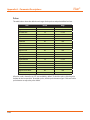
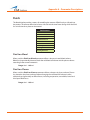
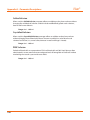
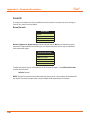
1
iStan
®
with
User Guide
End-User License Agreement
CAE Healthcare
iStan® Simulator Software and User Guide
THIS IS A LEGAL AGREEMENT. PLEASE READ THIS DOCUMENT CAREFULLY.
The software you are about to access is provided to you pursuant to the purchase of the Product by the legal entity
which employs you, or which you represent (the “Licensee” or You”), from CAE Healthcare. This purchase of the Product is
subject to CAE Healthcare’s Healthcare Education Products General Terms and Conditions (the “HEPGTC”) and this EndUser License agreement (“License”).
This License governs the grant of licenses for the software, in object code only, embedded in or bundled with the
Product or required to operate the Product, as the case may be (“Software”), as well as all related Product documentation
and information (“Data”) supplied by CAE Healthcare either with or separately from the Product, which items as
indicated in the HEPGTC are not sold but licensed.
Acceptance of these terms and conditions must be without modification of any of the terms, conditions and notices
contained herein.
Consequently, please be sure to read the terms of this License carefully.
If You agree to these terms, conditions and other provisions in their entirety, then click the “ACCEPT” button below.
If You do not accept these terms, conditions and other provisions in their entirety, without modification of any sort, then
click the “DECLINE” button below and your access to the Software and Data is prohibited.
1.
DEFINITIONS AND INTERPRETATION
1.1
The preamble forms an integral part of this License.
1.2
Terms with a capital letter defined in the Preamble have the meaning indicated in the Preamble. Whenever
used in this License, the following terms have the meaning set out below:
(a)
“Confidential Information” means any and all scientific and technical information which is in the possession
of, or belonging to, CAE Healthcare and relating to the Product, including without limitation, all Data, Software,
trade secrets, know-how, processes, methodologies, samples, components, analyses, compilations, guides and other
information or documents prepared by CAE Healthcare, its subsidiaries and affiliates and/or their officers, servants,
agents, representatives, employees or advisers which contain or are otherwise generated from or reflect any CAE
Healthcare proprietary information, whether or not covered by intellectual property rights or explicitly designated as
confidential or proprietary, which is disclosed by any means in written, oral, electronic, or any other form.
(b)
“Purpose” means the use of the Software and the Data solely for the operation and maintenance of the
Product, and the use of the Product solely as an educational tool.
2.
LICENSE
2.1
In consideration of Licensee’s agreement and compliance with the terms and conditions contained in the
HEPGTC and in this License, CAE Healthcare grants to Licensee, and Licensee accepts, a personal, non-exclusive, nontransferable license to use the Software and Data exclusively with the Product, and with the computer on which this
License appears.
2.2
Except for the License granted herein, CAE Healthcare grants no express or implied right under any patent,
copyright, mask work right, trademark, know how or other intellectual property rights. Without limiting the foregoing,
the Licensee shall not obtain any rights to CAE Healthcare’s property, or any part thereof, by implication, estoppel or
otherwise. Title to and full ownership of any trade secrets and other intellectual property rights related to the Product
and components thereof shall remain with CAE Healthcare and, if applicable, its suppliers. For clarification, Licensee
agrees that the source code for the Software is a trade secret of CAE Healthcare and only CAE Healthcare shall have the
right to alter, maintain, enhance or otherwise modify the Software.
i
End-User License Agreement
iStan®
2.3
Without limiting the foregoing or any other terms in this License, Licensee shall, and shall ensure that any
person authorized to access the Product, which are limited to Licensee’s employees, agents, representatives, medical
staff and students (“Authorized Users”):
(a)
not copy (save and except for normal back up and disaster recovery purposes provided such copy shall include
CAE Healthcare’s copyright and any other proprietary notices indicated on the Software and Data), ghost, export or
produce any derivative works from the Product, or any part thereof, not network the Product without CAE Healthcare’s
prior written approval, or make it available for concurrent use;
(b)
not sell, attempt to sell or transfer (unless in compliance with the HEPGTC), sublicense, encumber the Software
or Data;
(c)
not modify the Product in any way, combine with other programs, or reverse engineer, screen scratch,
decompile or disassemble any Software nor otherwise attempt to create or derive the source code related thereto;
(d)
not deface or remove any copyright or proprietary notices;
(e)
not use the Product without the Key, if provided with the Product, or attempt to develop or develop any means
or technology which would enable Licensee to bypass the use of the Key to operate the Product;
(f )
prevent anyone other than Authorized Users from accessing or using the Product;
(g)
not incorporate the Product, in whole or in part, to any product or service that Licensee would make available
to a third party, on a commercial basis or not.
2.4
Notwithstanding anything else contained in this License, in no event shall Licensee use the Product and/or
Confidential Information to enable, support, or otherwise aid Licensee or a third party to develop any product, software
or service competitive with any of CAE Healthcare’s products.
2.5
Licensee agrees to grant CAE Healthcare, its agents and representatives, at any time during Licensee’s normal
business hours and upon reasonable prior notice, the right to access to Licensee’s premises, to ensure that the use of the
Product is done at all times in compliance with the terms and conditions of this License.
2.6
CAE Healthcare reserves the right to embed a software security mechanism within the Product to monitor
usage of the Product to verify Licensee’s compliance with this Agreement, as well as to control access to the Software
through use of: a) a hardware lock device and/or b) a license administration software and/or c) a license authorization
key (collectively, the “Key”).
2.7
Some Products may provide Licensee with the option of saving and reproducing the images created by such
Products (“Work”) during their use. In this regard, Licensee hereby recognizes that the entire rights, title and interests
in and to such Work remain the exclusive property of CAE Healthcare. Licensee shall not modify such Work in any way
whatsoever and shall not remove or alter any CAE Healthcare notices. However, Licensee is permitted to produce and
reproduce such Work only for non-commercial educational purposes.
3.
FEEDBACK
Licensee agrees to provide CAE Healthcare, from time to time, with comments, suggestions, data, information or
feedback (“Feedback”) on the Product. Licensee acknowledges and agrees that such Feedback may be freely used by
CAE Healthcare, at its sole discretion, for the design, development, improvement, marketing and commercialization of its
products and services, without any restrictions based on confidentiality or intellectual property rights.
4.
TERM AND TERMINATION
4.1
This License shall become effective as of the date of Your execution of this License and shall remain in effect
until terminated as provided hereafter.
ii
4.2
This License terminates immediately upon termination of the HEPGTC.
4.3
CAE Healthcare may terminate this License immediately, upon written notice, should Licensee:
End-User License Agreement
(a)
fail to comply with any of the terms and conditions of this License;
(b)
terminate or suspend its business; make an assignment for the benefit of creditors, or any proceedings are
instituted by any party or against it seeking to declare it bankrupt or insolvent, or seeking liquidation, winding-up,
reorganization, arrangement, adjustment, protection, relief or composition of its debts under any law relating to
bankruptcy, insolvency, reorganization or relief of debtors, or seeking the entry of an order for relief or the appointment of
a receiver, trustee or other similar official for it or for any substantial part of its property;
4.4
Upon termination of this License, Licensee agrees to immediately discontinue use of the Confidential Information
and the Product, and to return same to CAE Healthcare as well as any copies, summaries or extracts thereof, with any
associated CD ROM(s), DVD, keys, dongles or other devices as may be directed by CAE Healthcare. At CAE Healthcare’s
request, Licensee shall promptly provide a written certificate signed by an officer of Licensee confirming that such items
have been returned to CAE Healthcare or destroyed as so directed by CAE Healthcare.
4.5
The following shall survive and continue in full force and effect notwithstanding any termination of this License:
the obligations of Licensee under Sections 2 (License), 5 (Non-Disclosure); as well as any other clauses which by their
nature and context are intended to survive.
5.
NON-DISCLOSURE
5.1
Licensee agrees to keep this License and all Confidential Information obtained hereunder in strict confidence,
and shall only disclose same a) to Authorized Users solely for the Purpose and provided such access to the Product
conforms, at all times, to the terms and conditions governing the use of the Product contained herein, or b) if required to
be disclosed by law, and only to the extent of such disclosure and limited to the purpose requested, with prior notice to
CAE Healthcare to permit it to seek an appropriate remedy to prevent the disclosure, or alternatively to agree to the terms
of such disclosure.
5.2
The obligations of confidentiality, use and non-disclosure referred to in this Section 5 shall not apply to
information which: (i) is or becomes publicly available through no fault of Licensee; (ii) was already in the rightful
possession of Licensee prior to its receipt from CAE Healthcare; (iii) is independently developed by Licensee, provided it
is not, in whole or in part, related to the Product; and (iv) is obtained by Licensee in good faith and on a non-confidential
basis and without a use restriction from a third party who lawfully obtained and disclosed such information. However,
Confidential Information does not come within the foregoing exceptions merely because features of it may be found
separately or within a general disclosure in the public domain.
5.3
Licensee agrees to be responsible for enforcing the terms of this Section 5 and to take such action, legal or
otherwise, to the extent necessary to cause anyone having access to the Confidential Information to comply with the
terms and conditions set forth herein (including all actions that Licensee would take to protect its own trade secrets and
confidential information but with not less than reasonable care). Licensee shall be responsible and indemnify, defend and
hold harmless CAE Healthcare for any default caused by any such persons.
6.
IRREPARABLE HARM
6.1
Licensee acknowledges that the Software and Data constitute a special, irreplaceable asset of great value
to CAE Healthcare, and that a breach, in any way, of any of Licensee’s obligations under Sections 2 (License), and 5
(Non-Disclosure) hereof would cause serious and irreparable harm to CAE Healthcare which may not be adequately
compensated for in damages. If the Licensee breaches any of such provisions, Licensee consents to an injunction being
issued against it restraining it from any further breach of such provision, without derogation from any other remedy which
CAE Healthcare may have in the event of such a breach.7.WARRANTY, LIMITATION OF LIABILITY
7.1
THE SOLE WARRANTIES PROVIDED BY CAE HEALTHCARE ARE LIMITED TO THE WARRANTIES PROVIDED IN THE
HEPGTC. ANY WARRANTIES PROVIDED ARE PERSONAL AND NOT TRANSFERABLE.
7.2
CAE HEALTHCARE’S LIABILITY SHALL IN NO CIRCUMSTANCES EXCEED THE LIMITATION OF LIABILITY INDICATED
IN THE HEPGTC. LIABILITY, IF ANY, SHALL BE SOLELY FOR DIRECT DAMAGES, NOT TO EXCEED ON A CUMULATIVE BASIS THE
AMOUNT PAID BY LICENSEE FOR THE PRODUCT.
iii
End-User License Agreement
8.
iStan®
GOVERNING LAW
8.1
This Agreement shall be governed by, subject to, and interpreted according to the laws of the State of
Florida, U. S. A., without regard to its conflict of law rules. In all cases, the Parties expressly exclude and waive the
application of the United Nations Convention on Commercial Agreements for the International Sale of Goods (1980)
(Vienna Sales Convention) as amended.
8.2
The exclusive forum for the resolution of any and all disputes arising out of or in connection with this
Agreement shall be a court of appropriate jurisdiction located in the State of Florida, U.S.A. Each Party hereby
waives any right that it might otherwise have to object to such venue or seek dismissal of the action on the basis
of forum non-conveniens. EACH PARTY HERETO IRREVOCABLY WAIVES, TO THE FULLEST EXTENT PERMITTED
BY APPLICABLE LAW, ANY AND ALL RIGHT TO TRIAL BY JURY IN ANY LEGAL PROCEEDING ARISING OUT OF OR
RELATING TO THIS AGREEMENT.
8.3
Notwithstanding the foregoing, if a party seeks injunctive proceedings to preserve confidentiality
obligations or intellectual property rights, then it is entitled to seek relief before the competent court/body of any
jurisdiction.
9.
MISCELLANEOUS
9.1
United States Government Customer: If Licensee is the United States Government (“U.S. Government”) or
a unit or agency of the U.S. Government, the Software and Data are deemed to be “commercial computer software”
and “commercial computer software documentation”, respectively, pursuant to DFAR Section 227.7202 and FAR
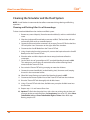
Section 12.212 b) as applicable. Any use, modification, reproduction, release, performance, display, or disclosure
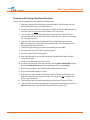
of the Software and/or Data by the U. S. Government, or any of its units or agencies shall be governed solely by
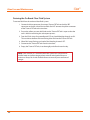
the terms of this License and the HEPGTC. Any technical data provided by CAE Healthcare with the Product that is
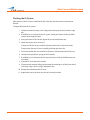
not covered by the above provisions is deemed to be “technical data-commercial items” pursuant to DFAR Section
252.227.7015(a).
9.2
Amendment. This License may only be amended by the duly authorized representatives of CAE
Healthcare.
9.3
No Waiver: The failure of CAE Healthcare to enforce at any time any of the provisions of this License, or
to require at any time the performance by Licensee of any of the provisions hereof, shall not be construed to be a
waiver of such provisions, nor in any way affect the validity of this License or any part thereof, or the right of CAE
Healthcare thereafter to enforce any such provision.
9.4
No third-party beneficiaries. Nothing in this Agreement shall be construed as creating or giving rise to any
rights for any third parties or any persons other than the parties to this Agreement.
9.5
Notices: Notices or communications pertaining to this Agreement must be given in writing and delivered
to the addressee as indicated in the HEPGTC.
9.6
Preamble/Headings. The preamble forms an integral part of this Agreement. The division of this
Agreement into Clauses, Articles, sections, subsections and other subdivisions and the insertion of headings are for
convenience of reference only and will not affect the construction or interpretation of this Agreement.
iv
End-User License Agreement
9.7
Severability. If any one or more of the provisions of this License shall be held to be invalid, illegal or
unenforceable, the validity, legality or enforceability of the remaining provisions of this Agreement shall not in any
way be affected or impaired thereby.
9.8
Assignment and Succession. Licensee may not assign or delegate this Agreement in whole or in part,
expressly or by operation of law, without CAE Healthcare’s prior written consent. CAE Healthcare may assign this
Agreement, in whole or in part, and/or its rights and obligations, in CAE Healthcare’s sole discretion, to any party.
This Agreement shall be binding upon and enure to the benefit of the parties hereto and their permitted successors
and assigns. Any assignment of this Agreement, or any license granted herein, in violation of the provisions of this
Section shall be void.
9.9
Entire Agreement. This License constitutes the complete agreement of the parties with respect to the
subject matter referred to herein, and supersede any other agreements, written or oral, concerning the subject
matter hereof.
9.10
Language. The parties declare that they have requested and hereby confirm their express wish that this
License, and related agreements and documents be drawn up in the English language and that any notification,
letter or any other communication from a party to the other pertaining thereto shall be solely in the English
language.
End of License
v
iStan®
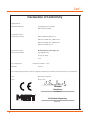
Declaration of Conformity
Application of
Council Directive (s):
Low Voltage Directive 73/23/EEC,
EMC Directive 89/336/EEC
Standard (s) to which
Conformity is declared:
EN61010, EN55011, EN61000-3-2,
EN61000-3-3, EN61000-4-2, EN61000-4-3,
EN61000-4-4, EN61000-4-5, EN61000-4-6,
EN61000-4-8, EN61000-4-11
Manufacturer’s Name: Medical Education Technologies, Inc.
Manufacturer’s Address:
6300 Edgelake Drive
Sarasota, FL 34240
U.S.A.
Type of Equipment:
Patient Care Simulator — iStan®
Model No.:
iStan-100
I, the undersigned, hereby declare that the equipment specified above conforms to the above Directive (s) and Standard (s).
Place:
United States of America
Date:
May 20, 2008
Carlos Moreno
(Full Name)
Vice President of Engineering
Medical Education Technologies, Inc.
vi
(Position)
vii
iStan®
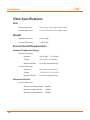
Specifications
iStan Specifications
Size
Mannequin/Simulator 72” H x 22” W x 12” D (183cm x 56cm x 30cm)
Instructor Workstation
1” H x 14.1” W x 9.6” D (2.5cm x 36cm x 24cm)
Weight
Mannequin/Simulator 124lbs (56kg)
Instructor Workstation
5.4lbs (2.5kg)
Environmental Requirements
Ambient Temperature Range
Mannequin/Simulator
Operation:
40°F to 104°F
Storage:
40°F to 122°F (4°C to 50°C)
Relative Humidity: 0% to 90% noncondensing
(4°C to 40°C)
Instructor Workstation
Operation:
50°F to 95°F (10°C to 35°C)
Storage:
-13°F to 113°F (-24°C to 45°C)
Relative Humidity: 0% to 90% noncondensing
Maximum Altitude
viii
Instructor Workstation
Maximum operating altitude: 10,000 ft
Maximum storage altitude: Maximum shipping altitude: 35,000 ft
15,000 ft
Specifications
Power
Mannequin/Simulator
AC Input:
AC 90 – 240VAC, 50/60Hz
Consumption:
Maximum 150W (Charging), 100W nominal
Internal Batteries:
16.8V 100-watt-hour lithium-ion, rechargeable
Run Time:
7 to 8 hours (Typical)
Instructor Workstation
AC Input:
AC 100 – 240VAC, 50/60Hz
Consumption:
Maximum 85W (Charging)
Internal Battery:
10.8V 60-watt-hour lithium-polymer, rechargeable
Run Time:
2 to 4 hours (Typical)
TouchPro Computer
Please see your product’s user guide for power specifications
Replacement Fuse
F1, DC Power In – 8A, 32VDC (250VAC), 5 x 20mm, IEC 60127-2/2 (Fast Acting)
Communications
Simulator Network
Wired:
10/100 Ethernet or
Wireless:
IEEE 802.11g
Wireless Voice
537 MHz to 819MHz (Country Specific)
Electrotherapy
Defibrillation:
20 to 360 joules (Monophasic, Biphasic)
Pacing :
20ma to 180ma
Air Supply
When using the optional external compressed air kit in conjunction with the facility supply
source and facility wall adapter.
Maximum pressure: 50 psi to 120 psi
ix
Cautions/Warnings
iStan®
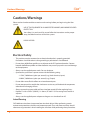
Cautions/Warnings
Please read and understand these cautions and warnings before you begin using the iStan
system.
USE OF THIS EQUIPMENT IN AN UNSPECIFIED MANNER, MAY IMPAIR DESIGNED
PROTECTION.
Your safety is in your hands. Be sure to follow the instructions on the proper
setup, breakdown and use of the iStan system.
SHOCK HAZARD
Electrical Safety
• This product must be connected to an electrical outlet that is properly grounded.
Precautions should be taken so that grounding or polarization is not defeated.
• Do not place defibrillator paddles on or adjacent to the ECG patient electrodes. Contact
between defibrillator paddles and the electrodes may cause injury to the user and damage
to the equipment.
• Always use the supplied power cords. Do not substitute.
• Operate the system from a power source with the following rating:
- 115VAC, 50/60 hertz (cycles per second) (e.g., North America, Japan)
- 230VAC, 50/60 hertz (cycles per second) (e.g., Europe)
• Do not allow excess fluids to flow on or into electronic parts.
• Do not attempt to disassemble the simulator or service any of the electrical components
other than the changing of fuses.
• Always remove the power cable and have simulator turned off when replacing fuses.
• Replace F1 with a 32VDC (250VAC), 5 x 20mm, IEC 60127-2/2 fast acting fuse/rated for 8
amperes.
• Always use the supplied power adapter to charge or run simulator from AC.
Latex Warning
CAE Healthcare simulators incorporate latex into their design. When performing certain
maintenance procedures, the latex can become exposed. Users with latex sensitivity should
take necessary precautions when handling the simulator while performing those procedures.
x
Cautions/Warnings
General Use Warnings
Electrical System
• Operate the system from a power source with the following rating: 115VAC, 50/60 hertz (cycles per
second) (e.g. North America, Japan), and 230VAC, 50/60 hertz (cycles per second) (e.g. Europe)
• Do not operate the iStan system in rain. Apply water to the mannequin only in accordance with the
supported clinical procedures identified in this User Guide.
• Do not allow excess fluids to flow on or into electronic parts.
CO2 Production System
• Care must always be taken when using high-pressure equipment.
• Do not disassemble or alter regulator.
• Store CO2 canisters in dry location between 32° and 104° F. (0 to 40°C). Do not expose CO2 canister
to heat above 140° F as rupture may occur.
• Never point CO2 canister towards your face or someone nearby.
• Use only CAE Healthcare specified CO2 canisters.
• Wear protective gloves and eye protection when removing canister from regulator assembly.
Bleeding and Secretion System
•
•
•
•
DO NOT modify the tank or any assembly component.
ALWAYS protect eyes, skin and clothing against accidental exposure.
NEVER exceed 35 strokes while pressurizing the tank.
ALWAYS read and follow instructions for creating trauma fluids (e.g. blood). NEVER fill the tank with
more than 6 liters (1.6 gallons) of fluid.
• After use, ALWAYS release pressure and clean the tank. DO NOT store liquids in the tank.
• ALWAYS release tank pressure before servicing. NEVER transport or ship in a pressurized and/or full
state or leave a pressurized tank unattended.
xi
Cautions/Warnings
iStan®
Mannequin
• Do not disassemble factory-assembled parts of the mannequin.
• Do not clean the mannequin with chemical solvents. Use water and a light soap solution only.
• Make sure that mannequin is set up on a stable, sturdy work surface to
avoid collapsing and causing injury to users.
• iStan should be operated in ambient temperatures below 104 degrees Fahrenheit (40
degrees Celsius). Prolonged operation (>4hrs) in ambient temperatures greater than 104
degrees Fahrenheit (40 degrees Celsius) may result in anomalous behavior and out of
specification performance.
• Do not introduce foreign substances into the airway - with the exception of small amounts
of approved lubricant. Only perform invasive procedures supported by the system as
described in the applicable sections of the User Guide.
• Do not pick the mannequin up by the limbs — support head and leverage weight with
torso. It may be necessary to have the help of a second person to lift and move iStan.
xii
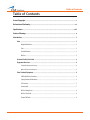
Table of Contents
Table of Contents
License/Copyright������������������������������������������������������������������������������������������������������������������ i
Declaration of Conformity......................................................................................................vi
Specifications......................................................................................................................viii
Cautions/Warnings .....���������������������������������������������������������������������������������������������������������� x
Introduction .....������������������������������������������������������������������������������������������������������������������� 1
iStan....................................................................................................................................... 1
Weight Distribution................................................................................................................................. 2
Skin.......................................................................................................................................................... 2
Skeletal Structure.................................................................................................................................... 2
Wireless................................................................................................................................................... 2
Contained in this User Guide..................................................................................................... 3
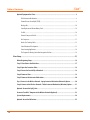
Equipment Overview................................................................................................................ 4
Standard Components Inventory............................................................................................................................4
Optional Components Inventory.............................................................................................................................5
iStan Standard Equipment........................................................................................................ 6
Full-Body Wireless Simulator................................................................................................................... 6
Laptop Instructor Workstation................................................................................................................. 6
CO2 Canisters ........................................................................................................................................... 7
Inventory Kit............................................................................................................................................ 7
Wireless Microphone................................................................................................................................ 8
Wireless Voice Link................................................................................................................................... 8
Trauma Fill Tanks...................................................................................................................................... 8
xiii
Table of Contents
iStan®
Optional Equipment for iStan.................................................................................................... 9
Tablet Instructor Workstation................................................................................................................... 9
Trauma Disaster Casualty Kit (TDCK)........................................................................................................ 9
Moulage Kit........................................................................................................................................... 10
iStan Replacement Lithium Battery Pack............................................................................................... 10
Tool Kit................................................................................................................................................... 10
External Compressed Air Kit................................................................................................................... 11
Air Compressor....................................................................................................................................... 11
Hands-Free Training Cables.................................................................................................................... 12
iStan Educational Development............................................................................................................. 13
iStan Learning Applications................................................................................................................... 14
The Program for Nursing Curriculum Integration for iStan..................................................................... 14
iStan Setup..........................................................................................................................15
Before Beginning Setup.......................................................................................................... 16
Step 1: Place iStan in the Work Area......................................................................................... 17
Step 2: Open the Secretions Valve............................................................................................ 18
Step 3: Ensure the Cervical Clip is Detached.............................................................................. 18
Step 4: Power on iStan............................................................................................................ 19
Step 5: Power on the Instructor Workstation............................................................................ 20
Step 6: Connect to the Wireless Network - Laptop Instructor Workstation (Macintosh) Option............ 20
Step 6: Connect to the Wireless Network - Tablet Instructor Workstation (Windows) Option........ 21
Optional: Connect the SpO2 Probe............................................................................................ 22
Connect a TouchPro™ Computer to the Wireless Network (Optional)............................................ 23
System Requirements............................................................................................................. 24
Optional: Insert the CO2 Canister.............................................................................................. 25
xiv
Table of Contents
Optional: Prepare the Secretion System................................................................................... 27
Using the Trauma Fill Tank..................................................................................................................... 27
Assembling the Trauma Fill Tank............................................................................................................ 28
Operating the Trauma Fill Tank............................................................................................................... 28
Using Müse...........................................................................................................................31
Starting the Application......................................................................................................... 31
Navigating the Home Page..................................................................................................... 34
The SCE Selection Panel......................................................................................................................... 35
The SCE Library...................................................................................................................................... 37
The SCE Summary Panel........................................................................................................................ 39
Printing SCEs.......................................................................................................................................... 40
Running an SCE...................................................................................................................... 41
Connecting to the Simulator.................................................................................................................. 41
Using the Patient Status Display............................................................................................................ 42
The Event Logs....................................................................................................................................... 44
Displaying Patient Records..................................................................................................................... 44
Adding a Scenario to a Running SCE....................................................................................................... 47
Changing Physiology............................................................................................................................. 48
SCE Time Controls................................................................................................................................... 63
Using the Event Recorder to Save States................................................................................................ 65
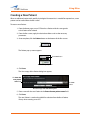
Creating a New Patient.......................................................................................................................... 67
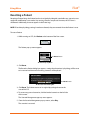
Resetting a Patient................................................................................................................................ 68
The Medication Monitor......................................................................................................................... 69
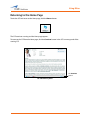
Returning to the Home Page.................................................................................................................. 71
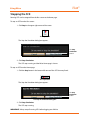
Stopping the SCE.................................................................................................................................... 72
xv
Table of Contents
iStan®
Developing SCEs..................................................................................................................... 73
Creating a New SCE................................................................................................................................ 74
The SCE Editor........................................................................................................................................ 75
Editing a Patient’s Profile....................................................................................................................... 76
Developing Scenarios............................................................................................................. 84
Creating a New Scenario........................................................................................................................ 84
Editing a Scenario.................................................................................................................................. 86
The Scenario Designer............................................................................................................................ 87
Adding Scenario States.......................................................................................................................... 90
Modifying Scenario States..................................................................................................................... 91
Deleting Scenario States........................................................................................................................ 97
Deleting Parameters and Transitions...................................................................................................... 98
Saving the Scenario............................................................................................................................... 99
Saving States to the State Library........................................................................................................ 100
Emptying the Trash.............................................................................................................................. 102
Administrative Tools..............................................................................................................104
History................................................................................................................................................. 104
System Administration........................................................................................................................ 105
Account Profile..................................................................................................................................... 124
Using TouchPro...................................................................................................................129
Accessing the TouchPro Software............................................................................................129
Modifying the TouchPro Display.............................................................................................131
Selecting a Preconfigured Layout......................................................................................................... 131
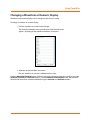
Changing a Waveform or Numeric Display........................................................................................... 133
Adding a Waveform............................................................................................................................. 134
xvi
Table of Contents
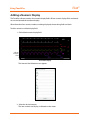
Adding a Numeric Display.................................................................................................................... 136
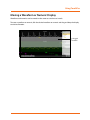
Moving a Waveform or Numeric Display.............................................................................................. 137
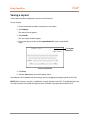
Saving a Layout.................................................................................................................................... 138
Sounds...............................................................................................................................139
12-Lead ECG........................................................................................................................140
NIBP Cycling and Manual NIBP.............................................................................................142
Patients.............................................................................................................................144
Configuring the TouchPro Software......................................................................................145
Changing the TouchPro Language........................................................................................146
Exiting the TouchPro Software.............................................................................................146
Using iStan.........................................................................................................................147
Parameters...........................................................................................................................148
Neurological Features............................................................................................................151
Eyes..................................................................................................................................................... 152
Respiratory Features.............................................................................................................154
Realistic Upper Airway..................................................................................................................................... 158
Articulated Mandible........................................................................................................................... 159
SpO2 Probe........................................................................................................................................... 159
Cricothyrotomy.................................................................................................................................... 159
Teeth with Breakaway Incisors............................................................................................................. 160
Chest Tube........................................................................................................................................... 164
Needle Decompression........................................................................................................................ 163
xvii
Table of Contents
iStan®
Cardiovascular......................................................................................................................164
Pulses . ................................................................................................................................................ 166
3-Lead or 5-Lead ECG........................................................................................................................... 168
Manual Blood Pressure........................................................................................................................ 169
Korotkoff Sounds (5 phases)................................................................................................................ 170
Defibrillation........................................................................................................................................ 170
Cardiac Pacing ..................................................................................................................................... 172
Fluids...................................................................................................................................173
Bleeding.............................................................................................................................................. 174
Genitourinary System.......................................................................................................................... 178
Pharmacology System......................................................................................................................... 179
Sounds.................................................................................................................................182
Speech................................................................................................................................................. 182
Throat Sounds...................................................................................................................................... 187
Breath Sounds..................................................................................................................................... 188
Heart Sounds....................................................................................................................................... 189
Bowel Sounds...................................................................................................................................... 190
iStan Care and Maintenance................................................................................................191
iStan Warranty Programs.......................................................................................................191
General Information............................................................................................................................ 191
Units Out of Agreement....................................................................................................................... 191
How to Contact Customer Service...........................................................................................192
Contract Period.................................................................................................................................... 193
Limitations of Agreement.................................................................................................................... 193
Return Materials Authorization ........................................................................................................... 193
System Software Upgrade Support.........................................................................................194
xviii
Table of Contents
Pricing Structure...................................................................................................................194
Time and Materials.............................................................................................................................. 194
Breakdown...........................................................................................................................195
Step 1: Shut Down the Software.......................................................................................................... 195
Step 2: Power Off the Simulator........................................................................................................... 195
Step 3: Clean the Simulator and the Fluid System................................................................................ 195
Maintenance Advice..............................................................................................................196
General Simulator Care........................................................................................................................ 196
Storage................................................................................................................................................ 196
Care of Electronic Equipment............................................................................................................... 196
Airway Inspection................................................................................................................................ 197
Recharging the Battery........................................................................................................................ 197
Replacing the Battery.......................................................................................................................... 198
Reducing Cervical Motion.................................................................................................................... 199
Draining Condensation from the Simulator.......................................................................................... 200
Connecting the Air Hose....................................................................................................................... 201
Cleaning the Simulator and the Fluid System..........................................................................202
Cleaning and Flushing After Use of Hemorrhage.................................................................................. 202
Cleaning and Flushing After Blood Secretions...................................................................................... 203
Draining the On-Board Clear Fluid System........................................................................................... 204
Flushing the Fluid System for Storage.................................................................................................. 205
Flushing the IV System...........................................................................................................206
Flushing the IO System..........................................................................................................207
Cleaning the Trauma Fill Tank and the Umbilical......................................................................208
Cleaning the In-Line Filter................................................................................................................... 209
Troubleshooting the Trauma Fill Tank................................................................................................... 210
xix
Table of Contents
iStan®
Handling CO2 Canisters...........................................................................................................211
Removing CO2 Canisters from the Regulator......................................................................................... 211
Important Canister Information........................................................................................................... 212
Related CAUTIONS/WARNINGS............................................................................................................. 212
Recommended Clinical Supply Sizes.....................................................................................213
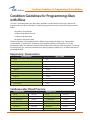
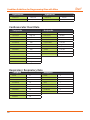
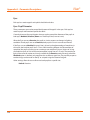
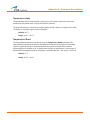
Condition Guidelines for Programming iStan with Müse®......................................................215
Appendix A - Müse Parameters Descriptions......................................................................... A-1
Appendix B - Wireless Voice Link .......................................................................................... B-1
Appendix C - Defibrilation Calibration Utility .........................................................................C-1
xx
Introduction
Introduction
As the worldwide leader in patient simulation technology and education, CAE Healthcare is
excited to introduce iStan. With CAE Healthcare’s proprietary human physiology model at
its core, iStan is designed to answer the need for a product that delivers more realism, more
clinical features and more flexibility than other simulators. Simply put, iStan is like no other
simulator before it.
iStan
iStan allows for the physical assessment of various clinical signs (e.g. heart/breath/bowel
sounds, palpable pulses, chest excursion, airway patency, etc.) that are dynamically modeled
using mathematical algorithms of human physiology and pharmacology.
The simulator can be placed on standard operating room tables, an ICU bed, on the ground or
even in a vehicle (in the case of a simulated accident). iStan can also be seated in an upright
position.
In addition, iStan has assessment, airway, cardiovascular, genitourinary, ACLS and trauma
features that are familiar to CAE Healthcare customers plus many new specially designed
features such as cyanosis and capillary refill, trismus, jugular vein distension, SpO2 finger
probe, fluids on board, bilateral autoinjection, intraosseous sites, flail chest and programmable
speech.
Wireless and tetherless, iStan takes simulation education to a new and exciting level of realism.
1
Introduction
iStan®
Weight Distribution
iStan is uniquely designed to emulate human weight distribution. This means that when iStan
is lifted, certain components (e.g., head) respond in similar fashion to the way human muscles
react to support themselves when lifted. This design allows learners to gain an understanding
of how to lift and move a real person.
Skin
Modeled from a cast of a real person, the skin of iStan truly acts, looks and feels like real human
skin, right down to the goose bumps (cutis anserina). Small “pores” on iStan’s forehead have the
ability to secrete clear fluid, simulating diaphoresis.
Skeletal Structure
Designed from the inside out, CAE Healthcare has created the first patient simulator truly
based around a human-like skeletal structure, a revolutionary development in itself. But iStan
also closely mimics the anatomical workings of the human body at a level of realism not
possible with other simulators. Spine, neck, arms and hips all mimic the degrees of movement
of a real person.
Wireless
iStan is fully wireless and battery operated for amazing portability and versatility.
2
Introduction
Contained in this User Guide
This User Guide has been designed for quick access to information on how to use and maintain
your iStan system. Please make sure that you read and follow the Cautions/Warnings on the
pages preceding the Table of Contents. This is for your safety and your learner’s safety, as well
as for the protection of your simulator.
Each subsequent section has been designed to keep valuable information at your fingertips.
Before using the system, follow the step-by-step instructions included in the iStan Setup
section.
The Using the Software section provides instructions on the use of the various software
features as well as how to create and save a new SCEs.
Using iStan includes information on how the simulator and software components work and
the functionality that each supports. Various clinical interventions are explained in this section
along with how these interventions isolate critically important learning objectives. In addition,
a description is provided of the CAE Healthcare preconfigured patients, as well as detailed
instructions on how to develop and save your own patients.
We encourage you to follow the iStan care and maintenance guidelines found in the iStan
Care and Maintenance section, as this will ensure that your system is functioning optimally.
Warranty details, as well as clean up and care information, are included in this section, making
it a very important part of keeping your system in good working condition.
3
iStan®
Introduction
Equipment Overview
iStan has been designed to be used in any learning environment. iStan’s standard features are
easily integrated into a laboratory setting or remote locations.
Standard Components Inventory
iStan comes with all the necessary equipment for establishing an educational simulation
center.
Standard Equipment
iStan Simulator
Laptop Instructor Workstation
Power Cord (Recharger)
CO2 Canisters (4)
Inventory Kit
Wireless Microphone or Wireless Voice Link
Trauma Fill Tanks (2)
Detailed descriptions of this equipment can be found in the section iStan Standard Equipment
(see page 6).
As you would with any shipment, cross-check this inventory with your CAE Healthcare packing
invoice to verify that all components have been received.
4
Introduction
Optional Components Inventory
Optional equipment is available to accommodate special customer requirements. For example,
options like an air compressor and the Trauma/Disaster Casualty Kit (TDCK) enable instructors
to create real-life scenarios at authentic locations.
Optional Equipment
Tablet Instructor Workstation
Trauma/Disaster Casualty Kit (TDCK)
Moulage Kit
iStan Replacement Lithium Battery Pack (4)
Tool Kit
iStan Learning Applications
External Compressed Air Kit
Air Compressor
Hands-Free Training Cables
Detailed descriptions of this equipment can be found in the section Optional Equipment for
iStan (see page 9).
Contact CAE Healthcare Customer Service at 866-462-7920 if there are any questions or if
optional equipment is needed.
5
Introduction
iStan®
iStan Standard Equipment
The design of the iStan system allows students to focus on the patient simulator while giving
instructors the ability to create an endless number of possible clinical situations.
Full-Body Wireless Simulator
All patient assessments and clinical interventions are played out on the iStan mannequin,
which represents a human patient. At 5 feet 10 inches (177.5 cm) in height and weighing 124
pounds (56 kg), iStan is fully operational in the supine, lateral, prone and seated positions. The
simulator offers features like arm pronation and supination, breath, heart and bowel sounds,
palpable pulses, patient voice, genitourinary features and airway management features.
The simulator is rechargeable using the Power Cord provided. See page 197 for instructions on
recharging the battery.
Laptop Instructor Workstation
The Laptop Instructor Workstation is a computer that utilizes Müse Software to operate as the
main simulation control center.
Instructors control the simulation session from the Workstation by using SCEs that meet their
learning objectives.
IMPORTANT: All CAE Healthcare computer components are preconfigured for use with
the iStan system. There are no software installation or configuration steps required. Only
approved CAE Healthcare applications should be installed or run on the iStan computer
system.
6
Introduction
CO2 Canisters
Four CO2 canisters are included with iStan for use with a disposable ETCO2 detector.
Inventory Kit
iStan comes with a number of accessories and replacement components.
Included in the Inventory Kit are:
iStan Start-Up Kit (Quick Start Chart and Setup Map)
Priming syringe
Roll (4 ft) of VHB tape and roll of 2 inch wide red tape (for cricothyrotomy)
Cricothyrotomy replacement skin
BP adapter kit
Silicone lubricant
iStan priming tube
iStan ECG posts
Pacing/Defibrillation disks
Condensation drain
Wound umbilical assembly
NIBP Adaptor
Chest Tube prime tubing
Female genitalia
CO2 Cartridge Kit
VGA Mini Adapter
7
Introduction
iStan®
Wireless Microphone
The wireless receiver enables the user to communicate through the simulator using a
microphone. The clip-on microphone is attached to a transmitter that may be attached to a
belt or waistband.
The microphone is battery-operated and has a power switch on the top to turn it on and off
Wireless Voice Link
The wireless voice link replaces the wireless microphone feature in iStan simulators with the
serial number 852 and higher. For more information about this feature, see Appendix B -Wireless
Voice Link on page B-1.
Trauma Fill Tanks
Fluids are supplied to the simulator using a trauma fill tank. Two tanks are supplied so that one
tank may be used for distilled water and red food coloring (for simulated blood) and the other
tank used for distilled water (for clear fluids).
These tanks should be cleaned after use, but even with cleaning, it is best to dedicate one tank
to simulated blood.
8
Introduction
Optional Equipment for iStan
Additional components enable the iStan system to be customized to fit the specific needs of a
wide variety of education environments.
Tablet Instructor Workstation
The Tablet Instructor Workstation is an optional, ruggedized tablet computer that can be used
instead of the Laptop Instructor Workstation to run the Müse software. An additional Müse
license is provided with this option.
NOTE: The Tablet Instructor Workstation cannot perform calibration utilities. The Laptop
Instructor Workstation is needed to perform these functions. Additionally, the Tablet Instructor
Workstation and the Laptop Instructor Workstation cannot be used at the same time. Müse
content is not shared between the Tablet and Laptop Instructor Workstations.
IMPORTANT: All CAE Healthcare computer components are preconfigured for use with
the iStan system. There are no software installation or configuration steps required. Only
approved CAE Healthcare applications should be installed or run on the iStan computer
system.
Trauma Disaster Casualty Kit (TDCK)
The TDCK adds to the fidelity of a training session by providing the means to add a continuous
flow of blood from the simulator while using the Moulage Kit to give a realistic look to the
injury or condition (product #TF-005).
9
Introduction
iStan®
Moulage Kit
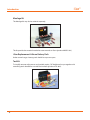
The Moulage Kit may also be ordered separately.
The kit provides the materials needed to create wounds on iStan (product #MODS-999).
iStan Replacement Lithium Battery Pack
Under normal usage, a battery pack should last up to two years.
Tool Kit
To simplify common adjustments and periodic repairs, CAE Healthcare has put together a kit
containing tools selected for use with the simulator (product #TOL-001).
10
Introduction
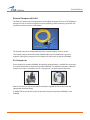
External Compressed Air Kit
The External Compressed Air Kit gives the user the ability to connect iStan to a CAE Healthcare
compressor, tank, or wall air using the kit’s hose and fittings. When connecting to wall air, the
kit attaches to the customer’s wall adapter.
The internal pump turns off automatically when external compressed air is sensed.
The External Compressed Air Kit includes a flexible 30ft (9m) hose attached to a preset air
regulator, a fitting for air compressors and adapters for wall or tank air (product #AIR-006).
Air Compressor
An air compressor (product #AIR-003) designed for quiet operation is available for same-room
use, and an alternative air compressor (product #AIR-002) is available for situations where the
compressor resides in a location, such as a storage room, set apart from the simulator.
Both Air Compressors are AC powered and include a regulator and an air hose with the
appropriate connector fitting.
A 220VAC/50 Hz version of the Quiet In-Room Air Compressor (product #AIR-004) is also
available.
11
iStan®
Introduction
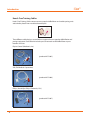
Hands-Free Training Cables
Hands-Free Training Cables connect to most popular defibrillators and cardiac pacing units
and take the place of non-reusable electrode pads.
Three different cable designs are available to support the most popular defibrillation and
pacing equipment. Each cable kit includes posts that attach to the defibrillator or pace
locations on iStan.
Physio-Control (Medtronic, Inc.)
(product #ACC-005)
Zoll (Zoll Medical Corporation)
(product #ACC-006)
Philips (Koninklijke Philips Electronics, N.V.)
(product #ACC-007)
12
Introduction
iStan Educational Development
IStan Basic and Advanced courses offer learners at all levels in-depth instruction in the setup,
operation, development of scenarios and maintenance related to the use of iStan.
The iStan Basic course provides learners with an overview of the system and its components,
as well as an introduction to patient creation and scenario design.
iStan Basic - two days at CAE Healthcare facility
iStan Basic On-Site - two days at learner-defined facility
iStan Basic On-Site Physician Instructor - two days at learner defined facility with
physician-led instruction
The iStan Advanced course builds upon the concepts introduced in the prerequisite Basic
course. After a quick review of the Basic course, Advanced instruction spends the majority of
the two days providing learners with the ability to design patients and scenarios that can be
used immediately upon completion of the course.
iStan Advanced - two days at CAE Healthcare facility
iStan Advanced On-Site - two days at learner-defined facility
iStan Advanced On-Site Physician Instructor - two days at learner defined facility with
physician-led instruction
13
Introduction
iStan®
iStan Learning Applications
CAE Healthcare Learning Applications enhance the use of the simulator by providing
preprogrammed scenarios and corresponding support documentation (i.e. course objectives,
instructor’s notes) that can be readily integrated into a lesson plan, a specific curriculum or an
educational program.
iStan Disaster Medical Readiness (DMR) Learning Application
iStan Advanced Cardiac Life Support (ACLS) Learning Application
iStan Cardiopulmonary Critical Situations Learning Application
iStan Adult Nursing Learning Application
iStan Tactical Medical Care - Military (TMC) Learning Application
iStan Emergency Medical Services (EMS) Learning Application
The Program for Nursing Curriculum Integration for iStan
The CAE Healthcare Program for Nursing Curriculum Integration (PNCI®) focuses on the
educational concepts and competencies of existing undergraduate nursing curriculums.
Developed in partnership with leading nursing schools, the PNCI’s foundation is the
Integration Roadmap, a four-semester guide that identifies and charts opportunities for
learning through simulation.
.
14
iStan Setup
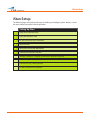
iStan Setup
The following pages will guide you through assembling and configuring iStan. Below is a list of
the steps required to prepare iStan for operation.
Setting Up iStan
1
Place iStan in the Work Area
2
Open the Secretions Valve
3
Ensure the Cervical Clip is Detached
4
Power on iStan
5
Power on the Instructor Workstation
6
Connect to the Wireless Network
Connect a TouchPro™ Computer to the Wireless Network (Optional)
Insert the CO2 Canister (Optional)
Connect the SpO2 Probe (Optional)
Fill the Fluid Reservoirs (Optional)
15
iStan®
iStan Setup
Before Beginning Setup
Proper operation of the iStan simulation unit requires correct configuration. Before setting up
the system, keep in mind these basic guidelines:
Understand the Cautions/Warnings information located in the Introduction section of this
User Guide.
Follow the sequence of steps carefully,
Complete all steps in order, and
Do not power on any components until instructed in the text.
KEEP all original shipping materials, including the BOXES - warranty and repair items must be
return shipped to CAE Healthcare in their original packaging.
Because shipping materials should be stored and retained, be sure that all protective packing
materials and unused ancillary computer parts are secured as well.
If unpacking iStan for the first time, careful use of a box cutter protects both the packaging
and the product.
16
iStan Setup
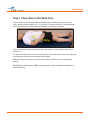
Step 1: Place iStan in the Work Area
Select a work area with enough room for all equipment, providing ample space for easy
access to the simulator. At least a 10' x 12' (3 meter x 4 meter) work area is recommended for
movement of learners and positioning of components around the simulator.
iStan and the Instructor Workstation may all be operated from their batteries, allowing for
wireless use.
In a lab environment, make sure that a multi-plug AC power outlet exists within the workspace
to recharge the simulator and its powered components.
Before placing the simulator on a surface, be certain that surface can easily support 200
pounds.
NEVER lift the simulator by the LIMBS. Leverage the torso of the simulator and support the
head while lifting.
17
iStan®
iStan Setup
Step 2: Open the Secretions Valve
With the v2 enhancements of iStan, a secretions valve was added to the internal operations
of iStan. This valve can be found inside the left chest area and it is attached to the black router
cover, adjacent to the circuit breaker. When iStan is shipped the valve is in the fully closed
position. Therefore, the valve needs to be opened in order to achieve secretions. The valve is
very sensitive and only needs to be opened slightly. If the secretions are too forceful, adjust
the valve accordingly.
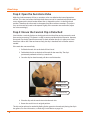
Step 3: Ensure the Cervical Clip is Detached
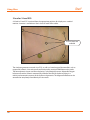
iStan includes a cervical clip that can be clipped to the inside of the neck to prevent the neck
from turning or moving. This feature is useful in certain specialized clinical scenarios. However,
for normal use, the clip should be removed. To check whether the clip is in place, turn iStan’s
head from side to side. If the neck moves freely, the clip is detached and no further action is
needed.
If the neck does not move freely:
1. Pull back the neck skin at the back of iStan’s head.
2. Feel behind the skin at the back of the neck for the metal clip. The clip is
permanently tethered to iStan by a metal wire
3. Once the clip has been located, pull down until it detaches.
The neck skin
The metal wire
The cervical clip
The Cervical Clip
4. Place the clip and the metal wire under the neck skin.
5. Return the neck skin to its original position.
The clip can be replaced as needed by feeling for the groove in the neck and placing the clip in
the groove. For more information, see Reducing Cervical Motion on page 199.
18
iStan Setup
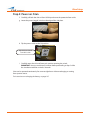
Step 4: Power on iStan
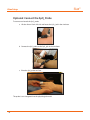
f. Carefully pull back the skin on iStan’s left hip and move the protective foam aside.
g. Locate the power (toggle) switch on the edge of the side plate.
h. Flip the power switch to the ON position.
Flip the Power Switch
from OFF to ON.
i. Carefully return the skin and foam to its position covering the switch.
IMPORTANT: You must wait three (3) minutes before proceeding to Step 5 while
the simulator establishes a wireless network.
iStan can be operated continuously for seven to eight hours without recharging or running
from a power source.
For instructions on recharging the battery, see page 197.
19
iStan®
iStan Setup
Step 5: Power on the Instructor Workstation
a. Place the Laptop or Tablet Instructor Workstation near iStan in a convenient
location.
b. Connect the AC adapter to the Instructor Workstation and a surge-protected
power outlet (optional).
NOTE: If the Instructor Workstation is running on battery power, ensure the battery
is fully charged.
c. Power on the Instructor Workstation.
Step 6: Connect to the Wireless Network - Laptop
Instructor Workstation (Macintosh) Option
Once iStan and the Instructor Workstation are both powered on, they automatically establish
a wireless connection and, when the Safari browser is opened, the Müse software launches. If
the auto-connect does not occur, perform the following steps:
a. Click once on the AirPort icon
screen.
located at the top-right-hand corner of the
b. Select the iStan network. The network is called iSTANXXX (where “XXX” is the unit
number)
c. Enter the Password. The password is istanxxx (where “xxx” is the unit number). The
password is case-sensitive.
d. Click OK.
The Müse software can now be launched (see Starting the Application on page 31).
20
iStan Setup
Step 6: Connect to the Wireless Network - Tablet Instructor
Workstation (Windows) Option
Once iStan and the Instructor Workstation are both powered on, they automatically establish
a wireless connection and, when the Internet Explorer browser is opened, the Müse software
launches. If the auto-connect does not occur, perform the following steps:
1. Tap on the Wireless Network icon in the task bar.
2. Select the iStan wireless network. The network is called iSTANXXX and the network
password is istanxxx, where “xxx” is the unit number. The password is casesensitive.
3. Click the Connect button.
The wireless connection is established. The Müse software can now be launched
using Internet Explorer.
21
iStan®
iStan Setup
Optional: Connect the SpO2 Probe
To connect and attach the SpO2 probe:
a. Lift the skin on iStan’s left side and locate the SpO2 jack in the simulator.
b. Connect the SpO2 probe to the SpO2 jack in the simulator.
c. Place the SpO2 probe on iStan.
The probe is now integrated into the physiological model.
22
iStan Setup
Connect a TouchPro™ Computer to the Wireless Network
(Optional)
The CAE Healthcare TouchPro computer comes pre-configured for use with iStan. If you wish
to supply your own computer to run the TouchPro software, the additional computer must
meet the system requirements on page 24 and must join the iStan network prior to use.
The iStan simulator and Instructor Workstation form a local area network with static IP
addresses. To incorporate an additional computer to run TouchPro, the computer’s network
properties must be configured to join the iStan network. The help of your system administrator
or CAE Healthcare Customer Service may be needed to configure the network properties.
The steps below outline how to obtain the IP address that accesses the TouchPro software on
the TouchPro computer. The Instructor Workstation MUST be connected to the iStan network
prior to performing the steps below (See pages 20 and 21 for instructions on how to connect to
iStan’s Wireless Network).
1. Power on the computer to be used for the TouchPro software.
2. Using this computer, join the iStan network. (See pages 20 and 21 or contact your
system administrator for instructions on how to join iStan’s wireless network.)
3. From the Laptop Instructor Workstation that is connected to the iStan Network,
from the Apple menu, click System Preferences.
4. From the System Preferences screen, click Network.
5. Click Advanced.
6. Click TCP/IP. Next to the IPv4 Address header, an IP Address is listed.
7. Write down the IP Address and click Cancel to close the Advanced screen.
8. Close the Network screen.
9. From the web browser on the TouchPro computer, enter the IP obtained in Step 6
into the browser’s address field. The Müse Start screen appears.
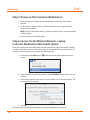
The Müse Start Screen
For more information on how to use the TouchPro software, please refer to page 129.
23
iStan Setup
iStan®
System Requirements
If you are not using a TouchPro computer or Wireless Remote provided by CAE Healthcare,
please be sure to utilize a computer with wireless capability. When operating the TouchPro or
Müse software, a computer with a Macintosh® or Microsoft Windows® operating system may be
used.
To run the TouchPro or Müse software, the computer used must meet the following minimum
requirements:
Macintosh® Operating System
• Mac OS X10.5.8 (minimum)
• Safari® 5.x.x or Firefox® 10 ESR (minimum)
• Adobe Flash Player® 10.1.x.x (minimum)
• Adobe Reader 9.x (or higher)
Windows® Operating System
• XP Service Pack 2, Vista, Windows 7 or Windows 8
• Firefox® 10 ESR, Internet Explorer® 8 or Safari 5.x.x (minimum)
• Adobe Flash Player® 10.1.x.x (minimum)
• Adobe Reader 9.x (or higher)
Hardware (Windows and Macintosh)
• Intel Core Duo, 2.0 GHz (minimum)
• 2 GB DDR3 RAM (minimum)
• 8 GB Hard Drive space available
• 1024x768 screen resolution (minimum)
• USB 2.0
• Wireless 802.11b/g/n Ethernet card
• 100BASE-T Ethernet Adapter
Macintosh, Quicktime and Safari are registered trademarks of Apple Inc. Windows Media and Internet
Explorer are registered trademarks of the Microsoft Corporation in the United States and/or other countries.
Firefox is a registered trademark of the Mozilla Foundation. Adobe® Flash Player is a trademark of Adobe
Systems Inc.
24
iStan Setup
Optional: Insert the CO2 Canister
Some SCEs rely on the simulation of exhalation of CO2. The following instructions will show
you how to safely install the CO2 canister in the simulator.
WARNING: Careful handling, including the use of hand and eye protection, is required in the use
of CO2 canisters.
Please read and understand all the important cautions and warnings on removing canisters as
well as safety steps that must be used when handling CO2 canisters.
Use of CO2 Canisters
Store the CO2 canisters in a dry location between 32° and 104° F. (0 to 40°C)
Do not expose the CO2 canister to heat above 140° F as rupture may occur.
Never point the CO2 canister towards your face or someone nearby.
Use only CAE Healthcare specified CO2 canisters.
Do not remove cannister from regulator base until empty. Canister end becomes
punctured when screwed into regulator base.
Never ship the CO2 canister attached to the regulator assembly.
Assembly of the CO2 Regulator
Care must always be taken when using high-pressure equipment.
Do not disassemble or alter regulator.
Dry completely if the regulator becomes wet.
Discontinue use of this equipment if leakage or visible damage is evident.
Insertion of the CO2 Canister
To insert the CO2 canister:
a. Locate the regulator (shipped in the inventory bag).
b. While holding the regulator firmly, carefully screw the CO2 canister into the
regulator as far as it will go. The final turns will puncture the CO2 canister, which is
necessary for correct operation.
25
iStan®
iStan Setup
CAUTION: Do not loosen the canister once it has been screwed into the regulator assembly
until the contents are exhausted and pressure relieved.
CAUTION: Unscrewing the canister before it is empty results in the sudden release of all highpressure gas with a possibility of liquid CO2 spray. Unprotected skin could receive freezing
burns.
a. Lift the skin and move the foam at the simulator’s right midsection and locate the
CO2 pneumatic umbilical hose inside the side tray.
b. Attach the blue CO2 pneumatic umbilical hose to the connection on the regulator.
c. Place the CO2 canister, regulator and hoses inside the simulator. Use the Velcro
mounting surface to secure this assembly to the tray. A properly installed assembly
will have the CO2 canister sloping down toward the rear of the mannequin.
d. Carefully reposition the foam and pull the skin back over the simulator to its
original location.
Once the canister and regulator assembly is in place, CO2 is measurable with a disposable ET
CO2 detector during patient exhalations.
Based on the training environment, a CO2 canister may last from 10 minutes (rapid breathing)
to 25 minutes.
See Handling CO2 Canisters on page 211.
26
iStan Setup
Optional: Prepare the Secretion System
ONLY distilled water or distilled water containing food coloring should be used with the
secretion system.
A mixture of no more than 29 mL (1 oz) red food coloring with 3.8 liters (1 gallon) of distilled
water should be used to create “blood.” The blood mixture should be created in advance in a
separate distilled water container.
NOTE: The higher the ratio of food coloring, the greater the possibility of staining.
Using the Trauma Fill Tank
The Trauma Fill Tank provides the means by which the simulated blood is transported to the
on-board blood reservoir.
CAUTIONS and WARNINGS
Carefully follow all instructions for using the Trauma Fill Tank. Pay particular
attention to the following cautions and warnings:
ALWAYS read and follow instructions for creating trauma fluids (e.g.
blood).
ALWAYS protect eyes, skin and clothing against accidental exposure.
After use, ALWAYS release pressure and clean the tank.
ALWAYS release tank pressure before servicing.
DO NOT modify the tank or any assemble component.
DO NOT store liquids in the tank.
NEVER transport or ship in a pressurized and/or full state.
NEVER leave a pressurized tank unattended.
NEVER fill the tank with more than 6 liters (1.6 gallons) of fluid.
NEVER exceed 35 strokes while pressurizing the tank.
27
iStan®
iStan Setup
Assembling the Trauma Fill Tank
Careful assembly of the Trauma Fill Tank helps to ensure proper operation.
Step 1: Connect the Trauma Fill Tank Umbilical to the Tank Assembly
To connect the umbilical to the Trauma Fill Tank:
a. Insert the pink siphon tube approximately 1/2 inch into the pink hose insert.
(Otherwise, the tank will pump only air.)
b. Lubricate (with silicone or water) the black o-ring on the pink hose insert.
c. Push into the threaded tank nipple until fully sealed.
d. Screw the hose nut onto the threaded tank nipple and firmly hand tighten.
Step 2: Attach the Overflow Bottle to the Tank Assembly
To attach the Overflow Bottle to the Trauma Fill Tank:
a. Connect the umbilical male connector to the female bottle lid fitting.
b. Clip the bottle to the tank using the attached carabiner mechanism.
Operating the Trauma Fill Tank
Be careful to complete the following steps correctly to ensure proper use and
maintenance of the iStan and its peripherals.
Step 1: Pour the Fluid into the Trauma Fill Tank
Pour the desired amount of fluid into the Trauma Fill Tank, being careful to NOT to
exceed 6 liters (1.6 gallons) of fluid.
NOTE: The left thigh tank is smaller (0.8 liters) and used for clear fluids (urine,
diaphoresis, tears and ear, nose and mouth secretions). The right thigh tank is larger
(1.8 liters) and used for blood (chest tube drainage.
Four (4) liters of simulated blood provides enough fluid to fill the right thigh reservoir
twice. The amount of blood used in a training session will vary with the patient, the
wounds simulated and the learner’s experience.
28
iStan Setup
Step 2: Connect the Trauma Fill Tank Umbilical to the Simulator
Attach the tank’s umbilical to the simulator by matching and connecting the fittings
labeled in blue and yellow.
a. For clear fluids, separate the skin on the left side of the simulator at the hip to
reveal a bundle of hoses.
For blood, the hoses can be located by separating the skin on the right side of the
simulator at the hip.
b. Locate the blue FILL hose and yellow VENT hose.
c. Connect the FILL (with the blue label) and VENT (with the yellow label) hoses to
the CAE Healthcare tank. Connections are male to female.
.
Connect the Vent Hose
Connect the Fill Hose
Both connections must be made for correct operation.
Step 3: Pressurize the Trauma Fill Tank and Fill the Reservoir
An integrated hand pump is used to create the pressure for the Trauma Fill Tank.
WARNING: To prevent ejected pump assembly and/or solution from striking and
injuring you, NEVER stand with your face or body directly over the top of the tank
when pumping or loosening the pump.
To operate the pump and fill the reservoir:
a. Ensure the yellow relief valve on the front of the tank is closed.
b. Unlock the pump handle by turning counter-clockwise. (Be careful not to loosen
the pump from the tank.)
c. Stroke the pump handle up and down from 25 to 35 times to transport
approximately 1 liter of fluid to the reservoir. NEVER exceed 35 strokes while
pressurizing the tank.
d. Lock the pump handle back into the pump assembly by turning clockwise.
e. Watch the Overflow Bottle located on the tank assembly. When liquid begins to
appear in this bottle, the reservoir is full. (Filling the 1.8 liter blood reservoir takes
approximately 3 to 5 minutes while filling the 0.8 liter clear reservoir takes 1 to 3
minutes.)
29
iStan®
iStan Setup
Step 4: Release Pressure from the Trauma Fill Tank
Immediately release pressure from the tank by turning and holding the yellow pressure relief
knob clockwise until all air pressure is gone.
If pressure will not release using the relief knob:
a. Place a rag over the top of the tank and pump handle.
b. While firmly pushing down on the pump handle, slowly turn the handle counterclockwise.
WARNING: NEVER leave a pressurized tank unattended.
Step 5: Disconnect the Trauma Fill Tank Umbilical from the Simulator
Step 6: Clean the Simulator and Fluid System
When the simulation is completed and the Trauma Fill Tank has been disconnected, remove
the fluids and clean the simulator (see Cleaning the Simulator and the Fluid System on page 202).
Step 7: Clean the Trauma Fill Tank
Before storing the Trauma Fill Tank, make sure the equipment is clean (see Cleaning the Trauma
Fill Tank and Umbilical on page 208).
Step 8: Store the Trauma Fill Tank
After cleaning, the Trauma Fill Tank assembly should be stored securely for future use.
a. Allow the interior of the tank to dry by loosening the pump assembly. Do NOT
leave the pump assembly out of bottle, however, because dust will contaminate
the system.
b. Loosely wrap the Trauma Tank Umbilical around the neck of the tank to protect it.
c. Store all components in a clean, dry area.
30
Using Müse
USING MÜSE
The Müse software is a browser-based application that can communicate directly with the simulator.
With the software, users can run SCEs, create scenarios and SCEs, import and export educational
content and perform administrative functions.
NOTE: For optimal Müse performance, no other software programs should be open while Müse is
running.
IMPORTANT: Only one Müse application window or tab and one TouchPro window or tab can be used
per Instructor Workstation at a time.
IMPORTANT: Do NOT use any of the browser’s navigational tools (i.e., back and forward buttons) while
operating Müse.
Starting the Application
Once the simulator is powered on and the Instructor Workstation is connected to the simulator
network, the Müse software can be launched.
To launch the software:
1. Using the Laptop or Tablet Instructor Workstation, launch the web browser
(e.g., Safari, Internet Explorer)
The Müse Start Screen appears.
The Müse
icon
The Müse Start Screen
31
iStan®
Using Müse
2. Select Müse.
The Login screen appears.
The Müse Login Screen
The links in the bottom left corner of the screen provide access to
additional information about the software:
• Click the About link to access information about the Müse software
version, the type of simulator and the serial number.
• Click the User Guide link to download the user guide (English
version). To access the User Guide in other languages, please visit
www.caehealthcare.com and click the Support link.
• Click the Support link for CAE Healthcare Support contact
information.
• Click the globe-shaped Language icon in the bottom left corner to
change the language of the Müse software.
32
Using Müse
3. On the Login screen, enter the Username admin and the Password admin
in the appropriate fields to access Müse.
Username
Password
The Müse Login Fields
Müse opens to the Home page by default.
33
iStan®
Using Müse
Navigating the Home Page
From the Home page, users can run, create, edit, search for and print SCEs.
The Home page can be accessed by clicking the Home button in the upper right corner of the Müse
software or, on any screen without a Home button, by clicking the Return button in the upper left or
right corner of the screen.
The Home Page
NOTE: To activate a fullscreen view in Internet Explorer, press F11 to toggle Internet Explorer’s
fullscreen mode.
34
Using Müse
The SCE Selection Panel
SCEs are process tools that enable the facilitator to execute a learning strategy using simulation.
Preconfigured CAE Healthcare SCEs provide an extensive overview and outline of the learning exercise
and require minimal additional faculty development time for use. Each SCE is comprised of a patient
and up to four scenarios.
Available SCEs appear in the SCE Selection panel on the Home page.
The Search button
The Clear button
The Search field
Tabs
The selected SCE
Base SCEs
Page arrows
The New SCE button
The Open Library button
The SCE Selection Panel
The SCE Selection panel has four tabs that access SCEs: Running Now, Recent, Favorites and All.
• Running Now tab: Lists the SCEs that are currently running and is only
available when at least one SCE is running.
• Recent tab: Lists all the recently run or edited SCEs.
• Favorites tab: Lists all SCEs that have been selected as favorites and is only
displayed after favorites have been selected. To add a favorite SCE to your
profile, click the Add to Favorites button at the top of any SCE on the
Home page. Managing favorites is achieved in the Account Profile portion
of the software.
• All tab: Lists all SCEs, including user-created SCEs and all SCEs from
available learning modules.
To search for an installed SCE, enter part of the name of an SCE in the Search field and click the Search
button.
35
iStan®
Using Müse
Click any SCE to select it. Once an SCE is selected, it appears in the SCE Summary panel.
To run an SCE, click Run in the SCE Summary panel to execute the SCE. A running SCE appears in
orange with an X icon.
Base SCEs are created by CAE Healthcare and represent base patient physiology. Base SCEs have no
associated scenarios and no physiological progressions.
The Lock icon indicates a locked SCE.
The Lock
icon
A Locked SCE
Locked SCEs are installed by CAE Healthcare and cannot be deleted. Base and preconfigured SCEs are
locked.
Click the page arrows to view additional pages of installed SCEs.
To open the SCE Library, click the Open Library button.
To create a new SCE, click the New SCE button.
36
Using Müse
The SCE Library
Access SCEs from your library by clicking the Open Library button at the bottom of the SCE Selection
panel. The SCE Library appears.
The Learning
Modules icon
The Learning
Modules menu
The SCEs icon
The Close
Library button
The SCE Library
The Learning Modules menu is open by default. The Learning Modules menu lists Base SCEs,
Preconfigured SCEs and all installed learning applications. Click the desired learning application name
to access its SCEs, or click Base SCEs or Preconfigured SCEs. The selected SCEs appear.
Clicking the SCEs icon reveals the SCEs menu, which lists all user-created SCEs.
Clicking the Learning Modules icon again reveals the Learning Modules menu.
To open an SCE, click the name of the SCE.
Click Close Library to exit the SCE Library.
37
Using Müse
iStan®
Base SCEs
Base SCEs are fundamental SCEs with no scenarios and no progression of events. Each base SCE is
designed to provide facilitators with a baseline to run simulations “on the fly” or as a physiological
baseline from which to design their own SCEs.
To access a base SCE from the SCE Library, choose Learning Modules, then click Base SCEs. The base
SCEs are displayed and available for selection.
Preconfigured SCEs
Preconfigured SCEs are training tools with scenarios and multiple states. They are intended to be used
for learner education and training.
To access a preconfigured SCE from the SCE Library, choose Learning Modules, then click the name of
the SCE category. The SCEs in the chosen category are displayed and available for selection.
38
Using Müse
The SCE Summary Panel
The SCE Summary Panel provides information about the selected SCE.
The Print button
The Add to
Favorites
button
The SCE
Content
Summary
The Review
button
The Run
button
The SCE Summary Panel
The Print SCE button can be used to generate a printable PDF of the selected SCE.
The Add to Favorites button adds the SCE to your Favorites list.
Clicking the Review button accesses the SCE Editor, which can be used to review and edit SCEs.
Select the Run button to run the SCE.
39
iStan®
Using Müse
Printing SCEs
To print an SCE:
1. From the Home page, select the SCE to print.
The SCE summary panel appears.
The Print
SCE button
The SCE Summary Panel
2. From the SCE summary panel, click the Print SCE button.
A PDF of the selected SCE appears in a new browser window.
3. Save the PDF to an external storage device to print from another computer,
OR
To print from the Instructor Workstation, consult your network administrator for assistance
connecting to a printer.
4. When finished saving or printing the PDF, close the browser window
containing the PDF to return to Müse.
40
Using Müse
Running an SCE
To run an SCE, from the Home screen, select an SCE and click the Run button. The Run screen can also
be accessed from the Scenario Designer or SCE Editor by clicking the Run button near the top of the
screen.
The Run Button
The Run screen appears.
The Connect button
Patient Records
The Stop button
SCE time controls
Physiological
display widgets
Condition,
Medications and
Interventions
palettes
Scenarios
Event Logs
The Event Recorder
The Run Screen
From the Run screen, users can manage the SCE, perform interventions, view physiological status and
events, save events as states, save the Patient and associate records with the Patient.
Connecting to the Simulator
After starting an SCE by clicking the Run button, click Connect to connect to the simulator. The
Connect button is located in the upper right corner of the Run screen.
The Connect Button
An SCE must be running before you can connect to the simulator.
41
iStan®
Using Müse
Using the Patient Status Display
On the Run screen, there are widgets that display the patient’s physiological status. The Patient Status
Display widgets can be changed to reflect the user’s needs. There are six available display spaces for
the widgets. Waveform widgets utilize two display spaces.
The Setup
button
The Mute All
button
Widgets
The Patient Status Display Widgets
Use the Mute All button to mute all Patient Status Display alarms.
To adjust the widget layout, click the Setup button.
42
Using Müse
The Widget Setup menu opens, displaying available widget types: Waveform, Numeric and Volume.
The Widget Setup Menu
Adjust the Patient Status Display layout by dragging a widget type from the Widget Setup Menu and
dropping it over the Patient Status Display. The new widget type replaces the old.
To change a Patient Status Display widget, click the widget to be changed. A list of available
parameters appears.
Choose the desired option from the list and the widget changes to reflect the new selection.
From the numeric widget menu, you can also use the Set Color button to change the display color of
the widget and the Set Alarm button to change the alarm settings for the selected widget.
43
iStan®
Using Müse
The Event Logs
During an SCE, all software operations sensed by the simulator or entered manually (e.g., virtual
defibrillation) are recorded by an event entry that appears on the screen. The event entry notes what
occurred and the time it happened.
The Event Logs
Event Logs can also be exported. For more information, see History on page 104.
Displaying Patient Records
Patient records can be uploaded to Müse and displayed in the TouchPro software while an SCE is
running.
To display an uploaded patient record:
1. From the Müse Run screen, click the Patient Records button.
The Patient Records Button
44
Using Müse
The Patient Records list appears, displaying all available patient records.
Patient records
The Start Displaying
button
The Patient Records List
2. Select a patient record from the list.
3. Click Start Displaying.
The patient record is shown in a new TouchPro web browser window.
IMPORTANT: Ensure pop-up blocking is turned OFF in the web browser of
the Instructor Workstation and any TouchPro workstations. Consult the
web browser’s help menu for assistance.
NOTE: The web browser window containing the patient record may be
minimized initially. If the window is not readily visible, click the web
browser icon on the Dock (Macintosh Instructor Workstation) or Taskbar
(Windows Instructor Workstation) to locate the new window.
The Patient Records button turns red, indicating that a patient record is
being displayed.
The Patient Records Button
45
iStan®
Using Müse
The Start Displaying button at the bottom of the Patient Records list
changes to a red Stop Displaying button.
Patient records
The Stop Displaying
button
The Patient Records List
To stop displaying a patient record, click Stop Displaying at the bottom of the Patient Records list.
To close the Patient Records list, click the Patient Records button. The list closes. If a patient record is
being displayed, the Patient Record button remains red until the list is re-opened and Stop
Displaying is chosen.
NOTE: Only one patient record can be displayed at a time.
For information about uploading patient records to Müse for selection from the Run screen, see Patient
Records on page 113.
46
Using Müse
Adding a Scenario to a Running SCE
SCEs incorporate scenarios that contain pre-programmed physiology. Scenarios can be added to SCEs
to enhance patient physiology.
To add a scenario to an SCE that is running:
1. Click the Add Scenario button on the Run screen
The Add Scenario Button
The Choose Scenario dialog box appears.
2. Select a scenario from the Choose Scenario Dialog Box.
The Search field can be used to search for a scenario to select.
3. Click Add.
The scenario is added to the SCE and appears under the Scenarios
heading on the Run screen.
An Added Scenario
47
Using Müse
iStan®
Changing Physiology
The patient physiology can be adjusted while an SCE is running in two ways: by using one of the
physiological views on the Run screen to modify parameters or by using the Conditions, Interventions
and Medications palettes.
Using the Physiological Views
From the Run screen, users can select from six different views representative of various body systems
and features:
Neurological
Respiratory
Cardiovascular
Fluids
TDCK
Sounds
48
Using Müse
To access each view, click the appropriate organ, icon or button.
• For Neurological, click the brain.
• For Respiratory, click the lung .
• For Cardiovascular, click the heart.
• For Fluids, click the droplet of blood.
• For TDCK, click the TDCK icon
• For Sounds, click the Sounds button.
From each view, various parameters can be viewed and adjusted.
Brain
Heart
Lung
Blood droplet
TDCK
Sounds button
The Physiological Views
49
iStan®
Using Müse
To change a patient’s physiology using the physiological view:
1. Click the appropriate organ, icon or button from the homunculus to select
the appropriate physiological view.
The associated
parameters
The
homunculus
The Run Screen
The associated parameters appear to the left of the homunculus.
2. Locate the desired parameter.
3. Select the parameter and set the new value.
50
Using Müse
Parameters have varying controls, such as sliders, switches and menus. In
the image below, the Heart Rate parameter is shown. Within the Heart Rate
parameter, there are switches that toggle between Modeled and Override
and Seconds and Minutes, a slider that sets the beats per minute and it’s
an available field where the beats per minute value can be keyed in.
The Heart Rate Parameter
Once the parameter has been set, it is reflected in the patient’s physiology.
51
iStan®
Using Müse
Types of Parameters
There are two types of parameters: numeric and discrete.
Once a parameter is selected and set, the patient’s physiology changes according to the model for that
parameter.
Numeric Parameters
Numeric parameters set either a measured value (e.g., 20 mL) or a multiplied value called a factor (e.g.,
Heart Rate Factor 2.0 is two times the baseline Heart Rate).
Numeric parameters are changed by clicking in the relevant field and entering a new value in place of
the existing one or using a slider to move through the range of parameter values until the desired
numeric value is established.
Once a measured value is set, that value overrides the physiologically modeled parameter value. To
return to a physiologically modeled value, switch the slider in the parameter dialog from Override to
Modeled.
Discrete Parameters
Discrete parameters enable users to select one of two or more options.
Discrete parameters are changed by choosing the appropriate option using a drop-down menu or
toggle switch.
In the image below, the Needle Decompression parameter is shown. The Needle Decompression
parameter is set using a discrete parameter switch that toggles between Off and On.
The Needle Decompression Switch
Once the parameter has been set, it is reflected in the patient’s physiology.
NOTE: Not all changes to parameters affect the patient’s physiology, but all are logged.
52
Using Müse
Using the Conditions, Medications and Interventions Palettes
The Conditions, Medications and Interventions palettes on the Run screen enable the application of conditions,
medications and interventions during simulation. Once applied, conditions are reflected in the patient’s
physiology and logged. All medications and interventions are also logged, and most affect the patient’s
physiology.
Using the Conditions Palette
Conditions are preprogrammed pathophysiological states that use one or more physiological
parameters and are designed to enable you to create physiological changes on the fly.
There are two ways to apply conditions using the Conditions palette: using a Quick Link or using the
complete Conditions menu. Quick Links are preconfigured conditions that are made accessible in the
Conditions palette for quick application. Quick Links can also be created for the Medications and
Interventions palettes.
To set parameters using the Quick Links in the Conditions palette, click one of the Quick Links. The
condition is applied and affects the patient’s physiology.
The Conditions
button
Quick Links
The Conditions Palette
NOTE: Quick Links can only be added while creating or editing an SCE.
53
iStan®
Using Müse
Or, to apply a condition that is not set up as a Quick Link in the Conditions palette:
1. Click the Conditions button.
The Conditions menu appears. Conditions are organized by system, or all
available conditions are listed under ALL CONDITIONS.
The Conditions Menu
2. Navigate the menus to find the desired condition.
Once the desired condition has been located, click the condition’s name
from the list.
The condition is applied and affects the patient’s physiology.
54
Using Müse
Using the Medications Palette
There are two ways to administer medications using the Medications palette: using a Quick Link or
using the Medications menu. Quick Links are preconfigured medications that are made accessible in
the Medications palette for quick application. Quick Links can also be created for the Conditions and
Interventions palettes.
To set parameters using the Quick Links in the Medications palette, click a Quick Link. The medication
is applied and appears in the patient’s physiology.
NOTE: Not all medications affect the patient’s physiology, but all are logged.
The
Medications
button
Quick Links
The Medications Palette
NOTE: Quick Links can only be added while creating or editing an SCE.
Or, to apply a medication that is not set up as a Quick Link in the Medications palette:
1. Click the Medications button. Medications are organized by type, and all
available medications are listed under ALL MEDICATIONS.
2. Navigate through the menus to locate the desired medication.
55
iStan®
Using Müse
3. Once the medication has been located, click the medication’s name from
the list.
The All Medications Menu
The Medication Dose menu appears, displaying the pre-defined does and
custom does routes for the chosen medication.
The custom
dose options
The
predefined
dose options
The Medication Dose Menu
56
Using Müse
4. Select a dose option. This can be done one of two ways:
a. Choose a pre-defined dose.
The
predefined
dose options
The Medication Dose Menu
The dose is applied and appears in the patient’s physiology.
OR,
b. Choose a route of administration to administer a custom dose.
The custom
dose options
The Medication Dose Menu
57
iStan®
Using Müse
The Custom Dose Administration menu appears.
The
Administer
button
The Custom Dose Administration Menu
5. Enter the desired dose and click the Administer button.
The dose is applied and appears in the patient’s physiology.
NOTE: Not all medications affect the patient’s physiology, but all are
logged.
58
Using Müse
Using the Interventions Palette
There are two ways to perform and/or administer interventions using the Interventions palette: using a
Quick Link or using the complete Interventions menu. Quick Links are preconfigured interventions
that are made accessible in the Interventions palette for quick application. Quick Links can also be
created for the Conditions and Medications palettes.
To apply an intervention using the Quick Links in the Intervention palette, click an Intervention Quick
Link.
NOTE: Not all interventions affect the patient’s physiology, but all are logged.
The
Interventions
button
Quick Links
The Interventions Palette
Once an Intervention is selected, a menu appears with available options for the selected Intervention.
Click the desired option to select it. The intervention is applied and appears in the patient’s physiology.
The
Interventions
options
A selected
intervention
The Selected Intervention Options
NOTE: Quick Links can only be added while creating or editing the SCE.
59
iStan®
Using Müse
Or, to apply an intervention that is not set up as a Quick Link in the Interventions palette:
1. Click the Interventions button.
The Interventions menu appears. Interventions are organized by type, or all
available interventions are listed under ALL INTERVENTIONS.
The All Interventions Menu
2. Navigate through the menus to find the desired intervention.
3. Once the desired intervention has been located, click the intervention’s
name from the list.
The All Interventions Menu
The Intervention Options menu appears, showing the available options for
the selected intervention.
60
Using Müse
4. Click the desired option.
The Intervention Options
The intervention is applied and appears in the patient’s physiology.
Transitioning Scenario States from the Run Screen
To move between scenario states from the Run screen:
1. Click the desired scenario.
A Scenario
The Scenario Management pop-up menu appears, and all available states
are listed.
The Scenario Management Pop-Up Menu
2. Select the desired state. The scenario proceeds to the selected state.
The scenario can also be paused or continued by selecting the Pause and Play options
from the Scenario Management Pop-Up menu.
61
iStan®
Using Müse
Transitioning Scenario States from the Scenario Screen
To move between scenario states from the Scenario Screen:
1. From the Run screen, click the desired loaded scenario. The Scenario
Management pop-up menu appears.
The Show
Scenario option
The Scenario Management Pop-Up Menu
2. From the menu, select Show Scenario.
The Scenario screen appears, displaying the scenario.
The Jump to
State button
The Close
Window
Button
Selected
state
States
The Scenario Screen
At the top of this screen, the Scenario Time and State Time are visible. Additionally, users
can pause and continue playing the scenario by clicking the Pause and Play buttons on
the Scenario Management pop-up menu, which is still visible on the left side of the screen.
62
Using Müse
3. Click the Jump to State button.
The Jump to State menu appears, displaying the available states.
The Jump to State Menu
4. Select the desired state.
The scenario transitions to the selected state and the state is highlighted
on the Scenario screen.
NOTE: Double-click on the states to expand to the full view.
5. Click the Close Window button to return to the Run screen.
SCE Time Controls
The SCE time controls are located at the top of the Run screen.
The Fast-Forward
button
The Timeline bar
The Pause
button
The Bookmark button
The Play
button
The SCE Time Controls
The Timeline bar shows the amount of time that has elapsed and bookmarks that have been created.
The Bookmark button creates a bookmark at the current point in the SCE. The bookmark can be used
later to return to this point in the SCE, resetting the patient’s physiology to what it was when the
bookmark was created.
The Play button starts the SCE if it has been paused.
The Pause button pauses the SCE time.
The Fast-Forward button accelerates the SCE time at a 4:1 ratio.
63
iStan®
Using Müse
Using Bookmarks
To create a bookmark, click the Bookmark button. An orange bookmark appears on the Timeline bar.
A bookmark
The Timeline bar
The Bookmark button
The SCE Time Controls
To return to a bookmarked time in the SCE:
1. Click the orange bookmark on the timeline.
The Return to Bookmark message appears.
The Return button
The Return to Bookmark Message
2. Click Return.
The SCE returns the selected point in the timeline.
NOTE: The SCE time continues moving forward and does not reset to the
bookmarked time.
64
Using Müse
Using the Event Recorder to Save States
The Event Recorder can be used to save conditions, interventions and parameter changes as states.
To save a state using the Event Recorder:
1. Apply the desired conditions, interventions and parameters.
2. Click the Event Recorder button at the bottom of the Müse screen.
The Event Recorder Button
The Event Recorder appears, displaying all events that have occurred since
the start of the SCE.
Events
The Edit button
The Save State button
The Clear button
The Event Recorder
WARNING: The Clear button deletes all recorded events. This action cannot
be undone.
65
iStan®
Using Müse
3. Review the list of events.
If you wish to remove any events from the state to be saved:
a. Click Edit.
A Delete button appears next to each recorded event.
Delete buttons
Events
The Done button
The Save State button
The Event Recorder
b. Click the Delete button next to each event to be removed.
The events are removed from the Event Recorder.
c. Click Done.
The Delete buttons are hidden.
4. Click Save State.
The New State Name window appears.
The Save button
The New State Name Window
5. Enter a state name.
6. Click Save.
The state is saved to the State Library and can be accessed via the Scenario Designer.
For more information about the State Library, see Saving States to the State Library on page 100.
66
Using Müse
Creating a New Patient
When an additional patient with specific physiological characteristics is needed for repeated use, a new
patient can be created from the Run screen.
To create a new Patient:
1. From the Home page, run an SCE that has a Patient with the same gender
as the Patient to be created.
2. From the Run screen, apply the desired conditions and set the necessary
parameters.
3. Once complete, click the Patient button at the bottom of the Run screen.
The Patient Button
The Patient pop-up menu appears.
The Save button
The Patient Pop-Up Menu
4. Click Save.
The Save a copy of the Patient dialog box appears.
The Enter the
new patient
name field
The Save
button
The Save a Copy of the Patient Dialog Box
5. Enter a name for the new Patient in the Enter the new patient name field.
6. Click Save.
The new Patient is saved and available for selection from the Base Patients
Library when creating a new SCE.
67
iStan®
Using Müse
Resetting a Patient
Resetting a Patient brings the Patient back to its original physiological state before any scenarios were
applied or modifications were made. Any running scenarios are paused. However, the SCE time is
unaffected. Additionally, the reset appears in the Event Logs.
NOTE: If baseline physiology settings have been selected, they are removed when the Patient is reset.
To reset a Patient:
1. While running an SCE, click Patient at the bottom of the Run screen.
The Patient Button
The Patient pop-up menu appears.
The Reset button
The Patient Pop-Up Menu
2. Click Reset.
The Reset the Patient dialog box appears, stating that the patient’s physiology will be reset
to its state at load time and all running scenarios will be paused.
The Reset button
The Reset the Patient Dialog Box
3. Click Reset. The Patient returns to its original physiological state at the
start of the SCE.
4. To resume any paused scenarios, click the loaded scenario on the left side
of the screen.
The Scenario Management pop-up menu appears.
5. From the Scenario Management pop-up menu, select Play.
The scenario is resumed.
68
Using Müse
The Medication Monitor
The Medication Monitor tracks the infusion of medication administered. To activate the Medication
Monitor, from the Run screen, click the Medication Monitor button in the bottom, right portion of the
screen.
The Medication Monitor Button
The Medication Monitor appears as a movable box on the Run screen.
The Close
button
Medication
name
The Reset
button
Normalized effector
site concentration
The Medication Monitor
The normalized effector site concentration is shown next to each medication listing.
The Reset button is used to clear a medication from the physiological model and the Medication
Monitor.
To close the Medication Monitor, press the Close button in the upper right corner of the medication
Monitor window.
69
iStan®
Using Müse
Resetting a Medication
To reset a medication from the Medication Monitor, click the Reset button on the Medication Monitor.
The Reset Medication dialog box appears, asking you to confirm that you wish to reset the medication.
The Reset button
The Reset Medication Dialog Box
The medication is cleared from the model and from the Medication Monitor.
With continuous infusions, the amount infused goes back to zero, but the infusion continues. To stop
the infusion, you must select the medication from the medication library and set the infusion rate to
zero.
70
Using Müse
Returning to the Home Page
To exit the SCE and return to the Home page, click the Return button.
The Return Button
The SCE continues running and the Home page appears.
To return to the SCE from the Home page, click the Continue button in the SCE summary panel of the
running SCE.
The Continue
button
The SCE Summary Panel
71
iStan®
Using Müse
Stopping the SCE
Running SCEs can be stopped from the Run screen or the Home page.
To stop an SCE from the Run screen:
1. Click Stop in the upper right corner of the screen.
The Stop Button
The Stop the Simulation dialog box appears.
The Stop
Simulation
button
The Stop The Simulation Dialog Box
2. Click Stop Simulation.
The SCE stops running and the Müse Home page is shown.
To stop an SCE from the Home page:
1. Click the Stop button in the bottom left corner of the SCE Summary Panel.
The Stop Button
The Stop the Simulation dialog box appears.
The Stop
Simulation
button
The Stop The Simulation Dialog Box
2. Click Stop Simulation.
The SCE stops running.
IMPORTANT: Always stop all running SCEs before logging out of Müse.
72
Using Müse
Developing SCEs
Creating and editing SCEs are similar processes. Once an SCE is created, the steps for modifying the SCE
are the same as those for editing a previously-created SCE. The processes of creating and editing SCEs
each begin with a unique button on the Home screen.
Use the New SCE button to create a new SCE.
The New SCE Button
The minimal requirements for creating a new SCE include selecting a Patient, naming the SCE and
saving the SCE. Once the new SCE is created, you can continue with the SCE development or edit it
later.
Use the Review button to edit an existing SCE.
The Review Button
73
iStan®
Using Müse
Creating a New SCE
Creating an SCE requires naming the SCE and selecting a Base Patient.
To create a new SCE:
1. From the Home screen, click New SCE.
The New SCE Button
The Patients Palette appears.
The Create
button
The Patients Palette
2. Select a patient from the palette and click Create.
The SCE Editor appears, showing the Enter a name for the SCE dialog box.
The SCE
Name field
The Save
button
The SCE Editor Screen
74
Using Müse
3. Enter the name for the SCE.
NOTE: The name of the SCE may NOT exceed 80 characters. Additionally, SCE file names
CANNOT contain any special characters, such as / \ : * ? < > % | “
4. Click Save.
Once the SCE is saved, it is stored and can be edited and reviewed at any
time, including creating a Patient Profile and content, determining settings
and programming scenarios.
The SCE Editor
The SCE Editor can be used to review preconfigured SCEs and to create or edit custom SCEs.
To access the SCE Editor, click the Review button in the SCE Summary Panel or create a new SCE.
The Return button
The SCE title
The Print button
The Run button
Content
Management
Patient profile
SCE Configuration
Preloaded
Scenarios
The SCE Editor
The buttons in the upper right corner of the SCE Editor provide options for running the SCE, generating
a printable PDF of the SCE or returning to the Home page.
The Content Management, SCE Configuration and Preloaded Scenario links in the left panel are
used to review the SCE content and configuration and to view scenarios applied to the SCE.
75
iStan®
Using Müse
Editing a Patient’s Profile
To edit the Patient Profile:
1. From the SCE Editor, in the Profile section, click Edit.
The Edit
button
The SCE Editor Screen
The Profile Editor appears.
The Change Picture
button
The Save button
The Profile Editor
2. Set the Patient’s name, age, gender and weight by filling in the appropriate
fields.
3. Click the Change Picture button to change the patient’s picture (optional).
4. Click Save.
IMPORTANT: No part of the patient’s profile can contain any special
characters, such as / \ : * ? < > % | “
76
Using Müse
Setting a Patient’s Baseline
To set the Patient’s Baseline:
1. From the SCE Editor, click Baseline.
The Baseline
button
The SCE Editor Screen
The Patient Baseline screen appears.
The
Complete
button
The Patient Baseline Screen
2. Set the Patient’s baseline physiology by modifying the desired parameters.
3. Click Complete.
When the SCE begins, the Patient presents with the selected baseline
settings.
77
iStan®
Using Müse
Content Management
SCE Content is entered from the SCE Editor using the Overview, Background, Preparation and Notes
buttons under the Content Management heading.
The Content Management Buttons
Each button accesses a screen that allows users to enter information for the chosen section (Overview,
Background, Preparation or Notes). Click the Edit button of each section on the SCE Editor to access a
rich-text editor that enables data entry.
IMPORTANT: Text can be copied and pasted into the fields from TextEdit or Notepad only.
The Rich-Text Editor
Click Save when all data for the field has been entered.
78
Using Müse
SCE Configuration
Setting up the Conditions, the TouchPro software and the Patient Status Display is achieved by clicking
the buttons under the SCE Configuration heading in the SCE Editor.
The SCE Configuration Buttons
Condition Setup Screen and Creating Quick Links
Click Condition Setup to access the Condition Setup screen. From the Condition Setup screen,
conditions, medications and interventions can be preconfigured for the SCE creating Quick Links.
On the Condition Setup screen, Conditions, Medications and Interventions buttons are available. To
navigate through available conditions and interventions, click the Conditions, Medications and
Interventions buttons.
The Conditions Setup screen appears.
The Condition Setup Screen
To create a Quick Link, drag and drop the desired choice(s) from the Conditions, Medications or
Interventions palette to the list of Quick Links.
Click the minus sign to remove a Quick Link from the SCE.
79
iStan®
Using Müse
Modifying the TouchPro Setup
Use the TouchPro Setup link to access the TouchPro Setup panel.
From the TouchPro Setup panel, TouchPro layouts can be enabled or disabled for the selected SCE.
When a layout is enabled, it is available to be used in the TouchPro software with the selected SCE.
When a layout is disabled, it is unavailable to be used in the TouchPro software with this SCE.
Click the On/Off switch next to a layout to enable or disable it.
The On/Off
switch
The TouchPro Setup Panel
80
Using Müse
Patient Status Display
To configure the Patient Status Display displayed on the Run screen, click Patient Status Display under
the SCE Configuration heading on the SCE Editor.
The Patient Status Display screen appears.
The Available
Widgets panel
Patient Status
Display spaces
The Patient Status Display Screen
To modify the Patient Status Display, drag and drop the desired waveform, numeric or volume widgets
from the Available Widgets panel to an available Patient Status Display space.
NOTE: Waveforms occupy two spaces.
Once the desired widget is placed, click the widget to change the physiologic parameter displayed.
81
iStan®
Using Müse
Adding a Scenario from the SCE Editor
SCEs incorporate scenarios that contain preprogrammed physiology. Scenarios can be added to SCEs
to enhance patient physiology. When a scenario is added to an SCE from the SCE Editor, the scenario
becomes associated with the SCE and begins automatically when the SCE is run.
Click the Add Scenario button on the Run screen to add a scenario to an SCE that is running.
To add a scenario to an SCE from the SCE Editor:
1. Click the Add Scenario button under the Preloaded Scenarios heading.
The Add Scenario Button
82
Using Müse
The Choose Scenario dialog box appears.
Scenarios
The Add
button
The Search
field
The Choose Scenario Dialog Box
2. Select a saved scenario from the Choose Scenario Dialog Box.
The Search field can be used to search for a scenario to select.
3. Click Add.
The scenario is added to the SCE and is listed on the SCE Editor beneath the
Pre-Loaded Scenarios heading.
For information about editing scenarios, see Editing a Scenario on page 86.
83
iStan®
Using Müse
Developing Scenarios
The Scenario Designer allows users to create and edit scenarios.
To access the Scenario Designer, create a new scenario or choose an existing scenario to edit.
Creating a New Scenario
To create a new scenario:
1. From the SCE Editor, under the Pre-Loaded Scenarios heading, click the
Add Scenario button.
The Add
Scenario button
The Pre-Loaded Scenarios Heading
The Choose Scenario dialog box appears.
The New
button
The Choose Scenario Dialog Box
84
Using Müse
2. Click New.
The Scenario Designer appears, displaying the new, untitled scenario.
The Scenario Designer
85
iStan®
Using Müse
Editing a Scenario
To edit a scenario:
1. From the SCE Editor, under the Pre-Loaded Scenarios heading, click the
Add Scenario button.
The Add
Scenario button
The Pre-Loaded Scenarios Heading
The Choose Scenario dialog box appears.
Scenarios
The Add
button
The Search
field
The Choose Scenario Dialog Box
2. Select a saved scenario from the Choose Scenario Dialog Box.
The Search field can be used to search for a scenario to select.
3. Click Add.
The scenario is added to the SCE and is listed on the SCE Editor beneath the
Pre-Loaded Scenarios heading.
86
Using Müse
4. Click the scenario’s name under the Pre-Loaded Scenarios heading.
The Scenario Designer appears, displaying the selected scenario.
The Scenario Designer
The Scenario Designer
The Scenario Designer is accessed by creating or editing a scenario from the SCE Editor.
From the Scenario Designer, scenario states can be added, modified and deleted.
The
Scenario
button
The View
buttons
Canvas
The New
State
button
The Scenario Designer
The Scenario button is used to manage states and save the scenario.
The View buttons toggle between Scenario Designer views.
The New State button is used to add new states.
Once created, states are displayed on the Scenario Designer canvas.
87
iStan®
Using Müse
Scenario Designer Views
The Scenario Designer has two views: the Graphical view and the Line Item view. The Graphical view
allows users to map out scenario states. The Line Item view places the states and transitions into a
linear format.
The Line
Item View
button
The
Graphical
View button
The Scenario Designer View Buttons
Click the Graphical view button to utilize the Graphical View.
The Collapse
State button
An expanded
state
The Graphical View
From the Graphical View, double-click on any state to expand it and view all its components. Click the
Collapse State button to collapse an expanded state.
88
Using Müse
Click the Line Item view button to utilize the Line Item view.
The Expand/
Collapse
arrow
An expanded
state
The Line Item View
From the Line Item View, click the Expand/Contract arrow to the left of any state to expand it and view
all its components. Click the arrow again to collapse the state.
89
iStan®
Using Müse
Adding Scenario States
When beginning to create a new scenario, the canvas is blank. Scenario states can be created by
dragging and dropping conditions, medications and interventions from their respective menus on the
right side of the Scenario Designer to the canvas.
Drag and drop a condition onto the canvas to create a state
The Scenario Designer Canvas
Or, a new, empty state can be added using the New State button.
To add a new state using the New State button:
1. Click the New State button on the upper left side of the Scenario Designer.
The New State Button
A new state appears.
A New State
2. From the Graphical View, double-click the new state, or from the Line Item
View, click the Expand/Collapse arrow to the left of the state to expand it.
The state expands and additional options appear.
The state
name
The Expanded State
90
Using Müse
3. Double-click the state name. (By default, new states are named “State.”)
The Rename state window appears and contains a field for entering a new
state name.
The State
Name field
The Save
button
The Rename State Window
4. Enter a new state name.
NOTE: When naming a Scenario State, the state name may NOT exceed 127
characters Additionally, scenario file and state names CANNOT contain any
special characters, such as ( / \ : * ? < > % | “)
5. Click Save.
The state is renamed.
Modifying Scenario States
Once a scenario state has been placed on the canvas, it can be modified. Additional parameters,
transitions and notes can be added. Each state can contain multiple parameters and transitions.
Double-click the state name to rename it.
The
Collapse
State button
A State
Click the Collapse State button to minimize the state.
Double-click the collapsed state to expand it.
91
iStan®
Using Müse
Adding Conditions, Interventions and Parameters
Conditions and interventions can be added to states by dragging and dropping them from the
Conditions menu to the desired state.
The Conditions menu
Adding a condition or intervention to a state
The Scenario Designer
To add parameters to a state, click the Parameters button within the state.
The
Parameters
button
A State
92
Using Müse
The State Parameters screen appears.
The State
Parameters
panel
The
The
Complete
Complete
button
button
The State Parameters Screen
Click the various organs to change the views, and then select the desired parameter. Once a parameter
has been selected, it appears in the State Parameters panel on the right side of the screen.
Add as many parameters as needed. Added parameters appear consecutively within the state. Drag
and drop to reorder as needed. Click Complete to save and exit the State Parameters screen, or click
Back to exit without saving.
NOTE: If the physiology of any of the parameters conflicts, the Müse software reflects the physiology of
the last parameter entered.
93
iStan®
Using Müse
Adding Transitions
To add a transition, the scenario must have both an original state and a state that results from the
transition.
To add a transition:
1. Click the Create button in the original state.
The Create
button
A State
The Transitions Menu appears, listing all available transition variable types.
The Transitions Menu
2. Select the desired variable type. For example, if a transition based on the
administration of medication is desired, select Medications and then
select the desired medication from the list.
94
Using Müse
Once a medication is selected, The Medication Transition menu appears, asking for the
comparison type and transition value.
Comparison type
Transition value
The Accept button
The Medication Transition Menu
Follow the same steps to make selections from similar menus for the
Assessment, Intervention, Physiology, Scenario and Vitals variable
types.
3. Once the variable values (e.g., comparison type and transition value) have
been selected, click Accept.
The selected transition variable is listed beneath the original state on the
Scenario Designer.
4. From the Scenario Designer, click the GOTO arrow beneath the new
transition variable.
The
GOTO
arrow
The Available
States menu
The Scenario Designer
95
iStan®
Using Müse
The Available States menu appears, listing all the available states.
5. Select a state from the menu.
An orange connector line appears, indicating that the states are now linked by a transition.
The orange
connector
line
The Scenario Designer
ELSE Transitions
An ELSE transition is used to transition to a state automatically when none of the other programmed
transitions occur.
Before specifying an ELSE transition from a state, the state must first contain at least one other
transition.
To add an ELSE transition, click ELSE in the original state. The ELSE menu appears, listing all the
available states.
The ELSE button
The ELSE menu
The Scenario Designer
96
Using Müse
Select the desired state. A black connector line appears, indicating that the states are now linked by an
ELSE transition.
Black
connector line
The Scenario Designer
Deleting Scenario States
To delete a state, drag and drop the state into the Trash.
A dragged state
The Trash
The Scenario Designer
States can be dragged and dropped to the Trash from the Graphical view or the Line Item view.
Deleted states remain in the Trash until you log out of the software or the Trash is cleared.
97
iStan®
Using Müse
Deleting Parameters and Transitions
To delete a parameter or transition, from an active state, drag and drop the desired parameter or
transition into the Trash.
To drag a parameter, click anywhere within the parameter. To drag a transition, click the yellow
selection bar to the left of the transition.
The yellow
selection bar
A dragged
transition
The Trash
The Scenario Designer
Parameters and transitions can be dragged and dropped to the Trash from the Graphical view or the
Line Item view.
Deleted parameters and transitions remain in the Trash until you log out of the software or the Trash is
emptied.
98
Using Müse
Saving the Scenario
At any time during scenario creation or modification, the scenario can be saved.
To save a scenario:
1. Click the Scenario button in the upper left of the Scenario Designer.
The Scenario drop-down menu appears.
The Scenario Drop-Down Menu
2. To save the most recent version of a modified scenario, click Save,
OR
To save a modified scenario as a new scenario, leaving the original scenario
intact:
a. Click Save As.
When Save As is clicked, the Save Scenario dialog box appears.
The Enter Scenario name
field
The Save
button
The Save Scenario Dialog Box
b. Enter the name for the scenario in the Enter scenario name field.
c. Click Save.
NOTE: When naming a scenario, the scenario name CANNOT exceed 128 characters. Additionally,
scenario file names CANNOT contain any special characters, such as / \ : * ? < > % | “
99
iStan®
Using Müse
Saving States to the State Library
Users can save states to the State Library for later use.
To save a state, drag and drop the state to the States button.
A dragged
state
The States
button
The Scenario Designer
The state is stored in the library.
100
Using Müse
To access the State Library, click the States button in the bottom right corner of the Scenario Designer.
The States Button
The State Library appears, listing all saved states.
The State Library
Click Conditions to exit the State Library.
101
iStan®
Using Müse
Emptying the Trash
To empty the Trash, click the Trash icon in the lower left corner of the Scenario Designer.
The Trash
icon
The Scenario Designer
102
Using Müse
The Trash List appears.
The Empty
Trash button
The Trash List
Click Empty Trash to empty the Trash. If you do not wish to delete the items listed, they can be
dragged back into the scenario, at which time they are removed from the Trash.
Logging out of the software automatically empties the Trash.
IMPORTANT: Items emptied from the Trash cannot be retrieved.
103
iStan®
Using Müse
Administrative Tools
The Müse software has administrative tools that allow users to manage logs, stored content, users and
system settings. The administrative tools are accessed via the Administrative Tools buttons, located on
the Home page.
The History button
The System
Administration
button
The Account
Profile button
The Administrative Tools Buttons
Click the History button to view and manage simulation session logs.
Click the System Administration button to manage stored content, user accounts, groups and system
settings.
Click the Account Profile button to manage and determine preferences for the active account.
History
From the History screen, users can view and export simulation session logs. Each simulation session is
listed with the Start Time, the title of the SCE and the Patient’s name. In addition, the Physiological Data
and Simulation Events are available for review and export.
The History Screen
By clicking the Simulation Events link of a Simulation Session, users can view the entire log of the
simulation and all the events that occurred during the SCE.
When the Physiological Data link of a Simulation Session is clicked, users can view all the physiological
data that occurred during the SCE.
On both the Simulation Events and Physiological Data screens, there is an Export button that, when
clicked, exports the data to a CSV file that can be stored on an external device.
104
Using Müse
System Administration
From the System Administration screen, users can control and access Content Management, User
Accounts, Groups, Maintenance and System Settings.
To access the System Administration screen, click the System Administration button from the Home
page.
The System Administration Button
The System Administration screen is displayed.
The System Administration Screen
105
iStan®
Using Müse
Content Management
From the Content Management options, users can manage learning applications, SCEs, Base Patients
and Scenarios.
To access the Content Management options, from the System Administration screen, click Content
Management.
The Content Management options appear.
The Content
Management
button
The Content
Management
options
The System Administration Screen
106
Using Müse
Learning Modules
From the Learning Modules panel, learning applications can be installed or deleted.
When the Content Management button is selected, the Learning Modules panel appears by default. If
another panel has been selected, return to the Learning Modules panel by clicking the Learning
Modules link.
The Learning
Modules link
The Learning
Applications
panel
The Install
Learning
Module button
The Remove
button
The Learning Modules Panel
To install a learning application:
1. Click Install Learning Module.
The Select file to upload dialog box appears.
2. Locate the correct learning application file on the external storage device
or the hard drive location where the SCE file is saved. The file extension is
mlm.
3. Select the file and click Select or Open.
4. Refresh the screen by clicking the Home button in the Müse software and
then return to the Learning Modules panel.
The learning application appears on the Learning Modules panel and is
available for use.
107
iStan®
Using Müse
To delete a learning application from Müse:
1. Select a learning application from the Learning Applications panel.
2. Click the Remove button.
The Remove Learning Module warning appears.
The Remove Learning Module Warning
3. Click Delete.
The learning application and all its SCEs are deleted.
NOTE: Preconfigured learning applications cannot be deleted. If a user
attempts to delete them, a failure message appears.
SCEs
From the Content Management options, click SCEs to access the SCEs panel.
The SCEs panel appears.
The SCEs link
The Import
SCEs button
The SCEs Panel
All user-created SCEs are listed in the SCEs panel.
On the SCEs panel, users can review, copy, delete, import and export the SCEs they have created.
NOTE: SCEs purchased from CAE Healthcare CANNOT be exported.
Click Import SCE to import an SCE from an external device or the hard drive location where the SCE file
is saved. Click Export to export an SCE to an external device. The SCE file extension is sce.
108
Using Müse
Base Patients
From the Content Management options, click Base Patients to access the Base Patients panel.
The Base Patients panel appears.
The Base
Patients
link
The Import
Patient
button
The Base Patients Panel
All Patients are listed in the Base Patients panel.
From the Base Patients panel, users can rename, review, delete and export Patients they have created
by clicking the respective buttons next to each Patient.
Click Import Patient to import a Patient file from an external device or the hard drive location where
the SCE file is saved. Click Export to export a Patient file to an external device. The Patient file extension
is pat.
NOTE: Preconfigured CAE Healthcare Base Patients CANNOT be exported.
109
iStan®
Using Müse
Scenarios
From the Content Management options, click Scenarios to access the Scenarios panel.
The Scenarios panel appears.
The
Scenarios
link
The Create
New
Scenario
button
The Import
Scenario
button
The Scenarios Panel
All Scenarios are listed in the Scenarios panel.
From the Scenarios panel, users can rename, review, delete, import and export Scenarios they have
created by clicking the respective buttons within each scenario. Locked Scenarios can only be
reviewed.
Users can also create new scenarios from the Scenarios screen by clicking the Create New Scenario
button.
Click Import to import a scenario file from an external device or the hard drive location where the SCE
file is saved. Click Export to export a scenario file to an external device. The scenario file extension is
mss.
NOTE: Preconfigured CAE Healthcare scenarios CANNOT be exported.
110
Using Müse
Conditions
From the Content Management options, click Conditions to access the Conditions Editor.
The Conditions Editor appears.
The
Conditions
link
The Rename
button
The Edit
Parameters
button
The Delete button
The Add button
The Conditions Editor
All conditions can be viewed in the Conditions panel by selecting their associated categories and
groups from the Condition Categories and Condition groups panels.
111
Using Müse
iStan®
From the Conditions Editor, users can create new Conditions to be used in SCEs. To create a new
condition:
1. From the Condition Categories panel, select a category.
NOTE: Conditions CANNOT be added to the Interventions category.
2. From the Condition Group panel, select a group.
3. In the Conditions panel, click the Add button.
The New Condition Name dialog box appears.
4. Enter a name for the condition in the New Condition Name dialog box.
5. Click Save.
The condition is added to the selected Condition category and group.
6. From the Conditions panel, select the new Condition.
7. Click the Edit Parameters button.
The Parameters screen appears.
8. From the Parameters screen, select the desired Condition parameters.
9. Click Complete.
The condition is saved with the selected parameters.
New condition categories and groups can also be added by clicking the Add button in the Condition
Categories and Condition Groups panels.
Use the Delete and Rename buttons in each panel to delete or rename a Condition, group or category.
NOTE: CAE Healthcare Conditions, groups and categories cannot be deleted or renamed.
112
Using Müse
Patient Records
Patient records can be uploaded to Müse for display in the TouchPro software. Once uploaded, a
patient record is available for use with any SCE.
Patient Records are managed from the Patient Records panel on the Content Management tab of the
System Administration screen.
Patient records
Preview
Rename
Upload Patient
Records
Delete
Export
The Patient Records Panel
The following patient record file types can be uploaded to Müse:
• JPG or JPEG images
• GIF images
• PNG images
• XPS images
• PDF documents
• MPEG videos
• MOV videos
• MP3 audio files
A single patient record file cannot exceed 20MB.
113
Using Müse
iStan®
To upload a patient record:
1. From Patient Records panel, click Upload Patient Records.
A file selection window appears.
2. Select the desired file and click Open or OK.
The file is uploaded and is now available to display in the TouchPro
software.
Müse can store up to 100GB of patient record files. To ensure adequate space, please delete patient
records when they are no longer needed.
To delete a patient record:
1. From the Patient Records panel, select the patient record to delete.
2. Click Delete.
The patient record is deleted and is no longer available to display in the
TouchPro software.
Individual patient records can also be previewed, renamed or exported by selecting the record and
clicking Rename, Export or Preview.
For information about displaying patient records in TouchPro, see Displaying Patient Records on page 44.
114
Using Müse
User Accounts
To access the User Accounts panel, from the System Administration screen, click the User Accounts
button. The User Accounts panel appears.
From the User Accounts panel, users can create, edit and delete users.
The User
Accounts
button
The user list
The user
fields
The Edit
button
The Delete
button
The New
button
The User Accounts Panel
NOTE: User Accounts functions are available only to users with the User Management or System
Management privilege.
115
Using Müse
iStan®
Creating a User
To create a new user:
1. From the User Accounts panel, click New.
The New Account Creation panel appears.
2. In the New Account Creation panel, enter the user’s personal data and
choose a password.
3. Assign the user to a group by selecting a group from the Group menu.
NOTE: A user can only be assigned to one group.
4. Click Create.
The new user is created and the New Account Creation panel disappears.
Editing a User
To edit a user’s information or privileges:
1. On the User Accounts panel, select the user to edit.
2. Click Edit.
The user fields become editable.
3. Make the desired changes.
4. Click Save.
Deleting a User
To permanently delete a user, from the User Accounts panel, select a user and click Delete. When the
User Deletion Warning box appears, click Yes.
The user account and the data associated with it are deleted. However, the administrative user deleting
the account becomes the owner of any SCEs, scenarios or patients created by the user being deleted
(i.e., the SCEs, scenarios and patients created by the deleted user are moved to the deleting user’s
account).
116
Using Müse
Groups
Users are assigned to groups to define access privileges. To access the Groups panel, from the System
Administration screen, click Groups.
The Groups panel appears.
The Groups
tab
The Groups
panel
The New
button
The Delete
button
The Save
button
The Groups Panel
NOTE: Groups functions are available only to users with the User Management or System Management
privilege.
From the Groups panel, users can create new groups, delete groups and assign privileges to groups.
In the Groups panel, three groups appear by default:
• Administrators
• Educators
• Deactivated Users
Each default group has privileges assigned.
117
Using Müse
iStan®
Privilege System
The Müse software has three different privileges:
• System Management
• User Management
• Content Management
User Management and Content Management can be assigned independently or combined. The System
Management privilege contains all privileges.
System Management
Users with the System Management privilege have access to all features of the Müse software,
including the benefits of the User Management and Content Management privileges, listed below.
Users with the System Management privilege can also view system settings, back up and restore data
and apply software updates.
User Management
Users with the User Management privilege can manage all users and groups.
Content Management
Users with the Content Management privilege can create and manage all SCEs.
Creating a New Group
To create a new Group:
1. From the Groups panel, click New.
The Group Name field appears.
2. Enter the name of the Group in the Group Name field.
3. Click Create Group.
The group appears in the Groups panel. Privileges can now be selected.
4. Select the privilege(s) to be assigned to the Group.
5. Click Save.
118
Using Müse
Deleting a Group
Groups can be deleted when they are no longer needed. Once a Group is deleted, all users who were
affiliated with the Group are moved to the Deactivated Users Group.
To permanently delete a Group, select the group to be deleted from the Groups panel and click Delete.
When the Group Deletion warning box appears, click Yes.
Providing Access to Content Only
To provide users with the ability to create and manage SCEs but not the ability to manage users or
groups:
1. Create a new group called Content Only.
2. Assign the group the Content Management privilege. Do NOT assign any
other privileges to the group.
3. On the User Accounts tab, create or edit the desired users, placing each
user in the Content Only group.
119
iStan®
Using Müse
System Settings
From the System Settings panel, users can manage the System Configuration, Data Management and
Product Licensing of the Müse software.
To access the System Settings panel, from the System Administration screen, click System Settings.
The System Settings panel appears.
The
System
Settings
button
The
System
Settings
panel
The System Settings Panel
NOTE: System Settings functions are available only to users with the System Management privilege.
120
Using Müse
System Configuration
Under System Configuration, Disk Space and System Time are displayed.
Data Management
The Data Management feature allows users to back up data to an external device. Users can also restore
the backup data.
Backing Up Data
Back up data to protect and store content and user data.
To back up data:
1. On the System Settings panel, click the Back Up Data button.
The Back Up Data Button
A Save dialog box appears.
2. Select a location to save the backed up data.
3. Click Save.
IMPORTANT: To protect content and user information, data should be backed up weekly.
121
iStan®
Using Müse
Restoring Data
Restore data when the backed up data needs to be replaced on the software. Restoring data only
restores the last backup and does NOT merge the backup data with the current data.
To restore backup data:
1. On the System Settings panel, click Restore Data.
The Back Up Data Button
The System Restore warning box appears stating that restoring data erases
all current data and asks if you want to continue.
The System Restore Warning Box
IMPORTANT: Restoring data ERASES all current data and replaces it with the backed up data.
2. Click Yes.
A select file dialog box appears.
3. Locate the appropriate .bak backup file to restore.
4. Click Select. The data is restored.
122
Using Müse
Product Licensing
To view product licensing information for your simulator or to enter a license key to activate your
software, click License Manager.
Error Log
The Error Log is available for technicians and is used when diagnosing the Müse software.
IMPORTANT: Do not clear the Error Log.
Localization
To change the language of the Müse software:
1. From the System Settings panel, under the Localization heading, Click
Change Language.
The Change Language dialog box appears.
2. Select a language from the dialog box.
3. Click Accept.
The Müse user interface changes to the selected language.
NOTE: Only the English version of the User Guide is available via the software, regardless of the Müse
language selection. To access the User Guide in other languages, please visit www.caehealthcare.com
and click the Support link.
123
iStan®
Using Müse
Account Profile
From the Account Profile screen, users can view, update and reset personal profile information. Users
can also view and add favorite SCEs from this screen.
Click the Account Profile button to access the Account Profile features.
The Account Profile Button
The Account Profile screen appears.
The Account Profile Screen
124
Using Müse
Profile Information
From the Account Profile screen, the Profile Information panel appears by default. If another panel has
been selected, click Profile Information to return to the Profile Information panel.
From the Profile Information panel, users can change their profile information and reset their
passwords.
The Profile
Information link
The Profile
Information
panel
The Account Profile Screen
To change profile information, enter the new information in the appropriate fields and click Update
Profile when finished.
To reset a password, enter the new password in the New Password field and re-enter the new
password in the Confirm Password field. Click Change Password when finished.
IMPORTANT: If you change your username or password, you MUST use the new username and/or
password upon your next login. You cannot access the system with the old username or password
once it has been changed.
125
iStan®
Using Müse
Favorite SCEs
To access the Favorite SCEs panel, click Favorite SCEs from the Account Profile screen. All of the
logged-in user’s favorite SCEs appear in the Favorite SCEs panel.
The Favorite
SCEs link
The Favorite
SCEs panel
The Add
Favorites
button
The Account Profile Screen
To add SCEs to the Favorite SCEs panel, click Add Favorites. The SCE Library appears. Select the desired
SCE and it automatically appears in the Favorite SCEs panel.
126
Using Müse
Medication Preferences
From the Medication Preferences panel, users can import customized medication response files created
in the Pharmacology Editor software.
To access Medication Preferences, click Medication Preferences on the Account Profile screen.
The Medication Preferences panel appears.
The
Medication
Preferences
link
The
Medication
Preferences
panel
The Account Profile Screen
To import medication response files, click the Set button. The select file dialog box appears. Select the
medication response file to be added and click Open or OK.
127
iStan®
Using Müse
Profile Preferences
From the Profile Preferences panel, users can change the font size used in the software.
To access Profile Preferences, click Profile Preferences on the Account Profile screen.
The Profile Preferences panel appears.
The
Font size
menu
The Profile
Preferences
panel
The Profile
Preferences
link
The Account Profile Screen
To change the font size, click on the Font size selection. The Font size drop-down menu appears.
From the Font size drop-down menu, select Normal, Small or Large.
128
Using TouchPro
USING TOUCHPRO
The TouchPro software enables users to view patient physiology.
The software can be used from the Instructor Workstation or on another computer provided the
computer has joined the simulator’s wireless network.
IMPORTANT: Only two TouchPro software screens can be open at a time.
Accessing the TouchPro Software
Like the Müse software, the TouchPro software is compatible with computers that have touch-screen
capabilities.
To run the TouchPro software, the Instructor Workstation must be connected to the simulator’s
network.
IMPORTANT: An SCE must be running on the Müse software for any physiological data to be displayed
on the TouchPro software. The TouchPro software can only show one Patient at a time.
To launch TouchPro from the Instructor Workstation:
1. With the Müse software running, open a new tab in the web browser and
go to the Home page of the web browser.
The Müse Start Screen appears.
The TouchPro
icon
The Müse Start Screen
2. Select the TouchPro icon.
129
iStan®
Using TouchPro
When TouchPro opens, the simulated patient monitor appears.
The TouchPro Display
NOTE: The capnogram waveform is not displayed on the TouchPro software from the Instructor
Workstation. Capnogram information can be found on the clinical patient monitor if one is connected
to the simulator.
130
Using TouchPro
Modifying the TouchPro Display
The layout of the waveforms and numeric data shown on the TouchPro software can be customized.
The TouchPro software can show up to six waveforms plus an additional four numeric readouts.
Selecting a Preconfigured Layout
There are five preconfigured CAE Healthcare Layouts:
ICU-Arterial Line Only - preconfigured with waveform and numeric
readouts for ECG Lead II, ECG Lead V, ABP, Pleth and a numeric readout for
Body Temperature.
EMS-ED-Telemetry - preconfigured with a waveform and numeric readout
for ECG Lead II and numeric readouts for SpO2 and noninvasive blood
pressure (NIBP).
ICU-OR No CVP - preconfigured with waveform and numeric readouts for
ECG Lead II, ECG Lead V, ABP, PAP and Pleth, and numeric readouts for NIBP,
Thermodilution C.O., Blood Temperature and Body Temperature.
ICU-OR - preconfigured with waveform and numeric readouts for ECG
Lead II, ECG Lead V, ABP, PAP, CVP and Pleth, and numeric readouts for NIBP,
Thermodilution C.O., Blood Temperature and Body Temperature.
Saturation-Pulse - preconfigured with numeric readouts for SpO2 and
pulse.
131
iStan®
Using TouchPro
To select a preconfigured layout, click Settings, select the layout from the Layouts panel and click the
Close Settings button.
The Close Settings
button
The Layouts
panel
The TouchPro Settings Menu
NOTE: Preconfigured layouts must be enabled in the Müse TouchPro Setup for the currently running
SCE to be accessible in the Layouts panel..
For more infomation about enabling preconfigured layouts, see Modifying the TouchPro Setup on
page 80.
132
Using TouchPro
Changing a Waveform or Numeric Display
Waveforms and numeric displays can be changed to suit the user’s needs.
To change a waveform or numeric display:
1. Click the waveform or numeric to be changed.
The Wave Vital Selection menu or the Numeric Vital Selection menu
appears, displaying all the available waveforms or numerics.
The Wave Vital Selection Menu
2. Select the desired waveform or numeric.
The new waveform or numeric is reflected on the screen.
From the Wave Vital Selection menu, the alarm, color and scale can be set for the waveform using the
Set Alarm, Set Color and Set Scale buttons. From the Numeric Vital Selection menu, the color and
alarm for the numeric can also be established using the Set Color and Set Alarm buttons.
133
iStan®
Using TouchPro
Adding a Waveform
The TouchPro software supports up to six waveforms.
To add a waveform:
1. Click the Settings button in the bottom right corner of the TouchPro
display.
The Settings Button
The Settings menu opens and the Add Waveform and Remove Waveform
buttons appear.
2. Click the plus button in the location above which you want the empty
waveform to appear.
An empty waveform field appears.
The Add
Waveform
and Remove
Waveform
buttons
An empty
waveform
field
The TouchPro Display Settings
3. Click the empty waveform field.
134
Using TouchPro
The Wave Vital Selection menu appears.
The Wave Vital Selection Menu
4. Select the desired waveform from the Wave Vital Selection menu.
The new waveform is reflected on the screen.
135
iStan®
Using TouchPro
Adding a Numeric Display
The TouchPro software contains four numeric display fields. All four numeric display fields are located
on one row beneath the waveform displays.
When fewer than four numeric readouts are being displayed, the remaining fields are blank.
To add a numeric to a blank display field:
1. Click a blank numeric display field.
A blank
numeric
field
The TouchPro Display
The Numeric Vital Selection menu appears.
The Numeric Vital Selection Menu
2. Select the desired numeric.
The new numeric vital display is reflected on the screen.
136
Using TouchPro
Moving a Waveform or Numeric Display
Waveforms and numerics can be moved on the screen to suit the user’s needs.
To move a waveform or numeric, click the desired waveform or numeric and drag and drop the display
to a desired location.
A dragged
waveform
The TouchPro Display
137
iStan®
Using TouchPro
Saving a Layout
Once a layout has been configured, it can be saved and reused.
To save a layout:
1. Ensure the desired waveforms and numerics are in place.
2. Click Settings.
The Settings menu appears.
3. Click Save As.
The Save Layout window appears.
4. In the Save Layout window, in the Layout Name field, enter a name for the
layout
.
The Layout
Name field
The Save Layout Window
5. Click Save.
6. Click the Close button to exit the Settings menu.
Saved layouts can be deleted from the Settings menu by dragging and dropping them in the Trash.
NOTE: When a layout is saved, it is available for use only with the current SCE. To enable the layout for
use with any other SCE, enable the layout from the TouchPro Setup panel for the desired SCE.
138
Using TouchPro
Sounds
All sounds can be silenced by clicking the Mute button in the bottom left corner of the TouchPro
display.
The Mute Button
To set up the audio for the TouchPro, from the Settings menu, click Audio Setup.
The Audio Setup Menu
From the Audio Setup window, select a waveform to set it as the pulse sound. Once a waveform is
selected, the Audio Setup window automatically closes.
Clicking the Mute button from the Audio Setup window mutes all alarms. Click the Mute button again
to return the alarms to their original state.
139
iStan®
Using TouchPro
12-Lead ECG
To view a 12-lead ECG report, click the 12-Lead ECG button at the bottom of the TouchPro screen.
The 12-Lead ECG Button
The report appears.
The Close button
The Print button
A 12-Lead ECG Report
The report can be printed or saved by clicking the Print button in the bottom right corner of the 12lead ECG report.
To close the report, click the Close button.
IMPORTANT: Prior to saving the report as a PDF or printing to a network printer, the print presets must
be adjusted. The page orientation must be set to Landscape and the margins must be set to .25 inches
on all sides. These settings vary in location depending on the operating system (i.e., Macintosh or
Windows).
To save the report to a PDF file on a Macintosh Instructor Workstation:
1. From the 12-lead ECG report screen, click the Print button located in the
bottom right corner of the 12-lead ECG report.
2. Select the Save As PDF option.
3. The report saves as a PDF on the Macintosh Instructor Workstation.
140
Using TouchPro
To save the report to a PDF file on a Windows Instructor Workstation:
1. From the 12-lead ECG report screen, click the Print button located in the
bottom right corner of the 12-lead ECG report.
The Print dialog box appears.
2. From the drop-down menu, select Microsoft XPS Document Writer.
3. The report saves on the Windows Instructor Workstation.
To print a report:
1. From the 12-lead ECG report screen, click the Print button located in the
bottom right corner of the 12-lead ECG report.
2. Select the appropriate network printer.
NOTE: A network printer must be configured in order to appear as an
option.
3. Click the Print button.
The report prints to the designated network printer.
141
iStan®
Using TouchPro
NIBP Cycling and Manual NIBP
When non-invasive blood pressure (NIBP) is displayed, the patient’s NIBP can be updated at specified
intervals using NIBP Cycling, or the current NIBP can be displayed immediately using the Manual NIBP
button.
To set the patient’s NIBP to be updated at regular intervals, from the Settings menu, click NIBP Cycling.
The NIBP Cycling menu appears. From the NIBP Cycling menu, select the desired interval for the cycling
and click Start.
The NIBP Cycling Menu
Custom cycling is also available.
142
Using TouchPro
To display the patient’s current NIBP, click the Manual NIBP button.
The Manual
NIBP button
The TouchPro Display
The current NIBP is displayed.
NOTE: Manual NIBP can be used at any time during cycling. However, this turns off auto-cycling.
143
iStan®
Using TouchPro
Patients
To view the available Patients, click the Settings button in the lower right corner of the TouchPro
screen. The Settings menu appears. From the Settings menu, click Patients to view the current Patient.
The Available Patients
NOTE: When connected to the simulator, the TouchPro only displays the active Patient.
144
Using TouchPro
Configuring the TouchPro Software
The background color and alarm suspension time can be set from the TouchPro Configure panel.
To access the Configure panel:
1. Click the Settings button in the bottom, right corner of the TouchPro
screen.
The Settings menu appears.
2. From the Settings menu, click the Configure button.
The Configure panel appears.
3. From the Configure panel, set the background color and alarm suspension
time.
The Configure Panel
4. Click the Exit button to exit the Configure panel when finished.
145
iStan®
Using TouchPro
Changing the TouchPro Language
To change the language of the TouchPro software:
1. Click the Settings button in the bottom, right corner of the TouchPro
screen.
The Settings menu appears.
2. From the Settings menu, click the Language Selection button.
The Language Selection panel appears.
3. From the Language Selection panel, select a language.
The Language Selection Panel
4. Click Accept.
The TouchPro software changes to the selected language.
Exiting the TouchPro Software
To exit TouchPro:
1. Click the Settings button from the bottom, right corner of the TouchPro
screen.
The Settings menu appears.
2. From the Settings menu, click Shutdown. A warning box appears asking if
you want to exit.
3. Click Shutdown.
TouchPro shuts down and the Müse Start Screen appears.
146
Using iStan
Using iStan
Once iStan has been set up (see the Setup section), the software has been loaded and an SCE
started (see the Using the Software section), the simulator is ready for learner interventions.
From the Run screen, the features of iStan can be accessed. They are broken down into the
following categories: Neurological, Respiratory, Cardiovascular, Fluids and Sounds.
The Run Screen
147
iStan®
Using iStan
Parameters
The Müse software has a number of parameters that control the physiological features of iStan.
The parameters are grouped by category: Neurological, Respiratory, Cardiovascular, Fluids
and Sounds. Each screen lists default Basic parameters. However, when the Basic/Additional
switch, located on the Run screen, is activated, more parameters become available.
Click the Basic switch
to Additional to see
more parameters
The Basic/Additional Switch
Below is a table that lists all of the Basic iStan parameters.
Basic Parameters
Neurological
Eyes: Pupil Size
Eyes: Blink Speed
Secretions:
Tearing
Secretions: Ears
Secretions:
Mouth
Diaphoresis
Convulsions
NMB
Temperature:
Body
Temperature:
Blood
148
Pulmonary
Swollen Tongue
Airway Occluder
Laryngospasm
Needle
Decompression
Bronchial Occlusion
Respiratory Rate
Respiratory Rate
Factor
Shunt Fraction
SpO2
NMB
Tidal Volume
Flail Chest
Intrapleural Volume:
Left
Intrapleural Volume:
Right
Trismus
Fraction of Inspired
O2
Cardiovascular
Blood Pressure
Heart Rate
Heart Rate Factor
Cardiac Rhythm
Cyanosis: Toes
Cyanossis:
Fingers
Arterial Catheter
Central Venous
Catheter
PA Catheter
PA Balloon
Defib
Pacing Current
Pacing Rate
Pacing Capture
Threshold
Cold Fluid Inject
Bleeding
Fluid Loss Blood
Fluid Loss Plasma
Colloid Infusion
Crystalloid
Infusion
PRBC Infusion
Whole Blood
Infusion
Urine Output
Bleeding
TDCK
Hemorrhage
Channel 1
Hemorrhage
Channel 2
Hemorrhage
Channel 3
Hemorrhage
Channel 4
Hemorrhage
Channel 5
Hemorrhage
Channel 6
Using iStan
Additional parameters available are shown in the table below.
Additional Parameters
Neurological
None
Pulmonary
Respiratory Rate
Chest Tube Air Leak Type:
Right
Tidal Volume
Tidal Volume Factor
pH Shift
PEEP
Chest Tube Enable: Left
Chest Tube Enable: Right
Chest Tube Flow: Left
Chest Tube Flow: Right
Chest Tube Air Leak Type:
Left
Chest Tube Air Leak Flow:
Left
Chest Tube Air Leak Flow:
Right
O2 Consumption
CO2 Production Factor
PaCO2 Set-point
I to E Ratio (1:X)
PetCO2-PaCO2 Factor
Respiratory Gain Factor
Respiratory Quotient
Volume/Rate Control
Factor
Chest Wall Capacity
Chest Wall Compliance
Factor
Distended Chest Wall
Compliace Factor
Functional Residual
Capacity
Cardiovascular
Bleeding
None
Perfusion Intensity
Capillary Refill: Big Toe:
Left
Capillary Refill: Big Toe:
Right
Capillary Refill: Thumb:
Left
Capillary Refill: Thumb:
Right
Jugular Vein Distension
Baroreceptor Maximum
Pressure
Baroreceptor Minimum
Pressure
Left Ventricle Contractillity
Factor
Right Ventricle
Contractility Factor
Systemic Vascular
Resistance Factor
Venous Capacity Factor
Extrathoracic Arteries
Elastance
Intrathoracic Arteries
Elastance
Pulmonary Arteries
Elastance
Pulmonary Vasculature
Resistance Factor
Venous Return Resistance
Factor
Baroreceptor Gain
(Overall) Factor
Baroreceptor Gain
(Peripheral) Factor
Chest Compression
Efficacy
TDCK
None
149
iStan®
Using iStan
Additional Parameters
Neurological
150
Pulmonary
Cardiovascular
Lung Compliance Factor:
Left
Lung Compliance Factor:
Right
Venous CO2 Shift
Left Bronchial Resistance
Right Bronchial
Resistance
Alveolar Enflurance
Alveolar Halothane
Alveolar Isoflurane
Alveolar Sevoflurane
Tamponade Volume
Ischemic Index Sensitivity
Ischemic Index Averaging
Aortic Valve Resistance
Factor
Mitral Valve Resistance
Factor
Pulmonic Valve
Resistance Factor
Bleeding
TDCK
Using iStan
Neurological Features
iStan can simulate a variety of neurological clinical indicators, such as secretions and reactive
eyes.
Neurological Features
Anatomy,
Physiology and
Clinical Signs
Clinical Interventions, Patient
Monitoring and Scenarios.
Software Control
Eyes
Each eye has reactive pupils and functional
eyelids that blink and close.
The response
to clinical
intervention must
be controlled by the
instructor.
Manual
Control
VIEW: Neurological
PARAMETER(S): Eye
Controls
Secretions
Clear fluid can be secreted from the nose,
mouth or ears.
The response
to clinical
intervention must
be controlled by the
instructor.
See Secretion
System
VIEW: Neurological
PARAMETER(S):
Secretions: Tearing,
Ears, Nose, Mouth
Temperature
Body and blood temperature measured can
be set using these parameters and can be
displayed on the Patient Status Display.
The response
to clinical
intervention must
be controlled by the
instructor.
VIEW: Neurological
PARAMETER(S):
Temperature: Body,
Blood
151
iStan®
Using iStan
Eyes
Each eye has reactive pupils and eyelids that blink and close.
The settings for Pupil Diameter are located on the Neurological view and accessed by selecting from the drop-down menu for the appropriate eye.
Currently, there are four pupil options that are used to control the diameter of the pupils in
both eyes: Modeled (default), Reactive, Blown, or a Fixed Pupil Size from 2mm to 8 mm.
Setting the Pupil Diameter to Reactive causes the pupils to re-size in response to changes in
light. If both pupils are set to Reactive, both pupils re-size accordingly. Other settings allow the
user to fix one or both pupils to a specific size.
Pupil Diameter
menu
Altering Pupil Diameter
The settings for Blink Control are located on the Neurological view.
Blink Speed Controls
Choosing the Auto setting (which is also the default setting) sets the eyes in a blinking mode
but allows the simulator to react to physiological changes that cause the eyes to close such as
unresponsiveness or a comatose condition.
152
Using iStan
Though set in the Closed position, the eyelids can still be manually opened for clinical
inspection.
Additionally, eyelids can be programmed scenarios to open and close spontaneously or can be
fixed in the closed position.
Blinking frequency can be set at one of three speeds: Normal (the default), Slow and Fast. To
adjust the blinking frequency, click the desired option on the Neurological view.
153
iStan®
Using iStan
Respiratory Features
iStan’s anatomically realistic upper airway provides for the opportunity to intubate (as well as
apply other airway interventions) the patient, while various clinical signs (i.e., breath sounds,
chest excursion, airway patency) can be physically demonstrated. A series of speakers inside
the simulator can generate a range of breath and throat sounds used in patient assessment.
Respiratory Features
Anatomy, Physiology
and Clinical Signs
Clinical Interventions, Patient
Monitoring and Scenarios.
Software Control
Manual
Control
Airway Management
and Ventilation
Alveolar and arterial gas
concentrations appropriately reflect
the efficacy of ventilation and oxygen
administration.
Oxygen
None required.
administration input
by the instructor.
VIEW: Respiratory
PARAMETER(S):
Fraction of Inspired
O2
Arterial Blood Gases
PaO2, PaCO2 and pH are continuously
None required, but
calculated and displayed when
adjustable
selected for the Patient Status Display.
VIEW: Respiratory
None required.
PARAMETER(S): O2
Consumption, CO2
Production Factor
Articulated Mandible
Allows for jaw thrust when sensors
in the lower jaw are grasped in a
clinically appropriate manner.
None required.
Breakaway Teeth
Upper front teeth can be dislodged
if laryngoscopy is performed
incorrectly.
None required.
See Breakaway
Teeth.
Bronchial Occlusion
Completely obstructs right and/or left
mainstem bronchi, simulating a lower
airway obstruction (e.g. mucus plug).
This yields an inability to ventilate the
lungs.
VIEW: Respiratory
None required.
Synchronized with ventilation
(spontaneous or mechanical).
Excursion depth proportional to tidal
volume.
None required.
Chest Excursion
154
PARAMETER(S):
Bronchial
Occlusion
None required.
Using iStan
Respiratory Features
Chest Tube Placement
Chest tubes can be inserted bilaterally
into the mid-axillary line of the fifth
intercostal space. Suction equipment
can be applied to withdraw fluid from
the simulated intrapleural space.
The instructor must
adjust the amount
of physiologic
intrapleural fluid
present.
see Chest tube
VIEW: Respiratory
PARAMETER(S):
Chest Tube Enable:
Left, Chest Tube
Enable: Right,
Chest Tube Flow:
Left, Chest Tube
Flow: Right, Chest
Tube Air Leak Type:
Left, Chest Tube
Air Leak Type:
Right, Chest Tube
Air Leak Flow: Left,
Chest Tube Air
Leak Flow: Right
Cricothyroid Membrane Allows needle cricothyrotomy,
transtracheal jet ventilation,
retrograde wire techniques and
cricothyrotomy.
None required.
See
Cricothyrotomy
Esophagus, Lower
Esophageal Sphincter
and Stomach
Esophageal intubation results in
gastric distension and the absence of
breath sounds, chest excursion and
CO2 output.
None required.
None required.
Exhaled CO2
Measure the presence or absence of
CO2.
None required.
see CO2 canister
Flail Chest
Abnormal mobility and loss of normal
chest wall movement can present on
the lower right side of the thoracic
wall.
The instructor can
set the level at
which electrical
capture and
mechanical capture
occur.
None required.
VIEW: Respiratory
PARAMETER(S): Flail
Chest
Laryngospasm
Closes vocal cords and prevents
intubation and ventilation. When
used with posterior pharynx swelling,
creates a “can’t intubate, can’t
ventilate” scenario.
VIEW: Respiratory
None required.
PARAMETER(S):
Laryngospasm
155
iStan®
Using iStan
Respiratory Features
Needle Decompression
Decompression of a pneumothorax
can be performed bilaterally by
inserting a needle at the midclavicular
line of the second intercostal space.
The instructor must
adjust the amount
of physiologic
intrapleural air
present.
see Needle
decompression.
VIEW: Respiratory
PARAMETER(S):
Needle
Decompression,
Intrapleural Vol:
Left, Intrapleural
Vol: Right
Posterior Pharynx
Swelling
Obstructs view of larynx to prevent
intubation, but allows mask
ventilation “can’t intubate, can
0ventilate” scenario.
VIEW: Respiratory
Pulse Oximetry
Oxyhemoglobin saturation (SpO2)
None required, but
automatically correlates with the
adjustable
oxygen concentration in the lungs and
VIEW: Respiratory
the intrapulmonary shunt fraction.
None required.
PARAMETER(S):
Airway Occluder
See Oprional:
Connect the SpO2
probe
PARAMETER(S):
SpO2, Shunt
Fraction
Realistic Upper
Airway (Oropharynx,
Nasopharynx and
Larynx)
Allows direct laryngoscopy, oral and
nasal intubation and use of specialty
airway devices. Senses if ET tube is
correctly inserted.
None required.
None required.
Spontaneous, SelfRegulating Breathing
Normal tidal breathing and
pathophysiological conditions such
as atelectasis, pneumothorax, asthma
and COPD.
None required, but
adjustable
None required.
VIEW: Respiratory
PARAMETER(S):
Respiratory Rate,
Respiratory Rate
Factor, etc.
Symmetric and
Asymmetric Lung
Ventilation
Tracheal, pathophysiologic conditions
such as pneumothorax.
None required, but
adjustable
None required.
VIEW: Respiratory
PARAMETER(S):
Chest Wall
Compliance Factor
Tongue Swelling
Hinders, but does not prevent
(Swollen, Semi-Swollen, intubation.
Not Swollen)
156
VIEW: Respiratory
PARAMETER(S):
Swollen Tongue
None required.
Using iStan
Respiratory Features
Trachea, Left and Right
Mainstem Bronchi
Tracheal intubation results in bilateral
chest excursion and breath sounds.
Endobronchial intubation results in
unilateral chest excursion and breath
sounds.
None required.
None required.
Trismus
Simulates the presence of a
masculatory muscle spasm.
VIEW: Respiratory
None required.
Venous Blood Gases
PARAMETER(S):
Trismus
None required, but
PvO2 and PvCO2 are continuously
calculated and displayed when
adjustable
selected for the Patient Status Display.
VIEW: Respiratory
None required.
PARAMETER(S):
PACO2 Set-point,
PET CO2 to PaCO2
Factor
157
iStan®
Using iStan
Realistic Upper Airway
The upper airway of iStan is designed to allow for intubation and laryngoscopy. Oral and nasal
intubation can be performed using a variety of airway devices, including LMAs, endotracheal
tubes, nasal-pharyngeal airways and oropharyngeal airways. For supported sizes, see
Recommended Clinical Supply Sizes on page 213.
Intubation
Sensors detect right mainstem intubation, and the action is recorded in the Events log and in
the Simulation Session. In addition, the simulator exhibits a right unilateral chest rise, and the
appropriate physiological changes result.
Intubation incorrectly applied into the esophagus causes abdominal distension.
IMPORTANT
Airways can be damaged by improper insertion of an airway adjunct (e.g. endotracheal
tube). To protect the airway, lubricate the adjunct prior to insertion using the silicone spray
provided.
Use ONLY the provided SILICONE SPRAY to lubricate the adjunct. NEVER use a water-based
lubricant because of resulting residue damage.
158
Using iStan
Articulated Mandible
An articulated mandible permits jaw thrust so when sensors in the lower jaw are grasped in a
clinically appropriate manner, the mandible may be extended.
This action is recorded in the Events log and in the Simulation Session.
SpO2 Probe
The SpO2 probe is integrated with the Patient Status Display and the physiological model.
SpO2 Probe
The connection for the SpO2 probe is located on the left side of the simulator.
Instructions on connecting the SpO2 probe are shown on page 22.
Cricothyrotomy
To replicate a needle cricothyrotomy:
1. Spray the silicone lubricant onto the airway adjunct prior to the simulation session.
2. Locate the simulated cricothyroid membrane sealed with tape underneath the
neck skin.
3. Follow standard clinical techniques and palpate to find the cricothyroid space.
4. Puncture the space through the neck skin of the patient simulator and into
the tape “membrane.” This puncture goes all the way through to the “trachea,”
simulating the clinical procedure.
Users must replace the tape that simulates the cricothyroid membrane after each
cricothyrotomy.
A replacement neck skin, airway lubricant and spools of tape are available in the Replacement
Kit.
159
iStan®
Using iStan
Replacing the Cricothyrotomy Tape
To replace the cricothyrotomy tape:
1. Remove the old, punctured tape completely from the cricoid feature and use
alcohol (an alcohol prep pad works well) to clean the glue residue from the surface.
Allow to dry.
2. Cut an approximately 2.25 inch (6 cm) length of the double-sided tape from the
roll provided.
3. Carefully remove the paper backing and lightly stretch the newly revealed
adhesive side of the tape over cricoid hole and down the far side of the cricoid
feature. Use the non-stick paper backing to press the tape against the cricoid
feature.
4. Cut a 2.5 to 3.0 inch (7 to 8 cm) length of red tape and apply it over the cricoid
feature and the tape.
Resealing the Membrane After a Puncture
To reseal the cricoid feature apply a small piece of red tape over the punctured area. This
can be repeated a brief number of times, but when the number of layers impedes the
cricothyrotomy, all existing tape must be removed and replaced with new tape.
Teeth with Breakaway Incisors
iStan is equipped with Breakaway Teeth whose front incisors become dislodged with improper
handling of a Laryngoscope.
The teeth are tied to the upper denture with a lanyard, which prevents losing the teeth down
the airway or misplacing them during storage.
160
Using iStan
Chest Tube
A chest tube can be inserted at the mid-axillary line of the fifth intercostal space on either side
of the simulator. For supported chest tube size, see Recommended Clinical Supply Sizes on page
213.
sing ordinary chest tube equipment, fluid and air can be withdrawn from the pleural space.
The volume removed influences the patient’s physiology to reflect improvement in pulmonary
mechanics and gas exchange.
Chest Tube Placement
Correct insertion of the chest tube is entered into the log for use during debriefing and can be
used as a scenario transition.
The chest tube feature is primed and enabled using the Chest Tube Enable parameter located
on the Respiratory view.
To prime the Chest Tube feature:
1. Insert the chest tube into the simulator as far as possible.
2. On the Respiratory view, select the Prime option under Chest Tube Enable: Left
or Chest Tube Enable: Right or both, depending on need.
Chest Tube Enable
3. Once water begins to flow, remove the tube.
4. Prior to use, select Enable under Chest Tube Enable: Left or Chest Tube Enable:
Right or both, depending on the location(s) utilized.
161
iStan®
Using iStan
Three additional parameters allow the user to set air flow and fluid rate as well as to determine
the type of air leak:
Chest Tube Air Leak Flow - determines the quantity of air that drains with the
chest tube output.
Chest Tube Air Leak Type - sets whether the leak is a pneumothorax or an air leak
with the chest tube or the chest wall.
Chest Tube Flow - specifies the rate at which fluid can be removed from the
simulated pleural space via a chest tube drainage system.
All three parameters are located on the Respiratory view under Additional Parameters.
The Intrapleural Volume parameter allows intrapleural volume to accumulate, for example, as
happens during pneumothorax, hydrothorax and hemothorax.
To simulate a pneumothorax, set the corresponding intrapleural volume to a value greater
than 0 mL. Values above 500 mL reduce the corresponding lung volume significantly. Breath
sounds are automatically diminished on the appropriate side due to decreased ventilation of
the affected lung.
For information regarding cleanup after using the Chest Tube feature, see page 202.
162
Using iStan
Needle Decompression
To set up a Pneumothorax Needle Decompression, enable the feature using the Needle
Decompression parameter on the Respiratory screen.
Needle Decompression Switch
Select ON/OFF to activate the feature.
Needle decompression can be performed bilaterally into the small hole located in the midclavicular line of the second intercostal space. Insert a needle until the hissing sound of the
valve release is heard. For supported needle size, see Recommended Clinical Supply Sizes on page
213.
Needle Decompression
The Intrapleural Volume parameter can be used to allow intrapleural volume to accumulate.
Effective needle decompression immediately reduces the intrapleural volume. The hissing
sound stops when intrapleural volume is zero.
163
iStan®
Using iStan
Cardiovascular
iStan produces realistic heart sounds and a wide range of pathophysiologic conditions
synchronized to the QRS complex of the ECG and audible with a standard stethoscope.
Cardiovascular Features
Anatomy,
Physiology and
Clinical Signs
Clinical Interventions, Patient
Monitoring and Scenarios.
3-Lead or 5-Lead ECG waveforms can be viewed on a standard
ECG
monitor and/or on the Patient Status Display.
Normal and abnormal cardiac rhythms are
linked to patient physiology (e.g. blood
pressure, cardiac output).
Software Control
Manual
Control
None required;
specific rhythms can
be selected.
ECG monitor may
be utilized.
VIEW: Cardiovascular
PARAMETER(S):
Cardiac Rhythm
Baroreceptor
Reflex
Cardiovascular system automatically
compensates for changing hemodynamic
conditions.
None required, but
adjustable.
None required.
VIEW: Cardiovascular
PARAMETER(S):
Baroreceptor
Maximum Pressure,
Baroreceptor
Minimum Pressure
Cardiac Pacing
Transthoracic cardiac pacemaker can be used
with iStan. Pacing results in appropriate
physiological changes in blood pressure and
cardiac output.
The instructor can
set the level at which
electrical capture and
mechanical capture
occur.
See Pacing
below for cardiac
pacing disk
locations and
instructions.
VIEW: Cardiovascular
PARAMETER(S):
Pacing Current,
Pacing Rate, Pacing
Capture Threshold
Cardiac Rhythms The desired arrhythmia can be selected.
The response
to clinical
intervention must
be controlled by the
instructor.
None required.
VIEW: Cardiovascular
PARAMETER(S):
Cardiac Rhythm
Chest
Compression
Effective chest compression results in
artificial circulation, cardiac output, central
and peripheral blood pressures, palpable
pulses, and CO2 return.
None required, but
adjustable.
VIEW: Cardiovascular
PARAMETER(S): Chest
Compression Efficacy
164
None required.
Using iStan
Cardiovascular Features
Circulation
Normal and abnormal circulation (e.g.
hypovolemia, hypervolemia and right/left
heart failure) can be adjusted.
None required, but
adjustable.
None required.
VIEW: Cardiovascular
PARAMETER(S):
Systemic Vascular
Resistance Factor
Defibrillation
iStan supports operation with a variety of
manual and automatic external defibrillators.
Defibrillation can
be simulated by the
instructor.
VIEW: Cardiovascular
PARAMETER(S): Defib
Invasive
Hemodynamic
Monitoring
Various hemodynamic physiological
indicators are registered and can be
monitored.
None required, but
adjustable.
See
Defibrillation
below for
defibrillation disk
locations and
instructions.
None required.
VIEW: Cardiovascular
PARAMETER(S):
Arterial Catheter,
Central Venous
Catheter, PA
Catheter
Jugular Vein
Distension
The jugular veins can be distended for
assessment.
None required, but
adjustable.
None required.
VIEW: Cardiovascular
PARAMETER(S):
Jugular Vein
Distention
Manual Blood
Pressure
Systemic blood pressure can be measured
using the return-to-flow technique. Korotkoff
sounds can also be auscultated.
None required.
Use of modified
blood pressure
cuff.
Myocardial
Ischemia
Myocardial oxygen supply and demand
automatically influence the cardiac rhythm,
yielding response to hypoxemia.
None required, but
adjustable.
None required.
VIEW: Cardiovascular
PARAMETER(S):
Ischemic Index
Sensitivity, Ischemic
Index Averaging
Palpable Pulses
Carotid, brachial, radial, femoral, popliteal,
posterior tibial and dorsalis pedis pulses
can be palpated bilaterally and are
synchronous with the cardiac cycle. A pulse
deficit automatically occurs if the systolic
arterial blood pressure falls below specified
thresholds.
None required, but
adjustable.
None required.
VIEW: Cardiovascular
165
Using iStan
Pulses
Fourteen pulse locations are activated, through sensors, by touch:
Carotid (2)
Brachial (2)
Radial (2)
Femoral (2)
Popliteal (2)
Posterior Tibial (2)
Dorsalis Pedis (2)
When a pulse is activated and when that pulse is no longer being palpated the action is
recorded on the Events Log and in the Simulation Session for later review.
166
iStan®
Using iStan
Pulses are visible and can be controlled from any physiological view. All pulses, unless altered
by an SCE, are enabled by default. To disable a pulse, click the pulse location on the human
form. To enable a pulse, click the pulse location again. When a pulse is palpated, the event is
recorded on the Events Log and the Simulation Session for later review.
Activated pulse
Deactivated
pulse
Pulses – Active and Inactive
A pulse deficit occurs when the systolic arterial blood pressure falls below the threshold
indicated in the table below.
Palpable Pulse Thresholds
Carotid
Brachial
Radial
Femoral
60mmHg
80mmHg
90mmHg
70mmHg
Popliteal
Posterior Tibial
Dorsalis Pedis
80mmHg
80mmHg
80mmHg
167
iStan®
Using iStan
3-Lead or 5-Lead ECG
A 3-lead or 5-lead ECG is emitted from the appropriate positions for display on a standard
monitor. A contact is available on iStan’s chest for each of five cables.
Five ECG leads are
available
5-Lead ECG Sites
The simulator generates a normal sinus ECG, as well as a broad range of abnormalities such as
myocardial ischemia, sinus tachycardia and bradycardia, ventricular fibrillation and asystole.
The hemodynamic response to the arrhythmias is physiologically correct. Myocardial oxygen
balance and cardiac ischemia automatically influence the cardiac rhythm resulting in a
realistic and automatic response of the rhythm to hypoxemia. The degree of influence can be
controlled or completely overridden by the instructor.
168
Using iStan
Manual Blood Pressure
Blood pressure can be taken manually on the left arm.
Non-invasive blood pressure monitoring techniques can be used by attaching the standard
cuff modified with a T-fitting and adapters.
The extension from the T-fitting is connected to the hose located inside the left upper-arm
skin.
Connecting the Blood Pressure T-Fitting
Connect the T-fitting extension to the hose and take the noninvasive blood pressure reading
using the return-to-flow technique.
An Attached Modified Blood Pressure Cuff
Store the modified blood pressure cuff with the system for future use.
169
iStan®
Using iStan
Korotkoff Sounds (5 phases)
Korotkoff sounds can be auscultated on the left arm.
To auscultate Korotkoff sounds,
1. Place the stethoscope on the left arm, just above the brachial pulse.
2. Let the cuff pressure drop slowly by opening the valve on the bulb slightly.
3. Monitor the pressure displayed on the cuff gauge.
All five phases should be recognized:
Phase I - Clear, repetitive, tapping sounds (Systolic)
Phase II - Longer beats, with some swishing sounds
Phase III - Crisp, more intense rhythm sounds
Phase IV - Muffled, less distinct sounds
Phase V - Sounds disappear completely (Diastolic)
Defibrillation
iStan is designed to safely absorb the energy discharged from manual and automatic
defibrillators. Standard defibrillation energy levels should be used for positive learning
reinforcement and to avoid negative training transfer.
However, use of a defibrillator for training purposes represents an operational hazard
equivalent to use of a defibrillator on a real patient. Consequently, ALL SAFETY PRECAUTIONS
for the use of defibrillators MUST BE FOLLOWED as if the simulator were a patient. Consult the
specific defibrillator’s User Manual for further information.
The following cautions should be observed:
Defibrillation should be performed on the defibrillation electrodes only. If defibrillation is
performed over any ECG electrode, high voltage may be present on the remaining connectors
during the shock. This may also damage ECG circuitry.
To prevent overheating, DO NOT provide more than three (3) defibrillation discharges in
a sequence per minute during the training session (maximum 200 joules with biphasic
defibrillation and 360 joules with a monophasic defibrillation). Avoid a large number of
consecutive discharges. For example, 20 or 25 discharges without any recovery interval may
damage the system. Leave at least 20 minutes recovery period after a sequence of more than
10 consecutive discharges.
Avoid a large number of consecutive discharges. For example, 20 or 25 discharges without any
recovery interval may damage the system.
Do NOT let the simulator come in contact with electrically conductive surfaces or objects
during defibrillation. A flame-supporting atmosphere, for example, with a high content of
oxygen, should be avoided during defibrillation.
170
Using iStan
Keep the simulator chest dry. Special attention should be taken when using the urinary system
or the chest tube feature.
To prevent pitting of the chest skin electrode, do NOT apply conductive gel or conductive
defibrillation pads intended for patient use.
Do NOT use cables or connectors having visible damage.
Do NOT spill fluids over any component inside the simulator torso. This could damage the
system and may also present a possible hazard for the operator.
When using a manual defibrillator, the ECG can be monitored via the defibrillator paddles.
Coarse ventricular fibrillation and high-rate ventricular tachycardia cardiac rhythms are
automatically recognized as “shockable” rhythms.
With each defibrillation, the iStan automatically records the amount of energy discharged
and the time defibrillation was performed. The simulated patient response to defibrillation
is determined by the scenario script or instructor intervention. Thus, cardioversion is not
automatically determined by the physiological models.
The minimum electrical charge recognized by the circuitry within the simulator is 20 joules.
Monophasic and Biphasic defibrillators can be used with either paddles or hands-free
connectors.
For paddle placement on the chest, the simulator has two anterior defibrillation disks, which
can be unscrewed leaving threaded connections if required.
Disks for defibrillation are located
on the left side of the chest as well as
to the right of the sternum
Defibrillation Sites
The Defib parameter is available for virtual defibrillation. The Defibrillation parameter is
located on the Cardiovascular view.
171
iStan®
Using iStan
Cardiac Pacing
A standard transthoracic cardiac pacemaker can be connected to the simulator using the
anterior contacts. The software automatically detects and responds to pacing signals (from 20
to 200 mA, in increments of 10).
Three parameters can be used to simulate pacing within the software:
Pacing Capture Threshold - determines the minimum pacing current necessary to
pace the heart.
Pacing Current - simulates a specific amount of current discharged by an external
cardiac pacemaker.
Pacing Rate - determines the cardiac rate when the Pacing Current is at or above the
Pacing Capture Threshold
All three parameters are located on the Cardiovascular view.
172
Using iStan
Fluids
Many of iStan’s fluids, such as Bleeding, IV Fluid Administration and Urine Output, can be
managed from the Fluids view.
Fluids
Anatomy,
Physiology and
Clinical Signs
Clinical Interventions, Patient
Monitoring and Scenarios.
Software Control
Manual
Control
Bleeding
Two simultaneous bleeding sites may be
used. Bleeding is linked to physiology and
may take place at all four limbs as well as the
chest/belly.
VIEW: Fluids
See Secretion
System.
IV Access
The right and left arms of the simulator
provides intravenous access locations.
None required.
See Permanent
IV Access Ports.
IV Medication
Administration
Bolus injections are administered utilizing
standard syringes while continuous IV
infusions can be administered using infusion
devices. Injections can be administered in the
IV arm or in two permanent access catheters
located at the right jugular and left femoral
veins.
Administered IV
medications must be
set by the instructor.
Medications are
administered via
the Medications and
Interventions palettes.
All administered
IV medications
are collected in
the bag attached
to the IV Drain
hose located on
the simulator’s
right hip.
IV/IO Fluid
Administration
IV fluids can be administered in the IV arm
or in the two permanent access catheters
located at the right jugular and left femoral
veins. Intraosseous (IO) sites are available at
the sternum and bilaterally at the tibia.
Administered IV fluids
must be set by the
instructor.
All administered
IV medications
are collected in
the bag attached
to the IV Drain
hose located on
the simulator’s
right hip.
VIEW: Fluids
PARAMETER(S):
Colloid Infusion,
Crystalliod Infusion,
PRBC Infusion,
Whole Blood
Infusion
IV/IO fluid
administration can
also be achieved by
using the Intervention
palettes.
173
Using iStan
iStan®
Bleeding
iStan is capable of bleeding simultaneously at two sites. The integrated hemorrhage system
allows for the physical and modeled simulation of venous or arterial bleeding at moulaged
wound sites at all four limbs as well as at the chest/belly.
Blood loss is continuously reported to the physiological models. The models respond to the
reported blood loss with the appropriate cardiovascular and respiratory system changes to
heart rate, blood pressure, and respiratory parameters.
Switch the desired control to On to enable the bleeding feature.
To change the bleeding type, size and/or location, this must be done during SCE creation.
Please refer to page 73 for directions on how to create an SCE.
When selected, Bleeding registers an automatic loss of blood from the physiologic models with
subsequent changes in hemodynamics. Venous settings produce a continuous bleed at three
user-adjustable flow rates. Arterial settings produce a pulsing flow based on the patient’s heart
rate, at three user-adjustable flow rates. Blood loss occurs at a rate dependent on wound size
and Mean Arterial Pressure (MAP).
For instructions on filling the fluid reservoirs see page 27.
Hematology Model
The physiological model calculates hematocrit values (i.e. percentage of total blood
hemoglobin) dynamically and continuously, taking into account blood and fluid losses, as well
as the intravenous infusion of fluids such as whole blood, packed red blood cells, colloids and
crystalloids.
Instructors can create patients with both normal and pathophysiological hematocrit levels. In
addition, learners discover how administering various fluids affects hematocrit, the oxygencarrying capacity of blood, and the resulting patient response.
The following important assumptions were made in the design of the Hematology Model:
Blood is comprised of two components: red blood cells and plasma.
Plasma is comprised of two components: colloid and crystalloid. The term colloid is used to
describe substances that generate a clinically significant colloid osmotic pressure, for example,
fresh frozen plasma, albumin and hetastarch. The term “crystalloid” is used to describe salt
solutions for infusion, for example, normal saline, dextrose in water and Ringer’s Lactate.
The mixing of blood and its various constituents is instantaneous and homogeneous. In
other words, one liter of crystalloid administered intravenously equilibrates immediately and
homogeneously throughout the entire circulation.
174
Using iStan
This initial Hematology Model does not yet distinguish between the differing clinical effects of
colloids versus crystalloids. For example, osmotic pressures and capillary leakage rates are not
taken into account. Likewise, fluid kinetics and how fluids distribute within the circulation, the
interstitial, and intracellular spaces are also not presently modeled.
In the Hematology Model, the following model variables, definitions and relationships have
been established:
Red Blood Cell Volume: The volume of red blood cells within the circulation.
Plasma Volume: The volume of plasma within the circulation.
Total Blood Volume: The volume of blood (i.e. Red Blood Cell Volume + Plasma
Volume) within the circulation.
Blood Volume Loss: The amount or rate of decrease in the total blood volume. A given
amount or rate of blood loss proportionally decreases both the Red Blood Cell Volume
and the Plasma Volume according to the current hematocrit.
Plasma Volume Loss: The amount or rate of decrease in the plasma volume. A given
amount or rate of plasma loss decreases the plasma volume without changing the red
blood cell volume. Plasma Volume Loss refers collectively and generically to all plasma
fluid losses, including evaporative, transcellular (e.g. ascites, pleural effusion), bowel
and third space losses.
Hematocrit: The ratio of Red Blood Cell Volume to Total Blood Volume, expressed as a
percentage.
175
iStan®
Using iStan
Hemorrhage Setup
The user determines the type and placement of the bleeding moulage for the lesson. An
optional Moulage Kit (see page 10) can provide molded gunshot wounds, broken and
protruding bones, amputations and an abdominal wound as well as theatrical components.
To decrease the likelihood of staining, apply a thin coat of petroleum jelly to the area of
bleeding.
Using one of the moulage wounds from the Moulage Kit:
1. Secure the wound over the simulator using the integrated straps.
2. Connect this haptic to the wound umbilical, the hose running along the arm or leg
downward from the red Bleeding Connector for each limb (or abdomen).
The Bleeding Connectors for the legs can be found behind the skin on either side of the
simulator at the hip. The Bleeding Connector for the arms can be found protruding from the
upper arm skins. The Bleeding Connector for the abdomen is also located behind the skin on
the right side of the simulator at the hip. Look for a male shut-off fitting marked with a red
label.
Hemorrhage Control
The bleeding rates at moulaged wound sites are monitored for effective hemorrhage control
therapy (e.g. hemostat, tourniquet). Data from the physiological blood models is recorded in
the physiologic logs for use during debriefing.
For information regarding cleanup after using the Hemorrhage feature, see page 202.
176
Using iStan
Tourniquet Application
A tourniquet may be applied to stop the flow of blood.
The wound umbilical contains an 18-inch section of soft tubing that allows the use of a
tourniquet to stop the flow of blood. Use the included tape to hold the hose in the correct
location for tourniquet usage.
For added realism, the simulator should be dressed in clothing that can be torn to “conform”
with the type of injury being demonstrated. Bleeding moulages and the wound umbilical
should be concealed under the victim’s clothing with only the wound showing.
Applying a Tourniquet
To stop bleeding, apply the tourniquet between the wound and heart.
177
iStan®
Using iStan
Genitourinary System
The simulator allows for the insertion of urinary catheters and excretion of urine with a flow rate that is
controlled by the instructor.
Urinary Catheterization
Prior to use, ensure the clear secretions tank is full.
Catheterize the simulator using a standard urinary catheter lubricated with silicone spray. For supported
cathether size, see Recommended Clinical Supply Sizes on page 213.
If color is desired, place the desired amount of yellow food coloring in the Foley bag.
Urinary Catheritization
The bladder for the simulated urine is accessed directly via the urethra.
From the Fluids view, set the Urine Output to the maximum level (500 mL/hr) in the software until
fluid flows through the catheter.
Urinary Output
Urinary output can be controlled by adjusting the Urine Output parameter on the Fluids view.
Selecting Urine Output
Changing the Simulator’s Genitalia
iStan comes with male and female genitalia.
To switch genitalia:
1. Remove iStan’s skin shorts.
2. Pull apart the hook and loop fastener (Velcro®) holding the genitalia.
3. Loosen and remove the urethra connector. This connection may be tight when genitalia
are removed the first time.
4. Remove the genitalia.
5. Attach urethra tube to the urethra connector.
6. Attach the desired genitalia using the hook and loop fastener (Velcro®).
7. Replace iStan’s skin shorts.
178
Using iStan
Pharmacology System
iStan supports pharmacological interventions through pre-programmed pharmacokinetic and
pharmacodynamic parameters that are established for more than 50 intravenous drugs.
Standard syringes and infusion devices can be utilized to administer medications and fluids
through ports on the left and right arms.
Additionally, medications and fluids can be administered through the permanent access
catheters located at the right jugular and the left femoral veins.
Permanent IV Access Ports
Permanent IV access ports are located at the left and right antecubital, the right jugular and
the left femoral veins. The IV system must be primed before the IV ports can be used.
To prime the IV access ports:
1. Verify caps are present on the Drain port and the Jugular IV, Femoral IV, Left and
Right Antecubital, IV Prime, Sternum IO Prime and Left and Right Tibial IO Prime
ports. For information about locating the IO ports, see Intraosseous Infusion on page
181.
As you prime the system, you will need to temporarily remove the caps from the
Drain port and IV ports, one at a time, to drain and prime the lines. Be sure to
replace the cap on the port used after each step below. All caps must be connected
for air and fluid to move through the system properly.
2. In preparation, drain the fluid reservoir by connecting a 60 mL syringe to the Drain
port on the right side of the simulator.
3. Withdraw air and excess moisture from the reservoir until a vacuum is formed (the
plunger is difficult to pull).
4. Connect a 60 mL syringe filled with distilled water to the Jugular IV port and prime
the line with approximately 10 mL.
5. Move the 60 mL syringe to the Left Femoral IV port and prime the line with
approximately 10 mL.
6. Move the 60 mL syringe to the Left Antecubital IV port and prime the line with
approximately 10 mL.
179
iStan®
Using iStan
7. Move the 60 mL syringe to the Right Antecubital IV port and prime the line with
approximately 10 mL.
8. Using an empty 60 mL syringe connected to the IV Prime port located in the midclavicular region, withdraw trapped air from the system until the plunger is difficult
to move.
9. Connect a 60 mL syringe filled with distilled water to the IV Prime port and firmly
inject all 60 mL. This charges the system for Flash and fills a small bladder to
support drawing blood samples.
NOTE: For added realism, if desired, use distilled water tinted with red food coloring.
Intravenous fluids and medications can be administered by attaching the tubing from a
standard IV solution set to the desired port. If administering more than 100 mL, connect an
external IV bag to the Drain port in iStan’s right hip to prevent overfilling the simulator.
For information regarding cleanup after using the IV/IO feature, see pages 206 and 207.
180
Using iStan
Intraosseous Infusion
iStan has three intraosseous (IO) sites, one at the sternum and one on each tibia, where the
patient can be infused. The IO system must be primed before the IO sites can be used. Only the
sites to be used need to be primed.
To prime the IO sites:
1. Using the 60 mL syringe, inject 30 mL of distilled water into the Jugular IV port. For
added realism, if desired, use distilled water tinted with red food coloring.
2. Locate the IO ports to be used:
To expose a Tibial IO insert, carefully roll up the ankle skin on the desired side. Pull
the Tibial IO insert from the IO port until the priming tube can be accessed.
To expose the Sternum IO insert, carefully pull back the chest skin.
The priming tube
The IO Insert
3. Insert a 60 mL syringe into the priming tube of each IO port to be used.
4. Pull the plunger until fluid begins to flow into the syringe.
5. Replace the insert and return the skin to its normal position.
Fluids can now be aspirated from a correctly applied intraosseous infusion.
For information regarding cleanup after using the IV/IO feature, see pages 206 and 207.
181
iStan®
Using iStan
Sounds
A variety of simulated sounds are available to enhance realism. A patient must be running on
iStan for any sounds to be available.
Speech
Using speech in simulations can be achieved using the Vocal Sounds and Speech Sounds
features on the software or by using an external microphone.
Vocal Sounds
A variety of programmable vocal sounds are available. Vocal sounds are male or female based
on the gender of the active patient.
Vocal Sounds
None
Audible Wheezing
Crying
Gagging
Gasping
Groaning
Long loud cough
Long soft cough
Mumbling
182
Using iStan
To select a sound from the Vocal Sounds drop-down menu, click the Sounds button on the Run
screen. The Sounds panel appears. Click Vocal Sounds and select the type of sound desired
from the Vocal Sounds drop-down menu.
Click Vocal Sounds to
access the Vocal Sounds
menu
Vocal Sounds Menu
Vocal Sounds play continuously when selected and are emitted immediately when selected
from the Vocal Sounds drop-down menu. To stop playing one of the vocal sounds, select None
from the list.
183
iStan®
Using iStan
Speech Sounds
Speech Sounds include a male or female voice that can utter pain rating indicators from 0 to
10, various phrases and a series of other utterances. Unlike Vocal Sounds, Speech Sounds only
play once.
Speech Sounds
Loud Cough
Soft Cough
Short Loud Cough
Short Soft Cough
Scream
Grunt
“Yes”
“No”
“Sometimes”
“Ouch”
“My leg hurts”
“My belly hurts”
“My chest is tight”
“I can’t breathe”
“Ow, that hurts”
“0” through “10” - Pain
Ratings
“Sharp”
“Pressure”
“Aching”
“Dull”
“Stabbing”
184
Using iStan
To play a Speech Sound, click the Speech balloon. A list of Speech Sounds appears.
The Speech
Sounds menu
The Speech Sounds Menu
Select the desired sound. The sound plays, and the list disappears.
To replay the last sound, click the Play button in the Speech balloon.
185
iStan®
Using iStan
Wireless Voice Capability
In addition to the pre-programmed speech, any response can be transmitted through the
speakers using the wireless microphone.
Wireless Microphone
The microphone volume can be adjusted on the microphone itself using the volume control.
The microphone volume is also controlled via the Vocal Sounds menu. For more information on
the Vocal Sounds menu, please see page 182.
Wireless Voice Link
If a wireless voice link package was included with the iStan simulator, see Appendix B -Wireless
Voice Link on page B-1 for additional instructions.
186
Using iStan
Throat Sounds
Stridor throat sounds can be enabled using the software. Throat sounds can be adjusted by
clicking the Sounds button on the Run screen. When the Sounds panel appears, select Throat
Sounds.
Click Throat Sounds to
access the Throat Sounds
menu
The Throat Sounds Menu
Click the Throat Sounds drop-down menu to change the type of sound. Click and drag the
slider to adjust the volume.
187
iStan®
Using iStan
Breath Sounds
Breath sounds are independently synchronized with ventilation of the left and right lungs.
Fourteen speakers, eight anterior and six posterior, provide breath sounds that can be
auscultated. Each of the four quadrants of the torso can be set independently to produce a
particular breath sound.
Breath Sounds
Normal
Crackles
Diminished
Gurgling
Pleura Rub
Rhonchi
Wheezing
Breath sounds can be adjusted by clicking the Sounds button on the Run screen. When the
Sounds panel appears, select Breath Sounds.
Click Breath Sounds
to access the Breath
Sounds menu
The Breath Sounds Menu
Click any one of the Breath Sounds drop-down menus that control one of four quadrants to
change the type of sound. Click and drag the slider for each location to adjust the volume.
By default, Normal breath sounds are heard.
188
Using iStan
Heart Sounds
Heart sounds emanate from four speakers and are synchronized with the cardiac cycle. Heart
sounds can be auscultated over the left and right sternal border, right lower sternal boarder
and apex.
By default, heart sounds are set to the Normal sound. The following sounds are available:
Heart Sounds
Normal S1-S2
S3
S4
S3 and S4
Early Systolic Murmur
Mid Systolic Murmur
Late Systolic Murmur
Pan Systolic Murmur
Late Diastolic Murmur
Heart sounds can be adjusted by clicking the Sounds button on the Run screen. When the
Sounds panel appears, select Heart Sounds.
Click Heart Sounds to
access the Heart Sounds
menu
The Heart Sounds Menu
Click the Heart Sounds drop-down menu to change the type of sound. Click and drag the
slider to adjust the volume.
189
iStan®
Using iStan
Bowel Sounds
Learners can auscultate bowel sounds over each of four intestinal quadrants: the Upper
Right, Upper Left, Lower Right and Lower Left. The sounds can be independently set in each
anatomical region to Normal, Hypoactive, Hyperactive or None (bowel sounds are absent).
Bowel sounds can be adjusted by clicking the Sounds button on the Run screen. When the
Sounds panel appears, select Bowel Sounds.
Click Bowel Sounds to
access the Bowel Sounds
menu
The Bowel Sounds Menu
Click any one of the Bowel Sounds drop-down menus that each control one of four quadrants
to change the type of sound.
Click and drag the slider for each location to adjust the volume.
Normal bowel sounds are present by default.
190
iStan Care and Maintenance
iStan Care and Maintenance
Maintaining iStan requires careful treatment of the electronic and mechanical components.
Each time iStan is assembled or disassembled, make sure all components are properly handled
and either removed from or placed into storage correctly.
iStan Warranty Programs
General Information
CAE Healthcare patient simulator products come with a one-year Manufacturer’s Warranty
(excluding batteries and consumables). All warranties begin at date of shipment or CAE
Healthcare installation. You may upgrade your first year Warranty to an Enhanced Warranty
and receive remedial and planned maintenance. To prevent equipment downtime and delays
after your warranty expires, we encourage you to contract for extended maintenance services
for all subsequent years.
Units Out of Agreement
For units no longer under warranty requiring repairs, the Time and Materials service plan will
apply (see Time and Materials section).
To place an out-of-warranty unit under a warranty contract, CAE Healthcare reserves the
right to have the patient simulator inspected by a CAE Healthcare-approved technician at the
customer’s expense. If necessary, the unit would have to be repaired at the customer’s expense
prior to issuance of a warranty contract.
The repairs required, as the result of the examination, will be quoted on a time and material
basis.
191
iStan Care and Maintenance
How to Contact Customer Service
CAE Healthcare Customer Service Headquarters - United States and Latin America
Monday - Friday from 7:00 a.m. to 6:00 p.m. ET
Toll Free
+1 (866) 462-7920
24-hour Hotline
+1 (941) 342-5605
Fax
+1 (941) 342-5600
Email Address:
[email protected]
Web URL:
www.caehealthcare.com
CAE Healthcare Customer Service - Canada
Monday - Friday from 8:00 a.m. to 5:00 p.m. ET
Toll Free
+1 (877) 223-6273
Email Address:
[email protected]
CAE Healthcare Customer Service - Europe, Middle East and Africa (EMEA)
Monday - Friday from 8:00 a.m. to 5:00 p.m. CET
Phone +49 (0) 6131 4950354
Fax +49 (0) 6131 4950351
Email Address: [email protected]
CAE Healthcare Customer Service - UK and Ireland
Monday - Friday from 9:00 a.m. to 5:00 p.m. GMT
Phone +44 (0)800-917-1851
Email Address: [email protected]
Principal hours of operation exclude holiday and non-business days.
192
iStan®
iStan Care and Maintenance
Contract Period
Warranty contracts are not ordinarily offered for periods of less than one year. However,
multiple-year warranty contracts may be arranged for up to an additional three years.
Discounts are available for purchase of multiple year contracts.
Limitations of Agreement
Your exclusive remedy for any defective patient simulator is limited to the repair or
replacement of the defective patient simulator.
CAE Healthcare may elect which remedy or combination of remedies to provide at its sole
discretion. CAE Healthcare shall have a reasonable time after determining that a defective
material exists to repair or replace defective material. CAE Healthcare's replacement material
will be manufactured from new and/or serviceable parts. CAE Healthcare's agreement
applies to repaired or replaced materials for the balance of the applicable period of the
original warranty or ninety days from the date of shipment of a repaired or replaced material,
whichever is longer. CAE Healthcare warrants its LABOR for 30 days or the balance at the
applicable period of the original warranty, whichever is greater.
CAE Healthcare shall not be liable under this warranty for incidental or consequential
damages, or in the event of any unauthorized repairs or modifications have been made or
attempted, or when the product, or any part thereof, has been damaged by accident, misuse
or abuse. This warranty does not cover normal wear and tear, staining, discoloration or other
cosmetic irregularities that do not impede or degrade product performance. Any damage or
malfunction as a result of the installation of software or hardware, not
authorized by CAE Healthcare, will be repaired under the Time and Materials service plan (see
Time and Materials section).
CAE Healthcare's warranty does not cover products that have been received improperly
packaged, altered or physically damaged. Products will be inspected upon receipt.
Some states in the USA do not allow the exclusion or limitations of incidental or consequential
damages, so the limitations above may not apply to you. This warranty gives you specific legal
rights and you may also have other rights, which vary from state to state.
Return Materials Authorization (RMA)
No product may be returned directly to CAE Healthcare without first contacting CAE
Healthcare for an RMA number. If it is determined that the product may be defective, you
will be given an RMA number and instructions for product return. An unauthorized return,
e.g., one for which an RMA number has not been issued, will be returned at your expense.
Authorized shipments are to be shipped prepaid to the address on the RMA. Your original box
and packaging materials should be kept for storing or shipping your product. To request an
RMA, please contact Customer Service.
193
iStan®
iStan Care and Maintenance
System Software Upgrade Support
Customers with current warranty contracts are entitled to receive upgrades to applications
software previously purchased. Installation of the system software is the user’s responsibility.
The System Software Upgrades Support includes software upgrades for base software and
purchased optional software modules.
**This does not apply for major upgrades or technological enhancements.**
Pricing Structure
Time and Materials
For those systems not under agreement, service will be provided as required on a Time and
Material basis:
Description
In-House
On-Site
Technical Support
As quoted at time of repair
CAE Healthcare’s prevailing
labor rate with a minimum of
four hours labor
Material
As quoted at time of repair
As quoted at time of repair
Travel
N/A
Priced at CAE Healthcare’s
fully burdened cost plus fee
Principal period of on-site support (customer’s local time) is:
• Monday through Friday, 8:00 AM to 5:00 PM (customer’s time zone)
• Holiday and non-business days excluded
• Support outside the principle period is billed at the premium rate (hourly rate x 1.5)
A minimum of 48 hours notice is required for scheduling an on-site support call. Urgent on-site
support with less that 48 hours notice will be charged at the premium hourly rate.
On-site time is described as the time period commencing from arrival at customer site through
departure from customer site.
194
iStan Care and Maintenance
Breakdown
After each use, iStan should be properly disassembled and stored in a secure place. To
ensure that iStan remains in good working condition, follow the prescribed CAE Healthcare
breakdown procedures below. These procedures are estimated to take less than 30 minutes.
Breakdown Steps
1
Clean the Simulator and the Fluid System
2
Shut Down the Software
3
Power Off the Simulator
Step 1: Clean the Simulator and the Fluid System
If you used fluids, to remove them, the Müse software must be launched. For detailed
instructions on cleaning, see page 202.
Step 2: Shut Down the Software
Shut down the Müse software and any optional TouchPro computers.
To shut down the Müse software on the Instructor Workstation:
a. In the Müse software, click the Disconnect icon on the Run screen.
b. Stop any running SCEs. The Stop Simulation dialog box appears.
c. Click the Stop Simulation button. The Simulation stops and returns to the Home
page.
d. Click the Account Name in the lower, right-hand corner of the screen. The Logout
dialog box appears.
e. Click Logout to exit the software.
To shut down the TouchPro software (optional):
a. Click the Settings button in the bottom, right-hand corner of the TouchPro screen.
b. From the Settings menu, click Shutdown. A warning box appears asking if you
want to exit.
c. Click Shutdown.
Step 3: Power Off the Simulator
1. Carefully pull pack the skin on iStan’s left hip and flip the power switch to the OFF
position.
2. Carefully pull the skin back into place for storage.
195
iStan Care and Maintenance
iStan®
Maintenance Advice
Simple care and maintenance helps to ensure that iStan stays in good working condition.
Many problems are caused by inadequate or improper maintenance. Perform a thorough
check of the various components each time the simulator is used.
General Simulator Care
Avoid the use of writing instruments and sharp objects near the patient simulator to
prevent unattractive markings on or tears in the skin.
Lubricate airway adjuncts, urinary catheters and chest tubes with silicone spray (and
NOT a water-based lubricant) prior to insertion.
A mild detergent and warm water will remove most marks and stains. Gently rub the
soiled area with a soft cloth. Do NOT use ABRASIVE soaps or pads.
Prior to using moulage of any kind, CAE Healthcare suggests the application of a very
light coating of petroleum jelly, followed by a light dusting of baby powder to the
simulator’s skin. This application makes cleaning the skin easier.
If any of the trauma, genitourinary or IV features of the iStan system have been used,
flush out the simulator as described in the following pages. Failure to flush the systems
may cause problems for the system during attempts at future use.
Storage
When in regular use, iStan’s breakdown procedure and general cleanup should be sufficient to
prepare the simulator for storage.
In addition, be certain to follow these instructions:
Storage temperature should not exceed 122 F (50 C) or fall below 41 F (5 C).
If a soft-sided simulator case is being used, the simulator should lay flat.
The simulator should NEVER be stored or shipped with fluids in the system.
CAE Healthcare also recommends storing the simulator with a cervical collar in place to
protect the neck.
Care of Electronic Equipment
Do NOT use any of the computer components associated with this system for any
other use.
Do NOT connect the computer components to any network of any kind.
Install any CAE Healthcare software updates as soon as they become available.
196
iStan Care and Maintenance
Airway Inspection
iStan is equipped with an anatomically accurate airway that supports the practice of difficult
airway management techniques. In the process of performing these techniques improperly or
aggressively, the upper airway can be damaged. While such damage may be readily apparent
(manifested as a leak in the breathing circuit) during connection to a ventilator, it may not be
obvious during spontaneous or bag and mask ventilation.
Because damage can occur, occasional visual inspection of the airway is recommended. Using
the light of a laryngoscope blade or a flashlight, visually examine both the upper and lower
airway. While tears in the upper airway resulting from intubation may be obvious, needle holes
in the lower bronchus resulting from techniques such as transtracheal jet ventilation may not
be readily apparent.
If damage to the airway is found, small cuts or tears may be reparable. However, for permanent
repair of damaged simulators contact CAE Healthcare Customer Service.
Recharging the Battery
The battery should be recharged after approximately seven to eight hours. The iStan battery
will NOT charge while the unit is in operation.
To recharge the battery, connect the power adapter to the receptacle inside the skin on iStan’s
left hip. Note that the power adapter connection is keyed. Care must be taken so that the
adapter is properly oriented (the flat side of the connector is on top) when the connection is
made.
Recharging should take approximately five hours.
197
iStan Care and Maintenance
iStan®
Replacing the Battery
1. BE CERTAIN iStan’s power ON/OFF switch located in iStan’s left hip is in the OFF
position.
2. Position iStan so that the battery compartment located in iStan’s lower lumbar
region is accessible.
3. Lift the top layer of skin from the waist up to mid-torso and remove the lower
lumbar foam piece covering the compartment panel.
4. Remove the panel to the battery compartment by loosening the thumbscrew
hardware by hand.
5. One by one, carefully lay in each battery pack, connecting each one to the nearest
battery pack input cable. The color of the battery pack cable wires should match
those of the input connector.
6. Refasten the battery compartment cover, tightening the thumbscrews.
7. Return the lumbar foam piece to its original location.
8. Carefully pull the top skin layer back into place.
9. Plug in the external 20VDC, 150W AC/DC power supply into the nearest AC outlet.
The fast-charge process lasts four to six hours and can only be done while iStan is
powered down and the external power supply is plugged in.
198
iStan Care and Maintenance
Reducing Cervical Motion
To reduce cervical motion:
1. Remove the neck skin and pull the skin at the back of the head toward the front to
expose the neck from the rear.
2. Locate the neck joint at the base of the skull.
3. Locate the steel cable attached to the back of the skull.
4. Locate the U-shaped plate at the end of the cable.
5. Slide the U-shaped plate onto the neck joint.
199
iStan Care and Maintenance
iStan®
Draining Condensation from the Simulator
As part of a regular preventive maintenance schedule, condensation should be drained from
the simulator.
Depending on environmental conditions, moisture may condense inside the compressed air
lines and tanks within the simulator. It is recommended that this fluid be drained every 40
hours of operation. In outside, high humidity conditions, the system should be drained more
frequently.
To drain condensation:
1. Locate the Condensation Drain Hose included with the inventory kit.
2. Bring the hose and a small bucket to the simulator location.
3. Separate the skin on the left side of the simulator at the hip to reveal a hose with
the appropriate gray connector mate. Bring to the outside for use in later steps.
4. With help from assistants, place iStan into a sitting position. (A 45-degree angle is
fine.)
5. Turn iStan on, but do not start the application. Give enough time for the internal
compressor to pressurize the system. (The pump will turn off automatically.)
6. Turn iStan off.
7. Place the tubing end of the Condensation Drain Hose into the small bucket and
then connect the gray fitting onto the simulators drain connector with a push
and twist motion. There will be a sudden release of pressure into the bucket. Any
condensation within the system will drain with this exhaust.
8. Disconnect the Condensation Drain Hose from the simulator.
200
iStan Care and Maintenance
Connecting the Air Hose
The air hose can be connected to or disconnected from iStan at any time. When the external
air pressure is sensed, the pump internal to iStan will turn off automatically. When you want to
make iStan mobile again, simply disconnect the hose.
The optional External Air kit (see page 11) consists of a flexible 30ft (9m) hose attached to a
preset air regulator and a fitting for air compressors and adapters for wall or tank air.
To connect the air hose:
1. Connect the external air kit to a CAE Healthcare compressor using the Quick
Coupler attached to the regulator. (Other compressed air sources will have their
own adapters. Locate the adapter for your compressed air source.)
2. Separate the skin on the left side of the simulator at the hip to reveal a hose with
the appropriate gray connector mate. Bring this hose to the outside for connection
to the air hose.
3. Mate the gray connectors with a push and twist motion.
201
iStan Care and Maintenance
iStan®
Cleaning the Simulator and the Fluid System
NOTE: A small bucket is recommended to collect wastewater during cleaning and flushing
operations.
Cleaning and Flushing After Use of Hemorrhage
To clean simulated blood from the simulator and fluid system:
1. Remove any wound haptic(s) from the wound umbilical(s) and rinse with distilled
water.
2. Wipe the simulator off immediately to remove red fluid. The food color will stain
more readily if left on for an extended period.
3. Connect the blue and yellow connectors of an empty Trauma Fill Tank to the blue
“fill” and yellow “vent” connectors on the right side of the simulator.
4. Disconnect the Overfill Bottle from the Trauma Fill Tank.
5. Using a haptic tube from the Inventory Kit, connect the haptic tube to the Overfill
Bottle port on the Trauma Fill Tank.
6. Place the other end of the haptic tube into an empty bucket to collect the
wastewater.
7. On the Fluids view of a preconfigured SCE, turn both bleeding channels to ON.
This setting turns on all valves to maximize the flow of the remaining blood
mixture into the Trauma Fill Tank.
8. Pressurize the Trauma Fill Tank by pumping no more than 20 times.
9. Connect the wound umbilical(s) to the bleeding site(s) that were used, keeping
the ends in the wastewater bucket.
10. When fluid stops flowing, turn both of the bleeding channels to OFF.
11. Disconnect the blue and yellow lines of the Trauma Fill Tank from the simulator.
12. Rinse the Trauma Fill Tank thoroughly with distilled water.
13. Using a Trauma Fill Tank with clear, distilled water, pump the distilled water into
the simulator.
14. Repeat steps 1-13 until waters flows clear.
15. Optional: To flush the chest tube lines, with a chest or priming tube in place and
an empty bucket to catch fluid, from the Respiratory view of an SCE, select Chest
Tube Enable: Left and Chest Tube Enable: Right to Prime. When fluid stops
flowing, stop the SCE.
202
iStan Care and Maintenance
Cleaning and Flushing After Blood Secretions
To clean simulated blood from the simulator and fluid system:
1. Wipe the simulator off immediately to remove red fluid. The food color will stain
more readily if left on for an extended period.
2. Connect the Trauma Fill Tank containing the red fluid to the blue “fill” connector on
the right side, but do not connect the yellow “vent” connection.
3. Turn the yellow pressure relief knob clockwise (open) on the Trauma Fill Tank.
Alternatively, loosen the Trauma Fill Tank lid so that the tank is able to vent during
the subsequent process.
4. From the Fluids view of a preconfigured SCE, turn both bleeding channels to
ON. This setting turns on all valves to maximize the flow of the remaining blood
mixture into the Trauma Fill Tank.
5. When fluid stops flowing, turn both of the bleeding channels OFF.
6. Disconnect the Trauma Fill Tank from the simulator.
7. Rinse the Trauma Fill Tank thoroughly.
8. Pour approximately 16 ounces (the size of the Overfill Bottle) of clean distilled
water into the tank.
9. Pump the distilled water into the simulator.
10. If a chest tube was used, flush that system by clicking Chest Tube Enable (right or
left) from the Respiratory view of a preconfigured SCE and select Prime.
11. Place a chest catheter in each side until the distilled water runs clear.
12. Run until the distilled water runs clear.
13. If fluid remains in the system, reconnect the Trauma Fill Tank containing the red
fluid to the blue “fill” connector on the right side, being sure not to connect the
yellow “vent” connection.
14. Turn the yellow pressure relief knob clockwise (open) on the Trauma Fill Tank.
15. From the Fluids view of a preconfigured SCE, turn both of the bleeding channels to
ON. When fluid stops flowing into the Trauma Fill Tank, stop the SCE.
203
iStan Care and Maintenance
iStan®
Draining the On-Board Clear Fluid System
To remove fluid from the on-board clear fluid system:
1. Connect the blue connector of an empty Trauma Fill Tank to the blue “fill”
connector on the left side of the simulator. Do NOT connect the yellow connector
of the Trauma Fill Tank to the simulator.
2. Ensure the yellow pressure relief knob on the Trauma Fill Tank is open so that the
tank is able to vent during the subsequent process.
3. From the Fluids view of a preconfigured SCE, turn both bleeding channels to ON.
This maximizes the flow of the remaining clear fluid into the Trauma Fill Tank.
4. When fluid stops flowing, turn both of the bleeding channels OFF.
5. Disconnect the Trauma Fill Tank from the simulator.
6. Empty the Trauma Fill Tank, rinse thoroughly and allow the tank to dry.
NOTE: Once a month, it is advised to flush the system with a 50/50 mix of
distilled water and white vinegar to keep mineral and algae build up to a
minimum. Always flush with distilled water to remove any trace amounts of
vinegar.
204
iStan Care and Maintenance
Flushing the Fluid System for Storage
When storing iStan for substantial periods of time, make certain that all moisture has been
removed from the system.
After draining the reservoirs, flush the system with air using the following steps:
1. Connect a clean and dry Trauma Fill Tank to both the yellow and blue connectors
on the right side.
2. Unlock the Trauma Fill Tank’s handle and stroke up and down 25 to 35 times to
pressurize the tank. This pressure air is transported to the on-board reservoir.
3. Lock the pump handle back into the pump assembly by turning clockwise.
4. After approximately one minute, disconnect the Trauma Fill Tank.
5. Connect a clean and dry Trauma Fill Tank to both the yellow and blue connectors
on the left side.
6. Unlock the Trauma Fill Tank’s handle and stroke up and down 25 to 35 times to
pressurize the tank. This pressure air is transported to the on-board reservoir.
7. Lock the pump handle back into the pump assembly by turning clockwise.
8. After approximately one minute, disconnect the Trauma Fill Tank.
9. If a chest tube was used, flush that system by clicking Chest Tube Enable (right or
left) from the Respiratory view of a preconfigured SCE and select Prime.
10. Place a chest catheter in each side until no distilled water runs out.
11. If fluids were used for head secretions, on the Neurological view of a preconfigured
SCE, click the Secretion: Ears (Mouth and Nose) parameter and select Prime.
12. Continue until no distilled water runs out.
13. If Hemorrhage bleeding was used, from the Fluids view of a preconfigured SCE,
turn both bleeding channels ON, then connect the wound umbilical to each
location until no distilled water runs out. When all the water has emptied, stop the
SCE.
NOTE: Once a month, it is advised to flush the system with a 50/50 mix of
distilled water and white vinegar to keep mineral and algae build up to a
minimum. Always flush with distilled water to remove any trace amounts of
vinegar.
205
iStan Care and Maintenance
iStan®
Flushing the IV System
1. To purge fluid from the IV system:
2. Connect an external empty 1.0 L IV bag to the Drain port on the simulator’s right
hip.
3. Connect a 60 mL syringe to IV Prime port and withdraw all fluid.
4. Slowly push 30mL of air into the Left Antecubital port. Replace the cap.
5. Slowly push 30 mL of air into the Right Antecubital port. Replace the cap.
6. Slowly push 60 mL of air into the IV Prime port and repeat (120 mL total). Replace
the cap.
7. Slowly push 30 mL of air into Jugular IV port. Replace the cap.
8. Slowly push 30 mL of air into Femoral IV port. Replace the cap.
9. Using a 60 mL syringe, withdraw all remaining air from the IV Prime port. Replace
the cap.
10. Disconnect the external IV bag and evacuate all remaining air or fluids from the IV
Drain port using a 60 mL syringe. Replace the cap.
11. If red fluid was used in the IV system, proceed to steps 11 and 12. If red fluid was
not used, you do not need to proceed any further.
12. Repeat the entire priming process using clear, distilled water. For instructions on
priming the IV system, see Permanent IV Access Ports on page 179.
13. Repeat steps 1 through 9.
206
iStan Care and Maintenance
Flushing the IO System
After each use, the IO systems should be flushed. Only the sites that were used need to be
flushed.
To purge fluid from the IO system:
1. Connect an external empty 1.0 L IV bag to the Drain port on the simulator’s right
hip.
2. If red fluid was used to prime the IO system, slowly push 60 mL of clear, distilled
water into the Jugular IV port.
3. lowly push 60 mL of air into the Jugular IV port and replace the cap.
4. Locate the IO ports that were used.
To expose a Tibial IO insert, carefully roll up the ankle skin on the desired side.
To expose the Sternum IO insert, carefully pull back the chest skin.
5. Ensure the needle that was used for IO infusion is still connected to the IO insert.
6. Connect an empty 60 mL syringe to the IO needle.
7. If red fluid was used to prime the IO site, inject 30 mL of clear, distilled water into
the needle.
8. Inject 30 mL of air into the IO needle.
9. Disconnect the external IV Bag and evacuate all remaining air or fluids from the IV
Drain port using a 60 mL syringe. Replace the cap.
10. Remove the needle from the IO insert.
11. Replace the insert and return the skin to its normal position.
207
iStan Care and Maintenance
iStan®
Cleaning the Trauma Fill Tank and the Umbilical
To prolong the life of the Trauma Fill Tank assembly and the fluid reservoirs, wash and flush the
tank and connections after each use with clean distilled water.
NOTE: A small bucket is recommended to collect wastewater during cleaning and flushing
operations.
Do NOT store liquids in the Trauma Fill Tank. If simulated blood mixtures are stored in the
tank, they may clog the system when they dry and possibly damage seals, filter and other
components.
1. Remove and rinse the Overflow Bottle.
2. Remove and rinse the pump assembly.
3. Rinse the tank to remove all traces of the simulated blood.
4. Pour 480 mL (16 oz) of distilled water into the tank and reinstall the pump
assembly. (The Overflow Bottle holds 16 ounces.)
5. Place the Overflow Bottle lid with umbilical attached into the wastewater bucket.
6. Attach the fill (blue-labeled) and vent (yellow-labeled) fittings together at the
other end of the umbilical.
7. Pump the tank 25 times while making sure the wastewater is going into the
bucket.
8. Allow the tank to empty completely (the remaining air pressure will purge the
fluid from the lines.
9. Reinstall the lid onto the Overflow Bottle and place the bottle back onto the tank
assembly.
10. Remove the pump assembly and pour any remaining fluid out of the tank. Then,
reinstall the pump.
11. Disconnect the fill and vent fittings from each other and wrap the Trauma Tank
Umbilical around the neck of the tank.
Always depressurize the tank, remove trauma fluid and clean the tank before performing
maintenance. The pump assembly may need periodic lubrication. Call CAE Healthcare
Customer Service for details if the pump loses the ability to create pressure, squeaks loudly or
is difficult to move.
208
iStan Care and Maintenance
Cleaning the In-Line Filter
To clean the In-line filter:
1. Disconnect the umbilical from the Overflow Bottle lid.
2. Using two 3/4” (or adjustable) wrenches, separate the halves of the filter by
holding the top nut (end towards tank) stable and turning the bottom. Be sure to
capture the spring as the halves are separated.
3. Remove the filter element from the female half by placing a screwdriver between
the top edge of the filter element and the female housing and gently prying the
filter. Once the filter breaks loose, do the same on the opposite side. This should
allow you to turn the housing over and have the filter element fall out.
4. Once the filter element is out, rinse the outside of the element, and then the
inside. Then, take a 60 mL syringe filled with distilled water and shoot the water
through the open end of the element, repeating this process five to six times. This
will back-flush the filter element and dislodge any trapped particles.
5. Wipe down the filter spring with a soft, lint-free cloth.
6. Place a paper towel or soft cloth on a hard surface. Tap the open end of the long
female filter housing on the hard surface to knock out any large debris.
7. While holding the female housing with the open end pointed downward, use the
syringe to shoot distilled water in the housing and rinse any remaining debris out,
then wipe down the inside of housing with a soft, lint free cloth.
8. Pour approximately 16 ounces of clean distilled water into the Trauma Fill Tank.
9. Aim the short hose with the male fitting toward a wastewater bucket and
pump one time. This should flush the hose and the male fitting clear of any
remaining debris. Stop the flow by turning the pressure relief valve.
10. Wipe down the inside of the male filter housing.
209
iStan®
iStan Care and Maintenance
11. While holding the female housing with the open end up, place the filter
element with the open end down into the housing, Using the tip of your finger, or
a small, soft instrument (e.g. the eraser end of a pencil), to gently apply pressure to
the filter element and push into place.
12. Place spring into housing.
13. Screw the two halves together hand tight, and then use the two wrenches to
tighten the connection.
14. Pump ten times to verify that the filter assembly has no leaks.
15. Place the Overflow Bottle lid with umbilical attached into the wastewater bucket.
16. Attach the blue and yellow connectors together at the other end of the
umbilical. This will flush the umbilical and wash any debris out.
Troubleshooting the Trauma Fill Tank
Before making any repairs, ALWAYS depressurize the tank, remove all trauma solution and
clean the tank.
Problem
Cause
Solution
Tank can be pressurized, but
only air comes out.
Siphon tube has detached from
insert.
Remove hose from tank and
reinsert siphon tube.
Pressure does not buildup. No
fluid is transported to simulator.
(1) Pump assembly not sealed
tightly into tank or
(2) Damaged pump cylinder gasket or o-ring.
(1) Thoroughly clean pump
cylinder gasket or o-ring and
surrounding area and apply a light
coating of silicone to pump gasket
or o-ring.
(3) Tank pressure relief valve is set to “open.”
(2) Contact CAE Healthcare for
service.
(3) Turn valve until it returns to a
“sealed” position.
Simulator fill time takes too
long. (more than 5 minutes)
210
(1) Not enough strokes applied to create pressure or
(1) Pump 25 to 35 times for best
performance.
(2) The In-line Filter is dirty or
(3) The umbilical is
disconnected at Overflow Bottle or
(4) Too much fluid in fill tank.
(2) Clean filter.
(3) Reconnect the overflow fitting.
(4) The Trauma Fill Tank works best
with 1 gallon (3.6 liters) of fluid
inside. If greater amounts of
fluid are used, tank may require
additional pumps as fluid is
transported to simulator.
iStan Care and Maintenance
Handling CO2 Canisters
Careful handling is required in the use of CO2 canisters. Please read and follow all appropriate
cautions and warnings.
For information on CO2 canister insertion, see page 25.
Removing CO2 Canisters from the Regulator
The following instructions will show you how to safely remove the CO2 canister from the
regulator assembly for replacement or shipping.
CAUTION: If unsure that CO2 canister is empty, eye and hand protection must be worn to
protect from release of freezing gas or liquid.
1. Remove the CO2 regulator assembly from the simulator.
2. While holding the regulator assembly firmly, slowly unscrew the CO2 canister from
the regulator. There is a small relief hole in the side of the regulator from which any
remaining CO2 will bleed. If this should happen, no harm will be done to system,
but it is rather noisy and the rapid release of CO2 gas can freeze the canister’s
surface and frostbite unprotected skin.
3. Continue unscrewing the canister until it is free from the assembly.
211
iStan Care and Maintenance
iStan®
Important Canister Information
The 16 Gram CO2 Canister with threaded neck is available at most Sports Equipment Retailers
- most often used for bicycle tire inflators. We recommend purchasing Leland brand canisters
(P/N 82122Z), which are also available from CAE Healthcare.
Punctured canisters are considered to be empty. No residue remains in the
canister after use. The steel used is a low carbon type, which will turn to rust
quickly if disposed in a landfill. If your community requires recycling, then
place with normal household recycling.
CO2 Canisters are considered by the U.S. Department of Transportation
to be “Other Regulated Materials - Domestic” (ORM-D). Ground shipping
containers must be clearly marked with this label. CO2 Canisters are
considered hazardous material when offered for air transportation so
different rules apply. Contact carrier for details and instructions.
Related CAUTIONS/WARNINGS
CO2 Canister
Store the CO2 canisters in a dry location between 32° and 104° F. (0 to 40°C)
Do not expose the CO2 canister to heat above 140° F as rupture may occur.
Never point the CO2 canister towards your face or someone nearby.
Use only CAE Healthcare specified CO2 canisters.
CO2 Regulator Assembly
Care must always be taken when using high-pressure equipment.
Do not disassemble or alter regulator.
Dry completely if the regulator becomes wet.
Discontinue use of this equipment if leakage or visible damage is evident.
Use of Equipment
Canister end becomes punctured when screwed into regulator base and therefore
should not be removed until empty.
Unscrewing canister before it is empty will result in sudden release of all high-pressure
gas with a possibility of liquid CO2 spray. Unprotected skin could receive freezing
burns.
Wear protective gloves and eye protection when removing canister from regulator
assembly.
Remove CO2 canister from regulator assembly when shipping simulator.
212
Recommended Clinical Supply Sizes
Recommended Clinical Supply Sizes
The following clinical supply sizes are recommended for use with the simulator. Other sizes
may cause damage and should not be used.
Clinical Supply
Urinary Catheter
Nasogastric Tube
ETT
LMA Unique
King LTS-LT-D
Combitube
Oropharyngeal Airway
Nasal-Pharyngeal Airway
Tracheostomy Tube
Chest Tube
Needle Decompression
Recommended Size
16 Fr
14 Fr**
7.0 to 7.5 mm
#4
#4
37 Fr
90 mm
30 Fr
7.5 mm
6 mm
28 Fr
14 gauge
6 cm
**Insertion only
213
Recommended Clinical Supply Sizes
214
iStan®
Condition Guidelines for Programming iStan with Müse
Condition Guidelines for Programming iStan
with Müse
This card is intended to help you select Müse conditions to achieve desired vital signs within each
programmed state. All four conditions should be programmed into each state in the order presented
below.
• Respiratory: Desaturation
• Cardiovascular: Blood Pressure
• Cardiovascular Heart Rate
• Respiratory: Respiratory Rate
The Müse software is physiologically driven. When using multiple conditions (e.g., Desaturation
+ Hypertension + Tachycardia + Tachypnea), physiological regulatory mechanisms such as the
baroreceptor reflex and ventilatory control cause compensatory changes within parameters. To achieve
the desired vital sign, select one condition level, above (greater) or below (less), to achieve the desired
physiological effect.
Respiratory: Desaturation
Desaturation
SpO2 Value
Reset
98%
High 90s
96-97%
Mid 90s
94-96%
Low 90s
91-93%
High 80s
87-90%
Mid 80s
84-86%
Low 80s
80-83%
High 70s
77-80%
Mid 70s
74-77%
Low 70s
69-71%
Less than 70
<69%
Cardiovascular: Blood Pressure
Hypertension
Hypotension
Reset
110s/70s
Reset
110s/70s
Increased
120s/80s
Decreased
100s/70s
Pre-Borderline
130s/80s
Pre-Borderline
100s/60s
Borderline
140s/90s
Borderline
90s/50s
Mild
150s/90s
Mild
80s/40s
Moderate
160s/100s
Moderate
70s/40s
Severe
170s/100s
Severe
60s/30s
215
iStan®
Condition Guidelines for Programming iStan with Müse
Hypertension
Hypotension
Profound
190s/110s
Profound
50s/30s
Extreme
220s/120s
Extreme
40s/30s
Cardiovascular: Heart Rate
Tachycardia
Bradycardia
Reset
70s
Reset
70s
Increased
High 70s
Decreased
Mid 60s
Elevated
80s
Pre-Borderline
Low 60s
Pre-Borderline
90s
Borderline
Mid 50s
Borderline
100s
Intermediate
Low 50s
Intermediate
110s
Mild
High 40s
Mild
120s
Moderate
Mid 40s
Moderate
130s
Severe
Low 40s
Severe
140s
Extreme
Mid 30s
Supra
150s
Acute
Low 30s
Profound
160s
Extreme
170s
Acute
High 170s
Respiratory: Respiratory Rate
Tachypnea
216
Bradypnea
Reset
11
Reset
11
Increased
15
Increased
10
Elevated
18
Intermediate
9
Borderline
20
Mild
7
Intermediate
22
Moderate
6
Mild
25
Severe
5
Moderate
28
Profound
3
Severe
31
Extreme
2
Profound
33
Extreme
36
Appendix A – Parameter Descriptions
Appendix A – Müse Parameter Descriptions
The Müse software has a number of parameters that control the physiological features of iStan.
The parameters are grouped by category: Neurological, Respiratory, Cardiovascular, Fluids and
Sounds. Each screen lists the Basic parameters by default. However, when the Basic/Additional
switch is activated, additional parameters become available.
Click the Additional switch to
return to the Basic parameters
Click the Basic switch to see
Additional parameters
The Basic/Additional Switch
The following is a brief description of each parameter. Each parameter description lists the
default settings for the Stan D. Ardman and Norma L. Female patients as well as the ranges, if
available, for all patients.
Neurological
iStan can simulate a variety of neurological clinical indicators, such as secretions and reactive eyes.
Neurological Parameters
Eyes: Pupil Size
Eyes: Blink Speed
Secretions: Tearing
Secretions: Ears
Secretions: Nose
Secretions: Mouth
Diaphoresis
Convulsions
ICP
NMB
Temperature: Body
Temperature: Blood
A-1
Appendix A – Parameter Descriptions
iStan®
Eyes
Each eye has reactive pupils and eyelids that blink and close.
Eyes: Pupil Diameter
These parameters are used to control the diameter of the pupils in the eyes. Each eye has
reactive pupils and functional eyelids that blink.
Currently, there are four pupil options that are used to control the diameter of the pupils in
both eyes: Modeled, Reactive, Blown or a Fixed Pupil Size (2 mm to 8 mm).
When the Eyes are set to Reactive, the pupils re-size in response to changes in lighting
condition. If both pupils are set to Reactive, both pupils re-size in a consensual manner.
If the Eyes are set to Modeled, the pupil size is driven by the pharmacology of morphine. In
this mode, the baseline pupil size is 4.7 mm. With increasing effector site concentration of
morphine, the pupils constrict (up to a maximum constriction of 2.8 mm). A dose of 4.6 mg
of morphine results in 50% of the maximum effect (a pupil size of 3.75 mm). The reactivity to
light is absent for this option and is only available in the Reactive mode. Presently, when the
Modeled option is selected, only morphine has an effect on pupil size. The pupillary response
to other drugs can be made “on the fly” or scripted using the Scenario Designer.
Other settings allow the user to fix one or both pupils to a specific size.
A-2
Default: Reactive
Appendix A – Parameter Descriptions
Eyes: Blinking
In Auto mode, the eyelids are normally blinking under the following conditions: Minute
Ventilation is greater than 1500 mL, SpO2 is greater than 70% and neuromuscular blockade
(NMB) is less than 30%.
The Blinking and Closed settings allow the user to have one or both eyes either blinking or
closed and override the automatic response.
Default: Auto
The Slow, Normal and Fast parameters control the eyelid blinking frequency. Presently,
blinking frequency is not linked to the physiological models. However, the response can be
done “on the fly” or scripted using the Scenario Designer.
Default: Normal
Secretions: Tearing
When activated, the Secretions: Tearing parameter is capable of producing tearing at the eyes.
Default: No Secretions
Secretions: Ears
When activated, the Secretions: Ears parameter is capable of producing clear secretions at the
ears.
Default: No Secretions
Secretions: Nose
When activated, the Secretions: Nose parameter is capable of producing clear secretions at
the nose.
Default: No Secretions
Secretions: Mouth
When activated, the Secretions: Mouth parameter is capable of producing clear secretions at
the mouth.
Default: No Secretions
A-3
Appendix A – Parameter Descriptions
iStan®
Diaphoresis
When enabled, the Diaphoresis parameter is used to simulate the presence of diaphoresis
on the forehead of the simulator. At this time, diaphoresis is not linked with the physiological
models.
Default: Disable
Convulsions
The Convulsions parameter is used to simulate the presence of convulsions. They are either
ON or OFF.
Default: Off
Intracranial Pressure (ICP)
The ICP parameter is used to set the ICP displayed as a numeric value on the TouchPro monitor.
The base value is set at 8 mmHg. This parameter is uninfluenced by physiological models.
Default: 8 mmHg
Range: 0.0 mmHg - 65.0 mmHg
Neuromuscular Blockade (NMB)
The pharmacokinetic and pharmacodynamic models based on the neuromuscular blocking
agents administered and the time course of their injection automatically determines the
degree of NMB. For some educational applications, however, the instructor may wish to set a
fixed degree of neuromuscular blockade that remains stable for an indefinite period. This can
be accomplished using the NMB parameter. The default setting instructs the pharmacologic
models to determine the degree of neuromuscular blockade based upon the drugs injected
and their pharmacologic properties.
When a positive numeric value is assigned to this parameter, the degree of NMB is set to that
level. For example, 80% NMB causes the simulator to set the degree of NMB to 80%, regardless
of the presence (or absence) of neuromuscular blocking drugs. Clinically, the spontaneous tidal
volume is markedly reduced.
A-4
Default: Modeled
Range: 0% - 100%
Appendix A – Parameter Descriptions
Temperature: Body
The temperature measured at the body surface can be set using this parameter and can be
displayed on the Patient Status Display and TouchPro software.
The body temperature is not linked to the physiologic models. However, changes can be made
“on the fly” or scripted using the Scenario Designer.
Default: 36.5° C
Range: 32.0° C - 42.0° C
Temperature: Blood
The arterial blood temperature can be set using the Temperature: Blood parameter. The
arterial blood temperature can then be displayed on the Patient Status Display and TouchPro
software. Note that changes in arterial temperature may alter the shape of the standard
oxyhemoglobin dissociation curve. As temperature increases or pH decreases, more oxygen is
released from hemoglobin and thus the patient’s saturation decreases. The inverse is also true.
Default: 37° C
Range: 32.0° C - 42.0° C
A-5
Appendix A – Parameter Descriptions
Respiratory – Basic Parameters
Respiratory Parameters – Basic
Swollen Tongue
Airway Occluder
Laryngospasm
Needle Decompression (Left and Right)
Bronchial Occlusion
Respiratory Rate
Respiratory Rate Factor
Shunt Fraction
SpO2
NMB
Tidal Volume
Flail Chest
Intrapleural Volume: Left
Intrapleural Volume: Right
Trismus
Fraction of Inspired O2
A-6
iStan®
Appendix A – Parameter Descriptions
Swollen Tongue
This parameter is used to create two degrees of tongue swelling: Semi-Swollen and Swollen.
The Not Swollen setting returns the tongue to its normal anatomic state.
Default: Not Swollen
Range: Not Swollen, Semi-Swollen and Swollen
Airway Occluder
Using the Airway Occluder parameter, swelling of the posterior oropharynx can be activated
to obstruct the view of the larynx and prevent intubation but allow mask ventilation of the
patient’s lungs, thereby creating a “cannot intubate, can ventilate” scenario.
Default: Off
Laryngospasm
Use the Laryngospasm parameter to simulate a laryngospasm. A laryngospasm actuator
closes the patient’s vocal cords and prevents both ventilation and intubation. When activated
with the Airway Occluder parameter, a “cannot ventilate, cannot intubate” crisis scenario is
achieved.
Default: Off
Needle Decompression (Left and Right)
The Needle Decompression parameter is used to activate the Needle Decompression
hardware in the simulator to relieve a pneumothorax in the simulator. This causes a rush of
air to be heard on successful decompression. The amount of decompression is automatically
subtracted from the Intrapleural Volume set.
Default: Off
NOTE: The Chest Tube and Needle Decompression features cannot be enabled
simultaneously.
A-7
Appendix A – Parameter Descriptions
iStan®
Bronchial Occlusion
Turning on the Bronchial Occlusion parameter completely obstructs the right or left bronchi,
simulating a lower airway obstruction (e.g., mucus plug). Improper intubation creates a mainstem
occlusion, yielding an inability to ventilate the lungs. However, the right and left bronchi are not
occluded individually.
Default: Off
Respiratory Rate
The Respiratory Rate parameter is used to set the respiratory rate to a given number of breaths
per minute. Once set, arterial oxygen and carbon dioxide values have no effect on the resulting
respiratory rate, but continue to influence other components of the physiological models. The
patient continues to breathe at the set number of breaths-per-minute, regardless of the arterial
oxygen or carbon dioxide levels.
For example, when the respiratory rate is set to 10 breaths per minute, the respiratory rate
remains at 10 breaths per minute, regardless of arterial oxygen or carbon dioxide levels. In such
situations, the patient can only respond to arterial oxygen or carbon dioxide levels by adjusting
the Tidal Volume parameter.
Default: Modeled
Range: 4 breaths per minute - 40 breaths per minute
Respiratory Rate Factor
The Respiratory Rate Factor parameter (along with the Tidal Volume Factor parameter) is used
to change the baseline respiratory rate (before the control-of-breathing and drug influences are
taken into account.) A value of 2 doubles the baseline respiratory rate. A value of 0.5 decreases
the baseline respiratory rate by 50%.
Default: 1
Range: 0.01 - 6.00
TIP: First decrease the respiratory gain factor to reduce the influence of the respiratory control
mechanism on the respiratory rate and tidal volume.
A-8
Appendix A – Parameter Descriptions
Shunt Fraction
The Shunt Fraction parameter is frequently used to assist in desaturating a patient. This
parameter creates a physiologic “bypass” of the normal pulmonary circulation, resulting in
changes in O2, CO2 and anesthetic gases at the alveolar level. Typically, values of 0.1 to 0.4 are
needed to create large alveolar-arterial oxygen gradients sufficient to cause arterial hypoxemia.
Default: 0.02
Range: 0.00 - 0.50
TIP: If the parameter is set high (0.5), the patient desaturates rapidly and responds to the
administration of supplemental O2.
SpO2
The SpO2 parameter is used to override the normal pulmonary circulation and set the SpO2 at a
fixed numeric value, regardless of the oxygen applied. Resetting to Modeled returns control of
the underlying SpO2 to the physiological models.
Default: Modeled
Range: 0% - 100%
Neuromuscular Blockade (NMB)
The degree of NMB is automatically determined by pharmacokinetic and pharmacodynamic
models, which are based on the neuromuscular blocking agents administered and the time
course of their injection. For some educational applications, however, the instructor may
wish to set a fixed degree of neuromuscular blockade that remains stable for an indefinite
period. This can be accomplished using the NMB parameter. The default value instructs the
pharmacologic models to determine the degree of neuromuscular blockade based on the
drugs injected and their pharmacologic properties.
When a positive numeric any other positive value is assigned to this parameter, the degree of
NMB is set to that level. For example, 80% NMB causes the simulator to set the degree of NMB
to 80%, regardless of the presence (or absence) of neuromuscular blocking drugs. Clinically, the
spontaneous tidal volume is markedly reduced.
Default: Modeled
Range: 0% - 100%
A-9
Appendix A – Parameter Descriptions
iStan®
Tidal Volume
The Tidal Volume parameter is used to set the tidal volume to a given volume per breath.
Once Tidal Volume is set to a numeric value, arterial oxygen and carbon dioxide values have no
effect on the tidal volume, but continue to influence other components of the physiological
models.
For example, with the tidal volume set to 600 mL in the adult simulator, the tidal volume
remains a constant (set) 600 mL even in the event of falling arterial oxygen levels. In such
situations, the patient can only respond to arterial oxygen or carbon dioxide levels when the
respiratory rate is adjusted
Default: Modeled
Range: 0 mL- 2500 mL
Flail Chest
When enabled, Flail Chest is used to simulate the characteristic appearance of the abnormal
mobility and loss of normal chest wall movement due to trauma. This feature is only present on
the lower right side of the thoracic wall.
Default: Disable
Intrapleural Volume (Vol): (Left and Right)
The Intrapleural Vol parameters allow intrapleural volume to accumulate, for example, as
happens during pneumothorax, hydrothorax or hemothorax.
To simulate a pneumothorax, set the corresponding Intrapleural Vol to a value greater than 0
mL. Values more than 1500 mL reduce the corresponding lung volume significantly. The breath
sounds are automatically diminished on the appropriate side due to decreased ventilation of
the affected lung.
A-10
Default: 0
Range: 0 mL - 2500 mL
Appendix A – Parameter Descriptions
Trismus
The Trismus feature is used to simulate the presence of masticatory muscle spasm leading to
difficulty opening the mouth.
Default: Disable
Fraction of Inspired O2 (FiO2)
This parameter is used to simulate changes in the FiO2, such as would occur with the
administration of supplemental oxygen. Use this parameter to simulate supplemental oxygen.
Default: 21%
Range: 0% - 100%
A-11
Appendix A – Parameter Descriptions
Respiratory – Additional Parameters
Respiratory Parameters – Additional
Respiratory Rate
Tidal Volume
Tidal Volume Factor
pH Shift
PEEP
Chest Tube Enable: Left
Chest Tube Enable: Right
Chest Tube Flow: Left
Chest Tube Flow: Right
Chest Tube Air Leak Type: Left
Chest Tube Air Leak Type: Right
Chest Tube Air Leak Flow: Left
Chest Tube Air Leak Flow: Right
O2 Consumption
CO2 Production Factor
PaCO2 Set-point
I to E Ratio (1:X)
PetCO2-PaCO2 Factor
Respiratory Gain Factor
Respiratory Quotient
Volume/Rate Control Factor
Chest Wall Capacity
Chest Wall Compliance Factor
Distended Chest Wall Compliance Factor
Functional Residual Capacity
Lung Compliance Factor: Left
Lung Compliance Factor: Right
Venous CO2 Shift
Left Bronchial Resistance Factor
Right Bronchial Resistance Factor
Alveolar Enflurane
Alveolar Halothane
Alveolar Isoflurane
Alveolar Sevoflurane
A-12
iStan®
Appendix A – Parameter Descriptions
Respiratory Rate
The Respiratory Rate parameter is used to set the respiratory rate to a given number of
breaths per minute. Once set, arterial oxygen and carbon dioxide values have no effect on the
resulting respiratory rate, but continue to influence other components of the physiological
models. The patient continues to breathe at the set number of breaths-per-minute, regardless
of the arterial oxygen or carbon dioxide levels.
For example, when the respiratory rate is set to 10 breaths per minute, the respiratory rate
remains at 10 breaths per minute, regardless of arterial oxygen or carbon dioxide levels. In such
situations, the patient can only respond to arterial oxygen or carbon dioxide levels by adjusting
the Tidal Volume parameter.
Default: Modeled
Range: 4 breaths per minute - 40 breaths per minute
Tidal Volume
The Tidal Volume parameter is used to set the tidal volume to a given volume per breath.
Once tidal volume is set to a numeric value, arterial oxygen and carbon dioxide values have no
effect on the tidal volume, but continue to influence other components of the physiological
models.
For example, with the tidal volume set to 600 mL in the adult simulator, the tidal volume
remains a constant (set) 600 mL even in the event of falling arterial oxygen levels. In such
situations, the patient can only respond to arterial oxygen or carbon dioxide levels when the
respiratory rate is adjusted
Default: Modeled
Range: 0 mL- 2500 mL
Tidal Volume Factor
The Tidal Volume Factor (along with the Respiratory Rate Factor) parameter is used to
change the baseline tidal volume (before the control-of-breathing and drug influences are
taken into account.) A value of 2 doubles the baseline tidal volume. A value of 0.5 decreases
the baseline tidal volume by 50%.
Default: 1
Range: 0.10 - 4.00
TIP: First decrease the respiratory gain factor to reduce the influence of the respiratory control
mechanism on the respiratory rate and tidal volume.
A-13
Appendix A – Parameter Descriptions
iStan®
pH Shift
The pH Shift parameter is used to create a metabolic acidosis or metabolic alkalosis under
script control.
The default pH value displayed on the Patient Status Display or TouchPro software is
dependent on respiratory arterial CO2 values. Under default conditions (PaCO2 = 40 mmHg),
the pH is approximately 7.4. Rising arterial CO2 produces a subsequent drop in pH, while falling
arterial CO2 levels result in rising pH values.
To simulate pH changes with metabolic changes (acidosis or alkalosis), the pH Shift value is a
mathematical addition to (or subtraction) from the displayed pH value to that which is desired.
Default: 0
Range: -(0.50) - 0.50
Positive End Expiratory Pressure (PEEP)
The PEEP parameter specifies the amount of positive end expiratory pressure applied during
mechanical ventilation. Setting this parameter results in clinically appropriate intrathoracic
pressures and hemodynamic responses. PEEP must be set both in the software and on the
ventilator.
Default: 0 cmH2O
Range: 0.0 cmH2O - 25.0 cmH2O
Chest Tube Enable: (Left and Right)
The Chest Tube Enable parameter is used to activate the chest tube hardware in the simulator.
The Prime option has no physiologic impact. Instead, it is used to prepare the feature by
allowing fluid to flow through the apparatus, thereby removing air from the line.
When a chest tube is placed into the simulator, this is sensed and recorded in the Event Log. It
is also possible to have a scenario transition on chest tube placement, which can be scripted
using the Scenario Designer.
Default: Disable
NOTE: The Chest Tube and Needle Decompression features cannot be enabled
simultaneously.
A-14
Appendix A – Parameter Descriptions
Chest Tube Flow: (Left and Right)
The Chest Tube Flow parameter is used with the chest tube feature of the simulator. The
Chest Tube Flow specifies the rate at which fluid can be removed from the simulated pleural
space via a chest tube drainage system. As the chest tube drains, the volume is automatically
subtracted from the set amount of Intrapleural Volume.
Default: 50 mL per minute
Range: 0 mL per minute - 50 mL per minute
Chest Tube Air Leak Type: (Left and Right)
The Chest Tube Air Leak Type parameter is used to set the type of air leak present in the
simulated patient. This can be either a pneumothorax or an air leak in the chest tube itself or
from the chest wall.
When Pneumothorax is selected, the amount of drainage (both air and fluid) removed from
the simulator is automatically subtracted from the set amount of intrapleural volume.
When Chest Tube Air Leak is selected, the amount of air mixed in the drainage being removed
from the simulator will not be automatically subtracted from the set amount of intrapleural
volume. Thus, only the fluid being drained from the chest tube affects the intrapleural volume.
This parameter is designed to be used with Chest Tube Air Leak Flow.
Default: Pneumothorax
Chest Tube Air Leak Flow: (Left and Right)
The Chest Tube Air Leak Flow parameter is used with the chest tube feature and determines
how much air drains with the chest tube output. This parameter should be used in conjunction
with Chest Tube Air Leak Type.
Default: 0 mL per minute
Range: 0 mL per minute - 50 mL per minute
O2 Consumption
The O2 Consumption parameter is used to change the rate of consumption of oxygen and
production of carbon dioxide.When O2 Consumption is increased and used with increased
Shunt Fraction, profound levels of hypoxia can be achieved.
Default: 250 mL per minute
Range: 0 mL per minute - 2000 mL per minute
A-15
Appendix A – Parameter Descriptions
iStan®
CO2 Production Factor
The CO2 Production Factor parameter allows for the manipulation of metabolic CO2
production to simulate a variety of pathophysiological conditions. CO2 production is
determined by the O2 Consumption and Respiratory Quotient settings. A CO2 Production
Factor value of 2 doubles the CO2 production, while a value of 0.5 decreases the CO2
production by 50%.
Default: 1
Range: 0.50 - 4.00
PaCO2 Set-point
The PaCO2 Set-point parameter is a set point for PaCO2. The control-of-breathing model
adjusts tidal volume and respiratory rate in order to bring the PaCO2 toward this set point.
Factors that influence the success of this control effort include baseline tidal volume, baseline
respiratory rate, respiratory gain, O2 consumption, respiratory quotient, lung compliances,
chest wall compliance, bronchial resistances, the presence of artificial airways in the simulator
and the inspired gas mixture.
When the PaCO2 Set-Point is set to a new value, the physiological controls adjust the
simulator’s respiratory pattern in an attempt to attain the desired set point. For example, when
the set point is raised from 40 to 50 mmHg, there is a transitory decrease in respiratory rate and
tidal volume, as the physiological controls attempt to drive the PaCO2 toward 50 mmHg. When
the PaCO2 reaches the new set point, the simulator’s respiratory rate and tidal volume should
return to normal values.
Default: 40 mmHg
Range: 20.0 mmHg - 70.0 mmHg
I to E Ratio (1:X)
The I to E Ratio (1:X) parameter sets the inspiratory-expiratory (I:E) ratio for spontaneous
ventilation. At the default setting, the time for exhalation is twice that of inhalation.
Default: 2
Range: 0.0 - 7.0
PaO2 Set-point
The PaO2 Set-point parameter is a set point for PaO2. When PaO2 is below the set point value,
progressive stimulation of spontaneous minute ventilation occurs. Both tidal volume and
respiratory rate rise, which under appropriate conditions results in PaO2 moving closer to the
A-16
Appendix A – Parameter Descriptions
set point. Factors that influence this control effort include baseline tidal volume, baseline
respiratory rate, respiratory gain, O2 consumption, respiratory quotient, lung compliances,
chest wall compliance, bronchial resistances, the presence of artificial airways in the simulator
and the inspired gas mixture. Minute ventilation is not affected for PaO2 above the set point.
For example, if PaO2 Set-point is set to 100 mmHg and PaO2 drops to 90 mmHg, ventilatory
stimulation occurs. When the PaO2 reaches the new set point, the simulator’s respiratory rate
and tidal volume are again controlled to maintain PaCO2 at the PaCO2 set point (see PaCO2 Setpoint on page B-14 for more information).
Default: 100.00 mmHg
Range: 20.0 mmHg - 100.0 mmHg
PetCO2- PaCO2 Factor
The PetCO2-PaCO2 Factor adjusts the end-tidal CO2 relative to the PaCO2. At the default value
of 1, PetCO2 very closely approximates PaCO2. When PetCO2- PaCO2 Factor is set at a value of
2, PetCO2 is approximately one half of PaCO2. PetCO2 depends on CO2 production and alveolar
ventilation. Because the alveolar dead space is not modeled physically in the hardware, the
responses to changes in mechanical ventilation settings may not be exact. The use of the Onset
feature (e.g., onset over 1 minute) is recommended for this parameter.
Default: 1
Range: 0.9 -10.0
Respiratory Gain Factor
The Respiratory Gain Factor determines how strong an influence arterial CO2 levels have on
the simulated patient’s tidal volume and respiratory rate. Under default conditions (value = 1),
when arterial CO2 levels rise, the patient’s respiratory rate and tidal volume show a transitory
increase in an attempt to return the patient to the physiological control CO2 set-point. If the
Respiratory Gain Factor is increased to more than 1, the patient has a more pronounced
response, while values less than 1 correspond to a blunted response.
Default: 1
Range: 0.00 - 10.00
Respiratory Quotient
Respiratory Quotient is the rate of carbon dioxide production divided by the rate of oxygen
consumption. Changes to the Respiratory Quotient parameter alter the rate of carbon dioxide
production relative to the rate of oxygen consumption.
Default: 0.8
Range: 0.50 - 1.10
A-17
Appendix A – Parameter Descriptions
iStan®
Volume/Rate Control Factor
Ventilatory responses to increased arterial carbon dioxide or decreased arterial oxygen may
take the form of increased tidal volume, increased respiratory rate, or both. The volume/rate
control factor determines these relative changes. At a value of 1, increased and decreased
ventilatory drive affect tidal volume and respiratory rate equally. When volume/rate control
is greater than 1, increased or decreased minute ventilation is predominantly achieved by
changes in tidal volume. When the volume/rate control factor is less than 1, ventilatory
changes are affected primarily by changes in respiratory rate.
For example, set the volume/rate control factor to 0.1 and increase the shunt fraction to 0.4 to
decrease the arterial O2. The patient responds to falling arterial oxygen levels with increased
minute ventilation. Increasing the respiratory rate with minimal increase in tidal volume
produces this.
Default: 1 mL
Range: 0.1 mL - 10.0 mL
Chest Wall Capacity
The Chest Wall Capacity parameter sets the total (combined) intrapleural and lung volumes
at which the chest wall is considered distended. Also, see Chest Wall Compliance Factor and
Distended Chest Wall Compliance Factor.
Default: 3900
Range: 1500 - 3900
Chest Wall Compliance Factor
This Chest Wall Compliance Factor parameter describes the interaction of the chest wall
with the lungs. The Chest Wall Compliance Factor parameter defines the volume-pressure
relationship in the normal operating lung volumes. Once distended, however, the chest wall
rapidly becomes much less compliant (i.e., much “stiffer”) and resistant to further inflation.
A-18
Default: 1
Range: 0.15 - 10.00
Appendix A – Parameter Descriptions
Distended Chest Wall Compliance Factor
The Distended Chest Wall Compliance Factor parameter, along with the Chest Wall
Compliance Factor parameter, describes the interaction of the chest wall with the lungs. The
Chest Wall Compliance Factor parameter defines the volume-pressure relationship in normal
lung volumes. Once distended, however, the chest wall rapidly becomes much “stiffer” and
resistant to further inflation. Also, see Chest Wall Compliance Factor.
The Distended Chest Wall Compliance Factor parameter must be set to a low value for
increased intrapleural volumes to result in elevated inspiratory pressures with positive pressure
ventilation. Also, see Intrapleural Volume (Vol): Left or Intrapleural Volume (Vol): Right
parameters.
Default: 1
Range: 0.10 - 10.00
Functional Residual Capacity
The Functional Residual Capacity parameter sets the combined left and right lung volume
remaining at the end of a normal, spontaneous exhalation.
Default: 2300 mL
Range: 500 mL- 4000 mL
Lung Compliance Factor: (Left and Right)
These two parameters independently set the left and right lung compliance. Lung compliance
factor determines how easily the lungs inflate. Low compliance factors (less than 1) create “stiff”
lungs requiring more pressure for expansion. High compliance factors (greater than 1) create
“loose” lungs that easily inflate with less pressure.
Default: 1
Range: 0.15 - 10.00
A-19
Appendix A – Parameter Descriptions
iStan®
Venous CO2 Shift
The Venous CO2 Shift parameter affects the partial pressure of CO2 in the venous blood.
Changing this parameter allows large and rapid shifts in total body CO2 concentration.
Increases in alveolar and arterial CO2 follow rapidly in a physiologically correct magnitude and
time course.
This parameter is useful for giving a “bolus” of CO2 to the venous system. The alveolar and
arterial CO2 levels rise rapidly in response to the added carbon dioxide but soon returns to “prebolus” levels as increased ventilation efforts work to eliminate the added CO2. Therefore, the
rise in CO2 levels is only transitory.
Default: 0 mmHg
Range: 0.0 mmHg - 60.0 mmHg
Bronchial Resistance Factor (Left and Right)
When using the Bronchial Occlusion parameter, the rate of resistance can be set using the
Left or Right Bronchial Resistance Factor parameters. The rate of resistance can also be set to
occur over time.
Default: 1 cmH2O
Range: 0.3 cmH2O - 1000.0 cmH2O
Alveolar Enflurane
The Alveolar Enflurane parameter is used to simulate the presence of enflurane in the alveolar
space without using real anesthetic vapors. The enflurane percentage is input to the drug
models to achieve the expected pharmacodynamic effects (e.g., respiratory depression.)
Default: 0%
Range: 0.00% - 5.00%
Alveolar Halothane
The Alveolar Halothane parameter is used to simulate the presence of halothane in the
alveolar space without using real anesthetic vapors. The halothane percentage is input to the
drug models to achieve the expected pharmacodynamic effects (e.g., respiratory depression.)
A-20
Default: 0%
Range: 0.00% - 5.00%
Appendix A – Parameter Descriptions
Alveolar Isoflurane
The Alveolar Isoflurane parameter is used to simulate the presence of isoflurane in the
alveolar space without using real anesthetic vapors. The isoflurane percentage is input to the
drug models to achieve the expected pharmacodynamic effects (e.g., respiratory depression.)
Default: 0%
Range: 0.00% - 5.00%
Alveolar Sevoflurane
The Alveolar Sevoflurane parameter is used to simulate the presence of sevoflurane in the
alveolar space without using real anesthetic vapors. The sevoflurane percentage is input to the
drug models to achieve the expected pharmacodynamic effects (e.g., respiratory depression.)
Default: 0%
Range: 0.00% - 8.00%
A-21
Appendix A – Parameter Descriptions
Cardiovascular – Basic Parameters
Cardiovascular Parameters – Basic
Blood Pressure
Heart Rate
Heart Rate Factor
Cardiac Rhythm
Cyanosis: Toes (Left and Right)
Cyanosis: Fingers (Left and Right)
Arterial Catheter
Central Venous Catheter
PA Catheter
PA Balloon
Defib
Pacing Current
Pacing Rate
Pacing Capture Threshold
Cold Fluid Inject
A-22
iStan®
Appendix A – Parameter Descriptions
Blood Pressure
The Blood Pressure parameter is used to override the physiological modeling for blood pressure. The systolic and diastolic blood pressures can both be set to fixed numeric values, regardless of interventions performed. Resetting the parameter to Modeled returns control of the
underlying Blood Pressure to the physiological models.
Default: Modeled
Range: Systolic 20 mmHg - 200 mmHg
Diastolic 10 mmHg - 200 mmHg
Heart Rate
The Heart Rate parameter is used to set the heart rate to a given (fixed) number of beats per
minute. Once the heart rate is set to a numeric value, administered drugs or intravascular
volume changes have no effect on the heart rate, but continue to influence other components
of the physiological models. Use this parameter to “fix” or set the heart rate to a specific
number.
Default: Modeled
Range: 30 beats per minute - 220 beats per minute
Heart Rate Factor
The Heart Rate Factor parameter is used to change the baseline heart rate before
physiological controls are taken into account. A value of 2 doubles the baseline heart rate,
while a value of 0.5 decreases the heart rate by 50%. Use this parameter to raise or lower the
heart rate.
Default: 1
Range: 0.10 - 4.00
A-23
Appendix A – Parameter Descriptions
iStan®
Cardiac Rhythm
The Cardiac Rhythm parameter is used to change the patient’s underlying cardiac rhythm
displayed on the Patient Status Display, TouchPro software or physiological monitor. To change
the cardiac rhythm, click the Cardiac Rhythm parameter and select the desired rhythm from
the available list. If a number appears following the cardiac rhythm on the list, this overrides the
heart rate to the rate indicated. For cardiac rhythms without a number, the Heart Rate Factor
parameter can be used to independently control the heart rate.
Default: Modeled
Options: Modeled
Asystole
Atrial Enlargement, Left
Atrial Enlargement, Right
Atrial Fibrillation
Atrial Fibrillation: HR 120
Atrial Fibrillation: HR 80
Atrial Flutter with 2:1 AV Conduction
Atrial Flutter: HR 150
Atrial Tachycardia
AV Block, First-Degree
AV Block, Second-Degree - Mobitz I
AV Block, Second-Degree - Mobitz II
AV Block, Third-Degree
Bundle Branch Block, Incomplete Right
Bundle Branch Block: Left
Bundle Branch Block, Left with PVC 25%
Bundle Branch Block: Right
Hypercalcemia
Hyperkalemia
Hypertrophy, Biventricular
Hypertrophy, Left Ventricular
Hypertrophy, Right Ventricular
Hypocalcemia
Hypokalemia
Hypothermia
Junctional
Junctional: HR 50
Long QT Syndrome
Myocardial Infarction with LBBB
Myocardial Infarction, Anterior
A-24
Appendix A – Parameter Descriptions
Myocardial Infarction, Anterolateral
Myocardial Infarction, Inferior
Myocardial Infarction, Lateral
Myocardial Infarction, Posterior
Myocardial Infarction, Septal
Myocardial Ischemia: Mild
Myocardial Ischemia: Moderate
Myocardial Ischemia: Moderate with PVC 10%
Myocardial Ischemia: Severe
Paroxysmal Junctional Tachycardia
Paroxysmal Junctional Tachycardia: HR 130
Pericarditis
Premature Atrial Contraction
Premature Ventricular Contraction 10%
Premature Ventricular Contraction 25%
Pulseless Electrical Activity
Sinus
Sinus Bradycardia
Sinus Bradycardia: HR 40
Sinus Tachycardia
Sinus Tachycardia: HR 120
ST Elevation with Chest Pain
Torsade de Pointes
Trifascicular Block
Ventricular Fibrillation: Coarse
Ventricular Fibrillation: Fine
Ventricular Tachycardia
Ventricular Tachycardia: Pulseless
Ventricular Tachycardia: HR 151
Ventricular Tachycardia: Pulseless HR 151
Wellen’s Syndrome
WPW Syndrome, Left Lateral Pathway
A-25
Appendix A – Parameter Descriptions
iStan®
Cyanosis: Toes (Left and Right)
The Cyanosis: Toes parameter is used to simulate the presence of cyanosis in the nail beds of
the toes. The intensity of the cyanosis may be set with the Perfusion Intensity parameter. At
this time, cyanosis is not linked with the physiological models.
Default: Off
NOTE: This parameter may not be used at the same time as the Capillary Refill parameters.
Cyanosis: Fingers (Left and Right)
The Cyanosis: Fingers parameter is used to simulate the presence of cyanosis in the nail
beds of the fingers. The intensity of the cyanosis may be set with the Perfusion Intensity
parameter. At this time cyanosis is not linked with the physiological models.
Default: Off
NOTE: This parameter may not be used at the same time as the Capillary Refill parameters.
Arterial Catheter
The arterial pressure displayed on the Patient Status Display or TouchPro software is set using
this parameter. A non-pulsatile, “zero” pressure signal is emitted when the Atmosphere
position is selected and can be used to simulate zeroing a pressure transducer. This may also
be used to remove the arterial pressure waveform, if desired. The Left Ventricle position is
useful for simulating cardiac catheterization procedures, or for demonstrating left ventricular
end-diastolic pressure and its relationship to pulmonary artery occlusion (“wedge”) and central
venous pressure.
Default: Peripheral Artery
Options: Atmosphere
Peripheral Artery
Left Ventricle
Central Venous Catheter
The venous pressure displayed on the Patient Status Display or TouchPro software is set
using this parameter. A non-pulsatile, “zero” pressure signal is emitted when the Atmosphere
position is selected and can be used to simulate zeroing a pressure transducer. This may also
be used to remove the central venous pressure waveform, if desired (i.e., beginning of an SCE
with an “unmonitored” patient).
Default: Intrathoracic Vein
Options: Atmosphere
Extrathoracic Vein
Intrathoracic Vein
A-26
Appendix A – Parameter Descriptions
Pulmonary Artery (PA) Catheter
The pulmonary artery pressure displayed on the Patient Status Display or TouchPro software
is set using this parameter. A non-pulsatile, “zero” pressure signal is emitted when the
Atmosphere position is selected and can be used to simulate zeroing a pressure transducer.
This may also be used to remove the pulmonary artery pressure waveform, if desired (i.e.,
beginning of an SCE with an “unmonitored” patient). The pulmonary artery catheter can be
“floated” into position by sequencing through the right heart positions. This may also be
scripted into a scenario using the Scenario Designer.
Default: Pulmonary Artery
Options: Atmosphere
Intrathoracic Vein
Right Atrium
Right Ventricle
Pulmonary Artery
PA Balloon
Inflation of the pulmonary artery catheter balloon is simulated by switching to the Inflated
option of the PA Balloon parameter. The appropriate pulmonary artery occlusion or “wedge”
waveform is then displayed on the Patient Status Display or TouchPro software.
Default: Deflated
Options: Deflated
Inflated
Defibrillation (Defib)
The Defib parameter is used to simulate a specified amount of energy discharged via an
external cardiac defibrillator. Setting this parameter results in the characteristic spike in the
ECG, followed by a return to the pre-defibrillation rhythm. Defib has no direct effect on the
electrical conduction system of the heart. Thus, synchronized cardioversion may be done “on
the fly” or scripted using the Scenario Designer.
Default: 0 Joules
Range: 0 Joules- 360 Joules
A-27
Appendix A – Parameter Descriptions
iStan®
Pacing Current
The Pacing Current parameter is used to simulate a specified amount of current discharged
via an external cardiac pacer. Setting this parameter results in the characteristic pacing signal
on the ECG waveform when the pacing current is at or above the capture threshold. Also, see
Pacing Capture Threshold.
Default: 0 mA
Range: 0 mA- 200 mA
Pacing Rate
The Pacing Rate parameter determines the cardiac rate (in beats/minute) when the pacing
current is at or above the pacing capture threshold. Also, see Pacing Current and Pacing
Capture Threshold.
Default: 80 beats per minute
Range: 0 beats per minute - 119 beats per minute
Pacing Capture Threshold
The Pacing Capture Threshold parameter determines the minimum pacing current necessary
to pace the heart via an external cardiac pacer. Also see Pacing Current. Pacing current values
below the pacing capture threshold have no effect on the patient’s heart rate.
Default: 50 mA
Range: 0 mA - 119 mA
Cold Fluid Inject
The Cold Fluid Inject parameter is used to simulate the injection of 10 mL iced saline into
the pulmonary artery catheter. The appropriate Thermodilution waveform and cardiac output
measurement are then displayed on the Patient Status Display or TouchPro software.
A-28
Appendix A – Parameter Descriptions
Cardiovascular – Additional Parameters
Cardiovascular Parameters – Additional
Perfusion Intensity
Capillary Refill: Big Toe: Left
Capillary Refill: Big Toe: Right
Capillary Refill: Thumb: Left
Capillary Refill: Thumb: Right
Autoinjection
Baroreceptor Maximum Pressure
Baroreceptor Minimum Pressure
Left Ventricle Contractillity Factor
Right Ventricle Contractility Factor
Systemic Vascular Resistance Factor
Venous Capacity Factor
Systemic Arteries Compliance Factor
Pulmonary Arteries Compliance Factor
Pulmonary Vasculature Resistance Factor
Venous Return Resistance Factor
Baroreceptor Gain (Overall) Factor
Baroreceptor Gain (Cardiac) Factor
Baroreceptor Gain (Peripheral) Factor
Chest Compression Efficacy
Tamponade Volume
Ischemic Index Sensitivity
Ischemic Index Averaging
Aortic Valve Resistance Factor
Mitral Valve Resistance Factor
Pulmonic Valve Resistance Factor
Perfusion Intensity
The Perfusion Intensity parameter adjusts the brightness of the LEDs used to simulate
both cyanosis and capillary refill. The intensity may be adjusted for different ambient light
conditions (e.g., from completely dark indoor environments to bright outdoor settings.) As the
intensity is adjusted toward 100%, the LEDs become increasingly profound in their intensity.
Default: 45%
Range: 0% - 100%
A-29
Appendix A – Parameter Descriptions
iStan®
Capillary Refill: Big Toe: (Left and Right)
The Capillary Refill: Big Toe parameter is used to simulate the capillary nail refill test done by
blanching the nail bed. When activated, the nail bed refills based on the selection of less than
or greater than three seconds. The intensity of the capillary refill may be set with the Perfusion
Intensity parameter. At this time, capillary refill is not linked with the physiological models.
Default: Off
Options: Less than 3 seconds
Greater than 3 seconds
Off
NOTE: This parameter may not be used at the same time as the Cyanosis parameters.
Capillary Refill: Thumb: (Left and Right)
The Capillary Refill: Thumb parameter is used to simulate the capillary nail refill test done by
blanching the nail bed. When activated, the nail bed refills based on the selection of less than
or greater than three seconds. The intensity of the capillary refill may be set with the Perfusion
Intensity parameter. At this time, capillary refill is not linked with the physiological models.
Default: Off
Options: Less than 3 seconds
Greater than 3 seconds
Off
NOTE: This parameter may not be used at the same time as the Cyanosis parameters.
Autoinjection
The Autoinjection parameter is used to activate the mechanism on the lateral aspect of each
thigh for autoinjector use. Once activated, simulating the injection by pressure on the lateral
aspect of each thigh causes the immediate administration of atropine 2 mg intramuscularly.
An autoinjector mechanism should be used without a needle to avoid damaging the
simulator.
Default: Disable
Options: Disable
Enable
A-30
Appendix A – Parameter Descriptions
Baroreceptor Maximum Pressure
Baroreceptor maximum pressure defines the mean arterial pressure (MAP) at which the
baroreceptor inhibitory activity on the heart is maximal. When a simulated patient’s MAP
increases above baseline pressure, the baroreceptor response exerts greater inhibitory
controls on the MAP (e.g., reduction in heart rate) in an attempt to return the MAP to the
patient’s baseline pressure. However, these controls have an upper limit, and this “maximum
pressure” is defined as the baroreceptor maximum pressure.
In other words, as the MAP increases, the physiological controls (i.e., baroreceptor response)
work to bring the pressure back toward baseline, primarily by reducing the heart rate. For
every 5 mmHg increase in MAP, the heart rate may decrease by 2 beats per minute in an
attempt to keep the MAP in check. However, there is an upper limit (“maximum pressure”),
after which these controls are no longer effective. Once the MAP reaches the baroreceptor
maximum pressure, there is no additional reduction in heart rate if the pressure continues
to rise. For example, should the pressure continue to rise, the heart rate would not show a
corresponding slowing.
Default: 112 mmHg
Range: 40 mmHg - 220 mmHg
NOTE: It is important to set both the baroreceptor maximum pressure and the baroreceptor
minimum pressure at the same time for the software to recognize the baroreceptor reset.
A-31
Appendix A – Parameter Descriptions
iStan®
Baroreceptor Minimum Pressure
Baroreceptor minimum pressure defines the mean arterial pressure (MAP) at which the
baroreceptor inhibitory activity on the heart is minimal. When a simulated patient’s MAP
decreases below baseline pressure, the baroreceptor response exerts inhibitory controls on
the MAP (e.g., increase in heart rate) in an attempt to return the MAP to the patient’s baseline
pressure. However, these controls have a lower limit, and this “minimum pressure” is defined as
the baroreceptor minimum pressure.
In other words, as the MAP decreases, the physiological controls (i.e., baroreceptor response)
work to bring the pressure back toward baseline, primarily by increasing the heart rate. For
every 5 mmHg decrease in MAP, the heart rate may increase by 2 beats per minute in an
attempt to keep the MAP in check. However, there is a lower limit (“minimum pressure”),
after which these controls are no longer effective. Once the MAP reaches the baroreceptor
minimum pressure, there is no additional increase in heart rate if the pressure continues
to fall. For example, should the pressure continue to fall, the heart rate would not show a
corresponding increase.
Default: 72 mmHg
Range: 20 mmHg - 160 mmHg
NOTE: It is important to set both the baroreceptor maximum pressure and the baroreceptor
minimum pressure at the same time for the software to recognize the baroreceptor reset.
Left Ventricle Contractility Factor
The Left Ventricle Contractillity Factor parameter adjusts the contractility of the left ventricle
and has a direct effect on cardiac output and blood pressure. Use this parameter to raise or
lower the cardiac output.
Default: 1
Range: 0.10 - 5.00
Right Ventricle Contractility Factor
The Right Ventricle Contractility Factor parameter adjusts the contractility of the right
ventricle and has a direct effect on pulmonary artery pressure and an inverse effect on central
venous pressure. Use this parameter to raise or lower pulmonary artery pressure (PAP) or to
change the central venous pressure (CVP).
A-32
Default: 1
Range: 0.10 - 5.00
Appendix A – Parameter Descriptions
Systemic Vascular Resistance Factor
The Systemic Vascular Resistance Factor parameter adjusts the baseline systemic vascular
resistance. Raising the value increases the systemic vascular resistance while lowering the
value decreases the vascular resistance.
Raising the parameter value is analogous to increasing the resistance to blood flow through
the systemic vasculature. Under such conditions, the arterial blood pressure (ABP) increases,
and the heart rate may decrease due to feedback from the physiological control mechanisms.
Default: 1
Range: 0.10 - 10.00
Venous Capacity Factor
The Venous Capacity Factor parameter adjusts the volume of blood contained in the
unstretched venous system without an increase in venous pressure. Raising the value
decreases the venous capacitance (vasodilatation and decreased vascular tone), while
lowering the value increases the venous capacitance (vasoconstriction and increased vascular
tone).
The volume of blood in the venous system has an inverse relationship to the blood pressure.
Lowering the value is analogous to a “shift” in blood from the venous system to the arterial
system, and this shift, when coordinated with increased systemic vascular resistance, results in
an increase in blood pressure [arterial blood pressure (ABP), pulmonary artery pressure (PAP)
and central venous pressure (CVP)].
Default: 1
Range: 0.10 - 100.00
Systemic Arteries Compliance Factor
The Systemic Arteries Compliance Factor parameter adjusts the pulse pressure (difference
between systolic and diastolic pressures) of the simulated patient’s systemic blood pressure.
Increases in the compliance factor result in a decreased (narrower) pulse pressure, while
smaller values increase the pulse pressure. Additionally, when the pulse pressure increases
as a result of a reduced compliance factor, both systolic and diastolic pressures increase.
Conversely, with a narrower pulse pressure (higher compliance factor), both the systolic and
diastolic blood pressures also drop.
Default: 1
Range: 0.50 - 5.00
A-33
Appendix A – Parameter Descriptions
iStan®
Pulmonary Arteries Compliance Factor
The Pulmonary Arteries Compliance Factor parameter adjusts the pulse pressure (difference
between systolic and diastolic pressures) of the simulated patient’s pulmonary blood pressure.
Increases in the compliance factor decrease (narrow) the pulse pressure, while smaller values
increase the pulse pressure. Additionally, when the pulse pressure increases as a result of
a reduced compliance factor, both systolic and diastolic pulmonary pressures increase.
Conversely, with a narrower pulse pressure (higher compliance factor) both the systolic and
diastolic pulmonary pressures also drop.
Default: 1
Range: 0.20 - 5.00
Pulmonary Vasculature Resistance Factor
The Pulmonary Vasculature Resistance Factor parameter adjusts the baseline pulmonary
vascular resistance. Raising the value increases the pulmonary vascular resistance, while
lowering the value decreases the vascular resistance.
Raising the parameter value is analogous to increasing the resistance to blood flow through
the pulmonary vasculature. Under such conditions, the pulmonary artery pressure (PAP) and
central venous pressure (CVP) increase due to back-pressure through the right side of the
heart.
Default: 1
Range: 0.10 - 10.00
Venous Return Resistance Factor
The Venous Return Resistance Factor parameteradjusts the resistance between the
extrathoracic and intrathoracic venous compartments. Raising the value increases the
resistance, while lowering the value decreases the resistance.
With less blood returning to the heart, there is a reduced volume entering the ventricles prior
to ventricular contraction. This results in a drop in the cardiac output and decrease in arterial
blood pressures. The heart rate increases due to feedback from the physiological control
mechanisms in an attempt to maintain adequate blood pressures.
A-34
Default: 1
Range: 0.10 - 100.00
Appendix A – Parameter Descriptions
Baroreceptor Gain (Overall) Factor
The Baroreceptor Gain (Overall) Factor parameteradjusts the influence of mean arterial
pressure (MAP) on heart rate, contractility, systemic vascular resistance and venous capacity.
Use this parameter to adjust how vigorously the heart and vasculature respond to blood
pressure changes. The degree of increase in heart rate or vascular response is influenced by
the baroreceptor gain (overall) factor.
For example, when blood pressure falls, the heart rate increases, the arteries increase their
vascular tone (resistance) and there is less pooling of the blood in the venous system, all in
an attempt to maintain adequate blood pressure. A barorecptor gain (overall) factor value of
less than 1 corresponds to baroreceptor depression. A barorecptor gain (overall) factor value
greater than 1 leads to a stronger response to MAP changes.
Default: 1
Range: 0.00 - 100.00
Baroreceptor Gain (Cardiac) Factor
The Baroreceptor Gain (Cardiac) Factor parameter selectively adjusts the influence of mean
arterial pressure (MAP) on the heart rate and contractility influencing how much the heart
rate increases or decreases with changes in blood pressure. Use this parameter to adjust how
vigorously the heart responds to blood pressure changes.
A baroreceptor gain (cardiac) factor of less than 1 corresponds to baroreflex depression (e.g.,
less heart rate response to MAP changes). A value greater than 1 leads to a stronger response
to MAP changes.
Default: 1
Range: 0.00 - 10.00
Baroreceptor Gain (Peripheral) Factor
The Baroreceptor Gain (Peripheral) Factor parameter adjusts the influence of mean arterial
pressure (MAP) on systemic vascular resistance and venous capacity influencing how much the
vasculature responds to changes in blood pressure.
For example, when blood pressure falls, the arteries increase their vascular tone (resistance),
and there is less pooling of the blood in the venous system, in an attempt to maintain
adequate blood pressure. A factor of less than 1 corresponds to baroreflex depression (e.g.,
less systemic vascular resistance response to MAP changes). A value greater than 1 leads to a
stronger response to MAP changes.
Default: 1
Range: 1.00 - 10.00
A-35
iStan®
Appendix A – Parameter Descriptions
Chest Compression Efficacy
The Chest Compression Efficacy parameter is used to determine the effectiveness of the
chest compression administered by the caregiver. The 100% setting indicates that chest
compressions are completely effective, while the 0% setting prevents them from having any
effect on intrathoracic pressure.
Default: 100%
Options: 100%
0%
Tamponade Volume
The Tamponade Volume parameter is used to set the amount of fluid or blood that is building
up in the space between the myocardium and the pericardium, causing a cardiac tamponade.
Default: 0 mL
Range: 0 mL - 500 mL
Ischemic Index Sensitivity
The Ischemic Index Sensitivity parameter determines the relative sensitivity of the simulated
patient to myocardial ischemia. A lower ischemic index sensitivity value corresponds to less
sensitivity to an unfavorable oxygen supply/demand ratio (i.e., poor oxygenation with high
heart rate). A patient with a low value is less sensitive to poor oxygenation, takes longer to go
into the “death spiral” and, therefore, survives longer.
Default: 0.45
Range: 0.10 - 5.00
Model-Driven ECG Rhythm
Ischemic Index (I.I.)
Normal Sinus Rhythm (NSR)
I.I. ≥ 0.90
Mild ST Segment Depression
0.90 > I.I. ≥ 0.70
Moderate ST Segment Depression
0.70 > I.I. ≥ 0.60
Premature Ventricular Contractions (PVCs)
0.60 > I.I. ≥ 0.40
Ventricular Tachycardia (VTach)
0.40 > I.I.
Ventricular Fibrillation (VFib)
1 minute after VTach
Asystole
1 minute after VFib
The patient’s response to myocardial ischemia may be altered using the Ischemic Index
Sensitivity parameter found on the Cardiovascular view. To make the patient less sensitive
to ischemia, lower the value below the default setting. To make the patient more sensitive,
increase the value above the default setting. These changes are then reflected in the Patient’s
Ischemic Index, as shown in the table above.
A-36
Appendix A – Parameter Descriptions
Ischemic Index Averaging
Ischemic index averaging determines how quickly myocardial ischemia develops in the
presence of an unfavorable oxygen supply/demand ratio or how rapidly it resolves when
myocardial oxygenation becomes favorable. By decreasing the averaging time (i.e., value
toward 0.5), ischemia has a faster onset if there is a poor oxygen supply to the heart or a faster
resolution with favorable oxygenation. Increasing the averaging time (i.e., value toward 0.99)
means ischemia takes longer to develop or longer to resolve.
Use this parameter to speed up the recovery from the model-driven “death spiral.” By setting
the parameter to 0.5, a patient pulls out of the “death spiral” at a faster rate than with a setting
of 0.99. However, the favorable conditions (i.e., better oxygenation and/or lower heart rate)
must exist before the number is made smaller. If not, the patient’s descent increases at a faster
rate.
Default: 0.99
Range: 0.50 - 0.99
Aortic Valve Resistance Factor
The Aortic Valve Resistance Factor parameter is used to adjust the resistance to blood
flow across the aortic valve. Increasing the value to greater than 1 corresponds to increased
resistance to blood flow through the aortic valve.
Default: 1
Range: 1 - 1000
Mitral Valve Resistance Factor
The Mitral Valve Resistance Factor parameter is used to adjust the resistance to blood
flow across the mitral valve. Increasing the value to greater than 1 corresponds to increased
resistance to blood flow through the mitral valve.
Default: 1
Range: 1 - 1000
Pulmonic Valve Resistance Factor
The Pulmonic Valve Resistance Factor parameter is used to adjust the resistance to blood
flow across the pulmonic valve. Increasing the value to greater than 1 corresponds to
increased resistance to blood flow through the pulmonic valve.
Default: 1
Range: 1 - 1000
A-37
iStan®
Appendix A – Parameter Descriptions
Pulses
The table below shows the defaults and ranges for the pulses and pulse deficits for iStan.
Pulse
Default
Range
Left Carotid
On
N/A
Right Carotid
On
N/A
Carotid Deficit
60
0 - 300
Left Brachial
On
N/A
Right Brachial
On
N/A
Brachial Deficit
80
0 - 300
Left Radial
On
N/A
Right Radial
On
N/A
Radial Deficit
90
0 - 300
Left Femoral
On
N/A
Right Femoral
On
N/A
Femoral Deficit
70
0 - 300
Left Popliteal
On
N/A
Right Popliteal
On
N/A
Popliteal Deficit
80
0 - 300
Left Dorsalis Pedis
On
N/A
Right Dorsalis Pedis
On
N/A
Dorsalis Pedis Deficit
80
0 - 300
Left Posterior Tibial
On
N/A
Right Posterior Tibial
On
N/A
Posterior Tibial Deficit
80
0 - 300
All pulses, unless altered by an SCE, are enabled by default. To disable a pulse, click the pulse
location on the human form. To enable a pulse, click the pulse location again. Click and hold a
pulse location to adjust the pulse deficit.
A-38
Appendix A – Parameter Descriptions
Fluids
The blood droplet provides a means of controlling the amount of fluid lost by or infused into
the patient. The amount of fluid to be lost or infused and the time frame during which the fluid
loss or infusion takes place can be entered.
Fluid Parameters
Fluid Loss Blood
Fluid Loss Plasma
Colloid Infusion
Crystalloid Infusion
PRBC Infusion
Whole Blood Infusion
Urine Output
Bleeding Channel 1
Bleeding Channel 2
Fluid Loss Blood
When used, the Fluid Loss Blood parameter reflects a decrease in total blood volume.
Blood loss proportionally decreases both the red blood cell volume and the plasma volume
according to the current hematocrit.
Range: 0 mL - 4000 mL
Fluid Loss Plasma
When used, the Fluid Loss Plasma parameter reflects a decrease in plasma volume. Plasma
loss decreases the plasma volume without changing the red blood cell volume. It refers
collectively and generically to all fluid losses, including evaporative, transcellular, bowel and
third space fluid losses.
Range: 0 mL - 4000 mL
A-39
Appendix A – Parameter Descriptions
iStan®
Colloid Infusion
When used, the Colloid Infusion parameter reflects an addition to the plasma volume without
changing the red blood cell volume. Colloids include modified fluid gelatin starch solutions,
dextran and human albumin.
Range: 0 mL - 4000 mL
Crystalloid Infusion
When used, the Crystalloid Infusion parameter reflects an addition to the plasma volume
without changing the red blood cell volume. The term crystalloid is used to describe salt
solutions for infusion (i.e., normal saline, dextrose in water and Ringer’s Lactate).
Range: 0 mL - 4000 mL
PRBC Infusion
Packed red blood cells are a preparation of 70% red blood cells and 30% liquid plasma, often
administered in severe anemia to restore adequate levels of hemoglobin and red cells without
overloading the vascular system with excess fluids.
A-40
Range: 0 mL - 4000 mL
Appendix A – Parameter Descriptions
Whole Blood Infusion
The term whole blood is used to refer to blood that has not been separated into its various
components. It represents a preparation of 40% red blood cells and 60% liquid plasma.
Range: 0 mL - 4000 mL
Urine Output
This parameter is used to control the urinary output.
Range: 0 mL - 500 mL
Bleeding: Ch.1
The Bleeding: Ch.1 parameter is used to activate the site of bleeding.
Default: Off
Bleeding: Ch.2
The Bleeding: Ch.2 parameter is used to activate the site of bleeding.
Default: Off
A-41
Appendix A – Parameter Descriptions
iStan®
Sounds
A variety of simulated sounds are available to enhance realism. A patient must be running on
iStan for any sounds to be available.
Bowel Sounds
Bowel Sounds
Normal
Hypoactive
Hyperactive
None
Normal, Hypoactive, Hyperactive and absent bowel sounds (None) are selected using this
parameter. Independent control of the type and volume of bowel sounds may be selected in
each anatomical region.
Bowel Sounds Locations
All Bowel Sounds
LUQ Bowel Sounds
RUQ Bowel Sounds
LLQ Bowel Sounds
RLQ Bowel Sounds
To affect the bowel sounds simultaneously in all anatomical regions, select All Bowel Sounds
and the desired sound.
Default: Normal
NOTE: The volume control slider underneath each area may be used to adjust the amplitude of
the sound. The volume control slider is only enabled while connected to a simulator.
A-42
Appendix A – Parameter Descriptions
Breath Sounds
Normal and abnormal breath sounds are selected using this parameter. Breath sounds are
independently synchronized with ventilation of the left and right lungs. Independent control
of the type and volume of breath sounds may be selected in each anatomical region.
Breath Sounds Locations
All Breath Sounds
Breath Sounds Anterior:
Upper Left
Breath Sounds Anterior:
Upper Right
Breath Sounds Anterior:
Lower Left
Breath Sounds Anterior:
Lower Right
Breath Sounds Posterior:
Upper Left
Breath Sounds Posterior:
Upper Right
Breath Sounds Posterior:
Lower Left
Breath Sounds Posterior:
Lower Right
Breath Sounds
Normal
Crackles
Diminished
Gurgling
Pleural Rub
Rhonchi
Wheezing
To affect the breath sounds simultaneously in all anatomical regions, select All Breath Sounds
and the desired sound.
Default: Normal
NOTE: The volume control slider underneath each area may be used to adjust the amplitude of
the sound. The volume control slider is only enabled while connected to a simulator.
A-43
Appendix A – Parameter Descriptions
iStan®
Heart Sounds
Normal and abnormal heart sounds are selected using this parameter. Sounds can be set for
all four quadrants or mitral, aortic, pulmonic and tricuspid sounds can be set independently.
Heart sounds are synchronized with the cardiac cycle.
Heart Sounds
Normal
S3
S4
S3 and S4
Early Systolic Murmur
Mid Systolic Murmur
Late Systolic Murmur
Pan Systolic Murmur
Late Diastolic Murmur
Default: Normal
NOTE: The volume control slider may be used to adjust the amplitude of the sound.
A-44
Appendix A – Parameter Descriptions
Microphone Volume
Microphone Volume is used to adjust the volume of sound coming from the wireless
microphone. To increase or decrease the volume of the microphone, and thus the patient’s
voice, use the volume control slider.
Speech Sounds
Speech Sounds include a male or female voice, based on the gender of the active patient, that
can utter pain rating indicators from 0 to 10, various phrases and a series of other utterances.
Unlike Vocal Sounds, Speech Sounds only play once.
Speech Sounds
Loud cough
Soft cough
Short Loud Cough
Short Soft Cough
Scream
Grunt
“Yes”
“No”
“Sometimes”
“Ouch”
“10, 9, 8, 7, 6...”
“My leg hurts”
“My belly hurts”
“My chest is tight”
“I can’t breathe”
“Ow, that hurts”
“0” through “10” - Pain Ratings
“Sharp”
“Pressure”
“Aching”
“Dull”
“Stabbing”
To play a Speech Sound, click the Speech balloon. A list of Speech Sounds appears.
Select the desired sound. The sound plays once, and the list disappears.
To replay the last sound, click the Play button in the Speech balloon.
A-45
Appendix A – Parameter Descriptions
iStan®
Throat Sounds
The Stridor throat sounds option from the simulator is selected using the Throat Sounds
parameter. The stridor is synchronized with ventilation of both lungs.
Default: None
NOTE: The volume control slider underneath each area may be used to adjust the amplitude of
the sound. The volume control slider is only enabled while connected to a simulator.
Vocal Sounds
To have the simulator emit the various vocal sounds, select the one desired. It immediately
begins to play in a continuous loop until None is selected.
A variety of programmable Vocal Sounds are available. Vocal Sounds are male or female based
on the gender of the active patient.
Vocal Sounds
None
Wheezing
Crying
Gagging
Gasping
Groaning
Long Loud Cough
Long Soft Cough
Mumbling
To select a sound from the Vocal Sounds drop-down menu, click the Sounds button on the
Run screen. The Sounds panel appears.
Click Vocal Sounds and select the type of sound desired from the Vocal Sounds drop-down
menu.
Default: None
NOTE: The volume control slider may be used to adjust the amplitude of the sound. The
volume control slider is only enabled while connected to a simulator.
A-46
Appendix B – Wireless Voice Link
Appendix B - Wireless Voice Link
This information is intended to assist in preparing Wireless Voice Link (WVL) devices for use in
conjunction with iStan.
Cautions and Warnings
This device complies with part 15 of the FCC Rules and with Industry Canada licence-exempt RSS
standard(s). Operation is subject to the following two conditions:
1. This device may not cause interference.
2. This device must accept any interference, including interference that may cause
undesired operation of the device.
Cet appareil est conforme aux normes d’Industrie Canada exempts de licence RSS (s). Son
fonctionnement est soumis aux deux conditions suivantes:
1. Cet appareil ne doit pas provoquer d’interférences.
2. Cet appareil doit accepter toute interférence, y compris les interférences pouvant
provoquer un fonctionnement indésirable de l’appareil.
Any modifications made to this device without the express approval of CAE could void the user’s
authority to operate this equipment.
B-1
Appendix B – Wireless Voice Link
iStan®
What’s Included
The WVL package includes the following items:
• Wireless Voice Link Handset (1)
• Olympus ME52W Standalone Microphone (1)
• AAA Alkaline Batteries (2)
• Quick Start Guide (1)
How It Works
The WVL is a radio pair that operates in the 2.4 GHz unlicensed radio band. The handset
communicates wirelessly with the base station located inside the simulator. The base station
converts the digitized microphone stream from the handset and outputs it via the base station
to the headphone and line out jacks. The output projects through the head speakers inside the
simulator.
To accommodate multiple WVL pairs in close proximity, each WVL is assigned two RF channels
on which to operate. The RF channels divide up the 2.400 – 2.4835 GHz spectrum in 80 single
frequencies to prevent the WVLs from interfering with each other.
Due to the nature of the unlicensed 2.4 GHz band, there may be other devices such as Wi-Fi,
microwave ovens or Bluetooth® radios operating in the 2.4 GHz band as well. Therefore, two
channels are used to transmit the audio stream redundantly to avoid interference. In case
there is an interference in one channel, the other can be used to extract the audio stream.
To operate correctly, both the handset and base station should be set to the same frequency
using the DIP switches located in the devices. If the interference is too high, the WVL
firmware has the ability to change channels automatically to avoid interruption. This process
occurs simultaneously in both the handset and the base station without the need for user
intervention. The units revert back to the original frequency set on the DIP switches when
both devices are restarted using the power switch.
Recommendations for Use
To receive the best sound quality from the WVL, please note the following recommendations:
• Do not separate the WVL pair with more than two walls.
• Use channels 0 through 11 for the best sound quality.
• Use channels 12 through 31 if more than 12 simulators are present in one area.
B-2
Appendix B – Wireless Voice Link
Wireless Voice Link Devices
There are two unique devices that make up a WVL pair: the handset device and the base
station device. The base station device is located inside the simulator, while the handset
device is battery powered and carried by the user. The handset transmits voice input through
a microphone to the base station receiver, where it is transmitted to the speakers in the
simulator’s head. The two different devices can be identified by their cases.
The handset device has a cover that extends over the length of the antenna.
Figure 1: The WVL Handset
The base station device antenna is almost fully exposed.
Figure 2: The WVL Base Station
B-3
iStan®
Appendix B – Wireless Voice Link
Physical Features
The following features are located on the top of the WVL devices:
• Headphone jack: Used to plug in headphones or an iPhone compatible headphone/
microphone combination
• Microphone jack: Used to plug in a standalone microphone
• Red power light: Indicates when the unit is powered on by blinking. Also indicates when
the Mute button is activated by solidly staying on.
• Green connection light: Indicates an RF link connection between the handset and base
station by blinking.
Red power light
Microphone
jack
Green connection light
Headphone
jack
Figure 3: WVL Front View
The following features are located on the side of the WVL devices:
• Battery compartment: Houses two AAA batteries and the DIP switch.
• DC power jack: Accommodates a 5VDC/0.2A power source.
• ON/OFF switch: Turns WVL handset power on or off.
• Line out jack: Connects the WVL to the simulator’s audio amplifier.
• Volume/mute dial: Controls microphone gain and microphone mute on the handset. See
Special Handset Settings on page B-8.
Battery
compartment
DC Power
Line out
Volume/mute dial (Handset)
Volume/mute dial (Base Station)
ON/OFF switch
Figure 4: WVL Side View
On the WVL handset, the volume/mute dial controls the microphone volume or mutes the
microphone. See Special Handset Settings on page B-8.
On the WVL base station, the dial serves as the volume control for the speakers inside the
simulator. Moving the dial toward the plus sign increases the volume. Moving the dial toward
the minus sign decreases the volume and setting. On the handset, pressing straight down on
the volume dial in the center mutes the microphone.
B-4
Appendix B – Wireless Voice Link
Preparing the Base Station in the Simulator
When using the base station in the simulator, ensure the batteries are removed and the
following items are attached:
• Power cable
• Line out cable
The DIP switch is located in the battery compartment of the base station (Figure 5: DIP Switch
Settings).
DIP switch
settings
Figure 5: Dip Switch Settings
The base station should come already connected and installed inside the iStan
Base Station
inside iStan
Figure 6: The Base Station Connected and Installed in iStan
B-5
Appendix B – Wireless Voice Link
iStan®
To prepare the base station:
3. Set the base station DIP switch positions 6 and 7 to OFF, and 8 to ON.
4. Turn the power off and on using the power switch on the outside of the base
station to ensure the DIP switch changes take effect.
5. Leave the power switch on the outside of the base station in the on position.
Figure 7: DIP Switch Settings for the Base Station
NOTE: Since the base station receives power from the simulator, the power switch on the
outside of the base station must remain in the ON position. Use this power switch to refresh
DIP switch settings. Do not turn the simulator off and on to refresh the DIP switch settings.
Preparing the Handset for Use
To prepare the handset for use:
1. Insert two AAA batteries into the battery compartment.
2. Set the handset DIP switch positions 6 and 7 to OFF and position 8 to ON.
3. Turn the power switch off and back on to ensure the DIP switch changes take
effect.
Figure 8: DIP Switch Settings for the Handset
While DIP switch positions 6 through 8 affect the handset and base station settings, DIP switch
positions 1 through 5 are used to set the radio frequency channel used for communication
between the handset and the base station.
B-6
Appendix B – Wireless Voice Link
Selecting the Radio Frequency Channel
There are two ways to configure the radio frequency (RF) channel spacing. The first
method reduces channel-to-channel interference, but allows only 12 channels to operate
simultaneously in the same vicinity. The second method increases the number of channels that
can be used simultaneously to 20 channels. However, this method diminishes the channel-tochannel noise immunity.
All of the WVL pairs in the same vicinity must use channels from RF Channel Group 1 or RF
Channel Group 2, and channels must belong to the same group. The DIP switch determines the
initial communication frequencies that the WVL pair use to communicate when the power of
the base station and handset is first turned on. If there is too much interference at the initial
channel, the WVL pair changes frequency automatically and continues operating. The WVL
pair repeats this process automatically as needed and changes frequencies when interference
is too high.
Multiple WVL pairs can be set to the same initial frequency. However, setting different initial
frequencies helps the WVL pairs quickly find a stable operating frequency.
For example, if there are 12 or fewer simulators in the same vicinity, set all of the WVL pairs to
use channel 0 of RF Channel Group 1. To give unique initial RF frequencies, assign each WVL
pair to its own RF channel with the settings found in CH 0 through CH 11.
If you have 13 to 20 simulators in the same vicinity, set all of the WVL pairs to use channel 12 of
RF Channel Group 2. To give unique initial RF frequencies, assign each WVL pair to its own RF
channel with the settings found in CH 12 through CH 31.
Figure 9: RF Channel Selection Methods
For a complete list of the initial frequencies associated with the RF Channels, see RF Channel
Initial Operating Frequencies on page B-11
B-7
Appendix B – Wireless Voice Link
iStan®
Powering Up the WVL Pair
To power up the WVL pair:
Power on the base station by turning on the simulator. The base station power switch is in the
on position by default.
Power on the handset by setting the power switch to the on position.
The red power light on each unit blinks when the unit is on. Once both units are powered on
and communicating with each other, the green connection light flashes once every second.
If the green connection light fails to blink, ensure both units are set to the same RF channel.
See Selecting the Radio Frequency Channel on page B-11. If you make changes to the DIP switch
settings, toggle the power switches of the handset and base station off and back on to ensure
the changes takes effect.
Using the iPhone/Standalone Microphone
DIP switch position 6 on the handset determines if the iPhone microphone input or the
standalone microphone input is enabled. When DIP switch position 6 is set to the OFF position,
the standalone microphone jack is enabled for the standalone microphone, provided by CAE
Healthcare.
Figure 10: Handset and CAE Healthcare-provided Microphone
To use a microphone compatible with an iPhone (three-pole jack), set DIP switch position 6 to
ON. Please note that an iPhone-compatible microphone is not provided as part of the product
package. Any microphone with a common 3.5 mm input jack can be used with the handset
when DIP switch position 6 is set to ON.
B-8
Appendix B – Wireless Voice Link
Special Handset Settings
Advanced settings for the handset DIP switch are available.
iPhone microphone enable
Base station volume control enable
Noise reduction enable (default)
Noise reduction disable
Microphone gain control enable (default)
Standalone microphone enable (default)
Figure 11: Advanced DIP Switch Settings
DIP switch settings are only refreshed when the handset is powered on. To ensure the DIP switch
changes take effect, turn the power off and back on after making changes.
To enable noise reduction and minimize background noise in high ambient noise environments,
place the position 8 DIP switch in the ON position.
Battery Capacity Indicator
The red power light flashes one time every second when the battery capacity is good. When the
battery capacity is nearly depleted, the red power LED flashes twice in quick succession every
second. This indicates the batteries need to be replaced.
To get the most battery life out of the handset, the handset should be powered down when it is
not in use.
B-9
Appendix B – Wireless Voice Link
iStan®
Troubleshooting
CAE Healthcare Customer Service is available to help with iStan problems, should they
arise. However, sometimes you can speed up the customer service process by performing
diagnostics before calling, and eliminating some problems on your own with the help of the
following instructions.
Power Problems
The red power light on the handset does not flash when power switch is turned on.
• Check that the batteries are inserted correctly. Install a fresh set of batteries, if needed.
The red power light on my base station is not flashing when the simulator is powered on.
• Check that the cables from the simulator are installed in the base station correctly.
Communication Problems
The simulator and handset are turned on, but the green connection light is not blinking.
• Verify that DIP switch positions 1 through 5 are all set to OFF, which is the default position
set in the simulator base station and handset at the factory. If you have modified this
setting, verify positions 1 through 5 on the handset and the simulator base station are
the same.
• Be sure to turn the power off and back on for the changes to take effect on both the
handset and the base station. Check if the green connection light is flashing after turning
the power off and back on each time to see if communication has been established
between the base station and the handset.
I’m experiencing static or dropouts in the simulator audio output.
• Reduce the range between the base station and the handset. Most likely, the handset
is out of range of the base station, or there may be too many obstacles (walls, windows,
doors) between the handset and the simulator.
Audio Problems
The sound output from the simulator is low when using a microphone on my lapel.
• Increase the microphone gain on the handset by moving the dial towards the plus sign.
DIP switch 7 must be in the OFF position for this to work.
I’m hearing feedback from the microphone when I am close to the simulator.
• Decrease the microphone gain on the handset by moving the dial towards the minus
sign. DIP switch 7 must be in the OFF position for this to work.
B-10
Appendix B – Wireless Voice Link
The sound output from the simulator is too high or too low.
• The volume level is configured at the factory for optimal performance. However, if you
want to adjust the volume level of the base station (located inside the simulator), set the
handset DIP switch 7 to ON. Remember to turn the handset power off and on after each
DIP-switch change. After this step is complete, you will be able to adjust the volume level
of the base station by adjusting the handset volume dial.
The sound output from the simulator is noisy when the speaker is not speaking.
• You can use the noise reduction feature by setting the handset DIP switch position 8 to
ON.
The simulator voice output is cut off when the speaker is speaking quietly.
• In this case, there are three possible options:
- Attempt to talk louder
- Increase the microphone gain
- Disable the noise reduction feature by setting the handset DIP switch 8 to OFF.
Specifications
Frequency of operation: 2.400 – 2.4835 GHz
Wireless range: 100 ft clear line of sight
RF power output: 0dBm
Batteries: 2 AAA Alkaline, NiCd, NiMH, Lithium
Handset battery life with base station on: 25 hours with alkaline batteries
Handset battery life with base station off: 100 hours with alkaline batteries
DC voltage input: 5 VDC, 0.2A
Line out jack: 3.5 mm
Headphone/iPhone jack: 3.5 mm
Standalone microphone jack: 3.5 mm
Mechanical dimensions with antenna: 6.17” x 2.52” x 0.65”
Mechanical dimensions without antenna: 4.2” x 2.52” x 0.65”
B-11
iStan®
Appendix B – Wireless Voice Link
RF Channel Initial Operating Frequencies
RF Channel
0
1
2
3
4
5
6
7
8
9
10
11
12
13
14
15
16
17
18
19
20
21
22
23
24
25
26
27
28
29
30
31
B-12
Frequency 1 (GHz)
2.402
2.405
2.408
2.411
2.414
2.417
2.420
2.423
2.426
2.429
2.432
2.435
2.402
2.404
2.406
2.408
2.410
2.412
2.414
2.416
2.418
2.420
2.422
2.424
2.426
2.428
2.430
2.432
2.434
2.436
2.438
2.440
Frequency 2 (GHz)
2.480
2.477
2.474
2.471
2.468
2.465
2.462
2.459
2.456
2.453
2.450
2.447
2.480
2.478
2.476
2.474
2.472
2.470
2.468
2.466
2.464
2.462
2.460
2.458
2.456
2.454
2.452
2.450
2.448
2.446
2.444
2.442
Appendix C – Defibrillation Calibration Utility
Appendix C - Defibrillation Calibration
Utility
The Defibrillation Calibration Utility allows users to ensure the accuracy of their pacing and
defibrillation device. All simulators are calibrated for defibrillation and pacing prior to shipment;
however, when using a new or different defibrillator (e.g., switching between monophasic and
biphasic), running the calibration utility is necessary.
The following items are required to complete the calibration:
• CAE Healthcare Simulator (ECS, PediaSIM, BabySIM or iStan)
• Macintosh Instructor Workstation with HPS6 software
• Defibrillation Calibration Utility
• AED/Defibrillator/Pacing Device
Getting Started
Before running the utility, power on the simulator and allow three minutes for the simulator to fully
power up prior to turning on the instructor workstation. See iStan Setup on page 15 of this user guide
for more information on how to power on iStan.
Once the simulator is on, connect the defibrillation device cables or AED pads to the chest. See
Using iStan on page 147 of this user guide for instructions on how to connect defibrillator devices or AED
pads to iStan.
After the defibrillation device is connected to the simulator, turn on the device, but do NOT start the
HPS6 software application.
Setting Up the Calibration Utility
When a defibrillator is being used for the first time with a simulator, the pair should be calibrated
to each other. Running the calibration utility ensures that the Joule or mA values logged by the
simulator match the defibrillation or pacing device.
IMPORTANT: Before beginning the calibration, be sure to select a minimum of 3 to 4 joule
parameters (ranging 50-360 Joules for Adult) for the defibrillation calibration and up to 20 pace
parameters (ranging 20-180 mA for Adult) for pacing calibration. See Recommended Ranges on page
C-10 for specific information regarding adult, pediatric and baby simulators.
To begin the utility:
1. Navigate to the Menu Bar at the top of the screen and click Go. The drop-down menu appears.
2. Select Applications from the drop-down menu.
C-1
Appendix C – Defibrillation Calibration Utility
3. Select the HPS Version 6 folder.
4. From the HPS Version 6 folder, select the Utilities folder.
5. Click Defib Calibrator.
Click Defib Calibrator
The Connect to Simulator window appears.
6. Click on the desired simulator and click Connect to begin the calibration utility.
Select Simulator and Click Connect
C-2
iStan®
Appendix C – Defibrillation Calibration Utility
The Calibration Option window appears.
7. Click the radio button next to Defibrillation Calibration or Pacing Calibration to select which type
of calibration to perform, and click Calibrate.
Choose the Defibrillation Calibration Option
Running the Defibrillation Calibration Utility
Before beginning the Defibrillation Calibration Utility, it is important to have a minimum of 3
to 4 joule parameters to enter on the defibrillation device for calibration. See Recommended
Ranges on page C-10 for more information.
After choosing the Defibrillation Calibration option and clicking the Calibrate button, the
Configure Initial Defibrillation window appears.
Configure Initial Defibrillation window
C-3
Appendix C – Defibrillation Calibration Utility
iStan®
To start the defibrillation calibration:
1. Input the desired calibration parameter for Joule measurement on the defibrillation device (e.g.,
50 Joules as first calibration parameter for Adult). Make sure that you as well as any bystanders
are clear of the simulator, and press Shock on the defibrillation device to administer the
defibrillation to the simulator.
Once the defibrillation device indicates the shock has been administered (typically, a “beep”
sound), the Captured Defib Event window appears.
Captured Defib Event window
2. Click Set and repeat Step 1 as many times as needed, using different calibration parameters. See
Recommended Ranges on page C-10 for more information.
3. After the desired calibration parameters have been measured, and Step 2 of the last parameters
had been completed, click Done.
The Update the Simulator window appears.
Update the Simulator window
4. Three options are available on the Update the Simulator window:
• Click View Data to view the calibration information in a data log
• Click Cancel to perform additional calibration or navigate back to the Reset option
C-4
Appendix C – Defibrillation Calibration Utility
• Click Update to save the current calibration data to the simulator
After clicking the Update button, the Update Complete window appears.
Update Complete window
5. Click Continue to proceed with the Pacing Calibration and return to the main calibration screen
OR
Click Disconnect to end the utility and reboot the simulator. The simulator must be rebooted for
the calibration to take effect and the simulator should not be turned off until the utility is closed.
Running the Pacing Calibration Utility
Before beginning the Pacing Calibration Utility, it is important to determine the pace
parameters to enter on the pacing device for calibration. See Recommended Ranges on page
C-10 for more information.
C-5
Appendix C – Defibrillation Calibration Utility
iStan®
Choose the Pacing Calibration Option
To begin the pacing calibration:
1. Click the radio button next to the Pacing Calibration option and clicking the Calibrate button.
The Configure Initial Pace Settings window appears.
2. Set the Rate on pacing device to 60 PPM.
3. Input the desired calibration parameter for mA measurement on the pacing device (e.g., 20 mA
as first calibration parameter for Adult) using the Current function. See Recommended Ranges on
page C-10 for more information.
4. Click Start in the Configure Initial Pace Settings window.
The Calibrating Simulator Pacing window appears while 5 current samples are transmitted from
the device to the simulator.
C-6
Appendix C – Defibrillation Calibration Utility
Calibrating Simulator Pacing window
Once the pacing device indicates the current has been administered, the Captured Pace Event
window appears.
5. Enter the mA that was set on the pacing device and click Set.
Captured Pace Event window
C-7
Appendix C – Defibrillation Calibration Utility
iStan®
6. Repeat Steps 1 through 5 as many times as desired using different calibration parameters each
time. See Recommended Ranges on page C-10 for more information. When the desired number of
calibration parameters are reached, click Done.
The Update the Simulator window appears.
Update the Simulator window
7. Three options are available on the Update the Simulator window:
• Click View Data to view the calibration information in a data log. The calibration
information window appears
Calibration Information window
• Click Cancel to perform additional calibration or navigate back to the Reset option
• Click Update to save the current calibration data to the simulator
C-8
Appendix C – Defibrillation Calibration Utility
After clicking the Update button, the Update Complete window appears.
Update Complete window
8. Click Disconnect to end the utility and reboot the simulator. The simulator must be rebooted for
the calibration to take effect and the simulator should not be turned off until the utility is closed.
Troubleshooting
During the calibration process, a “Calibration Points Too Close Together” error message may
appear if the measurement parameters are too close in intervals.
In this instance, there are three options available to move forward with the calibration:
• Click Ignore and the calibration process will proceed
• Click Show Errors to review the calibration pairs that are too close together
• Click Redo Calibration and use a different Joules/mA amount
C-9
iStan®
Appendix C – Defibrillation Calibration Utility
Recommended Ranges
The following table contains the recommended biphasic ranges for defibrillation and pacing
for Adult, Pediatric and Baby simulators.
C-10
Simulator
Defibrillation
Pacing Current
Adult (iStan, ECS)
50-360 Joules
20-180 mA
Pediatric (PediaSIM)
20-200 Joules
20-100 mA
Baby (BabySIM)
10-40 Joules
10-40 mA
caehealthcare.com
For more information about CAE Healthcare products, contact your regional sales manager
or the CAE Healthcare distributor in your country, or visit caehealthcare.com.
Tel +1 941-377-5562 or 866-233-6384
For customer service, please contact CAE Healthcare.
Customer Service Headquarters - United States and Latin America
Monday - Friday from 7:00 a.m. to 6:00 p.m. ET
Phone 1-866-462-7920
Email: [email protected]
Customer Service - Canada
Monday - Friday from 8:00 a.m. to 5:00 p.m. ET
Phone 1-877-223-6273
Email: [email protected]
Customer Service - Europe, Middle East, Africa,
India, Asia and Australia
Monday - Friday from 8:00 a.m. to 5:00 p.m. CET
Phone +49 (0) 6131 4950354
Email: [email protected]
Customer Service - United Kingdom and Ireland
Monday - Friday from 9:00 a.m. to 5:00 p.m. GMT
Phone +44 (0)800-917-1851
Email: [email protected]
©2013 CAE Healthcare
165K296200 v.2.1