1
GE Fanuc Automation
CIMPLICITY® HMI Products
CIMPLICITY
Recipes
Operation Manual
GFK-1303D
December 2000
GFL-005
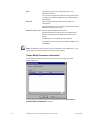
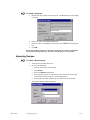
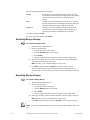
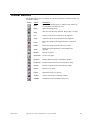
Following is a list of documentation icons:
Warning notices are used to emphasize that hazardous voltages, currents, temperatures, or
other conditions that could cause personal injury exist in the equipment or may be associated
with its use.
Caution provides information when careful attention must be taken in order to avoid
damaging results.
Important flags important information.
To do calls attention to a procedure.
Note calls attention to information that is especially significant to understanding and
operating the equipment or software.
Tip provides a suggestion.
Guide provides additional directions for selected topics.
This document is based on information available at the time of publication. While efforts have been made to be accurate,
the information contained herein does not purport to cover all details or variations in hardware or software, not to
provide for every possible contingency in connection with installation, operation, or maintenance. Features may be
described herein which are not present in all hardware and software systems. GE Fanuc Automation assumes no
obligation of notice to holders of this document with respect to changes subsequently made.
GE Fanuc Automation makes no representation of warranty, expressed, implied, or statutory with respect to, and
assumes no responsibility for the accuracy, completeness, sufficiency, or usefulness of the information contained herein.
No warranties of merchantability or fitness for purpose shall apply.
CIMPLICITY is a registered trademark of GE Fanuc Automation North America, Inc.
Windows, Windows NT, Windows 2000 and Windows 98 are registered trademarks of Microsoft Corporation
This manual was produced using Doc-To-Help®, by WexTech Systems, Inc.
Copyright 2000 GE Fanuc Automation North America, Inc.
All rights reserved
Index-ii
CIMPLICITY Recipes Operation Manual–December 2000
GFK-1303D
Preface
Contents of this Manual
Chapter 1. Introduction: Gives a brief description of the Recipes option.
Chapter 2. Recipe Concepts: Discusses the Recipe components.
Chapter 3. Using the Recipes Interface: Shows you how to use the Recipes user interface
to manage Parameters, Recipes, and Maps.
Chapter 4. Using the Run-Time Recipe Control: Describes how to create a Recipe object
for CimView screens.
Chapter 5. Event Editor Extensions for Recipes: Shows you how to create an Automatic
Action to upload or download a Recipe.
Chapter 6. Basic Control Engine Extensions for Recipes: Describes the Basic Control
Engine language extensions that support Recipes.
Appendix A. CSV File Format: Documents the format used for Import/Export .CSV files.
Appendix B. Operations Quick Reference: Lists the menus, mouse operations, and keypad
operations available in Recipes.
Related Publications
For more information, refer to these publications:
CIMPLICITY Base System User's Manual (GFK-1180)
CIMPLICITY Basic Control Engine Language Reference Manual (GFK-1283)
CIMPLICITY Basic Control Engine Program Editor Operation Manual (GFK1305)
CIMPLICITY Event Editor Operation Manual (GFK-1282)
GFK-1303
iii
Contents
Introducing Recipes
1-1
About Recipes ........................................................................................................................ 1-1
Using Recipe Objects in CimView .......................................................................... 1-2
Using Basic Control Engine Interface for Recipes .................................................. 1-2
Install Recipes Option ............................................................................................................ 1-3
Adding Recipes Option to Project ........................................................................... 1-4
Understanding Recipes
2-1
Recipe Configuration Components ........................................................................................ 2-1
The Recipe Configuration Interface ....................................................................................... 2-2
Understanding the Recipe Directory........................................................................ 2-3
Directory Icons ........................................................................................................ 2-3
Sample Recipes ...................................................................................................................... 2-4
Configuring Recipes
3-1
Recipe Group Procdures ........................................................................................................ 3-1
Opening A Recipe Group......................................................................................... 3-1
Defining Recipe Group Properties........................................................................... 3-2
Naming A Recipe Group ......................................................................................... 3-2
Recipe Parameters.................................................................................................................. 3-3
Adding Recipe Parameters....................................................................................... 3-3
Understanding Parameter Attributes ....................................................................... 3-4
Moving Parameters in the Recipes Grid .................................................................. 3-6
Removing Parameters from the Recipes Grid.......................................................... 3-6
Recipe Procedures.................................................................................................................. 3-7
Creating a Recipe..................................................................................................... 3-7
Renaming a Recipe .................................................................................................. 3-7
Copying a Recipe..................................................................................................... 3-8
Deleting a Recipe..................................................................................................... 3-8
Defining Recipe Properties ...................................................................................... 3-9
Displaying the Contents of Recipes ....................................................................... 3-10
Understanding Recipe Parameter Values............................................................... 3-11
Defining Recipe Cell Properties ............................................................................ 3-12
About Recipe Subfolders ....................................................................................... 3-13
GFK-1303D
Contents-v
Recipe Map Procedures........................................................................................................ 3-15
Creating a Map....................................................................................................... 3-15
Renaming a Map.................................................................................................... 3-15
Copying a Map....................................................................................................... 3-16
Deleting a Map....................................................................................................... 3-16
Defining Map Properties........................................................................................ 3-16
Displaying the Contents of Maps........................................................................... 3-17
Mapping Parameter Values.................................................................................... 3-19
Using Map Subfolders ........................................................................................... 3-19
Downloading Recipes ............................................................................................ 3-21
Uploading Recipes ................................................................................................. 3-23
Archiving Recipe Groups ...................................................................................... 3-24
Exporting Recipe Groups....................................................................................... 3-24
Importing A Recipe Group .................................................................................... 3-25
Validating Recipe Group Columns ........................................................................ 3-25
Validating Parameters............................................................................................ 3-26
Validating Recipes ................................................................................................. 3-27
Validating Maps..................................................................................................... 3-27
Comparing Recipes................................................................................................ 3-27
Recipes Automatic Action ................................................................................................... 3-29
Using the Run-Time Recipe Control
4-1
Creating a Recipe Control ...................................................................................................... 4-1
Configuring Recipe Control Properties.................................................................................. 4-2
General Recipes Control Properties......................................................................... 4-3
Batch ID Recipe Control Properties......................................................................... 4-4
Event Editor Extensions For Recipes
5-1
Creating A Recipe Action ...................................................................................................... 5-1
Basic Control Engine Extensions for Recipes
6-1
RCPDownload (statement)..................................................................................................... 6-1
RCPUpload (statement) ......................................................................................................... 6-2
RCPGroupExport (statement) ................................................................................................ 6-2
RCPGroupImport (statement) ................................................................................................ 6-3
Appendix A - CSV File Format
A-1
CSV File Format for Import/Export...................................................................................... A-1
Sample CSV File .................................................................................................... A-2
Appendix B – Recipes Quick Reference Operation Guide
B-1
About the Recipes Quick Reference Guide............................................................................B-1
Recipes Menu Options ...........................................................................................................B-2
Toolbar Buttons......................................................................................................................B-5
Mouse Operations ..................................................................................................................B-6
Keyboard Operations .............................................................................................................B-8
Index
Index-vi
i
CIMPLICITY Recipes Operation Manual–December 2000
GFK-1303D
Introducing Recipes
About Recipes
The CIMPLICITY Recipes software option enables you to create and manage recipe data
for your production processes. The Recipes interface consists of a spreadsheet format in
which you enter the configuration data for each of your recipes. This format allows you
to group similar products together.
Using the Recipes Configuration you can:
create and manage recipe parameters, recipes, and maps in a spreadsheet format.
import and export recipe groups to and from CSV file formats.
archive recipe groups.
reconcile recipe groups automatically to accommodate changes in the group’s
structure and layout.
compare recipes.
upload recipes manually.
review and modify parameters and values.
download recipes manually.
The Recipes option is fully integrated into the CIMPLICITY HMI family of products.
This ensures a seamless transition with other features of the CIMPLICITY software. Its
powerful, yet easy-to-use features have been designed with the flexibility to fulfill both
batch and discrete part processing requirements.
Note: This manual is not intended to provide instruction on CIMPLICITY HMI or your
Windows operating system, and it is assumed that users have a working knowledge of
both software products. Please refer to the documentation that originally came with your
software for questions about CIMPLICITY and Microsoft Windows.
GFK-1303D
1-1
Using Recipe Objects in CimView
Recipe objects can also be embedded in CimView screens (using OCX Controls). These
objects enable you to:
Upload and download recipes manually.
Review and modify parameters manually.
Using Basic Control Engine Interface for Recipes
The Recipes option also has a Scripting interface (using extensions to the Basic Control
Engine) that enables you to:
GFK-1303D
Upload and download recipes automatically based on system events, such as
point changes from a shop floor device.
Import and export recipe groups from/to CSV file formats.
1-2
Install Recipes Option
Before you can begin to configure Recipes, make sure the option is installed on all
computers where you want to create and maintain recipe data. Installing the Recipes
option is quick and easy using your original installation CD for CIMPLICITY HMI.
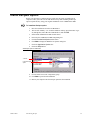
To install the Recipes option:
1.
Place the installation CD in the CD-ROM drive.
2.
The CD will AutoPlay—or—from the Windows desktop, press Start>Run. Type
d:\setup.bat (where d is the CD-ROM drive) and click OK.
3.
Select Install CIMPLICITY HMI from the menu.
4.
Proceed to the CIMPLICITY HMI Setup dialog box.
5.
Click the Review/Add Options radio button.
6.
Click Next to display the HMI Server Options dialog box.
7.
Check the Application Options box.
8.
Check the Recipes box.
Add Recipes option to CIMPLICITY
1. Check. . .
2. Check Recipes
option.
9.
Clear all other boxes in the Components group.
10. Click Next to proceed with installation.
11. Restart your computer once the Recipes option has been installed.
GFK-1303D
Introducing Recipes
1-3
Adding Recipes Option to Project
Once the option is installed from the CIMPLICITY HMI CD, you must add the option to
your project properties.
To add the Recipes option to your project:
1.
Open your project.
2.
From the Workbench, click Project on the menu bar.
3.
Select Properties to display the Project Properties dialog box.
4.
Click the General tab.
5.
In the Options group, scroll down and check the Recipes option box.
Select Receipes
from the Options
list.
6.
Click OK.
Result: The Recipes applet
is added to your Workbench directory.
Workbench directory
Applet added
to directory.
Project properties
GFK-1303D
1-4
Understanding Recipes
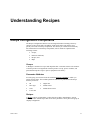
Recipe Configuration Components
The Recipes Configuration interface uses an integrated window featuring a directory
structure on the left side and a spreadsheet format on the right. This enables you to
quickly select and view Recipe components. The directory is constructed in a hierarchy
that contains the four main Recipe components, each of which are explained in the
following sections:
Groups,
Parameter Attributes,
Recipes, and
Maps
Groups
A Group is a container for recipes and maps that share a common structure. The structure
is made up of the list of ingredients needed to produce a recipe, process variables, and
point IDs that map the recipes to process equipment in the factory.
Parameter Attributes
For each group you can select from the available Parameter Attributes to which you
assign specific values. The available parameter attributes are predefined in the Recipe
directory as follows:
ID
High Limit
Data Type
Default Value
Units
Default Source Point
Low Limit
Recipes
A Recipe is the list of ingredients or values that are needed to manufacture a specific
batch of product. Similar recipes that use the same parameters can be placed in a group to
simplify configuration.
GFK-1303D
2-1
Maps
A Map is a list of point IDs to which recipe parameter values are written to (on
Download) or read from (on Upload). These points may represent non-contiguous device
addresses, and can span several devices. Each group can contain one or more maps.
The Recipe Configuration Interface
The Recipe Configuration Interface combines a directory structure, much like the project
Workbench, with a spreadsheet in one common window. This enables you to maintain
your recipe groups and configuration data in one compact structure.
All of the functionality is contained in the interface and can be accessed through menu
options, popup menus and toolbar buttons.
Recipe Configuration Interface when first launched
Directory structure
2-2
CIMPLICITY Recipes Operation Manual–December 2000
Spreadsheet for
configuration data.
GFK-1303D
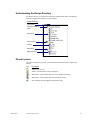
Understanding the Recipe Directory
The Recipe directory is structured in a hierarchy with the Group folder as the primary
container for parameter attributes, recipes and maps.
Recipe directory
Group folder
Parameter Attributes
folder
Parameters
Recipes folder
Recipes
Maps folder
Maps to devices
Directory Icons
The icons in the directory provide you with information about the folders and items as
follows:
Icon
Description
Folder is not selected.
Folder is selected and its items are displayed.
Represents a recipe item that has not yet been loaded into memory.
Represents a recipe item that has been loaded into memory.
Item is displayed in the right pane (spreadsheet grid).
GFK-1303D
Understanding Recipes
2-3
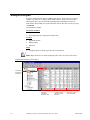
Sample Recipes
In order to understand fully how the CIMPLICITY Recipes option works, we created a
sample recipe group for a company called "Mom's Bakery." Aside from various other
baked goods, three types of bread with similar ingredients and baking processes are
made: White, Raisin and Rye. We placed all of the data for these three recipes in a group
called Bread.
The spreadsheet contains:
Parameter Attributes
Ingredients
Processing parameters: temperature and bake time
Recipes
Ingredient amounts
Baking degrees
Bake time
Maps
Configured points to which recipe data can be downloaded
Note: Maps do not have to contain contiguous points. They can span several devices.
Sample Recipes spreadsheet for Mom's Bakery
Indicates item
is displayed in
spreadsheet.
Parameter Attributes:
Ingredients
Temperature
Mix & Bake Times
2-4
Recipes:
Ingredient amounts
Degrees for baking
Bake times
CIMPLICITY Recipes Operation Manual–December 2000
Maps:
Points where recipes
can be downloaded.
GFK-1303D
Configuring Recipes
Recipe Group Procdures
A Recipe Group consists of Parameters, Recipes and Maps. You may define one or more
Recipe Groups, depending on your application. Each Recipe Group that you create and
save is stored in a file with an .RGP extension.
Opening A Recipe Group
You can use the File menu or toolbar buttons to open a new or existing Group.
Procedure to Open an Existing Recipe Group
To open an existing Group:
1.
Select the Group folder in the Tree.
2.
From the File menu, select Open, or click Open toolbar button.
The Open dialog is displayed. Browse for the Recipe Group (.RGP) file you want to
display. When you find it in the File Name list, select the file and select OK. The Open
dialog closes and the Recipe Group you selected is displayed in the Tree.
Procedure to Open a New Group
To open a new Group:
1.
Select the Group folder in the Tree.
2.
From the File menu, select New, or click the New toolbar button.
Result: A new, untitled Recipe Group is displayed in the Tree.
GFK-1303D
3-1
Defining Recipe Group Properties
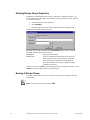
In addition to containing Parameters, Recipes, and Maps, a Group has Properties. To
view the Properties of the Group, select the top-level Group folder in the Tree, and then
do one of the following:
From the Edit menu, select Properties.
Press Alt+Enter.
Click the right mouse button and select Properties from the popup menu.
The Recipe Group Data dialog is displayed.
The name of the Group is displayed in the Group Name field. You may enter the
following optional properties for the Group:
Description
Group Point
Description of the Group.
Name of a CIMPLICITY Point ID to write the Group
Name to when a Recipe is Downloaded or Uploaded.
The Point ID may be unqualified or fully qualified.
The Point ID must be a Text point of sufficient length
to hold the group name.
After you are done, click OK to close the dialog and save any changes you made, or click
Cancel to close the dialog without saving any changes.
Naming A Recipe Group
You name a Group when you save it. The .name you enter for the Group becomes the
Group's name.
Note: The file type for a Recipe Group is .RGP
3-2
CIMPLICITY Recipes Operation Manual–December 2000
GFK-1303D
Recipe Parameters
A Recipe Group may have one or more Parameters associated with it. The Parameters
define the components used to produce a product.
Each Parameter that you define for the Group has seven attributes. You can use these
attributes to define the data type for the Parameter, further describe the Parameter, set
limits for the Parameter in Recipes, and define default values for Recipes.
Any time you add, delete or rearrange Parameters in the group, all Recipes and Maps will
automatically be reconciled to reflect your changes.
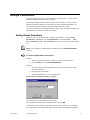
Adding Recipe Parameters
When you create a new Group, it has, by default, one Parameter. Use the Insert
Parameters function to add Parameters to the Group. The
new Parameters will be inserted in front of the currently selected Parameter
row.
Note: You can add up to 250 Parameters each time you use the Insert Parameters
function.
To insert new Parameters in the Group:
Method 1
1.
Select a cell of the Parameter row where you want to insert Parameters.
2.
From the Grid menu, select Insert Parameters....
Method 2
1.
Select the numbered cell in the Parameter row in the Grid where you want to
insert the Parameters.
2.
Click the right mouse button.
3.
Select Insert Parameters... from the popup menu.
Result: The Insert Parameters dialog is displayed.
You may insert up to 250 Parameters in one request.
Enter the number of Parameters you want to insert, and select OK
The Parameters you requested will be inserted in front of the selected row. In addition,
the new Parameter rows will automatically be inserted in all existing Recipes and Maps.
GFK-1303D
Configuring Recipes
3-3
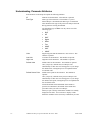
Understanding Parameter Attributes
Each Parameter in the Recipe Group has the following attributes:
ID
Identifier for the Parameter. This attribute is optional.
Data Type
Data Type of the Parameter. This attribute is required.
When a Recipe is downloaded, the Data Type of a Parameter
must match the Data Type of the point in the Map to which the
Recipe parameter is being downloaded.
The default data type is Text. You may choose one of the
following types:
SINT
INT
DINT
Digital
REAL
Text
USINT
UINT
UDINT
Units
Engineering units that this Parameter’s value refers to. This
attribute is optional.
Low Limit
Low limit for the Parameter. This attribute is optional.
High Limit
High limit for the Parameter. This attribute is optional.
Default Value
Default value for the Parameter. This attribute is optional.
Once you specify a default value, new Recipes will
automatically use this value as a starting point. If you change
the default value, existing Recipes are not updated with the
new default value.
Default Source Point
Default source point for the Parameter. This attribute is
optional.
Once you specify a default source point, new Recipes will
automatically use this value as a starting point. If you change
the default source point, existing Recipes are not updated with
the new default value.
If both the Default Value and Default Source Point are
specified for a Parameter, the Default Source Point takes
precedence when you create a new Recipe.
When you open a Group, no Parameter Attributes are initially
displayed in the Grid. You can choose to display or hide
Parameter Attributes in the Grid in any combination you want.
3-4
CIMPLICITY Recipes Operation Manual–December 2000
GFK-1303D
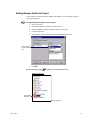
Procedure to Display Selected Parameter Attributes in the Grid
To display a Parameter Attribute in the Grid:
1. Select the Parameter Attribute in the Tree.
2.
Do one of the following:
From the Tree menu, select View.
Double-click the Parameter Attribute in the Tree.
Click the right mouse button and select View from the popup menu.
The Parameter Attributes are displayed in the Grid in the order you select them. Note
to
for each Parameter Attribute that you
that the icon in the Tree changes from
select.
Procedure to Display All Parameter Attributes in the Grid
To display all Parameter Attributes in the Grid:
1.
Select the Parameter Attributes folder.
2.
Do one of the following:
From the Tree menu, select View All.
Click the right mouse button and select View All from the popup menu.
Note: The icon in the Tree changes from
to
for all Parameter Attributes.
Procedure to Remove Selected Parameter Attributes from the
Grid
To remove a Parameter Attribute from the Grid:
1. Select the Parameter Attribute column in the Grid.
2.
Do one of the following:
From the Grid menu, select Hide Column.
Click the right mouse button and select Hide Column from the popup
menu.
Note that the icon in the Tree changes from
you select.
to
for each Parameter Attribute that
Procedure to Remove all Parameter Attributes from the Grid
To remove all Parameter Attributes from the Grid:
Either:
Select a Parameter Attribute cell in the Grid, then from the Grid menu, select
Hide All Attribute Columns or
Move the mouse pointer to the blank header cell for the parameter number
column, then click the right mouse button and select Hide All Attribute
Columns from the popup menu.
Note: The icon in the Tree changes from
GFK-1303D
Configuring Recipes
to
for all Parameter Attributes.
3-5
Moving Parameters in the Recipes Grid
To move a Parameter to another location:
1.
Select the numbered cell for the row in the Grid that you want to move.
2.
Hold down the left mouse button and drag the row to its new location.
3.
Release the left mouse button
Removing Parameters from the Recipes Grid
To remove one or more Parameters from the Grid:
1.
Select the rows you want to remove.
2.
Do one of the following:
3.
Click the right mouse button and select Delete Parameters from the
popup menu or
From the Grid menu, select Delete Parameters.
Confirm your selection.
Result: The Parameters you selected will be deleted from the Grid. The rows are also
automatically deleted from any Recipes and Maps that currently exist in the Recipe
Group.
3-6
CIMPLICITY Recipes Operation Manual–December 2000
GFK-1303D
Recipe Procedures
A Recipe specifies the amount (value) of each Parameter that will be used to manufacture
a specific batch of product. All the Recipes for a Recipe Group are found in the Recipes
folder.
You can create subfolders in the Recipes folder to further classify your Recipes. There is
no restriction on the number of levels of subfolders you can create. You can create a
Recipe in the Recipes folder or in any Recipes subfolder.
Initially, the Recipes folder contains no Recipes or Recipe subfolders.
Creating a Recipe
To create a Recipe:
1.
2.
Do one of the following:
Select the Recipes folder or any Recipe subfolder or
Select any Recipe in the folder where you want to place the new Recipe.
Do one of the following:
From the File menu, select New.
Click the New toolbar button.
Press Ctrl+N.
If you selected:
The Recipes folder or a Recipe subfolder, click the right mouse button
and select New->Recipe from the popup menu.
A Recipe, click the right mouse button and select New from the popup
menu.
The new Recipe is added to the end of the Recipe list in the current folder and is given
the default name New Recipe. It contains one cell for each parameter you have defined
for the Group. If you defined any Default Values or Default Source Points for the Group,
they are automatically transferred to the newly-created Recipe. Also, the Recipe name is
automatically open for editing so that you can immediately rename it.
Renaming a Recipe
To change the name of a Recipe:
1.
Select the Recipe name in the Tree.
2.
Click on the name to open it for editing.
3.
Enter the new Recipe name.
Note: The name must be unique across the entire Group.
GFK-1303D
Configuring Recipes
3-7
Copying a Recipe
You can copy a Recipe to the Recipes folder or to any Recipe subfolder you have created.
To copy a Recipe:
1.
Select the Recipe you want to copy.
2.
Hold down the Ctrl key.
3.
Hold down the left mouse button and drag the Recipe to the Recipes folder or to
another Recipe subfolder.
4.
Release the left mouse button.
The Tree is redisplayed with the copied Recipe in its new location. The default name of a
copied Recipe is Copy of <name>, where <name> is the name of the source Recipe.
The Recipe name is automatically open for editing so that you can immediately rename
it.
Deleting a Recipe
To delete a Recipe:
3-8
1.
Select the Recipe name in the Tree.
2.
Do one of the following:
From the Edit menu, select Delete.
Press the Delete key.
Click the Delete toolbar button.
Click the right mouse button and select Delete from the popup menu.
CIMPLICITY Recipes Operation Manual–December 2000
GFK-1303D
Defining Recipe Properties
Each Recipe in a Group has properties.
To view the properties of a Recipe:
1. Select the Recipe in the Tree, and then do one of the following:
From the Edit menu, select Properties.
Press Alt+Enter.
Click the right mouse button and select Properties from the popup menu.
Result: The Recipe Data dialog is displayed.
The following information is displayed in read-only fields:
Recipe Name
Create Time
Last Modified
The name of the Recipe.
The date and time the Recipe was initially created.
The date and time the Recipe was last modified.
You may enter optional information in any of the following fields:
Version
Product Code
Author
Recipe Point
Enter the version of the Recipe.
Enter the product code associated with the Recipe.
Enter the author of the Recipe.
Enter the name of a CIMPLICITY Point ID to write the Recipe
Name to when the Recipe is Downloaded or Uploaded.
The Point ID may be unqualified or fully qualified.
The Point ID must be a Text point of sufficient length to hold the Recipe
name.
Batch Point
Enter the name of a CIMPLICITY Point ID to write the userdefined Batch ID to when the Recipe is Downloaded.
The Point ID may be unqualified or fully qualified.
The Point ID must be a Text point of sufficient length to hold the Batch
ID.
Comments
GFK-1303D
Configuring Recipes
Enter any comments about the Recipe in this field.
3-9
Displaying the Contents of Recipes
You can display the contents of a single Recipe, all Recipes, or all Recipes in a subfolder.
Note: The icon in the Tree changes from
displaying in the Grid.
or
to
for Recipes that you are
Procedure to Display a Single Recipe
To display the contents of a Recipe in the Grid:
Do one of the following:
Double-click the Recipe in the Tree.
Select the Recipe in the Tree, then from the Tree menu, select View.
Move the mouse pointer to the Recipe in the Tree, click the right mouse button,
then select View from the popup menu.
Procedure to Display all Recipes
To display the contents of all Recipes in the Grid:
Do one of the following:
Select the Recipes folder in the Tree, then from the Tree menu, select View All.
Move the mouse pointer to the Recipes folder in the Tree, click the right mouse
button, then select View All from the popup menu.
All Recipes in the Recipes folder and all subfolders will be displayed in the Grid.
To display the contents of all Recipes in a Recipe subfolder:
Do one of the following:
Select the Recipe subfolder in the Tree, then from the Tree menu, select View
All.
Move the mouse pointer to the Recipe subfolder in the tree, click the right
mouse button, then select View All from the popup menu.
Result: All Recipes in the subfolder and any subfolders it contains will be displayed in
the Grid.
3-10
CIMPLICITY Recipes Operation Manual–December 2000
GFK-1303D
Understanding Recipe Parameter Values
When you create a Recipe, the initial value for each of the Recipe Parameters is created
in this order:
1.
If a Default Source Point is defined for the Parameter, it is copied to the Recipe,
and CIMPLICITY Point is set in the cell properties.
2.
Otherwise, if a Default Value is defined for the Parameter, it is copied to the
Recipe, and Value is set in the cell properties.
3.
Otherwise, the value in the Recipe is left blank, and Value is set in the cell
properties.
You can let the initial Recipe values stand, or you can modify them.
Procedure to Modify Recipe Parameter Values
To modify the value of a Recipe Parameter:
1.
Display the Recipe in the Grid.
2.
In the Recipe, select the Parameter value you want to modify.
3.
Change the value for the Parameter.
You may enter a value or CIMPLCITY Point ID in a Recipe Parameter. If you want to
enter a Point ID, you may enter it directly, or browse for it. The Point ID may be
unqualified or fully qualified. If you use the Browser to enter a Point ID, the cell
properties will automatically be set to CIMPLICITY Point.
After you modify the Recipe Parameter, you should display the Recipe Cell Properties
dialog and make sure that the cell's properties are set correctly.
GFK-1303D
Configuring Recipes
3-11
Defining Recipe Cell Properties
Each Parameter or cell in a Recipe has properties.
To display the property dialog for a cell:
1.
Select the cell in the Recipe.
2.
Do one of the following:
Click the right mouse button, and select Properties from the popup menu.
From the Edit menu, select Properties.
Press Alt+Enter.
The Recipe Cell Properties dialog is displayed.
Use the Value can be modified before Download check box to control whether or not
the value in the Recipe cell can be modified during Download. If you do not want users
to modify the value at Download, clear the check box. If you do want users to be able to
modify the value, enable the check box.
Use the Value and CIMPLICITY Point radio buttons to specify whether the contents of
the cell are a value or a CIMPLICITY point.
If you specify Value, the value in the cell is downloaded to the corresponding
Map point.
If you specify CIMPLICITY Point, the contents of the CIMPLICITY Point ID
are downloaded to the corresponding Map point.
When you create the Recipe, the defaults for a cell are:
3-12
Value can be modified before Download is enabled.
If a Default Source Point is defined in the Parameter Attributes, the
CIMPLICITY Point radio button is set.
If no Default Source Point is defined in the Parameter Attributes, the Value
radio button is set.
CIMPLICITY Recipes Operation Manual–December 2000
GFK-1303D
About Recipe Subfolders
CIMPLICITY Recipes architecture lets you define subfolders in the Recipes folder or in
existing subfolders. This feature gives you the ability to group Recipes. You can:
Create Recipe subfolders.
Rename Recipe subfolders.
Move Recipes between Recipe subfolders.
Delete Recipe subfolders.
Procedure to Create a Recipe Subfolder
To create a Recipe subfolder:
1.
Select the Recipes folder or subfolder where you want to put the new subfolder.
2.
Do one of the following:
From the Tree menu, select Create SubFolder.
Click the right mouse button and select New->SubFolder from the popup
menu.
The new Recipe subfolder is created in the current folder. It is positioned after currently
existing subfolders and in front of any Recipes in the folder. When you create a Recipe
subfolder, it is given the default name New Folder, and you are automatically given the
opportunity to change the subfolder name.
Procedure to Rename a Recipe Subfolder
To change the name of a Recipe subfolder:
1.
Select the Recipe subfolder name in the Tree.
2.
Click on the name to open it for editing.
3.
Enter the new subfolder name.
Note: The name must be unique across the entire Group.
Procedure to Move a Recipe Between Subfolders
You can move a Recipe between the Recipes folder and any Recipe subfolders you have
created.
To move a Recipe:
1.
Select the Recipe.
2.
Hold down the left mouse button and drag the Recipe to the Recipes folder or to
another Recipe subfolder.
3.
Release the left mouse button.
Result: The Tree is redisplayed with the Recipe in its new location.
GFK-1303D
Configuring Recipes
3-13
Procedure to Delete a Recipe Subfolder
To delete a Recipe subfolder:
3-14
1.
Make sure the subfolder is empty.
2.
Select the subfolder you want to delete.
3.
Do one of the following:
§
From the Edit menu, select Delete.
Select the Delete toolbar button.
Click the right mouse button and select Delete from the popup menu.
Press the Delete key.
CIMPLICITY Recipes Operation Manual–December 2000
GFK-1303D
Recipe Map Procedures
A Map is a list of CIMPLICITY Point IDs to which Recipe parameter values will be
written during a Download request, or from which Recipe parameter values will be read
during an Upload request. Map points may represent non-contiguous device addresses,
and can span several devices.
You can create subfolders in the Maps folder to further classify your Maps. There is no
restriction on the number of levels of subfolders you can create. You can create a Map in
the Maps folder or in any Map subfolder.
Initially, the Maps folder contains no Maps or Map subfolders.
Creating a Map
To create a Map:
1.
2.
Do one of the following:
Select the Maps folder or any Map subfolder or
Select any Map in the folder where you want to place the new Map.
Do one of the following:
From the File menu, select New.
Select the New toolbar button.
Press Ctrl+N.
If you selected
The Maps folder or any Map subfolder, click the right mouse button
and select New->Map from the popup menu.
A Map, click the right mouse button and select New from the popup
menu.
The new Map is added to the end of the Map list in the current folder with the default
name New Map. It contains one cell for each parameter you have defined for the Group.
Also, the Map name is automatically open for editing so that you can immediately
rename it.
Renaming a Map
To change the name of a Map:
1.
Select the Map name in the Tree.
2.
Click on the name to open it for editing.
3.
Enter the new Map name.
Note: The name must be unique across the entire Group
GFK-1303D
Configuring Recipes
3-15
Copying a Map
You can copy a Map to the Maps folder or to any Map subfolder you have created.
To copy a Map:
1.
Select the Map you want to copy.
2.
Hold down the Ctrl key.
3.
Hold down the left mouse button and drag the Map to the Maps folder or to
another Map subfolder.
4.
Release the left mouse button.
Result: The Tree is redisplayed with the copied Map in its new location.
The default name of a copied Map is Copy of <name>, where <name> is the name of
the source Map. The Map name is automatically open for editing so that you can
immediately rename it.
Deleting a Map
To delete a Map:
1.
Select the Map name in the Tree.
2.
Do one of the following:
From the Edit menu, select Delete.
Press the Delete key.
Select the Delete toolbar button.
Click the right mouse button and select Delete from the popup menu.
Defining Map Properties
Each Map in a Group has properties.
To view the properties of a Map:
1.
Select the Map in the Tree.
2.
Do one of the following:
From the Edit menu, select Properties.
Press Alt+Enter.
Click the right mouse button and select Properties from the popup menu.
Result: The Map Data dialog is displayed.
3-16
CIMPLICITY Recipes Operation Manual–December 2000
GFK-1303D
The following information is displayed in read-only fields:
Map Name
The name of the Map.
You may enter optional information in any of the following fields:
Description
Enter a description of the Map.
Map Point
Enter the name of a CIMPLICITY Point ID to write the Map
Name to when a Recipe is Downloaded or Uploaded.
The Point ID may be unqualified or fully qualified.
The Point ID must be a Text point of sufficient length to hold
the Map Name.
Status Point
Enter the name of a CIMPLICITY Point ID to write status
information to as a Recipe is Downloaded or Uploaded.
If you use an Analog or Float type point, a numeric
percentage (0-100%) will be written to the point as the
Recipe is Downloaded or Uploaded. This point can then
be used to animate an object on a CimView screen.
If you use a Text type point, a status message will be
written to the point. Be sure to use a TEXT_80 type
point so that the status message can be displayed in full.
The Point ID may be unqualified or fully qualified.
Displaying the Contents of Maps
You can display the contents of a single Map, all Maps, or all Maps in a subfolder.
Note: The icon in the Tree changes from
displaying in the Grid.
GFK-1303D
Configuring Recipes
or
to
for Maps that you are
3-17
Procedure to Display a Single Map
To display the contents of a Map in the Grid:
Do one of the following:
Double-click the Map in the Tree.
Select the Map in the Tree, then from the Tree menu, select View.
Move the mouse pointer to the Map in the Tree, click the right mouse button,
then select View from the popup menu.
Procedure to Display all Maps
To display the contents of all Maps in the Grid:
Do one of the following:
Select the Maps folder in the Tree, then from the Tree menu, select View All.
Move the mouse pointer to the Maps folder in the tree, click the right mouse
button, then select View All from the popup menu.
All Maps in the Maps folder and all Map subfolders will be displayed in the Grid.
To display the contents of all Maps in a Map subfolder:
Do one of the following:
Select the Map subfolder in the Tree, then from the Tree menu, select View All.
Move the mouse pointer to the Map subfolder in the tree, click the right mouse
button, then select View All from the popup menu.
Result: All Maps in the subfolder and any subfolders it contains will be displayed in the
Grid.
3-18
CIMPLICITY Recipes Operation Manual–December 2000
GFK-1303D
Mapping Parameter Values
Map parameter values are device points where CIMPLICITY software can Download or
Upload Recipe parameters. You can enter Point IDs manually or use the Point Browser
to select them. Point IDs may be unqualified or fully qualified.
The device points you define for the Map do not need to be contiguous or on the same
device. However, the more non-contiguous points you have in the Map, the more time
will be needed to perform Uploads and Downloads.
For best performance on Uploads or Downloads, use contiguous array points in a Map.
For example, consider the following Maps:
MAP1
PT[0]
PT[1]
PT[2]
PT[3]
PT[4]
PT[5]
PT[6]
PT[7]
PT[8]
MAP2
PT[0]
PT[1]
PT[2]
NPT[0]
NPT[1]
NPT[2]
NPT[3]
PT[3]
PT[4]
When MAP1 is used for a Download or Upload, a single write/read request is issued.
When MAP2 is used for a Download or Upload, three write/read requests are issued.
Modifying Map Parameter Values
To modify the value of a Map Parameter:
1.
Display the Map in the Grid.
2.
In the Map, select the Parameter value you want to modify.
3.
Change the CIMPLICITY Point ID for the Parameter. You may enter the new
Point ID manually, or use the Point Browser to select a Point ID. The Point ID
may be unqualified or fully qualified.
Using Map Subfolders
The CIMPLICITY Recipes architecture lets you define subfolders in the Maps folder or
in existing subfolders. This feature gives you the ability to group Maps. You can:
GFK-1303D
Create Map subfolders.
Rename Map subfolders
Move Maps between Map subfolders.
Delete Map subfolders.
Configuring Recipes
3-19
Procedure to Create a Map Subfolder
To create a Map subfolder:
1.
Select the Maps folder or subfolder where you want to put the new subfolder.
2.
Do one of the following:
From the Tree menu, select Create SubFolder.
Click the right mouse button and select New->SubFolder from the popup
menu.
Result: The new Map subfolder is created in the current folder.
It is positioned after currently existing subfolders and in front of any Maps in the folder.
When you create a Map subfolder, it is given the default name New Folder, and you are
automatically given the opportunity to change the subfolder name.
Procedure to Rename A Map Subfolder
To change the name of a Map subfolder:
1.
Select the Map subfolder name in the Tree.
2.
Click on the name to open it for editing.
3.
Enter the new subfolder name.
Note: The name must be unique across the entire Group.
Procedure to Move a Map Between Subfolders
You can move a Map between the Maps folder and any Map subfolders you have created.
To move a Map:
1.
Select the Map.
2.
Hold down the left mouse button and drag the Map to the Maps folder or to
another Map subfolder.
3.
Release the left mouse button.
Result: The Tree is redisplayed with the Map in its new location.
Procedure to Delete a Map Subfolder
To delete a Map subfolder:
3-20
1.
Make sure the subfolder is empty.
2.
Select the subfolder you want to delete.
3.
Do one of the following:
From the Edit menu, select Delete.
Select the Delete toolbar button.
Click the right mouse button and select Delete from the popup menu.
Press the Delete key.
CIMPLICITY Recipes Operation Manual–December 2000
GFK-1303D
Downloading Recipes
To initiate a Recipe Download:
1.
Select the Recipe in the Tree.
2.
Do one of the following:
From the Tools menu, select Download....
Press Ctrl+D.
Select the Download toolbar button.
Click the right mouse button and select Download... from the popup menu.
Drag and drop the Recipe onto the Map you want to use for the Download.
Result: The Download a Recipe dialog is displayed.
Use the General tab to enter information about the Download.
General Recipe Download Specifications
If you want to modify any Recipe parameters before downloading them, use the Modify
Parameters tab.
When you are ready to start the Download, click OK.
If you want to cancel the Download, click Cancel.
On the General tab, enter the following information in the input fields:
Recipe
The Recipe you selected (or the first Recipe in the list) is
displayed in this field.
You can use the drop-down list button to the right of the field
to display the current list of Recipes and select another Recipe
to Download.
GFK-1303D
Configuring Recipes
3-21
Map
The Map you selected (or the first Map in the List) is
displayed in this field.
You can use the drop-down list button to the right of the field
to display the current list of Maps and select another Map for
the Download.
Batch ID
Enter an optional Batch Identifier for the product to be
manufactured.
When the Download is executed, this text will be placed in the
Batch Point defined for the Recipe.
Batch ID Source Point Enter an optional CIMPLICITY Point ID.
When the Download is executed, the text contained in this
Point ID will be placed in the Batch Point defined for the
Recipe.
The Point ID may be unqualified or fully qualified.
The Point ID must be a Text point of sufficient length to hold
the Batch ID.
Note: Download will only accept one source of information for the Batch Point. If you
specify data in one field, the other will be automatically disabled.
Recipe Modify Parameters at Download
Use the Modify Parameters tab to display and modify Recipe parameters before
downloading them.
You can modify any parameters prior to Download that have their Value can be
modified before Download check box set.
3-22
CIMPLICITY Recipes Operation Manual–December 2000
GFK-1303D
To modify a parameter:
1.
Double-click the parameter in the Recipe list. The Modify Recipe Value dialog
box opens.
2.
Enter a new value in the Recipe Value field.
3.
If the new value is a CIMPLICITY Point ID, set the CIMPLICITY Point check
box.
4.
Click OK.
Result: The modified parameter is displayed in the Recipe list. When you click OK in
the Download a Recipe dialog box, the values in the Recipe list are downloaded.
Uploading Recipes
To initiate a Recipe Upload:
1.
Select the Recipe or Map in the Tree.
2.
Do one of the following:
From the Tools menu, select Upload....
Press Ctrl+U.
Select the Upload toolbar button.
Move the mouse pointer over the Recipe in the Tree, then click the right
mouse button and select Upload... from the popup menu.
Drag and drop the Map on the Recipe you want to use for the Upload.
The Upload a Recipe dialog is displayed.
GFK-1303D
Configuring Recipes
3-23
Enter the following information in the fields:
Recipe
The Recipe you selected is displayed in this field. You can
use the drop-down list button to the right of the field to display
the current list of Recipes and select another Recipe to
Upload.
Map
The Map you selected is displayed in this field. You can use
the drop-down list button to the right of the field to display the
current list of Maps and select a Map for the Upload.
Upload To
The Recipe you selected initially is displayed in this field.
You can choose to upload the Map values to this Recipe, or
you can enter the name of another Recipe to upload to.
To start the Upload, click OK.
To cancel the Upload request, click Cancel.
Archiving Recipe Groups
To archive a Recipe Group:
1.
Select the Group folder in the Tree.
2.
Do one of the following:
From the File menu, select Archive.
Click the Archive button on the toolbar.
Press Ctrl+A.
Click the right mouse button, and select Archive from the popup menu.
3.
In the Save As dialog, enter a file name (the default name is the Group name)
and select a directory for the archive file.
Note: The file type for an archived Recipe Group is .rar
4.
Click OK to archive the file, or Cancel to cancel the Archive request.
If there are differences between the displayed Recipe Group and the saved
Recipe Group, you will be asked if you want to save the Group before archiving
it.
Exporting Recipe Groups
To export a Recipe Group:
1.
Select the Group folder in the Tree
2.
Do one of the following:
From the File menu, select Export.
Click the Export button on the toolbar.
Press Ctrl+E.
Click the right mouse button, and select Export from the popup menu.
3. In the Save As dialog, enter a file name and select a directory for the export file.
Note: The file type for an exported Recipe Group is .csv
4.
Click OK to export the Recipe Group, or Cancel to cancel the Export request.
Note: You can use Notepad or Microsoft Excel to display and make changes in the .csv
file.
3-24
CIMPLICITY Recipes Operation Manual–December 2000
GFK-1303D
Importing A Recipe Group
You can import files that use the Recipe Group .csv format.
To import a Recipe Group:
1.
Open a new Recipe Group.
2.
Do one of the following:
From the File menu, select Import.
Click the Import button on the toolbar.
Press Ctrl+I.
Click the right mouse button, and select Import from the popup menu.
3.
In the Open dialog box, select the file you want to import.
4.
Click OK to import the file, or Cancel to cancel the import request.
Validating Recipe Group Columns
You can use this feature to validate the following information in your Recipe Group:
Parameters
Recipes
Maps
The type of validation done, and the messages displayed, depends on the type of column
you are validating.
Important: To validate Default Source Points, Recipe Points, or Maps, your
CIMPLICITY project must be running.
To validate a column in your Recipe Group:
1.
Display the column in the Grid.
2.
Select the column.
3.
Do one of the following:
From the Tools menu, select Validate.
Click the Validate button on the toolbar.
Press Ctrl+L.
Result: When the Validation procedure finds a problem, it displays a dialog with
detailed information about the location and type of problem. For example:
The information is also recorded in the project's Status Log.
GFK-1303D
Configuring Recipes
3-25
You can select one of the following actions in the dialog:
Click Yes to continue validation and display warnings and errors.
Click No to continue validation without displaying messages. Messages will
still be logged to the project's Status Log.
Click Cancel to cancel the validation procedure.
Validating Parameters
The following validations are performed in Parameter columns:
High/Low Limits
Default Value
Default Source Point
High/Low Limits
The following validations are performed for the High Limit and Low Limit columns:
If the cell is blank, no validation is performed.
If the cell is not blank, the Data Type of the row must be numeric.
When validating the Low Limit column, each Low Limit must be less than its
corresponding High Limit.
When validating the High Limit column, each High Limit must be greater than
its corresponding Low Limit.
Default Value
The following validations are performed for the Default Value column:
Cell can only be blank if a Default Source Point is filled in for the row.
If the Data Type for the row is numeric, the cell can contain only a numeric
value.
If the Data Type for the row is digital, the cell can contain only 0 or 1.
If the Data Type for the row is text, the cell can contain anything.
If the Data Type for the row is numeric, and Default High/Low limits are
defined, the Default Value is verified to be within those limits.
Default Source Point
The following validations are performed for the Default Source Point column:
3-26
If the cell is blank, no validation is performed.
The Point Type for the Default Source Point must match the Data Type of the
row.
If the Default Source Point is an array element, it must be within the array
bounds.
The point must be Enabled.
CIMPLICITY Recipes Operation Manual–December 2000
GFK-1303D
Validating Recipes
The following validations are performed in Recipe columns:
Blank cells are not allowed.
If a cell is a CIMPLICITY Point:
The type of the point must match the Data Type for the row.
If the point is an array element, it must be within the array bounds.
If the cell is a value:
The value in the cell must match the Data Type of the row.
The value should be within the configured High Limit and Low Limit for
the row.
Validating Maps
The following validations are performed in Map columns:
The type of the point must match the Data Type for the row.
If the point is an array element, it must be within the array bounds.
The point must have Read/Write access.
The point must be Enabled.
Comparing Recipes
To compare Recipes:
1.
Select a Recipe.
2.
Do one of the following:
3.
GFK-1303D
From the Tools menu, select Compare.
Click the right mouse button and select Compare from the Recipe popup
menu.
In the Recipe Compare Select dialog, you will see a list of all Recipes in the
Group. You may select one or more of these Recipes to use for comparison.
Configuring Recipes
3-27
4.
Click OK to continue or Cancel to cancel your request.
You will be given the option of clearing the current Grid contents prior to
loading the compare results. The following message is displayed:
Do you wish to clear the Grid prior to displaying Recipe comparisons?
5.
Click OK to clear the Grid first, or Cancel to load the compare results into the
current Grid state.
Result: The selected Recipes will be displayed in side-by-side columns. If
differences are found, they will be highlighted in bold.
For example, when comparing the Recipes for White and Raisin bread, the compare
results look like this:
3-28
CIMPLICITY Recipes Operation Manual–December 2000
GFK-1303D
Recipes Automatic Action
For Recipes, Automatic Actions are Downloads and Uploads that are done automatically
through the Event Manager. Once you configure an Automatic Action, you can use the
Event Editor to create Events that will cause the Action to be executed.
To create an Automatic Action:
Do one of the following:
From the Tools menu, select Create Auto Action....
Select a Recipe or Map in the Grid, click the right mouse button, then select
Create Auto Action… from the popup menu.
The Create Auto Action Parameter File dialog is displayed.
You can create Download and Upload automatic actions.
Enter information in the following fields:
Recipe
Enter the name of the Recipe to be Downloaded or Uploaded.
Map
Enter the name of the Map to be used for the Download or
Upload.
Batch ID
Enter an optional Batch Identifier for the product to be
manufactured. When the Download is executed, this text will
be placed in the Batch Point defined for the Recipe.
If you select Upload, this field changes to Upload To, and
the Batch ID Source Point field is disabled.
Specify the name of the Recipe you wish to Upload to in the
Upload To field. You can either specify a new Recipe (which
will be created in the Recipe Group), or an existing Recipe
(which will be overwritten in the Recipe Group).
GFK-1303D
Configuring Recipes
3-29
Batch ID Source Point Enter an optional CIMPLICITY Point ID. When a Download
is executed, the text contained in this Point ID will be placed
in the Batch Point defined for the Recipe.
The Point ID may be unqualified or fully qualified.
The Point ID must be a Text point of sufficient length to hold
the Batch ID.
Action
Select one action to be performed:
Click Download to perform a Download action.
Click Upload to perform an Upload action
Click OK to create the action, or click Cancel to exit the
dialog without creating the action.
When you click OK, the Save As dialog is displayed.
Select the file name and directory where you want to save the
file and click OK. The action is now available to the Event
Editor.
Note: The file type for an automatic action file is .rpf.
3-30
CIMPLICITY Recipes Operation Manual–December 2000
GFK-1303D
Using the Run-Time Recipe
Control
Creating a Recipe Control
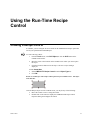
In CimEdit, you can configure an OCX control for the CIMPLICITY Recipes option that
will let you Upload and Download Recipes.
To create a Recipe control:
1.
From the Tools menu, select OLE Object, or click the OLE button on the
CimEdit Tools toolbar.
2.
Move the cursor to the location on the CimEdit screen where you want to place
the object.
3.
Click the left mouse button to fix the object. The Insert Object dialog is
displayed.
4.Click Create New.
5.
Select CIMPLICITY Recipe Control from the Object Type list.
6.
Click OK.
Result: A new Recipes control object will be placed in your CimEdit screen. The object
looks like this:
Once the Recipes object is in the CimEdit screen, you may do any of the following:
GFK-1303D
Resize the control or move it using the borders.
Double-click on the control to display the CIMPLICITY Recipes Control
Properties dialog and configure the control.
4-1
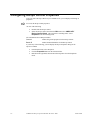
Configuring Recipe Control Properties
After you create a Recipe control on your CimEdit screen, you can display and change its
properties.
To access the Recipe control properties:
Do one of the following:
Double-click the Recipe control.
Select the Recipe control, then from the Edit menu select CIMPLICITY
Recipe Control Object. This will show a cascading menu. Select
Properties from the cascading menu.
The information about a Recipe includes:
General
Defines the general properties for the Recipe control.
Batch ID
Defines the Batch Identifier for the Recipe control.
If you do any of the following, you will display the Object Properties dialog for the
object in CimEdit:
4-2
From the Edit menu, select Properties.
Click the Properties button on the Format toolbar.
Hold down the right mouse button and select Properties from the drop-down
menu.
CIMPLICITY Recipes Operation Manual–December 2000
GFK-1303D
General Recipes Control Properties
The General properties define the fundamental characteristics of the Recipe control.
You can define the following properties for your Recipe control:
Text
Enter the text you want to appear on the button.
Group
Enter the name of the Recipe Group in this field. You can click the Popup Menu button
to the right of the input field to search for and select a Group.
Recipe
Enter the Recipe name in this field. You can click the drop-down list button to the right
of the field to display the list of Recipes in the Group.
Map
Enter the Map name in this field. You can click the drop-down list button to the right of
the field to display the list of Maps in the Group.
Action
Select one of the following actions for the control:
GFK-1303D
Download/Modify
Select this action if you want a user to be able to modify
Recipe parameters, and then Download the modified Recipe.
Download
Select this action if you want a user to Download a Recipe
without modifying it.
Upload to New
Select this action if you want a user to Upload a Recipe and
save the values in a new Recipe.
Upload/Save
Select this action if you want a user to Upload a Recipe and
overwrite its existing values with the new ones.
Using the Run-Time Recipe Control
4-3
Batch ID Recipe Control Properties
The Batch ID properties define the Batch Identifier for Downloads.
When you create a Recipe, you can define a Batch Point. Recipes will place a Batch ID in
the Batch Point when the Recipe is Downloaded.
You can do one of the following in this dialog:
Enter the Batch Identifier for this recipe in the Batch ID field. When the Recipe
is Downloaded, this text is written to the Batch Point.
Enter a Point ID in the Batch ID Source Point field. When the Recipe is
Downloaded, the contents of this Point ID are written to the Batch Point. The
Point ID may be unqualified or fully qualified, and it must be a Text point.
You can use the Browser and Popup menu buttons to the right of the input field
to browse for an existing Point ID or create a new one.
Note: Download will only accept one source of information for the Batch Point. If you
specify data in one field, the other will automatically be disabled.
4-4
CIMPLICITY Recipes Operation Manual–December 2000
GFK-1303D
Event Editor Extensions For
Recipes
Creating A Recipe Action
To create a Recipe Upload or Download action in the Event Editor:
1.
From the View menu, select By Action.
2.
Click the mouse once in the Action window.
3.
Do one of the following to create a new Action:
From the File menu, select New Action.
Click the New button on the toolbar.
Press Ctrl+N.
The New Action dialog will be displayed.
4.
Enter the name of the new action in the Action ID field and click OK.
The New Action properties dialog is displayed.
GFK-1303D
5.
Select Recipe Upload/Download from the list of actions in the Action Type
field.
6.
Select an Automatic Action file that you created in Recipes in the Parameter
File field.
5-1
You can click the Browser button to the right of the input field to browse for
to open a
an Automatic Action file or you can click the Pop-up Menu button
Recipe Configuration window and create a new Automatic Action file or to
browse for an existing Automatic Action file.
7.
Click OK to create the action.
Once you have created a Download or Upload Recipe Action, you can associate
an Event with it. When the Event occurs, the Action will automatically be
executed.
See the CIMPLICITY Event Editor Operation Manual (GFK-1282) for more
information about how to use the Event Manager.
5-2
CIMPLICITY Recipes Operation Manual–December 2000
GFK-1303D
Basic Control Engine
Extensions for Recipes
RCPDownload (statement)
Syntax
RCPDownload filename$[,[recipename$][,[mapname$][,
[pointorval$][,ispoint]]]]
Description
Downloads the specified Recipe from the specified Recipe Group
using the specified Map.
Comments
The RCPDownload function takes the following parameters:
Example
GFK-1303D
Parameter
Description
filename$
Required string containing the name of the
Recipe Group file where the Recipe is located.
The Recipe Group file must exist
recipename$
Optional string containing the name of the
Recipe to be Downloaded.
mapname$
Optional string containing the name of the Map
to be used when Downloading the Recipe.
pointorval$
Optional string containing the Batch Point or
Batch ID to be used when Downloading the
Recipe.
ispoint
Optional integer, set to 1 if pointorval$ is a
Batch Point.
RCPDownload "D:\Bread.rgp", "White", "Line1",
"Batch of White Bread", 0
6-1
RCPUpload (statement)
Syntax
RCPUpload filename$[,[recipename$][,[mapname$] [,newname$]]]
Description
Uploads the specified Recipe to the specified Recipe Group using
the specified Map.
Comments
The RCPUpload function takes the following parameters:
Example
Parameter
Description
filename$
Required string containing the name of the
Recipe Group file where the Recipe is located.
The Recipe Group file must exist.
recipename$
Optional string containing the name of the
Recipe to be Uploaded.
mapname$
Optional string containing the name of the Map
to be used when Uploading the Recipe.
newname$
Optional string containing the name of the
Recipe to be uploaded. You may use a new or
existing Recipe name.
RCPUpload "D:\Bread.rgp", "White", "Line1",
"NewWhite"
RCPGroupExport (statement)
Syntax
RCPGroupExport groupname$[, filename$]
Description
Exports the specified Recipe Group to a CSV file.
Comments
The RCPGroupExport function takes the following parameters:
Example
6-2
Parameter
Description
groupname$
Required string containing the name of the
Recipe Group file. The Recipe Group file must
exist.
filename$
Optional string containing the name of the CSV
file.
RCPGroupExport "D:\Bread.rgp"
CIMPLICITY Recipes Operation Manual–December 2000
GFK-1303D
RCPGroupImport (statement)
Syntax
RCPGroupImport groupname$[, filename$]
Description
Imports the specified Recipe Group from a CSV file.
Comments
The RCPGroupImport function takes the following parameters:
Example
GFK-1303D
Parameter
Description
groupname$
Required string containing the name of the
Recipe Group file.
filename$
Optional string containing the name of the CSV
file.
RCPGroupExport "D:\Bread.rgp", "Bread2.csv"
Basic Control Engine Extensions for Recipes
6-3
Appendix A - CSV File Format
CSV File Format for Import/Export
The data included in the CSV file for Recipes is divided into four areas:
1.
Group information
2.
Recipes information
3.
Maps information
4.
Parameters information
Each area consists of one line that lists the fields included in the area, followed by as
many lines needed to contain the data for the area.
For Group information, the first line consists of the text:
Group Name, Description, GroupPoint
and the second line contains the data for those fields.
For Recipes information, the first line consists of the text:
Recipe Name, Version, ProductCode, Author, RecipePoint,
BatchPoint, Comments
followed by one line of data for each Recipe in the Recipe Group.
For Maps information, the first line consists of the text:
Map Name, Description, MapPoint, StatusPoint
followed by one line of data for each Map in the Recipe Group.
For Parameters information, the first line consists of the text:
ID,Data Type,Units,Low Limit,High Limit,Default Value,Default
Source Point,r1,Can Mod,IsPoint,r2,Can Mod,IsPoint,...,rn,Can
Mod,IsPoint
followed by one line of data for each Parameter in the Recipe Group. This parameter
information also includes information about whether the corresponding Recipes
parameters can be modified or are CIMPLICITY points.
GFK-1303D
A-1
Sample CSV File
The following is an example of the CSV file that is exported by Recipes:
Group Name, Description, GroupPoint
Breads,,
Recipe Name, Version, ProductCode, Author, RecipePoint, BatchPoint,
Comments
\\Breads\Recipes\White,,,,,,
\\Breads\Recipes\Raisin,,,,,,
\\Breads\Recipes\Rye,,,,,,
Map Name, Description, MapPoint, StatusPoint
\\Breads\Maps\Old Line,,,
\\Breads\Maps\New Line,,,
ID,Data Type,Units,Low Limit,High Limit,Default Value,Default Source
Point,White,Can Mod,IsPoint,Raisin,Can Mod,IsPoint,Rye,Can
Mod,IsPoint,Old Line,New Line
Yeast,USINT,oz.,,,,,2,Y,N,2,Y,N,2,Y,N,PT_700_PLC1,PT_1
Water,INT,gal.,,,,,20,Y,N,30,Y,N,23,Y,N,PT_701_PLC1,PT_2
Milk,INT,gal.,,,,,40,Y,N,35,Y,N,40,Y,N,PT_703_PLC1,PT_3
Sugar,INT,lbs.,,,,,15,Y,N,15,Y,N,13,Y,N,PT_704_PLC1,PT_4
Shortning,INT,cups,,,,,10,Y,N,10,Y,N,12,Y,N,PT_705_PLC1,PT_5
Salt,INT,tsp.,,,,,1,Y,N,1,Y,N,1,Y,N,PT_706_PLC1,PT_6
Flour,INT,lbs.,,,,,50,Y,N,50,Y,N,0,Y,N,PT_707_PLC1,PT_7
Raisins,INT,cups,,,,,0,Y,N,10,Y,N,0,Y,N,PT_112_PLC1,PT_8
Molasses,INT,cups,,,,,0,Y,N,0,Y,N,10,Y,N,PT_113_PLC1,PT_9
Rye Flour,INT,lbs.,,,,,0,Y,N,0,Y,N,50,Y,N,PT_114_PLC1,PT_10
Caraway Seeds,INT,tbsp.,,,,,0,Y,N,0,Y,N,13,Y,N,PT_712_PLC1,PT_11
Temperature,INT,deg. F,,,,,425,Y,N,425,Y,N,420,Y,N,PT_1310_PLC2,PT_12
Mix Time,REAL,min.,,,,,15,Y,N,15,Y,N,17.5,Y,N,PT_1908_PLC2,PT_13
Bake Time,REAL,min.,,,,,25,Y,N,25,Y,N,29,Y,N,PT_2506_PLC2,PT_14
A-2
CIMPLICITY Recipes Operation Manual–December 2000
GFK-1303D
Appendix B – Recipes Quick
Reference Operation Guide
About the Recipes Quick Reference Guide
This guide provides you with all the information you need to operate the Receipes
Configuration interface. The directory in the left pane operates like the Workbench
directory with expandable and collapsable folders. The right pane is set up like a
spreadsheet and operates in the same manner.
In this chapter you will learn about:
GFK-1303D
Menu options
Toolbar buttons
Mouse operations
Keyboard operations
B-1
Recipes Menu Options
The menu bar offers several options for creating and maintaining data items in your
Recipes directory, along with maintaining the spreadsheet structure in the right pane.
The following menus are discussed:
File
Tree
Edit
Grid
View
Help
Tools
Note: Right-clicking on a folder, data item, or cell will often produce a popup menu.
See the descriptions below for popup menu options as they are the same.
Recipes File menu
The File menu has the following options:
B-2
Option
Description
New
Based on the item selected in the directory, creates a new folder or data
item.
Open
Launches the Open dialog box to open an existing Group.
Save
Saves the item selected in the directory.
Save As
Launches the Save dialog box to name and save the Group.
Save All
Saves all folders and data items in the directory.
Archive
Converts the Group
Export
Exports data in the Group to a CSV file.
Import
Imports a new Group.
Recent Files
Shows the files most recently opened and allows you to select them
directly.
Exit
Quits the Recipe Configuration interface.
CIMPLICITY Recipes Operation Manual–December 2000
GFK-1303D
Recipes Edit menu
The Edit menu has the following options:
Option
Description
Cut
Removes the contents of the selected cell and place them on the
Clipboard.
Copy
Copies the contents of the selected cell and places them on the
Clipboard.
Paste
Place the contents on the Clipboard into the selected cell.
Delete
Deletes the selected data item in the directory, or the selected cell
contents.
Properties
Launches the Properties dialog box for the selected item.
Recipes View menu
The View menu has the following options:
Option
Description
Toolbar
Displays the toolbar. A check mark indicates active option.
Status Bar
Displays the status bar. A check mark indicates active option.
Split
Resizes the left and right panes of the interface.
Recipes Tools menu
The Tools menu has the following options:
GFK-1303D
Option
Description
Upload
Uploads the selected Recipe or Map.
Download
Downloads the selected Recipe or Map.
Create Auto Action
Generates a Recipe Parameter file, which supplies the information
required to automatically upload or download a Recipe.
Validate
Validates the entries in the selected column and report errors.
Compare
Compares the selected Recipe to other recipes and displays the
results in the grid.
Dynamic Config
Toggles dynamic configuration update function.
New Point
Launches the New Point dialog box to create a new point.
Point Browse
Launches the Select a Point dialog box to enable browsing for
points.
Appendix B – Recipes Quick Reference Operation Guide
B-3
Recipes Tree menu
The Tree menu has the following options:
Option
Description
Expand One Level
Opens the selected folder.
Expand One Branch
Opens the selected folder and any subfolders.
Expand All
Opens all the folder and subfolders in the directory.
Collapse Branch
Closes the selected folder.
Indicate Expandable Branches
Displays the symbols for expanding folders. A check
mark indicates active option.
View
Displays the selected data item in the grid.
View All
Displays all data items from the selected folder in the
grid.
Copy
Copies the selected Recipe or Map.
Create Subfolder
Creates a Recipe or Map subfolder.
Recipes Grid menu
The Grid menu has the following options:
Option
Description
Select Column
Highlights the selected column.
Select Row
Highlights the selected row.
Freeze Selection
Disables scrolling fo the selected column(s) or row(s).
Unfreeze Rows
Re-enables scrolling of the frozen row(s).
Unfreeze Columns
Re-enables scrolling of the frozen column(s).
Hide Column
Removes the selected column from the grid. Column is
only hidden, not deleted.
Hide All Columns
Removes all columns from the grid. Columns are only
hidden, not deleted.
Hide All Attribute Columns
Removes all Attribute columns only from the grid.
Columns are only hidden, not deleted.
Hide All Recipe Columns
Removes all Recipe columns only from the grid. Columns
are only hidden, not deleted.
Hide All Map Columns
Removes all Map columns only from the grid.. Columns
are only hidden, not deleted.
Insert Parameters
Adds a row(s) to the grid.
Delete Parameters
Removes a row(s) from the grid.
Recipes Help menu
The Help menu has the following options:
B-4
Option
Description
Contents
Launches the Help contents file.
About Recipe Config.
Displays the current version number for Recipes.
CIMPLICITY Recipes Operation Manual–December 2000
GFK-1303D
Toolbar Buttons
The toolbar buttons offer one-click access to the most commonly used functions.They are
described as follows:
Button
Option
New
GFK-1303D
Description
Creates a new Group, Recipe, or Map, based on which type
of component is selected in the Tree.
Open
Opens an existing Group.
Save
Saves the selected Group, Attribute, Recipe, Map, or Folder.
Cut
Cuts the current Grid cell contents to the clipboard.
Copy
Copies the current Grid cell contents to the clipboard.
Paste
Inserts the contents of the clipboard into the current Grid
cell.
Delete
Deletes the current selection in the Tree or Grid.
About
Displays program information, version number and
copyright.
Browse
Browses for points.
New Point
Creates a new point.
Dynamic
Enables/disables Dynamic Configuration updates.
Download
Initiates a Download of the selected Recipe or Map.
Upload
Initiates an Upload of the selected Recipe or Map.
Import
Imports a new Group.
Export
Exports the Group to a CSV file.
Archive
Converts the Group to a read-only Archive.
Validate
Validates the selected column(s) in the Grid.
Appendix B – Recipes Quick Reference Operation Guide
B-5
Mouse Operations
You can move around in the directory and the grid panes by clicking your mouse.
Mouse operations can be performed from the:
Directory
Grid
Directory operations
Use your mouse to quickly navigate within the directory:
B-6
Action
Mouse Operation
Select an item
Left click.
Edit item text
Left click; left click.
Display popup menu
Right-click.
Download
Left click on Recipe and drag onto a Map.
Upload
Left click on Map and drag onto a Recipe.
Move Recipe into folder
Left click on Recipe and drag into a Recipe folder.
Copy Receipt into folder
Left click + Ctrl Key on Recipe and drag into a Recipe
folder.
Move Map into folder
Left click on Map and drag into a Map folder.
Copy Map into folder
Left click + Ctrl Key on Map and drag into a Map folder.
Display popup menu
Right-click on folder or data item in the directory.
CIMPLICITY Recipes Operation Manual–December 2000
GFK-1303D
Grid Operations
Use your mouse to quickly navigate within the grid:
Action
Mouse Operation
Select column
Left click on unfrozen column header.
Select two or more columns
Left click on first column; hold down Ctrl key and left
click on
subsequent columns. Columns cannot be frozen.
out of sequence
Select two or more columns
in sequence
Select row
Left click on a cell in a frozen column.
Select two or more rows
Left click on a cell in a frozen column; hold down the Ctrl
key
and left click on subsequence rows in the frozen column
Left click on first row in frozen column; hold down Shift
key
and left click on the last row in the sequence. For example
if you want to select four rows, select row 1 and then hold
down the Shift key and select row 4 to select all four
rows.
Double-click cell. Column cannot be frozen.
Left click on a column header and drag into position
(either to the left or the right). Column cannot be frozen.
Left click on a row and drag into posigion (either up or
down).
Right-click on a column header or any cell.
out of sequence
Select two or more rows
in sequence
Edit cell
Move a column
Move a row
Display popup menu
GFK-1303D
Left click on first column; hold down Shift key and left
click
on the last column in the sequence. Columns cannot be
frozen. For example if you want to select four columns,
select column 1 and then hold down the Shift key and
select column 4 to select all four columns.
Appendix B – Recipes Quick Reference Operation Guide
B-7
Keyboard Operations
You can perform several functions and navigate the directory and grid using your
keyboard.
The following keyboard functions are covered:
Quick keys
Keystrokes
Grid navigation
Quick keys
Here are some commonly used shortcuts using keystrokes:
B-8
Keystrokes
Function
Alt+Enter
Displays the Properties dialog box cor the selected data item in the
directory or grid.
Ctrl+*
Expands all branches in the directory.
Ctrl+A
Coverts the Groups to a read-only archive.
Ctrl+C
Copies cell contents to the Clipboard.
Ctrl+D
Initiates download of the selected Recipe or Map.
Ctrl+E
Exports Group data to a CSV file.
Ctrl+I
Imports a new Group.
Ctrl+L
Validates the selected column(s).
Ctrl+N
Based on the item selected in the directory, creates a new Group,
Recipe or Map.
Ctrl+O
Launches the Open dialog box for opening an existing Group.
Ctrl+S
Based on the item selected in the directory, saves a Group, Parameter
Attribute, Recipe, Map or Folder.
Ctrl+U
Initiates an upload of the selected Recipe or Map.
Ctrl+V
Pastes the contents from the Clipboard into the selected cell.
Ctrl+X
Removes the cells contents and places them on the Clipboard.
Delete
Deletes the selected data item in the directory, or the highlighted
contents in the cell.
CIMPLICITY Recipes Operation Manual–December 2000
GFK-1303D
Keystrokes
The following symbols on the keyboard can be used to perform functions as follows:
Symbol
+
*
-
Function
Opens the selected folder in the directory.
Opens the selected folder and its subfolders.
Collapses the selected folder in the directory.
Grid navigation
GFK-1303D
Keystrokes
Function
Left arrow
Moves to the left in the grid.
Right arrow
Moves to the right in the grid.
Up arrow
Moves up in the grid.
Down arrow
Moves down in the grid.
F2
Edit cell contents.
F6
Moves between directory and grid panes.
End
Moves to the end of the selected row.
Ctrl+End
Moves to the last cell in the last row of the grid.
Home
Moves to the beginning of the selected row.
PageUp
Scrolls up in the pane.
PageDown
Scrolls down in the pane.
Enter
Moves down one cell.
Esc
Aborts edit and reverts to original text.
Tab
Moves between directory and grid panes.
Appendix B – Recipes Quick Reference Operation Guide
B-9
Batch ID source point
Create Auto Action Parameter File dialog 3-30
Download a Recipe dialog 3-22
Recipe control properties 4-4
Batch point
Recipe Data dialog 3-9
BCE Extensions for Recipes
RCPDownload statement 6-1
RCPGroupExport statement 6-2
RCPGroupImport statement 6-3
RCPUpload statement 6-2
Index
C
.
.CSV
Exported recipe group file type 3-24
.RAR
Archived recipe group file type 3-24
.RGP
Recipe group file type 3-1
.RPF
Automatic action file type 3-30
A
About
Map subfolders 3-19
About CIMPLICITY Recipes 1-1
Action
Create Auto Action Parameter File dialog 3-30
Recipe control properties 4-3
Action type
New action dialog 5-1
Adding recipe parameters 3-3
Archiving a recipe group 3-24
File type 3-24
Attributes
Recipe parameters 3-4
Author
Recipe Data dialog 3-9
Automatic action
Creating 3-29
Automatic action file type 3-30
B
Basic Control Engine interface for Recipes 1-2
Batch ID
Create Auto Action Parameter File dialog 3-29
Download a Recipe dialog 3-22
Recipe control properties 4-4
Batch ID properties
Recipe control 4-4
GFK-1303D
Index
CIMPLICITY Point
Recipe Cell Properties dialog 3-12
CIMPLICITY Recipes
About 1-1
Basic Control Engine interface 1-2
Recipe objects inCimView 1-2
Comparing recipes 3-27
Components of recipes 2-1
Configuring recipe control properties 4-2
Batch ID properties 4-4
General properties 4-3
Copying a map 3-16
Copying a recipe 3-8
Create Auto Action Parameter File dialog 3-29
Action 3-30
Batch ID 3-29
Batch ID source point 3-30
Map 3-29
Recipe 3-29
Create time
Recipe Data dialog 3-9
Creating a map 3-15
Creating a map subfolder 3-20
Creating a recipe 3-7
Creating a recipe action 5-1
Creating a recipe control 4-1
Creating a recipe subfolder 3-13
Creating an automatic action 3-29
CSV file format
Recipes import/export A-1
D
Data type
Recipe parameter attributes 3-4
Default source point
Recipe parameter attributes 3-4
Default value
Recipe parameter attributes 3-4
Defining map properties 3-16
Defining recipe cell properties 3-12
Defining recipe properties 3-9
Index-i
Deleting a map 3-16
Deleting a map subfolder 3-20
Deleting a recipe 3-8
Deleting a recipe subfolder 3-14
Description
Map Data dialog 3-17
Recipe group properties 3-2
Dialogs
Create Auto Action Parameter File 3-29
Download a Recipe 3-21
Insert Parameters 3-3
Map Data 3-16
Recipe Cell Properties 3-12
Recipe Data 3-9
Recipe Group Data 3-2
Upload a Recipe 3-23
Displaying a single map 3-18
Displaying a single recipe 3-10
Displaying all maps 3-18
Displaying all parameter attributes 3-5
Displaying all recipes 3-10
Displaying selected recipe parameter attributes 3-5
Displaying the contents of a map 3-17
Displaying the contents of a recipe 3-10
Download a Recipe dialog 3-21
Batch ID 3-22
Batch ID source point 3-22
Map 3-22
Modify Parameters page 3-22
Recipe 3-21
Download recipe
RCPDownload statement 6-1
Downloading a recipe 3-21
Modifying parameters 3-22
E
Event editor
Recipe actions 5-1
Exporting a recipe group 3-24
File type 3-24
G
General properties
Recipe control 4-3
Group
Recipe control properties 4-3
Group point
Recipe group properties 3-2
H
High limit
Recipe parameter attributes 3-4
Index-ii
I
Icons
Recipe tree 2-3
ID
Recipe parameter attributes 3-4
Import/Export Recipes
CSV file format A-1
Importing a recipe group 3-25
Insert Parameters dialog 3-3
Number of Parameters to insert 3-3
L
Last modified
Recipe Data dialog 3-9
Low limit
Recipe parameter attributes 3-4
M
Mab subfolders
About 3-19
Map
Create Auto Action Parameter File dialog 3-29
Deleting 3-16
Displaying all 3-18
Displaying contents 3-17
Displaying single 3-18
Download a Recipe dialog 3-22
Modifying parameter values 3-19
Recipe control properties 4-3
Renaming 3-15
Upload a Recipe dialog 3-24
Map Data dialog 3-16
Description 3-17
Map name 3-17
Map point 3-17
Status point 3-17
Map name
Map Data dialog 3-17
Map parameter values 3-19
Map point
Map Data dialog 3-17
Map properties 3-16
Description 3-17
Map name 3-17
Map point 3-17
Status point 3-17
Map subfolders
Creating 3-20
Deleting 3-20
Moving a map between 3-20
Maps
Creating 3-15
CIMPLICITY Recipes Operation Manual–December 2000
GFK-1303D
Modify Parameters page
Download a Recipe dialog 3-22
Modifying map parameter values 3-19
Modifying recipe parameter values 3-11
Modifying recipe parameters at download 3-22
Moving a map between subfolders 3-20
Moving a recipe between subfolders 3-13
N
Naming a recipe group 3-2
New action dialog
Action type 5-1
Parameter file 5-2
Number of parameters to insert
Insert Parameters dialog 3-3
O
OCX controls
Recipes 4-1
OLE objects
Recipes 4-1
Opening a recipe group 3-1
Existing group 3-1
New group 3-1
P
Parameter file
New action dialog 5-2
Parameters
Recipes 3-3
Product code
Recipe Data dialog 3-9
Properties
Recipe group 3-2
Recipes 3-9
R
RCPDownload statement 6-1
RCPGroupExport statement 6-2
RCPGroupImport statement 6-3
RCPUpload statement 6-2
Recieps
Deleting recipe subfolders 3-14
Recipe
Components 2-1
Create Auto Action Parameter File dialog 3-29
Download a Recipe dialog 3-21
Recipe control properties 4-3
Upload a Recipe dialog 3-24
Recipe actions
Download 5-1
Upload 5-1
GFK-1303D
Index
Recipe Cell Properties dialog 3-12
CIMPLICITY Point 3-12
Value 3-12
Value can be modified before download 3-12
Recipe control properties
Action 4-3
Batch ID 4-4
Batch ID source point 4-4
Group 4-3
Map 4-3
Recipe 4-3
Text 4-3
Recipe Data dialog 3-9
Author 3-9
Batch point 3-9
Create time 3-9
Last modified 3-9
Product code 3-9
Recipe name 3-9
Recipe point 3-9
Version 3-9
Recipe group
Naming 3-2
Opening 3-1
Opening an existing 3-1
Opening new 3-1
Properties 3-2
Recipe Group Data dialog 3-2
Description 3-2
Group Point 3-2
Recipe group export
RCPGroupExport statement 6-2
Recipe group file type 3-1
Recipe group import
RCPGroupImport statement 6-3
Recipe group properties
Description 3-2
Group point 3-2
Recipe name
Recipe Data dialog 3-9
Recipe objects in CimVew 1-2
Recipe parameter attributes
Data type 3-4
Default source point 3-4
Default value 3-4
Displaying all 3-5
Displaying selected attributes 3-5
High limit 3-4
ID 3-4
Low limit 3-4
Removing all 3-5
Removing selected 3-5
Units 3-4
Index-iii
Recipe parameters
Adding 3-3
Attributes 3-4
Moving 3-6
Removing 3-6
Recipe point
Recipe Data dialog 3-9
Recipe subfolders
About 3-13
Creating 3-13
Deleting 3-14
Recipes
About map subfolders 3-19
About recipe subfolders 3-13
Archiving 3-24
Batch ID control properties 4-4
Comparing 3-27
Control properties 4-2
Copying a map 3-16
Copying a recipe 3-8
Creating a control 4-1
Creating a map 3-15
Creating a recipe 3-7
Creating a recipe action 5-1
Creating an auto action 3-29
Creating map subfolders 3-20
Creating recipe subfolders 3-13
CSV file format A-1
Defining recipe cell properties 3-12
Defining recipe properties 3-9
Deleting a map 3-16
Deleting a recipe 3-8
Deleting map subfolders 3-20
Displaying a single map 3-18
Displaying a single recipe 3-10
Displaying all maps 3-18
Displaying all recipes 3-10
Displaying map contents 3-17
Displaying recipe contents 3-10
Downloading 3-21
Exporting 3-24
General control properties 4-3
Importing 3-25
Map parameter values 3-19
Map properties 3-16
Modifying map parameter values 3-19
Modifying parameters at download 3-22
Modifying recipe parameter values 3-11
Moving a map between subfolders 3-20
Moving a recipe between subfolders 3-13
Recipe parameter values 3-11
Renaming a map 3-15
Renaming a recipe 3-7
Sample CSV file A-2
Tree icons 2-3
Understanding 2-4
Index-iv
Uploading 3-23
Validating 3-25
Working with groups 3-1
Working with maps 3-15
Working with Parameters 3-3
Working with recipes 3-7
RECIPES
BCE Extensions, RCPDownload statement 6-1
BCE Extensions, RCPGroupExport statement 6-2
BCE Extensions, RCPGroupImport statement 6-3
BCE Extensions, RCPUpload statement 6-2
Removing all parameter attributes 3-5
Removing select parameter attributes 3-5
Renaming a map 3-15
Renaming a recipe 3-7
S
Sample CSV file
Recipes A-2
Status point
Map Data dialog 3-17
Subfolders
Moving recipes between 3-13
T
Text
Recipe control properties 4-3
U
Understanding recipes 2-4
Units
Recipe parameter attributes 3-4
Upload a Recipe dialog 3-23
Map 3-24
Recipe 3-24
Upload to 3-24
Upload recipe
RCPUpload statement 6-2
Upload to
Upload a Recipe dialog 3-24
Uploading a recipe 3-23
V
Validating recipe group columns 3-25
Maps 3-27
Parameters 3-26
Parameters, Default source point 3-26
Parameters, Default value 3-26
Parameters, High/low limits 3-26
Recipes 3-27
Value
Recipe Cell Properties dialog 3-12
CIMPLICITY Recipes Operation Manual–December 2000
GFK-1303D
Value can be modified before Download
Recipe Cell Properties dialog 3-12
Version
Recipe Data dialog 3-9
W
Working with maps 3-15
Working with recipe groups 3-1
Working with recipe parameters 3-3
Working with recipes 3-7
GFK-1303D
Index
Index-v