1
NAS System
2.3.2 Rear View
NOTE: For maximum performance, we recommend that you select the
second PCIe bus(x8 connector) for installing other HBA (10G LAN,
SAS, FC). Refer to the motherboard documentation to obtain a block
diagram of all available PCI buses. This diagram will help you
determine which connectors belong to which buses. Contact your
dealer or sales representative for additional assistance.
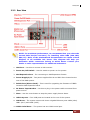
1. VGA Port – Use this to connect a VGA monitor.
2. Power On/Off Switch – Use this switch to power on the system.
3. SAS Expansion Port – For connecting to SAS Expansion Chassis.
4. Power Supply A, B – Two power supplies PSU-A and PSU-B are located at the
rear of the NAS system.
5. RS232 Port (Phone-Jack) – This is used for upgrading the firmware of JBOD
Controller SAS Expander board.
6. AC Power Input Socket – Use this to plug in the power cable connected from
power source.
7. Mute – Use the mute button to stop the power supply buzzer alarm.
8. USB 2.0 ports – Four USB ports are located at the rear of the system.
9. LAN Ports – The system comes with three 1Gigabit Ethernet ports LAN0 (eth0)
LAN1 (eth1) and LAN2 (eth2).
10. COM1 Serial Ports – The system has one COM1 serial port.
User’s Manual
15