1
Operation Guide 3420
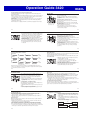
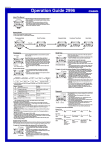
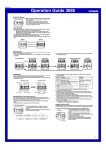
To toggle between 12-hour and 24-hour timekeeping
In the Timekeeping Mode, press D to toggle between 12-hour timekeeping and
24-hour timekeeping.
xWith the 12-hour format, the P (PM) indicator appears to the left of the hour digits for
times in the range of noon to 11:59 p.m. and no indicator appears to the left of the
hour digits for times in the range of midnight to 11:59 a.m.
xWith the 24-hour format, times are displayed in the range of 0:00 to 23:59, without
any indicator.
xThe 12-hour/24-hour timekeeping format you select in the Timekeeping Mode is
applied in all other modes.
xThe P indicator is not displayed when the current time is displayed in other modes.
World Time
City code
Current time and date
in the zone of the
selected city code
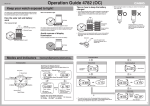
World Time shows the current time in 48 cities (29 time
zones) around the world.
x All of the operations in this section are performed in
the World Time Mode, which you enter by pressing C
(page E-4).
To view the time for another city code
In the World Time Mode, press D to scroll eastwardly
through city codes.
In the World Time Mode, press B to scroll westwardly
through city codes.
x For full information about city codes, see the “City Code
Table” at the back of this manual.
x If the current time for a city is wrong, check your
Timekeeping Mode time and time zone settings and
make necessary changes.
E-10
E-11
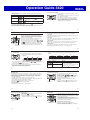
To toggle a city code time between Standard Time and Daylight Saving Time
1. In the World Time Mode, use D (east) and B (west) to
display the city code (time zone) whose Standard Time/
Daylight Saving Time setting you want to change.
2. Hold down A for about one second to toggle Daylight
Saving Time (DST displayed) and Standard Time
(DST not displayed).
x The DST indicator is on the display whenever you display
DST indicator
a city code for which Daylight Saving Time is turned on.
x Note that the DST/Standard Time setting affects only
the currently displayed city code. Other city codes are
not affected.
Stopwatch
Hours
Minutes
Seconds
1/100 second
The stopwatch lets you measure elapsed time, split times,
and two finishes. It also includes Auto-Start.
x The display range of the stopwatch is 23 hours,
59 minutes, 59.99 seconds.
x The stopwatch continues to run, restarting from zero after
it reaches its limit, until you stop it.
x The stopwatch measurement operation continues even if
you exit the Stopwatch Mode.
x Exiting the Stopwatch Mode while a split time is frozen
on the display clears the split time and returns to elapsed
time measurement.
x All of the operations in this section are performed in
the Stopwatch Mode, which you enter by pressing C
(page E-5).
E-12
E-13
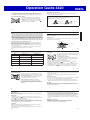
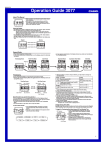
To measure times with the stopwatch
About Auto-Start
Elapsed Time
D
D
Start
D
Stop
Re-start
D
Stop
B
Clear
Split Time
With Auto-Start, the watch performs a 5-second countdown, and stopwatch operation
starts automatically when the countdown reaches zero.
During the final three seconds of the countdown, a beeper sounds with each second.
To use Auto-Start
D
B
B
Start
Split
(
displayed)
Split release
D
Stop
B
Clear
Two Finishes
D
B
Start
D
Split
Stop
First runner
Second runner
finishes. Display
finishes.
time of first runner.
B
Split release
Display time of
second runner.
B
Clear
1. While the stopwatch screen is showing all zeros in the
Stopwatch Mode, press B.
x This displays a 5-second countdown screen.
x To return to the all zeros screen, press B again.
2. Press D to start the countdown.
x When the countdown reaches zero, a tone sounds and a
stopwatch timing operation starts automatically.
x Pressing D while the Auto-Start countdown is in
progress immediately starts the stopwatch.
xThe time on the screen may not appear to stop immediately when you press a
button to stop timing or to perform a split operation. Despite this, the time recorded
by your button operation is accurate.
E-14
E-15
Countdown Timer
Hours
Seconds
Minutes
The countdown timer can be set within a range of one
minute to 24 hours. An alarm sounds when the countdown
reaches zero. The countdown timer also has an autorepeat feature and a progress beeper that signals the
progress of the countdown.
xAll of the operations in this section are performed in the
Countdown Timer Mode, which you enter by pressing
C (page E-5).
Configuring the Countdown Timer
The following are the settings you should configure before
actually using the countdown timer.
Countdown start time; Auto-repeat on/off; Progress beeper
on/off
xSee “To configure the countdown timer” (page E-19) for
information about setting up the timer.
Auto-repeat
When auto-repeat is turned on, the countdown restarts automatically from the
countdown start time when it reaches zero. If left running, the countdown is repeated
a total of eight times, after which it stops automatically.
When auto-repeat is turned off, the countdown stops when it reaches zero and the
display shows the original countdown start time.
x Pressing D while an auto-repeat countdown is in progress pauses the current
countdown. You can resume the auto-repeat countdown by pressing D, or you can
press B to reset to the countdown time starting value.
Countdown Timer Beeper Operations
The watch beeps at various times during a countdown so you can keep informed
about the countdown status without looking at the display. The following describes the
types of beeper operations the watch performs during a countdown.
E-16
Countdown End Beeper
The countdown end beeper lets you know when the countdown reaches zero.
x When the progress beeper is turned off, the countdown end beeper sounds for
about 10 seconds, or until you press any button to stop it.
x When the progress beeper is turned on, the countdown end beeper sounds for
about one second.
Progress Beeper
When the progress beeper is turned on, the watch uses beeps to signal countdown
progress as described below.
x Starting from five minutes before the end of the countdown, the watch emits four
short beeps at the top of each countdown minute.
x 30 seconds before the end of the countdown, the watch emits four short beeps.
x The watch emits a short beep for each of the last 10 seconds of the countdown.
x If the countdown start time is six minutes or greater, the watch emits a short beep
for each second of the final 10 seconds before the five-minute point is reached. Four
short beeps are emitted to signal when the five-minute point is reached.
E-18
E-17
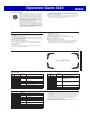
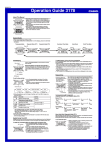
To configure the countdown timer
1. While the countdown start time is on the display in the
Countdown Timer Mode, hold down A until the current
countdown start time starts to flash, which indicates the
setting screen.
x If the countdown start time is not displayed, use the
procedure under “To use the countdown timer” (page
E-21) to display it.
2. Press C to move the flashing in the sequence shown
below to select other settings.
C
Hours
Minutes
C
C
Progress Beeper
Auto-repeat
C
E-19