1
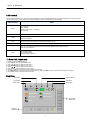
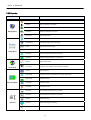
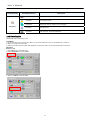
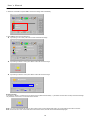
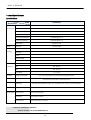
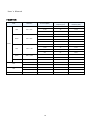
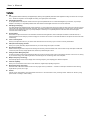
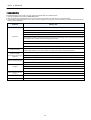
U s er ’ s Ma n u al Primary Directory Secondary Directory Description All Reset Recall the all factory default settings. Lock Mode Lock the OSD function. Overlapped Setting Value when the image to occur overlapped. DVI Select Select DVI source. Information Shows Firmware, Source and Resolution. Setup Menu Lock Mode Explain FP2202CHB system default value is Off. Lock Mode 1. Off: Function keys are non-locked, press “Menu” key to start the OSD menu and you can adjustment any functions. 2. Mode 1: All function keys are locked. 3. Mode 2: All function keys are locked unless brightness control. Press “Menu” key to start the brightness control menu. Operation How To Lock 1. Press “Menu” key to start OSD menu. 2. Select “Setup Menu” and press “Enter”. Setup Menu All Reset DVI Select Lock Mode Information Overlapped 3. Select “Lock Mode” and press “Enter”. Setup Menu All Reset DVI Select Lock Mode Information Overlapped 9