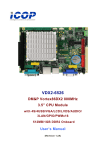
Download User`s manual - Microcomputer Systems, Inc.
Transcript
Copyright The information in this manual is subject to change without notice for continuous improvement in the product. All rights are reserved. The manufacturer assumes no responsibility for any inaccuracies that may be contained in this document. And makes no commitment to update or to keep current the information contained in this manual. No part of this manual may be reproduced, copied, translated or transmitted, in whole or in part, in any form or by any means without the prior written permission of the ICOP Technology Inc. Copyright 2012 ICOP Technology Inc. Manual No. IUMPMX090-01 Ver.1.0A Nov, 2012 Trademarks Acknowledgmen Vortex86MX is the registered trademark of ICOP Technology Inc. Other brand names or product names appearing in this document are the properties and registered trademarks of their respective owners. All names mentioned herewith are served for identification purpose only. Safety Information Read these Safety instructions carefully. Make sure the voltage of the power source is correct before connecting the equipment to the power outlet. Do not expose your Panel PC to rain or moisture, in order to prevent shock and fire hazard. Keep PMX-090T away from humidity. Do not open the cabinet to avoid electrical shock. Refer to your nearest dealer for qualified personnel servicing. Never touch un-insulated terminals or wire unless your power adaptor is disconnected. Locate your Panel PC as close as possible to the socket outline for easy access and to avoid force caused by entangling of your arms with surrounding cables from the Panel PC. USB connectors are not supplied with Limited Power Sources. If the equipment is not used for a long time, disconnect it from the power source to avoid damage by transient overvoltage. DO NOT ATTEMPT TO OPEN OR TO DISASSEMBLE THE CHASSIS (ENCASING) OF THIS PRODUCT. PLEASE CONTACT YOUR DEALER FOR SERVICING FROM QUALIFIED TECHNICIAN. ii PMX-090T DM&P Vortex86MX+ Panel PC with 9” WSVGA TFT LCD