Transcript
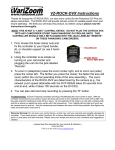
Thank you for purchasing the VariZoom VZ-ROCK-EX remote zoom
controller. Here are some important guidelines for safe and effective
operation…
VZ-ROCK-EX
Connection: Plug the 8-pin cable connector into the
lens jack located at the front of the camera. Be sure to match the pin
connections carefully. When properly connected, the cable should be
firmly seated within the jack.
WARNING: ABUSE OF THE 8-PIN CONNECTOR MAY
RESULT IN DAMAGE NOT COVERED BY THE WARRANTY.
TREAT THE CONNECTOR GENTLY WHEN CONNECTING AND
DISCONNECTING IT FROM THE CAMERA.
Power: The VZ-ROCK-EX controller does not require batteries or
external power. Just plug the cable into the Lens Remote jack, and it’s
ready to use.
Tripod / Jib Mount: Your VZ-ROCK Series controller has a
clamping system for attaching to your tripod handle, shoulder support
or crane/jib.
Recording: Press the red “R” button to start and stop recording.
Video Return:
“A” button allows you to see what is being recorded through the viewfinder.
Zoom: The thumb rocker is pressure sensitive and allows you to smoothly ramp up to that speed and back down
again
If your controller causes the lens to zoom on its own, you may need to calibrate the zoom rocker. To do so, first connect the
controller to the lens normally. On the underside of the rocker you will see a small brass hex socket screw, and on the flat end of the
rocker you will see a hole with a slotted adjustment knob inside. Loosen the brass hex socket screw with a 5/64” hex key and turn the
slotted adjustment knob (using a flat tip screwdriver) from left to right until the lens stops zooming, then tighten the brass screw.
Warranty Warning! Do not open your control device. If you need service, call and
we’ll be happy to set up a service return. All products have a 2-year parts and labor warranty.
Please save your receipt and feel free to send us your comments and suggestions. Thanks!
-- please keep this document for your records & reference -VariZoom Lens Controls: 888-826-3399 / 512-219-7722
or visit us at www.varizoom.com