Transcript
Operating Instructions
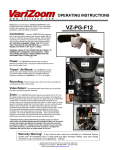
Thank you for purchasing the VariZoom VZ-PG-EX remote
zoom controller for Panasonic camcorders. Here are some
important guidelines for safe and effective operation…
VZ-PG-EX
Connection:
Insert the VZ-PG-EX cable connector
into the 8-pin jack on the handgrip of your EX camcorder.
When properly connected, the cable should be firmly seated
within the jack.
*****
WARNING: ABUSE OF THE CONNECTOR MAY RESULT IN
DAMAGE NOT COVERED BY THE WARRANTY. TREAT
THE CONNECTOR GENTLY.
Power:
The VZ-PG-EX controller does not require batteries
or external power. Just plug the cable in and it’s ready to use.
Tripod / Jib Mount:
Your VZ-PG-EX controller
comes with a heavy-duty quick-release clamping system to attach
firmly to your tripod pan handle, shoulder support or camera
crane/jib.
Recording: Press the button above the zoom rocker to activate the camera’s pause/record function.
Zoom:
Your VZ-PG-EX features dual-variable speed control. You can set the speed control knob to limit the max zoom speed
available through the variable thumb rocker. The variable thumb rocker is pressure sensitive and allows you to smoothly ramp up to the
max speed and back down again. In other words, the rocker will give you the full range of zoom speeds if the dial is turned all the way
up, and a very small range of speeds if it is turned almost all the way down (when it is turned completely down, zoom is deactivated).
You can also use the speed dial in conjunction with the rocker, rolling the dial with your index finger to vary speed as you depress the
rocker. Max and min zoom speeds may vary between different lens models, but the PG controller will access the full range of available
speeds for any given lens
Warranty Warning!
Do not open your control device. Opening may void your warranty
and possibly render the controller useless. If you need service, send your controller to a
Varizoom Service Center only. All controllers have a 2-year parts and labor warranty. Please,
save your receipt and send us your comments and suggestions. Thanks!
-- please keep this document for your records & reference -VariZoom Lens Controls - 888-826-3399 – 512-219-7722
visit us on the web at www.varizoom.com