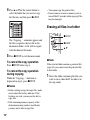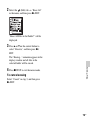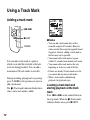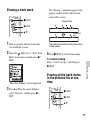
1
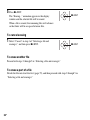
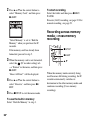
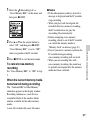
4-196-712-12(1)
IC Recorder
Operating Instructions
Getting Started
Basic Operations
Other Recording Operations
Other Playback Operations
Editing Files
About the Menu Function
Utilizing Your Computer
Additional Information
Troubleshooting
Index
© 2011 Sony Corporation
Printed in China
ICD-SX712
Owner’s Record
The model number is located at the rear panel and the
serial number is located inside the battery
compartment. Record these numbers in the space
provided below. Refer to these numbers whenever
you call upon your Sony dealer regarding this
product.
Model No. __________________________________
Serial No. __________________________________
The following FCC statement applies only to the
version of this model manufactured for sale in the
USA. Other versions may not comply with FCC
technical regulations.
INFORMATION
This equipment has been tested and found to comply
with the limits for a Class B digital device, pursuant to
Part 15 of the FCC Rules. These limits are designed to
provide reasonable protection against harmful
interference in a residential installation. This
equipment generates, uses and can radiate radio
frequency energy and, if not installed and used in
accordance with the instructions, may cause harmful
interference to radio communications.
However, there is no guarantee that interference will
not occur in a particular installation. If this equipment
does cause harmful interference to radio or television
reception, which can be determined by turning the
equipment off and on, the user is encouraged to try to
correct the interference by one or more of the
following measures:
Reorient or relocate the receiving antenna.
Increase the separation between the equipment and
receiver.
Connect the equipment into an outlet on a circuit
different from that to which the receiver is connected.
Consult the dealer or an experienced radio/TV
technician for help.
2
GB
You are cautioned that any changes or modifications
not expressly approved in this manual could void your
authority to operate this equipment.
If you have any questions about this product, you may
call: Sony Customer Information Service Center
1-800-222-7669 or http://www.sony.com/
Declaration of Conformity
Trade Name
Model
Responsible Party
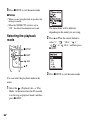
Address
: SONY
: ICD-SX712
: Sony Electronics Inc.
: 16530 Via Esprillo,
San Diego, CA 92127 USA
Telephone Number : 858-942-2230
This device complies with part 15 of the FCC
Rules. Operation is subject to the following two
conditions: (1) This device may not cause harmful
interference, and (2) this device must accept any
interference received, including interference that
may cause undesired operation.
RECYCLING NICKEL METAL HYDRIDE
BATTERIES
Nickel metal hydride batteries are
recyclable.
You can help preserve our
environment by returning your used
rechargeable batteries to the
collection and recycling location
nearest you.
For more information regarding recycling of
rechargeable batteries, call toll free 1-800-822-8837,
or visit http://www.rbrc.org/.
Caution: Do not handle damaged or leaking nickel
metal hydride batteries.
• The recorded music is limited to private use only.
Use of the music beyond this limit requires
permission of the copyright holders.
• Sony is not responsible for incomplete recording/
downloading or damaged data due to problems of
the IC recorder or computer.
• Depending on the types of the text and characters,
the text shown on the IC recorder may not be
displayed properly on device. This is due to:
– The capacity of the connected IC recorder.
– The IC recorder is not functioning normally.
– Content information is written in the language
or the character that is not supported by the IC
recorder.
Notice for users
All rights reserved. This manual or the software
described herein, in whole or in part, may not be
reproduced, translated or reduced to any machine
readable form without prior written approval from
Sony Corporation.
IN NO EVENT SHALL SONY CORPORATION BE
LIABLE FOR ANY INCIDENTAL,
CONSEQUENTIAL OR SPECIAL DAMAGES,
WHETHER BASED ON TORT, CONTRACT, OR
OTHERWISE, ARISING OUT OF OR IN
CONNECTION WITH THIS MANUAL, THE
SOFTWARE OR OTHER INFORMATION
CONTAINED HEREIN OR THE USE THEREOF.
Sony Corporation reserves the right to make any
modification to this manual or the information
contained herein at any time without notice.
The software described herein may also be governed
by the terms of a separate user license agreement.
• This software is for Windows and cannot be used
for Macintosh.
• The supplied connecting cable is for the IC recorder
ICD-SX712. You cannot connect other IC
recorders.
3
GB
What you record is for personal
enjoyment and use only. Copyright laws
prohibit other forms of use without the
permission of the copyright holders.
The use of Memory Stick™ media for
recording copyright-protected graphics or
other data is limited to the restrictions
specified under applicable copyright
laws. Any use beyond those restriction is
prohibited.
This product supports “Memory Stick
Micro™ (M2™)” media. “M2™” is an
abbreviated form of “Memory Stick
Micro™.” Hereinafter, “M2™” is used in
this document.
• microSD and microSDHC logos are trademarks of
SD-3C, LLC.
• “Memory Stick Micro,” “M2” and
are
trademarks or registered trademarks of Sony
Corporation.
• “MagicGate” is a trademark of Sony Corporation.
• Nuance, the Nuance logo, Dragon, Dragon
NaturallySpeaking, and RealSpeak are trademarks
and/or registered trademarks of Nuance
Communications Inc., and/or its affiliates in the
United States and/or other countries.
• US and foreign patents licensed from Dolby
Laboratories.
All other trademarks and registered trademarks are
trademarks or registered trademarks of their
respective holders. Furthermore, “ ™ ” and “®” are
not mentioned in each case in this manual.
The “Sound Organizer” uses software modules as
shown below:
Windows Media Format Runtime
Trademarks
• Microsoft, Windows, Windows Vista and Windows
Media are registered trademarks or trademarks of
Microsoft Corporation in the United States and/or
other countries.
• Macintosh and Mac OS are trademarks of Apple
Inc., registered in the USA and other countries.
• Pentium is a registered trademark of Intel
Corporation.
• MPEG Layer-3 audio coding technology and
patents licensed from Fraunhofer IIS and Thomson.
4
GB
This product contains technology subject to certain
intellectual property rights of Microsoft.
Use or distribution of this technology outside of this
product is prohibited without the appropriate
license(s) from Microsoft.
Table of Contents
Getting Started
Other Recording Operations
Step 1: Checking the Contents of the
Package .....................................................8
Index to parts and controls ...................9
Preventing unintentional operations
(HOLD) ..............................................11
Step 2: Recharging the Batteries .............12
Recharging the batteries using a
computer .............................................12
Recharging the batteries using a USB
AC adaptor ..........................................14
When to charge/replace the
batteries ...............................................14
Step 3: Turning the IC Recorder On .......15
Turning the power on .........................15
Turning the power off .........................15
Step 4: Setting the Clock ........................16
Setting the clock after recharging the
batteries ...............................................16
Setting the clock using the menu ........16
Step 5: Setting the Language to Be Used
in the Display Window ...........................19
Changing the Recording Settings ............33
Switching the directionality of the
built-in microphones ...........................33
Selecting a recording scene for each
situation ...............................................34
Manual recording ................................39
Adding a recording to a previously
recorded file ........................................40
Adding an overwrite recording during
playback ..............................................42
Recording a few seconds in advance
– the pre-recording function ...............43
Starting to record automatically in
response to sound
– the VOR function .............................45
Recording on a Memory Card .................47
Recording across memory media
– cross-memory recording ..................50
Recording via Other Devices ..................52
Recording with an external
microphone .........................................52
Recording from other equipment ........53
Operating during Recording ....................57
Monitoring the recording ....................57
Basic Operations
Recording .......................................20
Listening .........................................25
Erasing ............................................31
5
GB
Other Playback Operations
Changing the Playback Settings .............58
Convenient playback methods ............58
Selecting a recording date from the
calendar and playing back ..................59
Reducing noise in the playback
sound and making the human voice
clearer – the noise cut function ...........60
Adjusting the playback sound by
amplifying inaudible sound
– the digital voice up function ............61
Adjusting the playback speed and
tones – the DPC (Digital Pitch
Control) function, key control ............63
Selecting the sound effect ...................64
Selecting the playback mode ..............66
Playing Back a File at a Desired Time
with an Alarm .........................................68
Playback via Other Devices ....................71
Recording with other equipment ........71
Editing Files
Arranging Files in a Folder .....................72
Moving a file to a different folder ......72
Copying a file to the other memory
media ..................................................73
Erasing all files in a folder ..................74
Using a Track Mark ................................76
Adding a track mark ...........................76
Erasing a track mark ...........................77
Erasing all the track marks in the
selected file at one time ......................77
6
GB
Dividing a File ........................................79
Dividing a file at the current
position ...............................................79
Dividing a file at all the track mark
positions ..............................................80
Changing a Folder Name ........................82
Protecting a File ......................................84
About the Menu Function
Making Settings for the Menu ................85
Menu Settings .........................................86
Utilizing Your Computer
Using the IC Recorder with Your
Computer ...............................................103
Connecting the IC recorder to your
computer ...........................................103
Structure of folders and files .............104
Disconnecting the IC recorder from
your computer ...................................108
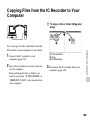
Copying Files from the IC Recorder to
Your Computer .....................................109
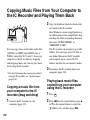
Copying Music Files from Your
Computer to the IC Recorder and
Playing Them Back ...............................110
Copying a music file from your
computer to the IC recorder
(drag and drop) .................................110
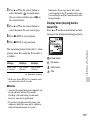
Playing back music files copied
from your computer using the
IC recorder ........................................110
Using the IC Recorder as USB
Memory ................................................. 112
Using the Supplied Sound Organizer
Software ................................................113
What you can do using Sound
Organizer ..........................................113
System requirements for your
computer ........................................... 114
Installing Sound Organizer ...............116
The Sound Organizer window .......... 117
Additional Information
Using a USB AC Adaptor .....................119
Disconnecting the IC recorder from
the AC outlet ..................................... 120
Precautions ............................................ 121
Specifications ........................................ 124
System requirements ........................124
Design and specifications ................. 125
Battery life ........................................ 128
Troubleshooting
Troubleshooting ....................................130
Message List ......................................... 140
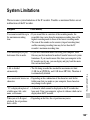
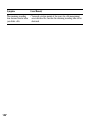
System Limitations ............................... 145
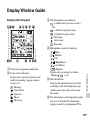
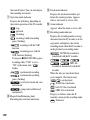
Display Window Guide ........................147
Index .....................................................152
7
GB
Getting Started
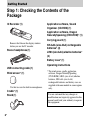
Step 1: Checking the Contents of the
Package
IC Recorder (1)
Application software, Sound
Organizer (CD-ROM) (1)
Application software, Dragon
NaturallySpeaking (DVD-ROM)* (1)
Carrying pouch (1)
Remove the film on the display window
before you use the IC recorder.
Stereo headphones (1)
NH-AAA (size AAA) rechargeable
batteries* (2)
LR03 (size AAA) alkaline batteries*
(2)
Battery case* (1)
Operating Instructions
USB connecting cable (1)
Wind screen* (1)
Use this to cover the built-in microphones.
Cradle* (1)
Stand (1)
8
GB
* The wind screen, cradle, application
software, Dragon NaturallySpeaking
(DVD-ROM), LR03 (size AAA) alkaline
batteries, NH-AAA (size AAA)
rechargeable batteries and battery case are
supplied with some models in some regions
only.
You are cautioned that any changes or
modifications not expressly approved in this
manual could void your authority to operate
this equipment.
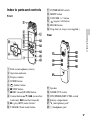
Index to parts and controls
Front
K
L
M
N
O
P
POWER/HOLD switch
MENU button
VOLUME –/+* button
(repeat) A-B button
ERASE button
Strap hole (A strap is not supplied.)
A
B
C
D
E
F
G
H
Built-in microphones (stereo)
Operation indicator
Display window
SCENE button
(folder) button
x STOP button
z REC (record)/PAUSE button
Control button (v, V / . (review/fast
backward), > (cue/fast forward))
I N (play)/ENT (enter) button*
J T-MARK (Track mark) button
Q
R
S
T
U
V
Getting Started
Rear
Speaker
NOISE CUT switch
DPC(SPEED)/KEY CTRL switch
Battery compartment
m (microphone) jack*
i (headphone) jack
9
GB
W M2™/microSD memory card slot
X (USB) connector
* These buttons and the jack have a tactile dot.
Use it as a reference point for operations, or
to identify each terminal.
10
GB
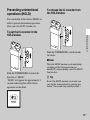
Preventing unintentional
operations (HOLD)
To release the IC recorder from
the HOLD status
You can disable all the buttons (HOLD) in
order to prevent unintentional operations
when you carry the IC recorder, etc.
Getting Started
To put the IC recorder in the
HOLD status
Slide the POWER/HOLD switch towards
the center.
P Note
Slide the POWER/HOLD switch in the
direction of “HOLD.”
“HOLD” will appear for approximately 3
seconds, indicating that all the button
operations are disabled.
When the HOLD function is activated during
recording, all the button operations are
disabled. To stop recording, cancel the HOLD
function first.
z Tip
Even if the HOLD function is activated, you
can stop the alarm playback by pressing any
button. (You cannot stop normal playback.)
11
GB
Step 2: Recharging the Batteries
P Note
The NH-AAA (size AAA) rechargeable
batteries are supplied with some models in
some regions only.
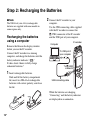
Recharging the batteries
using a computer
2 Connect the IC recorder to your
computer.
Use the USB connecting cable supplied
with the IC recorder to connect the
(USB) connector of the IC recorder
and the USB port of your computer.
IC recorder
Computer
Remove the film on the display window
before you use the IC recorder.
Connect the IC recorder to a running
computer, and charge the batteries until the
battery indicator indicates “
.”
It takes about 4 hours to fully charge
exhausted batteries.*
To USB port of
your computer
To (USB)
connector
1 Insert rechargeable batteries.
Slide and lift the battery compartment
lid, insert two NH-AAA rechargeable
batteries with correct polarity, and close
the lid.
USB connecting cable
While the batteries are charging,
“Connecting” and the battery indicator
are displayed in an animation.
12
GB
For details on disconnecting the IC
recorder from your computer, refer to the
operating instructions supplied with your
computer.
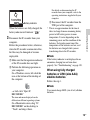
Battery indicator
When the batteries are fully charged, the
battery indicator will indicate “
.”
computer.
Follow the procedures below; otherwise,
when the IC recorder contains data files,
the files may be damaged or become
unplayable.
1 Make sure that the operation indicator
of the IC recorder does not light.
2 Perform the following operation on
your computer.
On a Windows screen, left-click the
icon at the bottom of the desktop of
the computer.
USB port of the computer.
* This is an approximation for the time it
takes to charge from no remaining battery
power to full battery power at room
temperature. It varies depending on the
remaining power and the condition of the
batteries. It also takes more time if the
temperature of the batteries are low, or if
the batteries are charged while you are
transferring data to the IC recorder.
Getting Started
3 Disconnect the IC recorder from your
3 Disconnect the IC recorder from the
P Note
If the battery indicator is not displayed in an
animation, charging has not been done
properly. See “Troubleshooting” on page 130.
When using fully charged
batteries or LR03 (size AAA)
alkaline batteries
Follow the step 1.
P Note
t Left-click “Eject IC
RECORDER.”
You cannot charge LR03 (size AAA) alkaline
batteries.
The icon and menu displayed can be
different on different operating systems.
On a Macintosh screen, drag “IC
RECORDER” on the desktop to
“Trash” and drop it there.
13
GB
z Tips
• Do not use manganese batteries for this IC
recorder.
• When replacing the batteries, files recorded
or alarm settings are not erased even when
you remove the batteries.
• When replacing the batteries, the clock
continues moving for about 1 day after you
remove the batteries.
Recharging the batteries
using a USB AC adaptor
You can also charge the batteries by using
an AC-U501AD USB AC adaptor, etc. (not
supplied) (page 119).
When to charge/replace the
batteries
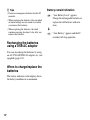
The battery indicator on the display shows
the battery condition in an animation.
14
GB
Battery remain indication
: “Low Battery Level” appears.
Charge the rechargeable batteries or
replace the old batteries with new
ones.
m
: “Low Battery” appears and the IC
recorder will stop operation.
Step 3: Turning the IC Recorder On
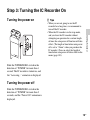
Turning the power on
Getting Started
z Tips
• When you are not going to use the IC
recorder for a long time, we recommend to
turn off the IC recorder.
• When the IC recorder is in the stop mode,
and you leave the IC recorder without
attempting an operation for a certain length
of time, the auto power off function will take
effect. (The length of time before auto power
off is set to “10min” when you purchase the
IC recorder.) You can select the length of
time before auto power off takes effect in the
menu (page 101).
Slide the POWER/HOLD switch in the
direction of “POWER” for more than 1
second. The IC recorder is turned on, and
the “Accessing...” animation is displayed.
Turning the power off
Slide the POWER/HOLD switch in the
direction of “POWER” for more than 2
seconds, and the “Power Off” animation is
displayed.
15
GB
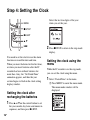
Step 4: Setting the Clock
MENU
Select the last two digits of the year
when you set the year.
x STOP
N/ENT
v, V
.
2 Press x STOP to return to the stop mode
display.
You need to set the clock to use the alarm
function or record the date and time.
When you insert batteries for the first time,
or when you insert batteries after the IC
recorder has been without batteries for
more than 1 day, the “Set Date&Time”
animation appears, and then the year
section begins to flash in the clock setting
display window.
Setting the clock after
recharging the batteries
1 Press v or V on the control button to set
the year, month, day, hour, and minute in
sequence, and then press N/ENT.
16
GB
Setting the clock using the
menu
While the IC recorder is in the stop mode,
you can set the clock using the menu.
1 Select “Date&Time” in the menu.
1 Press MENU to enter the menu mode.
The menu mode window will be
displayed.
2 Press . on the control button, press
v or V on the control button to select
the
(IC recorder setting) tab, and
then press N/ENT.
3 Press v or V on the control button to
select “Date&Time,” and then press
N/ENT.
3 Press v or V on the control button to
select “10y1m1d,” and then press N/
ENT.
Getting Started
4 Press v or V on the control button to set
2 Press v or V on the control button to
select “Auto” or “Manual,” and then
press N/ENT.
When you selected “Auto,” the clock is
automatically adjusted using the clock in
the computer connected to the IC
recorder and on which the supplied
Sound Organizer software is started.
When you select “Manual,” proceed to
the next steps.
the year, month, day, hour, and minute in
sequence, and then press N/ENT.
Select the last two digits of the year
when you set the year.
5 Press x STOP to exit the menu mode.
P Note
If you do not press N/ENT within 1 minute
of entering the clock setting data, the clock
setting mode is canceled and the window will
return to the display of the stop mode.
17
GB
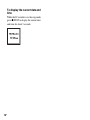
To display the current date and
time
While the IC recorder is in the stop mode,
press x STOP to display the current date
and time for about 3 seconds.
18
GB
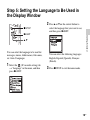
Step 5: Setting the Language to Be Used in
the Display Window
2 Press v or V on the control button to
x STOP
select the language that you want to use,
and then press N/ENT.
Getting Started
N/ENT
v, V
You can select the language to be used for
messages, menus, folder names, file names,
etc. from 3 languages.
1 Select the
(IC recorder setting) tab
t “Language” in the menu, and then
press N/ENT.
You can select the following languages.
English, Español (Spanish), Français
(French)
3 Press x STOP to exit the menu mode.
19
GB
Basic Operations
Recording
P Notes
• Before making a recording, be sure to check the battery indicator (page 14).
• Noise may be recorded if an object, such as your finger, etc., accidentally rubs or scratches the IC
recorder during recording.
z Tip
Before you start recording, we recommend you make a trial recording first, or monitor the
recording (page 57).
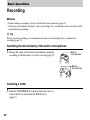
Switching the directionality of the built-in microphones
1 Change the angle of the built-in microphones manually
according to the direction you want to record (page 33).
Built-in
microphones
Built-in
microphones
Selecting a folder
1 Slide the POWER/HOLD switch towards the center to
release the IC recorder from the HOLD status
(page 11).
20
GB
2 Press
to display the folder selection window.
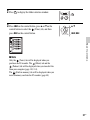
3 Press . on the control button, press v or V on the
control button to select the
(Voice) tab, and then
press > on the control button.
v, V
., >
Basic Operations
P Note
Only the
(Voice) tab will be displayed when you
purchase the IC recorder. The
(Music) tab and the
(Podcast) tab will be displayed when you transfer files
from your computer (page 110, 114).
The
(Built-in memory) tab will be displayed when you
insert a memory card into the IC recorder (page 48).
21
GB
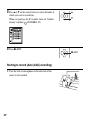
4 Press v or V on the control button to select the folder in
v
which you want to record files.
When you purchase the IC recorder, there are 5 folders
already available (
FOLDER01-05).
V
5 Press N/ENT.
N/ENT
Starting to record (Auto (AGC) recording)
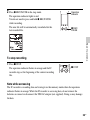
1 Turn the built-in microphones in the direction of the
source to be recorded.
22
GB
2 Press z REC/PAUSE in the stop mode.
The operation indicator lights in red.
You do not need to press and hold z REC/PAUSE
while recording.
The new file will be automatically recorded after the
last recorded file.
Operation
indicator
z REC/
PAUSE
Basic Operations
To stop recording
1 Press x STOP.
The operation indicator flashes in orange and the IC
recorder stops at the beginning of the current recording
file.
x STOP
Note while accessing
The IC recorder is recording data and storing it on the memory media when the operation
indicator flashes in orange. While the IC recorder is accessing data, do not remove the
batteries or connect or disconnect the USB AC adaptor (not supplied). Doing so may damage
the data.
23
GB
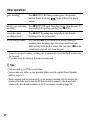
Other operations
pause recording*
Press z REC/PAUSE. During recording pause, the operation
indicator flashes in red and “
” begins to flash in the display
window.
release pause and resume
recording
Press z REC/PAUSE again. Recording resumes from that point. (To
stop recording after pausing recording, press x STOP.)
review the current
recording instantly**
Press N/ENT. Recording stops and playback starts from the
beginning of the file just recorded.
review during recording** Press and hold . on the control button during recording or
recording pause. Recording stops and you can search backwards
while listening to fast playback sound. After you release . on the
control button, playback starts from that point.
* 1 hour after you pause recording, recording pause is automatically released and the IC recorder enters
the stop mode.
** You cannot select this function in the manual recording mode.
z Tips
• You can record up to 199 files in each folder.
• You can make new folders or erase unwanted folders using the supplied Sound Organizer
software (page 113).
• When a memory card has been inserted, you can continue recording a file by changing the
location of the folder used to store the file from the built-in memory to the memory card
automatically after the built-in memory is full (Cross-memory recording) (page 50).
24
GB
Listening
Starting playback
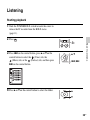
1 Slide the POWER/HOLD switch towards the center to
release the IC recorder from the HOLD status
(page 11).
2 Press
.
control button to select the
(Voice) tab, the
(Music) tab, or the
(Podcast) tab, and then press
> on the control button.
4 Press v or V on the control button to select the folder.
Basic Operations
3 Press . on the control button, press v or V on the
v, V
., >
v
V
25
GB
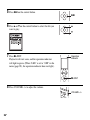
5 Press > on the control button.
>
6 Press v or V on the control button to select the file you
v
want to play.
V
7 Press N/ENT.
Playback will start soon, and the operation indicator
will light in green. (When “LED” is set to “OFF” in the
menu (page 98), the operation indicator does not light.)
Operation
indicator
N/ENT
8 Press VOLUME –/+ to adjust the volume.
VOLUME –/+
26
GB
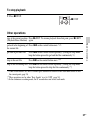
To stop playback
1 Press x STOP.
x STOP
Other operations
stop at the current position Press N/ENT. To resume playback from that point, press N/ENT
(Playback Pause function) again.
Basic Operations
go back to the beginning of Press . on the control button once.*1*2
the current file
go back to previous files
Press . on the control button repeatedly. (During the stop mode,
keep the button pressed to go back the files continuously.*3)
skip to the next file
Press > on the control button once.*1*2
skip to the succeeding files Press > on the control button repeatedly. (During the stop mode,
keep the button pressed to skip the files continuously.*3)
*1 When a track mark is set, the IC recorder goes backward or forward to the track mark before or after
the current point (page 76).
*2 These operations are for when “Easy Search” is set to “OFF” (page 58).
*3 In the continuous searching mode, the IC recorder does not locate track marks.
27
GB
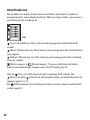
About the tab view
The recordable area and the playback-only area of folders stored on the IC recorder are
managed separately, and are displayed with tabs. When you choose a folder, you can move to
one of those areas by switching a tab.
Tabs
(Voice): Recordable area. This is the area used to manage files recorded with the IC
recorder.
(Music): Playback-only area. This is the area used to manage music files transferred from
your computer.
(Podcast): Playback-only area. This is the area used to manage podcast files transferred
from your computer.
(Built-in memory) or
(External memory): You can switch between the built-in
memory and external memory (memory card) of the IC recorder (page 49).
Only the
(Voice) tab will be displayed when you purchase the IC recorder. The
(Music) tab and the
(Podcast) tab will be displayed when you transfer files from your
computer (page 110, 114).
The
(Built-in memory) tab will be displayed when you insert a memory card into the IC
recorder (page 48).
28
GB
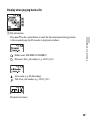
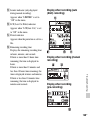
Display when playing back a file
A File information
Press v or V on the control button to check the file information during playback.
A file recorded using the IC recorder is displayed as follows.
Basic Operations
: Folder name: FOLDER01-FOLDER05
: File name: Date_file number (e.g. 100101_001)
: Artist name (e.g. My Recording)
: Title: Date_file number (e.g. 100101_001)
Playback level meter
29
GB
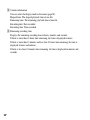
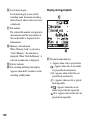
B Counter information
You can select the display mode in the menu (page 98).
Elapsed time: The elapsed playback time of one file
Remaining time: The remaining playback time of one file
Recording date: Date recorded
Recording time: Time recorded
C Remaining recording time
Displays the remaining recording time in hours, minutes, and seconds.
If there is more than 10 hours time remaining, the time is displayed in hours.
If there is more than 10 minutes and less than 10 hours time remaining, the time is
displayed in hours and minutes.
If there is less than 10 minutes time remaining, the time is displayed in minutes and
seconds.
30
GB
Erasing
P Note
Once a recording has been erased, you cannot retrieve it.
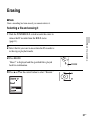
Selecting a file and erasing it
1 Slide the POWER/HOLD switch towards the center to
release the IC recorder from the HOLD status
(page 11).
Basic Operations
2 Select the file you want to erase when the IC recorder is
in the stop or playback mode.
3 Press ERASE.
“Erase?” is displayed and the specified file is played
back for confirmation.
4 Press v or V on the control button to select “Execute.”
ERASE
v
V
31
GB
5 Press N/ENT.
The “Erasing...” animation appears in the display
window and the selected file will be erased.
When a file is erased, the remaining files will advance
so that there will be no space between files.
N/ENT
To cancel erasing
1 Select “Cancel” in step 4 of “Selecting a file and
erasing it,” and then press N/ENT.
N/ENT
To erase another file
Proceed with steps 2 through 5 in “Selecting a file and erasing it.”
To erase a part of a file
Divide the file into two files first (page 79), and then proceed with steps 2 through 5 in
“Selecting a file and erasing it.”
32
GB
Other Recording Operations
Changing the Recording Settings
Switching the directionality
of the built-in microphones
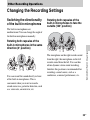
The built-in microphones are
unidirectional. You can change the angle of
the built-in microphones manually.
Rotating both capsules of the
built-in microphones to face the
outside (120° position)
Rotating both capsules of the
built-in microphones in the same
direction (0° position)
Other Recording Operations
You can record the sound directly in front
of the built-in microphones. This is
convenient when you want to record a
sound source in a particular direction, such
as a voice note, an interview, etc.
The microphone on the right records sound
from the right; the microphone on the left
records sound from the left. You can thus
obtain dynamic stereo sound recording,
therefore this position is recommended for
recording a sound source, such as a
conference, a musical performance, etc.
33
GB
Selecting a recording scene
for each situation
SCENE
x STOP
(Meeting)
N/ENT
v, V
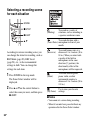
According to various recording scene, you
can change the items for recording, such as
REC Mode (page 89), REC Level
(page 90), etc., to the recommended
settings in bulk. You can change the
settings for each item.
1 Press SCENE in the stop mode.
To record dictation with a
(Voice Notes) microphone in front of your
mouth.
(Interview)
(Music)
The Scene Select window will be
displayed.
2 Press v or V on the control button to
select the scene you want, and then press
N/ENT.
To record in a variety of
situations, such as recording in
a spacious conference room.
(My Scene)
To record human voice at a
distance of 1 to 2 meters (40 to
80 in.). When you rotate both
capsules of the built-in
microphones in the same
direction (0° position), the
directionality effect of the
microphones will be improved.
To record acoustic guitar,
piano, violin, or other
instrumental sounds at a
distance of 2 to 3 meters (80 to
120 in.).
Use to store your favorite
settings.
P Notes
• You cannot set a scene during recording.
• When 60 seconds have passed without any
operation after the Scene Select window
34
GB
appears in step 1, the stop mode display will
be displayed.
There are ways of making settings to record
well other than using scene selection.
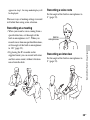
Recording a voice note
Set the angle of the built-in microphones to
0° (page 33).
Recording at a meeting
Built-in
microphones
Other Recording Operations
• When you record a voice coming from a
specific direction, set the angle of the
built-in microphones to 0°. When you
record voices from unspecified directions,
set the angle of the built-in microphones
to 120° (page 33).
• By placing the IC recorder on the
supplied stand, you can record with clear
and low-noise sound, without vibration
noise from the desk.
Recording an interview
Set the angle of the built-in microphones to
0° (page 33).
35
GB
Recording music
• Set the angle of the built-in microphones
to 120° (page 33).
• By attaching a tripod (not supplied) using
the supplied stand, you can adjust the
angles of the IC recorder and the built-in
microphones more precisely.
To change the Scene Select
settings using the menu
1 Select the
(Recording) tab t “Scene
Edit” in the menu, and then press N/
ENT.
Sound source
Approx. 2 to 3 meters
(80 to 120 in.)
Set up the IC recorder
with the display window
facing up, and with the
built-in microphones
pointing to the sound
source.
Tripod (not supplied)
36
GB
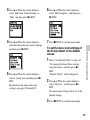
2 Press v or V on the control button to
select the scene you want to change the
settings, and then press N/ENT.
3 Press v or V on the control button to
6 Press v or V on the control button to
select “Edit from Current Setting” or
“Edit,” and then press N/ENT.
select “Edit Complete,” and then press
N/ENT.
4 Press v or V on the control button to
7 Press x STOP to exit the menu mode.
select the menu item you want to change,
and then press N/ENT.
Other Recording Operations
To set the menu item settings of
the Scene Select to the default
values
1 Select “Set Default Value” in step 3 of
5 Press v or V on the control button to
select a setting item, and then press N/
ENT.
For details on the menu items and
settings, see pages 89 through 93.
“To change the Scene Select settings
using the menu,” and then press N/
ENT.
“Default Value?” will be displayed.
2 Press v or V on the control button to
select “Execute,” and then press N/
ENT.
The menu item settings will be set to the
default settings.
3 Press x STOP to exit the menu mode.
37
GB
Default settings
For details on the menu items and settings,
see pages 89 through 93.
38
(Music)
(My Scene)
REC
Mode
LPCM
44.1kHz/16bit
LPCM
44.1kHz/16bit
Manual
(Interview)
REC
Level
Low(Music)
(Meeting) (Voice
Notes)
REC
Mode
MP3
192kbps
MP3
128kbps
MP3
192kbps
REC
Level
Value
–
10
REC
Level
Medium
Low
Medium
LCF(Low OFF
Cut)
OFF
REC
Level
Value
–
–
–
LIMITER –
ON
VOR
OFF
–
OFF
OFF
MIC IN
MIC IN
LCF(Low ON
Cut)
ON
ON
SYNC
REC
LIMITER –
–
–
Select
Input
VOR
OFF
OFF
OFF
SYNC
REC
OFF
OFF
OFF
Select
Input
MIC IN
MIC IN
MIC IN
GB
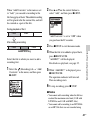
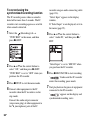
2 Select a folder.
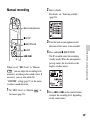
Manual recording
For details, see “Selecting a folder”
(page 20).
Built-in microphones
x STOP
3 Turn the built-in microphones in the
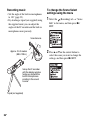
z REC/PAUSE
direction of the source to be recorded.
N/ENT
When you set “REC Level” to “Manual
,” you can adjust the recording level
manually, according to the sound source. If
necessary, you can also utilize the
“LIMITER” setting (page 91) in the menu
to reduce sound distortion.
1 Set “REC Level” to “Manual
the menu (page 90).
” in
Other Recording Operations
4 Press and hold z REC/PAUSE.
., >
The IC recorder enters the recording
standby mode. When the microphones
pick up sound, the level meter in the
display window moves.
5 Press . or > on the control button
to adjust the recording level, depending
on the sound source.
39
GB
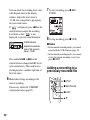
You can check the recording level value
with the peak meter of the display
window. Adjust the level closer to
–12 dB, into a range that is appropriate
for your sound source.
If “
” is displayed, press . on the
control button to adjust the recording
level down so that “
” is not
displayed, to prevent sound distortion.
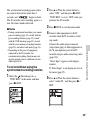
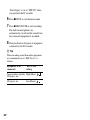
7 To start recording, press z REC/
PAUSE.
8 To stop recording, press x STOP.
OVER indicator
P Notes
Adjust the maximum
level of the sound to
about –12 dB.
• In the manual recording mode, you cannot
record with the VOR function (page 45).
• In the manual recording mode, you cannot
review the current recording, even if you
press N/ENT.
Press and hold . or > on the
control button to change the REC Level
value continuously. The sound level is
also displayed as a number right side of
the level meter.
6 Make other settings according to the
state of recording.
If necessary, utilize the “LIMITER”
setting in the menu (page 91).
Adding a recording to a
previously recorded file
x STOP
z REC/PAUSE
N/ENT
v, V
40
GB
When “Add/Overwrite” in the menu is set
to “Add,” you can add a recording to the
file being played back. The added recording
will be placed after the current file, and will
be counted as a part of the file.
2 Press v or V on the control button to
select “Add,” and then press N/ENT.
During playback of file 3
File 3
File 4
“Add/Overwrite” is set to “OFF” when
you purchase the IC recorder.
After adding a recording
File 3
File 4
Select the file to which you want to add a
recording first.
1 Select the
(Recording) tab t “Add/
Overwrite” in the menu, and then press
N/ENT.
4 When the file to be added is played back,
Other Recording Operations
Added recording
3 Press x STOP to exit the menu mode.
press z REC/PAUSE.
“Add REC?” will be displayed.
For details on playback, see page 25.
5 While “Add REC?” is displayed, press
z REC/PAUSE.
The operation indicator will turn red.
Then recording starts.
6 To stop recording, press x STOP.
P Notes
• You cannot add a recording when the file has
reached the maximum size limit (2 GB with
LPCM files and 1 GB with MP3 files).
• You cannot add a recording to an LPCM file
or an MP3 file that was not recorded using
41
GB
the IC recorder. Moreover, when you edit
files using the supplied Sound Organizer
software, adding a recording to the files may
not be possible.
• The REC Mode of an additional recording is
the same as the added file.
• If 10 minutes have passed after step 4, you
must start the procedure again from step 4.
Adding an overwrite
recording during playback
x STOP
The starting point of an overwrite recording
File 2
File 3
File 4
The erased part
of File 2
File 2
File 3
File 4
Added overwrite recording in File 2
Select the file to which you want to add an
overwrite recording first.
z REC/PAUSE
N/ENT
v, V
When “Add/Overwrite” in the menu is set
to “Overwrite,” you can add an overwrite
recording after a selected point in a
recorded file. The part of the file after the
selected point is erased.
42
GB
1 Select the
(Recording) tab t “Add/
Overwrite” in the menu, and then press
N/ENT.
2 Press v or V on the control button to
select “Overwrite,” and then press N/
ENT.
“Add/Overwrite” is set to “OFF” when
you purchase the IC recorder.
Other Recording Operations
3 Press x STOP to exit the menu mode.
overwrite recording to an LPCM file, even if
the file has reached the maximum size limit
(2 GB), when the beginning of the point to
be overwritten has not reached the maximum
size limit.
• You cannot add an overwrite recording to an
LPCM file or MP3 file which was not
recorded using the IC recorder. Moreover,
when you edit files using the supplied Sound
Organizer software, adding an overwrite
recording to the files may not be possible.
• The REC Mode of an additional overwrite
recording is the same as the added file.
• If 10 minutes have passed after step 4, you
must start the procedure again from step 4.
4 When the file to be added is played back,
press z REC/PAUSE at the position
where you want to overwrite the file.
“Overwrite REC?” will be displayed.
For details on playback, see page 25.
5 While “Overwrite REC?” is displayed,
press z REC/PAUSE.
The operation indicator will turn red.
Then recording starts.
6 To stop recording, press x STOP.
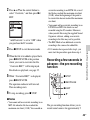
Recording a few seconds in
advance – the pre-recording
function
x STOP
z REC/PAUSE
N/ENT
v, V
P Notes
• You cannot add an overwrite recording to an
MP3 file when the file has reached the
maximum size limit (1 GB). You can add an
The pre-recording function allows you to
record sound sources for approximately 5
43
GB
seconds prior to the point when you press
z REC/PAUSE. This is useful for
recording during interviews or when
making an open-air recording so that you
will not miss an opportunity to start
recording.
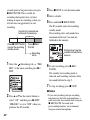
Sounds for 5 seconds are
buffered in the memory.
Press z REC/PAUSE
to enter the recording
standby mode.
3 Press x STOP to exit the menu mode.
4 Select a folder.
5 Press and hold z REC/PAUSE.
The IC recorder enters the recording
standby mode.
Pre-recording starts and sounds for a
maximum of the last 5 seconds are
buffered in the memory.
Press z REC/
PAUSE.
Displays how long the
sound is buffered in the
memory.
Recording
starts.
1 Select the
(Recording) tab t “PRE
REC” in the menu, and then press N/
ENT.
6 To start recording, press z REC/
PAUSE.
The standby for recording mode is
released, and recording continues from
the sound buffered in step 5.
7 To stop recording, press x STOP.
P Notes
2 Press v or V on the control button to
select “ON,” and then press N/ENT.
“PRE REC” is set to “OFF” when you
purchase the IC recorder.
44
GB
• If you start recording with pre-recording
function using the built-in microphones, a
click noise may be recorded when you press
z REC/PAUSE. To record with
pre-recording function, we recommend
using an external microphone.
• When the remaining recordable time is less
than 10 seconds, the pre-recording function
is disabled. Before starting to use the
pre-recording function, erase unwanted files.
• When 60 minutes have passed after the IC
recorder entered the standby mode in step 5,
the standby mode will be canceled and
recording stops.
• If you stop recording before step 6, sounds
buffered in the memory will not be saved.
recorder detects sound, and pause when no
sound is heard, eliminating recording
during soundless periods.
1 Select the
(Recording) tab t “VOR”
in the menu when the IC recorder is in
the stop or recording mode, and then
press N/ENT.
To cancel the pre-recording
function
Set “PRE REC” to “OFF” in step 2.
2 Press v or V on the control button to
select “ON,” and then press N/ENT.
“VOR” is set to “OFF” when you
purchase the IC recorder.
x STOP
3 Press x STOP to exit the menu mode.
z REC/PAUSE
4 Press z REC/PAUSE.
N/ENT
v, V
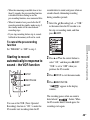
You can set the VOR (Voice Operated
Recording) function to “ON,” to make the
IC recorder start recording when the IC
Other Recording Operations
Starting to record
automatically in response to
sound – the VOR function
“
window.
” appears in the display
The recording pauses when no sound is
detected and “
” flashes. When
the IC recorder detects sound again, the
recording starts again.
45
GB
To cancel the VOR function
Set “VOR” to “OFF” in step 2.
P Notes
• The VOR function is affected by the sound
around you. Set “REC Level” in the menu
according to the recording conditions. If
recording is not satisfactory after you have
changed the “REC Level” setting, or for an
important recording, set “VOR” to “OFF” in
the menu.
• If you press z REC/PAUSE to pause
recording during VOR recording, only
“
” flashes.
• During manual recording (page 39),
pre-recording (page 43), and synchronized
recording (page 54), the VOR function does
not work.
46
GB
Recording on a Memory Card
x STOP
z REC/PAUSE
N/ENT
v, V
.
* When you are
inserting a memory
card with the back side
of the IC recorder
facing toward you.
Insert microSD card with the
terminal side facing toward you.*
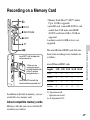
In addition to the built-in memory, you can
record files on a memory card.
The microSD/microSDHC cards that have
been tested according to our standards are
as follows.
Other Recording Operations
Insert M2™ with the label side
facing toward you.*
• Memory Stick Micro™ (M2™) media:
Up to 16 GB is supported.
• microSD card: A microSD (FAT16) card
smaller than 2 GB and a microSDHC
(FAT32) card from 4 GB to 32 GB are
supported.
A memory card of 64 MB or less is not
supported.
microSD/microSDHC cards
Supplier
2 GB 4 GB 8 GB 16 GB 32 GB
SONY
a
a
a
—
—
Toshiba
a
a
a
a
—
Panasonic
a
a
a
a
—
SanDisk
a
a
a
a
a
a: Operation tested
–: Operation not tested
As of September 2010
About compatible memory cards
Memory cards that you can use with the IC
recorder are as follows:
47
GB
For ICD-SX712, the operational tests
performed were using memory cards available
as of September 2010.
For the latest information about the memory
cards that have been tested, please access the
support home page for the IC recorder:
http://www.sony.com/recordersupport
In this manual, M2™ and microSD cards
are generally referred to as a “memory
card.”
The M2™/microSD card slot is referred to
as the “memory card slot.”
Due to the file system specifications of the
IC recorder, you can record and play back
an LPCM file smaller than 2 GB, and an
MP3/LPEC/WMA/AAC-LC file smaller
than 1 GB using a memory card.
in the stop mode.
2 Insert an M2™ or microSD card, in the
direction shown in the illustration on
page 47, securely to the end of the slot
until it clicks into place. Then close the
cover.
To remove a memory card
Push the memory card into the slot. When it
pops out, remove it from the memory card
slot.
Structure of folders and files
You can record up to 4,074 files on an M2™
media.
5 folders are created in a memory card in
addition to those in the built-in memory.
The structure of folders and files is
somewhat different from that of the built-in
memory (page 106).
P Note
P Notes
Operations of all types of compatible memory
cards are not guaranteed.
• Do not insert or remove a memory card
during recording/playback/formatting.
Doing so may cause a malfunction of the IC
recorder.
• Do not remove a memory card while the
“Accessing...” animation appears in the
display window. Doing so may damage the
data.
• If a memory card is not recognized, remove
it and then insert it into the IC recorder
again.
To insert a memory card
Before recording, be sure to copy all the
data stored on the memory card to your
computer and format the memory card on
the IC recorder (page 102) so it contains no
data.
48
1 Open the cover of the memory card slot
GB
• Close the cover of the memory card slot
firmly. Also, do not insert any liquid, metal,
flammable or any object other than a
memory card into the slot. Doing so may
cause fire, electric shock, or malfunctions.
To switch the IC recorder
destination to the memory card
(from the folder selection
window)
1 Press
2 Press . on the control button, press v
or V on the control button to select the
(Built-in memory) tab, and then
press N/ENT.
3 Press v or V on the control button to
select “Memory Card,” and then press
N/ENT.
The
to the
4 Press x STOP to return to the stop mode
display.
To use the built-in memory
Select “Built-In Memory” in step 3.
Other Recording Operations
.
The folder selection window will be
displayed.
then the folder selection window will be
displayed.
To switch the IC recorder
destination to the memory card
(from the menu)
1 Select the
(IC recorder setting) tab
t “Select Memory” in the menu, and
then press N/ENT.
(Built-in memory) tab changes
(External memory) tab, and
49
GB
2 Press v or V on the control button to
select “Memory Card,” and then press
N/ENT.
“Select Memory” is set to “Built-In
Memory” when you purchase the IC
recorder.
If the memory card has already been
formatted, proceed to step 5.
3 When the memory card is not formatted,
select the
(IC recorder setting) tab
t “Format” in the menu, and then press
N/ENT.
“Erase All Data?” will be displayed.
4 Press v or V on the control button to
select “Execute,” and then press N/
ENT.
5 Press x STOP to exit the menu mode.
To use the built-in memory
Select “Built-In Memory” in step 2.
50
GB
To start recording
Select the folder and then press z REC/
PAUSE.
For auto (AGC) recording, see page 22. For
manual recording, see page 39.
Recording across memory
media – cross-memory
recording
x STOP
N/ENT
v, V
When the memory media currently being
used becomes full during recording, the IC
recorder automatically switches its
destination to the other memory media and
continues recording (Cross-memory
recording).
1 Select the
(Recording) tab t
“Cross-Memory REC” in the menu, and
then press N/ENT.
2 Press v or V on the control button to
3 Press x STOP to exit the menu mode.
To cancel cross-memory
recording
Set “Cross-Memory REC” to “OFF” in step
2.
Other Recording Operations
select “ON,” and then press N/ENT.
“Cross-Memory REC” is set to “OFF”
when you purchase the IC recorder.
P Notes
• If the other memory media is also full, a
message is displayed and the IC recorder
stops recording.
• When you play back the original file
recorded with cross-memory recording,
the IC recorder does not play the
succeeding file automatically.
• Before attempting cross-memory
recording, check to see if the IC recorder
can switch the memory media to
“Memory Card” in advance (page 49).
• Even if you insert a memory card into the
IC recorder during recording,
cross-memory recording will not work.
• When you are recording files with
cross-memory recording, the sound may
be partially interrupted after the memory
media has been switched.
When the current memory media
becomes full during recording
The “Continue REC in Other Memory”
animation appears in the display window.
Recording continues as a new file in a
recordable folder of the smallest folder
number available for the other memory
media.
A new file created with a new file name.
51
GB
Recording via Other Devices
Recording with an external
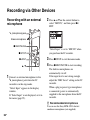
microphone
2 Press v or V on the control button to
select “MIC IN,” and then press N/
ENT.
m (microphone) jack
Stereo microphone
z REC/PAUSE
x STOP
N/ENT
v, V
1 Connect an external microphone to the
m (microphone) jack when the IC
recorder is in the stop mode.
“Select Input” appears in the display
window.
If “Select Input” is not displayed, set it in
the menu (page 93).
“Select Input” is set to “MIC IN” when
you purchase the IC recorder.
3 Press x STOP to exit the menu mode.
4 Press z REC/PAUSE to start recording.
The built-in microphones are
automatically cut off.
If the input level is not strong enough,
adjust the “REC Level” setting on the IC
recorder.
When a plug in power type microphone
is connected, power is automatically
supplied to the microphone from the IC
recorder.
z Recommended microphones
You can use the Sony ECM-CS10 electret
condenser microphone (not supplied).
52
GB
To record sound from a
telephone or a cell phone
You can use the ECM-TL1 headphone-type
electret condenser microphone (not
supplied) to record sound from a telephone
or a cell phone.
Insert the earphone of the microphone into
your ear, then, while holding the receiver to
the ear with the earphone in it, connect the
plug of the earphone to the
(microphone) jack of the IC recorder.
• After you have made the connection, check
the sound quality of the conversation and the
recording level before you start recording.
• If the beep of the telephone or a dial tone is
recorded, the conversation may be recorded
with lower level of sound. In this case, start
recording after the conversation has started.
• The VOR function (page 45) may not work,
depending on the kind of telephone or the
line condition.
• We assume no responsibility whatsoever for
any inconvenience, even if you cannot
record a conversation using the IC recorder.
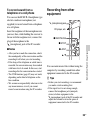
m (microphone) jack
CD player, etc.
z REC/PAUSE
x STOP
N/ENT
Other Recording Operations
P Notes
Recording from other
equipment
v, V
You can make music files without using the
computer by recording sound from other
equipment connected to the IC recorder.
z Tips
• Before you start recording, we recommend
you make a trial recording first.
• If the input level is not strong enough,
connect the headphone jack (minijack,
stereo) of other equipment to the
m (microphone) jack of the IC recorder and
adjust the volume level on the piece of
equipment connected to the IC recorder.
53
GB
To record using the
synchronized recording function
The IC recorder pauses when no sound is
detected for more than 2 seconds. The IC
recorder starts recording again as a new file
when sound is detected.
1 Select the
(Recording) tab t
“SYNC REC” in the menu, and then
press N/ENT.
2 Press v or V on the control button to
select “ON,” and then press N/ENT.
“SYNC REC” is set to “OFF” when you
purchase the IC recorder.
3 Press x STOP to exit the menu mode.
4 Connect other equipment to the IC
recorder when the IC recorder is in the
stop mode.
Connect the audio output connector
(stereo mini-plug) of other equipment to
the m (microphone) jack of the IC
54
GB
recorder using an audio connecting cable
(page 126).
“Select Input” appears in the display
window.
If “Select Input” is not displayed, set it in
the menu (page 93).
5 Press v or V on the control button to
select “Audio IN,” and then press N/
ENT.
“Select Input” is set to “MIC IN” when
you purchase the IC recorder.
6 Press z REC/PAUSE to start recording.
“
” flashes and the IC recorder
enters the recording pause mode.
7 Start playback on the piece of equipment
connected to the IC recorder.
“
” appears on the display and
synchronized recording starts.
The synchronized recording pauses when
no sound is detected for more than 2
seconds, and “
” begins to flash.
The IC recorder starts recording again as a
new file when sound is detected.
P Notes
To record without using the
synchronized recording function
1 Select the
(Recording) tab t
“SYNC REC” in the menu, and then
press N/ENT.
select “OFF,” and then press N/ENT.
“SYNC REC” is set to “OFF” when you
purchase the IC recorder.
3 Press x STOP to exit the menu mode.
4 Connect other equipment to the IC
recorder when the IC recorder is in the
stop mode.
Connect the audio output connector
(stereo mini-plug) of other equipment to
the m (microphone) jack of the IC
recorder using an audio connecting cable
(page 126).
“Select Input” appears in the display
window.
If “Select Input” is not displayed, set it in
the menu (page 93).
Other Recording Operations
• During synchronized recording, you cannot
pause recording (page 24), record with the
pre-recording function (page 43), record
with the VOR function (page 45), record
with the cross-memory recording function
(page 50), and add a track mark (page 76).
• Depending on the piece of equipment
connected to the IC recorder, the
synchronized recording function may not
operate properly due to a difference in the
audio input level.
2 Press v or V on the control button to
5 Press v or V on the control button to
select “Audio IN,” and then press N/
ENT.
55
GB
“Select Input” is set to “MIC IN” when
you purchase the IC recorder.
6 Press x STOP to exit the menu mode.
7 Press z REC/PAUSE to start recording.
The built-in microphones are
automatically cut off and the sound from
the connected equipment is recorded.
8 Start playback on the piece of equipment
connected to the IC recorder.
z Tip
When recording sound from other equipment,
we recommend you set “REC Level” as
follows.
Equipment to be
connected
“REC Level”
setting
Tape recorder, portable High(Music)
CD player, etc.
CD player, etc.
56
GB
Low(Music)
Operating during Recording
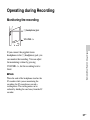
Monitoring the recording
i (headphone) jack
VOLUME –/+
Other Recording Operations
If you connect the supplied stereo
headphones to the i (headphone) jack, you
can monitor the recording. You can adjust
the monitoring volume by pressing
VOLUME –/+, but the recording level is
fixed.
P Note
When the cord of the headphones touches the
IC recorder while you are monitoring the
recording, the IC recorder may record a
rustling noise. The rustling noise can be
reduced by holding the cord away from the IC
recorder.
57
GB
Other Playback Operations
Changing the Playback Settings
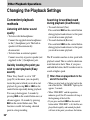
Convenient playback
methods
Listening with better sound
quality
• To listen with the headphones:
Connect the supplied stereo headphones
to the i (headphone) jack. The built-in
speaker will be automatically
disconnected.
• To listen from an external speaker:
Connect an active or passive speaker (not
supplied) to the i (headphone) jack.
Quickly locating the point you
wish to start playback (Easy
search)
When “Easy Search” is set to “ON”
(page 94) in the menu, you can quickly
locate the point at which you wish to start
playback by pressing > or . on the
control button repeatedly during playback.
You can go back approx. 3 seconds by
pressing . on the control button once, or
advance approx. 10 seconds by pressing
> on the control button once. This
function is useful for locating a desired
point in a long recording.
58
GB
Searching forward/backward
during playback (Cue/Review)
• To search forward (Cue):
Press and hold > on the control button
during playback and release it at the point
you wish to resume playback.
• To search backward (Review):
Press and hold . on the control button
during playback and release it at the point
you wish to resume playback.
The IC recorder searches at slow speed with
playback sound. This is useful to check one
word forward or back. Then, if you press
and hold the button, the IC recorder starts to
search at higher speed.
z When files are played back to the
end of the last file
• When you play back or fast play back to the
end of the last file, “FILE END” lights up for
approx. 5 seconds.
• When “FILE END” and the operation
indicator go off, the IC recorder will stop at
the beginning of the last file.
• If you press and hold . on the control
button while “FILE END” is lit, the files are
played back rapidly, and normal playback
will start at the point you release the button.
• If the last file is long and you wish to start
playback at a later part of the file, press and
hold > on the control button to go to the
end of the file, and then press . on the
control button while “FILE END” is lit to go
back to the desired point.
• For files other than the last one, go to the
beginning of the next file and play backward
to the desired point.
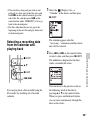
Selecting a recording date
from the calendar and
playing back
v, V
(Display) tab t
“Calendar” in the menu, and then press
N/ENT.
The calendar appears after the
“Accessing...” animation, and the current
date will be selected.
2 Press . or > on the control button
to select a date, and then press N/ENT.
The underline is displayed at the date
where a recorded file exists.
Other Playback Operations
x STOP
1 Select the
N/ENT
., >
You can play back a file recorded using the
IC recorder by searching for it from the
calendar.
You can move to the previous week or
the following week of the date by
pressing v or V on the control button.
When you press and hold each button,
you can move continuously through the
dates or the weeks.
59
GB
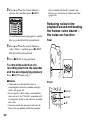
3 Press v or V on the control button to
select a file, and then press N/ENT.
A confirmation message appears, and the
file you selected will be played back.
files recorded with the IC recorder. For
details, see “Structure of folders and files”
(page 104).
Reducing noise in the
playback sound and making
the human voice clearer –
the noise cut function
Rear
4 Press v or V on the control button to
select “Enter,” and then press N/ENT.
The file will be played back.
5 Press x STOP to stop playback.
To cancel the selection of a
recording date from the calendar
and the accompanying playback
Press x STOP before step 4.
P Notes
• You need to set the clock to select a
recording date from the calendar and play
back a file (page 16).
• If you specify a date where a recorded file
does not exist, the “No File” animation will
be displayed. Select a date where a recorded
file exists.
• You can search for and play back only the
files in the recordable folder that contains
60
GB
Front
x STOP
N/ENT
v, V
When you set the NOISE CUT switch to
“ON,” ambient noise other than the human
voice is reduced. A file is played back with
clear sound quality because the noise of all
frequency bands including a human voice is
reduced.
P Notes
• The effect of the noise cut function may be
different depending on the condition of the
recorded voice.
• When you are using the built-in speaker, the
noise cut function does not work.
• When the NOISE CUT switch is set to
“ON,” the effect function does not work.
select “Maximum” or “Medium,” and
then press N/ENT.
“Noise Cut Level” is set to “Maximum”
when you purchase the IC recorder.
3 Press x STOP to exit the menu mode.
To cancel the noise cut function
Set the NOISE CUT switch to “OFF.”
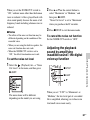
Adjusting the playback
sound by amplifying
inaudible sound – the digital
voice up function
Other Playback Operations
To set the noise cut level
2 Press v or V on the control button to
1 Select the
(Playback) tab t “Noise
Cut Level” in the menu, and then press
N/ENT.
x STOP
N/ENT
v, V
The menu items will be different
depending on the model you are using.
When you set “V-UP” to “Maximum” or
“Medium,” the low-level part of a recorded
file is amplified, allowing you to hear even
low/small voices more easily.
61
GB
1 Select the
(Playback) tab t “V-UP”
in the menu when the IC recorder is in
the stop or playback mode, and then
press N/ENT.
Maximum
Adjusts the digital voice up
function more effectively.
Medium
Adjusts the digital voice up
function less finely.
OFF
Disables the digital voice up
function.
“V-UP” is set to “OFF” when you purchase
the IC recorder.
The menu items will be different
depending on the model you are using.
2 Press v or V on the control button to
select “Maximum” or “Medium,” and
then press N/ENT.
3 Press x STOP to exit the menu mode.
62
GB
To cancel the digital voice up
function
Set “V-UP” to “OFF” in step 2.
Adjusting the playback
speed and tones – the DPC
(Digital Pitch Control)
function, key control
Rear
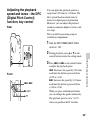
You can adjust the playback speed in a
range from 0.25 times to 3.00 times. The
file is played back in natural tones by
means of a digital processing function.
Moreover, you can adjust the playback
sounds in semitones higher or lower, each
in 6 steps.
This is useful for practicing songs to
recorded accompaniment.
1 Slide the DPC(SPEED)/KEY CTRL
switch to “ON.”
2 During playback, press v or V on the
control button to enter the setting mode.
Other Playback Operations
3 Press . or > on the control button
Front
., >
N/ENT
v, V
to adjust the playback speed.
.: Decreases the speed by 0.05 times
each time this button is pressed (from
×0.25 to ×1.00).
>: Increases the speed by 0.10 times
each time this button is pressed (from
×1.00 to ×3.00).
When you press and hold each button,
you can change the speed continuously.
The playback speed is set to “×0.70”
when you purchase the IC recorder.
63
GB
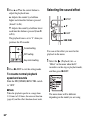
4 Press v or V on the control button to
Selecting the sound effect
adjust the playback tone.
v: Adjusts the sounds by a halftone
higher each time this button is pressed
(from #1 to #6).
V: Adjusts the sound by a halftone lower
each time this button is pressed (from 21
to 26).
The playback tone is set to “0” when you
purchase the IC recorder.
x STOP
v, V
N/ENT
., >
Current setting
DPC setting
You can set the effect you want for the
playback in the menu.
Key control setting
1 Select the
5 Press N/ENT to exit the setting mode.
(Playback) tab t
“Effect” in the menu when the IC
recorder is in the stop or playback mode,
and then press N/ENT.
To resume normal playback
speed and sounds
Slide the DPC(SPEED)/KEY CTRL switch
to “OFF.”
P Note
When the playback speed is in a range from
2.10 times to 3.00 times, the noise cut function
(page 60) and the effect function do not work.
64
GB
The menu items will be different
depending on the model you are using.
2 Press v or V on the control button to
select effect you want for the playback,
and then press N/ENT.
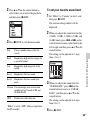
To set your favorite sound level
1 Set “Effect” to “Custom” in step 2, and
then press N/ENT.
The custom setting window will be
displayed.
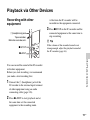
2 When you adjust the sound level for the
3 Press x STOP to exit the menu mode.
Stresses middle ranges, ideal for
vocals.
Rock
Emphasizes high and low ranges for
a powerful sound.
Jazz
Emphasizes high ranges for lively
sound.
Bass1
Emphasizes the bass sound.
Bass2
Emphasizes the bass sound even
more.
Custom You can design your own custom
sound level for 5 bands of EQ and
CLEAR BASS.
OFF
Disables the effect function.
“Effect” is set to “OFF” when you purchase
the IC recorder.
Other Playback Operations
Pop
0.4 kHz, 1.0 kHz, 2.5 kHz, 6.3 kHz, and
16 kHz bands, press . or > on the
control button to move to the band to the
left or right, and then press v or V on the
control button.
The setting can be adjusted in 7 steps
from –3 to +3.
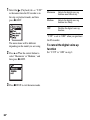
3 When you adjust the sound level for
“CLEAR BASS,” press . on the
control button to move to “CLEAR
BASS,” and then press v or V on the
control button.
The setting can be adjusted in 4 steps
from 0 to +3.
4 Press N/ENT.
65
GB
5 Press x STOP to exit the menu mode.
P Notes
• When you are using the built-in speaker, this
setting is invalid.
• When the NOISE CUT switch is set to
“ON,” the effect function does not work.
Selecting the playback
mode
x STOP
The menu items will be different
depending on the model you are using.
2 Press v or V on the control button to
select “1,” “
,” “ALL,” “
1,”
“
,” or “
ALL,” and then press
N/ENT.
N/ENT
A-B
v, V
3 Press x STOP to exit the menu mode.
You can select the playback mode in the
menu.
1 Select the
(Playback) tab t “Play
Mode” in the menu when the IC recorder
is in the stop or playback mode, and then
press N/ENT.
66
GB
1
A file is played back.
Files in one folder are played back
continuously.
ALL
1
All the files are played back
continuously.
One file is played back repeatedly.
Files in one folder are played back
repeatedly.
ALL All the files are played back
repeatedly.
To resume normal playback:
Press N/ENT.
To stop A-B repeat playback:
Press x STOP.
To change the segment specified for A-B
repeat playback:
During A-B repeat playback, press
(repeat) A-B again to specify a new
starting point A. Then specify a new
finishing point B, as in step 2.
P Note
Other Playback Operations
“Play Mode” is set to “
” when you
purchase the IC recorder.
You cannot set the point A and B near the
beginning of a file or the end of a file, and
around track mark.
To play back a specified section
repeatedly – A-B repeat
1 During playback, press
(repeat) A-B
to specify the starting point A.
“A-B B?” is displayed.
2 Press
(repeat) A-B again to specify
the finishing point B.
“
A-B” is displayed and the specified
section is played back repeatedly.
67
GB
Playing Back a File at a Desired Time with an
Alarm
x STOP
N/ENT
v, V
You can sound an alarm and start playback
of a selected file at a desired time.
You can have a file played back on a
specified date, once every week, or at the
same time every day.
You can set a maximum of 30 alarms.
The menu items will be different
depending on the model you are
using.
2 Press v or V on the control button to
select “New,” and then press N/
ENT.
1 Select the file you want to play back with
an alarm.
2 Enter the alarm setting mode.
(Playback) tab t
“Alarm” in the menu when the IC
recorder is in the stop mode, and then
press N/ENT.
1 Select the
68
GB
3 Set the alarm date and time.
1 Press v or V on the control button to
select “Date,” a day of the week, or
“Daily,” and then press N/ENT.
2 When you select “Date”:
Set the year, month, day, hour, and
minute in sequence, as described in
“Step 4: Setting the Clock” on
page 16.
When you select a day of the week
or “Daily”:
Press v or V on the control button to
set the hour, and then press N/ENT,
press v or V on the control button to
set the minute, and then press N/
ENT.
4 Press v or V on the control button to
select a favorite alarm pattern, and then
press N/ENT.
The alarm list is displayed.
2 Press v or V on the control button to
select the item you want to change, then
press N/ENT.
3 Press v or V on the control button to
select “Edit,” then press N/ENT.
The file you selected will be played
back.
4 Select “Date,” a day of the week, or
“Daily,” then press N/ENT.
5 Set the date and time and press N/ENT.
Other Playback Operations
6 Select an alarm pattern, and then press
“Executing...,” then your settings are
displayed.
N/ENT.
“Executing...,” then your settings are
displayed.
5 Press x STOP to exit the menu mode.
7 Press x STOP to exit the menu mode.
The setting process is finished and “,”
(alarm indicator) appears in the display
window.
To change the alarm setting
1 Select the
(Playback) tab t
“Alarm” t “List” in the menu, and then
press N/ENT.
To cancel the alarm setting
Follow steps 1 and 2 of “To change the
alarm setting.” In step 3, select “Cancel”
and press N/ENT. “Cancel Alarm?” is
displayed. Press v or V on the control
button to select “Execute,” then press N/
ENT. The alarm will be canceled and the
69
GB
alarm indicator will disappear from the
display window.
When the set date and time
comes
At the set time, “ALARM” is displayed in
the display window and the alarm and the
selected file will be played back using the
selected alarm pattern.
When the playback ends, the IC recorder
will stop automatically. (When the alarm
pattern is set to “Beep&Play” or “Play,” the
IC recorder will stop at the beginning of the
selected file.)
To stop the alarm playback
Press any button other than VOLUME –/+
while the alarm sound is heard. If the
HOLD function is activated, you can stop
the alarm playback by pressing any button.
P Notes
• You can set only one alarm each one file.
• When the clock has not been set or no files
are recorded, you cannot set the alarm.
• The alarm sounds even if you set “Beep” to
“OFF” in the menu (page 100).
• If the alarm time comes while you are
updating data, the alarm will be canceled
automatically.
• If more than one alarm time comes, only the
first file will be played back with an alarm.
70
GB
• If you divide a file you have set an alarm for,
the alarm setting remains on only the first
part of the divided file.
• If you erase a file in which you have set an
alarm, that alarm will be also canceled.
• You cannot set alarm in podcast files.
• You cannot set an alarm in the files stored on
a memory card.
Playback via Other Devices
Recording with other
equipment
A file from the IC recorder will be
recorded on the equipment connected.
3 Press x STOP on the IC recorder and the
i (headphone) jack
Tape recorder,
Mini disc recorder, etc.
x STOP
connected equipment at the same time to
stop recording.
z Tip
If the volume of the recorded sound is not
strong enough, adjust the playback sound of
the IC recorder (page 26).
N/ENT
Other Playback Operations
You can record the sound of the IC recorder
with other equipment.
Before you start recording, we recommend
you make a trial recording first.
1 Connect the i (headphone) jack of the
IC recorder to the external input terminal
of other equipment using an audio
connecting cable (page 126).
2 Press N/ENT to start playback and at
the same time set the connected
equipment to the recording mode.
71
GB
Editing Files
Arranging Files in a Folder
Moving a file to a different
folder
3 Press . on the control button, press v
or V on the control button to select the
(Voice) tab or the
(Music) tab,
and then press >.
x STOP
v, V
N/ENT
., >
1 Select the file you want to move.
4 Press v or V on the control button to
select the folder that you want to move
the file into, and then press N/ENT.
2 Select the
(Edit) tab t “Move File”
in the menu when the IC recorder is in
the stop or playback mode, and then
press N/ENT.
The file to be moved will be played back.
The “Moving File...” animation is
displayed and the file is moved to the last
position in the destination folder.
When you move a file to another folder,
the original file in the previous folder
will be erased.
5 Press x STOP to exit the menu mode.
72
GB
To cancel moving the file
Press x STOP before step 4.
P Notes
• You cannot move podcast files.
• You cannot move protected files (page 84).
• You cannot move files to the other memory
media.
1 Select the file you want to copy.
When you want to copy a file from a
memory card to the built-in memory, set
the source memory media to “Memory
Card” (page 49).
2 Select the
(Edit) tab t “File Copy”
in the menu, and then press N/ENT.
Copying a file to the other
memory media
Memory card slot
x STOP
v, V
., >
Editing Files
N/ENT
The “Copy to Memory Card Select
Folder” or the “Copy to Built-In Memory
Select Folder” animation appears and the
folder selection window is displayed.
3 Press . on the control button, press v
or V on the control button to select the
(Voice) tab or the
(Music) tab,
and then press >.
You can copy files between the built-in
memory and a memory card, which is
useful in saving a backup. Before starting
the operation, insert a memory card to be
used for copying into the memory card slot.
73
GB
4 Press v or V on the control button to
select the folder that you want to copy
the file into, and then press N/ENT.
• You cannot copy the podcast files.
• Do not remove or insert a memory card, or
turn off the IC recorder while copying. Files
may be damaged.
Erasing all files in a folder
x STOP
The “Copying...” animation appears and
the file is copied as the last file in the
destination folder. A file will be copied
with the identical file name.
N/ENT
v, V
5 Press x STOP to exit the menu mode.
To cancel the copy operation
Press x STOP before step 4.
To cancel the copy operation
during copying
While the “Copying...” animation is
displayed in step 4, press x STOP.
P Notes
• Before starting to copy the target file, make
sure to check the battery indicator. If the
batteries are weak, you may not be able to
copy files.
• If the remaining memory capacity of the
destination memory media is insufficient,
you may not be able to copy files.
74
GB
P Note
If the selected folder contains a protected file
(page 84), you cannot erase the protected file
in that folder.
1 Select the folder containing the files you
want to erase when the IC recorder is in
the stop mode.
2 Select the
(Edit) tab t “Erase All”
in the menu, and then press N/ENT.
“Erase All Files in the Folder?” will be
displayed.
3 Press v or V on the control button to
select “Execute,” and then press N/
ENT.
The “Erasing...” animation appears in the
display window and all files in the
selected folder will be erased.
Editing Files
4 Press x STOP to exit the menu mode.
To cancel erasing
Select “Cancel” in step 3, and then press
N/ENT.
75
GB
Using a Track Mark
Adding a track mark
., >
N/ENT
T-MARK
You can add a track mark at a point at
which you would like to divide a file later
or locate during playback. You can add a
maximum of 98 track marks to each file.
During recording, playing back, or pausing,
press T-MARK at the position you want to
add a track mark.
The
(Track mark) indicator flashes three
times, and a track mark is added.
P Notes
• You can add a track mark only to files
recorded using the IC recorder. However,
when you edit files using the supplied Sound
Organizer software, adding a track mark to
the files may not be possible.
• You cannot add a track mark at a point
within 0.5 seconds from another track mark.
• You cannot add a track mark at the very
beginning or at the very end of the file.
• If there are already 98 track marks in a file,
you cannot add any more track marks.
• When a track mark is added during
playback, the playback stops.
Locating a track mark and
starting playback at the track
mark
Press . or > on the control button in
the stop mode. When the
(Track mark)
indicator flashes once, press N/ENT.
76
GB
Erasing a track mark
x STOP
The “Erasing...” animation appears in the
display window and the selected track
mark will be erased.
Stop position
N/ENT
v, V
1 Stop at a position after the track mark
you would like to erase.
2 Select the
(Edit) tab t “Erase Track
Mark” in the menu, and then press N/
ENT.
3 Press v or V on the control button to
select “Execute,” and then press N/
ENT.
The track mark just before the stop position
will be erased.
4 Press x STOP to exit the menu mode.
To cancel erasing
Select “Cancel” in step 3, and then press
N/ENT.
Editing Files
“Erase Track Mark?” will be displayed.
Erase track
mark
Erasing all the track marks
in the selected file at one
time
x STOP
N/ENT
v, V
77
GB
1 Select a file from which you want to
erase the track marks.
2 Select the
(Edit) tab t “Erase All
Track Marks” in the menu, and then
press N/ENT.
“Erase All Track Marks?” will be
displayed.
3 Press v or V on the control button to
select “Execute,” and then press N/
ENT.
The “Erasing...” animation appears in the
display window and all the track marks
will be erased at one time.
4 Press x STOP to exit the menu mode.
To cancel erasing
Select “Cancel” in step 3, and then press
N/ENT.
78
GB
Dividing a File
Dividing a file at the current
position
2 Select the
(Edit) tab t “Divide
Current Position” in the menu, and then
press N/ENT.
x STOP
N/ENT
v, V
3 Press v or V on the control button to
adjust the position to be divided, if you
wish.
v: Moves the position backward.
V: Moves the position forward.
Editing Files
You can divide a file in the stop mode, so
that the file is divided into two parts and a
new file number is added to the newer part
of the divided file. By dividing a file, you
can easily find the point from which you
want to play back when you make a long
recording such as at a meeting. You can
divide a file until the total number of files in
the folder reaches the maximum number
allowed.
A period of approximately 4 seconds
from the dividing point will be played
back repeatedly.
1 Stop the file at the position where you
want to divide a file.
You can adjust the position to be divided
by approximately 0.3 seconds in a period
79
GB
of approximately 6 seconds each, both
before and after the current position.
4 Press N/ENT.
“Divide?” will be displayed.
5 Press v or V on the control button to
select “Execute,” and then press N/
ENT.
The “Dividing...” animation appears, and
the divided files will be suffixed with a
sequential number (“_1” for the original
file, and “_2” for the new file).
File 1
File 2
File 2_1 File 2_2
To cancel dividing
Select “Cancel” in step 5, and then press
N/ENT.
File 3
A file is divided.
File 1
transferred from a computer). Moreover,
when you edit files using the supplied Sound
Organizer software, dividing files may not
be possible.
• Once a file is divided, you cannot return it to
the original status again.
• If you divide a file at the position within 0.5
seconds from a track mark, the track mark
will be erased.
• Because of the system limitations, you
cannot divide a file at the very beginning or
at the very end of the file.
File 3
Dividing a file at all the track
mark positions
A suffix made up of a sequential number is
added to each of the divided files.
x STOP
6 Press x STOP to exit the menu mode.
N/ENT
P Notes
v, V
• You need a certain amount of free space in
the memory media to divide a file.
• When you divide a file with a title and artist
name, the newer part has the same title, and
artist name.
• You cannot divide files other than those
recorded using the IC recorder (e.g., a file
80
GB
1 Select the file you want to divide.
2 Select the
(Edit) tab t “Divide All
Track Marks” in the menu when the IC
recorder is in the stop mode, and then
press N/ENT.
To cancel dividing
Select “Cancel” in step 3, and then press
N/ENT.
z Tip
To cancel division during the operation at all
the remaining track marks, press x STOP.
The files that have been divided before the
cancellation remain divided.
P Notes
“Divide All Track Marks?” will be
displayed.
3 Press v or V on the control button to
Editing Files
select “Execute,” and then press N/
ENT.
The “Dividing...” animation appears, and
the file is divided at all the track mark
positions. All the existing track marks in
the files will be erased.
• You need a certain amount of free space in
the memory media to divide a file.
• When you divide a file with a title and artist
name, the newer part has the same title, and
artist name.
• You cannot divide files other than those
recorded using the IC recorder (e.g., a file
transferred from a computer). Moreover,
when you edit files using the supplied Sound
Organizer software, dividing files may not
be possible.
• Once a file is divided, you cannot return it to
the original status again.
File 1
A file is divided.
File 1_01 File 1_02
File 1_03
A suffix made up of a sequential number is
added each of the divided files.
4 Press x STOP to exit the menu mode.
81
GB
Changing a Folder Name
3 Press v or V on the control button to
x STOP
N/ENT
v, V
You can change the folder name of folders
that can be used to store files recorded
using the IC recorder.
You can choose a new folder name from the
16 templates.
select a favorite folder name, and then
press N/ENT.
You can choose a new folder name from
the 16 templates below.
Conference, Meeting, Lecture, Class,
Music, Singing, Interview, Language
Lesson, Travel, Outdoors, Message,
Schedule, Shopping List, To Do, Voice
Notes, FOLDER
1 Select the folder for which you want to
change the name from the
of the folder list.
2 Select the
(Voice) tab
(Edit) tab t “Change
Folder Name” in the menu when the IC
recorder is in the stop mode, and then
press N/ENT.
82
GB
“Executing...” appears in the display
window and the folder name will be
changed.
4 Press x STOP to exit the menu mode.
z Tips
• You can specify the same folder name up to
10 times. When you specify a folder name
that already exists, a suffix made up of a
sequential number (2 to 10) is added to the
name of the new folder.
• When you choose “FOLDER” from the
templates, a suffix made up of a sequential
number (01 to 10) is added to each of the
folder names.
P Note
You cannot change a folder name in a tab used
for playback only, such as the
(Music) tab
or the
(Podcast) tab.
Editing Files
83
GB
Protecting a File
“Set Protection?” will be displayed.
x STOP
N/ENT
v, V
To prevent a file from being accidentally
erased or edited, you can protect an
important file. A protected file is marked
with the (protect) indicator and is
regarded as a read-only file you cannot
erase or edit.
1 Display the file which you want to
protect from the
(Music) tab.
2 Select the
(Voice) tab or the
(Edit) tab t “Protect” in
the menu when the IC recorder is in the
stop mode, and then press N/ENT.
84
GB
3 Press v or V on the control button to
select “Execute,” and then press N/
ENT.
The file is protected. A protected file is
marked with the (protect) indicator.
4 Press x STOP to exit the menu mode.
To release protection
Select the protected file, and then proceed
with steps 2 through 4. In this case, “Erase
Protection?” will be displayed in step 2.
P Note
You cannot set protection to the files in the
(Podcast) tab.
About the Menu Function
Making Settings for the Menu
3 Press v or V on the control button to
MENU
x STOP
select the menu item for which you want
to make setting, and then press N/ENT.
N/ENT
v, V
.
4 Press v or V on the control button to
1 Press MENU to enter the menu mode.
The menu mode window will be
displayed.
select the setting that you want to set,
and then press N/ENT.
5 Press x STOP to exit the menu mode.
P Note
About the Menu Function
If you do not press any button for 60 seconds,
the menu mode is automatically canceled and
the window will return to the normal display.
To return to the previous window
2 Press . on the control button, press v
or V on the control button to select the
(Recording) tab, the
(Playback)
tab, the
(Edit) tab, the
(Display)
tab or the
(IC recorder setting) tab,
and then press N/ENT.
Press . on the control button during
menu mode.
To exit the menu mode
Press x STOP or MENU.
85
GB
Menu Settings
Tabs
(Recording)
(Playback)
86
GB
Menu items
Operation mode
(a: the setting can be made / —: the setting cannot be made)
Stop mode
Playback mode
Recording mode
Scene Edit
a
—
—
REC Mode
a
—
—
REC Level
a
—
a
LCF(Low Cut)
a
—
a
LIMITER
a
—
a
Add/Overwrite
a
—
—
PRE REC
a
—
—
Cross-Memory REC
a
—
—
VOR
a
—
a
SYNC REC
a
—
—
Select Input
a
—
a
Noise Cut Level
a
a
—
V-UP
a
a
—
Effect
a
a
—
Easy Search
a
a
—
Play Mode
a
a
—
Alarm
a
—
—
Tabs
(Edit)
(Display)
Menu items
Operation mode
(a: the setting can be made / —: the setting cannot be made)
Playback mode
Recording mode
a
—
—
Divide Current Position
a
—
—
Move File
a
a
—
File Copy
a
—
—
Change Folder Name
a
—
—
Erase Track Mark
a
—
—
Erase All Track Marks
a
—
—
Divide All Track Marks
a
—
—
Erase All
a
—
—
Calendar
a
—
—
Display
a
a
a
LED
a
—
—
Backlight
a
—
—
Select Memory
a
—
—
a
—
—
Date&Time
a
—
—
Time Display
a
—
—
Beep
a
—
—
USB Charge
a
—
—
Auto Power Off
a
—
—
Format
a
—
—
(IC recorder setting) Language
About the Menu Function
Stop mode
Protect
87
GB
Tabs
(Recording)
Menu items
Settings (*: Initial setting)
Scene Edit
Edits the settings of the various recording menu items
which are pre-set in the “Scene Select” menu. You can
choose a scene item as follows:
(Meeting),
(Voice Notes),
(Interview),
(Music),
(My Scene)
Edit from Current Setting:
Changes the settings that is pre-set in the menu.
Set Default Value:
Changes the settings to the default settings.
Execute: Changes the settings to the default
settings and completes the process.
Cancel: Completes the process without changing
the settings.
Edit:
Changes the settings from the settings in the
selected scene item.
z Tip
You can edit the following menu items: “REC Mode”
(page 89), “REC Level” (page 90), “LCF(Low Cut)”
(page 90), “LIMITER” (page 91), “VOR” (page 45),
“SYNC REC” (page 54), “Select Input” (page 52, 53).
When you select “Edit Complete,” the process will be
completed.
88
GB
See page
36
Tabs
(Recording)
Menu items
Settings (*: Initial setting)
REC Mode
Sets the recording mode.
LPCM 44.1kHz/16bit:
LPCM (not compressed) in stereo high-quality
recording mode
MP3 320kbps*:
MP3 (compressed) in stereo high-quality recording
mode
MP3 192kbps:
MP3 (compressed) in stereo standard-quality
recording mode
MP3 128kbps:
MP3 (compressed) in long play stereo recording
mode
MP3 48kbps(MONO):
MP3 (compressed) in monaural standard recording
mode
MP3 8kbps(MONO):
MP3 (compressed) in long play monaural recording
mode
See page
–
About the Menu Function
89
GB
Tabs
Menu items
Settings (*: Initial setting)
REC Level
Sets the microphone sensitivity.
High
:
To record a sound far away from the IC recorder or
a low sound, such as recording in a spacious room.
Medium
*:
To record a sound relatively-close to the IC
recorder, such as recording in a meeting space.
Low
:
To record dictation with a microphone in front of
your mouth, a sound near the IC recorder, or a loud
sound.
High(Music)
:
To record more natural acoustic sound, as well as
preventing sound distortion.
Low(Music)
:
To record a loud sound, such as band practice.
Manual
:
During manual recording, you can adjust the
recording level manually.
–
LCF(Low Cut)
Sets the LCF (Low Cut Filter) function to cut a low
frequency to reduce the roaring noise from wind;
therefore you can record a file more clearly.
ON:
The LCF function is activated.
OFF*:
The LCF function is canceled.
–
(Recording)
90
GB
See page
Tabs
Menu items
Settings (*: Initial setting)
LIMITER
Sets the input level automatically to prevent the sound
distortion that occurs when a sound that is too loud is
input.
ON*:
The LIMITER function is activated.
OFF:
The LIMITER function is canceled.
(Recording)
See page
–
P Note
When “REC Level” is set to “Manual
setting is effective.
,” this
Allows you to add a recording to a previously recorded
file or an overwrite recording during playback.
Add:
You can add a recording.
Overwrite:
You can overwrite a recording.
OFF*:
You cannot add or overwrite a recording.
40, 42
PRE REC
Allows you to record sound sources for a maximum of
5 seconds prior to the point when the recording is
started. Sounds for 5 seconds are buffered in the
memory.
ON:
The pre-recording function is activated.
OFF*:
The pre-recording function is canceled.
43
About the Menu Function
Add/Overwrite
91
GB
Tabs
Menu items
92
GB
Settings (*: Initial setting)
See page
When the memory media currently selected (page 49)
becomes full during recording, the IC recorder
automatically switches its destination to the other
memory media and continues recording. The new
recording is stored as another file.
ON:
The cross-memory function is activated.
OFF*:
The cross-memory function is disabled. Recording
stops when the memory media currently being
selected becomes full.
50
VOR
Sets the VOR (Voice Operated Recording) function.
ON:
Recording starts when the IC recorder detects sound
and pauses when no sound is heard, eliminating
recording during soundless periods. The VOR
function is activated when z REC/PAUSE is
pressed.
OFF*:
The VOR function does not work.
45
SYNC REC
When set to “ON,” the IC recorder enters the recording
pause mode when no sound is detected for more than 2
seconds, and the IC recorder starts recording again as a
new file when any sound is detected.
ON:
The synchronized recording function is activated.
OFF*:
The synchronized recording function is canceled.
54
Cross-Memory
(Recording) REC
Tabs
Menu items
Settings (*: Initial setting)
Select Input
Selects the external input to be recorded that is
connected to the m (microphone) jack.
MIC IN*:
Select when you record files using an external
microphone.
Audio IN:
Select when you record using other equipment.
Noise Cut Level
Sets the noise cut level to use when the IC recorder
play a file back which is recorded with noise cut
function (page 60).
Maximum*:
The noise cut level will be more intense.
Medium:
The noise cut level will be weakened. Select when
you cannot catch the sound easily by setting “Noise
Cut Level” to “Maximum.”
61
V-UP
A low-level portion of a recorded file can be amplified,
allowing you to hear even low/small voices more
easily.
Maximum:
Adjusts the digital voice up function more
effectively.
Medium:
Adjusts the digital voice up function less finely.
OFF*:
Disables the digital voice up function.
61
(Recording)
(Playback)
See page
52, 53
About the Menu Function
93
GB
Tabs
Menu items
Settings (*: Initial setting)
Effect
Sets the effect you want for the playback in the menu.
Pop:
Stresses middle ranges, ideal for vocals.
Rock:
Emphasizes high and low ranges for a powerful
sound.
Jazz:
Emphasizes high ranges for lively sound.
Bass1:
The bass sound is emphasized.
Bass2:
The bass sound is emphasized even more.
Custom:
You can design your own custom sound level for 5
bands of EQ (0.4 kHz, 1.0 kHz, 2.5 kHz, 6.3 kHz
and 16 kHz) in 7 steps (–3 to +3) and CLEAR
BASS in 4 steps (0 to +3).
OFF*:
The effect function does not work.
(Playback)
See page
64
P Note
When playing back files using the built-in speaker or
when the NOISE CUT switch is set to “ON” (page 60),
the effect function does not work.
Easy Search
94
GB
Sets the easy search function.
ON:
You can go forward for about 10 seconds by
pressing > on the control button and go back for
about 3 seconds by pressing . on the control
button. This function is useful when attempting to
locate desired point in a long recording.
OFF*:
The easy search function does not work. When you
press > or . on the control button, a file will
be moved forward or backward.
58
Tabs
Menu items
Settings (*: Initial setting)
Play Mode
Sets the playback mode.
1:
A file is played back.
(Playback)
See page
66
*:
Files in one folder are played back continuously.
ALL:
All the files are played back continuously.
1:
One file is played back repeatedly.
:
Files in one folder are played back repeatedly.
ALL:
All the files are played back repeatedly.
Alarm
68
About the Menu Function
Sets the alarm.
New:
Sets the alarm. To set the alarm, select “New” and
set the date, time or day of the week or choose daily
for playback, and set the following alarm pattern.
Beep&Play: The selected file is played back after
the alarm sounds.
Beep: Only the alarm sounds.
Play: Only the selected file is played back.
List:
A list of the file numbers, date, or the days of the
week in which the alarm has already been set will be
displayed.
Edit: You can change the selected date or day of
the week and time.
Cancel: You can cancel the alarm setting on the
selected date or on a day of the week.
95
GB
Tabs
Menu items
Settings (*: Initial setting)
Protect
Protects the selected file to prevent the file from being
erased, divided, or being moved.
Execute:
The selected file will be protected. If you specify a
file that has already been protected, cancel the
protection.
Cancel:
Protection or cancel protection is not executed.
84
Divide Current
Position
Divides a file into two.
Execute:
A file will be divided into two.
Cancel:
Division is not executed.
79
Move File
Moves the selected file to the selected folder.
Before attempting to move a file, select the file to be
moved, and then go to the menu window.
72
File Copy
Copies the selected file from the built-in memory to the
desired folder on a memory card, or from a memory
card to the desired folder on the built-in memory.
Before attempting to copy a file, select the file to be
copied and then go to the menu window.
73
Change Folder
Name
Renames a folder by selecting a template.
Conference*, Meeting, Lecture, Class, Music, Singing,
Interview, Language Lesson, Travel, Outdoors,
Message, Schedule, Shopping List, To Do, Voice
Notes, FOLDER
82
(Edit)
Erase Track Mark Erases the track mark just before the current position.
Execute:
The track mark will be erased.
Cancel:
The track mark will not be erased.
96
GB
See page
77
Menu items
Settings (*: Initial setting)
Erases all the track marks of the selected file.
Execute:
All the track marks will be erased.
Cancel:
All the track marks will not be erased.
77
(Edit)
Erase All Track
Marks
Divide All Track
Marks
Divides a file at all the track mark positions.
Execute:
The track mark division is executed.
Cancel:
The track mark division is not executed.
80
Erase All
Erases all files in the selected folder.
Press
to return to the folder window before erasing
the files and select a folder from which all files are to
be erased, and then go to the menu window.
Execute:
All files in the selected folder will be erased.
Cancel:
All files will not be erased.
74
Calendar
Switches the display window to a calendar, and plays
back a file recorded with the IC recorder by selecting a
date from the calendar.
Enter:
The selected file is played back.
Back:
The IC recorder does not play the selected file and
returns to the calendar view.
59
(Display)
See page
About the Menu Function
Tabs
97
GB
Tabs
Menu items
Settings (*: Initial setting)
Display
Changes the display mode.
Elapsed Time*:
Elapsed playback time of one file
Remain Time:
During stop or playback, the remaining time of one
file
During recording, the available recording time
REC Date:
Date recorded
REC Time:
Time recorded
–
LED
Turns the operation indicator on or off during
operation.
ON*:
During recording or playback, the operation
indicator lights or flashes.
OFF:
The operation indicator does not light or flash, even
during operation.
–
(Display)
P Note
When the IC recorder is connected to a computer, the
operation indicator lights or flashes even if “LED” is
set to “OFF.”
98
GB
See page
Tabs
Menu items
Settings (*: Initial setting)
Backlight
Turns the backlight in the display window on or off.
10 SEC*:
The backlight in the display window lights up for
approx. 10 seconds.
60 SEC:
The backlight in the display window lights up for
approx. 60 seconds.
Always-ON:
The backlight in the display window lights up
always.
OFF:
The backlight in the display window does not light,
even during operation.
(Display)
See page
–
P Note
When you select “Always-ON,” the batteries will be
consumed quickly. When you use the IC recorder with
batteries, we recommend you select other options than
“Always-ON.”
Select Memory
Selects the memory media on which you want to store
a file, or which contains the file you want to play, edit,
or copy.
Built-In Memory*:
The built-in memory of the IC recorder is selected.
Memory Card:
The memory card inserted in the memory card slot
is selected.
49
About the Menu Function
(IC recorder
setting)
P Note
When no memory card is currently inserted in the IC
recorder, the built-in memory is automatically selected.
99
GB
Tabs
Menu items
Settings (*: Initial setting)
Language
Sets the language to be used for messages, menus,
folder names, file names, etc.
English*, Español (Spanish), Français (French)
19
Date&Time
Auto*:
When the IC recorder is connected to a computer
that is running the Sound Organizer, the clock will
be automatically adjusted according to that
computer.
Manual:
Sets the clock by setting year, month, day, hour, and
minute in sequence.
16
Time Display
Sets the clock display.
12-Hour*:
12:00AM = midnight, 12:00PM = noon
24-Hour:
0:00 = midnight, 12:00 = noon
–
Beep
Sets whether a beep will be heard or not.
ON*:
A beep will sound to indicate that an operation has
been accepted or an error has occurred.
OFF:
No beep sound will be heard.
–
(IC recorder
setting)
P Note
The alarm sounds even if you set “Beep” to “OFF” in
the menu.
100
GB
See page
Tabs
Menu items
Settings (*: Initial setting)
USB Charge
Sets whether batteries will be charged using a USB
connection or not.
ON*:
The batteries will be charged.
OFF:
The batteries will not be charged.
(IC recorder
setting)
See page
–
P Note
If you use a USB AC adaptor (not supplied) to connect
the IC recorder to the AC outlet (page 119), you can
charge batteries regardless this setting.
Auto Power Off
–
About the Menu Function
If the IC recorder is on and left for the period you have
set, the IC recorder turns off automatically.
5min:
The IC recorder will be turned off after approx. 5
minutes.
10min*:
The IC recorder will be turned off after approx. 10
minutes.
30min:
The IC recorder will be turned off after approx. 30
minutes.
60min:
The IC recorder will be turned off after approx. 60
minutes.
OFF:
The IC recorder will not be turned off automatically.
101
GB
Tabs
(IC recorder
setting)
Menu items
Settings (*: Initial setting)
Format
Formats the memory media currently selected (the
built-in memory or the memory card), erasing all the
data in the memory and resetting the folder structure to
its default status.
Execute:
The “Formatting...” animation appears and the
memory media will be formatted.
Cancel:
The memory media will not be formatted.
P Notes
• Use the IC recorder formatting function to format the
memory media.
Switch the memory media to the one to be formatted
before you start the format operation (page 49).
• When you format the memory media, all the data
which you have stored on the IC recorder will be
erased. Once the memory media has been erased, you
cannot retrieve the data that was erased.
102
GB
See page
–
Utilizing Your Computer
Using the IC Recorder with Your Computer
When the IC recorder is connected to your
computer, you can transfer data between
them.
Copying files from the IC
recorder to your computer to
store them (page 109)
Using the IC recorder as USB
memory (page 112)
For details on the system requirements for
your computer, see page 114, 124.
Connecting the IC recorder
to your computer
Computer
IC recorder
To USB port of
your computer
You can store image data or text data stored
on the computer temporarily in the IC
recorder.
Managing and editing files using
the Sound Organizer software
(page 113)
The supplied Sound Organizer software
allows you to transfer the files that you
have recorded using the IC recorder to your
computer to manage and edit them. You can
also transfer music files and podcast files
stored on your computer to the IC recorder.
To (USB)
connector
Utilizing Your Computer
Copying music files from your
computer to the IC recorder to
play them back (page 110)
System requirements for your
computer
USB connecting cable
To exchange files between the IC recorder
and your computer, connect the IC recorder
to your computer.
103
GB
1 Connect the
(USB) connector of the
IC recorder with the USB port of your
running computer with the supplied USB
connecting cable inserted into the
connectors securely until each plug stops
to the end.
2 Make sure the IC recorder has been
recognized properly.
On a Windows screen; open “My
Computer” or “Computer,” and make
sure that “IC RECORDER” or
“MEMORY CARD” has been
recognized.
On a Macintosh screen; make sure that
an “IC RECORDER” or “MEMORY
CARD” drive is displayed on the
desktop.
The IC recorder is recognized by the
computer as soon as the connection is
made. While the IC recorder is connected to
the computer, “Connecting” is displayed in
the display window of the IC recorder.
P Notes
• If you connect more than two USB devices
to your computer, normal operation will not
be guaranteed.
104
GB
• Use of this IC recorder with a USB hub or a
USB connection support cable other than the
supplied cable is not guaranteed.
• A malfunction may occur depending on the
USB devices connected at the same time.
• Before connecting the IC recorder to your
computer, check that batteries are inserted in
the IC recorder.
• It is recommended that you disconnect the
IC recorder from the computer when you are
not using the IC recorder connected to the
computer.
Structure of folders and
files
The folders and files are displayed on the
computer screen as shown.
On a Windows screen using Explorer, and
on a Macintosh screen using Finder, folders
and files can be displayed by opening “IC
RECORDER” or “MEMORY CARD.”
Built-in memory
“IC RECORDER”
Folder for files recorded
using the IC recorder
VOICE*1
FOLDER01
FOLDER05
Folder transferred from
your computer
MUSIC
J-POP*2
LPCM
*3
AAC-LC
PODCASTS
NEWS*2
MP3
*3
AAC-LC
Conversation*2
LPCM
MP3
MSV
*4
WMA
*1 Even if a file is transferred directly under
the VOICE folder, it will not be displayed
on the
(Voice) tab of the IC recorder.
z Tips
• The title or artist name, etc., registered in the
music files, can be displayed on the IC
recorder. It is useful if you input the ID3 tag
information using the software you use to
make the music files on your computer.
• If no title, or artist name has been registered
“Unknown” will be displayed in the display
window of the IC recorder.
Utilizing Your Computer
POP
When you transfer a file from your
computer to the IC recorder, put the file in
the folders under the VOICE folder.
*2 The name of a folder in which music files
are stored will be displayed on the IC
recorder as it is, so it is convenient if you
put an easy-to-remember name on the
folder in advance.
Folders shown in the illustration are
examples of folder names.
*3 The IC recorder can recognize up to 8 levels
of folders transferred to the IC recorder.
*4 If you transfer music files separately, they
are classified as being in “No Folder.”
When connecting the IC recorder with your
computer after the destination memory
media has been set to “Memory Card”
(page 49), the structure of folders is
different from that when the destination
memory media is set to “Built-In Memory.”
105
GB
Memory Stick Micro™ (M2™)
“MEMORY CARD”
MSSONY
microSD card
“MEMORY CARD”
PRIVATE
Folder for files recorded
using the IC recorder
VOICE
SONY
Folder for files recorded
using the IC recorder
VOICE
FOLDER01
FOLDER01
FOLDER05
FOLDER05
Folder transferred from
your computer
MUSIC
Folder transferred from
your computer
MUSIC
POP
POP
J-POP
J-POP
LPCM
LPCM
AAC-LC
PODCASTS
NEWS
PODCASTS
MP3
MP3
AAC-LC
Conversation
Conversation
LPCM
LPCM
MP3
106
GB
AAC-LC
NEWS
MP3
MSV
MSV
WMA
WMA
AAC-LC
Structure of folders displayed in
the display window of the IC
recorder
Folders displayed on the
(Voice) tab of the IC recorder
The display of the structure of the folders
seen in the display window of the IC
recorder is different from that seen on the
display of a computer.
The folder indicators in the display window
of the IC recorder are as follows:
Folder for files recorded using the
IC recorder
:
Folder transferred from a computer
(They are displayed when music
files have been transferred from a
computer.)
:
Folder for podcast files transferred
from a computer (These folders are
displayed when podcast files have
been transferred from a computer.)
P Note
Even if a file is transferred directly under the
VOICE folder, it will not be displayed on the
(Voice) tab of the IC recorder.
Folders displayed on the
(Music) tab of the IC recorder
Utilizing Your Computer
:
Folders for files recorded using the IC
recorder (folders under the VOICE folder)
will be displayed.
P Note
If folders have no files that can be played back
using the IC recorder, those folders will not be
displayed in the display window of the IC
recorder.
The following folders will be displayed
among the folders forwarded from a
computer.
• Folders under the MUSIC folder which
contains a file (when some folders have
multiple levels, all folders will be
displayed in parallel.)
107
GB
• Folders transferred to places other than
under the MUSIC folder or the
PODCASTS folder
• A folder called “No Folder” (If you
transfer music files separately, those files
will be displayed under this folder.)
Folders displayed on the
(Podcast) tab of the IC recorder
Folders for podcast files transferred from a
computer will be displayed.
When you transfer podcast files from your
computer to the IC recorder, use the
supplied Sound Organizer software.
Disconnecting the IC
recorder from your
computer
Follow the procedures below; otherwise,
data may be damaged.
1 Make sure that the operation indicator of
the IC recorder does not light.
108
GB
2 Perform the following operation on your
computer.
On a Windows screen, left-click the icon
at the bottom of the desktop of the
computer.
t Left-click “Eject IC RECORDER.”
The icon and menu displayed can be
different on different operating systems.
On a Macintosh screen, drag “IC
RECORDER” on the desktop to “Trash”
and drop it there.
For details on disconnecting the IC
recorder from your computer, refer to the
operating instructions supplied with your
computer.
3 Disconnect the USB connecting cable
connected to the IC recorder from the
USB port of the computer.
Copying Files from the IC Recorder to Your
Computer
z To copy a file or folder (Drag and
drop)
1 Connect the IC recorder to your
computer (page 103).
2 Copy files or folders you want to transfer
to your computer.
Drag and drop the files or folders you
want to copy from “IC RECORDER” or
“MEMORY CARD” to the local disk on
your computer.
1 Click and hold,
2 drag,
3 and then drop.
3 Disconnect the IC recorder from your
computer (page 108).
Utilizing Your Computer
You can copy the files and folders from the
IC recorder to your computer to store them.
109
GB
Copying Music Files from Your Computer to
the IC Recorder and Playing Them Back
2 Copy the folder in which the music files
You can copy music or the other audio files
(LPCM(.wav)/MP3(.mp3)/LPEC(.msv)/
WMA(.wma)/AAC-LC(.m4a)*) from your
computer to the IC recorder by dragging
and dropping them, and you can play them
back using the IC recorder.
* For the file formats that can be played back
using the IC recorder, see “Specifications”
(page 124).
Copying a music file from
your computer to the IC
recorder (drag and drop)
1 Connect the IC recorder to your
computer (page 103).
110
GB
are stored to the IC recorder.
On a Windows screen using Explorer, or
on a Macintosh screen using Finder, drag
and drop the folder containing the music
files onto “IC RECORDER” or
“MEMORY CARD.”
The IC recorder can recognize up to 400
folders. You can copy up to 199 files to
one folder. Moreover, the IC recorder
can recognize up to a total of 4,095
folders and files for one memory media.
3 Disconnect the IC recorder from your
computer (page 108).
Playing back music files
copied from your computer
using the IC recorder
1 Press
.
2 Press . on the control button, press v
or V on the control button to select the
(Music) tab, and then press >.
3 Press v or V on the control button to
select the folder ( ) in which music
files are stored, and then press > on
the control button.
4 Press v or V on the control button to
select the music file you want to play.
5 Press N/ENT to start playback.
limitations. If you copy music files from
your computer to the IC recorder one by one,
you can display and play back the music files
in copied order.
Display when playing back a
music file
Press v or V on the control button to check
the music file information during playback.
6 Press x STOP to stop playback.
: Folder name
48 kbps
128 kbps
256 kbps
: File name
89 hr. 25 min.
(1,341 files)
33 hr. 30 min.
(502 files)
16 hr. 45 min.
(251 files)
: Artist name
(hr.: hours/min.: minutes)
: Title
Utilizing Your Computer
The maximum playback time (files*), when
playing music files using the IC recorder, is
as follows.
* In the case where MP3 files of 4 minutes each
are transferred to the IC recorder.
P Notes
• A music file copied from your computer can
be played back with the IC recorder.
Dividing a file and setting a track mark,
however, may not be performed.
• If you have copied music files using your
computer, those files may not be copied in
order of transfer because of system
111
GB
Using the IC Recorder as USB Memory
When the IC recorder is connected to your
computer using a USB connecting cable,
image data or text data on the computer, as
well as files recorded using the IC recorder
can be temporarily stored on the IC
recorder.
Your computer must meet the specified
system requirements to use the IC recorder
as USB memory.
For details on the system requirements, see
page 124.
112
GB
Using the Supplied Sound Organizer
Software
What you can do using
Sound Organizer
Importing files recorded with an
IC recorder
You can import recording files that were
recorded with an IC recorder into Sound
Organizer.
The imported files are saved to the
computer.
You can import the songs of a music CD
into Sound Organizer.
The imported songs are saved to the
computer.
Importing songs on the
computer
You can import music and other files saved
to the computer into Sound Organizer.
Subscribing to and updating
podcasts
You can subscribe to podcasts in Sound
Organizer.
Subscribing to and updating podcasts
enables you to download (subscription) and
enjoy the latest data from the Internet.
Utilizing Your Computer
Sound Organizer allows you to exchange
files with an IC recorder or memory card.
The songs imported from music CDs and
other media, MP3 and other audio files
imported from a computer, and podcasts
can also be played and transferred to an IC
recorder. Various operations can be
performed for imported files, including
playback, editing and conversion to MP3
and other formats. You can also burn CDs
of the music you like, and send audio files
by mail.
Importing songs from a music
CD
Playing files
You can play the files imported into Sound
Organizer.
113
GB
Changing the file information of
files
You can change the title name, artist name,
and other file information displayed in the
file list.
Dividing files
You can divide one file into multiple files.
Combining files
You can combine multiple files into one
file.
Deleting files from an IC recorder
114
Burning a music CD
You can select your favorite songs from the
songs imported into Sound Organizer and
then burn your own original music CD.
Other convenient uses
• You can start the mail software and send a
recording file attached to mail.
• You can use the voice recognition
software Dragon NaturallySpeaking*
which is compatible with Sound
Organizer to perform voice recognition
for a file and convert the voice to text.
You can delete a file saved to an IC
recorder.
Use this operation to delete files in the IC
recorder when you want to increase the
amount of free space in the IC recorder or
there are unnecessary files.
* The application software, Dragon
NaturallySpeaking (DVD-ROM) is supplied
with some models in some regions only.
Transferring files to an IC
recorder
The following shows the system
requirements for using Sound Organizer.
You can transfer a file from Sound
Organizer to an IC recorder or memory
card.
You can enjoy transferred music, podcasts,
and other content on your IC recorder.
Operating systems
GB
System requirements for
your computer
•
•
•
•
•
Windows 7 Ultimate
Windows 7 Professional
Windows 7 Home Premium
Windows 7 Starter (32 bit version)
Windows Vista Ultimate Service Pack 2
or higher
P Notes
• Operation is not guaranteed if any operating
system other than those indicated listed
above is used.
• 64 bit versions of Windows XP are not
supported.
IBM PC/AT or compatible
• CPU
Windows XP: Pentium III processor of
500 MHz or faster
Windows Vista: Pentium III processor of
800 MHz or faster
Windows 7: Pentium III processor of
1 GHz or faster
• Memory
Windows XP: At least 256 MB
Windows Vista: At least 512 MB (In the
case of Windows Vista Ultimate/
Business/Home Premium, at least 1 GB is
recommended.)
Windows 7: At least 1 GB (32 bit
version)/At least 2 GB (64 bit version)
• Free hard disk space
At least 400 MB is required.
Depending on the version of Windows,
more than 400 MB may be used.
Also, free space for handling music data
is required.
• Display settings
Screen resolution: 800 × 600 pixels or
higher (1,024 × 768 pixels is
recommended)
Screen color: High Color (16 bit) or
higher
• Sound card
A SoundBlaster compatible card is
recommended.
• USB port
A compatible USB port is required to use
devices and media.
Operation via a USB hub is not
guaranteed except for models for which
operation has been specifically
guaranteed.
Utilizing Your Computer
• Windows Vista Business Service Pack 2
or higher
• Windows Vista Home Premium Service
Pack 2 or higher
• Windows Vista Home Basic Service Pack
2 or higher
• Windows XP Media Center Edition 2005
Service Pack 3 or higher
• Windows XP Media Center Edition 2004
Service Pack 3 or higher
• Windows XP Professional Service Pack 3
or higher
• Windows XP Home Edition Service Pack
3 or higher
Pre-installed.
115
GB
Installing Sound Organizer
Install Sound Organizer on your computer.
P Notes
• When installing Sound Organizer, log in to
an account with administrator privileges.
Also, if you are using Windows 7 and the
[User Account Control] screen appears,
confirm the contents of the screen and then
click [Yes] ([Continue] in the case of
Windows Vista).
• Sound Organizer cannot be started by a user
with limited privileges in Windows XP.
• To use the software update function in
Windows XP, you must log on to an account
with computer administrator privileges.
• The Windows Media Format Runtime
module is added by the installer of Sound
Organizer. This module is not removed
when Sound Organizer is uninstalled.
However, it may not be installed if it has
been preinstalled.
• The data in the content storage folders is not
deleted when Sound Organizer is
uninstalled.
• In an installation environment in which
multiple operating systems are installed on
one computer, do not install Sound
Organizer in each of the operating systems.
Doing so may result in data inconsistencies.
116
GB
1 Make sure that the IC recorder is not
connected, then turn on your computer
and start up Windows.
2 Insert the supplied CD-ROM into the
CD-ROM drive.
The [Sound Organizer - InstallShield
Wizard] menu starts up automatically
and the [Welcome to Sound Organizer
Installer] window appears.
If the [Welcome to Sound Organizer
Installer] menu does not start up, open
Windows Explorer, right-click the
CD-ROM drive, double-click
[SoundOrganizerInstaller.exe], and then
follow the instructions on the screen.
3 Make sure that you accept the terms of
the license agreement, select [I accept the
terms in the license agreement], then
click [Next].
4 When the [Setup Type] window appears,
select [Standard] or [Custom], and then
click [Next].
Follow the instructions on the screen and
set the installation settings when you
select [Custom].
5 When the [Ready to Install the Program]
window appears, click [Install].
The installation starts.
6 When [Sound Organizer has been
installed successfully.] window appears,
check [Launch Sound Organizer Now],
and then click [Finish].
P Note
You may need to restart your computer after
installing Sound Organizer.
Utilizing Your Computer
The Sound Organizer
window
A Help
Displays the help of Sound Organizer.
For details on each operation, refer to
these help files.
B The file list of Sound Organizer (My
Library)
Displays a list of files included in My
Library of Sound Organizer in
accordance with the operation.
Recording Files: Displays a list of
recording files.
Recording files that were recorded with
an IC recorder appear in this library
when they are imported.
Music: Displays a list of music files.
Songs imported from a music CD
appear in this library.
Podcast: Displays a list of podcasts.
C The file list of the IC recorder
Displays the files saved to the
connected IC recorder or memory card.
D Edit Mode button
Displays the edit area so that you can
edit a file.
E Quick Operation Guide button
Displays the Quick Operation Guide to
receive guidance on the basic features
of Sound Organizer.
117
GB
F Sidebar (Import/Transfer)
IC Recorder: Displays the transfer
screen. A list of files on a connected
device appears.
Import CD: Displays the screen for
importing music CDs.
Burn CD/DVD: Displays the
screen for burning discs.
G Transfer buttons
: Transfers the files of Sound
Organizer to an IC recorder or memory
card.
: Imports the files of an IC
recorder or memory card to My Library
of Sound Organizer.
118
GB
Additional Information
Using a USB AC Adaptor
the batteries continuously until “
” is
displayed.
It takes about 4 hours to fully charge
exhausted batteries.*
To the (USB)
connector
USB connecting
cable (supplied)
1 Connect a USB AC adaptor (not
supplied) to an AC outlet.
2 Connect the USB AC adaptor to the
supplied USB connecting cable.
3 Connect the USB connecting cable to the
Additional Information
You can charge the rechargeable batteries
by connecting the IC recorder to an AC
outlet using a USB AC adaptor
AC-U501AD (not supplied). You can
charge the batteries while you are using the
IC recorder, so that it is useful when you
want to record for a long time.
When you use the IC recorder for the first
time, or after you have not used the IC
recorder for a certain period of time, charge
(USB) connector of the IC recorder.
While the batteries are charging, the
battery indicator is displayed in an
animation.
Now you can use the IC recorder while
charging the batteries.
Battery indicator
* This is an approximation for the time it takes
to charge from no remaining battery power
to full battery power at room temperature. It
varies depending on the remaining power
119
GB
and the condition of the batteries. It also
takes more time if the temperature of the
batteries is low, or if the batteries are
charged while you are transferring data to
the IC recorder.
P Notes
• While playing back files using the built-in
speaker, you cannot charge the batteries.
• You cannot charge LR03 (size AAA)
alkaline batteries.
Disconnecting the IC
recorder from the AC outlet
Follow the procedures below; otherwise,
when the IC recorder contains data files, the
files may be damaged or become
unplayable.
1 If you are recording or playing back a
file, press x STOP to put the IC recorder
into the stop mode.
2 Make sure that the operation indicator of
the IC recorder does not light.
3 Disconnect the IC recorder from the
USB AC adaptor, and then disconnect
the USB AC adaptor from the AC outlet.
120
GB
P Notes
• During recording (the operation indicator
lights or flashes in red) or accessing data (the
operation indicator flashes in orange),
– the IC recorder should not be connected to
or disconnected from the USB AC adaptor
connected to the AC outlet.
– the USB AC adaptor connected to the IC
recorder should not be connected to or
disconnected from the AC outlet.
Doing so may damage the data. If the IC
recorder is required to process a large
amount of data, the start-up window may be
displayed for an extended period of time.
This is not a malfunction of the IC recorder.
Wait until the start-up display disappears
from the display window.
• While a USB AC adaptor is being used, the
battery indicator does not appear in the
display window.
Precautions
On power
Operate the unit only on 2.4 V or 3.0 V DC.
Use two NH-AAA rechargeable batteries or
two LR03 (size AAA) alkaline batteries.
On safety
Do not operate the unit while driving,
cycling or operating any motorized vehicle.
On handling
On noise
• Noise may be heard when the unit is
placed near an AC power source, a
fluorescent lamp or a mobile phone
during recording or playback.
• Noise may be recorded when an object,
such as your finger, etc., rubs or scratches
the unit during recording.
Additional Information
• Do not leave the unit in a location near
heat sources, or in a place subject to direct
sunlight, excessive dust or mechanical
shock.
• Should any solid object or liquid fall into
the unit, remove the batteries and have the
unit checked by qualified personnel
before operating it any further.
• Be careful not to allow water to splash on
the unit. The unit is not water-proof. In
particular, be careful in the following
situations.
– When you have the unit in your pocket
and go to the bathroom, etc.
When you bend down, the unit may
drop into the water and may get wet.
– When you use the unit in an
environment where the unit is exposed
to rain, snow, or humidity.
– In circumstances where you get sweaty.
If you touch the unit with wet hands or
if you put the unit in the pocket of
sweaty clothes, the unit may get wet.
• You may feel pain in your ears if you use
the headphones when the ambient air is
very dry. This is not because of a
malfunction of the headphones, but
because of static electricity accumulated
in your body. You can reduce static
electricity by wearing non-synthetic
clothes that prevent the emergence of
static electricity.
121
GB
On maintenance
To clean the exterior, use a soft cloth
slightly moistened in water. Do not use
alcohol, benzine or thinner.
If you have any questions or problems
concerning your unit, please consult your
nearest Sony dealer.
Backup recommendations
To avoid potential risk of data loss
caused by accidental operation or
malfunction of the IC recorder, we
recommend that you save a backup copy
of your recorded files to a computer, etc.
On using a memory card
P Notes
• When formatting (initializing) a memory
card, make sure to use the IC recorder to
format it. Operations of the memory cards
formatted with Windows or other devices are
not guaranteed.
• If you format a memory card containing
recorded data, the recorded data will be
deleted. Be careful not to delete important
data.
• Do not leave a memory card within the reach
of small children. They might accidentally
swallow it.
122
GB
• Do not insert or remove a memory card
during recording/playback/formatting.
Doing so may cause a malfunction of the IC
recorder.
• Do not remove a memory card while the
“Accessing...” animation appears in the
display window or the indicator is flashing in
orange. Doing so may damage the data.
• We do not guarantee the operations of all
types of compatible memory cards with the
IC recorder.
• For compatible M2™, please refer to the
Sony web site (page 124).
• “MagicGate™” is the collective name of
content protection technologies developed
by Sony. The IC recorder does not support
data recording/playback that requires
MagicGate™ functions.
• The IC recorder does not support parallel
data transfer.
• You cannot use a ROM (read-only-memory)
type or write-protected memory card.
• Data may be corrupted in the following
cases:
– When a memory card is removed or the IC
recorder is turned off during a read or write
operation.
– When a memory card is used in locations
subject to static electricity or electrical
noise.
• We assume no responsibility for any loss or
damage of recorded data.
Additional Information
• We recommend that you save a backup copy
of the important data.
• Do not touch the terminal of a memory card
with your hand or a metal object.
• Do not strike, bend or drop a memory card.
• Do not disassemble or modify a memory
card.
• Do not expose a memory card to water.
• Do not use a memory card under the
following conditions:
– Locations beyond the required operating
conditions, including locations, such as the
hot interior of a car parked in the sun and/
or in the summer, the outdoors exposed to
direct sunlight, or a place near a heater.
– Humid locations or locations with
corrosive substances present.
• When using a memory card, make sure to
check the correct insertion direction into the
memory card slot.
123
GB
Specifications
System requirements
To use your computer with the
Sound Organizer software
To use your computer with the Sound
Organizer software, see “System
requirements for your computer” on
page 114.
To use your computer without
the Sound Organizer software
To use your computer with the IC recorder
without the Sound Organizer software, or to
use the IC recorder as a USB mass storage
device, your computer must meet the
operating system requirements and port
environment described below.
Operating systems:
– Windows 7 Ultimate
– Windows 7 Professional
– Windows 7 Home Premium
– Windows 7 Home Basic
– Windows 7 Starter
– Windows Vista Ultimate Service Pack 2
or higher
– Windows Vista Business Service Pack 2
or higher
124
GB
– Windows Vista Home Premium Service
Pack 2 or higher
– Windows Vista Home Basic Service Pack
2 or higher
– Windows XP Media Center Edition 2005
Service Pack 3 or higher
– Windows XP Media Center Edition 2004
Service Pack 3 or higher
– Windows XP Media Center Edition
Service Pack 3 or higher
– Windows XP Professional Service Pack 3
or higher
– Windows XP Home Edition Service Pack
3 or higher
– Mac OS X (v10.2.8-v10.6)
Pre-Installed
P Notes
• Operation is not guaranteed if any operating
system other than those indicated on the left
(Windows 98, Windows 2000 or Linux, etc.)
is used.
• 64 bit versions of Windows XP are not
supported.
• For the latest version information and
compatibility with your operating system,
please access the support home page for the
IC recorder:
http://www.sony.com/recordersupport
Hardware environment:
– Sound board: Sound cards compatible
with any of the supported Microsoft
Windows operating systems
– Port: USB port
Bit rate and sampling frequencies for
MP3 files*1
Bit rate: 32 kbps - 320 kbps, VBR
Sampling frequencies:
16/22.05/24/32/44.1/48 kHz
File extension: .mp3
P Note
• The following systems are not supported:
– Operating systems other than the ones
indicated on page 124
– Personally constructed computers or
operating systems
– Upgraded operating systems
– Multi-boot environment
– Multi-monitor environment
IC recorder section
Capacity (User available capacity)
2 GB equals 2,147,483,648 bytes, a portion of
which is used for system management and/or
application files.
Available capacity is approximately 1.80 GB
(1,932,735,283 bytes).
Frequency range
•
•
•
•
•
•
LPCM 44.1kHz/16bit: 40 Hz - 20,000 Hz
MP3 320kbps: 40 Hz - 16,000 Hz
MP3 192kbps: 40 Hz - 16,000 Hz
MP3 128kbps: 40 Hz - 16,000 Hz
MP3 48kbps(MONO): 40 Hz - 14,000 Hz
MP3 8kbps(MONO): 50 Hz - 2,000 Hz
Bit rate and sampling frequencies for
WMA files*2
Bit rate: 32 kbps - 192 kbps, VBR
Sampling frequencies: 44.1 kHz
File extension: .wma
*2 WMA Ver. 9 is compatible, however, MBR
(Multi Bit Rate), Lossless, Professional,
and Voice are not supported.
Copyright-protected file cannot be played
back.
Not all encoders are supported.
Bit rate and sampling frequencies for
AAC-LC files*3
Additional Information
Design and specifications
*1 The playback of MP3 files recorded using
the IC recorder is also supported. Not all
encoders are supported.
Bit rate: 16 kbps - 320 kbps, VBR
Sampling frequencies:
11.025/12/16/22.05/24/32/44.1/48 kHz
File extension: .m4a
*3 Copyright-protected file cannot be played
back.
Not all AAC encoders are supported.
125
GB
Sampling frequencies and bit for linear
PCM files
5°C - 35°C (41°F - 95°F)
Sampling frequencies: 22.05/44.1 kHz
Bit: 16 bit
File extension: .wav
Dimensions (w/h/d) (not incl. projecting
parts and controls) (JEITA)*4
General
Approx. 32.4 mm × 137.8 mm × 16 mm
(1 1/4 in. × 5 3/8 in. × 5/8 in.)
Speaker
Mass (JEITA)*4
Approx. 16 mm (21/32 in.) dia.
Approx. 68 g (2 3/8 oz) excluding batteries
Input/Output
*4 Measured value by the standard of JEITA
(Japan Electronics and Information
Technology Industries Association)
• Microphone jack (minijack, stereo)
– input for plug in power, minimum input
level
– 1.5 mV
• Headphone jack (minijack, stereo)
– output for 8 ohms - 300 ohms impedance
headphones
• USB connector (mini-B jack)
– High-Speed USB compatible
• Memory Stick Micro™ (M2™)/microSD
memory card slot
Playback speed control (DPC)
3.00 times - 0.25 times
Power output
150 mW
Power requirements
Two NH-AAA rechargeable batteries: 2.4
V DC
Two LR03 (size AAA) alkaline batteries: 3.0
V DC
126
Operating temperature
GB
Supplied accessories
See page 8.
Optional accessories
Memory Stick Micro™ (M2™) MS-A16GU2,
MS-A8GU2, MS-A4GU2, MS-A2GU2
microSD/microSDHC SR-8A4, SR-4A4,
SR-2A1
Active speaker SRS-M50
Electret condenser microphone ECM-CS10,
ECM-TL1
Audio connecting cable RK-G136, RK-G139
Rechargeable battery NH-AAA-B2KN
USB AC adaptor AC-U501AD
Design and specifications are subject to
change without notice.
Maximum recording time*5*6
The maximum recording time of all the folders is as follows.
REC Mode
Recording
scene*7
Built-in
memory
Memory card
2 GB
4 GB
8 GB
16 GB
32 GB
3 hr.
0 min.
3 hr.
0 min.
6 hr.
0 min.
12 hr.
5 min.
24 hr.
15 min.
48 hr.
40 min.
13 hr.
20 min.
13 hr.
20 min.
26 hr.
45 min.
53 hr.
40 min.
107 hr.
0 min.
214 hr.
0 min.
22 hr.
20 min.
22 hr.
20 min.
44 hr.
40 min.
89 hr.
25 min.
178 hr.
0 min.
357 hr.
0 min.
(Voice Notes) 33 hr.
30 min.
33 hr.
30 min.
67 hr.
5 min.
134 hr.
0 min.
268 hr.
0 min.
536 hr.
0 min.
MP3
48kbps(MONO)
89 hr.
25 min.
89 hr.
25 min.
178 hr.
0 min.
357 hr.
0 min.
715 hr.
0 min.
1,431 hr.
0 min.
MP3
8kbps(MONO)
536 hr.
0 min.
536 hr.
0 min.
1,073 hr.
0 min.
2,147 hr.
0 min.
4,294 hr.
0 min.
8,589 hr.
0 min.
LPCM 44.1kHz/
16bit
(Music)
(My Scene)
MP3 320kbps
MP3 192kbps
(Meeting)
(Interview)
MP3 128kbps
(hr.: hours/min.: minutes)
*5 When you are going to record continuously for a long time, you may have to replace the batteries
with new ones in the midst of recording. For details on the battery life, see the next table.
*6 The maximum recording time varies if you record files in mixed recording mode.
*7 Default settings
Additional Information
ICD-SX712
127
GB
Battery life
When using Sony NH-AAA rechargeable batteries*1
REC Mode
Recording
Playback through
speaker*2
Playback using the
headphones
LPCM 44.1kHz/16bit
19 hr.
16 hr.
22 hr.
MP3 320kbps
17 hr.
16 hr.
22 hr.
MP3 192kbps
17 hr.
16 hr.
22 hr.
MP3 128kbps
17 hr.
16 hr.
22 hr.
MP3 48kbps(MONO)
19 hr.
16 hr.
22 hr.
MP3 8kbps(MONO)
19 hr.
16 hr.
22 hr.
Music file
(128 kbps/44.1kHz)
–
16 hr.
22 hr.
(hr.: hours)
128
GB
When using Sony LR03 (SG) (size AAA) alkaline batteries*1
REC Mode
Recording
Playback through
speaker *2
Playback using the
headphones
LPCM 44.1kHz/16bit
25 hr.
21 hr.
30 hr.
MP3 320kbps
22 hr.
21 hr.
30 hr.
MP3 192kbps
22 hr.
21 hr.
30 hr.
MP3 128kbps
22 hr.
21 hr.
30 hr.
MP3 48kbps(MONO)
25 hr.
21 hr.
30 hr.
MP3 8kbps(MONO)
25 hr.
21 hr.
30 hr.
Music file
(128 kbps/44.1kHz)
–
21 hr.
30 hr.
(hr.: hours)
Additional Information
*1 The battery life is measured in testing using methods proprietary to Sony. The battery life may
shorten depending on how you operate the IC recorder.
*2 When playing back music through the internal speaker with the volume level set to 20
129
GB
Troubleshooting
Troubleshooting
Before taking the IC recorder for repair, check the following sections. Should any problem
persist after you have made these checks, consult your nearest Sony dealer.
Please note that recorded files may be deleted during service or repair work.
130
Symptom
Remedy
Noise is heard.
• An object, such as your finger, etc., accidentally rubbed or
scratched the IC recorder during recording so that noise was
recorded.
• The IC recorder was placed near an AC power source, a
fluorescent lamp or a mobile phone during recording or playback.
• The plug of the connected microphone is dirty. Clean the plug.
• The plug of the connected headphones is dirty. Clean the plug.
• Noise may be heard during recording pause of an MP3 file, VOR
recording, or synchronized recording.
You cannot charge the
batteries by connecting the
IC recorder to your
computer.
• When you connect the IC recorder to a computer which is not
running, the batteries will not be charged.
• Even if the computer is on, and the computer is in a mode of
reduced operation (standby or sleep), you cannot charge the
batteries.
• “USB Charge” is set to “OFF” in the menu. To charge the
batteries using your computer, set it to “ON” (page 101).
• Disconnect the IC recorder from your computer and reconnect it.
• Operation is not guaranteed if you use any system requirements
other than those described on page 124.
GB
Symptom
Remedy
The charging indicator is not • Rechargeable batteries have not been inserted, or batteries other
than rechargeable batteries (alkaline batteries, manganese
displayed or disappears in
batteries, etc.) have been inserted.
the middle of charging.
• Rechargeable batteries have been inserted with incorrect polarity.
• Rechargeable batteries other than NH-AAA have been inserted.
• The rechargeable batteries have deteriorated. Replace the old
rechargeable batteries with new ones.
• The USB connecting cable is not connected properly.
• “USB Charge” is set to “OFF” in the menu. To charge the
batteries using your computer, set it to “ON” (page 101).
• While playing back files using the built-in speaker, you cannot
charge the batteries.
• Slide the POWER/HOLD switch in the direction of “POWER” for
more than 2 seconds when the IC recorder is stopped (page 15).
The IC recorder cannot be
turned on.
• The power to the IC recorder is off. Slide the POWER/HOLD
switch in the direction of “POWER” for more than 1 second
(page 15).
• The batteries have been inserted with incorrect polarity (page 12).
The IC recorder is powered
off automatically.
• When the IC recorder is in the stop mode and you leave the IC
recorder without attempting an operation for a certain length of
time, the auto power off function will take effect. (The length of
time before auto power off is set to “10min” when you purchase
the IC recorder.) You can select the length of time before auto
power off takes effect in the menu (page 101).
The IC recorder does not
operate correctly.
• Take out the batteries and insert them again.
Troubleshooting
The IC recorder cannot be
turned off.
It takes a long time for the IC • If the IC recorder is required to process a large amount of data, it
recorder to start.
may take longer for the IC recorder to start. This is not a
malfunction of the IC recorder. Wait until the start-up display
disappears.
131
GB
Symptom
Remedy
The IC recorder does not
operate.
• You may have formatted the memory of the IC recorder using the
computer. Use the IC recorder formatting function to format the
memory (page 102).
The IC recorder does not
operate, even if you press
any button.
• The batteries are weak (page 14).
• The power to the IC recorder is off. Slide the POWER/HOLD
switch in the direction of “POWER” for more than 1 second
(page 15).
• The HOLD function is activated. Slide the POWER/HOLD switch
in the center direction (page 11).
No sound comes from the
speaker.
• The volume is turned down completely (page 26).
• Headphones are plugged in (page 58).
Sound comes from the
speaker even when the
headphones are plugged in.
• If you plug in the headphones not securely during playback, the
sound may come from the speaker. Unplug the headphones, and
then insert them securely.
The operation indicator does • “LED” is set to “OFF.” Display the menu and set “LED” to “ON”
not light.
(page 98).
The “Memory Full”
animation is displayed and
you cannot start recording.
• The memory is full. Erase some of the files (page 31) or erase all
the files after you store them on the other memory media or on
your computer.
The “File Full” animation is • 199 files have been recorded in the selected folder ( ) or 4,074
files (when there are 21 folders) in total have been recorded.
displayed and you cannot
Therefore you cannot record another file, or move a file. Erase
operate the IC recorder.
some of the files (page 31) or erase all the files after you store
them on the other memory media or on your computer.
You cannot record a file.
132
GB
• The remaining memory capacity is insufficient.
• You cannot record a file when you select a folder in the playbackonly area (the
(Music) tab and the
(Podcast) tab).
Symptom
Remedy
The playback volume is low. • The volume is turned down completely. Press VOLUME –/+ to
adjust the volume (page 26).
• The recording scene is set to
(Voice Notes). Select a
recording scene depending on the current situation (page 34).
• “REC Level” is set to “Low
” or “Low(Music)
.” Set it to
“High
,” “Medium
,” or “High(Music)
” (page 90).
• When you set “REC Level” is set to “Manual
,” adjust the
recording level manually using . or > on the control button
(page 39).
• If it is difficult to hear small sound of a recorded file, set “V-UP”
to “Maximum” or “Medium” (page 61). Playback sound may
become more audible.
The input sound is distorted. • The sound source has parts that are too loud. Set “LIMITER” to
“ON” in the menu (page 91).
• “Add/Overwrite” is set to “OFF” in the menu. Set “Add/
Overwrite” to “Add” or “Overwrite” (page 91).
• The remaining memory capacity is insufficient. The overwritten
part will be deleted after the overwriting part finishes recording.
Therefore, you can only overwrite within the remaining recording
time.
• You cannot add or overwrite a recording to a file which was not
recorded using the IC recorder.
• You cannot add or overwrite a recording to a file in a folder in the
playback-only area (the
(Music) tab and the
(Podcast) tab).
Recording is interrupted.
• The VOR function is activated. Set “VOR” to “OFF” in the menu
(page 45).
The VOR function does not
work.
• During manual recording and synchronized recording, the VOR
function does not work.
Troubleshooting
You cannot add a recording
or an overwrite recording.
133
GB
Symptom
Remedy
When recording from other • Connect the headphone jack of other equipment to the
equipment, the input level is
m (microphone) jack of the IC recorder and adjust the volume
too strong or not strong
level on the piece of equipment connected to the IC recorder.
enough.
Playback sound becomes
loud unexpectedly.
• “V-UP” is set to “Maximum” or “Medium.” Set it to “OFF”
(page 61).
Playback speed is too fast or • The playback speed is adjusted in DPC. Slide the DPC(SPEED)/
too slow.
KEY CTRL switch to “OFF” or press . or > on the control
button to adjust the speed in DPC again (page 63).
134
You cannot divide a file.
• You need a certain amount of free space in the memory to divide a
file.
• 199 files have been recorded in the selected folder ( ). Erase
some of the files (page 31) or erase all the files after you store
them on the other memory media or on your computer.
• Because of the system limitations, you may not be able to divide a
file at the very beginning or at the very end of the file.
• You cannot divide files other than those recorded using the IC
recorder (e.g., a file transferred from a computer).
The memory card is not
recognized.
• Since the memory card may contain image data or other files, the
memory required for creating initial folders is insufficient. Use
Windows Explorer, Macintosh desktop, or other tools to erase
unwanted files or initialize the memory card on the IC recorder.
• Switch the memory media of the IC recorder to “Memory Card”
(page 49).
• Remove a memory card and check the side of the memory card.
Then insert it with correct side and direction.
“--:--” is displayed.
• You have not set the clock (page 16).
“--y--m--d” or “--:--” is
displayed on the REC Date
display.
• The date of recording will not be displayed if you recorded the file
when the clock was not set.
GB
Symptom
Remedy
There are fewer menu items • The menu items displayed are different depending on the
displayed in the menu mode. operation modes (stop mode, playback mode, and recording
mode) (page 86).
The remaining time
displayed in the display
window is shorter than that
displayed in the supplied
Sound Organizer software.
• The IC recorder requires a certain amount of memory for system
operation. That amount is subtracted from the remaining time,
which is the reason for the difference.
The battery life is short.
• The battery life on page 128 is based on playback with the volume
level set to 20. The battery life may shorten depending on the
operation of the IC recorder.
• Even if you do not use the IC recorder, the batteries are consumed
There is no battery power
remaining after you have left slightly. If you do not intend to use the IC recorder for an
the batteries inserted for long extended period of time, it is recommended that you turn the
power off (page 15) or remove the batteries. Moreover, if you set
time without using the IC
“Auto Power Off” to a short span in the menu (page 101), you can
recorder.
prevent the batteries from being consumed due to forgetting to
turn the IC recorder off.
• Once the batteries are fully charged, they are not recharged
automatically, even if you leave the IC recorder connected to the
USB AC adaptor. You can use the IC recorder while it is
connected to the USB AC adaptor, but charge it again after
disconnecting it.
“
” or “
” is
flashing instead of the
battery indicator.
• The environmental temperature is out of the range for charging.
Charge the batteries in an environment with a temperature of 5 °C
- 35 °C (41 °F - 95 °F).
Troubleshooting
There is no battery power
remaining when you
disconnect the IC recorder
from the USB AC adaptor
after you have left the IC
recorder connected for long
time, fully charged.
135
GB
Symptom
Remedy
The battery life of the
rechargeable batteries is
short.
• You are using the rechargeable batteries in an environment with a
temperature of under 5 °C (41 °F). Charge the batteries in an
environment with a temperature of 5 °C - 35 °C (41 °F - 95 °F).
• The IC recorder has not been used for a certain time. Charge and
discharge the rechargeable batteries using the IC recorder several
times.
• Replace the old rechargeable batteries with new ones.
• The battery indicator is displayed only for a short time, however,
the rechargeable batteries are not charged completely. It takes
about 4 hours to fully charge exhausted batteries.
Menu does not reflect the
change in settings.
• If the batteries are removed just after the menu setting is changed,
or the menu setting is changed using “IC recorder settings” of the
Sound Organizer software with the exhausted batteries inserted,
the menu setting may not function.
A character in a folder or file • The IC recorder cannot support or display some special characters
and symbols that are entered on a computer using Windows
name is displayed in
Explorer or the Macintosh desktop.
unreadable characters.
The “Accessing...”
animation display does not
disappear.
• If the IC recorder is required to process excessive amount of data,
the animation may be displayed for an extended period of time.
This is not a malfunction of the IC recorder. Wait until the
message disappears.
It takes a long time to copy a • If the file size of a file is large, it takes a considerable time to
file.
finish copying. Wait until the copying is finished.
The transferred files are not
displayed.
136
GB
• The IC recorder can recognize up to 8 levels of folders transferred
to the IC recorder.
• If files are incompatible, other than an LPCM(.wav)/MP3(.mp3)/
LPEC(.msv)/WMA(.wma)/AAC-LC(.m4a) file that the IC
recorder supports, they may not be displayed. See page 125.
Symptom
Remedy
The IC recorder is not
recognized by your
computer.
A folder/file cannot be
transferred from your
computer.
• Disconnect the IC recorder from your computer and reconnect it.
• Do not use a USB hub or USB extension cable other than the
supplied USB connecting cable. Connect the IC recorder to your
computer using the supplied USB connecting cable.
• Operation is not guaranteed if you use any system requirements
other than those described on page 124.
• Depending on the USB port position, the IC recorder may not be
recognized. If this happens, try another port.
The file transferred from
your computer cannot be
played back.
• The file format may differ from those that can be played back
using the IC recorder (LPCM(.wav)/MP3(.mp3)/LPEC(.msv)/
WMA(.wma)/AAC-LC(.m4a)). Check the file name (page 125).
The computer cannot start.
• If you reboot the computer with the IC recorder connected to the
computer, the computer may freeze or may not start properly.
Disconnect the IC recorder from the computer and reboot the
computer again.
Troubleshooting
137
GB
Sound Organizer
Refer to the help files of the Sound Organizer software, too.
Symptom
Cause/Remedy
The Sound Organizer
• The free disk or memory space on the computer is too small.
software cannot be installed. Check the hard disk and memory space.
• You are trying to install the software into the operating system
that the Sound Organizer software does not support. Install the
software into the supported operating system (page 114).
• In Windows XP, you have logged on using a user name belonging
to a user account with limitations. Or in Windows Vista or
Windows 7, you have logged on using a guest account. Make sure
to log on using a user name with computer administrator
privileges.
The IC recorder cannot be
properly connected.
138
GB
• Check that the installation of the software has been successful.
Also check the connection as follows:
– When using an external USB hub, connect the IC recorder
directly to the computer.
– Disconnect and then connect the cable with the IC recorder.
– Connect the IC recorder to another USB port.
• Your computer may be in the system standby/hibernate mode. Do
not let your computer enter into the system standby/hibernate
mode while being connected to the IC recorder.
• Save a backup copy of all of the data stored on the built-in
memory or the memory card, and then format the built-in memory
or the memory card using the formatting function in the menu
(page 102).
Symptom
Cause/Remedy
• No sound board is installed.
Playback sound from the
computer is low./No sound is • No speaker is built-in or connected to the computer.
emitted from the computer. • The volume of the sound is turned down.
• Turn up the volume on the computer. (Refer to the instruction
manual of the computer.)
• The volume of WAV files can be changed and saved using the
“Increase Volume” feature of the Microsoft Sound Recorder.
Stored files cannot be played • You cannot play back files whose file format the Sound Organizer
back or edited.
software does not support. Depending on the file format, you
cannot use part of editorial features of the software. Refer to the
help files of the Sound Organizer software.
The counter or slider moves • This happens when you play back files that you divided,
incorrectly, or noise is heard. combined, overwrote, or added a recording. Store a file on your
computer first*, and then add it to the IC recorder. (*Select the
saving file format that suits the IC recorder you use.)
Operation is slow when there • When the total number of files increases, the operation becomes
are many files.
slower, regardless of the length of the recording time.
• It takes a longer time to copy or delete long files. Wait until the
copying is finished. After completing operations, the display
works normally.
The software ‘hangs’ when
the Sound Organizer
software starts up.
• Do not disconnect the connector of the IC recorder while the
computer is communicating with the IC recorder. Otherwise the
computer operations become unstable or the data inside the IC
recorder may be damaged.
• There may be conflict between the software and other driver or
application.
Troubleshooting
Display does not work
during saving, adding, or
deleting of files.
139
GB
Message List
Message
Cause/Remedy
HOLD
• All the button operations are disabled because the IC recorder is in
the HOLD status to prevent unintentional operations. Slide the
POWER/HOLD switch towards the center to release the IC
recorder from the HOLD status (page 11).
Low Battery
• Batteries are exhausted. Replace the old LR03 (size AAA)
alkaline batteries with new ones. Or charge the rechargeable
batteries (page 12) or replace the old rechargeable batteries with
new ones.
Memory Card Error
• An error occurred while a memory card was being inserted into
the memory card slot. Remove and try inserting it again. If this
message persists, use a new memory card.
Memory Card Not Supported • A memory card that the IC recorder does not support is inserted.
See “About compatible memory cards” on page 47.
140
Unknown Memory Card
• An M2™ that the IC recorder does not authorize is inserted. See
“About compatible memory cards” on page 47.
Memory Card Locked
• The memory card is write-protected. A write-protected memory
card cannot be used with the IC recorder.
Read Only Memory Card
• A read-only memory card is inserted. A read-only memory card
cannot be used with the IC recorder.
Memory Card Access
Denied
• Since a memory card containing an access control function is
inserted, you cannot use it.
Memory Full
• The remaining memory capacity of the IC recorder is insufficient.
Erase some files before recording.
GB
Cause/Remedy
File Full
• When there are already the maximum number of files in the
selected folder or the total number of files stored on the IC
recorder has exceeded the maximum, you cannot record a new
file. Erase some files before recording.
File Damaged
• You cannot play back or edit files, because the data of the selected
file is damaged.
Format Error
• The IC recorder cannot be turned on using the computer because
there is no copy of the control file required for operation. Format
the IC recorder using the formatting function in the menu
(page 102).
Process Error
• The IC recorder failed in memory access. Remove and then reinsert the batteries.
• Save a backup copy of your data and format the IC recorder using
the menu (page 102).
Stop and Reinsert Memory
Card
• A memory card was inserted during recording or playback.
Remove the memory card and insert it while the IC recorder is in
the stop mode.
Set Date&Time
• Set the clock; otherwise, you cannot set the alarm.
Set Add/Overwrite
• “Add/Overwrite” in the menu is set to “OFF.” You cannot add a
recording or an overwrite recording (page 91).
Track Marks are Full
• You can set up to 98 track marks for a file. Cancel unwanted track
marks (page 77).
No File
• The selected folder does not have any files. You cannot move a
file or set the alarm, etc., because of this.
No Track Marks
• There are no track marks when you attempt to erase or locate a
track mark.
No Setting
• If you have not set the alarm, the alarm list will not be displayed.
Make the alarm setting for “New” (page 68).
Troubleshooting
Message
141
GB
142
Message
Cause/Remedy
Low Battery Level
• You cannot format the memory or erase all the files in a folder
because of insufficient battery power. Replace the old LR03 (size
AAA) alkaline batteries with new ones. Or charge the
rechargeable batteries (page 12) or replace the old rechargeable
batteries with new ones.
File Protected
• The selected file is protected or is a “Read only” file. You cannot
erase it. Cancel the protection on the IC recorder or cancel “Read
only” on your computer to edit the file using the IC recorder
(page 84).
Already Set
• The selected file has already been set for alarm playback. Select
the other file.
• You set the alarm to play back a file at a date and time previously
set on another file. Change the alarm setting.
Past Date/Time
• You set the alarm when the time has already passed. Check it and
set the appropriate date and time (page 68).
Settings are Full
• You can set up to 30 alarms. Cancel unwanted alarms.
• When you operate “Change Folder Name” function in the menu,
there are 10 folders with the same folder name as the folder you
selected. Please choose a different folder name from the templates
(page 82).
Unknown Data
• This data is not in a file format that is supported by the IC
recorder. The IC recorder supports LPCM(.wav)/MP3(.mp3)/
LPEC(.msv)/WMA(.wma)/AAC-LC(.m4a) files. For details, see
“Design and specifications” on page 125.
• You cannot play back copyright protected files.
GB
Cause/Remedy
Invalid Operation
• You cannot divide or set a track mark in files in the folder in the
playback-only area (the
(Music) tab and the
(Podcast) tab).
• When a memory card has a bad block on it, the card cannot be
written to. Prepare a new memory card to replace the current one.
• The file name has reached the maximum number of characters;
you cannot divide the file. Shorten the file name.
• The “Divide All Track Marks” function cannot be used because
there is a track mark within 0.5 seconds from the dividing
position.
• The “Divide All Track Marks” function cannot be used because
there is a track mark within 0.5 seconds from the beginning of a
file or the end of a file.
• The file length is less than 1 second; you cannot divide such a
short file.
• The “Divide Current Position” function cannot be used at a
position within 0.5 seconds from the beginning of a file or the end
of a file.
• You cannot use the editorial functions in the menu for
LPEC(.msv) files.
New File
• The file being recorded has reached the maximum size limit
(2 GB for an LPCM file, and 1 GB for an MP3 file). The file will
be divided automatically and recording will continue as a new file.
Invalid when Noise Cut is
ON
• When the NOISE CUT switch is set to “ON,” the effect function
does not work. Cancel the noise cut setting (page 60).
Change Folder
• If there are no files in the
or
folder, no folders are
displayed in the display window. Only a folder with a file will be
displayed.
Cannot Divide - Exceeds
Max 199 Files in Folder
• When there are already 199 files in the selected folder or the total
number of files stored on the IC recorder exceeds the maximum,
you cannot divide a file. Erase some files before dividing a file.
Troubleshooting
Message
143
GB
Message
Cause/Remedy
Same File Name Exists
• A file of the same file name already exists in the destination folder
when a file is copied to the other memory media.
No Memory Card
• There is no memory card inserted into the memory card slot when
you attempt to set the “Select Memory,” “File Copy,” or
“Cross-Memory REC” menus.
Continue REC in Other
Memory
• When “Cross-Memory REC” in the menu is enabled and the
memory media currently being used becomes full during
recording, the IC recorder switches to the other memory media
and continues recording.
Invalid in Manual Setting
• “REC Level” in the menu is set to “Manual
function does not work (page 90).
Manual Setting Only
• “REC Level” in the menu is not set to “Manual
LIMITER function does not work (page 90).
.” The VOR
.” The
Erased Track Marks too near • When there is a track mark set within 0.5 seconds from the
Divide Point
dividing position, the track mark is automatically erased.
144
No operation with Memory
Card
• You cannot set an alarm in a file stored on a memory card. Switch
the memory media of the IC recorder to “Built-In Memory”
(page 49, 50).
System Error
• A system error other than the above has occurred. Remove the
batteries and re-insert them.
GB
System Limitations
There are some system limitations of the IC recorder. Troubles as mentioned below are not
malfunctions of the IC recorder.
Symptom
Cause/Remedy
You cannot record files up to • If you record files in a mixture of the recording modes, the
recordable time varies from the maximum recording time of the
the maximum recording
highest recording mode to those of the lowest recording mode.
time.
• The sum of the number on the counter (elapsed recording time)
and the remaining recording time may be less than the IC
recorder’s maximum recording time.
• If you have transferred music files using your computer, those
files may not be transferred in order of transfer because of system
limitations. If you transfer music files from your computer to the
IC recorder one by one, you can display and play back the music
files in transferred order.
A file is divided
automatically.
• The file being recorded has reached the maximum size limit
(2 GB for an LPCM file, and 1 GB for an MP3 file). Therefore it
is automatically divided.
You cannot enter lower-case • Depending on the combination of the characters used for the
characters.
folder name that was made on your computer, those characters
may change to all capitals.
“s” is displayed in place of • A character which cannot be displayed on the IC recorder has
been used. Using your computer, replace it with one which can be
a folder name, title, artist
displayed on the IC recorder.
name, or file name.
When you set A-B repeat
playback, the set positions
move a little.
Troubleshooting
You cannot display or play
back music files in order.
• Depending on the files, the set positions may move.
145
GB
146
Symptom
Cause/Remedy
The remaining recording
time becomes shorter when
you divide a file.
• You need a certain amount of free space for a file management
area to divide a file, therefore the remaining recording time will be
shortened.
GB
Display Window Guide
Display when stopped
Troubleshooting
A Newly arriving podcast indication
B Scene select indication
Displays the currently selected scene
used for recording. Appears when a
scene is set.
: Meeting
: Voice Notes
: Interview
: Music
: My Scene
C File information type indicator
: A folder where you can record a
file
: A folder for playback only
: A folder for podcast files
: Title name
: Artist name
: File name
D Microphone sensitivity indicator
: High
: Medium
: Low
: High(Music)
: Low(Music)
: Manual
Displays the recording level when
“Manual
” is set.
E File information
Displays the information for each file
according to the file information type
(folder name, title name, artist name,
file name).
F File information switch operation guide
You can switch the file information
display in order by pushing v or V on
147
GB
the control button. You can also display
the recording level meter.
G Operation mode indicator
Displays the following, depending on
the current operation of the IC recorder.
: stop
: playback
: recording
: recording standby/recording
pause (flashing)
: recording with the VOR
function
: recording pause with the
VOR function (flashing)
If you press z REC/PAUSE to pause
recording when “VOR” is set to
“ON” in the menu, only “
”
flashes.
: synchronized recording
: synchronized recording
pause (flashing)
: review/fast backward, cue/
fast forward
: going backward/forward
continuously
H Elapsed time/Remaining time/
Recording date and time indication
148
GB
I Track mark indicator
Displays the track mark number just
before the current position. Appears
when a track mark is set for a file.
J Alarm indicator
Appears when the alarm is set in a file.
K Recording mode indicator
Displays the recording mode set using
the menu when the IC recorder is in the
stop mode, and displays the current
recording mode when the IC recorder is
in the playback or recording mode.
: LPCM file recorded or
transferred with the IC recorder
,
,
,
,
: MP3 file
recorded or transferred with the IC
recorder
When the files are transferred from
your computer, file formats only
(
/
) are displayed.
: WMA files transferred
: AAC-LC files transferred
: LPEC files transferred
Displays as follows when the IC
recorder cannot get the recording mode.
: Unknown
Display when recording (auto
(AGC) recording)
Display when recording (manual
recording)
Display when recording
(pre-recording)
Troubleshooting
L Limiter indicator (only displayed
during manual recording)
Appears when “LIMITER” is set to
“ON” in the menu.
M LCF (Low Cut Filter) indicator
Appears when “LCF(Low Cut)” is set
to “ON” in the menu.
N Protect indicator
Appears when the protection is set for a
file.
O Remaining recording time
Displays the remaining recording time
in hours, minutes, and seconds.
If there is more than 10 hours time
remaining, the time is displayed in
hours.
If there is more than 10 minutes and
less than 10 hours time remaining, the
time is displayed in hours and minutes.
If there is less than 10 minutes time
remaining, the time is displayed in
minutes and seconds.
149
GB
P Level meter display
Level meter display in auto (AGC)
recording mode. In manual recording,
the level meter whose colors are reverse
is displayed.
Q File number
The selected file number is displayed in
the numerator and the total number of
files in the folder is displayed in the
denominator.
R Memory card indication
When “Memory Card” is selected as
“Select Memory,” the indication is
displayed. When “Built-In Memory” is
selected, no indication is displayed.
S Battery indicator
T Pre-recording buffering time display
Appears when the IC recorder is in the
recording standby mode.
150
GB
Display during playback
U Playback mode indicator
1: Appears when a file is played back.
: Appears when files in one folder
are played back continuously.
ALL: Appears when all the files are
played back continuously.
1: Appears when one file is played
back repeatedly.
: Appears when files in one
folder are played back repeatedly.
ALL: Appears when all the files are
played back repeatedly.
V Noise cut/Effect indicator
Appears when the NOISE CUT switch
is set to “ON,” or “Effect” is set in the
menu.
: Noise cut
: Pop
: Rock
: Jazz
: Bass1
: Bass2
: Custom
W HOLD indicator
Appears when the IC recorder is in the
HOLD status to prevent unintentional
operations.
To release the HOLD status, slide the
POWER/HOLD switch towards the
center (page 11).
Display in the HOLD status
Troubleshooting
151
GB
Index
A
D
AAC-LC files ........................................ 125
A-B repeat ...............................................67
Adding a recording .....................40, 86, 91
Adjusting the volume ........................26, 57
Alarm ..........................................68, 86, 95
Alkaline battery ....................................129
Auto (AGC) recording ............................22
Digital voice up ...........................61, 86, 93
Displaying the current date and time ......18
Dividing a file at all the track mark
positions ......................................80, 87, 97
Dividing a file at the current
position ........................................79, 87, 96
DPC (Digital Pitch Control) ....................63
B
E
Battery indicator .....................................14
Battery life ............................................ 128
Easy search ..................................58, 86, 94
Editing files .............................................72
Effect ...........................................64, 86, 94
Erasing ....................................................31
Erasing a track mark ...................77, 87, 96
Erasing all files in a folder ..........74, 87, 97
Erasing all the track marks ..........77, 87, 97
External microphone ...............................52
C
Calendar ......................................59, 87, 97
Changing a folder name ..............82, 87, 96
Changing the Scene Select
settings ........................................36, 86, 88
Copying a file to the other memory
media ...........................................73, 87, 96
Copying files to your computer ............109
Copying music files to the IC
recorder ................................................. 110
Cross-memory recording ............50, 86, 92
Cue ..........................................................58
152
GB
F
Folder ..................................20, 25, 72, 104
H
HOLD ......................................................11
I
Index to parts and controls
Display window ................................ 147
Front .....................................................9
Rear .......................................................9
Input selection .............................52, 86, 93
K
Key control .............................................63
M
Index
Maintenance ..........................................122
Manual recording ....................................39
Memory card ................................... 47, 122
Memory Stick Micro™ (M2™) ..... 47, 106
Menu
Add/Overwrite ..............................86, 91
Alarm ............................................86, 95
Auto Power Off .......................... 87, 101
Backlight .......................................87, 99
Beep ............................................ 87, 100
Calendar ........................................87, 97
Change Folder Name ....................87, 96
Cross-Memory REC .....................86, 92
Date&Time .................................87, 100
Display ..........................................87, 98
Divide All Track Marks ................87, 97
Divide Current Position ................87, 96
Easy Search ...................................86, 94
Effect .............................................86, 94
Erase All .......................................87, 97
Erase All Track Marks ..................87, 97
Erase Track Mark .........................87, 96
File Copy ......................................87, 96
Format .........................................87, 102
Language .....................................87, 100
LCF(Low Cut) ..............................86, 90
LED ...............................................87, 98
LIMITER ......................................86, 91
Making settings for the menu .............85
Menu settings ......................................86
Move File ......................................87, 96
Noise Cut Level ............................86, 93
Play Mode .....................................86, 95
PRE REC ......................................86, 91
Protect ...........................................87, 96
REC Level ....................................86, 90
REC Mode ....................................86, 89
Scene Edit .....................................86, 88
Select Input ...................................86, 93
Select Memory ..............................87, 99
SYNC REC ...................................86, 92
Time Display ..............................87, 100
153
GB
USB Charge ................................ 87, 101
VOR ..............................................86, 92
V-UP .............................................86, 93
Message list ..........................................140
Microphone directionality ................20, 33
microSD card .................................. 47, 106
Monitoring the recording ........................57
Moving a file ...............................72, 87, 96
MP3 files ............................................... 125
N
Noise .....................................................121
Noise cut .................................................60
Noise cut level ............................61, 86, 93
O
Overwrite recording ....................42, 86, 91
P
Pause recording .......................................24
Playback ............................................25, 58
Playback modes ..........................66, 86, 95
Podcast .................................................. 113
POWER/HOLD switch .....................11, 15
Precautions ............................................ 121
Pre-recording ..............................43, 86, 91
Protecting a file ...........................84, 87, 96
154
GB
R
Rechargeable battery ...............12, 119, 128
Recharging the batteries ..........................12
Recording ..........................................20, 33
Recording from a telephone ....................53
Recording from other equipment ............53
Recording level .......................................39
Recording time ......................................127
Recording with other equipment .............71
Review ..............................................24, 58
S
Scene selection ........................................34
Setting the clock ........................16, 87, 100
Setting the language ..................19, 87, 100
Sound Organizer ...................................113
Specifications ........................................124
Switching the memory ................49, 87, 99
Synchronized recording ..............54, 86, 92
System limitations .................................145
System requirements .....................114, 124
T
Tab view ..................................................28
Track mark ..............................................76
Troubleshooting ....................................130
U
USB AC adaptor ................................... 119
USB memory ........................................ 112
Using the IC recorder with your
computer ............................................... 103
V
VOR (Voice Operated
Recording) ..................................45, 86, 92
W
WMA files ............................................ 125
Index
155
GB