1
MOTO-1 BMW diagnostic scanner user manual
2.5 Software Updating Menu
BMW
1.System Diagnosis
2. System Information
3. Software Updating
ÏÎÐÍSelect
ENTER
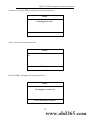
This function will be used when updating the software. According to this operation direction, you
can finish the software update process.
3. System Diagnoses
3.1 Introduction of system diagnoses
Connect diagnostic connector to the motorcycle diagnostic connector and turn on the ignition
switch. If there is not power supply in the diagnostic connector, you need to connect with the
alligator clip to get electricity from the battery. Open the power supply switch of the diagnostic
scanner, and enter the following interface.
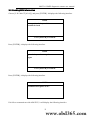
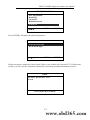
BMW
1.System Diagnosis
2. System Information
3. Software Updating
ÏÎÐÍSelect
ENTER
Press the [ENTER] key to enter the following interface.
6 www.obd365.com