1
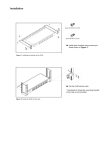
Widescreen LCD Rack Console with USB Basic CAT5/6 KVM 1.9 Installation (continued) 3 Pick up the LCD tray. Insert the LCD tray into the mounting bracket. Pull and hold the left & right black arrow buttons on the rails. Return the LCD tray to park position. 4 Fix the rear kit to the mounting bracket by M3.2 screw x 4 pcs included. Caution: This step is necessary. Failure to complete this will cause damage. 5 Complete the installation Tighten all 8 pcs of M6 screw to complete the installation. 1.10 How to use the slides www.raloy.com 8