1
BENESTON®
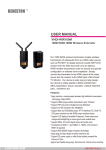
USER MANUAL
GWIR-030M
WIRELESS HD VIDEO WIRELESS HD VIDEO
Transmitter : GWIR-030M-T
Receiver : GWIR-030M-R
Features
● Support point-to-point transmission.
● Support devices with HDMI output, such as
Blue-Ray Player,HD Media Player, IPTV, PC,
Laptop and PS3 etc.
● 60GHz wireless HD video transmission,
transmitting bit rate up to 4Gbps
● Real time, latency within 1ms.
● Support 3D 720P/1080P.Support digital audio
up to 7.1.
● Support HDCP 2.0.
● Full hardware design, plug-and-play.
GWIR-030M
V00150909-U(1)
Please read the Manual before attempting to use this
product. Specifications and appearance are subject to
change without notice.
Disposal of Old Electrical & Electronic Equipment (Applicable in the European
Union and other European countries with separate collection systems).
This symbol on the product or on its packaging indicates that this product shall not be treated as
household waste. Instead it shall be handed over to the applicable collection point for the
recycling of electrical and electronic equipment. By ensuring this product is disposed of correctly,
you will help prevent potential negative consequences for the environment and human health,
which could otherwise be caused by inappropriate waste handling of this product. The recycling
of materials will help to conserve natural resources. For more detailed information about
recycling of this product, please contact your local city
office, your household waste disposal service or the shop where you purchased the product.
Caution
1. Handle this product with care
Avoid any shock or bumping of the product. Improper handling could damage the product.
Do not handle the unit with wet hands. Provide proper ventilation and air circulation and
do not use near water.
2. Requires a proper operating environment
This product is not waterproof and is designed for indoor use. The allowable
temperature range for operation of this product is between 0°C~40°C / 32°F~104°F
3. Check the power source voltage
The power source voltage should be within the specified range. (Product must meet the specifications).
4. Objects and liquid entry
Never push objects of any kind into this product as this may touch dangerous voltage points of
short out parts that could result in a fire orelectric shock. Never spill any kind of liquid on the product.
5. Cleaning
Do not useliquid or aerosol cleaners to clean this unit. Always unplug the power to the device
before cleaning.
6. Servicing
Do not attempt to service this product by yourself as opening or removing covers may expose you
to dangerous voltage or other hazards. Refer all service to qualified servicing personnel.
GWIR-030M
V00150909-U(1)
Packing List
Please check the packing list carefully, if any par ts is missed, please contact your dealer.
Components of all models are subject to the following packing list.
GWIR-030M-T
USB Adapter
( 5V/1A ) x 1(Option)
Wireless HD Transmitter
Sticky / Hanger x 1
GWIR-030M-R
HDMI Cable x 1
USB Cable x 1
HDMI Cable x 1
(Option)
180 HDMI Connector x1
USB Adapter
( 5V/1A ) x 1
Wireless HD Receiver
Sticky / Hanger x 1
USB Cable x 1
180 HDMI Connector x1
(Option)
* Please take all the actual accessories as the standard.
Structure & Interface
Wireless HD Transmitter:
1. SCAN: Short press to wake up when product is in stand-by status
Short press to connect to RX in working status under point to point mode.
2. POWER(mini B USB):mini USB socket for power supplying by USB cable.
3. HDMI IN :for audio and video input.
GWIR-030M
V00150909-U(1)
Wireless HD Receiver:
1. SCAN: Shor t press to wake up when product is in stand-by status
No need to press SCAN key in working status under point to point mode.
2. POWER(mini B USB):mini USB socket for power supplying by USB cable.
3. HDMI OUT :for audio and video input.
Product Installation
1. Connect the TX/RX to the soruce /display with HDMI cable / connector, connect the
TX to available USB outlet for power, connect the RX with adapter and power on the
products.
Indicators of TX&RX will flash slowly when the products are powered on.
2. When the products are powered on and indicators of TX&RX are flashing slowly, please
press code key of TX for 1 sec and then release, and both indicators will be flashing rapidly
which means the pairing process is done. (Original pack of TX and RX were paired as default
set in the factor y already and shall disregard current step. )
3. When the AV source player&displayer are powered on and the indicators of TX&RX light on
steadily, the video output is working normally.
Note: To obtain best per formance of range , please always keep the antennas sur faces of TX
and RX are facing to each other.
GWIR-030M
V00150909-U(1)
Indicators
Model
Indicator
Network
Indicator
Network
Indicator
Indicator Status
OFF
Flash slowly
Flash slowly
ON
Working Status
No power on or in stand- by status
TX and RX are unconnected.
TX and RX are conneccted.
AV is normally transmitted
OFF
Flash slowly
Flash slowly
ON
No power on or in stand- by status
TX and RX are unconnected.
TX and RX are conneccted.
AV is received and output normally
Specification
Frequency
Modulation mod
Wireless standard
Frequency Stability
Bandwidth
Transmission power
Antenna gain
Antenna Angle
Receiving sensitivity
Audio and Video interface
Video resolution
Audio format
System latency
Range
Power consumption
Power supply
Protected Overvoltage
Operation Temperature
Storage Temperature
Operation Humidity
Dimension
Weight
GWIR-030M
HRP2: 59.40---61.56Ghz; HRP3: 61.56---63.72Ghz
16QAM
WirelessHD1.1
±10PPM
1.76GHZ/HPR
28dbm(MAX)
18dbi(MAX)
-80°~80°
-72dbm
HDMI
2D: 480i,480p, 576i,576p, 720p, 1080i, 1080p
3D:720p,1080p
PC: VGA (640x480), SVGA (800x600), XGA (1024x768),
PCM、AAC、Dolby Digital 2.0/5.1、DTS 5.1、LPCM 5.1/7.1
≤1ms
30M LOS(MAX)
3.3W(MAX)
DC 5V/1A
6~17V
0-60℃
-20℃ - + 80
15% - 85%
89.5*34.5*20mm
50g(+- 3g)
V00150909-U(1)
Trouble Shooting
TX or RX is not turned on
TX and RX are out of effective range
GWIR-030M-T
GWIR-030M-R
Connection failure
GWIR-030M-T
GWIR-030M-R
No video output
GWIR-030M
TX and RX are not paired yet
Obstacles exsit in the antenna area
Power on both TX and RX
Approach RX and TX to effected
range
Power on TX and RX, and press
code key of TX for 1s
keep no obstacle in front of the
TX/RX antenna at least 2m range
Antenna angle is out of effective range Make the TX antenna and RX
antenna directly facing to each
other
The source is not turned on
Turn on the source
The displayer is not turned on
Turn on the displayer
The resolution is not supported
Change the resolution
V00150909-U(1)