1
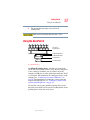
Portégé® M100 Series
User’s Guide
If you need assistance:
❖
Toshiba Global Support Centre
Calling within the United States (800) 457-7777
Calling from outside the United States (949) 859-4273
For more information, see “If Something Goes Wrong” on
page 188 in this guide.
Handling the cord on this product will expose you to lead, a
chemical known to the State of California to cause birth defects
or other reproductive harm. Wash hands after handling.
C6656-0804M2
08/04
2
Models: Portégé R100 Series
ReWritable CD/DVD Drives
The computer system you purchased may include a ReWritable CD and/or DVD
drive(s), among the most advanced data storage technologies available. As with
any new technology, you must read and follow all set-up and usage instructions in
the applicable user guides and/or manuals enclosed. If you fail to do so, this
product may not function properly and you may lose data or suffer other damage.
TOSHIBA AMERICA INFORMATION SYSTEMS (“TOSHIBA”), ITS
AFFILIATES AND SUPPLIERS DO NOT WARRANT THAT
OPERATION OF THE PRODUCT WILL BE UNINTERRUPTED OR
ERROR FREE. YOU AGREE THAT TOSHIBA, ITS AFFILIATES AND
SUPPLIERS SHALL HAVE NO RESPONSIBILITY FOR DAMAGE TO
OR LOSS OF ANY BUSINESS, PROFITS, PROGRAMS, DATA OR
REMOVABLE STORAGE MEDIA ARISING OUT OF OR RESULTING
FROM THE USE OF THE PRODUCT, EVEN IF ADVISED OF THE
POSSIBILITY THEREOF.
Protection of Stored Data
For your important data, please make periodic back-up copies of all the data
stored on the hard disk or other storage devices as a precaution against possible
failures, alteration, or loss of the data. IF YOUR DATA IS ALTERED OR
LOST DUE TO ANY TROUBLE, FAILURE OR MALFUNCTION OF
THE HARD DISK DRIVE OR OTHER STORAGE DEVICES AND THE
DATA CANNOT BE RECOVERED, TOSHIBA SHALL NOT BE
LIABLE FOR ANY DAMAGE OR LOSS OF DATA, OR ANY OTHER
DAMAGE RESULTING THEREFROM. WHEN COPYING OR
TRANSFERRING YOUR DATA, PLEASE BE SURE TO CONFIRM
WHETHER THE DATA HAS BEEN SUCCESSFULLY COPIED OR
TRANSFERRED. TOSHIBA DISCLAIMS ANY LIABILITY FOR THE
FAILURE TO COPY OR TRANSFER THE DATA CORRECTLY.
Critical Applications
The computer you have purchased is not designed for any “critical applications.”
“Critical applications” means life support systems, medical applications,
connections to implanted medical devices, commercial transportation, nuclear
facilities or systems or any other applications where product failure could lead to
injury to persons or loss of life or catastrophic property damage.
ACCORDINGLY, TOSHIBA, ITS AFFILIATES AND SUPPLIERS
DISCLAIM ANY AND ALL LIABILITY ARISING OUT OF THE USE
OF THE COMPUTER PRODUCTS IN ANY CRITICAL
APPLICATIONS. IF YOU USE THE COMPUTER PRODUCTS IN A
5.375 x 8.375 ver 2.3
3
CRITICAL APPLICATION, YOU, AND NOT TOSHIBA, ASSUME
FULL RESPONSIBILITY FOR SUCH USE.
FCC Notice “Declaration of Conformity Information”
This equipment has been tested and found to comply with the limits for a Class B
digital device, pursuant to Part 15 of the FCC rules. These limits are designed to
provide reasonable protection against harmful interference in a residential
installation.
This equipment generates, uses and can radiate radio frequency energy and, if not
installed and used in accordance with the instructions, it may cause harmful
interference to radio communications. However, there is no guarantee that
interference will not occur in a particular installation. If this equipment does
cause harmful interference to radio or television reception, which can be
determined by turning the equipment off and on, the user is encouraged to try to
correct the interference by one or more of the following measures:
❖
Reorient or relocate the receiving antenna.
❖
Increase the separation between the equipment and receiver.
❖
Connect the equipment to an outlet on a circuit different from that to which
the receiver is connected.
❖
Consult the dealer or an experienced radio/TV technician for help.
NOTE
Only Peripherals complying with the FCC Class B limits may be attached to
this equipment. Operation with noncompliant peripherals or peripherals not
recommended by Toshiba is likely to result in interference to radio and TV
reception. Shielded cables must be used between the external devices and
the computer's parallel port, monitor port, USB port, PS/2 port®, i.LINK®
port and microphone jack. Changes or modifications made to this equipment
not expressly approved by Toshiba or parties authorized by Toshiba could
void the user's authority to operate the equipment.
This device complies with Part 15 of the FCC Rules. Operation is subject to the
following two conditions:
❖
This device may not cause harmful interference.
❖
This device must accept any interference received, including interference
that may cause undesired operation.
5.375 x 8.375 ver 2.3
4
Contact:
Toshiba America Information Systems, Inc.
9740 Irvine Blvd.
Irvine, CA 92618-1697
(949) 583-3000
Industry Canada requirement
This Class B digital apparatus complies with Canadian ICES-003.
Cet appareil numérique de la classe B est conformé à la norme NMB-003 du
Canada.
FCC requirements
The following information is pursuant to FCC CFR 47, Part 68 and refers to
internal modems.
This equipment complies with Part 68 of the FCC rules. On the bottom of this
equipment is a label that contains, among other information, the FCC registration
number and ringer equivalence number (REN) for this equipment. If requested,
the information must be provided to the telephone company.
The modem connects to the telephone line by means of a standard jack called the
USOC RJ11C.
A plug and jack used to connect this equipment to the premises wiring and
telephone network must comply with the applicable FCC part 68 rules and
requirements adopted by the ACTA. It is designed to be connected to a
compatible modular jack that is also compliant.
The REN is used to determine the number of devices that may be connected to a
telephone line. Excessive RENs on a telephone line may result in the devices not
ringing in response to an incoming call. In most but not all areas, the sum of
RENs should not exceed five (5.0). To be certain of the number of devices that
may be connected to a line, as determined by the total RENs, contact the local
telephone company. For products approved after July 23, 2001, the REN for this
product is part of the product identifier that has the format
US:AAAEQ##TXXXX. The digits represented by the ## are the REN without a
decimal point (e.g., 03 is a REN of 0.3). For earlier products, the REN is
separately shown on the label.
Connection to party line service is subject to state tariffs. Contact the state public
utility commission, public service commission or corporation commission for
information.
5.375 x 8.375 ver 2.3
5
Telephone Company Procedures
The goal of the telephone company is to provide you with the best service it can.
In order to do this, it may occasionally be necessary for them to make changes in
their equipment, operations or procedures. If these changes might affect your
service or the operation of your equipment, the telephone company will give you
notice, in writing, to allow you to make any changes necessary to maintain
uninterrupted service.
If Problems Arise
If this equipment causes harm to the telephone network, the telephone company
will notify you in advance that temporary discontinuance of service may be
required. But if advanced notice is not practical, the telephone company will
notify the customer as soon as possible. Also, you will be advised of your right to
file a complaint with the FCC if you believe it is necessary.
If trouble is experienced with this equipment, for repair or limited warranty
information, please contact Toshiba Corporation, Toshiba America Information
Systems, Inc. or an authorized representative of Toshiba, or the Toshiba Support
Centre within the United States at (800) 457-7777 or Outside the United States at
(949) 859-4273. If the equipment is causing harm to the telephone network, the
telephone company may request that you disconnect the equipment until the
problem is resolved.
Disconnection
If you should ever decide to permanently disconnect your modem from its
present line, please call the telephone company and let them know of this change.
Fax Branding
The Telephone Consumer Protection Act of 1991 makes it unlawful for any
person to use a computer or other electronic device, including Fax machines, to
send any message unless such message clearly contains in a margin at the top or
bottom of each transmitted page or on the first page of the transmission, the date
and time it is sent and an identification of the business or other entity, or other
individual sending the message and the telephone number of the sending
machine or such business, other entity, or individual. (The telephone number
provided may not be a 900 number or any other number for which charges
exceed local or long-distance transmission charges.)
In order to program this information into your fax transmission, refer to the fax
software instructions installed on this computer.
5.375 x 8.375 ver 2.3
6
Alarm Equipment
If your home has specially wired alarm equipment connected to the telephone
line, ensure the installation of this equipment does not disable your alarm
equipment. If you have questions about what will disable alarm equipment,
consult your telephone company or a qualified installer.
Instructions for IC CS-03 Certified Equipment
1
NOTICE: The Industry Canada label identifies certified equipment.
This certification means that the equipment meets certain
telecommunications network protective, operational and safety
requirements as prescribed in the appropriate Terminal Equipment
Technical Requirements document(s). The Department does not
guarantee the equipment will operate to the user’s satisfaction.
Before installing this equipment, users should ensure that it is permissible to
be connected to the facilities of the local telecommunications company. The
equipment must also be installed using an acceptable method of connection.
The customer should be aware that compliance with the above conditions
may not prevent degradation of service in some situations.
Repairs to certified equipment should be coordinated by a representative
designated by the supplier. Any repairs or alterations made by the user to
this equipment, or equipment malfunctions, may give the
telecommunications company cause to request the user to disconnect the
equipment.
Users should ensure for their own protection that the electrical ground
connections of the power utility, telephone lines and internal metallic water
pipe system, if present, are connected together. This precaution may be
particularly important in rural areas.
Caution: Users should not attempt to make such connections themselves,
but should contact the appropriate electric inspection authority, or
electrician, as appropriate.
2
The user manual of analog equipment must contain the equipment’s
Ringer Equivalence Number (REN) and an explanation notice similar
to the following:
The Ringer Equivalence Number (REN) of this device can be found on the
label affixed to your computer.
5.375 x 8.375 ver 2.3
7
NOTICE: The Ringer Equivalence Number (REN) assigned to each
terminal device provides an indication of the maximum number of
terminals allowed to be connected to a telephone interface. The termination
on an interface may consist of any combination of devices subject only to
the requirement that the sum of the Ringer Equivalence Numbers of all the
devices does not exceed 5.
3
The standard connecting arrangement (telephone jack type) for this
equipment is jack type(s): USOC RJ11C.
Wireless Interoperability
The TOSHIBA Wireless LAN Mini PCI Card products are designed to be
interoperable with any wireless LAN product that is based on Direct Sequence
Spread Spectrum (DSSS) radio technology, and is compliant to:
❖
The IEEE 802.11 Standard on Wireless LANs (Revision A/B/G), as defined
and approved by the Institute of Electrical and Electronics Engineers.
❖
The Wireless Fidelity (Wi-Fi) certification as defined by the Wi-Fi Alliance.
The “Wi-Fi CERTIFIED” logo is a certification mark of the Wi-Fi Alliance.
Bluetooth™ and Wireless LAN devices operate within the same radio
frequency range and may interfere with one another. If you use Bluetooth™
and Wireless LAN devices simultaneously, you may occasionally experience
a less than optimal network performance or even lose your network
connection.
If you should experience any such problem, immediately turn off your
Bluetooth™ or Wireless LAN device.
Please contact Toshiba PC product support on Web site http://www.toshibaeurope.com/computers/tnt/bluetooth.htm in Europe or
http://www.pcsupport.global.toshiba.com in the United States for more
information.
This device is restricted to indoor use due to its operation in the 5.15 GHz to
5.25 GHz frequency range.
5.375 x 8.375 ver 2.3
8
Wireless LAN and your Health
Wireless LAN products, like other radio devices, emit radio frequency
electromagnetic energy. The level of energy emitted by Wireless LAN devices
however is far much less than the electromagnetic energy emitted by wireless
devices like for example mobile phones.
Because Wireless LAN products operate within the guidelines found in radio
frequency safety standards and recommendations, TOSHIBA believes Wireless
LAN is safe for use by consumers. These standards and recommendations reflect
the consensus of the scientific community and result from deliberations of panels
and committees of scientists who continually review and interpret the extensive
research literature.
In some situations or environments, the use of Wireless LAN may be restricted
by the proprietor of the building or responsible representatives of the
organization. These situations may for example include:
❖
Using the Wireless LAN equipment on board of airplanes, or
❖
In any other environment where the risk of interference to other devices or
services is perceived or identified as harmful.
If you are uncertain of the policy that applies on the use of wireless devices in a
specific organization or environment (e.g. airports), you are encouraged to ask for
authorization to use the Wireless LAN device prior to turning on the equipment.
Regulatory Information
The TOSHIBA Wireless LAN Mini PCI Card must be installed and used in strict
accordance with the manufacturer’s instructions as described in the user
documentation that comes with the product. This device complies with the
following radio frequency and safety standards.
Canada – Industry Canada (IC)
This device complies with RSS 210 of Industry Canada.
The installer of this radio equipment must ensure that the antenna is located
or pointed such that it does not emit RF field in excess of Health Canada
limits for the general population; consult Safety Code 6, obtainable from
Health Canada’s Web site www.hc-sc.gc.ca/rpb. The RF device shall not be
co-located with any other transmitter that has not been tested with this
device.
5.375 x 8.375 ver 2.3
9
Operation is subject to the following two conditions: (1) this device may not
cause interference, and (2) this device must accept any interference, including
interference that may cause undesired operation of this device.
L’utilisation de ce dispositif est autorisée seulement aux conditions suivantes: (1)
il ne doit pas produire de brouillage et (2) l’utilisateur du dispositif doit étre prêt à
accepter tout brouillage radioélectrique reçu, même si ce brouillage est
susceptible de compromettre le fonctionnement du dispositif.
The term “IC” before the equipment certification number only signifies that the
Industry Canada technical specifications were met.
To prevent radio interference to the licensed service, this device is intended to be
operated indoors and away from windows to provide maximum shielding.
Equipment (or its transmit antenna) that is installed outdoors is subject to
licensing.
Pour empecher que cet appareil cause du brouillage au service faisant l'objet
d'une licence, il doit etre utilize a l'interieur et devrait etre place loin des fenetres
afin de Fournier un ecram de blindage maximal. Si le matriel (ou son antenne
d'emission) est installe a l'exterieur, il doit faire l'objet d'une licence.
This device is restricted to indoor use due to its operation in the 5.15 GHz to
5.25 GHz frequency range. Industry Canada requires this product to be used
indoors for frequency range 5.15 GHz to 5.25 GHz to reduce the potential for
harmful interference to co-channel Mobile Satellite systems.
High power radars are allocated as primary users of the 5.25 GHz to 5.35
GHz and 5.65 GHz to 5.85 GHz bands. These radar stations can cause
interference with and/or damage this device.
Europe – EU Declaration of Conformity
❖
This device complies with the essential requirements of the R&TTE
Directive 1999/5/EC with essential test suites as per standards:
EN 60950 Safety of Information Technology equipment
ETS 300 328 Technical requirements for radio equipment
ETS 300 826 General EMC requirements for radio equipment.
5.375 x 8.375 ver 2.3
10
English:
Finnish:
Dutch:
French:
Swedish:
Danish:
German:
Hereby, TOSHIBA Corp. Digital Media Network Company, declares
that this Radio LAN device is in compliance with the essential
requirements and other relevant provisions of Directive 1999/5/EC.
Valmistaja TOSHIBA Corp. Digital Media Network Company
vakuuttaa täten että Radio LAN device tyyppinen laite on direktiivin
1999/5/EY oleellisten vaatimusten ja sitä koskevien direktiivin muiden
ehtojen mukainen.
Hierbij verklaart TOSHIBA Corp. Digital Media Network Company dat
het toestel Radio LAN device in overeenstemming is met de essentiële
eisen en de andere relevante bepalingen van richtlijn 1999/5/EG.
Bij deze TOSHIBA Corp. Digital Media Network Company dat deze
Radio LAN device voldoet aan de essentiële eisen en aan de overige
relevante bepalingen van Richtlijn 1999/5/EC.
Par la présente TOSHIBA Corp. Digital Media Network Company
déclare que l'appareil Radio LAN device est conforme aux exigences
essentielles et aux autres dispositions pertinentes de la directive 1999/5/
CE.
Par la présente, TOSHIBA Corp. Digital Media Network Company
déclare que ce Radio LAN device est conforme aux exigences
essentielles et aux autres dispositions de la directive 1999/5/CE qui lui
sont applicables.
Härmed intygar TOSHIBA Corp. Digital Media Network Company att
denna Radio LAN device står I överensstämmelse med de väsentliga
egenskapskrav och övriga relevanta bestämmelser som framgår av
direktiv 1999/5/EG.
Undertegnede TOSHIBA Corp. Digital Media Network Company
erklærer herved, at følgende udstyr Radio LAN device overholder de
væsentlige krav og øvrige relevante krav i direktiv 1999/5/EF
Hiermit erklärt TOSHIBA Corp. Digital Media Network Company, dass
sich dieser/diese/dieses Radio LAN device in Übereinstimmung mit den
grundlegenden Anforderungen und den anderen relevanten Vorschriften
der Richtlinie 1999/5/EG befindet". (BMWi)
Hiermit erklärt TOSHIBA Corp. Digital Media Network Company die
Übereinstimmung des Gerätes Radio LAN device mit den
grundlegenden Anforderungen und den anderen relevanten
Festlegungen der Richtlinie 1999/5/EG. (Wien)
Greek:
5.375 x 8.375 ver 2.3
11
Italian:
Spanish:
Portuguese:
Con la presente TOSHIBA Corp. Digital Media Network Company
dichiara che questo Radio LAN device è conforme ai requisiti essenziali
ed alle altre disposizioni pertinenti stabilite dalla direttiva 1999/5/CE.
Por medio de la presente TOSHIBA Corp. Digital Media Network
Company declara que el Radio LAN device cumple con los requisitos
esenciales y cualesquiera otras disposiciones aplicables o exigibles de la
Directiva 1999/5/CE.
TOSHIBA Corp. Digital Media Network Company declara que este
Radio LAN device está conforme com os requisitos essenciais e outras
disposições da Directiva 1999/5/CE.
USA – Federal Communications Commission (FCC)
This device complies with Part 15 of FCC Rules. Operation of the devices in a
Wireless LAN System is subject to the following two conditions:
❖
❖
This device may not cause harmful interference.
This device must accept any interference that may cause undesired
operation.
TOSHIBA is not responsible for any radio or television interference caused by
unauthorized modification of the devices included with this TOSHIBA Wireless
LAN Mini PCI Card, or the substitution or attachment of connecting cables and
equipment other than specified by TOSHIBA.
The correction of interference caused by such unauthorized modification,
substitution or attachment will be the responsibility of the user.
Caution: Exposure to Radio Frequency Radiation
The radiated output power of the TOSHIBA Wireless LAN Mini PCI Card is far
below the FCC radio frequency exposure limits. Nevertheless, the TOSHIBA
Wireless LAN Mini PCI Card shall be used in such a manner that the potential
for human contact during normal operation is minimized. In normal operating
configuration, the LCD in the upright position, the distance between the antenna
and the user should not be less than 20 cm. The antenna(s) used for this
transmitter must not be co-located or operating in conjunction with any other
antenna or transmitter. Antenna(s) used in 5.15 GHz to 5.25 GHz frequency band
must be integral antenna which provide no access to the end user.
Refer to the Regulatory Statements as identified in the documentation that comes
with those products for additional information.
5.375 x 8.375 ver 2.3
12
Caution: Radio Frequency Interference Requirements
This device is restricted to indoor use due to its operation in the 5.15 GHz to
5.25 GHz frequency range. FCC requires this product to be used indoors for
frequency range 5.15 GHz to 5.25 GHz to reduce the potential for harmful
interference to co-channel Mobile Satellite systems.
High power radars are allocated as primary users of the 5.25 GHz to 5.35 GHz
and 5.65 GHz to 5.85 GHz bands. These radar stations can cause interference
with and/or damage this device.
NOTE
The above Caution information applies to products that operate with an
802.11a device.
Taiwan
Article 14
Article 17
Unless approved, for any model accredited low power radio frequency
electric machinery, any company, trader or user shall not change the
frequency, increase the power or change the features and functions of the
original design.
Any use of low power radio frequency electric machinery shall not affect
the aviation safety and interfere with legal communications. In event that
any interference is found, the use of such electric machinery shall be
stopped immediately, and reusing of such products can be resumed until
no interference occurs after improvement.
The legal communications mentioned in the above item refer to radio
communications operated in accordance with telecommunication laws and
regulations.
Low power radio frequency electric machinery shall resist against interference
from legal communications or from industrial, scientific and medical radio
emission electric machinery.
Using this Equipment in Japan
In Japan, the frequency bandwidth of 2,400 MHz to 2,483.5 MHz for second
generation low-power data communication systems such as this equipment
overlaps that of mobile object identification systems (premises radio station and
specified low-power radio station).
1. Sticker
Please put the following sticker on devices incorporating this product.
5.375 x 8.375 ver 2.3
13
2. Indication
The indication shown below appears on this equipment.
(1)
(2) (3)
2.4DSOF4
(4)
1
2.4: This equipment uses a frequency of 2.4 GHz.
2
DS: This equipment uses DS-SS modulation.
OF: This equipment uses OFDM modulation.
3
The interference range of this equipment is less than 40m.
4
This equipment uses a frequency bandwidth from
2,400 MHz to 2,483.5 MHz.
It is possible to avoid the band of mobile object identification systems.
3. TOSHIBA Direct PC
Monday – Friday: 10:00 – 17:00
Toll Free Tel: 0120-13-1100
Direct Dial: 03-3457-5916
Fax: 03-5444-9450
Device Authorization
This device obtains the Technical Regulation Conformity Certification and the
Technical Conditions Compliance Approval, and it belongs to the device class of
radio equipment of low-power data communication system radio station
stipulated in the Radio Law and the Telecommunications Business Law of Japan.
The Name of the radio equipment: refer to the equipment label provided on the
computer
JAPAN APPROVALS INSTITUTE FOR TELECOMMUNICATIONS
EQUIPMENT
5.375 x 8.375 ver 2.3
14
Approval Number: D01-1128JP
TELECOM ENGINEERING CENTER Approval Number: 03NY.A0018,
03GZDA0017
The following restrictions apply:
❖
❖
❖
Do not disassemble or modify the device.
Do not install the embedded wireless module into other device.
5.17 GHz to 5.23 GHz for indoor use only
Radio approvals for wireless devices
NOTE
The following information is dependent on what type of wireless device is in
your computer.
Approved Countries/Regions for use for the Atheros
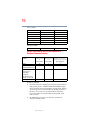
AR5BMB-43/44 Mini PCI Wireless network adapter
This equipment is approved to the radio standard by the countries/regions in the
following table.
Do not use this equipment except in the countries/regions in the following
table.
NOTE
This device works on passive scan only.
A peer-to-peer mode is not available in 802.11a and Turbo Mode.
802.11b (2.4 GHz)
Australia
Canada
France
Ireland
Luxembourg
Norway
Switzerland
Austria
Denmark
Germany
Italy
Netherlands
Portugal
UK
5.375 x 8.375 ver 2.3
Belgium
Finland
Greece
Liechtenstein
New Zealand
Sweden
USA
15
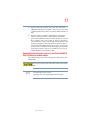
Europe - Restrictions for use of 2.4 GHz Frequencies in
European Community Countries
België/
Belgique:
Deutschland:
France:
Italia:
Nederland:
For private usage outside buildings across public grounds over less than
300m no special registration with IBPT/BIPT is required. Registration to
IBPT/BIPT is required for private usage outside buildings across public
grounds over more than 300m. For registration and license please
contact IBPT/BIPT.
Voor privé-gebruik buiten gebouw over publieke groud over afstand
kleiner dan 300m geen registratie bij BIPT/IBPT nodig; voor gebruik
over afstand groter dan 300m is wel registratie bij BIPT/IBPT nodig.
Voor registratie of licentie kunt u contact opnemen met BIPT.
Dans le cas d’une utilisation privée, à l’extérieur d’un bâtiment, audessus d’un espace public, aucun enregistrement n’est nécessaire pour
une distance de moins de 300m. Pour une distance supérieure à 300m un
enregistrement auprès de I’IBPT est requise. Pour les enregistrements et
licences, veuillez contacter I’IBPT.
License required for outdoor installations. Check with reseller for
procedure to follow.
Anmeldung im Outdoor-Bereich notwendig, aber nicht
genehmigungspflichtig.Bitte mit Händler die Vorgehensweise
abstimmen.
Restricted frequency band: only channels 1 to 7 (2400 MHz and 2454
MHz respectively) may be used outdoors in France. Please contact
A.R.T. (http://www.art-telecom.fr) for applicable procedures to follow.
Bande de fréquence restreinte: seuls les canaux 1- 7 (2400 et 2454 MHz
respectivement) doivent être utilisés endroits extérieur en France. Vous
pouvez contacter I’Autorité de Régulation des Télécommuniations
(http://www.art-telecom.fr) pour la procédure à suivre.
License required for indoor use. Use with outdoor installations not
allowed.
E’necessaria la concessione ministeriale anche per l’uso interno.
Verificare con i rivenditori la procedura da seguire.
License required for outdoor installations. Check with reseller for
procedure to follow.
Licentie verplicht voor gebruik met buitenantennes. Neem contact op
met verkoper voor juiste procedure.
5.375 x 8.375 ver 2.3
16
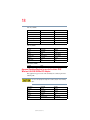
802.11a (5 GHz)
Australia
Canada
France
Ireland
Luxembourg
Norway
Switzerland
Austria
Denmark
Germany
Italy
Netherlands
Portugal
UK
Belgium
Finland
Greece
Liechtenstein
New Zealand
Sweden
USA
Turbo Mode (5 GHz)
Canada
USA
Europe - Restrictions for use of 5 GHz Frequencies in
European Community Countries
European Community
Countries
Austria
Belgium, France,
Switzerland/Lichtenstein
Denmark, Finland,
Germany, Greece,
Ireland, Italy,
Luxembourg,
Netherlands, Norway,
Portugal, Sweden, UK
Iceland, Spain
5150-5250 MHz 5250-5350 MHz
Channels: 36, 40, 44,
48
5470-5725 MHz
Channels: 52, 56, 60, Channels: 100, 104, 108, 112,
64
116, 120, 124, 128, 132, 136, 140
Indoor Only
O
O
Indoor Only
x
O
Indoor/Outdoor
x
x
O
O
O
O
O
O
O: allowed ×: forbidden
❖
To remain in conformance with European spectrum usage laws for Wireless
LAN operation, the above 2.4 GHz and 5 GHz channel limitations apply.
The user should use the wireless LAN utility to check the current channel of
operation. If operation is occurring outside of the allowable frequencies as
listed above, the user must cease operating the Wireless LAN at that
location and consult he local technical support staff responsible for the
wireless network.
❖
The 5 GHz Turbo mode feature is not allowed for operation in any
European Community country.
5.375 x 8.375 ver 2.3
17
❖
This device must not be operated in ad-hoc mode using channels in the
5 GHz bands in the European Community. Ad-hoc mode provides a direct
communication between two client devices without a Wireless LAN Access
Point.
❖
This device must be used with Access Points that have employed and
activated a radar detection feature required for European Community
operation in the 5 GHz bands. This device will operate under the control of
the Access Point in order to avoid operating on a channel occupied by any
radar system in the area. The presence of nearby radar operation may result
in temporary interruption of operation of this device. The Access Point’s
radar detection feature will automatically restart operation on a channel free
of radar. You may consult with the local technical support staff responsible
for the wireless network to ensure the Access Point device(s) are properly
configured for European Community operation.
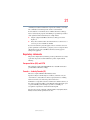
Approved Countries/Regions for use for the Atheros AR5001X
Mini PCI Wireless network adapter
This equipment is approved to the radio standard by the countries/regions in the
following table.
Do not use this equipment except in the countries/regions in the following
table.
NOTE
This device works on passive scan only.
A peer-to-peer mode is not available in 802.11a and Turbo Mode.
5.375 x 8.375 ver 2.3
18
802.11b (2.4 GHz)
Australia
Canada
France
Ireland
Luxembourg
Norway
Switzerland
Austria
Denmark
Germany
Italy
Netherlands
Portugal
UK
Belgium
Finland
Greece
Liechtenstein
New Zealand
Sweden
USA
Austria
Denmark
Germany
Italy
Netherlands
Portugal
UK
Belgium
Finland
Greece
Liechtenstein
New Zealand
Sweden
USA
802.11a (5 GHz)
Australia
Canada
France
Ireland
Luxembourg
Norway
Switzerland
Turbo Mode (5 GHz)
Canada
USA
Approved Countries/Regions for use for the Intel® PRO/
Wireless LAN 2100 3B Mini PCI Adapter
This equipment is approved to the radio standard by the countries/regions in the
following table.
Do not use this equipment except in the countries/regions in the following
table.
Argentina
Belgium
Chile
France
Iceland
Japan
Australia
Brazil
Denmark
Germany
Ireland
Liechtenstein
5.375 x 8.375 ver 2.3
Austria
Canada
Finland
Greece
Italy
Luxembourg
19
Mexico
Norway
Singapore
Switzerland
USA
Netherlands
Peru
Spain
UK
Venezuela
New Zealand
Portugal
Sweden
Uruguay
Approved Countries/Regions for use for the Toshiba Mini PCI
Wireless LAN Card
This equipment is approved to the radio standard by the countries/regions in the
following table.
Do not use this equipment except in the countries/regions in the following
table.
Australia
Canada
France
Hong Kong
Italy
Luxembourg
New Zealand
Portugal
Sweden
UK
Austria
Denmark
Germany
Iceland
Japan
Malaysia
Norway
Singapore
Switzerland
USA
Belgium
Finland
Greece
Ireland
Liechtenstein
Netherlands
Philippines
Spain
Thailand
Bluetooth wireless technology Interoperability
Bluetooth™ Cards from TOSHIBA are designed to be interoperable with any
product with Bluetooth wireless technology that is based on Frequency Hopping
Spread Spectrum (FHSS) radio technology, and is compliant to:
❖
Bluetooth Specification as defined and approved by The Bluetooth Special
Interest Group.
❖
Logo certification with Bluetooth wireless technology as defined by The
Bluetooth Special interest Group.
5.375 x 8.375 ver 2.3
20
Bluetooth wireless technology is a new innovative technology, and TOSHIBA
has not confirmed compatibility of its Bluetooth™ products with all PCs and/
or equipment using Bluetooth wireless technology other than TOSHIBA
portable computers.
Always use Bluetooth™ cards from TOSHIBA in order to enable wireless
networks over two or more (up to a total of seven) TOSHIBA portable
computers using these cards. Please contact TOSHIBA PC product support
on Web site http://www.toshiba-europe.com/computers/tnt/bluetooth.htm in
Europe or http://www.pcsupport.global.toshiba.com in the United States for
more information.
When you use Bluetooth™ cards from TOSHIBA close to 2.4 GHz Wireless
LAN devices, Bluetooth transmissions might slow down or cause errors. If
you detect certain interference while you use Bluetooth™ cards from
TOSHIBA, always change the frequency, move your PC to the area outside of
the interference range of 2.4 GHz Wireless LAN devices (40 meters/
43.74 yards or more) or stop transmitting from your PC. Please contact
TOSHIBA PC product support on Web site http://www.toshiba-europe.com/
computers/tnt/bluetooth.htm in Europe or http://
www.pcsupport.global.toshiba.com in the United States for more
information.
Bluetooth™ and Wireless LAN devices operate within the same radio
frequency range and may interfere with one another. If you use Bluetooth™
and Wireless LAN devices simultaneously, you may occasionally experience
a less than optimal network performance or even lose your network
connection. If you should experience any such problem, immediately turn off
either one of your Bluetooth™ or Wireless LAN. Please contact Toshiba PC
product support on Web site http://www.toshiba-europe.com/computers/tnt/
bluetooth.htm in Europe or http://www.pcsupport.global.toshiba.com in the
United States for more information.
Bluetooth wireless technology and your Health
The products with Bluetooth wireless technology, like other radio devices, emit
radio frequency electromagnetic energy. The level of energy emitted by devices
with Bluetooth wireless technology however is far much less than the
electromagnetic energy emitted by wireless devices like for example mobile
phones.
Because products with Bluetooth wireless technology operate within the
guidelines found in radio frequency safety standards and recommendations,
TOSHIBA believes Bluetooth wireless technology is safe for use by consumers.
These standards and recommendations reflect the consensus of the scientific
5.375 x 8.375 ver 2.3
21
community and result from deliberations of panels and committees of scientists
who continually review and interpret the extensive research literature.
In some situations or environments, the use of Bluetooth wireless technology
may be restricted by the proprietor of the building or responsible representatives
of the organization. These situations may for example include:
❖
Using the equipment with Bluetooth wireless technology on board of
airplanes, or
❖
In any other environment where the risk of interference to other devices or
services is perceived or identified as harmful.
If you are uncertain of the policy that applies on the use of wireless devices in a
specific organization or environment (e.g. airports), you are encouraged to ask for
authorization to use the device with Bluetooth wireless technology prior to
turning on the equipment.
Regulatory statements
This product complies with any mandatory product specification in any country/
region where the product is sold. In addition, the product complies with the
following:
European Union (EU) and EFTA
This equipment complies with the R&TTE directive 1999/5/EC and has been
provided with the CE mark accordingly.
Canada — Industry Canada (IC)
This device complies with RSS 210 of Industry Canada.
Operation is subject to the following two conditions: (1) this device may not
cause interference, and (2) this device must accept any interference, including
interference that may cause undesired operation of this device.”
L’utilisation de ce dispositif est autorisée seulement aux conditions suivantes: (1)
il ne doit pas produire de brouillage et (2) l’utilisateur du dispositif doit étre prét à
accepter tout brouillage radioélectrique reçu, même si ce brouillage est
susceptible de compromettre le fonctionnement du dispositif.
The term “IC” before the equipment certification number only signifies that the
Industry Canada technical specifications were met.
5.375 x 8.375 ver 2.3
22
Caution: FCC Interference Statement
This device complies with part15 of the FCC rules. Operation is subject to the
following two conditions:
❖
This device may not cause harmful interference, and
❖
This device must accept any interference received, including interference
that may cause undesired operation.
Note that any changes or modifications to this equipment not expressly approved
by the manufacturer may void the authorization to operate this equipment.
Caution: Exposure to Radio Frequency Radiation
The radiated output power of the Bluetooth™ Card from TOSHIBA is far below
the FCC radio frequency exposure limits. Nevertheless, the Bluetooth™ Card
from TOSHIBA shall be used in such a manner that the potential for human
contact during normal operation is minimized.
In order to comply with FCC radio-frequency radiation exposure guidelines for
an uncontrolled environment, the Bluetooth™ Card from TOSHIBA has to be
operated while maintaining a minimum body to antenna which are located on top
of LCD distance of 20 cm.
Refer to the Regulatory Statements as identified in the documentation that comes
with those products for additional information.
The Bluetooth™ Card from TOSHIBA is far below the FCC radio frequency
exposure limits.
Nevertheless, it is advised to use the Bluetooth™ Card from TOSHIBA in such a
manner that human contact during normal operation is minimized.
NOTE
Changes or modifications made to this equipment not expressly approved by
TOSHIBA or parties authorized by TOSHIBA could void the user’s authority
to operate the equipment.
5.375 x 8.375 ver 2.3
23
Taiwan
Article 14
Article 17
Unless approved, for any model accredited low power radio frequency
electric machinery, any company, trader or user shall not change the
frequency, increase the power or change the features and functions of the
original design.
Any use of low power radio frequency electric machinery shall not affect
the aviation safety and interfere with legal communications. In event that
any interference is found, the use of such electric machinery shall be
stopped immediately, and reusing of such products can be resumed until
no interference occurs after improvement.
The legal communications mentioned in the above item refer to radio
communications operated in accordance with telecommunication laws and
regulations.
Low power radio frequency electric machinery shall resist against interference
from legal communications or from industrial, scientific and medical radio
emission electric machinery.
Using this equipment in Japan
In Japan, the frequency bandwidth of 2,400 MHz to 2,483.5 MHz for second
generation low-power data communication systems such as this equipment
overlaps that of mobile object identification systems (premises radio station and
specified low-power radio station).
1. Sticker
Please put the following sticker on devices incorporating this product.
5.375 x 8.375 ver 2.3
24
2. Indication
The indication shown below appears on this equipment.
(1)
(2) (3)
2.4FH1
(4)
1
2.4: This equipment uses a frequency of 2.4 GHz.
2
FH: This equipment uses FH-SS modulation.
3
The interference range of this equipment is less than 10m.
4
This equipment uses a frequency bandwidth from 2,400 MHz to
2,483.5 MHz. It is impossible to avoid the band of mobile object
identification systems.
3. TOSHIBA Direct PC
Monday – Friday: 10:00 – 17:00
Toll Free Tel: 0120-13-1100
Direct Dial: 03-3457-5916
Fax: 03-5444-9450
Device Authorization
This device obtains the Technical Regulation Conformity Certification, and it
belongs to the device class of radio equipment of low-power data communication
system radio station stipulated in the Radio Law of Japan.
The Name of the radio equipment: EYXF2CS
TELECOM ENGINEERING CENTER
Approval Number: 01NYDA1305
The following restrictions apply:
❖
Do not disassemble or modify the device.
❖
Do not install the embedded wireless module into other device.
5.375 x 8.375 ver 2.3
25
DVD-ROM, multi-function drive safety instructions
The DVD-ROM and multi-function drives employ a laser system. To ensure
proper use of this product, please read this instruction manual carefully and retain
for future reference. Should the unit ever require maintenance, contact an
authorized service location.
Use of controls, adjustments or the performance of procedures other than those
specified may result in hazardous radiation exposure.
To prevent direct exposure to the laser beam, do not try to open the enclosure.
Location of the required label
(Sample shown below. Location of the label and manufacturing information may
vary.)
This appliance contains a laser system and is classified as a “CLASS 1 LASER
PRODUCT.” To use this model properly, read the user’s guide carefully and keep it
for your future reference. In case of any trouble with this model, please contact your
nearest “AUTHORIZED service station.” To prevent direct exposure to the laser
beam, do not try to open the enclosure.
Use of controls or adjustments or performance of procedures other than those
specified in the owner’s manual may result in hazardous radiation exposure.
Copyright
This guide is copyrighted by Toshiba America Information Systems, Inc. with all
rights reserved. Under the copyright laws, this guide cannot be reproduced in any
form without the prior written permission of Toshiba. No patent liability is
assumed, however, with respect to the use of the information contained herein.
©2004 by Toshiba America Information Systems, Inc. All rights reserved.
5.375 x 8.375 ver 2.3
26
Export Administration Regulation
This document contains technical data that may be controlled under the U.S.
Export Administration Regulations, and may be subject to the approval of the
U.S. Department of Commerce prior to export. Any export, directly or indirectly,
in contravention of the U.S. Export Administration Regulations is prohibited.
Notice
The information contained in this manual, including but not limited to any
product specifications, is subject to change without notice.
TOSHIBA CORPORATION AND TOSHIBA AMERICA
INFORMATION SYSTEMS, INC. (TOSHIBA) PROVIDES NO
WARRANTY WITH REGARD TO THIS MANUAL OR ANY OTHER
INFORMATION CONTAINED HEREIN AND HEREBY EXPRESSLY
DISCLAIMS ANY IMPLIED WARRANTIES OF MERCHANTABILITY
OR FITNESS FOR ANY PARTICULAR PURPOSE WITH REGARD TO
ANY OF THE FOREGOING. TOSHIBA ASSUMES NO LIABILITY
FOR ANY DAMAGES INCURRED DIRECTLY OR INDIRECTLY
FROM ANY TECHNICAL OR TYPOGRAPHICAL ERRORS OR
OMISSIONS CONTAINED HEREIN OR FOR DISCREPANCIES
BETWEEN THE PRODUCT AND THE MANUAL. IN NO EVENT
SHALL TOSHIBA BE LIABLE FOR ANY INCIDENTAL,
CONSEQUENTIAL, SPECIAL, OR EXEMPLARY DAMAGES,
WHETHER BASED ON TORT, CONTRACT OR OTHERWISE,
ARISING OUT OF OR IN CONNECTION WITH THIS MANUAL OR
ANY OTHER INFORMATION CONTAINED HEREIN OR THE USE
THEREOF.
Trademarks
Portégé and Noteworthy are registered trademarks, FreedomWare, and
SmartMedia are trademarks, of Toshiba America Information Systems, Inc. and/
or Toshiba Corporation.
Microsoft and Windows are registered trademarks of Microsoft Corporation in
the United States and/or other countries.
DirectX, Active Desktop, DirectShow, and Windows Media are registered
trademarks of Microsoft Corporation.
ConfigFree is a trademark of Toshiba Corporation.
Wi-Fi is a registered trademark of the Wireless Capability Ethernet Alliance.
5.375 x 8.375 ver 2.3
27
Dolby - Manufactured by Toshiba under license from Dolby Laboratories/ Dolby
and the double-D symbol are trademarks of Dolby Laboratories.
TouchPad is a trademark of Synaptics, Inc.
All other brand and product names are trademarks or registered trademarks of
their respective companies.
Computer disposal information
This product contains mercury. Disposal of this material may be regulated due to
environmental considerations. For disposal, reuse or recycling information,
please contact your local government or the Electronic Industries Alliance at
www.eiae.org.
5.375 x 8.375 ver 2.3
Contents
Introduction ..............................................................37
This guide .............................................................. 38
Safety icons ........................................................... 38
Other icons used ................................................. 40
Other documentation ............................................. 40
Service options ...................................................... 41
Chapter 1: Getting Started 42
Selecting a place to work ....................................... 42
Creating a computer-friendly environment .......... 42
Keeping yourself comfortable.............................. 43
Other precautions .................................................. 47
Important information on your
computer’s cooling fan.................................. 48
Setting up your computer ...................................... 49
Setting up your software ..................................... 49
Registering your computer with Toshiba............. 50
Adding external devices ...................................... 50
Connecting a power source.................................... 51
Using the computer for the first time ..................... 55
Opening the display panel ................................... 55
28
5.375 x 8.375 ver 3.1
Contents
29
Your computer’s features and specifications ....... 56
Turning on the power .......................................... 56
Using the AccuPoint II ........................................... 57
Installing additional memory (optional) ................. 58
Removing a memory module .............................. 64
Connecting an external USB mouse ....................... 65
Connecting an external USB keyboard ................... 65
Connecting a printer .............................................. 65
Connecting the modem.......................................... 67
Connecting to a phone line ................................. 67
Connecting other external devices ......................... 68
Customizing your computer’s settings ................ 69
Powering off the computer .................................... 69
Closing the display panel..................................... 70
Different ways to turn the computer on
and off........................................................... 70
Caring for your computer....................................... 71
Cleaning the computer ........................................ 71
Moving the computer .......................................... 71
Using a computer lock ........................................ 71
Chapter 2: Learning the Basics 73
Computing tips ...................................................... 73
Using the keyboard ................................................ 75
Character keys .................................................... 75
Making your keyboard emulate a full-size
keyboard ....................................................... 75
Ctrl, Fn, and Alt keys ........................................... 76
Function keys ...................................................... 76
Windows ® special keys ...................................... 77
Overlay keys ........................................................ 77
Starting a program................................................. 79
Starting a program from the Start menu ............. 79
Starting a program from Windows ®
Explorer ........................................................ 80
5.375 x 8.375 ver 3.1
30
Contents
Starting a program from the Run
dialog box ..................................................... 81
Saving your work ................................................... 82
Printing your work ................................................. 84
Using optional external disks ................................. 85
Inserting and removing disks .............................. 85
Copying documents to a disk .............................. 86
Taking care of disks............................................. 87
Backing up your work ............................................ 87
Restoring your work .............................................. 88
Using the DVD-ROM or multi-function drive.......... 89
DVD-ROM or multi-function drive
components .................................................. 90
Inserting a compact disc .................................... 91
Playing an audio CD ............................................ 93
Viewing the contents of a CD or DVD .................. 94
Removing compact discs with the
computer on ................................................. 95
Removing compact discs with the
computer off ................................................. 95
Caring for CDs and DVDs .................................... 96
Powering down the computer ................................ 96
Turn Off or Shut down......................................... 97
Restart command................................................ 97
Hibernation command ......................................... 98
Standby command .............................................. 98
Using Turn Off or Shut down ................................. 99
Turning off more quickly ................................... 100
Starting again after Turn Off or Shut down........ 102
Using Hibernation ................................................ 102
Enabling the Hibernation command .................. 102
Going into Hibernation mode ............................ 104
Going into Hibernation mode more quickly ....... 106
Starting again from Hibernation ........................ 106
Using Standby ..................................................... 106
5.375 x 8.375 ver 3.1
Contents
31
Going into Standby mode more quickly ............ 107
Starting again from Standby ............................. 110
Toshiba’s online resources................................... 110
Chapter 3: Mobile Computing 111
Toshiba’s energy-saver design ............................. 111
Running the computer on battery power ............. 112
Battery Notice.................................................... 112
Power management .......................................... 113
Using additional batteries.................................. 113
Charging batteries................................................ 113
Charging the batteries.......................................... 114
Charging the main battery ................................. 114
Charging the RTC battery .................................. 114
Using a battery charger ..................................... 116
Monitoring main battery power............................ 116
Determining remaining battery power ............... 117
What to do when the main battery runs low...... 117
Setting battery alarms ....................................... 118
Conserving battery power ................................ 119
Setting a power usage mode ............................. 119
Turning off the display automatically ................... 121
Enabling the screen saver ................................. 121
Changing the main battery ................................... 122
Removing the battery from the computer ......... 123
Inserting a charged battery ............................... 124
Taking care of your battery................................... 125
Safety precautions............................................. 125
Maximizing battery life ...................................... 126
Disposing of used batteries ................................. 127
Traveling tips........................................................ 128
Chapter 4: Expansion Options ..................................129
Using your computer at the office........................ 129
Using an expansion device................................... 130
5.375 x 8.375 ver 3.1
32
Contents
Using the optional external USB diskette drive..... 130
Connecting the optional external USB
diskette drive............................................... 130
Using the optional USB external diskette
drive with a PC Card.................................... 131
Using a keyboard with the Advanced Port
Replicator ...................................................... 132
Connecting a keyboard to the Advanced
Port Replicator ............................................ 132
Making your external keyboard emulate
the Fn key.................................................... 132
Using a mouse with the Advanced Port
Replicator ...................................................... 133
Connecting a mouse to the Advanced
Port Replicator ............................................ 133
Using a printer with the Advanced Port
Replicator ...................................................... 134
Connecting a USB printer .................................. 134
Connecting a serial or parallel printer................ 134
Using external display devices ............................. 135
Directing the display output when you
turn on the computer ................................. 135
Adjusting the quality of the external display ...... 136
Display limitations ............................................. 136
Using Slim SelectBay modules ............................ 137
Removing a module from the Slim
SelectBay .................................................... 137
Inserting a module into the Slim SelectBay ....... 139
Using PC Cards.................................................... 139
Inserting a PC Card ........................................... 139
Removing a PC Card ......................................... 140
Hot swapping PC Cards..................................... 141
Using an SD card ................................................. 141
Installing SD card drivers .................................. 142
Installing the SD card in the SD slot.................. 142
5.375 x 8.375 ver 3.1
Contents
33
Formatting an SD card ...................................... 143
Using Standby or Hibernate while using
the SD card ................................................. 143
Removing an SD card ....................................... 143
Using the i.LINK® port ......................................... 144
Chapter 5: Enhancing Productivity 145
Windows® XP special features ............................. 145
Personalizing your desktop.................................. 146
Customizing the taskbar.................................... 146
Bringing the world to your desktop ................... 147
Changing desktop and browsing style............... 148
Personalizing individual windows...................... 149
Customizing window toolbars ........................... 150
Displaying information about each folder.......... 151
Setting up for communications............................ 152
Determining the COM port ............................... 153
Using the Ethernet LAN Port ............................. 154
Accessing a LAN ............................................... 154
Exchanging data with another computer.............. 155
Transferring application files ............................. 155
Setting up a direct cable connection ................. 156
Setting up a wireless connection....................... 156
Using Bluetooth................................................. 156
Using audio features ............................................ 157
Using external speakers or headphones............ 157
Recording sounds ............................................. 158
Using a microphone .......................................... 159
Adjusting recording settings ............................. 159
Chapter 6: Toshiba Utilities
Fn-esse ................................................................ 161
Starting Fn-esse ................................................ 162
Assigning a key to a program or document....... 163
Viewing existing key assignments..................... 165
Changing or removing existing key
5.375 x 8.375 ver 3.1
34
Contents
assignments................................................ 165
Hotkey utility ........................................................ 165
Expansion device properties ................................ 166
Mobile Extension ............................................... 166
TOSHIBA Console ................................................ 168
Customizing Your Computer ............................. 169
Network............................................................. 170
Security ............................................................. 170
TOSHIBA Button Controls ................................. 170
Power Management .......................................... 171
Toshiba Hardware Setup.................................... 174
Chapter 7: Keeping Your Files Safe .......................... 176
Using passwords in Windows ............................. 176
User-level passwords .......................................... 177
Setting a user-level password............................ 177
Using an instant password ................................ 178
Setting a Windows user password .................... 178
Setting a user-level password in
System Setup.............................................. 179
Disabling a user password ................................ 181
Disabling a user-level password in
System Setup.............................................. 182
Using the power-on (user-level) password........ 184
Using the instant (user-level) password ............ 185
Using a supervisor password............................... 185
Setting a supervisor password .......................... 185
Deleting a supervisor password ........................ 186
Chapter 8: If Something Goes Wrong ...................... 188
Problems that are easy to fix ............................... 188
Problems when you turn on the computer........... 190
The Windows ® operating system is not working. 192
Using Startup options to fix problems............... 192
Internet problems.............................................. 193
5.375 x 8.375 ver 3.1
Contents
35
The Windows® XP operating system can
help you ...................................................... 194
Resolving a hardware conflict .............................. 194
A plan of action ................................................. 195
Resolving hardware conflicts on your own ....... 195
Fixing a problem with Device Manager.............. 197
Memory problems............................................. 198
Power and the batteries..................................... 199
Keyboard problems ........................................... 201
AccuPoint II problems....................................... 201
Display problems .............................................. 202
Disk drive problems .......................................... 205
Problems with the DVD-ROM or
multi-function drive..................................... 207
Sound system problems ................................... 208
PC Card problems ............................................. 209
Printer problems ............................................... 211
Modem problems.............................................. 212
Internet Problems ................................................ 213
DVD operating problems...................................... 214
Develop good computing habits .......................... 216
If you need further assistance.............................. 217
Before you call .................................................. 218
Contacting Toshiba............................................ 218
Other Toshiba Internet Web sites ........................ 219
Toshiba’s worldwide offices ................................. 220
Appendix A: Hot Keys...............................................222
Volume Mute........................................................ 222
Password security ............................................... 222
Without a password .......................................... 222
With a password ............................................... 223
Power usage mode ............................................. 223
Standby mode...................................................... 224
Hibernation mode ............................................... 225
5.375 x 8.375 ver 3.1
36
Contents
Display modes ..................................................... 226
Display brightness ............................................... 226
Wireless device enable/disable............................. 227
Keyboard hot keys .............................................. 227
Appendix B: Power Cord/Cable Connectors ............. 228
USA and Canada................................................ 228
United Kingdom ................................................ 228
Australia ............................................................ 228
Europe............................................................... 228
Appendix C: Using ConfigFree™ with your Toshiba
Computer................................................................. 230
Getting Started..................................................... 231
ConfigFree Main Screen .................................... 231
Starting ConfigFree............................................ 232
Configuring ConfigFree...................................... 232
ConfigFree Utilities............................................... 233
Connectivity Doctor ........................................... 233
Device Settings.................................................. 234
Profile Settings.................................................. 236
Quick Connect ................................................... 237
Using Auto Switch ............................................... 238
Auto Switch (Cable Disconnect) ........................ 239
Auto Switch (SSID) ........................................... 239
Glossary ................................................................. 240
Index ....................................................................... 255
5.375 x 8.375 ver 3.1
Introduction
Welcome to the world of powerful and portable multimedia
computers! With your new Toshiba notebook computer, your
access to information can accompany you wherever you go.
You will find that your Microsoft® Windows® XP
Professional operating system is already installed on your
computer. It offers exciting features and easy Internet access.
37
5.375 x 8.375 ver 2.3
38
Introduction
This guide
NOTE
The product specifications and configuration information
are designed for a product Series. Your particular model
may not have all the features and specifications listed or
illustrated. For more detailed information about the
features and specifications on your particular model,
please visit Toshiba's Web site at
pcsupport.toshiba.com.
While Toshiba has made every effort at the time of
publication to ensure the accuracy of the information
provided herein, product specifications, configurations,
prices, system/component/options availability are all
subject to change without notice. For the most up-todate product information about your computer, or to stay
current with the various computer software or hardware
options, visit Toshiba's Web site at
pcsupport.toshiba.com.
This guide
This guide introduces the computer’s features. You can:
❖
Read the entire guide from beginning to end.
❖
Skim through and stop when a topic interests you.
❖
Use the table of contents and the index to find specific
information.
If you are new to computers, or have not used a notebook
computer before, read through the first couple of chapters to
familiarize yourself with the components of the computer and
how to turn it on. After that, seek out whatever interests you
most.
Safety icons
This manual contains safety instructions that must be
observed in order to avoid potential hazards that could result
in personal injuries, damage to your equipment, or loss of
5.375 x 8.375 ver 2.3
Introduction
Safety icons
39
data. These safety cautions have been classified according to
the seriousness of the risk, and the icons highlight these
instructions as follows:
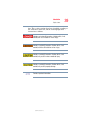
Indicates an imminently hazardous situation which, if not
avoided, will result in death or serious injury.
Indicates a potentially hazardous situation which, if not
avoided, could result in death or serious injury.
Indicates a potentially hazardous situation which, if not
avoided, may result in minor or moderate injury.
Indicates a potentially hazardous situation which, if not
avoided, may result in property damage.
NOTE
Provides important information.
5.375 x 8.375 ver 2.3
40
Introduction
Other documentation
Other icons used
Additional icons highlight other helpful or educational
information:
TECHNICAL NOTE: This icon highlights technical information
about the computer.
HINT: This icon denotes helpful hints and tips.
DEFINITION: This icon indicates the definition of a term used
in the text.
Other documentation
Your computer comes with the following documentation in
addition to this user’s guide:
❖
This electronic version of the user’s guide.
❖
Guides for other programs that may come preinstalled on
your computer and for additional programs on your
Recovery media (if applicable to your system).
❖
For accessory information, visit Toshiba's web site at
accessories.toshiba.com.
❖ The Microsoft® Windows® operating system
documentation, which explains the features of the
operating system.
5.375 x 8.375 ver 2.3
Introduction
Service options
41
Service options
Toshiba offers a full line of optional service programs to
complement its limited warranty. To stay current on the most
recent software and hardware options for your computer, and
for other product information, be sure to regularly check the
Toshiba Web site pcsupport.toshiba.com.
If you have a problem or need to contact Toshiba, see “If
Something Goes Wrong” on page 188.
5.375 x 8.375 ver 2.3
Chapter 1
Getting Started
This chapter provides tips for working comfortably,
summarizes how to connect components, and explains what
to do the first time you use your notebook computer.
Selecting a place to work
Your computer is designed to be used in a variety of
circumstances and locations. This section provides guidelines
for setting up your computing environment.
Creating a computer-friendly environment
Place the computer on a flat surface that is large enough for
the computer and any other items you are using, such as a
printer. Leave enough space around the computer and other
equipment to provide adequate ventilation. Otherwise, they
may overheat.
To keep your computer in prime operating condition, protect
your work area from:
❖
Dust, moisture, and direct sunlight.
42
5.375 x 8.375 ver 2.3
Getting Started
Selecting a place to work
43
❖
Equipment that generates a strong electromagnetic field,
such as stereo speakers (other than speakers that are
connected to the computer) or speakerphones.
❖
Rapid changes in temperature or humidity and sources of
temperature change such as air conditioner vents or
heaters.
❖
Extreme heat, cold, or humidity.
❖
Liquids and corrosive chemicals.
If you spill liquid into the computer, turn it off, unplug it from
the AC power source, and let it dry out completely before
turning it on again.
If the computer does not operate properly after you turn it back
on, contact a Toshiba service representative or your network
administrator.
Keeping yourself comfortable
Strain and stress injuries are becoming more common as
people spend more time using their computers. With a little
care and proper use of the equipment you can work
comfortably throughout the day.
This section provides hints on avoiding strain and stress
injuries. For more information, consult books on ergonomics,
repetitive-strain injury, and repetitive-stress syndrome.
Placement of the computer
Proper placement of the computer and external devices is
important to avoid stress-related injuries. Consider the
following when placing your computer:
❖
Place the computer on a flat surface at a comfortable
height and distance. You should be able to type without
5.375 x 8.375 ver 2.3
44
Getting Started
Selecting a place to work
twisting your torso or neck, and look at the screen
without slouching.
❖
If you are using an external monitor, the top of the screen
should be no higher than eye level.
❖
If you use a paper holder, set it at about the same height
and distance as the screen.
Seating and posture
When using your computer, maintain good posture with your
body relaxed and your weight distributed evenly. Proper
seating is a primary factor in reducing work strain. Some
people find a backless chair more comfortable than a
conventional chair.
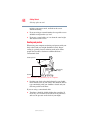
Below eye level
Approximately
90° angles
Footrest
Correct posture and positioning of the computer
❖
Position your chair so that the keyboard is at or slightly
lower than the level of your elbow. You should be able to
type comfortably with your shoulders relaxed and your
forearms parallel to the floor.
If you are using a conventional chair:
❖
Your knees should be slightly higher than your hips. If
necessary, use a footrest to raise the level of your knees
and ease the pressure on the back of your thighs.
5.375 x 8.375 ver 2.3
Getting Started
Selecting a place to work
45
❖
Adjust the back of your chair so that it supports the lower
curve of your spine. If necessary, use a cushion to provide
extra back support. Lower-back-support cushions are
available at many office supply stores.
❖
Sit with your back straight so that your knees, hips, and
elbows form approximately 90-degree angles when you
work. Avoid slumping forward or leaning back too far.
Lighting
Proper lighting can improve the visibility of the display and
reduce eyestrain.
❖
Position the display panel or external monitor so that
sunlight or bright indoor lighting does not reflect off the
screen. Use tinted windows or shades to reduce glare.
❖
Avoid placing your computer in front of a bright light that
could shine directly in your eyes.
❖
If possible, use soft, indirect lighting in your computer
work area.
Your LCD display has a brightness approaching that of a TV
device. We recommend that you adjust the brightness of your
LCD to a comfortable level to prevent possible strain on your
eyes.
Arms and wrists
❖
Avoid bending, arching or twisting your wrists. Keep
them in a relaxed, neutral position while typing.
5.375 x 8.375 ver 2.3
46
Getting Started
Selecting a place to work
❖
NOTE
Exercise your hands, wrists and arms to improve
circulation.
Using the computer keyboard incorrectly may result in
discomfort and possible injury. If your hands, wrists, and/or
arms bother you while typing, stop using the computer and
rest. If the discomfort persists, consult a physician.
Work habits
The key to avoiding discomfort or injury from strain is to
vary your activities. If possible, schedule a variety of tasks
into your working day. Finding ways to break up the routine
can reduce stress and improve your efficiency.
❖
Take frequent breaks to change position, stretch your
muscles and relieve your eyes. A break of two or three
minutes every half hour is more effective than a long
break after several hours.
❖
Avoid performing repetitive activities for long periods.
Intersperse such activities with other tasks.
❖
Focusing your eyes on your computer screen for long
periods can cause eyestrain. Look away from the
computer frequently and focus your eyes on a distant
object for at least thirty seconds.
Your LCD display has a brightness approaching that of a TV
device. We recommend that you adjust the brightness of your
LCD to a comfortable level to prevent possible strain on your
eyes.
5.375 x 8.375 ver 2.3
Getting Started
Other precautions
47
Other precautions
Your computer is designed to optimize safety, minimize
strain, and withstand the rigors of portability. However, you
should observe certain precautions to further reduce the risk
of personal injury or damage to the computer.
❖
Avoid prolonged physical contact with the underside of
the computer.
If the computer is used for long periods, its case can become
very warm. While the temperature may not feel too hot to the
touch, if you maintain physical contact with the computer for
a long time (if you rest the computer on your lap, for
example), your skin might suffer low-heat injury.
Do not apply heavy pressure to the computer or subject it to
sharp impacts. Excessive pressure or impact can damage
computer components or cause your computer to malfunction.
Some PC Cards can become hot with prolonged use. If two
cards are installed, both can become hot even if only one is
used extensively. Overheating of a PC Card can result in errors
or instability in the PC Card operation.
Be careful when you remove a PC Card that has been used for
lengthy periods of time.
❖
Avoid spilling liquids on the computer’s keyboard.
If you do spill a liquid that gets into the keyboard, turn
off the computer immediately. Leave the computer turned
off overnight to let it dry out before you use it again.
❖
Never turn off the computer if a drive light indicates a
drive is active.
5.375 x 8.375 ver 2.3
48
Getting Started
Other precautions
Turning off the computer while it is reading from or
writing o a disk may damage the disk, the drive, or both.
❖
Turning off the computer while it is reading from or
writing to a disk may damage the disk, the drive or both.
❖
Keep the computer and disk away from objects that
generate strong magnetic fields, such as large stereo
speakers.
Information on disks is stored magnetically. Placing a
magnet too close to a disk can erase important files.
❖
Scan all new files for viruses.
This precaution is especially important for files you receive
via email or download from the Internet. Occasionally, even
new programs you buy from a supplier may contain a
computer virus. You will need a special program to check for
viruses. Ask your dealer to help you.
Important information on your computer’s cooling fan
Your computer may have a CPU cooling fan that cools the
CPU by drawing outside air into the computer. The cooling
fan may be located on the bottom of the computer.
To prevent possible overheating of the CPU, make sure the air
intake on the cooling fan is not blocked. The fan draws in air
by creating a vacuum. If the fan is blocked, it could cause the
CPU to run at a lower performance level or cause the computer
to shut down. Loose items such as notebook and tissue paper,
plastic wrappers, or other similar materials can block the air
intake, preventing air from reaching the CPU. Do not use the
computer on surfaces with objects that can be drawn in by the
cooling fan.
5.375 x 8.375 ver 2.3
Getting Started
Setting up your computer
NOTE
49
The cooling fan location will vary depending on the computer.
Setting up your computer
TECHNICAL NOTE: You must complete all set up steps up to
“Setting up your software” on page 49 before adding external
or internal components to your computer. These components
include, but are not limited to, a mouse, keyboard, printer,
memory, and PC Cards.
Your computer contains a rechargeable main battery that
needs to be charged before you can use it.
To use external power or to charge the battery, you must
attach the AC adapter. See “Connecting a power source” on
page 51.
Setting up your software
NOTE
The names of windows displayed, and the order in which
windows appear, may vary according to your software setup
choices.
The first time you turn on your computer, the Setup Wizard
guides you through steps to set up your software.
1
From the welcome screen, click Next to enter the Setup
Wizard.
2
Confirm acceptance of Microsoft’s End User License
Agreement and click Next.
3
Enter your name and the name of your company or
organization and click Next.
5.375 x 8.375 ver 2.3
50
Getting Started
Setting up your computer
The computer will pause for a moment while checking for an
internet connection.
A window will display the message “An Internet connection
could not be chosen.”
4
NOTE
5
Enter the information about your computer.
If you are connecting your computer to a network, consult your
system administrator before you choose your computer name
and network settings.
Set the correct date, time and time zone for your
computer and click Next.
Your computer restarts automatically.
Registering your computer with Toshiba
Product registration is strongly recommended, and allows
Toshiba to send Customer periodic updates, announcements,
and special offers applicable to the product. Product
registration can be completed during the initial start up
process of your computer. If you opt not to register at that
time, you can either double-click the icon on your desktop or
go to the Toshiba Web site at www.register.toshiba.com.
Customer failure to complete Product Registration will not
diminish Customer rights under this limited Warranty.
Adding external devices
NOTE
Before adding external devices, Toshiba recommends setting
up your software. See “Setting up your software” on page 49.
Before starting to use your computer, you may also want to:
5.375 x 8.375 ver 2.3
Getting Started
Connecting a power source
51
❖
Add more memory (see “Using the AccuPoint II” on
page 57)
❖
Connect a mouse (see “Connecting an external USB
mouse” on page 65 and “Connecting a mouse to the
Advanced Port Replicator” on page 133)
❖
Connect a full-size keyboard (see “Connecting an
external USB keyboard” on page 65 and “Connecting a
keyboard to the Advanced Port Replicator” on page 132)
❖
Connect an external monitor (see “Connecting other
external devices” on page 68 and “Using external display
devices” on page 135)
❖
Connect a local printer (see “Connecting a printer” on
page 65, “Connecting a USB printer” on page 134 and
“Connecting a serial or parallel printer” on page 134)
❖
Install PC Cards (see “Using PC Cards” on page 139)
Connecting a power source
Your computer requires power to operate. Use the power
cord/cable and AC adapter to connect the computer to a live
electrical outlet, or to charge the computer’s battery.
5.375 x 8.375 ver 2.3
52
Getting Started
Connecting a power source
AC adapter cord
AC adapter
Sample Power cord/cable and AC adapter
Hold the power cord/cable by its plug when you connect/
disconnect it. Do NOT pull the cable itself. Doing so may
damage the power cord/cable and result in a short circuit or
electric shock.
When you connect the AC adapter to the computer, always
follow the steps in the exact order as described in the User's
Manual. Connecting the power cord/cable to a live electrical
outlet should be the last step; otherwise’ the adapter DC output
plug could hold an electrical charge and cause an electrical
shock or minor bodily injury when touched. As a general
safety precaution, avoid touching any metal parts.
Use only the AC adapter supplied with your computer or an
equivalent adapter that is compatible. Use of any incompatible
adapter could damage your computer. Toshiba assumes no
liability for any damage caused by use of an incompatible
adapter.
To connect AC power to the computer:
5.375 x 8.375 ver 2.3
Getting Started
Connecting a power source
1
53
Connect the power cord/cable to the AC adapter.
Sample connecting the power cord/cable to the AC adapter
Handling the cord on this product will expose you to lead, a
chemical known to the State of California to cause birth defects
or other reproductive harm. Wash hands after handling.
_
+
2
Plug the AC adapter into the DC-IN on the left side of the
computer.
Sample connecting the AC adapter to the computer
3
Connect the power cord/cable to a live electrical outlet.
If the electrical outlet is live, the system indicator panel’s
AC power light ( ) glows green.
5.375 x 8.375 ver 2.3
54
Getting Started
Connecting a power source
Damaged power cords/cables can cause fire or electric shock.
Never modify, forcibly bend, place heavy objects on top of, or
apply heat to the power cord/cable.
If the power cords/cable becomes damaged or the plug
overheats, discontinue use. There is a risk of electric
shock.
Never remove the power plug from the outlet with wet hands.
Doing so may cause an electric shock.
Charging the main battery
To charge the main battery, plug the computer into a live wall
outlet. It takes several hours to charge the battery with the
computer off. It takes much longer to charge the battery while
the computer is on. For more information on battery use, see
“Running the computer on battery power” on page 112.
Once the battery is charged for the first time, avoid leaving the
computer plugged in and turned off for more than a few hours
at a time. Continuing to charge a fully charged battery can
damage the battery.
TECHNICAL NOTE: When your computer is using all of the
power provided by the AC Adaptor to run applications,
features, and devices, the recharging of the battery can not
occur. Your computer's Power Saver utility can be used to
select a power level setting that reduces the power required for
system operation and will allow the battery to recharge.
5.375 x 8.375 ver 2.3
Getting Started
Using the computer for the first time
NOTE
55
Battery life and charge time may vary depending on the
applications, power management setting.
Using the computer for the first time
For information on connecting devices, see “Setting up your
computer” on page 49.
Opening the display panel
1
Release the display latch.
2
Lift the display panel.
To avoid damaging the display panel, do not force it beyond
the point where it moves easily.
Never lift the computer by the display panel.
Small bright dots may appear on your TFT display when you
turn on your computer. Your display contains an extremely
large number of thin-film transistors (TFT) and is
manufactured using high-precision technology. Any small
bright dots that may appear on your display are an intrinsic
characteristic of the TFT manufacturing technology.
NOTE
Over a period of time, and depending on the usage of the
computer, the brightness of the LCD Screen will deteriorate.
This is an intrinsic characteristic of LCD technology.
Screen will dim when the computer is operated on battery
power and you may not be able to increase the brightness of
the screen.
5.375 x 8.375 ver 2.3
56
Getting Started
Using the computer for the first time
Your computer’s features and specifications
Certain notebook chassis are designed to accommodate all
possible configurations for an entire product Series. Your
selected model may not have all the features and
specifications corresponding to all of the icons or switches
shown on the notebook chassis, unless you have selected all
those features.
Below is an example of one of the many possible icons that
may come with your computer:
Sample system icons
This information applies to all the features and icons
described in this guide.
Turning on the power
To turn on the computer:
1
Make sure any external devices (such as the AC adapter,
if you plan to use AC power rather than battery power)
are properly connected and ready.
2
If an optional external diskette drive is connected to your
computer, check that the drive is empty.
3
Press and hold in the power button until the on/off light
on the system indicator panel glows green—about one
second.
When you turn on the computer for the first time, do not turn
off the power again until the operating system has loaded
completely.
5.375 x 8.375 ver 2.3
Getting Started
Using the AccuPoint II
4
57
The preinstalled operating system will load
automatically.
Never turn off the computer while any drive is in use.
Using the AccuPoint II
AccuPoint II
pointing device
Programmable button
Programmable button
Primary button
Secondary button
AccuPoint II keys
AccuPoint II pointing device—Enables you to move the
cursor and to select items on the screen. (If you would prefer
to use a mouse or trackball, you can connect one to the
computer’s USB port, or to the optional port replicator’s PS/2
or serial ports. For information on connecting a mouse to the
computer, see “Connecting an external USB mouse” on
page 65. For information on connecting a mouse using the
Advanced Port Replicator, see “Connecting a mouse to the
Advanced Port Replicator” on page 133.
To move the cursor, gently push the pointing device in the
direction you want the cursor to move. Pushing harder on the
pointing device moves the cursor faster.
5.375 x 8.375 ver 2.3
58
Getting Started
Installing additional memory (optional)
Primary and secondary control buttons
The control buttons are used like the buttons on a mouse. The
primary control button corresponds to the left mouse button.
To double-click, press the primary button twice in rapid
succession.
The function of the secondary button depends on the program
you are using. It usually corresponds to the right mouse
button. Check your program’s documentation to find whether
it uses the secondary mouse button.
Installing additional memory (optional)
Before you install or remove a memory module, turn off the
computer using the Start menu. If you install or remove a
memory module while the computer is in Standby or
Hibernation mode, data will be lost.
HINT: To purchase additional memory modules, see the
accessories information packaged with your system or visit
Toshiba’s Web site at toshibaaccessories.com.
Your computer comes with enough memory to run most of
today’s popular applications. You may want to increase the
computer’s memory if you use complex software or process
large amounts of data.
Additional memory comes in various capacities (to stay
current on the most recent software and hardware options for
your computer, and for other product information, be sure to
regularly check the Toshiba Web site at
accessories.toshiba.com.
The computer has two memory expansion slots—Slot A and
Slot B. You can install one or two memory modules.
5.375 x 8.375 ver 2.3
Getting Started
Installing additional memory (optional)
59
Before you install or remove a memory module, turn off the
computer using the Start menu. If you install or remove a
memory module while the computer is in Standby or
Hibernation mode, data will be lost.
A memory module must be installed in slot A. do not try
to operate the computer with a memory module in slot B
only.
If you install a memory module that is incompatible with the
computer, a beep will sound when you turn on the computer. If
the module is installed in slot A, thee will be a long beep
followed by a short beep. If the module is in slot B, there will
be a long beep followed by two short beeps. In this case, turn
off the computer and remove the incompatible module.
If you use the computer for a long time, the memory modules
become hot. If this happens, let the memory modules cool to
room temperature before you replace them.
Additional memory modules can be installed in the memory
expansion slots under your computer’s keyboard. You will
need a standard Phillips no.1 screwdriver and a small flat
head screwdriver for this procedure.
To avoid damaging the computer’s screws, use a standard
Phillips no. 1 screwdriver that is in good condition.
1
Shut down your computer completely using the Shut
Down or Turn Off command.
See “Powering down the computer” on page 96.
5.375 x 8.375 ver 2.3
60
Getting Started
Installing additional memory (optional)
2
Unplug the computer and remove any cables you may
have connected.
Installing a memory module with the computer’s power on may
damage the computer, the module, or both.
3
Open the display panel and remove the panel that
contains the Power and TOSHIBA Console buttons.
When removing the computer’s power and TOSHIBA Console
button panel to install additional memory, be careful not to
damage the display or circuit board.
Using a flat head screw driver to pry the panel off
You can pry the panel out of its position by using a flat
head screwdriver. Starting at the left or right side,
carefully wedge the flat head screwdriver between the
panel and the surrounding housing. Grasp the end of the
panel, lift up and wiggle it back and forth until the panel
comes free.
5.375 x 8.375 ver 2.3
Getting Started
Installing additional memory (optional)
61
Removing the left keyboard screw
4
Locate and remove the screws that hold the keyboard in
place.
Removing the right keyboard screw
5.375 x 8.375 ver 2.3
62
Getting Started
Installing additional memory (optional)
5
Lift the keyboard and place it face down on the palm rest
of the computer.
Lifting off the keyboard
The memory module expansion slots
5.375 x 8.375 ver 2.3
Getting Started
Installing additional memory (optional)
63
Static electricity can damage the memory module. Before you
handle the module, touch a grounded metal surface to
discharge any static electricity you may have built up.
To avoid damaging the memory module, be careful not to
touch its pin connector on the side you insert into the
computer.
6
Remove the new memory module from its antistatic
packaging.
7
Insert the memory module in the slot and gently press it
down into place.
The clips on either side of the module will click to secure
the module.
Inserting the memory module into the slot
Pressing the memory module into the slot
5.375 x 8.375 ver 2.3
64
Getting Started
Installing additional memory (optional)
8
Replace the keyboard and the screws.
9
Replace the panel that contains the Power and TOSHIBA
Console buttons. Press hard on the keyboard panel to
snap it into place.
10 Restart the computer.
When you turn on the computer, it automatically
recognizes the additional memory.
Removing a memory module
If you need to remove a memory module:
1
Complete steps 1–5 in ““Installing additional memory
(optional)”” to shut down the computer and expose the
memory module(s).
2
Pull the clips away from the memory module.
The memory module pops partially out of the slot.
Pulling the clips away from the memory module
3
Carefully remove the module from the slot.
4
Replace the keyboard and the screws.
5
Replace the panel that contains the Power and TOSHIBA
Console buttons.
6
Restart the computer.
5.375 x 8.375 ver 2.3
Getting Started
Connecting an external USB mouse
65
Connecting an external USB mouse
You may want to use a mouse instead of the computer’s builtin pointing device, the AccuPoint II. You can attach an
external mouse to one of the computer’s USB ports, provided
the mouse is USB-compatible.
Connecting an external USB keyboard
You can attach an external standard keyboard to a USB port
on your computer, provided the keyboard is USB-compatible.
NOTE
The emulation Fn key is not supported when using a USB
keyboard.
Connecting a printer
You can connect a local printer to your computer.
Your computer has USB connectivity. Connecting a printer
with a parallel or serial interface requires a port replicator.
See “Using a printer with the Advanced Port Replicator” on
page 134.
If the printer has a USB interface, you can connect it directly
to the computer.
You also need a USB cable, which may come with your
printer. Alternatively, your organization may keep a stock of
cables; consult your network administrator. Otherwise, you
can purchase one from a computer or electronics store.
5.375 x 8.375 ver 2.3
66
Getting Started
Connecting a printer
Connecting a USB printer
1
Connect the flat end of the USB cable to the USB port.
2
Connect the other end of the USB cable to the printer.
3
Connect the printer’s power cords/cable to a power outlet
and turn on the printer.
See your printer documentation for additional configuration
steps, or see “Setting up a printer” on page 66.
Setting up a printer
If you have a printer, follow these steps to set it up for the first
time. You only need to set up the printer once.
1
Click Start, Printers and Faxes.
The Printers and Faxes window appears.
2
Click Add a Printer.
The Add Printer Wizard appears
Sample Add Printer Wizard
5.375 x 8.375 ver 2.3
Getting Started
Connecting the modem
3
67
Follow the on-screen instructions to set up your printer.
TECHNICAL NOTE: Some printers require a specific
®
installation process. In this case, the Windows XP
Professional Add Printer Wizard will display an error message.
If this happens, refer to your printer installation guide for
further instructions.
Connecting the modem
Your computer comes with a built-in modem that can be
connected to a standard voice-grade telephone line.
The modem allows you to:
❖
Access the Internet.
❖
Communicate with your office’s local area network
(LAN), or a larger corporate wide area network (WAN).
For specific information about connecting to a LAN or
WAN, consult your network administrator.
❖
Send a fax directly from your computer.
Connecting to a phone line
Before you can communicate using the modem, you need to
connect it to a telephone line. Your computer’s built-in
modem provides an RJ11 jack.
1
Plug one end of a telephone cable (purchased separately)
into the modem port on the back of the computer.
5.375 x 8.375 ver 2.3
68
Getting Started
Connecting other external devices
Connecting the telephone cable to the modem port
2
Connect the other end to the RJ11 wall jack.
Connecting to a wall jack
The modem is designed for use with a standard analog
telephone line. Never connect the modem to a digital
telephone line. A digital line will damage the modem.
Now you’re ready to send a fax or use the modem to connect
to an online service or the Internet.
For more information on using a modem, see “Setting up for
communications” on page 152.
Connecting other external devices
For more information on attaching other external devices,
such as a keyboard and diskette drive, see the “Expansion
Options” chapter on page 129.
5.375 x 8.375 ver 2.3
Getting Started
Powering off the computer
69
Customizing your computer’s settings
There are several ways in which you can customize your
computer to suit your particular requirements. Refer to your
operating system documentation or Help and Support for
details.
You may also wish to customize your power usage settings.
For more information, see “Turning off the display
automatically” on page 121. There are additional custom
settings you can choose. See “Toshiba Utilities” on page 161.
Powering off the computer
It’s a good idea to power off your computer when you are not
using it for a while.
If you are using the computer for the first time, leave the
computer plugged into a power source (even though the
computer is off) to fully charge the main battery. When the
main battery light glows green, the battery is fully charged.
Guidelines for powering off the computer:
❖
If you have work in progress and if you are not connected
to a network, use the Hibernate command to save your
system settings to the hard disk so that, when you turn on
the computer again, you automatically return to where
you left off.
❖
To leave the computer off for a longer period, power
down the computer. The Windows® XP Professional
operating system uses the Shut down command to power
down the computer if you are connected to a Windows®
network server (domain server) or the Turn Off command
if you are not.
❖
When the hard disk drive light on the system indicator
panel is on, do not turn off the power. Doing so may
damage your hard disk.
For more information, see “Powering down the computer” on
page 96.
5.375 x 8.375 ver 2.3
70
Getting Started
Powering off the computer
Closing the display panel
When you are finished using the computer, power off and
close the display panel to keep dust and dirt out of the
computer.
If you close the display panel while the computer is still on,
one of these actions will occur:
❖
If you have the audible warning set, the computer will
beep to notify you that it is still on. See “Toshiba
Hardware Setup” on page 174.
❖
If you have an action feature set, the computer will
perform that action (Nothing, Standby, Hibernate). For
more information, see “Power Management” on
page 171.
Different ways to turn the computer on and off
Pressing the power button is not the only way to turn on and
off the computer.
Alternatives include:
❖
Using Hot Key combinations
❖
Opening and closing the display panel
For more information, see “Using Hibernation” on page 102
and “Using Standby” on page 106.
5.375 x 8.375 ver 2.3
Getting Started
Caring for your computer
71
Caring for your computer
This section gives tips on cleaning and moving your
computer. For information about taking care of your
computer’s main battery, see “Safety precautions” on
page 125.
Cleaning the computer
Keep liquid, including cleaning fluid, out of the computer’s
keyboard, speaker grille and other openings. Never spray
cleaner directly onto the computer. Never use harsh or caustic
chemical products to clean the computer.
To keep your computer clean, gently wipe the display panel
and exterior case with a lightly dampened cloth. Ask your
network administrator for suggestions for appropriate
cleaning products.
Moving the computer
Before moving your computer, even across the room, make
sure all disk activity has ended (the drive-in-use light stops
glowing) and all external peripheral cables are disconnected.
Using a computer lock
You may want to secure your computer to a heavy object such
as your desk. The easiest way to do this is to purchase an
optional PORT-Noteworthy computer lock cable.
Sample PORT-Noteworthy computer lock cable
5.375 x 8.375 ver 2.3
72
Getting Started
Caring for your computer
To secure the computer:
1
Loop the cable through or around some part of a heavy
object.
Make sure there is no way for a potential thief to slip the
cable off the object.
2
Pass the locking end through the loop.
3
Insert the cable’s locking end into the security lock slot
on your computer, then engage the locking device.
The computer is now securely locked.
5.375 x 8.375 ver 2.3
Chapter 2
Learning the Basics
This chapter lists computing tips and provides important
information about the system’s basic features.
Computing tips
❖
Save your work frequently.
Your work stays in the computer’s temporary memory until
you save it to the disk. If the network you are using goes down
and you must restart your computer to reconnect, or your
battery runs out of charge while you are working, you will
lose all work since you last saved.
See “Saving your work” on page 82 for further information.
HINT: Some programs have an automatic save feature which
you can turn on. This feature saves your file to the hard disk at
preset intervals. See your software documentation for details.
73
5.375 x 8.375 ver 2.3
74
Learning the Basics
Computing tips
❖
Back up your files to disks (or other removable storage
media) on a regular basis. Label the backup copies
clearly and store them in a safe place.
If your hard disk suddenly fails, you may lose all the data
on it unless you have a separate backup copy.
❖
Use Error-checking and Disk Defragmenter regularly to
conserve disk space and improve performance. Consult
your operating system documentation for more
information on these and other utilities.
❖
Scan all new files for viruses. This precaution is
especially important for files you receive via diskette,
email, or download from the Internet.
❖
Take frequent breaks to avoid repetitive-motion injuries
and eyestrain.
❖
Do not turn off the computer if a drive indicator light
indicates a drive is active.
Turning off the computer while it is reading from or writing to
a disk may damage the disk, the drive, or both.
❖
NOTE
Before turning off the computer, use the Turn off
computer command or Standby command. See
“Powering down the computer” on page 96 to learn more
about Standby.
The operating system records information, such as your
desktop setup, during its shutdown procedure. If you do not let
the operating system shut down, details such as new icon
positions may be lost.
5.375 x 8.375 ver 2.3
Learning the Basics
Using the keyboard
75
Using the keyboard
Your computer’s keyboard contains character keys, control
keys, function keys, and special Windows keys, providing all
the functionality of a full-size keyboard.
Sample keyboard
Character keys
Typing with the character keys is very much like typing on a
typewriter, except that:
❖
The space bar creates a space character instead of just
passing over an area of the page.
❖
The lowercase letter l (el) and the number 1 are not
interchangeable.
❖
The uppercase letter O and the number 0 are not
interchangeable.
❖
The Caps Lock key changes only the alphabet keys to upper
case—the number and symbol keys are not affected. The
light on the Caps Lock key glows when you press the Caps
Lock key.
Making your keyboard emulate a full-size keyboard
Although your computer’s keyboard layout is compatible
with a standard full-size keyboard, it has fewer keys.
A standard full-size keyboard has two Enter, Ctrl, and Alt keys;
editing keys; cursor positioning keys; and a numeric keypad.
5.375 x 8.375 ver 2.3
76
Learning the Basics
Using the keyboard
Pressing the Fn key simultaneously in combination with one
of the specially marked keys allows you to emulate a full-size
keyboard.
Your computer’s keyboard has only one Enter and one Ctrl key.
Most of the time, this does not matter. However, some
programs assign separate functions to the right and left Ctrl
and Alt keys, or to the regular and numeric pad Enter keys on
the full-sized keyboard. Using the Fn key you can simulate
these separate keys, as follows:
❖
Press Fn and Ctrl simultaneously to simulate the Ctrl key on
the right side of the enhanced keyboard.
❖
Press Fn and Enter simultaneously to simulate the Enter key
on the numeric pad of the enhanced keyboard.
Ctrl, Fn, and Alt keys
Ctrl
Alt
Fn
Ctrl, Fn, and Alt keys
The Ctrl, Fn, and Alt keys do different things depending on the
program you are using. For more information, see your
program documentation.
Function keys
Function keys
The function keys (not to be confused with the Fn key) are the
12 keys at the top of the keyboard.
through F12 are called function keys because they execute
programmed functions when pressed. Used in combination
with the Fn key, function keys marked with icons execute
specific functions on the computer. For example, Fn+F9 turns
F1
5.375 x 8.375 ver 2.3
Learning the Basics
Using the keyboard
77
off the TouchPad. For more information, see “Fn-esse®” on
page 149, or “Hot Keys” on page 199.
Hot keys
When used in combination with the Fn key, function keys
marked with icons run programmed functions specific to your
computer. For more information, see “Hot Keys” on
page 222.
Windows ® special keys
Start key
Application key
Windows® special keys
The keyboard provides two keys that have special functions:
❖
The Start key opens the Start menu.
❖
The Application key has the same function as the
secondary (or right mouse) control button.
Overlay keys
&
∗
7
8
Home 7
U
(
)
9
0
PgUp 9
8
I
4
O
5
J
P
-
6
K
End 1
∗
:
;
L
2
PgDn 3
>
M
.
Ins
0
Keyboard overlay keys
5.375 x 8.375 ver 2.3
Del
.
+
?
/
/
78
Learning the Basics
Using the keyboard
The keys with numbers and symbols on them form the
numeric and cursor overlay. This overlay lets you enter
numeric data or control the cursor as you would using the tenkey keypad on a full-size keyboard.
Using the overlay to type numeric data
The keys with the numbers on their right front are the
numeric overlay keys.
To turn the numeric overlay on, press Fn and F11
simultaneously. The numeric mode light on the keyboard
indicator panel glows when the numeric overlay is on.
You can still use the overlay keys to type alphabetic
characters while the numeric overlay is on. To do so:
❖
For lowercase letters, hold down Fn while you type the
letters.
❖
For uppercase letters, hold down both Fn and Shift while
you type the letters.
To turn off the numeric overlay, hold down the Fn key and
press F11 again. The numeric mode light on the keyboard
indicator panel goes out.
Using the overlay for cursor control
To turn the cursor control overlay on, press Fn and F10
simultaneously. The cursor control mode light on the
keyboard indicator panel glows when the cursor control
overlay is on.
To type alphabetic characters while the overlay is on:
❖
For lowercase letters, hold down Fn while you type the
letters.
❖
For uppercase letters, hold down both Fn and Shift while
you type the letters.
❖
To use the numeric keypad overlay when the cursor
control overlay is on, hold down Shift while you use the
5.375 x 8.375 ver 2.3
Learning the Basics
Starting a program
79
numeric overlay keys. To return to the cursor control
overlay, release Shift.
To turn off the cursor control overlay, hold down the Fn key
and press F10 again. The cursor control mode light on the
keyboard indicator panel goes out.
Starting a program
The easiest way to start a program is to double-click the name
of the file that contains the information you want to work on.
To find the file, use My Computer or Windows Explorer.
If you prefer to open the program first, you have four options.
You can:
❖
Double-click the icon for the program on your desktop
❖
Use the Start menu
❖
Use Windows Explorer or My Computer to locate the
program file
❖
Use the Run dialog box
The next three sections explain how to start a program from
the Start menu, Explorer and the Run dialog box.
Starting a program from the Start menu
When you install a program, the operating system usually
puts an icon in the All Programs menu. To start a program
that has an icon in the All Programs menu, follow these steps,
which use the Windows WordPad program as an example:
1
Click Start, then point to All Programs.
The Windows XP operating system displays the All Programs
menu, which lists programs and program groups. If your
program is listed, go to step 3, otherwise, continue with step 2.
2
Point to the program group, in this example, Accessories.
The Accessories menu is displayed.
5.375 x 8.375 ver 2.3
80
Learning the Basics
Starting a program
3
Click the program, in this example, WordPad.
WordPad opens.
To close the program, click the Close button in the
upper-right corner of the program’s window.
Starting a program from Windows ® Explorer
If a program is not listed in the Programs menu, you can start
it from Windows Explorer. Windows Explorer gives you a
view of your computer’s contents as a hierarchy or “tree.”
You can easily see the content of each drive and folder on
your computer. To use this method, you should know the file
name and location of the program’s executable file (this file
ends with .exe).
This example opens WordPad using its file name,
wordpad.exe.
1
Click Start, then point to All Programs.
2
Click Accessories.
3
Click Windows Explorer.
4
Click My Computer, to expand it.
5
In the left part of the window, under the C: icon, doubleclick the folder containing the program, in this case
Program Files.
Windows Explorer shows the contents of the Program Files
folder on the right side of the window. The left side of the
window shows all the folders contained within the Program
Files folder.
6
In the left part of the window, click Windows NT.
7
Click Accessories.
Windows Explorer shows the contents of the Accessories
folder on the right side of the window.
8
In the right part of the window, double-click WordPad.
5.375 x 8.375 ver 2.3
Learning the Basics
Starting a program
81
WordPad opens.
To close the program, click the Close button in the
upper-right corner of the program’s window.
Starting a program from the Run dialog box
This example uses the Run command to start WordPad:
1
Click Start, then click Run.
The Run dialog box appears.
Sample Run dialog box
2
In the Run dialog box:
❖
If you know the program’s location, type the command
line. For a program in the Windows folder, type just the
program name. Otherwise, type the full file path. For
example, to access WordPad, type:
c:\Program Files\WindowsNT\Accessories\Wordpad, then click
OK.
❖
If you do not know the location, click Browse....
In the Browse dialog box, enter the file name (for
example, wordpad.exe) and select the drive to search.
5.375 x 8.375 ver 2.3
82
Learning the Basics
Saving your work
When the operating system has found the file, click
Open.
HINT: To run the same program again, click the arrow to the
right of the text box and select the command line from the
drop-down list.
Saving your work
Before you turn off the computer, save your work on the hard
disk drive or a diskette.
Always save your data even when you are using Stand by
mode. If your battery fully discharges, your information will be
lost. Your computer can be configured to warn you when the
battery is running low, see “Setting battery alarms” on
page 116.
Many programs offer a feature that saves documents at
regular intervals. Check your program’s documentation to see
if it has an automatic save feature.
Saving files
1
On the File menu of your Windows program, click Save.
If you are working with a document that already has a file
name, this is all you need to do. If you created a new
document, your program displays a Save As dialog box.
Use this dialog box to specify where to store the document
and to give it a file name.
5.375 x 8.375 ver 2.3
Learning the Basics
Saving your work
83
Sample Save As dialog box
2
Choose the drive and folder where you want your file to
be stored.
3
Type a file name, then click Save.
HINT: To make another copy of the file you are currently
working with, choose Save As from the File menu and give the
new file a different name.
The Windows XP operating system supports file names of up
to 255 characters; the names can include spaces. Some
®
applications still require MS-DOS file names.
File names
If you plan to share your files with a computer using a pre®
Windows 95 version of the Windows operating system, the
file name must be no more than eight characters long.
Typically the file name also has an extension, consisting of a
period and up to three additional characters.
You may use all the letters and numbers on the keyboard plus
®
these characters: _ ^ $ ~ ! # % & { } ( ) @ and ‘. MS-DOS
file names are not case-sensitive and must not contain spaces.
5.375 x 8.375 ver 2.3
84
Learning the Basics
Printing your work
Using a file extension
Most programs assign an extension to the file name that
identifies the file as being created in the program with a
particular format. For example, Microsoft Word saves files
with a .doc extension. Any file name with an extension of
“.doc” is assumed to be a Microsoft Word file. Creating your
own extension is usually unwise, since the program is
unlikely to recognize a strange extension and may refuse to
handle your file correctly.
Printing your work
Verify that the Windows® XP operating system is set up for
your printer as described in “Setting up a printer” on page 66.
TECHNICAL NOTE: You only need to set up the printer the first
time you connect it. If you use more than one printer or are
changing printers, you will need to set up the operating system
to run with the additional printer(s).
To print a file:
1
If your printer is not on, turn it on now.
2
Open the File menu of your Windows program and click
Print.
The program displays a Print dialog box.
5.375 x 8.375 ver 2.3
Learning the Basics
Using optional external disks
85
Sample Print dialog box
3
Specify the print parameters. For example, the range of
pages and number of copies to print.
4
Click Print.
Using optional external disks
To use disks, you must connect the optional external USB
disk drive to the USB port on the back of the computer, or to
the optional Advanced Port Replicator. See “Using the
optional external USB diskette drive” on page 130 for more
information.
Inserting and removing disks
1
Insert a disk into the insertion slot until it clicks in place.
A protective flap inside the drive’s insertion slot
automatically retracts when you insert a disk.
The disk-in-use light glows when the computer is
accessing a disk.
2
Push the disk eject button to remove a disk from the
drive.
5.375 x 8.375 ver 2.3
86
Learning the Basics
Using optional external disks
Copying documents to a disk
disks provide an easy means of transferring files from one
computer to another. Copying a file to a disk also gives you a
backup copy in case something happens to the original on
your hard disk. This section describes how to use the My
Computer window to copy a file from the hard disk to a disk.
To copy files to a disk:
1
Connect the optional external USB diskette drive to the
computer.
2
Insert a disk into the drive.
3
Double-click the My Computer icon.
The operating system opens the My Computer window.
4
Double-click the drive that contains the file you want to
copy.
The operating system displays the contents of the drive.
5
Double-click the folder that contains the file, then click
the file you want to copy.
HINT: Use the Ctrl or Shift key to select more than one file.
6
On the menu bar, click File, then click Send To.
7
Click the icon for 3½ Floppy (A:).
The operating system copies the file(s).
HINT: You can also copy a file to disk by clicking the file (or
files) you want to copy with the secondary button, then
pointing to Send To and clicking 3 ½ Floppy (A:).
5.375 x 8.375 ver 2.3
Learning the Basics
Backing up your work
87
Taking care of disks
To protect the data stored on your disks:
❖
Store your disks in their boxes or other containers to
protect them and keep them clean.
❖
Keep disks at room temperature and avoid exposing them
to direct sunlight. Otherwise data may be lost.
❖
Keep your disks away from sources of magnetism, such
as speakers and radios, since these can destroy data.
❖
Clean dirty disks with a soft cloth moistened in water. Do
not use cleaning fluids.
Avoid:
❖
Sliding back the protective metal cover.
❖
Touching the magnetic surface of a disk. Fingerprints can
prevent the drive from reading the data held on a disk.
❖
Twisting or bending a disk.
❖
Placing heavy objects on your disks.
❖
Eating, smoking or using erasers near your disks. Foreign
particles can damage the surface.
Backing up your work
To back up several files at one time, use the Backup or
Restore Wizard. You can choose the files and the type of
backup you want to perform.
1
Connect the backup device to your computer as shown in
the manufacturer’s instructions.
2
Click Start, All Programs, Accessories, System Tools,
Backup.
The Backup or Restore Wizard window appears.
5.375 x 8.375 ver 2.3
88
Learning the Basics
Restoring your work
Sample Backup or Restore Wizard window
3
Follow the on-screen instructions.
Restoring your work
You can also use the Backup or Restore Wizard to restore
information from your backup media to your hard disk.
TECHNICAL NOTE: When restoring files, the backup program
prompts you if you try to overwrite a file that already exists on
the hard disk. Make sure the backup version is the one you
want before overwriting the existing file.
5.375 x 8.375 ver 2.3
Learning the Basics
Using the DVD-ROM or multi-function drive
89
Using the DVD-ROM or multi-function drive
Optical storage has become the preferred medium for
software, music, and video. Digital versatile discs (DVDs)
provide a significant increase in data storage and support
features that are not available on any other video platform.
These features include wide-screen movies, multiple
language tracks, digital surround sound, multiple camera
angles, and interactive menus.
For these reasons, your computer may come with a DVDROM drive or multi-function drive.
TECHNICAL NOTE: Your DVD-ROM or multi-function drive is
set to play region 1 (North America) DVD-ROMs. If you play a
DVD disc from another region, the drive will automatically
change to play in the format of the other region. The drive will
allow you to change regions four times. On the fourth change,
the region will be “locked in.” That is, the drive will only play
DVDs from that last region. Note that changing from region 1
to region 2 and back to region 1 is counted as two changes.
NOTE
NOTE: For optimum DVD performance, it is recommended that
you play DVDs while running on AC power rather than battery
power.
You use CD-ROMs or DVD-ROMs to load and run software,
and to access reference material such as catalogs, as well as
listen to music.
If the drive is not currently installed in the Slim SelectBay,
follow the instructions in “Using Slim SelectBay modules”
on page 137.
5.375 x 8.375 ver 2.3
90
Learning the Basics
Using the DVD-ROM or multi-function drive
DVD-ROM or multi-function drive components
Your DVD-ROM or multi-function drive may look like this:
Drive-in-use indicator light
Eject button
Manual eject hole
Sample DVD-ROM or multi-function drive
Drive-in-use indicator light—Glows when the drive is in
use.
Eject button—Press to release the disc tray.
Do not press the eject button or turn off the computer while the
Drive in-use indicator light is glowing. Doing so could
damage the disc or the drive.
When the disc tray is open, be careful not to touch the lens or
the area around it. Doing so could cause the drive to
malfunction.
Manual eject hole—Use if you need to release the disc tray
when the power is off. Use a straightened paper clip or other
narrow object to press the manual eject button located inside
the hole.
Never use a pencil to press the eject button. Pencil lead can
break off inside the computer and damage it.
5.375 x 8.375 ver 2.3
Learning the Basics
Using the DVD-ROM or multi-function drive
91
Inserting a compact disc
To insert a compact disc into the drive:
1
Make sure the computer is turned on.
2
Make sure the drive-in-use indicator light is off.
To avoid damaging a disc or losing data, check that the disc
activity light is off before opening the disc tray.
3
Press the drive’s eject button.
The disc tray slides partially out of the drive (about 1
inch).
HINT: The drive will not open if the computer’s power is off.
4
Grasp the tray and pull it fully open.
Drive tray fully extended
5.375 x 8.375 ver 2.3
92
Learning the Basics
Using the DVD-ROM or multi-function drive
5
Hold the disc by its edges and check that it is clean and
free of dust.
Handle discs carefully. Avoid touching the surface of the disc.
Grasp it by its center hole and edge. If you handle the disc
incorrectly, you could lose data.
If the disc is dusty, clean it as described in “Caring for
CDs and DVDs” on page 96.
6
Place the disc carefully in the disc tray, label side up.
Positioning the disc in the drive
7
Gently press the disc onto the center spindle until it clicks
into place.
Be careful not to touch the drive’s lens (located underneath the
drive’s spindle) or the area around it. Doing so could cause the
drive to malfunction.
5.375 x 8.375 ver 2.3
Learning the Basics
Using the DVD-ROM or multi-function drive
8
93
Make sure the disc is completely on the spindle and is
lying flat on the tray.
If you insert the disc incorrectly, it may jam the drive. If this
happens, contact your network administrator for assistance.
9
Push the disc tray in by pressing gently on the center of
the tray until it clicks into place.
You are ready to use the disc.
Playing an audio CD
Insert an audio CD and close the disc tray.
The computer automatically detects a disc in the drive and
opens the Audio CD window. To play an audio CD select the
Play Audio CD using Windows Media® Player option and
click OK.
The Windows Media Player opens and the CD begins to play.
You can use the Windows Media Player program to control
the CD.
To access the Windows Media Player, you can open it
through the Start menu or activate it from the taskbar.
NOTE
When using Windows Media Player, your system may not be
able to activate Standby or Hibernation modes. To prevent this
from occurring, close Windows Media Player before you select
Standby or Hibernation mode.
TECHNICAL NOTE: If you record MP3 files, you will only be
able to play them on a device capable of playing MP3 files.
5.375 x 8.375 ver 2.3
94
Learning the Basics
Using the DVD-ROM or multi-function drive
Sample Windows Media Player screen
The Windows Media Player control panel works much like an
ordinary compact disc player:
❖
To play the CD or to pause, click the Play/pause button
on the CD Player control panel.
❖
To stop the CD, click the Stop button.
Before using headphones to listen to an audio CD, turn the
volume dial down. Playing the CD with the volume set too
high could damage your ears.
Viewing the contents of a CD or DVD
CDs and DVDs contain files just like the hard disk. CDs are
often used to install software or store files that require lots of
space, such as photographs and large presentation files. You
can use Explorer or My Computer to view the contents of any
CD or DVD.
5.375 x 8.375 ver 2.3
Learning the Basics
Using the DVD-ROM or multi-function drive
95
Removing compact discs with the computer on
To remove a compact disc (CD or DVD) with the computer
turned on:
Never press the eject button or turn off the computer while the
in-use indicator light is glowing. Doing so could damage the
disc or the drive.
1
Press the eject button on the drive.
If the disc is still spinning when you open the disc tray, wait for
it to stop before removing it.
2
Pull the tray until it is fully open, remove the disc, and
place it in its protective cover.
3
Gently push the tray in to close it.
Removing compact discs with the computer off
To remove a compact disc with the computer turned off:
1
Insert a slender object, such as a straightened paper clip,
into the manual eject hole.
Never press the eject button or turn off the computer while the
drive-in-use light is glowing. Doing so could damage the disk
or the drive.
2
Gently pull the tray out until it is fully open, remove the
disc, and place it in its protective cover.
3
Gently push the tray in to close it.
5.375 x 8.375 ver 2.3
96
Learning the Basics
Powering down the computer
Caring for CDs and DVDs
❖
Store your discs in their original containers to protect
them from scratches and keep them clean.
❖
Do not bend a disc or place heavy objects on top of it.
❖
Do not apply a label to, or otherwise mar the surface of a
disc.
❖
Hold a disc by its outside edge. Fingerprints on the
surface can prevent the DVD-ROM drive or multifunction drive from reading the data properly.
❖
Do not expose discs to direct sunlight or extreme heat or
cold.
❖
To clean a disc that is dirty, wipe it with a clean, dry
cloth. The most efficient method to clean it is to start
from the center of the disc and wipe toward the outward
edge (not in a circle). If necessary, moisten the cloth with
water or a neutral cleaner (not benzine or rubbing
alcohol). Let the disc dry completely before inserting it in
the drive.
TECHNICAL NOTE: If you record MP3 files, you will only be
able to play them on a device capable of playing MP3 files.
Powering down the computer
When you power down the computer, you have a number of
options to choose from:
❖
Turn Off or Shut down, which power off the computer
❖
Hibernation, which saves the current operating state to
the hard disk and powers off the computer
❖
Standby, which saves the current operating state to
memory and enters a low power mode
❖
Restart, which restarts the computer
5.375 x 8.375 ver 2.3
Learning the Basics
Powering down the computer
97
Each option has its advantages.
TECHNICAL NOTE: Before using any of these options to power
down your computer, save your files and make sure the disk
activity lights are off.
If you change your mind and decide to continue working after
all, wait a few seconds before turning the computer on again.
Turn Off or Shut down
The Turn Off or Shut down commands power off the
computer. The Windows® XP Professional operating system
uses Turn Off if you are not connected to a Windows®
network server (domain server). It uses Shut down if you are
connected to a Windows® network server (domain server).
Factors to consider when choosing Turn Off or Shut down:
❖
No power is used while the computer is turned off. This
is the most efficient mode if you will be away from your
computer for an extended time.
❖
Restarting from Turn Off or Shut down uses the most
time and battery power.
❖
When starting up again, the system does not
automatically open the programs and files you were
previously using.
Restart command
Restart is the same as Turn Off or Shut down but
automatically powers up the computer. Use it when you need
to reload the operating system, for example to activate
changes to system settings.
5.375 x 8.375 ver 2.3
98
Learning the Basics
Powering down the computer
Hibernation command
The Hibernation command powers off the computer, but it
first saves the current state of the computer to the hard disk.
Since Hibernation does not require power to maintain the
saved information, the system settings are retained
indefinitely. Restoring information from the hard disk takes
longer than restoring it from memory. When you start up
again, the computer runs a self-test, loads the operating
system, and then returns to the state in which you left it.
Factors to consider when choosing Hibernation:
❖
While in Hibernation mode, the computer uses no battery
power.
❖
Because the state of the system is held on the hard disk,
no data is lost if the battery discharges while the
computer is in Hibernation mode.
❖
When starting up again, this choice uses less time and
battery power than the Turn Off or Shut down option. But
it uses a little more time and battery power to start up
than the Standby option, because information is being
retrieved from the hard disk instead of from memory.
❖
On restarting, the computer returns to the state in which
you left it, and opens all the programs and files you were
using.
Standby command
The Standby command puts the computer into a powersaving mode. Standby stores the current state of the computer
in memory so that, when you restart the computer, you can
continue working from where you left off.
Factors to consider when choosing Standby:
❖
While in Standby mode, the computer uses some battery
power. If your computer is left in Standby mode for an
extended period, your computer could lose data.
5.375 x 8.375 ver 2.3
Learning the Basics
Using Turn Off or Shut down
99
❖
When starting up again, this choice uses less time and
battery power than either Turn Off, Shut down or
Hibernation.
❖
On restarting, the computer returns to the state in which
you left it, and opens all the programs and files you were
using.
NOTE
If you power down using the Standby command and the
battery discharges fully, your information will be lost. Be sure
to save your work often.
Using Turn Off or Shut down
If you are not connected to a Windows® network server
(domain server), power off the computer as follows:
To turn off the computer.
1
Click Start, Turn off computer.
The Turn off computer window appears.
Sample Turn off computer window
2
Click Turn Off.
The computer turns itself off.
If you are connected to a Windows® network server (domain
server), power off the computer as follows:
5.375 x 8.375 ver 2.3
100
1
Learning the Basics
Using Turn Off or Shut down
Click the Start button, then Shut down.
The Shut Down window appears.
2
Select Shut down from the drop-down list.
3
Click OK.
The computer shuts down completely.
Turning off more quickly
In addition to the method described above, you can turn off
the computer by pressing the power button.
To use this method, you first need to turn on the feature in
TOSHIBA Power Saver.
1
Click Start, Control Panel.
The Control Panel window appears.
2
Click Performance and Maintenance.
3
Double-click the Toshiba Power Saver icon.
The TOSHIBA Power Saver Properties window appears.
Sample TOSHIBA Power Saver Properties window
5.375 x 8.375 ver 2.3
Learning the Basics
Using Turn Off or Shut down
4
101
Click Details in the Running on batteries section.
The Full Power Properties window appears.
5
Click the System Power Mode tab.
Sample Full Power Properties window
6
Select Power Off for the option you want.
❖
When I press the power button
Set this option to Power Off if you want the computer
to turn off when you press the power button.
5.375 x 8.375 ver 2.3
102
7
Learning the Basics
Using Hibernation
Click Override all Modes with settings here.
The Set the range window appears.
Sample Set the range window with DC only option
8
9
Do one of the following:
❖
Click DC only if you want the settings to apply only
when you are using battery power.
❖
Click All for the settings to apply whether you are
using battery power or outlet power.
Click OK to close the Full Power Properties window.
10 Click OK to close the TOSHIBA Power Saver Properties
window, then close the Control Panel.
Starting again after Turn Off or Shut down
To start the computer up again, press and release the power
button; the on/off light changes to green.
Using Hibernation
Enabling the Hibernation command
Hibernation is a default setting. If it should become disabled,
you can enable it as follows:
1
Click Start, Control Panel.
The Control Panel window appears.
2
Click Performance and Maintenance.
3
Double-click the Toshiba Power Saver icon.
5.375 x 8.375 ver 2.3
Learning the Basics
Using Hibernation
103
The TOSHIBA Power Saver Properties window appears.
Sample TOSHIBA Power Saver Properties window
4
In the Running on batteries area, click the Details button.
5
Click the System Power Mode tab.
6
Select Hibernation for the options you want.
❖
When I press the power button
Set this option to Hibernation so that the computer
will go into Hibernation mode when you press the
power button.
❖
When I close the lid
Set this option to Hibernation so that the computer
will go into Hibernation mode when you close the
display panel.
7
Click Override all Modes with settings here.
5.375 x 8.375 ver 2.3
104
Learning the Basics
Using Hibernation
The Set the range window appears.
Sample Set the range window with DC only option
8
9
Do one of the following:
❖
Click DC only if you want the settings to apply only
when you are using battery power.
❖
Click All for the settings to apply whether you are
using battery power or outlet power.
Click OK to close the Full Power Properties window.
10 Click the Hibernate tab, then click the Enable
hibernate support check box.
11 Click OK to close the TOSHIBA Power Saver Properties
window, then close the Control Panel.
Going into Hibernation mode
If you are not connected to a Windows® network server
(domain server), power off the computer using the
Hibernation command as follows:
1
Click Start, Turn off computer.
5.375 x 8.375 ver 2.3
Learning the Basics
Using Hibernation
105
The Turn off computer window appears.
Sample Turn off computer window with shift key held down to
show Hibernate option
2
Hold down the shift key and click Hibernate
(“Hibernate” only appears when the shift key is pressed),
or press the “H” key.
The computer saves the state of the system, including all open
programs and files, to the hard disk, and then powers down
completely.
If you are connected to a Windows® network server (domain
server), follow these steps to power down the computer using
Hibernation:
1
Click Start, then Shut Down.
The Shut Down window appears.
2
Select Hibernate from the drop-down list of options.
3
Click OK.
The computer saves the state of the system, including all open
programs and files, to the hard disk, and then powers down
completely.
5.375 x 8.375 ver 2.3
106
Learning the Basics
Using Standby
Going into Hibernation mode more quickly
You can also put the computer into Hibernation mode in three
ways:
❖
By pressing the hotkey combination Fn+F4
❖
By pressing the power button
❖
By closing the display panel
Starting again from Hibernation
To start up the computer from Hibernation mode, press and
release the power button until the on/off icon glows green.
The computer returns to the screen you were using.
If you went into Hibernation mode by closing the display
panel, you can start the computer again by opening the
display panel.
Using Standby
If you are not connected to a Windows® network server
(domain server), power down the computer using the Standby
command as follows:
1
Click Start, Turn off computer.
The Turn off computer window appears.
Sample Turn off computer window with Stand By option
5.375 x 8.375 ver 2.3
Learning the Basics
Using Standby
2
107
Click Stand By or press the “S” key.
The computer saves the state of all open programs and files to
memory, turns off the display, and goes into a low-power
mode. The on/off light ( ) blinks amber indicating the
machine is in Standby mode.
If you are connected to a Windows® network server (domain
server), power down the computer using the Standby
command as follows:
1
Click the Start button, then select Shut down.
The Shut Down window appears.
2
Select Stand by from the drop-down list of options.
3
Click OK.
The computer saves the state of all open programs and files to
memory, turns off the display, and goes into a low-power
mode. The on/off light blinks green to indicate the machine is
in Standby mode.
NOTE
If you power down using the Standby command and the
battery discharges fully, your information will be lost. Be sure
to save your work often.
Going into Standby mode more quickly
You can also put the computer into Standby mode in three
ways:
❖
By pressing the hot key combination Fn+F3.
❖
By pressing the power button
❖
By closing the display panel.
5.375 x 8.375 ver 2.3
108
Learning the Basics
Using Standby
To put the computer into Standby mode when you press the
power button or close the display panel, you must preset the
mode:
1
Click Start, Control Panel.
The Control Panel window appears
2
Click Performance and Maintenance.
3
Double-click the Toshiba Power Saver icon.
The TOSHIBA Power Saver Properties window appears.
Sample TOSHIBA Power Saver Properties window
4
Click Details in the Running on batteries section.
The Full Power Properties window appears.
5
Click the System Power Mode tab.
5.375 x 8.375 ver 2.3
Learning the Basics
Using Standby
109
Sample Full Power Properties window
6
Select Standby for the options you want.
❖
When I press the power button
Set this option to Standby so that the computer will
go into Standby mode when you press the power
button.
❖
When I close the lid
Set this option to Standby so that the computer will
go into Standby mode when you close the display
panel.
❖
When the system standby time has passed
Set this option to Standby if you want the computer
to automatically go into Standby mode when you
have not used it for a specified amount of time. You
can set the System standby time on the Power Save
Mode tab.
7
Click Override all Modes with settings here.
5.375 x 8.375 ver 2.3
110
Learning the Basics
Toshiba’s online resources
The Set the range window appears.
Sample Set the range window with DC only option
8
9
Do one of the following:
❖
Click DC only for the settings to apply only when
you are using battery power.
❖
Click All for the settings to apply whether you are
using battery power or outlet power.
Click OK to close the Full Power Properties window.
10 Click OK to close the TOSHIBA Power Saver Properties
window, then close the Control Panel.
Starting again from Standby
To start up the computer from Standby mode, press and
release the power button until the on/off light changes to
green. The computer returns to the screen you were using.
If you put the computer in Standby mode by closing the
display panel, you can start the computer again by opening
the display panel.
Toshiba’s online resources
Toshiba maintains a number of online sites to which you can
connect. These sites provide information about Toshiba
products, give help with technical questions and keep you up
to date with future upgrades. For more information, see
“Contacting Toshiba” on page 218.
5.375 x 8.375 ver 2.3
Chapter 3
Mobile Computing
This chapter covers all aspects of using your computer while
traveling.
Toshiba’s energy-saver design
Your computer enters a low-power standby mode when it is
not being used, thereby conserving energy and saving money
in the process. It has a number of other features that enhance
its energy efficiency.
Many of these energy-saving features have been set by
Toshiba. We recommend you leave these features active,
allowing your computer to operate at its maximum energy
efficiency, so that you can use it for longer periods while
traveling.
Many of these energy-saving features have been set by
Toshiba. We recommend you leave these features active,
allowing your computer to operate at its maximum energy
efficiency, so that you can use it for longer periods while
traveling.
111
5.375 x 8.375 ver 2.4.0
112
Mobile Computing
Running the computer on battery power
Running the computer on battery power
The computer contains a removable Lithium-Ion (Li-Ion)
high-capacity battery that provides power when you are away
from an AC outlet. You can recharge it many times.
Battery Notice
Battery life may vary, depending on applications, power
management settings, and features utilized. Recharge time varies
depending on usage. The battery may not charge while the
computer is consuming full power.
After a period of time, the battery will lose its ability to
perform at maximum capacity and will need to be replaced.
This is normal for all batteries. To purchase a new battery
pack, see your accessories information that shipped with your
computer, or to stay current on the most recent software and
hardware options for your computer, and for other product
information, regularly check the Toshiba Web site at
accessories.toshiba.com.
To ensure that the battery maintains its maximum capacity,
operate the computer on battery power at least once a month
until the battery is fully discharged. Please see “Maximizing
battery life” on page 126 for procedures. If the computer is
continuously operated on AC power, either through an AC
adapter or a docking station (if applicable to your system), for
an extended period (more than a month), the battery may fail
to retain a charge. This may shorten the life of the battery, and
the battery light may not indicate a low-battery condition.
NOTE
For optimum DVD performance, Toshiba recommends that you
play DVDs while running on AC power rather than on battery
power.
Battery life is less than when using similar applications in the
Windows operating system.
5.375 x 8.375 ver 2.4.0
Mobile Computing
Charging batteries
NOTE
113
Over a period of time, and depending on the usage of the
computer, the brightness of the LCD Screen will deteriorate.
This is an intrinsic characteristic of LCD technology.
Screen will dim when the computer is operated on battery
power and you may not be able to increase the brightness of
the screen.
Power management
Your computer ships with the power management options
preset to a configuration that will provide the most stable
operating environment and optimum system performance for
both AC power and battery modes.
Changes to these settings may result in system performance
or stability issues. users who are not completely familiar with
the power management component of the system should use
the preset configuration. For assistance with setup changes,
contact Toshiba’s Global Support Centre.
Using additional batteries
If you spend a lot of time traveling and need to work for
many hours without an AC power source, you may want to
carry additional charged batteries with you. You can then
replace a discharged battery and continue working.
Charging batteries
The main battery and replacement batteries need to be
charged before you can use them to power the computer. You
can charge the main battery using either your computer or an
optional battery charger.
5.375 x 8.375 ver 2.4.0
114
Mobile Computing
Charging the batteries
Charging the batteries
NOTE
Battery charge time may vary depending on the applications,
power management settings, and features used.
The battery needs to be charged before you can use it to
power the computer.
Never leave batteries in the battery charger for more than a
week at a time. Doing so may reduce the potential charge of
the battery.
Use only battery chargers designed to work with your
notebook computer. You can order a Toshiba battery charger
from Toshiba’s Web site at accessories.toshiba.com.
Charging the main battery
The main battery light ( ) glows amber while the battery is
being charged, and glows green when it is fully charged.
A battery may not start charging immediately under the
following conditions:
❖
The battery is extremely hot or cold.
To ensure that the battery charges to its full capacity, wait until
it reaches room temperature.
❖
The battery is almost completely discharged.
Leave the power connected and the battery should begin
charging after a few minutes.
Charging the RTC battery
Your computer has an internal real-time clock (RTC) battery.
The RTC battery powers the System Time Clock and BIOS
5.375 x 8.375 ver 2.4.0
Mobile Computing
Charging the batteries
115
memory used to store your computer’s configuration settings.
When fully charged, it maintains this information for up to a
month when the computer is powered off.
The RTC battery may have become completely discharged
while your computer was shipped, resulting in the following
error message during startup:
BAD RTC BATTERY
BAD CHECKSUM (CMOS)
CHECK SYSTEM
NOTE
The above error message may vary by computer model.
The RTC battery does not charge while the computer is turned
off even when the AC adapter is charging the computer.
If the RTC battery is low, the real-time clock and calendar
may display the incorrect time and date, or stop working.
To recharge the RTC battery, connect the computer and leave
it powered on for 24 hours.
NOTE
It is seldom necessary to charge the RTC battery because it
charges while the computer is on. If the RTC battery is low, the
real-time clock and calendar may display the incorrect time
and date or stop working.
When Hibernation mode is enabled and the RTC battery is
completely discharged, a warning prompts you to reset the
real-time clock.
The computer can be used while the RTC battery is being
charged, although the charging status of the RTC battery
cannot be monitored.
5.375 x 8.375 ver 2.4.0
116
Mobile Computing
Monitoring main battery power
Using a battery charger
You can purchase an optional battery charger that recharges
batteries without requiring the use of your computer.
Avoid leaving batteries in the battery charger for more than a
week at a time. Doing so may reduce the potential charge of
the battery.
Use only battery chargers designed to work with your
computer and its batteries. You can order a Toshiba battery
charger through the accessories information sheet or Toshiba’s
Web site at toshibaaccessories.com.
Monitoring main battery power
The computer’s main battery light gives you an indication of
the main battery’s current charge:
❖
No illumination means the main battery is not in use and
the AC Adapter is not connected.
❖
Green means the main battery is fully charged.
❖
Amber means the main battery is charging (AC Adapter
connected).
❖
Flashing amber means the main battery charge is low and
it is time to recharge the main battery or plug in the AC
Adapter.
HINT: Be careful not to confuse the main battery light ( ) with
the on/off light ( ). When the on/off light flashes amber, it
indicates that the system is suspended (using the operating
system Standby command).
5.375 x 8.375 ver 2.4.0
Mobile Computing
Monitoring main battery power
117
Determining remaining battery power
NOTE
Wait at least 16 seconds after turning on the computer before
trying to monitor the remaining battery power. The computer
needs this time to check the battery’s remaining capacity and
perform its calculations.
1
Click Start, then click Control Panel.
2
Click Performance and Maintenance.
3
Click the Toshiba Power Saver icon.
The Power Saver Properties window appears.
The current power source and battery power remaining
section displays the current charge state of the battery.
The value is shown as a percentage of remaining battery
charge.
TECHNICAL NOTE: The computer drains the battery faster at
low temperatures. Check your remaining charge frequently if
you are working in temperatures below 50 degrees Fahrenheit.
The computer calculates the remaining battery charge based
on your current rate of power use and other factors such as the
age of the battery.
What to do when the main battery runs low
When the main battery runs low you can:
❖
Plug the computer into an external power source and
recharge the main battery.
❖
Put the computer in Hibernation mode and replace the
main battery with a charged spare.
5.375 x 8.375 ver 2.4.0
118
Mobile Computing
Monitoring main battery power
❖
Connect the computer to the optional high-capacity
battery.
❖
Save your work and turn off the computer.
If you do not manage to do any of these things before the
main battery completely runs out of power, the computer
automatically enters Standby mode and turns itself off.
Standby mode keeps track of where you were so, when you
turn on the power again, you can continue where you left off.
The computer stores information on what you were doing
until the main battery runs out of power. If you have
Hibernation mode enabled (the default), the computer copies
the details of your open programs and files to the hard disk
before shutting down.
Setting battery alarms
You can set two alarms. Each alarm can be set to alert you
when a specified percentage of remaining battery power has
been reached. You can set how the warning occurs: sound an
alarm, display a message, both, or none. You can also set the
computer to enter Standby mode or Hibernation mode or to
completely power down when the alarm goes off.
To set an alarm or alarms:
1
Click Start, Control Panel.
2
Click Performance and Maintenance.
3
Click the Toshiba Power Saver icon.
The TOSHIBA Power Saver Properties window appears.
4
In the “Running on batteries” section, click Details.
The mode Properties window appears.
5
Click the Alarm tab and set the alarm(s), as desired.
5.375 x 8.375 ver 2.4.0
Mobile Computing
Monitoring main battery power
119
Conserving battery power
How long a fully charged battery lasts when you are using the
computer depends on a number of factors, such as:
❖
How the computer is configured
❖
How much you use the display panel instead of an
external monitor
❖
How much you use the hard disk and other drives
❖
Whether you use any optional devices to which the
battery supplies power, such as a PC Card
❖
Where you are working—since operating time decreases
at low temperatures
Toshiba’s power-saving options greatly increase the length of
time you can use the computer before it becomes necessary to
recharge the battery.
Toshiba has combined these options into preset power usage
modes.
Setting a power usage mode
1
Click Start, Control Panel.
The Control Panel window appears.
2
Click Performance and Maintenance.
3
Click the Toshiba Power Saver icon.
5.375 x 8.375 ver 2.4.0
120
Mobile Computing
Monitoring main battery power
The TOSHIBA Power Saver Properties window appears.
Sample TOSHIBA Power Saver Properties window
By changing the options that appear in the Power Saver Properties
dialog box and clicking OK, you can reconfigure that function.
You may choose a power-saving management strategy to best suit
your computing needs. If you are running on batteries and the
programs that you are using do not require a lot of system
resources, you may experience longer work sessions by enabling
the Normal setting. Any options that you change become the
active settings when you exit the program. (You do not have to
restart your system before they become active settings.)
5.375 x 8.375 ver 2.4.0
Mobile Computing
Turning off the display automatically
121
Using a hot key to select the power usage mode
1
Press Fn and F2 simultaneously to display the power usage
pop-up window.
2
While continuing to press Fn, press F2 until you select the
desired power usage mode.
3
Release the Fn key.
The computer is now in the selected mode.
Turning off the display automatically
To save power, it’s a good idea to set the display to turn off
automatically when you’re not using the computer. You can
do this in several ways:
❖
Use the Display Properties to enable the blank screen
saver.
❖
Use the Power Saver Properties to turn off the LCD panel
after a certain amount of time has passed.
Enabling the screen saver
1
Click Start, Control Panel.
2
Click Appearance and Themes.
3
Click Display.
The Display Properties window appears.
4
Click the Screen Saver tab.
5.375 x 8.375 ver 2.4.0
122
Mobile Computing
Changing the main battery
Sample Display Properties window with Screen Saver tab
displayed
5
In the section labeled Screen Saver, select the screen
saver of your choice.
6
In the Wait window, click the up and down buttons to set
the number of minutes of inactivity before the display
turns off automatically.
7
Click Apply, then OK.
Changing the main battery
When your main battery has run out of power, you have two
options: plug in the AC Adapter or install a fresh main
battery.
5.375 x 8.375 ver 2.4.0
Mobile Computing
Changing the main battery
123
When handling a battery, be careful not to drop it or shortcircuit its terminals. Also, do not drop, hit, or otherwise impact
the battery. Do not scratch or break the casing and do not twist
or bend the battery pack.
Do not remove the battery pack while the computer is in
Standby mode. Data in memory will be lost.
If your battery discharges fully, your information will be lost.
Be sure to save your work often.
Removing the battery from the computer
To remove the battery:
1
Save your work.
2
Shut down and turn off the computer.
3
Remove all cables connected to the computer.
4
Turn the computer over.
5
Slide the battery lock up and slide the release latch to the
left.
6
Insert a fingertip in the battery module recessed area and
pull the discharged battery module out of the computer.
5.375 x 8.375 ver 2.4.0
124
Mobile Computing
Changing the main battery
Unlocking the battery
Removing the discharged battery
If the battery is leaking or its case is cracked, put on protective
gloves to handle it, and discard it immediately following the
advice in “Disposing of used batteries” on page 127.
Inserting a charged battery
1
Wipe the terminals of the charged battery with a clean
cloth to ensure a good connection.
2
Insert the charged battery into the slot.
5.375 x 8.375 ver 2.4.0
Mobile Computing
Taking care of your battery
125
The battery has been designed so that you cannot install it
with reverse polarity.
If the battery does not slide into the slot easily, remove the
battery and try again. Avoid forcing the battery into position.
3
Turn the computer right side up and lock the battery into
place using the battery lock.
4
Reconnect any cables.
5
Restart the computer.
For information on changing a battery in a Slim SelectBay
module, see “Using Slim SelectBay modules” on page 137.
Taking care of your battery
The following sections offer tips on how to take care of your
battery and prolong its life.
Safety precautions
❖
If the battery pack produces an odor, overheats or
changes color or shape while it is being used or charged,
turn off the computer’s power immediately and
disconnect the power cord/cable from the power socket.
Carefully remove the battery pack from the computer.
❖
Do not try to disassemble a battery pack.
❖
Do not overcharge or reverse charge a battery.
Overcharging will shorten its life, and reverse charging
could damage it.
❖
Avoid touching the metal terminals of the battery with
another metal object. Short-circuiting the battery can
cause it to overheat and may cause damage to the battery
or the computer.
5.375 x 8.375 ver 2.4.0
126
Mobile Computing
Taking care of your battery
❖
Do not incinerate a spent battery, as this could cause it to
explode and release toxic materials.
❖
If a battery is leaking or damaged, replace it immediately.
Use protective gloves when handling a damaged battery.
❖
To replace the main battery, use an identical battery that
you can purchase through to Toshiba Web site at
accessories.toshiba.com.
❖
A reverse polarity condition should be avoided with all
batteries. The main battery is designed so that it cannot
be installed in reverse polarity.
❖
Charge the battery only in the computer or in a battery
charger designated as an approved option.
❖
When you install the battery pack, you should hear a
click when it is seated properly.
❖
Do not expose the battery pack to fire. The battery pack
could explode.
Maximizing battery life
To maximize the life of your battery pack:
❖
At least once a month, disconnect the computer from a
power source and operate it on battery power until the
battery pack fully discharges. Before doing so, follow the
steps below:
1
Turn off the computer’s power.
2
Disconnect the AC adapter and turn on the
computer’s power. If it does not turn on, go to step 4.
3
Operate the computer on battery power for five
minutes. If the battery pack has at least five minutes
of operating time, continue operating until the battery
pack is fully discharged. If the battery light LED
flashes or there is some other warning to indicate a
low battery, go to step 4.
5.375 x 8.375 ver 2.4.0
Mobile Computing
Disposing of used batteries
127
4
Connect the AC adapter to the computer and the
power cord/cable to a power outlet. The DC-IN or
AC power-light LED should glow green, and the
Battery LED should glow amber to indicate that the
battery pack is being charged. If the DC-IN or AC
power-light indicator does not glow, power is not
being supplied. Check the connections for the AC
adapter and power cord/cable.
5
Charge the battery pack until the Battery LED glows
green.
❖
If you have extra battery packs, rotate their use.
❖
If you will not be using the system for an extended
period, more than one month, remove the battery pack.
❖
Disconnect the AC adapter when the battery is fully
charged. Overcharging makes the battery hot and
shortens life.
❖
If you are not going to use the computer for more than
eight hours, disconnect the AC adapter.
❖
Store spare battery packs in a cool dry place out of direct
sunlight.
Disposing of used batteries
The life of a battery pack should last for years. When the
battery pack needs replacing, the main battery light flashes
amber shortly after you have fully recharged the battery.
You must discard a battery if it becomes damaged.
5.375 x 8.375 ver 2.4.0
128
Mobile Computing
Traveling tips
The computer’s main battery is a Lithium-Ion (Li-Ion) battery,
which can explode if not properly replaced, used, handled, or
disposed of. Putting spent batteries in the trash is not only
irresponsible, it may be illegal. Dispose of the battery as
required by local ordinances or regulations.
Use only batteries recommended by Toshiba.
After repeated use, the batteries will finally lose their ability
to hold a charge and you will need to replace them. Under
federal, state, and local laws, it may be illegal to dispose of
old batteries by placing them in the trash.
Please be kind to our shared environment. Check with your
local government authority for details regarding where to
recycle old batteries or how to dispose of them properly. If
you cannot find the information you need elsewhere, call
Toshiba at: (800) 457-7777.
Traveling tips
The environmental precautions listed in “Selecting a place to
work” on page 39, also apply while traveling.
❖
Never leave your computer on a sunny ledge or in a place
where it could get wet or covered in dust.
❖
Always travel with the computer in a carrying case.
Toshiba offers a choice of carrying cases for the
computer. They all provide plenty of extra space for
manuals, power cords/cables, and compact discs. Contact
your authorized Toshiba representative for more
information.
TECHNICAL NOTE: When traveling by air, you may be required
to pass your notebook through airport security equipment. The
X-ray equipment will not harm your computer.
5.375 x 8.375 ver 2.4.0
Chapter 4
Expansion Options
Your computer is designed to work in your office as well as
on the road. This chapter explains how to set up several
optional external devices so that your notebook can provide
all the convenience of a traditional desktop computer.
To order additional devices and accessories, see the
accessories information provided with your computer, or visit
toshibaaccessories.com.
Using your computer at the office
By connecting an external full-size keyboard, an external
monitor, a mouse and a printer, you can work with your
computer as if it were a standard office model. You can
connect a monitor and USB-compatible devices, such as the
keyboard, mouse and printer, directly to the computer, or to
the optional Advanced Port Replicator.
For information on connecting a mouse and a printer, see the
“Getting Started” chapter on page 42.
If you want to connect your computer to the office network,
you can use the LAN port or your optional wireless LAN
(Wi-Fi) capability.
129
5.375 x 8.375 ver 2.4.0
130
Expansion Options
Using an expansion device
Using an expansion device
The expansion port allows you to connect your computer to a
port replicator, which is an excellent investment if you’re
using your computer both in and out of the office.
When you return to your desk, you probably want to connect
to your network, print reports from your computer, or use a
mouse instead of the AccuPoint II. Connecting cables for
each of these devices every time you return to the office is
time-consuming and inconvenient.
With a port replicator, you can leave external devices
connected while you are using your computer away from
your desk. When you return, you can quickly connect your
computer and have immediate access to all the devices.
A port replicator also provides serial, parallel and PS/2 ports
to support legacy devices such as a serial mouse and PS/2
keyboard.
For more information, see the documentation that comes with
the device.
To purchase an expansion device, see the accessories
information packaged with your system or visit Toshiba’s
Web site at toshibaaccessories.com.
Using the optional external USB diskette drive
The optional external USB diskette drive allows you to use
diskettes and is useful for installing software on the hard disk,
exchanging information with other systems, and making
backup copies of the files stored on your hard disk.
Connecting the optional external USB diskette drive
You can attach the optional external USB diskette drive to a
USB port on the computer or to any of the USB ports on the
optional Advanced Port Replicator.
5.375 x 8.375 ver 2.4.0
Expansion Options
Using the optional external USB diskette drive
131
USB connector
Eject button
Diskette slot
Diskette-in-use light
Optional external USB diskette drive and connector cable
TECHNICAL NOTE: You may attach the optional external USB
diskette drive while the computer is on or off.
If you attempt to access the drive when it is not attached to the
computer, you will receive an error message.
To attach the optional external USB diskette drive cable to a
USB port on either the computer or the optional Advanced
Port Replicator, gently push the connector into the USB port.
The computer automatically recognizes the optional external
USB diskette drive and calls it A:.
Using the optional USB external diskette drive with a PC
Card
If you have connected a USB external diskette drive and a PC
Card storage device before turning on your computer, the
operating system may display two external diskette drives, instead
of one diskette drive and one PC Card drive.
If you want to use both a USB external diskette drive and PC Card
device simultaneously, please connect one or both devices after the
operating system startup process is complete.
5.375 x 8.375 ver 2.4.0
132
Expansion Options
Using a keyboard with the Advanced Port Replicator
Using a keyboard with the Advanced Port
Replicator
If you prefer to use a standard keyboard, you can attach one
to a USB, PS/2 or serial port on the optional Advanced Port
Replicator, provided the keyboard is USB- or PS/2compatible.
Connecting a keyboard to the Advanced Port Replicator
To connect a USB or PS/2 keyboard to the optional Advanced
Port Replicator, gently push the keyboard cable into the USB
or PS/2 port.
NOTE
If you connect a PS/2 keyboard to the computer while it is in
Standby or Hibernation mode, you will not be able to use the
keyboard when you turn on the computer.
Making your external keyboard emulate the Fn key
An external keyboard does not have the Fn key provided by
the computer’s built-in keyboard. You can use the Fn Key
Emulation option in Toshiba Hardware Setup to assign an
external keyboard key combination that will emulate the
internal keyboard’s Fn key.
In Toshiba Hardware Setup, you can emulate the Fn keys by
setting key combinations in the keyboard option of the utility.
See “Toshiba Hardware Setup” on page 174 for more
information.
NOTE
The Fn emulation key is not supported when using a USB
keyboard.
5.375 x 8.375 ver 2.4.0
Expansion Options
Using a mouse with the Advanced Port Replicator
133
Using a mouse with the Advanced Port
Replicator
If you prefer to use an external mouse, you can attach one to a
PS/2 port, serial port, or USB port on the optional Advanced
Port Replicator, provided the mouse is PS/2- ,serial- , or
USB-compatible.
NOTE
A PS/2-compatible mouse disables the AccuPoint II device.
When connecting any PS/2 or serial device, turn off your
computer to prevent any possible hardware damage.
Connecting a mouse to the Advanced Port Replicator
To connect the USB, PS/2, or serial mouse to the optional
Advanced Port Replicator, gently push the mouse cable into
the USB, PS/2 or serial port.
NOTE
If you connect a PS/2 mouse to the Advanced Port Replicator
while it is in Standby or Hibernation mode, you will not be able
to use the mouse when you turn on the computer.
If you connect a PS/2 mouse to the optional Advance Port
Replicator, the mouse cursor may move irregularly after hotdocking the computer. Simply wait a few minutes until the
mouse stabilizes.
5.375 x 8.375 ver 2.4.0
134
Expansion Options
Using a printer with the Advanced Port Replicator
Using a printer with the Advanced Port
Replicator
In addition to connecting a printer to your computer, you can
also connect a printer to an Advanced Port Replicator. The
replicator supports a USB- , serial- , or parallel-compatible
printer.
Before you can connect the printer to the replicator, you need
to know whether it uses a USB, serial or parallel interface.
Check the printer’s documentation.
If the printer is not a USB printer and can be switched
between serial and parallel mode, chose parallel because it is
faster.
Connecting a USB printer
To connect a USB printer to the Advanced Port Replicator:
1
Connect the computer to the port replicator.
2
Connect the flat end of the USB cable to the USB port on
the port replicator.
3
Connect the other end of the USB cable to the printer.
4
Connect the printer’s power cable to a power outlet and
turn on the printer.
Connecting a serial or parallel printer
To connect a printer to a serial or parallel port on the
Advanced Port Replicator:
1
If the computer is on, turn it off.
2
Connect the computer to the port replicator.
3
Connect the printer cable to the serial or parallel port on
the port replicator.
4
Connect the printer’s power cable to a power outlet and
turn on the printer.
5.375 x 8.375 ver 2.4.0
Expansion Options
Using external display devices
5
135
Turn on the computer.
For a parallel or serial printer, never connect the printer cable
while the computer’s power is on. Doing so may damage the
printer, the computer, or both.
Using external display devices
Your computer comes with a built-in LCD display, but you
can easily attach an external monitor to your computer if you
need a larger screen. To do this:
1
Connect the monitor’s video cable to the RGB (monitor)
port on the back of the computer.
2
Connect the monitor’s power cable to a live electrical
outlet.
3
Turn on the external monitor.
4
Set the display mode by pressing Fn + F5, or by setting the
Display Properties settings. For more information, see
“Directing the display output when you turn on the
computer” on page 135.
Directing the display output when you turn on the computer
Once you’ve connected an external display device, you can
choose to use the internal display only, the external device
only, or both simultaneously. The quickest way to change the
display output settings is to use the display hot key (Fn + F5):
1
Press Fn and F5 simultaneously.
2
While holding down Fn, press F5 repeatedly until the
setting you want takes effect.
This hot key cycles through the settings in the following
order:
❖
Built-in display panel only
5.375 x 8.375 ver 2.4.0
136
3
Expansion Options
Using external display devices
❖
Built-in display panel and external monitor
simultaneously
❖
External monitor only
Release the Fn key.
TECHNICAL NOTE: You can also change these settings using
the Display Properties Box.
Adjusting the quality of the external display
To obtain the best picture quality from your external display
device, you may need to adjust the video settings. See the
documentation supplied with the device for additional
configuration steps.
TECHNICAL NOTE: In order to use the simultaneous mode,
you must set the resolution of the internal display panel to
match the resolution of the external display device. The
external display device must support a resolution of 640 X 480
or higher.
Display limitations
Keep in mind that the quality of the display will be limited to
the capabilities of the external video device.
❖
If the external video device, such as an SVGA monitor, is
capable of displaying at a maximum resolution of 640 x
480 and your system is set for a higher resolution, only
part of the desktop will appear on the screen. You can
view the “lost” area by scrolling to it.
❖
If you use the display hot key (Fn + F5) to change the
display output with the LCD Display Stretch option
enabled and the Display area (resolution) set to 640 x 480
5.375 x 8.375 ver 2.4.0
Expansion Options
Using Slim SelectBay modules
137
or 800 x 600, the image on the internal display panel may
appear stretched.
Using Slim SelectBay modules
The Slim SelectBay gives you additional flexibility. By
inserting and removing Slim SelectBay modules, you can
configure your computer for the task at hand without having
to carry unnecessary components with you when you travel.
For example, any one of several modules can be used in the
Slim SelectBay:
❖
DVD-ROM drive. This drive can also be used as a
standard CD-ROM drive.
❖
CD-R/RW drive
❖
multi-function drive
❖
DVD Multi drive
❖
Weight saver insert (a “honeycomb” piece of plastic) that
reinforces the Slim SelectBay for travel. The weight
saver came in your computer’s accessories box.
HINT: Items from this list that did not come with your computer
can be purchased separately. See the accessories information
packaged with your system or visit Toshiba’s Web site at
toshibaaccessories.com.
Removing a module from the Slim SelectBay
Use caution when lifting or turning your computer. Failure to
do so may result in damage to components, such as cables
attached to your computer, or to the computer itself.
1
Turn off the computer.
5.375 x 8.375 ver 2.4.0
138
Expansion Options
Using Slim SelectBay modules
You may also hot swap a module in the Slim SelectBay.
Stop the module by clicking the Safely Remove
Hardware icon on the System tray. After the module is
stopped, it is safe to remove.
2
Turn the computer upside down and locate the Slim
SelectBay module.
3
Slide the Slim SelectBay latch toward the back of the
computer.
Unlatching the Slim SelectBay
4
While holding the latch, slide the module out of the
computer.
Sliding the module out
5.375 x 8.375 ver 2.4.0
Expansion Options
Using PC Cards
139
If you are removing the weight saver, retain it for
transporting the computer when no other module is
installed in the Slim SelectBay.
Inserting a module into the Slim SelectBay
To install a module into the Slim SelectBay, slide the module
all the way into the Slim SelectBay.
Using PC Cards
You may insert two Type II cards or one Type III card into the
computer’s PC Card slots.
PC Cards are credit-card sized expansion cards that greatly
increase the capabilities of your computer.
Some PC Cards combine several functions. multi-function
cards allow you to get the most out of your PC Card slots.
Most PC Cards conform to the PCMCIA (Personal Computer
Memory Card International Association) standard.
TECHNICAL NOTE: For PCMCIA-compatible PC Cards, check
the package to make sure they conform to the PCMCIA 2.1
standard (or later). Other cards may work with your computer,
but they are likely to be much more difficult to set up and use.
Inserting a PC Card
Before inserting a PC Card, read the documentation that
came with the card to see if it has any special requirements.
HINT: The operating system provides the Card and Socket
Services software for your PC Card. Even if your PC Card
comes with its own version of Card and Socket Services, you
should use the files included in the operating system.
5.375 x 8.375 ver 2.4.0
140
Expansion Options
Using PC Cards
To insert a PC Card or Cards:
1
Locate the PC Card slots on the left side of the computer.
2
Insert the PC Card or Cards.
If you have a Type III card, insert it in the lower part of
the slot. If you have a Type II card, you can insert it in
either the upper or lower part of the slot.
Inserting a PC Card
3
When the card is almost all the way into the slot, push
firmly, but gently, to ensure a firm connection with the
computer. Avoid forcing the card into position.
Removing a PC Card
1
Locate the PC Card ejection tab that corresponds to the
slot in which your PC Card is installed.
The top tab releases a card in the upper slot. The bottom
tab releases a card in the lower slot.
2
Push the eject button.
The eject button pops out from the slot.
3
Push the eject button again so the card will pop out.
4
Grasp the edges of the PC Card and slide it out of the
slot.
5.375 x 8.375 ver 2.4.0
Expansion Options
Using an SD card
141
Hot swapping PC Cards
One of the great things about PC Cards is that you can
replace one PC Card with another while the computer is on.
This is called “hot swapping.”
DEFINITION: Hot swapping is the ability to change PC Cards
while the computer is on.
Hot swapping precautions
Although you can insert a PC Card at any time, remember not
to remove a card while it is in use. Otherwise, you could lose
valuable information.
For example:
❖
Never remove a hard disk card or CD-ROM drive card
while the system is accessing the card.
❖
Never remove a network card while you are connected to
the network.
❖
Never remove a SCSI card while any of the SCSI devices
connected to it are operating.
DEFINITION: SCSI is an acronym for Small Computer Systems
Interface. A single SCSI PC Card enables you to connect
several SCSI devices to your computer at the same time.
Before removing a PC Card, stop it by clicking the PC Card
(PCMCIA) icon on the taskbar.
Using an SD card
Your computer supports the use of an SD card, a stamp-size
flash memory card with various capacities of memory. The
card can be used with a variety of digital products: digital
5.375 x 8.375 ver 2.4.0
142
Expansion Options
Using an SD card
music players, cellular phones, PDAs, digital cameras, digital
video camcorders, etc.
Do not touch the SD connector. You could expose the storage
area to static electricity which can destroy data.
Do not remove an SD card while data is being written or read.
Even when the message “copying...” in the windows
disappears, the computer may be writing to the computer and
your data could be destroyed. Wait for the SD indicator light to
go out.
Installing SD card drivers
During installation of the SD card drivers, one or more dialog
boxes may appear indicating that the driver is not digitally
signed. The message may appear as “Digital Signature not
found (About Secure Digital Emulation from Toshiba).”
Click Yes to continue.
Installing the SD card in the SD slot
To insert an SD card, turn the card so that the connector
(metal area) faces down then push the card in the slot until it
locks in place.
If the operating system does not recognize an inserted SD
card, remove and insert it again.
The green LED on the left side of the SD card slot will glow
when the card is being accessed.
If the SD card is not inserted into the slot correctly, any data
saved to the card may be lost.
5.375 x 8.375 ver 2.4.0
Expansion Options
Using an SD card
143
Formatting an SD card
If you want to format your SD card, you may do so using
Windows® operating system formats such as FAT16 or
FAT32. You can also use the TOSHIBA SD Memory Card
Format Utility. After formatting is complete, there is a
possibility that the SD card may become unusable on some
devices which have an SD card slot.
NOTE
Multi Media Cards (MMCs) are not supported by this product.
Stopping or removing the SD card after formatting
If you have formatted the SD card drive with the Windows®
operating system format (see Formatting an SD Card in the
preceding section), you may be unable to stop or eject your
card. If this occurs, try restarting the computer.
Using Standby or Hibernate while using the SD card
It is recommended that you do not select Standby or
Hibernation mode while an SD card is in use. If you do so,
your system may not enter Standby or Hibernation mode,
some tasks may become unresponsive, and the operating
system may not shut down properly. If this occurs, reset your
computer by holding down the power button for four seconds.
Removing an SD card
Before removing an SD card from the SD slot, close any
applications which utilize the SD card. Use the eject utility to
ensure that the card is ready to be removed. Once the activity
indicator light has turned off, you may safely remove the
card.
To remove an SD card, press the card inward to release it. The
card pops out slightly. The device name will disappear only
5.375 x 8.375 ver 2.4.0
144
Expansion Options
Using the i.LINK® port
after you have physically removed the card from your
computer.
Removing the SD card without the eject utility may result in
lost data on your SD card.
Using the i.LINK® port
The i.LINK® port on the rear of the computer provides an
extremely fast data transfer rate (up to 400 mega bits per
second [Mbps]). You can connect up to 63 external devices to
the i.LINK® port.
In addition to high speed, the i.LINK® port also supports
isochronous data-the delivery of data at a guaranteed rate.
This makes it ideal for devices that transfer high levels of data
in real-time, such as video devices.
As with USB ports, the i.LINK® port supports both Plug-andPlay (automatic configuration) and hot swapping (the ability
to connect and disconnect devices while the computer is on).
The main difference between i.LINK® and USB technology
is that i.LINK® supports faster data transfer rates.
5.375 x 8.375 ver 2.4.0
Chapter 5
Enhancing Productivity
In this chapter, you will explore other features of your
notebook computer.
Windows® XP special features
The Windows® XP Professional operating system offers you
several new features and enhancements, including:
❖
New system file protection
❖
A system restore function, allowing you to rollback the
system to its previous mode
❖
An improved help center, support automation, and
automatic Windows® operating system update
❖
Wizards to simplify setting up your home network
❖
Ability to share one Internet connection among multiple
PCs
❖
An automatic discovery feature that allows your
computer to detect new and intelligent devices
145
5.375 x 8.375 ver 2.4.0
146
Enhancing Productivity
Personalizing your desktop
Personalizing your desktop
Your desktop is your virtual workspace. This section explains
how to customize its features for the way you like to work.
You can customize the following aspects of the desktop:
❖
Taskbar—which resources to display for quick access
❖
Web content interface—what information from the
Internet to always display
❖
Desktop style—how windows are displayed and how to
browse folders and files
❖
Toolbars—what information appears at the top of each
window
Customizing the taskbar
As you work, the taskbar changes to reflect what you are
doing. Its icons provide shortcuts to programs, documents,
files, folders, system features, and components. Open
applications also have Forward and Backward buttons to
allow navigation through folders, documents, and Web sites.
For example, you can personalize the taskbar to include
Quick Launch icons, and also your favorite URL addresses or
local folders and programs.
DEFINITION: URL stands for Uniform Resource Locator, which
is the address that defines the route to a file on the Web or any
other Internet facility. Generically, it is known as the World
Wide Web site address.
Having a list of favorite URLs handy saves time. Using it
bypasses the need for you to launch your browser first.
To customize your taskbar settings, point to an empty space
in the taskbar and click the secondary button. Then click
Properties.
5.375 x 8.375 ver 2.4.0
Enhancing Productivity
Personalizing your desktop
147
Bringing the world to your desktop
With the Windows® XP operating system you can set up your
desktop with complete World Wide Web integration at a
single click.
Turning on the Web content interface
The first step to bring active content to your desktop is to turn
on the Web content interface:
1
Point to an empty space on the desktop and click the
secondary button.
2
Click Properties.
The Display Properties window appears.
3
Click the Desktop tab.
4
Click the Customize Desktop button.
5
Click the Web tab.
6
Follow the instructions to set up your desktop.
Adding components to the Web content interface
1
Point to an empty space on the desktop and click the
secondary button.
2
Click on Properties.
The Display Properties window appear.
3
Click the Desktop tab.
4
Click the Customize Desktop button.
5
Click the Web tab.
The operating system displays a list of items to add to the
desktop.
6
To view additional components, click New.
The New Desktop Item dialog box appears.
5.375 x 8.375 ver 2.4.0
148
7
Enhancing Productivity
Personalizing your desktop
To browse the Gallery for more components to add, click
Visit Gallery.
In order to browse, an active Internet connection must be
established.
8
To select some other Web site, type the address of the
Web site you want or click Browse to locate it.
You can configure the Web content interface in several other
ways. For further information, see your operating system
documentation or access Windows® Help by clicking Start,
Help and Support.
Changing desktop and browsing style
The operating system enables you to customize the way you
view your desktop and browse the files and folders on your
local computer or network file server.
You can specify that:
❖
Items that normally require a double-click will open with
a single click.
❖
Folders will open in their own window instead of in the
same window.
❖
Folders are accompanied by a list of common tasks
instead of being displayed alone.
The options you choose determine how you browse in the
operating system, regardless of whether you start from the
desktop, My Computer, Windows Explorer, or Internet
Explorer.
For more information about changing your desktop style,
enter desktop in the Help and Support Index.
Choosing a style
To select desktop and browsing style options:
1
Click Start, then click My Computer.
5.375 x 8.375 ver 2.4.0
Enhancing Productivity
Personalizing your desktop
149
The My Computer window appears.
2
Select the Tools menu, then click Folder Options.
The Folder Options dialog box appears.
Sample Folder Options dialog box
3
Click the preferred options.
4
Click Apply, then OK.
Personalizing individual windows
Just as you can display a Web page on your desktop, you can
also display a Web page in an individual window. If you
subscribe to the Web page, it can be automatically updated on
a regular basis. For example, using this Web integration
feature you can monitor weather, game scores, stock prices,
or headlines—all in the window of your choice.
5.375 x 8.375 ver 2.4.0
150
Enhancing Productivity
Personalizing your desktop
Customizing window toolbars
You can display one or more customizable toolbars at the top
of a window. As you browse, the operating system detects the
kind of information presented in the window and
automatically displays the appropriate toolbar buttons and
menus.
You can also add these toolbars to the taskbar.
Address bar
Standard buttons
Sample toolbar locations
5.375 x 8.375 ver 2.4.0
Enhancing Productivity
Personalizing your desktop
151
The elements you can add to the top of the window are:
Toolbar element
Description
Address Bar
Opens Web pages, programs, folders, or
documents. By default, the address bar
shows your current location, and whether
it is a folder or a Web page. You can
browse to another location by typing an
address — a URL, a path, or even a program name.
If you start typing a previously typed
address, the AutoComplete feature finishes the address for you.
Standard buttons Displays buttons for commonly used
commands, such as copying, pasting,
deleting items, changing views, and
browsing backward and forward.
Displaying a toolbar in a window
1
Click Start, then click My Computer.
The My Computer window appears.
2
On the View menu, point to Toolbars, then click the
name of the toolbar you want to display.
The toolbar appears below the menu bar of the current
window.
Displaying information about each folder
In addition to displaying the contents of each window, you
might find it helpful to have the operating system display the
name of the folder and brief information about how to use the
folder. This means displaying an individual window as a Web
page.
1
Click Start, then click My Computer.
The My Computer window appears.
5.375 x 8.375 ver 2.4.0
152
Enhancing Productivity
Setting up for communications
2
Open the folder you want to view as a Web page.
3
In the Tools menu, select Folder Options.
4
In the Tasks section, click the button for Show common
tasks in folders.
5
Click Apply, then OK.
Sample Control Panel window as a Web page
The addition of the name of the folder and instructions for
how to use the folder on the left give the window the
appearance of a Web page.
Setting up for communications
In order to connect to the Internet, use an online service, or
communicate across the telephone lines with another
computer, you need:
❖
A modem (one comes with your computer)
❖
A telephone line
5.375 x 8.375 ver 2.4.0
Enhancing Productivity
Setting up for communications
153
❖
A browser or communications program
❖
An Internet Service Provider (ISP) or online service if
you plan to use the Internet
Determining the COM port
Your modem is connected to one of the computer’s COM
(communications) ports. The default setting for the modem is
COM3.
The following procedure is intended to support you if you
need to either upgrade your modem or reset the port to the
default settings.
If you’re having trouble connecting through the modem, you
may need to determine the current COM port name and
possibly change it.
To find out which port your modem is connected to in the
operating system:
1
Click Start, click Control Panel, then Printers and
Other Hardware.
The Control Panel opens.
2
Click Phone and Modem options.
The Phone and Modem options window appears.
3
Click the Modems tab.
A location box appears.
4
Make a note of the COM port number shown in the
Attached to field.
5
To verify that the modem is set up properly, double-click
the COM port to which your modem is connected.
The Modem AMR Properties box appears. In the device
status area, the computer should indicate whether the
modem is working properly.
6
If the modem is not working properly, click
Troubleshooting and follow the instructions.
5.375 x 8.375 ver 2.4.0
154
Enhancing Productivity
Setting up for communications
7
Click OK to close the Properties box, then the Phone and
Modem options box.
8
Close the Control Panel.
Using the Ethernet LAN Port
If your operating system is Windows® XP Professional, you
can connect your computer to a Local Area Network (LAN)
at work or from a remote location.
When your computer starts, the Windows® operating system
attempts to contact a Dynamic Host Configuration Protocol
(DHCP) server. If the computer is not connected to a
network, it may pause a few minutes as it waits for a reply. To
avoid this delay, you can configure the Windows® operating
system to disable the LAN port.
To disable the LAN port:
1
Click Start and then click Control Panel.
2
Click Performance and Maintenance.
3
Click the System icon and select the Hardware tab, then
select the Device Manager button
4
Select Network Adapters, then select the specific
Network Adapter.
5
Right-click the Adapter and click Disable.
6
Click Yes to confirm disabling the network card.
Your LAN port is now disabled.
Accessing a LAN
To access a LAN:
❖
At the office, you can connect the network Ethernet cable
to the RJ45 jack on your computer.
❖
Your computer may be equipped for wireless
communications. If so, see the next section on
“Exchanging data with another computer.”
5.375 x 8.375 ver 2.4.0
Enhancing Productivity
Exchanging data with another computer
❖
155
From home or while on the road you’ll need a dial-up
connection. Ask your network administrator for the
telephone number to access the network.
Exchanging data with another computer
To transfer a large amount of information between your
notebook and another computer with a compatible infrared
port, you can use a special synchronization program.
1
Place the computers so that their infrared ports are
aligned.
2
Load the synchronization program on both computers.
3
Set any specific options.
4
Start the transfer.
5
When you have finished transferring files, close the
synchronization programs on both computers.
Transferring application files
There may be instances when you will need to transfer
application files from the Recovery media that comes with
your computer. If a DVD-ROM or multi-function drive is not
a standard feature of your computer, but you can transfer
these files to your computer in the following ways:
❖
Use an external DVD-ROM or multi-function drive.
You can order a PORT-Noteworthy PC Card CD-ROM
drive from Toshiba and install it in the PC Card slots on
the left side of the computer. Alternatively, if you have a
PC Card SCSI adapter, you can use a SCSI CD-ROM
drive.
❖
Connect to a network.
You can access your Recovery media by connecting your
notebook to the office network. You then can upload the
files on the media from another computer with a DVD-
5.375 x 8.375 ver 2.4.0
156
Enhancing Productivity
Exchanging data with another computer
ROM or multi-function drive onto a network server and
download the files onto your notebook.
❖
Use the infrared port to connect your notebook to another
computer that has a DVD-ROM or multi-function drive.
Setting up a direct cable connection
To establish a direct cable connection with another computer:
1
Click Start, All Programs.
2
Point to Accessories, Communications, and click New
Connection Wizard.
3
Click Next.
4
Select Set up an advanced connection.
5
Click Next.
6
Select Connect directly to another computer.
7
Choose the appropriate role for your computer:
8
❖
Guest
❖
Host
Follow the on-screen instructions.
Setting up a wireless connection
For information on how to set up a wireless connection, refer
to your wireless networking device documentation.
Using Bluetooth
The following information applies to those systems with the
optional Bluetooth wireless feature:
Bluetooth is a technology that expands wireless
communication beyond networking equipment, and can
connect many different kinds of electronic devices without
the need for cables. Bluetooth uses the 2.4 GHz frequency
band for wireless communications.
5.375 x 8.375 ver 2.4.0
Enhancing Productivity
Using audio features
157
Bluetooth can transmit at data rates up to 1 Mbit/sec. The
range (through walls and floors) of the wireless transmission
is up to 100 feet.
If your computer is equipped with Bluetooth, and you want to
enable the Bluetooth module:
1
Flip the wireless antenna on/off switch to the on position.
The antenna is enabled.
2
Hold down the function key (Fn) and press F8 until the
Bluetooth icon is highlighted.
3
Release the keys.
Bluetooth is now enabled.
Your Bluetooth module is based on the Bluetooth specification
version 1.1. Toshiba cannot confirm all compatibility with PC
products and/or electronic devices using Bluetooth other than
Toshiba mobile PCs.
Using audio features
Your computer is equipped with a built-in monaural speaker.
The computer plays sounds through the internal speaker. It
uses the sound settings in your operating system, except for
the system speaker, which is configured by the Toshiba
System utility. To adjust the volume, click the speaker icon in
the taskbar.
Using external speakers or headphones
Your computer is equipped with a full stereo sound system
with internal speakers. Instead of using the internal speakers,
5.375 x 8.375 ver 2.4.0
158
Enhancing Productivity
Using audio features
you can connect headphones or a pair of external stereo
speakers.
TECHNICAL NOTE: Use amplified speakers that require an
external power source. Other types of speakers will be
inadequate to produce sound from the computer.
To play back sound files through headphones or external
speakers:
1
Locate the headphone jack on the computer.
2
Using any necessary adapters, plug the cable from the
headphones or external speakers into the headphone jack.
The headphone jack requires a 16-ohm stereo mini jack.
To adjust the volume:
❖
For external speakers, use the volume controls on each
speaker.
❖
For headphones, use the computer’s volume control dial.
Recording sounds
The external microphone may be used with other software to
record monaural audio sounds and save them as digital
audio.WAV files on disk.
DEFINITION: A .WAV (pronounced “wave”) file is the format
for storing sound in files.
You may also record sounds as .WAV files by connecting an
external microphone or other sound source to the microphone
jack.
5.375 x 8.375 ver 2.4.0
Enhancing Productivity
Using audio features
159
Using a microphone
1
Connect an external microphone to the computer.
2
Click Start, point to All Programs, Accessories,
Entertainment, then click Sound Recorder.
Positioning
bar
Record
Stop
Play
Skip forward
Skip backward
Sample Sound Recorder screen
3
Click the Record button and speak normally into the
microphone.
You can only record 60 seconds at a time.
4
When you have finished recording, click the Stop button.
5
To hear what you just recorded, click the Play button.
6
To save the file, select Save from the File menu.
Adjusting recording settings
The better the quality of the recording, the more disk space
the sound file requires. Experiment to find a balance that fits
your needs.
1
Open Sound Recorder, if necessary (click Start, point to
All Programs, Accessories, Entertainment, then click
Sound Recorder).
5.375 x 8.375 ver 2.4.0
160
Enhancing Productivity
Using audio features
2
In the Sound Recorder window, click Edit, then click
Audio Properties.
3
In the Audio Properties dialog box, adjust the Recording
Volume and Preferred device.
4
Click OK.
Your new settings take effect the next time you record.
TECHNICAL NOTE: If you record MP3 files, you will only be
able to play them on a device capable of playing MP3 files.
5.375 x 8.375 ver 2.4.0
Chapter 6
Toshiba Utilities
Your computer includes several utilities designed to help you
to reconfigure your system to best meet your individual
needs. Together, these allow you to ascertain certain system
details, set additional options, or change default options.
These utilities are described in this chapter:
®
❖
Fn-esse
❖
Hotkey utility
❖
TOSHIBA Mobile Extension Service Configuration
❖
TOSHIBA Console
❖
TOSHIBA Button Controls
Fn-esse
The operating system shortcuts and Toshiba’s Fn-esse
program provide quick ways to open programs, documents,
and folders from within any program without using the Start
menu.
This section describes how to use the Fn-esse program to
quickly access your programs and files.
161
5.375 x 8.375 ver 2.4.0
162
Toshiba Utilities
Fn-esse
With Fn-esse, you can assign an Fn key combination to:
❖
Open a Windows® program
❖
Open a file in its associated Windows® program
❖
Display a customized folder of Windows® programs and/
or files from which to choose
Fn-esse also has several keys, known as hot keys, that
perform preassigned operations. For more information, see
“Hot Keys” on page 222.
You can assign any key that is not associated with a hot key
or a keyboard overlay.
Starting Fn-esse
You can access Fn-esse in one of two ways:
❖
Click Start, All Programs, Toshiba Utilities and
Fn-esse.
❖
Click the Fn-esse icon.
The Fn-esse keyboard appears.
Sample Fn-esse keyboard
The keys are color-coded as follows:
❖
Available keys are black.
❖
Assigned keys and keys associated with a popup list are
shown on the Fn-esse keyboard in the selected color.
❖
Unavailable keys are dark gray.
5.375 x 8.375 ver 2.4.0
Toshiba Utilities
Fn-esse
163
Assigning a key to a program or document
There are two ways to assign a key to open a program or
document:
❖
Drag-and-drop
❖
Use the keyboard or pointing device
The method most often used is drag-and-drop.
Using drag-and-drop
To assign a key to a program or document:
1
Start both Fn-esse and Windows® Explorer (or the
program supporting drag-and-drop).
2
Resize the Explorer window so that you can see both the
Fn-esse keyboard and Explorer at the same time.
3
In the Explorer window, highlight the program or
document file you wish to assign to a key.
4
Click and hold the primary button as you drag the
highlighted item from Explorer to the key on the Fn-esse
keyboard you want to assign to it.
5
Release the primary button.
Fn-esse displays the Add/Edit Command dialog box with
the Description, Command Line, and Working Directory
fields automatically completed.
6
Click OK to close the Add/Edit Command dialog box
with your key assignment in place.
The program or document is now associated with the key
you just selected. To open the program or document,
press Fn plus the appropriate key from within any
®
Windows program.
5.375 x 8.375 ver 2.4.0
164
Toshiba Utilities
Fn-esse
Using the keyboard or pointing device
To assign a key to open a program or document:
1
Start Fn-esse.
2
Perform one of the following:
❖
Using the keyboard, press and hold the Fn key, then
press the desired assignment key.
❖
Using the pointing device, move the cursor over the
desired key and press the secondary button.
The Assignment Type dialog box appears.
HINT: If you are making a direct key assignment, complete step
3. If you are making a popup assignment, complete step 4.
3
4
To make a direct key assignment, select Direct to display
the Add/Edit Command dialog box, then complete these
steps:
❖
Enter the Description, Command Line, and Working
Directory for the new Fn-esse key assignment, or
click the Browse button to specify this information.
❖
Click OK.
To make a popup assignment, select Popup to display the
Application Explorer dialog box, then complete these
steps:
❖
Select the desired folder. The left side of the
Application Explorer window displays the folders in
the Programs menu. The right side lists the programs
and documents in the folder. These are the items that
appear in the popup list.
❖
To create a popup list with items from various
folders, or to pick only a few items from a folder,
create a new folder containing only the desired
programs and documents. If you are unsure how to
5.375 x 8.375 ver 2.4.0
Toshiba Utilities
Hotkey utility
165
do this, refer to your operating system
documentation.
❖
Click OK to associate the folder with the key you
just selected.
❖
To open a popup list showing the items in that folder,
press Fn plus the appropriate key from within any
®
Windows program.
Viewing existing key assignments
To view the existing key assignments, choose Assignments
from the Fn-esse keyboard. Fn-esse displays the Function
Key Assignments dialog box. This box lists all the key
assignments and the program or document to which each key
is assigned.
To view items in a popup list, click the Expand popup lists
check box.
Changing or removing existing key assignments
1
In the Fn-esse keyboard, click the key you wish to change
with the secondary button.
Fn-esse displays the Assignment Type dialog box.
2
To change the key assignment, click Direct or Popup and
continue as if you were creating a new assignment.
3
To remove the key assignment, click Clear.
Hotkey utility
The hotkey utility allows you to receive a confirmation
message when you use the hot key combination for Standby
[Fn+F3] and Hibernation [Fn+F4].
To activate the utility:
1
Click Start, then click Hotkey utility
The Hotkey window appears.
5.375 x 8.375 ver 2.4.0
166
Toshiba Utilities
Expansion device properties
Sample Toshiba Hotkey utility window
2
Put a check mark next to the desired option.
3
Click OK.
Expansion device properties
To adjust the settings for the optional Slim Port Replicator,
use the TOSHIBA Mobile Extension Service Configuration
utility.
Mobile Extension
To adjust the settings for docking or using the Slim
SelectBay, use the TOSHIBA Mobile Extension.
1
Click Start, then Control Panel, and then click
TOSHIBA Mobile Extension.
The TOSHIBA Mobile Extension dialog box appears.
2
Under the Mobile Extension Service tab, you can select
behaviors to enable or disable, like Warm Undock
Service and Parallel Port Check, by checking or
unchecking the appropriate box.
5.375 x 8.375 ver 2.4.0
Toshiba Utilities
Expansion device properties
167
Sample Mobile Extension Service tab options
3
Under the SelectBay Service tab, you can select
behaviors like Hot Dock and Warm Dock for your Slim
SelectBay.
Sample SelectBay Service tab options
5.375 x 8.375 ver 2.4.0
168
4
Toshiba Utilities
TOSHIBA Console
Under the Display Change Service tab, you can select
behaviors of the display output of an external monitor
when the system is docked.
Sample Display Change Service tab options
TOSHIBA Console
The TOSHIBA Console provides quick access to computer
functions and allows you to customize a range of computer
settings.
You can normally access this utility in two ways:
❖
Press the TOSHIBA Console button located above the
F12 key on your keyboard.
❖
Use the Start menu, as follows.
1
Click Start, then click All Programs.
2
Point to TOSHIBA Console, then click the resulting
TOSHIBA Console selection.
The TOSHIBA Console window appears.
5.375 x 8.375 ver 2.4.0
Toshiba Utilities
TOSHIBA Console
169
Sample TOSHIBA Console window
The TOSHIBA Console offers three categories of features:
❖
Customize Your Computer
❖
Network
❖
Security
Customizing Your Computer
The features available in this category are:
❖
Power Management
❖
TOSHIBA Button Controls
❖
Mouse
❖
Hotkey assignment (for detailed information, see
“Fn-esse” on page 161)
❖
Toshiba Hardware Setup
❖
Toshiba Mobile Extension
❖
Config Free
5.375 x 8.375 ver 2.4.0
170
Toshiba Utilities
TOSHIBA Console
Network
The features in this category are the IR Utility and
Connectivity Doctor.
Security
The features available in this category are:
❖
Supervisor password
❖
User password
TOSHIBA Button Controls
The Toshiba Button Controls allow you to program the
TOSHIBA Console button and to choose the resolution of the
image output of the TOSHIBA Presentation button. Those
buttons are located just above the function keys at the top of
the keyboard.
To access these controls:
1
In the TOSHIBA Console window, click TOSHIBA
Button Controls.
The TOSHIBA Controls Properties window appears.
Sample TOSHIBA Controls Properties window
5.375 x 8.375 ver 2.4.0
Toshiba Utilities
TOSHIBA Console
171
2
Select the desired option for either button from the dropdown menu.
3
Click Apply, then click OK.
Power Management
The Power Management feature enables you to control your
computer’s power usage, regardless of the source, and use the
many preset power modes, or create one yourself.
To access Power Management through the TOSHIBA
Console, double-click the Power Management icon.
The TOSHIBA Power Saver Properties window appears.
Sample TOSHIBA Power Saver Properties window
The Power Save Modes tab shows the power usage modes for
both AC power (“Plugged in”) and battery power (Running
on batteries”).
5.375 x 8.375 ver 2.4.0
172
Toshiba Utilities
TOSHIBA Console
You can either use one of the preset modes or create and use
your own customized mode. The preset modes cannot be
deleted.
By changing the options that appear in the Toshiba Power
Saver Properties window and clicking OK, you can
reconfigure that function. Any options that you change
become effective when you click either OK or Apply.
Plugged in section
This section has a single preset power usage mode — Full
Power. You can create other AC power modes, but Toshiba
recommends use of the preset Full Power mode.
The windows and settings for creating and customizing AC
power modes are described below.
Running on batteries section
This section lists the preset modes along with the estimated
battery life for each mode. The preset modes are:
❖
Long Life
❖
Normal
❖
High Power
❖
DVD Playback
❖
Presentation
❖
Super Long Life
Although you can change the properties for any of these
modes, this is not recommended. If you need a customized
mode, create a new mode with the properties you require.
The Super Long Life mode is designed to maximize battery
operating time. When it is enabled, all LAN functions, both
wired and wireless (CardBus controller), are disabled. The
Super Long Life mode is not enabled by default on your
computer.
5.375 x 8.375 ver 2.4.0
Toshiba Utilities
TOSHIBA Console
173
To enable LAN settings in the Super Long Life mode, follow
these steps:
1
Click the Device Settings tab.
2
Right-click the status setting for the device and select
Enable.
3
To disable LAN settings, follow the previous steps and
select Disable.
Creating a new power mode
1
Highlight one of the preset modes.
2
Click Create copy.
3
A new mode appears with the title “Copy Name” where
Name is the title of the mode you copied. Delete this title,
type in the name for your new power mode, then press
Enter.
Customizing a power mode
1
Highlight the mode on the Power Save Modes window.
2
Click Details....
The Properties window for the selected mode opens with the
General tab displayed.
This tab enables you to choose an icon for your power usage
mode, describe the mode’s characteristics and, optionally,
associate it with a program.
The Name field displays the name assigned to the mode in the
Power Saver Properties window. You can change the name
here if you wish.
5.375 x 8.375 ver 2.4.0
174
Toshiba Utilities
TOSHIBA Console
Toshiba Hardware Setup
Toshiba Hardware Setup is the Toshiba configuration
management tool. To access it:
In the TOSHIBA Console, double-click the Toshiba
Hardware Setup icon.
Sample TOSHIBA HWSetup window
The TOSHIBA HWSetup window appears with tabs for the
following:
❖
Boot Priority — Allows you to change the sequence in
which your computer accesses its disk drives for the files
that load and initialize the operating system.
You can also manually choose the boot-up sequence by
pressing the power button, then quickly pressing the right
or left arrow keys.
5.375 x 8.375 ver 2.4.0
Toshiba Utilities
TOSHIBA Console
175
Select the boot device by pressing the right or left arrow
keys, then pressing the Enter key.
Since the system is a quick-booting system, you must press
the arrow keys immediately after pressing the power button.
❖
Keyboard—Allows you to configure the Fn function key
emulation for an external keyboard. This function does
not work with a USB keyboard.
❖
USB—Allows you to enable or disable USB Legacy
Emulation.
❖
LAN — Lets you enable or disable the Wake-up on LAN
feature.
❖
Parallel/Printer—Allows you to configure the Advanced
Port Replicator parallel port default settings.
❖
Display—Allows you to change various default settings
for the built-in LCD display and external video displays.
❖
CPU—Allows you to enable or disable the processor
serial number, and to set the “CPU Frequency Mode” to
one of “Dynamically Switchable,” “Always High,” or
“Always Low.”
❖
General — Allows you to view the current BIOS.
❖
Device Config—Shows the Device configuration options.
5.375 x 8.375 ver 2.4.0
Chapter 7
Keeping Your Files Safe
You may have files on your computer that you want to keep
private. Your computer comes with several options that can
help you keep your computer and files safe from unwanted
intrusion.
This chapter describes the security options for your notebook
computer.
Using passwords in Windows
Setting a password lets you leave your computer, secure in
the knowledge that nobody can access your files. When you
set a password, you must enter the password before you can
work on your computer again.
Toshiba supports the following types of passwords on the
M100 Series computer:
❖
A power-on (user-level) password that requires you to
enter the password whenever you start the computer.
❖
An instant (user-level) password that secures your open
programs and files when you need to leave the computer
temporarily.
176
Keeping Your Files Safe
User-level passwords
❖
177
A supervisor-level password that protects system settings
by restricting who can make changes in Toshiba Utilities
and System Setup. This is useful if more than one person
is using the computer.
User-level passwords
The user-level password is the basic level of password
security. You can use it as a power-on password. For most
users, this is all the password security you’ll need.
You can set (register) a user-level password in either Toshiba
Hardware Setup or System Setup. If you use System Setup,
however, you can also create a password service diskette
which can be used to bypass the password function when
starting your computer. Once you have used the diskette, you
must reset your password and create another password
service diskette.
Make sure you use a password you can remember easily.
If you ever forget your password, contact your network
administrator.
A good way to prevent forgetting your password is to
create a password service diskette. Refer to “Setting a
user-level password in System Setup” on page 179 for
instructions.
Setting a user-level password
You can set a user-level password in Toshiba Console or in
System Setup.
5.375 x 8.375 ver 2.4.0
178
Keeping Your Files Safe
User-level passwords
Setting a user-level password in
Toshiba Hardware Setup
Setting a password leaves your computer secure so that
nobody can access your files. You must enter the password
before you can work on your computer.
A single user password supports the instant and power-on
password functions.
Using an instant password
An instant password secures your system with a single
keystroke. Use this feature when you leave your desk for a
few minutes and don’t want to turn off the computer.
1
Press Fn, then press F1.
The screen goes blank.
2
Move the Dual Pointing Device, or press a key.
On the displayed screen, select a user.
3
For the selected user:
❖
If you have not registered a user password, press Enter.
❖
If you have registered a user password, type the password
and press Enter.
The desktop displays.
Setting a Windows user password
To register a password for the Windows Logon and Instant
Password functions:
1
Click Start, then Control Panel.
2
Click User Accounts.
3
Select Create a password.
4
Enter the password and password hint as directed.
5.375 x 8.375 ver 2.4.0
Keeping Your Files Safe
User-level passwords
179
5
Click Create Password.
6
Click the Close icon (x) to close the User Accounts
window.
When you log into Windows, you will be asked for this
password. This password will also be required to bring the
machine out of the instant security mode that <Fn><F1>
places the machine into.
Setting a user-level password in System Setup
HINT: If you forget your password and have lost your password
service diskette, contact Toshiba Technical Support. For more
information, refer to “If you need further assistance” on
page 217.
To register a user-level password in System Setup and create
a password service diskette:
1
Click Start, then Shut Down. Select Shut down and click
OK.
The computer shuts down and turns itself off.
2
Connect your diskette drive. For instructions, see “Using
the optional external USB diskette drive” on page 130.
3
Insert a write-enabled diskette into the diskette drive.
HINT: Run System Setup outside Windows, at a system
prompt. If you try to run System Setup from an MS-DOS
session under Windows, results can be unpredictable.
4
Hold down the Esc key and press and hold the power
button in until the on/off light on the system indicator
panel turns on (green)—about one second. When you
5.375 x 8.375 ver 2.4.0
180
Keeping Your Files Safe
User-level passwords
receive the following message:
“Check system. Then press [F1] key,” press F1.
System Setup displays a setup screen.
5
Press P to move to the PASSWORD section of the
screen.
6
Press the spacebar.
System Setup asks you to enter a new password.
7
Type a password of 1 to 16 characters and press Enter.
You may use any combination of letters and numbers in your
password.
8
When System Setup prompts you to do so, verify the
password by typing it again and pressing Enter.
If the two passwords match, System Setup displays:
Registered.
If the two passwords don’t match System Setup displays an
error message. Repeat steps 7 and 8 to enter the password
again.
9
Press End to save your change.
System Setup asks you to confirm your choice.
10 Press Y to confirm you want to quit.
System Setup prompts you to select the type of diskette you
inserted.
The System Setup process overwrites all existing information
on the password service diskette. Make sure the diskette you
use does not contain any important information.
11 Press 1 if you’re using a 1.44 MB diskette or
press 2 if you’re using a 720 KB diskette.
5.375 x 8.375 ver 2.4.0
Keeping Your Files Safe
User-level passwords
181
System Setup creates the password service diskette and
displays a message when it’s finished.
12 Remove the diskette and press any key to continue.
System Setup closes, returning you to the system prompt. The
next time you start the computer your password will be in
effect.
13 Store your password service diskette in a safe place,
away from the computer.
Don’t use your password service diskette for any other
purpose. If you try to access the diskette, you’ll receive an
error message, and will have to reset your password and create
a new password service diskette.
Disabling a user password
To cancel the password that supports the instant and poweron password functions:
1
Press the Toshiba Console button and click on Security.
2
Click the User Password icon.
3
Click Delete.
4
Type your password in the Enter Password box and click
Delete.
5.375 x 8.375 ver 2.4.0
182
Keeping Your Files Safe
User-level passwords
5
Click OK twice.
TECHNICAL NOTE: You have three tries to enter the
correct password. After an incorrect try, an
“Incorrect Password” dialog box will appear. Click OK to
reenter the password.
After three incorrect tries, this message appears:
“Sorry, access denied! Reboot is required to regain acce
ss.” You will need to turn off the computer, then reboot.
6
Click OK to exit.
Disabling a user-level password in System Setup
To register a user-level password in System Setup and create
a password service diskette:
1
Click Start, then Shut Down. Select Shut down and click
OK.
The computer shuts down and turns itself off.
HINT: Run System Setup outside Windows, at a system
prompt. If you try to run System Setup from an MS-DOS
session under Windows, results can be unpredictable.
2
Hold down the Esc key and press and hold the power
button in until the on/off light on the system indicator
panel turns on (green)—about one second. When you
receive the following message:
“Check system. Then press [F1] key,” press F1.
System Setup displays a setup screen.
3
Press P to move to the PASSWORD section of the
screen.
4
Press the spacebar.
5.375 x 8.375 ver 2.4.0
Keeping Your Files Safe
User-level passwords
183
System Setup asks you to enter a new password.
5
Press Enter.
6
When System Setup prompts you to do so, verify the
password by pressing Enter.
7
Press End to save your change.
System Setup asks you to confirm your choice.
8
Press Y to confirm you want to quit.
System Setup closes, returning you to the system prompt. The
next time you start the computer, your password will be
disabled.
5.375 x 8.375 ver 2.4.0
184
Keeping Your Files Safe
User-level passwords
Using the power-on (user-level) password
Whenever you start your computer with a power-on (userlevel) password in effect, the computer prompts you to enter
the password before it goes through its normal startup
procedure.
When your computer prompts you to enter your password,
type it in and press Enter. If you enter the password correctly,
the computer continues with its normal startup procedure. If
you enter an incorrect password, the computer beeps. After
three incorrect attempts, the system turns off automatically.
If you’ve forgotten your password and you have a password
service diskette:
1
Connect your diskette drive. For instructions, see “Using the
optional external USB diskette drive” on page 130.
2
Turn on the computer.
The system prompts you for your password.
3
Insert the password service diskette into the diskette drive
and press Enter.
The system prompts you, “Set Password Again (Y/N)?”
The password service diskette is not reusable. Once you use it,
you must create a new diskette, even if you set the same
password.
4
To enter System Setup and reset your password, press Y.
Follow the instructions in “Setting a user-level password
in System Setup” on page 179 to reset your password.
To remove your password, press N. It will no longer be
registered.
5.375 x 8.375 ver 2.4.0
Keeping Your Files Safe
Using a supervisor password
185
Using the instant (user-level) password
An instant password secures your system with a single
keystroke. Use this feature when you need to leave your desk
for a few minutes and don’t want to turn off the computer.
To use an instant password, press Fn and F1 simultaneously.
Pressing this hot key freezes the keyboard and AccuPoint II
and blanks the screen. An instant password has no effect on
an optional serial mouse or trackball.
If you have not registered a user-level password, press Enter to
unlock your system.
If you have registered a user-level password, type your
password and press Enter. If you enter the password correctly,
the computer returns to where it was when you pressed the
hot key.
Using a supervisor password
A supervisor password prevents other users from changing
hardware configuration options.
Setting a supervisor password
1
Click Start, then click All Programs.
2
Point to Toshiba Console, then click the resulting
Toshiba Console selection.
The Toshiba Console window appears.
3
Select Security.
5.375 x 8.375 ver 2.4.0
186
Keeping Your Files Safe
Using a supervisor password
Sample Toshiba Console Security window
4
Click the Supervisor password icon, then click on the
Supervisor Password tab.
5
Select Set.
6
Enter a password (then enter it again to verify).
7
Click Set.
8
Click OK if you want to save the password to a text file
on a diskette. Click Cancel if you do not want to save the
password to a text file on a diskette.
9
Click OK to exit.
Deleting a supervisor password
1
Click Start, then click All Programs.
2
Point to Toshiba Console, then click the resulting
Toshiba Console selection.
The Toshiba Console window appears.
3
Select Security.
5.375 x 8.375 ver 2.4.0
Keeping Your Files Safe
Using a supervisor password
Sample Toshiba Console Security window
4
Click the Supervisor password icon.
5
Select Delete.
6
Enter the correct password.
7
Click Delete, then click OK twice to exit.
5.375 x 8.375 ver 2.4.0
187
Chapter 8
If Something Goes
Wrong
Some problems you may encounter when using your
computer are relatively easy to identify and solve. Others
may require help from your network administrator or the
manufacturer of a software program.
This chapter aims to help you solve many problems by
yourself. It covers the problems you are most likely to
encounter.
If all else fails, contact Toshiba. You will find information on
Toshiba’s support services at the end of this chapter.
Problems that are easy to fix
Your program stops responding.
If you are working with a program that suddenly freezes all
operations, chances are the program has stopped responding.
You can exit the failed program without shutting down the
operating system or closing other programs.
188
5.375 x 8.375 ver 2.4.0
If Something Goes Wrong
Problems that are easy to fix
189
To close a program that has stopped responding:
1
Press Ctrl, Alt, and Del simultaneously (once).
2
Click Windows Task Manager.
The Windows Task Manager window appears.
3
Click the Applications tab.
If a program has stopped responding, the words “not
responding” appear beside its name in the list.
4
Select the program you want to close, then click End
Task.
Closing the failed program should allow you to continue
working. If it does not, continue with step 5.
5
Close the remaining programs one by one by selecting
the program name, then End Task.
To power off your computer, do one of the following:
If you are not connected to a domain server:
1
Click Start, Turn off computer.
The Turn off computer window appears.
2
Click Turn Off.
The computer turns off.
If you are connected to a domain server:
1
Click the Start button, then Shut down.
The Shut Down window appears.
2
Select Shut down from the drop-down list.
3
Click OK.
The computer shuts down completely.
5.375 x 8.375 ver 2.4.0
190
If Something Goes Wrong
Problems when you turn on the computer
Your program performs an illegal operation.
If you receive the message, “Your program has performed an illegal
operation,” you should record the details of the message and
consult the software manufacturer.
To record the details:
1
Click the Details button and select the text the operating
system displays.
The Details button displays information that the software
manufacturer needs to help you solve your problem.
2
Press Ctrl and c simultaneously to copy the text to the
clipboard.
3
Open Notepad (click Start, point to All Programs, then
point to Accessories and click Notepad).
4
Press Ctrl and v simultaneously to paste the details into
Notepad.
5
Add a paragraph break and type some notes describing
what you were doing when you received the message.
6
Save the file and refer to it when you contact the software
manufacturer.
Problems when you turn on the computer
These problems may occur when you turn on the power.
The computer will not start.
Make sure you attached the AC adapter and power cord/cable
properly or installed a charged battery.
Press and hold down the power button for a few seconds.
If you are using the AC adapter, check that the wall outlet is
working by plugging in another device, such as a lamp.
5.375 x 8.375 ver 2.4.0
If Something Goes Wrong
Problems when you turn on the computer
191
The computer starts but, when you press a key, nothing
happens.
You are probably in Standby mode and have a software or
resource conflict. When this happens, turning the power on
returns you to the problem instead of restarting the system.
To clear the condition, press Ctrl, Alt, and Del simultaneously.
Clearing the condition may get the computer running, but it
will not solve a resource conflict. Read the documentation
that came with the conflicting device and “Resolving a
hardware conflict” on page 194.
The computer is not accessing the hard disk or the
optional external diskette drive.
Your computer normally loads the operating system from the
hard disk. If you have a hard disk problem, you will not be
able to start the computer. Insert a system diskette into the
optional external diskette drive and press F12 when the
machine starts and use the arrow keys to select the boot-up
device.
The computer displays the WARNING RESUME FAILURE
message.
The computer was placed in Stand By mode and the battery
has discharged. Data stored in the computer’s memory has
been lost.
To charge the battery, leave the computer plugged into a live
wall outlet for several hours. For more information, see
“Power and the batteries” on page 199.
The computer displays the Non-System disk or disk error message.
Make sure there is no diskette in the optional external diskette
drive. If there is one, remove it and press any key to continue.
If pressing any key does not work, press Ctrl, Alt, and Del to
restart the computer.
5.375 x 8.375 ver 2.4.0
192
If Something Goes Wrong
The Windows® operating system is not working
The Windows ® operating system is not
working
Once you are familiar with the desktop and used to the way
the operating system responds to your work routine, you can
easily detect if the operating system is not working correctly.
For example:
❖
The operating system fails to start after the Starting
Windows XP message appears.
❖
The operating system takes a long time to start.
❖
The operating system responds differently from the
normal routine.
❖
The screen does not look right.
Unless a hardware device has failed, problems usually occur
when you change the system in some way such as installing a
new program or adding a device.
If you experience any of these problems, use the options in
the Startup menu to fix the problem.
Using Startup options to fix problems
If the operating system fails to start properly, you may have to
change your system’s configuration or verify the startup
procedure to fix the problem. To do this, use the options in
the Startup menu. This section describes each option and
when to use the procedure.
To open the Startup menu:
1
Restart your computer.
2
Press F8 when your computer starts.
The Windows® Advanced Options menu displays these
options:
❖
Safe Mode
5.375 x 8.375 ver 2.4.0
If Something Goes Wrong
The Windows® operating system is not working
193
❖
Safe Mode (with Networking)
❖
Safe Mode (with Command Prompt)
❖
Enable Boot Logging
❖
Enable VGA Mode
❖
Last known good configuration (your most recent
settings that worked)
❖
Directory Services Restore Mode (Windows®
domain controllers only)
❖
Debugging Mode
❖
Start Windows® normally
❖
Reboot
❖
Return to OS Choices (menu)
See your Windows® documentation for further explanation.
TECHNICAL NOTE: If your computer is connected to a
network, the Startup menu may display different versions of
Safe mode.
Internet problems
My Internet connection is very slow.
Many factors contribute to the speed with which you can surf
the Internet. They include: modem speed, time of day (when
everyone else is surfing, your access can be slow) and
popularity of the site. If accessing a particular site is very
slow, try later.
My browser can not find the URL address I typed in.
Make sure you separated the domain names of the address
with the forward slash (/). Check the spelling of each name
and the syntax of the address carefully. A single incorrect
letter or missed character, comma instead of period (“dot”) or
5.375 x 8.375 ver 2.4.0
194
If Something Goes Wrong
Resolving a hardware conflict
other mistake makes it impossible for your browser to locate
the site.
My browser can not find a site I bookmarked.
The World Wide Web is constantly changing. A site you
bookmarked yesterday may not be available today or its
server may be down for temporary repair. Try again later.
The Windows® XP operating system can help you
If the operating system has started properly, but you still have
a problem using your computer, the online Help can assist
you in troubleshooting the problem.
To access Windows® XP Help and Support:
1
Click Start, then click Help and Support.
The Help and Support window appears.
2
Then do one or both of the following:
❖
In the search field, type in the topic on which you
need help and follow the on-screen instructions.
❖
Click a problem you would like help with from the
listings and follow the on-screen instructions.
You can connect to Support Online by clicking Support from
the menu.
Resolving a hardware conflict
If you receive an error message telling you there is a device
driver conflict or a general hardware problem, try using
Windows® Help and Support to troubleshoot the problem
first.
For help on hardware conflicts:
1
Click Start, then click Help and Support.
2
Click the Hardware link in the window’s left pane.
A list of category links appear.
5.375 x 8.375 ver 2.4.0
If Something Goes Wrong
Resolving a hardware conflict
195
3
Click the Fixing a hardware problem.
4
Choose from specific topics and follow the steps.
If there is still a problem, the operating system should display
a message that explains what the conflict is.
A plan of action
The smooth operation of the system depends on the
interaction of all devices, programs, and features. If the
system or one of its attached devices is not working,
resolving the problem can be time-consuming and frustrating.
The recommended procedure for getting multiple devices to
work together is to add and set up one device at a time. After
you add each device, test it to make sure it and all previously
connected devices work.
The device most recently connected to the system is the one
most likely to be causing a hardware conflict.
Resolving hardware conflicts on your own
Computer components need resources to accomplish a task.
A device, such as a disk drive or a modem, needs a channel to
the computer’s Central Processing Unit (CPU). It also needs a
direct channel to the computer’s memory to store information
as it works. These channels of communication are commonly
referred to as system resources.
Interrupt Request Channel
The channel to the CPU is called an Interrupt Request (IRQ)
because it interrupts what the processor is doing and requests
some of the processor’s time. If two or more devices use the
same IRQ, the processor does not know which device is
asking for attention. This causes a hardware conflict.
5.375 x 8.375 ver 2.4.0
196
If Something Goes Wrong
Resolving a hardware conflict
Direct Memory Access
Similarly, the data required by the device is stored in a
specific place or address in memory called the Direct
Memory Access (DMA). The DMA provides a dedicated
channel for adapter cards to bypass the microprocessor and
access memory directly. If two or more devices use the same
DMA, the data required by one device overwrites the data
required by the other, causing a hardware conflict.
Plug and Play
With Plug and Play and the operating system, avoiding
hardware conflicts is easy. Plug and Play is a computer
standard that helps the system BIOS (basic input/output
system) and the operating system to automatically assign
system resources to Plug and Play-compliant devices. In
theory, if every device connected to the computer is Plug and
Play-compliant, no two devices will compete for the same
system resources. Plug in the device and turn on your
computer. The operating system is automatically set up to
accommodate the new device.
If you install an older (legacy) device that the operating
system cannot recognize, the operating system may have
difficulty assigning resources to it. As a result, a hardware
conflict can occur.
Resolving conflicts
There are three things you can do to resolve hardware
conflicts:
❖
Disable the device.
For an older device, remove it from the computer.
❖
Disable another system component and use its resources
for the new device, see “Fixing a problem with Device
Manager” on page 197.
5.375 x 8.375 ver 2.4.0
If Something Goes Wrong
Resolving a hardware conflict
❖
197
Reconfigure the device so that its requirements do not
conflict. Refer to the device’s documentation for
instructions about changing settings on the device.
Fixing a problem with Device Manager
Device Manager provides a way to check and change the
configuration of a device.
Changing the default settings using Device Manager can
cause other conflicts that make one or more devices unusable.
Device Manager is a configuration tool for advanced users
who understand configuration parameters and the
ramifications of changing them.
Disabling a device
1
Click Start, Control Panel, Administrative Tools.
2
Click the Computer Management icon.
3
Select the specific device from the device category.
4
In the toolbar, look to the far right for an icon of a
monitor with a strike mark through a circle on the front.
This is the disable feature.
5
Click the icon.
You are given the option of disabling the device.
6
Click yes or no, whichever is appropriate.
Checking device properties
Device Manager provides a way to view the properties of a
device. Properties include the name of the manufacturer, the
type of device, the drivers installed, and the system resources
assigned to the device.
5.375 x 8.375 ver 2.4.0
198
If Something Goes Wrong
Resolving a hardware conflict
To check a device’s properties:
1
Click Start, Control Panel, Administrative Tools.
2
Click the Computer Management icon.
3
Click the Device Manager button.
4
To view the device(s) installed, double-click the device
type.
5
To view the properties, double-click the device.
The operating system displays the Device Properties
dialog box, which provides an array of tabs. They
include:
❖
The General tab, which provides basic information
about the device.
❖
The Resource tab, which lists resources assigned to
the monitor, optional external diskette disk drive, and
other power-using functions.
❖
The Drivers tab, which displays the drivers being
used by the device.
A Troubleshooting button is also present.
6
Click troubleshooting.
A Help and Support window for that device appears.
For more information about Device Manager, refer to
Windows® XP online help.
Memory problems
Incorrectly connected or faulty memory modules may cause
errors that seem to be device-related. It is worthwhile
checking for these first:
1
Click Start, Turn off computer.
2
Click Turn Off.
The operating system shuts down and turns off the
computer automatically.
5.375 x 8.375 ver 2.4.0
If Something Goes Wrong
Resolving a hardware conflict
199
3
Remove the memory module, following the instructions
in “Removing a memory module” on page 64.
4
Reinstall the memory module, following the instructions
in “Using the AccuPoint II” on page 57, and making sure
the module is seated properly.
5
Check for the error again.
6
If the error recurs, remove the memory module entirely
and check for the error again.
If removing the memory module eliminates the error, the
memory module may be faulty. If the error recurs without
the memory module installed, the error is not caused by
the memory module.
TECHNICAL NOTE: You must have at least one memory
module installed for the computer to work.
Power and the batteries
Your computer receives its power through the AC adapter and
power cord/cable or from the system batteries (main battery,
optional high-capacity battery and real-time clock (RTC)
battery). Power problems are interrelated. For example, a
faulty AC adapter or power cord/cable will neither power the
computer nor recharge the batteries.
Here are some typical problems and how to solve them:
The AC power light does not come on when you plug in
the AC adapter and power cord/cable.
Make sure the AC adapter and power cord/cable are firmly
plugged into both the wall outlet and the computer.
If the AC power light still does not come on, check that the
wall outlet is working properly by plugging in a lamp or other
appliance.
5.375 x 8.375 ver 2.4.0
200
If Something Goes Wrong
Resolving a hardware conflict
The AC adapter and power cord/cable work correctly,
but the battery will not charge.
The battery does not charge while the computer is consuming
full power. Try turning off the computer.
The main battery may not be inserted correctly in the
computer. Turn off the computer, remove the battery, clean
the contacts with a soft dry cloth (if necessary) and replace
the battery. See “Removing the battery from the computer”
on page 123.
The battery may be too hot or too cold to charge properly. If
you think this is the probable cause, let the battery reach
room temperature and try again.
If the battery has completely discharged, it will not begin
charging immediately. Leave the AC adapter and power cord/
cable connected, wait 20 minutes and see if the battery is
charging.
If the battery light is glowing after 20 minutes, let the
computer continue charging the battery for at least another 20
minutes before you turn on the computer.
If the battery light does not glow after 20 minutes, the battery
may have reached the end of its useful life. Try replacing it.
The battery appears not to power the computer for as
long as it usually does.
If you frequently recharge a partially charged battery, it may
not charge fully. Let the battery discharge completely, then
try charging it again.
Check the power options using the Power Management
utility. Have you added a device, such as a PC Card or
memory module, that takes its power from the battery? Is
your software using the hard disk more? Is the display power
set to turn off automatically? Was the battery fully charged to
begin with? All these conditions affect how long the charge
lasts.
5.375 x 8.375 ver 2.4.0
If Something Goes Wrong
Resolving a hardware conflict
201
For more information on maximizing battery power, see
“Charging batteries” on page 113.
Keyboard problems
If, when you type, strange things happen or nothing happens,
the problem may be related to the keyboard itself.
The keyboard produces unexpected characters.
A keypad overlay may be on. If the numlock light or cursor
control mode light is on, press Fn and F10 simultaneously to
turn off the cursor control mode light or Fn and F11
simultaneously to turn off the numlock light.
If the problem occurs when both the keypad overlays are off,
make sure the software you are using is not remapping the
keyboard. Refer to the software documentation and check
that the program does not assign different meanings to any of
the keys.
You’ve connected an external keyboard and the
operating system displays one or more keyboard error
messages.
The keyboard you connected may be defective or
incompatible with the computer. Try using a different make
of keyboard.
Nothing happens when you press the keys on the
external keyboard.
You may have plugged the external PS/2 keyboard in while
the computer was turned on. Click Start, Shut Down or
Turn off computer, and Restart the computer using the
AccuPoint II on the internal keyboard. The computer will
restart and recognize the device.
AccuPoint II problems
Some of the keyboard problems already listed may affect the
AccuPoint II. In addition:
5.375 x 8.375 ver 2.4.0
202
If Something Goes Wrong
Resolving a hardware conflict
Your finger slides off the AccuPoint II easily.
If the AccuPoint II cap is oily, remove the cap and clean it
with a cotton swab dipped in rubbing alcohol.
To remove the cap:
1
Firmly grasp the cap and pull it straight up.
Removing the AccuPoint II cap
2
NOTE
After cleaning the cap, position it on the peg and press it
into place.
The peg is square, so be careful to align the cap’s hole with the
peg.
Display problems
Here are some typical display problems and their solutions:
The screen is blank.
Display Auto Off may have gone into effect. Press any key to
activate the screen.
You may have activated the instant password feature by
pressing Fn and F1 simultaneously. If you have registered a
password, press any key, type the password and press Enter. If
no password is registered, press any key. The screen
reactivates and allows you to continue working.
5.375 x 8.375 ver 2.4.0
If Something Goes Wrong
Resolving a hardware conflict
203
If you are using the built-in screen, make sure the display
priority is not set for an external monitor. To do this, press Fn
and F5 simultaneously (once). If this does not correct the
problem, press Fn and F5 simultaneously again to return the
display priority to its previous setting.
If you are using an external monitor:
❖
Check that the monitor is turned on.
❖
Check that the monitor’s power cable is firmly plugged
into a working power outlet.
❖
Check that the cable connecting the external monitor to
the computer is firmly attached.
❖
Try adjusting the contrast and brightness controls on the
external monitor.
❖
Press Fn and F5 simultaneously to make sure the display
priority is not set for the built-in screen.
The screen does not look right.
You can change the display settings by clicking a blank area
of the desktop with the secondary control button, then
clicking Properties. This opens the Display Properties dialog
box. The Appearance tab of this dialog box allows you to
choose the colors for the screen. The Settings tab allows you
to choose the screen resolution.
The built-in screen flickers.
Some flickering is a normal result of the way the screen
produces colors. To reduce the amount of flickering, try using
fewer colors.
To change the number of colors displayed:
1
Point at the desktop and click with the secondary button.
2
Click Properties, and then the Settings tab.
3
Change the Colors option and click OK.
®
For more information, see Windows Help.
5.375 x 8.375 ver 2.4.0
204
If Something Goes Wrong
Resolving a hardware conflict
A message tells you that there is a problem with your
display settings and that the adapter type is incorrect or
the current settings do not work with your hardware.
Reduce the size of the color palette to one that is supported by
the computer’s internal display.
To change the display properties:
1
Point at the desktop and click with the secondary button.
The Display Properties window appears.
2
Click Properties, then click the Settings tab.
3
Adjust the screen resolution and/or color quality.
4
Click OK.
The display mode is set to Simultaneous and the external
display device does not work.
Make sure the external monitor is capable of displaying at
resolutions of 800 x 600 or higher. Devices that do not
support this resolution will only work in External monitor
only mode.
Small bright dots appear on your TFT display when you
turn on your computer.
Your display contains an extremely large number of thin-film
transistors (TFT) and is manufactured using high-precision
technology. The small bright dots that appear on your display
are an intrinsic characteristic of the TFT manufacturing
technology.
NOTE
Over a period of time, and depending on the usage of the
computer, the brightness of the LCD Screen will deteriorate.
This is an intrinsic characteristic of LCD technology.
Screen will dim when the computer is operated on battery
power and you may not be able to increase the brightness of
the screen.
5.375 x 8.375 ver 2.4.0
If Something Goes Wrong
Resolving a hardware conflict
205
Disk drive problems
Problems with the hard disk or with a diskette drive usually
show up as an inability to access the disk or as sector errors.
Sometimes a disk problem may cause one or more files to
appear to have garbage in them. Typical disk problems are:
You are having trouble accessing a disk, or one or more
files appear to be missing.
Make sure you are identifying the drive by its correct name
(A: or C:).
Error-checking
Run Error-checking, which analyzes the directories, files and
File Allocation Table (FAT) on the disk and repairs any
damage it finds:
To run Error-checking:
1
Click Start, then click My Computer.
2
Right-click the drive you want to check.
The drive’s Properties box appears.
3
Click the Tools tab.
4
Click the Check now button.
The Check Disk All Apps box appears.
5
6
You can choose one or both options:
❖
Automatically fix file system errors
❖
Scan for and attempt recovery of bad sectors
Click Start.
Error-checking tests and repairs the disk.
Your hard disk seems very slow.
If you have been using your computer for some time, your
files may have become fragmented. Run Disk Defragmenter.
5.375 x 8.375 ver 2.4.0
206
If Something Goes Wrong
Resolving a hardware conflict
To do this, click Start, then click All Programs, point to
Accessories and System Tools, and click Disk
Defragmenter.
Your data files are damaged or corrupted.
Refer to your software documentation for file recovery
procedures. Many software packages automatically create
backup files.
You may also be able to recover lost data using utility
software. Consult your network administrator.
Some programs run correctly but others do not.
This is probably a configuration problem. If a program does
not run properly, refer to its documentation and check that the
hardware configuration meets its needs.
A diskette will not go into the optional external diskette
drive.
You may already have a diskette in the drive. Make sure the
drive is empty.
You may be inserting the diskette incorrectly. Hold the
diskette with the hub side facing down, and insert it so that
the metal head window cover goes into the drive first.
The metal cover or a loose label may be obstructing the path
into the drive. Carefully inspect the diskette. If the metal
cover is loose, replace the diskette. If the label is loose,
replace the label and try inserting the diskette again.
The computer displays the Non-system disk or disk error
message.
If you are starting the computer from a diskette, the diskette
in the drive does not have the files necessary to start the
computer. Replace it with a bootable diskette.
The drive cannot read a diskette.
Try another diskette. If you can access the second diskette,
the first diskette (not the drive) is probably causing the
5.375 x 8.375 ver 2.4.0
If Something Goes Wrong
Resolving a hardware conflict
207
problem. Run Error-checking on the faulty diskette (for
instructions, see “Disk drive problems” on page 205).
Problems with the DVD-ROM or multi-function drive
You cannot access a disc in the drive.
Make sure the tray which holds the CD-ROM or DVD-ROM
is closed properly. Press gently until it clicks into place.
Open the tray and remove the disc. Make sure the tray is
clean. Any dirt or foreign object can interfere with the laser
beam.
Examine the disc to see if it is dirty. If necessary, wipe it with
a clean cloth dipped in water or a neutral cleaner.
Replace the disc in the tray. Make sure that the disc is lying
flat, label side uppermost. Close the tray carefully, making
sure it has shut completely.
You press the DVD-ROM or multi-function drive eject
button, but the DVD-ROM or multi-function drive tray
does not slide out.
Make sure the computer is connected to a power source and
turned on. The DVD-ROM or multi-function drive eject
mechanism requires power to operate.
If you need to remove a disc and cannot turn on the computer
(for example, if the battery is completely discharged), use a
narrow object, such as a straightened paper clip, to press the
manual eject button. This button is in the small hole next to
the DVD-ROM or multi-function eject button on the face of
the DVD-ROM/multi-function tray.
Some discs run correctly but others do not.
Check the type of disc you are using. The DVD-ROM drive
supports the Digital Versatile Disc (DVD) formats DVDROM, DVD-R (read-only), plus CD-ROM, CD-R (read-
5.375 x 8.375 ver 2.4.0
208
If Something Goes Wrong
Resolving a hardware conflict
only), and CD-RW (read-only). The CD-ROM drive supports
CD-ROM, CD-R (read-only), and CD-RW (read-only).
HINT: The DVD-ROM drive is initially set for Region 1 (North
America) DVDs.
If the problem is with a data CD or DVD, refer to the
software’s documentation and check that the hardware
configuration meets the program’s needs.
The disc will not come out of the drive when you click
the eject button on the screen.
Press the button on the DVD-ROM or multi-function drive
itself.
Sound system problems
You do not hear any sound from the computer.
Adjust the volume control.
If you are using external headphones or speakers, check that
they are securely connected to your computer.
The computer emits a loud, high-pitched noise.
This is feedback between the microphone and the speakers. It
occurs in any sound system when input from a microphone is
fed to the speakers and the speaker volume is too loud. Adjust
the volume control.
Changing the settings for the Record Monitor feature in the
Recording Control Utility (default Off), or the Mute feature
in the Mixer Utility (default Enabled), may cause feedback.
Revert to the default settings.
5.375 x 8.375 ver 2.4.0
If Something Goes Wrong
Resolving a hardware conflict
209
PC Card problems
PC Cards (PCMCIA-compatible) include many types of
devices, such as a removable hard disk, additional memory,
or a pager.
Most PC Card problems occur during installation and setup
of new cards. If you’re having trouble getting one or more of
these devices to work together, several sections in this chapter
may apply.
Resource conflicts can cause problems when using PC Cards.
See “Resolving a hardware conflict” on page 194.
Card Information Structure
When you insert a PC Card into a slot, the computer attempts
to determine the type of card and the resources it requires by
reading its Card Information Structure (CIS). Sometimes the
CIS contains enough information for you to use the card
immediately.
Other cards must be set up before you can use them. Use the
Windows® XP PC Card (PCMCIA) Wizard to set up the card.
Refer to your Microsoft® documentation for more
information, or refer to the documentation that came with the
PC Card.
Some card manufacturers use special software called
enablers to support their cards. Enablers result in
nonstandard configurations that can cause problems when
installing the PC Card.
If your system does not have built-in drivers for your PC Card
and the card did not come with an operating system driver, it
may not work under the operating system. Contact the
manufacturer of the PC Card for information about using the
card under the operating system.
5.375 x 8.375 ver 2.4.0
210
If Something Goes Wrong
Resolving a hardware conflict
PC Card checklist
❖
Make sure the card is inserted properly into the slot.
See “Using Slim SelectBay modules” on page 137 for
how to insert PC Cards.
❖
Make sure all cables are securely connected.
❖
Occasionally a defective PC Card slips through quality
control. If another PCMCIA-equipped computer is
available, try the card in that machine. If the card
malfunctions again, it may be defective.
Resolving PC Card problems
Here are some common problems and their solutions:
The slot appears to be dead. PC Cards that used to work
no longer work.
Check the PC Card status:
1
Click Start.
2
Click My Computer icon with the secondary button,
then click Properties.
The System Properties dialog box appears.
3
Click the Hardware tab.
4
Click the Device Manager button.
5
Double-click the PCMCIA adapter.
6
Double-click the appropriate PC Card.
The operating system displays your PC Card’s Properties
dialog box, which contains information about your PC
Card configuration and status.
The computer stops working (hangs) when you insert a
PC Card.
The problem may be caused by an I/O (input/output) conflict
between the PCMCIA socket and another device in the
5.375 x 8.375 ver 2.4.0
If Something Goes Wrong
Resolving a hardware conflict
211
system. Use Device Manager to make sure each device has its
own I/O base address. See “Fixing a problem with Device
Manager” on page 197 for more information.
Since all PC Cards share the same socket, each card is not
required to have its own address.
Hot swapping (removing one PC Card and inserting
another without turning the computer off) fails.
Follow this procedure before you remove a PC Card:
1
Double-click the PC Card icon on the taskbar.
2
Click Safely remove xxxx, where xxxx is the identifier
for your PC Card.
The operating system displays a message that you may
safely remove the card.
3
Remove the card from the slot.
The system does not recognize your PC Card.
Refer to the PC Card documentation.
Removing a malfunctioning card and reinstalling it can
correct many problems. For more information, see “Using
Slim SelectBay modules” on page 137.
A PC Card error occurs.
Reinsert the card to make sure it is properly connected.
If the card is attached to an external device, check that the
connection is secure.
Refer to the card’s documentation, which should contain a
troubleshooting section.
Printer problems
This section lists some of the most common printer problems:
5.375 x 8.375 ver 2.4.0
212
If Something Goes Wrong
Resolving a hardware conflict
The printer will not print.
Check that the printer is connected to a working power outlet,
turned on and ready (on line).
Check that the printer has plenty of paper. Some printers will
not start printing when there are just two or three sheets of
paper left in the tray.
Make sure the printer cable is firmly attached to the computer
and the printer.
Run the printer’s self-test to check for any problem with the
printer itself.
Make sure you installed the proper printer drivers, as shown
in “Setting up a printer” on page 66.
You may have connected the printer while the computer is on.
Disable Standby mode, turn off the computer, and turn off the
printer. Turn the printer back on, make sure it is on line, then
turn the computer back on.
Try printing another file. For example, you could create and
attempt to print a short test file using Notepad. If a Notepad
file prints correctly, the problem may be in your original file.
If you cannot resolve the problem, contact the printer’s
manufacturer.
The printer will not print what you see on the screen.
Many programs display information on the screen differently
from the way they print it. See if your program has a print
preview mode. This mode lets you see your work exactly as it
will print. Contact the software manufacturer for more
information.
Modem problems
This section lists common modem problems:
5.375 x 8.375 ver 2.4.0
If Something Goes Wrong
Internet Problems
213
The modem will not receive or transmit properly.
Make sure the cable from the modem to the telephone line is
firmly connected to the computer’s modem port and the
telephone line jack.
Check the port settings to make sure the hardware and
software are referring to the same COM port. See
“Determining the COM port” on page 153.
Check the communications parameters (baud rate, parity, data
length and stop bits) specified in the communications
program. It should be set up to transmit at 300, 1200, 2400,
4800, 9600, 14400, 28800, 33600 bps (bits per second) or
higher. Refer to the program’s documentation and the modem
manual for information on how to change these settings.
The modem is on, set up properly and still will not
transmit or receive data.
Make sure the line has a dial tone. Connect a telephone
handset to the line to check this.
The other system may be busy or off line. Try making a test
transmission to someone else.
Internet Problems
My Internet connection is very slow.
Many factors contribute to the speed with which you can surf
the Internet. They include: modem speed, time of day (when
everyone else is surfing, your access can be slow), and
popularity of the site. If accessing a particular site is very
slow, try later.
My browser can not find the URL address I typed in.
Make sure you separated the domain names of the address
with the forward slash(/). Check the spelling of each name
and the syntax of the address carefully. A single incorrect
letter, missed period (“dot”) or other mistake makes it
impossible for your browser to locate the site.
5.375 x 8.375 ver 2.4.0
214
If Something Goes Wrong
DVD operating problems
My browser can not find a site I bookmarked.
The World Wide Web is constantly changing. A site you
bookmarked yesterday may not be available today or its
server may be down to temporary repair. Try again later.
DVD operating problems
If you experience a problem playing DVDs, you may be able
to fix the problem yourself.
For general problems playing a DVD title, try the following
steps:
1
Check that the disc is in a format that the drive supports
DVD-ROM.
2
Ensure that the drive is properly installed in the
SelectBay. It must be inserted completely.
3
Ensure that the disc is properly inserted in the drive tray.
4
Ensure that the Display properties are not True Color (24bit). If it is set to 24-bit color, there will be a video format
error. To verify your display settings:
5
❖
Click Start, Control Panel, Appearance and
Themes, and double-click Display.
❖
Click on the Settings tab and check the Color
Palette. It should be set to High Color (16-bit).
❖
If it is not set to High Color, change the settings to
16-bit color and click OK.
Clean the disc and try again.
A dirty drive can also cause audio problems. If you have
tried several discs and all fail, consider sending your
drive to an authorized service provider to get it cleaned.
6
Verify that your computer recognizes your DVD-ROM
drive. To do this:
Double-click the My Computer icon on the desktop. The
DVD-ROM drive should appear in the list.
5.375 x 8.375 ver 2.4.0
If Something Goes Wrong
DVD operating problems
215
7
See “Checking device properties” on page 197 for
instructions on using Device Manager to view the DVDROM properties.
8
Check the Toshiba Web site for new information on
DVD-ROM drives and their operation.
A blank screen appears while watching a DVD-ROM
movie or title.
Disable the Shut off Monitor feature in the Display Properties
using the following steps:
1
Click the secondary mouse button on a blank area of the
desktop.
2
Click Properties.
3
Click the Screen Saver tab.
4
Deselect Shut off Monitor.
Jumping video lines appear around the DVD-ROM
video window.
To change the screen’s display resolution:
1
Click Start, Control Panel.
The Control Panel window appears.
2
Click Appearance and Themes, and double-click the
Display icon.
The Display Properties dialog box appears.
3
Click the Settings tab.
4
Next to the words Desktop Area, move the slider to a
lower setting, such as 800 x 600 or 640 x 480.
5
Click OK.
DVD titles, games, or applications appear distorted.
Having Stretch enabled when your video resolution is set to
640 x 480 or 800 x 600 can cause distortion. To disable
5.375 x 8.375 ver 2.4.0
216
If Something Goes Wrong
Develop good computing habits
Stretch, go into Hardware Setup and disable it. For more
information, see “Toshiba Hardware Setup” on page 174.
The screen saver runs while you are watching a movie or
title.
If the screen saver is enabled, it runs on top of any movie or
title you are watching. To disable the screen saver:
1
Click Start, Control Panel.
The Control Panel window appears.
2
Click Appearance and Themes, and double-click the
Display icon.
The Display Properties dialog box appears.
3
Click the Screen Saver tab.
In the Screen Saver list, the current screen saver is
highlighted.
4
Click the down arrow at the right of the current screen
saver name.
A list of screen savers displays.
5
Click and hold the up arrow by the list or move the slide
to the top.
6
Click None.
7
Click OK.
Develop good computing habits
Make sure you are prepared.
Save your work frequently.
You can never predict when your computer will lock, forcing
you to close a program and lose unsaved changes. Many
software programs build in an automatic backup, but you
should not rely solely on this feature. Save your work!
5.375 x 8.375 ver 2.4.0
If Something Goes Wrong
If you need further assistance
217
On a regular basis, back up the information stored on
your hard disk.
Here are some ways you can do this:
❖
Copy files to diskette.
❖
Connect a tape drive to the system and use specialized
software to copy everything on the hard disk to a tape.
❖
Connect your computer to the office network and copy
files to your network partition.
Some people use a combination of these methods, backing up
all files to tape weekly and copying critical files to diskette on
a daily basis.
If you have installed your own programs, you should back up
these programs as well as your data files. If something goes
wrong that requires you to reformat your hard disk and start
again, reloading all your programs and data files from a
backup source will save time.
Read the user’s guides.
It’s very difficult to provide a fail-safe set of steps you can
follow every time you experience a problem with the
computer. Your ability to solve problems will improve as you
learn about how the computer and its software work together.
Get familiar with all the user’s guides provided with your
computer, as well as the manuals that come with the
programs and devices you purchase.
Your local computer store or book store sells a variety of selfhelp books you can use to supplement the information in the
manuals.
If you need further assistance
If you have followed the recommendations in this chapter and
are still having problems, you may need additional technical
assistance. This section contains the steps to take to ask for
help.
5.375 x 8.375 ver 2.4.0
218
If Something Goes Wrong
If you need further assistance
Before you call
Since some problems may be related to the operating system
or the program you are using, it is important to investigate
other sources of assistance first.
Before contacting Toshiba:
❖
Review the troubleshooting information in your
operating system documentation.
❖
If the problem occurs while you are running a program,
consult the program’s documentation for troubleshooting
suggestions. Contact the software company’s technical
support group for their assistance.
❖
Consult your network administrator.
❖
Consult your authorized Toshiba representative, who is
your best source for current information.
Detailed system specifications are available at
www.ts.toshiba.com by selecting your particular product and
model number, clicking GO, and then clicking the Detailed
Specs link from the menu on the left. Or just refer to the
computer documentation that shipped with your product.
For the number of a Toshiba dealer near you in the United
States, call: (800) 457-7777.
Contacting Toshiba
If you still need help and suspect that the problem is
hardware-related, Toshiba offers a variety of resources to help
you. You can access Toshiba on the Internet using any
Internet browser by typing support.toshiba.com
Toshiba voice contact
Before calling Toshiba, make sure you have:
❖
Your computer’s serial number.
❖
The computer and any optional devices related to the
problem.
5.375 x 8.375 ver 2.4.0
If Something Goes Wrong
Other Toshiba Internet Web sites
219
❖
The recovery media that came with your system.
❖
Name and version of the program involved in the
problem along with its installation diskettes or CD-ROM.
❖
Information about what you were doing when the
problem occurred.
❖
Exact error messages and when they occurred.
For technical support, call the Toshiba InTouch Center:
Within the United States at (800) 457-7777
Outside the United States at (949) 859-4273
Other Toshiba Internet Web sites
toshiba.com
Worldwide Toshiba corporate site
computers.toshiba.com
Marketing and product
information in the USA
www.toshiba.ca
Canada
www.toshiba-Europe.com
Europe
www.toshiba.co.jp/index.htm
Japan
http://servicio.toshiba.com
Mexico and all of Latin
America
5.375 x 8.375 ver 2.4.0
220
If Something Goes Wrong
Toshiba’s worldwide offices
Toshiba’s worldwide offices
Australia
Toshiba (Australia) Pty. Limited
84-92 Talavera Road
North Ryde NSW 2113
Sydney
Australia
Canada
Toshiba Canada Ltd.
191 McNabb Street
Markham, Ontario
L3R - 8H2
Canada
France
Toshiba Systèmes (France) S.A.
7, Rue Ampère; B. P. 131
92800 Puteaux Cédex
France
Germany
Toshiba Europe GmbH
Leibnizstraße 2
D-93055 Regensburg
Germany
Italy
Centro Direzionale Colleoni
Palazzo Perseo
Via Paracelso 10
20041, Agrate Brianza
Milano, Italy
Japan
Toshiba Corporation, PCO-IO
1-1, Shibaura 1-Chome
Minato-Ku, Tokyo, 105-8001
Japan
Latin America and Caribbean
Toshiba America Information
Systems
9740 Irvine Blvd.
Irvine, California 92618
USA
Mexico
Toshiba de México S.A. de C.V.
Sierra Candela No.111, 6to. Piso
Col. Lomas de Chapultepec.
CP 11000 Mexico, DF.
800-457-7777 (within the US)
949-859-4273 (outside of the US this call may incur long-distance
charges)
5.375 x 8.375 ver 2.4.0
If Something Goes Wrong
Toshiba’s worldwide offices
221
Spain
Toshiba Information Systems
(España) S.A.
Parque Empresarial San Fernando
Edificio Europa, 1a Planta
Escalera A
28831 (Madrid) San Fernando de
Henares
Spain
United Kingdom
Toshiba Information Systems
(U.K) Ltd.
Toshiba Court
Weybridge Business Park
Addlestone Road
Weybridge, Surrey KT15 2UL
United Kingdom
United States
Toshiba America Information
Systems, Inc.
9740 Irvine Boulevard
Irvine, California 92618
United States
The Rest of Europe
Toshiba Europe (I.E.) GmbH
Hammfelddamm 8
D-4-1460 Neuss
Germany
For more information on additional Toshiba worldwide
locations, please visit: www.toshiba.co.jp/index.htm.
5.375 x 8.375 ver 2.4.0
Appendix A
Hot Keys
Hot keys are keys that, when pressed in combination with the
Fn key, turn system functions on and off. Hot keys have a
legend on the key indicating the option or feature the key
controls.
Volume Mute
Fn +
This hot key enables/disables volume mute on
your computer.
When volume mute is enabled, no sound will
come from the speakers or headphones.
Password security
Fn +
This hot key blanks the display.
Without a password
The Fn + F1 key combination turns off the display. Using the
mouse or any key will make the display reappear.
222
5.375 x 8.375 ver 2.4.0
Hot Keys
Power usage mode
223
With a password
The Fn + F1 key combination turns off the display and
activates the security feature. Using the mouse or any key will
make the password dialog box appear. Choose a user name
and key the associated password to make the display
reappear.
Power usage mode
Fn +
This hot key displays the power usage pop-up window and cycles through the battery save modes.
Sample power usage modes
The properties of each mode are set in the Toshiba
Power Management utility. For more information,
see “Power Management” on page 171.
5.375 x 8.375 ver 2.4.0
224
Hot Keys
Standby mode
Standby mode
Fn +
This hot key puts the computer into Standby
mode.
❖
A message box is displayed by default
to confirm that the computer is going
into Standby mode. You can choose
not to display this message box.
Sample Standby confirmation box
❖
For more information about Standby
mode, please see “Using Standby” on
page 106.
5.375 x 8.375 ver 2.4.0
Hot Keys
Hibernation mode
225
Hibernation mode
Fn +
This hot key puts the computer into Hibernation
mode.
❖
If Hibernation mode is enabled (the
default) a message box is displayed by
default to confirm the computer is
going into Hibernation mode. You can
choose not to display this message
box.
Sample Hibernation confirmation box
❖
If Hibernation mode is disabled, this
hot key will not respond. For more
information on Hibernation mode, see
“Using Hibernation” on page 102.
5.375 x 8.375 ver 2.4.0
226
Hot Keys
Display modes
Display modes
Fn +
This hot key cycles through the power-on display
options.
The display modes are:
❖
Built-in display panel only
❖
Built-in display panel and external
monitor simultaneously
❖
External monitor only
Sample display options window
Display brightness
Fn +
This hot key decreases the screen brightness.
Fn +
This hot key increases the screen brightness.
5.375 x 8.375 ver 2.4.0
Hot Keys
Wireless device enable/disable
227
Wireless device enable/disable
Fn +
This hot key enables and disables the optional
wireless devices installed in your computer.
The wireless modes are:
❖
All disabled—This disables both the
Bluetooth and Wi-Fi modules.
❖
Wi-Fi enabled—This enables just the
Wi-Fi module.
❖
Bluetooth enabled—This enables just
the Bluetooth module (see “Using
Bluetooth” on page 156).
❖
All enabled—This enables both
Bluetooth and Wi-Fi.
Keyboard hot keys
Fn +
This hot key turns the cursor control overlay on
and off.
Fn +
This hot key turns the numeric overlay on and off.
Fn +
This hot key turns the scroll lock feature on and
off.
5.375 x 8.375 ver 2.4.0
Appendix B
Power Cord/Cable
Connectors
Your computer features a universal power supply you can use
worldwide. This appendix shows the shapes of the typical AC
power cord/cable connectors for various parts of the world.
USA and Canada
United Kingdom
UL approved
CSA approved
BS approved
Australia
Europe
AS approved
VDA approved
NEMKO approved
228
5.375 x 8.375 ver 2.4.0
Power Cord/Cable Connectors
5.375 x 8.375 ver 2.4.0
229
Appendix C
Using ConfigFree™ with
your Toshiba Computer
ConfigFree™ is a set of utilities used for configuring
networks that use both wired and wireless network devices.
These utilities include the following:
❖
Connectivity Doctor — The Connectivity Doctor utility
is used to help fix networking problems with your
notebook computer. For more information, see
“Connectivity Doctor” on page 233.
❖
Device Settings — The Device Settings utility is used to
enable and disable any of the wired, wireless, and
infrared (for systems with infrared) network devices. You
can also change the device properties of your wired and
wireless local area network (LAN), and specify settings
to automatically switch between wired and wireless
LAN. For more information, see “Device Settings” on
page 234.
❖
Profile Settings — The Profiles utility is used to enable a
faster and more efficient network configuration. Multiple
profiles can be created for various network
configurations. For more information, see “Profile
Settings” on page 236.
230
5.375 x 8.375 ver 2.3
Using ConfigFree™ with your Toshiba Computer
Getting Started
❖
231
Quick Connect — The Quick Connect utility is used to
configure a wireless LAN connection (ad hoc
connection) between a personal computer and a Toshiba
Wireless Projector. The Toshiba Wireless Projector utility
must be installed in order to enable Quick Connect. For
more information, see “Quick Connect” on page 237
Getting Started
This section contains information about the ConfigFree main
screen, and how to start and configure ConfigFree.
ConfigFree Main Screen
ConfigFree main screen
❖
Stay on the task tray — Select this check box to display
the ConfigFree icon in the taskbar.
❖
Options — Use to configure options in ConfigFree. For
more information, see “Configuring ConfigFree” on
page 232.
5.375 x 8.375 ver 2.3
232
Using ConfigFree™ with your Toshiba Computer
Getting Started
❖
Create LOG — Creates and displays a log file
containing diagnostic information about devices
connected to the network.
❖
About — Displays version information about
ConfigFree.
❖
Help — Displays the online help file.
Starting ConfigFree
To start ConfigFree, do any of the following:
❖
(Microsoft® Windows® XP users) Click the Start button,
and then point to All Programs. Point to the TOSHIBA
ConfigFree folder, and then click ConfigFree.
❖
(Microsoft® Windows® 2000 users) Click the Start
button, and then point to Programs. Point to the
TOSHIBA ConfigFree folder, and then click
ConfigFree.
❖
Double-click the ConfigFree icon
❖
Click the ConfigFree icon
click the desired utility.
❖
Press the Toshiba Console button (if applicable to your
system) to open the Toshiba Console, and then click the
ConfigFree icon.
on the taskbar.
on the taskbar, and then
Configuring ConfigFree
The ConfigFree Option dialog box is used to specify various
options, such as whether certain warning messages should
display and what information should be captured when
creating a profile. You can also enable and disable sounds
from this dialog box.
To access the ConfigFree Option dialog box, do one of the
following:
❖
Open ConfigFree, and then click Options.
5.375 x 8.375 ver 2.3
Using ConfigFree™ with your Toshiba Computer
ConfigFree Utilities
❖
233
Right-click the ConfigFree icon on the taskbar, and then
click Options.
For more information on configuring ConfigFree, see the
online help.
ConfigFree Utilities
Connectivity Doctor
The Connectivity Doctor displays the connection
configuration and the status of all wired and wireless LAN
devices that are connected to the network. For wireless
network devices, the signal strength and WEP (Wired
Equivalent Privacy) key settings (if applicable) also display.
NOTE
Infrared (for systems with infrared) and dial-up devices are not
tested by the Connectivity Doctor.
If a problem, or potential problem, is detected, an
exclamation point displays in the Connectivity Doctor screen
at the relevant location. You can then view a possible cause
and solution for the problem by clicking on the exclamation
point.
For example, if the connection to a wireless network cannot
be established because the wireless communication switch is
turned off, an exclamation point displays next to the wireless
communication switch. Upon clicking the exclamation point,
a description of the problem and a solution displays.
5.375 x 8.375 ver 2.3
234
Using ConfigFree™ with your Toshiba Computer
ConfigFree Utilities
The Connectivity Doctor
The Connectivity Doctor screen automatically refreshes.
However, you can also use the Refresh button to refresh the
screen.
Device Settings
The Device Settings screen displays a list of all wired,
wireless, and infrared (for systems with infrared) devices that
are connected to the network. Detailed information about
each device, such as the driver version number and the status,
are also displayed.
5.375 x 8.375 ver 2.3
Using ConfigFree™ with your Toshiba Computer
ConfigFree Utilities
235
Viewing the device settings
❖
Network Connections — Displays the Network
Connection window, which contains detailed information
about the network connection.
❖
Enable/Disable — You can easily enable or disable any
of the listed devices simply by selecting the desired
device, and then clicking the Enable/Disable button.
Each time a device is enabled or disabled, the status of
the device will change.
❖
Enable Wireless when cable disconnect occurs —
Select this check box to enable the Auto Switch feature.
For more information, see “Using Auto Switch” on
page 238.
5.375 x 8.375 ver 2.3
236
Using ConfigFree™ with your Toshiba Computer
ConfigFree Utilities
Profile Settings
The Profile Settings utility displays a list of all the registered
profiles in ConfigFree. You can also add, modify, and delete
profiles; switch the profile being used; and view specific
details about each profile.
Viewing registered profiles
❖
Details — The Details button displays the ConfigFree
Details screen. This screen displays detailed information
for each profile and can be used to view the various
settings for each registered profile.
❖
Auto Switch — The Auto Switch button accesses the
Auto Switch feature. For more information, see “Using
Auto Switch” on page 238.
❖
Internet Options — The Internet Options button opens
the Microsoft® Windows® Internet Options dialog box.
See your Microsoft® Windows® documentation for more
information.
5.375 x 8.375 ver 2.3
Using ConfigFree™ with your Toshiba Computer
ConfigFree Utilities
237
Add, Modify, and Delete a Profile
❖
To add a new profile to ConfigFree, click the Add button
in the Profile Settings screen. To overwrite an existing
profile, select the profile to be overwritten, and then click
Add.
❖
To modify an existing profile, select the profile you want
to modify, and then click Modify.
❖
To delete an existing profile, select the profile to be
deleted, and then click Delete. A message box displays
confirming that you want to delete the profile.
Switch Profiles
To switch the profile that is being used, select the profile you want
to switch to, and then click Switch.
Quick Connect
The Quick Connect feature switches the Wireless LAN
connection to connect to the Toshiba Wireless Projector.
As a result, you will not be able to use the network to connect
to a Toshiba Wireless Projector when the wireless LAN
Configuration is set to Ad hoc. If you are connected to an
access point, the connection will be broken and later reestablished.
If the Toshiba Wireless Projector setting has been changed
from the default, change the connection setting by using
Quick Connect-Setup menu.
NOTE
The connection will be made in Ad hoc mode, therefore, if the
setting on the Toshiba Wireless Projector is in Infrastructure
mode, it will not connect.
5.375 x 8.375 ver 2.3
238
Using ConfigFree™ with your Toshiba Computer
Using Auto Switch
If the wireless mode for the wireless setting is set for 5 GHz
(802.11a), Quick Connect will change this mode to 2.4 GHz
(802.11b), and then connect to the projector.
The wireless LAN configuration will return to the default
settings under the following conditions:
❖
If the Toshiba Wireless Projector utility is closed.
❖
If you select Toshiba Wireless Projector (DPJ) from the
ConfigFree tray menu (this will disconnect the wireless
LAN connection).
❖
If you select a profile from the ConfigFree tray menu or
when you disable a wireless device.
❖
If you close ConfigFree.
Using Auto Switch
The Auto Switch feature contains options for automatically
switching network devices and profiles if a network
connection should fail.
❖
Auto Switch (Cable Disconnect) — This option
automatically switches network devices if a wired
network cable is disconnected. For more information, see
“Auto Switch (Cable Disconnect)” on page 239.
❖
Auto Switch (SSID) — If your notebook computer is
connected to a wireless LAN network, ConfigFree
automatically switches profiles if a network failure
occurs. For more information, see “Auto Switch (SSID)”
on page 239.
A message displays each time the Auto Switch feature is
applied. You then have the option of disabling the Auto
Switch option for future use.
You can access the Auto Switch feature in any of the
following ways:
❖
From the taskbar, right-click the Config Free icon, and
then click Auto Switch.
5.375 x 8.375 ver 2.3
Using ConfigFree™ with your Toshiba Computer
Using Auto Switch
❖
239
From the Profile Settings screen, you can click the Auto
Switch button.
Auto Switch (Cable Disconnect)
If a wired network cable is disconnected from the network,
the Auto Switch (Cable Disconnect) option will
automatically switch to another network device.
❖
Enable Wireless when cable disconnect occurs — If
your notebook computer is connected to multiple wired
LAN devices, and the physical connection to all of these
devices is disconnected, ConfigFree switches to a
wireless LAN device.
However, if the cable connection to only one wired LAN
device is disconnected, ConfigFree will not switch to a
wireless device.
Auto Switch (SSID)
The Auto Switch (SSID) option automatically switches to a
different profile if your notebook computer is connected to a
wireless LAN network and a network failure occurs.
ConfigFree detects the Service Set Identifier (SSID) of the
wireless network that you are connected to. If the SSID
matches the Wireless Network SSID specified in Auto
Switch, the ConfigFree switches to the corresponding profile.
NOTE
If your notebook computer is connected to multiple wireless
LAN devices, the Auto Switch (SSID) feature is disabled. To
enable this feature, only one wireless LAN device can be used.
5.375 x 8.375 ver 2.3
Glossary
TECHNICAL NOTE: Some features defined in this glossary
may not be available on your computer.
Acronyms
The following acronyms may appear in this user’s guide.
AC
alternating current
BIOS
basic input/output system
bps
bits per second
CD
compact disc
CD-ROM
compact disc read-only memory
CD-RW
compact disc rewrite memory
CMOS
complementary metal-oxide semiconductor
COM1
communications port 1 (serial port)
COM2
communications port 2 (serial port)
CPU
central processing unit
DC
direct current
240
5.375 x 8.375 ver 2.4.0
Glossary
DMA
direct memory access
DIMM
dual inline memory module
DOS
disk operating system
DPI
dots per inch
DSTN
dual supertwist nematic
DVD
digital versatile (or video) disc
241
DVD-ROM digital versatile (or video) disc read-only memory
ECP
enhanced capabilities port
EPROM
erasable programmable read-only memory
FAT
file allocation table
FCC
Federal Communications Commission
FIR
fast infrared
GB
gigabyte
HDD
hard disk drive
HTML
Hypertext Markup Language
IEEE
Institute of Electrical and Electronics Engineers
I/O
input/output
IRQ
interrupt request
ISP
Internet service provider
KB
kilobyte
LAN
local area network
LCD
liquid crystal display
LPT1
line printer port 1 (parallel port)
LSI
large-scale integration
MB
megabyte
MIDI
Musical Instrument Digital Interface
PC
personal computer
PCI
Peripheral Component Interconnect
PCMCIA
Personal Computer Memory Card International
Association
5.375 x 8.375 ver 2.4.0
242
Glossary
RAM
random access memory
RFI
radio frequency interference
ROM
read-only memory
RTC
real-time clock
SCSI
small computer system interface
SDRAM
synchronous dynamic random access memory
SRAM
static random access memory
SVGA
super video graphics adapter
TFT
thin film transistor
USB
universal serial bus
URL
uniform resource locator
WAN
wide area network
www
World Wide Web
Terms
The following terms may appear in this user’s guide.
A
active-matrix display — A liquid crystal display (LCD) made from an
array of liquid crystal cells using active-matrix technology. Also
known as a “TFT display,” in its simplest form there is one thin film
transistor (TFT) for each cell. This type of display works well with
notebook computers because of its shallow depth and high-quality
color. Active-matrix displays are viewable from wider angles than
most passive-matrix displays.
adapter — A device that provides a compatible connection between two
units. For example, the computer’s internal display adapter receives
information from the software and translates it into images on the
screen. An adapter can take a number of forms, from a
microprocessor to a simple connector. An intelligent adapter (one
that is capable of doing some processing) may also be called a
controller.
alternating current (AC) — The type of power usually supplied to
residential and commercial wall outlets. AC reverses its direction at
regular intervals. Compare direct current (DC).
5.375 x 8.375 ver 2.4.0
Glossary
243
application — A computer program that you use to perform tasks of a
specific type. Applications include word processors, spreadsheets,
and database management systems. See also program.
B
backup — A copy of a file, usually on a removable disk, kept in case the
original file is lost or damaged.
basic input/output system (BIOS) — See BIOS.
baud rate — The speed at which a communication device, such as a
printer or modem, transmits information. Baud rate is the number of
signal changes per second (not necessarily the same as bits per
second). See also bits per second.
BIOS (basic input/output system) — Basic instructions, stored in readonly memory (ROM), containing the information the computer
needs in order to check hardware and load the operating system
when you start up the computer.
bit: — Short for “binary digit.” A bit is the smallest unit of information
used by a computer. A group of eight bits is a byte. See also byte.
bits per second (bps) — A way of measuring the speed at which
information is passed between two devices. The basic measure used
in modem communications, bps is similar, but not identical, to the
baud rate. See also baud rate.
boot — To start the computer. The term “boot” originates from bootstrap
program (as in “pulling itself up by its bootstraps”), a program that
loads and initializes the operating system. See also reboot.
boot disk — See system disk.
boot priority (startup sequence) — The order in which the computer
accesses its disk drives to locate the startup files. Under the default
startup sequence, the computer looks for the startup files in the
diskette drive before checking the hard disk.
bus — An electrical circuit that connects the central processing unit
(CPU) with other parts of the computer, such as the video adapter,
disk drives, and ports. It is the pathway through which data flows
from one device to another. See also bus speed, frontside bus.
bus speed — The speed at which the central processing unit (CPU)
communicates with the other parts of the computer.
5.375 x 8.375 ver 2.4.0
244
Glossary
byte — A sequence of eight bits. A byte is the smallest addressable unit
of data. See also bit, gigabyte, kilobyte, megabyte.
C
cache — A section of very fast memory in which frequently used
information is duplicated for quick access. Accessing data from
cache is faster than accessing it from the computer’s main memory.
See also CPU cache, L1 cache, L2 cache.
CD — An individual compact disc. See also CD-ROM.
CD-ROM (compact disc read-only memory) — A form of highcapacity storage that uses laser optics instead of magnetic means for
reading data. See also CD. Compare DVD-ROM.
central processing unit (CPU) — The chip that functions as the “brain”
of the computer. It takes information from outside sources, such as
memory or keyboard input, processes the information, and sends the
results to another device that uses the information.
character — Any letter, number, or symbol you can use on the
computer. Some characters are non-printing characters, such as a
paragraph break in a word-processing program. A character
occupies one byte of computer storage.
chip — A small piece of silicon containing computer logic and circuits
for processing, memory, input/output, and/or control functions.
Chips are mounted on printed circuit boards.
click — To press and release the AccuPoint II control button or mouse
button without moving the AccuPoint II or mouse. In the Windows®
operating system, this refers to the left mouse button or primary
AccuPoint control button, unless otherwise stated. See also doubleclick.
color palette — A set of specified colors that establishes the colors that
can be displayed on the screen at a particular time.
compatibility — The extent to which computers, programs, or devices
can work together harmoniously, using the same commands,
formats, or language as another.
configuration — (1) The collection of components that make up a single
computer system. (2) How parts of the system are set up (that is,
configured).
5.375 x 8.375 ver 2.4.0
Glossary
245
controller — A device that controls the transfer of data from a computer
to a peripheral device and vice versa. For example, disk drives,
monitors, keyboards, and printers all require controllers.
CPU — See central processing unit (CPU).
CPU cache — A section of very fast memory residing between the CPU
and the computer’s main memory that temporarily stores data and
instructions the CPU will need to execute commands and programs.
See also cache, L1 cache, L2 cache.
cursor — A symbol that indicates the current position on the screen. The
shape of the cursor varies, depending on the program you’re using
and what you’re doing.
D
default — The setting selected by a program when the user does not
specify an alternative setting.
device — A component attached to the computer. Devices may be
external (outside the computer’s case) or internal (inside the
computer’s case). Printers, disk drives, and modems are examples of
devices.
device driver — A program (called a “driver”) that permits a computer
to communicate with a device.
dialog box — An on-screen window displayed by the operating system
or a program giving a direction or requesting input from the user.
direct current (DC) — The type of power usually supplied by batteries.
DC flows in one direction. Compare alternating current (AC).
direct memory access (DMA) — A dedicated channel, bypassing the
CPU, that enables direct data transfer between memory and a
device.
directory — See folder.
disable — To turn a computer option off. See also enable.
disc — A round, flat piece of metal, designed to be read from and written
to by optical (laser) technology, and used in the production of optical
discs, such as CDs and DVDs. Compare disk.
5.375 x 8.375 ver 2.4.0
246
Glossary
disk — A round, flat piece of material that can be magnetically
influenced to hold information in digital form, and used in the
production of magnetic disks, such as diskettes and hard disks.
Compare disc. See also diskette, hard disk.
disk drive — The device that reads and writes information and programs
on a diskette or hard disk. It rotates the disk at high speed past one or
more read/write heads.
diskette — A thin, flexible disk in a protective jacket that stores
magnetically encoded data. Diskettes can be removed from the
computer and come in two sizes: 5.25-inch and 3.5-inch. Your
computer uses 3.5-inch diskettes. See also double-density diskette,
high-density diskette.
document — Any file created with an application and, if saved to disk,
given a name by which it can be retrieved. See also file.
double-click — To press the AccuPoint II control button or mouse
button rapidly twice without moving the AccuPoint or mouse. In the
Windows® operating system, this refers to the primary AccuPoint
control button or left mouse button, unless otherwise stated.
double-density diskette — A 3.5-inch diskette that can hold up to 720
KB of information (half the capacity of a high-density diskette). See
also diskette, high-density diskette.
download — (1) In communications, to receive a file from another
computer through a modem or network. (2) To send font data from
the computer to a printer. See also upload.
drag — To hold down the AccuPoint II control button or mouse button
while moving the cursor to drag a selected object. In the Windows®
operating system, this refers to the primary AccuPoint II control
button or left mouse button, unless otherwise stated.
driver — See device driver.
DVD — An individual digital versatile (or video) disc. See also DVDROM.
5.375 x 8.375 ver 2.4.0
Glossary
247
DVD-ROM (digital versatile [or video] disc read-only memory) — A
very high-capacity storage medium that uses laser optics for reading
data. Each DVD-ROM can hold as much data as several CD-ROMs.
Compare CD-ROM.
E
emulation — A technique in which a device or program imitates another
device or program.
enable — To turn on a computer option. See also disable.
executable file — A computer program that is ready to run. Application
programs and batch files are examples of executable files. Names of
executable files usually end with a .bat or .exe extension.
expansion device — A device that connects to a computer to expand its
capabilities. Other names for an expansion device are port expander,
port replicator, docking station, or network adapter.
extension — See file extension.
external device — See device.
F
file — A collection of related information, saved on disk with a unique
name. A file may be a program, information used by a program, or a
document. See also document.
file allocation table (FAT) — The section of a disk that keeps track of
the location of files stored on the disk.
file name — A set of characters that uniquely identifies a file within a
particular folder. It consists of two parts: the actual name and the file
name extension. See also file extension.
file extension — The three characters following the period (pronounced
“dot”) at the end of a file name. The extension indicates the type of
file. Examples are .exe for program files and .hlp for help files. See
also file name.
folder — Also called directory. A container for organizing files saved to
a disk. A folder is symbolized on screen by a graphical image (icon)
of a file folder. A folder can contain files and other folders.
format — (verb) To prepare a blank disk for use with the computer’s
operating system. Formatting creates a structure on the disk so the
operating system can write information to the disk or read
information from it.
5.375 x 8.375 ver 2.4.0
248
Glossary
frontside bus — The primary pathway (bus) between the CPU and the
computer’s main memory. Also called “system bus.” See also bus.
function keys — The keys labeled F1 through F12, typically located on
the keyboard. Their function is determined by the operating system
and/or individual programs.
G
gigabyte (GB) — A unit of data equal to 1,073,741,824 bytes (1024 x
1024 x 1024 bytes). See also byte.
ground — A conductor to which all components of an electric circuit are
connected. It has a potential of zero (0) volts, is connected to the
earth, and is the point of reference for voltages in the circuit.
H
hard disk — A storage device composed of a rigid platter or platters that
can be magnetically coded with data. Hard disks hold much more
information than diskettes and are used for long-term storage of
programs and data. The primary (or only) hard disk in a computer is
usually fixed, but some computers have secondary hard disks that
are removable. By default, the hard disk is referred to as drive C.
hardware — The physical components of a computer system. Compare
software.
Hibernation — A feature of many Toshiba notebook computers that
saves to the hard disk the current state of your work, including all
open files and programs, when you turn the computer off. When
you turn on the computer again, your work is returned to the same
state it was when the computer was turned off. See also Standby,
Suspend.
high-density diskette — A 3.5-inch diskette that holds 1.44 MB of data.
See also diskette.
hot key — (1) A feature in which certain keys in combination with the
Fn key can set system options or control system parameters, such as
the battery save mode. (2) A key or combination of keys that
activates a memory resident program.
hot swapping — The ability to add or remove devices from a computer
while the computer is running and have the operating system
automatically recognize the change.
5.375 x 8.375 ver 2.4.0
Glossary
I
249
icon — A small image displayed on the screen that represents a function,
file, or program.
interlaced — A method of refreshing a computer screen, in which only
every other line of pixels is refreshed. Interlaced monitors take two
passes to create a complete screen image. Compare non-interlaced.
internal device — See device.
Internet — The decentralized, world-wide network of computers that
provides electronic mail, the World Wide Web, and other services.
See also World Wide Web.
K
keyboard shortcut — A key or combination of keys that you use to
perform a task instead of using a pointing device such as the
AccuPoint.
kilobyte (KB) — A unit of data equal to 1024 bytes. See also byte.
L
L1 (level one) cache — Memory cache built into the processor to help
improve processing speed. See also cache, CPU cache, L2 cache.
L2 (level two) cache — Memory cache installed on the motherboard to
help improve processing speed. It is slower than L1 cache and faster
than main memory. See also cache, CPU cache, L1 cache.
LAN (local area network) — A group of computers or other devices
dispersed over a relatively limited area and connected by a
communications link that enables any device to interact with any
other on the network.
liquid crystal display (LCD) — A type of display that uses a liquid
substance between two transparent electrode panels. When an
electric current passes through the electrodes, the molecules in the
liquid form a crystalline pattern that polarizes the light passing
through it. A filter over the electrodes permits only non-polarized
light to pass to the surface of the display, creating light and dark
pixels.
load — To move information from a storage device (such as a hard disk)
into memory for processing.
local area network — See LAN.
5.375 x 8.375 ver 2.4.0
250
Glossary
logical drive — A section of a disk that is recognized by the operating
system as a separate disk drive. A system’s logical drives may differ
from its physical drives. For example, a single hard disk drive may
be partitioned into two or more logical drives.
M
megabyte (MB) — A unit of data equal to 1,048,576 bytes (1024 x 1024
bytes). See also bytes.
memory — Typically refers to the computer’s main memory, where
programs are run and data is temporarily stored and processed.
Memory can be volatile and hold data temporarily, such as RAM, or
it can be nonvolatile and hold data permanently, such as ROM. A
computer’s main memory is RAM. See RAM, ROM.
microprocessor — See central processing unit (CPU).
MIDI (Musical Instrument Digital Interface) — A standard for
connecting musical instruments, synthesizers, and computers. The
MIDI standard provides a way of translating music into a form
computers can use, and vice versa.
modem — Short for “modulator/demodulator.” A device that converts
information from digital to analog and back to digital, enabling
information to pass back and forth between digital computers and
analog telephone lines.
motherboard — The main circuit board in the computer. It contains the
processor, memory, and other primary components.
MS-DOS prompt — See system prompt.
multimedia — A combination of two or more media, such as sound,
animation, and video in a computer program or presentation.
Musical Instrument Digital Interface — See MIDI.
N
network — A collection of computers and associated devices that are
connected by communications facilities. A network allows you to
share data and peripheral devices, such as printers, with other users
and to exchange electronic mail.
non-interlaced — A method of refreshing a computer screen, in which
each pixel of every line is refreshed as the electron beam scans
across and down the screen. Compare interlaced.
5.375 x 8.375 ver 2.4.0
Glossary
251
non-system disk — A disk for storing programs and data that cannot be
used to start the computer. Compare system disk.
O
online — Available through the computer. Online may refer to
information being read from your own computer’s hard disk, such
as online documentation or online help, or to information coming
from another company on a company network or the Internet.
operating system — A set of programs that controls how the computer
works. Examples of operating systems are the Windows® XP
Professional and Windows® XP Home operating systems.
P
palette — See color palette.
parallel — Processes that occur simultaneously. In communications, it
means the transmission of more than one bit of information at a
time. On your computer, the parallel port provides a parallel
communications interface between the computer and an appropriate
device. Most modern printers are parallel. Compare serial.
password — A unique string of characters entered by a user to verify his
or her identity to the computer or the network.
PC Card — A credit-card-sized expansion card designed to increase the
capabilities of notebook computers. PC Cards provide functions
such as modem, fax/modem, hard disk drive, network adapter,
sound card, or SCSI adapter.
peripheral — Any device, such as a printer or joystick, that is attached
to the computer and controlled by the computer’s CPU.
pixel — Short for “picture element.” The smallest dot that can be
produced on a screen or printer.
Plug and Play — Generally, refers to the computer’s ability to
automatically configure itself to work with peripheral devices.
When capitalized, refers to a standard that, when followed by a
device manufacturer, allows a PC to configure itself automatically to
work with the device.
pointing device — Any device, such as the AccuPoint or a mouse, that
enables you to move the cursor on the screen.
port — A socket on the computer where you plug in a cable for
connection to a network or a peripheral device.
5.375 x 8.375 ver 2.4.0
252
Glossary
processor — See central processing unit (CPU).
program — A set of instructions that can be executed by a computer.
The general classes of programs (also called software) are operating
system, application, and utility. See also operating system,
application, utility.
properties — The attributes of an object or device. For example, the
properties of a file include the file’s type, size, and creation date.
R
RAM (random access memory) — Volatile memory that can be
written to as well as read. By volatile, we mean that information in
RAM is lost when you turn off your computer. This type of memory is
used for your computer’s main memory. See also memory. Compare
ROM.
random access memory — See RAM.
read-only memory — See ROM.
reboot — See boot, restart.
removable disk — A disk that can be removed from a disk drive. A
diskette is one example of a removable disk.
resolution — A measure of the sharpness of the images that can be
produced by a printer or displayed on a screen. For a printer,
resolution is expressed in dots per inch (dpi). For a screen, it is
expressed as the number of pixels available horizontally and
vertically.
restart — Synonymous with reboot. To reset the computer by reloading
the operating system without turning the computer off. See also
boot.
RJ11 — A modular connector used on most U.S. telephone systems and
direct-connect modems. The RJ11 connector is a 6-wire connector.
ROM (read-only memory) — Non-volatile memory that can be read
but not written to. By non-volatile, we mean that information in
ROM remains whether or not the computer is receiving power. This
type of memory is used to store your computer’s BIOS, which is
essential instructions the computer reads when you start it up. See
also BIOS, memory. Compare RAM.
5.375 x 8.375 ver 2.4.0
Glossary
S
253
select — To highlight or otherwise specify text, data, or graphics with the
intent to perform some operation on it.
serial — Processes that occur one at a time. In communications, it means
the transmission of one bit at a time sequentially over a single
channel. On your computer, the serial port provides a serial interface
between the computer and an appropriate device. Compare parallel.
shortcut — See keyboard shortcut.
software — See program. Compare hardware.
Standby — A feature of some Windows® operating systems that allows
you to turn off the computer without exiting your open applications
and to continue from where you left off when you turn the computer
on again.
Suspend — A feature of some Windows® operating systems that allows
you to turn off the computer without exiting your open applications
and to continue from where you left off when you turn the computer
on again.
system disk — A diskette that contains the operating system files needed
to start the computer. Any diskette can be formatted as a system
disk. A system disk is also called a “bootable disk” or a “startup
disk.” Compare non-system disk.
system prompt — The symbol (in the MS-DOS® operating system,
generally a drive letter followed by a “greater than” sign) indicating
where users are to enter commands.
T
U
TFT display — See active-matrix display.
universal serial bus (USB) — A serial bus that supports a data transfer
rate of up to 480 Mbps (million bits per second). USB can connect
up to 127 peripheral devices through a single all-purpose USB port.
USB allows hot swapping of peripherals. See also bus, hot
swapping, serial.
upload — To send a file to another computer through a modem or
network. See also download.
USB — See universal serial bus (USB).
5.375 x 8.375 ver 2.4.0
254
Glossary
utility — A computer program designed to perform a narrowly focused
operation or solve a specific problem. Utilities are often related to
computer system management.
W
V
Web — See World Wide Web.
Wi-Fi — A trademarked term by the Wireless Capability Ethernet
Alliance which stands for Wireless Fidelity. Wi-Fi is another term
for the IEEE 2.11b communication protocol to permit an Ethernet
connection using wireless communication components.
World Wide Web (www) — The worldwide network of Web sites
linked together over the Internet. A user of the Web can jump from
site to site regardless of the location of the computer hosting the site.
See also Internet.
5.375 x 8.375 ver 2.4.0
Index
Numerics
101-key keyboard 75
A
accessories
devices 137
expansion devices 130
memory 58
PORT-Noteworthy computer lock
cable 71
AccuPoint II
replacing the cap 202
troubleshooting 201
adding
memory 58
adding memory 58
Advanced Port Replicator 129, 130,
133
keyboard
connecting 132
mouse
connecting 133
ports
parallel 134
PS/2 133
serial 133, 134
USB 133, 134
printer
connecting 134
audio
.WAV digital wave files 158
features 157
B
Backup or Restore Wizard 87, 88
basics
keyboard 75
battery
changing 122, 123
charge indicator light 116
charge not lasting 200
charging main 113
conserving power 119
disposal 127
low charge 117
monitoring power 116
not charging 200
optional charger 116
power usage mode 119, 223
remaining power 117
255
256
Index
removing 124
unlocking 123, 124
Bluetooth 156
buttons
control 58
primary control 58
secondary control 58
C
CD
playing an audio 93
channels
DMA 196
IRQ 195
checking device properties 197
cleaning the computer 71
COM port 153
communications
network connection 154
system resources 195
compact discs
inserting 91
removing 95
computer
lock 71
non-system disk or disk error
message 191
not accessing disk drives 191
precautions 47
running on battery power 112
setting up 49
warning resume failure message
191
computing tips 73
configuring
password 176
connecting
external monitor 135
external USB keyboard 65
external USB mouse 65
modem to telephone line 67
parallel printer 134
printer 65
serial printer 134
conserving battery power 119
control buttons 58
copying files 155
critical applications 2
customizing
taskbar 146
D
desktop
browsing style 148
changing styles 148
personalizing 146
Device Manager 197
checking properties 197, 198
disabling a device 197
digital audio .WAV files 158
disc, positioning 92
Disk Defragmenter 206
disk drive
corrupted/damaged data files 206
missing files/trouble accessing a
disk 205
running slow 205
diskette
care 87
copying documents to 86
copying files 86
inserting and removing 85
protecting stored data 87
diskette drive
attaching external USB 130, 131
can’t insert a diskette 206
can’t read a diskette 207
display
doesn’t look normal/flickers 203
external monitor not working 204
Index
external monitor, connecting 135
external, adjusting 136
hot key 135
screen is blank 202
display panel
closing 70
turn off automatically 121
displaying folder information 151
disposal information 27
disposing of used batteries 127
DMA (Direct Memory Access) 196
double-click 58
DVD player
general problems 214
DVD-ROM/Multifunction drive
opening 91
troubleshooting 207
E
environment
computer-friendly 42
ergonomics 43, 45
error messages
device driver conflict 194
general hardware problem 194
non-system disk or disk error
191, 206
problem with display settings/
current settings not working
with hardware 204
program has performed an illegal
operation 190
warning resume failure 191
Error-checking 205
Ethernet LAN Port
disabling 154
using 154
exchanging data 155
expansion capability 130
external
257
diskette drive 130
using with PC Card 131
monitor
not working 204
external monitor
connecting 135
F
FAT (File Allocation Table) 205
FCC Notice “Declaration of
Conformity Information” 3
FCC requirements 4
file extensions 84
file names 83
files
.WAV 158
backing up 74
printing 84
restoring 88
saving 82
transferring application files 155
Fn key
assigning functions 162, 163
Fn-esse 162
Fn key emulation 132
Fn-esse 161
assigning keys 162, 163
change/remove key assignments
165
drag-and-drop 163
keyboard 162
starting 162
using keyboard or pointing device
164
viewing key assignments 165
folders
displaying information 151
H
hardware conflicts 194
resolving 196
258
Index
headphones 158
Help and Support
Windows XP 194
Hibernation command 98
enabling 102
Hibernation mode 98
methods 104, 106, 107
hot key
display brightness 226
display modes 226
display output settings 135
Hibernation mode 225
instant password 185
keyboard overlays 227
password security 222
power usage mode 223
Standby mode 224
volume mute 222
wireless mode 227
hot keys
power usage modes 121
hot swapping 141
precautions 141
Hotkey utility 165
I
i.LINK
FCC 3
icons
safety 39
Industry Canada requirement 4
infrared port
transferring files 155
installing
memory modules 58
instant password 185
hot key 185
instant passwords, using 178
Internet
bookmarked site not found 194
slow connection 193
URL address not found 193
IRQ (Interrupt Request) 195
K
keyboard
caps lock key 75
character keys 75
connecting
to Advanced Port Replicator
132
connecting USB-compatible 65
emulating Fn keys 132
Fn-esse 162
function keys 76
hot keys 227
not working 191
numeric overlay 78
troubleshooting 201
keyboard, full-size 75
L
LCD panel
closing 70
screen saver 121
turn off automatically 121
lighting 45
M
memory
adding 58
expansion slots 58
installing additional 58
problem solving 198
memory module
removing 64
removing screws 61
microphone
using 159
modem
connecting to telephone line 67
Index
determining COM port 153
problem solving 213
resetting port to default settings
153
upgrading 153
modes
Hibernation 98
Standby 98
monitor
adjusting display 136
connecting 135
not working 203
mouse
connecting
to Advanced Port Replicator
133
connecting USB-compatible 65
moving the computer 71
N
network
accessing 154
O
optional additional equipment
battery charger 113, 116
memory modules 58
Noteworthy computer lock cable
71
P
parallel printer
connecting 134
password 176
creating 177
deleting a supervisor 186
disabling a user 181
forgetting 179
instant 185
power-on 176
service diskette 179
259
supervisor
set up 185
supervisor-level 177
types 176
user-level 176, 185
passwords
instant, using 178
PC Card
checklist 210
CIS (Card Information Structure)
209
computer stops working 210
errors 211
hot swapping 141
hot swapping fails 211
inserting 140
modem default 153
not recognized 211
problem solving 209, 210
removing 140
slots 139
using with diskette drive 131
PC Card slots 139
Plug and Play 196
port
COM 153
power
computer will not start 190
energy-saving features 111
preset usage modes 119
problem solving 199
power button 56, 180, 182
power cord/cable connectors 228
Power Management 171
running on batteries 172
power mode
Super Long Life 172
power off
guidelines 69
power usage mode 119
260
Index
power usage modes
changing 119
customizing 173
preset 119
powering down the computer 96
options 96
precautions 47, 54
primary control button 58
printer
connecting 65
to Advanced Port Replicator
134
parallel port
connecting to 134
problem solving 212
serial port
connecting to 134
setting up 66
printing a file 84
problem solving
AC power 199
accessing disk drives 191
battery charge doesn’t last 200
battery not charging 200
can’t insert diskette in drive 206
can’t read a diskette 207
changing display properties 204
checking device properties 197
computer hangs when PC Card
inserted 210
computer will not power up 190
contacting Toshiba 218
corrupted/damaged data files 206
Device Manager 197
disabling a device 197
disk drive is slow 205
display is blank 202
external display not working 204
external monitor 203
faulty memory 198
hardware conflict 194, 195, 196
high-pitched noise 208
illegal operation 190
Internet bookmarked site not
found 194
Internet connection is slow 193
keyboard
not responding 191
missing files/trouble accessing a
disk 205
modem not receiving or
transmitting 213
no sound 208
non-system disk or disk error
191, 206
PC Card 209
checklist 210
error occurs 211
hot swapping fails 211
not recognized 211
slots appear dead 210
power and batteries 199
printer 212
program not responding 188
program not working properly
206
screen does not look right/flickers
203
Startup options 192
system resources 195
trouble prevention 216
URL address not found 193
warning resume failure 191
Windows won’t start 191
Windows XP not working 192
problems
forgetting your password 179
program, starting 79
programs
not running correctly 206
protection of stored data 2
Index
R
recording
adjusting quality 159
recording sounds 158
Recovery media 40
transferring application files 156
registering computer 50
remaining battery power 117
removing
PC Cards 140
Restart command 97
restoring work 88
RJ11 modem jack, connecting
telephone cable 68
Run dialog box 81
running the computer on battery power
112
S
safety
computer 128
disposing of batteries 127
icons 39
saving files 82
screen
blank 202
doesn’t look normal/flickers 203
screen saver
enabling 121
SD card
formatting 143
installing drivers 142
installing in SD slot 142
using 141
using in Hibernation mode 143
using in Standby mode 143
secondary control button 58
security
password 176
serial printer
261
connecting 134
setting up
computer 49
printer 66
Shut down
using 99
Slim SelectBay
modules 137
removing module 138
unlatching 138
sound
problem solving 208
speakers
connecting external 158
Standby command 98, 107
Standby mode 98
hot key 224
starting a program 79
Run dialog box 81
Windows Explorer 80
Windows Start menu 79
starting the computer
password 184
Startup menu
problem solving 192
stored data protection 2
Super Long Life mode 172
supervisor password, deleting 186
supervisor password, set up 185
T
taskbar
customizing 146
toolbars
displaying in a window 151
Toshiba
Forum 218
Internet Web sites 219
online services 218
registering computer 50
262
Index
Toshiba Accessories
information 40, 41
TOSHIBA Button Controls 170
TOSHIBA Console 168
Toshiba Hardware Setup 174
TOSHIBA Mobile Extension 166
traveling tips 128
troubleshooting
AccuPoint II 201, 202
DVD player
general problems 214
DVD-ROM/Multifunction drive
207
external keyboard 201
keyboard 201
AccuPoint II problems 201
keypad overlay 201
Turn Off
using 99
Turn Off command 100
Turn Off methods 100
turning off the computer 69
U
Uniform Resource Locator (URL) 146
URL (Uniform Resource Locator) 146
USB-compatible
diskette drive
connecting 130
keyboard
connecting 65
mouse
connecting 65
printer
connecting 65
user password, disabling 181
using
Bluetooth 156
using a file extension 84
utilities
Fn-esse 161
Hotkey utility 165
Power Management 171
TOSHIBA Mobile Extension 166
V
Volume 222
volume control 157
W
Web content interface 147
Web sites 218
Web sites,Toshiba 219
Windows Explorer 80
Windows Media Player 93
Windows Start menu 79
Windows XP
Help and Support 194
problem solving 192
special features 145
wireless features
Bluetooth 156
wireless interoperability 7
wizards
Add Printer 67
Backup or Restore 87