1
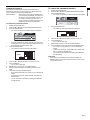
To cancel the password function:
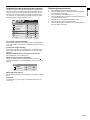
This projector is equipped with the password function that is
designed for prevention of wrong operation by children and restriction on operation by other than specified users.
MENU ACCESS ........ All the buttons except for the POWER button
on the projector are disabled. (The buttons on
the remote control are enabled.) You can use
this mode as a measure of prevention of
wrong operation by children and restriction on
operation by other than specified users.
1.
2.
3.
Display the FEATURE menu.
Press the S or T button to select PASSWORD FUNCTION.
Press the ENTER button.
• The screen for canceling the password function will appear.
opt.
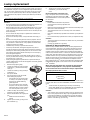
To enable the password function:
1.
2.
3.
Display the FEATURE menu.
Press the S or T button to select PASSWORD FUNCTION.
Press the ENTER button.
• The screen for setting the password function will appear.
XGA60
MENU ACCESS
4.
LOCK
OK
UNLOCK
OK
Press the ENTER button.
• The screen for entering the password will appear.
PASSWORD
opt.
XGA60
OK
CANCEL
MENU ACCESS
LOCK
OK
UNLOCK
OK
•
4.
When the password has already been set, the mode won’t
be changed. In such cases, press the ENTER button to cancel the password function and try again.
Press the ENTER button.
• The screen for entering a password will appear.
5.
6.
7.
8.
PASSWORD
CONFIRM
OK
CANCEL
Important:
•
5.
6.
7.
8.
9.
Press the S or T button to select a number from 0 to 9.
Press the X button.
• You can set the next digit.
Repeat steps 5 and 6 to set a four-digit password.
Enter the password again for confirmation using the same
steps.
Select OK, and press the ENTER button.
• If the entered passwords don’t match, an error message will
appear.
• To cancel the procedure, select CANCEL, and press the
ENTER button.
• You can cancel the procedure by pressing the MENU button alternatively.
Press the S or T button to select a number from 0. to 9.
Press the X button.
• You can set the next digit.
Repeat steps 5 and 6 to enter the four-digit password.
Press the X button, select OK, and press the ENTER button.
• If you enter a wrong password, an error message will
appear.
• To cancel the procedure, press the X button, select CANCEL, and press the ENTER button.
• You can cancel the procedure by pressing the MENU button alternatively.
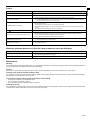
If you forget your password, keep pressing the MENU and
ENTER buttons on the control panel at the same time to cancel
the password function.
EN-21
ENGLISH
Password function