1
Scan, watch and discover how
to get the most out of your TV
Model No.
Número de modelo
TC-P42S60
TC-P50S60
TC-P55S60
TC-P60S60
TC-P65S60
Escanee, observe y descubra
como obtener el máximo de su TV
http://SCN.BY/
9T9AB0HTW8JBJZ
Owner’s Manual
42”/50”/55”/60”/65” Class 1080p
Plasma HDTV
(41.9/49.9/55.1/60.1/64.7 inches measured
diagonally)
Manual de usuario
Televisión de alta definición de 1080p
y clase 42”/50”/55”/60”/65” de Plasma
(41,9/49,9/55,1/60,1/64,7 pulgadas medidas
diagonalmente)
For assistance (U.S.A./Puerto Rico), please call:
1-877-95-VIERA (958-4372)
www.panasonic.com/help
For assistance (Canada), please call:
1-866-330-0014
concierge.panasonic.ca
Para solicitar ayuda (EE.UU./Puerto Rico), llame al:
1-877-95-VIERA (958-4372)
www.panasonic.com/help
Register online at
www.panasonic.com/register
(U.S. customers only)
manual electrónico
English
Thank you for purchasing this Panasonic product.
Please read these instructions before operating your set and
retain them for future reference. The images shown in this
manual are for illustrative purposes only.
Español
Gracias por su decisión de comprar este producto marca Panasonic.
Lea estas instrucciones antes de utilizar su televisor y guárdelas
para consultarlas en el futuro. Las imágenes mostradas en este
manual tienen solamente fines ilustrativos.
TQB2AA0704-1
This product incorporates the following software:
(1) the software developed independently by or for Panasonic Corporation,
(2) the software owned by third party and licensed to Panasonic Corporation,
(3) the software licensed under the GNU LESSER GENERAL PUBLIC LICENSE Version 2.1 (LGPL V2.1) and/
or,
(4) open sourced software other than the software licensed under the LGPL V2.1.
The software categorized as (3) and (4) are distributed in the hope that it will be useful, but WITHOUT ANY
WARRANTY, without even the implied warranty of MERCHANTABILITY or FITNESS FOR A PARTICULAR
PURPOSE. Please refer to the detailed terms and conditions thereof shown in the "License" menu on this
product.
At least three (3) years from delivery of this product, Panasonic will give to any third party who contacts us at
the contact information provided below, for a charge no more than our cost of physically performing source
code distribution, a complete machine-readable copy of the corresponding source code covered under LGPL
V2.1 or the other licenses with the obligation to do so, as well as the respective copyright notice thereof.
Contact Information : [email protected]
The source code and the copyright notice are also available for free in our website below.
http://www.unipf.jp/dl/DTV13U/
“PlayReady” is a trademark registered by Microsoft. Please be aware of the following.
(a) This product contains technology subject to certain intellectual property rights of Microsoft. Use or
distribution of this technology outside of this product is prohibited without the appropriate license(s) from
Microsoft.
(b) Content owners use Microsoft PlayReady™ content access technology to protect their intellectual property,
including copyrighted content. This device uses PlayReady technology to access PlayReady-protected
content and/or WMDRM-protected content. If the device fails to properly enforce restrictions on content usage,
content owners may require Microsoft to revoke the device’s ability to consume PlayReady-protected content.
Revocation should not affect unprotected content or content protected by other content access technologies.
Content owners may require you to upgrade PlayReady to access their content.
If you decline an upgrade, you will not be able to access content that requires the upgrade.
■ Do not display a still picture for a long time
This causes the image to remain on the plasma screen (“Image retention”).
This is not considered a malfunction and is not covered by the warranty.
4:3
Typical still images
12
To prevent the “Image retention”, the screen
saver is automatically activated after a
few minutes if no signals are sent or no
operations are performed.
● Channel number and other logos
● Image displayed in 4:3 mode
● Video game
■ Set up
● Do not place the unit where it’s exposed to sunlight or other bright light (including reflections).
● Use of some types of fluorescent lighting may reduce the remote control’s transmission range.
2
VIERA Link™ is a
trademark of Panasonic
Corporation.
Contents
HDMI, the HDMI logo and
High-Definition Multimedia
Interface are trademarks
or registered trademarks
of HDMI Licensing LLC in
the United States and other
countries.
Please read before using the unit
®
DLNA , the DLNA Logo and
DLNA CERTIFIED™ are
trademarks, service marks,
or certification marks of
the Digital Living Network
Alliance.
Manufactured under license
under U.S. Patent Nos:
5,956,674; 5,974,380;
6,487,535 & other U.S.
and worldwide patents
issued & pending. DTS,
the Symbol, & DTS and
the Symbol together are
registered trademarks &
DTS 2.0+Digital Out is a
trademark of DTS, Inc.
Product includes software.
© DTS, Inc. All Rights
Reserved.
Precautions ····································· 4
• Safety
Accessories ············· 9
• Accessories/Optional
············································· 13
• Connections
Controls ·································· 17
• Identifying
Time Setup ······································· 19
• First
eHELP (Built-in Manual) ················ 20
• Using
Asked Questions (FAQ) ········· 21
• Frequently
and Cleaning ·································· 22
• Care
··········································· 23
• Specifications
Warranty
• Limited
(for U.S.A. and Puerto Rico only) ············· 25
Services Directory
• Customer
(for U.S.A. and Puerto Rico) ···················· 26
• Limited Warranty (for Canada) ················· 27
Manufactured under
license from Dolby
Laboratories. Dolby and
the double-D symbol
are trademarks of Dolby
Laboratories.
HDAVI Control™ is a trademark of Panasonic
Corporation.
This product is licensed under the AVC patent
portfolio license for the personal and non-commercial
use of a consumer to (i) encode video in compliance
with the AVC Standard (“AVC Video”) and/or (ii)
decode AVC Video that was encoded by a consumer
engaged in a personal and non-commercial activity
and/or was obtained from a video provider licensed
to provide AVC Video. No license is granted or shall
be implied for any other use. Additional information
may be obtained from MPEG LA, LLC.
See http://www.mpegla.com.
3
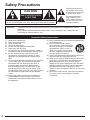
Safety Precautions
CAUTION
RISK OF ELECTRIC SHOCK
DO NOT OPEN
WARNING: To reduce the risk of electric shock, do not remove cover or back.
No user-serviceable parts inside. Refer servicing to qualified service personnel.
WARNING:
The lightning flash with arrowhead
within a triangle is intended to tell the
user that parts inside the product are a
risk of electric shock to persons.
The exclamation point within a
triangle is intended to tell the
user that important operating and
servicing instructions are in the
papers with the appliance.
To reduce the risk of fire or electric shock, do not expose this apparatus to rain or
moisture.
Do not place liquid containers (flower vase, cups, cosmetics, etc.) above the set
(including on shelves above, etc.).
Important Safety Instructions
1)
2)
3)
4)
5)
6)
7)
Read these instructions.
Keep these instructions.
Heed all warnings.
Follow all instructions.
Do not use this apparatus near water.
Clean only with dry cloth.
Do not block any ventilation openings. Install in
accordance with the manufacturer’s instructions.
8) Do not install near any heat sources such
as radiators, heat registers, stoves, or other
apparatus (including amplifiers) that produce
heat.
9) Do not defeat the safety purpose of the polarized
or grounding-type plug. A polarized plug has
two blades with one wider than the other. A
grounding type plug has two blades and a
third grounding prong. The wide blade or the
third prong are provided for your safety. If the
provided plug does not fit into your outlet, consult
an electrician for replacement of the obsolete
outlet.
10) Protect the power cord from being walked on
or pinched particularly at plugs, convenience
receptacles, and the point where they exit from
the apparatus.
4
11) Only use attachments / accessories specified by
the manufacturer.
12) Use only with the cart, stand,
tripod, bracket, or table specified
by the manufacturer, or sold with
the apparatus. When a cart is
used, use caution when moving
the cart / apparatus combination
to avoid injury from tip-over.
13) Unplug this apparatus during lightning storms or
when unused for long periods of time.
14) Refer all servicing to qualified service personnel.
Servicing is required when the apparatus has
been damaged in any way, such as powersupply cord or plug is damaged, liquid has been
spilled or objects have fallen into the apparatus,
the apparatus has been exposed to rain or
moisture, does not operate normally, or has been
dropped.
15) To prevent electric shock, ensure the grounding
pin on the AC cord power plug is securely
connected.
WARNING/CAUTION (TV set)
WARNING
Small parts can present choking hazard if
accidentally swallowed.
Keep small parts away from young children.
Discard unneeded small parts and other objects,
including packaging materials and plastic bags/
sheets to prevent them from being played with
by young children, creating the potential risk of
suffocation.
■ Set up
This Plasma TV may fall and can cause personal
injury or even death if not installed correctly. To
prevent personal injury or death, follow these
warnings:
● Install the Plasma TV in accordance with
the manufacturer’s recommended pedestal
or stand, corresponding hardware and
installation instructions.
This Plasma TV is for use only with the following
optional accessories. Use with any other type
of optional accessories may cause instability.
The following accessories are manufactured by
Panasonic Corporation.
• Wall-hanging bracket (Angled)
TY-WK4P1RW (TC-P42S60, TC-P50S60)
TY-WK5P1RW (TC-P55S60, TC-P60S60)
TY-WK6P1RW (TC-P65S60)
● Be sure to ask a qualified technician to carry
out the installation and set-up.
Two or more people are required to install or
remove the television.
● Some wall mounts (wall-hanging brackets) are
not designed to be mounted to walls with steel
studs or old cinder block constructions.
Ask your dealer or licensed contractor to properly
secure the wall-hanging bracket.
● Do not route the TV’s power cord inside the
wall.
The power cord was not designed for in-wall
mounting.
Doing so can lead to fire hazard.
● Do not place the Plasma TV or its stand on a
sloped or unstable surface.
The Plasma TV may fall or tip over.
● Do not support the Plasma TV on a nonspecified pedestal.
● Do not place the Plasma TV on furniture that
can easily be used as steps, such as a chest of
drawers.
● Do not climb or allow children to climb on the
Plasma TV
● Place or install the Plasma TV where it cannot
be pushed, pulled over or knocked down.
● Route all cords and cables such that they
cannot be tripped over or pulled by curious
children.
● Do not place any objects on top of the Plasma
TV.
If water spills onto the Plasma TV or foreign
objects get inside it, a short-circuit may occur,
which could result in fire or electric shock. If any
foreign objects get inside the Plasma TV, please
consult an Authorized Service Center.
● In the unlikely event that you receive a shock
from this product, it is possible that your
household outlet may be wired improperly.
Have an electrician verify that the TV’s outlet is
properly wired. If the symptom persists, have the
TV serviced by a qualified authorized technician.
● To prevent the spread of fire, keep
candles or other open flames away
from this product at all times
■ AC Power Supply Cord
To prevent fire or electric shock:
● The Plasma TV is designed to operate on a 120
V AC, 60 Hz service. Insert the power cord plug
as far as it will go into the wall socket.
If the plug is not fully inserted, heat may generate,
which could cause a fire.
● The included power cord is for use with this
unit only.
● Do not use any power cord other than that
provided with this TV.
● Do not handle the power cord plug with wet
hands.
● Do not do anything that might damage the
power supply cord.
● When disconnecting the power supply cord,
hold the plug, not the cord.
● Do not use the power supply cord if the plug or
cord is damaged.
Replace the cord or contact your Authorized
Service Center.
● Do not use a 3-prong to 2-prong AC plug
adapters to connect your TV’s plug to the wall
outlet.
Doing so will defeat the TV plug’s safety feature,
which can lead to a shock hazard. If the wall outlet
does not accommodate a 3-prong plug, have a
qualified electrician replace your outlet and check
the associated wiring.
● If water or an object gets inside the Plasma TV,
if the Plasma TV is dropped, or if the enclosure
becomes damaged, unplug the power supply
cord immediately.
A short-circuit may occur, which could cause a
fire. Contact an Authorized Service Center for an
evaluation.
■ Radio waves
● Do not place this TV in any medical institutions
or locations with medical devices.
Radio waves from this TV may interfere with the
medical devices and cause accidents due to the
malfunction.
● Do not use this TV near any automatic control
devices such as automatic doors or fire alarms.
Radio waves from this TV may interfere with the
automatic control devices and cause accidents
due to the malfunction.
● Keep this TV away at least 9 inches (22 cm)
from the location where a cardiac pacemaker
is implanted.
Radio waves from this TV may interfere with the
operation of the pacemaker.
5
■ Handling the power supply cord
● Insert the power plug fully into the socket outlet.
(If the power plug is loose, it could generate heat
and cause fire.)
● Ensure that the power plug is easily
accessible.
● Ensure the earth pin on the power plug is
securely connected to prevent electrical shock.
• An apparatus with CLASS I construction shall
be connected to a power socket outlet with a
protective earthing connection.
● Do not touch the power plug with a wet hand.
(This may cause electrical shock.)
● Do not use any power cord other than that
provided with this TV. (This may cause fire or
electrical shock.)
● Do not damage the power cord. (A damaged
cord may cause fire or electrical shock.)
• Do not move the TV with the cord plugged in the
socket outlet.
• Do not place a heavy object on the cord or place
the cord near a high-temperature object.
• Do not twist the cord, bend it excessively, or
stretch it.
• Do not pull on the cord. Hold onto the power
plug body when disconnecting cord.
• Do not use a damaged power plug or socket
outlet.
● If a problem occurs (such as no picture or
no sound), or if smoke or an abnormal odor
is detected from the Plasma TV, unplug the
power supply cord immediately.
Continued use of the TV under these conditions
might cause a fire or permanent damage to the TV.
Have the TV evaluated by an Authorized Service
Center. Servicing of the TV by unauthorized
personnel is strongly discouraged due to its high
voltage.
CAUTION
● Do not cover the ventilation holes.
Doing so may cause the Plasma TV to overheat,
which can cause a fire or damage to the Plasma
TV.
● Leave a space of 3 15/16” (10 cm) or more at
the top, left and right, and 2 3/4” (7 cm) or more
at the rear.
● When using the pedestal, keep the space
between the bottom of the TV and the pedestal
or stand surface clear from objects that may
obstruct ventilation.
■ When Moving the Plasma TV
● Be sure to disconnect all cables before moving
the Plasma TV.
Moving the TV with its cables attached might
damage the cables which, in turn, can cause fire
or electric shock.
● To prevent an electric shock, disconnect the
power plug from the wall outlet as a safety
precaution before carrying out any cleaning.
● Transport only in upright position.
Transporting the unit with its display panel facing
upright or downward may cause damage to the
internal circuitry.
● Using a dry cloth, clean any dust from the
power supply cord and plug regularly.
Build-up of dust on the power cord plug can
increase humidity, which might damage the
insulation and cause a fire.
This Plasma TV radiates infrared rays;
therefore, it may affect other infrared
communication equipment. Install your infrared
sensor in a place away from direct or reflected
light from your Plasma TV.
The TV will still consume some power as long as
the power supply cord is connected to the wall
outlet.
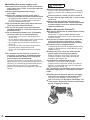
● Display panel is made of glass. Do not apply
strong force or impact to the display panel.
This may cause damage resulting in injury.
● The TV is heavy. TV should be handled by 2 or
more people. Support as shown to avoid injury
by the TV tipping or falling.
6
FCC and IC STATEMENT
This equipment has been tested and found to comply with the limits for an Other Class B digital device,
pursuant to Part 15 of the FCC Rules. These limits are designed to provide reasonable protection against
harmful interference in a residential installation. This equipment generates, uses and can radiate radio
frequency energy and, if not installed and used in accordance with the instructions, may cause harmful
interference to radio communications. However, there is no guarantee that interference will not occur in a
particular installation. If this equipment does cause harmful interference to radio or television reception, which
can be determined by turning the equipment off and on, the user is encouraged to try to correct the interference
by one or more of the following measures:
• Reorient or relocate the receiving antenna.
• Increase the separation between the equipment and receiver.
• Connect the equipment into an outlet on a circuit different from that to which the receiver is connected.
• Consult the Panasonic Service Center or an experienced radio/TV technician for help.
FCC Caution:
To assure continued compliance, follow the attached installation instructions and use only shielded
interface cables when connecting to peripheral devices. Some recommended user provided interface
cables may require usage of the attached ferrite core kit(s), refer to interface cable connection
instructions for details. Any changes or modifications not expressly approved by Panasonic Corp. of
North America could void the user's authority to operate this device.
FCC and Industry Canada (IC) RF Exposure Warning:
• This TV is provided with one USB port on rear enclosure for exclusive dedicated use for insertion
of the following optional transmitter: Wireless LAN Adapter with FCC ID:H8N-WLU5150/IC
ID:1353A-WLU5150.
• Other transmitters shall not be used, unless specifically recommended when they become
available. Other third-party wireless transmitters have not been RF exposure evaluated for use
with this TV and may not comply with FCC and IC RF exposure requirements.
• The above described transmitter comply with FCC and IC radiation exposure limits set forth for
an uncontrolled environment for mobile use with minimum 8 inches (20 cm) spacing requirement
between transmitters and all person’s body (excluding extremities of hands, wrist and feet) during
wireless modes of operation.
<Only for wireless LAN if capable of transmission in the 5.15 ~ 5.25 GHz frequency band>
This product is restricted to indoor use due to its operation in the 5.15 to 5.25 GHz frequency range.
FCC and IC require this product to be used indoors for the frequency range 5.15 to 5.25 GHz to reduce the
potential for harmful interference to co-channel Mobile Satellite systems. High power radars are allocated
as primary users of the 5.25 to 5.35 GHz and 5.65 to 5.85 GHz bands. These radar stations can cause
interference with and/or damage this product.
Responsible Party:
Contact Source:
email:
Panasonic Corporation of North America
One Panasonic Way, Secaucus, NJ 07094
Panasonic Consumer Marketing Company of North America
1-877-95-VIERA (958-4372)
[email protected]
This device complies with Part 15 of the FCC Rules and all applicable IC RSS standards.
Operation is subject to the following two conditions:
(1) This device may not cause harmful interference, and (2) this device must accept any interference received,
including interference that may cause undesired operation.
7
CEA CHILD SAFETY NOTICES
WARNING
Flat panel displays are not always supported on
the proper stands or installed according to the
manufacturer’s recommendations. Flat panel
displays that are inappropriately situated on
dressers, bookcases, shelves, desks, speakers,
chests, or carts may fall over and may cause
personal injury or even death.
The consumer electronics industry (of which
Panasonic is a member) is committed to making
home entertainment enjoyable and safe. To prevent
personal injury or death, be sure to follow the
following safety guidelines:
TUNE INTO SAFETY:
• One size does NOT fit all. Follow the
manufacturer’s recommendations for the safe
installation and use of your flat panel display.
• Carefully read and understand all enclosed
instructions for proper use of this product.
• Don’t allow children to climb on or play with
furniture and television sets.
• Don’t place flat panel displays on furniture that
can easily be used as steps, such as a chest of
drawers.
• Remember that children can become excited while
watching a program, especially on “larger than life”
flat panel displays. Care should be taken to install
the display where it cannot be pushed, pulled over,
or knocked down.
• Care should be taken to route all cords and cables
connected to the flat panel display so that they
cannot be pulled or grabbed by curious children.
WALL MOUNTING: IF YOU DECIDE TO WALL
MOUNT YOUR FLAT PANEL DISPLAY, ALWAYS:
• Use a mount that has been recommended by
the display manufacturer and/or listed by an
independent laboratory (such as UL, CSA, ETL).
• Follow all instructions supplied by the display and
wall mount manufacturers.
• If you have any doubts about your ability to safely
install your flat panel display, contact your retailer
about professional installation.
• Make sure the wall where you are mounting the
display is appropriate. Some wall mounts are not
designed to be mounted to walls with steel studs
or old cinder block construction. If you are unsure,
contact a professional installer.
• A minimum of two people are required for
installation. Flat panel displays can be heavy.
Panasonic recommends that a qualified installer
perform the wall-mount installation. See page 5.
The American Academy of Pediatrics
discourages media viewing for children
younger than two years. For more details, see
www.aap.org.
■ About built-in wireless LAN
● To use the built-in wireless LAN, using an access point is recommended.
● To use the built-in wireless LAN in the access point mode, up to 7 devices are connectable. But the
transfer rate will vary according to communication environment or connected equipments.
● Do not use the built-in wireless LAN to connect to any wireless network (SSID* ) for which you do
1
not have usage rights. Such networks may be listed as a result of searches. However, using them
may be regarded as illegal access.
● Check that the Access point supports WPS*2.
(If it does not support WPS, the encryption key of the Access point is required when configuring
settings.)
● Follow the instructions on the Access point setup screen and configure the appropriate security settings.
For more details on setting of Access point, please refer to operating manual for the Access point.
● We recommend using 11n (5 GHz) for the wireless system between the built-in wireless LAN and
Access point.
Communication is also possible with 11a, 11b, and 11g, but the communication speed may be
slower.
● If the wireless system of the Access point is changed, devices that could connect by wireless LAN
may no longer be able to connect.
● Data transmitted and received over radio waves may be intercepted and monitored.
● Keep the TV away from the following devices as much as possible:
Wireless LAN, microwaves, and other devices that use 2.4 GHz and 5 GHz signals. Otherwise, the
TV failures such as malfunction may occur due to the radio wave interference.
● When noises occur due to the static electricity, etc., the TV might stop operating for the protection
of the devices. In this case, turn the TV Off with power On / Off switch, then turn it On again.
*1 SSID is a name for identifying a particular wireless network for transmission.
*2 WPS: Wi-Fi Protected Setup
8
Accessories/Optional Accessories
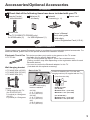
Accessories
Check that all the following items have been included with your TV
Remote Control
N2QAYB000827
Batteries (2)
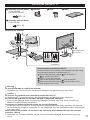
Pedestal
AA Battery
Power cord
Assembly (p. 11)
Ferrite core
(For TC-P42S60/TC-P50S60 only)
for HDMI cable (2)
for USB Keyboard (1)
Owner’s Manual
Quick start guide
Child safety
Product Registration Card (U.S.A.)
Optional Accessories
Please contact your nearest Panasonic dealer to purchase the recommended optional accessories. For
additional details, please refer to the optional accessories installation manual.
Electronic Touch Pen This device provides you to paint or play games on the TV screen.
● TY-TP10U
• Available only for specific applications.
• This TV can be paired with up to 2 Touch Pens simultaneously.
(Pairing condition may differ depending on the registration status for each
Bluetooth device.)
• You need to connect the Bluetooth adapter* to this TV.
(*Included with this optional accessory)
Wall-hanging bracket
● TY-WK4P1RW (42"/50")
● TY-WK5P1RW (55"/60")
● TY-WK6P1RW (65")
Back of the TV
screws for attaching the TV to the wallhanging bracket (not supplied with the TV)
a
b
(View from the side)
M8
(image)
• Tilting angle for this TV:
(for 42"/50"/55"/65")
0 (vertical) to 10 degrees
(for 60")
0 (vertical) to 15 degrees
Holes for wall-hanging
bracket installation
(42"/50")
a: 15.7” (400 mm)
b: 11.8” (300 mm)
(55"/60")
a: 19.7” (500 mm)
b: 11.8” (300 mm)
(65")
a: 26.9” (684 mm)
b: 11.8” (300 mm)
Depth of screw:
(for 42"/50")
Minimum: 0.67 ” (17.0 mm)
Maximum: 1.38 ” (35.0 mm)
(for 55"/60"/65")
Minimum: 0.67 ” (17.0 mm)
Maximum: 1.46” (37.0 mm)
9
Warning
● In order to maintain the TV’s performance and safety, be absolutely sure to ask your dealer or a
licensed contractor to secure the wall-hanging brackets.
● Carefully read the instructions accompanying optional accessories, and be absolutely sure to take
steps to prevent the TV from tipping over.
● Do not mount the unit directly below ceiling lights (such as spotlights, floodlights or halogen lights)
that typically give off high heat. Doing so may be warped or damage plastic cabinet parts.
● Handle the TV carefully during installation since subjecting it to impact or other forces may cause
product damage.
● Take care when fixing wall brackets to the wall. Always ensure that there are no electrical cables or
pipes in the wall before hanging the bracket.
● When using the angled-type wall-hanging bracket, please ensure that there is sufficient space for the
connecting cables not to press against the wall when the TV is tilted forward.
● To prevent fall and injury, remove the TV from its fixed wall position when it is no longer in use.
10
Attaching the pedestal to TV
Assembly screws (black)
(7) (for 42"/50")
(12) (for 55"/60"/65")
Bracket
Neck
Base
M5 × 16
Assembly screws (black)
(4) (for 42"/50")
M4 × 10
Attaching the pedestal
A
3
C
D
1
E
5
4
(for 55"/60"/65")
B (for 42"/50")
A
2
A
TC-P42S60 TC-P55S60
TC-P50S60 TC-P60S60
TC-P65S60
Removing the pedestal from the TV
Be sure to remove the pedestal in the following way when using
the wall-hanging bracket or repacking the TV.
Remove the assembly screws
(for 55"/60"/65") /
(for 42"/50") from the TV.
Lift the TV from the pedestal.
Remove the assembly screws
from the bracket.
Remove the assembly screws
from the bottom of the
base and pull out the neck.
Warning
Do not disassemble or modify the pedestal.
Otherwise, the TV may fall over and become damaged, and personal injury may result.
Caution
Do not use any pedestal other than that provided with this TV.
Otherwise, the TV may fall over and become damaged, and personal injury may result.
Do not use the pedestal if it becomes warped or physically damaged.
If you use the pedestal when it is physically damaged, personal injury may result. Contact your
nearest Panasonic Dealer immediately.
During set-up, make sure that all screws are securely tightened.
If sufficient care is not taken to ensure screws are properly tightened during assembly, the pedestal
will not be strong enough to support the TV, and it might fall over and become damaged, and personal
injury may result.
When removing the pedestal, do not remove the pedestal by any methods other than the specified
procedure. (Above)
Otherwise, the TV and/or pedestal may fall over and become damaged, and personal injury may
result.
11
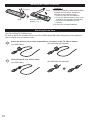
Installing the remote’s batteries
Pull open
Close
Hook
Note the correct
polarity (+ or -).
Caution
Incorrect installation may cause battery
leakage and corrosion, resulting in
damage to the remote control.
not mix old and new batteries.
• Do
not mix different battery types (such
• Do
as alkaline and manganese batteries).
not use rechargeable (Ni-Cd)
• Do
batteries.
Do not burn or break batteries.
Attaching Ferrite Core
(For TC-P42S60/TC-P50S60 only)
Be sure to attach the provided ferrite core to the HDMI cable/USB cable of Keyboard (not supplied) to
reduce interference or electrical noise.
Attach the ferrite core as close as possible to connector on the TV side as shown.
(for USB cable of keyboard)
(for HDMI cable)
Close the ferrite core until it clicks.
(for HDMI cable)
12
(for USB cable of keyboard)
Connections
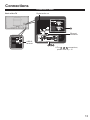
Connection Panels
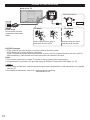
Digital audio out
Back of the TV
Ethernet
connector
USB1/2
terminal
● For
, ,
connections,
please refer to p. 15
13
Antenna or Cable connection
Back of the TV
VHF/UHF Antenna
or
Power Cord
Connect after all other
connections have been
made.
To attach
Insert it firmly until the tabs on
both sides click into place.
Cable TV
To remove
Keep pushing both sides
until they snap and pull.
VHF/UHF Antenna
• NTSC (National Television System Committee): Analog television system
ATSC (Advanced Television Systems Committee):
Digital TV Standards include digital high-definition television (HDTV), standard-definition television (SDTV),
data broadcasting, multi-channel surround sound audio and interactive television.
Cable
● You need to subscribe to a cable TV service to enjoy viewing their programming.
● A high-definition connection can be made using an HDMI or Component Video cable. (p. 15)
Note
● When using a Cable box, external equipment and video cables shown in this manual are not supplied
with the TV.
● For additional assistance, visit us at: www.panasonic.com/help
www.panasonic.ca
14
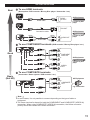
AV cable connection
Best
To use HDMI terminals
(Set-top-box / DVD recorder / Blu-ray Disc player / Camcorder / etc.)
HDMI
AV OUT
HDMI cable
AV Equipment
e.g. Blu-ray Disc
player
DVI OUT
HDMI-DVI
Conversion cable
white
AV Equipment
white
L
R
Audio cable
red
AUDIO OUT
e.g. Blu-ray Disc
player
red
To use COMPONENT terminals (DVD recorder / Blu-ray Disc player / etc.)
Y
green
Good
blue
green green
blue
PB
COMPONENT
blue VIDEO OUT
PR
red
red
red
L
white
red
AV Equipment
e.g. Blu-ray Disc
player
white white AUDIO
R OUT
red
red
To use COMPOSITE terminals
Basic
(Not HD)
(Camcorder / Game system / DVD recorder / etc.)
yellow
yellow
AV Equipment
yellow
L COMPOSITE
white
white OUT
R
white
red
e.g. Camcorder
red
red
Note
● In some cases, it is not possible to connect depending on the type of cable or
equipment.
● The Green terminal is shared for both the COMPONENT and COMPOSITE (VIDEO IN)
connection. When using COMPOSITE (VIDEO IN) connection, the Yellow connector
(Video) should be inserted into Green connection.
15
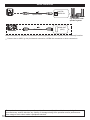
Audio connection
Optical cable
DIGITAL
AUDIO IN
e.g. Amplifier with
speaker system
HDMI cable
HDMI OUT
(ARC)
HDMI connection is available if connected audio equipment has ARC (Audio Return Channel) function.
Please refer to eHELP (p. 20) for Network connection, VIERA link connection or other connections.
Panasonic does not guarantee operation and performance of peripheral devices made by other
manufacturers; and we disclaim any liability or damage arising from operation and/or performance
from usage of such other maker’s peripheral devices.
16
Identifying Controls
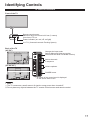
TV controls/indicators
Front of the TV
Remote control sensor
Maximum range for remote is 23 feet (7 meters)
from front of TV set
Power indicator (on: red, off: no light)
C.A.T.S. (Contrast Automatic Tracking System)
Back of the TV
(42"/50")
Changes the input mode
Selects Menu and Submenu entries
(Press and hold down for MENU function)
Selects channels
in sequence
(55"/60"/65")
Volume up/down
POWER button
• An image of the control panel is displayed
on the screen while in use.
Note
The TV consumes a small amount of electric energy even when turned off.
Do not place any objects between the TV remote control sensor and remote control.
17
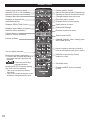
Remote control
Viewing from external media
Switches TV On or Off (Standby)
Switches surround sound setting
Displays Main Menu
Closed caption On/Off
Selects Secondary Audio Programming
Operates the Favorite channel list function
Changes aspect ratio and zoom
Displays or removes the
information banner
Exits from menu screen
Displays Online movies screen
Displays VIERA TOOLS menu
Select source to watch
Displays Option Menu for special
functions (when available)
Colored buttons
(used for various functions)
Volume up/down
Use for digital channels
External equipment operations
* Functions are switched depending on
connected external equipment and
operation.
: Press and hold to skip
backward/forward
Accesses NETFLIX service directly
(via Online movies screen)
• This service requires an Internet
connection.
• This service might be stopped or the
conditions changed without notice.
18
Selects/OK/Change
Go back to previous menu
Sound mute On/Off
Channel up/down, when viewing from
ANT/Cable source
Numeric keypad to select any channel or
press to enter alphanumeric input in menus
Switches to previously viewed
channel or input
Set Sleep timer
Displays eHELP (built-in manual)
(p. 20)
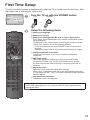
First Time Setup
The first time setup screen is displayed only when the TV is turned on for the first time, after
the power cord is inserted into a wall outlet.
Turn the TV on with the POWER button
(42"/50")
(TV)
(Remote)
(55"/60"/65")
or
Setup the following items
● Select your language
● Select your country
● Select your viewing mode (Be sure to select “Home Use”)
If you select “Store Demonstration” by mistake, confirmation screen
will be displayed.
To display the “Set viewing mode” screen again in order to select
“Home Use”, perform one of the following actions:
• Press and hold down the rear POWER button for at least five
seconds.
• Unplug the power cord for 30 seconds and then plug it in again.
● Configure Network connection
Follow the instructions on screen to complete the Network
connection.
● ANT/Cable setup
Select and adjust the settings according to your ANT/Cable
environment. Select “Yes” on the confirmation screen to start
the scanning process. After scanning is complete, press OK to
continue.
● Adjust the Clock
Select the clock mode and adjust other settings.
When “Auto” is selected, clock will be set automatically according
to Time zone and DST. The TV must be connected to the Internet to
use this feature.
● Complete First time setup
Completion screen is displayed.
To watch TV via a Cable box, Satellite receiver, or any other source
(DVD, DVR, gaming device, etc.), press the INPUT button and select the
appropriate input.
19
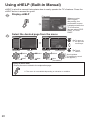
Using eHELP (Built-in Manual)
eHELP is a built-in manual that explains how to easily operate the TV's features. Press the
eHELP button to access the guide.
Display eHELP
[Top page]
When you enter
eHELP again
after exiting, the
confirmation screen
is displayed while the
TV is turned on.
You can select “TOP
PAGE” or “LAST
PAGE”.
Select the desired page from the menu
To return to
the previous
menu/layer
Categories
Menus
Select
Next
Submenus
Select
Next
To exit
eHELP
Desired page
Select
Next
(If available)
Scroll up/down
(If available the scroll
bar appears.)
■ Jump to menu item
Display the menu related to the explanation page.
● The menu is not available depending on situation or condition.
20
Frequently Asked Questions (FAQ)
Questions
Answers
Why doesn’t the remote
control work?
Check that the batteries are fresh, are of the same type and are
installed with the correct polarity (+ & -).
To operate other devices, such as changing channels when using
Cable or Satellite boxes, or operating non-Panasonic Blu-ray
players, use the remote supplied with the device.
Why is there no picture
or just a blue, black or
snowy screen being
displayed?
Ensure that the power cord is plugged in and the TV is turned on
(front red LED light should be on, not blinking).
Press the INPUT button on the remote to select the correct input
source.
Ensure all connections are correct and secure.
When using external video source, such as a Cable/Satellite
box or DVD player, ensure that the device is on and functioning
correctly.
Press MENU on the TV’s remote control. If the menu is displayed,
then the TV is working; recheck above steps.
Why is the screen blank
and the power indicator
blinking?
The TV has gone into shutdown mode to protect itself. Try
unplugging it for a few minutes and connecting it again. If there
was a temporary power surge on the AC line it may now be OK. If
the blinking returns, call 1-877-95-VIERA (U.S.A.) or 1-866-3300014 (Canada).
21
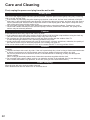
Care and Cleaning
First, unplug the power cord plug from the wall outlet.
Display panel
The front of the display panel has been specially treated. Wipe the panel surface gently using only a cleaning
cloth or a soft, lint-free cloth.
If the surface is particularly dirty after cleaning up the dust, soak a soft, lint-free cloth in diluted, mild liquid
dish soap (1 part mild liquid dish soap diluted by 100 times the amount of water), and then wring the cloth to
remove excess liquid. Use this cloth to wipe the surface of the display panel, then wipe it evenly with a dry
cloth of the same type until the surface is dry.
Do not scratch or hit the surface of the panel with fingernails or other hard objects. Furthermore, avoid
contact with volatile substances such as insect sprays, solvents, and thinner; otherwise, the quality of the
surface may be adversely affected.
Cabinet
If the cabinet becomes dirty, wipe it with a soft, dry cloth.
If the cabinet is particularly dirty, soak the cloth in diluted, mild liquid dish soap and then wring the cloth dry.
Use this cloth to wipe the cabinet and then wipe it dry with a dry cloth.
Do not allow any mild liquid dish soap to come into direct contact with the surface of the TV.
If water droplets get inside the unit, operating problems may result.
Avoid contact with volatile substances such as insect sprays, solvents, and thinner; otherwise, the quality of
the cabinet surface may be adversely affected or the coating may peel off.
Do not let articles made from rubber or PVC be in contact with the TV for long periods of time.
Pedestal
Cleaning
Wipe the surfaces with a soft, dry cloth. If the unit is particularly dirty, clean it using a cloth soaked with water
to which a small amount of mild liquid dish soap has been added and then wipe with a dry cloth.
Do not use products such as solvents, thinner, or household wax for cleaning, as they can damage the
surface coating.
Note: If using a chemically-treated cloth, follow the instructions supplied with the cloth.
Do not attach sticky tape or labels, as they can make the surface of the pedestal dirty. Do not allow longterm contact with rubber, vinyl products, or the like. (Doing so will cause deterioration.)
Power cord plug
Wipe the plug with a dry cloth at regular intervals.
Note: Moisture and dust can lead to fire or electrical shock.
22
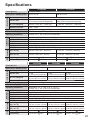
Specifications
TC-P42S60
Power Source
AC 120 V, 60 Hz
Power Consumption
(Rated power / Standby power) 240 W / 0.2 W
TC-P50S60
296 W / 0.2 W
Display Panel
Panel System
Plasma Display panel
Screen size
42 ” class
(41.9 inches measured diagonally)
36.5 ” × 20.5 ” × 41.9 ”
(929 mm × 523 mm × 1,066 mm)
W × H × Diagonal
50 ” class
(49.9 inches measured diagonally)
43.5 ” × 24.4 ” × 49.9 ”
(1,106 mm × 622 mm × 1,269 mm)
Number of pixels
1,920 × 1,080
Speaker Output
20 W [10 W + 10 W] (10 % THD)
Channel Capability (Digital/Analog) VHF/ UHF: 2 - 69, CATV: 1 - 135
VIDEO IN
COMPONENT IN
HDMI IN 1/2
USB 1/2
DIGITAL AUDIO OUT
OTHERS
Including pedestal
(W × H × D)
Temperature: 32 °F - 104 °F (0 °C - 40 °C)
Humidity: 20 % - 80 % RH (non-condensing)
RCA PIN (VIDEO, AUDIO-L, AUDIO-R)
RCA PIN (Y, PB, PR, AUDIO-L, AUDIO-R)
TYPE A Connector (supports “HDAVI Control 5” function)
USB2.0 Type A connector
DC 5V, Max. 500 mA
PCM / Dolby Digital, Fiber Optic
ETHERNET (10BASE-T/100BASE-TX)
39.2 ” × 25.6 ” × 10.1 ”
46.2 ” × 29.6 ” × 11.7 ”
(995 mm × 651 mm × 256 mm)
(1,172 mm × 751 mm × 295 mm)
TV Set only
(W × H × D)
39.2 ” × 23.5 ” × 3.2 ”
(995 mm × 597 mm × 80 mm)
46.2 ” × 27.5 ” × 3.2 ”
(1,172 mm × 698 mm × 80 mm)
Including pedestal
40.8 lb. (18.5
) NET
53.0 lb. (24.0
) NET
TV Set only
35.3 lb. (16.0
) NET
46.3 lb. (21.0
) NET
Operating Conditions
Connection
Terminals
Dimensions Mass
TC-P55S60
Power Source
AC 120 V, 60 Hz
Power Consumption
(Rated power / Standby power) 304 W / 0.2 W
Display Panel
Panel System
Plasma Display panel
Screen size
55 ” class
(55.1 inches measured diagonally)
48.0 ” × 27.0 ” × 55.1 ”
(1,221 mm × 687 mm × 1,401 mm)
W × H × Diagonal
TC-P60S60
TC-P65S60
304 W / 0.2 W
345 W / 0.2 W
60 ” class
(60.1 inches measured diagonally)
52.3 ” × 29.4 ” × 60.1 ”
(1,331 mm × 748 mm × 1,527 mm)
65 ” class
(64.7 inches measured diagonally)
56.4 ” × 31.7 ” × 64.7 ”
(1,434 mm × 807 mm × 1,646 mm)
Number of pixels
1,920 × 1,080
Speaker Output
20 W [10 W + 10 W] (10 % THD)
Channel Capability (Digital/Analog) VHF/ UHF: 2 - 69, CATV: 1 - 135
VIDEO IN
COMPONENT IN
HDMI IN 1/2
USB 1/2
DIGITAL AUDIO OUT
OTHERS
Including pedestal
(W × H × D)
Temperature: 32 °F - 104 °F (0 °C - 40 °C)
Humidity: 20 % - 80 % RH (non-condensing)
RCA PIN (VIDEO, AUDIO-L, AUDIO-R)
RCA PIN (Y, PB, PR, AUDIO-L, AUDIO-R)
TYPE A Connector (supports “HDAVI Control 5” function)
USB2.0 Type A connector
DC 5V, Max. 500 mA
PCM / Dolby Digital, Fiber Optic
ETHERNET (10BASE-T/100BASE-TX)
50.7 " × 32.2 " × 13.2 "
55.0 " × 34.6 " × 13.2 "
59.1 " × 36.9 " × 14.2 "
(1,287 mm × 816 mm × 333 mm) (1,397 mm × 878 mm × 333 mm) (1,500 mm × 936 mm × 359 mm)
TV Set only
(W × H × D)
50.7 " × 30.0 " × 3.2 "
55.0 " × 32.5 " × 3.2 "
59.1 " × 34.8 " × 3.2 "
(1,287 mm × 762 mm × 80 mm) (1,397 mm × 824 mm × 80 mm) (1,500 mm × 882 mm × 80 mm)
Operating Conditions
Connection
Terminals
Dimensions Mass
Including pedestal
66.2 lb. (30.0
) NET
75.0 lb. (34.0
) NET
84.9 lb. (38.5
) NET
TV Set only
57.4 lb. (26.0
) NET
66.2 lb. (30.0
) NET
75.0 lb. (34.0
) NET
23
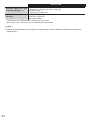
Wireless LAN
IEEE 802.11a/n :
Standard Compliance and
5.15 GHz - 5.35 GHz, 5.47 GHz - 5.85 GHz
IEEE 802.11b/g/n :
Frequency Range *1, *2
2.400 GHz - 2.4835 GHz
Security
WPA2-PSK (TKIP/AES)
WPA-PSK (TKIP/AES)
WEP (64bit/128bit)
*1 The frequency and channel differ depending on the country.
*2 802.11b/g/n CH1 ~ CH11 only use for United States and Canada.
Note
Design and Specifications are subject to change without notice. Mass and Dimensions shown are
approximate.
24
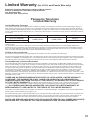
Limited Warranty (for U.S.A. and Puerto Rico only)
Panasonic Consumer Marketing Company of North America,
Division of Panasonic Corporation of North America
One Panasonic Way
Secaucus, New Jersey 07094
Panasonic Television
Limited Warranty
Limited Warranty Coverage
If your product does not work properly because of a defect in materials or workmanship, Panasonic Consumer Marketing Company of
North America (referred to as “the warrantor”) will, for the length of the period indicated on the chart below, which starts with the date of
original purchase (“Limited Warranty period”), at its option either (a) repair your product with new or refurbished parts, (b) replace it with a
new or a refurbished equivalent value product, or (c) refund your purchase price. The decision to repair, replace or refund will be made by
the warrantor.
TV CATEGORIES
Up to 42” (diagonal)
46” (diagonal) and larger
PARTS
LABOR
1 (ONE) YEAR
1 (ONE) YEAR
SERVICE
Carry-In
On-Site
During the “Labor” Limited Warranty period there will be no charge for labor. During the “Parts” Limited Warranty period, there will be no
charge for parts.
You must carry-in your product or arrange for on-site service during the Limited Warranty period. If non-rechargeable batteries are
included, they are not warranted. This Limited Warranty only applies to products purchased and serviced in the United States or Puerto
Rico. This Limited Warranty is extended only to the original purchaser of a new product which was not sold “as is”. A purchase receipt or
other proof of the original purchase date is required for Limited Warranty service.
On-Site or Carry-In Service
For On-Site or Carry-In Service in the United States and Puerto Rico call 1-877-95-VIERA (1-877-958-4372).
On-site service where applicable requires clear, complete and easy access to the product by the authorized servicer and does not include
removal or re-installation of an installed product. It is possible that certain on-site repairs will not be completed on-site, but will require that
the product or parts of the product, at the servicer’s discretion be removed for shop diagnosis and/or repair and then returned.
Limited Warranty Limits And Exclusions
This Limited Warranty ONLY COVERS failures due to defects in materials or workmanship, and DOES NOT COVER normal wear and
tear or cosmetic damage, nor does it cover markings or retained images on the glass panel resulting from viewing fixed images (including,
among other things, non-expanded standard 4:3 pictures on wide screen TVs, or onscreen data in a stationary and fixed location such
as network logos, video games and banners). The Limited Warranty ALSO DOES NOT COVER damages which occurred in shipment,
or failures which are caused by products not supplied by the warrantor, or failures which result from accidents, misuse, abuse, neglect,
bug infestation, mishandling, misapplication, alteration, faulty installation, set-up adjustments, misadjustment of consumer controls,
improper maintenance, power line surge, lightning damage, modification, or commercial use (such as in a hotel, office, restaurant, or other
business), rental use of the product, service by anyone other than a Factory Service Center or other Authorized Servicer, or damage that is
attributable to acts of God.
THERE ARE NO EXPRESS WARRANTIES EXCEPT AS LISTED UNDER “LIMITED WARRANTY
COVERAGE”. THE WARRANTOR IS NOT LIABLE FOR INCIDENTAL OR CONSEQUENTIAL
DAMAGES RESULTING FROM THE USE OF THIS PRODUCT, OR ARISING OUT OF ANY BREACH
OF THIS LIMITED WARRANTY. (As examples, this excludes damages for lost time, cost of having someone remove or
re-install an installed unit if applicable, or travel to and from the servicer. The items listed are not exclusive, but are for illustration
only.) ALL EXPRESS AND IMPLIED WARRANTIES, INCLUDING THE LIMITED WARRANTY OF
MERCHANTABILITY, ARE LIMITED TO THE PERIOD OF THE LIMITED WARRANTY.
Some states do not allow the exclusion or limitation of incidental or consequential damages, or limitations on how long an implied Limited
Warranty lasts, so the exclusions may not apply to you.
This Limited Warranty gives you specific legal rights and you may also have others rights which vary from state to state. If a problem with
this product develops during or after the Limited Warranty period, you may contact your dealer or Service Center. If the problem is not
handled to your satisfaction, then write to the warrantor’s Consumer Affairs Department at the addresses listed for the warrantor.
PARTS AND SERVICE (INCLUDING COST OF AN ON-SITE SERVICE CALL, WHERE APPLICABLE)
WHICH ARE NOT COVERED BY THIS LIMITED WARRANTY ARE YOUR RESPONSIBILITY.
25
Customer Services Directory (for U.S.A. and Puerto Rico)
Customer Services Directory (United States and Puerto Rico)
Obtain Product Information and Operating Assistance, locate your nearest Dealer or Service
Center, purchase Parts and Accessories, or make Customer Service and Literature requests
by visiting our Web Site at:
http://www.panasonic.com/help
or, contact us via the web at:
http://www.panasonic.com/contactinfo
You may also contact us directly at:
1-877-95-VIERA (958-4372)
Monday-Friday 9 am-9 pm; Saturday-Sunday 10 am-7 pm, EST.
■ For hearing or speech impaired TTY users, TTY: 1-877-833-8855
Accessory Purchases (United States and Puerto Rico)
Purchase Parts, Accessories and Instruction Books on line for all Panasonic Products by
visiting our Web Site at:
http://www.pstc.panasonic.com
or, send your request by E-mail to:
[email protected]
You may also contact us directly at:
1-800-332-5368 (Phone) 1-800-237-9080 (Fax Only) (Monday - Friday 9 am to 9 pm, EST.)
Panasonic National Parts Center
20421 84th Avenue South,
Kent, WA 98032
(We Accept Visa, MasterCard, Discover Card, and American Express)
■ For hearing or speech impaired TTY users, TTY: 1-866-605-1277
26
Limited Warranty (for Canada)
Panasonic Canada Inc.
5770 Ambler Drive, Mississauga, Ontario L4W 2T3
PANASONIC PRODUCT – LIMITED WARRANTY
Panasonic Canada Inc. warrants this product to be free from defects in material and workmanship under normal use and for a period as
stated below from the date of original purchase agrees to, at its option either (a) repair your product with new or refurbished parts, (b)
replace it with a new or a refurbished equivalent value product, or (c) refund your purchase price. The decision to repair, replace or refund
will be made by Panasonic Canada Inc.
Viera TV (46” & over)
In-home service
One (1) year, parts (including panel) and labour.
Viera TV (under 46”)
Carry-in service
One (1) year, parts (including panel) and labour.
In-home Service will be carried out only to locations accessible by roads and within 50 km of an authorized Panasonic service facility.
In-home service requires clear, complete and easy access to the product by the Authorized Servicer and does not include removal or
re-installation of an installed product. If removal is required to service the product, it will be at the discretion of the Servicer and in no event
will Panasonic Canada Inc. or the Servicer be liable for any special, indirect or consequential damages.
This warranty is given only to the original purchaser, or the person for whom it was purchased as a gift, of a Panasonic brand product
mentioned above sold by an authorized Panasonic dealer in Canada and purchased and used in Canada, which product was not sold “as
is”, and which product was delivered to you in new condition in the original packaging.
IN ORDER TO BE ELIGIBLE TO RECEIVE WARRANTY SERVICE HEREUNDER, A PURCHASE
RECEIPT OR OTHER PROOF OF DATE OF ORIGINAL PURCHASE, SHOWING AMOUNT PAID
AND PLACE OF PURCHASE IS REQUIRED
LIMITATIONS AND EXCLUSIONS
This warranty ONLY COVERS failures due to defects in materials or workmanship, and DOES NOT COVER normal wear and tear
or cosmetic damage. The warranty ALSO DOES NOT COVER damages which occurred in shipment, or failures which are caused
by products not supplied by Panasonic Canada Inc., or failures which result from accidents, misuse, abuse, neglect, mishandling,
misapplication, alteration, faulty installation, set-up adjustments, misadjustment of consumer controls, improper maintenance, power line
surge, lightning damage, modification, introduction of sand, humidity or liquids, commercial use such as hotel, office, restaurant, or other
business or rental use of the product, or service by anyone other than a Authorized Servicer, or damage that is attributable to acts of God.
Dry cell batteries are also excluded from coverage under this warranty.
THIS EXPRESS, LIMITED WARRANTY IS IN LIEU OF ALL OTHER WARRANTIES, EXPRESS OR
IMPLIED, INCLUDING ANY IMPLIED WARRANTIES OF MERCHANTABILITY AND FITNESS FOR
A PARTICULAR PURPOSE. IN NO EVENT WILL PANASONIC CANADA INC. BE LIABLE FOR ANY
SPECIAL, INDIRECT OR CONSEQUENTIAL DAMAGES RESULTING FROM THE USE OF THIS
PRODUCT OR ARISING OUT OF ANY BREACH OF ANY EXPRESS OR IMPLIED WARRANTY. (As
examples, this warranty excludes damages for lost time, travel to and from the Authorized Servicer, loss of or damage to media or images,
data or other memory or recorded content. This list of items is not exhaustive, but for illustration only.)
In certain instances, some jurisdictions do not allow the exclusion or limitation of incidental or consequential damages, or the exclusion of
implied warranties, so the above limitations and exclusions may not be applicable. This warranty gives you specific legal rights and you
may have other rights which vary depending on your province or territory.
WARRANTY SERVICE
For product operation and information assistance, please contact:
Our Customer Care Centre:
1-800 #:
1-866-330-0014
or visit our website: https://concierge.panasonic.ca
For product repairs, please contact Viera Customer Care Agent using the above contact info.
IF YOU SHIP THE PRODUCT TO A SERVICENTRE
Carefully pack and send prepaid, adequately insured and preferably in the original carton.
Include details of the defect claimed, and proof of date of original purchase.
27
USA Only: Disposal may be regulated in your community due to
environmental considerations. For disposal or recycling information,
please visit Panasonic website:
http://www.panasonic.com/environmental
or call 1-888-769-0149.
Sólo Estados Unidos: La disposición puede estar regulada en su
comunidad debido a consideraciones ambientales. Para información
sobre la disposición o reciclaje, por favor visite la página web de
Panasonic: http://www.panasonic.com/environmental
o llame al 1-888-769-0149.
Customer’s Record
The model number and serial number of this product can be found on its back cover. You should
note this serial number in the space provided below and retain this book, plus your purchase receipt,
as a permanent record of your purchase to aid in identification in the event of theft or loss, and for
Warranty Service purposes.
Model Number
Serial Number
Anotación del cliente
El modelo y el número de serie de este producto se encuentran en su panel posterior. Deberá
anotarlos en el espacio provisto a continuación y guardar este manual, más el recibo de su compra,
como prueba permanente de su adquisición, para que le sirva de ayuda al identificarlo en el caso de
que le sea sustraído o lo pierda, y también para disponer de los servicios que le ofrece la garantía.
Modelo
Número de serie
Panasonic Consumer Marketing Company of North America,
Division of Panasonic Corporation of North America
One Panasonic Way, Secaucus
New Jersey 07094 U.S.A.
© 2013 Panasonic Corporation of North America. All Rights Reserved.
© 2013 Panasonic Corporation of North America. Todos los Derechos Reservados.
Panasonic Canada Inc.
5770 Ambler Drive
Mississauga, Ontario
L4W 2T3 CANADA
Printed in U.S.A.
Impreso en EE.UU.
M1212-1013
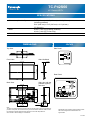
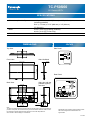
TC-P42S60
42" Plasma HDTV
SPECIFICATIONS
Dimensions (W x H x D)
Mass
Power Source
39.2" (995 mm) x 25.6" (651 mm) x 10.1" (256 mm)
(Including pedestal)
39.2" (995 mm) x 23.5" (597 mm) x 3.2" (80 mm)
(TV Set only)
40.8 lb. (18.5 kg) (Including pedestal)
35.3 lb. (16.0 kg) (TV Set only)
AC 120 V, 60 Hz
DIMENSIONS
JACKS
Top View
Side Panel
Front View
Side ViewBack
2.5 (63)
23.5 (597)
39.2 (995)
Rear Panel
Side view with the
pedestal (option)
attached
Back View
8.4
(211.5)
25.6 (651)
11.9 (300)
15.8 (400)
4.1 (102.5)
15.8 (400)
10.1 (256)
Note:
To make sure that the Plasma Television fits the cabinet properly when a high degree of
precision is required, we recommend that you use the Plasma Television itself to make
the necessary cabinet measurements. Panasonic cannot be responsible for
inaccuracies in cabinet design or manufacture.
Specifications are subject to change without notice.
Non-metric weights and measurements are
approximate.
P121226
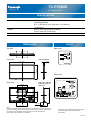
TC-P50S60
50" Plasma HDTV
SPECIFICATIONS
Dimensions (W x H x D)
Mass
Power Source
46.2" (1,172 mm) x 29.6" (751 mm) x 11.7" (295 mm)
(Including pedestal)
46.2" (1,172 mm) x 27.5" (698 mm) x 3.2" (80 mm)
(TV Set only)
53.0 lb. (24.0 kg) (Including pedestal)
46.3 lb. (21.0 kg) (TV Set only)
AC 120 V, 60 Hz
DIMENSIONS
JACKS
Top View
Side Panel
Front View
Side ViewBack
2.5 (63)
27.5 (698)
46.2 (1172)
Rear Panel
Side view with the
pedestal (option)
attached
Back View
7.8
(197.5)
29.6 (751)
11.9 (300)
15.8 (400)
4.9 (122.5)
18.2 (460)
11.7 (295)
Note:
To make sure that the Plasma Television fits the cabinet properly when a high degree of
precision is required, we recommend that you use the Plasma Television itself to make
the necessary cabinet measurements. Panasonic cannot be responsible for
inaccuracies in cabinet design or manufacture.
Specifications are subject to change without notice.
Non-metric weights and measurements are
approximate.
P121226
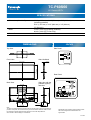
TC-P55S60
55" Plasma HDTV
SPECIFICATIONS
Dimensions (W x H x D)
Mass
Power Source
50.7" (1,287 mm) x 32.2" (816 mm) x 13.2" (333 mm)
(Including pedestal)
50.7" (1,287 mm) x 30.0" (762 mm) x 3.2" (80 mm)
(TV Set only)
66.2 lb. (30.0 kg) (Including pedestal)
57.4 lb. (26.0 kg) (TV Set only)
AC 120 V, 60 Hz
DIMENSIONS
JACKS
Top View
Side Panel
Front View
Side ViewBack
2.5 (63)
30.0 (762)
50.7 (1287)
Rear Panel
Side view with the
pedestal (option)
attached
Back View
9.7
(244.5)
32.2 (816)
11.9 (300)
19.7 (500)
5.9 (148.5)
22.1 (560)
13.2 (333)
Note:
To make sure that the Plasma Television fits the cabinet properly when a high degree of
precision is required, we recommend that you use the Plasma Television itself to make
the necessary cabinet measurements. Panasonic cannot be responsible for
inaccuracies in cabinet design or manufacture.
Specifications are subject to change without notice.
Non-metric weights and measurements are
approximate.
P121226
TC-P60S60
60" Plasma HDTV
SPECIFICATIONS
Dimensions (W x H x D)
Mass
Power Source
55.0" (1,397 mm) x 34.6" (878 mm) x 13.2" (333 mm)
(Including pedestal)
55.0" (1,397 mm) x 32.5" (824 mm) x 3.2" (80 mm)
(TV Set only)
75.0 lb. (34.0 kg) (Including pedestal)
66.2 lb. (30.0 kg) (TV Set only)
AC 120 V, 60 Hz
DIMENSIONS
JACKS
Top View
Side Panel
Front View
Side ViewBack
2.5 (63)
32.5 (824)
55.0 (1397)
Rear Panel
8.0
(202.5) 11.9 (300)
19.7 (500)
34.6 (878)
Side view with the
pedestal (option)
attached
Back View
5.9 (148.5)
22.1 (560)
13.2 (333)
Note:
To make sure that the Plasma Television fits the cabinet properly when a high degree of
precision is required, we recommend that you use the Plasma Television itself to make
the necessary cabinet measurements. Panasonic cannot be responsible for
inaccuracies in cabinet design or manufacture.
Specifications are subject to change without notice.
Non-metric weights and measurements are
approximate.
P121226
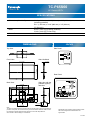
TC-P65S60
65" Plasma HDTV
SPECIFICATIONS
Dimensions (W x H x D)
Mass
Power Source
59.1" (1,500 mm) x 36.9" (936 mm) x 14.2" (359 mm)
(Including pedestal)
59.1" (1,500 mm) x 34.8" (882 mm) x 3.2" (80 mm)
(TV Set only)
84.9 lb. (38.5 kg) (Including pedestal)
75.0 lb. (34.0 kg) (TV Set only)
AC 120 V, 60 Hz
DIMENSIONS
JACKS
Top View
Side Panel
Front View
Side ViewBack
2.5 (63)
34.8 (882)
59.1 (1500)
Rear Panel
7.1
(180) 11.9 (300)
27.0 (684)
36.9 (936)
Side view with the
pedestal (option)
attached
Back View
6.2 (156.5)
23.7 (600)
14.2 (359)
Note:
To make sure that the Plasma Television fits the cabinet properly when a high degree of
precision is required, we recommend that you use the Plasma Television itself to make
the necessary cabinet measurements. Panasonic cannot be responsible for
inaccuracies in cabinet design or manufacture.
Specifications are subject to change without notice.
Non-metric weights and measurements are
approximate.
P121226