1
CONFIGURATION MANUAL
Version 12.05 - January 2015
CONFIGURATION MANUAL XT3 Server 12.05
Copyright
EVS Broadcast Equipment SA– Copyright © 2011-2015. All rights reserved.
Disclaimer
The information in this manual is furnished for informational use only and subject to
change without notice. While every effort has been made to ensure that the information
contained in this user manual is accurate, up-to-date and reliable, EVS Broadcast
Equipment cannot be held responsible for inaccuracies or errors that may appear in this
publication.
Improvement Requests
Your comments will help us improve the quality of the user documentation. Do not
hesitate to send improvement requests, or report any error or inaccuracy on this user
manual by e-mail to [email protected].
Regional Contacts
The address and phone number of the EVS headquarters are usually mentioned in the
Help > About menu in the user interface.
You will find the full list of addresses and phone numbers of local offices either at the end
of this user manual (for manuals on hardware products) or at the following page on the
EVS website: http://www.evs.com/contacts.
User Manuals on EVS Website
The latest version of the user manual, if any, and other user manuals on EVS products
can be found on the EVS download center, on the following webpage:
http://www.evs.com/downloadcenter.
I
CONFIGURATION MANUAL XT3 Server 12.05
Table of Contents
TABLE OF CONTENTS
WHAT'S NEW?
1.
INTRODUCTION
VII
1
1.1. Introduction to the Configuration of EVS Servers
1
1.2. Introduction to the Manual
4
1.3. Starting the EVS Server
4
1.4. Accessing the Web-Based Interface
5
2.
6
MULTICAM SETUP
2.1. Overview of User Interfaces
6
2.1.1. Overview of the Setup Areas
6
2.1.2. Navigability and Commands
9
2.2. Configuration Lines
11
2.2.1. Chapter Contents
11
2.2.2. Launching a Configuration
12
2.2.3. Editing a Configuration
13
2.2.4. Renaming Configuration Lines
15
2.2.5. Exporting and Importing Configuration Lines
16
2.2.6. Changing the Position of Configuration Lines
21
2.2.7. Copying, Pasting and Deleting Configuration Lines
21
2.3. Server Parameters
23
2.3.1. Chapter Contents
23
2.3.2. Assigning a Server Facility Name
23
2.3.3. Activating and Deactivating the Password Protection
24
2.3.4. Setting the Server LAN PC Address
26
2.3.5. Setting the Server Date and Time
27
2.3.6. Setting the Default Output To VGA/Video
29
2.3.7. Configuring Server Raids
29
2.4. Licenses and Maintenance
32
2.4.1. Overview on Options Codes Management
32
2.4.2. Options Codes Management Window
33
2.4.3. Entering and Removing License Codes
35
2.5. Server Maintenance
Table of Contents
III
37
2.5.1. Chapter Contents
37
2.5.2. Rebooting the EVS Server
37
2.5.3. Hardware Check
38
2.5.4. Clearing Video Disks
42
III
EVS Broadcast Equipment SA
3.
Issue 12.05.D - January 2015
2.5.5. Record Train Maintenance
43
2.5.6. Importing and Exporting Keyword Files
45
2.5.7. Exporting Log Files
46
MULTICAM CONFIGURATION
47
3.1. Overview on User Interfaces
3.1.1. Introduction
47
3.1.2. Overview of the Multicam Configuration Window
49
3.1.3. Navigating and Editing in the Multicam Configuration Window
53
3.1.4. Overview of the Setup Menus in the Remote Panel
55
3.1.5. Navigating and Editing in the Setup Menus of the Remote Panel
56
3.1.6. Required Application Reboot
57
3.2. Supported Configurations
59
3.2.1. General Information on Supported Configurations
59
3.2.2. SD/HD Base Configurations
63
3.2.3. General Information on Supermotion Configurations
67
3.2.4. SLSM Configurations
69
3.2.5. General Information on 3D Configurations
91
3.2.6. General Information on 1080p Configurations
92
3.2.7. 3D/1080p Standard Configurations
93
3.2.8. 3D/1080p SLSM Configurations
100
3.2.9. General Information on 4K Configurations
111
3.2.10. 4K Configurations
113
3.2.11. 4K SLSM Configurations
116
3.3. Server Tab
118
3.3.1. Overview
118
3.3.2. Video Codecs and Reference
119
3.3.3. Phase Definition Settings
135
3.3.4. Interpolation Settings
136
3.3.5. PC LAN Settings
137
3.4. Channels Tab
139
3.4.1. Overview
139
3.4.2. Channels
141
3.4.3. Audio
164
3.4.4. Timecode and Data Insertion
183
3.5. Network Tab
191
3.5.1. Overview
191
3.5.2. SDTI Settings
192
3.5.3. Gigabit Connection
194
3.5.4. Gigabit IP Configuration
197
3.5.5. Gigabit Prioritization Settings
199
3.6. Monitoring Tab
IV
47
202
3.6.1. Overview
202
3.6.2. Multiviewer Settings
203
3.6.3. OSD Settings
207
Table of Contents
CONFIGURATION MANUAL XT3 Server 12.05
3.6.4. Monitoring Settings
3.7. Protocol Tab
211
3.7.2. RS422 Protocols Settings
213
3.7.3. Clip Identifiers
214
3.7.4. Sony BVW Settings
215
3.7.5. EditRec
216
3.7.6. RS422 VarID Settings
225
229
3.8.1. Overview
229
3.8.2. GPI Settings
230
3.8.3. Tally Settings
234
3.9. Operation Tab
236
3.9.1. Overview
236
3.9.2. OSD Settings
240
3.9.3. Audio Meters OSD Settings
242
3.9.4. Clips Settings
244
3.9.5. Playlist Settings
250
3.9.6. Timeline Settings
256
3.9.7. Protection Settings
257
3.9.8. Keywords Settings
259
3.9.9. Push Settings
261
3.9.10. Audio Settings
264
3.9.11. EVS Controller Settings
266
3.9.12. Cam Mapping Settings
273
3.9.13. Hypermotion Management
274
3.9.14. Hypermotion Controller Settings
276
3.9.15. Special Effects Settings
278
MONITORING
284
4.1. Server Monitoring
284
4.1.1. Overview on Server Monitoring Windows
284
4.1.2. General Information Window
285
4.1.3. Raid and Disk Status Window
287
4.1.4. Timecode Status Window
290
4.1.5. Timecode Monitoring Window
292
4.1.6. Log Management
293
4.2. SDTI Network Monitoring
295
5.
4.2.1. Overview on SDTI Network Monitoring Windows
295
4.2.2. SDTI Network Schema
295
4.2.3. Hardware Error Counters
297
4.2.4. Disconnecting a Machine from the XNet Network
297
PROTOCOLS
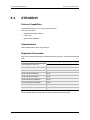
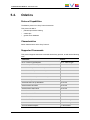
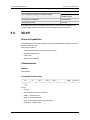
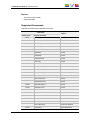
5.1. Introduction
Table of Contents
211
3.7.1. Overview
3.8. GPI Tab
4.
208
299
299
V
EVS Broadcast Equipment SA
5.2. Sony BVW75
299
5.3. XTENDD35
302
5.4. Odetics
303
5.5. VDCP
304
6.
TRUCK MANAGER PLUGIN
307
6.1. Introduction
307
6.2. Plugin Overview
308
6.3. Contextual Menu
310
6.4. Configuration Area
311
6.5. Server Area
312
6.6. Channels Area
314
6.7. Network Area
318
GLOSSARY
VI
Issue 12.05.D - January 2015
321
Table of Contents
CONFIGURATION MANUAL XT3 Server 12.05
What's New?
In the Multicam Configuration manual, the icon
has been added on the left
margin to highlight information on new and updated features in release 12.05.
The changes linked to new features in version 12.05 are listed below:
Integration with Truck Manager
EVS server configuration via the Multicam plugin in the Truck Manager application
•
See section "Truck Manager Plugin" on page 307
Gigabit Prioritization Feature
Prioritization of transfers from/to the Gigabit FTP server
•
See section " Gigabit Prioritization Settings" on page 199
TwinRec Feature
Use of both record channels of each codec module
•
See section "TwinRec Feature" on page 147
•
See section "TwinRec" on page 145 (new setting in Base settings)
Autosense Function
Automatic detection and upconversion of SD video in HD configuration
•
See section "SD Autosense " on page 160
•
See section "SD => HD Conversion" on page 162
•
See section "4:3 Conversion " on page 160
Internal 10GbE Gigabit Ethernet connection
•
See section "Gigabit Connection" on page 194
•
See section "Gigabit IP Configuration" on page 197
New Supported SLSM 4x - 6x Configurations
•
New SLSM Rec values for XT3:
◦
See section "Base Settings" on page 141
◦
See section "Codec-Related Information" on page 128
•
See section "General Information on Supermotion Configurations" on page 67
•
See section "SLSM Configurations" on page 69
•
See section "3D/1080p SLSM Configurations" on page 100
New Supported SLSM 2x 3G XREC Configurations on XT3 6U servers
•
See section "SLSM Configurations" on page 69, more precisely "XREC
configurations" on page 81
Epsio Zoom Integration
•
What's New?
See section "Special Effects Settings" on page 278
VII
EVS Broadcast Equipment SA
Issue 12.05.D - January 2015
New Supported Configuration with 4K SLSM Recorders
•
See section "4K SLSM Configurations" on page 116
Dual Multiviewer
•
See section "Multiviewer Settings" on page 203
Record Train Maintenance
•
See section "Record Train Maintenance" on page 43
•
See section "Clearing Video Disks" on page 42
•
See section "General Information Window" on page 285
Support of Cue Points on Clips
•
See section "EVS Controller Settings" on page 266
New XT3 4U chassis
•
See section "Gigabit Connection" on page 194
•
See section "Audio Connectors" on page 165
The following changes unrelated to new features, and therefore not highlighted with the
New icon, have been brought to the configuration manual:
Section on enhanced playout mode in standard and SLSM configurations:
•
See section "Enhanced Playout Mode" on page 62
Section on protocols
•
See section "Protocols" on page 299
Updates in SLSM 3G configurations
•
VIII
See section "SLSM Configurations" on page 69
What's New?
CONFIGURATION MANUAL XT3 Server 12.05
1.
Introduction
1.1.
Introduction to the Configuration of
EVS Servers
Configuration Module
The Multicam Setup application is used for configuration and maintenance operations on
EVS video servers. It is also used to select which application to run, since EVS disk
recorders have the ability to run various dedicated applications (Video Server, Slow
Motion, …).
The configuration module available from Multicam 11.00 has been developed along the
lines presented in this section.
Consolidation into a Single User Interface
The server can be fully configured from a single user interface.
The user interface includes:
•
1. Introduction
a setup section presented on one page with two main areas which give access to the
configuration lines and the most used maintenance commands:
1
EVS Broadcast Equipment SA
•
Issue 12.05.D - January 2015
a configuration section for each configuration line. It is presented in seven tabs which
easily give access to all configuration parameters:
Simple User Interface
The user interface is simple and clear thanks to:
•
the separation of basic and advanced parameters
The most commonly used parameters are displayed in a basic mode while more
specific parameters are hidden, and can be displayed when you toggle to the
advanced mode.
•
the filtering of the parameters displayed
The parameters are only displayed when they are applicable to the chassis type, the
video standard and option codes.
2
1. Introduction
CONFIGURATION MANUAL XT3 Server 12.05
Parameter Changes While Server is Running
Changes to most parameters can be performed and are taken into account while the
server is running.
Easy Audio Configuration
The audio configurations are open and easily configurable as it is possible to:
•
modify the audio parameters while the server is running
•
configure individual outputs for Embedded, Digital and Analog audio.
•
configure audio monitoring settings directly from the Remote Control panel.
Configuration Available from Server, Web and Remote
Panel
You can configure the EVS server using one of the three available tools:
•
The server-based application (VGA) features all settings and commands for the setup
and configuration.
•
The newly designed web-based interface is equivalent to the server-based application
and enables engineers to configure the EVS server remotely.
•
The Remote Panel now includes:
◦
a technical setup menu that gives access to the most commonly used technical
settings.
◦
an operational setup menu that only provides operational settings.
The following table gives an overview on the features available in each user interface:
EVS Server Configuration
Configuration Window
Setup Window
Server-Based
Application
Web-Based
Interface
Remote Panel
1. Introduction
Technical Settings
Operational Settings
Yes
Yes
(tabs 1-6)
Yes
(tab 7)
Yes
(except some
Tools commands)
Yes
(tabs 1-6)
Yes
(tab 7)
No
Yes
(Technical Setup F0)
Yes
(Setup Menu SHIFT+D)
3
EVS Broadcast Equipment SA
1.2.
Issue 12.05.D - January 2015
Introduction to the Manual
Documented User Interfaces
The Server Configuration manual deals with all user interfaces used to configure
Multicam: server-based application, web-based interface, and Remote Panel.
•
On the one hand, the information on navigability and editing commands, specific to the
user interface, is described in clearly separated sections.
•
On the other hand, the reference information on and the description of configuration
parameters are described in common sections valid for all user interfaces. A clear
overview shows whether and where the parameters are available in each user
interface.
Configuration Manual Structure
The Server Configuration manual is organized in two sections:
•
•
1.3.
A section dedicated to the Multicam Setup window that mainly features:
◦
the configurations lines and their management
◦
the functions related to server administration and maintenance.
A section dedicated to the Multicam Configuration window, organized in seven tabs,
which describes all server configuration parameters that can be defined for each
configuration line. The section includes:
◦
the parameter description itself
◦
other server-related information needed for the configuration
Starting the EVS Server
Introduction
When switching on the EVS server, the first step is the PC boot sequence, followed by
the boot of the video I/O boards, and finally the Multicam Setup application is started.
When Starting the EVS Server for the First Time
Before you first use your EVS server, you need to perform the following tasks:
•
Define the configuration lines your EVS server should run.
For more information, see section "Configuration Lines" on page 11.
4
1. Introduction
CONFIGURATION MANUAL XT3 Server 12.05
•
Define the configuration parameters for each configuration line you will need.
In this step, you will define, among others, the channel configuration for the selected
configuration line, as well as audio and video parameters for the EVS server.
For more information, see section "Multicam Configuration" on page 47.
When Starting the EVS Server After Initial Configuration
After the initial configuration, you will select a configuration line and press ENTER to run
the server in this configuration. See section "Launching a Configuration" on page 12. As
soon as the EVS server is launched in a configuration, it starts the loop recording process.
1.4.
Accessing the Web-Based Interface
Prerequisite
When the EVS server is started, you can access the web-based interface of the Multicam
Setup application for that EVS server from any computer on the same network range as
the EVS server. You can use any browser to open the web-based interface.
Procedure
To be able to open the web-based interface in a browser, you need to know the IP address
of the PC LAN of the EVS server. See section "Setting the Server LAN PC Address" on
page 26 for more information.
In your browser, enter the following URL: http://xxx.xxx.xxx.xxx/cfgweb/ where the
crosses correspond to the PC LAN IP address of the EVS server you want to access.
1. Introduction
5
EVS Broadcast Equipment SA
Issue 12.05.D - January 2015
2.
Multicam Setup
2.1.
Overview of User Interfaces
2.1.1.
Overview of the Setup Areas
General Description
The Multicam Setup window is the window that opens first when the Multicam Setup
application is launched. It is displayed when the EVS server is started but does not run a
given configuration yet.
The Multicam Setup window allows users to:
•
view and manage the various configuration lines.
•
perform some administration and maintenance tasks on the EVS server.
•
view summary information on the EVS server and the selected configuration line.
This is available in both server-based and web-based Multicam Setup applications.
Both user interfaces include the same features, except that the Tools menu offers fewer
commands in the web-based user interface.
6
2. Multicam Setup
CONFIGURATION MANUAL XT3 Server 12.05
User Interfaces
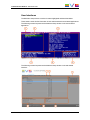
The Multicam Setup window contains six areas highlighted and described below.
These areas contain similar information in both web-based and server-based applications.
The following screenshot presents the Multicam Setup window in the server-based
application:
The following screenshot presents the Multicam Setup window in the web-based
interface:
2. Multicam Setup
7
EVS Broadcast Equipment SA
Issue 12.05.D - January 2015
Description of the Areas
The table below describes the various parts of Multicam Setup window:
8
#
Name of area
Description
1.
Title bar
The title bar displays the following information:
• Multicam version
• server facility name (if any)
• chassis type
• server serial number
2.
Configuration Lines
This area shows all configurations the EVS server can
run:
• 16 configurations lines are available on an EVS
server. A default configuration is defined behind all
configuration lines, even if no name is assigned to
the configuration line.
• Each configuration line contains all configuration
parameters, which allow a very flexible
configuration of the EVS server.
See section "Configuration Lines" on page 11 for more
information.
3.
Tools
This area provides the main commands for server
administration and maintenance.
For more information, click the Tools command below
to go to the dedicated sections in the Multicam Setup
chapter:
• Import/export configuration lines
• Assign server facility name
• Import/export keyword files
• Export log files
• Options code management
• Hardware check
• Raid Configuration
• Set LAN PC address
• Set date and time
• Clear video disks
• Default to VGA
• Reboot
• Enable password for technical settings
4.
Configuration
Summary
This area shows a summary of the server parameters
for the configuration line selected in the Configuration
Lines area.
The summary displays the following information:
1. codec type - bitrate - video standard
(for each active codec)
2. based config - INs/OUTs - No. audios
3. SDTI No. - server name - server type
2. Multicam Setup
CONFIGURATION MANUAL XT3 Server 12.05
2.1.2.
#
Name of area
Description
5.
Task bar
The Task bar (Server-based application) displays
commands for the main actions in the window.
See section "Navigability and Commands" on page 9
for more information.
5'. Status bar
The Status bar (web-based interface) displays:
• the Multicam Setup application status
• the date and time of the last refresh
• the Refresh button
6.
This area displays the following information on the EVS
server:
• genlock status (OK or bad)
• timecode and timecode status (OK or bad)
• IP address of the LAN PC
Server Information
Navigability and Commands
In the Server-Based Application
General Navigability
The following table presents the general commands to navigate in the Multicam Setup
window:
2. Multicam Setup
Command description
Command key
Moving the cursor to the first item of the Tools menu
F9
Moving the cursor to the first configuration line
ESC
Moving down in the list of editable items
(configuration lines and Tools commands)
TAB
Moving up in the list of editable items
SHIFT+TAB
Displaying a Help window that gives a summary of
the commands
F1
9
EVS Broadcast Equipment SA
Issue 12.05.D - January 2015
Configuration Lines
In the Configuration Lines area, a configuration line is highlighted when it is selected.
The main commands for configuration line management are presented below:
Command description
Command key
Moving up in the list of configuration lines
UP ARROW
Moving down in the list of configuration lines
DOWN ARROW
Starting the server with a given configuration line
ENTER on selected line.
Entering the Configuration window to edit the settings
related to a selected line
F8
Renaming a configuration line
CTRL + F1
Deleting a configuration line
CTRL + DELETE
See section "Configuration Lines" on page 11 for more commands on configuration lines.
Tools Menu
Command description
Command key
Selecting a tool command
Pressing the shortcut key
(between brackets in the
command name)
Calling a tool command
ENTER on the selected
command
In the Web-Based Interface
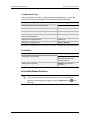
Note
To be sure that changes have been taken into account in the web-based
interface, refresh regularly the page by clicking the Refresh button
status bar.
10
in the
2. Multicam Setup
CONFIGURATION MANUAL XT3 Server 12.05
Configuration Lines
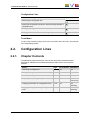
Command description
Command icon
Renaming the configuration line
Entering the Configuration window to edit the settings related the
configuration line
Deleting the configuration line
Starting the server with the corresponding configuration line
Tools Menu
To call a Tools command, simply click on the command in the Tools menu. This will open
the corresponding window.
2.2.
Configuration Lines
2.2.1.
Chapter Contents
The table below presents the topics of this section and shows whether the feature
described is available from the web-based interface and/or from the server-based
interface.
2. Multicam Setup
Section
Page
Server-Based Web-Based
"Launching a Configuration"
2.2.2
Yes
Yes
"Editing a Configuration"
2.2.3
Yes
Yes
"Renaming Configuration Lines"
2.2.4
Yes
Yes
"Exporting and Importing Configuration Lines"
2.2.5
Yes
Yes
(one by one)
"Changing the Position of Configuration Lines"
2.2.6
Yes
Yes
(indirectly)
"Copying, Pasting and Deleting Configuration
Lines"
2.2.7
Yes
Yes
(indirectly)
11
EVS Broadcast Equipment SA
2.2.2.
Issue 12.05.D - January 2015
Launching a Configuration
Introduction
When the EVS server has initialized, the Multicam Setup window stays open, by default,
until the operator selects the requested configuration line and launches it.
Multicam can encode the video signal simultaneously in several essences, and grant a
seamless access to the video material in all active essences. The material ingested on an
EVS server must therefore, as much as possible, be and remain available on this server in
all active essences. For this reason, some restrictions or checks are applied when you
launch a configuration.
Compatible Multi-Essence Configurations
On the same SDTI network, it is not allowed to have:
•
EVS servers with mixed multi-essence configurations;
or
•
a combination of EVS servers supporting and not supporting multi-essence
configurations.
In such situations, you will get the following message when you try to launch a
configuration on the EVS server: "Incompatible multi-codec configuration
on the network".
You have the option to:
•
come back to the Multicam Setup window to select a configuration compatible with
the other EVS servers;
•
work in standalone mode. This mode will prevent you from browsing the content of
other EVS servers and from transferring content to other EVS servers.
Change of Multi-Essence Configuration
To make sure the video material is available in the required essences on the EVS server,
you need to perform a clear clip before launching a configuration in the following
situations:
•
after upgrading from Multicam 11.XX to Multicam 12.XX.
•
in specific changes from one to another multi-essence configuration
See section "Clearing Video Disks" on page 42 for detailed information on when a clear
clip is required.
12
2. Multicam Setup
CONFIGURATION MANUAL XT3 Server 12.05
How to Manually Launch a Configuration
In the Server-Based Application
To start a configuration in the server-based application, proceed as follows:
1. Press the UP ARROW or DOWN ARROW key to respectively move up and down in
the list of configuration lines until the requested line is highlighted.
2. Press ENTER to run the configuration line on the EVS server.
In the Web-Based Interface
To start a configuration in the web-based interface, click the Launch icon
configuration line you want to launch.
next to the
Automatic Launch
From the server-based application, it is possible to set the server so that the last used
configuration line is automatically launched when the Multicam Setup window has stayed
open for five seconds.
To activate the automatic launch, press F7 on the requested configuration line in the
Multicam Setup menu before launching this configuration. This configuration line is then
highlighted in black (no longer in green) to indicate the automatic launch is active. The last
used configuration line will then be launched automatically after a five seconds' delay the
next time the EVS server will be restarted.
If you want to change the configuration line to be launched, you need to rapidly hit a key on
the keyboard connected to the EVS server within five seconds after the Multicam Setup
window has been displayed. Then, the Multicam Setup window will stay open and let you
select another configuration.
2.2.3.
Editing a Configuration
How to Edit a Configuration
Introduction
When the operator hits a key on the keyboard connected to the EVS server (within five
seconds if the automatic launch of a configuration is active), the Multicam Setup window
stays open, and the operator can select and enter the selected configuration to edit it.
16 configurations lines are available on an EVS server. A default configuration is defined
behind all configuration lines, even if no name is assigned to the configuration line.
Each configuration line contains all configuration parameters, which allow a very flexible
configuration of the EVS server.
2. Multicam Setup
13
EVS Broadcast Equipment SA
Issue 12.05.D - January 2015
In the Server-Based Application
To edit a configuration line in the server-based application, proceed as follows:
1. Press the UP ARROW or DOWN ARROW key to respectively move up and down in
the list of configuration lines until the requested line is highlighted.
2. Press F8.
The Configuration window opens. See section "Multicam Configuration" on page 47 to
edit the configuration parameters.
3. When the configuration is defined for a given line, press ALT+A in the Configuration
window to validate the changes
4. Press ESC to come back to the Setup window.
In the Web-Based Interface
To edit a configuration line in the web-based interface, proceed as follows:
1. Click the Edit icon
for the configuration line you want to configure.
The Configuration window opens. See section "Multicam Configuration" on page 47 to
edit the configuration parameters.
2. When the configuration is defined for the given line, click Apply to validate, and then
Quit to come back to the Setup window.
Invalid Configuration
Invalid configuration lines are easily detected in the server-based application:
•
When a configuration line becomes invalid, a red exclamation mark <!> is displayed
next to the configuration line in both server-based and web-based interfaces:
or
•
14
When the operator presses F8 to edit the configuration line in the server-based
application, a popup window indicates the line is invalid. When the operator
acknowledges the message, the pages including the invalid parameters are displayed
with the invalid parameters selected.
2. Multicam Setup
CONFIGURATION MANUAL XT3 Server 12.05
2.2.4.
Renaming Configuration Lines
Introduction
When the EVS server is delivered, default names are assigned to the configuration lines.
You can change them as explained below.
In the Server-Based Application
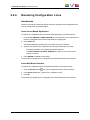
To rename the configuration line in the server-based application, proceed as follows:
1. Press the UP ARROW or DOWN ARROW key to respectively move up and down in
the list of configuration lines until the requested line is highlighted.
2. Press CTRL+F1.
The line if highlighted in pink and the cursor blinks on the first character.
3. Type the new name for the configuration line taking the following into account:
◦
The space bar allows you to delete the selected character.
◦
The LEFT ARROW and RIGHT ARROW keys allow you to move the cursor
position on the line.
4. Press ENTER to validate the new name.
The new name is assigned to the configuration line and reflected in all user interfaces.
In the Web-Based Interface
To rename the configuration line in the web-based interface, proceed as follows:
1. Click the Rename button
next to the configuration line you want to rename.
2. In the Rename dialog box, type the new configuration name.
3. Click OK.
The new name is assigned to the configuration line and reflected in all user interfaces.
2. Multicam Setup
15
EVS Broadcast Equipment SA
2.2.5.
Issue 12.05.D - January 2015
Exporting and Importing Configuration
Lines
How to Export Configuration Lines
Note
The screenshots in this section features configuration names which are
examples, and may not reflect configurations supported on your EVS server.
In the Server-Based Application
To export configuration lines from an EVS server in the server-based application, proceed
as follows:
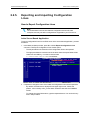
1. In the Multicam Setup window, press P to call the Export Configuration Lines
command. The Export Configuration Lines window opens:
◦
The left pane allows the selection of the configuration lines to be exported
◦
The right pane allows the selection of the location where the export folder will be
created on the USB key, or on the local drive folder
C:/LSMCE/DATA/SETUP/USER or a subfolder.
2. If requested, change the name of the folder the configuration lines will be exported to:
16
◦
By default, the folder name, displayed in the upper right corner, follows the
pattern: <server facility name_current date> where the date has the YYMMDD
format.
◦
To change the export folder name, type the requested name. You can do this any
time in the procedure.
2. Multicam Setup
CONFIGURATION MANUAL XT3 Server 12.05
3. If requested, change the selection of configuration lines selected for export on the left
pane:
◦
By default, a cross is displayed in front of all configuration lines, which means
they are all selected for export.
◦
To deselect a line, use the UP ARROW or DOWN ARROW key to highlight the
requested line, and press SPACEBAR. The cross is removed, and the
deselected lines turn light gray.
4. Press TAB to shift the focus to the right pane.
5. If requested, change the location where the export folder will be created:
◦
By default, the export folder is created on the USB key root or on the local drive
folder the local drive folder C:/LSMCE/DATA/SETUP/USER.
◦
To change the folder where the export folder will be created, highlight the
requested folder. The last highlighted folder will be considered as the requested
location.
6. To start the export process, press ENTER.
7. When the selected lines are exported (as a .lin file), a message opens to confirm the
export. Click OKto acknowledge the message.
In the Web-Based Interface
Note
In the web-based interface, it is only possible to export configuration lines one
by one.
To export configuration lines from an EVS server in the web-based interface, proceed as
follows:
1. From the Multicam Setup window, click Export configuration lines in the Tools
menu.
The Export configuration lines window opens:
2. Multicam Setup
17
EVS Broadcast Equipment SA
Issue 12.05.D - January 2015
2. Click Export next to the configuration line you want to export.
3. In the File Download dialog box, click Save.
4. Select the location where you will save the export configuration file (.lin file) and, if
requested, change the file name.
5. Click Save.
The export file is saved at the requested location.
If you want to export several configuration lines, repeat this operation for all requested
configuration lines.
How to Import Configuration Lines
In the Server-Based Application
Warning
If the EVS server is password-protected, you should deactivate the password
protection. Otherwise, you will only be able to import the operational settings of
the configuration lines selected for import.
1. In the Multicam Setup window, press M to call the Import Configuration Lines
command.
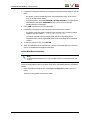
2. The Import Configuration Files window opens:
18
◦
The left pane allows the selection of the folder containing the configuration files to
be imported.
◦
The right pane allows the selection of the configuration lines to be imported onto
the EVS server.
2. Multicam Setup
CONFIGURATION MANUAL XT3 Server 12.05
3. On the left pane, use the UP ARROW or DOWN ARROW key to highlight the folder
that contains the configuration file you want to import.
When the folder is selected, the right pane shows:
◦
a cross in front of the configuration lines that will be imported.
The lines are imported onto the same position and with the same name as in the
export file.
4. Press TAB to shift the focus to the right pane.
5. If requested, deselect lines you do not want to import:
◦
By default, all configuration lines present in the .lin file will be imported onto the
EVS server.
◦
To deselect a line, use the UP ARROW or DOWN ARROW key to highlight the
requested line, and press SPACEBAR. The deselected lines turn light gray and
the cross is removed.
6. Press ENTER to validate the selection of configuration lines to import.
A warning message informs you about which configuration lines will be imported, and
tells the next screen will allow you to select which settings to replace.
7. Select 'Yes' using the RIGHT ARROW, and press ENTER.
8. In the Select settings to replace window, select the type of settings you want to import
for the selected configuration lines:
a. Press SPACEBAR to select or deselect a settings type.
b. Press TAB to move to the next settings type.
c. Repeat these steps for all settings types you want to import.
9. Press ENTER to start the import process.
2. Multicam Setup
19
EVS Broadcast Equipment SA
Issue 12.05.D - January 2015
In the Web-Based Interface
Note
In the web-based interface, it is only possible to import configuration lines one
by one.
To import configuration lines onto an EVS server in the web-based interface, proceed as
follows:
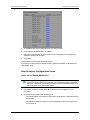
1. From the Multicam Setup window, click Import configuration lines in the Tools menu.
The Import configuration line window opens.
2. Click Select next to the top field and select the configuration file you want to import.
3. Tick the configuration line to be replaced on the EVS server.
4. Click Import.
The configuration line is imported with its original name onto the selected configuration
line on the EVS server.
20
2. Multicam Setup
CONFIGURATION MANUAL XT3 Server 12.05
2.2.6.
Changing the Position of Configuration
Lines
In the Server-Based Application
To move a configuration line up in the list in the server-based application, proceed as
follows:
1. Press the UP ARROW or DOWN ARROW key to respectively move up and down in
the list of configuration lines until the requested line is highlighted.
2. Do one of the following:
◦
To move the selected line up, press CTRL + UP ARROW.
◦
To move the selected line down, press CTRL + DOWN ARROW.
In the Web-Based Interface
The feature to move configuration lines up and down in the list of configuration lines is not
available as such in the web-based interface.
You can however use the import and export feature to change the position of lines in the
list of configuration lines.
2.2.7.
Copying, Pasting and Deleting
Configuration Lines
How to Copy/Paste Configuration Lines
In the Server-Based Application
Warning
Note that copying a line onto another position will erase the configuration on the
selected position.
To copy and paste a configuration line in the server-based application, proceed as follows:
1. Press the UP ARROW or DOWN ARROW key to respectively move up and down in
the list of configuration lines until the requested line is highlighted.
2. Press CTRL+C to copy the line to the clipboard.
3. With the UP ARROW and DOWN ARROW keys, move to the position where you
want to copy the line.
4. Press CTRL + V to paste the line to the selected position.
5. Press ENTER to confirm that you agree to replace the former configuration line by the
one copied on the selected position.
2. Multicam Setup
21
EVS Broadcast Equipment SA
Issue 12.05.D - January 2015
In the Web-Based Interface
The feature to copy and paste configuration lines is not available as such in the webbased interface.
You can however use the import and export feature to change the position of lines in the
list of configuration lines.
How to Delete Configuration Lines
Warning
When you delete a configuration line, the line will automatically be deleted,
without prior warning message.
In the Server-Based Application
To delete a configuration line in the server-based application, proceed as follows:
1. Press the UP ARROW or DOWN ARROW key to respectively move up and down in
the list of configuration lines until the requested line is highlighted.
2. Press CTRL+DEL to delete the line.
The line is directly deleted.
In the Web-Based Interface
To delete a configuration line in the web-based interface, click the Delete icon
the configuration line you want to delete.
next to
The configuration line is directly deleted.
22
2. Multicam Setup
CONFIGURATION MANUAL XT3 Server 12.05
2.3.
Server Parameters
2.3.1.
Chapter Contents
The table below presents the topics of this section and shows whether the described
features are available from the web-based interface and/or from the server-based
interface.
2.3.2.
Commands
Page
ServerBased
WebBased
"Assigning a Server Facility Name"
2.3.2
Yes
Yes
"Activating and Deactivating the Password
Protection"
2.3.3
Yes
No
"Setting the Server LAN PC Address"
2.3.4
Yes
No
"Setting the Server Date and Time"
2.3.5
Yes
No
"Setting the Default Output To VGA/Video"
2.3.6
Yes
No
"Configuring Server Raids"
2.3.7
Yes
No
Assigning a Server Facility Name
Introduction
You can assign a facility name to the EVS server. It allows the identification of the EVS
server with a dedicated name, besides the server's serial number. This name is
independent from any configuration.
The server facility name differs from the server net name, which can vary from a
configuration to the other as it is defined in the configuration parameters.
The server facility name is displayed in the title bar of the Multicam setup and
configuration windows, as well as on the OSD (on-screen display).
2. Multicam Setup
23
EVS Broadcast Equipment SA
Issue 12.05.D - January 2015
In the Server-Based Application
To assign a server facility name in the server-based application, proceed as follows:
1. In the Multicam Setup window, press F to call the Assign server facility name
command. A dialog box opens:
2. Type the server facility name and press ENTER.
The facility name is directly assigned and displayed in the Title bar, as well as on the
OSD.
In the Web-Based Interface
To assign a server facility name in the web-based interface, proceed as follows:
1. From the Multicam Setup window, click Assign server facility name in the Tools
menu. A dialog box opens:
2. Type the server facility name and press OK.
The facility name is directly assigned and displayed in the Title bar, as well as on the
OSD.
2.3.3.
Activating and Deactivating the Password
Protection
Activating the Password on the EVS Server
Introduction
The administrator can protect the EVS server with a password. This password protection
prevents unauthorized users from changing configuration settings. It does not prevent
from using operational commands.
The password protection can only be activated and deactivated from the server-based
application.
24
2. Multicam Setup
CONFIGURATION MANUAL XT3 Server 12.05
The password protection has the following impact on the various user interfaces:
•
The password is required to apply changes to configuration parameters in the serverbased application and in the web-based interface.
•
On the Remote Panel, the Technical Setup menu is not available.
How to Activate the Password on the EVS Server
To activate a password on the EVS server, proceed as follows:
1. In the Multicam Setup window, press W to call the Enable password command. A
warning message opens.
2. Read the warning message carefully. Press the RIGHT ARROW key to select 'Yes'
and press ENTER to activate the password protection.
The password protection is directly active in all user interfaces, for all configuration
parameters on all configuration lines.
Enabling Changes to Configuration Parameters
In the Server-Based Application
When the password protection is active, the following message is displayed in red at the
top of each configuration tab in the Multicam Configuration window:
To enable changes in the configuration parameters during the session, you will be
prompted for the password the first time you save changes to configuration parameters in
a session.
In the Web-Based Interface
When the password protection is active, the Multicam Configuration window is
completely dimmed and a closed lock icon is displayed at the top of the window:
To enable changes in configuration parameters during the browser session, proceed as
follows:
1. Click the Lock icon
.
2. Enter the password on the dialog box that is displayed.
3. Press OK.
The close lock icon changes to an open lock icon
modified and saved for the browser session.
2. Multicam Setup
, and the parameters can be
25
EVS Broadcast Equipment SA
Issue 12.05.D - January 2015
Deactivating the Password on the EVS Server
Once the password protection is active, it can only be deactivated from the server-based
application as follows:
1. In the Multicam Setup window, press W to call the Enable password command.
A message opens to warn you that you are about to remove the password protection:
2. Press the RIGHT ARROW key to select 'Yes' and press ENTER
3. Type the password in the dialog box that opens, and press ENTER to validate:
The password protection is directly removed from all user interfaces.
2.3.4.
Setting the Server LAN PC Address
Introduction
The MTPC board of an EVS server allows interaction with other EVS hardware on a setup
via the LAN PC address. The port #1 of the MTPC board is used. The communication is
established through telnet or FTP access. XNet Monitor will also use the LAN IP
connection to transfer the monitoring data.
Note
You can only define the settings associated with the LAN PC address from the
server-based application.
26
2. Multicam Setup
CONFIGURATION MANUAL XT3 Server 12.05
Settings
The MTPC board connection settings are described in the table below:
Setting
Description
IP Address
Specifies the IP address to connect to the port #1 of the MTPC board on
the server. The IP addresses 0.0.0.0 and 255.255.255.255 are not
allowed.
Subnet Mask
Specifies the range of logical addresses within the address space
assigned to the MTPC board connection.
Default
Gateway
Specifies the IP address of the router on the network that the MTPC
board can use as an access point to external networks.
How to Set the LAN PC
To set up the LAN PC on the EVS server, proceed as follows:
1. In the Multicam Setup window, press L to call the Set LAN PC address command.
The following window opens:
2. In this window, type the IP address, subnet mask, and default gateway. Use the TAB
key to move from one field to the other.
3. Press ENTER to validate the definition of the LAN PC settings.
The LAN PC settings will automatically be taken into account when you launch a
configuration line.
2.3.5.
Setting the Server Date and Time
Introduction
The Set Date and Time command allows you to adjust the system time & date from the
Multicam Setup window in the server-based application. This is not available in the webbased interface.
Note
When you have just launched a configuration, a window displaying the system
date and time gives you another opportunity to modify these parameters.
2. Multicam Setup
27
EVS Broadcast Equipment SA
Issue 12.05.D - January 2015
Supported Formats
The supported date format is DD-MM-YYYY, as shown in the example below:
•
15-03-2011 for March 15, 2011
The supported time format is hh:mm:ss, as shown in the example below
•
22:58:00 for 22 h 58 min 00 sec (24-hour display)
A warning message will inform you if the format you try to use is not valid.
How to Set the System Date and Time
To set up the system date and time from the Multicam Setup window, proceed as follows:
1. In the Multicam Setup window, press T to call the System date and time command.
The following window opens:
2. In this window, type:
◦
the date in the DD/MM/YYYY format
◦
the time in the hh:mm:ss format (24-hour display)
using TAB to move from one field to the other.
3. Press ENTER to apply the changes to the system date and time.
The date and time you have entered here will automatically be taken into account when
you launch a configuration.
28
2. Multicam Setup
CONFIGURATION MANUAL XT3 Server 12.05
2.3.6.
Setting the Default Output To VGA/Video
Introduction
Between the PC boot and the I/O boot, the video driver is loaded. The Default Output to
VGA/Video command allows you to switch the video display from and to one of the
following modes:
•
VGA mode
•
B&W video mode. This mode sends a video CVBS output on the VGA connector,
which allows the VGA screen to be displayed on a standard composite video monitor
using the VGA <==> BNC adapter provided with the unit.
Note
When a configuration has been launched, you can still switch from one mode to
the other with ALT + BACKSPACE.
How to Change the Default Output
Pressing E allows you to toggle from one mode to the other, and so changing the default
output mode.
The parameter displayed on the Multicam Setup window corresponds to the active value.
This means that when the parameter displayed is 'Default to VGA', the active mode is the
VGA mode.
2.3.7.
Configuring Server Raids
Introduction
When the EVS server is started, the server raids are automatically detected, and built
based on the default settings described in the 'Default Raid Configuration' section below.
You can view the default raid configuration and modify it from the Raid Configuration
window. This window is only available in the server-based application.
Note
Only hard disk drives from EVS can be used as they are specifically configured
to work with EVS video servers.
2. Multicam Setup
29
EVS Broadcast Equipment SA
Issue 12.05.D - January 2015
Overview on the Raid Configuration Window
The Raid Configuration window is available from the Multicam Setup window, when
pressing R to call the Raid Configuration command in the Tools menu:
The Requested Configuration area, in the upper part of the window, displays the default
raid configuration. You can modify the default raid configuration in this area. You will find
more information on editable parameters below.
The Current Configuration area, in the lower part of the Raid Configuration window,
provides raid and disk status information.
Default Raid Configuration
At the first start, the software builds the raids using the following settings:
•
If internal and external storage are detected, both are used.
•
(5+1) raid configuration with a maximum of 5 spares is used. First, all the raids are
built. The remaining disks are used as spare disks. The construction of raids starts
with internal arrays and carries on with external arrays. A raid can be created across
several hardware arrays.
Requested Raid Configuration
Overview
In the Requested Raid Configuration, you can modify the following parameters in the
default raid configuration:
•
Use of internal and/or external storage.
•
Use of spare disks.
•
Number of raids to be used.
To modify one of these parameters, press TAB to select the requested field, and
SPACE BAR to select the requested value, or type the requested value.
30
2. Multicam Setup
CONFIGURATION MANUAL XT3 Server 12.05
Field Description
The following table describes the fields editable in the Requested Configuration area in the
Raid Configuration window. The fields are described in the sequence they appear. You
can select them using the TAB key.
Field Name
Description
Storage type
Specifies which storage type you will use. When both
storage types are available, the following values are
possible:
• Internal only
• External + Internal
• External only
Number of raids
Specifies the number of raids you want to use.
Type the number of raids you want to use.
Raid configuration type Specifies the raid configuration type.
The software is able to handle two raid organizations:
• (4+1): raid of 5 disks
• (5+1): raid of 6 disks
Current Raid Configuration
This area is used to display the raid status for the selected configuration when the EVS
server is running a configuration.
2. Multicam Setup
31
EVS Broadcast Equipment SA
Issue 12.05.D - January 2015
2.4.
Licenses and Maintenance
2.4.1.
Overview on Options Codes Management
Introduction
To run a software application and/or specific software options, not only the software itself
is required but also a license key (called 'license code' in Multicam), which is unique for
every option on every system.
This license keys can be temporary, be valid only until a defined deadline for
demonstration purposes, or be permanent with no time limit.
The license keys are managed from the Options codes management window. This
window is available in both the server-based application and the web-based interface.
Note
When a temporary license code will expire within the next two weeks or is
expired, the system warns the operator when the Multicam Setup window
opens.
Accessing the Options Codes Management Window
To open the Options codes management window in the server-based application, press O
from the Multicam Setup window.
To open the Option codes management window in the web-based interface, click Options
code management in the Tools menu from the Multicam Setup window.
32
2. Multicam Setup
CONFIGURATION MANUAL XT3 Server 12.05
2.4.2.
Options Codes Management Window
In the Server-Based Application
The window features three areas which contain the information mentioned below:
2. Multicam Setup
Area
Description
Upper area
List of key settings related to the EVS server:
• System ID: ID code of the hardware key, necessary for license
code calculation.
• Serial number: Serial number of the mainframe, also written on
the back plate of the mainframe.
• User: The user name is a label for information's sake only.
• Chassis type: Type of mainframe. If this value is wrong, audio
and video routing inside the system will not work properly.
• PSU type: Type of PSU installed on the chassis: standard or hot
swap.
• Key date and time: Expiration date & time for temporary license
codes. Not available when the permanent codes are installed.
Central area
All codes available for the given server chassis.
Next to each code name, the code number, the type of license
(permanent, temporary, demo, or 'not granted'), as well as the
expiration date are mentioned.
Lower area
Area where you can enter new license codes manually.
The commands on how to import new license code from files are
specified.
33
EVS Broadcast Equipment SA
Issue 12.05.D - January 2015
In the Web-Based Interface
The window features two areas which contain the information mentioned below:
34
Area
Description
Central area
All codes available for the given server chassis for which a
license key has been granted and is still valid.
Next to each code name, the code number is mentioned.
Lower area
Area where you can enter new license codes manually or upload a
license code file.
2. Multicam Setup
CONFIGURATION MANUAL XT3 Server 12.05
2.4.3.
Entering and Removing License Codes
Introduction
When you request new license codes to activate one or more features, you can receive
the license keys from EVS in the form of:
•
a xxxxx.COD file (xxxxx = serial number of the server for which this file has been
calculated). You need to apply this file to the EVS server from the Option codes
management window.
•
a license code that you can type in the Option codes management window.
Once the license codes have been entered, the corresponding options or features are
automatically active when you launch a configuration, without having to reboot the server.
How to Enter License Codes from a COD File
In the Server-Based Application
To enter a new license code delivered via a COD file, proceed in one of the following
ways:
1. Copy the .COD file on a USB key that you connect to the USB port of the EVS server.
2. From the Multicam Setup window, press O to open the Options codes management
window.
3. Press simultaneously ALT+ U keys.
OR
1. Copy manually the .COD file to the C:\ drive of the EVS server.
2. In the Multicam Setup menu, press O to open the Options codes management
window.
3. Press simultaneously ALT+ F keys.
The license codes will be read from the .COD file and updated into the system. Next to
the line corresponding to the code, the license type, and the expiration date, if any, are
displayed.
2. Multicam Setup
35
EVS Broadcast Equipment SA
Issue 12.05.D - January 2015
In the Web-Based Interface
To enter a new license code delivered via a COD file, proceed as follows:
1. Copy the .COD file onto a drive available from your PC.
2. From the Multicam Setup window, click Options code management in the Tools
menu to open the Options code management window.
3. Click the Browse button, select the .COD file and click Open.
4. Click Submit.
The license codes will be read from the local file and updated into the system.
The lines corresponding to the new codes area added to the code list.
How to Enter License Codes with a Key Number
In the Server-Based Application
To enter a new license code delivered via a key number, proceed as follows:
1. From the Multicam Setup window, press O to open the Options codes management
window.
2. Type the code you have received. It will automatically be typed in the Validation Code
field:
3. Press ENTER.
Next to the line corresponding to the activated codes, the license type and the expiration
date (if any) are displayed.
In the Web-Based Interface
To enter a new license code delivered via a key number, proceed as follows:
1. From the Multicam Setup window, click Options code management in the Tools
menu to open the Options code management window.
2. Type the code number in the first field of the Add new code group box:
3. Click Submit.
The lines corresponding to the new codes are added to the code list.
36
2. Multicam Setup
CONFIGURATION MANUAL XT3 Server 12.05
How to Remove a License Code
You can remove a license code from the server-based application. Proceed as follows:
1. Press the UP ARROW and DOWN ARROW keys to move inside the options list and
select the option to be removed.
2. When the option is selected (highlighted in white), press simultaneously CTRL+
DELETE on the keyboard.
3. Confirm the deletion of the option with ENTER.
2.5.
Server Maintenance
2.5.1.
Chapter Contents
The table below presents the topics of this section and shows whether the described
features are available from the web-based interface and/or from the server-based
interface.
2.5.2.
Commands
Page
Server-Based
Web-Based
"Rebooting the EVS Server"
37
Yes
No
"Hardware Check"
38
Yes
No
"Clearing Video Disks"
42
Yes
No
"Record Train Maintenance"
43
Yes
No
"Importing and Exporting Keyword Files"
45
Yes
No
"Exporting Log Files"
46
Yes
No
Rebooting the EVS Server
To reboot the EVS server is not running in a given configuration, press B from the
Multicam Setup window, then RIGHT ARROW and ENTER to validate the action.
To reboot the EVS server when it is running in a given configuration, press ALT+Q when
you are in the Clip or Playlist page, then press ENTER to confirm the action.
2. Multicam Setup
37
EVS Broadcast Equipment SA
2.5.3.
Issue 12.05.D - January 2015
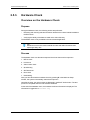
Hardware Check
Overview on the Hardware Check
Purpose
During the hardware check, the following actions are performed:
•
Retrieving and checking relevant information related to the various boards installed on
the EVS server
•
Verifying the validity of the data recorded on the video disk array
The hardware check is only available in the server-based application.
Tip
Hardware check is also used to rebuild the video and audio information after
replacing a faulty disk.
Process
The hardware check runs the same steps and checks as the server boot process :
1. MTPC check
2. H3X check
3. Video Codec check
4. Quad booting
5. GbE download
6. Disk check
7. Data loading
After you have launched the hardware check by pressing H in the Multicam Setup
window, the system automatically starts the test process.
One after the other, the various steps are displayed in the BOOT.H3X window. The test
process is completed when the H3X board is initialized.
At the end of the hardware check, the hardware revisions information is displayed. The
information is logged in the bootwins.log.
38
2. Multicam Setup
CONFIGURATION MANUAL XT3 Server 12.05
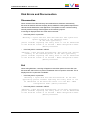
Disk Errors and Disconnection
Disconnection
When one disk of the video raid array has sustained errors, Multicam automatically
disconnects that disk and uses the parity disk to rebuild the missing data and provide the
video and audio data blocks to the application. The operator can thus continue working
normally and the message “!Raid” appears on all monitoring outputs.
A message is displayed each time a disk is disconnected:
•
if the faulty disk is a spare disk:
"Warning: a spare disk has been disconnected. The system will
operate normally on the remaining disks.
At the next opportunity
please consider replacing the faulty disk. It can be identified
in the Shift-F5 screen or in the EVS - RAID configuration menu.
[Enter]=Continue"
•
if the faulty disk is contained in a RAID:
"Warning: a disk has been disconnected. The system will operate
normally on the remaining disks. At the next opportunity
please consider replacing the faulty disk. It can be identified
in the Shift-F5 screen or in the EVS - RAID configuration menu.
[Enter]=Continue"
Exit
When exiting Multicam, a warning will appear to remind the operator that one disk was
disconnected, and invite him to perform a hardware check to repair the video raid. This is
displayed even if a spare disk is available:
•
if the faulty disk is a spare disk:
"Warning: a spare disk has been disconnected. At the next
opportunity please consider replacing the faulty disk. It can
be identified in the Shift-F5 screen or in the EVS - RAID
configuration menu. [Enter]=Continue"
•
if the faulty disk is contained in a RAID:
"Warning: a disk has been disconnected. At the next opportunity
please consider replacing the faulty disk. It can be identified
in the Shift-F5 screen or in the EVS - RAID configuration menu.
[Enter]=Continue"
2. Multicam Setup
39
EVS Broadcast Equipment SA
Issue 12.05.D - January 2015
Restarting
If Multicam is restarted without the RAID being rebuilt, a message similar to the following
one, and adapted to the disk type, is displayed during the bootwins:
•
if a spare disk is OK:
[ Bad ] SEAGATE ST9300603SS
•
3SE10H1J
0006
279GB 02 07
if no spare disk is OK and the RAID is no more complete:
[ Bad ] SEAGATE ST9300603SS
3SE10H1J
0006
279GB 02 07
WARNING !!! Tray XX is missing 1 disk(s) to be complete
Then when entering Multicam, another message appears, even if a spare disk is available:
•
if the faulty disk is a spare disk:
"Warning: a spare disk has been disconnected. The system will
operate normally on the remaining disks. At the next
opportunity please consider replacing the faulty disk. It can
be identified in the Shift-F5 screen or in the EVS - RAID
configuration menu. [Enter]=Continue"
•
if the faulty disk is contained in a RAID:
"Warning: a disk has been disconnected. The system will operate
normally on the remaining disks. At the next opportunity please
consider replacing the faulty disk. It can be identified in the
Shift-F5 screen or in the EVS - RAID configuration menu.
[Enter]=Continue"
The operator can press ENTER and operate normally on 4 disks (configuration “4+1”) or
on 5 disks (configuration “5+1”) or exit the software and return to Multicam Setup window
to run a hardware check.
Retrieving Logs
If you suspect that the drive disconnection in operation was not due to a severe disk
failure, but perhaps to the server being too prompt to disconnect a drive, you must run a
hardware check immediately after ending the session during which the disk was
disconnected.
Don’t rebuild the RAID, but press simultaneously the ALT+L keys to generate the log file
C:\LSMCE\DATA\LOG\SCSI.LOG, and send this file to EVS for detailed analysis. Note
that this procedure is only valid if the drive is disconnected during operation, not for a drive
being disconnected when booting the system.
40
2. Multicam Setup
CONFIGURATION MANUAL XT3 Server 12.05
Rebuild Process
Introduction
The XT3 server is capable of performing a rebuild process of the RAID. This process can
happen either while the Multicam application is not running (offline process – rebuild is
faster) or while the Multicam application is running (online process – rebuild is slower).
Disconnection Process
As explained in the section "Disk Errors and Disconnection" on page 39, the software will
disconnect a disk that does not behave as expected.
Two options are available for the operator:
•
•
Replace the disconnected disk and restart the server
◦
Start the Multicam application. The rebuild process will start automatically.
◦
Start a hardware check from the EVS menu and launch the rebuild. The process
starts offline. The operator can wait for the rebuild to be completed or cancel it
(that is to say postpone it) and start the Multicam application, in which case the
rebuild carries on in online mode.
The operator can also force the disk to be reconnected by starting the rebuild process
in the hardware check. The process starts offline. The operator can wait for the rebuild
to be completed or cancel it and start the Multicam application, in which case the
rebuild carries on in online mode.
Note
If errors are detected during the rebuild process, a message appears after the
rebuild is complete to warn the operator, and the raid is not considered as
properly rebuilt. In this state, the system will keep working on 4 disks (4+1
configuration) or on 5 disks (5+1 configuration). If you want to run on 5, or 6,
disks again, you can try replacing the disk again and perform another rebuild, or
clear all clips.
If you don’t need to retrieve the clips or the record trains, you don’t need to rebuild the
RAID. In this case, select the 'Clear All Clips' answer when the message with this option
appears in the hardware check.
If you don’t rebuild the RAID array or if you don’t clear clips, the EVS server will keep
running on 4, or 5, disks only, and you will see a warning message appearing every time
you start or close the Multicam application. Normal operation can be achieved on 4, or 5,
disks, but then, if another disk fails, the system will hang and all video and audio data will
be definitively lost.
Warning
By default, the online rebuild process takes up 10% of the disk bandwidth. If you
want to change this, contact EVS support.
2. Multicam Setup
41
EVS Broadcast Equipment SA
2.5.4.
Issue 12.05.D - January 2015
Clearing Video Disks
Introduction
This function is used to delete media from the RAID disk array. This will permanently
delete the video and audio data, including protected clip and record trains.
When you change the multi-essence configuration, you may also have to clear Intra clips,
LongGOP clips, or all clips. The decision depends on the initial and the new multi-essence
configuration. The table in this section will help you make the decision.
The following options are therefore possible:
•
Clearing the media on all video disks (full clear clip)
•
Clearing only the Intra clips (partial clear clip)
•
Clearing only the LongGOP clips (partial clear clip)
•
Clearing only record trains (See section "Record Train Maintenance" on page 43)
The Lo-Res clips associated to Hi-Res clips will be cleared when the user clears the clips
of the on-air codec.
Required and Optional Clear Clips
When Required is specified in the following table, a full clear clip is required when you
shift from the given source configuration to the given target configuration.
When Optional is specified in the following table, a partial clear clip is useful, but is not
required. It allows you to remove old material you will no longer want to or be able to use,
while keeping material corresponding to the still active essences.
Target Configuration
Intra
Intra
Intra+
LongGOP
LongGOP
Intra+
Proxy
Required
Optional
R
Required
Optional
R
Required
Source Config. Intra+
Optional
LongGOP
42
LongGOP Optional
Required
Intra+
Proxy
Optional
Optional
R
Required
Optional
2. Multicam Setup
CONFIGURATION MANUAL XT3 Server 12.05
In the Server-Based Application
To clear video disks in the server-based application, proceed as follows:
1. In the Multicam Setup window, press C to call the Clear Video Disks command.
2. Select one of the available options and press ENTER.
A confirmation message is displayed.
3. Press RIGHT ARROW, and ENTER to select Yes and validate the deletion.
OR
Press ENTER to cancel the deletion.
Note
After a Clear Video Disks action, the command toggles to Undo Clear Video
Disks At Next Start as long as your server has not been rebooted after the
Clear Video Disks command. This allows you to cancel the Clear Video
Disks request.
In the Web-Based Interface
To clear video disks in the web-based interface, proceed as follows:
1. In the Multicam Setup window, click the Clear video disks command from the Tools
area to open the Clear Video Disks window.
2. Select one of the available options and press OK.
A confirmation message is displayed.
3. Click Yes to validate the deletion or No to cancel the deletion.
2.5.5.
Record Train Maintenance
Preventing the Overflow of the Record Trains Field Counter
The record train uses a counter to identify each field being encoded in the server. This
counter will overflow after 2 years and 8 months at 50 Hz or 2 years and 3 months at
59.94 Hz when the server is in continuous use.
When the field counter reaches its limit, the recorder and the player stop. It is possible to
close the current file and start a new one without the need to clear the video disks (as
required in earlier versions of Multicam), nor to exit Multicam.
2. Multicam Setup
43
EVS Broadcast Equipment SA
Issue 12.05.D - January 2015
How to Reset the Field Counter
You can reset the field counter from the Multicam Setup window, or from the Multicam
Configuration window:
To reset the counter from the Multicam Setup window, proceed as follows:
1. Go to the Clear video disk dialog box.
2. Select Clear only record trains.
See section "Clearing Video Disks" on page 42
To reset the counter from the Multicam Configuration window, proceed as follows:
1. In the VGA, press SHIFT+F5 to open the Server Monitoring window.
2. In the General Information page (page 1), select the Reset record train command.
See section "General Information Window" on page 285
Impacts of the Field Counter Maintenance
During the field counter maintenance:
•
The players that are using content from local clips are not be disturbed.
•
The players that are using content from a remote (XNet) server are not disturbed.
•
Playing out a record train of the server in field counter maintenance on a remote server
will impact the playout.
After performing the field counter maintenance:
•
All the trains are erased, but neither the clips nor the playlists are erased.
•
Multicam restarts the recorders that were running before the maintenance operation.
•
Multicam restarts the players that were running before the maintenance operation. The
record train used by each player remains unchanged.
Automatic Advance Warning
As the recorders and the players will stop if the field counter reaches its limit, warnings are
automatically issued in advance:
1. 12 weeks before the counter overflow:
◦
VGA: A message is displayed once.
2. From 8 to 4 weeks before the counter overflow:
◦
VGA: a message is displayed once every week .
3. From 4 weeks to the day before the counter overflow:
44
◦
VGA: a message is displayed once every day.
◦
OSD: a "!Rec" warning is continuously displayed on all PGM OSD screens.
2. Multicam Setup
CONFIGURATION MANUAL XT3 Server 12.05
4. One day before the counter overflow:
◦
VGA: the message is repeated.
◦
OSD: the "!Rec" warning flashes on all PGM OSD screens.
Field Counter Overflow
When the field counter reaches the overflow:
2.5.6.
•
Multicam stops the recorders and the players.
•
Multicam issues error messages on the VGA, the OSD, and the LSM.
•
The operator is allowed to browse and make clips with all the content available on the
disks.
Importing and Exporting Keyword Files
Introduction
The keyword file is a simple text file with a name of 8 characters and a .KWD extension.
All keyword files must be stored in the C:\LSMCE\DATA\KWD directory of the server. A
sample keyword file (SAMPLE.KWD) is provided by EVS when Multicam is installed.
You can also import and export keyword files to and from the EVS server via a USB key.
You can only perform this action in the server-based application.
How to Import a Keyword File
To import a keyword file, proceed as follows:
1. Save the keyword file you want to import on a USB key, and plug it into the USB port
of the EVS server as the Multicam Setup window is open.
2. In the Multicam Setup window, press K to call the Import/export keyword file
command.
The following dialog box opens:
3. If several keyword files are stored on the USB key, press SPACEBAR until the
requested file is selected on the left field.
4. Press ENTER to import the keyword file from the USB key to the EVS server.
5. Press OK to close the message box that appears when the keyword file has been
imported.
6. Remove the USB key.
2. Multicam Setup
45
EVS Broadcast Equipment SA
Issue 12.05.D - January 2015
How to Export a Keyword File
To export a keyword file, proceed as follows:
1. Plug a USB key into the USB port of the EVS server as the Multicam Setup window is
open.
2. In the Multicam Setup window, press K to call the Import/export keyword file
command.
The following dialog box opens:
3. Press ENTER to export the keyword file from the EVS server to the USB key.
4. Press OK to close the message box that appears when the keyword file has been
exported.
5. Remove the USB key.
2.5.7.
Exporting Log Files
When the EVS support team requests the log files to investigate an issue, you can export
the log files to a plugged-in USB key by pressing the X shortcut key from the Multicam
Setup window.
When you call the Export log file command, a .zip file is created on the root folder the
USB key. It contains:
•
all files and folders located on C:\LSMCE\DATA folder of the EVS server
•
an Excel spreadsheet that contains the definition of your configuration lines
After the export action, a message box asks you whether you want to delete the logs on
the EVS server. If you answer 'Yes', the content of the folders C:\LSMCE\DATA\LOG
and C:\LSMCE\DATA\DUMP are deleted.
You can also export log files from XNet Monitor. For more information, refer to the XNet
Monitor user manual.
46
2. Multicam Setup
CONFIGURATION MANUAL XT3 Server 12.05
3.
Multicam Configuration
3.1.
Overview on User Interfaces
3.1.1.
Introduction
Preliminary Remarks
Configuration as Initial Step
Prior to using Multicam, the operator should set all necessary parameters in the Multicam
Configuration window. If clips are stored with certain parameters and the operator wishes
to change the parameter values afterwards, those clips and playlists will not change.
Configuration with Caution
Most parameters are factory preset, and should not be modified without advice of qualified
EVS staff. Improper values for some parameters will prevent the proper operation of the
system.
Parameter Availability
Only the parameters or parameter values valid for the given server type, server chassis,
and active license codes are available for defining the various configurations.
General Comparison Between User Interfaces
You can configure the EVS server using one of the three available user interfaces:
•
Multicam Configuration window in the server-based application
•
Multicam Configuration window in the web-based interface
•
Technical and Operational Setup menus in an EVS Remote Panel (if any)
The Multicam Configuration windows in the server-based and web-based interface are
almost identical.
In the Remote Panel, however, only the most used technical settings are available in the
Technical Setup menu, and all operational settings are available in the Operational Setup
menu.
3. Multicam Configuration
47
EVS Broadcast Equipment SA
Issue 12.05.D - January 2015
The following table provides an overview on the features available in each user interface:
Configuration Window
Technical Settings
Operational Settings
Server-Based
Application
Yes
(tabs 1-6)
Yes
(tab 7)
Web-Based
Interface
Yes
(tabs 1-6)
Yes
(tab 7)
Yes (partly)
(Technical Setup: F0)
Yes
(Setup Menu: SHIFT+D)
Remote Panel
Overview on Configuration Parameters
The first topic of each section in the Multicam Configuration chapter gives you an
overview on the parameters available in this section, and specifies whether you will find
the parameter:
•
in the basic or advanced view in the server-based application and the web-based
interface
•
in the Technical Setup, Operational Setup, or not at all on the Remote Control panel
The following list provides a hyperlink to all overview topics in the various sections:
48
•
Server settings
•
Channels settings
•
Network settings
•
Monitoring settings
•
Protocol settings
•
GPI settings
•
Operations settings
3. Multicam Configuration
CONFIGURATION MANUAL XT3 Server 12.05
Concurrent Modifications in the Remote Panel and the
Server-Based Application
When a parameter is modified with the Remote Panel, and that parameter is not in conflict
with the parameter modified in the Configuration page of the server-based application, the
following message will be displayed on the VGA.
'The configuration has been modified by another user without
any conflict. Your copy has been updated with these
modifications.'
When a parameter is modified with the Remote Panel, and the parameter is in conflict with
the parameter modified in the Configuration page of the server-based application, the
following message will be displayed on the VGA or on the LCD display of the Remote
Panel. The configuration will be updated if the user agrees.
'The configuration has been modified by another user.
Do you want to load it and lose your modification?'
Warning
When this message is displayed on the Remote Panel and the user answers
'No' to the message (Clear button), the modifications performed on the Remote
Panel will be preserved. The changes applied on the VGA will however be
loaded after the user leaves the operational setup menu, except if the specific
fields modified on the VGA have been modified and validated on the Remote
Panel after the message display.
3.1.2.
Overview of the Multicam Configuration
Window
Introduction
In the server-based and web-based interfaces, all server settings related to each
configuration file are grouped in a single window: the Multicam Configuration window.
When the server is not running a given configuration, the Multicam Configuration window
allows you to define any of the configurations available in the Multicam Setup window.
When the server is running a given configuration, the Multicam Configuration window
allows you to modify the settings of the running configuration.
The Multicam Configuration window is organized in a similar way in both user interfaces:
•
It consists of seven tabs.
•
Each tab contains one or more pages in the server-based application.
•
Each tab displays all settings on a single page in the web-based interface.
•
The settings on page/tab are organized in field groups having a dedicated name.
3. Multicam Configuration
49
EVS Broadcast Equipment SA
Issue 12.05.D - January 2015
Accessing the Multicam Configuration Window
In the Server-Based Application
To access the Multicam Configuration window from the Multicam Setup window when the
server is not running, proceed as follows:
1. Press the UP ARROW or DOWN ARROW key to respectively move up and down in
the list of configuration lines until the requested line is highlighted.
2. Press F8.
The Multicam Configuration window opens.
To access the Multicam Configuration window from the Clips or Playlist window when the
server is running, press SHIFT+F2.
In the Web-Based Interface
To access the Multicam Configuration window from the Multicam Setup window when the
server is not running, click the Edit icon
for the configuration line you want to
configure. The Multicam Configuration window opens.
The Multicam Configuration window will directly be displayed on the web-based interface
when the server is running a given configuration. You will directly be able to edit the
settings for the running configuration.
Display Mode
The settings in the Multicam Configuration window have been categorized as basic or
advanced settings depending on whether they are commonly used or not.
Two display modes are consequently available:
•
Basic mode
•
Advanced mode
Selecting the basic mode will hide settings on some pages, or completely hide other
pages.
To change the display mode in the server-based application, press F3.
To change the display mode in the web-based interface, click on the display mode label
or
50
.
3. Multicam Configuration
CONFIGURATION MANUAL XT3 Server 12.05
User Interfaces
Server-Based User Interface
The following screenshot presents the 1st tab, and 1st page of the Multicam Configuration
window in the server-based application, shown in advanced mode:
•
The title bar displays the selected configuration, and specifies whether the
configuration has been launched (running) or not (not running).
•
The selected tab is highlighted in pink.
•
The current page and number of pages in the tab are specified in the top right corner.
•
The display mode (basic or advanced) is specified in the top right corner.
Web-Based User Interface
The following screenshot presents the 1st tab of the Multicam Configuration window of an
XT3 server in the web-based interface, shown in basic mode:
•
The top line displays the name of the selected configuration, and specifies whether
the configuration has been launched (running) or not (not running).
•
The selected tab is displayed in a lighter gray color.
•
The Display mode (basic or advanced) is specified on the top line.
3. Multicam Configuration
51
EVS Broadcast Equipment SA
52
Issue 12.05.D - January 2015
3. Multicam Configuration
CONFIGURATION MANUAL XT3 Server 12.05
3.1.3.
Navigating and Editing in the Multicam
Configuration Window
In the Server-Based Application
Navigation Commands
The following table presents the commands to navigate in the Multicam Configuration
window:
Command description
Command key
Selecting a given tab
CTRL + tab number
Moving from one tab to the other
(when the tab is selected, i.e. rose highlighted)
LEFT ARROW / RIGHT
ARROW
Moving down/up in the pages of the active tab
PAGE DOWN or PAGE UP
Moving down in the list of editable settings
TAB
Moving up in the list of editable settings
SHIFT + TAB
Toggling between Basic and Advanced display mode
F3
Editing Commands
The following table presents the commands to edit the configuration settings in the
Multicam Configuration window when the field has been selected (using the TAB key).
In text fields, you can directly type the requested value for a selected field.
Command description
Command key
Increasing the value
(or displaying the next value in the list)
SPACEBAR
Decreasing the value
(or displaying the previous value in the list)
SHIFT+SPACEBAR
Moving the cursor position within a text field
SHIFT+ RIGHT ARROW /
LEFT ARROW
Resetting the value of the selected setting
F5
Resetting all values of all settings in the current tab
for the selected configuration
CTRL+F5
Resetting all values of all settings in all tabs for the
selected configuration
CTRL+SHIFT+F5
Applying changes
ALT+A
Leaving without applying changes
ESC, ENTER
3. Multicam Configuration
53
EVS Broadcast Equipment SA
Issue 12.05.D - January 2015
Enabling Values in a List
For some settings, you need to enable values in a list of displayed values. This is, for
example, the case with the selection of pages (receive pages, protect pages) in the
Operation tab.
The enabled pages are highlighted in blue, and the disabled pages are not highlighted.
To enable a list of values for a given setting, proceed as follows:
1. Select the list of values with the TAB key.
Once the list of values is selected, the enabled values stay highlighted in blue, and the
disabled values are highlighted in pink.
2. On the keyboard, type the page numbers you want to enable. They become
highlighted in blue.
3. Apply the changes with ALT+A, and confirm the action.
In the Web-Based Interface
Navigation and Editing Commands
The navigation and editing commands in the web-based interface are the commonly used
commands in a web-based interface. The command buttons available are the following
ones:
Command description
Command key
Activating the Advanced display mode
Coming back to the Basic display mode
Applying changes
Canceling changes
54
3. Multicam Configuration
CONFIGURATION MANUAL XT3 Server 12.05
In Server- and Web-Based Interfaces
Display and Checks of Modified Values
Once modified, the field values are displayed in blue color as long as the changes have
not been applied. No check on inconsistent or incompatible field values are performed at
that stage.
When you apply the changes, the following occurs:
3.1.4.
•
The values you have modified are checked. If setting values are inconsistent, you will
get an error message at that stage.
•
The validated values return to the standard color.
•
The inconsistencies are displayed as follows:
◦
Inconsistent values are displayed in red.
◦
A warning message tells you which field value is problematic.
◦
The page containing the inconsistent field value is then displayed when you use
the server-based application.
Overview of the Setup Menus in the Remote
Panel
Introduction
When you work in LSM or XSense mode, the Technical and Operational Setup menus
available on the Remote Panel allow you to define:
•
the commonly used technical settings in the Technical Setup menu
•
all operational settings in the Operational Setup menu.
The values assigned to the settings are saved as soon as they are modified.
Accessing the Technical Setup Menu
To access the Technical Setup menu, press F0 from the Main Setup page.
The Technical Setup menu opens on the 1st page.
The Technical Setup menu is divided in sections and subsections, named by Tx.y where
x is the section number, and y the subsection number.
In all sections dedicated to a tab of the Multicam Configuration window in this manual, you
will find an overview table that lists the settings available in the Technical Setup menu, as
well as the sections where you will find them.
Note
The Setup menu of the Remote Panel is dynamically adapted based on the EVS
server configuration and valid license codes. Consequently, the settings
available on the Remote Panel do not have a fixed position in the Setup menu.
3. Multicam Configuration
55
EVS Broadcast Equipment SA
Issue 12.05.D - January 2015
Accessing the Operational Setup Menu
To access the Operational Setup menu, proceed as follows:
1. If you are in Playlist mode, press RECORD first to exit this mode.
2. Press SHIFT + MENU to go to the Main menu:
3. Select Setup by pressing SHIFT + D to enter the Operational Setup menu.
The Operational Setup menu is divided in sections and subsections, named by x.y where
x is the section number, and y the subsection number.
3.1.5.
Navigating and Editing in the Setup Menus
of the Remote Panel
Introduction
The way you navigate and edit settings is identical in the Technical Setup menu and
Operational Setup menu. The navigation and editing commands are explained below.
Navigation Commands
The following table presents the commands to navigate in the Setup menus of the Remote
Panel:
56
Command description
Command key
Moving to another section when you are inside a section
SHIFT+F_ key
corresponding to the
section
Moving to the next page inside a section
When you are on the last page of a section, you will go to the
1st page of the next section.
F10
Moving to the previous page inside a section
When you are on the first page of a section, you will go to the
last page of the previous section.
F9
Exiting the Setup menu
Menu
Scrolling through section pages with the jog wheel
ENTER (when no setting
is selected) + jog
3. Multicam Configuration
CONFIGURATION MANUAL XT3 Server 12.05
Editing Commands
The following table presents the commands to edit a setting in the Setup menus of the
Remote Panel:
3.1.6.
Command description
Command key
Selecting a setting in a section
F_ key corresponding to
the requested setting
Modifying the setting value
Turn the jog wheel
Validating the modification to a setting value
ENTER
Restoring the default value for the selected setting
CLEAR + F_ key
corresponding to the
requested setting
Restoring the default values on the entire Setup menu
CLEAR + F0
Validating the changes in the Setup menu
(to answer to the message when you try to leave the menu)
MENU
Cancelling the changes in the Setup menu
(to answer to the message when you try to leave the menu)
CLEAR
Staying in the Setup menu
(to answer to the message when you try to leave the menu)
ENTER
Required Application Reboot
Introduction
Modifications to some parameters will only be applied after rebooting the application.
When you change one of the following parameters, a message will inform you that you
need to reboot Multicam.
Such parameters are summarized below, but the parameter description also specifies
when a reboot is required:
Tab Name
Setting Name
Server tab
Some video and reference settings:
• Field rate
• Resolution
• LTC timecode
Server tab
All codec settings
Warning
When you change the codec essences active on the EVS
server, you may be required to clear the video disks. See
section "Clearing Video Disks" on page 42
3. Multicam Configuration
57
EVS Broadcast Equipment SA
58
Issue 12.05.D - January 2015
Tab Name
Setting Name
Server tab
All PC LAN settings (only editable from the Multicam Setup window)
Channels tab
Some base settings:
• Inputs
• Outputs
• Base config
Channels tab
One audio setting:
• Number of tracks
Channels tab
One recorder setting:
• SD Autosense
• REC capacity
Network tab
All SDTI settings:
• Speed
• Net name
• Net number
• Type
Network tab
All Gigabit settings:
• Gigabit connection
• Gigabit IP configuration
3. Multicam Configuration
CONFIGURATION MANUAL XT3 Server 12.05
3.2.
Supported Configurations
3.2.1.
General Information on Supported
Configurations
Overview on Supported Configuration Types
The main supported configurations on the various EVS servers are presented in a
graphical and user-friendly way on the following webpage of the EVS website:
http://www.evs.com/backpanel/index.html#
An XT3 server, equipped with V3X boards, supports the following configurations types:
•
standard SD/HD configurations
•
standard SD/HD XREC configurations (using secondary links for independent
recorders)
•
SLSM SD/HD configurations
•
SLSM SD/HD XREC configurations
•
3D/1080p configurations
•
SLSM 3D/1080p configurations
•
4K configurations
•
SLSM 4K configurations
Note
The feature Mix on one channel1 is available on all SD/HD configurations.
Number of Record and Play Channels
The number of record and play channels for a given configuration is defined in the
Channels tab, in the Base settings. See section "Base Settings" on page 141.
The number of play and record channels available may differ depending on the chassis
and on the configurations running on the XT3 server:
•
Multicam LSM mode, when the EVS server is controlled by the Remote Panel
•
Spotbox mode, when the EVS server is controlled by industry-standard protocols
such as Sony BVW75, VDCP, Odetics, DD35, EVS’ AVSP, IPDP, EditRec or LinX
API.
1Feature that allows using the secondary link of the codec module of a player channel on the V3X board (J3) as
the preview channel to provide the PGM/PRV mode with a single codec module.
3. Multicam Configuration
59
EVS Broadcast Equipment SA
Issue 12.05.D - January 2015
The following table shows the minimum and maximum number of channels that can be
operated in both modes:
6U
4U
LSM
Spotbox
LSM
Spotbox
Max. # channels
8
8
7
7
Min. # REC
1
0
1
0
Max. # REC
6
6
6
6
Min. # PLAY
1
0
1
0
Max. # PLAY
5
6
3
4
Note
Based on the above-mentioned limitations, some configurations described in the
following sections are only available in Server or Spotbox mode.
Channel Assignment
The following general principles apply to all configurations, and are valid for all EVS
servers equipped with V3X boards:
60
•
The record channels (IN connectors) are always assigned from the right to the left.
•
The play channels (OUT connectors) are always assigned from the left to the right.
3. Multicam Configuration
CONFIGURATION MANUAL XT3 Server 12.05
•
•
The primary links of the V3X boards mentioned in the tables of this section correspond
to the upper connectors of a codec module.
◦
J8 for IN connectors
◦
J7 for OUT connectors (J6 is also equivalent to J7)
The secondary links of the V3X boards correspond to the middle connectors of a
codec module:
◦
J5 for IN connectors
◦
J3 for OUT connectors
3. Multicam Configuration
61
EVS Broadcast Equipment SA
Issue 12.05.D - January 2015
Enhanced Playout Mode
On EVS servers equipped with H3X and V3X boards and running a frame codec, both
decoders of a V3X codec module can be used in specific conditions to increase the
decoding performances during a replay. This enhanced playout mode is configurable per
channel.
When the enhanced playout mode is enabled, it is effectively used when the video is
played out faster than the standard speed (100% with a standard recorder, 50% in SLSM
2x, 33% in SLSM 3x, ...).
The enhanced playout mode is automatically enabled when all conditions below are
fulfilled:
•
The EVS server is equipped with H3X and V3X boards.
•
The EVS server is running a frame codec (AVC Intra, MPEG2-Intra or DVCPro) in
1080i.
•
The Vertical Interpolation parameter is enabled in the Server tab, Interpolation
settings.
•
The Mix on One Channel parameter for the related play channel is disabled in the
Channels tab, Mix on One Channel settings.
•
The 3D parameter is disabled in the Channels tab, Base settings.
Channel Assignment in XREC Configurations
With V3X boards, the XREC configurations should be cabled in the following sequence:
1. Cable the play channels from left to right.
2. Cable the record channels from right to left starting with the primary links, without
using the left codec modules already cabled as play channels.
3. Cable the remaining record channels to assign starting from right to left, and using the
secondary link for the remaining codec modules.
Clip and Record Train Compatibility
•
Clips are compatible across all Multicam configurations including SLSM clips.
•
Record trains are also compatible as long as the number of record channels (cameras)
is not increased in LSM mode.
Example
•
62
◦
1 REC ==> 2 REC: Record trains are lost.
◦
4 REC ==> 3 REC: Record trains are kept.
Record trains are always kept in Spotbox mode, even when the number of record
trains is increased.
3. Multicam Configuration
CONFIGURATION MANUAL XT3 Server 12.05
3.2.2.
SD/HD Base Configurations
Introduction
The tables below show the available SD/HD configurations with an XT3 4U server, and
XT3 6U server, as well as how the BNC connectors should be cabled.
The XREC configurations, presented after the 'standard' ones, make use of the
secondary channel of the codec module as an independent record channel. See section
"Channel Assignment in XREC Configurations" on page 62.
Note
When the option 'mix on one channel' is activated on a play channel (Channels
tab, page 7), the secondary link of the codec module (J3 on V3X board) of the
play channel is used to play transition effects.
XT3 4U Servers
Available Standard Configurations
IN4/OUT1
IN3/OUT2
IN2/OUT3
IN1/OUT4
Prim.
Ch.
Prim.
Ch.
Prim.
Ch.
Prim.
Ch.
Sec.
Ch.
Sec.
Ch.
Sec.
Ch.
#REC
#PLAY
1
0
2
0
3
0
4
0
REC4
0
1
PLAY1
MIX1
1
1
PLAY1
MIX1
2
1
PLAY1
MIX1
3
1
PLAY1
MIX1
REC3
0
2
PLAY1
MIX1
PLAY2
MIX2
1
2
PLAY1
MIX1
PLAY2
MIX2
2
2
PLAY1
MIX1
PLAY2
MIX2
REC2
0
3
PLAY1
MIX1
PLAY2
MIX2
PLAY3
MIX3
1
3
PLAY1
MIX1
PLAY2
MIX2
PLAY3
MIX3
REC1
0
4
PLAY1
MIX1
PLAY2
MIX2
PLAY3
MIX3
PLAY4
3. Multicam Configuration
Sec.
Ch.
REC1
REC2
REC1
REC3
REC2
REC1
REC3
REC2
REC1
REC1
REC2
REC1
REC2
REC1
REC1
REC1
MIX4
63
EVS Broadcast Equipment SA
Issue 12.05.D - January 2015
Example: 3REC + 1PLAY
The BNC connectors to be used as record and play channels in a standard 3REC 1PLAY
configuration need to be cabled as shown below:
Available XREC Configurations
IN4/OUT1
IN3/OUT2
IN2/OUT3
IN1/OUT4
Prim.
Ch.
Prim.
Ch.
Sec.
Ch.
REC1
REC4
#REC
#PLAY
Prim.
Ch.
Sec.
Ch.
Prim.
Ch.
Sec.
Ch.
Sec.
Ch.
4
1
PLAY1
MIX1
REC3
REC2
5
1
PLAY1
MIX1
REC3
REC2
REC5
REC1
REC4
6
1
PLAY1
MIX1
REC3
REC6
REC2
REC5
REC1
REC4
3
2
PLAY1
MIX1
PLAY2
MIX2
REC2
REC1
REC3
4
2
PLAY1
MIX1
PLAY2
MIX2
REC2
REC4
REC1
REC3
2
3
PLAY1
MIX1
PLAY2
MIX2
PLAY3
MIX3
REC1
REC2
Example: 6REC + 1PLAY XREC
The BNC connectors to be used as record and play channels in a 6REC 1PLAY XREC
configuration need to be cabled as shown below:
64
3. Multicam Configuration
CONFIGURATION MANUAL XT3 Server 12.05
XT3 6U Servers
Available Standard Configurations
IN6/OUT1
IN5/OUT2
IN4/OUT3
IN3/OUT4
IN2/OUT5
IN1/OUT6
Prim.
Ch.
Prim.
Ch.
Prim.
Ch.
Prim.
Ch.
Prim.
Ch.
Prim.
Ch.
#
REC
#
PLAY
Sec.
Ch.
Sec.
Ch.
Sec.
Ch.
Sec.
Ch.
Sec.
Ch.
1
0
2
0
3
0
4
0
5
0
6
0
REC6
0
1
PLAY1
MIX1
1
1
PLAY1
MIX1
2
1
PLAY1
MIX1
3
1
PLAY1
MIX1
4
1
PLAY1
MIX1
5
1
PLAY1
MIX1
REC5
0
2
PLAY1
MIX1
PLAY2
MIX2
1
2
PLAY1
MIX1
PLAY2
MIX2
2
2
PLAY1
MIX1
PLAY2
MIX2
3
2
PLAY1
MIX1
PLAY2
MIX2
4
2
PLAY1
MIX1
PLAY2
MIX2
REC4
0
3
PLAY1
MIX1
PLAY2
MIX2
PLAY3
MIX3
1
3
PLAY1
MIX1
PLAY2
MIX2
PLAY3
MIX3
2
3
PLAY1
MIX1
PLAY2
MIX2
PLAY3
MIX3
3
3
PLAY1
MIX1
PLAY2
MIX2
PLAY3
MIX3
REC 3
0
4
PLAY1
MIX1
PLAY2
MIX2
PLAY3
MIX3
PLAY4
MIX4
1
4
PLAY1
MIX1
PLAY2
MIX2
PLAY3
MIX3
PLAY4
MIX4
2
4
PLAY1
MIX1
PLAY2
MIX2
PLAY3
MIX3
PLAY4
MIX4
REC2
0
5
PLAY1
MIX1
PLAY2
MIX2
PLAY3
MIX3
PLAY4
MIX4
PLAY5
MIX5
1
5
PLAY1
MIX1
PLAY2
MIX2
PLAY3
MIX3
PLAY4
MIX4
PLAY5
MIX5
REC1
0
6
PLAY1
MIX1
PLAY2
MIX2
PLAY3
MIX3
PLAY4
MIX4
PLAY5
MIX5
PLAY6
Sec.
Ch.
REC1
3. Multicam Configuration
REC2
REC1
REC3
REC2
REC1
REC4
REC3
REC2
REC1
REC5
REC4
REC3
REC2
REC1
REC5
REC4
REC3
REC2
REC1
REC1
REC2
REC1
REC3
REC2
REC1
REC 4
REC3
REC2
REC1
REC 4
REC3
REC2
REC1
REC1
REC2
REC1
REC3
REC2
REC1
REC3
REC2
REC1
REC1
REC2
REC1
REC2
REC1
REC1
REC1
MIX6
65
EVS Broadcast Equipment SA
Issue 12.05.D - January 2015
Example: 4REC + 2PLAY
The BNC connectors to be used as record and play channels in a standard 4REC 2PLAY
configuration need to be cabled as shown below:
Available XREC Configurations
IN6/OUT1
IN5/OUT2
IN4/OUT3
IN3/OUT4
IN2/OUT5
IN1/OUT6
Prim.
Ch.
Prim.
Ch.
Prim.
Ch.
Prim.
Ch.
Sec.
Ch.
#
REC
#
PLAY
Prim.
Ch.
Sec.
Ch.
Prim.
Ch.
6
1
PLAY1
MIX1
REC5
5
2
PLAY1
MIX1
PLAY2
6
2
PLAY1
MIX1
4
3
PLAY1
5
3
3
Sec.
Ch.
Sec.
Ch.
Sec.
Ch.
Sec.
Ch.
REC 4
REC3
REC2
REC1
REC6
MIX2
REC4
REC3
REC2
REC1
REC5
PLAY2
MIX2
REC4
REC3
REC2
REC1
REC5
MIX1
PLAY2
MIX2
PLAY3
MIX3
REC 3
REC2
REC1
REC4
PLAY1
MIX1
PLAY2
MIX2
PLAY3
MIX3
REC 3
REC2
REC1
REC4
4
PLAY1
MIX1
PLAY2
MIX2
PLAY3
MIX3
PLAY4
MIX4
REC2
REC1
REC3
4
4
PLAY1
MIX1
PLAY2
MIX2
PLAY3
MIX3
PLAY4
MIX4
REC2
REC4
REC1
REC3
2
5
PLAY1
MIX1
PLAY2
MIX2
PLAY3
MIX3
PLAY4
MIX4
PLAY5
MIX5
REC1
REC2
REC6
REC5
Example: 4REC + 4PLAY XREC
The BNC connectors to be used as record and play channels in a 4REC 4PLAY XREC
configuration need to be cabled as shown below:
66
3. Multicam Configuration
CONFIGURATION MANUAL XT3 Server 12.05
3.2.3.
General Information on Supermotion
Configurations
Concepts
The Supermotion cameras are two- to six-phase cameras, that record the incoming
feeds at a frame rate 2, 3, 4 or 6 times higher than a standard camera.
The Ultramotion cameras are 10-phase cameras, that record the incoming feeds at a
frame rate 10 times higher than a standard camera.
The Hypermotion cameras should clearly be distinguished from the supermotion and
ultramotion cameras in two respects:
•
The A/V material from the supermotion and ultramotion cameras is continuously fed
into the EVS server, whereas the A/V material from the hypermotion cameras is
recorded on the camera buffer, and then ingested into the EVS server when the
operator sends a play command to the hypermotion camera.
•
The A/V material from supermotion and ultramotion cameras is ingested into the EVS
server through one physical record channel per phase, whereas the A/V material from
the hypermotion camera is ingested into the EVS server through one physical record
channel.
See section "Hypermotion Management" on page 274 for more information on the
configuration related to hypermotion cameras.
Introduction
The feeds from supermotion and ultramotion cameras can directly be ingested into EVS
servers. The camera's number of phases directly determines the number of physical
record channels used on the EVS server.
A two-phase camera will use two physical record channels (primary or secondary channel
with V3X), a three-phase camera will use three physical record channels, and so on.
For supermotion two-phase or six-phase cameras, you can use a 3G-SDI connection
(single cable) to connect your camera to both physical channels of a codec module
(primary and secondary channels) at a time.
Limitation
When working with an SLSM configuration in multi-essence Intra + LongGOP, the Intra
codec records all phases, and the LongGOP codec records only the regular speed content
(not SLSM) from phase 1.
3. Multicam Configuration
67
EVS Broadcast Equipment SA
Issue 12.05.D - January 2015
Conditions
SLSM 2x-3x-4x-6x Configurations
The SLSM 2x-3x-4x-6x configurations are available with all HD and SD codecs natively
supported by the EVS server.
These configurations are valid when the following conditions are fulfilled:
•
The license code 110 (Super Motion) is valid.
•
The base configuration is Multicam LSM.
Note
The SLSM 6x configurations are also supported with the license code 26 (Only
SLSM 6x-10x).
3G SLSM 2x-6x Configurations
The 3G SLSM 2x-6x configurations are valid with all HD codecs natively supported by the
EVS server in the following conditions:
•
The license code 110 (Super Motion) is valid.
•
The base configuration is Multicam LSM.
•
The parameter 3G/Dual is set to No.
•
The resolution must be HD 720p or 1080i.
Note
The 3G SLSM configurations are managed via the SLSM REC setting, and not
via the 3G/Dual setting. As the EVS server is operated in HD, this allows the
connection of both a standard HD camera and a 3G SLSM camera at the same
time.
U-Motion 10x Configurations
The U-Motion 10x configurations are available when the following conditions are fulfilled:
68
•
The license code 25 (SLSM 10x, for standard servers) or the license code 26 (Only
SLSM 6x-10x, for servers dedicated to U-Motion) is valid.
•
The base configuration is Multicam LSM.
•
The resolution must be HD 720p or 1080i.
•
The codec used must be one of the following:
◦
MJpeg (up to 110 Mbps)
◦
DNxHD (up to 100 Mbps)
◦
Apple ProRes (up to 102 Mbps)
3. Multicam Configuration
CONFIGURATION MANUAL XT3 Server 12.05
Enhanced Playout Mode
On EVS servers equipped with H3X and V3X boards and running a frame codec, both
channels of a V3X codec module can be used in specific conditions to increase the
decoding performances during a replay. This enhanced playout mode is configurable per
channel and is available in SLSM configurations.
The way to enable and use the enhnaced playout mode is described in more details in the
short section "Enhanced Playout Mode" on page 62.
3.2.4.
SLSM Configurations
Introduction
SLSM Principles
This section details the available multi-phase SLSM configurations on XT3 servers.
In SLSM configurations, a supermotion recorder of a two-, three-, four- or six-phase
camera accounts for one logical channel, but corresponds respectively to two, three, four
or six physical channels.
In 3G SLSM configurations, a supermotion recorder of a two-phase or six-phase camera
accounts for one logical channel. On the rear panel, it uses respectively one or three
connector(s), and is cabled on the primary connector of the codec module. On the V3X
board, it uses both primary and secondary channels of that codec module.
In U-Motion configurations, an ultramotion recorder of a ten-phase camera accounts for
one logical channel, but corresponds respectively to ten physical channels.
Introduction to the Configurations
The following sections show the available SLSM and U-Motion configurations with an
XT3 6U server and XT3 4U server:
•
The tables show the channel assignment at the level of the V3X board.
•
The examples show how the BNC connectors should be cabled for a selected
configuration.
The XREC configurations, presented at the end of the tables, make use of the secondary
channel of the codec module on the V3X board as an independent record channel. See
also the section "Channel Assignment in XREC Configurations" on page 62.
Note
Specific SLSM configurations for 1080p/3D dual link and 3G configurations are
presented in the section "3D/1080p SLSM Configurations" on page 100.
3. Multicam Configuration
69
EVS Broadcast Equipment SA
Issue 12.05.D - January 2015
XT3 4U Servers
Available SLSM 2-Phase Configurations
The table below shows the available SLSM 2 Phase configurations in HD with an XT3 4U
server.
A separate channel is used for each phase. The table shows how the BNC connectors
should be assigned on the rear panel, which corresponds to the channel assignment at the
level of the codec module of the V3X board.
IN4/OUT1
#REC
SLSM
2x
#
REC
#
PLAY
1
0
0
1
1
0
1
2
0
2
0
1
Prim.
Chan.
IN3/OUT2
Sec.
Chan.
Prim.
Chan.
IN2/OUT3
Sec.
Chan.
Prim.
Chan.
IN1/OUT4
Sec.
Chan.
Prim.
Chan.
REC1,2
REC1,1
REC2
REC1,2
REC1,1
REC3
REC2
REC1,2
REC1,1
0
REC2,2
REC2,1
REC1,2
REC1,1
0
1
PLAY1
MIX1
REC1,2
REC1,1
1
1
1
PLAY1
MIX1
REC2
REC1,2
REC1,1
1
0
2
PLAY1
MIX1
PLAY2
MIX2
REC1,2
REC1,1
Sec.
Chan.
XREC configurations
70
1
2
2
PLAY1
MIX1
PLAY2
MIX2
REC1,2
REC3
REC1,1
REC2
2
0
2
PLAY1
MIX1
PLAY2
MIX2
REC1,2
REC2,2
REC1,1
REC2,1
3
0
1
PLAY1
MIX1
REC2,1
REC3,2
REC1,2
REC3,1
REC1,1
REC2,2
3. Multicam Configuration
CONFIGURATION MANUAL XT3 Server 12.05
Example: 1xSLSM 2PH + 2PLAY
The BNC connectors to be used as record and play channels in an SLSM configuration
with 1xSLSM 2PH + 2 PLAY need to be cabled as shown below:
Example: 3xSLSM 2PH + 1PLAY (XREC)
The BNC connectors to be used as record and play channels in an SLSM configuration
with 3xSLSM 2PH + 1PLAY in XREC mode need to be cabled as shown below.
3. Multicam Configuration
71
EVS Broadcast Equipment SA
Issue 12.05.D - January 2015
Available 3G SLSM 2-Phase Configurations
The table below shows the available 3G SLSM 2 Phase configurations in HD with an XT3
4U server.
A single 3G cable transports both phases, and is connected to the primary connector of
the codec module on the rear panel. This accounts for two channels on the V3X board.
The table shows the channel assignment at the level of the V3X board:
IN4/OUT1
IN3/OUT2
IN2/OUT3
IN1/OUT4
Prim.
Chan.
Prim.
Chan.
Prim.
Chan.
Prim.
Chan.
Sec.
Chan.
REC
1, 1
REC
1,2
REC2
REC
1, 1
REC
1, 2
REC2
REC
1, 1
REC
1,2
REC
1, 1
REC
1, 2
REC
1, 1
REC
1,2
REC
1, 1
REC
1, 2
REC
1, 1
REC
1,2
REC
1, 1
REC
1,2
#REC
SLSM
2x
#REC
#PLAY
1
0
0
1
1
0
1
2
0
2
0
0
1
0
1
PLAY1
MIX1
1
1
1
PLAY1
MIX1
1
0
2
PLAY1
MIX1
PLAY2
MIX2
Sec.
Chan.
Sec.
Chan.
REC3
REC
2, 1
Sec.
Chan.
REC
2, 2
REC2
XREC configurations
72
1
1
2
PLAY1
MIX1
PLAY2
MIX2
REC2
2
0
2
PLAY1
MIX1
PLAY2
MIX2
REC
2, 1
REC
2, 2
REC
1, 1
REC
1,2
3
0
1
PLAY1
MIX1
REC
3, 1
REC
3, 2
REC
2, 1
REC
2, 2
REC
1, 1
REC
1,2
3. Multicam Configuration
CONFIGURATION MANUAL XT3 Server 12.05
Example: 1x3G SLSM 2PH + 1REC + 1PLAY
The BNC connectors to be used as record and play channels in a 3G SLSM configuration
with 1x3G SLSM 2PH + 1 REC + 1 PLAY need to be cabled as shown below.
On the codec module of the V3X board used, both primary and secondary channels are
used for each 3G SLSM REC.
Example: 3x3G SLSM 2PH + 1PLAY (XREC)
The BNC connectors to be used as record and play channels in a 3G SLSM configuration
with 3x3G SLSM 2PH + 1PLAY in XREC mode need to be cabled as shown below.
On the codec module of the V3X board used, both primary and secondary channels are
used for each 3G SLSM REC.
3. Multicam Configuration
73
EVS Broadcast Equipment SA
Issue 12.05.D - January 2015
Available SLSM 3-Phase Configurations
The table below shows the available SLSM 3 Phase configurations in HD with an XT3 4U
server.
A separate channel is used for each phase. The table shows how the BNC connectors
should be assigned on the rear panel, which corresponds to the channel assignment at the
level of the codec module of the V3X board.
IN4/OUT1
IN3/OUT2
Prim.
Chan.
Prim.
Chan.
#REC
SLSM
3x
#
REC
#PLAY
1
0
0
1
1
0
REC2
1
0
1
PLAY1
Sec.
Chan.
IN2/OUT3
Sec.
Chan.
Prim.
Chan.
IN1/OUT4
Sec.
Chan.
Prim.
Chan.
REC1,3
REC1,2
REC1,1
REC1,3
REC1,2
REC1,1
MIX1
REC1,3
REC1,2
REC1,1
Sec.
Chan.
XREC configurations
1
1
2
PLAY1
MIX1
PLAY2
MIX2
REC1,2
REC2
REC1,1
REC1,3
1
3
1
PLAY1
MIX1
REC1,3
REC4
REC1,2
REC3
REC1,1
REC2
2
0
1
PLAY1
MIX1
REC1,3
REC2,3
REC1,2
REC2,2
REC1,1
REC2,1
Example: 1xSLSM 3PH + 3REC+ 1PLAY (XREC)
The BNC connectors to be used as record and play channels in an SLSM configuration
with 1xSLSM 3PH + 3REC + 1PLAY in XREC mode need to be cabled as shown below:
74
3. Multicam Configuration
CONFIGURATION MANUAL XT3 Server 12.05
Available SLSM 4-Phase Configurations
The table below shows the available SLSM 4 Phase configurations in HD with an XT3 4U
server.
A separate channel is used for each phase. The table shows how the BNC connectors
should be assigned on the rear panel, which corresponds to the channel assignment at the
level of the codec module of the V3X board.
IN4/OUT1
#REC
SLSM
4x
#REC
#PLAY
Prim.
Ch.
1
0
0
REC1,4
IN3/OUT2
Sec.
Ch.
Prim.
Ch.
IN2/OUT3
Sec.
Ch.
Prim.
Ch.
IN1/OUT4
Sec.
Ch.
Prim.
Ch.
Sec.
Ch.
REC1,3
REC1,2
REC1,1
REC1,2
REC1,1
REC1,4
REC1,1
REC1,3
XREC configurations
1
0
1
PLAY1
MIX1
REC1,3
1
0
2
PLAY1
MIX1
PLAY2
MIX2
REC1,2
REC1,4
Example: 1xSLSM 4PH + 1PLAY (XREC)
The BNC connectors to be used as record and play channels in an SLSM configuration
with 1xSLSM 4PH + 1PLAY in XREC mode need to be cabled as shown below:
3. Multicam Configuration
75
EVS Broadcast Equipment SA
Issue 12.05.D - January 2015
Available SLSM 6-Phase Configurations
The table below shows the available SLSM 6 Phase configurations in HD with an XT3 4U
server.
A separate channel is used for each phase. The table shows how the BNC connectors
should be assigned on the rear panel, which corresponds to the channel assignment at the
level of the codec module of the V3X board.
#REC
SLSM
6x
#REC
#PLAY
IN4/OUT1
IN3/OUT2
IN2/OUT3
IN1/OUT4
Prim.
Ch.
Sec.
Ch.
Prim.
Ch.
Sec.
Ch.
Prim.
Ch.
Sec.
Ch.
Prim.
Ch.
Sec.
Ch.
PLAY1
MIX1
REC
1,3
REC
1,6
REC
1,2
REC
1,5
REC
1,1
REC
1,4
XREC configurations
1
0
1
Example: 1xSLSM 6PH + 1 PLAY MIX (XREC)
The BNC connectors to be used as record and play channels in an SLSM configuration
with 1xSLSM 6PH + 1 PLAY MIX need to be cabled as shown below:
76
3. Multicam Configuration
CONFIGURATION MANUAL XT3 Server 12.05
Available 3G SLSM 6-Phase Configurations
The table below shows the available 3G SLSM 6 Phase configurations in HD with an XT3
4U server.
A single 3G cable transports both phases, and is connected to the primary connector of
the codec module on the rear panel. This accounts for two channels on the V3X board.
The table shows the channel assignment at the level of the V3X board:
#REC
SLSM
6x
#REC
#PLAY
IN4/OUT1
IN3/OUT2
IN2/OUT3
IN1/OUT4
Prim.
Ch.
Sec.
Ch.
Prim.
Ch.
Sec.
Ch.
Prim.
Ch.
Sec.
Ch.
Prim.
Ch.
Sec.
Ch.
PLAY1
MIX1
REC
1,5
REC
1,6
REC
1,3
REC
1,4
REC
1,1
REC
1,2
XREC configurations
1
0
1
Example: 1x3G SLSM 6PH + 1 PLAY (XREC)
The BNC connectors to be used as record and play channels in an 3G SLSM configuration
with 1x3G SLSM 6PH + 1 PLAY in XREC mode need to be cabled as shown below.
On the codec module of the V3X board used, both primary and secondary channels are
used for each 3G SLSM REC.
XT3 6U Servers
Available SLSM 2-Phase Configurations
The table below shows the available SLSM 2 Phase configurations in HD with an XT3 6U
server server.
A separate channel is used for each phase. The table shows how the BNC connectors
should be assigned on the rear panel, which corresponds to the channel assignment at the
level of the codec module of the V3X board.
3. Multicam Configuration
77
EVS Broadcast Equipment SA
#REC
SLSM
2x
#
REC
#
PLAY
1
0
0
1
1
0
1
2
0
2
0
0
1
3
0
2
1
0
1
4
0
2
2
3
Issue 12.05.D - January 2015
IN6/OUT1
IN5/OUT2
IN4/OUT3
IN3/OUT4
IN2/OUT5
IN1/OUT6
Prim.
Ch.
Prim.
Ch.
Prim.
Ch.
Prim.
Ch.
Prim.
Ch.
Prim.
Ch.
Sec.
Ch.
Sec.
Ch.
Sec.
Ch.
Sec.
Ch.
Sec.
Ch.
REC
1,2
REC
1,1
REC
2
REC
1,2
REC
1,1
REC
3
REC
2
REC
1,2
REC
1,1
REC
2,2
REC
2,1
REC
1,2
REC
1,1
REC
4
REC
3
REC
2
REC
1,2
REC
1,1
REC
3
REC
2,2
REC
2,1
REC
1,2
REC
1,1
REC
5
REC
4
REC
3
REC
2
REC
1,2
REC
1,1
0
REC
4
REC
3
REC
2,2
REC
2,1
REC
1,2
REC
1,1
0
0
REC
3,2
REC
3,1
REC
2,2
REC
2,1
REC
1,2
REC
1,1
1
0
1
PLAY
1
MIX
1
REC
1,2
REC
1,1
1
1
1
PLAY
1
MIX
1
REC
2
REC
1,2
REC
1,1
1
2
1
PLAY
1
MIX
1
REC
3
REC
2
REC
1,2
REC
1,1
2
0
1
PLAY
1
MIX
1
REC
2,2
REC
2,1
REC
1,2
REC
1,1
1
3
1
PLAY
1
MIX
1
REC
4
REC
3
REC
2
REC
1,2
REC
1,1
2
1
1
PLAY
1
MIX
1
REC
3
REC
2,2
REC
2,1
REC
1,2
REC
1,1
1
0
2
PLAY
1
MIX
1
PLAY
2
MIX
2
REC
1,2
REC
1,1
1
1
2
PLAY
1
MIX
1
PLAY
2
MIX
2
REC
2
REC
1,2
REC
1,1
1
2
2
PLAY
1
MIX
1
PLAY
2
MIX
2
REC
3
REC
2
REC
1,2
REC
1,1
2
0
2
PLAY
1
MIX
1
PLAY
2
MIX
2
REC
2,2
REC
2,1
REC
1,2
REC
1,1
1
0
3
PLAY
1
MIX
1
PLAY
2
MIX
2
PLAY
3
MIX
3
REC
1,2
REC
1,1
1
1
3
PLAY
1
MIX
1
PLAY
2
MIX
2
PLAY
3
MIX
3
REC
1,2
REC
1,1
78
REC
2
Sec.
Ch.
3. Multicam Configuration
CONFIGURATION MANUAL XT3 Server 12.05
IN6/OUT1
IN5/OUT2
IN4/OUT3
IN3/OUT4
IN2/OUT5
IN1/OUT6
Prim.
Ch.
#REC
SLSM
2x
#
REC
#
PLAY
Prim.
Ch.
Sec.
Ch.
Prim.
Ch.
Sec.
Ch.
Prim.
Ch.
Sec.
Ch.
Prim.
Ch.
Sec.
Ch.
Prim.
Ch.
1
0
4
PLAY1
MIX
1
PLAY
2
MIX
2
PLAY
3
MIX
3
PLAY
4
MIX
4
REC
1,2
MIX
4
REC
1,2
REC
3
REC
1,1
REC
2
Sec.
Ch.
Sec.
Ch.
REC
1,1
XREC configurations
1
2
4
PLAY
1
MIX
1
PLAY
2
MIX
2
PLAY
3
MIX
3
PLAY
4
1
3
3
PLAY
1
MIX
1
PLAY
2
MIX
2
PLAY
3
MIX
3
REC
3
REC
1,2
REC
5
REC
1,1
REC
4
1
4
2
PLAY
1
MIX
1
PLAY
2
MIX
2
REC
3
REC
2
REC
1,2
REC
5
REC
1,1
REC
4
2
0
4
PLAY
1
MIX
1
PLAY
2
MIX
2
PLAY
3
REC
1,2
REC
2,2
REC
1,1
REC
2,1
2
2
2
PLAY
1
MIX
1
PLAY
2
MIX
2
REC
2,2
REC
2,1
REC
1,2
REC
4
REC
1,1
REC
3
3
0
2
PLAY
1
MIX
1
PLAY
2
MIX
2
REC
2,2
REC
2,1
REC
1,2
REC
3,2
REC
1,1
REC
3,1
4
0
2
PLAY
1
MIX
1
PLAY
2
MIX
2
REC
2,2
REC
1,2
REC
3,2
REC
1,1
REC
3,1
MIX
3
REC
4,2
PLAY
4
REC
2,1
MIX
4
REC
4,1
Example: 2xSLSM 2PH + 2 REC + 2 PLAY MIX (XREC)
The BNC connectors to be used as record and play channels in an SLSM configuration
with 2xSLSM 2PH + 2REC + 2PLAY MIX in XREC mode need to be cabled as shown
below:
3. Multicam Configuration
79
EVS Broadcast Equipment SA
Issue 12.05.D - January 2015
Example: 3xSLSM 2PH + 2 PLAY MIX (XREC)
The BNC connectors to be used as record and play channels in an SLSM configuration
with 3xSLSM 2PH + 2 PLAY MIX in XREC mode need to be cabled as shown below:
Available 3G SLSM 2-Phase Configurations
The table below shows the available 3G SLSM 2 Phase configurations in HD with an XT3
6U server server.
A single 3G cable transports both phases, and is connected to the primary connector of
the codec module on the rear panel. This accounts for two channels on the V3X board.
The table shows the channel assignment at the level of the V3X board:
80
#REC
SLSM
2x
#REC #PLAY
1
0
0
1
1
0
1
2
0
1
3
0
1
4
0
2
0
0
2
1
0
2
2
0
3
0
0
1
0
1
IN6/OUT1
IN5/OUT2
IN4/OUT3
IN3/OUT4
IN2/OUT5
IN1/OUT6
Prim.
Ch.
Prim.
Ch.
Prim.
Ch.
Prim.
Ch.
Prim.
Ch.
Prim.
Ch.
Sec.
Ch.
REC
1,1
REC
1,2
REC
2
REC
1,1
REC
1,2
REC
3
REC
2
REC
1,1
REC
1,2
REC
4
REC
3
REC
2
REC
1,1
REC
1,2
REC
4
REC
3
REC
2
REC
1,1
REC
1,2
Sec.
Ch.
REC
5
Sec.
Ch.
REC
4
Sec.
Ch.
MIX
1
Sec.
Ch.
REC
2,1
REC
2,2
REC
1,1
REC
1,2
REC
3
REC
2,1
REC
2,2
REC
1,1
REC
1,2
REC
3
REC
2,1
REC
2,2
REC
1,1
REC
1,2
REC
2,1
REC
2,2
REC
1,1
REC
1,2
REC
1,1
REC
1,2
REC
3,1
PLAY
1
Sec.
Ch.
REC
3,2
3. Multicam Configuration
CONFIGURATION MANUAL XT3 Server 12.05
IN6/OUT1
IN5/OUT2
IN4/OUT3
IN3/OUT4
IN2/OUT5
IN1/OUT6
Prim.
Ch.
Sec.
Ch.
Prim.
Ch.
Sec.
Ch.
Prim.
Ch.
Prim.
Ch.
Prim.
Ch.
Prim.
Ch.
Sec.
Ch.
REC
1,1
REC
1,2
REC
1,1
REC
1,2
REC
1,1
REC
1,2
REC
2
REC
1,1
REC
1,2
REC
2
REC
1,1
REC
1,2
REC
3
REC
2
REC
1,1
REC
1,2
REC
3
REC
2
REC
1,1
REC
1,2
REC
3
REC
2
REC
1,1
REC
1,2
#REC
SLSM
2x
#REC #PLAY
1
0
2
PLAY
1
MIX
1
PLAY
2
MIX
2
1
0
3
PLAY
1
MIX
1
PLAY
2
MIX
2
PLAY
3
MIX
3
1
0
4
PLAY1
MIX
1
PLAY
2
MIX
2
PLAY
3
MIX
3
1
1
1
PLAY
1
MIX
1
1
1
2
PLAY
1
MIX
1
1
2
1
PLAY
1
MIX
1
1
2
2
PLAY
1
MIX
1
1
3
1
PLAY
1
MIX
1
2
0
1
PLAY
1
MIX
1
2
1
1
PLAY
1
MIX
1
2
0
2
PLAY
1
MIX
1
PLAY
2
MIX
2
PLAY
2
PLAY
2
Sec.
Ch.
PLAY
4
Sec.
Ch.
MIX
4
MIX
2
MIX
2
REC
4
Sec.
Ch.
REC
3
REC
2,1
REC
2,2
REC
1,1
REC
1,2
REC
2,1
REC
2,2
REC
1,1
REC
1,2
REC
2,1
REC
2,2
REC
1,1
REC
1,2
REC
2
REC
1,1
REC
1,2
XREC configurations
1
1
4
PLAY
1
MIX
1
PLAY
2
MIX
2
PLAY
3
MIX
3
PLAY
4
1
2
3
PLAY
1
MIX
1
PLAY
2
MIX
2
PLAY
3
MIX
3
REC
3
REC
2
REC
1,1
REC
1,2
1
3
2
PLAY
1
MIX
1
PLAY
2
MIX
2
REC
4
REC
3
REC
2
REC
1,1
REC
1,2
2
0
3
PLAY
1
MIX
1
PLAY
2
MIX
2
PLAY
3
MIX
3
2
0
4
PLAY
1
MIX
1
PLAY
2
MIX
2
PLAY
3
MIX
3
2
1
2
PLAY
1
MIX
1
PLAY
2
MIX
2
2
1
3
PLAY
1
MIX
1
PLAY
2
MIX
2
PLAY
3
2
2
2
PLAY
1
MIX
1
PLAY
2
MIX
2
2
3
0
3. Multicam Configuration
REC
5
MIX
4
REC
2,1
REC
2,2
REC
1,1
REC
1,2
REC
2,1
REC
2,2
REC
1,1
REC
1,2
REC
3
REC
2,1
REC
2,2
REC
1,1
REC
1,2
REC
3
REC
2,1
REC
2,2
REC
1,1
REC
1,2
REC
4
REC
3
REC
2,1
REC
2,2
REC
1,1
REC
1,2
REC
4
REC
3
REC
2,1
REC
2,2
REC
1,1
REC
1,2
MIX
3
PLAY
4
MIX
4
81
EVS Broadcast Equipment SA
82
Issue 12.05.D - January 2015
IN6/OUT1
IN5/OUT2
IN4/OUT3
IN3/OUT4
IN2/OUT5
IN1/OUT6
Prim.
Ch.
Prim.
Ch.
Prim.
Ch.
Prim.
Ch.
Prim.
Ch.
Sec.
Ch.
Prim.
Ch.
Sec.
Ch.
REC
2,1
REC
2,2
REC
1,1
REC
1,2
#REC
SLSM
2x
#REC #PLAY
2
4
0
REC
6
3
0
1
PLAY
1
MIX
1
3
0
2
PLAY
1
MIX
1
PLAY
2
MIX
2
3
0
3
PLAY
1
MIX
1
PLAY
2
MIX
2
3
1
0
3
1
1
PLAY
1
MIX
1
3
1
2
PLAY
1
MIX
1
3
2
0
3
2
1
PLAY
1
3
3
0
REC
6
4
0
0
4
0
1
PLAY
1
MIX
1
4
0
2
PLAY
1
MIX
1
4
1
0
4
1
1
PLAY
1
4
2
0
REC
6
Sec.
Ch.
Sec.
Ch.
REC
5
MIX
1
MIX
1
Sec.
Ch.
REC
4
Sec.
Ch.
REC
3
REC
3,1
REC
3,2
REC
2,1
REC
2,2
REC
1,1
REC
1,2
REC
3,1
REC
3,2
REC
2,1
REC
2,2
REC
1,1
REC
1,2
REC
3,1
REC
3,2
REC
2,1
REC
2,2
REC
1,1
REC
1,2
REC
4
REC
3,1
REC
3,2
REC
2,1
REC
2,2
REC
1,1
REC
1,2
REC
4
REC
3,1
REC
3,2
REC
2,1
REC
2,2
REC
1,1
REC
1,2
REC
4
REC
3,1
REC
3,2
REC
2,1
REC
2,2
REC
1,1
REC
1,2
REC
5
REC
4
REC
3,1
REC
3,2
REC
2,1
REC
2,2
REC
1,1
REC
1,2
REC
5
REC
4
REC
3,1
REC
3,2
REC
2,1
REC
2,2
REC
1,1
REC
1,2
REC
5
REC
4
REC
3,1
REC
3,2
REC
2,1
REC
2,2
REC
1,1
REC
1,2
PLAY
2
MIX
2
PLAY
3
MIX
3
REC
4,1
REC
4,2
REC
3,1
REC
3,2
REC
2,1
REC
2,2
REC
1,1
REC
1,2
REC
4,1
REC
4,2
REC
3,1
REC
3,2
REC
2,1
REC
2,2
REC
1,1
REC
1,2
REC
4,1
REC
4,2
REC
3,1
REC
3,2
REC
2,1
REC
2,2
REC
1,1
REC
1,2
REC
5
REC
4,1
REC
4,2
REC
3,1
REC
3,2
REC
2,1
REC
2,2
REC
1,1
REC
1,2
REC
5
REC
4,1
REC
4,2
REC
3,1
REC
3,2
REC
2,1
REC
2,2
REC
1,1
REC
1,2
REC
5
REC
4,1
REC
4,2
REC
3,1
REC
3,2
REC
2,1
REC
2,2
REC
1,1
REC
1,2
PLAY
2
MIX
2
3. Multicam Configuration
CONFIGURATION MANUAL XT3 Server 12.05
Example: 1x3G SLSM 2PH + 2 REC + 2 PLAY MIX
The BNC connectors to be used as record and play channels in a 3G SLSM configuration
with 1x3G SLSM 2PH + 2REC + 2PLAY MIX need to be cabled as shown below.
On the codec module of the V3X board used, both primary and secondary channels are
used for each 3G SLSM REC.
Example: 3x3G SLSM 2PH + 2 REC + 1 PLAY MIX (XREC)
The BNC connectors to be used as record and play channels in an SLSM configuration
with 3x3G SLSM 2PH + 2REC + 1PLAY MIX in XREC mode need to be cabled as shown
below.
On the codec module of the V3X board used, both primary and secondary channels are
used for each 3G SLSM REC.
3. Multicam Configuration
83
EVS Broadcast Equipment SA
Issue 12.05.D - January 2015
Available SLSM 3-Phase Configurations
The table below shows the available SLSM 3 Phase configurations in SD/HD with an XT3
6U server.
A separate channel is used for each phase. The table shows how the BNC connectors
should be assigned on the rear panel, which corresponds to the channel assignment at the
level of the codec module of the V3X board.
#REC
SLSM
3x
#REC #PLAY
1
0
0
1
1
0
1
2
0
1
3
0
2
0
1
IN6/OUT1
IN5/OUT2
IN4/OUT3
IN3/OUT4
IN2/OUT5
IN1/OUT6
Prim.
Ch.
Prim.
Ch.
Prim.
Ch.
Prim.
Ch.
Prim.
Ch.
Prim.
Ch.
Sec.
Ch.
Sec.
Ch.
Sec.
Ch.
Sec.
Ch.
Sec.
Ch.
REC
1,3
REC
1,2
REC
1,1
REC
2
REC
1,3
REC
1,2
REC
1,1
REC
3
REC
2
REC
1,3
REC
1,2
REC
1,1
REC
4
REC
3
REC
2
REC
1,3
REC
1,2
REC
1,1
0
REC
2,3
REC
2,2
REC
2,1
REC
1,3
REC
1,2
REC
1,1
0
1
PLAY
1
MIX
1
REC
1,3
REC
1,2
REC
1,1
1
1
1
PLAY
1
MIX
1
REC
2
REC
1,3
REC
1,2
REC
1,1
1
2
1
PLAY
1
MIX
1
REC
3
REC
2
REC
1,3
REC
1,2
REC
1,1
1
0
2
PLAY
1
MIX
1
PLAY
2
MIX
2
REC
1,3
REC
1,2
REC
1,1
1
1
2
PLAY
1
MIX
1
PLAY
2
MIX
2
REC
2
REC
1,3
REC
1,2
REC
1,1
1
0
3
PLAY
1
MIX
1
PLAY
2
MIX
2
PLAY
3
MIX
3
REC
1,3
REC
1,2
REC
1,1
MIX
3
PLAY
4
Sec.
Ch.
XREC configurations
84
1
1
4
PLAY
1
MIX
1
PLAY
2
MIX
2
PLAY
3
1
3
2
PLAY
1
MIX
1
PLAY
2
MIX
2
REC
2
1
3
3
PLAY
1
MIX
1
PLAY
2
MIX
2
PLAY
3
1
4
1
PLAY
1
MIX
1
REC
3
2
0
2
PLAY
1
MIX
1
PLAY
2
MIX
2
MIX
4
REC
1,3
MIX
3
REC
1,3
REC
4
REC
1,2
REC
2
REC
1,1
REC
1,3
REC
1,2
REC
4
REC
1,1
REC
3
REC
1,2
REC
3
REC
1,1
REC
2
REC
2
REC
1,3
REC
1,2
REC
5
REC
1,1
REC
4
REC
2,1
REC
1,3
REC
1,2
REC
2,3
REC
1,1
REC
2,2
3. Multicam Configuration
CONFIGURATION MANUAL XT3 Server 12.05
IN6/OUT1
IN5/OUT2
IN4/OUT3
IN3/OUT4
IN2/OUT5
IN1/OUT6
Prim.
Ch.
Sec.
Ch.
Prim.
Ch.
Sec.
Ch.
Prim.
Ch.
Sec.
Ch.
Prim.
Ch.
Sec.
Ch.
Prim.
Ch.
Sec.
Ch.
Prim.
Ch.
Sec.
Ch.
MIX
2
REC
2,1
REC
4
REC
1,3
REC
3
REC
1,2
REC
2,3
REC
1,1
REC
2,2
REC
2,1
REC
3,3
REC
1,3
REC
3,2
REC
1,2
REC
3,1
REC
1,1
REC
2,3
#REC
SLSM
3x
#REC #PLAY
2
2
2
PLAY
1
MIX
1
PLAY
2
3
0
1
PLAY
1
MIX
1
PLAY
2,2
Example: 1xSLSM 3PH + 2REC + 1PLAY MIX
The BNC connectors to be used as record and play channels in an SLSM configuration
with 1xSLSM 3PH + 2REC + 1PLAY MIX need to be cabled as shown below:
Example: 1xSLSM 3PH + 3 REC + 2 PLAY MIX (XREC)
The BNC connectors to be used as record and play channels in an SLSM configuration
with 1xSLSM 3PH + 3 REC + 2 PLAY MIX in XREC mode need to be cabled as shown
below:
3. Multicam Configuration
85
EVS Broadcast Equipment SA
Issue 12.05.D - January 2015
Available SLSM 4-Phase Configurations
The table below shows the available SLSM 4 Phase configurations in HD with an XT3 6U
server.
A separate channel is used for each phase. The table shows how the BNC connectors
should be assigned on the rear panel, which corresponds to the channel assignment at the
level of the codec module of the V3X board.
IN6/OUT1
IN5/OUT2
IN4/OUT3
IN3/OUT4
IN2/OUT5
IN1/OUT6
Prim.
Ch.
Prim.
Ch.
Prim.
Ch.
Prim.
Ch.
Prim.
Ch.
Prim.
Ch.
#REC
SLSM
4x
#REC #PLAY
1
0
0
1
1
0
1
2
0
REC
3
1
0
1
PLAY
1
MIX
1
1
1
1
PLAY
1
MIX
1
REC
2
1
0
2
PLAY
1
MIX
1
PLAY
2
Sec.
Ch.
Sec.
Ch.
Sec.
Ch.
Sec.
Ch.
Sec.
Ch.
Sec.
Ch.
REC
1,4
REC
1,3
REC
1,2
REC
1,1
REC
2
REC
1,4
REC
1,3
REC
1,2
REC
1,1
REC
2
REC
1,4
REC
1,3
REC
1,2
REC
1,1
REC
1,4
REC
1,3
REC
1,2
REC
1,1
REC
1,4
REC
1,3
REC
1,2
REC
1,1
MIX
2
REC
1,4
REC
1,3
REC
1,2
REC
1,1
REC
1,3
REC
4
REC
1,2
REC
3
REC
1,1
REC
2
REC
1,3
REC
2,3
REC
1,2
REC
2,2
REC
1,1
REC
2,1
XREC configurations
1
3
2
PLAY
1
MIX
1
PLAY
2
MIX
2
REC
1,4
2
0
2
PLAY
1
MIX
1
PLAY
2
MIX
2
REC
1,4
REC
2,4
Example: 1xSLSM 4PH + 3REC + 2PLAY (XREC)
The BNC connectors to be used as record and play channels in an SLSM configuration
with 1xSLSM 4PH + 3REC + 2PLAY in XREC mode need to be cabled as shown below:
86
3. Multicam Configuration
CONFIGURATION MANUAL XT3 Server 12.05
Available SLSM 6-Phase Configurations
The table below shows the available SLSM 6 Phase configurations in HD with an XT3 6U
server.
A separate channel is used for each phase. The table shows how the BNC connectors
should be assigned on the rear panel, which corresponds to the channel assignment at the
level of the codec module of the V3X board.
#REC
SLSM
6x
#REC #PLAY
IN6/OUT1
IN5/OUT2
IN4/OUT3
IN3/OUT4
IN2/OUT5
IN1/OUT6
Prim.
Ch.
Prim.
Ch.
Prim.
Ch.
Prim.
Ch.
Prim.
Ch.
Prim.
Ch.
Sec.
Ch.
REC
1,1
REC
1,6
REC
1,1
REC
1,5
Sec.
Ch.
Sec.
Ch.
Sec.
Ch.
Sec.
Ch.
Sec.
Ch.
XREC configurations
1
0
1
PLAY
1
REC
1,5
REC
1,4
REC
1,3
REC
1,2
1
0
2
PLAY
1
PLAY
2
REC
1,4
REC
1,3
REC
1,2
REC
1,6
Example: 1xSLSM 6PH + 2 PLAY MIX
The BNC connectors to be used as record and play channels in an SLSM configuration
with 1xSLSM 6PH + 2 PLAY MIX need to be cabled as shown below:
3. Multicam Configuration
87
EVS Broadcast Equipment SA
Issue 12.05.D - January 2015
Available 3G SLSM 6-Phase Configurations
The table below shows the available 3G SLSM 6 Phase configurations in HD with an XT3
6U server.
A single 3G cable transports both phases, and is connected to the primary connector of
the codec module on the rear panel. This accounts for two channels on the V3X board.
The table shows the channel assignment at the level of the V3X board:
#REC
SLSM
6x
#REC #PLAY
1
0
IN6/OUT1
IN5/OUT2
IN4/OUT3
IN3/OUT4
IN2/OUT5
IN1/OUT6
Prim.
Ch.
Prim.
Ch.
Prim.
Ch.
Prim.
Ch.
Sec.
Ch.
Prim.
Ch.
Sec.
Ch.
Prim.
Ch.
Sec.
Ch.
REC
1,5
REC
1,6
REC
1,3
REC
1,4
REC
1,1
REC
1,2
REC
1,5
REC
1,6
REC
1,3
REC
1,4
REC
1,1
REC
1,2
REC
2
REC
1,5
REC
1,6
REC
1,3
REC
1,4
REC
1,1
REC
1,2
REC
2
REC
1,5
REC
1,6
REC
1,3
REC
1,4
REC
1,1
REC
1,2
REC
1,5
REC
1,6
REC
1,3
REC
1,4
REC
1,1
REC
1,2
REC
1,5
REC
1,6
REC
1,3
REC
1,4
REC
1,1
REC
1,2
REC
1,5
REC
1,6
REC
1,3
REC
1,4
REC
1,1
REC
1,2
Sec.
Ch.
Sec.
Ch.
Sec.
Ch.
0
XREC configurations
1
0
1
PLAY
1
MIX
1
1
1
1
PLAY
1
MIX
1
1
2
1
PLAY
1
MIX
1
REC
3
1
0
2
PLAY
1
MIX
1
PLAY
2
MIX
2
1
1
2
PLAY
1
MIX
1
PLAY
2
MIX
2
REC
2
1
0
3
PLAY
1
MIX
1
PLAY
2
MIX
2
PLAY
3
MIX
3
Example: 1x3G SLSM 6PH
The BNC connectors to be used as record and play channels in an 3G SLSM configuration
with 1x3G SLSM 6PH need to be cabled as shown below.
On the codec module of the V3X board used, both primary and secondary channels are
used for each 3G SLSM REC.
88
3. Multicam Configuration
CONFIGURATION MANUAL XT3 Server 12.05
Example: 1x3G SLSM 6PH + 2REC + 1 PLAY (XREC)
The BNC connectors to be used as record and play channels in an 3G SLSM configuration
with 1x3G SLSM 6PH + 2REC + 1 PLAY in XREC mode need to be cabled as shown
below.
On the codec module of the V3X board used, both primary and secondary channels are
used for each 3G SLSM REC.
Available U-Motion 10-Phase Configurations
The table below shows the available U-Motion 10 Phase configurations in HD with an XT3
6U server.
A separate channel is used for each phase. The table shows how the BNC connectors
should be assigned on the rear panel, which corresponds to the channel assignment at the
level of the codec module of the V3X board.
#REC
SLSM
10x
#REC #PLAY
IN6/OUT1
IN5/OUT2
IN4/OUT3
IN3/OUT4
IN2/OUT5
IN1/OUT6
Prim.
Ch.
Prim.
Ch.
Sec.
Ch.
Prim.
Ch.
Sec.
Ch.
Prim.
Ch.
Sec.
Ch.
Prim.
Ch.
Sec.
Ch.
Prim.
Ch.
Sec.
Ch.
REC
1,5
REC
1,10
REC
1,4
REC
1,9
REC
1,3
REC
1,8
REC
1,2
REC
1,7
REC
1,1
REC
1,6
Sec.
Ch.
XREC configurations
1
0
1
3. Multicam Configuration
PLAY
1
89
EVS Broadcast Equipment SA
Issue 12.05.D - January 2015
Example: 1xSLSM 10PH + 1 PLAY MIX (XREC)
The BNC connectors to be used as record and play channels in an SLSM configuration
with 1xSLSM 10PH + 1 PLAY MIX need to be cabled as shown below:
90
3. Multicam Configuration
CONFIGURATION MANUAL XT3 Server 12.05
3.2.5.
General Information on 3D Configurations
Requirements
The 3D is available when the following software requirements are met:
•
The license code 23 or 24 is activated on the EVS server.
•
The 3D parameter is set to Yes.
•
The 3G/Dual parameter is set to a proper value.
See section "Base Settings" on page 141.
Connections on EVS Servers with V3X Boards
On the rear panel, a 3D feed is cabled with one of the following interfaces:
•
Dual Link interface:
Two cables, seen as one logical channel (record or play channel) by the EVS server,
are connected to both connectors of a codec module, for example IN1 and IN1B in
REC.
•
3G interface:
A single cable, corresponding to a logical channel, is connected to the primary
connector of a codec module.
On the V3X board, a 3D connection is connected as follows:
•
Both primary and secondary channels of the codec module (COD A or COD B) on the
V3X board are used whatever the connection interface to the rear panel (Dual Link or
3G).
3. Multicam Configuration
91
EVS Broadcast Equipment SA
3.2.6.
Issue 12.05.D - January 2015
General Information on 1080p
Configurations
Introduction
Depending on the server type, and on the type of board installed, the 1080p is
implemented in different ways on the EVS server, as regards file interoperability and
transport mode. This is explained in this section.
Based on these two factors (file interoperability and transport mode), the values available
for the 3G/Dual parameter, on the Channels tab, will differ. See section "Base Settings"
on page 141 for more information on this parameter.
Requirements
The "full" 1080p (with file native interoperability) is available when the following hardware
requirements are met:
•
The EVS server is fitted with H3X and V3X boards.
The 1080p is available when the following software requirements are met:
•
The license code 21 or 22 is activated on the EVS server.
•
The 3G/Dual parameter is set to a proper value.
See section "Base Settings" on page 141.
Limitations
Codec Limitations
1080p can only be used with Intra and Proxy codecs.
1080p only supports AVC-Intra, Avid DNxHD, and Apple ProRes 422 codecs.
1080p cannot be used with LongGOP codecs.
Configuration Limitations
The EVS server supports up to 6 channels of 1080p video.
1080p does not support Mix on one channel feature.
1080p does not support XREC configurations.
92
3. Multicam Configuration
CONFIGURATION MANUAL XT3 Server 12.05
File Interoperability
From Multicam 12.02, the XT3 server working in 1080p encodes or decodes natively the
full 1080p video in a single file on the EVS server. This provides file interoperability,
without requiring transcoding.
This feature is only supported on an XT3 fitted with a H3X and V3X boards.
Native file interoperability is ensured when the following values are available for the
3G/Dual modes: 3G Level-A, 3G Level-B or Dual.
Connections on EVS Servers with V3X and H3X Boards
On the rear panel, a 1080p feed is cabled with one of the following interfaces:
•
Dual Link interface:
Two cables, seen by the EVS server as one logical channel (record or play channel),
are connected to both connectors of a codec module, for example IN1 and IN1B in
REC.
•
3G interface:
A single cable, corresponding to a logical channel, is connected to the primary
connector of a codec module.
On the V3X board, a 1080p connection is connected as follows:
•
Only the primary channel of the codec module (COD A) on the V3X board is used.
The connection to the secondary channel is no longer necessary since the full 1080p
video is included in a single file on the EVS server.
3.2.7.
3D/1080p Standard Configurations
Assignment Principles
On the rear panel side, the following rules on connector assignments apply to 3D or 1080p
configurations:
•
For 3D in Dual Link with V3X boards, the first cable arrives into the primary
connector of a codec module, and the second cable arrives into the secondary
connector of the same codec module.
On the V3X board, the same logic applies to the corresponding channels of the codec
module.
•
For 3D in 3G (single link), only with V3X boards, the single cable arrives into the
primary connector of the codec module.
On the V3X board, both primary and secondary channels of the corresponding codec
module are used.
•
For 1080p in Dual Link with V3X boards, the first cable arrives into the primary
connector of a codec module, and the second channel arrives into the secondary
connector of the same codec module.
3. Multicam Configuration
93
EVS Broadcast Equipment SA
Issue 12.05.D - January 2015
With EVS servers equipped with V3X and H3X boards, only the primary channel of a
codec module on the V3X board is used (but the decoding/encoding capability of both
channels of the V3X codec module is used without bandwidth restriction). In this
case, full 1080p with native file interoperability is available.
•
For 1080p in 3G (single link), only with V3X boards, the single cable arrives into
the primary connector of the codec module.
With EVS servers equipped with V3X and H3X boards, only the primary channel of a
codec module on the V3X board is used (but the decoding/encoding capability of both
channels of the V3X codec module is used without bandwidth restriction). In this
case, full 1080p with native file interoperability is available.
XT3 4U Servers
Available 3D Configurations
The tables below show the available 3D configurations with standard cameras on XT3 4U
server.
They show the channel assignment at the level of the codec module of a V3X board. This
is valid whatever the type of cable connected to the rear panel (Dual Link or 3G).
IN4/OUT1
IN3/OUT2
IN2/OUT3
IN1/OUT4
#REC
#PLAY
1
0
2
0
3
0
4
0
REC4A
REC4B
0
1
PLAY1A
PLAY1B
1
1
PLAY1A
PLAY1B
2
1
PLAY1A
PLAY1B
3
1
PLAY1A
PLAY1B
REC3A
REC3B
0
2
PLAY1A
PLAY1B
PLAY2A
PLAY2B
1
2
PLAY1A
PLAY1B
PLAY2A
PLAY2B
2
2
PLAY1A
PLAY1B
PLAY2A
PLAY2B
REC2A
REC2B
0
3
PLAY1A
PLAY1B
PLAY2A
PLAY2B
PLAY3A
PLAY3B
1
3
PLAY1A
PLAY1B
PLAY2A
PLAY2B
PLAY3A
0
4
PLAY1A
PLAY1B
PLAY2A
PLAY2B
PLAY3A
94
Prim.
Chan.
Sec.
Chan.
Prim.
Chan.
Sec.
Chan.
Prim.
Chan.
Sec.
Chan.
Prim.
Chan.
Sec.
Chan.
REC1A
REC1B
REC2A
REC2B
REC1A
REC1B
REC3A
REC3B
REC2A
REC2B
REC1A
REC1B
REC3A
REC3B
REC2A
REC2B
REC1A
REC1B
REC1A
REC1B
REC2A
REC2B
REC1A
REC1B
REC2A
REC2B
REC1A
REC1B
REC1A
REC1B
REC1A
REC1B
PLAY3B
REC1A
REC1B
PLAY3B
PLAY4
PLAY4B
3. Multicam Configuration
CONFIGURATION MANUAL XT3 Server 12.05
Example: 3D Dual Link 2REC + 2PLAY
The BNC connectors to be used as recorder and play channels in a 3D Dual Link
configuration 2REC + 2PLAY need to be cabled as shown below:
Available 1080p Configurations
The tables below show the 1080p configurations with standard cameras on a XT3 4U
server.
They show the channel assignment at the level of the codec module of a V3X board. This
is valid whatever the type of cable connected to the rear panel (Dual Link or 3G).
IN4/OUT1
IN3/OUT2
IN2/OUT3
IN1/OUT4
#REC
#PLAY
1
0
2
0
3
0
4
0
REC4
0
1
PLAY1
1
1
PLAY1
2
1
PLAY1
3
1
PLAY1
REC3
0
2
PLAY1
PLAY2
1
2
PLAY1
PLAY2
2
2
PLAY1
PLAY2
REC2
0
3
PLAY1
PLAY2
PLAY3
1
3
PLAY1
PLAY2
PLAY3
REC1
0
4
PLAY1
PLAY2
PLAY3
PLAY4
3. Multicam Configuration
Prim.
Chan.
Sec.
Chan.
Prim.
Chan.
Sec.
Chan.
Prim.
Chan.
Sec.
Chan.
Prim.
Chan.
Sec.
Chan.
REC1
REC2
REC1
REC3
REC2
REC1
REC3
REC2
REC1
REC1
REC2
REC1
REC2
REC1
REC1
REC1
95
EVS Broadcast Equipment SA
Issue 12.05.D - January 2015
Example: 1080p 3G 2REC + 2PLAY
The BNC connectors to be used as recorder and play channels in a 1080p 3G
configuration 2REC + 2PLAY need to be cabled as shown below.
With the full 1080p, only the primary channel of a codec module on the V3X board is used.
Note
In an equivalent configuration with a Dual Link connection interface, both
primary and secondary connectors on the rear panel are cabled. However, only
the primary channel on the codec module of the V3X board is used in full 1080p
configurations.
XT3 6U Servers
Available 3D Configurations
The tables below show the available 3D configurations with standard cameras on a XT3
6U server. They show the channel assignment at the level of the codec module of a V3X
board. This is valid whatever the type of cable connected to the rear panel (Dual Link or
3G).
#REC
#PLAY
1
0
2
0
3
0
4
0
96
IN6/OUT1
IN5/OUT2
IN4/OUT3
IN3/OUT4
IN2/OUT5
IN1/OUT6
Prim.
Ch.
Prim.
Ch.
Prim.
Ch.
Prim.
Ch.
Prim.
Ch.
Prim.
Ch.
Sec.
Ch.
REC
1A
REC
1B
Sec.
Ch.
Sec.
Ch.
REC
4A
Sec.
Ch.
REC
4B
Sec.
Ch.
Sec.
Ch.
REC
2A
REC
2B
REC
1A
REC
1B
REC
3A
REC
3B
REC
2A
REC
2B
REC
1A
REC
1B
REC
3A
REC
3B
REC
2A
REC
2B
REC
1A
REC
1B
3. Multicam Configuration
CONFIGURATION MANUAL XT3 Server 12.05
IN6/OUT1
IN5/OUT2
IN4/OUT3
IN3/OUT4
IN2/OUT5
IN1/OUT6
Prim.
Ch.
Prim.
Ch.
Sec.
Ch.
Prim.
Ch.
Sec.
Ch.
Prim.
Ch.
Sec.
Ch.
Prim.
Ch.
Sec.
Ch.
Prim.
Ch.
Sec.
Ch.
REC
5A
REC
5B
REC
4A
REC
4B
REC
3A
REC
3B
REC
2A
REC
2B
REC
1A
REC
1B
REC
5A
REC
5B
REC
4A
REC
4B
REC
3A
REC
3B
REC
2A
REC
2B
REC
1A
REC
1B
REC
1A
REC
1B
#REC
#PLAY
5
0
6
0
REC
6A
REC
6B
0
1
PLAY
1A
PLAY
1B
1
1
PLAY
1A
PLAY
1B
2
1
PLAY
1A
PLAY
1B
3
1
PLAY
1A
PLAY
1B
4
1
PLAY
1A
PLAY
1B
5
1
PLAY
1A
PLAY
1B
REC
5A
REC
5B
0
2
PLAY
1A
PLAY
1B
PLAY
2A
PLAY
2B
1
2
PLAY
1A
PLAY
1B
PLAY
2A
PLAY
2B
2
2
PLAY
1A
PLAY
1B
PLAY
2A
PLAY
2B
3
2
PLAY
1A
PLAY
1B
PLAY
2A
PLAY
2B
4
2
PLAY
1A
PLAY
1B
PLAY
2A
PLAY
2B
REC
4A
REC
4B
0
3
PLAY
1A
PLAY
1B
PLAY
2A
PLAY
2B
PLAY
3A
PLAY
3B
1
3
PLAY
1A
PLAY
1B
PLAY
2A
PLAY
2B
PLAY
3A
PLAY
3B
2
3
PLAY
1A
PLAY
1B
PLAY
2A
PLAY
2B
PLAY
3A
PLAY
3B
3
3
PLAY
1A
PLAY
1B
PLAY
2A
PLAY
2B
PLAY
3A
PLAY
3B
REC
3A
REC
3B
0
4
PLAY
1A
PLAY
1B
PLAY
2A
PLAY
2B
PLAY
3A
PLAY
3B
PLAY
4A
PLAY
4B
1
4
PLAY
1A
PLAY
1B
PLAY
2A
PLAY
2B
PLAY
3A
PLAY
3B
PLAY
4A
PLAY
4B
2
4
PLAY
1A
PLAY
1B
PLAY
2A
PLAY
2B
PLAY
3A
PLAY
3B
PLAY
4A
PLAY
4B
REC
2A
REC
2B
0
5
PLAY
1A
PLAY
1B
PLAY
2A
PLAY
2B
PLAY
3A
PLAY
3B
PLAY
4A
PLAY
4B
PLAY
5A
PLAY
5B
3. Multicam Configuration
Sec.
Ch.
REC
2A
REC
2B
REC
1A
REC
1B
REC
3A
REC
3B
REC
2A
REC
2B
REC
1A
REC
1B
REC
4A
REC
4B
REC
3A
REC
3B
REC
2A
REC
2B
REC
1A
REC
1B
REC
4A
REC
4B
REC
3A
REC
3B
REC
2A
REC
2B
REC
1A
REC
1B
REC
1A
REC
1B
REC
2A
REC
2B
REC
1A
REC
1B
REC
3A
REC
3B
REC
2A
REC
2B
REC
1A
REC
1B
REC
3A
REC
3B
REC
2A
REC
2B
REC
1A
REC
1B
REC
1A
REC
1B
REC
2A
REC
2B
REC
1A
REC
1B
REC
2A
REC
2B
REC
1A
REC
1B
REC
1A
REC
1B
REC
1A
REC
1B
97
EVS Broadcast Equipment SA
Issue 12.05.D - January 2015
IN6/OUT1
IN5/OUT2
IN4/OUT3
IN3/OUT4
IN2/OUT5
IN1/OUT6
#REC
#PLAY
Prim.
Ch.
Sec.
Ch.
Prim.
Ch.
Sec.
Ch.
Prim.
Ch.
Sec.
Ch.
Prim.
Ch.
Sec.
Ch.
Prim.
Ch.
Sec.
Ch.
Prim.
Ch.
Sec.
Ch.
1
5
PLAY
1A
PLAY
1B
PLAY
2A
PLAY
2B
PLAY
3A
PLAY
3B
PLAY
4A
PLAY
4B
PLAY
5A
PLAY
5B
REC
1A
REC
1B
0
6
PLAY
1A
PLAY
1B
PLAY
2A
PLAY
2B
PLAY
3A
PLAY
3B
PLAY
4A
PLAY
4B
PLAY
5A
PLAY
5B
PLAY
6A
PLAY
6B
Example: 3D Dual Link 3REC + 1PLAY
The BNC connectors to be used as recorder and play channels in a 3D Dual Link
configuration 3REC + 1PLAY need to be cabled as shown below:
Note
In an equivalent configuration with a single link 3G interface, only the J8
connectors are cabled. However the primary and secondary channels on the
codec module of the V3X board are both used.
Available 1080p Configurations
The tables below show the available 1080p configurations with standard cameras on a
XT3 6U server. They show the channel assignment at the level of the codec module of a
V3X board. This is valid whatever the type of cable connected to the rear panel (Dual Link
or 3G).
IN6/OUT1
IN5/OUT2
IN4/OUT3
IN3/OUT4
IN2/OUT5
IN1/OUT6
Prim.
Ch.
Prim.
Ch.
Prim.
Ch.
Prim.
Ch.
Prim.
Ch.
Prim.
Ch.
#REC
#PLAY
1
0
2
0
3
0
4
0
5
0
6
0
REC 6
0
1
PLAY 1
98
Sec.
Ch.
Sec.
Ch.
Sec.
Ch.
Sec.
Ch.
Sec.
Ch.
Sec.
Ch.
REC 1
REC 2
REC 1
REC 3
REC 2
REC 1
REC 4
REC 3
REC2
REC 1
REC 5
REC 4
REC 3
REC 2
REC 1
REC 5
REC 4
REC 3
REC 2
REC 1
3. Multicam Configuration
CONFIGURATION MANUAL XT3 Server 12.05
IN6/OUT1
IN5/OUT2
IN4/OUT3
IN3/OUT4
IN2/OUT5
IN1/OUT6
Prim.
Ch.
Prim.
Ch.
Prim.
Ch.
Prim.
Ch.
Prim.
Ch.
#REC
#PLAY
Prim.
Ch.
1
1
PLAY 1
2
1
PLAY 1
3
1
PLAY 1
4
1
PLAY 1
5
1
PLAY 1
REC 5
0
2
PLAY 1
PLAY 2
1
2
PLAY 1
PLAY 2
2
2
PLAY 1
PLAY 2
3
2
PLAY 1
PLAY 2
4
2
PLAY 1
PLAY 2
REC 4
0
3
PLAY 1
PLAY 2
PLAY 3
1
3
PLAY 1
PLAY 2
PLAY 3
2
3
PLAY 1
PLAY 2
PLAY 3
3
3
PLAY 1
PLAY 2
PLAY 3
REC 3
0
4
PLAY 1
PLAY 2
PLAY 3
PLAY 4
1
4
PLAY 1
PLAY 2
PLAY 3
PLAY 4
2
4
PLAY 1
PLAY 2
PLAY 3
PLAY 4
REC 2
0
5
PLAY 1
PLAY 2
PLAY 3
PLAY 4
PLAY 5
1
5
PLAY 1
PLAY 2
PLAY 3
PLAY 4
PLAY 5
REC 1
0
6
PLAY 1
PLAY 2
PLAY 3
PLAY 4
PLAY 5
PLAY 6
3. Multicam Configuration
Sec.
Ch.
Sec.
Ch.
Sec.
Ch.
Sec.
Ch.
Sec.
Ch.
Sec.
Ch.
REC 1
REC 2
REC 1
REC 3
REC 2
REC 1
REC 4
REC 3
REC 2
REC 1
REC 4
REC 3
REC 2
REC 1
REC 1
REC 2
REC 1
REC 3
REC 2
REC 1
REC 3
REC 2
REC 1
REC 1
REC 2
REC 1
REC 2
REC 1
REC 1
REC 1
99
EVS Broadcast Equipment SA
Issue 12.05.D - January 2015
Example: 1080p 3G 3REC + 1PLAY
The BNC connectors to be used as recorder and play channels in a 1080p 3G
configuration 3REC + 1PLAY need to be cabled as shown below.
With the full 1080p, only the primary channel of a codec module on the V3X board is used.
Note
In an equivalent configuration with a Dual Link connection interface, both
primary and secondary connectors on the rear panel are cabled. However, only
the primary channel on the codec module of the V3X board is used in full 1080p
configurations.
3.2.8.
3D/1080p SLSM Configurations
Assignment Principles
The combination of 3D standards and SLSM configurations associates the following
individual rules for connector assignments on the rear panel:
•
For 3D in Dual Link with V3X boards, the first cable arrives into the primary connector
of a codec module, and the second cable arrives into the secondary connector of the
same codec module.
•
For 3D in 3G (single link), only with V3X boards, the single cable arrives into the
primary connector of the codec module. On the V3X board, both primary and
secondary channels of the corresponding codec module are used.
•
For 1080p in Dual Link with V3X boards, the first cable arrives into the primary
connector of a codec module, and the second cable arrives into the secondary
connector of the same codec module.
•
For 1080p in 3G (single link), only with V3X boards, the single cable arrives into the
primary connector of the codec module. On the V3X board, both primary and
secondary channels of the corresponding codec module are used.
With EVS servers equipped with V3X and H3X boards, only the primary channel of a
codec module on the V3X board is used (but the decoding/encoding capability of both
channels of the V3X codec module is used without bandwidth restriction). In this
case, full 1080p with native file interoperability is available.
100
3. Multicam Configuration
CONFIGURATION MANUAL XT3 Server 12.05
•
For the SLSM 2 Phase configurations, one SLSM recorder accounts for one logical
channel, but corresponds to two physical channels. This means that the primary
connectors of two codec modules will be used for one SLSM 2 Phase recorder.
•
For the SLSM 3 Phase configurations, one SLSM recorder accounts for one logical
channel, but corresponds to three physical channels. This means that the primary
connectors of three codec modules will be used for one SLSM 3 Phase recorder.
•
For the SLSM 4 Phase configurations, one SLSM recorder accounts for one logical
channel, but corresponds to four physical channels. This means that the primary
connectors of four codec modules will be used for one SLSM 4 Phase recorder.
XT3 4U Servers
Available SLSM 2x Configurations in 3D
The table below shows the available 3D configurations with SLSM 2 Phase cameras on a
XT3 4U server. The table shows the channel assignment at the level of the codec module
of a V3X board. This is valid whatever the type of cable connected to the rear panel (Dual
Link or 3G).
IN4/OUT1
IN3/OUT2
IN2/OUT3
IN1/OUT4
Prim.
Ch.
Prim.
Ch.
Prim.
Ch.
Sec.
Ch.
Prim.
Ch.
Sec.
Ch.
REC
1,2A
REC
1,2B
REC
1,1A
REC
1,1B
#REC
SLSM
2x
#REC
#PLAY
1
0
0
1
1
0
1
2
0
REC
3A
2
0
0
1
0
1
1
3. Multicam Configuration
Sec.
Ch.
Sec.
Ch.
REC
2A
REC
2B
REC
1,2A
REC
1,2B
REC
1,1A
REC
1,1B
REC
3B
REC
2A
REC
2B
REC
1,2A
REC
1,2B
REC
1,1A
REC
1,1B
REC
2,2A
REC
2,2B
REC
2,1A
REC
2,1B
REC
1,2A
REC
1,2B
REC
1,1A
REC
1,1B
1
PLAY
1A
PLAY
1B
REC
1,2A
REC
1,2B
REC
1,1A
REC
1,1B
1
1
PLAY
1A
PLAY
1B
REC
2A
REC
2B
REC
1,2A
REC
1,2B
REC
1,1A
REC
1,1B
0
2
PLAY
1A
PLAY
1B
PLAY
2A
PLAY
2B
REC
1,2A
REC
1,2B
REC
1,1A
REC
1,1B
101
EVS Broadcast Equipment SA
Issue 12.05.D - January 2015
Example: 3D Dual Link 1SLSM 2x + 1REC+ 1PLAY
The BNC connectors to be used as record and play channels in a 3D Dual Link
configuration 1SLSM 2PH + 1REC + 1 PLAY need to be cabled as shown below:
Note
In an equivalent configuration with a 3G interface, only the J8 connectors are
cabled. However the primary and secondary channels on the codec module of
the V3X board are both used.
Available SLSM 2x Configurations in 1080p
The table below shows the available 1080p configurations with SLSM 2 Phase cameras
on a XT3 4U server. The table shows the channel assignment at the level of the codec
module of a V3X board. This is valid whatever the type of cable connected to the rear
panel (Dual Link or 3G).
102
#REC
SLSM
2x
#REC
#PLAY
1
0
0
1
1
0
1
2
0
2
0
1
IN4/OUT1
IN3/OUT2
IN2/OUT3
IN1/OUT4
Prim.
Ch.
Prim.
Ch.
Prim.
Ch.
Prim.
Ch.
Sec.
Ch.
Sec.
Ch.
Sec.
Ch.
Sec.
Ch.
REC 1,2
REC 1,1
REC 2
REC 1,2
REC 1,1
REC 3
REC 2
REC 1,2
REC 1,1
0
REC 2,2
REC 2,1
REC 1,2
REC 1,1
0
1
PLAY 1
REC 1,2
REC 1,1
1
1
1
PLAY 1
REC 2
REC 1,2
REC 1,1
1
0
2
PLAY 1
PLAY 2
REC 1,2
REC 1,1
3. Multicam Configuration
CONFIGURATION MANUAL XT3 Server 12.05
Example: 1080p 3G 1SLSM 2x + 1REC+ 1PLAY
The BNC connectors to be used as record and play channels in a 1080p 3G configuration
1SLSM 2PH + 1REC + 1 PLAY need to be cabled as shown below.
With the full 1080p, only the primary channel of a codec module on the V3X board is used.
Note
In an equivalent configuration with a Dual Link connection interface, both
primary and secondary connectors on the rear panel are cabled. However, only
the primary channel on the codec module of the V3X board is used in full 1080p
configurations.
Available SLSM 3x Configurations in 3D
The tables below show the available 3D configurations with SLSM 3 Phase cameras on a
XT3 4U server. They show the channel assignment at the level of the codec module of a
V3X board. This is valid whatever the type of cable connected to the rear panel (Dual Link
or 3G).
IN4/OUT1
IN3/OUT2
IN2/OUT3
IN1/OUT4
Prim.
Ch.
Prim.
Ch.
Sec.
Ch.
Prim.
Ch.
Sec.
Ch.
Prim.
Ch.
Sec.
Ch.
REC
1,3A
REC
1,3B
REC
1,2A
REC
1,2B
REC
1,1A
REC
1,1B
#REC
SLSM
3x
#REC
#PLAY
1
0
0
1
1
0
REC
2A
REC
2B
REC
1,3A
REC
1,3B
REC
1,2A
REC
1,2B
REC
1,1A
REC
1,1B
1
0
1
PLAY
1A
PLAY
1B
REC
1,3A
REC
1,3B
REC
1,2A
REC
1,2B
REC
1,1A
REC
1,1B
3. Multicam Configuration
Sec.
Ch.
103
EVS Broadcast Equipment SA
Issue 12.05.D - January 2015
Available SLSM 3x Configurations in 1080p
The tables below show the available 1080p configurations with SLSM 3 Phase cameras
on a XT3 4U server. They show the channel assignment at the level of the codec module
of a V3X board. This is valid whatever the type of cable connected to the rear panel (Dual
Link or 3G).
#REC
SLSM
3x
#REC
#PLAY
1
0
0
1
1
0
1
0
1
IN4/OUT1
IN3/OUT2
IN2/OUT3
IN1/OUT4
Prim.
Ch.
Prim.
Ch.
Prim.
Ch.
Prim.
Ch.
Sec.
Ch.
Sec.
Ch.
Sec.
Ch.
Sec.
Ch.
REC 1,3
REC 1,2
REC 1,1
REC 2
REC 1,3
REC 1,2
REC 1,1
PLAY 1
REC 1,3
REC 1,2
REC 1,1
Available SLSM 4x Configurations in 1080p
The tables below show the available 1080p configurations with SLSM 4 Phase cameras
on a XT3 4U server. They show the channel assignment at the level of the codec module
of a V3X board. This is valid whatever the type of cable connected to the rear panel (Dual
Link or 3G).
IN4/OUT1
IN3/OUT2
IN2/OUT3
IN1/OUT4
Prim.
Ch.
Prim.
Ch.
Prim.
Ch.
#REC
SLSM
4x
#REC
#PLAY
Prim.
Ch.
1
0
0
REC 1,4
Sec.
Ch.
Sec.
Ch.
REC 1,3
Sec.
Ch.
REC 1,2
Sec.
Ch.
REC 1,1
XT3 6U Servers
Available SLSM 2x Configurations in 3D
The tables below show the available 3D configurations with SLSM 2 Phase cameras on a
XT3 6U server. They show the channel assignment at the level of the codec module of a
V3X board. This is valid whatever the type of cable connected to the rear panel (Dual Link
or 3G).
#REC
SLSM
2x
#REC
#PLAY
1
0
0
1
1
0
1
2
0
104
IN6/OUT1
IN5/OUT2
IN4/OUT3
IN3/OUT4
IN2/OUT5
IN1/OUT6
Prim.
Ch.
Prim.
Ch.
Prim.
Ch.
Prim.
Ch.
Prim.
Ch.
Sec.
Ch.
Prim.
Ch.
Sec.
Ch.
REC
1,2A
REC
1,2B
REC
1,1A
REC
1,1B
Sec.
Ch.
Sec.
Ch.
REC
3A
Sec.
Ch.
REC
3B
Sec.
Ch.
REC
2A
REC
2B
REC
1,2A
REC
1,2B
REC
1,1A
REC
1,1B
REC
2A
REC
2B
REC
1,2A
REC
1,2B
REC
1,1A
REC
1,1B
3. Multicam Configuration
CONFIGURATION MANUAL XT3 Server 12.05
IN6/OUT1
IN5/OUT2
IN4/OUT3
IN3/OUT4
IN2/OUT5
IN1/OUT6
Prim.
Ch.
Prim.
Ch.
Prim.
Ch.
Sec.
Ch.
Prim.
Ch.
Sec.
Ch.
Prim.
Ch.
Sec.
Ch.
Prim.
Ch.
Sec.
Ch.
REC
2,2A
REC
2,2B
REC
2,1A
REC
2,1B
REC
1,2A
REC
1,2B
REC
1,1A
REC
1,1B
#REC
SLSM
2x
#REC
#PLAY
2
0
0
1
3
0
REC
4A
REC
4B
REC
3A
REC
3B
REC
2A
REC
2B
REC
1,2A
REC
1,2B
REC
1,1A
REC
1,1B
2
1
0
REC
3A
REC
3B
REC
2,2A
REC
2,2B
REC
2,1A
REC
2,1B
REC
1,2A
REC
1,2B
REC
1,1A
REC
1,1B
1
4
0
REC
5A
REC
5B
REC
4A
REC
4B
REC
3A
REC
3B
REC
2A
REC
2B
REC
1,2A
REC
1,2B
REC
1,1A
REC
1,1B
2
2
0
REC
4A
REC
4B
REC
3A
REC
3B
REC
2,2A
REC
2,2B
REC
2,1A
REC
2,1B
REC
1,2A
REC
1,2B
REC
1,1A
REC
1,1B
3
0
0
REC
3,2A
REC
3,2B
REC
3,1A
REC
3,1B
REC
2,2A
REC
2,2B
REC
2,1A
REC
2,1B
REC
1,2A
REC
1,2B
REC
1,1A
REC
1,1B
1
0
1
PLAY
1A
PLAY
1B
REC
1,2A
REC
1,2B
REC
1,1A
REC
1,1B
1
1
1
PLAY
1A
PLAY
1B
1
2
1
PLAY
1A
PLAY
1B
REC
3A
2
0
1
PLAY
1A
PLAY
1B
1
3
1
PLAY
1A
PLAY
1B
REC
4A
2
1
1
PLAY
1A
PLAY
1B
1
0
2
PLAY
1A
1
1
2
1
2
2
Sec.
Ch.
Sec.
Ch.
REC
2A
REC
2B
REC
1,2A
REC
1,2B
REC
1,1A
REC
1,1B
REC
3B
REC
2A
REC
2B
REC
1,2A
REC
1,2B
REC
1,1A
REC
1,1B
REC
2,2A
REC
2,2B
REC
2,1A
REC
2,1B
REC
1,2A
REC
1,2B
REC
1,1A
REC
1,1B
REC
4B
REC
3A
REC
3B
REC
2A
REC
2B
REC
1,2A
REC
1,2B
REC
1,1A
REC
1,1B
REC
3A
REC
3B
REC
2,2A
REC
2,2B
REC
2,1A
REC
2,1B
REC
1,2A
REC
1,2B
REC
1,1A
REC
1,1B
PLAY
1B
PLAY
2A
PLAY
2B
REC
1,2A
REC
1,2B
REC
1,1A
REC
1,1B
PLAY
1A
PLAY
1B
PLAY
2A
PLAY
2B
2
PLAY
1A
PLAY
1B
PLAY
2A
PLAY
2B
REC
3A
0
2
PLAY
1A
PLAY
1B
PLAY
2A
PLAY
2B
1
0
3
PLAY
1A
PLAY
1B
PLAY
2A
1
1
3
PLAY
1A
PLAY
1B
1
0
4
PLAY
1A
PLAY
1B
3. Multicam Configuration
REC
2A
REC
2B
REC
1,2A
REC
1,2B
REC
1,1A
REC
1,1B
REC
3B
REC
2A
REC
2B
REC
1,2A
REC
1,2B
REC
1,1A
REC
1,1B
REC
2,2A
REC
2,2B
REC
2,1A
REC
2,1B
REC
1,2A
REC
1,2B
REC
1,1A
REC
1,1B
PLAY
2B
PLAY
3A
PLAY
3B
REC
1,2A
REC
1,2B
REC
1,1A
REC
1,1B
PLAY
2A
PLAY
2B
PLAY
3A
PLAY
3B
REC
2A
REC
2B
REC
1,2A
REC
1,2B
REC
1,1A
REC
1,1B
PLAY
2A
PLAY
2B
PLAY
3A
PLAY
3B
PLAY
4A
PLAY
4B
REC
1,2A
REC
1,2B
REC
1,1A
REC
1,1B
105
EVS Broadcast Equipment SA
Issue 12.05.D - January 2015
Example: 3D Dual Link 1SLSM 2x + 1REC+ 1PLAY
The BNC connectors to be used as record and play channels in a 3D Dual Link
configuration 1SLSM 2PH + 1REC + 1 PLAY need to be cabled as shown below:
Note
In an equivalent configuration with a 3G interface, only the J8 connectors are
cabled. However the primary and secondary channels on the codec module of
the V3X board are both used.
Available SLSM 2x Configurations in 1080p
The tables below show the available 1080p configurations with SLSM 2 Phase cameras
on a XT3 6U server. They show the channel assignment at the level of the codec module
of a V3X board. This is valid whatever the type of cable connected to the rear panel (Dual
Link or 3G).
#REC
SLSM
2x
#REC
#PLAY
1
0
0
1
1
0
1
2
0
2
0
0
1
3
0
2
1
0
1
4
0
2
2
3
IN6/OUT1
IN5/OUT2
IN4/OUT3
IN3/OUT4
IN2/OUT5
IN1/OUT6
Prim.
Ch.
Prim.
Ch.
Prim.
Ch.
Prim.
Ch.
Prim.
Ch.
Prim.
Ch.
Sec.
Ch.
Sec.
Ch.
Sec.
Ch.
Sec.
Ch.
Sec.
Ch.
Sec.
Ch.
REC 1,2
REC 1,1
REC 2
REC 1,2
REC 1,1
REC 3
REC 2
REC 1,2
REC 1,1
REC 2,2
REC 2,1
REC 1,2
REC 1,1
REC 4
REC 3
REC 2
REC 1,2
REC 1,1
REC 3
REC 2,2
REC 2,1
REC 1,2
REC 1,1
REC 5
REC 4
REC 3
REC 2
REC 1,2
REC 1,1
0
REC 4
REC 3
REC 2,2
REC 2,1
REC 1,2
REC 1,1
0
0
REC 3,2
REC 3,1
REC 2,2
REC 2,1
REC 1,2
REC 1,1
1
0
1
PLAY 1
REC 1,2
REC 1,1
1
1
1
PLAY 1
REC 1,2
REC 1,1
106
REC 2
3. Multicam Configuration
CONFIGURATION MANUAL XT3 Server 12.05
IN6/OUT1
IN5/OUT2
IN4/OUT3
IN3/OUT4
IN2/OUT5
IN1/OUT6
Prim.
Ch.
Prim.
Ch.
Prim.
Ch.
Prim.
Ch.
Prim.
Ch.
#REC
SLSM
2x
#REC
#PLAY
Prim.
Ch.
1
2
1
PLAY 1
REC 3
REC 2
REC 1,2
REC 1,1
2
0
1
PLAY 1
REC 2,2
REC 2,1
REC 1,2
REC 1,1
1
3
1
PLAY 1
REC 4
REC 3
REC 2
REC 1,2
REC 1,1
2
1
1
PLAY 1
REC 3
REC 2,2
REC 2,1
REC 1,2
REC 1,1
1
0
2
PLAY 1
PLAY 2
REC 1,2
REC 1,1
1
1
2
PLAY 1
PLAY 2
REC 2
REC 1,2
REC 1,1
1
2
2
PLAY 1
PLAY 2
REC 3
REC 2
REC 1,2
REC 1,1
2
0
2
PLAY 1
PLAY 2
REC 2,2
REC 2,1
REC 1,2
REC 1,1
1
0
3
PLAY 1
PLAY 2
PLAY 3
REC 1,2
REC 1,1
1
1
3
PLAY 1
PLAY 2
PLAY 3
REC 2
REC 1,2
REC 1,1
1
0
4
PLAY 1
PLAY 2
PLAY 3
PLAY 4
REC 1,2
REC 1,1
Sec.
Ch.
Sec.
Ch.
Sec.
Ch.
Sec.
Ch.
Sec.
Ch.
Sec.
Ch.
Example: 1080p 3G 1SLSM 2x + 1REC+ 1PLAY
The BNC connectors to be used as record and play channels in a 1080p 3G configuration
1SLSM 2PH + 1REC + 1 PLAY need to be cabled as shown below.
With the full 1080p, only the primary channel of a codec module on the V3X board is used.
Note
In an equivalent configuration with a Dual Link connection interface, both
primary and secondary connectors on the rear panel are cabled. However, only
the primary channel on the codec module of the V3X board is used in full 1080p
configurations.
3. Multicam Configuration
107
EVS Broadcast Equipment SA
Issue 12.05.D - January 2015
Available SLSM 3x Configurations in 3D
The tables below show the available 3D configurations with SLSM 3 Phase cameras on a
XT3 6U server. They show the channel assignment at the level of the codec module of a
V3X board. This is valid whatever the type of cable connected to the rear panel (Dual Link
or 3G).
108
IN6/OUT1
IN5/OUT2
IN4/OUT3
IN3/OUT4
IN2/OUT5
IN1/OUT6
Prim.
Ch.
Prim.
Ch.
Prim.
Ch.
Prim.
Ch.
Sec.
Ch.
Prim.
Ch.
Sec.
Ch.
Prim.
Ch.
Sec.
Ch.
REC
1,3A
REC
1,3B
REC
1,2A
REC
1,2B
REC
1,1A
REC
1,1B
#
REC
SLSM
3x
#
REC
#
PLAY
1
0
0
1
1
0
1
3
0
REC
4A
REC
4B
REC
3A
2
0
0
REC
2,3A
REC
2,3B
REC
2,2A
1
0
1
PLAY
1A
PLAY
1B
1
1
1
PLAY
1A
PLAY
1B
1
2
1
PLAY
1A
PLAY
1B
REC
3A
REC
3B
1
0
2
PLAY
1A
PLAY
1B
PLAY
2A
PLAY
2B
1
1
2
PLAY
1A
PLAY
1B
PLAY
2A
PLAY
2B
REC
2A
1
0
3
PLAY
1A
PLAY
1B
PLAY
2A
PLAY
2B
PLAY
3A
Sec.
Ch.
Sec.
Ch.
Sec.
Ch.
REC
2A
REC
2B
REC
1,3A
REC
1,3B
REC
1,2A
REC
1,2B
REC
1,1A
REC
1,1B
REC
3B
REC
2A
REC
2B
REC
1,3A
REC
1,3B
REC
1,2A
REC
1,2B
REC
1,1A
REC
1,1B
REC
2,2B
REC
2,1A
REC
2,1B
REC
1,3A
REC
1,3B
REC
1,2A
REC
1,2B
REC
1,1A
REC
1,1B
REC
1,3A
REC
1,3B
REC
1,2A
REC
1,2B
REC
1,1A
REC
1,1B
REC
2A
REC
2B
REC
1,3A
REC
1,3B
REC
1,2A
REC
1,2B
REC
1,1A
REC
1,1B
REC
2A
REC
2B
REC
1,3A
REC
1,3B
REC
1,2A
REC
1,2B
REC
1,1A
REC
1,1B
REC
1,3A
REC
1,3B
REC
1,2A
REC
1,2B
REC
1,1A
REC
1,1B
REC
2B
REC
1,3A
REC
1,3B
REC
1,2A
REC
1,2B
REC
1,1A
REC
1,1B
PLAY
3B
REC
1,3A
REC
1,3B
REC
1,2A
REC
1,2B
REC
1,1A
REC
1,1B
3. Multicam Configuration
CONFIGURATION MANUAL XT3 Server 12.05
Example: 3D Dual Link 1SLSM 3x + 1PLAY
The BNC connectors to be used as record and play channels in a 3D Dual Link
configuration 1SLSM 3PH + 1 PLAY need to be cabled as shown below:
Note
In an equivalent configuration with a 3G interface, only the J8 connectors are
cabled. However the primary and secondary channels on the codec module of
the V3X board are both used.
Available SLSM 3x Configurations in 1080p
The tables below show the available and 1080p configurations with SLSM 3 Phase
cameras on a XT3 6U serv er. They show the channel assignment at the level of the
codec module of a V3X board. This is valid whatever the type of cable connected to the
rear panel (Dual Link or 3G).
IN6/OUT1
IN5/OUT2
IN4/OUT3
IN3/OUT4
IN2/OUT5
IN1/OUT6
Prim.
Ch.
Prim.
Ch.
Prim.
Ch.
Prim.
Ch.
Prim.
Ch.
Prim.
Ch.
#
REC
SLSM
3x
#
REC
#
PLAY
1
0
0
1
1
0
1
3
0
REC 4
2
0
0
REC 2,3
1
0
1
PLAY 1
1
1
1
PLAY 1
1
2
1
PLAY 1
REC 3
1
0
2
PLAY 1
PLAY 2
1
1
2
PLAY 1
PLAY 2
1
0
3
PLAY 1
PLAY 2
3. Multicam Configuration
Sec.
Ch.
Sec.
Ch.
Sec.
Ch.
Sec.
Ch.
Sec.
Ch.
Sec.
Ch.
REC 1,3
REC 1,2
REC 1,1
REC 2
REC 1,3
REC 1,2
REC 1,1
REC 3
REC 2
REC 1,3
REC 1,2
REC 1,1
REC 2,2
REC 2,1
REC 1,3
REC 1,2
REC 1,1
REC 1,3
REC 1,2
REC 1,1
REC 2
REC 1,3
REC 1,2
REC 1,1
REC 2
REC 1,3
REC 1,2
REC 1,1
REC 1,3
REC 1,2
REC 1,1
REC 2
REC 1,3
REC 1,2
REC 1,1
PLAY 3
REC 1,3
REC 1,2
REC 1,1
109
EVS Broadcast Equipment SA
Issue 12.05.D - January 2015
Example: 1080p 3G 1SLSM 3x + 1PLAY
The BNC connectors to be used as record and play channels in a 1080p 3G configuration
1SLSM 3PH + 1 PLAY need to be cabled as shown below.
With the full 1080p, only the primary channel of a codec module on the V3X board is used.
Note
In an equivalent configuration with a Dual Link connection interface, both
primary and secondary connectors on the rear panel are cabled. However, only
the primary channel on the codec module of the V3X board is used in full 1080p
configurations.
Available SLSM 4x Configurations in 1080p
The tables below show the available 1080p configurations with SLSM 4 Phase cameras
on a XT3 6U server. They show the channel assignment at the level of the codec module
of a V3X board. This is valid whatever the type of cable connected to the rear panel (Dual
Link or 3G).
110
IN6/OUT1
IN5/OUT2
IN4/OUT3
IN3/OUT4
IN2/OUT5
IN1/OUT6
Prim.
Ch.
Prim.
Ch.
Prim.
Ch.
Prim.
Ch.
Prim.
Ch.
Prim.
Ch.
#
REC
SLSM
4x
#
REC
#
PLAY
1
0
0
1
1
0
1
2
0
REC 3
1
0
1
PLAY 1
1
1
1
PLAY 1
1
1
2
PLAY 1
Sec.
Ch.
Sec.
Ch.
Sec.
Ch.
Sec.
Ch.
Sec.
Ch.
Sec.
Ch.
REC 1,4
REC 1,3
REC 1,2
REC 1,1
REC 2
REC 1,4
REC 1,3
REC 1,2
REC 1,1
REC 2
REC 1,4
REC 1,3
REC 1,2
REC 1,1
REC 1,4
REC 1,3
REC 1,2
REC 1,1
REC 2
REC 1,4
REC 1,3
REC 1,2
REC 1,1
PLAY 2
REC 1,4
REC 1,3
REC 1,2
REC 1,1
3. Multicam Configuration
CONFIGURATION MANUAL XT3 Server 12.05
Example: 1080p 3G 1SLSM 4x + 1PLAY
The BNC connectors to be used as record and play channels in a 1080p 3G configuration
1SLSM 4PH + 1 PLAY need to be cabled as shown below.
With the full 1080p, only the primary channel of a codec module on the V3X board is used.
Note
In an equivalent configuration with a Dual Link connection interface, both
primary and secondary connectors on the rear panel are cabled. However, only
the primary channel on the codec module of the V3X board is used in full 1080p
configurations.
3.2.9.
General Information on 4K Configurations
Description
The 4K format available on the EVS server is called UHDTV (Ultra-High Definition TV). It
is activated by setting the UHDTV-4K value for the Resolution parameter.
In 4K, the image resolution is 3840 x 2160. A 4K image consists of four 1080p frames
transported via four 3G-SDI links. Each 4K image therefore requires 4 physical channels
in the EVS server.
Requirements
The 4K is available when the following hardware requirements are met:
•
The XT3 server is fitted with H3X and V3X boards.
•
The V3X boards have V3X modules with a serial number ≥ 1300.
•
The V3X base is a A4 revision, with a serial number ≥ 4130.
•
The EVS server is equipped with SAS HDD disks, with revision 10K.5.
3. Multicam Configuration
111
EVS Broadcast Equipment SA
Issue 12.05.D - January 2015
The 4K is available when the following software requirements are met:
•
The license code 27 is granted on the EVS server.
•
The Resolution parameter is set to UHDTV-4K.
See section "Video and Reference Settings" on page 119.
•
The Intra Codec parameter is set to DNxHD (forced value).
See section "Codec Settings" on page 123.
•
The 3G/Dual parameter is set to a 3G value.
The No value is automatically excluded.
See section "Base Settings" on page 141.
Limitations
Codec Limitations
•
4K can only be used with the DNxHD Intra codecs.
•
4K cannot be used with LongGOP or Proxy codecs.
Configuration Limitations
•
4K does not support 3D configurations.
•
4K supports the Mix on one channel feature with limitations.
Audio Limitations
•
4K does not support 16 audio tracks.
Operational Limitations
The following features are NOT available with 4K:
112
•
EditRec
•
Offside Line (internal or external)
•
CAM Mapping
•
Internal Loop mode
•
Replace External Loop
•
Split Screen feature
•
Paint Target feature
3. Multicam Configuration
CONFIGURATION MANUAL XT3 Server 12.05
3.2.10. 4K Configurations
Assignment Principles
A 4K image consists of four 1080p frames transported via four 3G-SDI links.
Each 1080p frame of a 4K image is called an image quadrant. Each image quadrant is
assigned to its corresponding 3G-SDI link in the following sequence:
1 = TL
Top Left
2 = TR
Top Right
3 = BL
Bottom Left
4 = BR
Bottom Right
XT3 4U Servers
Available Configuration
The tables below show the available 4K configurations on a XT3 4U server. They show
the channel assignment at the level of the codec module of a V3X board:
IN4/OUT1
IN3/OUT2
IN2/OUT3
IN1/OUT4
#REC
#PLAY
Prim.
Ch.
Sec.
Ch.
Prim.
Ch.
Sec.
Ch.
Prim.
Ch.
Sec.
Ch.
Prim.
Ch.
Sec.
Ch.
1
1
PLAY
1TL
PLAY
1BL
PLAY
1TR
PLAY
1BR
REC
1TR
REC
1BR
REC
1TL
REC
1BL
Example: 4K 1REC + 1PLAY
The BNC connectors to be used as recorder and play channels in a 4K configuration
1REC + 1PLAY need to be cabled as shown below:
3. Multicam Configuration
113
EVS Broadcast Equipment SA
Issue 12.05.D - January 2015
XT3 6U Servers
Available Configurations
The tables below show the available 4K configurations on a XT3 6U server. They show
the channel assignment at the level of the codec module of a V3X board:
IN6/OUT1
IN5/OUT2
IN4/OUT3
IN3/OUT4
IN2/OUT5
IN1/OUT6
#REC
#PLAY
Prim.
Ch.
Sec.
Ch.
Prim.
Ch.
Sec.
Ch.
Prim.
Ch.
Sec.
Ch.
Prim.
Ch.
Sec.
Ch.
Prim.
Ch.
Sec.
Ch.
Prim.
Ch.
Sec.
Ch.
1
1
PLAY
1TL
MIX
1TL
PLAY
1TR
MIX
1TR
PLAY
1BL
MIX
1BL
PLAY
1BR
MIX
1BR
REC
1TR
REC
1BR
REC
1TL
REC
1BL
2
1
PLAY
1TL
PLAY
1BL
PLAY
1TR
PLAY
1BR
REC
1BR
REC
2BR
REC
1BL
REC
2BL
REC
1TR
REC
2TR
REC
1TL
REC
2TL
1
2
PLAY
1TL
PLAY
2TL
PLAY
1TR
PLAY
2TR
PLAY
1BL
PLAY
2BL
PLAY
1BR
PLAY
2BR
REC
1TR
REC
1BR
REC
1TL
REC
1BL
Warning
Mix on one channel is only supported in the 1REC + 1PLAY configuration since
the secondary link of the PGM is only available in this configuration.
The standard mix feature in PGM+PRV mode is supported in the 1REC +
2PLAY configuration.
Example: 4K 1REC + 1PLAY
The BNC connectors to be used as recorder and play channels in a 4K configuration
1REC + 1PLAY need to be cabled as shown below:
114
3. Multicam Configuration
CONFIGURATION MANUAL XT3 Server 12.05
Example: 4K 2REC + 1PLAY
The BNC connectors to be used as recorder and play channels in a 4K configuration
2REC + 1PLAY need to be cabled as shown below:
Example: 4K 1REC + 2PLAY
The BNC connectors to be used as recorder and play channels in a 4K configuration
1REC + 2PLAY need to be cabled as shown below:
3. Multicam Configuration
115
EVS Broadcast Equipment SA
Issue 12.05.D - January 2015
3.2.11. 4K SLSM Configurations
Introduction
Assignment Principles
A 4K image consists of four 1080p frames transported via four 3G-SDI links.
Each 1080p frame of a 4K image is called an image quadrant. Each image quadrant is
assigned to its corresponding 3G-SDI link in the following sequence:
1 = TL
Top Left
2 = TR
Top Right
3 = BL
Bottom Left
4 = BR
Bottom Right
SLSM Principles
This section details the available multi-phase SLSM configurations on XT3 servers.
In SLSM configurations, a supermotion recorder of a two-phase camera accounts for one
logical channel, but corresponds to two physical channels.
In 4K SLSM configurations, a supermotion recorder of a two-phase camera corresponds
to one logical channel, and is cabled on the primary link of a codec module. It however
uses both primary and secondary links of that codec module on the V3X board.
Overview on Configurations
The tables in the following sections show the available SLSM configurations with an XT3
6U server:
116
•
The table shows the connector assignment at the level of the V3X when there is a
difference between the connection to the rear panel and to the V3X board. In all cases,
this is specified in the introduction.
•
The examples show how the BNC connectors should be cabled for a selected
configuration.
3. Multicam Configuration
CONFIGURATION MANUAL XT3 Server 12.05
XT3 6U Servers
Available Configurations
The table below shows the available 4K SLSM 2 Phase configurations with an XT3 4U
server.
A separate physical connector is used for each phase. The table shows how the BNC
connectors should be assigned on the rear panel. This corresponds to the channel
assignment at the level of the codec module of the V3X board:
#REC
SLSM
2x
IN6/OUT1
IN5/OUT2
IN4/OUT3
IN3/OUT4
IN2/OUT5
IN1/OUT6
#REC
#PLAY
Prim.
Ch.
Sec.
Ch.
Prim.
Ch.
Sec.
Ch.
Prim.
Ch.
Sec.
Ch.
Prim.
Ch.
Sec.
Ch.
Prim.
Ch.
Sec.
Ch.
Prim.
Ch.
Sec.
Ch.
1
0
1
PLAY
1TL
PLAY
1BL
PLAY
1TR
PLAY
1BR
REC
1,1BR
REC
1,2BR
REC
1,1BL
REC
1,2BL
REC
1,1TR
REC
1,2TR
REC
1,1TL
REC
1,2TL
Example: 4K SLSM 2PH + 1PLAY
The BNC connectors to be used as recorder and play channels in a 4K SLSM 2PH
configuration + 1PLAY need to be cabled as shown below:
3. Multicam Configuration
117
EVS Broadcast Equipment SA
3.3.
Server Tab
3.3.1.
Overview
Issue 12.05.D - January 2015
Server Tab
The Server tab consists of a single page in the basic or advanced mode in the serverbased application. It covers the settings related to video codecs and standards, time
reference, phase definition, interpolation activation, and PC LAN.
Settings List
The table below presents the settings of the Server tab. It specifies whether the setting is
available:
•
in the basic or advanced display mode in the server-based and web-based interfaces
•
in the Technical Setup menu of the Remote Panel
Basic
Advanced
Technical
Setup
Video and reference settings
P1
P1
–
Field rate
X
X
–
Resolution
X
X
–
Aspect ratio
X
X
–
LTC Timecode
X
X
–
Sync PC Time to TC
–
X
–
Genlock
X
X
–
Codec Settings
(Intra / LongGOP / Proxy)
P1
P1
–
Codec
X
X
–
Bitrate
X
X
–
Horizontal Res./Recorded Lines
–
X
–
Phase definition settings
–
P1
T1.1
SD
–
X
X
HD to SD SDI
–
X
X
Interpolation settings
–
P1
T1.2
Vertical interp.
–
X
X
Setting Name
118
3. Multicam Configuration
CONFIGURATION MANUAL XT3 Server 12.05
Basic
Advanced
Technical
Setup
Four Lines
–
X
X
PC LAN settings
–
P1
IP Address
X
X
–
Subnet Mask
X
X
–
Default Gateway
X
X
–
Setting Name
3.3.2.
Video Codecs and Reference
Video and Reference Settings
User Interface
The Video and Reference settings are available on the Server tab in the server-based
application (1st page) and web-based interface. These settings are not available in the
Technical Setup menu of the Remote Panel.
Warning
Most Video and Reference settings (all except Sync PC time and Genlock)
require an application reboot (ALT+Q from the operational windows) for changes
to be taken into account.
The following screenshot displays the Video and Reference settings defined on the Server
tab in the web-based interface:
Field Rate
Description
Field frequency used (Hz).
Both field rate and resolution give the video standard.
Values
50.00 Hz (PAL) - default
59.94 Hz (NTSC)
59.94 Hz (J)
3. Multicam Configuration
119
EVS Broadcast Equipment SA
Issue 12.05.D - January 2015
Resolution
Description
Vertical resolution used (number of white-to-black and black-towhite transitions that can be seen from the top to the bottom of
the picture) (pixel + type).
Both field rate and resolution correspond to the video standard.
With an XT3 server, SD and HD video standards can be
available if the relevant license codes are activated.
Values
In SD:
• 525i
• 625i
In HD:
• 720p
• 1080i
• 1080p (only available with code 21 or 22)
In 3G:
• UHDTV-4K
Aspect ratio
Description
Specifies the aspect ratio of the content provided on the input
video signal.
Values
The following values are available:
In SD:
• 16:9
• 4:3
• 4:3 Letterbox: Black stripes are placed above and below
the active video to compensate for the full width.
• 16.9 Pillarbox: Black stripes are placed left and right of the
active video to fill in the missing pixels.
In HD:
• 16:9
• 16.9 Pillarbox
Default value
16:9
LTC Timecode
120
Description
Longitudinal timecode (timecode information stored on a
separate track from the video) delivered to the EVS server, and
timecode status.
Values
The timecode is given as hh:mm:ss:fr (only on the serverbased application)
The timecode status can be 'OK or Valid', 'BAD', 'LOST' or
'DRIFT' (defined by the EVS server).
3. Multicam Configuration
CONFIGURATION MANUAL XT3 Server 12.05
Sync PC Time to TC
Description
Specifies whether the PC time is synchronized with the
timecode, and how often the synchronization takes place.
Values
Synchronization: Yes/No
Frequency: by default 'every 00h15' (not editable)
Genlock
Description
Specifies the type of genlock signal, the status and the frame
synchronizer mode.
Values
Type: 'Blackburst' or 'Tri-Sync' (always 'Blackburst' in SD)
Status: 'OK or Valid' or 'BAD' (defined by the EVS server)
Mode: 'Studio' (no correction of a shifted video signal) or
'Resync' (resynchronization of a shifted video signal)
About Multi-Essence
Introduction
From Multicam 12, the XT3 server can encode, at a time, a record train in two different
codec types, which are called essences. The following essences are available: Intra
and/or LongGOP (XDCAM) or Proxy (Lo-Res). This process is seamless to the user,
who will go on working as before with the EVS server.
This section provides an overview of the multi-essence feature, and mainly specifies the
rules and restrictions you should take into account when you configure an XT3 server in
multi-essence.
Essence Combinations
The essences can be combined as follows:
•
Intra + LongGOP
•
Intra + Proxy
•
Intra only
•
LongGOP only
3. Multicam Configuration
121
EVS Broadcast Equipment SA
Issue 12.05.D - January 2015
General Rules
•
You will only see one record train per record channel and one clip per LSMID even if
the record trains and clips exist in several essences on the EVS server.
•
A single clip is identical in all available essences.
•
The Proxy essence can not be used as a single essence on an EVS server.
Recording and Editing Rules
•
When the server is configured in multi-essence mode, the clips are created in each
active essence.
•
In general, all editing actions on clips are applied seamlessly on all active essences of
the clip.
Playout Rules
•
Only one essence can be played out at a time. The codec used for playout is specified
in the Server tab, after the codec sections.
•
When the Intra essence is in use on the server, this essence is played out. Otherwise,
the LongGOP essence is played out.
•
If the on-air essence is not available, a black clip is displayed.
•
The Proxy essence is never played out.
Limitations
With LongGOP Codec
When working with an SLSM configuration in multi-essence Intra + LongGOP, the Intra
codec records all phases, and the LongGOP codec records only the regular speed content
(not SLSM) from phase 1.
With Proxy Codec
Dolby E is not supported in Proxy essence. If audio channels are configured in Dolby E in
a multi-essence configuration with Proxy, the Proxy output will have no associated audio.
Note
The Lo-Res audio is Mpeg-1 Layer II at 48 kHz sampling frequency.
122
3. Multicam Configuration
CONFIGURATION MANUAL XT3 Server 12.05
Codec Settings
Introduction
From Multicam 12, the XT3 server can encode, at a time, a record train in one or two
different codec types, which are called essences.
Possible Codec Sections
The codec settings are organized in three codec sections, which correspond to the
essences you can activate on the XT3 server.
Only the codec sections corresponding to the essences available on the EVS server will
be displayed. See section "Codec Availability" on page 126 for more information on the
availability of a given codec and/or codec section.
The following codec sections can be available:
•
Codec Intra: It is always displayed as at least an Intra codec is available.
•
Codec LongGOP: It is displayed when the LongGOP essence is available.
•
Proxy: It is displayed when the Proxy essence is available. This essence is always
used together with a Hi-Res Intra codec.
User Interface
The Codec settings are available on the Server tab in the server-based application (1st
page) and web-based interface. These settings are not available in the Technical Setup
menu of the Remote Panel.
Warning
The Codec settings require an application reboot (ALT+Q from the operational
windows) for changes to be taken into account.
The following screenshot displays the Codec settings defined on the Server tab in the
web-based interface:
3. Multicam Configuration
123
EVS Broadcast Equipment SA
Issue 12.05.D - January 2015
In Use
Description
Specifies, in each essence section, whether the given essence
is encoded or not on the EVS server.
Values
•
•
Default value
Yes in Intra Codec section
No in LongGOP Codec and Proxy sections
Yes
No
Codec (Codec Intra)
Description
Algorithm used to compress and decompress the video signal.
With Intra codecs, the compression techniques are performed
exclusiverly relative to information contained within the current
frame.
Values
In SD:
• Mjpeg (SD)
• IMX
• DVCPro 50
In HD:
• Mjpeg EVS (HD)
• Mjpeg Standard (HD)
• Mpeg 2 Intra (HD)
• Avid DNxHD 120, 185 or 185x (only in 50 Hz)
• Avid DNxHD 145, 220 or 220x (only in 59.94 Hz)
• Apple ProRes 422, 422 LT, 422 HQ
• DVCPro HD
• AVC-Intra 100
See section "Codec Availability" on page 126 for detailed
information on codec availability.
Default values
•
•
•
IMX in SD
Avid DNxHD 120 in HD 50Hz
Avid DNxHD 145 in HD 59.94 Hz
Note
When the EVS server is configured to work in AVC-Intra codec, the XAVC
codec is also available in playout.
124
3. Multicam Configuration
CONFIGURATION MANUAL XT3 Server 12.05
Codec (Codec LongGOP)
Description
Algorithm used to compress and decompress the video signal.
With LongGOP codecs, the compression techniques are
performed relative to information contained within the current
frame, but also to information relative to other frames in the
group of pictures (GOP).
Values
XDCAM HD 50
Proxy
Description
Algorithm used to compress and decompress the video signal
in low resolution. It is used for remote browsing purposes.
It is not possible to run an EVS server with the Proxy essence
only.
Values
Mjpeg
Bitrate
Description
Number of megabits processed per second (Mbps).
The bitrate depends on the codec.
Values
See section "Codec-Related Information" on page 128 for
detailed information on bitrates per codec.
Horizontal Res. (HD)
Description
Number of white-to-black and black-to-white transitions that
can be seen from the left to the right of the picture (pixels).
The setting value depends on the selected video standard and
on the codec.
Values
See section "Codec-Related Information" on page 128 for
detailed information on horizontal resolution for each video
standard and codec.
3. Multicam Configuration
125
EVS Broadcast Equipment SA
Issue 12.05.D - January 2015
Recorded Lines (SD)
Description
Number of lines recorded from the top to the bottom of the
picture.
The setting value depends on the selected video standard and
on the codec.
Values
See section "Codec-Related Information" on page 128 for
detailed information on recorded lines for each video standard
and codec.
Codec Availability
Introduction
The codec availability mainly depends on whether the license code required for a given
codec is active or not.
The codec availability of the LongGOP or Proxy essence depends on additional hardware
and software requirements detailed below.
Requirement Overview
Codec Intra
The Intra codecs are available when the respective license code is active.
On an XT3 server, several license codes are available as standard codecs on the base
server hardware.
Codec LongGOP
The codec LongGOP settings, and the XDCAM codec, are available in the following
conditions:
126
•
The server is fitted with an H3X board.
•
The server is fitted with V3X base boards equipped with XDCAM modules.
•
The license code for LongGOP (14) is granted on the server.
•
The video standard is 720p or 1080i.
•
The SLSM recorders are disabled in a LongGOP-only configuration.
•
The base configuration is Server or Spotbox in a LongGOP-only configuration.
3. Multicam Configuration
CONFIGURATION MANUAL XT3 Server 12.05
Codec Proxy
The Proxy settings, and the Mjpeg Proxy codec, are available in the following conditions:
•
The server is fitted with an H3X board.
•
The server is fitted with V3X modules.
•
The license code for Proxy (32) is granted on the server.
License Codes
The following table presents the codec availability for an XT3 server depending on the
license code.
The codecs corresponding to license codes 10 to 12 are installed by default on the XT3
server.
SD codecs
V3X Codec
Board
IMX
code 11
Mjpeg (SD)
code 10
DVCPro 50
code 9
Mjpeg (Proxy codec)
code 32
HD codecs
V3X Codec
Board
Mpeg-2 Intra (HD)
code 12
Avid DNxHD®
code 5
Apple ProRes 422, 422 LT, 422 HQ
code 6
DVCPro HD
code 8
AVC-Intra
code 13
XDCAM (LongGOP codec)
code 14
3. Multicam Configuration
127
EVS Broadcast Equipment SA
Issue 12.05.D - January 2015
Codec-Related Information
Bitrates and Recorded Lines in SD 525i
Codec Type
SD Mjpeg
Standard
SD IMX (D10)
DVCPro 50
Bitrate
20-100 Mbps
30; 40; 50 Mbps
50 Mbps
Default bitrate
30 Mbps
30 Mbps
50 Mbps
Recorded video
lines
496 lines
(L16-23; L278-525)
default
512 lines
(L7-262; L270525)
480 lines
(L23-262; L285524)
480 lines
(L23-262; L286-525)
512 lines
(L7-262; L270-525)
Bitrates and Recorded Lines in SD 625i
Codec Type
SD Mjpeg
Standard
SD IMX (D10)
DVCPro 50
Bitrate
20-100 Mbps
30;40;50 Mbps
50 Mbps
Default bitrate
30 Mbps
30 Mbps
50 Mbps
Recorded video
lines
576 lines
(L23-310; L336-623)
default
608 lines
(L7-310; L320623)
576 lines
(L23-310; L335622)
592 lines
(L15-310; L328-623)
608 lines
(L7-310; L320-623)
128
3. Multicam Configuration
CONFIGURATION MANUAL XT3 Server 12.05
Bitrates and Horizontal Resolutions in HD 720p (50 Hz)
HD
Mjpeg
EVS
HD
Mjpeg
Standard
HD Mpeg2 Intra
AVC
DVCPro
Intra 100 HD
XDCAM
HD
Bitrate
(Mbps)
20-320
20-320
20-260
111
100
50
Default
bitrate
100
100
100
111
100
50
Horizontal
Resolution
640
640
640
1280
960
1280
768
768
768
960
960
960
1024
1024
1024
1280
(default)
1280
(default)
1280
(default)
Codec
AVID
DNxHD
115
AVID
DNxHD
175
AVID
DNxHD
175x (10b)
Apple Apple
ProRes ProRes
422 LT 422 SQ
Apple
ProRes
422 HQ
Bitrate
(Mbps)
1-115
116-185
116-185
85
120
185
Default
bitrate
115
175
175
85
120
185
Horizontal
Resolution
1280
1280
1280
1280
1280
1280
Codec
3. Multicam Configuration
129
EVS Broadcast Equipment SA
Issue 12.05.D - January 2015
Bitrates and Horizontal Resolutions in HD 720p (59.94 Hz)
HD
Mjpeg
EVS
HD
Mjpeg
Standard
HD Mpeg2 Intra
AVC
Intra 100
DVCPro
HD
XDCAM
HD
Bitrate
(Mbps)
20-260
20-260
20-260
111
100
50
Default
bitrate
100
100
100
111
100
50
Horizontal
Resolution
640
640
640
1280
960
1280
768
768
768
960
960
960
1024
1024
1024
1280
(default)
1280
(default)
1280
(default)
Codec
AVID
AVID
AVID
DNxHD DNxHD DNxHD
145
220
220x (10b)
Codec
Apple
ProRes
422 LT
Apple
ProRes
422
Apple
ProRes
422 HQ
Bitrate (Mbps) 1-145
146-220 146-220
102
145
220
Default bitrate 145
220
220
102
145
220
Horizontal
Resolution
1280
1280
1280
1280
1280
1280
Note
The dynamic bitrate management system modifies compression tables for each
recorded field to keep the bitrate of the encoded stream as close as possible to
the target. A higher bitrate means better picture quality and less storage
capacity but a higher bandwidth is required. Improper values can exceed disks
performance, causing frozen pictures during playback.
Warning
Some video formats allowed on an XT3 server create clips that are not
compatible with previous hardware revisions. When an incompatible format is
selected, a warning will be issued at application startup. In addition, the video
format information displayed on the Server tab of the Multicam Configuration
window indicates any incompatible information.
130
3. Multicam Configuration
CONFIGURATION MANUAL XT3 Server 12.05
Bitrates and Horizontal Resolutions in HD 1080i (50 Hz)
HD
Mjpeg
EVS
HD
Mjpeg
Standard
HD Mpeg- AVC
2 Intra
Intra 100
DVCPro
HD
XDCAM
HD
Bitrate
(Mbps)
20-260
20-260
20-260
111
100
50
Default
bitrate
100
100
100
111
100
50
Horizontal
Resolution
960
960
960
1920
1440
1920
1152
1152
1152
1280
1280
1280
1372
1372
1372
1440
1440
1440
1536
1536
1536
1600
1600
1600
1920
(default)
1920
(default)
1920
(default)
Codec
AVID
DNxHD
120
Apple
AVID
AVID
ProRes
DNxHD DNxHD
185
185x (10b) 422 LT
Apple
ProRes
422 SQ
Apple
ProRes
422 HQ
Bitrate
(Mbps)
1-120
121-185 121-185
85
120
185
Default
bitrate
120
184
184
85
120
185
Horizontal
Resolution
1920
1920
1920
1920
1920
1920
Codec
3. Multicam Configuration
131
EVS Broadcast Equipment SA
Issue 12.05.D - January 2015
Bitrates and Horizontal Resolutions in HD 1080i (59.94 Hz)
HD
Mjpeg
EVS
HD
Mjpeg
Standard
HD Mpeg- AVC
DVCPro
2 Intra
Intra 100 HD
XDCAM
HD
Bitrate
(Mbps)
20-260
20-260
20-260
111
100
50
Default
bitrate
100
100
100
111
100
50
Horizontal
Resolution
960
960
960
1920
1280
1920
1152
1152
1152
1280
1280
1280
1372
1372
1372
1440
1440
1440
1536
1536
1536
1600
1600
1600
1920
(default)
1920
(default)
1920
(default)
AVID
DNxHD
145
AVID
DNxHD
220
AVID
Apple
DNxHD
ProRes
220x (10b) 422 LT
Apple
ProRes
422 SQ
Apple
ProRes
422 HQ
Bitrate
(Mbps)
1-145
146-220
146-220
102
145
220
Default
bitrate
145
220
220
102
145
220
Horizontal
Resolution
1920
1920
1920
1920
1920
1920
Codec
Codec
132
3. Multicam Configuration
CONFIGURATION MANUAL XT3 Server 12.05
Bitrates and Horizontal Resolutions in HD 1080p (50 Hz)
AVID
Apple
Apple
AVID
AVID
DNxHD
ProRes ProRes
DNxHD DNxHD
365x
240
365
422 LT 422 SQ
(10b)
Apple
AVC AVC
ProRes Intra Intra
422 HQ 50
100
Bitrate
(Mbps)
1-242
243-367 243-367 170
245
367
108
222
Default
bitrate
242
367
367
170
245
367
108
222
1920
1920
1920
1920
1920
1440 1920
Codec
Horizontal 1920
Resolution
Bitrates and Horizontal Resolutions in HD 1080p (59.94 Hz)
Codec
AVID
Apple
Apple
Apple
AVC AVC
AVID
AVID
DNxHD
ProRes ProRes ProRes Intra Intra
DNxHD DNxHD
440x
290
440
422 LT 422 SQ 422 HQ 50
100
(10b)
Bitrate
(Mbps)
1-291
292-440 292-440 204
293
440
108
222
Default
bitrate
291
440
440
204
293
440
108
222
1920
1920
1920
1920
1920
1440 1920
Horizontal 1920
Resolution
Bitrates and Horizontal Resolutions in 4K (50 and 59.94 Hz)
The following table presents the bitrate per quadrant. The total bitrate for one channel
therefore corresponds to four times the values specified in this table.
Field rate
50 Hz
59.94 Hz
Codec
AVID
DNxHD
AVID
DNxHD
Bitrate (Mbps)
100-242 (x4)
100-260 (x4)
Default bitrate
242 (x4)
260 (x4)
Horizontal Resolution 3840
3. Multicam Configuration
3840
133
EVS Broadcast Equipment SA
Issue 12.05.D - January 2015
Bitrates for SLSM configurations
The following table presents the available codecs and the corresponding maximum
bitrates (Mbps) per SLSM phase for SLSM 4x, 6x, and 10x configurations.
The total REC bitrate is the configured bitrate multiplied by the number of phases.
Codec
HD
Mjpeg
EVS
HD
Mjpeg
Standard
HD
Mpeg-2
Intra
AVC
Intra
100
DVCPro
HD
SLSM 4x - 50 or 59.94 Hz
185
185
185
111
100
SLSM 6x - 50 or 59.94 Hz
120
120
120
SLSM 10x - 50 or 59.94 Hz
100
100
—
Codec
AVID
DNxHD
120
AVID
DNxHD
185
AVID
Apple Apple Apple
DNxHD ProRes ProRes ProRes
185x
422 LT 422 SQ 422 HQ
SLSM 4x - 50 Hz
120
185
185
85
120
185
SLSM 6x - 50 Hz
120
—
—
85
120
—
SLSM 10x - 50 Hz
100
—
—
85
—
—
Codec
AVID
DNxHD
145
AVID
DNxHD
220
AVID
Apple Apple Apple
DNxHD ProRes ProRes ProRes
220x
422 LT 422 SQ 422 HQ
SLSM 4x - 59.94 Hz
145
220
220
102
145
220
SLSM 6x - 59.94 Hz
120
—
—
102
145
—
SLSM 10x - 59.94 Hz
100
—
—
102
—
—
Properties of the Proxy Codec
The Mjpeg Proxy codec has the following properties:
134
Property
Value
Bitrate (Mbps)
3 or 5
Default bitrate
3
Resolution
SD NTSC 352 x 240 pixels
CIF 352 x 288 pixels
CIF is used in all modes other than SD NTSC.
3. Multicam Configuration
CONFIGURATION MANUAL XT3 Server 12.05
3.3.3.
Phase Definition Settings
User Interface
The Phase Definition settings are available on the Server tab in the server-based
application (2nd page) and web-based interface in the advanced mode.
The following screenshot displays the Phase Definition settings defined on the Server tab
in the web-based interface:
SD (Standard Definition)
Description
Allows adjusting the digital main phase of the mainframe for the
standard definition. The value is adjusted by steps of half
pixels.
The values depends on the genlock type (See section "Video
and Reference Settings" on page 119).
Values
•
•
3. Multicam Configuration
If the Genlock type is set to ‘Blackburst’, the main phase
for SD can be adjusted by steps of half pixels (37 ns)
between - 12000 ns and +15000 ns.
If the Genlock type is set to ‘Tri-Sync’ (only possible in HD
resolutions), the main phase for SD can be adjusted by
steps of half pixels (37 ns) between - 30000 ns and
+32000 ns.
135
EVS Broadcast Equipment SA
Issue 12.05.D - January 2015
HD to SD SDI / SD SDI to HD
Description
Allows adjusting the secondary phase of the mainframe, that is
to say the relative phase of the:
• HD SDI outputs compared to the phase of the SD SDI
outputs with a 'Blackburst' genlock.
• SD SDI outputs compared to the phase of the HD SDI
outputs with a 'Tri-Sync' genlock.
This setting only applies to HD resolutions.
See section "Video and Reference Settings" on page 119 for
more information on genlock type.
Values
•
•
If the Genlock type is set to ’BlackBurst’, the secondary
phase for HD to SD SDI can be adjusted by steps of half
pixels (13.5 ns) between - 1000 ns and +1000 ns.
If the Genlock type is set to 'Tri-Sync', the secondary
phase for SD SDI to HD can be adjusted by steps of half
pixels (37 ns) between - 400 ns and +400 ns.
Warning
• The SD phase is always adjusted according to the SDI outputs. Internal
CVBS outputs have a delay of 48 x 37 ns compared to the corresponding
SDI outputs.
• The internal CVBS outputs cannot be used to feed directly a vision mixer or
any equipment performing video effects, since the phase of the chroma
subcarrier is not adjustable internally.
3.3.4.
Interpolation Settings
User Interface
The Interpolation settings are available on the Server tab in the server-based application
(2nd page) and web-based interface in the advanced mode.
The following screenshot displays the Interpolation settings defined on the Server tab in
the web-based interface:
136
3. Multicam Configuration
CONFIGURATION MANUAL XT3 Server 12.05
General Description
The interpolation process aims at reducing the vertical jitter of the pictures that is present
during slow-motion replays. This vertical jitter is actually caused by a violation of the
frame parity when playing back the pictures at less than 100 % speed.
The process consists in re-building new frames to produce a more transparent result.
These frames have to be interpolated, that is calculated by making suitably weighted
averages of adjacent lines.
There are two interpolation modes: the two-line interpolator and the four-line interpolator.
They are not mutually exclusive:
•
The two-line interpolator reduces the vertical jitter, but also the vertical bandwidth.
•
The four-line interpolator makes it possible to have perfectly steady pictures, but
reduces even more the vertical bandwidth.
Note
All VTRs use interpolation in PLAY VAR mode.
Vertical Interp. (Vertical Interpolation)
Description
Enables or disables the two-line interpolation process.
Values
•
•
No (default)
Yes
Four Lines
3.3.5.
Description
Enables or disables the four-line interpolation process.
Values
•
•
No (default)
Yes
PC LAN Settings
User Interface
The PC LAN settings allow the MTPC board of an EVS server to communicate and
exchange information with other EVS hardware on a setup.
The PC LAN settings are displayed on the Server tab in the server-based application
(2nd page) and web-based interface in the advanced mode.
3. Multicam Configuration
137
EVS Broadcast Equipment SA
Issue 12.05.D - January 2015
The following screenshot displays the PC LAN settings defined on the Server tab in the
web-based interface:
Note
The PC LAN settings are read-only in the Multicam Configuration window. You
can modify them in the Multicam Setup window, using the Set LAN PC
address command. See section "Setting the Server LAN PC Address" on page
26 for more information.
IP Address
Description
IP address to connect to the port #1 of the MTPC board on the
server.
Values
The IP addresses 0.0.0.0 and 255.255.255.255 are not
allowed.
Subnet Mask
Description
Range of logical addresses within the address space assigned
to the MTPC board connection.
Default Gateway
Description
138
IP address of the router on the network that the MTPC board
can use as an access point to external networks.
3. Multicam Configuration
CONFIGURATION MANUAL XT3 Server 12.05
3.4.
Channels Tab
3.4.1.
Overview
Channels Tab
The Channels tab consists of maximum nine pages in the advanced mode in the serverbased application, and two pages in the basic mode. The Channels tab includes the
settings related to video and audio channels, type and configuration of recorders, audio
format and audio-video synchronization parameters.
Setting List
The table below presents the settings of the Channels tab. They specify where the setting
groups are available (page) and whether each setting is available:
•
in the basic or advanced display mode in the server-based and web-based interfaces.
In the web-based interface, the settings are all displayed on one page.
•
in the Technical Setup menu of the Remote Panel.
Setting Name
Basic
Advanced
Technical
Setup
Base settings
P1
P1
T2.X
Inputs
X
X
X
Outputs
X
X
X
Base config
X
X
X
SLSM Rec
X
X
X
3D
X
X
X
TwinRec
X
X
X
3G/Dual
X
X
X
Port settings
P1
P1
T2.X
X
X
RS422 #1-#6
Channels and control settings
P1
P1
T2.X
OUT1-6 / IN1-6
X
X
X
Name
X
X
X
Main ctrl
X
X
X
Sec. ctrl
–
X
X
3. Multicam Configuration
139
EVS Broadcast Equipment SA
Issue 12.05.D - January 2015
Basic
Advanced
Technical
Setup
Mode
–
X
X
OSD
–
X
Audio settings
P2
P2
T2.X
Audio connectors
X
X
X
Number of tracks
X
X
X
Audio full scale
–
X
X
Ancillary mode
–
X
X
Sample rate conv.
–
X
X
Audio monitoring group
P2
P2
T2.X
Mon #1-#4
X
X
X
Advanced audio settings (Inputs)
–
P3
–
Advanced audio settings
(Embedded outputs)
–
P4
–
Advanced audio settings (Digital
AES/EBU outputs)
–
P5
–
Advanced audio settings (Analog
outputs)
–
P6
–
P7
T2.X
Setting Name
Recorder settings
Loop recording
–
X
X
Rec auto start
–
X
X
Clip Capacity
–
X
X
Autosense
–
X
4:3 conversion
–
X
Rec capacity
–
X
SD –> HD conversion
–
X
Mix on one channel setting
OUT1-6
–
Timecode settings
P7
T2.X
X
X
P8
T2.X
LTC
–
X
–
User
–
X
X
Primary TC
–
X
X
P8
T2.X
SMPTE 334M packets
management settings
140
X
3. Multicam Configuration
CONFIGURATION MANUAL XT3 Server 12.05
Basic
Advanced
Technical
Setup
Decoding
–
X
X
Encoding
–
X
X
Custom 1 / 2
–
X
–
SD OUT Encoding
–
X
–
Setting Name
Timecode insertion settings
3.4.2.
P9
IN Loop settings
–
X
–
SD OUT settings
–
X
–
HD OUT settings
–
X
–
Channels
Base Settings
User Interface
The base settings allow defining the main characteristics of a configuration as regards
play and record channels.
Warning
Some base settings (Inputs, Outputs Base config.) require an application reboot
(ALT+Q from the operational windows) for changes to be taken into account.
These fields are available in the following interfaces:
•
in the Multicam Configuration window, Channels tab, in the advanced display mode
on page 1 on the server- and web-based interfaces
•
in the Technical menu of the Remote Control Panel (T2.X)
The following screenshot displays the Base settings defined on the Channels tab in the
web-based interface:
3. Multicam Configuration
141
EVS Broadcast Equipment SA
Issue 12.05.D - January 2015
Inputs
Description
Number of logical record channels in the given configuration.
The partition of the disk storage between these channels, and
the advanced audio settings are automatically adapted to the
number of record channels.
Values
The number of supported channels depends on the chassis,
and the mode:
• On XT3: 0-6 (Spotbox), 1-6 (LSM)
See section "General Information on Supported
Configurations" on page 59 for more information on number of
record channels and on supported configurations.
Outputs
142
Description
Number of logical play channels in the given configuration.
Values
• On XT3 6U: 0-6 (Spotbox), 1-5 (LSM)
• On XT3 4U: 0-4 (Spotbox), 1-3 (LSM)
See section "General Information on Supported
Configurations" on page 59 for more information on number of
record channels and on supported configurations.
3. Multicam Configuration
CONFIGURATION MANUAL XT3 Server 12.05
Base Config.
Description
Mode the EVS server is working in.
The base configurations available depend on the server type,
and on the valid license codes.
Values
•
•
•
•
•
•
Default value
3. Multicam Configuration
Multicam LSM:
mode where the EVS server is controlled by the Remote
Control Panel or from the Multicam production screens.
Replay-Only LSM:
restricted Multicam LSM mode without playlist
management, split audio, nor support of hypermotion
cameras.
Video Delay:
mode where the server is used to play out the input with a
video delay.
Spotbox:
mode where the EVS server can be controlled by industrystandard protocols: Sony BVW75, VDCP, Odetics, DD35,
EVS’ AVSP, IPDP, EditRec or LinX API, or from the
Multicam production screens.
XSense:
mode where the EVS server can be controlled by the
XSense Remote Panel or from the Multicam production
screens.
Server:
mode where the EVS server can only be controlled by the
supported industry-standard protocols, but not from the
Multicam production screens.
Multicam LSM
143
EVS Broadcast Equipment SA
Issue 12.05.D - January 2015
SLSM Rec
Availability
This parameter is available with the license code 110.
Description
Activates the slow motion recording, and allows defining the
type of SLSM recorder that is connected to the EVS server.
Values
In SD:
• None
• Single SD SLSM 3x Alt. Parity
• Single SD SLSM 3x Ident. Parity
• Double SD SLSM 3x Alt. Parity
• Double SD SLSM 3x Ident. Parity
In HD:
• None
• Single HD SLSM 2x Alt. Parity
• Single HD SLSM 3x Alt. Parity
• Double HD SLSM 3x Alt. Parity
• Double HD SLSM 2x Alt. Parity
• Triple HD SLSM 2x Alt. Parity
• Single HD SLSM 6x Alt. Parity
• Single HD SLSM 10x Alt. Parity
• Single 3G HD SLSM 2x Alt. Parity
• Double 3G HD SLSM 2x Alt. Parity
• Triple 3G HD SLSM 2x Alt. Parity
• Triple HD SLSM 3x Alt. Parity
• Quad HD SLSM 2x Alt. Parity
• Quad 3G HD SLSM 2x Alt. Parity
• Single HD SLSM 4x Alt. Parity
• Double HD SLSM 4x Alt. Parity
• Single 3G HD SLSM 6x Alt. Parity
In 4K:
• Single HD SLSM 2x
Note
The fault tolerance on the different phases of the super motion camera is +/90% of one field. So there should be no delay between the different phases
when all equipments are genlocked.
144
3. Multicam Configuration
CONFIGURATION MANUAL XT3 Server 12.05
TwinRec
Note
See section "TwinRec Feature" on page 147 for full information on this feature,
and the availability of the associated parameter.
Availability
The parameter is only available in specific conditions, and with
the license code 33 (TwinRec option).
Description
Activates the TwinRec feature. This feature makes it possible
to ingest two record channels per codec module, and therefore
allows 12 record channels on a 6U EVS server.
Values
Yes / No (default).
3D
Availability
The parameter is only available, and with the license code 23
for 3D Dual Link, and license code 24 for 3D 3G.
Description
Activates the 3D option, using the Dual Link or the 3G-SDI
standard. This option makes it possible to use the server to
record and play back 3D video.
Values
Yes / No (default).
3. Multicam Configuration
145
EVS Broadcast Equipment SA
Issue 12.05.D - January 2015
3G/Dual
Description
Defines the interface the EVS server will use with the 3D or
1080p standards:
• The Dual Link interface consists of a pair of HD-SDI serial
links and provides a bitrate of 2.970 Gbit/s.
• The 3G-SDI interface consists of a single serial link that
provides 2.970 Gbit/s.
Values
The following values are possible, but their availability depends
on several conditions:
• No: available in all cases
• Dual: Dual-Link for 1080p
◦ Available with V3X modules + H3X board
◦ Available with code 21 + 1080p resolution
• Dual (3D): Dual-Link for 3D
◦ Available with code 23 + 3D setting to Yes
• 3G Level A: 3G-SDI for 1080p in one 3G stream (native file
interoperability)
◦ Available with V3X modules + H3X board
◦ Available with code 22 or 27 + 1080p resolution
• 3G Level B: 3G-SDI for 1080p in two HD streams (native
file interoperability)
◦ Available with V3X modules + H3X board
◦ Available with code 22 or 27 + 1080p resolution
• 3G (3D): 3G-SDI for 3D
◦ Available with code 24 + 3D setting to Yes
Default value
No
Warning
Only the configurations explicitly allowed by the license codes can be started.
For instance, if a user has code 22 (1080p 3G) and 23 (3D Dual-Link), he cannot
start the server in 3D 3G although he can select 3G and 3D Dual-Link in the
Multicam Configuration window. To enable 3D 3G configurations to be started,
code 24 must be active.
Note
Clips recorded with the 3G/Dual parameter in one mode (Level-A, Level-B, or
Dual) are playable in another mode (Level-A, Level-B, or Dual).
146
3. Multicam Configuration
CONFIGURATION MANUAL XT3 Server 12.05
TwinRec Feature
Introduction
The TwinRec feature allows the use of both record channels of each codec module.
Therefore, you can ingest two record channels per codec module, which means 12 record
channels on a 6U EVS server fitted with 3 codec boards. This feature is mainly applicable
to entertainment shows.
When you use the TwinRec feature, you will wire all main (J8) and secondary (J5) record
channels, but set the number of inputs to 6 (not to 12) as only the main channels are
displayed in the Multicam Configuration window. Consequently, the configuration of the
main channels are automatically applied to the corresponding secondary channels.
The 12 recorded channels could then be streamed through a 10 GbE connection directly to
an external storage or nearline, using Xsquare.
The TwinRec feature can be activated via the TwinRec parameter available in the
Channels tab, Base Settings section. See section "Base Settings" on page 141.
Availability
The TwinRec feature, and its associated parameter, are available and displayed in the
following conditions:
•
on a XT3 6U server fitted with 3 codec boards
•
with valid license codes 33 (TwinRec) and 23 (3D Dual)
•
with a Spotbox base configuration (Base Settings section)
The TwinRec parameter can only be activated when all the following conditions are met:
•
The Resolution parameter is set to 720p or 1080i (Server tab, Video and Reference
section).
•
The Intra only or Intra + Proxy mode is active (Server tab, Codec section).
•
The EVS server runs a 6 IN 0 OUT or 4 IN 0 OUT channel configuration (Base
Settings section).
•
The 3D parameter is set to No (Base Settings section).
•
The 3G/Dual parameter is set to Dual (Base Settings section).
•
In the SLSM settings, the Number of cameras parameter is set to 0 (Base Settings
section).
A message will warn the user if one of the above-mentioned conditions is not fulfilled.
3. Multicam Configuration
147
EVS Broadcast Equipment SA
Issue 12.05.D - January 2015
Limitations
The following limitations are applicable to the TwinRec feature as the configuration of the
main channels is applied to the corresponding secondary channels:
•
The TwinRec function is only available in HD only, in intra-frame codecs.
•
The audio is only recorded on the main channels, not on the secondary channels.
When the feeds are exported to an external storage, Xsquare will however duplicate
the audio of the main channel to the secondary channel.
•
The embedded audio is mapped to the main channel.
•
The audio monitoring is performed on the main channels only.
•
Only the main channels can be seen in the internal multiviewer.
•
In the Clip screen, the clips of the secondary channels are hidden behind the clips of
the main channels.
•
When GPIs are used, the behavior of the secondary channel will be exactly the same
as that of the associated main channel.
Port Settings
User Interface
The port settings allow assigning the RS422 ports to the various external controllers (EVS
or third-party) that will communicate with the EVS server.
These fields are available in the following interfaces:
•
in the Multicam Configuration window, Channels tab, in the advanced display mode
on page 1 on the server- and web-based interfaces
•
in the Technical menu of the Remote Control Panel (T2.X)
The following screenshot displays the Port settings defined on Channels tab in the webbased interface:
148
3. Multicam Configuration
CONFIGURATION MANUAL XT3 Server 12.05
RS422 #1 - #6
Description
Specifies what type of device/controller is connected to each
RS422 port of the EVS server.
Values
The following values can be available if the required license
codes are active:
• 'EVS Remote' for LSM Remote Panel (code between 103
and 109).
• 'EVS Remote' for XSense Remote Panel (code between
103 and 109 or code 96)
• 'EVS IPDP' (code 120 or 121)
• 'Sony BVW75' (code 118)
• 'XtenDD35' (code 118)
• 'Odetics' (and 'Odetics FK)' (code 119)
• 'VDCP' (and 'VDCP FK)' (code 119)
• 'EVS AVSP' (code 120 or 121)
• 'Edit Rec' (code 122)
• 'LinX' (code 123)
Default
On port #1 (only): IPDP
Note
Odetics FK and VDCP FK are not available directly from the Port setting, but
when the Odetics or VDCP protocols are assigned to an RS422 port, the Fill and
Key modes are available on the Main Ctrl field in the Channels and Control
settings.
Channels and Control Settings
User Interface
The Channel and Control settings mainly allow specifying which controllers (main and
possibly secondary) have the hand on which play or record channels.
These fields are available in the following interfaces:
•
in the Multicam Configuration window, Channels tab, in the advanced display mode
on page 1 on the server- and web-based interfaces
•
in the Technical menu of the Remote Control Panel (T2.3 to T2.6)
3. Multicam Configuration
149
EVS Broadcast Equipment SA
Issue 12.05.D - January 2015
The following screenshot displays the Channel and Control settings defined on the
Channels tab in the web-based interface:
Name
Description
User-defined name for play or record channel. This name will
be used for the OSD, and in the IPDirector application suite.
The name can contain maximum 24 characters.
Main ctrl (Main Controller)
150
Description
Name of the main device/controller allowed to control the given
play or record channel.
Values
For a controller to be available in the list of values, it must first
be assigned to an RS422 port in the port settings.
In addition, rules specific to each controller apply to the
assignment of the controller (used alone or in combinations
with other controllers) to play or/and record channels. See
section "Rules for Controller Assignment" on page 152 for
more information.
An error message will be displayed to warn you in case of a
wrong protocol selection or protocol combination, and the fields
that contain errors will be highlighted in red.
3. Multicam Configuration
CONFIGURATION MANUAL XT3 Server 12.05
Sec. ctrl (Secondary Controller)
Description
Name of the main device/controller allowed to control the given
play or record channel.
Values
For a controller to be available in the list of values, it must first
be assigned to an RS422 port in the port settings.
In addition, rules specific to each controller apply to the
assignment of the controller (used alone or in combinations
with other controllers) to play or/and record channels. See
section "Rules for Controller Assignment" on page 152 for
more information.
An error message will be displayed to warn you in case of a
wrong protocol selection or protocol combination, and the fields
that contain errors will be highlighted in red.
Mode
Description
Specifies how the control on the given play or record channel is
managed between the main and secondary controllers, when it
is possible to define main and secondary controllers.
Values
Two control modes are possible:
• Exclusive mode:
The main controller can decide at any time to pass the
control to, or to retrieve the control from the secondary
controller.
• Parallel mode:
Any of both controllers can take the control as long as the
other controller is not executing a command. The control
can thus be freely passed on from one controller to the
other.
OSD
Description
Specifies which device (main or secondary controller) will
manage the OSD display characters in parallel mode.
Values
Two values are possible:
• Main: The OSD display is managed by the main controller.
• Sec.: The OSD display is managed by the secondary
controller.
3. Multicam Configuration
151
EVS Broadcast Equipment SA
Issue 12.05.D - January 2015
Rules for Controller Assignment
Main Rules for XT3 server
On an XT3 server, the following main rules are applicable:
•
•
152
In a Multicam LSM base configuration:
◦
All Remote Panels must be the first in the list of main controllers, without gap. It is
not allowed to have another controller preceding a Remote Panel in this list.
◦
Other controllers can be assigned as secondary controllers to PGMs taking into
account the protocol-specific rules.
◦
No more than 4 play channels on an EVS server can be assigned to Remote
Panels, and no more than 3 play channels can be assigned to one Remote Panel.
◦
Only a Remote Panel (no other controller) can be assigned to a REC channel as a
main controller.
◦
No secondary controller can be assigned to a REC channel.
In a Spotbox or Server base configuration:
◦
A Remote Panel is not allowed.
◦
Controllers other than the EVS Remote can be assigned to play or record
channels, taking into account the protocol-specific rules on controller use and
combinations.
3. Multicam Configuration
CONFIGURATION MANUAL XT3 Server 12.05
Protocol-Specific Assignment Rules
Standalone Protocol
The table shows whether or not the given protocol, used as a standalone (as main
controller, without secondary controller) can be assigned to the specified number of play
channels, record channels or play and record channel combinations.
The green cells refer to allowed assignments, the red ones to banned assignments.
Numbers in the cells refer to the notes mentioned below the table.
Remote
IPDP
AVSP
VDCP
Sony
EditRec
Odetics
DD35
Odetics
F&K
VDCP
F&K
LinX
1 PGM
2 PGM
2
> 2 PGM
1 REC
1
> 1 REC
1 PGM
+ 1 REC
Several PGM
+ 1 REC
Several PGM
+ Several REC
1. Every recorder
2. Only consecutive PGMs
Protocol Used in Exclusive Mode
The table shows whether or not the given protocol, used in exclusive mode (as a main
controller or secondary controller) can be assigned to the specified number of play
channels, record channels or play and record channel combinations.
The green cells refer to allowed assignments, the red ones to banned assignments.
Numbers in the cells refer to the notes mentioned below the table.
3. Multicam Configuration
153
EVS Broadcast Equipment SA
Remote
IPDP
Issue 12.05.D - January 2015
AVSP
VDCP
Sony
EditRec
Odetics
DD35
Odetics
F&K
VDCP
F&K
LinX
Main Controller
1 PGM
2
2 PGM
> 2 PGM
1 PGM
+ 1 REC1
1 REC
> 1 REC
Several PGM
+ 1 REC1
Several PGM
+ Several
REC1
Secondary Controller
1 PGM
2 PGM
> 2 PGM
1 PGM
+ 1 REC1
1 REC
Several PGM
+ 1 REC1
Several PGM
+ Several
REC1
1. The recorder cannot be controlled by a secondary controller in exclusive mode. In
these cases, the recorder must be standalone or in parallel mode.
2. Only with AirBox as main controller.
Protocol Used in Parallel Mode
The table shows whether or not the given protocol, used in parallel mode (as a main,
secondary or mix controller) can be assigned to the specified number of play channels,
record channels or play and record channel combinations.
The green cells refer to allowed assignments, the red ones to banned assignments.
Numbers in the cells refer to the notes mentioned below the table.
Remote
IPDP
AVSP
VDCP
Sony
EditRec
Odetics
DD35
Odetics
F&K
VDCP
F&K
LinX
1 PGM
2 PGM
154
3. Multicam Configuration
CONFIGURATION MANUAL XT3 Server 12.05
Remote
IPDP
AVSP
VDCP
Sony
EditRec
Odetics
DD35
Odetics
F&K
VDCP
F&K
LinX
> 2 PGM
1 REC
1
> 1 REC
1 PGM
+ 1 REC
Several PGM
+ 1 REC
Several PGM
+ Several REC
1. Only with EditRec.
Rules for Controller Combinations
Exclusive mode - Play Channels
The following table shows the supported protocol combinations in exclusive mode on play
channels.
Secondary >
Primary v
Remote
Remote
-
IPDP
-
AVSP
VDCP
Sony
Odetics
DD35
EditRec
LinX
Odetics F&K
VDCP F&K
3. Multicam Configuration
IPDP
AVSP
VDCP
Sony
Odetics
DD35
EditRec
LinX
Odetics
F&K
VDCP
F&K
-
155
EVS Broadcast Equipment SA
Issue 12.05.D - January 2015
Exclusive mode - REC Channels
The following table shows the supported protocol combinations in exclusive mode on
record channels.
Secondary >
Primary v
Remote
IPDP
AVSP
VDCP
Sony
Odetics
DD35
EditRec
LinX
Odetics
F&K
VDCP
F&K
Remote
IPDP
AVSP
-
VDCP
-
Sony
-
Odetics
-
DD35
-
EditRec
LinX
Odetics F&K
VDCP F&K
Parallel mode - Play Channels
The following table shows the supported protocol combinations in parallel mode on play
channels.
Secondary >
Primary v
Remote
Remote
-
IPDP
-
AVSP
-
VDCP
-
Sony
-
EditRec
-
Odetics
-
DD35
-
LinX
-
Odetics F&K
-
VDCP F&K
-
156
IPDP
AVSP
VDCP
Sony
EditRec
Odetics
DD35
LinX
Odetics
F&K
VDCP
F&K
-
3. Multicam Configuration
CONFIGURATION MANUAL XT3 Server 12.05
Parallel mode - REC Channels
The following table shows the supported protocol combinations in parallel mode on record
channels.
Secondary >
Primary v
Remote
Remote
-
IPDP
-
AVSP
-
VDCP
-
Sony
-
EditRec
-
Odetics
-
DD35
-
LinX
-
Odetics F&K
-
VDCP F&K
-
3. Multicam Configuration
IPDP
AVSP
VDCP
Sony
EditRec
Odetics
DD35
LinX
Odetics
F&K
VDCP
F&K
-
157
EVS Broadcast Equipment SA
Issue 12.05.D - January 2015
Recorder Settings
User Interface
The Recorder settings allow specifying configuration settings associated to the record
channels.
These fields are available in the following interfaces:
•
•
in the Multicam Configuration window, Channels tab, in the advanced display mode:
◦
on page 5, 6 or 7 on the server-based application
◦
on page 1 on the web-based interface
in the Technical menu of the Remote Control Panel (T2.X)
The following screenshot shows the Recorder settings defined on the Channels tab in the
web-based application:
Loop Recording
158
Description
The Loop recording setting enables/disables the endless loop
recording of all record channels of the EVS server.
Values
Yes (default) / No
The value is forced to 'Yes' in all configurations, except Spotbox and
Server configurations.
3. Multicam Configuration
CONFIGURATION MANUAL XT3 Server 12.05
Clip Capacity
Description
The Clip capacity setting specifies the recording mode on the
record channels.
Values
The following values are available: Global / Per channel
• Global:
In this mode, the clip capacity is shared between the different
record trains.
Example: When 3 record trains are used, creating a clip of 30
min on REC1 will take 10 min of recording capacity equally from
each record train.
• Per channel:
In this mode, the clip capacity is only relevant to the individual
record train.
Example: When 3 record trains are used, creating a clip of 30
min on REC1 will take 30 min of recording capacity from the 1st
record train, but will not affect the recording capacity of the other
two record trains.
Default value
The default value depends on the base configuration:
• Global (locked):
◦ in LSM configurations
◦ in Video delay configurations
◦ in Spotbox configurations
• Per channel:
◦ with 2-ch VTR
◦ in Server configurations
Rec Auto Start
Availability
This setting is displayed when a Spotbox or Server configuration is
running.
Description
Automatic start of the record channels after the EVS server has
initialized.
Values
Yes (default) / No
3. Multicam Configuration
159
EVS Broadcast Equipment SA
Issue 12.05.D - January 2015
SD Autosense
Warning
A change to this parameter requires an application reboot (ALT+Q from the
operational windows) to be taken into account.
Availability
This setting is available in the following conditions:
• with all HD codecs, and all multi-essence configurations.
• with an EVS server equipped with V3X and H3X boards.
• when an HD resolution is selected in the open configuration.
Description
The SD Autosense setting allows Multicam to automatically detect
and upscale an SD feed and record it in the HD codec selected in the
open configuration.
Values
Yes / No (default)
Limitations
When the SD Autosense setting is enabled, the following features
are not supported on the EVS server:
• Replace function (with internal loop in playlist)
• SHIFT + LOOP on the LSM Remote Panel
• Paint function
• Target Track function
• Internal offside line
4:3 Conversion
160
Availability
This setting is only available when the SD Autosense setting is
enabled.
Description
The 4:3 conversion setting allows users to specify how Multicam
will convert the source aspect ratio when:
• Multicam detects the source aspect ratio is 4:3 full frame.
and
• Multicam is configured to manage the conversion automatically
(SD->HD conversion setting is set to Auto).
Values
The following values are possible:
• Pillarbox: Left and right stripes are added to the source video to
display it in a 16:9 pillar box aspect ratio.
• Crop: Top and bottom ends of the source video are cropped to
display it in a 16:9 full frame aspect ratio.
Default value
Pillarbox
3. Multicam Configuration
CONFIGURATION MANUAL XT3 Server 12.05
REC Capacity
Warning
A change to this parameter requires an application reboot (ALT+Q from the
operational windows) to be taken into account.
Description
This parameter contains two types of information on the specified
recorder:
Recording Capacity: XX% percentage of the disk space allocated
to each channel.
Loop / No Loop: indicates whether the Loop Recording parameter
is enabled or not.
Values
The following values are possible:
• Recording Capacity: The value is defined by the user.
The total of all values must not exceed 100%.
By default, the recording capacity is evenly distributed among all
recorders.
Example: In a 2 REC 4 PLAY configuration, the recording
capacity will be 50% for each recorder by default.
• Loop / No Loop:
• The value directly depends on the Loop Recording setting:
◦ If the Loop Recoding is enabled, the value will be 'Loop'.
◦ If the Loop Recording is disabled, the value will be 'No Loop'.
3. Multicam Configuration
161
EVS Broadcast Equipment SA
Issue 12.05.D - January 2015
SD => HD Conversion
Availability
This setting is only available when the SD Autosense setting is
enabled.
Description
The SD–>HD conversion setting makes it possible to specify how
Multicam converts the aspect ratio of a SD source video to an HD
video format.
Values
With this parameter, you specify the conversion mode and type:
• Conversion mode:
◦ Auto: Multicam automatically converts the aspect ratio
based on the source aspect ratio detected in AFD or WSS.
◦ Forced: Multicam applies the aspect ratio conversion
specified in the Conversion type.
• Conversion type:
The conversion type specified is always used in Forced mode,
and can be used in Auto mode when the source aspect ratio
cannot be detected in AFD or WSS.
◦ Anamorphic: The source video is converted to a 16:9
aspect ratio.
◦ Pillarbox: Left and right stripes are added to the source
video to display it in a 16:9 pillar box aspect ratio.
◦ Crop: Top and bottom ends of the source video are cropped
to display it in a 16:9 full frame aspect ratio.
Default values
Conversion mode: Auto
Conversion type: Anamorphic
Mix on One Channel Feature
Introduction
The Mix on one channel feature allows the use of the second channel of a codec module
(J3) to provide mixing with a single codec module. This function can be enabled for each
individual play channel. This feature is available for playlists only, in Spotbox and
Multicam LSM configurations and with all controllers.
Availability
The Mix on one channel feature is available in the following conditions:
162
•
with a valid license code 31
•
with a sufficient bandwidth (275 MBytes/sec with XT3 6U, and 110 MBytes/sec with
XT3 4U)
3. Multicam Configuration
CONFIGURATION MANUAL XT3 Server 12.05
Supported Modes
1 PGM Mode
In a single PGM mode, users working in a Spotbox configuration with IPDirector no longer
need to use two channels in PGM/PRV mode to play back a playlist with effects.
When they activate the mix on one channel feature, they can play back a playlist with
effects using only 1 PGM.
Multi PGM Mode
In a multi PGM mode, the Load PL setting interacts with the use of the Mix on one
channel setting as shown in the table below. The table summarizes how the play
channels are used when you load a playlist in 2 PGM mode, depending on the defined
settings:
V3X Mod 1
Mix on one
channel?
Mode
Load Playlist?
OUT1
Prim.
link
V3X Mod 2
OUT1 OUT2
Sec. Prim.
link
link
2 PGM
No
Conditional
Cut
Cut
2 PGM
Yes
Conditional
Mix
Mix
2 PGM
No
Always
Mix
PRV
2 PGM
Yes
Always
Mix
PRV
OUT2
Sec.
link
When users set the Load PL parameter to 'Conditional', and enable the Mix on one
channel setting, they can use load playlists on both play channels, and play them with
effects, or only play back a playlist with effects on PGM1, while using PGM2 to play back
something else.
Mix on One Channel Settings
User Interface
These fields are available in the following interfaces:
•
•
in the Multicam Configuration window, Channels tab, in the advanced display mode:
◦
on page 5, 6 or 7 on the server-based application
◦
on page 1 on the web-based interface
in the Technical menu of the Remote Control Panel (T2.9)
Warning
The Mix on one channel settings are only available if the license code 31 is
valid.
3. Multicam Configuration
163
EVS Broadcast Equipment SA
Issue 12.05.D - January 2015
The following screenshot displays the Mix on One Channel settings defined on the
Channels tab in the web-based interface:
Mix on one channel
3.4.3.
Description
Enables/disables mixing on a single codec module, by means
of the secondary link of the codec module (J3) of a play
channel. This function applies to mixes in playlists, not in
timelines.
The license code 31 is required for the Mix on One Channel
feature to be available.
Mix on One Channel is available for all controllers (Remote
Panel or protocol), and with all codecs and resolutions, except
in 1080p.
Values
Yes / No (default)
Audio
Audio and Audio Monitoring Settings
User Interface
The Audio settings allow users to specify, among others, the physical configuration for
audio connectors, and the number of audio tracks.
The Audio Monitoring settings allow users to specify which audio signals are monitored.
These fields are available in the following interfaces:
•
•
164
in the Multicam Configuration window, Channels tab, in the advanced display mode:
◦
on page 2 on the server-based application
◦
on the web-based interface
in the Technical menu of the Remote Control Panel (T2.X).
3. Multicam Configuration
CONFIGURATION MANUAL XT3 Server 12.05
The following screenshot displays the Audio settings and Audio Monitoring settings
defined on the Channels tab in the web-based interface:
Audio Connectors
Description
Type of connectors available in the hardware configuration.
The audio formats available on the EVS server, and in the
Advanced audio settings pages, depend on the audio
hardware configuration.
Note that the values defined on this field are not validated
against the real hardware configuration.
Values
The following table shows the available audio hardware
configurations, and the available audio formats based on this
hardware configuration
Only the values followed by one asterisk are applicable to the
new rear panels on XT3 6U servers.
Only the value followed by two asterisks is applicable to the
new XT3 4U servers, which can only have this audio
hardware configuration.
3. Multicam Configuration
Hardware configuration
Available formats
•
None
E (Embedded)
EY (Dolby E Embedded)
•
16 XLR A (Analog)
E
EY
A (Analog)
•
16 XLR D (Digital)*
E
EY
D (Digital AES/EBU)
DY (Dolby E AES)
•
16 XLR A + 8 XRL D
E - EY - A - D - DY
•
16 XLR A + 16 BNC D
E - EY - A - D - DY
•
16 XLR A + 4 DB 15 D
E - EY - A - D - DY
•
4 DB 15 A + 16 BNC D*
E - EY - A - D - DY
•
4 DB 15 A + 4 DB 15 D*
E - EY - A - D - DY
•
4 DB 15 D **
E - EY - D - DY
165
EVS Broadcast Equipment SA
Issue 12.05.D - January 2015
Number of Tracks
Warning
A change to this parameter requires an application reboot (ALT+Q from the
operational windows) to be taken into account.
Description
Number of mono audio tracks associated to each video
channel.
Values
4 Monos (default), 8 Monos or 16 Monos
Audio Full Scale
Description
Maximum audio level for the analog outputs on the server (in
dB).
It allows indirectly defining the head room, as the audio full
scale is 4 dB higher than the head room. As the default value
for the audio full scale is 22 dB, the default value for the head
room is 18.
Values
Range of values: [10…30] dB
Default value
22 dB
Ancillary Mode
Availability
This setting is displayed in SD configurations.
Description
Encoding method used for digital audio.
Values
20 Bits / 24 Bits (default)
Sample Rate Conv. (Conversion)
166
Description
Specifies whether the input sample rate is converted. This
parameter is only available with the digital AES/EBU audio
format.
If this parameter is set to 'No', the user has to ensure that the
signals are properly synchronized.
Values
Yes (default) / No
3. Multicam Configuration
CONFIGURATION MANUAL XT3 Server 12.05
Audio Monitoring: Mon #1 - Mon #4
Description
Specifies the source of the audio signal that will be sent to
each of the four audio monitoring connectors (numbered from
left to right on the backplane).
Value
For each audio monitoring connector, the audio signal to be
monitored is specified by the video channel number and the
audio mono channel number.
Example: The value 'OUT1-01' for Mon #1 means that the
audio signal of the 1st audio mono channel of the PGM1 is sent
to the monitoring connector 1.
Default Values
By default, the audio signal of the first play channel, and the
audio mono channels from 1 to 4 (OUT1-01 to OUT1-04) are
respectively assigned to the Mon #1 to Mon #4 connectors.
Overview on Advanced Audio Settings
Introduction
The Advanced Audio settings are defined in the Channels tab of the Multicam
Configuration window. In the server-based application, they are displayed on page 3 to 6,
which are only available in the advanced mode. They allow audio channel routing, muting,
and adjusting the audio gain.
The Advanced Audio settings for the inputs allow users to specify how the audio sources
are routed to the audio mono channels of each record channel.
The Advanced Audio settings for the outputs allow users to specify how the audio mono
channels are routed to each play channel (for embedded audio) or to the various physical
audio connectors (digital or analog connectors).
In the server-based application, the advanced audio settings are available on different
pages:
Page
Type of audio settings
Page 3
audio inputs
Page 4
audio embedded outputs
Page 5
audio digital outputs (AES/EBU)
Page 6
audio analog outputs
In the web-based interface, the audio inputs and outputs are displayed in separate tables
features as tabs in the Channels tab. The various audio outputs are all displayed in the
same table.
Note
The settings for audio digital and analog outputs are only available when the
corresponding connectors are defined in the Audio Connectors field (Audio
settings section) that reflects the audio hardware configuration.
3. Multicam Configuration
167
EVS Broadcast Equipment SA
Issue 12.05.D - January 2015
General Principles
The advanced audio settings are presented as a table:
In the table, the information is organized as follows:
168
•
The rows correspond to the audio mono channels of the A/V material stored on the
EVS server. The number of rows depends on the value assigned to the Number of
tracks setting defined in the Audio settings field group.
•
The columns correspond to the record channels or play channels.
•
The values in the cells show the rooting of the audio mono channels:
◦
from the source to the material stored on the EVS server (audio inputs)
◦
from the material stored on the EVS server to the play channels (audio outputs)
3. Multicam Configuration
CONFIGURATION MANUAL XT3 Server 12.05
The values in the cells of the table, for example 'E1-01', are made up as follows:
•
The first letter refers to the audio type (E for embedded, D for digital, A for analog, DY
for Dolby Digital, EY for Dolby Embedded).
•
The first number before the hyphen refers to the play or record channel.
•
The figure after the hyphen refers to the audio mono channel.
Audio Input Settings
Introduction
The advanced audio input settings allow users to specify the following elements:
•
Which type of audio source should be taken into account in the recording process.
•
How the audio mono channels of the source material will be distributed to the material
recorded on the EVS server.
•
Whether an audio gain or audio muting should be applied in the recording process.
3. Multicam Configuration
169
EVS Broadcast Equipment SA
Issue 12.05.D - January 2015
Example 1
The E2-03 value located in the intersection between row 3 and column IN2 means that the
3rd audio mono channel of the embedded audio source plugged into the IN2 (CAMB)
connector will be recorded on the same position on the EVS server.
Example 2
The allocation of the source audio mono channels shown above means that:
170
•
The embedded audio source of the 1st mono channel of the record channel (IN1 or
IN2) will be stored on mono channels 1 to 4 of the recorded material.
•
The embedded audio source of the 5th mono channel of the record channel (IN1 or
IN2) will be stored on mono channels 5 to 8 of the recorded material.
3. Multicam Configuration
CONFIGURATION MANUAL XT3 Server 12.05
Example 3
The allocation of the source audio mono channels shown above means that:
•
The audio source from the digital connectors is used for the material recorded on the
EVS server.
•
The audio source 1 from the digital connector will be mapped to the 1st mono channel
of the material recorded on the EVS server, and so on.
Example 4
You will allocate the source audio mono channels as shown above when you want to send
the audio mono channels from REC1 to all other record channels.
The shortcut CTRL+0 allows you doing this more rapidly in the server-based application.
Audio Output Settings
Introduction
The audio output settings for audio allow users to do the following:
•
Map the audio mono channels of the material stored on the EVS server to an output
mono channel of a play channel.
•
Specify the audio gain to be applied to each output mono channel.
•
Mute an output mono channel.
This can be defined for the three audio types: embedded audio, as well as digital and
analog audio, if the corresponding connectors are available on the hardware configuration.
3. Multicam Configuration
171
EVS Broadcast Equipment SA
Issue 12.05.D - January 2015
User Interface
The screenshots below show the default audio channel assignment for the three audio
types in a configuration with 16 embedded mono channels, 8 digital audio connectors, and
8 analog audio connectors.
See section "Default Mapping for Audio Inputs and Outputs" on page 173 for a full
overview on the default mono channel assignment in the various supported
configurations.
172
3. Multicam Configuration
CONFIGURATION MANUAL XT3 Server 12.05
Example
In the screenshot below, the audio mono channels defined on the A/V material on the EVS
server are allocated to the play channels in the following way:
The audio outputs are in dolby embedded format.
By default, an audio mono channel of the A/V material stored the EVS server is sent to the
corresponding embedded channel of the play channel. In this example, this is the case for
mono channels from 3 to 8.
For mono channels 1 and 2, the default mapping has been changed as follows:
•
The audio mono channel 1 of the A/V material is sent to the mono channel 2 of the play
channel, and this for all play channels.
•
The audio mono channel 2 of the A/V material is sent to the mono channel 1 of the play
channel, and this for all play channels.
Default Mapping for Audio Inputs and Outputs
Introduction
The tables below present the channel mapping for audio inputs and outputs in the
following configuration:
•
XT3 6U chassis
•
Maximum number of recorders or players (see section "General Information on
Supported Configurations" on page 59).
•
Audio hardware configuration: 4 DB15 Analog + 16 BNC Digital
In configurations with less recorders or players, the irrelevant rows or columns should be
disregarded.
3. Multicam Configuration
173
EVS Broadcast Equipment SA
Issue 12.05.D - January 2015
Audio (Embedded) Inputs
By default, the audio embedded mono channels from the source material are mapped as
shown in the table below onto the A/V material stored on the EVS server.
The table shows the maximum number of players, and an audio configuration with 16
tracks (mono channels):
OUT 1 OUT 2 OUT 3 OUT 4 OUT 5 OUT 6
174
Mono1
E1-01
E2-01
E3-01
E4-01
E5-01
E6-01
Mono2
E1-02
E2-02
E3-02
E4-02
E5-02
E6-02
Mono3
E1-03
E2-03
E3-03
E4-03
E5-03
E6-03
Mono4
E1-04
E2-04
E3-04
E4-04
E5-04
E6-04
Mono5
E1-05
E2-05
E3-05
E4-05
E5-05
E6-05
Mono6
E1-06
E2-06
E3-06
E4-06
E5-06
E6-06
Mono7
E1-07
E2-07
E3-07
E4-07
E5-07
E6-07
Mono8
E1-08
E2-08
E3-08
E4-08
E5-08
E6-08
Mono9
E1-09
E2-09
E3-09
E4-09
E5-09
E6-09
Mono10 E1-10
E2-10
E3-10
E4-10
E5-10
E6-10
Mono11 E1-11
E2-11
E3-11
E4-11
E5-11
E6-11
Mono12 E1-12
E2-12
E3-12
E4-12
E5-12
E6-12
Mono13 E1-13
E2-13
E3-13
E4-13
E5-13
E6-13
Mono14 E1-14
E2-14
E3-14
E4-14
E5-14
E6-14
Mono15 E1-15
E2-15
E3-15
E4-15
E5-15
E6-15
Mono16 E1-16
E2-16
E3-16
E4-16
E5-16
E6-16
3. Multicam Configuration
CONFIGURATION MANUAL XT3 Server 12.05
Audio Embedded Outputs
By default, the audio mono channels from the A/V material stored on the EVS server are
mapped to the embedded mono channels on the play channels as presented in the table
below.
The table shows the maximum number of players, and an audio configuration with 16
tracks (mono channels):
OUT 1 OUT 2 OUT 3 OUT 4 OUT 5 OUT 6
Mono1
E1-01
E2-01
E3-01
E4-01
E5-01
E6-01
Mono2
E1-02
E2-02
E3-02
E4-02
E5-02
E6-02
Mono3
E1-03
E2-03
E3-03
E4-03
E5-03
E6-03
Mono4
E1-04
E2-04
E3-04
E4-04
E5-04
E6-04
Mono5
E1-05
E2-05
E3-05
E4-05
E5-05
E6-05
Mono6
E1-06
E2-06
E3-06
E4-06
E5-06
E6-06
Mono7
E1-07
E2-07
E3-07
E4-07
E5-07
E6-07
Mono8
E1-08
E2-08
E3-08
E4-08
E5-08
E6-08
Mono9
E1-09
E2-09
E3-09
E4-09
E5-09
E6-09
Mono10 E1-10
E2-10
E3-10
E4-10
E5-10
E6-10
Mono11 E1-11
E2-11
E3-11
E4-11
E5-11
E6-11
Mono12 E1-12
E2-12
E3-12
E4-12
E5-12
E6-12
Mono13 E1-13
E2-13
E3-13
E4-13
E5-13
E6-13
Mono14 E1-14
E2-14
E3-14
E4-14
E5-14
E6-14
Mono15 E1-15
E2-15
E3-15
E4-15
E5-15
E6-15
Mono16 E1-16
E2-16
E3-16
E4-16
E5-16
E6-16
Audio Digital Outputs
The default mapping to audio digital output connectors differ depending on the number of
tracks (mono channels) defined.
8 Audio Tracks
With audio configurations with 8 tracks (mono channels), the audio mono channels of the
A/V material stored on the EVS server are sent to the digital audio output connectors of
the play channels as presented in the table below.
3. Multicam Configuration
175
EVS Broadcast Equipment SA
Issue 12.05.D - January 2015
The table shows the maximum number of players, and the audio configuration with 8
tracks (mono channels):
OUT 1 OUT 2 OUT 3 OUT 4 OUT 5 OUT 6
Mono1 D 01
D 09
None
None
None
None
Mono2 D 02
D 10
None
None
None
None
Mono3 D 03
D 11
None
None
None
None
Mono4 D 04
D 12
None
None
None
None
Mono5 D 05
D 13
None
None
None
None
Mono6 D 06
D 14
None
None
None
None
Mono7 D 07
D 15
None
None
None
None
Mono8 D 08
D 16
None
None
None
None
4 or 16 Audio Tracks
With audio configurations with 4 or 16 tracks (mono channels), the audio mono channels
of the A/V material stored on the EVS server are sent to the digital audio output
connectors of the play channels as presented in the table below.
The table shows maximum number of players, and an audio configuration with 16 tracks
(mono channels):
OUT 1 OUT 2 OUT 3 OUT 4 OUT 5 OUT 6
176
Mono1
D 01
D 05
D 09
D 13
None
None
Mono2
D 02
D 06
D 10
D 14
None
None
Mono3
D 03
D 07
D 11
D 15
None
None
Mono4
D 04
D 08
D 12
D 16
None
None
Mono5
None
None
None
None
None
None
Mono6
None
None
None
None
None
None
Mono7
None
None
None
None
None
None
Mono8
None
None
None
None
None
None
Mono9
None
None
None
None
None
None
Mono10 None
None
None
None
None
None
Mono11 None
None
None
None
None
None
Mono12 None
None
None
None
None
None
Mono13 None
None
None
None
None
None
Mono14 None
None
None
None
None
None
Mono15 None
None
None
None
None
None
Mono16 None
None
None
None
None
None
3. Multicam Configuration
CONFIGURATION MANUAL XT3 Server 12.05
Audio Analog
By default, the audio mono channels of the A/V material stored on the EVS server are sent
to the analog audio output connectors of the play channels as presented in the table
below.
The table shows the maximum number of players, and an audio configuration with 8
tracks (mono channels):
OUT 1 OUT 2 OUT 3 OUT 4 OUT 5 OUT 6
Mono1 A 01
A 05
None
None
None
None
Mono2 A 02
A 06
None
None
None
None
Mono3 A 03
A 07
None
None
None
None
Mono4 A 04
A 08
None
None
None
None
Mono5 None
None
None
None
None
None
Mono6 None
None
None
None
None
None
Mono7 None
None
None
None
None
None
Mono8 None
None
None
None
None
None
Modifying the Audio Routing or Type
Introduction
Audio routing settings can be modified in the Channels tab, in the Advanced Audio
Settings. It is possible to change:
•
the audio type of all displayed audio channels at the same time by means of:
◦
the shortcut keys described below in the server-based application
◦
the buttons at the bottom of the table in the web-based interface
•
the audio type of individual channels by manually editing the audio type value.
•
the routing of an individual audio channel by editing the cell value in the advanced
audio settings tables.
3. Multicam Configuration
177
EVS Broadcast Equipment SA
Issue 12.05.D - January 2015
Collective Editing Actions in Server- and Web-Based
Interfaces
You can apply the following editing actions to all audio channels of a page using the
following shortcuts, when available on the current page:
Command description
Command key
(Server-based
app.)
Command button
(Web-based interface)
Set all audio channels to Embedded
CTRL+E
all E
Set all audio channels to Digital
CTRL+D
all D
Set all audio channels to Analog
CTRL+A
all A
Set all audio channels to Embedded
Dolby E or Digital DolbyE
CTRL+Y
all EY/DY
Set all audio channels to None
CTRL+N
all None applicable to all
E,D or A outputs at a time
Reset all the audio configuration (also
on other pages) to default values
F5
-
Route all audio input channels of
REC1 to the other record channels
(only audio inputs)
CTRL+0
Rec 1 on all
Validating the changes
ALT+A
Apply
Individual Editing Actions in the Server-Based Application
In the server-based application, use the general editing commands for modifying individual
field/cell values (audio type or audio routing):
178
Command description
Command key
Selecting a field value
TAB
Scrolling down in the list of the possible values for the
selected field
SPACEBAR
Scrolling up in the list of the possible values for the selected
field
SHIFT + SPACEBAR
3. Multicam Configuration
CONFIGURATION MANUAL XT3 Server 12.05
Individual Editing Actions in the Web-Based Interface
In the web-based application, click on the values you want to edit in the requested cell(s).
The available values are displayed in drop-down fields, which allow you to select the
requested value individually:
Modifying the Audio Gain and Mute Settings
Introduction
From the Advanced Audio Settings pages (3-6) of the Channels tab, you can not only
modify the default routing of audio channels, but also do the following:
•
Adjusting the audio gain for each audio mono channel individually
•
Muting individual audio channels
The audio gain and audio mute information is hidden by default. The CTRL+G command
allows you to toggle the display in the tables to show the audio gain and mute information.
The audio gain can be adjusted by steps of 0.75dB, 3dB or 6dB, in the range from
-77.25dB to +23.25dB of the current audio level.
The following screenshot shows the display of mute and audio gain settings:
3. Multicam Configuration
179
EVS Broadcast Equipment SA
Issue 12.05.D - January 2015
In the Server-Based Application
The following table shows the various commands available to adjust the audio gain, and
mute an audio channel in the server-based application.
One of the following command can be applied on an individual channel when it is selected
and when the audio gain display is on.
Command description
Command key
Hiding and Showing the audio gain display
CTRL+G
Muting the selected audio channel
CTRL+M
Un-muting the selected audio channel
CTRL+U
Increasing by 0.75dB the audio level of the selected audio
channel
SPACEBAR
Lowering by 0.75dB the audio level of the selected audio
channel
SHIFT + SPACEBAR
Increasing by 3dB the audio level of the selected audio
channel
CTRL+ARROW RIGHT
Lowering by 3dB the audio level of the selected audio
channel
CTRL+ARROW LEFT
Increasing by 6dB the audio level of the selected audio
channel
CTRL+ARROW UP
Lowering by 6dB the audio level of the selected audio
channel
CTRL+ARROW DOWN
In the Web-Based Interface
To modify the audio gain of an audio channel or mute it, proceed as follows:
1. In the Channels tab, select the Inputs tab or Outputs tab of the Advanced Audio
Settings depending on whether you want to work on audio input or output channels.
2. Click the Show gain button.
The audio gain applied to each mono channel is displayed, instead of the audio type
and routing data.
180
3. Multicam Configuration
CONFIGURATION MANUAL XT3 Server 12.05
3. In the requested cell, click the value you want to modify, and select the requested
audio gain or mute value from the list:
Dolby Audio Management
Concepts
•
Dolby Digital or Dolby 5.1 or AC-3, is an audio coding system containing up to 6
discrete channels of sound, with 5 channels for normal-range speakers (20 Hz 20,000 Hz) (Right front, Center, Left Front, Right Rear and Left Rear) and one channel
(20 Hz - 120 Hz) for the LFE, or subwoofer.
•
Dolby E is a professional coding system optimized for the distribution of surround and
multichannel audio through two-channel postproduction and broadcasting
infrastructures, or for recording surround audio on two audio tracks of conventional
digital video tapes, video servers, communication links, switchers, and routers.
Note
Dolby E is not supported in Proxy essence. If audio channels are configured in
Dolby E in a multi-essence configuration with Proxy, the Proxy output will have
no associated audio.
3. Multicam Configuration
181
EVS Broadcast Equipment SA
Issue 12.05.D - January 2015
Available Dolby Configurations
Case 1: The 5.1 audio signal is carried on 6 discrete PCM audio
channels
•
It is available on an XT3 server in all configurations.
•
The audio can be analog, digital or embedded depending on the configuration.
•
In AES audio, if the audio is correctly genlocked to the video, the sample rate
converter can be switched off.
Case 2: The 5.1 audio signal is coded in the two-channel Dolby E
standard
•
Dolby E over AES/EBU links
◦
Set the configuration of the pair of channels carrying the Dolby E signal to “DY” in
the Multicam Configuration window, Channels tab. This has two effects :
•
It disables the sample rate converter on the input channels.
•
It forces all transitions to a hard cut.
If the sample rate converter is activated and the audio configuration is a mix between
PCM audio over AES and Dolby E over AES, the sample rate converter will only be
applied to the PCM over AES signal.
•
Dolby E Embedded in the SDI/HD SDI stream
◦
Set the configuration of the pair of channels carrying the Dolby E signal to “EY” in
the Multicam Configuration window, Channels tab. This will force the transition to
a hard cut.
◦
The sample rate converter parameter does not apply to embedded audio.
The Dolby E transitions will be correct as long as:
•
the configuration is correct
•
the AES stream containing Dolby E is correctly synchronized with the video
Dolby E transitions will not be correct (2 frames of mute at the transitions) if the audio type
is set to E instead of EY or D instead of DY.
Audio effects (scrub, slow motion) are not possible in Dolby E. If they are used anyway,
the audio will be muted.
182
3. Multicam Configuration
CONFIGURATION MANUAL XT3 Server 12.05
3.4.4.
Timecode and Data Insertion
Timecode Settings
User Interface
The Timecode settings allow specifying which type of timecode the users want to use as
the reference to work on a given recorder of an EVS server.
The selection of a timecode type, using the timecode settings, rely on the management of
two timecode jump tables.
These fields are available in the following interfaces:
•
•
in the Multicam Configuration window, Channels tab, in the advanced display mode:
◦
on page 6, 7 or 8 on the server-based application
◦
on the web-based interface
partly in the Technical menu of the Remote Control Panel (T2.X)
The following screenshot displays the Timecode settings defined on the Channels tab in
the web-based application:
LTC
Description
Longitudinal timecode (timecode defined on or plugged into the
EVS server) automatically stored in the first timecode jump
table (LTC table).
This is not possible to modify the timecode type stored in the
first timecode jump table.
Values
LTC (non-editable)
3. Multicam Configuration
183
EVS Broadcast Equipment SA
Issue 12.05.D - January 2015
User
Description
Timecode type stored in the second timecode jump table (User
TC table).
Values
In SD:
• LTC
• VITC
In HD:
• LTC
• HANC LTC
• HANC VITC
Primary TC
Description
Timecode type that is displayed at the bottom the VGA and is
used to work with the video material stored on the given
recorder.
Usually, an LTC timecode is used to perform operations on live
events. A VITC timecode is used for video material ingested
from tapes as it is the timecode embedded in the video signal.
Values
•
•
OSD Display
LTC: LTC timecode, which is automatically stored in the
LTC table. It is specified in the LTC field.
User: User-defined timecode, which is stored in the USER
TC table and specified in the User field.
Depending on the value selected for this setting, the timecode
displayed at the bottom of the user’s OSD will have a different
color:
• If the LTC timecode is selected, the timecode color will be
white.
• If the USER timecode is selected, the timecode color will
be yellow.
Timecode Insertion Settings
User Interface
The Timecode Insertion settings allow the management of VITC or ANC timecodes
channel by channel.
These fields are available in the following interfaces:
•
184
in the Multicam Configuration window, Channels tab, in the advanced display mode:
◦
on page 7, 8 or 9 on the server-based application
◦
on the web-based interface
3. Multicam Configuration
CONFIGURATION MANUAL XT3 Server 12.05
The following screenshot shows the Timecode Insertion settings in SD on the Channels
tab in the web-based application:
The screenshot below shows the Timecode Insertion settings in HD on the Channels tab
in the web-based application:
In Loop
D-VITC
The D-VITC (Digital Vertical Interval Timecode) and userbits are always written on the
monitoring SD outputs of the record codec and are the same as on the source video.
Lines
Description
Lines on which the VITC must be written on the output
connectors of the record codec.
Values
From 06-08 to 20-22
Default Values
14-16 in NTSC
19-21 in PAL
3. Multicam Configuration
185
EVS Broadcast Equipment SA
Issue 12.05.D - January 2015
HD OUT (in HD)
HAnc LTC / HAnc VITC
Description
Enables/disables the insertion of the embedded timecode
(HAnc LTC or HAnc VITC) in the HD output.
Values
The values specified for the HAnc LTC and HAnc VITC fields
have to be the same. The values can be as follows:
• No
No new timecode inserted in the output.
•
In
Same timecode as in the input inserted in the
output.
•
LTC
Timecode from the LTC table inserted in the
output.
•
USER
User-defined timecode inserted in the output.
TC 0
All HAnc LTC/HAnc VITC timecodes
generated in the video signal coming out of
the given PGM will remain static and fixed to
00:00:00:00.
•
Default value
No
UserBits
186
Description
Enables/disables the insertion of the user bits in the HD output.
The values specified for the HAnc LTC and HAnc VITC fields
have to be the same.
When TC0 is selected in the HAnc LTC and HAnc VITC field,
the user bits values will also remain static and fixed to
00:00:00:00 whatever the selected value.
Values
Yes (default) / No
3. Multicam Configuration
CONFIGURATION MANUAL XT3 Server 12.05
SD OUT (in HD and SD)
D-VITC
Description
Enables/disables the insertion of the embedded timecode (DVITC) in the SD output.
Values
The values specified for the D-VITC field can be as follows:
• No
No new timecode inserted in the output.
Default value
•
In
Same timecode as in the input inserted in the
output.
•
LTC
Timecode from the LTC table inserted in the
output.
•
USER
User-defined timecode inserted in the output.
•
TC 0
All D-VITC timecodes generated in the video
signal coming out of the given PGM will
remain static and fixed to 00:00:00:00.
No
Lines
Description
Lines on which the specified timecode must be written on the
loop of the input.
Values
From 06-08 to 20-22
Default values
•
•
14-16 in NTSC
19-21 in PAL
UserBits
Description
Enables/disables the insertion of the user bits in the SD
output.
When TC0 is selected for the D-VITC field, the user bits
values will also remain static and fixed to 00:00:00:00
whatever the selected value.
Values
Yes (default) / No
3. Multicam Configuration
187
EVS Broadcast Equipment SA
Issue 12.05.D - January 2015
CleanVBI
Description
Specifies whether the VBI (Vertical Blanking Interface)
information needs to be cleaned on the output.
The VITC being recorded in the active video lines, it can be
disrupted in play var because of interpolation or parity violation
on some fields. Moreover, if the server inserts VITC on the
output while there is already VITC on another line, it can create
problems.
Values
•
No (default) The VBI is not cleaned in the output.
•
Always
The VBI is always cleaned in the output.
•
If not OK
The VBI is cleaned in the output if it is not
correct (play var mode, vertical split screen,
etc).
SMPTE Package Settings
User Interface
The SMPTE Package Management settings specify how ancillary data packets stored in
the vertical ancillary data space in HD and SD signals are handled.
These fields are available in the following interfaces:
•
•
in the Multicam Configuration window, Channels tab, in the advanced display mode:
◦
on page 6, 7 or 8 on the server-based application
◦
on page 1 on the web-based interface
partly in the Technical menu of the Remote Control Panel (T2.X)
The following screenshot shows the SMPTE Package settings defined on the Channels
tab in the web-based application:
188
3. Multicam Configuration
CONFIGURATION MANUAL XT3 Server 12.05
Supported Packets
The supported ancillary data packets must comply with the SMPTE standards 334M,
291M (type 2 ANC packet).
Up to now, SMPTE 334M data packets carried on the chrominance (C) data stream within
the SMPTE 292M signal are not decoded (HD).
All DIDs mentioned in the SMPTE 334M standards are supported:
•
61 => 62
•
40 => 5F
•
C0 => DF
Those DIDs are saved and restored on the output channels on their original lines. The
other DIDs are not saved.
The maximum number of bytes saved per field (frame for 720p) is 2014. One saved
SMPTE 334M packet is composed of user data word (UDW) plus 7 configuration bytes. It
has to be taken into account to compute the number of bytes saved.
Please refer to the SMPTE RP 291-2006 standard for the assignment of DIDs to specific
applications.
Decoding
Description
Enables/disables the decoding of SMPTE 334M data packets
on each record channel.
Values
Yes (default) / No
Encoding
Description
Enables/disables the encoding of the SMPTE 334M data onto
each play channel in HD.
Values
Yes / No (default)
Custom 1/2
Description
Enables/disables a customized decoding of the SMPTE 334M
data packets. See section "Customizing the Decoding of
SMPTE Data" on page 190 for more information.
Values
Yes / No (default)
3. Multicam Configuration
189
EVS Broadcast Equipment SA
Issue 12.05.D - January 2015
Customizing the Decoding of SMPTE Data
Upon request, it is possible to customize the decoding of the SMPTE 334M data.
If you wish to keep uncompressed 8-bit data in the VANC data space, you can select two
lines - La and Lb - on which Na and Nb bytes can be saved per field (frame for 720p).
The saved data are left aligned after SAV (Start of Active Video) and the maximum
number of data saved (Na + Nb + regular SMPTE 334M packet) must not exceed 2014.
If you require this customization, please contact your EVS representative to specify the
number of bytes you want to keep and on which lines. EVS will provide you with a specific
customization file.
This customization file will be activated using the Custom 1, Custom 2 settings.
SD OUT Encoding
Description
Enables/disables the encoding of the SMPTE334M data
present on the HD output on the SD downconverted output on
each play channel. See section "SMPTE 334 Data Encoding
on Downconverted Output" on page 190 for more information.
Values
Yes / No (default)
SMPTE 334 Data Encoding on Downconverted Output
For the downconverted output, one SMPTE 334M packet is encoded per line starting from
the second line after the line specified for the switching line. In other words, the maximum
number of packets per field is as follows:
•
8 packets per field in 525i (lines 12-19 and 275-282)
•
15 packets per field in 625i (lines 8-22 and 321-335)
The limitations are:
190
•
The data are re-encoded in the same order as they were in HD, but not necessarily on
the same lines.
•
If VITC is inserted in the downconverted output, no SMPTE 334M data will be inserted
on the lines carrying the VITC.
3. Multicam Configuration
CONFIGURATION MANUAL XT3 Server 12.05
3.5.
Network Tab
3.5.1.
Overview
Network Tab
The Network tab consists of two pages in the basic and/or advanced mode in the serverbased application. The Network tab includes the settings on the SDTI network and
Gigabit Ethernet network, both networks used for the backup and transfer of video and
audio data.
Setting List
The table below presents the settings of the Network tab. It specifies whether the setting
is available:
•
in the basic or advanced display mode in the server-based and web-based interfaces
•
in the Technical Setup menu of the Remote Panel
Setting Name
Basic
Advanced
Technical
Setup
SDTI settings
P1
P1
T3.X
Speed
X
X
X
Net name
X
X
–
Net number
X
X
X
Type
X
X
X
SDTI Priorities settings
–
P1
T3.X
High priority
–
X
X
Gigabit Connection settings
P1
P1
T3.X
Physical interface
X
X
X
Link aggregation
X
X
X
Gigabit IP Configuration settings
P1
P1
T3.X
IP address
X
X
X
Subnet mask
X
X
X
Default gateway
X
X
X
Gigabit Prioritization settings
P2
P2
T3.X
3. Multicam Configuration
191
EVS Broadcast Equipment SA
Issue 12.05.D - January 2015
Basic
Advanced
Technical
Setup
Configuration mode
X
X
X
Connections
(Lo-Res/Hi-Res/Unreserved)
X
X
X
Setting Name
3.5.2.
SDTI Settings
Introduction
The SDTI settings allow specifying the settings related to the SDTI network. This network
allows the content between EVS servers, XF[2] and/or XStoreSE to be visible across the
network, and easily transferable.
Warning
Changes to the SDTI parameters require an application reboot (ALT+Q from the
operational windows) to be applied.
User Interface
The SDTI setting are available in the following interfaces:
•
in the Multicam Configuration window, Network tab, in the basic and advanced
display mode on page 1 in the server- and web-based interfaces
•
partly in the Technical menu of the Remote Control Panel (T3.1)
The SDTI Priorities setting will also be dealt with in this section, and is available in the
following interfaces:
•
in the Multicam Configuration window, Network tab, in the basic and advanced
display mode on page 1 in the server- and web-based interfaces
•
in the Technical menu of the Remote Control Panel (T3.2)
Note
The SDTI settings will only be displayed if the SDTI board is present on the
EVS server and if the SDTI license code (117) is valid.
The following screenshots display the SDTI and SDTI Priorities settings on the Network
tab in the web-based interface:
192
3. Multicam Configuration
CONFIGURATION MANUAL XT3 Server 12.05
Speed
Description
Enables the selection of the SDTI option and the bandwidth for
the XNet network.
On the XT3 server, there is one pair of SDTI connectors:
XNet2 Non-Relay connectors are used at 1485 or 2970 Mbps.
The SDTI circuit is closed only when the Multicam software is
started.
Values
The following values are available:
• No Relay 1485 (Mbps)
• No Relay 2970 (Mbps)
• Off
Default value
Off
Warning
All EVS servers in an SDTI network must be set up with the same SDTI speed.
If the SDTI speed is changed on an EVS server, it will automatically be
disconnected from the XNet network, without prior warning.
Net Name
Description
Machine name on the SDTI network.
It is not mandatory because a network number is assigned to
the EVS server. It is however recommended as it helps to
easily identify the servers connected to the XNet network.
The Net Name will be displayed even if the SDTI code is not
valid.
Values
The Net Name is user-defined and cannot exceed 8
characters.
Default value
By default, no Net Name is assigned.
Net Number
Description
The Net Number parameter defines the machine number on the
network. This number is user-defined and must be unique for
each system on the network. An error message appears if the
number is already assigned to another machine.
Values
Range between 1 and 29
Default value
1
3. Multicam Configuration
193
EVS Broadcast Equipment SA
Issue 12.05.D - January 2015
Type
Description
Defines the privileges of the EVS server on the SDTI network.
Values
The following values are possible:
• Client: It cannot access the content on other EVS servers.
• Master: It can access all content on other EVS servers.
• Server: It manages the SDTI network, and it can access
all content on other EVS servers.
Only one EVS server on the network should be set to
Server type. If no Server type is defined on the network,
XNet will not be established. If more than one EVS server
is defined as Server type, only the first one to connect will
be the actual Server.
Whatever the server type defined, the content of an EVS
server can be accessed without restrictions by the other EVS
servers (with type Master or Server) on the SDTI network.
Default value
Server
High Priority
Description
Defines a higher priority for a play channel of the local server
whenever they play network clips/trains. This higher priority
will only apply in play, not in shuttle mode.
Values
Yes / No (default)
Note
Using this command will not prevent a freeze on the SDTI network if the
network is completely stalled. It is always worth checking the network status
and defining clear network usage rules if you wish to play footage across the
network.
3.5.3.
Gigabit Connection
Introduction
The Gigabit connection allows the backup and transfer of the audio and video data without
going through the SDTI network. The Gigabit Connection settings specify which interface
provides the gigabit connection on the EVS server.
194
3. Multicam Configuration
CONFIGURATION MANUAL XT3 Server 12.05
The Gigabit connection is provided via one of the following interfaces, having the following
characteristics:
•
The internal 10GbE board is equipped with two 1GbE ports and two 10GbE ports.
The 1GbE or 10GbE ports can be used from Multicam 12.05 to provide the internal
Gigabit connection.
•
The Gigabit-H3X board is equipped with two 1GbE ports.
These ports can still be used to provide the Gigabit connection. They however provide
less bandwidth than the 1GbE connections on the 10GbE board.
•
An external gateway PC equipped with two 10GbE ports can be used when the EVS
server is fitted with a PCIe external connector.
Note
Only the 1GbE connectors on the Gigabit Ethernet Connector module are
currently available on XT3 4U servers.
Warning
Changes to the Gigabit Connection settings require an application reboot
(ALT+Q from the operational windows) to be applied.
User Interface
The Gigabit connection settings are available:
•
in the Multicam Configuration window, Network tab, in the basic and advanced
display modes on page 1 in the server-, and web-based interface.
•
in the Technical menu of the Remote Control Panel (T3.X).
Working Principles
You can only use the 10GbE connections via an external gateway PC when the EVS
server is equipped with a PCIe external connector.
When you use an external gateway PC equipped with 10GbE ports, you can use the
Gigabit-H3X connections on the EVS server, but not at the same time.
When you use the 10GbE board, you can use the 1GbE or the 10 GbE connections, but
not at same time.
3. Multicam Configuration
195
EVS Broadcast Equipment SA
Issue 12.05.D - January 2015
Teaming
Teaming is only available with the 10GbE board, on both its 1GbE or 10GbE interfaces.
Teaming can be enabled using the Link Aggregation setting.
When teaming is active, and one of the GbE link fails, the other will seamlessly take over
all ongoing and pending tasks.
Physical Interface
196
Availability
This section is only available if the server is equipped with an
Gigabit-H3X board or a 10GbE board.
Description
Specifies the physical interface that provides the Gigabit
Ethernet connection.
Values
The following values are available:
• None
No gigabit interface is present.
• Gigabit-H3X
One or two of the 1GbE connection of the Gigabit-H3X
board is/are used.
• Gateway PC
The Gigabit Ethernet connection is provided through the
Gigabit Gateway installed on a gateway PC, and the
10GbE connector of the gateway PC is used. In this case,
it is not possible to use the GbE connections available on
the EVS server.
• 1 GbE (on 10GbE board)
One or two of the 1GbE connections on the 10GbE board
is/are used.
• 10 GbE
One or two of the 10GbE connections of the 10GbE board
is/are used.
Default Value
Gigabit-H3X
3. Multicam Configuration
CONFIGURATION MANUAL XT3 Server 12.05
Link aggregation
3.5.4.
Description
Specifies the teaming method when using the 1GbE or the
10GbE ports of the 10GbE board.
Values
The following values are available:
• None
No link aggregation method is applied, and no teaming is
provided.
• LACP
The Link Aggregation Control Protocol is used to provide
teaming.
• Adapter Fault Tolerance
The Adapter Fault Tolerance (AFT) method is used to
provide teaming.
• Switch Fault Tolerance
The Switch Fault Tolerance (SFT) method is used to
provide teaming.
Default Value
None
Gigabit IP Configuration
Introduction
The Gigabit IP Configuration settings specify the IP addresses for the Gigabit
connections on the Gigabit-H3X board or on the 10GbE board, depending on which GbE
connections are specified in the Physical Interface parameter in the Gigabit Connection
settings.
Warning
Changes to the Gigabit settings require an application reboot (ALT+Q from the
operational windows) to be applied.
User Interface
The Gigabit IP Configuration settings are available:
•
in the Multicam Configuration window, Network tab, in the basic and advanced
display modes on page 1 in the server-, and web-based interface.
•
in the Technical menu of the Remote Control Panel (T3.X).
The following screenshot displays the Gigabit IP Configuration settings on the Network
tab in the web-based interface:
3. Multicam Configuration
197
EVS Broadcast Equipment SA
Issue 12.05.D - January 2015
Gigabit Connection Problems
When the Gigabit module is not present on the H3X board or when the Gigabit connection
has been lost, the first line of the Gigabit IP Configuration settings displays the message
!Not detected!.
When the Gigabit connection of the 10GbE board has been lost, the last line of the Gigabit
IP Configuration settings will display the message Connection problem.
When the teaming is active, and only one of the connection is lost, the Gigabit transfers
will continue as the second connection will take over seamlessly. No warning message is
displayed in the Multicam configuration module.
IP Address (Port 1/Port 2)
Description
IP address to connect to the port1/port2 of the Gigabit Ethernet
connection on the EVS server (or on the Gateway PC).
Values
The IP addresses 0.0.0.0 and 255.255.255.255 are not
allowed.
Subnet Mask (Port 1/Port 2)
Description
Range of logical addresses within the address space assigned
to the Gigabit Ethernet connection.
The IP addresses of both GbE ports must belong to different
subnet masks. Otherwise, Multicam will return an error
message.
Default Gateway (Port 1/Port 2)
Description
198
IP address of the router on the Gigabit Ethernet network that
serves as an access point to external networks.
3. Multicam Configuration
CONFIGURATION MANUAL XT3 Server 12.05
3.5.5.
Gigabit Prioritization Settings
Introduction
The Gigabit connection is used for several tasks (browsing, streaming, transfer, etc.). For
this reason, prioritization parameters can be defined to make sure the EVS server will
have a sufficient bandwidth to smoothly perform tasks seen as critical within a given
workflow.
The Gigabit prioritization settings allow users to prioritize the transfer from/to the Gigabit
FTP server.
Warning
• Changes to the Gigabit Prioritization settings require an application reboot
(ALT+Q from the operational windows) to be applied.
• When the Truck Manager is used in a given workflow, it automatically
configures the Gigabit Prioritization settings to take into account the
connection needs of all EVS products in the workflow.
User Interface
The Gigabit Prioritization settings are available:
•
in the Multicam Configuration window, Network tab, in the advanced display modes
on page 2 in the server-based interface, and in the web-based interface.
The following screenshot highlights the Gigabit prioritization settings on the Network tab
in the web-based interface:
General Description
The prioritization settings consists in giving priority to a number of Lo-Res (Proxy)
connections on the Gigabit network.
Based on the effective bandwidth on the Gigabit interfaces of the EVS server, Multicam
calculates the maximum number of Lo-Res connections that can be granted with priority.
Knowing the maximum number of connections which can have priority, the administrator
can set the requested number of reserved connections for critical jobs (Lo-Res browsing,
for example). The unreserved connections will be available for less prioritary jobs (backup
of clips to be archived, for example).
3. Multicam Configuration
199
EVS Broadcast Equipment SA
Issue 12.05.D - January 2015
When processing jobs, Multicam always makes use of the full available Gigabit
bandwidth: If the bandwidth is not fully allocated, the remaining bandwidth is
automatically distributed among the connections.
Configuration mode
Description
Specifies whether and how you want to configure the priorities
for the Gigabit connections.
Values
Two configuration modes are available:
• Disabled:
◦ The parameters for setting prioritization are hidden: you
cannot reserve connections.
◦ The number of unreserved connections is
automatically set to the maximum (25 connections).
• Enabled:
◦ You can set the number of Lo-Res connections.
◦ The number of unreserved connections is computed
and set automatically (never lower than 6).
Default value
Disabled
Connections (Lo-Res)
200
Availability
The setting is only available in Enabled configuration mode,
and if the Lo-Res codec essence is active on the EVS server.
Description
Allows configuring the number of Lo-Res connections allowed
to the bandwidth of the EVS server.
Each Lo-Res connection has a priority profile optimized for a
smooth browsing of Lo-Res media, without impacting other
transfers.
Values
The values is set in the Reserved column.
The number of remaining and maximum Lo-Res connections
for the given server configuration is specified in the
Remain./Max. column.
Default value
0
3. Multicam Configuration
CONFIGURATION MANUAL XT3 Server 12.05
Connections (Unreserved)
Availability
The setting is only displayed in Enabled configuration mode.
Description
Specifies the number of unreserved connections allowed to the
Gigabit interface of the EVS server.
Values
The field value is not editable. It is automatically adapted
depending on the other prioritization parameters. A minimum of
six unreserved connections are configured to provide the same
number of connections as in earlier versions of Multicam.
Default value
N.A.
Example
Your setup consists of the following EVS hardware and software products:
•
One EVS server configured in 4REC 2PLAY
•
Multireview application: It requires 1 Lo-Res channel per recorder.
Knowing the connections required by the various applications, the person responsible for
configuring the setup will set the prioritized connections as follows:
•
The Lo-Res connections for Multireview will be set to 4 as the EVS server has 4
record channels.
•
The unreserved connections are automatically assigned, with a minimum of 6
unreserved connections.
3. Multicam Configuration
201
EVS Broadcast Equipment SA
3.6.
Monitoring Tab
3.6.1.
Overview
Issue 12.05.D - January 2015
Monitoring Tab
The Monitoring tab consists of one page in basic mode (there are no advanced
parameters) in the server-based application. The Monitoring tab includes the settings of
the Multiviewer output, the OSD information to be displayed, and the downconverted
outputs configuration.
Setting List
The table below presents the settings of the Monitoring tab. It specifies where the setting
groups are available (page) and whether each setting is available:
•
in the basic and advanced display mode in the server-based and web-based interfaces
•
in the Technical Setup menu of the Remote Panel
Setting Name
Basic & Advanced
Technical Setup
P1
–
Layout
X
–
Audio Monitoring from video
X
–
Audio Monitoring left-right tracks
X
–
DB15 output
X
–
HD output format
X
–
SD aspect ratio
X
–
OSD Settings
P1
T4.1
Genlock Error
X
X
Disk Error
X
X
Network error
X
X
Clip name
X
X
P1
T4.2
J3 Player (Char OUT)
X
X
J3 Recorder (Char OUT)
X
X
Char OUT J4
X
X
Char OUT J1
X
X
Multiviewer Settings
Monitoring Settings
202
3. Multicam Configuration
CONFIGURATION MANUAL XT3 Server 12.05
Setting Name
3.6.2.
Basic & Advanced
Technical Setup
SD aspect ratio
X
X
SD edge enhancement
X
X
Multiviewer Settings
Introduction
On EVS servers equipped with V3X boards, the two ports available on the rear panels
allow the connection of two independent HD-SDI multiviewers from Multicam 12.05.
This allows the following uses:
•
two operators working independently on the same EVS server
•
a single operator working with one multiviewer displaying recorders, and a second
multiviewer displaying players.
•
one operator to have a recorder display of a 4K channel on one multiviewer, and a
player display of the 4K channel on the second multiviewer, for example.
The Multiviewer settings make it possible to specify the settings for the two
multiviewers, such as the number of channels to combine and display, the audio and
output video configuration.
Note
On EVS servers with the latest rear panels, the Multiviewer connectors are
labeled OUT1 and OUT2.
On EVS servers with former rear panels, the OUT1 connector is labeled HDSDI, and the OUT2 is labeled SD-SDI.
User Interface
These fields are available in the Multicam Configuration window, Monitoring tab .
Note
The Multiviewer settings will only be displayed if a Multiviewer board is present
on the EVS server.
The following screenshot displays the Multiviewer section on the Monitoring tab in the
web-based interface:
3. Multicam Configuration
203
EVS Broadcast Equipment SA
Issue 12.05.D - January 2015
Multiviewer 1/2
Maximum Number of Sources
The cumulated number of sources displayed in the two multiviewers may not exceed 12
channels. If the requested layouts are not supported, Multicam will display an error
message.
For this reason, the following layout combinations are not supported:
•
8 (Multviewer 1) + 8 (Multiviewer 2)
•
8 (Multviewer 1) + 6 (Multiviewer 2)
•
6 (Multviewer 1) + 8 (Multiviewer 2)
Layout
Description
Specifies how the sources are displayed on the Multiviewer 1
or Multiviewer 2.
Values
The following layouts are available:
• 4 (2+2)
• 6 (4+2)
• 6 (3+3)
• 8 (3+3+2) (not useful on all servers)
• 1 (only available in a 4K configuration, only possible value
in 4K)
The layout 8 (3+3+2) is not available on the multiviewer 2.
Default value
•
•
•
•
204
4 (2+2) for 4U servers
6 (4+2) for 6U servers configured as 4IN-2OUT or 4OUT2IN
6 (3+3) for 6U servers in other configurations
1 in 4K
3. Multicam Configuration
CONFIGURATION MANUAL XT3 Server 12.05
Available Layouts
The available layouts are:
•
4 (2+2): 4 identical size images, 2 at the top, 2 at the bottom.
•
6 (4+2): 4 small size images at the top, 2 larger images at the bottom.
•
6 (3+3): 6 identical size images, 3 at the top, 3 at the bottom.
•
8 (3+3+2): 6 small size images in the first 2 rows, 2 larger images at the bottom. This
layout is not useful on all servers.
•
1: It is only available with a 4K configuration, and it allows users to monitor the four
quadrants of one PGM as shown below:
3. Multicam Configuration
205
EVS Broadcast Equipment SA
Issue 12.05.D - January 2015
Display 1 to 8
Description
Specifies the source linked to the corresponding display in the
selected layout. You can select play channels (PGM), record
channels (REC), or no image (none).
Values
The values available for recorder or player channels correspond
to the names the channels have been assigned in the
Channels tab, Channel and control settings, which are the
following by default:
• PGM1 to PGM6
• REC1 to REC6
• none
Audio monitoring from video
Description
Specifies the channel for which the audio will be monitored via
the SDI outputs.
This is selectable individually for each multiviewer.
Values
The list of values includes the channels selected above for
multiviewer display.
Default value
None
Audio monitoring left-right tracks
Description
Specifies the pair of stereo audio tracks of the selected
channel to monitor.
This is selectable individually for each multiviewer.
Values
1/2, 3/4, 5/6, 7/8, 9/10, 11/12, 13/14, 15/16
Default value
1/2: By default, the first stereo pair of the source is selected.
Multiviewer Format
DB15 output
206
Description
Specifies the color model to be applied to the multi-pin
multiviewer output on the rear panel of the EVS server.
The multi-pin multiviewer output corresponds to the HD-SDI
output 1.
Values
•
•
Default value
RGB HD
RGB HD
YUV HD
3. Multicam Configuration
CONFIGURATION MANUAL XT3 Server 12.05
HD output format
3.6.3.
Description
Specifies the format for the HD output of the multiviewer.
Both multiviewers use the same HD output format.
Values
•
•
720p
1080i
Default value
•
•
720p (if the EVS Server is configured in 720p)
1080i (in other cases)
OSD Settings
User Interface
The OSD settings allow specifying the settings related to the OSD and information to be
displayed on the monitoring screen.
These fields are available in the following interfaces:
•
in the Multicam Configuration window, Monitoring tab
•
in the Technical menu of the Remote Control Panel (T4.1)
The following screenshot displays the OSD settings on the Monitoring tab in the webbased interface:
Genlock Error
Description
Enables or disables the Genlock information display on the
output monitor.
If the Genlock reference is not correct, the !GkV message
appears on the output monitor.
Values
Yes (default) / No
3. Multicam Configuration
207
EVS Broadcast Equipment SA
Issue 12.05.D - January 2015
Disk Error
Description
Enables or disables the disk error information display on the
output monitor.
As the server is equipped with a RAID disk array, the operation
can continue seamlessly even with 1 faulty disk. If 1 disk is
disconnected during operation, the !Raid message appears on
all output monitors, and another message appears when the
operator shuts down the application, to invite him to replace the
disk and rebuild the RAID array.
Please, refer to the Technical Reference manual for details on
the RAID system and its maintenance.
Values
Yes (default) / No
Network error
Description
Enables or disables the network error information display on
the output monitor.
If there is an problem with the network connection, the !Net
message appears on the output monitor. When the network is
available again, the system will try to reconnect and the →Net
message appears on the output monitor.
Values
Yes (default) / No
Clip name
3.6.4.
Description
Specifies how the clip name is displayed.
Values
VarID / Name
Default
Name
Monitoring Settings
User Interface
The Monitoring settings allow specifying the settings related to the monitoring output
lines and the parameters linked to HD/SD down-conversion.
These fields are available in the following interfaces:
•
in the Multicam Configuration window, Monitoring tab
•
in the Technical menu of the Remote Control Panel (T4.2)
The following screenshot displays the Monitoring settings on the Monitoring tab, in the
web-based interface:
208
3. Multicam Configuration
CONFIGURATION MANUAL XT3 Server 12.05
J3 player (Char OUT + Format)
Description
Allows modifying the behavior of the J3 connector on V3X
codec modules used as player channels.
One of the following behaviors is possible:
• Clean (downconverted) output (initial behavior)
• Monitoring output (same behavior as J4)
Values
The following values are available for the Char OUT setting:
• No: J3 is used with its initial behavior
• Yes: J3 is used as a monitoring output (same as J4)
With V3X boards, the value is forced if a single behavior is
possible.
The values for the Format setting is read-only and corresponds
to the actual output format.
Default value
No
J3 recorder (Char OUT + Format)
Description
Allows modifying the behavior of the J3 connector on V3X
codec modules used as recorder channels.
One of the following behaviors is possible:
• Loop of input (initial behavior)
• Monitoring output (same behavior as J4)
This is especially useful in XREC configurations.
Values
The following values are available for the Char OUT setting:
• No: J3 is used with its initial behavior
• Yes: J3 is used as a monitoring output (same as J4)
With V3X boards, the value is forced if a single behavior is
possible.
The values for the Format setting is read-only and corresponds
to the actual output format.
Default value
No
3. Multicam Configuration
209
EVS Broadcast Equipment SA
Issue 12.05.D - January 2015
Char OUT J4
Description
Specifies the monitoring output format generated on the J4
connector.
Values
•
•
•
Default value
System dependent
SD
HD (not supported in 1080p 3G Level A)
3G
Char OUT J1
Description
Specifies the monitoring output type generated on the J1
connector.
Value
•
CVBS
SD aspect ratio
Availability
This parameter is available when the EVS server is configured
in HD.
Description
Specifies how the aspect ratio of HD video is converted in SD.
Values
•
•
•
Default value
4:3 Letterbox: Black stripes are placed above and below
the active video to compensate for the full width.
4:3 Crop: Left and right ends of the active video are
cropped to compensate for the full height.
16:9: Corresponds to the HD aspect ratio. It is also called
anamorphic.
4:3 Letterbox
SD edge enhanc.
210
Description
Defines the edge enhancer strength used when generating the
SD downconverted output video.
Values
0 to 100
Default value
66
3. Multicam Configuration
CONFIGURATION MANUAL XT3 Server 12.05
3.7.
Protocol Tab
3.7.1.
Overview
Protocol Tab
The Protocol tab consists of 3 pages in the basic mode and 4 pages in the advanced mode
in the server-based application. The Protocol tab includes the settings that will be used
with the Sony BVW75 protocol and the EditRec feature.
Setting List
The table below presents the settings of the Protocol tab. It specifies whether the setting
is available:
•
in the basic or advanced display mode in the server-based and web-based interfaces
•
in the Technical Setup menu of the Remote Panel.
Basic
Advanced
Technical
Setup
RS422 Protocols Settings
P1
P1
T5.1
Id Type
X
X
X
Sony BVW Settings
P1
P1
T5.2
FFW/REW speed
X
X
X
Use guardband
X
X
X
List Remote CAM
X
X
X
SONY Parallel Status
X
X
X
P2 / P3
P2 / P3
read only
read only
P2 / P3
P2 / P3
T5.X
X
X
X
P2 / P3
P2 / P3
T5.X
Serial Sony LTC
X
X
–
Serial Sony VITC
X
X
X
Insert TC in SDI
–
X
X
User TC of created clips
–
X
X
Setting Name
Edit Rec 1 / 2
Port #
Playlist Settings
Default PL
Time Code Settings
3. Multicam Configuration
211
EVS Broadcast Equipment SA
Setting Name
Basic
Advanced
Technical
Setup
OSD Settings
P2 / P3
P2 / P3
T5.X
OSD on Output
X
X
X
Display sel
–
X
X
TC H-Pos
–
X
X
TC V-Pos
–
X
X
Name H-Pos
–
X
X
Name V-Pos
–
X
X
Audio Settings
P2 / P3
P2 / P3
T5.X
Edit audio Fade
X
X
X
P2 / P3
P2 / P3
T5.4 / T5.7
EE
X
X
X
Stop Behavior
X
X
X
Full EE command 'value'
X
X
X
RS422 VarID Settings
–
P4
–
Uniqueness
–
read only
–
Length
–
read only
–
Format
–
read only
–
VDCP visibility Settings
–
P4
–
Port #1...6
–
read only
–
Channel Settings
212
Issue 12.05.D - January 2015
3. Multicam Configuration
CONFIGURATION MANUAL XT3 Server 12.05
3.7.2.
RS422 Protocols Settings
User Interface
The RS422 Protocols settings allow specifying the settings related to the clip
identification used to access the video clips.
These fields are available in the following interfaces:
•
in the Multicam Configuration window, Protocol tab, on page 1 in the basic and
advanced display mode in the server- and web-based interfaces
The following screenshot displays the RS422 Protocol settings on the Protocols tab in the
web-based interface:
Id Type
Description
Specifies the clip ID used by the protocols to access and
identify the clips.
Please note that at any time, the VDCP protocol can decide to
use either the default value or the VarID (see RS422 VarID
Settings).
See section "Clip Identifiers" on page 214 for more information
on clip identifiers.
Values
•
•
Default value
ID LSM
3. Multicam Configuration
ID LSM
UmID
213
EVS Broadcast Equipment SA
3.7.3.
Issue 12.05.D - January 2015
Clip Identifiers
LSM ID
The LSM ID is a clip identifier based on the EVS video server structure.
The LSM ID is made up of 3 digits and 1 letter, for example 112B, where the digits and
letter represent the following elements in the server structure:
The digits after the LSM ID correspond to the Net Number of the server on which the clip
is stored, i.e. the EVS video server ID on the XNet network. They are not part of the LSM
ID.
UmID
The UmID is an 8-bytes ID with fixed length.
It is used for the unique clip identification on the SDTI network.
VarID
The VarID is a 32-bytes ID with variable length and format.
The following VarID parameters need to be set up:
•
Length (8 bytes, 32 bytes)
•
Format (ASCII, binary)
•
Uniqueness level (local = server level, global = network level)
•
Protocol visibility (list of Net Numbers of the servers)
Note
The VarID allows a redundant architecture where the VarID can be identical on
two different servers. All servers can stay on the same SDTI network.
Consequently, this does not require a full replication of the XNet network. With
the UmID, the full replication was necessary as this clip ID has to be unique on
the XNet network.
214
3. Multicam Configuration
CONFIGURATION MANUAL XT3 Server 12.05
3.7.4.
Sony BVW Settings
User Interface
The Sony BVW settings allow specifying the settings that will be used with the Sony
BVW75 protocol.
These fields are available in the following interfaces:
•
in the Multicam Configuration window, Protocol tab, on page 1 in the basic and
advanced display mode in the server- and web-based interfaces
•
in the Technical menu of the Remote Control Panel (T5.X)
Warning
The Sony BVW settings are only available if the license code 118, required to
work with the Sony protocol, is valid.
The following screenshot displays the Sony BVW settings on the Protocol tab in the webbased interface:
FFW/REW speed
Description
Specifies the speed used by the protocol for forward and
rewind operations.
Values
2 to 50 times the normal speed
Default value
50
Use guardband
Description
Makes the OUT guardband available to the protocol.
Values
•
•
Default value
3. Multicam Configuration
Yes, meaning that the protocol has access to the IN and
OUT guardbands.
No, meaning that the protocol has only access to the IN
guardband.
No
215
EVS Broadcast Equipment SA
Issue 12.05.D - January 2015
List Remote CAM
Description
Allows access to the CAM recorders of the remote server
specified in the XNet field.
Values
•
•
Default value
Yes, meaning that the recorders of the local server and the
remote server are available.
No, meaning that only the recorders of the local server are
available.
No
SONY Parallel Status
3.7.5.
Description
Activates the Sony serial connection status reporting when
several controllers are used in parallel mode.
Values
Yes / No
Default value
Yes
EditRec
Introduction to Edit Rec
Edit Rec Protocol
The Edit Rec is a linear editing engine associated to a play channel and a record channel
on a server. Its role is to emulate a VTR. The Edit Rec engine relies on the Edit Rec
protocol. In addition, both the play and the record channels of the Edit Rec engine are
associated to the same RS422 port.
For more information on the Edit Rec feature, refer to the Edit Rec manual.
Overview on Edit Rec Settings
The Edit Rec settings allow specifying the settings that will be used by the Edit Rec
feature.
The Edit Rec settings are available in the following interfaces:
216
•
in the Multicam Configuration window, Protocol tab, on page 2 for Edit Rec 1 and on
page 3 for Edit Rec 2, in the basic and advanced display mode in the server- and webbased interfaces
•
in the Technical menu of the Remote Control Panel, pages T5.X for Edit Rec 1 and
Edit Rec 2
3. Multicam Configuration
CONFIGURATION MANUAL XT3 Server 12.05
The following screenshot displays the Edit Rec 1 settings on the Protocols tab in the webbased interface:
Edit Rec 1/2 Setting
As two Edit Rec engines can be defined on a server, two pairs of play and record channels
can be assigned to this Edit Rec.
When an Edit Rec engine is set up on a server, the Port # parameter on the corresponding
Edit Rec settings page specifies the port number of the associated play and record
channels. If no Edit Rec engine has been configured, Port #-- is displayed.
Note
You can only edit the settings when the corresponding Edit Rec play channel is
stopped.
Playlist Settings for Edit Rec
User Interface
The Playlist settings allow specifying the "OSD Settings for Edit Rec" on page
224playlist that will be loaded by default when the Edit Rec starts.
3. Multicam Configuration
217
EVS Broadcast Equipment SA
Issue 12.05.D - January 2015
The following screenshot displays the playlist settings for Edit Rec on the Protocols tab in
the web-based interface:
Default PL
218
Description
Specifies the playlist loaded by default when the Edit Rec is
started.
Values
10 to 99
Default value
60
3. Multicam Configuration
CONFIGURATION MANUAL XT3 Server 12.05
Audio Settings for Edit Rec
User Interface
The Audio settings allow specifying the settings related to the fading applied at the clip
boundaries.
The following screenshot displays the Audio settings for Edit Rec on the Protocols tab in
the web-based interface:
Edit audio Fade
Description
Defines the audio effect to be applied to the clip boundaries and
included in the clip material.
Values
•
•
•
Default value
No
3. Multicam Configuration
No
V-Fade
µMix
219
EVS Broadcast Equipment SA
Issue 12.05.D - January 2015
Time Code Settings for Edit Rec
User Interface
The Time Code settings allow specifying the timecode (TC) types used in various
communication protocols.
The following screenshot displays the Timecode settings for Edit Rec on the Protocols
tab in the web-based interface:
Serial Sony LTC
Description
Specifies the type of timecode used in communications
between the Sony controller and the Edit Rec engine when the
controller works with the LTC.
Values
This field is not editable.
The value is always Edit TC, meaning the timecode of the
playlist based on the Start TC.
Serial Sony VITC
Description
Specifies the type of timecode used in communications
between the Sony controller and the Edit Rec engine when the
controller works with the VITC.
Values
•
•
Default value
220
Edit TC, the playlist timecode based on the defined Start
TC.
User TC, the clip timecode from the USER TC table.
Edit TC
3. Multicam Configuration
CONFIGURATION MANUAL XT3 Server 12.05
Insert TC in SDI (1 or 2 fields)
Description
Activates or deactivates the timecode insertion in the VITC in
SD or in the HANC in HD when the playlist is played out on the
Edit Rec play channel.
Values
•
•
Default value
Yes - Edit TC
No, no timecode is inserted.
Yes, the following timecode is inserted:
◦ Edit TC, the playlist timecode based on the defined
Start TC.
◦ Default, the timecode selected in the D-VITC field in
SD, or in the HANC VITC / LTC fields in HD defined in
Timecode Insertion Settings.
User TC of created clips
Description
Specifies the TC type inserted into the User TC for the created
clips.
Values
•
•
Default value
Edit TC
3. Multicam Configuration
Edit TC
User
221
EVS Broadcast Equipment SA
Issue 12.05.D - January 2015
Channel Settings for Edit Rec
User Interface
The Channel settings allow specifying the settings related to the channel behavior.
The following screenshot displays the Channel settings for Edit Rec on the Protocols tab
in the web-based interface:
EE
Description
Activates the EE (Electronic to Electronic) mode, the signal
being recorded is played on the output channel without any
delay.
Values
Yes / No
Default Value
Yes
Stop Behavior
Description
Defines the channel behavior when it is in stop mode.
Values
•
•
Default Value
222
PB (playback): The EditRec playlist is displayed on the
EditRec output.
EE: The EditRec input passes through the server and is
displayed on the EditRec output.
PB
3. Multicam Configuration
CONFIGURATION MANUAL XT3 Server 12.05
Full EE command 'value'
Description
Allows to specify whether the Full EE command is applied on
the audio and/or to the video.
The Full EE command makes it possible to view the source
connected to the EditRec through the EditRec outputs without
any audio or video delay.
From a practical point of view, this command allows the
operator to select the IN and OUT points of the sources and of
the recorder from a single monitoring window (EditRec output).
Values
The following values are available:
• Video+Audio: When the EVS server receives the Full EE
command, it is applied to the video and audio feeds.
• Audio: When the EVS server receives the Full EE
command, it is applied to the audio feeds only. This is
relevant with the Sony plugin Editor.
Default Value
Video + Audio
3. Multicam Configuration
223
EVS Broadcast Equipment SA
Issue 12.05.D - January 2015
OSD Settings for Edit Rec
User Interface
The OSD settings allow specifying the settings related to the OSD and information to be
displayed on the monitoring screen.
The following screenshot displays the OSD settings for Edit Rec on the Protocols tab in
the web-based interface:
OSD on Output
Description
Activates or deactivates the OSD feature.
Values
Yes / No
Default value
Yes
Display sel
Description
Specifies the field or combination of fields to be displayed on
the screen.
• The TC is the Edit TC or the User TC in case the controller
uses the VITC and User TC has been selected for the
Serial Sony VITC field.
• The Name is the number of the edited playlist.
Values
•
•
•
•
•
•
•
Default value
224
Name
TC
TC Status
TC Status Name
TC Name
Status
Status Name
TC Status Name
3. Multicam Configuration
CONFIGURATION MANUAL XT3 Server 12.05
TC H-Pos
Description
Defines the horizontal position of the TC on the screen.
Values
0 to 9
Default value
4
Name H-Pos
Description
Defines the horizontal position of the edit name on the screen.
Values
0 to 15
Default value
0
TC V-Pos
Description
Defines the vertical position of the TC on the screen.
Values
0 to 11
Default value
10
Name V-Pos
3.7.6.
Description
Defines the vertical position of the edit name on the screen.
Values
0 to 11
Default value
0
RS422 VarID Settings
User Interface
The RS422 VarID settings and the VDCP visibility settings display the read-only VarID
settings.
These fields are available in the following interfaces:
•
in the Multicam Configuration window, Protocol tab, on page 4 in the advanced display
mode in the server- and web-based interfaces.
Warning
The VDCP visibility settings are only available if the license code 119, required
to work with the VDCP protocol, is valid.
3. Multicam Configuration
225
EVS Broadcast Equipment SA
Issue 12.05.D - January 2015
The following screenshot displays the RS422 VarID and the VDCP visibility settings on
the Protocols tab in the web-based interface:
VarID Definition and Parameters
Warning
Please contact the EVS support should you need to change the VarID definition
or parameters.
The VarID is a 32-bytes ID with variable length and format. The VarID settings enable
VDCP protocol to use the VarID to access the clip IDs on a server or on the XNet
network.
This page in the Multicam Configuration menu only displays the parameter values. These
values are extracted from the ‘varid.ini’ file and can only be changed by editing this
external file. In case of error or undefined values, the corresponding parameter default
value is used.
If any of the VarID settings does not correspond to the network defined values set on the
XNet, the server will be disconnected from the network and operate in local mode. In this
case:
226
•
The Multicam Configuration window clearly displays the message !Not XNet
common value! next to the incorrect parameter.
•
A message is displayed on the SDTI network monitoring screen indicating the
incorrect parameter.
3. Multicam Configuration
CONFIGURATION MANUAL XT3 Server 12.05
VarID Configuration File
The VarID parameters are defined in a configuration file. This file, named varid.ini, is
located in the C:\LSMCE\DATA directory.
The file has the following syntax:
;;;;;;;;;;;;;;;;;;;;;;;;;;;;;;;;;;;;;;
; VARID settings
;-----------------------------;Parameter values and [default]
;
; Uniqueness= [Local] or Global
; Length= [32] or 8
; Format= [ASCII] or Binary
; Visibility= [], 1..29,*
;
default= empty is converted to local XT Net
number
;
* for all XNet
;
;-----------------------------Uniqueness=Local
Length=32
Format=ASCII
1=
2=
3=
4=
5=
6=
;;;;;;;;;;;;;;;;;;;;;;;;;;;;;;;;;;;;;;
Uniqueness
Description
Specifies whether the VarID will be unique at the XNet network
level or at the EVS server level.
This parameter is valid with VDCP, AVSP and LinX protocols.
Values
•
•
Default value
Local
Global, the VarID is unique at the XNet network level.
Local, the VarID is unique at the EVS server level.
Length
Description
Specifies whether the VarID has a fixed length of 8 bytes or a
variable length of 32 bytes.
Values
•
•
3. Multicam Configuration
8, fixed length.
32, variable length.
227
EVS Broadcast Equipment SA
Default value
Issue 12.05.D - January 2015
32
Format
Description
Specifies whether the VarID has an ASCII or binary format.
Values
•
•
Default value
ASCII
ASCII
Binary
VDCP Visibility
Description
Specifies the list of servers which will be visible on the various
communication ports that the VDCP protocol will use to
communicate with. This parameter is only relevant for the
VDCP protocol.
For a list of servers, use the corresponding servers XNet
numbers separated with a semi-colon (;). Please note that the
list order is taken into account in the visibility. This means that
the system first searches for the requested clips on the first
server of the list, then on the second, and so on.
Values
•
•
•
Default value
228
(empty), the local server is used (converted to the local
XNet number).
1 to 29, the servers available on XNet.
*, for all XNet servers.
1
3. Multicam Configuration
CONFIGURATION MANUAL XT3 Server 12.05
3.8.
GPI Tab
3.8.1.
Overview
GPI Tab
The GPI tab consists of one page in basic mode (there are no advanced parameters) in the
server-based application. The GPI tab includes the settings of the GPI inputs and outputs
signals.
Setting List
The table below presents the settings of the GPI tab. They specify where the setting
groups are available (page) and whether each setting is available:
•
in the server-based and web-based interfaces
•
in the Technical Setup menu of the Remote Panel.
Setting Name
Basic & Advanced
Technical
Setup
GPI Settings
P1
T6.1 to T6.6
X
T6.1
Channel/Device
X
T6.2 to T6.3
Port
X
T6.2 to T6.3
Function
X
T6.2 to T6.3
Delay
X
T6.4
Function
X
T6.5
Type
X
T6.5
Advance
X
T6.6
Pulse duration
X
T6.6
P1
T6.7
Tally
X
X
Add Clip to PL
X
X
Clips guardbands
X
X
TTL GPIs set as GPIs
GPIs IN
GPIs OUT
Tally Settings
3. Multicam Configuration
229
EVS Broadcast Equipment SA
3.8.2.
Issue 12.05.D - January 2015
GPI Settings
User Interface
The GPI Settings allow specifying the settings related to the GPI inputs and outputs
features.
These fields are available in the following interfaces:
•
in the Multicam Configuration window, GPI tab
•
in the Technical menu of the Remote Control Panel (T6.X)
The following screenshot displays the GPI settings on the GPI tab in the web-based
interface:
Note
If the TTL GPIs set as GPIs parameter is set to In, then the display looks like
the illustration above with 8 GPIs IN and 4 GPIs OUT lines.
If it is set to Out, then the display is reorganized to expose 4 GPIs IN and 8
GPIs OUT lines.
230
3. Multicam Configuration
CONFIGURATION MANUAL XT3 Server 12.05
GPI Types and Functions
There are 3 types of GPIs available to be used on the servers:
•
The input lines 1 to 4 are opto-isolated inputs.
•
The output lines 1 to 4 are relay outputs.
•
The GPIs TTL lines can be configured as 4 TTL inputs or 4 TTL outputs, in both cases
numbered from 5 to 8.
According to the protocol you are using, the following functions are available and can be
assigned to the GPIs lines as described hereunder in the Function parameter.
•
AVSP: Play, Stop, Still, Recue, GotoClipIN, GotoClipOUT, Next, Skip.
•
Sony: Play, Pause, Recue, Previous, Next, Skip.
•
DD35: Play, Pause, Recue, Previous, Next, Skip.
•
Odetics: Play, Pause, Recue, Next.
•
VDCP: Play, Pause, Recue, Previous, Next, Skip.
Note
For all protocols, except AVSP, use the channel assignment (PGM1 to PGM6)
instead of the device protocol type (Sony BVW75, Odetics).
The AVSP protocol does not require any GPI IN setting in this page as they are
defined through specific serial AVSP commands. For this reason, specific
AVSP commands will not be available via the Function parameter for the GPIs
IN.
TTL GPIs set as GPIs
Description
Defines the 4 configurable GPIs as inputs or outputs.
Values
In / Out
Default value
In
GPIs IN - Channel/Device
Description
Specifies the server channel or the external device connected
to the corresponding GPI input line, and therefore to which
channel or device the GPI will be sent to.
Values
The following values are possible and correspond to one of the
channels or controllers assigned in the Channel and Control
settings (Channels tab, page 1):
• PGMx: The GPI is sent to the specified play channel.
• RECx: The GPI is sent to the specified record channel.
• RMTx: The GPI is sent to the remote controller.
• <Protocol Name>: The GPI is sent to the third-party
controlling device.
3. Multicam Configuration
231
EVS Broadcast Equipment SA
Issue 12.05.D - January 2015
GPIs IN - Port
Description
Specifies the RS422 port on which the server will receive the
input signal. This setting is relevant when the device is an EVS
remote controller or third-party controller.
Values
The possible values are from 1 to 6: it corresponds to the
RS422 port to which the controller specified in the
Channel/Device field is assigned in the Port settings
(Channels tab, page 1).
GPIs IN - Function
Description
Specifies the function associated to the GPI input line.
According the configured protocol some or all of the functions
described below are available.
Values
•
•
•
•
•
•
•
•
•
•
•
•
•
Default value
232
Play: sends a play command at 100% speed on the
selected channel.
Pause: sends a pause command on the selected channel.
Recue: sends a jump to the IN point of the on air element
on the selected channel. (If this is a playlist, the jump is
performed to the IN point of the first clip of the playlist.)
Previous: sends a command to go to the previous clip of a
playlist on the selected channel.
Next: sends a command to go to the next clip of a playlist
on the selected channel.
Skip: sends a command to skip the clip being played on
the selected channel.
Tally: activates or deactivates the on-air flag on the
selected channel. (This GPI is only used by IPDirector.)
Mark IN: sets an IN point on the corresponding record
channel.
Mark OUT: sets an OUT point on the corresponding record
channel.
Mark Tly: sets an IN and an OUT points on record trains
based on changes in camera angles of the director’s cut.
An IN point is set on the train to which the director switches
and an OUT point is set on the train that the director leaves.
Exit ASP: sends a command to exit the loop as soon as
possible without playing the current element until its end
then jump to the selected element. (This GPI is used with
playlists in IPDirector.)
Exit OUT: sends a command to exit the loop as soon as
the OUT point of the current element is reached then jump
to the selected element. (This GPI is used with playlists in
IPDirector.)
None: no value is defined.
None
3. Multicam Configuration
CONFIGURATION MANUAL XT3 Server 12.05
GPIs IN - Delay
Description
Specifies the time (number of seconds and/or frames) that the
server will wait after receiving the input signal before executing
the input-related function.
Values
•
•
Default value
Disable
00s00fr to 02s00fr
Disable
GPIs OUT - Function
Description
Specifies the function that activates the output line.
Values
The following function can trigger a GPI OUT:
• Replace
GPIs OUT - Type
Description
Specifies the type of GPI output signal that will trigger the
specified function.
Values
The following values are possible:
The level changes to high level at
• close
activation.
•
close
pulse
A rising edge pulse is generated at
activation.
•
open
The level changes to low level at
activation.
•
open
pulse
A falling edge pulse is generated at
activation.
GPIs OUT - Advance
Description
Defines the time (number of seconds and/or frames), at which
the output will be generated ahead of the timecode linked to the
output line.
Values
•
•
Default value
Disable
3. Multicam Configuration
00s00fr to 02s00fr
Disable
233
EVS Broadcast Equipment SA
Issue 12.05.D - January 2015
GPIs OUT - Pulse duration
3.8.3.
Description
Defines the pulse duration (number of seconds and/or frames)
for pulse type output lines.
Values
•
•
Default value
Disable
00s00fr to 02s00fr (2fr steps)
Disable
Tally Settings
Introduction
The Tally settings allow specifying the settings related to the tally feature. This feature
allows the user to automatically create a clip for each change of camera performed with
the Director’s Cut and to add these clips to a playlist. The clips are created automatically
by the server as it receives GPIs IN signals from a switcher when the director changes
the camera angle.
User Interface
These fields are available in the following interfaces:
•
in the Multicam Configuration window, GPI tab
•
in the Technical menu of the Remote Control Panel (T6.X)
The following screenshot displays the Tally settings on the GPI tab in the web-based
interface:
How to Activate the Tally Function
To use the tally function, proceed as follows:
1. Activate it using the Tally parameter.
2. Go to the GPIs IN settings area and select the GPI IN used for the tally control.
3. Set the Channel/Device on the REC on which the Director’s Cut is performed.
4. Set the function as Mark Tly.
234
3. Multicam Configuration
CONFIGURATION MANUAL XT3 Server 12.05
The tally function is now active, and works as follows:
When the server receives a ‘Mark tally’ GPI IN, an IN point is marked on the
corresponding record train (for ex. cam a). When a second ‘Mark Tally’ GPI IN is received
on a different record train (for ex. cam b), the server marks an OUT point on the first record
train (cam a) and an IN point on the second record train (cam b). All the clips created this
way are added to the defined playlist.
Tally
Description
Activate or deactivate the tally function.
Values
Yes/No
Default Value
Yes
Add Clip to PL
Description
Selects the LSM ID of the playlist to which the tally clips will be
added.
Values
10 to 99
Default Value
99
Clips guardbands
Description
Specifies the guardbands length of the tally clips, in seconds.
Values
0 to 250
Default Value
0
3. Multicam Configuration
235
EVS Broadcast Equipment SA
3.9.
Operation Tab
3.9.1.
Overview
Issue 12.05.D - January 2015
Operation Tab
The Operation tab consists of six pages in the basic mode in the server-based application.
No advanced mode is available in this tab. The Operation tab includes all operational
settings.
Setting List
The table below presents the settings of the Operation tab. They specify where the setting
groups are available (page) and whether each setting is available:
•
in the basic or advanced display mode in the server-based and web-based interfaces.
In the web-based interface, the settings are all displayed on one page.
•
in the Operational Setup menu of the Remote Panel.
OSD Settings
Setting Name
Basic
Operational
Setup
OSD settings
P1
1.1
Cue Number on OSD
X
X
Keyword info
X
X
OSD on outputs
X
X
OSD on inputs
X
X
Background
X
X
P1
1.2
Audio Meters
X
X
DB Adjust
X
X
Style
X
X
Thickness
X
X
Audio meters OSD settings
236
3. Multicam Configuration
CONFIGURATION MANUAL XT3 Server 12.05
Clips Settings
Setting Name
Basic
Operational
Setup
Clips settings
P1 to P2
2.x
Automake clip for cam A/B/C/D/E/F
P1
X
Make clips rem. trains
P1
X
Guardbands
P1
X
Default clip duration
P1
X
Autoname clips
P1
X
Clip post-roll
P1
X
Mark cue points
P1
X
Preroll
P1
X
Record trains OUTs
P1
X
Default copy/move
P1
X
Freeze on cue points
P2
X
Codec target
P2
X
Protocol receive page
P2
X
Playlist receive page
P2
X
Timeline receive page
P2
X
Basic
Operational
Setup
P2
3.x
Video effect duration
X
X
Audio locked to video
X
X
Audio effect duration
X
X
Wipe type
X
X
Default playlist speed
X
X
Insert in playlist
X
X
Confirm Ins/Del clips
X
X
Advanced audio editing
X
X
Extend split transition
X
X
Playlist Settings
Setting Name
Playlist settings
3. Multicam Configuration
237
EVS Broadcast Equipment SA
Issue 12.05.D - January 2015
Basic
Operational
Setup
Swap audio tracks
X
X
Playlist loop
X
X
Playlist auto fill
X
X
Fade to/from color
X
X
Load playlist
X
X
Basic
Operational
Setup
Timeline settings
P3
4.1
Mono per group
X
X
P3
5.1
Protect pages
X
X
Clip edit by network
X
X
Confirm delete clips/playlists
X
X
P3
6.1
Keyword files
X
X
Keyword mode
X
X
P3
7.1
Push target
X
X
Codec target
X
X
Push target 1/2
X
X
Push mode
X
X
Push receive page
X
X
P3
8.1
Audio slow motion
X
X
Lipsync value
X
X
Aux track output
X
X
Setting Name
Miscellaneous Settings
Setting Name
Protection settings
Keywords settings
Push settings
Audio settings
238
3. Multicam Configuration
CONFIGURATION MANUAL XT3 Server 12.05
Controller Settings
Basic
Operational
Setup
P4
9.X
Effect duration for take
X
X
Fast jog
X
X
PGM Speed/Var max
X
X
Lever engage mode
X
X
Second lever range
X
X
Recall clip toggle
X
X
Record key
X
X
Pointing device
X
X
VGA & Remote sync
X
X
Call channel VGA
X
X
PGM/PRV mode
X
X
Internal loop mode
X
X
Grab image
X
X
Browse button
X
X
Default XFile
X
X
Basic
Operational
Setup
P5
10.X
X
X
P5
11.X
Hypermotion
X
X
Recorder
X
X
Remote mode
X
X
Port
X
X
Protocol
X
X
Dial Speed
X
X
Setting Name
Controller settings
Hypermotion and Cam Mapping Settings
Setting Name
Cam Mapping settings
Authorize cam mapping
Hypermotion settings
3. Multicam Configuration
239
EVS Broadcast Equipment SA
Issue 12.05.D - January 2015
Special Effects Settings
Basic
Operational
Setup
P6
12.X
Pain/target transition
X
X
Set colour for
X
X
Colour
X
X
Custom Y
X
X
Custom U
X
X
Custom V
X
X
Split screen tracking
X
X
Paint/target OSD mon.
X
X
Internal offside line
X
X
Epsio
X
X
IP address
X
X
Default tool
X
X
Auto mark
X
X
Setting Name
Special Effects settings
3.9.2.
OSD Settings
User Interface
The OSD settings allow users to specify which and how the information will be displayed
on the OSD.
These fields are available in the following interfaces:
240
•
in the Multicam Configuration window, Operation tab, in the basic display mode on
page 1 on the server- and web-based interfaces
•
in the Operational menu of the Remote Control Panel (1.1)
3. Multicam Configuration
CONFIGURATION MANUAL XT3 Server 12.05
The following screenshot displays the OSD settings on the Operation tab in the webbased interface:
Cue number on OSD
Description
Enables / disables the display of the cue point number on the
OSD of the output monitors when a cue point is recalled inside
a record train.
Values
Yes (default) / No
Keyword info
Description
Shows / hides the defined keywords and ranking on the OSD of
the output monitors when the clip is loaded on its Short IN
point.
As soon as the operator starts jogging into the clip or initiates a
playback, this information is removed from the OSD so that the
video content is clearly visible.
Values
Yes / No (default)
OSD on outputs
Description
Enables / disables the OSD on the play channels.
Values
Yes (default) / No
OSD on inputs
Description
Enables / disables the OSD on the record channels.
Values
Yes (default) / No
3. Multicam Configuration
241
EVS Broadcast Equipment SA
Issue 12.05.D - January 2015
Background
3.9.3.
Description
Applies a dark gray background to the OSD display.
Values
Yes / No (default)
Audio Meters OSD Settings
User Interface
The Audio Meters OSD settings allow users to specify whether and how the audio meters
are to be displayed on the OSD.
These fields are available in the following interfaces:
•
in the Multicam Configuration window, Operation tab, in the basic display mode on
page 1 on the server- and web-based interfaces
•
in the Operational menu of the Remote Control Panel (1.2)
The following screenshot displays the Audio Meters OSD settings on the Operation tab in
the web-based interface:
Audio meters
Description
Shows/hides the audio meters on the OSD.
Values
Yes / No
Default value
Yes
DB Adjust
242
Description
Adjusts the value of the displayed audio meters.
Values
From - 83.2 to 0.0 dB, with a variable increments (larger in low
values, and smaller with increasing values)
Default value
0.0
3. Multicam Configuration
CONFIGURATION MANUAL XT3 Server 12.05
Style
Description
Specifies the style of the audio meters
Values
Light Bars , Glowing Boxes , Dark Boxes , Light Boxes , Dark
Bars
Default value
Light Bars
Thickness
Description
Specifies the thickness of the audio meters
Values
Thin, Medium, Thick
Default value
Thin
3. Multicam Configuration
243
EVS Broadcast Equipment SA
3.9.4.
Issue 12.05.D - January 2015
Clips Settings
User Interface
The Clips settings relate to various aspects of the clip management: clip definition,
storage location, metadata, and cue points.
The Clips settings are available in the following interfaces:
•
•
in the Multicam Configuration window, Operation tab, in the basic display mode:
◦
on pages 1 and 2 on the server-based application
◦
on page 1 on the web-based interface
in the Operational menu of the Remote Control Panel (2.X)
The following screenshot displays the Clips settings on the Operation tab in the webbased interface:
244
3. Multicam Configuration
CONFIGURATION MANUAL XT3 Server 12.05
Automake clip for CAM A/B/C/D/E/F
Availability
This parameter is only displayed in Multicam LSM, ReplayOnly LSM and XSense configurations.
Introduction
When creating clips, the clip corresponding to the camera on
which IN/OUT points have been marked are always saved. It
is possible to save automatically the same action on the other
cameras.
Only cameras letters applicable to the logical channels are
displayed.
Description
Specifies that clips have to be created on the given camera (A,
B, C, D, E or F) even if no IN or OUT point has been marked on
that camera.
Values
Yes / No
Default value
Yes
Make clip rem. trains
Availability
This setting is only available if the license code 117 is valid.
Description
Allows users to clip all cameras of a remote EVS server if at
least one record train of that server is controlled.
Values
Ctrled Cams / All cams
Default value
Ctrled Cams
Guardbands
Description
Specifies the amount of A/V material that remains available
before and after a clip (called 'guardbands') when the clip is
created.
Values
From 00s00fr to 60s00fr
Default value
05s00fr
3. Multicam Configuration
245
EVS Broadcast Equipment SA
Issue 12.05.D - January 2015
Default clip duration
Description
Specifies the duration of clips created with only one reference
point (IN or OUT point).
Values
Disable, or from 00s01fr to 4h.
When set to 'Disable', both IN and OUT points are required to
be able to create a clip.
The duration can be set:
• With second granularity up to 1 minute
• With minute granularity from 1 minute up to 4 hours.
Default value
04s00fr
Autoname clips
246
Description
If this function is enabled, the value of the selected field will
automatically be used to name the clip upon creation.
Values
The values from the following fields can be used to
automatically name clips:
• Disable:
No name is assigned to a clip when it is created.
• TC IN:
The timecode of the IN point of the clip is automatically
assigned to a clip when it is created.
• CAM Name:
The name of the record channel is automatically assigned
to a clip when it is created.
• ID Louth:
The ID Louth of the clip, i.e. the unique identifier for the clip
on the XNet network, is assigned to a clip when it is
created.
• VarID 32:
The VarID of the clip is assigned to a clip when it is
created.
When this option is selected, the VarID used to assign a
name to the clip will be limited to the first 8 characters of
this field.
Default value
Disable
3. Multicam Configuration
CONFIGURATION MANUAL XT3 Server 12.05
Clip post-roll
Description
When the post-roll function is enabled from the secondary clip
menu, the clip will play through its OUT point for the duration
defined by the Clip post-roll parameter.
This is also valid inside record trains if the Record Train OUTs
parameter is set to 'Freeze'.
Values
From 00s00fr to 30s00fr
Default value
02s00fr
Mark cue point
Description
Specifies how the cue point timecode will be memorized.
Values
Two values are possible for this parameter:
• Live:
Memorizes cue points based on the timecode of the LIVE
input.
• Playback:
Memorizes cue points based on the timecode of the field
loaded on the main play channel.
Default value
Live
Preroll
Description
Preroll duration used when recalling a cue point.
Values
From 0s01fr to 5s00fr.
Default value
0s05fr
3. Multicam Configuration
247
EVS Broadcast Equipment SA
Issue 12.05.D - January 2015
Record trains OUTs
Description
Specifies whether Multicam will freeze or play through when it
reaches an OUT point marked on the record train that is being
played back.
Values
Two values are possible for this parameter:
• Play through:
Multicam will still countdown to the OUT point, but will
keep playing through this point.
• Freeze:
Multicam will countdown to the OUT point and will
automatically freeze:
◦ on that picture if the post-roll mode is disabled
◦ on that picture + the post-roll duration if the post-roll
mode is enabled.
When playing a clip, Multicam always freezes on the OUT
point (or OUT point + post-roll duration when post-roll mode is
enabled).
Default value
Play through
Default copy/move
248
Description
Specifies whether the copy operations should be executed
preferably using the SDTI or the Gigabit network.
Values
Two values are possible for this parameter:
• SDTI:
The copy operations are first executed through the SDTI
network. If the SDTI network is temporarily unavailable,
the transfer is then tried through the Gigabit interface.
Transfers to GbE targets will always be performed via the
GbE interface.
• Gigabit:
The copy operations are first executed via the GbE
interface.
If the transfer is not possible (ports not connected, IP
address unknown, no more connection ports are available),
the transfer is then tried through SDTI.
The value is forced to Gigabit if the code 117 (SDTI) is not valid
on the EVS server, or if the SDTI network is not active.
Default value
SDTI
3. Multicam Configuration
CONFIGURATION MANUAL XT3 Server 12.05
Freeze on cue points
Description
Specifies whether Multicam will freeze or not when it reaches
a cue point marked on the clip or the record train that is being
played back.
The post-roll parameter is not taken into account for this
functionality.
Values
•
•
Default value
Yes:
The playout freezes on the cue points when playing clips
or record trains where cue points have been defined.
No:
The playout plays through the cue points when playing
clips or record trains.
No
Codec target
Description
Specifies which essence(s) of the clip will be used in case of
clip copies to a distant server.
Values
Two values are possible for this parameter:
• Intra: Only the Intra essence of the clip is copied.
• Intra + LongGOP: Both Intra and LongGOP essences of
the clip are copied.
When the Proxy essence is active, it will always be copied.
This value is therefore not selectable.
Default value
Intra + LongGOP
Protocol Receive page
Description
Specifies on which page the clips created by protocols are
stored. When a page is full, clips are stored on the next page.
Only clips created on this page (and the other protocol pages if
the first page is full) are visible for protocols.
Values
1 to 10 (=0)
Default value
6
3. Multicam Configuration
249
EVS Broadcast Equipment SA
Issue 12.05.D - January 2015
Playlist Receive page
Introduction
This setting is linked to the copy function that allows users to
automatically create a local copy of all network clips when
copying a local or network playlist. For details, refer to the
description of the Playlist copy function in the Operations
manual.
Availability
The setting is only available if the license code 111 or 112 is
valid.
Description
Specifies on which page(s) of your EVS server the clips
received when using the PLST+CLIPS copy function must be
stored.
Clip pages can be assigned simultaneously as PUSH and
PLST Receive Pages.
Values
1 to 10 (=0)
Default value
0 (page 10)
Timeline Receive page
3.9.5.
Description
Specifies on which page(s) the clips automatically created in
timeline mode as part of the timeline editing process are stored.
Values
1 to 10 (=0)
Default value
0 (page 10)
Playlist Settings
User Interface
The Playlist settings relate to various aspects of playlist management and effects.
These fields are available in the following interfaces:
•
•
250
in the Multicam Configuration window, Operation tab, in the basic display mode:
◦
on page 2 on the server-based application
◦
on page 1 on the web-based interface
in the Operational setup menu of the Remote Control Panel (3.X)
3. Multicam Configuration
CONFIGURATION MANUAL XT3 Server 12.05
The following screenshot displays the Playlist settings on the Operation tab in the webbased interface:
Availability
The Playlist settings are only available if the license code 111 or 112 is valid. Some
playlist settings are tied to the code 112, and will therefore not be available if the license
code is not valid.
You can also create and manage playlist exclusively via protocols. In this case, the
playlist settings will not be available, and all playlist-related parameters will be defined by
the controlling application or device.
Video effect duration
Description
Sets the duration of video transition effect. The specified value
is used as default value in the Playlist Edit mode.
Note that the duration of the video transition when using the
TAKE button in 1PGM+PRV mode has its own parameter,
Effect for take, defined in the EVS Controller section of the
Operation tab.
Values
0s00fr to 20s00fr
Default value
00s10fr
3. Multicam Configuration
251
EVS Broadcast Equipment SA
Issue 12.05.D - January 2015
Audio locked to video
Availability
This setting is only available if the license code 112 is valid.
Description
Specifies whether you will be able to define different durations
for the audio and video transitions inside a playlist when the
Advanced Audio Editing parameter is enabled.
This setting is irrelevant if the Advanced Audio Editing
parameter is disabled.
Values
The possible values are:
• Yes: The duration of video and audio transitions in a playlist
cannot be different.
• No: The duration of the video and audio transitions in a
playlist can be different.
If the license code 112 for advanced audio editing is not valid,
the parameter value is forced to 'Yes'.
Default value
Yes
Audio effect duration
Availability
This setting is only available if the license code 112 is valid.
This setting is only available when the Audio locked to video
setting is set to No.
Description
Sets the duration of the audio transition effect when:
• the Advanced Audio Editing setting is enabled.
• the Audio locked to video setting is set to 'No'.
The specified value is used as default value in Playlist Edit
mode.
If the Advanced Audio Editing is disabled, this setting is not
relevant since the video and audio transitions will always have
the same duration, based on the Video Effect Duration.
Values
0s00fr to 20s00fr
Default value
0s00fr
Wipe type
252
Description
Specifies the vertical wipe effects from Left to Right or from
Right to Left.
Values
Vert. L>R / Vert. R>L
Default value
Vert. L > R
3. Multicam Configuration
CONFIGURATION MANUAL XT3 Server 12.05
Default playlist speed
Description
Defines the default speed used to play clips in a playlist.
Values
The following values are possible Unknown, and from 0% to
100%:
• Unknown means that the speed of the previous clip in the
playlist will be used as a reference for the current clip.
• 0% will force the playlist to pause at the end of each clip.
• 1% to 100% will apply the specified speed as default
speed for playlist elements.
Default value
Unknown
Insert in playlist
Description
Specifies if the clips add to a playlist are insert before or after
the active clip in the playlist.
Values
After / Before
Default value
Before
Confirm Ins/Del clips
Description
Specifies whether a confirmation will be required each time the
operator wants to add a clip to the playlist or remove a clip from
the playlist.
Values
Yes / No
Default value
No
Advanced audio editing
Availability
This setting is only available if the license code 112 is valid.
Description
Activates /deactivates the desynchrone (audio/video) editing in
a playlist edit mode.
Changing this parameter modifies the display on the output
monitors and adds special function keys on the LCD screen to
define different transition points and durations on the video and
audio tracks.
Values
Yes / No
Default value
No
3. Multicam Configuration
253
EVS Broadcast Equipment SA
Issue 12.05.D - January 2015
Extend split transition
Availability
This setting is only available if the license code 112 is valid.
Description
Determines how the transition should be extended when the
transition duration on the audio or video track only is modified.
This parameter is only useful when performing split audio
editing.
Values
The following values are possible:
• Center (on) Cut:
Extends equally on both sides of the transition.
• End (on) Cut:
Extends the beginning of the transition to the left so that the
end of the transition is unchanged.
• Start (on) Cut:
Extends the end of the transition to the right so that the
beginning of the transition is unchanged.
• Ask:
Allows the operator to select any of the above options
when editing the duration of the transition.
Default value
Center Cut
Swap audio tracks
254
Availability
This setting is only available if the license code 112 is valid.
Description
Defines whether the audio tracks to swap are automatically or
manually selected, when performing split audio editing with at
least 4 mono audio tracks per video.
Values
The following values are possible:
• Auto:
The audio tracks to swap are automatically selected by the
application when inserting a swap point.
This is the default value in 4-audio configurations.
• Manual:
The operator can define which audio tracks he wants to
swap when inserting a swap point.
This is the only value available in 8- and 16-audio
configurations.
Default value
Auto
3. Multicam Configuration
CONFIGURATION MANUAL XT3 Server 12.05
Playlist loop
Description
Specifies whether the playlists in play mode will be looped and
played back continuously.
Values
Yes / No
Default value
No
Playlist auto fill
Description
Specifies which camera angles will be added to the playlists
when using the Fill Playlist (F9) function from the main menu
of the Remote Panel.
Values
The following values are possible:
• All Cam:
The clips for all camera angles will be added to the playlist.
• Prim+Sec:
The clips corresponding to the primary and secondary
camera angles will be added to the playlist.
• Primary:
The clips corresponding to the primary camera angles will
be added to the playlist.
• Secondary:
The clips corresponding to the secondary camera angles
will be added to the playlist.
• Cam A, Cam B, Cam C, Cam D, Cam E or Cam F:
The clips corresponding to the defined camera angle will be
added to the playlist.
Default value
All Cam
Fade to/from color
Description
Specifies the color that is used in the transition effects ‘fade to
color’, ‘fade from color’ and ‘fade to/from color’ (V fade).
Values
Black / White
Default value
Black
3. Multicam Configuration
255
EVS Broadcast Equipment SA
Issue 12.05.D - January 2015
Load Playlist
3.9.6.
Description
This parameter is only used in 2PGM or 3PGM mode.
Values
The following values are available:
• Always:
This always loads the selected playlist in PGM/PRV mode.
• Conditional:
This loads the selected playlist on the selected PGM only if
only 1 channel is active when entering the Playlist Edit
mode. It allows loading and playing multiple playlists using
a single Remote Panel.
Default Value
Always
Timeline Settings
User Interface
These fields are available in the following interfaces:
•
•
in the Multicam Configuration window, Operation tab, in the basic display mode:
◦
on page 3 on the server-based application
◦
on page 1 on the web-based interface
in the Operational setup menu of the Remote Control Panel (4.1)
The Timeline settings relate to the audio groups in timelines.
The following screenshot displays the Timeline settings on the Operation tab in the webbased interface:
Mono per group
256
Description
Defines how many audio mono channels are associated to
each of both audio tracks of a timeline.
Values
The following values are possible, depending on the value
defined for the Number of tracks setting in the Channels tab:
# tracks
Possible values
4
2
8
4 (default) , 2+6, 6+2
16
8
3. Multicam Configuration
CONFIGURATION MANUAL XT3 Server 12.05
Note
The 2+6 feature is particularly useful when working in Dolby audio to assign a
timeline track to the stereo pair and the other track to the Dolby 5.1 audio
3.9.7.
Protection Settings
User Interface
The Protection settings aim at protecting clips stored on the EVS server from deletion.
These fields are available in the following interfaces:
•
•
in the Multicam Configuration window, Operation tab, in the basic display mode:
◦
on page 3 on the server-based application
◦
on page 1 on the web-based interface
in the Operational setup menu of the Remote Control Panel (5.1)
The following screenshot displays the Protection settings on the Operation tab in the webbased interface:
Protect pages
Description
Specifies the pages on which the clips stored are protected
from accidental deletion.
The clips stored on these pages are also protected when using
the Clear All Clips (F7) function from the main menu of the
Remote Panel.
See section "Navigating and Editing in the Multicam
Configuration Window" on page 53 for more information on how
to enable pages.
Values
Page 1 to 10 (=0). Several pages can be selected.
Warning
When the option Clear Video Disks is selected in the Multicam Setup window
of the server-based application, all clips are deleted, including the protected
ones.
3. Multicam Configuration
257
EVS Broadcast Equipment SA
Issue 12.05.D - January 2015
Clip edit by network
Availability
This setting is only available if the license code 117 is valid.
Description
Allows users to edit clips on the whole SDTI network.
Values
The following values are possible:
• Yes:
Other users on the network can trim, rename, delete, etc.
your clips, or modify the keywords and ranking assigned to
your clips.
• No:
Only the local operators can modify or delete clips on the
server and edit their metadata.
Default value
No
Confirm delete clips/playlists
Description
Enables a confirmation request when users delete clips,
playlists or in both situations.
Values
The following values are possible:
• Off:
Clips and playlists are immediately deleted.
• Clips:
A confirmation is required for a clip deletion, but not for a
playlist deletion.
• Playlists:
A confirmation is required for a playlist deletion, but not for
a clip deletion.
• Clips & Playlists:
A confirmation is required both for a playlist deletion, and
for a clip deletion.
Default Values
Off
Note
This parameter does not apply to the Clear Video Disks command, available in
the Multicam Setup window of the server-based application, which already has
its own confirmation message.
258
3. Multicam Configuration
CONFIGURATION MANUAL XT3 Server 12.05
3.9.8.
Keywords Settings
User Interface
The Keywords settings allow the management of keywords on the EVS server.
These fields are available in the following interfaces:
•
•
in the Multicam Configuration window, Operation tab, in the basic display mode:
◦
on page 3 on the server-based application
◦
on page 1 on the web-based interface
in the Operational setup menu of the Remote Control Panel (6.1)
Warning
The Keywords settings are only available if the license codes 124 and 125 are
valid.
The following screenshot displays the Keywords settings on the Operation tab in the webbased interface:
3. Multicam Configuration
259
EVS Broadcast Equipment SA
Issue 12.05.D - January 2015
Keyword files
Description
Specifies the keywords file that can be used to assign
keywords to clips or to search the clips database.
Values
The following values are possible:
• -------- :
No keywords file is selected, and the keyword assignment
and related search functions are not available.
• SERVER:
The keywords file sent by the active EVS server to all
systems on the SDTI network will be used. This value is
only available if the SDTI network is used.
• <Keywords file name>:
◦ Other file names will appear if keywords files (files with
a .KWD extension) have been loaded in the
C:\LSMCE\DATA\KWD directory of the system.
◦ Keyword files can be imported using the Import/Export
Keyword Files function in the Multicam Setup window.
See section "Importing and Exporting Keyword Files"
on page 45 for details about keyword import/export
function,
◦ See the "Keyword Management" section in the
Multicam operational manual for details about the
keywords file format and keywords-related functions,
Default Values
-------- (keywords file not selected)
Keyword mode
260
Description
Specifies the keyword assignment/search mode on the EVS
Remote Panel.
Values
The following values are possible:
• List:
It will display the keywords by groups of 8 on the LCD of
the Remote Panel and the operator can select them with
the corresponding F_ key.
• Numeric:
It doesn’t display the keywords list on the LCD, but allows
the operator to enter directly the keyword ID using the F_
keys.
The Numeric mode is faster when the operator knows the
position of the keywords inside the keywords file, either
from memory, using the VGA keyword screens, or using a
print of the keywords list.
Default Values
List
3. Multicam Configuration
CONFIGURATION MANUAL XT3 Server 12.05
3.9.9.
Push Settings
User Interface
The Push settings relate to the management of the Push function on the EVS server. The
Push function allows users to easily send a copy of a clip to another machine on the
network via the GbE network or the SDTI network.
These fields are available in the following interfaces:
•
•
in the Multicam Configuration window, Operation tab, in the basic display mode:
◦
on page 3 on the server-based application
◦
on page 1 on the web-based interface
in the Operational setup menu of the Remote Control Panel (7.1)
Warning
The values available in the Push settings depend on the presence of the SDTI
hardware or GbE hardware, and on the value of the Speed setting in the
Network tab.
The following screenshot displays the Push settings on the Operation tab in the webbased interface:
3. Multicam Configuration
261
EVS Broadcast Equipment SA
Issue 12.05.D - January 2015
Push Target
Description
Specifies which EVS servers will be listed as possible targets
for push actions when the user selects:
• the default Target 1 and Target 2 in the settings, or
• a target for a specific push action if no default target has
been configured.
Values
The following values are possible:
• SDTI:
Only SDTI targets will be listed. The servers are listed by
their network system name and number.
• Gigabit:
Only EVS servers reachable via the GbE network and not
present on the same SDTI network will be listed. The
servers are listed by their GbE server name, and IP
Address.
• SDTI+Gigabit:
First the servers on the same SDTI network connected
through SDTI are listed, then the servers not on the same
SDTI network but reachable via the GbE network are
listed.
The Gigabit and SDTI+Gigabit values are not available if the
EVS server does not have a GbE board.
Default Value
SDTI
Codec target
262
Description
Specifies which essence(s) of the clip will be used in case of a
push action.
Values
Two values are possible for this parameter:
• Intra: Only the Intra essence of the clip is pushed.
• Intra + LongGOP: Both Intra and LongGOP essences of
the clip are pushed.
When the Proxy essence is active, it will always be pushed.
This value is therefore not selectable.
Default value
Intra + LongGOP
3. Multicam Configuration
CONFIGURATION MANUAL XT3 Server 12.05
Push Target 1 / 2
Availability
These parameters are only available in the server-based
application, not in the web-based interface.
Description
Specifies to which machine(s) on the network the clips must
automatically be sent when the operator uses the PUSH
function on the Remote Panel.
The machines defined in this setting are also used as default
target for clip copies.
The users can define two default targets: Target 1/ Target 2.
The clips will be pushed in sequential order.
Values
A list of values will be displayed depending on the value
assigned to the Target setting:
• --------:
When no target is defined in these parameters, the user will
be able to define the requested target when (s)he calls the
PUSH function.
• <network system name and number>are listed and can
be assigned for targets belonging to the SDTI network.
• <GbE server name and IP Address> are listed and can
be assigned for targets belonging on the GbE network.
Default Values
-------- (No target machine specified)
Push Mode
Description
Specifies how the clips should be sent using the PUSH
function, that is to say with or without the original guardbands.
Values
The following values are possible:
• Short:
The clips are sent from the Short IN to the Short OUT
points, to which the guardbands of the destination machine
are added.
• Long:
The clips are sent from the Protect IN to the Protect OUT.
Default Values
Short
3. Multicam Configuration
263
EVS Broadcast Equipment SA
Issue 12.05.D - January 2015
Push Receive Page
Description
Specifies the page of your machine where clips sent to you by
other network operators using the PUSH function must be
stored.
See section "Navigating and Editing in the Multicam
Configuration Window" on page 53 for more information on
how to enable pages
Values
Page 1 to 10 (=0). Several pages can be selected.
Default Values
(Page) 5
3.9.10. Audio Settings
User Interface
These fields are available in the following interfaces:
•
•
in the Multicam Configuration window, Operation tab, in the basic display mode:
◦
on page 3 on the server-based application
◦
on page 1 on the web-based interface
in the Operational setup menu of the Remote Control Panel (8.1)
The following screenshot displays the Audio settings on the Operation tab in the webbased interface:
Audio slow motion
264
Description
Allows users to play back or mute the audio track when the
playing speed is different than 100%.
Values
The following values are possible:
• Yes: The audio track is not muted during the playback.
• No: The audio track is muted during the playback.
Default value
No
3. Multicam Configuration
CONFIGURATION MANUAL XT3 Server 12.05
Lipsync value (ms)
Description
Specifies the delay (in ms) between video and audio signals:
• A positive value means video is ahead of audio.
• A negative value means audio ahead of video.
Values
The following values are possible:
• Range for PAL: from -41,458 ms to 14,708 ms → 848 to
3544 samples, 0 ms → 2838 samples
• Range for NTSC: from -34,625 to 12,125 ms → 688 to 2932
(samples), 0 ms → 2350 samples
Default value
0 ms
Note
This adjustment is done during the record process. A new Lipsync value will
apply for the next recorded pictures only.
Aux track output
Description
Specifies to which audio outputs the auxiliary track of the
playlist will be played out.
Values
The following values are possible:
• PRV:
The auxiliary track will use the audio outputs normally
assigned to the PRV channel. If no PRV channel is
available, the Aux Track will not be assigned to any audio
output.
• PRV&7-8/15-16:
The auxiliary track will use the audio outputs normally
assigned to the PRV channel if there is one, plus all the
audio outputs from 7-8/15-16 that have not yet been
assigned to another channel. Use this option if you need an
auxiliary track without PRV channel available.
• PGM:
The auxiliary track will use the audio outputs normally
assigned to the PGM channel.
Default value
PRV
3. Multicam Configuration
265
EVS Broadcast Equipment SA
Issue 12.05.D - January 2015
3.9.11. EVS Controller Settings
Introduction
The EVS Controller settings gather:
◦
Settings related to the behavior of the keys, lever or jog of the Remote Panel.
◦
Settings associated to XFile or the EVS server itself.
Warning
Most of the settings are only available or applicable with base configurations
associated to the use of an EVS Remote Panel (LSM Remote, XSense
Remote).
User Interface
These fields are available in the following interfaces:
•
in the Multicam Configuration window, Operation tab, in the basic display mode:
◦
on page 4 on the server-based application
◦
on page 1 on the web-based interface
The following screenshot displays the EVS Controller settings on the Operation tab in the
web-based interface:
266
3. Multicam Configuration
CONFIGURATION MANUAL XT3 Server 12.05
Effect duration for take
Description
Defines the duration of the transition when using the TAKE key
to chain 2 sequences in PGM+PRV mode.
Values
Range of values: 00s00fr to 20s00fr.
Default value
00s05fr
Fast jog
Description
Sets the increment of the jump when the Remote Panel is used
in Fast Jog mode.
Values
The values from 1 to 20 times are possible.
Default value
20x
PGM Speed / Var Max
Availability
The Var Max option is not available with XSense
configurations.
Context
During playback, if PGM Speed or Var Max has been enabled
in the secondary menu of the Remote Panel, the lever range
will be adapted so that:
• the only playback value for any position of the lever other
than 0, is the one specified by this parameter in the setup
(PGM Spd mode ON)
OR
• the speed range defined by the lever is limited to the value
specified by this parameter (VarMax mode ON).
Description
Specifies the playback speed assigned to the lever when the
PGM Speed or Var Max commands are used.
Values
Range of values from 1 to 400 %
Default value
50%
3. Multicam Configuration
267
EVS Broadcast Equipment SA
Issue 12.05.D - January 2015
Lever engage mode
Description
Specifies how the playback speed varies depending on the
position of the lever.
This parameter is not relevant in XSense configurations.
Values
The following values are possible:
• Direct mode:
The lever will engage directly when moved, resulting in a
speed jump to the desired speed determined by the lever
arm position.
• Current speed mode:
The lever will only engage when it reaches the current
playback speed, whereas a move of the lever arm in the
opposite direction of the current speed will result in a direct
speed change.
Default value
Direct
Second lever range
268
Context
The lever can be used in normal mode to play back clips at
slow motion speed from 0 to 100%. A secondary range is
available to playback material at other speed ranges.
To gain access to the secondary speed from the remote
controller, press SHIFT + LEVER/TAKE.
The second lever range is also available when editing the
speed of playlist clips.
Description
Specifies the secondary speed range on the Remote Panel.
Values
The following values are possible:
• -100% → +100%
• 0 → +200%
• -200% → +200%
• 0 → +400%
• -400% → +400%
Default value
-100% → +100%
3. Multicam Configuration
CONFIGURATION MANUAL XT3 Server 12.05
Recall clip toggle
Description
Enables/disables the selection of the camera of a clip through
the Function keys: Pressing several times the F_ key browses
to CAM A, CAM B, CAM C, CAM D, CAM E and CAM F.
Values
Yes / No
Default value
Yes
Record key
Description
Changes the function of the RECORD key on the Remote
Panel, as described below.
Values
The following values are possible:
• Start REC+Live:
Pressing the RECORD key starts the record process and
switches to LIVE mode.
• Live:
Pressing the RECORD key only switches to last recorded
picture, but the record is not restarted if it has been
previously stopped by the operator.
Default value
Start REC+Live
Pointing device
Description
Specifies the pointing device connected to the EVS server, and
initializes it. Currently, only tablets are supported as pointing
devices.
If the tablet is not properly calibrated, this function will reinitialize it.
Value
Tablet
3. Multicam Configuration
269
EVS Broadcast Equipment SA
Issue 12.05.D - January 2015
VGA & Remote sync
Description
Specifies whether and how the current clips machine, page and
bank of VGA screens and Remote Panel must be
synchronized.
Values
The following values are possible:
• No:
Clip machine, page and bank can be selected
independently on the VGA screen and on the Remote
Panel.
• Yes:
Clip machine, page and bank are synchronized between
VGA screen and Remote Panel. Connecting to the clips of
a network machine or coming back to the clips of the local
machine, or selecting a new page or bank on one side will
be automatically reflected on the other.
• Server:
Clip pages and banks can be selected independently on
VGA and Remote Panel, but connecting to the clips of a
network machine or coming back to the clips of the local
machine on the VGA or Remote Panel will be automatically
reflected on the other.
Default value
No
Call channel VGA
270
Description
Enables or disables the Call Channel function on the VGA
Clip screen. This function allows the operator to select on
which PGM channel the clips called from the keyboard/tablet
and VGA should be loaded.
Values
Yes / No
Default value
Yes
3. Multicam Configuration
CONFIGURATION MANUAL XT3 Server 12.05
PGM/PRV mode
Description
Allows the user to select the PGM/PRV mode on the LCD
display as a function accessible from the A button on the
Remote Panel’s main menu.
Otherwise, the PGM/PRV mode selection is not accessible
from the A button.
Values
The following values are possible:
• Yes: The PGM/PRV mode is available from the A key on
the Remote Panel.
• No: The PGM/PRV mode is not available from the A key
on the Remote Panel.
Default value
Yes
Internal loop mode
Description
Defines which components of PGM1 output must be recorded
back into the server when the Loop mode is engaged.
Values
The following values are possible:
• Video + Audio:
Both video and audio signals of PGM1 are recorded back
into CAM A input..
• Video only:
Only the video signal of PGM1 is recorded back into CAM
A input. This allows the operator to continue the record of
live audio tracks during the Loop process. This can be
useful to add music, voice or live sound to an edit for
example.
Default value
Video + Audio
Note
In audio embedded, the audio is always looped, whether the loop mode is set to
Video + Audio or Video only.
3. Multicam Configuration
271
EVS Broadcast Equipment SA
Issue 12.05.D - January 2015
Grab image
Availability
This setting is only available if the license code 117 is valid.
Description
Enables / disables an image grab when the MARK key on the
Remote Panel is hit, and when a default XFile has been
assigned.
Each time the MARK key is used, a cue point is marked and a
command is sent to the XFile to save that image.
The grab can also be activated on the keyboard with the
combination CTRL + G.
Values
Yes / No
Default value
No
Browse button
Description
Allows users to convert the function of the BROWSE key.
Values
The following values are possible:
• Browse:
◦ Without cue points:
This will directly activate the playlist browse function,
which is the default function assigned to this key.
◦ When cue points are defined:
This activates the browsing through the cue points
defined on the clip or on the record train.
• Sort TC:
The system will perform a Sort TC directly. The system will
not prompt the user with a select menu, and it will use the
current TC on the channel to search with the last selected
criteria.
If the user wants to perform a search with different criteria
(Search Net or Local, StartDate, EndDate, CAM/CLIP,
etc… ), the user should use the normal Sort-TC selection in
the upper menu.
Default value
Browse
Default XFile
272
Description
Specifies the XF[2] where clips must be sent to when using the
Archive function from the Remote Panel or VGA screens.
Values
XF[2] name and network number
Default value
-------- # --
3. Multicam Configuration
CONFIGURATION MANUAL XT3 Server 12.05
3.9.12. Cam Mapping Settings
User Interface
The Cam Mapping settings allow specifying the settings related to the mapping of
network cameras to unused camera positions on the remote up to the camera D.
These fields are available in the following interfaces:
•
•
in the Multicam Configuration window, Operation tab, in the basic display mode:
◦
on page 5 on the server-based application
◦
on page 1 on the web-based interface
in the Operational setup menu of the Remote Control Panel (page 10.1)
Warning
The cam mapping feature and setting are only available if the license code 126,
which allows the mapping of additional cameras, is valid.
The following screenshot displays the Cam Mapping settings on the Operation tab in the
server-based interface:
Mapping of Network Cameras
This feature allows the mapping of network cameras to unused camera positions on the
remote (up to the last D camera).
The mapping allows a quick selection of network trains on the network. Nevertheless,
please note that these cameras are NOT recorded on the local server, they remain
recorded on their respective destination servers.
For example, in a 2IN 2OUT configuration, the cameras C and D are not used and thus is
possible to map up to 2 network cameras:
•
Cam A and Cam B are local cameras.
3. Multicam Configuration
273
EVS Broadcast Equipment SA
•
Issue 12.05.D - January 2015
Cam C and Cam D can be mapped to network cameras using respectively the Cam C
and Cam D parameters.
Cam Mapping
Description
Enables or disables the cam mapping feature.
Values
Yes / No
Default Values
No
Cam X
Availability
This setting is displayed for each available camera line that can
be mapped to a network camera.
Description
Specifies the network camera mapped to the corresponding
local camera.
Values
The available network camera that can be mapped.
Default Values
none
3.9.13. Hypermotion Management
Principles
The hypermotion cameras can be controlled by the LSM Remote Panel. The camera is
linked via a RS422 or LAN PC connector to the same XT3 server as the controlling
Remote Panel.
In setups including a hypermotion camera, the following principles apply:
274
•
An XT3 server cannot control more than one hypermotion camera.
•
The hypermotion camera is used with the classical channel configurations.
•
Not all Multicam LSM configurations with several PGMs and several Remotes are
supported within the current RS422 and channel configuration constraints.
•
If the Remote Mode setting in the Hypermotion Controller settings is set to
‘Hypermotion only’, an additional menu is made available in the main menu of the LSM
Remote Panel.
3. Multicam Configuration
CONFIGURATION MANUAL XT3 Server 12.05
Remote Panel Assignment
In setups where several LSM Remote Panels and a hypermotion camera are defined, the
assignment of the various PGMs and hypermotion camera to the LSM Remote Panels is
automatically performed as shown in the table below depending on:
•
the number of PGMs in the selected channel configuration
•
the selected Remote Mode (Hypermotion only or Hypermotion + LSM)
•
the number of Remote Panels available
The following table presents the possible configurations:
# of Remotes
1
2
3
4
Hypermotion Hyperm. Hyperm. Hyperm. Hyperm. Hyperm. Hyperm. Hyperm. Hyperm.
Mode
Only
+ LSM
Only
+ LSM
Only
+ LSM
Only
+ LSM
1 OUT
NA
R1: PGM1
+hyperm.
R1: PGM1
R2:
hyperm.
NA
NA
NA
NA
NA
2 OUT
NA
R1: PGM1
+PGM2
+hyperm.
R1: PGM1
+PGM2
R2:
hyperm.
R1: PGM1
R2: PGM2
+hyperm.
R1: PGM1
R2: PGM2
R3:
hyperm.
NA
NA
NA
3 OUT
NA
R1: PGM1
+PGM2
+PGM3
+hyperm.
R1: PGM1
+PGM2
+PGM3
R2:
hyperm.
R1: PGM1
+PGM2
R2: PGM3
+hyperm.
R1: PGM1
+PGM2
R2: PGM3
R3:
hyperm.
R1: PGM1
R2: PGM2
R3: PGM3
+hyperm.
R1: PGM1
R2: PGM2
R3: PGM3
R4:
hyperm.
NA
4 OUT
NA
R1: PGM1
+PGM2
+PGM3
+hyperm.
R1: PGM1
+PGM2
+PGM3
R2:
hyperm.
R1: PGM1
+PGM2
+PGM3
R2: PGM4
+hyperm.
OR
R1: PGM1
+PGM2
R2: PGM3
+PGM4
+hyperm.
R1: PGM1
+PGM2
R2: PGM3
+PGM4
R3:
hyperm.
R1: PGM1
+PGM2
R2: PGM3
R3: PGM4
+hyperm.
R1: PGM1
+PGM2
R2: PGM3
R3: PGM4
R4:
hyperm.
R1: PGM1
R2: PGM2
R3: PGM3
R4: PGM4
+hyperm.
‘PGM1+PGM2’ can represent the 2PGMs mode as well as the PGM/PRV mode.
Warning
The cells with ‘NA’ correspond to impossible configurations taking into account
the existing constraints. In this case, the Hypermotion option is not available in
the operational menu even if the Hypermotion setting is set to ‘Yes’.
3. Multicam Configuration
275
EVS Broadcast Equipment SA
Issue 12.05.D - January 2015
3.9.14. Hypermotion Controller Settings
User Interface
The Hypermotion controller settings allow specifying the settings related to the control of
a hypermotion camera from an LSM Remote Panel.
These fields are available in the following interfaces:
•
•
in the Multicam Configuration window, Operation tab, in the basic display mode:
◦
on page 5 on the server-based application
◦
on page 1 on the web-based interface
in the Operational setup menu of the Remote Control Panel (pages 11.X)
Warning
The hypermotion feature and settings are only available if the license code 20,
which allows controlling a hypermotion camera from the remote panel, is valid.
The following screenshot displays the Hypermotion Controller settings on the Operation
tab in the web-based interface:
Hypermotion
276
Description
Enables or disables the hypermotion camera control feature.
When this setting is enabled, you can access and use the
hypermotion menu on the LSM Remote Panel via the
SHIFT+D key combination in the operational menu.
Values
Yes / No
Default Values
No
3. Multicam Configuration
CONFIGURATION MANUAL XT3 Server 12.05
Recorder
Description
Selects the record channel to which the A/V material from the
hypermotion camera will be sent.
Values
CAM A to CAM D
Default Values
The default value is the last CAM defined in the channel
configuration (for ex. CAM C in a 3 IN 3 OUT configuration).
Remote mode
Description
Specifies the camera elements controlled by the server.
Values
•
•
Default value
Hypermotion only:
The server controls only the hypermotion camera. An
additional remote is made available in the main menu of the
remote panel, since the hypermotion camera is considered
as an additional external camera.
Hypermotion + LSM:
The server controls the hypermotion camera and one PGM
in exclusive mode.
Hypermotion only
Port
Description
Specifies on which port (RS422 or Lan PC) the commands
must be sent to the hypermotion camera, and possibly to the
PGM if you have selected ‘Hypermotion + LSM” in the Remote
Mode parameter.
Values
The following values are possible:
• RS422 #2 to RS422 #6
• Lan PC
The port value is specific to the camera. See the cameraspecific section in the operational manual.
Default value
RS422 #6
3. Multicam Configuration
277
EVS Broadcast Equipment SA
Issue 12.05.D - January 2015
Protocol
Description
Specifies the protocol type used for data transfer on the
selected port.
Values
The following values are possible:
• TCP / UDP (when Port is set to Lan PC).
• ASCII / Sony 9-pin (when Port is set to one of the RS422).
The protocol value is specific to the camera. See the cameraspecific section in the operational manual.
Default values
•
•
TCP (when Port is set to Lan PC).
Sony 9-pin (when Port is set to one of the RS422).
IP Address
Availability
This setting is only available if the Port setting is set to Lan
PC.
Description
Specifies the IP address of the PC LA N.
Values
xxx.xxx.xxx.xxx
Default value
192.168.10.60
Dial Speed
Description
Defines the multiplication factor applied to the jog value.
Values
Range of values: 10x to 1000x (multiple of 10x)
Default value
10x
3.9.15. Special Effects Settings
User Interface
The Special effects settings allow specifying special effects to be applied to such as
effect duration, color or tool used for the wipe and split effects, for the offside line feature,
etc
These fields are available in the following interfaces:
•
•
278
in the Multicam Configuration window, Operation tab, in the basic display mode:
◦
on page 6 on the server-based application
◦
on page 1 on the web-based interface
in the Operational setup menu of the Remote Control Panel (pages 12.X)
3. Multicam Configuration
CONFIGURATION MANUAL XT3 Server 12.05
The following screenshot displays the Special Effects settings on the Operation tab in the
web-based interface:
Paint/target transition
Availability
This setting is available with a valid license code 114 or 115, a
8-bit codec, and a compatible base configuration.
Description
Defines the duration (and so the speed) of the apparition of an
incrustation in Painting and Target Tracking modes.
Values
00s01fr to 05s00fr
Default value
00s05fr
Set colour for
Availability
This setting is available with a valid license code 113, and a
compatible base configuration.
Description
Applies the default color to a specific tool, either to the cursor,
or to the border of the wipe effect or to the delimiter of the split
screen.
Values
•
•
Default value
Wipe Split
3. Multicam Configuration
Wipe Split
Cursor
279
EVS Broadcast Equipment SA
Issue 12.05.D - January 2015
Colour
Availability
This setting, and the three related custom settings below, are
available with a valid license code 113.
Description
Defines the default color applied to the cursor or to the wipe or
split effect according to the Set colour for parameter value.
Values
•
•
•
Default Values
White
White
Black
Custom (defines with the Custom Y, U , and V
parameters)
Custom Y
Description
Defines the Y value of the custom color that can be used with
the Colour parameter.
Values
0 to 255
Default value
240
Custom U
Description
Defines the U value of the custom color that can be used with
the Colour parameter.
Values
0 to 255
Default value
128
Custom V
280
Description
Defines the V value of the custom color that can be used with
the Colour parameter.
Values
0 to 255
Default value
128
3. Multicam Configuration
CONFIGURATION MANUAL XT3 Server 12.05
Split screen tracking
Availability
This setting is available with a valid license code 113 and a
compatible base configuration.
Description
Enables or disables the auto-tracking in the split screen mode.
Values
Yes / No
Default value
No
Paint/target OSD mon.
Availability
This setting is available with a valid license code 114 or 115, a
8-bit codec, and a compatible base configuration.
Description
Specifies if the paint and target function use the SD or HD
output.
Values
SD / HD
Default value
SD
Note
This setting is also available without a valid license code 114 or 115 when Epsio
Live is used. The setting has to be set to HD to allow OSD management with
Epsio Live.
Internal offside line
Availability
The internal offside line and related settings below are available
with a valid license code 114, a 8-bit codec, and a compatible
base configuration.
Description
Activates or deactivates the internal offside line feature and the
access to the internal offside line menu with the SHIFT+D key
in the operational menu.
Values
•
•
Default value
3. Multicam Configuration
Yes:
The SHIFT+D gives access to the internal offside menu.
No:
The SHIFT+D key gives access to the secondary
controller, as usual.
No
281
EVS Broadcast Equipment SA
Issue 12.05.D - January 2015
Epsio
Description
Activates or deactivates the control of Epsio application from
the remote when the Offside line parameter is set to Yes.
Values
•
•
•
Default value
None:
No Epsio interactivity.
Live (offside line):
This enables the Epsio Live application (including the
offside line). The SHIFT+D key gives access to the Epsio
Live menu.
Zoom:
This enables the connection to Epsio Zoom to create zoom
sequences using Epsio Zoom external tool. The SHIFT+D
key gives access to the Epsio Zoom menu.
None
IP address
Description
Defines the IP address of the Epsio workstation on the network
when the Epsio connection is enabled via the Epsio
parameter.
Values
xxx.xxx.xxx.xxx
Default value
192.168.10.50
Default tool
282
Availability
This setting is not available with Epsio Zoom.
Description
Selects the tool used by default in the Epsio Live menu on the
remote when the Epsio Live connection is enabled via the
Epsio parameter.
Values
•
•
•
•
Default value
Offside
Offside
Arrow
Circle
Graphics
3. Multicam Configuration
CONFIGURATION MANUAL XT3 Server 12.05
Auto mark
Description
Activates / deactivates the automatic insertion of a cue point
on the record train every time the Epsio operator enters the
Epsio menu on the remote.
Values
Yes / No
Default value
No
3. Multicam Configuration
283
EVS Broadcast Equipment SA
Issue 12.05.D - January 2015
4.
Monitoring
4.1.
Server Monitoring
4.1.1.
Overview on Server Monitoring Windows
The Server Monitoring section is available by pressing SHIFT+F5 from the operational
windows on the VGA.
Note
This section is only available in the server-based application. It is not available
from the web-based interface.
It contains the pages shortly presented in the following table. The page name in this table
allows you to directly jump to the corresponding page:
284
Page
Page Name
Description
#1
General
Information
window
Provides general system information and maintenance
commands on the EVS server.
#2
Raid and Disk
Status window
Gives information on the disks or raids from internal
and/or external storage.
#3
Timecode Status
window
Gives information on the genlock, analog LTC and
timecode statuses from the EVS server. This page is also
used to set up how the timecodes are managed in the
timecode jump tables.
#4
Timecode
Displays timecode information from recorders (SD or
Monitoring window HD).
#5
Log Management
window
Allows a user-friendly and easy management of the logs.
4. Monitoring
CONFIGURATION MANUAL XT3 Server 12.05
4.1.2.
General Information Window
Introduction
The page 1 in the Server Monitoring section, General Information window, provides
system information on the EVS server, as well as some maintenance commands:
System Information
4. Monitoring
Field Name
Description
Multicam version
Version of Multicam running on the EVS server
Chassis type
Type of server chassis (with server height when relevant)
Serial number
Serial number of the EVS server
Facility name
Name assigned to the EVS server for internal maintenance
via the Tools menu, Assign server facility name option, in
the Multicam setup window.
Net name
Machine name on the SDTI network.
It is not mandatory. It can however be useful to easily identify
the servers running a given configuration, as it is tied to the
running configuration.
The Net Name will be displayed even if the SDTI code is not
valid.
It is defined in the Multicam Configuration window, Network
tab, SDTI section, Net name parameter.
Net number
Machine number (from 1 to 29) on the network. This number
is user-defined and must be unique for each system on the
network.
SDTI type
Role and privileges of the EVS server on the SDTI network.
285
EVS Broadcast Equipment SA
Issue 12.05.D - January 2015
Field Name
Description
Local clips
Number of clips (out of the max. clip numbers) stored locally
on the EVS server.
Network clips
Number of clips (out of the max. clip numbers) stored on the
XNet network.
Date and Time
This section specifies the date and time of the EVS server.
Maintenance
This section provides some commands to perform the following maintenance actions:
286
Command
Description
Reset archive status
Resets the flag of all clips whose archive status has been
enabled with the Archive fonction on the Remote panel.
Resync to TC ref
Resynchronizes the server timecode to the timecode
reference.
Delete keyword file
Deletes the selected keyword file. Press SPACEBAR until
you select the keyword file to remove, and press ENTER.
Record train reset
Resets the record trains before their field counter overflows.
Users are requested to confirm the action before performing
the reset. See section "Record Train Maintenance" on page
43
4. Monitoring
CONFIGURATION MANUAL XT3 Server 12.05
4.1.3.
Raid and Disk Status Window
Introduction
The second page gives information on the disks or raids from internal and/or external
storage.
Raid Type
The Raid type section displays the number of raids, the type of raid (4+1 or 5+1) and the
number of spare disks. This information cannot be modified.
Raid Status
This section displays each raid by its number and uses a color code to display its status.
See section "Disk Status" on page 288 for more information on the disk statuses.
When a raid is rebuilding, the percentage rebuild is displayed instead of the raid number.
This value shows the progress of the rebuild process. See section "Rebuild Process" on
page 41 for more information on the rebuild process.
4. Monitoring
287
EVS Broadcast Equipment SA
Issue 12.05.D - January 2015
External Array Status
This section displays the status of each external array and potential alerts:
Status
Meaning
OK
No alert
PSU1!, PSU2!
Problem with a power supply unit
FAN1!, FAN2! or FAN3!
Problem with a fan
Disk Status
This section provides a representation of the disks contained in the external and/or
internal arrays, as well as their status, which can be as follows:
Color Code
Raid Status
Light gray
OK: The disk is connected in a raid.
Red
Disconnected: The disk is physically present but disconnected by the
software.
Orange
Rebuilding: The disk is being rebuilt.
Green
Spare: The disk is connected but is not included in a raid.
gray dashes
Not present: The disk is not physically connected to the hardware.
How to Change the Disk Status Display
Based on the selection made in the Display field, two types of representations are
available: by disk number or by raid number. Users can change the option by using the
Spacebar, the plus (+) and minus (-) keys, as well as the arrow keys.
288
4. Monitoring
CONFIGURATION MANUAL XT3 Server 12.05
Disk Display
This represents each disk by its number in the array, or gray dashes if not present, and
uses a color code to display its status.
The external arrays can contain up to 24 disks, with a minimum of 5 disks.
The internal arrays organization can be as follows: one array of 6 disks, on array of 12
disks, two arrays with 6 disks each. See section "Raid Status" on page 287 for more
information on the raid status.
Raid Display
This represents each disk by the raid number it is included in, or gray dashes if not
present, and uses a color code to display the disk status. Spare disks are represented by
the letters sp.
How to Highlight the Disks of a Raid
The Highlight Raid field makes it possible to highlight, with a light gray background, the
disks belonging to the raid number specified on the right of the field.
4. Monitoring
289
EVS Broadcast Equipment SA
4.1.4.
Issue 12.05.D - January 2015
Timecode Status Window
Introduction
This page of the Server Monitoring section provides information on the genlock, analog
LTC and timecode statuses from the EVS server. This page is also used to set up how the
timecodes are managed in the timecode jump tables.
Genlock Status
The Genlock Status section provides the following information:
•
Genlock status: OK, bad
•
Date and time when the genlock has been correctly set or restored.
Analog LTC Status
The Analog LTC Status section specifies the current status of the analog LTC timecode,
as well as the number of drifts detected compared to the genlock.
The possible status values are the following depending on the MTPC board used:
290
Status
Description
OK
The timecode is incremented in a normal way.
Drift
The timecode received and the genlock are not synchronous.
Bad
The timecode received is not correct.
For example when an NTSC timecode is received instead of a PAL
timecode (freq. error), when there are disturbances in the timecode
reception (bad signal).
Lost
No timecode is available.
4. Monitoring
CONFIGURATION MANUAL XT3 Server 12.05
Timecode Status
Introduction
The Timecode Status section displays the settings for managing and monitoring the
timecode jump tables. Records are created in these tables when a break, or jump, in the
timecodes occurs in the recorded material. The records in the timecode jump tables are
then used to search for and manipulate the video material on the XT3 server.
There are two timecode jump tables:
•
Timecode jump table for the LTC timecodes
•
Timecode jump table for the timecodes specified by the user in the Multicam
Configuration module, Channels tab, Timecode Settings area, User field.
See section "Timecode Settings" on page 183 for more information on this setting.
LTC Timecode
4. Monitoring
LTC
Description
LTC jumps
Number of timecode jumps calculated in the LTC timecode
jump table for the given recorder since the last start of the
server.
Default
Values
1
LTC threshold Number of continuous timecodes to be received, after a
break in LTC timecodes in the recorded material, in order to
create a new record in the LTC timecode jump table.
50
Peak alerts
Number of peak alerts generated for the recorder since the
last start of the server.
A peak alert is generated each time the peak limit specified
in the Peak Limit field is reached.
In this case, this field is automatically incremented by one.
0
Peak limits
(sec)
Period of time (in seconds) of continuous timecodes after
which a break in timecodes in the recorded material will
generate a peak alert. When a peak alert is generated, the
value in Peak Alerts field is incremented by one.
10
Frequency
alert
Number of frequency alerts generated for the recorder since 0
the last start of the server.
A frequency alert is generated when X timecode jumps have
been detected in Y seconds.
The X value is defined in the Frequency Number field. The Y
value is defined in the Frequency Time field.
In this case, this field is automatically incremented by one.
Frequency
number
Number of timecode jumps detected for the recorder after
which a frequency alert can be generated.
Frequency
time
Period of time (in seconds) after which a frequency alert can 50
be generated.
10
291
EVS Broadcast Equipment SA
Issue 12.05.D - January 2015
User Timecode
4.1.5.
Default
Values
VITC
Description
VITC jumps
Number of timecode jumps calculated in the VITC timecode 1
jump table for the given recorder since the last start of the
server.
VITC
threshold
Number of continuous timecodes to be received, after a
50
break in VITC timecodes in the recorded material, in order to
create a new record in the VITC timecode jump table.
Timecode Monitoring Window
Introduction
The Timecode Monitoring Window displays the various timecodes used in the running
configuration. It varies somewhat depending on whether you work in SD or HD.
Timecodes on SD Recorders
When the server runs an SD codec, the following timecode information is displayed:
292
•
LTC timecode
•
VITC timecode on the various recorders
4. Monitoring
CONFIGURATION MANUAL XT3 Server 12.05
Timecodes on HD Recorders
When the server runs an HD codec, the following timecode information is displayed:
4.1.6.
•
LTC timecode
•
HANC timecodes on the various recorders
Log Management
Introduction
The Log Management window displays a menu dedicated to log management. This
window allows a user-friendly and easy management of the logs where log files can be
accessed from a remote computer while the Multicam is still in use.
4. Monitoring
293
EVS Broadcast Equipment SA
Issue 12.05.D - January 2015
Log File Types
The left column displays items related to microcode. The right column displays those of
the Multicam.
Each item has two associated log files:
•
a regular log file
•
a log file logging only errors
Criticality Levels
Each item has a criticality level that can be modified:
•
The lowest and default level of criticality is Critical, where the log is limited to
recording critical and important commands. This is the default value for all items.
•
An intermediate level is Normal.
•
The highest level is Debug which basically records every command.
This highest level should never be chosen without advice of qualified EVS staff.
You can press SHIFT+F1 to access a help screen that provides information on all
commands available in this window.
Warning
When you have to switch to Debug mode, first reproduce the problem, then
extract the logs, and finally switch back to the default Critical mode.
Extracting Log Files
This window also offers the ability to extract log files when the Multicam is running.
When the Log Management window is open, press E to extracts the log files instantly so
that a user can access them through a common FTP client application from a remote
computer.
The extracted files are located in C:\LSMCE\DATA\LOG. Their name starts with an
underscore: The regular log file Multicam_Database.log is renamed _Multicam_
Database.log once extracted when the application is running.
Note
You can extract logs from the XNetMonitor for any server running on the XNet
network. For more information, refer to the XNetMonitor manual.
294
4. Monitoring
CONFIGURATION MANUAL XT3 Server 12.05
4.2.
SDTI Network Monitoring
4.2.1.
Overview on SDTI Network Monitoring
Windows
The SDTI Network monitoring windows can be accessed via the server-based application
when the EVS server is running in a given configuration. To access the SDTI Network
Monitoring section, press SHIFT+F4.
It consists in the following pages:
4.2.2.
•
The SDTI Network Schema (page 1) shows a schematic representation of the SDTI
network.
•
The Hardware Error Counters (page 2) provides a list of the hardware for which an
SDTI-related error has been returned .
SDTI Network Schema
Overview
This page shows a schematic representation of the SDTI network. This allows you to
check the SDTI network status, and to see how hardware devices are interconnected on
the SDTI network.
4. Monitoring
295
EVS Broadcast Equipment SA
Issue 12.05.D - January 2015
Data Displayed
All machines are displayed in the logical connection order, i.e. the way they are effectively
connected on the network.
For each machine, the following information is displayed:
•
net number + name
•
serial number
•
main network configuration setting (server, master or client) as defined in the EVS
application.
Background Color
The background color of the data related to a given machine means:
•
blue: effective server
•
gray: not currently server
Text Color
The color of the text indicates the video network overload, based on how many SDTI
network mailboxes are used:
•
white: (OK)
Less than 90% of the network capacity is used.
•
red: (warning)
Over 90% of the network capacity is used, and the network risks to be overloaded.
Link Color
The color of the link indicates the physical link status between two machines:
296
•
green: OK
•
red: errors
4. Monitoring
CONFIGURATION MANUAL XT3 Server 12.05
Possible Actions
•
Pressing S changes the presentation of the SDTI network, and shows alternately a
representation based on the serial number, or on the topology.
•
Pressing ENTER resets the status information.
•
Pressing SPACEBAR to pause or restart the monitoring
•
Pressing F5 to refresh the SDTI network schema
•
Pressing RIGHT ARROW to display the second SDTI network monitoring window.
From this window, you can also disconnect the Xhub branch on which the EVS server is
located from the network. See section "Disconnecting a Machine from the XNet Network"
on page 297 for more information.
4.2.3.
Hardware Error Counters
The second page of the SDTI monitoring section provides a list of the hardware devices
present on the SDTI network, sorted by serial number, with error counters information.
In operating conditions, when all machines are connected, the CpLk (electrical quality of
the network) and Frm (checksum on the packets) counters should not increase at all.
At the contrary, the counters will increase during disconnection/connection of/to the
network.
4.2.4.
Disconnecting a Machine from the XNet
Network
Introduction
From the Monitoring section, page 2, you can disconnect from the XNet network the XHub
branch the EVS server your are working on is connected to. This can be useful when
setting up an SDTI network or troubleshooting an SDTI network issue.
4. Monitoring
297
EVS Broadcast Equipment SA
Issue 12.05.D - January 2015
This feature is only possible when using a XHub from version 3.03.
How to Disconnect a Machine from the XNet Network
To disconnect a machine from the server, proceed as follows:
1. Press SHIFT- F4 to access the SDTI Network Monitoring window.
2. Press CTRL-ALT-L to disconnect the XHub branch from the network.
The following warning is displayed: 'The network branch you are
connected on will be disconnected from the network. All
network actions will be disabled.'
3. Click ENTER to confirm that you want to disconnect the XHub branch from the
network.
On the SDTI Network Monitoring window, the following message in red font informs that
the machine is disconnected and how it can be connected again:
'XHub branch disconnected from the network. Press CTRL-ALT-L to
reconnect.'
298
4. Monitoring
CONFIGURATION MANUAL XT3 Server 12.05
5.
Protocols
5.1.
Introduction
The EVS servers can be controlled by several protocols. This section will describe briefly
the supported protocols. The purpose of this description is not to be exhaustive but to give
a quick overview of the protocols capabilities and the function supported.
5.2.
Sony BVW75
Protocol Capabilities
This Sony protocol is able to:
•
use the transport command
•
get the channel status
•
get the channel TC
Characteristics
Bitrates
38.4 kilobits/s
Command Construction
where:
5. Protocols
•
CMD-1 : Command category
•
DataCount : number of byte in the command
•
CMD-2 : number of the command
•
Data-x : Command parameters
•
CheckSum : validity check
299
EVS Broadcast Equipment SA
Issue 12.05.D - January 2015
Replies
Ack: command received and executed
Name
CMD-1
Data Count
CMD-2
CheckSum
1
1
01
XX
CMD-1
Data Count
CMD-2
Data-1
CheckSum
1
1
12
ZZ
XX
Command
Nack: Error
Name
Command
Supported Commands
This table summarizes the supported commands:
300
Command
Return
00.0C Local Disable
10.01:Ack
00.11 Device Type Request
12.11.20.25 for PAL
12.11.21.25 for NTSC
00.0D Local Enable
10.01:Ack
20.00 Stop
10.01:Ack
20.01 Play
10.01:Ack
20.02 Record
10.01:Ack (customized)
20.04 StandByOff
10.01:Ack
20.05 StandByOn
10.01:Ack
20.0F Eject
10.01:Ack (customized)
20.10 Forward
10.01:Ack
2X.11 Jog Fwd
10.01:Ack
2X.12 Var Fwd
10.01:Ack
2X.13 Shuttle Fwd
10.01:Ack
20.20 Rewind
10.01:Ack
2X.21 Jog Rew
10.01:Ack
2X.22 Var Rew
10.01:Ack
2X.23 Shuttle Rew
10.01:Ack
20.30 Preroll
10.01:Ack
24.31 CueUp With Data
10.01:Ack
20.54 Anti-Clog Timer Disable
10.01:Ack (No action)
5. Protocols
CONFIGURATION MANUAL XT3 Server 12.05
5. Protocols
Command
Return
20.55 Anti-Clog Timer Enable
10.01:Ack (No action)
20.60 Full EE OFF
10.01:Ack (No action)
20.61 Full EE ON
10.01:Ack (No action)
20.64 Edit OFF
10.01:Ack (No action)
20.65 Edit ON
10.01:Ack (No action)
40.00 Timer-1 Preset
10.01:Ack
40.08 Timer-1 Reset
10.01:Ack
40.10 Set In
10.01:Ack
40.11 Set Out
10.01:Ack
44.14 IN Preset
10.01:Ack
44.15 OUT Preset
10.01:Ack
40.20 Reset In
10.01:Ack
40.21 Reset Out
10.01:Ack
40.30 Edit Preset
10.01:Ack
44.31 Preroll Preset
10.01:Ack
40.35 Color Frame Select
10.01:Ack (No action)
41.36 Set Timer Mode
10.01:Ack
40.40 Set Auto Mode OFF
10.01:Ack
40.41 Set Auto Mode ON
10.01:Ack
40.9E Superimpose
10.01:Ack (No action)
61.0A Request TCGen
74.08 : GEN TIME DATA
74.09 : GEN UB DATA
78.08 : GEN TC & UB DATA
61.0C Request TimeCode
74.00 TIMER-1 DATA
74.04 LTC TIME DATA
74.05 LTC UB DATA
78.04 LTC TIME & UB DATA
74.06 VITC TIME DATA
74.07 VITC UB DATA
78.06 VITC TIME & UB DATA
60.10 Request IN
74.10 IN DATA
60.11 Request OUT
74.11 OUT DATA
61.20 Request Status
7X.20 STATUS DATA
60.2E Request Speed
7X.2E COMMAND SPEED DATA
60.31 Request Preroll
74.31 PREROLL TIME DATA
60.36 Request Timer Mode
71.36 TIME MODE DATA
301
EVS Broadcast Equipment SA
5.3.
Issue 12.05.D - January 2015
XTENDD35
Protocol Capabilities
The XTendDD35 protocol is a Sony Protocol extension
This protocol is able to:
•
preload clips without chaining
•
create clips
•
get the server database
Characteristics
Same characteristics as the Sony Protocol.
Supported Commands
This protocol supports the same commands as the Sony protocol, as well as the following
ones:
Command
Return
60.81: Request current ID
7X.81
60.82: Get First ID
7X.82
60.83: Get Next ID
7X.82
60.84: Get First Delete ID
7X.84
60.85: Get Next Delete ID
7X.84
60.86: Get First ID Added ID
7X.86
60.87: Get Next ID Added ID
7X.86
67.91: Request ID duration
7X.91
27.82: Open File
10.01
EVS adds some custom commands to the protocol in order to take advantage of the
server potential. Please contact EVS to know more about these commands.
302
5. Protocols
CONFIGURATION MANUAL XT3 Server 12.05
5.4.
Odetics
Protocol Capabilities
The Odetics protocol is a Sony Protocol extension.
This protocol is able to:
•
preload clips without chaining
•
create clips
•
get the server database
Characteristics
Same characteristics as the Sony Protocol.
Supported Commands
This protocol supports the same commands as the Sony protocol, as well as the following
ones:
5. Protocols
Command
Return
00.11 : Device Type Request
12.11 : Device Type
2X.31 CueUp With Data (Odetics extention)
10.01:Ack
44.14 Preset IN (Odetics extention)
10.01:Ack
44.15 Preset OUT (Odetics extention)
10.01:Ack
40.40 Auto Mode Off
10.01:Ack
40.41 Auto Mode ON (Odetics extention)
10.01:Ack
A0.01 Auto Skip
10.01:Ack
AX.02 Record Cue Up With Data.
10.01:Ack
AX.04 Preview In Preset
10.01:Ack
AX.05 Preview Out Preset
10.01:Ack
A0.06 Preview In Reset
10.01:Ack
A0.07 Preview OUT Reset
10.01:Ack
Ax.10 Erase ID
10.01:Ack
A0.14 List First ID
8X.14 ID Listing
A0.15 List Next ID
8X.14 ID Listing
A8.18 ID Status Request
81.18 ID Status
303
EVS Broadcast Equipment SA
Issue 12.05.D - January 2015
Command
Return
A0.1c Longuest Contiguous Available Storage.
84.1C Longest Contiguous
Available Storage
A0.21 Device ID Request
88.21 Device ID
A8.20 Set Device ID
10.01:Ack
EVS adds some custom commands to the protocol in order to take advantage of the
server potential. Please contact EVS to know more about these commands.
5.5.
VDCP
Protocol Capabilities
The Video Disk Control Protocol (VDCP) is a protocol dedicated to the video server and
design for the automation.
This protocol is able to:
•
control several channels with one serial connection
•
preload and chain clips
•
create clips
•
get the server database
Characteristics
Bitrates
38.4 kilobits/s
Command Construction
where:
304
•
STX : 02
•
BC : number of byte in the command
•
CMD-1 : Command type
•
CMD-2 : Command number
•
Data : Command parameter (max 255 Datas)
•
CheckSum : validity check
5. Protocols
CONFIGURATION MANUAL XT3 Server 12.05
Replies
•
Ack (0x04) or Nack (0x05)
•
Replies with data
Supported Commands
This table summarizes the supported commands:
Command
Return
VarID mode
80.15
00.15 Delete Protect
04 Ack
80.16
00.16 Undelete Protect
04 Ack
-
10.00 Stop
04 Ack
-
10.01 Play
04 Ack
-
10.02 Record
04 Ack
-
10.04 Still
04 Ack
-
10.05 Step
04 Ack
-
10.06 Continue
04 Ack
-
10.07 Jog
04 Ack
-
10.08 Var Play
04 Ack
20.1D Rename ID
04 Ack
20.1E Preset Standard Time
04 Ack
A0.1F
20.1F New Copy
04 Ack
-
20.20 Sort Mode
04 Ack
-
20.21 Close Port
04 Ack
-
20.22 Select Port
04 Ack
A0.23
20.23 Record Init
04 Ack
A0.24
20.24 Play Cue
04 Ack
A0.25
20.25 Cue With Data
04 Ack
A0.26
20.26 Delete ID
04 Ack
20.29 Clear
04 Ack
20.2C Record Init With Data
04 Ack
-
20.43 Disk Preroll
04 Ack
-
30.01 Open Port
30.81 Port Opened
30.02 Next
B0/30.82 Next ID
A0.1D
-
A0.2C
B0.02
5. Protocols
8-bytes ID mode
305
EVS Broadcast Equipment SA
Issue 12.05.D - January 2015
Command
Return
VarID mode
B0.03
8-bytes ID mode
30.03 Last
B0/30.83 Last ID
-
30.05 Port Status
30.85 Status
-
30.06 Position Request
30.86 Position
B0.07
30.07 Active ID Request
B0/30.87 Active ID
-
30.08 Device Type Request
30.88 Device Type
-
30.10 System Status Request
30.90 System Status
B0.11
30.11 ID List
B0/30.91 ID
B0.14
30.14 ID Size Request
B0/30.94 ID Size
B0.16
30.16 ID Request
B0/30.96 ID Characteristic
B0.18
30.18 ID’s Added List
B0/30.98 Added ID
B0.19
30.19 ID’s Deleted List
B0/30.99 Deleted ID
EVS adds some custom commands to the protocol in order to take advantage of the
server potential. Please contact EVS to know more about these commands.
306
5. Protocols
CONFIGURATION MANUAL XT3 Server 12.05
6.
Truck Manager Plugin
6.1.
Introduction
Plugin Integration into Truck Manager
This chapter describes the Multicam plugin for the Truck Manager application.
The Multicam plugin consists of a list of operational settings relevant for Multicam. These
settings are displayed in a specific area in the Truck Manager application, in the lower part
of the Configuration pane.
The Multicam plugin allows users to define and apply remotely the settings required for the
Multicam application to be operational.
Plugin Delivery
The plugin is delivered with the Multicam application.
The Truck Manager application automatically downloads the right plugin version when it
connects to an EVS server for the first time on a given setup.
For this reason, the version of the Truck Manager is not tied to a given plugin version of
the Multicam application.
6. Truck Manager Plugin
307
EVS Broadcast Equipment SA
6.2.
Issue 12.05.D - January 2015
Plugin Overview
Introduction
The Multicam plugin contains the elements highlighted on the screenshot below:
308
6. Truck Manager Plugin
CONFIGURATION MANUAL XT3 Server 12.05
Description
The table below describes the various elements of the Multicam plugin:
Part
Name
Description
1.
Plugin name
Field to expand or collapse the plugin area.
2.
Apply button
Button to apply the parameter values to Multicam.
3.
Menu icon
Icon to open the contextual menu, which provides
general commands, or commands specific to Multicam.
See section "Contextual Menu" on page 310.
4.
Configuration Area
Area that allows users to select the configuration line,
and access the advanced Multitcam parameters.
See section "Configuration Area" on page 311.
5.
Server Area
Area that allows users to set the main server
parameters of Multicam.
See section "Server Area" on page 312.
6.
Channels Area
Area that allows users to set the main channels
parameters of Multicam.
See section "Channels Area" on page 314.
7.
Network Area
Area that allows users to set the main network
parameters of Multicam.
See section "Network Area" on page 318
6. Truck Manager Plugin
309
EVS Broadcast Equipment SA
6.3.
Issue 12.05.D - January 2015
Contextual Menu
Introduction
The following contextual menu is available when you click on the contextual menu icon
in the Multicam plugin in Truck Manager.
The contextual menu provides general commands, and commands specific to Multicam.
Command Description
The table below describes the various commands of the contextual menu:
310
Command Name
Select that command to ...
Reset
Reset the values defined in the plugin to the values
currently defined in the Multicamapplication.
Export
Export all setting values associated to the Multicam
application to a .cnf file named according to the following
pattern <Name>-<ProductName>.cnf.
Import
Import the setting values stored in a .cnf file into the
application plugin.
Copy
Copy to the clipboard the parameters associated to the
Multicam application.
Paste
Paste to another application the parameters previously
copied to the clipboard.
Clear video disks
Delete all clips, playlists and record trains on the EVS
server when users launch a new configuration.
6. Truck Manager Plugin
CONFIGURATION MANUAL XT3 Server 12.05
Command Name
Select that command to ...
Clear only Intra clips
Delete all clips and playlists in an Intra essence on the
EVS server.
Clear only LongGOP
clips
Delete all clips and playlists in a LongGOP essence on the
EVS server.
Clear only record trains
Delete the record trains on the EVS server.
Cancel clear video disks Cancel the clear video disks command previously issued.
6.4.
Configuration Area
Introduction
This section describes the Configuration area located above the settings in the Multicam
plugin:
Field Description
The following table describes the fields in the Configuration area from left to right, and
form top to bottom:
Item
Use this item to ...
Configuration
Selection field
Select the Multicam configuration you want to edit in the
Truck Manager.
Advanced button
Access the web-based interface of the Multicam
Configuration window, and to access the advanced
parameters not available in the Truck Manager.
Configuration Name
field
Change the name of the selected configuration.
6. Truck Manager Plugin
311
EVS Broadcast Equipment SA
6.5.
Issue 12.05.D - January 2015
Server Area
Introduction
This section describes the various settings available in the Server area.
Once you have specified the requested values for the various settings, click the Apply
button to apply the values remotely to Multicam.
Video
Field Rate
Description
Field frequency used (Hz).
Both field rate and resolution give the video standard.
Values
50.00 Hz (PAL) - default
59.94 Hz (NTSC)
59.94 Hz (J)
Resolution
312
Description
Vertical resolution used (number of white-to-black and black-towhite transitions that can be seen from the top to the bottom of
the picture) (pixel + type).
Both field rate and resolution correspond to the video standard.
With an XT3 server, SD and HD video standards can be
available if the relevant license codes are activated.
Values
In SD:
• 525i
• 625i
In HD:
• 720p
• 1080i
• 1080p (only available with code 21 or 22)
In 3G:
• UHDTV-4K
6. Truck Manager Plugin
CONFIGURATION MANUAL XT3 Server 12.05
Codec Intra
Codec
Description
Algorithm used to compress and decompress the video signal.
With Intra codecs, the compression techniques are performed
exclusiverly relative to information contained within the current
frame.
Values
In SD:
• Mjpeg (SD)
• IMX
• DVCPro 50
In HD:
• Mjpeg EVS (HD)
• Mjpeg Standard (HD)
• Mpeg 2 Intra (HD)
• Avid DNxHD 120, 185 or 185x (only in 50 Hz)
• Avid DNxHD 145, 220 or 220x (only in 59.94 Hz)
• Apple ProRes 422, 422 LT, 422 HQ
• DVCPro HD
• AVC-Intra 100
See section "Codec Availability" on page 126 for detailed
information on codec availability.
Bitrate
Description
Number of megabits processed per second (Mbps).
The bitrate depends on the codec.
Values
See section "Codec-Related Information" on page 128 for
detailed information on bitrates per codec.
Codec LongGOP
Codec
Description
Algorithm used to compress and decompress the video signal.
With LongGOP codecs, the compression techniques are
performed relative to information contained within the current
frame, but also to information relative to other frames in the
group of pictures (GOP).
Values
XDCAM HD 50
Bitrate
See section "Bitrate" on page 313.
6. Truck Manager Plugin
313
EVS Broadcast Equipment SA
Issue 12.05.D - January 2015
Codec Proxy
Codec
Description
Algorithm used to compress and decompress the video signal
in low resolution. It is used for remote browsing purposes.
It is not possible to run an EVS server with the Proxy essence
only.
Values
Mjpeg
Bitrate
See section "Bitrate" on page 313.
6.6.
Channels Area
Introduction
This section describes the various settings available in the Channels area.
Once you have specify the requested values for the various settings, click the Apply
button to apply the values remotely to Multicam.
Base Settings
Inputs
314
Description
Number of logical record channels in the given configuration.
The partition of the disk storage between these channels, and
the advanced audio settings are automatically adapted to the
number of record channels.
Values
The number of supported channels depends on the chassis,
and the mode:
• On XT3: 0-6 (Spotbox), 1-6 (LSM)
See section "General Information on Supported
Configurations" on page 59 for more information on number of
record channels and on supported configurations.
6. Truck Manager Plugin
CONFIGURATION MANUAL XT3 Server 12.05
Outputs
Description
Number of logical play channels in the given configuration.
Values
• On XT3 6U: 0-6 (Spotbox), 1-5 (LSM)
• On XT3 4U: 0-4 (Spotbox), 1-3 (LSM)
See section "General Information on Supported
Configurations" on page 59 for more information on number of
record channels and on supported configurations.
Base Config.
The default values are only applicable to the settings in the Multicam application, not to
the settings in the Truck Manager plugin.
Description
Mode the EVS server is working in.
The base configurations available depend on the server type,
and on the valid license codes.
Values
•
•
•
•
•
•
Default value
6. Truck Manager Plugin
Multicam LSM:
mode where the EVS server is controlled by the Remote
Control Panel or from the Multicam production screens.
Replay-Only LSM:
restricted Multicam LSM mode without playlist
management, split audio, nor support of hypermotion
cameras.
Video Delay:
mode where the server is used to play out the input with a
video delay.
Spotbox:
mode where the EVS server can be controlled by industrystandard protocols: Sony BVW75, VDCP, Odetics, DD35,
EVS’ AVSP, IPDP, EditRec or LinX API, or from the
Multicam production screens.
XSense:
mode where the EVS server can be controlled by the
XSense Remote Panel or from the Multicam production
screens.
Server:
mode where the EVS server can only be controlled by the
supported industry-standard protocols, but not from the
Multicam production screens.
Multicam LSM
315
EVS Broadcast Equipment SA
Issue 12.05.D - January 2015
SLSM Rec
316
Description
Activates the slow motion recording, and allows defining the
type of SLSM recorder that is connected to the EVS server.
Values
In SD:
• None
• Single SD SLSM 3x Alt. Parity
• Single SD SLSM 3x Ident. Parity
• Double SD SLSM 3x Alt. Parity
• Double SD SLSM 3x Ident. Parity
In HD:
• None
• Single HD SLSM 2x Alt. Parity
• Single HD SLSM 3x Alt. Parity
• Double HD SLSM 3x Alt. Parity
• Double HD SLSM 2x Alt. Parity
• Triple HD SLSM 2x Alt. Parity
• Single HD SLSM 6x Alt. Parity
• Single HD SLSM 10x Alt. Parity
• Single 3G HD SLSM 2x Alt. Parity
• Double 3G HD SLSM 2x Alt. Parity
• Triple 3G HD SLSM 2x Alt. Parity
• Triple HD SLSM 3x Alt. Parity
• Quad HD SLSM 2x Alt. Parity
• Quad 3G HD SLSM 2x Alt. Parity
• Single HD SLSM 4x Alt. Parity
• Double HD SLSM 4x Alt. Parity
• Single 3G HD SLSM 6x Alt. Parity
In 4K:
• Single HD SLSM 2x
6. Truck Manager Plugin
CONFIGURATION MANUAL XT3 Server 12.05
Port Settings
Port #1 - #6
The default value is only applicable to the settings in the Multicam application, not to the
settings in the Truck Manager plugin.
Description
Specifies what type of device/controller is connected to each
RS422 port of the EVS server.
Values
The following values can be available if the required license
codes are active:
• 'EVS Remote' for LSM Remote Panel (code between 103
and 109).
• 'EVS Remote' for XSense Remote Panel (code between
103 and 109 or code 96)
• 'EVS IPDP' (code 120 or 121)
• 'Sony BVW75' (code 118)
• 'XtenDD35' (code 118)
• 'Odetics' (and 'Odetics FK)' (code 119)
• 'VDCP' (and 'VDCP FK)' (code 119)
• 'EVS AVSP' (code 120 or 121)
• 'Edit Rec' (code 122)
• 'LinX' (code 123)
Default
On port #1 (only): IPDP
Channel and Control Settings
PGM or REC Name
Description
User-defined name for play or record channel. This name will
be used for the OSD, and in the IPDirector application suite.
The name can contain maximum 24 characters.
Audio Settings
Number of Tracks
Description
Number of mono audio tracks associated to each video
channel.
Values
4 Monos (default), 8 Monos or 16 Monos
6. Truck Manager Plugin
317
EVS Broadcast Equipment SA
6.7.
Issue 12.05.D - January 2015
Network Area
Introduction
This section describes the various settings available in the Network area.
Once you have specify the requested values for the various settings, click the Apply
button to apply the values remotely to Multicam.
SDTI
Speed
Description
Enables the selection of the SDTI option and the bandwidth for
the XNet network.
On the XT3 server, there is one pair of SDTI connectors:
XNet2 Non-Relay connectors are used at 1485 or 2970 Mbps.
The SDTI circuit is closed only when the Multicam software is
started.
Values
The following values are available:
• No Relay 1485 (Mbps)
• No Relay 2970 (Mbps)
• Off
Net Name
318
Description
Machine name on the SDTI network.
It is not mandatory because a network number is assigned to
the EVS server. It is however recommended as it helps to
easily identify the servers connected to the XNet network.
The Net Name will be displayed even if the SDTI code is not
valid.
Values
The Net Name is user-defined and cannot exceed 8
characters.
6. Truck Manager Plugin
CONFIGURATION MANUAL XT3 Server 12.05
Type
Description
Defines the privileges of the EVS server on the SDTI network.
Values
The following values are possible:
• Client: It cannot access the content on other EVS servers.
• Master: It can access all content on other EVS servers.
• Server: It manages the SDTI network, and it can access
all content on other EVS servers.
Only one EVS server on the network should be set to
Server type. If no Server type is defined on the network,
XNet will not be established. If more than one EVS server
is defined as Server type, only the first one to connect will
be the actual Server.
Whatever the server type defined, the content of an EVS
server can be accessed without restrictions by the other EVS
servers (with type Master or Server) on the SDTI network.
Net Number
Description
The Net Number parameter defines the machine number on the
network. This number is user-defined and must be unique for
each system on the network. An error message appears if the
number is already assigned to another machine.
Values
Range between 1 and 29
Gigabit IP Configuration
IP Address (Port 1/Port 2)
Description
IP address to connect to the port1/port2 of the Gigabit Ethernet
connection on the EVS server (or on the Gateway PC).
Values
The IP addresses 0.0.0.0 and 255.255.255.255 are not
allowed.
Subnet Mask (Port 1/Port 2)
Description
6. Truck Manager Plugin
Range of logical addresses within the address space assigned
to the Gigabit Ethernet connection.
The IP addresses of both GbE ports must belong to different
subnet masks. Otherwise, Multicam will return an error
message.
319
EVS Broadcast Equipment SA
Issue 12.05.D - January 2015
Default Gateway (Port 1/Port 2)
Description
320
IP address of the router on the Gigabit Ethernet network that
serves as an access point to external networks.
6. Truck Manager Plugin
CONFIGURATION MANUAL XT3 Server 12.05
Glossary
3
3G Level-A
3G-SDI interface in which the 3G digital video stream is transferred as a single 3G-SDI
stream.
3G Level-B
3G-SDI interface in which the 3G digital video stream is still transferred as 2 HD SDI
streams, and not as a single one.
3G-SDI
Interface to transfer digital video content. It consists of a single 2.970 Gbit/s serial link. It
is standardized in SMPTE 424M and replaces the dual link HD-SDI.
C
Cable
Part of a cable that arrives from the camera and is plugged into a video BNC connector.
Channel
Video connection interface on the V3X codec module. It can be used and assigned as a
player or record channel in a given configuration. They are named with J8 for the primary
channel when the codec module is used as a recorder, J5 for the secondary channel when
the codec module is used as a recorder, J7 for the primary channel when the codec
module is used as a player, J3 for the secondary channel when the codec module is used
as a player. One channel 3G-SDI can handle a bandwidth equivalent to 2 x HD-SDI.
Codec module
On the rear panel, it refers to a set of 6 BNC connectors labelled as "Codec 1" to "Codec
6". On the V3X board, it refers to the corresponding module board (COD A or COD B)
fitted on one of the codec base board. There are two codec modules per codec board.
Connector
Video connection interface (BNC) on the rear panel. The primary connector is named with
from 1 to 6, the secondary connector is named from 1B to 6B.
D
Decoder
Processing unit that actually decodes the video signal.
Dual-Link
SDI interface in which the digital video stream is transferred as 2 HD SDI streams via two
physical links.
Glossary
321
EVS Broadcast Equipment SA
Issue 12.05.D - January 2015
E
Encoder
Processing unit that actually encodes the video signal.
G
GPI
Abbreviation for General Purpose Interface. This refers to a device used as an
communication interface with the EVS server. It has digital lines which may be used for
input, output, or both, depending on the function.
H
Hypermotion camera
These are cameras that record at a frame rate much higher than real time. The content
recorded at high frame rate on a memory block of the camera buffer is ingested into the
EVS server through a single record channel when the operator initiates a play command
on the camera. Hypermotion cameras can be controlled by an LSM Remote Panel.
I
Intra-frame codec
Codec type for which the compression techniques are performed relative to information
contained within the current frame, and not relative to any other frame in the video
sequence. It is shortened by 'intra' in the manual.This is opposed to long-GOP codecs.
(Source Wikipedia)
L
Logical channel
Logical player or recorder channel in a given configuration, independent from the physical
connections that have to be used to enable this logical channel.
M
Mix on One Channel
Feature that allows using the secondary link of the codec module of a player channel on
the V3X board (J3) as the preview channel to provide the PGM/PRV mode with a single
codec module.
Multicam Configuration window
Window in the server-based and web-based Multicam Setup application from where you
can define all configuration parameters.
Multicam Setup application
Term used to refer equally to the server-based or web-based user interface used to set up
and configure the EVS servers.
322
Glossary
CONFIGURATION MANUAL XT3 Server 12.05
Multicam Setup window
Initial Window in the server-based and web-based Multicam Setup application, that is
displayed when the EVS server is not running a given configuration yet. It gives access to
the configuration lines defined on the EVS server and to the commonly used maintenance
tools.
Multi-Essence configuration
EVS server configuration that allows multiple and simultaneous encoding of the video
materal into the server. Intra+ XDCAM is an example of a multi-essence configuration.
O
Operational Setup menu
Menu accessible on the Remote Panel using the SHIFT+D keys form the main menu. It
allows users to define operational parameters.
OSD
Abbreviation for on-screen display.
P
Physical channel
See also Channel.
Play channel (or Player)
Codec module used as a player.
R
Record channel (or Recorder)
Codec module used as a recorder.
S
SDTI network
EVS proprietary network that allows users to view and share the content of
interconnected EVS video servers. 'XNet network' is used as synonym for 'SDTI
network'.
Server-Based Multicam Setup application
Server-Based application used to set up and configure the EVS servers. The short form is
'Server-Based application' in this user manual. This is accessible from the EVS Server
itself when it has been started.
SLSM camera
Also called Supermotion cameras. These are cameras that record at a frame rate 2, 3, 4 or
6 times higher than the normal frame rate of 25 fps (PAL) or 30 fps (NTSC). The 2, 3, 4 or 6
phases of the camera are ingested in parallel as separate record channels into the EVS
server.
Glossary
323
EVS Broadcast Equipment SA
Issue 12.05.D - January 2015
T
Technical Setup menu
Menu accessible on the Remote Panel using the F0 key. It allows users to define
currently used configuration parameters.
U
U-Motion cameras
Also called Ultramotion cameras. These are cameras that record at a frame rate ten times
higher than the normal frame rate of 25 fps (PAL) or 30 fps (NTSC). The ten phases of the
camera are ingested in parallel as separate record channels into the EVS server.
W
Web-Based Multicam Setup interface
Web-Based interface used to set up and configure the EVS servers. The short form is
'web-based interface' in this manual. This is accessible from any machine (PC or server)
that is on the same network range as the EVS server. This can be accessed from a web
browser using the following URL pattern: http://xxx.xxx.xxx.xxx/cfgweb/ where the
crosses correspond to the IP address of the PC LAN of the EVS server.
X
XREC
This feature allows using the secondary channel of the codec module as an independent
record channel.
324
Glossary
Corporate
+32 4 361 7000
North & Latin America
+1 973 575 7811
EVS Headquarters
Liège Science Park
16, rue Bois St Jean
B-4102 Seraing
Belgium
To learn more about EVS go to www.evs.com
Asia & Pacific
+852 2914 2501
Other regional offices
www.evs.com/contact
EVS Broadcast Equipment is continuously adapting and improving its products in accordance with the ever changing
requirements of the Broadcast Industry.
The data contained herein is therefore subject to change without prior notice. Companies and product names are
trademarks or registered trademarks of their respective companies.